#Python

0 Followers · 456 Posts

Python is an interpreted high-level programming language for general-purpose programming. Created by Guido van Rossum and first released in 1991, Python has a design philosophy that emphasizes code readability, notably using significant whitespace

Official site.

InterSystems Python Binding Documentation.

Article Murray Oldfield · Sep 24, 2024 7m read

Problems with Strings

I am accessing IRIS databases with JDBC (or ODBC) using Python. I want to fetch the data into a pandas dataframe to manipulate the data and create charts from it. I ran into a problem with string handling while using JDBC. This post is to help if anyone else has the same issues. Or, if there is an easier way to solve this, let me know in the comments!

I am using OSX, so I am unsure how unique my problem is. I am using Jupyter Notebooks, although the code would generally be the same if you used any other Python program or framework.

The JDBC problem

When I fetch data from the database the column descriptions and any string data are returned as data type java.lang.String. If you print string data data it will look like: "(p,a,i,n,i,n,t,h,e,r,e,a,r)" instead of the expected "painintherear".

This is probably because character strings of data type java.lang.String are coming through as an iterable or array when fetched using JDBC. This can happen if the Python-Java bridge you're using (e.g., JayDeBeApi, JDBC) is not automatically converting java.lang.String to a Python str in a single step.

Python's str string representation, in contrast, has the whole string as a single unit. When Python retrieves a normal str (e.g. via ODBC), it doesn't split into individual characters.

The JDBC Solution

To fix this issue, you must ensure that the java.lang.String is correctly converted into Python's str type. You can explicitly handle this conversion when processing the fetched data so it is not interpreted as an iterable or list of characters.

There are many ways to do this string manipulation; this is what I did.

import pandas as pd

import pyodbc

import jaydebeapi
import jpype

def my_function(jdbc_used)

    # Some other code to create the connection goes here
    
    cursor.execute(query_string)

    if jdbc_used:
        # Fetch the results, convert java.lang.String in the data to Python str
        # (java.lang.String is returned "(p,a,i,n,i,n,t,h,e,r,e,a,r)" Convert to str type "painintherear"
        results = []
        for row in cursor.fetchall():
            converted_row = [str(item) if isinstance(item, jpype.java.lang.String) else item for item in row]
            results.append(converted_row)

        # Get the column names and ensure they are Python strings 
        column_names = [str(col[0]) for col in cursor.description]

        # Create the dataframe
        df = pd.DataFrame.from_records(results, columns=column_names)
        
        # Check the results
        print(df.head().to_string())
        
    else:  
        # I was also testing ODBC
        # For very large result sets get results in chunks using cursor.fetchmany(). or fetchall()
        results = cursor.fetchall()
        # Get the column names
        column_names = [column[0] for column in cursor.description]
        # Create the dataframe
        df = pd.DataFrame.from_records(results, columns=column_names)

    # Do stuff with your dataframe

The ODBC problem

When using an ODBC connection, strings are not returned or are NA.

If you're connecting to a database that contains Unicode data (e.g., names in different languages) or if your application needs to store or retrieve non-ASCII characters, you must ensure that the data remains correctly encoded when passed between the database and your Python application.

The ODBC solution

This code ensures that string data is encoded and decoded using UTF-8 when sending and retrieving data to the database. It's especially important when dealing with non-ASCII characters or ensuring compatibility with Unicode data.

def create_connection(connection_string, password):
    connection = None

    try:
        # print(f"Connecting to {connection_string}")
        connection = pyodbc.connect(connection_string + ";PWD=" + password)

        # Ensure strings are read correctly
        connection.setdecoding(pyodbc.SQL_CHAR, encoding="utf8")
        connection.setdecoding(pyodbc.SQL_WCHAR, encoding="utf8")
        connection.setencoding(encoding="utf8")

    except pyodbc.Error as e:
        print(f"The error '{e}' occurred")

    return connection

connection.setdecoding(pyodbc.SQL_CHAR, encoding="utf8")

Tells pyodbc how to decode character data from the database when fetching SQL_CHAR types (typically, fixed-length character fields).

connection.setdecoding(pyodbc.SQL_WCHAR, encoding="utf8")

Sets the decoding for SQL_WCHAR, wide-character types (i.e., Unicode strings, such as NVARCHAR or NCHAR in SQL Server).

connection.setencoding(encoding="utf8")

Ensures that any strings or character data sent from Python to the database will be encoded using UTF-8, meaning Python will translate its internal str type (which is Unicode) into UTF-8 bytes when communicating with the database.


Putting it all together

Install JDBC

Install JAVA - use dmg

https://www.oracle.com/middleeast/java/technologies/downloads/#jdk23-mac

Update shell to set default version

$ /usr/libexec/java_home -V
Matching Java Virtual Machines (2):
    23 (arm64) "Oracle Corporation" - "Java SE 23" /Library/Java/JavaVirtualMachines/jdk-23.jdk/Contents/Home
    1.8.421.09 (arm64) "Oracle Corporation" - "Java" /Library/Internet Plug-Ins/JavaAppletPlugin.plugin/Contents/Home
/Library/Java/JavaVirtualMachines/jdk-23.jdk/Contents/Home
$ echo $SHELL
/opt/homebrew/bin/bash
$ vi ~/.bash_profile

Add JAVA_HOME to your path

export JAVA_HOME=$(/usr/libexec/java_home -v 23)
export PATH=$JAVA_HOME/bin:$PATH

Get the JDBC driver

https://intersystems-community.github.io/iris-driver-distribution/

Put the jar file somewhere... I put it in $HOME

$ ls $HOME/*.jar
/Users/myname/intersystems-jdbc-3.8.4.jar

Sample code

It assumes you have set up ODBC (an example for another day, the dog ate my notes...).

Note: this is a hack of my real code. Note the variable names.

import os

import datetime
from datetime import date, time, datetime, timedelta

import pandas as pd
import pyodbc

import jaydebeapi
import jpype

def jdbc_create_connection(jdbc_url, jdbc_username, jdbc_password):

    # Path to JDBC driver
    jdbc_driver_path = '/Users/yourname/intersystems-jdbc-3.8.4.jar'

    # Ensure JAVA_HOME is set
    os.environ['JAVA_HOME']='/Library/Java/JavaVirtualMachines/jdk-23.jdk/Contents/Home'
    os.environ['CLASSPATH'] = jdbc_driver_path

    # Start the JVM (if not already running)
    if not jpype.isJVMStarted():
        jpype.startJVM(jpype.getDefaultJVMPath(), classpath=[jdbc_driver_path])

    # Connect to the database
    connection = None

    try:
        connection = jaydebeapi.connect("com.intersystems.jdbc.IRISDriver",
                                  jdbc_url,
                                  [jdbc_username, jdbc_password],
                                  jdbc_driver_path)
        print("Connection successful")
    except Exception as e:
        print(f"An error occurred: {e}")

    return connection


def odbc_create_connection(connection_string):
    connection = None

    try:
        # print(f"Connecting to {connection_string}")
        connection = pyodbc.connect(connection_string)

        # Ensure strings are read correctly
        connection.setdecoding(pyodbc.SQL_CHAR, encoding="utf8")
        connection.setdecoding(pyodbc.SQL_WCHAR, encoding="utf8")
        connection.setencoding(encoding="utf8")

    except pyodbc.Error as e:
        print(f"The error '{e}' occurred")

    return connection

# Parameters

odbc_driver = "InterSystems ODBC"
odbc_host = "your_host"
odbc_port = "51773"
odbc_namespace = "your_namespace"
odbc_username = "username"
odbc_password = "password"

jdbc_host = "your_host"
jdbc_port = "51773"
jdbc_namespace = "your_namespace"
jdbc_username = "username"
jdbc_password = "password"

# Create connection and create charts

jdbc_used = True

if jdbc_used:
    print("Using JDBC")
    jdbc_url = f"jdbc:IRIS://{jdbc_host}:{jdbc_port}/{jdbc_namespace}?useUnicode=true&characterEncoding=UTF-8"
    connection = jdbc_create_connection(jdbc_url, jdbc_username, jdbc_password)
else:
    print("Using ODBC")
    connection_string = f"Driver={odbc_driver};Host={odbc_host};Port={odbc_port};Database={odbc_namespace};UID={odbc_username};PWD={odbc_password}"
    connection = odbc_create_connection(connection_string)


if connection is None:
    print("Unable to connect to IRIS")
    exit()

cursor = connection.cursor()

site = "SAMPLE"
table_name = "your.TableNAME"

desired_columns = [
    "RunDate",
    "ActiveUsersCount",
    "EpisodeCountEmergency",
    "EpisodeCountInpatient",
    "EpisodeCountOutpatient",
    "EpisodeCountTotal",
    "AppointmentCount",
    "PrintCountTotal",
    "site",
]

# Construct the column selection part of the query
column_selection = ", ".join(desired_columns)

query_string = f"SELECT {column_selection} FROM {table_name} WHERE Site = '{site}'"

print(query_string)
cursor.execute(query_string)

if jdbc_used:
    # Fetch the results
    results = []
    for row in cursor.fetchall():
        converted_row = [str(item) if isinstance(item, jpype.java.lang.String) else item for item in row]
        results.append(converted_row)

    # Get the column names and ensure they are Python strings (java.lang.String is returned "(p,a,i,n,i,n,t,h,e,a,r,s,e)"
    column_names = [str(col[0]) for col in cursor.description]

    # Create the dataframe
    df = pd.DataFrame.from_records(results, columns=column_names)
    print(df.head().to_string())
else:
    # For very large result sets get results in chunks using cursor.fetchmany(). or fetchall()
    results = cursor.fetchall()
    # Get the column names
    column_names = [column[0] for column in cursor.description]
    # Create the dataframe
    df = pd.DataFrame.from_records(results, columns=column_names)

    print(df.head().to_string())

# # Build charts for a site
# cf.build_7_day_rolling_average_chart(site, cursor, jdbc_used)

cursor.close()
connection.close()

# Shutdown the JVM (if you started it)
# jpype.shutdownJVM()
0
0 458
Article Steve Pisani · Mar 13, 2024 5m read

A customer recently asked if IRIS supported OpenTelemetry as they where seeking to measure the time that IRIS implemented SOAP Services take to complete. The customer already has several other technologies that support OpenTelemetry for process tracing.  At this time, InterSystems IRIS (IRIS) do not natively support OpenTelemetry.  

5
1 778
Article Ashok Kumar T · Sep 12, 2024 7m read

Hello Community,

In this article, I will outline and illustrate the process of implementing ObjectScript within embedded Python. This discussion will also reference other articles related to embedded Python, as well as address questions that have been beneficial to my learning journey.

As you may know, the integration of Python features within IRIS has been possible for quite some time. This article will focus on how to seamlessly incorporate ObjectScript with embedded Python.

1
1 490
Article Vladimir Prushkovskiy · Feb 26, 2024 6m read

In today's data landscape, businesses encounter a number of different challenges. One of them is to do analytics on top of unified and harmonized data layer available to all the consumers. A layer that can deliver the same answers to the same questions irrelative to the dialect or tool being used. InterSystems IRIS Data Platform answers that with and add-on of Adaptive Analytics that can deliver this unified semantic layer. There are a lot of articles in DevCommunity about using it via BI tools. This article will cover the part of how to consume it with AI and also how to put some insights back. Let's go step by step...

What is Adaptive Analytics?

You can easily find some definition in developer community website In a few words, it can deliver data in structured and harmonized form to various tools of your choice for further consumption and analysis. It delivers the same data structures to various BI tools. But... it can also deliver same data structures to your AI/ML tools!

Adaptive Analytics has and additional component called AI-Link that builds this bridge from AI to BI.

What exactly is AI-Link ?

It is a Python component that is designed to enable programmatic interaction with the semantic layer for the purposes of streamlining key stages of the machine learning (ML) workflow (for example, feature engineering).

With AI-Link you can:

  • programmatically access features of your analytical data model;
  • make queries, explore dimensions and measures;
  • feed ML pipelines; ... and deliver results back to your semantic layer to be consumed again by others (e.g. through Tableau or Excel).

As this is a Python library, it can be used in any Python environment. Including Notebooks. And in this article I'll give a simple example of reaching Adaptive Analytics solution from Jupyter Notebook with the help of AI-Link.

Here is git repository which will have the complete Notebook as example: https://github.com/v23ent/aa-hands-on

Pre-requisites

Further steps assume that you have the following pre-requisites completed:

  1. Adaptive Analytics solution up and running (with IRIS Data Platform as Data Warehouse)
  2. Jupyter Notebook up and running
  3. Connection between 1. and 2. can be established

Step 1: Setup

First, let's install needed components in our environment. That will download a few packages needed for further steps to work. 'atscale' - this is our main package to connect 'prophet' - package that we'll need to do predictions

pip install atscale prophet

Then we'll need to import key classes representing some key concepts of our semantic layer. Client - class that we'll use to establich a connection to Adaptive Analytics; Project - class to represent projects inside Adaptive Analytics; DataModel - class that will represent our virtual cube;

from atscale.client import Client
from atscale.data_model import DataModel
from atscale.project import Project
from prophet import Prophet
import pandas as pd 

Step 2: Connection

Now we should be all set to establish a connection to our source of data.

client = Client(server='http://adaptive.analytics.server', username='sample')
client.connect()

Go ahead and specify connection details of your Adaptive Analytics instance. Once you're asked for the organization respond in the dialog box and then please enter your password from the AtScale instance.

With established connection you'll then need to select your project from the list of projects published on the server. You'll get the list of projects as an interactive prompt and the answer should be the integer ID of the project. And then data model is selected automatically if it's the only one.

project = client.select_project()   
data_model = project.select_data_model()

Step 3: Explore your dataset

There are a number of methods prepared by AtScale in AI-Link component library. They allow to explore data catalog that you have, query data, and even ingest some data back. AtScale documentation has extensive API reference describing everything that is available. Let's first see what is our dataset by calling few methods of data_model:

data_model.get_features()
data_model.get_all_categorical_feature_names()
data_model.get_all_numeric_feature_names()

The output should look something like this image

Once we've looked around a bit, we can query the actual data we're interested in using 'get_data' method. It will return back a pandas DataFrame containing the query results.

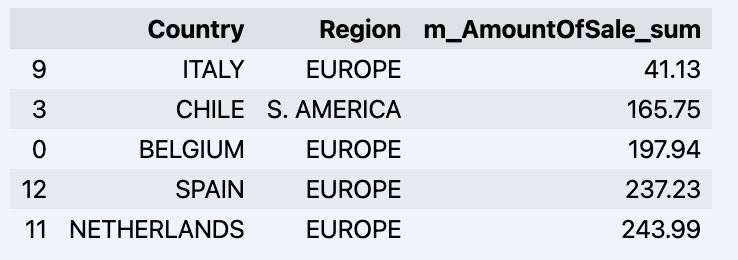
df = data_model.get_data(feature_list = ['Country','Region','m_AmountOfSale_sum'])
df = df.sort_values(by='m_AmountOfSale_sum')
df.head()

Which will show your datadrame: image

Let's prepare some dataset and quickly show it on the graph

import matplotlib.pyplot as plt

# We're taking sales for each date
dataframe = data_model.get_data(feature_list = ['Date','m_AmountOfSale_sum'])

# Create a line chart
plt.plot(dataframe['Date'], dataframe['m_AmountOfSale_sum'])

# Add labels and a title
plt.xlabel('Days')
plt.ylabel('Sales')
plt.title('Daily Sales Data')

# Display the chart
plt.show()

Output: image

Step 4: Prediction

The next step would be to actually get some value out of AI-Link bridge - let's do some simple prediction!

# Load the historical data to train the model
data_train = data_model.get_data(
    feature_list = ['Date','m_AmountOfSale_sum'],
    filter_less = {'Date':'2021-01-01'}
    )
data_test = data_model.get_data(
    feature_list = ['Date','m_AmountOfSale_sum'],
    filter_greater = {'Date':'2021-01-01'}
    )

We get 2 different datasets here: to train our model and to test it.

# For the tool we've chosen to do the prediction 'Prophet', we'll need to specify 2 columns: 'ds' and 'y'
data_train['ds'] = pd.to_datetime(data_train['Date'])
data_train.rename(columns={'m_AmountOfSale_sum': 'y'}, inplace=True)
data_test['ds'] = pd.to_datetime(data_test['Date'])
data_test.rename(columns={'m_AmountOfSale_sum': 'y'}, inplace=True)

# Initialize and fit the Prophet model
model = Prophet()
model.fit(data_train)

And then we create another dataframe to accomodate our prediction and display it on the graph

# Create a future dataframe for forecasting
future = pd.DataFrame()
future['ds'] = pd.date_range(start='2021-01-01', end='2021-12-31', freq='D')

# Make predictions
forecast = model.predict(future)
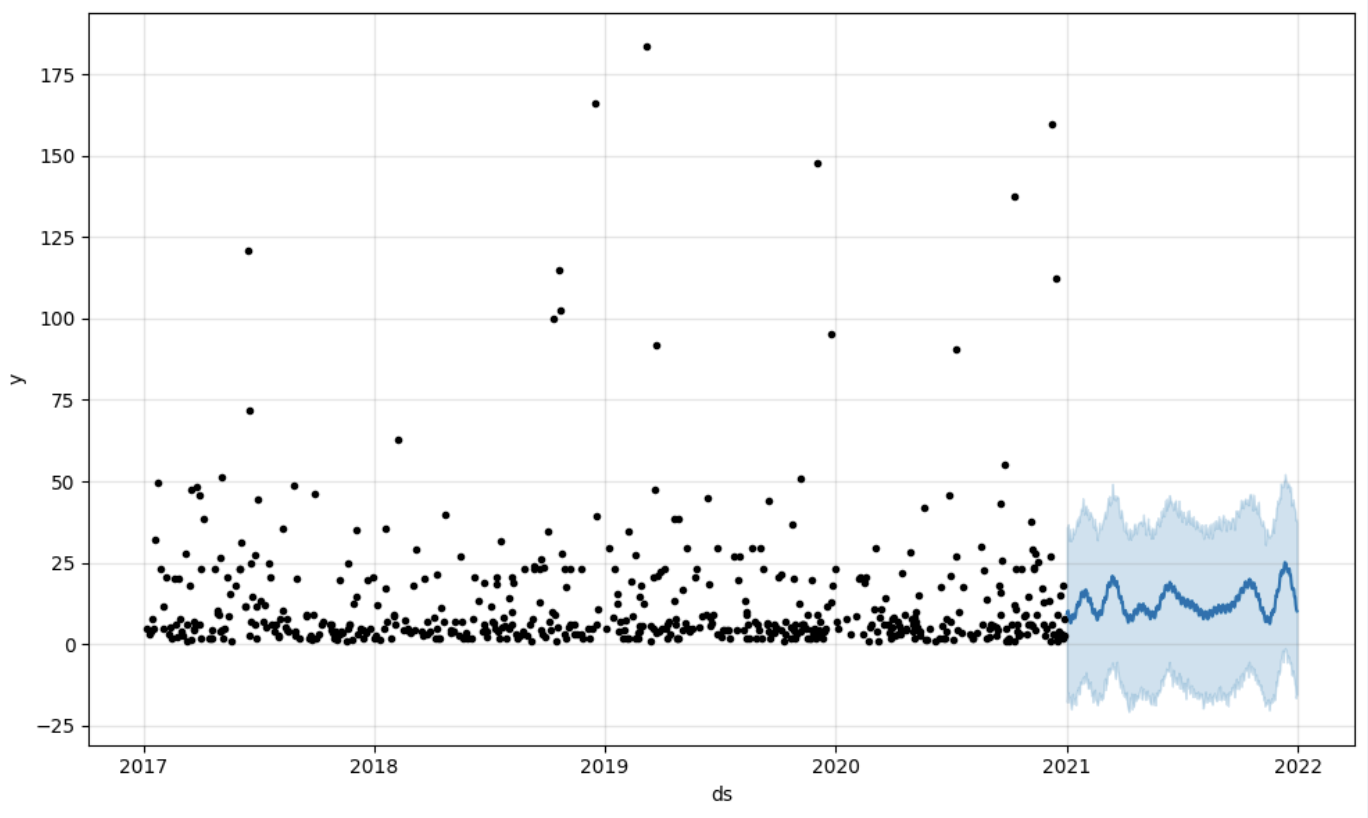
fig = model.plot(forecast)
fig.show()

Output: image

Step 5: Writeback

Once we've got our prediction in place we can then put it back to the data warehouse and add an aggregate to our semantic model to reflect it for other consumers. The prediction would be available through any other BI tool for BI analysts and business users. The prediction itself will be placed into our data warehouse and stored there.

from atscale.db.connections import Iris
db = Iris(
    username,
    host,
    namespace,
    driver,
    schema, 
    port=1972,
    password=None, 
    warehouse_id=None
    )

data_model.writeback(dbconn=db,
                    table_name= 'SalesPrediction',
                    DataFrame = forecast)

data_model.create_aggregate_feature(dataset_name='SalesPrediction',
                                    column_name='SalesForecasted',
                                    name='sum_sales_forecasted',
                                    aggregation_type='SUM')

Fin

That is it! Good luck with your predictions!

2
1 495
Question David.Satorres6134 · Sep 2, 2024

Hello,

I've recently updated the python version of a linux server running Red Hat Enterprise Linux 8.10 (Ootpa). We have an instance 2023.1 running there, and whenever I run the $System.Pyhthon.Shell() I can see it's still pointing to the old version. From within linux, it runs the latest one (we've change all the links to the new 3.11, so no scripts are broken).

So I guess the problem comes from the fact irispython is still compiled using old python version. So, how can I do to force IRIS to use the current version on the server, or update the irispython file?

Thanks!

3
0 270
Article Ashok Kumar T · Sep 2, 2024 4m read

In the preceding section, we explored the installation process and initiated the writing of the IRIS in native Python. We will now proceed to examine global traversal and engage with IRIS class objects.

 get: this function is used to get values from the traversal node.

deftraversal_firstlevel_subscript():"""
    ^mygbl(235)="test66,62" and ^mygbl(912)="test118,78"
    """for  i in irispy.node('^mygbl'):
        print(i, gbl_node.get(i,''))


node and items: single level traversal with node and get the values same as $Order(^mygbl(subscript), direction, data)

0
1 330
Article Yuri Marx · Sep 13, 2022 3m read

Samba is the standard for file services interoperability across Linux, Unix, DOS, Windows, OS/2 and other OS. Since 1992, Samba has provided secure, stable and fast file services for all clients (OS and programs) using the SMB/CIFS protocol. Network administrators have used SAMBA to create shared network folders to allow company employees to create, edit and view corporate files as if they were on their computers locally, when these files are physically located on a network file server. It is possible to create a network folder in Linux and see it as a shared folder in Windows, for example. 

4
3 1840
Article Mihoko Iijima · Feb 23, 2024 5m read

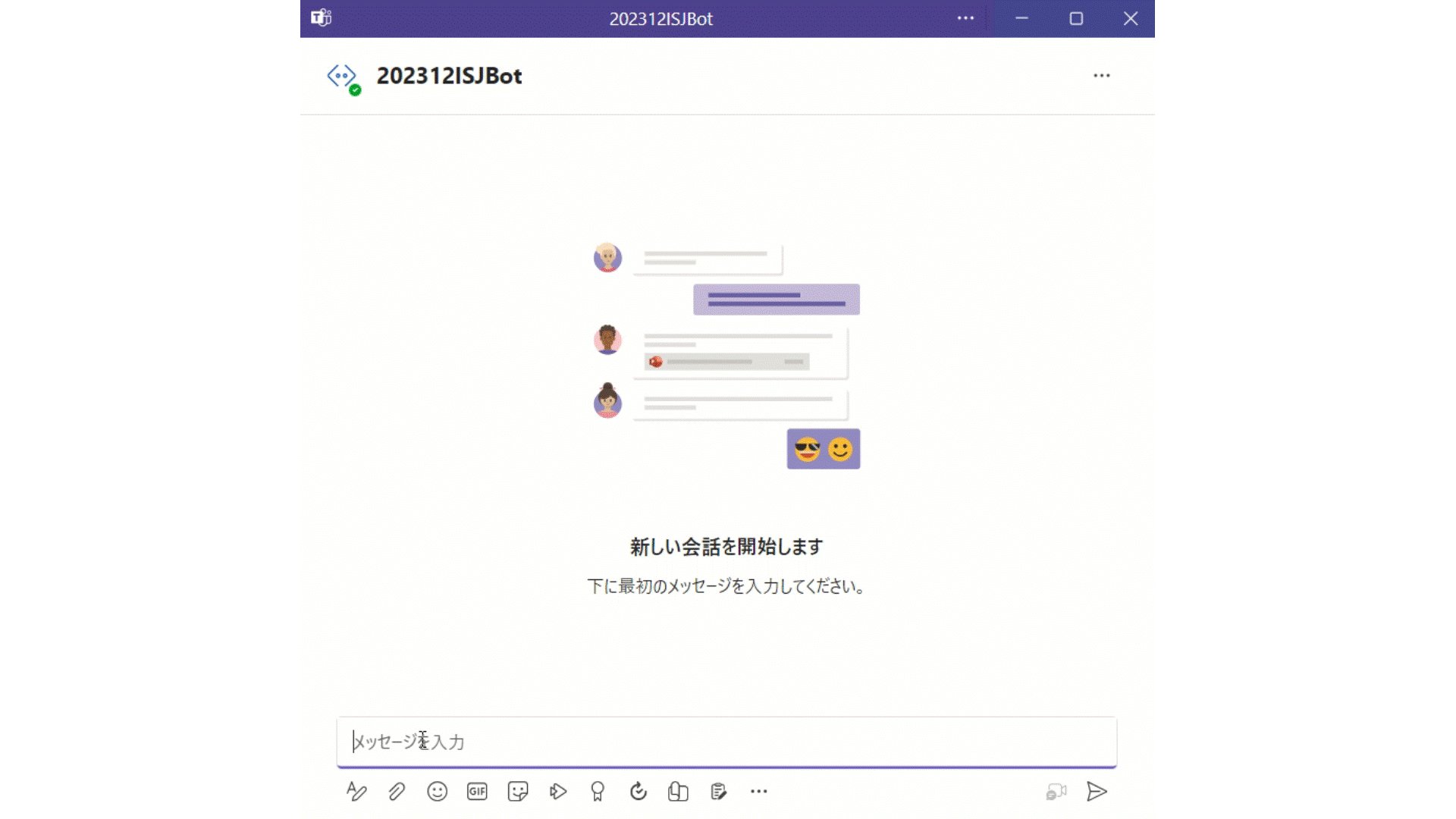
I have challenged to create a bot application using Azure Bot that can retrieve and post data to IRIS for Health.


A patient's data has already been registered in the FHIR repository of IRIS for Health.

The patient's MRN is 1001. His name is Taro Yamada. (in Japanese :山田 太郎)

This bot can post new pulse oximeter readings as an observation resource linked to the patient.

2
2 483
Question Hannah Sullivan · Aug 14, 2024

If anyone has experience debugging Embedded Python or has insight into why an ObjectScript method when called from a Python method would not work but would work when called directly via ObjectScript or in a Python shell, your help would be appreciated! 

We have an ObjectScript ClassMethod called GetTemplateString() which takes in a templateName of String type and uses the template name to get the template object, access the Code, and read the code into a templateString. The string version of the Code is returned.

2
0 154
Article Guillaume Rongier · Jul 26, 2024 5m read

It's been a long time since I didn't write an update post on IoP.

image

So what's new since IoP command line interface was released?

Two new big features were added to IoP:

  • Rebranding: the grongier.pex module was renamed to iop to reflect the new name of the project.
  • Async support: IoP now supports async functions and coroutines.

Rebranding

The grongier.pex module was renamed to iop to reflect the new name of the project.

The grongier.pex module is still available for backward compatibility, but it will be removed in the future.

Async support

IoP supports async calls for a long time, but it was not possible to use async functions and coroutines directly in IoP.

Before jumping into this new feature, I will explain how async calls work in InterSystems IRIS and present two examples of how to use async calls IoP.

Legacy async calls

Let's see how legacy async calls work:

from iop import BusinessProcess
from msg import MyMessage


class MyBP(BusinessProcess):

    def on_message(self, request):
        msg_one = MyMessage(message="Message1")
        msg_two = MyMessage(message="Message2")

        self.send_request_async("Python.MyBO", msg_one,completion_key="1")
        self.send_request_async("Python.MyBO", msg_two,completion_key="2")

    def on_response(self, request, response, call_request, call_response, completion_key):
        if completion_key == "1":
            self.response_one = call_response
        elif completion_key == "2":
            self.response_two = call_response

    def on_complete(self, request, response):
        self.log_info(f"Received response one: {self.response_one.message}")
        self.log_info(f"Received response two: {self.response_two.message}")

Basically they work the same way as async call works in IRIS. The send_request_async method sends a request to a Business Operation and the on_response method is called when the response is received.

You can distinguish the responses by the completion_key parameter.

Send multiple sync requests

It's not exactly a new feature, but it's worth mentioning that you can send multiple sync requests in parallel:

from iop import BusinessProcess
from msg import MyMessage


class MyMultiBP(BusinessProcess):

    def on_message(self, request):
        msg_one = MyMessage(message="Message1")
        msg_two = MyMessage(message="Message2")

        tuple_responses = self.send_multi_request_sync([("Python.MyMultiBO", msg_one),
                                                        ("Python.MyMultiBO", msg_two)])

        self.log_info("All requests have been processed")
        for target,request,response,status in tuple_responses:
            self.log_info(f"Received response: {response.message}")

Here we are sending two requests to the same Business Operation in parallel.

The response is a tuple with the target, request, response and status of each call.

It's really useful when you need to send multiple requests and you don't care about the order of the responses.

Async functions and coroutines

Now let's see how to use async functions and coroutines in IoP:

import asyncio

from iop import BusinessProcess
from msg import MyMessage


class MyAsyncNGBP(BusinessProcess):

    def on_message(self, request):

        results = asyncio.run(self.await_response(request))

        for result in results:
            print(f"Received response: {result.message}")

    async def await_response(self, request):
        msg_one = MyMessage(message="Message1")
        msg_two = MyMessage(message="Message2")

        # use asyncio.gather to send multiple requests asynchronously
        # using the send_request_async_ng method
        tasks = [self.send_request_async_ng("Python.MyAsyncNGBO", msg_one),
                 self.send_request_async_ng("Python.MyAsyncNGBO", msg_two)]

        return await asyncio.gather(*tasks)

In this example, we are sending multiple requests to the same Business Operation in parallel using the send_request_async_ng method.

If you read this post carefully until this point, please comment "Boomerang". This is may be a detail for you, but for me it's mean a lot. Thanks!

The await_response method is a coroutine that sends multiple requests and waits for all responses to be received. Thanks to the asyncio.gather function, we can wait for all responses to be received in parallel.

The benefits of using async functions and coroutines are:

  • Better performance: you can send multiple requests in parallel.
  • Easier to read and maintain: you can use the await keyword to wait for responses.
  • More flexibility: you can use the asyncio module to create complex workflows.
  • More control: you can use the asyncio module to handle exceptions and timeouts.

Conclusion

What are the defirences between send_request_async, send_multi_request_sync and send_request_async_ng?

  • send_request_async: sends a request to a Business Operation and waits for the response if the on_response method is implemented and the completion_key parameter is used.
    • benefit: you can use async calls the way you are used to.
    • drawback: you can be hard to maintain if you need to send multiple requests in parallel.
  • send_multi_request_sync: sends multiple requests to the same Business Operation in parallel and waits for all responses to be received.
    • benefit: it's easy to use.
    • drawback: you can control the order of the responses (i mean the list of responses is not ordered).
  • send_request_async_ng: sends multiple requests to the same Business Operation in parallel and waits for all responses to be received.
    • benefit: you can control the order of the responses.
    • drawback: you need to use async functions and coroutines.

Happy multithreading!

5
0 296
Article Eric Mariasis · Jul 23, 2024 1m read

I implemented a Python Flask application for the 2024 Python Contest with a page that provides common form fields for an outgoing email such as the To and CC fields. And it lets you input a message as well as uploading text based attachments.
Then using LlamaIndex in Python, the app analyzes the content you put in and returns to you in a result box if there is anything that should stop you from sending that email.
Take a look at the Github repo here.

3
0 138
Article Zeljko Sucic · Jul 26, 2024 7m read

As a part of the IRIS Python 2024 contest, my colleague Damir and I went with an idea to build a platform called ShelterShare for connecting victims and volunteers for shelter requests . To do so we chose django as a framework and proceeded to build the first version with 3 different docker containers, django, iris and nginx which would then utilize IRIS as a pure Database engine via the beautifly composed django_iris (cudos to Dimitry). As we were progressing fast, we decided to explore the option of running it within the same container as IRIS by utilizing WSGI added in 2024.1. We knew ahead

5
1 277
Question Ashok Kumar T · Aug 4, 2024

Hello Community,

How to convert the IRIS %DynamicArray into python list. I got "<THROW>TestDyncArray+1^MyLearn.Pyth.NewClass1.1 *%Exception.PythonException <PYTHON EXCEPTION> 246 <class 'AttributeError'>: <unknown exception data>" error when passing array values to python class.

ClassMethod TestDyncArray()
{
	Do..DyncArrayInPy([1,2,3,4])
}

ClassMethod DyncArrayInPy(numbers) [ Language = python ]
{
	import iris
	print(type(numbers)) ;<class 'iris.%Library.DynamicArray'> need to be a <class 'list'>for num in numbers:
		print(num)
}

Thanks!

3
0 218
Article Henry Pereira · Aug 1, 2024 4m read

Frontend development can be a daunting, even nightmarish, task for backend-focused developers. Early in my career, the lines between frontend and backend were blurred, and everyone was expected to handle both. CSS, in particular, was a constant struggle; it felt like an impossible mission.

Although I enjoy frontend work, CSS remains a complex challenge for me, especially since I learned it through trial and error. The meme of Peter Griffin struggling to open blinds perfectly captures my experience of learning CSS. Peter Griffin CSS

But today, everything changes. Tools like Streamlit have revolutionized the game for developers like me, who prefer the comfort of a terminal's black screen. Gone are the days of wrestling with lines of code that look like cryptic messages from aliens (looking at you, CSS!). As Doctor Károly Zsolnai-Fehér from Two Minute Papers always says, "What a time to be alive!" With Streamlit, you can build an entire web application using just Python code. Want to see it in action? Buckle up, because I'm about to share my attempt at creating the frontend for SQLZilla using this awesome tool.

To install it, simply open your terminal and cast this spell:

pip install streamlit

(Or you can add it to your requirements.txt file.)

Create a file, app.py and add this code snippet to display an "SQLZilla" title:

import streamlit as st

st.title("SQLZilla")

Run the Show!

Open your terminal again and type this command to activate your creation:

streamlit run app.py

Voila! Your Streamlit app should appear in your web browser, proudly displaying the title "SQLZilla."

Add an image using image method, to centralize it I just create 3 columns and add on center (shame on me)

   st.title("SQLZilla")

   left_co, cent_co, last_co = st.columns(3)
   with cent_co:
       st.image("small_logo.png", use_column_width=True)

To manage configurations and query results, you can use session state. Here's how you can save configuration values and store query results:

if 'hostname' not in st.session_state:
    st.session_state.hostname = 'sqlzilla-iris-1'
if 'user' not in st.session_state:
    st.session_state.user = '_system'
if 'pwd' not in st.session_state:
    st.session_state.pwd = 'SYS'
# Add other session states as needed

To connect SQLZilla to an InterSystems IRIS database, you can use SQLAlchemy. First, install SQLAlchemy with:

pip install sqlalchemy

Then, set up the connection in your app.py file:

from sqlalchemy import create_engine
import pandas as pd

# Replace with your own connection details
engine = create_engine(f"iris://{user}:{password}@{host}:{port}/{namespace}")

def run_query(query):
    with engine.connect() as connection:
        result = pd.read_sql(query, connection)
        return result

Once you've connected to the database, you can use Pandas and Streamlit to display the results of your queries. Here's an example of how to display a DataFrame in your Streamlit app:

if 'query' in st.session_state:
    query = st.session_state.query
    df = run_query(query)
    st.dataframe(df)

To make your app more interactive, you can use st.rerun() to refresh the app whenever the query changes:

if 'query' in st.session_state and st.button('Run Query'):
    df = run_query(st.session_state.query)
    st.dataframe(df)
    st.rerun()

You can find various Streamlit components to use. In SQLZilla, I added an ACE code editor version called streamlit-code-editor:

from code_editor import code_editor

editor_dict = code_editor(st.session_state.code_text, lang="sql", height=[10, 100], shortcuts="vscode")

if len(editor_dict['text']) != 0:
    st.session_state.code_text = editor_dict['text']

Since the SQLZilla assistant is written in Python, I just called the class:

from sqlzilla import SQLZilla

def assistant_interaction(sqlzilla, prompt):
    response = sqlzilla.prompt(prompt)
    st.session_state.chat_history.append({"role": "user", "content": prompt})
    st.session_state.chat_history.append({"role": "assistant", "content": response})

    if "SELECT" in response.upper():
        st.session_state.query = response

    return response

Congratulations! You’ve built your own SQLZilla. Continue exploring Streamlit and enhance your app with more features. And if you like SQLZilla, vote for this incredible assistant that converts text into queries!

3
2 577
Article Alex Alcivar · Jul 27, 2024 7m read

I received some really excellent feedback from a community member on my submission to the Python 2024 contest. I hope its okay if I repost it here:

you build a container more than 5 times the size of pure IRIS

and this takes time

container start is also slow but completes

backend is accessible as described

a production is hanging around

frontend reacts

I fail to understand what is intended to show

the explanation is meant for experts other than me

The submission is here: https://openexchange.intersystems.com/package/IRIS-RAG-App

2
3 465
Article Maxim Gorshkov · Feb 14, 2024 4m read

The invention and popularization of Large Language Models (such as OpenAI's GPT-4) has launched a wave of innovative solutions that can leverage large volumes of unstructured data that was impractical or even impossible to process manually until recently. Such applications may include data retrieval (see Don Woodlock's ML301 course for a great intro to Retrieval Augmented Generation), sentiment analysis, and even fully-autonomous AI agents, just to name a few!

4
5 802
Article Muhammad Waseem · Sep 21, 2023 7m read

image

Hi Community,
In this article, I will demonstrate below steps to create your own chatbot by using spaCy (spaCy is an open-source software library for advanced natural language processing, written in the programming languages Python and Cython):

  • Step1: Install required libraries

  • Step2: Create patterns and responses file

  • Step3: Train the Model

  • Step4: Create ChatBot Application based on the trained model

So Let us start.

1
1 3648
Question ala zaalouni · Jul 10, 2024

When registering the components: I used this command:"Utils.migrate("/external/src/CoreModel/Python/settings.py)" ;The error appears: "An error has occurred: iris.cls: error finding class",I changed with these two lines:result = subprocess.run(["iop", "-m", "/external/src/CoreModel/Python/settings.py"], stdout=subprocess.PIPE, stderr=subprocess.PIPE, check=True)subprocess.run(["iop", "-m", "/external/src/CoreModel/Python/settings.py"], stdout=subprocess.DEVNULL, stderr=subprocess.DEVNULL, check=True) also there is an error:"An error occurred: Command '['iop', '-m',

2
0 149
Announcement Evgeny Shvarov · Jul 15, 2024

Hi Developers!

Here are the technology bonuses for the InterSystems Python Contest 2024 that will give you extra points in the voting:

  • IRIS Vector Search usage - 3
  • Python Pex Interoperability - 3
  • Python in BPL - 2
  • WSGI Web Apps - 2
  • Python libs: sqlalchemy and dbt - 2
  • LLM AI or LangChain usage: Chat GPT, Bard and others - 3
  • NoObjectScriptLine - 3
  • Hugginface - 2
  • Docker container usage - 2 
  • ZPM Package deployment - 2
  • Online Demo - 2
  • Implement InterSystems Community Idea - 4
  • Find a bug in Embedded Python - 2
  • First Article on Developer Community - 2
  • Second Article On DC - 1
  • First Time Contribution - 3
  • Video on YouTube - 3
  • YouTube Short - 1

See the details below.<--break-><--break->

0
0 248
Article Guillaume Rongier · Feb 5, 2024 20m read

I have been using embedded python for more than 2 years now on a daily basis. May be it's time to share some feedback about this journey.

Why write this feedback? Because, I guess, I'm like most of the people here, an ObjectScript developer, and I think that the community would benefit from this feedback and could better understand the pros & cons of chosing embedded python for developing stuff in IRIS. And also avoid some pitfalls.

image

Introduction

I'm a developer since 2010, and I have been working with ObjectScript since 2013.

So roughly 10 years of experience with ObjectScript.

Since 2021 and the release of Embedded Python in IRIS, I put my self a challenge :

  • Learn Python
  • Do as much as possible everything in Python

When I started this journey, I had no idea of what Python was. So I started with the basics, and I'm still learning every day.

Starting with Python

The good thing with Python is that it's easy to learn. It's even easier when you already know ObjectScript.

Why ? They have a lot in common.

ObjectScriptPython
UntypedUntyped
Scripting languageScripting language
Object OrientedObject Oriented
InterpretedInterpreted
Easy C integrationEasy C integration

So, if you know ObjectScript, you already know a lot about Python.

But, there are some differences, and some of them are not easy to understand.

Python is not ObjectScript

To keep it simple, I will focus on the main differences between ObjectScript and Python.

For me there are mainly 3 differences :

  • Pep8
  • Modules
  • Dunders

Pep8

What the hell is Pep8 ?

It's a set of rules to write Python code.

pep8.org

Few of them are :

  • naming convention
  • variable names
    • snake_case
  • class names
    • CamelCase
  • indentation
  • line length
  • etc.

Why is it important ?

Because it's the way to write Python code. And if you don't follow these rules, you will have a hard time to read other people's code, and they will have a hard time to read your code.

As ObjectScript developers, we also have some rules to follow, but they are not as strict as Pep8.

I learned Pep8 the hard way.

For the story, I'm a sales engineer at InterSystems, and I'm doing a lot of demos. And one day, I was doing a demo of Embedded Python to a customer, this customer was a Python developer, and the conversation turned short when he saw my code. He told me that my code was not Pythonic at all (he was right) I was coding in python like I was coding in ObjectScript. And because of that, he told me that he was not interested in Embedded Python anymore. I was shocked, and I decided to learn Python the right way.

So, if you want to learn Python, learn Pep8 first.

Modules

Modules are something that we don't have in ObjectScript.

Usually, in object oriented languages, you have classes, and packages. In Python, you have classes, packages, and modules.

What is a module ?

It's a file with a .py extension. And it's the way to organize your code.

You didn't understand ? Me neither at the beginning. So let's take an example.

Usually, when you want to create a class in ObjectScript, you create a .cls file, and you put your class in it. And if you want to create another class, you create another .cls file. And if you want to create a package, you create a folder, and you put your .cls files in it.

In Python, it's the same, but Python bring the ability to have multiple classes in a single file. And this file is called a module. FYI, It's Pythonic to have multiple classes in a single file.

So plan head how you will organize your code, and how you will name your modules to not end up like me with a lot of modules with the same name as your classes.

A bad example :

MyClass.py

class MyClass:
    def __init__(self):
        pass

    def my_method(self):
        pass

To instantiate this class, you will do :

import MyClass.MyClass # weird right ?

my_class = MyClass()

Weird right ?

Dunders

Dunders are special methods in Python. They are called dunder because they start and end with double underscores.

They are kind of our % methods in ObjectScript.

They are used for :

  • constructor
  • operator overloading
  • object representation
  • etc.

Example :

class MyClass:
    def __init__(self):
        pass

    def __repr__(self):
        return "MyClass"

    def __add__(self, other):
        return self + other

Here we have 3 dunder methods :

  • __init__ : constructor
  • __repr__ : object representation
  • __add__ : operator overloading

Dunders methods are everywhere in Python. It's a major part of the language, but don't worry, you will learn them quickly.

Conclusion

Python is not ObjectScript, and you will have to learn it. But it's not that hard, and you will learn it quickly. Just keep in mind that you will have to learn Pep8, and how to organize your code with modules and dunder methods.

Good sites to learn Python :


Embedded Python

Now that you know a little bit more about Python, let's talk about Embedded Python.

What is Embedded Python ?

Embedded Python is a way to execute Python code in IRIS. It's a new feature of IRIS 2021.2+. This means that your python code will be executed in the same process as IRIS. For the more, every ObjectScript class is a Python class, same for methods and attributes and vice versa. 🥳 This is neat !

How to use Embedded Python ?

There are 3 main ways to use Embedded Python :

  • Using the language tag in ObjectScript
    • Method Foo() As %String [ Language = python ]
  • Using the ##class(%SYS.Python).Import() function
  • Using the python interpreter
    • python3 -c "import iris; print(iris.system.Version.GetVersion())"

But if you want to be serious about Embedded Python, you will have to avoid using the language tag.

image

Why ?

  • Because it's not Pythonic
  • Because it's not ObjectScript either
  • Because you don't have a debugger
  • Because you don't have a linter
  • Because you don't have a formatter
  • Because you don't have a test framework
  • Because you don't have a package manager
  • Because you are mixing 2 languages in the same file
  • Because when you process crashes, you don't have a stack trace
  • Because you can't use virtual environments or conda environments
  • ...

Don't get me wrong, it works, it can be useful, if you want to test something quickly, but IMO it's not a good practice.

So, what did I learn from this 2 years of Embedded Python, and how to use it the right way ?

How I use Embedded Python

For me, you have two options :

  • Use Python libraries as they were ObjectScript classes
    • with ##class(%SYS.Python).Import() function
  • Use a python first approach

Use Python libraries and code as they were ObjectScript classes

You still want to use Python in your ObjectScript code, but you don't want to use the language tag. So what can you do ?

"Simply" use Python libraries and code as they were ObjectScript classes.

Let's take an example :

You want to use the requests library ( it's a library to make HTTP requests ) in your ObjectScript code.

With the language tag

ClassMethod Get() As %Status [ Language = python ]
{
	import requests

	url = "https://httpbin.org/get"
	# make a get request
	response = requests.get(url)
	# get the json data from the response
	data = response.json()
	# iterate over the data and print key-value pairs
	for key, value in data.items():
		print(key, ":", value)
}

Why I think it's not a good idea ?

Because you are mixing 2 languages in the same file, and you don't have a debugger, a linter, a formatter, etc. If this code crashes, you will have a hard time to debug it. You don't have a stack trace, and you don't know where the error comes from. And you don't have auto-completion.

Without the language tag

ClassMethod Get() As %Status
{
	set status = $$$OK
    set url = "https://httpbin.org/get"
    // Import Python module "requests" as an ObjectScript class
    set request = ##class(%SYS.Python).Import("requests")
    // Call the get method of the request class
    set response = request.get(url)
    // Call the json method of the response class
	set data = response.json()
    // Here data is a Python dictionary
    // To iterate over a Python dictionary, you have to use the dunder method and items()
	// Import built-in Python module
	set builtins = ##class(%SYS.Python).Import("builtins")
    // Here we are using len from the builtins module to get the length of the dictionary
    For i = 0:1:builtins.len(data)-1 {
        // Now we convert the items of the dictionary to a list, and we get the key and the value using the dunder method __getitem__
		Write builtins.list(data.items())."__getitem__"(i)."__getitem__"(0),": ",builtins.list(data.items())."__getitem__"(i)."__getitem__"(1),!
	}
	quit status
}

Why I think it's a good idea ?

Because you are using Python as it was ObjectScript. You are importing the requests library as an ObjectScript class, and you are using it as an ObjectScript class. All the logic is in ObjectScript, and you are using Python as a library. Even for maintenance, it's easier to read and understand, any ObjectScript developer can understand this code. The drawback is that you have to know how to use duners methods, and how to use Python as it was ObjectScript.

Conclusion

Belive me, this way you will end up with a more robust code, and you will be able to debug it easily. At first, it's seems hard, but you will find the benefits of learning Python faster than you think.

Use a python first approach

This is the way I prefer to use Embedded Python.

I have built a lot of tools using this approach, and I'm very happy with it.

Few examples :

So, what is a python first approach ?

There is only one rule : Python code must be in .py files, ObjectScript code must be in .cls files

How to achieve this ?

The whole idea is to create ObjectScript wrappers classes to call Python code.


Let's take the example of iris-fhir-python-strategy :

Example : iris-fhir-python-strategy

First of all, we have to understand how IRIS FHIR Server works.

Every IRIS FHIR Server implements a Strategy.

A Strategy is a set of two classes :

SuperclassSubclass Parameters
HS.FHIRServer.API.InteractionsStrategyStrategyKey — Specifies a unique identifier for the InteractionsStrategy.
InteractionsClass — Specifies the name of your Interactions subclass.
HS.FHIRServer.API.RepoManagerStrategyClass — Specifies the name of your InteractionsStrategy subclass.
StrategyKey — Specifies a unique identifier for the InteractionsStrategy. Must match the StrategyKey parameter in the InteractionsStrategy subclass.

Both classes are Abstract classes.

  • HS.FHIRServer.API.InteractionsStrategy is an Abstract class that must be implemented to customize the behavior of the FHIR Server.
  • HS.FHIRServer.API.RepoManager is an Abstract class that must be implemented to customize the storage of the FHIR Server.

Remarks

For our example, we will only focus on the HS.FHIRServer.API.InteractionsStrategy class even if the HS.FHIRServer.API.RepoManager class is also implemented and mandatory to customize the FHIR Server. The HS.FHIRServer.API.RepoManager class is implemented by HS.FHIRServer.Storage.Json.RepoManager class, which is the default implementation of the FHIR Server.

Where to find the code

All source code can be found in this repository : iris-fhir-python-strategy The src folder contains the following folders :

  • python : contains the python code
  • cls : contains the ObjectScript code that is used to call the python code

How to implement a Strategy

In this proof of concept, we will only be interested in how to implement a Strategy in Python, not how to implement a RepoManager.

To implement a Strategy you need to create at least two classes :

  • A class that inherits from HS.FHIRServer.API.InteractionsStrategy class
  • A class that inherits from HS.FHIRServer.API.Interactions class

Implementation of InteractionsStrategy

HS.FHIRServer.API.InteractionsStrategy class aim to customize the behavior of the FHIR Server by overriding the following methods :

  • GetMetadataResource : called to get the metadata of the FHIR Server
    • this is the only method we will override in this proof of concept

HS.FHIRServer.API.InteractionsStrategy has also two parameters :

  • StrategyKey : a unique identifier for the InteractionsStrategy
  • InteractionsClass : the name of your Interactions subclass

Implementation of Interactions

HS.FHIRServer.API.Interactions class aim to customize the behavior of the FHIR Server by overriding the following methods :

  • OnBeforeRequest : called before the request is sent to the server
  • OnAfterRequest : called after the request is sent to the server
  • PostProcessRead : called after the read operation is done
  • PostProcessSearch : called after the search operation is done
  • Read : called to read a resource
  • Add : called to add a resource
  • Update : called to update a resource
  • Delete : called to delete a resource
  • and many more...

We implement HS.FHIRServer.API.Interactions class in the src/cls/FHIR/Python/Interactions.cls class.

 
Spoiler
Class FHIR.Python.Interactions Extends (HS.FHIRServer.Storage.Json.Interactions, FHIR.Python.Helper)
{

Parameter OAuth2TokenHandlerClass As%String = "FHIR.Python.OAuth2Token";

Method %OnNew(pStrategy As HS.FHIRServer.Storage.Json.InteractionsStrategy) As%Status { // %OnNew is called when the object is created.// The pStrategy parameter is the strategy object that created this object.// The default implementation does nothing// Frist set the python path from an env varset..PythonPath = $system.Util.GetEnviron("INTERACTION_PATH") // Then set the python class name from the env varset..PythonClassname = $system.Util.GetEnviron("INTERACTION_CLASS") // Then set the python module name from the env varset..PythonModule = $system.Util.GetEnviron("INTERACTION_MODULE")

<span class="hljs-keyword">if</span> (<span class="hljs-built_in">..PythonPath</span> = <span class="hljs-string">""</span>) || (<span class="hljs-built_in">..PythonClassname</span> = <span class="hljs-string">""</span>) || (<span class="hljs-built_in">..PythonModule</span> = <span class="hljs-string">""</span>) {
	<span class="hljs-comment">//quit ##super(pStrategy)</span>
	<span class="hljs-keyword">set</span> <span class="hljs-built_in">..PythonPath</span> = <span class="hljs-string">"/irisdev/app/src/python/"</span>
	<span class="hljs-keyword">set</span> <span class="hljs-built_in">..PythonClassname</span> = <span class="hljs-string">"CustomInteraction"</span>
	<span class="hljs-keyword">set</span> <span class="hljs-built_in">..PythonModule</span> = <span class="hljs-string">"custom"</span>
}


<span class="hljs-comment">// Then set the python class</span>
<span class="hljs-keyword">do</span> <span class="hljs-built_in">..SetPythonPath</span>(<span class="hljs-built_in">..PythonPath</span>)
<span class="hljs-keyword">set</span> <span class="hljs-built_in">..PythonClass</span> = <span class="hljs-keyword">##class</span>(FHIR.Python.Interactions).GetPythonInstance(<span class="hljs-built_in">..PythonModule</span>, <span class="hljs-built_in">..PythonClassname</span>)

<span class="hljs-keyword">quit</span> <span class="hljs-keyword">##super</span>(pStrategy)

}

Method OnBeforeRequest( pFHIRService As HS.FHIRServer.API.Service, pFHIRRequest As HS.FHIRServer.API.Data.Request, pTimeout As%Integer) { // OnBeforeRequest is called before each request is processed.if$ISOBJECT(..PythonClass) { set body = ##class(%SYS.Python).None() if pFHIRRequest.Json '= "" { set jsonLib = ##class(%SYS.Python).Import("json") set body = jsonLib.loads(pFHIRRequest.Json.%ToJSON()) } do..PythonClass."on_before_request"(pFHIRService, pFHIRRequest, body, pTimeout) } }

Method OnAfterRequest( pFHIRService As HS.FHIRServer.API.Service, pFHIRRequest As HS.FHIRServer.API.Data.Request, pFHIRResponse As HS.FHIRServer.API.Data.Response) { // OnAfterRequest is called after each request is processed.if$ISOBJECT(..PythonClass) { set body = ##class(%SYS.Python).None() if pFHIRResponse.Json '= "" { set jsonLib = ##class(%SYS.Python).Import("json") set body = jsonLib.loads(pFHIRResponse.Json.%ToJSON()) } do..PythonClass."on_after_request"(pFHIRService, pFHIRRequest, pFHIRResponse, body) } }

Method PostProcessRead(pResourceObject As%DynamicObject) As%Boolean { // PostProcessRead is called after a resource is read from the database.// Return 1 to indicate that the resource should be included in the response.// Return 0 to indicate that the resource should be excluded from the response.if$ISOBJECT(..PythonClass) { if pResourceObject '= "" { set jsonLib = ##class(%SYS.Python).Import("json") set body = jsonLib.loads(pResourceObject.%ToJSON()) } return..PythonClass."post_process_read"(body) } quit1 }

Method PostProcessSearch( pRS As HS.FHIRServer.Util.SearchResult, pResourceType As%String) As%Status { // PostProcessSearch is called after a search is performed.// Return $$$OK to indicate that the search was successful.// Return an error code to indicate that the search failed.if$ISOBJECT(..PythonClass) { return..PythonClass."post_process_search"(pRS, pResourceType) } quit$$$OK }

Method Read( pResourceType As%String, pResourceId As%String, pVersionId As%String = "") As%DynamicObject { return##super(pResourceType, pResourceId, pVersionId) }

Method Add( pResourceObj As%DynamicObject, pResourceIdToAssign As%String = "", pHttpMethod = "POST") As%String { return##super(pResourceObj, pResourceIdToAssign, pHttpMethod) }

/// Returns VersionId for the "deleted" version Method Delete( pResourceType As%String, pResourceId As%String) As%String { return##super(pResourceType, pResourceId) }

Method Update(pResourceObj As%DynamicObject) As%String { return##super(pResourceObj) }

}

The FHIR.Python.Interactions class inherits from HS.FHIRServer.Storage.Json.Interactions class and FHIR.Python.Helper class.

The HS.FHIRServer.Storage.Json.Interactions class is the default implementation of the FHIR Server.

The FHIR.Python.Helper class aim to help to call Python code from ObjectScript.

The FHIR.Python.Interactions class overrides the following methods :

  • %OnNew : called when the object is created
    • we use this method to set the python path, python class name and python module name from environment variables
    • if the environment variables are not set, we use default values
    • we also set the python class
    • we call the %OnNew method of the parent class
Method %OnNew(pStrategy As HS.FHIRServer.Storage.Json.InteractionsStrategy) As %Status
{
	// First set the python path from an env var
	set ..PythonPath = $system.Util.GetEnviron("INTERACTION_PATH")
	// Then set the python class name from the env var
	set ..PythonClassname = $system.Util.GetEnviron("INTERACTION_CLASS")
	// Then set the python module name from the env var
	set ..PythonModule = $system.Util.GetEnviron("INTERACTION_MODULE")

	if (..PythonPath = "") || (..PythonClassname = "") || (..PythonModule = "") {
		// use default values
		set ..PythonPath = "/irisdev/app/src/python/"
		set ..PythonClassname = "CustomInteraction"
		set ..PythonModule = "custom"
	}

	// Then set the python class
	do ..SetPythonPath(..PythonPath)
	set ..PythonClass = ..GetPythonInstance(..PythonModule, ..PythonClassname)

	quit ##super(pStrategy)
}
  • OnBeforeRequest : called before the request is sent to the server
    • we call the on_before_request method of the python class
    • we pass the HS.FHIRServer.API.Service object, the HS.FHIRServer.API.Data.Request object, the body of the request and the timeout
Method OnBeforeRequest(
	pFHIRService As HS.FHIRServer.API.Service,
	pFHIRRequest As HS.FHIRServer.API.Data.Request,
	pTimeout As %Integer)
{
	// OnBeforeRequest is called before each request is processed.
	if $ISOBJECT(..PythonClass) {
		set body = ##class(%SYS.Python).None()
		if pFHIRRequest.Json '= "" {
			set jsonLib = ##class(%SYS.Python).Import("json")
			set body = jsonLib.loads(pFHIRRequest.Json.%ToJSON())
		}
		do ..PythonClass."on_before_request"(pFHIRService, pFHIRRequest, body, pTimeout)
	}
}
  • OnAfterRequest : called after the request is sent to the server
    • we call the on_after_request method of the python class
    • we pass the HS.FHIRServer.API.Service object, the HS.FHIRServer.API.Data.Request object, the HS.FHIRServer.API.Data.Response object and the body of the response
Method OnAfterRequest(
	pFHIRService As HS.FHIRServer.API.Service,
	pFHIRRequest As HS.FHIRServer.API.Data.Request,
	pFHIRResponse As HS.FHIRServer.API.Data.Response)
{
	// OnAfterRequest is called after each request is processed.
	if $ISOBJECT(..PythonClass) {
		set body = ##class(%SYS.Python).None()
		if pFHIRResponse.Json '= "" {
			set jsonLib = ##class(%SYS.Python).Import("json")
			set body = jsonLib.loads(pFHIRResponse.Json.%ToJSON())
		}
		do ..PythonClass."on_after_request"(pFHIRService, pFHIRRequest, pFHIRResponse, body)
	}
}
  • And so on...

Interactions in Python

FHIR.Python.Interactions class calls the on_before_request, on_after_request, ... methods of the python class.

Here is the abstract python class :

import abc
import iris

class Interaction(object):
    __metaclass__ = abc.ABCMeta

    @abc.abstractmethod
    def on_before_request(self, 
                          fhir_service:'iris.HS.FHIRServer.API.Service',
                          fhir_request:'iris.HS.FHIRServer.API.Data.Request',
                          body:dict,
                          timeout:int):
        """
        on_before_request is called before the request is sent to the server.
        param fhir_service: the fhir service object iris.HS.FHIRServer.API.Service
        param fhir_request: the fhir request object iris.FHIRServer.API.Data.Request
        param timeout: the timeout in seconds
        return: None
        """
        

    @abc.abstractmethod
    def on_after_request(self,
                         fhir_service:'iris.HS.FHIRServer.API.Service',
                         fhir_request:'iris.HS.FHIRServer.API.Data.Request',
                         fhir_response:'iris.HS.FHIRServer.API.Data.Response',
                         body:dict):
        """
        on_after_request is called after the request is sent to the server.
        param fhir_service: the fhir service object iris.HS.FHIRServer.API.Service
        param fhir_request: the fhir request object iris.FHIRServer.API.Data.Request
        param fhir_response: the fhir response object iris.FHIRServer.API.Data.Response
        return: None
        """
        

    @abc.abstractmethod
    def post_process_read(self,
                          fhir_object:dict) -> bool:
        """
        post_process_read is called after the read operation is done.
        param fhir_object: the fhir object
        return: True the resource should be returned to the client, False otherwise
        """
        

    @abc.abstractmethod
    def post_process_search(self,
                            rs:'iris.HS.FHIRServer.Util.SearchResult',
                            resource_type:str):
        """
        post_process_search is called after the search operation is done.
        param rs: the search result iris.HS.FHIRServer.Util.SearchResult
        param resource_type: the resource type
        return: None
        """

Implementation of the abstract python class

from FhirInteraction import Interaction

class CustomInteraction(Interaction):

    def on_before_request(self, fhir_service, fhir_request, body, timeout):
        #Extract the user and roles for this request
        #so consent can be evaluated.
        self.requesting_user = fhir_request.Username
        self.requesting_roles = fhir_request.Roles

    def on_after_request(self, fhir_service, fhir_request, fhir_response, body):
        #Clear the user and roles between requests.
        self.requesting_user = ""
        self.requesting_roles = ""

    def post_process_read(self, fhir_object):
        #Evaluate consent based on the resource and user/roles.
        #Returning 0 indicates this resource shouldn't be displayed - a 404 Not Found
        #will be returned to the user.
        return self.consent(fhir_object['resourceType'],
                        self.requesting_user,
                        self.requesting_roles)

    def post_process_search(self, rs, resource_type):
        #Iterate through each resource in the search set and evaluate
        #consent based on the resource and user/roles.
        #Each row marked as deleted and saved will be excluded from the Bundle.
        rs._SetIterator(0)
        while rs._Next():
            if not self.consent(rs.ResourceType,
                            self.requesting_user,
                            self.requesting_roles):
                #Mark the row as deleted and save it.
                rs.MarkAsDeleted()
                rs._SaveRow()

    def consent(self, resource_type, user, roles):
        #Example consent logic - only allow users with the role '%All' to see
        #Observation resources.
        if resource_type == 'Observation':
            if '%All' in roles:
                return True
            else:
                return False
        else:
            return True

Too long, do a summary

The FHIR.Python.Interactions class is a wrapper to call the python class.

IRIS abstracts classes are implemented to wrap python abstract classes 🥳.

That help us to keep python code and ObjectScript code separated and for so benefit from the best of both worlds.

10
22 1771
Article Guillaume Rongier · Jul 8, 2024 8m read

django_logo

Description

This is a template for an Django application that can be deployed in IRIS as an native Web Application.

Installation

  1. Clone the repository
  2. Create a virtual environment
  3. Install the requirements
  4. Run the docker-compose file
git clone
cd iris-django-template
python3 -m venv .venv
source .venv/bin/activate
pip install -r requirements.txt
docker-compose up

Usage

The base URL is http://localhost:53795/django/.

Endpoints

  • /iris - Returns a JSON object with the top 10 classes present in the IRISAPP namespace.
  • /interop - A ping endpoint to test the interoperability framework of IRIS.
  • /api/posts - A simple CRUD endpoint for a Post object.
  • /api/comments - A simple CRUD endpoint for a Comment object.

How to develop from this template

See WSGI introduction article: wsgi-introduction.

TL;DR : You can toggle the DEBUG flag in the Security portal to make changes to be reflected in the application as you develop.

Code presentation

The Django application is structured as follows:

  • app - Django project folder
    • app - Django app folder for configuration
      • settings.py - Django settings file
      • urls.py - Django URL configuration file to connect the views to the URLs
      • wsgi.py - Django WSGI file
      • asgi.py - Django ASGI file
    • community - Django app folder for the community app, crud on Post and Comment objects
      • models.py - Django models file for the Post and Comment objects
      • views.py - Django views file to access the Post and Comment objects
      • serializers.py - Django serializers file for the Post and Comment objects
      • admin.py - Django admin file add crud to the admin interface
      • migrations - Django migrations folder to build the database
      • fixtures - Django fixtures folder demo data
    • sqloniris - Django app folder for the SQL on IRIS app
      • views.py - Django views file to query the IRISAPP namespace
      • apps.py - Django app configuration file
    • interop - Django app folder for the interoperability app
      • views.py - Django views file to test the interoperability framework
      • apps.py - Django app configuration file
    • manage.py - Django management file

app/settings.py

This file contains the Django settings for the application.

...

# Application definition

INSTALLED_APPS = [
    'django.contrib.admin',
    'django.contrib.auth',
    'django.contrib.contenttypes',
    'django.contrib.sessions',
    'django.contrib.messages',
    'django.contrib.staticfiles',
    'community',
    'sqloniris',
    'interop',
    'rest_framework'
]

...

REST_FRAMEWORK = {
    # Use Django's standard `django.contrib.auth` permissions,
    # or allow read-only access for unauthenticated users.
    'DEFAULT_PERMISSION_CLASSES': [
        'rest_framework.permissions.DjangoModelPermissionsOrAnonReadOnly'
    ],
    'DEFAULT_PAGINATION_CLASS': 'rest_framework.pagination.LimitOffsetPagination',
    'PAGE_SIZE': 20
}

...

DATABASES = {
    "default": {
        "ENGINE": "django_iris",
        "EMBEDDED": True,
        "NAMESPACE": "IRISAPP",
        "USER":"SuperUser",
        "PASSWORD":"SYS",
    }
}

Few important settings to note:

  • INSTALLED_APPS - Contains the list of installed apps in the Django project.
    • community - The Django app for the CRUD operations on the Post and Comment objects.
    • sqloniris - The Django app for the SQL on IRIS operations.
    • interop - The Django app for the interoperability operations.
    • rest_framework - The Django REST framework for the REST API.
  • REST_FRAMEWORK - Contains the settings for the Django REST framework.
    • DEFAULT_PERMISSION_CLASSES - Only authenticated users can perform CRUD operations.
    • DEFAULT_PAGINATION_CLASS - The pagination class for the REST API.
  • DATABASES - Contains the settings for the IRIS database connection.
    • Here we are using the django_iris engine to connect to the IRIS database.

app/urls.py

This file contains the URL configuration for the Django application.

from django.contrib import admin
from django.urls import path,include
from rest_framework import routers
from community.views import PostViewSet, CommentViewSet
from sqloniris.views import index
from interop.views import index as interop_index

router = routers.DefaultRouter()
router.register(r'posts', PostViewSet)
router.register(r'comments', CommentViewSet)


urlpatterns = [
    path('admin/', admin.site.urls),
    path('api/', include(router.urls)),
    path('iris/', index),
    path('interop/', interop_index)
]
  • router - Contains the default router for the REST API.
  • routeer.register - Registers the Post and Comment viewsets to the router.
  • urlpatterns - Contains the URL patterns for the Django application.
    • /admin/ - The Django admin interface.
    • /api/ - The REST API for the Post and Comment objects.
    • /iris/ - The SQL on IRIS endpoint.
    • /interop/ - The interoperability endpoint.

app/wsgi.py

This file contains the WSGI configuration for the Django application.

This is the file that we have to provide to IRIS to run the Django application.

In the Security->Applications->Web Applications section, we have to provide the path to this file.

  • Application Name
    • app.wsgi
  • Callable Name
    • application
  • WSGI App directory
    • /irisdev/app/app

community/models.py

This file contains the Django models for the Post and Comment objects.

from django.db import models

# Create your models here.
class Post(models.Model):
    title = models.CharField(max_length=100)
    content = models.TextField()

class Comment(models.Model):
    content = models.TextField()
    post = models.ForeignKey(Post, on_delete=models.CASCADE, related_name='comments')
  • Post - The model for the Post object.
    • title - The title of the post.
    • content - The content of the post.
  • Comment - The model for the Comment object.
    • content - The content of the comment.
    • post - The foreign key to the Post object.
    • related_name - The related name for the comments.

community/seializers.py

This file contains the Django serializers for the Post and Comment objects.

Using the Django REST framework, we can serialize the Django models to JSON objects.

from rest_framework import serializers
from community.models import Post, Comment

class PostSerializer(serializers.ModelSerializer):
    class Meta:
        model = Post
        fields = ('id', 'title', 'content', 'comments')

class CommentSerializer(serializers.ModelSerializer):
    class Meta:
        model = Comment
        fields = ('id', 'content', 'post')
  • PostSerializer - The serializer for the Post object.
  • CommentSerializer - The serializer for the Comment object.
  • fields - The fields to be serialized.

community/views.py

This file contains the Django views for the Post and Comment objects.

Using the Django REST framework, we can create CRUD operations for the Django models.

from django.shortcuts import render
from rest_framework import viewsets

# Import the Post and Comment models
from community.models import Post, Comment

# Import the Post and Comment serializers
from community.serializers import PostSerializer, CommentSerializer

# Create your views here.
class PostViewSet(viewsets.ModelViewSet):
    queryset = Post.objects.all()
    serializer_class = PostSerializer

class CommentViewSet(viewsets.ModelViewSet):
    queryset = Comment.objects.all()
    serializer_class = CommentSerializer
  • PostViewSet - The viewset for the Post object.
  • CommentViewSet - The viewset for the Comment object.
  • queryset - The queryset for the viewset.
  • serializer_class - The serializer class for the viewset.

sqloniris/views.py

This file contains the Django views for the SQL on IRIS operations.

from django.http import JsonResponse

import iris

def index(request):
    query = "SELECT top 10 * FROM %Dictionary.ClassDefinition"
    rs = iris.sql.exec(query)
    # Convert the result to a list of dictionaries
    result = []
    for row in rs:
        result.append(row)
    return JsonResponse(result, safe=False)
  • index - The view for the SQL on IRIS operation.
  • query - The SQL query to be executed on the IRIS database.
  • rs - The result set from the query.
  • result - The list of list from the result set.
  • JsonResponse - The JSON response for the view, safe is set to False to allow list of list.

interop/views.py

This file contains the Django views for the interoperability operations.

from django.http import HttpResponse

from grongier.pex import Director

bs = Director.create_python_business_service('BS')

def index(request):
    result = bs.on_process_input(request)
    return HttpResponse(result, safe=False)
  • bs - The business service object created using the Director class.
  • index - The view for the interoperability operation.
  • result - The result from the business service.

NB : we don't use JsonResponse to simplify the code, we can use it if we want to return a JSON object.

Troubleshooting

How to run the Django application in a standalone mode

To run the Django application in a standalone mode, we can use the following command:

cd /irisdev/app/app
python3 manage.py runserver 8001

This will run the Django application on the default port 8001.

NB : You must be inside of the container to run this command.

docker exec -it iris-django-template-iris-1 bash

Restart the application in IRIS

Be in DEBUG mode make multiple calls to the application, and the changes will be reflected in the application.

How to access the IRIS Management Portal

You can access the IRIS Management Portal by going to http://localhost:53795/csp/sys/UtilHome.csp.

Run this template locally

For this you need to have IRIS installed on your machine.

Next you need to create a namespace named IRISAPP.

Install the requirements.

# Move to the app directory
cd /irisdev/app/app

# python manage.py flush --no-input
python3 manage.py migrate
# create superuser
export DJANGO_SUPERUSER_PASSWORD=SYS
python3 manage.py createsuperuser --no-input --username SuperUser --email admin@admin.fr

# load demo data
python3 manage.py loaddata community/fixtures/demo.json

# collect static files
python3 manage.py collectstatic --no-input --clear

# init iop
iop --init

# load production
iop -m /irisdev/app/app/interop/settings.py

# start production
iop --start Python.Production

How to serve static files

To serve the static files in the Django application, we can use the following command:

cd /irisdev/app
python3 manage.py collectstatic

This will collect the static files from the Django application and serve them in the /irisdev/app/static directory.

To publish the static files in IRIS, configure the Security->Applications->Web Applications section.

web_applications

1
0 325
Article Guillaume Rongier · Jul 8, 2024 3m read

wsgi_logo

Context

The Web Server Gateway Interface (WSGI) is a simple calling convention for web servers to forward requests to web applications or frameworks written in the Python programming language. WSGI is a Python standard described in detail in PEP 3333.

🤔 Ok, great definition and what the point with iris ?

IRIS 2024.2+ has a new feature that allows you to run WSGI applications directly on IRIS. This feature is a great way to integrate IRIS with other Python frameworks and libraries.

This goes in the trend of Python first experience, where you can use Python to interact with IRIS, and now you can also run Python applications directly on IRIS.

How to use it

To instantiate a WSGI application on IRIS, you need to configure it in the Security->Applications->Web Applications section of the IRIS Management Portal.

Simple flask example:

File called app.py in /irisdev/app/community directory:

from flask import Flask

app = Flask(__name__)

@app.route('/')
def hello_world():
    return 'Hello, World!'

UI Configuration

image

In this section, you can configure the WSGI application by providing :

  • Aplication Name

  • this corresponds of the file name of the WSGI application

  • ex: app.py but without the .py extension : app

  • Callable Name

    • the callable function that will be called by the WSGI server

    • ex: app corresponds to the app variable in the app.py file

      • app = Flask(__name__)
  • WSGI App directory

    • the path where the WSGI application is located
    • ex: /irisdev/app/community
  • Python Protocol Type

    • it can be wsgi or asgi
      • wsgi is the default value and the one used in this example
      • asgi is for asynchronous applications
        • we support asgi syncrhonously for now with the a2wsgi adapter
  • DEBUG

    • if checked, the WSGI application will run in debug mode
      • this is useful for development purposes as any changes to the WSGI application will be automatically reloaded

CPF Merge

You can also configure the WSGI application using CPF. Here is an example of the configuration:

[Actions]
CreateApplication:Name=/flask,NameSpace=IRISAPP,WSGIAppLocation=/irisdev/app/community/,WSGIAppName=app,WSGICallable=app,Type=2,DispatchClass=%SYS.Python.WSGI,MatchRoles=:%ALL,WSGIDebug=0,WSGIType=0

Log Files

The WSGI application logs are stored in the WSGI.log file located in the mgr directory of the instance.

Examples

Here are some examples of WSGI applications that you can run on IRIS, they aim to show how to run different Python frameworks on IRIS.

Basically, the use case will be the same for all the frameworks:

Endpoints

  • /iris - Returns a JSON object with the top 10 classes present in the IRISAPP namespace.
  • /interop - A ping endpoint to test the interoperability framework of IRIS.
  • /posts - A simple CRUD endpoint for a Post object.
  • /comments - A simple CRUD endpoint for a Comment object.

Object Model

Post object:

  • id
  • title
  • content

Comment object:

  • id
  • post_id (foreign key to Post)
  • content

Flask

Django

FastAPI

Limitations

  • The ASGI is supported synchronously for now with the a2wsgi adapter.
  • tornado applications ( jupyter, streamlit, .. ) are not supported as they are not WSGI compliant.
0
0 545