#InterSystems Natural Language Processing (NLP, iKnow)

0 Followers · 70 Posts

InterSystems IRIS Natural Language Processing (NLP), formerly known as iKnow, allows you to perform text analysis on unstructured data sources in a variety of natural languages without any prior knowledge of their content. It does this by applying language-specific rules that identify semantic entities. Because these rules are specific to the language, not the content, NLP can provide insight into the contents of texts without the use of a dictionary or ontology. Learn more.

InterSystems staff + admins Hide everywhere
Hidden post for admin
InterSystems Official Benjamin De Boe · Feb 18, 2020

Last week at the InterSystems BeNeLux Symposium, we announced the publication of the InterSystems iKnow Natural Language Processing technology to Open Source. This enables developers and researchers to take advantage of this unique technology at any level of their application stack, workflow or experiment.

0
1 817
Article Luis Angel Pérez Ramos · Oct 31, 2025 5m read

Yes, yes! Welcome! You haven't made a mistake, you are in your beloved InterSystems Developer Community in Spanish.

You may be wondering what the title of this article is about, well it's very simple, today we are gathered here to honor the Inquisitor and praise the great work he performed. 

So, who or what is the Inquisitor?

Perfect, now that I have your attention, it's time to explain what the Inquisitor is. The Inquisitor is a solution developed with InterSystems technology to subject public contracts published daily on the platform  https://contrataciondelestado.es/ to scrutiny.

0
0 41
Question Scott Roth · Aug 4, 2025

I am trying to help another group within our organization access a SQL Table that I have created to populate Epic Department Data within our environment and came across the ability to use SQL Seach REST Interface using iKnow.

However, I am having issues trying to get it to work via POSTMAN before I hand off the solution...

the POST URL... https://<servername>/api/iKnow/latest/TESTCLIN/table/osuwmc_Epic_Clarity.DepartmentMaster/search

where osuwmc_Epic_Clarity.DepartmentMaster is the table

In the body...

15
1 174
Article Rahul Singhal · Mar 1, 2025 6m read

Introduction

To achieve optimized AI performance, robust explainability, adaptability, and efficiency in healthcare solutions, InterSystems IRIS serves as the core foundation for a project within the x-rAI multi-agentic framework. This article provides an in-depth look at how InterSystems IRIS empowers the development of a real-time health data analytics platform, enabling advanced analytics and actionable insights. The solution leverages the strengths of InterSystems IRIS, including dynamic SQL, native vector search capabilities, distributed caching (ECP), and FHIR interoperability. This innovative approach directly aligns with the contest themes of "Using Dynamic SQL & Embedded SQL," "GenAI, Vector Search," and "FHIR, EHR," showcasing a practical application of InterSystems IRIS in a critical healthcare context.

System Architecture

The Health Agent in x-rAI is built on a modular architecture that integrates multiple components:

Data Ingestion Layer: Fetches real-time health data from wearable devices using the Terra API.

Data Storage Layer: Utilizes InterSystems IRIS for storing and managing structured health data.

Analytics Engine: Leverages InterSystems IRIS's vector search capabilities for similarity analysis and insights generation.

Caching Layer: Implements distributed caching via InterSystems IRIS Enterprise Cache Protocol (ECP) to enhance scalability.

Interoperability Layer: Uses FHIR standards to integrate with external healthcare systems like EHRs.

Below is a high-level architecture diagram:

[Wearable Devices] --> [Terra API] --> [Data Ingestion] --> [InterSystems IRIS] --> [Analytics Engine]
                                                          ------[Caching Layer]------
                                                          ----[FHIR Integration]-----

Technical Implementation

1. Real-Time Data Integration Using Dynamic SQL

The Health Agent ingests real-time health metrics (e.g., heart rate, steps, sleep hours) from wearable devices via the Terra API. This data is stored in InterSystems IRIS using dynamic SQL for flexibility in query generation.

Dynamic SQL Implementation

Dynamic SQL allows the system to adaptively construct queries based on incoming data structures.

def index_health_data_to_iris(data):
    conn = iris_connect()
    if conn is None:
        raise ConnectionError("Failed to connect to InterSystems IRIS.")
    try:
        with conn.cursor() as cursor:
            query = """
                INSERT INTO HealthData (user_id, heart_rate, steps, sleep_hours)
                VALUES (?, ?, ?, ?)
            """
            cursor.execute(query, (
                data['user_id'],
                data['heart_rate'],
                data['steps'],
                data['sleep_hours']
            ))
            conn.commit()
            print("Data successfully indexed into IRIS.")
    except Exception as e:
        print(f"Error indexing health data: {e}")
    finally:
        conn.close()

Benefits of Dynamic SQL

Enables flexible query construction based on incoming data schemas.

Reduces development overhead by avoiding hardcoded queries.

Supports seamless integration of new health metrics without modifying the database schema.

2. Advanced Analytics with Vector Search

InterSystems IRIS’s native vector datatype and similarity functions were utilized to perform vector search on health data. This allowed the system to identify historical records similar to a user’s current health metrics.

Vector Search Workflow

Convert health metrics (e.g., heart rate, steps, sleep hours) into a vector representation.

Store vectors in a dedicated column in the HealthData table.

Perform similarity searches using VECTOR_SIMILARITY().

SQL Query for Vector Search

SELECT TOP 3 user_id, heart_rate, steps, sleep_hours,
       VECTOR_SIMILARITY(vec_data, ?) AS similarity
FROM HealthData
ORDER BY similarity DESC;

Python Integration

def iris_vector_search(query_vector):
    conn = iris_connect()
    if conn is None:
        raise ConnectionError("Failed to connect to InterSystems IRIS.")
    try:
        with conn.cursor() as cursor:
            query_vector_str = ",".join(map(str, query_vector))
            sql = """
                SELECT TOP 3 user_id, heart_rate, steps, sleep_hours,
                       VECTOR_SIMILARITY(vec_data, ?) AS similarity
                FROM HealthData
                ORDER BY similarity DESC;
            """
            cursor.execute(sql, (query_vector_str,))
            results = cursor.fetchall()
            return results
    except Exception as e:
        print(f"Error performing vector search: {e}")
        return []
    finally:
        conn.close()

Benefits of Vector Search

Enables personalized recommendations by identifying historical patterns.

Enhances explainability by linking current metrics to similar past cases.

Optimized for high-speed analytics through SIMD (Single Instruction Multiple Data) operations.

3. Distributed Caching for Scalability

To handle increasing volumes of health data efficiently, the Health Agent leverages InterSystems IRIS’s Enterprise Cache Protocol (ECP). This distributed caching mechanism reduces latency and enhances scalability.

Key Features of ECP

Local caching on application servers minimizes central database queries.

Automatic synchronization ensures consistency across all cache nodes.

Horizontal scaling enables dynamic addition of application servers.

Caching Workflow

Frequently accessed health records are cached locally on application servers.

Subsequent queries for the same records are served directly from the cache.

Updates to cached records trigger automatic synchronization with the central database.

Benefits of Caching

Reduces query response times by serving requests from local caches.

Improves system scalability by distributing workload across multiple nodes.

Minimizes infrastructure costs by reducing central server load.

4. FHIR Integration for Interoperability

InterSystems IRIS’s support for FHIR (Fast Healthcare Interoperability Resources) ensured seamless integration with external healthcare systems like EHRs.

FHIR Workflow Wearable device data is transformed into FHIR-compatible resources (e.g., Observation, Patient).

These resources are stored in InterSystems IRIS and made accessible via RESTful APIs.

External systems can query or update these resources using standard FHIR endpoints.

Benefits of FHIR Integration

Ensures compliance with healthcare interoperability standards.

Facilitates secure exchange of health data between systems.

Enables integration with existing healthcare workflows and applications.

Explainable AI Through Real-Time Insights

By combining InterSystems IRIS’s analytics capabilities with x-rAI’s multi-agentic reasoning framework, the Health Agent generates actionable and explainable insights. For example:

"User 123 had similar metrics (Heart Rate: 70 bpm; Steps: 9,800; Sleep: 7 hrs). Based on historical trends, maintaining your current activity levels is recommended."

This transparency builds trust in AI-driven healthcare applications by providing clear reasoning behind recommendations.

Conclusion The integration of InterSystems IRIS into x-rAI’s Health Agent showcases its potential as a robust platform for building intelligent and explainable AI systems in healthcare. By leveraging features like dynamic SQL, vector search, distributed caching, and FHIR interoperability, this project delivers real-time insights that are both actionable and transparent—paving the way for more reliable AI applications in critical domains like healthcare.
1
3 157
InterSystems Official Benjamin De Boe · Sep 21, 2023

InterSystems has decided to stop further development of the InterSystems IRIS Natural Language Processing, formerly known as iKnow, technology and label it as deprecated as of the 2023.3 release of InterSystems IRIS. InterSystems will continue to support existing customers using the technology, but does not recommend starting new development projects outside of the core text exploration use cases it was originally designed for. Other use cases involving natural language are increasingly well-served using novel techniques based on Large Language Models, an area InterSystems is also

7
0 850
Article José Pereira · Jul 9, 2023 3m read

As said in the previous article about the iris-fhir-generative-ai experiment, the project logs all events for analysis. Here we are going to discuss two types of analysis covered by analytics embedded in the project:

  • Users prompts
  • Execution errors

In order to extract useful data to apply analytics, we used the iknowpy library - an opensource library for Natural Language Processing based in the iKnow for IRIS Data Platform. It makes possible identifies entities (phrases) and their semantic context in natural language text in several languages.

Here it's used to extract concepts from data of each log. Check the method SaveConcepts() in the class LogConceptTable for more details.

So, we create a IRIS BI Cube for counting concepts and relate them with other dimensions, like log types and descriptions, for instance.

After you got some prompts answered, you are ready to build the cube. You can do this by accessing the cube manager and hit the Build button, or do it programatically:

ZN "USER"
Do ##class(%DeepSee.Utils).%BuildCube("LogAnalyticsCube")

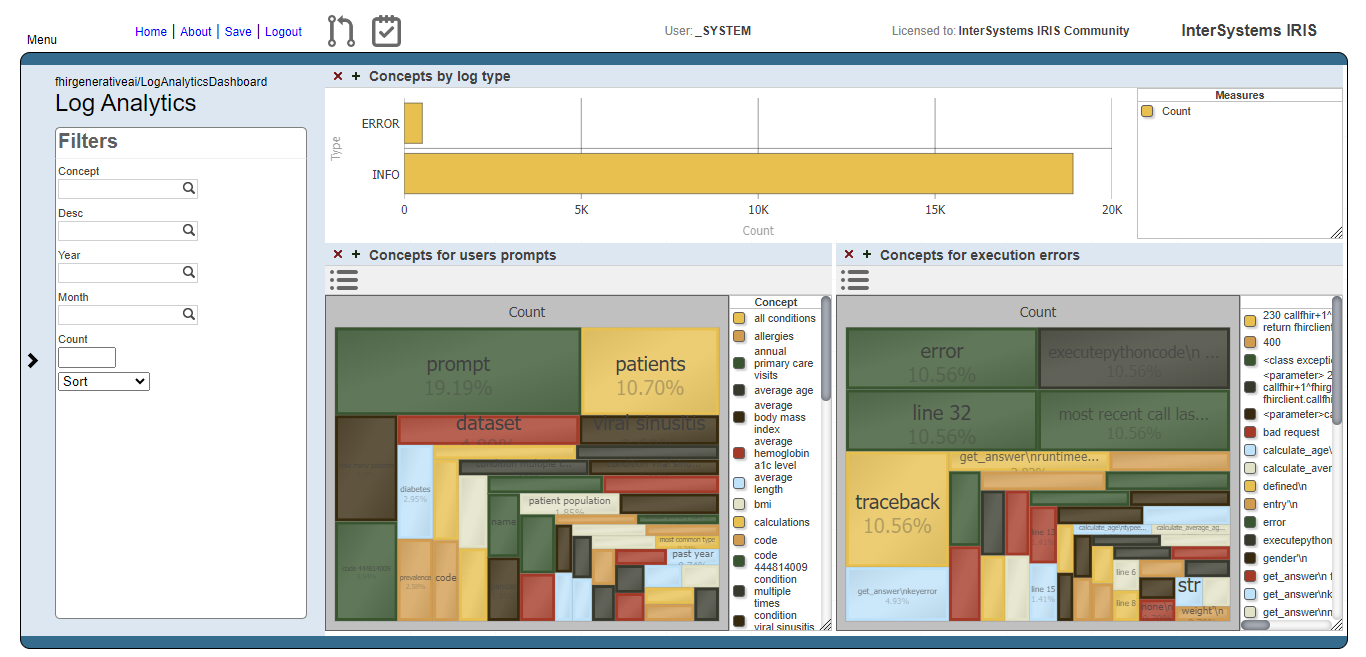
With this cube, we create a dashboard which people can get insights about how the prompts are going in terms of what users are asking and if those prompts are beeing executed or not.

Fig.1 - Log Analytics Dashboard

Fig.1 - Log Analytics Dashboard

Users prompts analysis

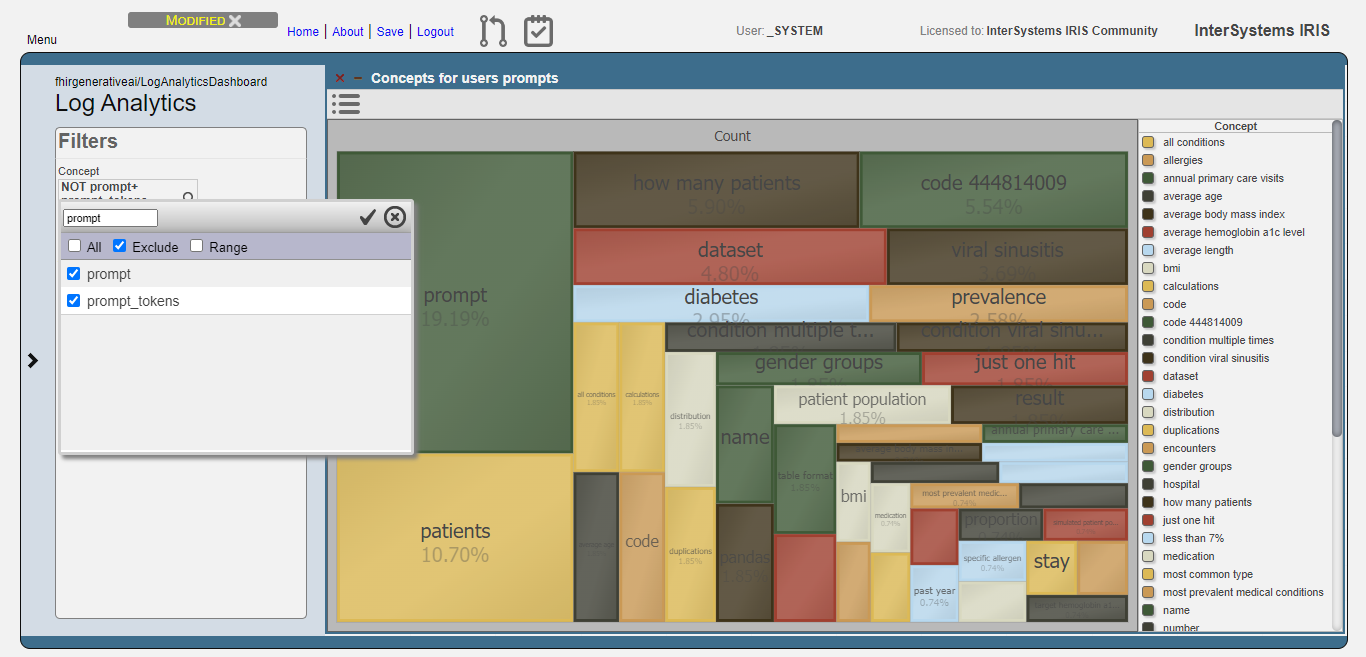
The image below shows the result of the users prompts analysis after running the methods DoAccuracyTests and DoAccuracyExtendedSetTests() of the class fhirgenerativeai.Tests(). It uses a treemap to show the most prevelent concepts.

Fig.2 - Detail of users prompts

Fig.2 - Detail of users prompts

As you can see, the most prevelent concepts are meaningless concepts like prompt, code, dataset etc.

Let's exclude these concepts from the analysis:

Fig.3 - Exclusion of meaningless concepts

Fig.3 - Exclusion of meaningless concepts

Then, get the top 10 concepts:

Fig.4 - Top 10 concepts for users prompts

Fig.4 - Top 10 concepts for users prompts

Now, we can see that users are asking questions rearging patients, and conditions like viral sinusitis and diabetes, for instance. This could lead system administrators to get insights about what users are expecting and proceed to attend such needs.

Execution errors analysis

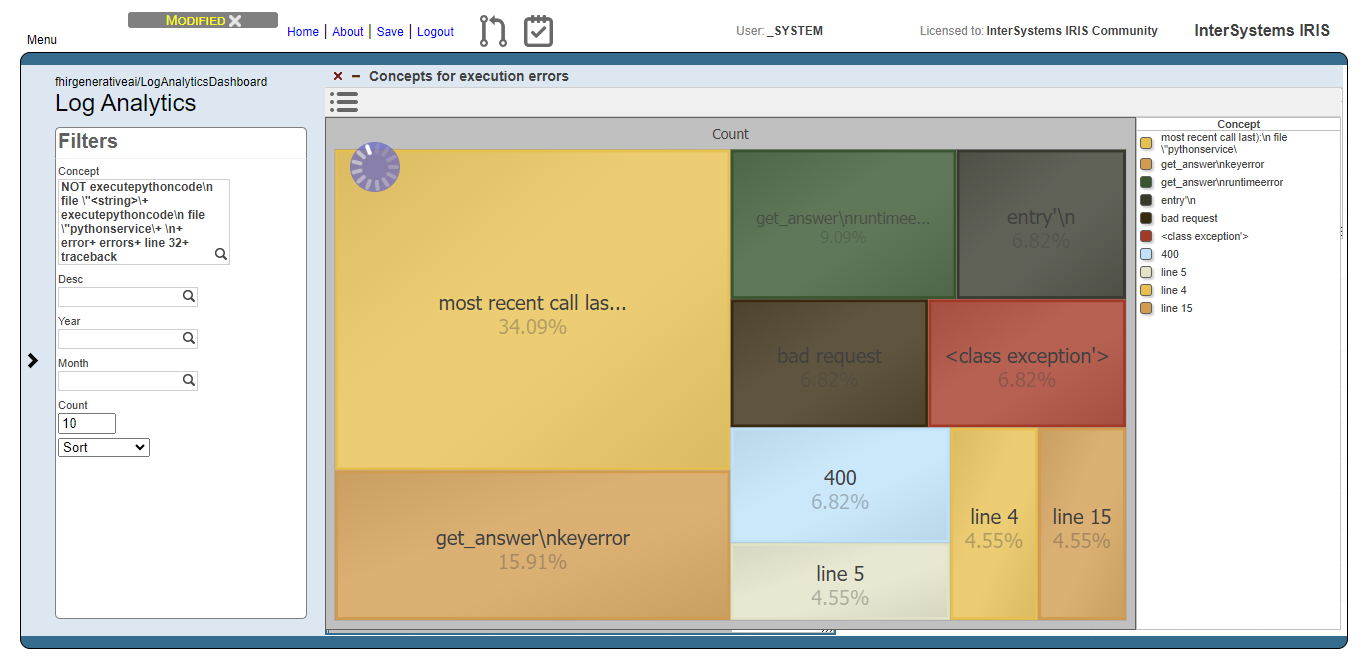
For the execution errors analysis, we have the same visualization as the users prompts. But now, displaying concepts related to execution errors.

Fig.5 - Details of execution errors

Fig.5 - Details of execution errors

And like for the users prompts analysis, we exclude meaningless concepts and got just the top 10 concepts:

Fig.6 - Top 10 concepts for execution errors

Fig.6 - Top 10 concepts for execution errors

Now we can note, for instance, that concepts like "bad request" and 400 (the HTTP code for bad request error) are relevant. This means that the AI model are generating code that tends to setting invalid FHIR requests.

0
1 293
Question Guillaume Rongier · Sep 23, 2022

Hello,

I'm looking for a way to write a stored procedure or something to return a ResultSet with Embedded Python.

My goal is the following:

I have a Goal table with a Text field that is free text.

CREATETable Goal (
    Idint,
    TextVARCHAR(5000)
);


I would like to create a procedure that returns all the entities (in the iKnow sense) in a new Entity column.

Python code, i would like to use :

5
0 398
Article Benjamin De Boe · Jun 7, 2016 6m read

This is the second article in a series on iKnow demo applications, showcasing how the concepts and context provided through iKnow's unique bottom-up approach can be used to implement relevant use cases and help users be more productive in their daily tasks. Last week's article discussed the Knowledge Portal, a straightforward tool to browse iKnow indexing results.

This week, we'll look into the Set Analysis demo, a slightly more advanced application where you'll be using the concepts identified by iKnow to organize your content into sets of documents. The original version of this demo was developed by Danny Wijnschenk & Alain Houf for an academy session at GS2015, but the app has evolved significantly since then.

10
0 1486
Question Eduard Lebedyuk · Dec 21, 2016

I'm in a process of acquiring a corpus  of documents on educational courses. 

For example there is an educational course called "OOP" and it can have documents from 2008, 2009, ... 2016 etc.
And there are a lot of these courses, each one with programs from different years (hopefully)

So 1 document is 1 programm of one course for one year.

I want to calculate how much does a course changes per year.

7
0 685
Question Jenna Makin · Feb 6, 2020

Hi-

I have a SQL Query using %iFind.Highlight which returns text highlighting certain words and phrases.   %iFind.Highlight seems to remove cr/lf from the returned text.

Here's my query

ClassMethod Search(pSessionId As %String, pSearchString As %String) As %String
{
    set tTags="<span style='background-color:yellow;'>"
    &sql(
    SELECT %iFind.Highlight(Text , :pSearchString , , :tTags) into :results 
    FROM SSA_OCR.TempSearchable where sessionId = :pSessionId)
    quit results
}

The returned text looks like this:

1
0 403
Question Jenna Makin · Feb 5, 2020

Hi

I've been working with SQL using an iFind index to search text.   Using the %iFind.Highlight function in my SELECT statement I can get text back that highlights the found words using <b> and </b>

I am aware that using ##class(%iFind.Utils).Highlight, I can pass a parameter to override the <b> tag and use instead a <span> tag with style to change the background color of the found words.

Is there a way to override the <b> tag from a SQL statement?

Thanks

6
0 335
Article Alex Litkovets · Apr 10, 2017 5m read

Introduction

We used the InterSystems iKnow technology to create a review assessment system called iKnow Reviews Analyzer (iKRA). Some information about the prototype of the system can be found here. iKRA analyzes users’ text reviews and automatically rates the object being reviewed. This functionality may come in very handy on e-commerce sites, forums or collections of media content – in other words, everywhere where people discuss products, places or services, for example.

What does the solution do?

5
0 2017
Article Nikita Savchenko · Jan 5, 2019 6m read

This article introduces InterSystems iKnow Entity Browser, a web application which allows to visualize extracted and organized text data mined from a large number of texts, powered by InterSystems iKnow technology, which is also known as InterSystems Text Analytics in InterSystems IRIS. Feel free to play with the demo of this tool or learn more about it on InterSystems Open Exchange.

6
3 1283
Question Guillaume Rongier · Jun 17, 2019

Hi,

I try to implement an iFind index.

Here is my definition class :

ClassAviation.TestSQLSrchExtends%Persistent [ DdlAllowed, Owner = {UnknownUser}, SqlRowIdPrivate, SqlTableName = TestSQLSrch ]
{


PropertyUniqueNumAs%Integer;


PropertyCrashDateAs%TimeStamp [ SqlColumnNumber = 2 ];


PropertyNarrativeAs%String(MAXLEN = 100000) [ SqlColumnNumber = 3 ];


IndexNarrSemanticIdx On (Narrative) As %iFind.Index.Basic;


IndexUniqueNumIdxOnUniqueNum [ Type = index, Unique ];


}

The problem start when I add an Relationship in my indexed class, I end up with this error :

1
0 559
Question Minoru Horita · Apr 11, 2019

In Cache'/Ensemble, by specifying the objectsPackage parameter, dictionaries (and other objects) get projected to tables that can be accessed by SQL queries.

But in IRIS (IRIS for UNIX (Ubuntu Server LTS for x86-64 Containers) 2019.1 (Build 507U) Mon Feb 25 2019 13:47:16 EST), when I created a dictionary with ##class(%iKnow.Matching.DictionaryAPI).CreateDictionary(), it does not get projected to a table.

The class APIs correctly retrieve information about this dictionary.

Am I missing something with IRIS, or is there any issues about this?

2
0 366
Article Константин Ерёмин · Sep 18, 2017 8m read

image

The InterSystems DBMS has a built-in technology for working with non-structured data called iKnow and a full-text search technology called iFind. We decided to take a dive into both and make something useful. As the result, we have DocSearch — a web application for searching in InterSystems documentation using iKnow and iFind.

18
0 1592
Question Eduard Lebedyuk · Jun 19, 2018

I have iKnow domain with 1 source, 1 data and 1 metadata fields. Source is a table.

Let's say individual rows are immutable, but new rows are added after the domain is built.

How do I add them to domain?

In  %SYSTEM.iKnow class IndexTable method is available:

classmethod IndexTable(pDomainName As %String, pTableName As %String, pIdField As %String, pGroupField As %String, pDataField As %String, pMetaFields As %List = "", pWhereClause As %String = "", pConfig As %String = "") as %Status

Assuming I have a table App.Text with fields:

1
0 409
Question Eduard Lebedyuk · Jun 18, 2018

I have iKnow domain of forum posts, their full text is an iKnow data, and each post also has a number of views as a metadata field.

I want to get a sum of views by concept. Let's say I have a concept called "TESTEST" and there are 10 sources that have this concept. Each source has some views. I want to get views total - impact of this concept so to say.

What's the best iKnow architecture for this use case?

So far I got this:

1
0 412
Question Minoru Horita · Mar 27, 2018

I am trying to create an iKnow domain programmatically like:

    Set dom = ##class(%iKnow.Domain).%New("TestDom")
    Do  dom.SetParameter("DefaultConfig", "MyConfiguration")
    Set sc = dom.%Save()

   ...

Although "MyConfiguration" sets the language to "ja", i.e. Japanese, it doesn't seem to be respected, and what I see on the top right pane in Knowledge Portal is related concepts, instead of proximity profiles, which I expect to see  in Japanese language mode.

Also resulting segmentation of sentences looks to be it is in English mode.

Can someone tell me how I can do this?

2
0 452