#Embedded Python

0 Followers · 283 Posts

Embedded Python refers to the integration of the Python programming language into the InterSystems IRIS kernel, allowing developers to operate with data and develop business logic for server-side applications using Python.

Documentation.

InterSystems Official Aya Heshmat · Mar 27, 2025 4m read

The Interoperability user interface now includes modernized user experiences for the DTL Editor and Production Configuration applications that are available for opt-in in all interoperability products. You can switch between the modernized and standard views. All other Interoperability screens remain in the Standard user interface. Please note that changes are limited to these two applications and we identify below the functionality that is currently available. 

23
4 707
Article Kate Lau · Oct 13, 2025 13m read

Hi all,

Let's do some more work about the testing data generation and export the result by REST API.😁

Here, I would like to reuse the datagen.restservice class which built in the pervious article Writing a REST api service for exporting the generated patient data in .csv

This time, we are planning to generate a FHIR bundle include multiple resources for testing the FHIR repository.

Here is some reference for you, if you want to know mare about FHIR The Concept of FHIR: A Healthcare Data Standard Designed for the Future

OK... Let's start😆

6
0 106
Article Kate Lau · Oct 13, 2025 5m read

Hi all,

It's me again 😁. In the pervious article Writing a REST api service for exporting the generated FHIR bundle in JSON, we actually generated a resource DocumentReference, with the content data encoded in Base64

Question!! Is it possible to write a REST service for decoding it? Because I am very curious what is the message data talking about🤔🤔🤔

OK, Let's start!

1. Create a new utility class datagen.utli.decodefhirjson.cls for decoding the data inside the DocumentReference
 

Class datagen.utli.decodefhirjson Extends%RegisteredObject
{
}
2
1 67
Article Kate Lau · Oct 9, 2025 6m read

Hi,

It's me again😁, recently I am working on generating some fake patient data for testing purpose with the help of Chat-GPT by using Python. And, at the same time I would like to share my learning curve.😑

1st of all for building a custom REST api service is easy by extending the %CSP.REST

Creating a REST Service Manually

Let's Start !😂

1. Create a class datagen.restservice which extends  %CSP.REST 

Class datagen.restservice Extends%CSP.REST
{
Parameter CONTENTTYPE = "application/json";
}


2. Add a function genpatientcsv() to generate the patient data, and package it into csv string

3
1 76
Article Yu Han Eng · Oct 5, 2025 2m read

With the rapid adoption of telemedicine, remote consultations, and digital dictation, healthcare professionals are communicating more through voice than ever before. Patients engaging in virtual conversations generate vast amounts of unstructured audio data, so how can clinicians or administrators search and extract information from hours of voice recordings?

Enter IRIS Audio Query - a full-stack application that transforms audio into a searchable knowledge base. With it, you can:

1
0 48
Article Eric Fortenberry · Dec 20, 2024 9m read

Your Mission

Let's pretend for a moment that you're an international action spy who's dedicated your life to keeping the people of the world safe from danger. You recieve the following mission:

Good day, Agent IRIS,

We're sorry for interrupting your vacation in the Bahamas, but we just received word from our London agent that a "time bomb" is set to detonate in a highly populated area in Los Angeles. Our sources say that the "time bomb" is set to trigger at 3:14 PM this afternoon.

Hurry, the people are counting on you!

The Problem

You rush to your feet and get ready to head to Los Angeles, but you quickly realize that you're missing a key piece of information; will the "time bomb" trigger at 3:14 PM Bahama-time or at 3:14 PM Los Angeles-time? ...or maybe even 3:14 PM London-time.

You quickly realize that the time you were provided (3:14 PM) does not give you enough information to determine when you need to be in Los Angeles.

The time you were provided (3:14 PM) was ambiguous. You need more information to determine an exact time.

Some Solutions

As you think over the problem, you realize there are methods of overcoming the ambiguity of time that you were provided:

  1. Your source could have provided the location to which the local time was 3:14 PM. For instance, Los Angeles, Bahamas, or London.

  2. Your source could have used a standard such as UTC (Coordinated Universal Time) to provide you an offset from an agreed-upon location (such as Greenwich, London).

The Happy Ending

You call your source and confirm that the time provided was indeed 3:14 PM Los Angeles-time. You are able to travel to Los Angeles, disarm the "time bomb" before 3:14 PM, and quickly return to the Bahamas to finish your vacation.

The Point

So, what is the point of this thought exercise? I doubt that any of us will encounter the problem presented above, but if you work with an application or code that moves data from one location to another (especially if the locations are in different time zones), you need to be aware of how to handle datetimes and time zones.

Time Zones are HARD!

Well, time zones aren't so bad. Daylight savings time and political boundaries make time zones difficult.

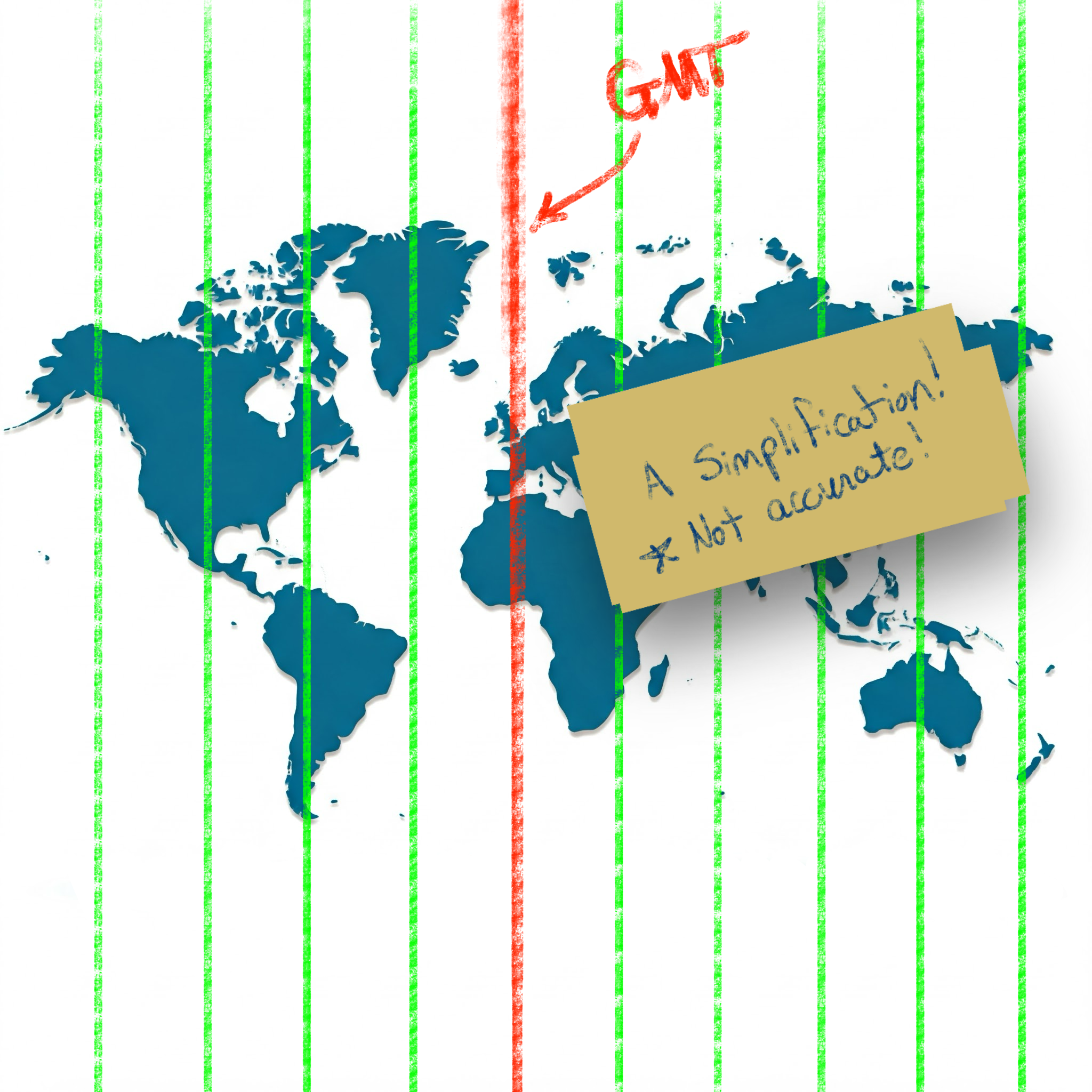
I thought I always understood the "general" idea of time zones: the planet is split into vertical slices by time zone, where each time zone is one hour behind the time zone to the East.

Simplification of time zones on a world map

While this simplification holds for many locations, unfortunately there are many exceptions to this rule.

Time zones of the world (Wikipedia) Reference: Time zones of the world (Wikipedia)

Standardizing with UTC (the "Origin")

To simplify the language of conveying specific times, the world has settled on using UTC (Coordinated Universal Time). This standard sets the "origin" to the 0° longitude that goes through Greenwich, London.

Defining "Offset"

Using UTC as the basis, all other time zones can be defined relative to UTC. This relationship is referred to as the UTC offset.

If you have a local time and an offset, you no longer have an ambiguous time (as seen in our spy example above); you have a definite and specific time with no ambiguity.

The typical format used to show the UTC offset is ±HHMM[SS[.ffffff]].

  • A minus - sign indicates an offset to the West of UTC.
  • A plus + sign indicates an offset to the East of UTC.
  • HH indicates hours (zero-padded)
  • MM indicates minutes (zero-padded)
  • SS indicates seconds (zero-padded)
  • .ffffff indicates fractional seconds

For example, in America, the Eastern Standard Zime Zone (EST) is defined as -0500 UTC. This means that all locations in EST are 5 hours behind UTC. If the time is 9:00 PM at UTC, then the local time in EST is 4:00 PM.

In the Australian Central Western Standard Time Zone (ACWST), the offset is defined as +0845 UTC. If the time is 1:00 AM at UTC, then the local time in ACWST is 9:45 AM.

Daylight Savings Time

So, back to the time zone maps above. From the image, you can see that many time zones follow the political boundaries of countries and regions. This complicates time zone calculations slightly, but it is easy enough to wrap your mind around.

Unfortunately, there is one more factor to consider when working with times and time zones.

Let's look at Los Angeles.

On the map, the UTC offset for Los Angeles is -8 in Standard Time. Standard Time is typically followed during the winter months, whereas Daylight Savings Time is typically followed during the summer months.

Daylight Savings Time (DST) advances the clocks in a give time zone forward (typically by one hour during the summer months). There are several reasons that political regions might choose to follow DST (such as energy savings, better use of daylight, etc.). The difficulty and complexity of Daylight Savings Time is that DST is not consistently followed around the world. Depending on your location, your region may or may not follow DST.

Time Zone Database

Since the combination of political boundaries and Daylight Savings Time greatly increases the complexity of determining a specific time, a time zone database is needed to correctly map local times to specific times relative to UTC. The Internet Assigned Numbers Authority (IANA) Time Zone Database is the common source of time zone information used by operating systems and programming languages.

The database includes the names and aliases of all time zones, information about the offset, information about the use of Daylight Savings Time, time zone abbreviations, and which date ranges the various rules apply.

Copies of and information about the time zone database can be found on IANA's website.

Most UNIX systems have a copy of the database that gets updated with the operating system's package manager (typically installed in /usr/share/zoneinfo). Some programming languages have the database built-in. Others make it available by a library or can read the system's copy of the database.

Time Zone Names/Identifiers

The time zone database contains many names and aliases for specific time zones. Many of the entries include a country (or continent) and major city in the name. For example:

  • America/New_York
  • America/Los_Angeles
  • Europe/Rome
  • Australia/Melbourne

Conversion and Formatting Using ObjectScript

So, now we know about:

  • Local times (ambiguous times without an offset or location)
  • UTC offsets (the relative offset a timestamp or location is from the UTC "origin" in Greenwich, London)
  • Daylight Savings Time (an attempt at helping civilization at the expense of time zone offsets)
  • Time zone database (which includes information about time zones and Daylight Savings observance in many locations and regions)

Knowing this, how do we work with datetimes/time zones in ObjectScript?

***Note: I believe all the following statements are true about ObjectScript, but please let me know if I misstate how ObjectScript works with time zones and offsets.

Built-in Variables and Functions

If you need to convert timestamps between various formats within the system time zone of the process running IRIS, the built-in features of ObjectScript should be sufficient. Here is a brief listing of various time-related variables/functions in ObjectScript:

  • $ZTIMESTAMP / $ZTS

    • IRIS Internal format as a UTC value (offset +0000).
    • Format: ddddd,sssss.fffffff
  • $NOW(tzmins)

    • Current system local time with the given tzmins offset from UTC.
    • Does not take Daylight Savings Time into account.
    • By default, tzmins is based off of the $ZTIMEZONE variable.
    • Format: ddddd,sssss.fffffff
  • $HOROLOG

    • Current system local time (based on $ZTIMEZONE), taking Daylight Savings Time into account.
    • Format: ddddd,sssss.fffffff
  • $ZTIMEZONE

    • Returns or sets the system's local UTC offset in minutes.
  • $ZDATETIME() / $ZDT()

    • Converts $HOROLOG format to a specific display format.
    • Can be used to convert from system local time to UTC (+0000).
  • $ZDATETIMEH() / $ZDTH()

    • Converts a datetime string to internal $HOROLOG format.
    • Can be used to convert from UTC (+0000) to system local time.

As best as I can tell, these functions are only able to manipulate datetimes using the time zone of the local system. There does not appear to be a way to work with arbitrary time zones in ObjectScript.

Enter the tz Library on Open Exchange

To accommodate conversion to and from arbitrary time zones, I worked to create the tz - ObjectScript Time Zone Conversion Library.

This library accesses the time zone database installed on your system to provide support for converting timestamps between time zones and formats.

For instance, if you have time local to Los Angeles (America/Los_Angeles), you can convert it to the time zone used in the Bahamas (America/New_York) or the time zone used in London (Europe/London):

USER>zw ##class(tz.Ens).TZ("2024-12-20 3:14 PM", "America/Los_Angeles", "America/New_York")
"2024-12-20 06:14 PM"

USER>zw ##class(tz.Ens).TZ("2024-12-20 3:14 PM", "America/Los_Angeles", "Europe/London")
"2024-12-20 11:14 PM"

If you are given a timestamp with an offset, you can convert it to the local time in Eucla, Australia (Australia/Eucla), even if you don't know the original time zone:

USER>zw ##class(tz.Ens).TZ("2024-12-20 08:00 PM -0500", "Australia/Eucla")
"2024-12-21 09:45 AM +0845"

If you work with HL7 messages, the tz library has several methods exposed to Interoperability Rules and DTLs to help you easily convert between time zones, local times, times with offsets, etc.:

// Convert local time from one time zone to another 	 
set datetime = "20240102033045"
set newDatetime = ##class(tz.Ens).TZ(datetime,"America/New_York","America/Chicago")

// Convert local time to offset 	 
set datetime = "20240102033045"
set newDatetime = ##class(tz.Ens).TZOffset(datetime,"America/Chicago","America/New_York")

// Convert offset to local time 	 
set datetime = "20240102033045-0500"
set newDatetime = ##class(tz.Ens).TZLocal(datetime,"America/Chicago")

// Convert to a non-HL7 format 	 
set datetime = "20240102033045-0500"
set newDatetime = ##class(tz.Ens).TZ(datetime,"America/Chicago",,"%m/%d/%Y %H:%M:%S %z")

Summary

I appreciate you following me on this "international journey" where we encountered time zones, Daylight Savings Time, world maps, and "time bombs". Hopefully, this was able to shed some light on (and simplify) many of the complexities of working with datetimes and time zones.

Check out tz - ObjectScript Time Zone Conversion Library and let me know if you have any questions (or corrections/clarifications to something I said).

Thanks!

References/Interesting Links

4
5 441
Article Sammy Lee · Aug 28, 2025 1m read

As part of a recent documentation technical project to optimize the search, I needed to use Embedded Python in my ObjectScript code. The main blocker was passing a Python list from a Python class method to a ObjectScript method. Sending the list by reference to the python method, populating it with the Insert() method, and returning the reference to the ObjectScript method resulted in an list with type %SYS.Python, a process that was straightforward but not efficient.I explored an alternative method: converting a Python list to an ObjectScript list using JSON as the intermediary format. This

0
1 61
Article Muhammad Waseem · Aug 18, 2025 7m read

Interoperability on Python (IoP) is a proof-of-concept project designed to showcase the power of the InterSystems IRIS Interoperability Framework when combined with a Python-first approach.IoP leverages Embedded Python (a feature of InterSystems IRIS) to enable developers to write interoperability components in Python, which can seamlessly integrate with the robust IRIS platform. This guide has been crafted for beginners and provides a comprehensive introduction to IoP, its setup, and practical steps to create your first interoperability component. By the end of this article, you will get a clear understanding of how to use IoP to build scalable, Python-based interoperability solutions.

6
5 326
Article Ashok Kumar T · Jul 21, 2025 13m read

This article is a continuation of the IRIS JSON project and features additional methods and insights.

Let's continue with the instance methods

%GetTypeOf(Key)

This instance method is used to determine the JSON data type of the %DynamicObject or %DynamicArray.

It returns one of the following strings:

1
3 239
Question Hannah Sullivan · Aug 6, 2025

I have a custom Buffer class which is designed to capture written/printed statements to the device, to be able to transform the captured text to string or stream type. I have used this in ObjectScript to capture ObjectScript write statements and return a string. I would like to try to use this with a [ Language = python ] method as follows. This class will be called by a scheduled task.

4
0 79
Article Joel Solon · Jul 29, 2025 13m read

Imagine you’re walking down the street on a nice summer’s day, and someone walks up to you and says “Hey, you work at InterSystems, right? I’ve been hearing more and more about InterSystems IRIS lately. I know IRIS has its own programing language called ObjectBook? or InstaScript? OK, I admit it, I know it’s called ObjectScript! I know IRIS also supports Python. I’m a Python developer, so that sounds great to me. But I’m also interested in ObjectScript. For example, Python and other languages support collections. Does ObjectScript support collections?”

You’d answer “Of course!”

And then your new friend might get excited and start firing off more questions:

  • How many kinds of collections does ObjectScript support?
  • Can ObjectScript use Python collections?
  • Can Python use ObjectScript collections?
  • Which collection is best?

How would you answer? Well, you don’t have to worry about answering. All you’d have to do is send your new friend the URL of this long page.

0
0 195
Article Vachan C Rannore · Jul 24, 2025 1m read

Are you curious about how to run Python scripts directly in your InterSystems IRIS or Caché terminal? 🤔 Good news it's easy! 😆 IRIS supports Embedded Python, allowing you to use Python interactively within its terminal environment. 

How to access the Python Shell?

To launch the Python shell from the IRIS terminal, simply run the following command:

do##class(%SYS.Python).Shell()

This opens an interactive Python shell inside the IRIS terminal. From here, you can write and run Python code just as you would in a normal Python environment.

Exiting the Shell:

>>> quit()

4
1 135
Question Justin Millette · Jun 26, 2025

I am looking to create a Python virtual environment (venv) so that my imported/installed python packages can be separate on different namespaces in IRIS. I am able to go and create an environment, activate it, and install packages, but I am not sure how to ensure that Embedded Python methods actually point to this virtual environment. 

Is the best solution to just load the virtual environment at runtime, in each method? That seems like a bad solution. Has anyone run into this and found a good solution?

2
1 139
Article Henry Ames · Jun 18, 2025 2m read

I am writing this post primarily to gather an informal consensus on how developers are using Python in conjunction with IRIS, so please respond to the poll at the end of this article! In the body of the article, I'll give some background on each choice provided, as well as the advantages for each, but feel free to skim over it and just respond to the poll.

5
2 206
Article Shuheng Liu · May 16, 2025 9m read

1. A Motivating Example

Embedded Python has been around for a while. You probably followed the tutorials and learned about it. However, if you've tried to combine Python and ObjectScript in real development work, you probably ran into situations where you get an error message like this:

USER>Do##class(MyClass).SomeMethod()

ERROR #5002: ObjectScript error: <PYTHON EXCEPTION> *<class 'ZeroDivisionError'>: division by zero
4
5 331
Article Heloisa Paiva · Mar 17, 2023 2m read

Why I've decided to write this

In my last article I've talked about returning values with Python. But returning them is simple, what can make it harder is what I'm going to talk about today: where the value is treated.
 

Python object in IRIS

Following the example of the last aricle, we have the method:

Class python.returnTest [ Abstract ]
{

ClassMethod returnSomething(pValue... As%String) As%Integer [ Language = python ]
{
	return pValue
}

}


Then, we'll have as a return a Python object, that IRIS interprets as  the class %SYS.Python. So if I call the method with two values, like this:

4
4 572
Article Yuri Marx · May 29, 2025 8m read

Google Forms is the most popular solution on the market for collecting data, answering questionnaires and quizzes. So, it is the ideal solution for collecting patient data and responses in a practical way, without the need to expand or develop systems. In this article, I will detail how to create an account on Google Cloud, register the application that will consume the Google Forms API, generate the service user necessary to consume the API and finally perform actions to create new forms and collect data filled in them in an automated way in embedded Python and IRIS.

2
2 125
Article Yuri Marx · May 29, 2025 4m read

Template engines are essential for producing customizable dynamic content, without the need for compilation and opening up great possibilities of extensibility for the template user. Especially if the template engine supports Python. A popular solution for template engine is Mko. It is is a template library written in Python. It provides a familiar, non-XML syntax which compiles into Python modules for maximum performance. Mako's syntax and API borrows from the best ideas of many others, including Django and Jinja2 templates, Cheetah, Myghty, and Genshi. Conceptually, Mako is an embedded

2
1 159
Article sween · May 6, 2025 13m read

 Hello IRIS Fans and Welcome to IRIS iRacing!

Here were going to take 3 laps of your time and demonstrate how I wired up my Racing SIM to IRIS for "As Real Time as It Gets" Metrics reporting.  I missed the window for the contest, which happens quite often, but I still ended up 3rd I think in the demo race in the video below.

Technical Salad

Below are the technical ingredients for this demonstration for a salad you can post on Instragram.

0
0 152
Article Luis Angel Pérez Ramos · Apr 30, 2025 8m read

I recently had to refresh my knowledge of the HealthShare EMPI module and since I've been tinkering with IRIS's vector storage and search functionalities for a while I just had to add 1 + 1.

For those of you who are not familiar with EMPI functionality here's a little introduction:

Enterprise Master Patient Index

In general, all EMPIs work in a very similar way, ingesting information, normalizing it and comparing it with the data already present in their system. Well, in the case of HealthShare's EMPI, this process is known as NICE:

0
1 167
Article Eduard Lebedyuk · Apr 18, 2025 8m read

For my hundredth article on the Developer Community, I wanted to present something practical, so here's a comprehensive implementation of the GPG Interoperability Adapter for InterSystems IRIS.

Every so often, I would encounter a request for some GPG support, so I had several code samples written for a while, and I thought to combine all of them and add missing GPG functionality for a fairly complete coverage. That said, this Business Operation primarily covers data actions, skipping management actions such as key generation, export, and retrieval as they are usually one-off and performed manually anyways. However, this implementation does support key imports for obvious reasons. Well, let's get into it.

What is GPG?

GnuPG is a complete and free implementation of the OpenPGP standard as defined by RFC4880 (also known as PGP). GnuPG allows you to encrypt and sign your data and communications and perform the corresponding tasks of decryption and signature verification.

For InterSystems Interoperability adapter, I will be using Embedded Python and gnupg Python library specifically.

The gnupg module allows Python programs to make use of the functionality provided by the GNU Privacy Guard (abbreviated GPG or GnuPG). Using this module, Python programs can encrypt and decrypt data, digitally sign documents and verify digital signatures, manage (generate, list and delete) encryption keys, using Public Key Infrastructure (PKI) encryption technology based on OpenPGP.

Disclaimer

This project, whenever possible, aims to use GPG defaults. Your organization's security policies might differ. Your jurisdiction or your organization's compliance with various security standards might require you to use GPG with different settings or configurations. The user is wholly responsible for verifying that cryptographic settings are adequate and fully compliant with all applicable regulations. This module is provided under an MIT license. Author and InterSystems are not responsible for any improper or incorrect use of this module.

Installation

OS and Python

First, we'll need to install python-gnupg, which can be done using pip or irispip:

irispip install  --target C:\InterSystems\IRIS\mgr\python python-gnupg

If you're on Windows, you should install GPG itself. GPG binaries must be in the path, and you must restart IRIS after GPG installation. If you're on Linux or Mac, you likely already have GPG installed.

InterSystems IRIS

After that, load the code into any Interoperability-enabled namespace and compile it. The code is in Utils.GPG package and has the following classes:

  • Operation: main Business Operation class
  • *Request: Interoperability request classes
  • *Response: Interoperability response classes
  • File*: Interoperability request and response classes using %Stream.FileBinary for payload
  • Tests: code for manual testing, samples

Each request has two properties:

  • Stream — set that to your payload. In File* requests, your stream must be of the %Stream.FileBinary class; for non-file requests, it must be of the %Stream.GlobalBinary class.
  • ResponseFilename — (Optional) If set, the response will be written into a file at the specified location. If not set, for File requests, the response will be placed into a file with .asc or .txt added to the request filename. If not set, for global stream requests, the response will be a global stream.

The request type determines the GPG operation to perform. For example, EncryptionRequest is used to encrypt plaintext payloads.

Each response (except for Verify) has a Stream property, which holds the response, and a Result property, which holds a serializable subset of a GPG result object converted into IRIS persistent object. The most important property of a Result object is a boolean ok, indicating overall success.

Sample key generation

Next, you need a sample key; skip this step if you already have one (project repo also contains sample keys, you can use them for debugging, passphrase is 123456):

Use any Python shell (for example, do $system.Python.Shell()):

import gnupg
gpg_home = 'C:\InterSystems\IRIS\Mgr\pgp'
gpg = gnupg.GPG(gnupghome=gpg_home)
input_data = gpg.gen_key_input(key_type="RSA", key_length=2048)
master_key = gpg.gen_key(input_data)
public_key = 'C:\InterSystems\IRIS\Mgr\keys\public.asc'
result_public = gpg.export_keys(master_key.fingerprint, output=public_key)
private_key = 'C:\InterSystems\IRIS\Mgr\keys\private.asc'
result_private = gpg.export_keys(master_key.fingerprint, True, passphrase="", output=private_key)

You must set gpg_home, private_key, and public_key to valid paths. Note that a private key can only be exported with a passphrase.

Production configuration

Add Utils.GPG.Operation to your Production, there are four custom settings available:

  • Home: writable directory for GPG to keep track of an internal state.
  • Key: path to a key file to import
  • Credentials: if a key file is passphrase protected, select a Credential with a password to be used as a passphrase.
  • ReturnErrorOnNotOk: If this is False and the GPG operation fails, the response will be returned with all the info we managed to collect. If this is True, any GPG error will result in an exception.

On startup, the operation loads the key and logs GPG initialized if everything is okay. After that, it can accept all request types based on an imported key (a public key can only encrypt and verify).

Usage

Here's a sample encryption request:

/// do ##class(Utils.GPG.Tests).Encrypt()
ClassMethod Encrypt(target = {..#TARGET}, plainFilename As %String, encryptedFilename As %String)
{
	if $d(plainFilename) {
		set request = ##class(FileEncryptionRequest).%New()
		set request.Stream = ##class(%Stream.FileBinary).%New()
		$$$TOE(sc, request.Stream.LinkToFile(plainFilename))
	} else {
		set request = ##class(EncryptionRequest).%New()
		set request.Stream = ##class(%Stream.GlobalBinary).%New()
		do request.Stream.Write("123456")
		$$$TOE(sc, request.Stream.%Save())
	}
	
	if $d(encryptedFilename) {
		set request.ResponseFilename = encryptedFilename
	}
		
	set sc = ##class(EnsLib.Testing.Service).SendTestRequest(target, request, .response, .sessionid)
	
	zw sc, response, sessionid
}

In the same manner, you can perform Decryption, Sign, and Verification requests. Check Utils.GPG.Tests for all the examples.

Why Business Operation?

While writing this, I received a very interesting question about why GPG needs to be a separate Business Host and not a part of a Business Process. As this can be very important for any cryptography code, I wanted to include my rationale on that topic.

I would like to start with how Business Processes work and why this is a crucial consideration for cryptography code. Consider this simple Business Process User.BPL:

<process language='objectscript' request='Ens.Request' response='Ens.Response'>
  <context>
    <property name='x' type='%Integer' instantiate='0' />
  </context>
  <sequence>
    <assign property="context.x" value="1" action="set" />
    <if name='Check' condition='1' >
      <true>
        <assign property="context.x" value="2" action="set"  />
      </true>
    </if>
  </sequence>
</process>

It will generate the Context class with one property:

Class User.BPL.Context Extends Ens.BP.Context 
{
Property x As %Integer;
}

And State class with two methods (simplified):

Method S1(process As User.BPL, context As User.BPL.Context)
{
  Set context.x=1
  Set ..%NextState="S2"
  Quit ..ManageState()
}

Method S2(process As User.BPL, context As User.BPL.Context)
{
  Set context.x=2
  Set ..%NextState="S3"
  Quit ..ManageState()
}

Since BP is a state machine, it will simply call the first state and then whatever is set in %NextState. Each state has information on all possible next states—for example, one next state for a true path and another for a false path in the if block state. However, the BP engine manages the state between state invocations. In our case, it saves the User.BPL.Context object which holds an entire context - property x.

But there's no guarantee that after saving the state of a particular BP invocation, the subsequent state for this invocation would be called next immediately. The BP engine might wait for a reply from BO/BP, work on another invocation, or even work on another process entirely if we're using shared pool workers. Even with a dedicated worker pool, another worker might grab the same process invocation to continue working on it.

This is usually fine since the worker's first action before executing the next state is loading the context from memory—in our example, it's an object of the User.BPL.Context class with one integer property x, which works.

But in the case of any cryptography library, the context must contain something along the lines of:

/// Private Python object holding GPG module
Property %GPG As %SYS.Python; 

Which is a runtime Python module object that cannot be persisted. It also likely cannot be pickled or even dilled as we initialize a crypto context to hold a key — the library is rather pointless without it, after all.

So, while theoretically, it could work if the entire cryptography workload (idempotent init – idempotent key load - encryption - signing) is handled within one state, that is a consideration that must always be carefully observed. Especially since, in many cases, it will work in low-load environments (i.e., dev) where there's no queue to speak of, and one BP invocation will likely progress from beginning to end uninterrupted. But when the same code is promoted to a high-load environment with queues and resource contention (i.e., live), the BP engine is likelier to switch between different invocations to speed things up.

That's why I highly recommend extracting your cryptography code into a separate business operation. Since one business operation can handle multiple message types, you can have one business operation that processes PGP signing/encryption/verification requests. Since BOs (and BSes) are not state machines, once you load the library and key(s) in the init code, they will not be unloaded until your BH job expires one way or another.

Conclusion

GPG Interoperability Adapter for InterSystems IRIS allows you to use GPG easily if you need Encryption/Decryption and Signing/Verification.

Documentation
0
0 137