ChatGPT is an artificial intelligence (AI) chatbot developed by OpenAI. It is built on top of OpenAI's GPT-3.5 and GPT-4 families of large language models (LLMs) and has been fine-tuned using both supervised and reinforcement learning techniques.
Hi,
It's me again😁, recently I am working on generating some fake patient data for testing purpose with the help of Chat-GPT by using Python. And, at the same time I would like to share my learning curve.😑
1st of all for building a custom REST api service is easy by extending the %CSP.REST
Creating a REST Service Manually
Let's Start !😂
1. Create a class datagen.restservice which extends %CSP.REST
Class datagen.restservice Extends%CSP.REST
{
Parameter CONTENTTYPE = "application/json";
}
2. Add a function genpatientcsv() to generate the patient data, and package it into csv string
#InterSystems Demo Games entry
⏯️ Care Compass – InterSystems IRIS powered RAG AI assistant for Care Managers
Care Compass is a prototype AI assistant that helps caseworkers prioritize clients by analyzing clinical and social data. Using Retrieval Augmented Generation (RAG) and large language models, it generates narrative risk summaries, calculates dynamic risk scores, and recommends next steps. The goal is to reduce preventable ER visits and support early, informed interventions.
Presenters:
🗣 @Brad Nissenbaum, Sales Engineer, InterSystems
🗣 @Andrew Wardly, Sales Engineer, InterSystems
🗣 @Fan Ji, Solution Developer, InterSystems
🗣 @Lynn Wu, Sales Engineer, InterSystems
☤ Care 🩺 Compass 🧭 - Proof-of-Concept - Demo Games Contest Entry
Introducing Care Compass: AI-Powered Case Prioritization for Human Services
In today’s healthcare and social services landscape, caseworkers face overwhelming challenges. High caseloads, fragmented systems, and disconnected data often lead to missed opportunities to intervene early and effectively. This results in worker burnout and preventable emergency room visits, which are both costly and avoidable.
Care Compass was created to change that.
Disclaimer: Care Compass project is a technical demonstration developed by sales engineers and solution engineers. It is intended for educational and prototyping purposes only. We are not medical professionals, and no part of this project should be interpreted as clinical advice or used for real-world patient care without appropriate validation and consultation with qualified healthcare experts.
The Problem
Twelve percent of Medicaid beneficiaries account for 38 percent of all Medicaid emergency department (ED) visits. These visits are often driven by unmet needs related to housing instability, mental illness, and substance use. Traditional case management tools rarely account for these upstream risk factors, making it difficult for caseworkers to identify who needs help most urgently.
This data comes from a 2013 study published in The American Journal of Emergency Medicine, which highlights how a small portion of the Medicaid population disproportionately contributes to system-wide costs
(Capp et al., 2013, PMID: 23850143).
Too often, decisions are reactive and based on incomplete information.
Our Solution
Care Compass is an AI-powered assistant that helps caseworkers make better decisions based on a complete picture of a client’s medical and social needs. It combines Retrieval-Augmented Generation (RAG) and large language models to interpret data and generate actionable insights.
The assistant assesses real-time information, summarizes key risk factors, calculates dynamic risk scores, and recommends possible next steps and resources. Instead of combing through disconnected records, caseworkers get a unified view of their caseload, prioritized by urgency and context.
How It Works
The platform integrates a large language model, real-time data retrieval, and custom reasoning logic. Information from structured and unstructured sources is synthesized into readable summaries that explain not only the level of risk, but why a client is considered high-risk.
An intuitive user interface makes it easy for caseworkers to interact with the assistant, review insights, and take appropriate action. The emphasis is on transparency and trust. The system doesn’t just score risk; it explains its reasoning in plain language.
Lessons Learned
Building Care Compass has taught us that raw model accuracy is only part of the equation. We’ve learned that:
- Small datasets limit the effectiveness of retrieval-based methods
- Structured data is often inconsistent or incomplete
- Fine-tuning models does not always improve performance
- Interpretability is essential—especially for systems that guide care decisions
- HIPAA compliance and data privacy must be built into the system from the beginning
Looking Ahead
Our next steps include expanding our dataset with more diverse and representative cases, experimenting with different embedding models, and incorporating evaluation metrics that reflect how useful and understandable the assistant’s outputs are in practice.
We’re also exploring how to better communicate uncertainty and strengthen the ethical foundations of the system, especially when working with vulnerable populations.
Care Compass is our response to a widespread need in health and human services: to prioritize what matters, before it becomes a crisis. It empowers caseworkers with the clarity and tools they need to act earlier, intervene more effectively, and deliver more equitable outcomes.
To see more about how we implemented the solution, please watch our youtube video:https://youtu.be/hjCKJxhckbs
I have a new project to store information from REST responses into an IRIS database. I’ll need to sync information from at least two dozen separate REST endpoints, which means creating nearly that many ObjectScript classes to store the results from those endpoints.
Could I use ChatGPT to get a headstart on creating these classes? The answer is “Yes”, which is great since this is my first attempt at using generative AI for something useful. Generating pictures of giraffes eating soup was getting kind of old….
Here’s what I did:
Hi Community,
Traditional keyword-based search struggles with nuanced, domain-specific queries. Vector search, however, leverages semantic understanding, enabling AI agents to retrieve and generate responses based on context—not just keywords.
This article provides a step-by-step guide to creating an Agentic AI RAG (Retrieval-Augmented Generation) application.
Implementation Steps:
- Create Agent Tools
- Add Ingest functionality: Automatically ingests and index documents (e.g., InterSystems IRIS 2025.1 Release Notes).
- Implement Vector Search Functionality
- Create Vector Search Agent
- Handoff to Triage (Main Agent)
- Run The Agent
.png)
Hi Community,
In this article, I will introduce my application iris-AgenticAI .
The rise of agentic AI marks a transformative leap in how artificial intelligence interacts with the world—moving beyond static responses to dynamic, goal-driven problem-solving. Powered by OpenAI’s Agentic SDK , The OpenAI Agents SDK enables you to build agentic AI apps in a lightweight, easy-to-use package with very few abstractions. It's a production-ready upgrade of our previous experimentation for agents, Swarm.
This application showcases the next generation of autonomous AI systems capable of reasoning, collaborating, and executing complex tasks with human-like adaptability.
Application Features
- Agent Loop 🔄 A built-in loop that autonomously manages tool execution, sends results back to the LLM, and iterates until task completion.
- Python-First 🐍 Leverage native Python syntax (decorators, generators, etc.) to orchestrate and chain agents without external DSLs.
- Handoffs 🤝 Seamlessly coordinate multi-agent workflows by delegating tasks between specialized agents.
- Function Tools ⚒️ Decorate any Python function with @tool to instantly integrate it into the agent’s toolkit.
- Vector Search (RAG) 🧠 Native integration of vector store (IRIS) for RAG retrieval.
- Tracing 🔍 Built-in tracing to visualize, debug, and monitor agent workflows in real time (think LangSmith alternatives).
- MCP Servers 🌐 Support for Model Context Protocol (MCP) via stdio and HTTP, enabling cross-process agent communication.
- Chainlit UI 🖥️ Integrated Chainlit framework for building interactive chat interfaces with minimal code.
- Stateful Memory 🧠 Preserve chat history, context, and agent state across sessions for continuity and long-running tasks.
# IRIS-Intelligent ButlerIRIS Intelligent Butler is an AI intelligent butler system built on the InterSystems IRIS data platform, aimed at providing users with comprehensive intelligent life and work assistance through data intelligence, automated decision-making, and natural interaction.## Application scenarios adding services, initializing configurations, etc. are currently being enriched## Intelligent ButlerIRIS Smart Manager utilizes the powerful data management and AI capabilities of InterSystems IRIS to create a highly personalized, automated, secure, and reliable intelligent life and
Prompt
Firstly, we need to understand what prompt words are and what their functions are.
Prompt Engineering
Hint word engineering is a method specifically designed for optimizing language models.
Its goal is to guide these models to generate more accurate and targeted output text by designing and adjusting the input prompt words.
Core Functions of Prompts
Hi Community,
This is a detailed, candid walkthrough of the IRIS AI Studio platform. I speak out loud on my thoughts while trying different examples, some of which fail to deliver expected results - which I believe is a need for such a platform to explore different models, configurations and limitations. This will be helpful if you're interested in how to build 'Chat with PDF' or data recommendation systems using IRIS DB and LLM models.
Hi Community,
We're pleased to invite you to the upcoming webinar in Hebrew:
👉 Hebrew Webinar: GenAI + RAG - Leveraging Intersystems IRIS as your Vector DB👈
📅 Date & time: February 26th, 3:00 PM IDT
.png)
Generative artificial intelligence is artificial intelligence capable of generating text, images or other data using generative models, often in response to prompts. Generative AI models learn the patterns and structure of their input training data and then generate new data that has similar characteristics.
Generative AI is artificial intelligence capable of generating text, images and other types of content. What makes it a fantastic technology is that it democratizes AI, anyone can use it with as little as a text prompt, a sentence written in a natural language.
Hi Community,
In this article, I will introduce my application iris-RAG-Gen .
Iris-RAG-Gen is a generative AI Retrieval-Augmented Generation (RAG) application that leverages the functionality of IRIS Vector Search to personalize ChatGPT with the help of the Streamlit web framework, LangChain, and OpenAI. The application uses IRIS as a vector store.
Application Features
- Ingest Documents (PDF or TXT) into IRIS
- Chat with the selected Ingested document
- Delete Ingested Documents
- OpenAI ChatGPT
I received some really excellent feedback from a community member on my submission to the Python 2024 contest. I hope its okay if I repost it here:
you build a container more than 5 times the size of pure IRIS
and this takes time
container start is also slow but completes
backend is accessible as described
a production is hanging around
frontend reacts
I fail to understand what is intended to show
the explanation is meant for experts other than me
The submission is here: https://openexchange.intersystems.com/package/IRIS-RAG-App
Hi Community
In this article, I will introduce my application irisChatGPT which is built on LangChain Framework.
First of all, let us have a brief overview of the framework.
The entire world is talking about ChatGPT and how Large Language Models(LLMs) have become so powerful and has been performing beyond expectations, giving human-like conversations. This is just the beginning of how this can be applied to every enterprise and every domain!
In the previous article, we saw in detail about Connectors, that let user upload their file and get it converted into embeddings and store it to IRIS DB. In this article, we'll explore different retrieval options that IRIS AI Studio offers - Semantic Search, Chat, Recommender and Similarity.
New Updates ⛴️
- Added installation through Docker. Run `./build.sh` after cloning to get the application & IRIS instance running in your local
- Connect via InterSystems Extension in vsCode - Thanks to @Evgeny Shvarov
- Added FAQ's in the home page that covers the basic info for new users
Semantic Search
The introduction of InterSystems' "Vector Search" marks a paradigm shift in data processing. This cutting-edge technology employs an embedding model to transform unstructured data, such as text, into structured vectors, resulting in significantly enhanced search capabilities. Inspired by this breakthrough, we've developed a specialized search engine tailored to companies.
We harness generative artificial intelligence to generate comprehensive summaries of these companies, delivering users a powerful and informative tool.
Hi Community!
As an AI language model, ChatGPT is capable of performing a variety of tasks like language translation, writing songs, answering research questions, and even generating computer code. With its impressive abilities, ChatGPT has quickly become a popular tool for various applications, from chatbots to content creation.
But despite its advanced capabilities, ChatGPT is not able to access your personal data. So we need to build a custom ChatGPT AI by using LangChain Framework:
Below are the steps to build a custom ChatGPT:.png)
-
Step 1: Load the document
-
Step 2: Splitting the document into chunks
-
Step 3: Use Embedding against Chunks Data and convert to vectors
-
Step 4: Save data to the Vector database
-
Step 5: Take data (question) from the user and get the embedding
-
Step 6: Connect to VectorDB and do a semantic search
-
Step 7: Retrieve relevant responses based on user queries and send them to LLM(ChatGPT)
-
Step 8: Get an answer from LLM and send it back to the user
For more details, please Read this article
Hi Members,
Watch this video to learn a new innovative way to use a large language model, such as ChatGPT, to automatically categorize Patient Portal messages to serve patients better:
⏯ Triage Patient Portal Messages Using ChatGPT @ Global Summit 2023

Hi Community,
InterSystems Innovation Acceleration Team invites you to take part in the GenAI Crowdsourcing Mini-Contest.
GenAI is a powerful and complex technology. Today, we invite you to become an innovator and think big about the problems it might help solve in the future.
What do you believe is important to transform with GenAI?
Your concepts could be the next big thing, setting new benchmarks in technology!
Contest Structure
1. Round 1 - Pain Point / Problem Submission:
Hi folks,
I made a solution (https://openexchange.intersystems.com/package/iris-pretty-gpt-1) and want to use it like
CREATEFUNCTION ChatGpt(INpromptVARCHAR)
RETURNSVARCHARPROCEDURELANGUAGE OBJECTSCRIPT
{
    return ##class(dc.irisprettygpt.main).prompt(prompt)
}


CREATETABLE people (
nameVARCHAR(255),
city VARCHAR(255),
age INT(11)
)


INSERTINTO people ChatGpt("Make a json file with 100 lines of structure [{'name':'%name%', 'age':'%age%', 'city':'%city%'}]")Introduction
This article aims to explore how the FHIR-PEX system operates and was developed, leveraging the capabilities of InterSystems IRIS.
Streamlining the identification and processing of medical examinations in clinical diagnostic centers, our system aims to enhance the efficiency and accuracy of healthcare workflows. By integrating FHIR standards with InterSystems IRIS database Java-PEX, the system help healthcare professionals with validation and routing capabilities, ultimately contributing to improved decision-making and patient care.
how it works
IRIS Interoperability: Receives messages in the FHIR standard, ensuring integration and compatibility with healthcare data.
Information Processing with 'PEX Java': Processes FHIR-formatted messages and directs them to Kafka topics based on globally configured rules in the database, facilitating efficient data processing and routing, especially for examinations directed to quarantine.
Handling Kafka Returns via External Java Backend: Interprets only the examinations directed to quarantine, enabling the system to handle returns from Kafka through an external Java backend. It facilitates the generation of prognostic insights for healthcare professionals through Generative AI, relying on consultations of previous examination results for the respective patients.
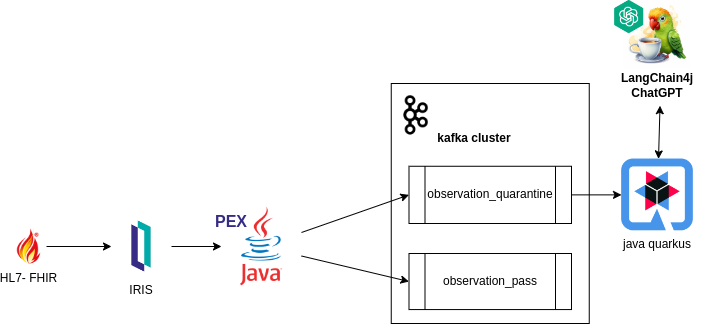
Development
Through the PEX (Production EXtension) by InterSystems, a extensibility tool enabling enhancement and customization of system behavior, we crafted a Business Operation. This component is tasked with processing incoming messages in the FHIR format within the system. As example follows:
import com.intersystems.enslib.pex.*;
import com.intersystems.jdbc.IRISObject;
import com.intersystems.jdbc.IRIS;
import com.intersystems.jdbc.IRISList;
import com.intersystems.gateway.GatewayContext;

import org.apache.kafka.clients.producer.*;
import org.apache.kafka.common.serialization.*;

import com.fasterxml.jackson.databind.JsonNode;
import com.fasterxml.jackson.databind.ObjectMapper;

import java.io.FileInputStream;
import java.io.IOException;
import java.util.Properties;

public class KafkaOperation extends BusinessOperation {
// Connection to InterSystems IRIS
private IRIS iris;

// Connection to Kafka
private Producer<Long, String> producer;

// Kafka server address (comma separated if several)
public String SERVERS;

// Name of our Producer
public String CLIENTID;

/// Path to Config File
public String CONFIG;

public void OnInit() throws Exception {
[...]
}

public void OnTearDown() throws Exception {
[...]
}

public Object OnMessage(Object request) throws Exception {
    IRISObject req = (IRISObject) request;
    LOGINFO("Received object: " + req.invokeString("%ClassName", 1));

    // Create record
    String value = req.getString("Text");
    String topic = getTopicPush(req);
    final ProducerRecord<Long, String> record = new ProducerRecord<>(topic, value);

    // Send new record
    RecordMetadata metadata = producer.send(record).get();

    // Return record info
    IRISObject response = (IRISObject)(iris.classMethodObject("Ens.StringContainer","%New",topic+"|"+metadata.offset()));
    return response;
}

private Producer<Long, String> createProducer() throws IOException {
[...]
}

private String getTopicPush(IRISObject req) {
[...]
}

[...]
}
`
Within the application, the getTopicPush method takes on the responsibility of identifying the topic to which the message will be sent.
The determination of which topic the message will be sent to is contingent upon the existence of a rule in the "quarantineRule" global, as read within IRIS.
String code = FHIRcoding.path("code").asText();
String system = FHIRcoding.path("system").asText();

IRISList quarantineRule = iris.getIRISList("quarantineRule",code,system);

 String reference = quarantineRule.getString(1);
 String value = quarantineRule.getString(2);

 String observationValue = fhir.path("valueQuantity").path("value").asText()
When the global ^quarantineRule exists, validation of the FHIR object can be validated.
private boolean quarantineValueQuantity(String reference, String value, String observationValue) {
    LOGINFO("quarantine rule reference/value: " + reference + "/" + value);
    double numericValue = Double.parseDouble(value);
    double numericObservationValue = Double.parseDouble(observationValue);

    if ("<".equals(reference)) {
        return numericObservationValue < numericValue;
    }
    else if (">".equals(reference)) {
        return numericObservationValue > numericValue;
    }
    else if ("<=".equals(reference)) {
        return numericObservationValue <= numericValue;
    }
    else if (">=".equals(reference)) {
        return numericObservationValue >= numericValue;
    }

    return false;
}
Practical Example:
When defining a global, such as:
Set ^quarantineRule("59462-2","http://loinc.org") = $LB(">","500")
This establishes a rule to "59462-2" code and ""http://loinc.org"" system in the global ^quarantineRule, specifying a condition where the value when greater than 500 is defined as quarantine. In the application, the getTopicPush method can then use this rule to determine the appropriate topic for sending the message based on the validation outcome.
Given the assignment, the JSON below would be sent to quarantine since it matches the condition specified by having:
 {
          "system": "http://loinc.org",
          "code": "59462-2",
          "display": "Testosterone"
}

"valueQuantity": { "value": 550, "unit": "ng/dL", "system": "http://unitsofmeasure.org", "code": "ng/dL" }
FHIR Observation:
{
    "resourceType": "Observation",
    "id": "3a8c7d54-1a2b-4c8f-b54a-3d2a7efc98c9",
    "status": "final",
    "category": [
      {
        "coding": [
          {
            "system": "http://terminology.hl7.org/CodeSystem/observation-category",
            "code": "laboratory",
            "display": "laboratory"
          }
        ]
      }
    ],
    "code": {
      "coding": [
        {
          "system": "http://loinc.org",
          "code": "59462-2",
          "display": "Testosterone"
        }
      ],
      "text": "Testosterone"
    },
    "subject": {
      "reference": "urn:uuid:274f5452-2a39-44c4-a7cb-f36de467762e"
    },
    "encounter": {
      "reference": "urn:uuid:100b4a8f-5c14-4192-a78f-7276abdc4bc3"
    },
    "effectiveDateTime": "2022-05-15T08:45:00+00:00",
    "issued": "2022-05-15T08:45:00.123+00:00",
    "valueQuantity": {
      "value": 550,
      "unit": "ng/dL",
      "system": "http://unitsofmeasure.org",
      "code": "ng/dL"
    }
}
The Quarkus Java application
After sending to the desired topic, a Quarkus Java application was built to receive examinations in quarantine.
@ApplicationScoped
 public class QuarentineObservationEventListener {

@Inject
PatientService patientService;

@Inject
EventBus eventBus;

@Transactional
@Incoming("observation_quarantine")
public CompletionStage<Void> onIncomingMessage(Message<QuarentineObservation> quarentineObservationMessage) {
	var quarentineObservation = quarentineObservationMessage.getPayload();
	var patientId = quarentineObservation.getSubject()
			.getReference();
	var patient = patientService.addObservation(patientId, quarentineObservation);
	publishSockJsEvent(patient.getId(), quarentineObservation.getCode()
			.getText());
	return quarentineObservationMessage.ack();
}

private void publishSockJsEvent(Long patientId, String text) {
	eventBus.publish("monitor", MonitorEventDto.builder()
			.id(patientId)
			.message(" is on quarentine list by observation ." + text)
			.build());
}
 }
This segment of the system is tasked with persisting the information received from Kafka, storing it in the patient's observations within the database, and notifying the occurrence to the monitor.
The monitor
Finally, the system's monitor is responsible for providing a simple front-end visualization. This allows healthcare professionals to review patient/examination data and take necessary actions.
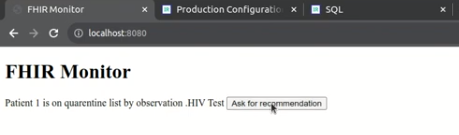
Implementation of langchainPT
Through the monitor, the system enables healthcare professionals to request recommendations from the Generative AI.
@Unremovable
@Slf4j
@ApplicationScoped
public class PatientRepository {
	@Tool("Get anamnesis information for a given patient id")
	public Patient getAnamenisis(Long patientId) {
		log.info("getAnamenisis called with id " + patientId);
		Patient patient = Patient.findById(patientId);
		return patient;
	}

	@Tool("Get the last clinical results for a given patient id")
	public List<Observation> getObservations(Long patientId) {
		log.info("getObservations called with id " + patientId);
		Patient patient = Patient.findById(patientId);
		return patient.getObservationList();
	}

}
segue implementação de langchain4j
@RegisterAiService(chatMemoryProviderSupplier = RegisterAiService.BeanChatMemoryProviderSupplier.class, tools = {PatientRepository.class})
public interface PatientAI {

	@SystemMessage("""
			You are a health care assistant AI. You have to recommend exams for patients based on history information.
			""")
	@UserMessage("""
			 Your task is to recommend clinical exams for the patient id {patientId}.

			 To complete this task, perform the following actions:
			 1 - Retrieve anamnesis information for patient id {patientId}.
			 2 - Retrieve the last clinical results for patient id {patientId}, using the property 'name' as the name of exam and 'value' as the value.
			 3 - Analyse results against well known conditions of health care.

			 Answer with a **single** JSON document containing:
			 - the patient id in the 'patientId' key
			 - the patient weight in the 'weight' key
			 - the exam recommendation list in the 'recommendations' key, with properties exam, reason and condition.
			 - the 'explanation' key containing an explanation of your answer, especially about well known diseases.

			Your response must be just the raw JSON document, without ```json, ``` or anything else.
			 """)
	String recommendExams(Long patientId);
}
In this way, the system can assist healthcare professionals in making decisions and carrying out actions.
Video demo
Authors
NOTE:
The application https://openexchange.intersystems.com/package/fhir-pex is currently participating in the InterSystems Java Contest 2023. Feel free to explore the solution further, and please don't hesitate to reach out if you have any questions or need additional information. We recommend running the application in your local environment for a hands-on experience. Thank you for the opportunity 😀!
A "big" or "small" ask for ChatGPT?
I tried OpenAI GPT's coding model a couple of weeks ago, to see whether it can do e.g. some message transformations between healthcare protocols. It surely "can", to a seemingly fair degree.
It has been nearly 3 weeks, and it's a long, long time for ChatGPT, so I am wondering how quickly it grows up by now, and whether it could do some of integration engineer jobs for us, e.g. can it create an InterSystems COS DTL tool to turn the HL7 into FHIR message?
Immediately I got some quick answers, in less than one minute or two.
Test
.png)
Hi Community
In this article, I will introduce my application IRIS-GenLab.
IRIS-GenLab is a generative AI Application that leverages the functionality of Flask web framework, SQLALchemy ORM, and InterSystems IRIS to demonstrate Machine Learning, LLM, NLP, Generative AI API, Google AI LLM, Flan-T5-XXL model, Flask Login and OpenAI ChatGPT use cases.
Application Features
.png)
The FHIR® SQL Builder, or Builder, is a component of InterSystems IRIS for Health. It is a sophisticated projection tool used to create custom SQL schemas using data in an InterSystems IRIS for Health FHIR repository without moving the data to a separate SQL repository. The Builder is designed specifically to work with FHIR repositories and multi-model databases in InterSystems IRIS for Health.
The latest Node.js Weekly newsletter included a link to this article:
https://thecodebarbarian.com/getting-started-with-vector-databases-in-n…
I'm wondering if anyone has been considering or actually using IRIS as a vector database for this kind of AI/ChatGPT work?
FHIR has revolutionized the healthcare industry by providing a standardized data model for building healthcare applications and promoting data exchange between different healthcare systems. As the FHIR standard is based on modern API-driven approaches, making it more accessible to mobile and web developers. However, interacting with FHIR APIs can still be challenging especially when it comes to querying data using natural language.
With rapid evolution of Generative AI, to embrace it and help us improve productivity is a must. Let's discuss and embrace the ideas of how we can leverage Generative AI to improve our routine work.
Previous post - Using AI to Simplify Clinical Documents Storage, Retrieval and Search
This post explores the potential of OpenAI's advanced language models to revolutionize healthcare through AI-powered transcription and summarization. We will delve into the process of leveraging OpenAI's cutting-edge APIs to convert audio recordings into written transcripts and employ natural language processing algorithms to extract crucial insights for generating concise summaries.
Hi folks!
How can I change the production setting programmatically?
I have a production that is a solution that uses some api-keys, which are the parameters of Business Operations but of course cannot be hard-coded into the source code.
E.g. here is the example of such a production that runs a connection of Telegram and ChatGPT.
And it can be installed as:
zpm "install telegram-gpt"
But now one needs to setup the key manually before using the production, having the following setting:
.png)
I'd like to set up it programmatically so one could install it as:
zpm "install telegram-gpt -D Token=sometoken"
How can I make it work?