#Security

0 Followers · 322 Posts

Security in IT is the protection of computer systems from the theft and damage to their hardware, software or information, as well as from disruption or misdirection of the services they provide.

See the InterSystems Documentation on Security.

Question Giulia Ghielmi · Oct 30, 2025

Hello everyone! 👋

I have a question regarding roles and resources. 

To give you some context: I have a user who has been assigned only the role %HS_UsageDashboard_Access.This allows them to access the dashboards correctly (by giving the direct URL). Then,  if I try to access the Management Portal with this same user, I can log in with no access to any resources within it (as expected).

3
0 63
Article Ashok Kumar T · Feb 17, 2025 6m read

What is JWT?

JWT (JSON Web Token) is an open standard (RFC 7519) that offers a lightweight, compact, and self-contained method for securely transmitting information between two parties. It is commonly used in web applications for authentication, authorization, and information exchange.

A JWT is typically composed of three parts:

1. JOSE (JSON Object Signing and Encryption) Header
2. Payload
3. Signature

These parts are encoded in Base64Url format and concatenated with dots (.) separating them.

Structure of a JWT

Header

{ "alg": "HS256", "typ": "JWT"}

Payload

3
8 389
Article Julio Esquerdo · Feb 14, 2025 5m read

HTTP and HTTPS with REST API

Hello

The HTTP protocol allows you to obtain resources, such as HTML documents. It is the basis of any data exchange on the Web and a client-server protocol, meaning that requests are initiated by the recipient, usually a Web browser.

REST APIs take advantage of this protocol to exchange messages between client and server. This makes REST APIs fast, lightweight, and flexible. REST APIs use the HTTP verbs GET, POST, PUT, DELETE, and others to indicate the actions they want to perform.

When we make a call to a RESt API, what actually happens is an HTTP call. The API receives this call and according to the requested verb and path, the API performs the desired action. In the case of the Iris implementation we can see this clearly in the URLMap definition area:

1
3 377
Question Colin Nagle · Oct 24, 2024

I have an API set up in IRIS which is secured using an IRIS authentication service, so there is a bearer token being passed down in the request header.

I've already set Parameter HandleCorsRequest = 1; on the spec class and All the endpoints I am have (a mix of GET, POST, PATCH and DELETE) are working from postman without issue, the problem is when consuming from the web front-end and the preflight checks the browser instigates. Most of the endpoints work in the browser, but some are triggering the preflight (OPTIONS) check causing the CORS issue.

This is what I am seeing in the browser:-

5
0 287
Article sween · Oct 23, 2025 9m read

IKO Helm Status: WFH

Here is an option for your headspace if you are designing an multi-cluster architecture and the Operator is an FTE to the design.  You can run the Operator from a central Kubernetes cluster (A), and point it to another Kubernetes cluster (B), so that when the apply an IrisCluster to B the Operator works remotely on A and plans the cluster accordingly on B.  This design keeps some resource heat off the actual workload cluster, spares us some serviceaccounts/rbac and gives us only one operator deployment to worry about so we can concentrate on the IRIS workloads.

1
1 38
Article sween · Oct 21, 2025 4m read

"Haul" a Portable Registry for Airgapped IrisClusters

Rancher Government Hauler streamlines deploying and maintaining InterSystems container workloads in air-gapped environments by simplifying how you package and move required assets. It treats container images, Helm charts, and other files as content and collections, letting you fetch, store, and distribute them declaratively or via CLI — without changing your existing workflows.   Meaning your charts and what have yous, can have conditionals on your pull locations in Helm values, etc. 

If you have been tracking how HealthShare is being deployed via IPM Packages, you can certainly appreciate the adoption of OCI compliance storage for the packages themselves using ORAS... which is core to the Hauler solution.

0
1 32
Article Raef Youssef · Sep 23, 2025 4m read

Securing IRIS Integrations with Mutual TLS (mTLS): A Practical Guide

In today’s enterprise environments, secure communication between systems is not optional—it’s essential. Whether you're integrating InterSystems IRIS with cloud APIs, internal microservices, or third-party platforms, Mutual TLS (mTLS) offers a powerful way to ensure both ends of the connection are authenticated and encrypted.

This post walks through how to configure IRIS for mTLS and how to validate your certificates to avoid common pitfalls.


🔐 What is Mutual TLS (mTLS)?

TLS (Transport Layer Security) is the standard protocol for securing data in transit. In traditional TLS, only the server presents a certificate. Mutual TLS goes a step further: both the client and server present certificates to authenticate each other.

This bidirectional trust is ideal for:

  • Internal service-to-service communication
  • API integrations with sensitive data
  • Zero-trust architectures

🧰 Prerequisites

Before you begin, make sure you have:

  • ✅ A server certificate and private key for IRIS
  • ✅ A CA certificate to validate client certificates
  • ✅ A client certificate and private key for the external system
  • ✅ IRIS version 202X.X, which provides support for TLS 1.2 and higher

⚙️ Configuring IRIS for mTLS

1. IRIS as a Server (Accepting mTLS Connections)

🔸 Import Certificates

Use the System Management Portal or command line to import:

  • Server certificate
  • Server private key
  • CA certificate (to validate clients)

🔸 Create TLS Configuration

Go to:

System Administration > Security > SSL/TLS Configurations
  • Create a new configuration
  • Enable “Require client certificate”

🔸 Assign TLS to Listener

Apply the TLS configuration to the relevant service (e.g., web server, REST endpoint).

2. IRIS as a Client (Connecting to External Systems)

This section also applies to external client systems connecting to IRIS servers.

🔸 Import Client Certificates

Import the client certificate and private key into IRIS.

🔸 Configure Outbound TLS

Use ObjectScript to set up the connection:

set http = ##class(%Net.HttpRequest).%New()
set http.SSLConfiguration = "MyClientTLSConfig"
set http.Server = "api.external-system.com"
set http.Port = 443
set status = http.Get("/endpoint")

🧪 Testing Your Certificates for mTLS

Before deploying, validate your certificates to ensure they meet mTLS requirements.

1. Check Certificate Validity

openssl x509 -in client.crt -noout -text

Look for:

  • Validity dates
  • Subject and Issuer fields
  • Extended Key Usage (should include TLS Web Client Authentication as shown below)
X509v3 Extended Key Usage:
    TLS Web Client Authentication

2. Verify Private Key Matches Certificate

openssl x509 -noout -modulus -in client.crt | openssl md5
openssl rsa -noout -modulus -in client.key | openssl md5

The hashes should match.

3. Test mTLS Handshake with OpenSSL

openssl s_client -connect server.example.com:443   -cert client.crt -key client.key -CAfile ca.crt

This simulates a full mTLS handshake. Look for:

  • Verify return code: 0 (ok)
  • Successful certificate exchange

4. Validate Certificate Chain

openssl verify -CAfile ca.crt client.crt

Ensures the client certificate is trusted by the CA.


📊 mTLS Handshake Diagram

   ![image](/sites/default/files/inline/images/mtls_diagram.png)

🧯 Troubleshooting Tips

  • 🔍 Certificate chain incomplete? Ensure intermediate certs are included.
  • 🔍 CN/SAN mismatch? Match certificate fields with expected hostnames.
  • 🔍 Permission errors? Check file access rights on certs and keys.
  • 🔍 Handshake failures? Enable verbose logging in IRIS and OpenSSL.

✅ Conclusion

Mutual TLS is a cornerstone of secure system integration. With IRIS, configuring mTLS is straightforward—but validating your certificates is just as important. By following these steps, you’ll ensure your connections are encrypted, authenticated, and enterprise-grade secure.

0
1 81
Question TAZ.R · Jul 16, 2025

Hello Community,

I’m working on an InterSystems IRIS production that needs to call an external API using OAuth client credentials (client_id and client_secret). For security reasons, I must pass these credentials via environment variables in my Docker container.

In the IRIS terminal, I can successfully retrieve these environment variables using $System.Util.GetEnviron("api-clientid") and $System.Util.GetEnviron("api-clientsecret"). However, inside my Business Operation class (OnMessage method), these environment variables return empty strings.

13
1 125
Question David Saunders · Aug 8, 2025

I have a personal copy of Cache which I use to help me with certain things. The instance resides on my Windows desktop. The apps I use a web enabled. It would be great if I could access my apps via web browser from my laptop without having to keep a copy of Cache on my laptop. It would make it difficult to keep the databases synced. So, if I restart my Cache instance, then I can use get to my apps by entering the url: http://ipadd:57772/csp/user/myapp.cls. but later, after having closed the browser on my laptop, if I try to open a browser session on my desktop I get license limit exceeded. So

3
0 66
Question Yone Moreno Jiménez · Aug 5, 2025

Hello, how are you?

First of all thanks for your time reading this question.

We are investigating how to validate the indexes of a global. We have read:

https://docs.intersystems.com/irisforhealth20251/csp/docbook/DocBook.UI…

And:

https://docs.intersystems.com/irisforhealth20251/csp/documatic/%25CSP.D…

We want to validate the inxedes of the global titled "Ens.Util.LogD". We have executed on the ObjectScript terminal, on the desired namespace:

2
0 69
Article Ash Sherzhanov · Jul 31, 2025 3m read

SQL injection remains one of the most critical vulnerabilities in database-driven applications, allowing attackers to manipulate queries and potentially access or compromise sensitive data. In InterSystems IRIS, developers have access to both Dynamic SQL and Embedded SQL, each with distinct characteristics. Understanding how to use them securely is essential for preventing SQL injection.

The Problem: Dynamic SQL and SQL Injection

0
2 147
Question André-Claude Gendron · Jul 31, 2025

Hi everyone,

I’m working with an existing InterSystems IRIS server that hosts several web applications and namespace-specific code and data. I’d like to reverse-engineer the current environment into a %Installer.Manifest file so I can store it in Git and manage its changes.

My goal is to:

  • Track the application setup and configuration in version control
  • Rebuild environments consistently (namespaces, CSP apps, security roles, etc.)
  • Possibly automate deployments later on
1
2 59
InterSystems Official Daniel Palevski · Jul 23, 2025

InterSystems is pleased to announce the General Availability (GA) of the 2025.2 release of InterSystems IRIS® data platform. This is a Continuous Delivery (CD) release. Please note that the GA versions of InterSystems IRIS for Health™ and HealthShare® Health Connect™ 2025.2 are currently withheld due to mirroring limitations introduced by security updates (details below).

Release Highlights

This release introduces impactful enhancements across security, developer experience, operations, and interoperability. Notable new features include:

0
1 141
Article Vinicius Maranhao Ribeiro de Castro · Apr 2, 2020 4m read

In this 3-part series of articles, is shown how you can use IAM to simply add security, according to OAuth 2.0 standards, to a previously unauthenticated service deployed in IRIS.

In the first part, was provided some OAuth 2.0 background together with some IRIS and IAM initial definitions and configurations in order to facilitate the understanding of the whole process of securing your services.

1
0 1154
Question Ronaldo Nascimento · Jul 18, 2025

I am trying to create users who only have `%SQL` Role for the INSTANCE. But I am unable to find any documentation on the `Security.Users` class.

See:

// Instantiate the Security.Users objectSet userObj = ##class(Security.Users).%New()// Set the username and passwordSet userObj.Name = userNameSet userObj.FullName = userFullNameSet userObj.Namespace = "USER"Set userObj.Roles = "%SQL"
   Set sc = userObj.ChangePassword(passwd)// Save the user to the databaseSet ss = userObj.%Save()
3
0 105
InterSystems Official Kevin Xu · Jul 14, 2025

InterSystems IRIS 2025.2 introduces the IRISSECURITY database, the new home for security data. Unlike IRISSYS, the previous home for security data, IRISSECURITY can be encrypted, which secures your sensitive data at rest. In a future version, IRISSECURITY will be mirrorable.

This version also introduces the %SecurityAdministrator role for general security administration tasks. 

2
3 332
Article Vishal Pallerla · Jul 17, 2025 3m read

At hackathons that InterSystems participated and I supported, many students were asking how all their teammates could use the same IRIS database that they spun up in a container. I suggested using ngrok to expose their localhost IRIS and realized we don't have documentation on that. Hence, I thought this would be great to let more people knwo about this powerful technique for enhancing collaboration during development and testing.

Step-by-Step Guide to Exposing InterSystems IRIS with ngrok

This guide will walk you through the process of exposing your local InterSystems IRIS instance using ngrok. Follow these steps to get started quickly.

Step 1: Set Up Your IRIS Container

  1. Install Docker: Ensure that Docker is installed on your machine.

  2. Run the IRIS Container: Use the following command to start an InterSystems IRIS container:

    docker run --name iris -d --publish 52773:52773 containers.intersystems.com/intersystems/iris-community:latest
    

    This command pulls the latest version of the IRIS Community Edition and runs it on port 52773.

Step 2: Install ngrok

  1. Download ngrok: Go to the ngrok website and download the appropriate version for your operating system.

  2. Install ngrok:

    • For MacOS: Use Homebrew:
      brew install ngrok/ngrok/ngrok
      
    • For Windows: Use Chocolatey:
      choco install ngrok
      
    • For Linux: Follow the installation instructions provided on the ngrok website.

Step 3: Configure ngrok

  1. Authenticate ngrok: After installing, you need to authenticate your ngrok account. Run the following command:

    ngrok config add-authtoken YOUR_AUTHTOKEN
    

    Replace YOUR_AUTHTOKEN with your actual token from the ngrok dashboard.

Step 4: Start the Tunnel

  1. Expose Your IRIS Instance: Run this command to create a tunnel to your local IRIS instance:

    ngrok http 52773
    
  2. Access the Public URL: After running the command, ngrok will provide a public URL (e.g., https://abc123.ngrok.io). This URL can be accessed by anyone over the internet.

Step 5: Share Access

  • Share the public URL with your teammates or collaborators so they can access the IRIS database running on your local machine.

Best Practices

  • Security: Implement authentication and authorization for your IRIS instance to protect sensitive data.

  • Temporary Use: Remember that ngrok is primarily for development and testing; avoid using it for production environments.

  • Monitor Connections: Keep an eye on the ngrok dashboard for connection statistics and potential issues.

Conclusion

Exposing your InterSystems IRIS container using ngrok is a straightforward process that enhances collaboration during development. By following this step-by-step guide, you can easily make your local database accessible to teammates, facilitating better teamwork and innovation. Always prioritize security when exposing local services, and enjoy seamless development with IRIS and ngrok!

0
1 122
Question Riccardo Villa · Jul 15, 2025

Hello,

I need to expose InterSystems HealthInsight dashboards over the internet to external operators. The authentication flow is managed externally. When a user is authenticated, our system receives an HTTP request with specific headers (e.g., operator’s fiscal code and hospital identifier) that we need to extract in order to:

  • Authorize the user to access the dashboards.
  • Apply row-level security on the dashboards, filtering the data by hospital and user role.

I created a new Web Application on IRIS as shown in the screenshot:

2
0 68
Announcement Shane Nowack · Jul 8, 2025

Hello again,

We are still seeking feedback on our two new HealthShare Unified Care Record certification exam designs. This is your opportunity to tell us what knowledge, skills, and abilities are important for Certified HealthShare Unified Care Record Specialists.

The feedback surveys are open until July 20th, 2025. All participants are eligible to receive 7000 Global Masters points for each survey they complete!

Interested in sharing your opinions? See the original post for more details on how to weigh-in on the exam topics.

0
0 34
Question Colin Brough · Jun 26, 2025

I am attempting to follow the tutorial at Publishing Web Services Using Caché | Caché Web Services QuickStart Tutorial | Caché & Ensemble 2018.1.4 – 2018.1.11 to build a toy SOAP web-service using Cache but am running into what I suspect are permissions issues, or perhaps setting up the "plumbing" to get an incoming request to call the web-service methods.

Ensemble instance running on local laptop. Only the Ensemble private web-server installed on the machine (no IIS or Apache).

0
0 45
Article Guillaume Rongier · Jul 8, 2024 6m read

Flask_logo

Description

This is a template for a Flask application that can be deployed in IRIS as an native Web Application.

Installation

  1. Clone the repository
  2. Create a virtual environment
  3. Install the requirements
  4. Run the docker-compose file
git clone
cd iris-flask-template
python3 -m venv .venv
source .venv/bin/activate
pip install -r requirements.txt
docker-compose up

Usage

The base URL is http://localhost:53795/flask/.

Endpoints

  • /iris - Returns a JSON object with the top 10 classes present in the IRISAPP namespace.
  • /interop - A ping endpoint to test the interoperability framework of IRIS.
  • /posts - A simple CRUD endpoint for a Post object.
  • /comments - A simple CRUD endpoint for a Comment object.

How to develop from this template

See WSGI introduction article: wsgi-introduction.

TL;DR : You can toggle the DEBUG flag in the Security portal to make changes to be reflected in the application as you develop.

Code presentation

app.py

This is the main file of the application. It contains the Flask application and the endpoints.

from flask import Flask, jsonify, request
from models import Comment, Post, init_db

from grongier.pex import Director

import iris

app = Flask(__name__)
app.config['SQLALCHEMY_DATABASE_URI'] = 'iris+emb://IRISAPP'

db = init_db(app)
  • from flask import Flask, jsonify, request: Import the Flask library.
  • from models import Comment, Post, init_db: Import the models and the database initialization function.
  • from grongier.pex import Director: Import the Director class to bind the flask app to the IRIS interoperability framework.
  • import iris: Import the IRIS library.
  • app = Flask(__name__): Create a Flask application.
  • app.config['SQLALCHEMY_DATABASE_URI'] = 'iris+emb://IRISAPP': Set the database URI to the IRISAPP namespace.
    • The iris+emb URI scheme is used to connect to IRIS as an embedded connection (no need for a separate IRIS instance).
  • db = init_db(app): Initialize the database with the Flask application.

models.py

This file contains the SQLAlchemy models for the application.

from dataclasses import dataclass
from typing import List
from flask_sqlalchemy import SQLAlchemy

db = SQLAlchemy()

@dataclass
class Comment(db.Model):
    id:int = db.Column(db.Integer, primary_key=True)
    content:str = db.Column(db.Text)
    post_id:int = db.Column(db.Integer, db.ForeignKey('post.id'))

@dataclass
class Post(db.Model):
    __allow_unmapped__ = True
    id:int = db.Column(db.Integer, primary_key=True)
    title:str = db.Column(db.String(100))
    content:str = db.Column(db.Text)
    comments:List[Comment] = db.relationship('Comment', backref='post')

Not much to say here, the models are defined as dataclasses and are subclasses of the db.Model class.

The use of the __allow_unmapped__ attribute is necessary to allow the creation of the Post object without the comments attribute.

dataclasses are used to help with the serialization of the objects to JSON.

The init_db function initializes the database with the Flask application.

def init_db(app):
    db.init_app(app)

    with app.app_context():
        db.drop_all()
        db.create_all()
        # Create fake data
        post1 = Post(title='Post The First', content='Content for the first post')
        ...
        db.session.add(post1)
        ...
        db.session.commit()
    return db
  • db.init_app(app): Initialize the database with the Flask application.
  • with app.app_context(): Create a context for the application.
  • db.drop_all(): Drop all the tables in the database.
  • db.create_all(): Create all the tables in the database.
  • Create fake data for the application.
  • return the database object.

/iris endpoint

######################
# IRIS Query example #
######################

@app.route('/iris', methods=['GET'])
def iris_query():
    query = "SELECT top 10 * FROM %Dictionary.ClassDefinition"
    rs = iris.sql.exec(query)
    # Convert the result to a list of dictionaries
    result = []
    for row in rs:
        result.append(row)
    return jsonify(result)

This endpoint executes a query on the IRIS database and returns the top 10 classes present in the IRISAPP namespace.

/interop endpoint

########################
# IRIS interop example #
########################
bs = Director.create_python_business_service('BS')

@app.route('/interop', methods=['GET', 'POST', 'PUT', 'DELETE'])
def interop():
    
    rsp = bs.on_process_input(request)

    return jsonify(rsp)

This endpoint is used to test the interoperability framework of IRIS. It creates a Business Service object and binds it to the Flask application.

NB : The bs object must be outside of the scope of the request to keep it alive.

  • bs = Director.create_python_business_service('BS'): Create a Business Service object named 'BS'.
  • rsp = bs.on_process_input(request): Call the on_process_input method of the Business Service object with the request object as an argument.

/posts endpoint

############################
# CRUD operations posts    #
############################

@app.route('/posts', methods=['GET'])
def get_posts():
    posts = Post.query.all()
    return jsonify(posts)

@app.route('/posts', methods=['POST'])
def create_post():
    data = request.get_json()
    post = Post(title=data['title'], content=data['content'])
    db.session.add(post)
    db.session.commit()
    return jsonify(post)

@app.route('/posts/<int:id>', methods=['GET'])
def get_post(id):
    ...

This endpoint is used to perform CRUD operations on the Post object.

Thanks to the dataclasses module, the Post object can be easily serialized to JSON.

Here we use the sqlalchemy query method to get all the posts, and the add and commit methods to create a new post.

/comments endpoint

############################
# CRUD operations comments #
############################

@app.route('/comments', methods=['GET'])
def get_comments():
    comments = Comment.query.all()
    return jsonify(comments)

@app.route('/comments', methods=['POST'])
def create_comment():
    data = request.get_json()
    comment = Comment(content=data['content'], post_id=data['post_id'])
    db.session.add(comment)
    db.session.commit()
    return jsonify(comment)

@app.route('/comments/<int:id>', methods=['GET'])
def get_comment(id):
    ...

This endpoint is used to perform CRUD operations on the Comment object.

The Comment object is linked to the Post object by a foreign key.

Troubleshooting

How to run the Flask application in a standalone mode

You can always run a standalone Flask application with the following command:

python3 /irisdev/app/community/app.py

NB : You must be inside of the container to run this command.

docker exec -it iris-flask-template-iris-1 bash

Restart the application in IRIS

Be in DEBUG mode make multiple calls to the application, and the changes will be reflected in the application.

How to access the IRIS Management Portal

You can access the IRIS Management Portal by going to http://localhost:53795/csp/sys/UtilHome.csp.

Run this template locally

For this you need to have IRIS installed on your machine.

Next you need to create a namespace named IRISAPP.

Install the requirements.

Install IoP :

#init iop
iop --init

# load production
iop -m /irisdev/app/community/interop/settings.py

# start production
iop --start Python.Production

Configure the application in the Security portal.

4
1 491
Announcement Shane Nowack · Jun 12, 2025

Hello Everyone,

The Certification team of InterSystems Learning Services is developing two new HealthShare Unified Care Record certification exams, and we are reaching out to our community for feedback that will help us evaluate and establish the contents of the exams.  Please note that these exams will replace our HealthShare Unified Care Record Technical Specialist exam that we plan to retire in January 2026. Certifications earned in this technology before the exam’s retirement will remain valid for five years from the date of achievement.

0
0 138
Question Thembelani Mlalazi · May 29, 2025

I am trying to log in to the Web Gateway Management and I have missed placed the password to access the system I have tried 

changing the password under local settings in the CSP.ini  and that has managed to change the password to access the gateway but cannot log me into the management area I have followed a post here and read here and I seem not to get the answers that actual explain how I can get to the web gateway management.

3
1 123
Article Benjamin De Boe · Nov 9, 2023 3m read

With the release of InterSystems IRIS Cloud SQL, we're getting more frequent questions about how to establish secure connections over JDBC and other driver technologies. While we have nice summary and detailed documentation on the driver technologies themselves, our documentation does not go as far to describe individual client tools, such as our personal favourite DBeaver. In this article, we'll describe the steps to create a secure connection from DBeaver to your Cloud SQL deployment.

21
2 2085
Article Theo Stolker · May 23, 2025 2m read

After we rolled out a new cointainer based on containers.intersystems.com/intersystems/irishealth:2023.1 this week, we suddenly noticed that our FHIR Repository started responding with an Error 500. This turns out to be caused by PROTECT violations on the new HSSYSLOCALTEMP namespace and database used by this version of the IRIS for Health FHIR components.

The trick to solve that is to add the "%DB_HSSYSLOCALTEMP" to the Web Application(s) that handle FHIR Requests. You can script that by running the following Class method in the namespace(s) that define these Web Applications:

do ##class(HS.HealthConnect.FHIRServer.Upgrade.MethodsV6).AddLOCALTEMPRoleToCSP()

In our case that was not enough. In some of our custom code we actually need access to the jwt Bearer token as sent by the client, which we could fetch from the AdditionalInfo "USER:OAuthToken" element, which is no longer present in the 2023.6.1.809 build as described in https://docs.intersystems.com/upgrade/results?product=ifh&versionFrom=2023.1.0&versionTo=2023.1.6&categories=Business%20Intelligence,Cloud,Core,Development%20Tools,Driver%20Technologies,Embedded%20Python,External%20Languages,FHIR,Healthcare%20Interoperability,Interoperability,Machine%20Learning,Mirroring,Monitoring,Natural%20Language%20Processing,SQL,Security,Sharding,Web%20Applications&audience=All&changes=121

We worked around that issue by the adding the following logic to fetch the token from the token cache:

	$$$ThrowOnError(##class(HS.HC.Util.InfoCache).GetTokenInfo(pInteropRequest.Request.AdditionalInfo.GetAt("USER:TokenId"), .pTokenInfo))
	set OAuthToken = pTokenInfo("token_string")
0
0 60
Article Elliott Grey · Mar 7, 2023 9m read

Foreword

InterSystems IRIS versions 2022.2 and newer feature the ability to authenticate to a REST API using JSON web tokens (JWTs). This feature enhances security by limiting where and how often passwords transfer over the network in addition to setting an expiration time on access.

The goal of this article is to serve as a tutorial on how to implement a mock REST API using InterSystems IRIS and lock access to it behind JWTs.

NOTE I am NOT a developer. I make no claims as to the efficiency, scalability, or quality of the code samples I use in this article. These examples are for educational purposes ONLY. They are NOT intended for production code.

Prologue

With that disclaimer out of the way, let's explore the concepts we're going to be dissecting here.

What is REST?

REST is an acronym for REpresentational State Transfer. It is an architecture for programs to communicate with web applications and access functions those applications have published.

What is a JWT?

A JSON web token (JWT) is a compact, URL-safe means of representing claims transferred between two parties that can be digitally signed, encrypted, or both. If you want to learn more about JWTs and other JSON web classes InterSystems IRIS supports, read this post.

Getting Our Hands Dirty

According to the Spec

To consume a REST API, we first need to have a REST API. I've provided a sample OpenAPI 2.0 specification here that's Table Top Role Playing Game (TTRPG) flavored. It's the one I'll be using throughout the examples here. There are plenty of examples of how to write your own online so feel free to dive into that, but the specification is just a blueprint. It doesn't do anything other than inform us how to use the API.

REST API Generation

InterSystems IRIS provides a very neat way of generating REST API code stubs. This documentation provides a complete way of generating the code stubs. Feel free to use the OpenAPI 2.0 specification I provided in the previous section here.

Implementation

Here's where we're going to dig deep. The generation section will have created three .cls files for you:

  1. impl.cls
  2. disp.cls
  3. spec.cls

We are going to spend the bulk of our time in impl.cls, maybe touch disp.cls for debugging, and leave spec.cls alone.

In impl.cls are code stubs for the methods disp.cls will call when it receives an API request. The OpenAPI specification defined these signatures. It can tell what you want it to do, but you ultimately need to implement it. So let's do that!

Creation

One of the ways we use a database is adding objects to it. These objects serve as the foundation for our other functions. Without any existing objects, we won't have anything to view so we're going to start with our object model: a Character!

A Character will necessarily have a name and optionally specify their class, race, and level. Below is an example implementation of the TTRPG.Character class

Class TTRPG.Character Extends %Persistent
{

Property Name As %String [ Required ];

Property Race As %String;

Property Class As %String;

Property Level As %String;

Index IndexName On Name [ IdKey ];

ClassMethod GetCharByName(name As %String) As TTRPG.Character
{
    set character = ##class(TTRPG.Character).%OpenId(name)

    Quit character
}
}

Since we want to store Character objects in the database, we need to inherit the %Persistent class. We want to be able to look up our characters by name as opposed to assigning an arbitrary ID key to them so we set the [ IdKey ] attribute on the Index for the Character.Name property. This also guarantees uniqueness of the character name.

With our foundational object model defined, we can dissect the REST API implementation. The first method we'll explore is the PostCharacter method.

As an overview, this part consumes an HTTP POST request to the /characters endpoint with our defined character properties in the body. It should take the provided arguments and create a TTRPG.Character object out of them, save it to the database, and let us know whether it succeeded or not.

ClassMethod PostCharacter(name As %String, class As %String, race As %String, level As %String) As %DynamicObject
{
    set results = {} // create the return %DynamicObject

    //create the character object
    set char = ##class(TTRPG.Character).%New()

    set char.Name = name
    set char.Class = class
    set char.Race = race
    set char.Level = level
    set st = char.%Save()

    if st {
        set charInfo = {}
        set charInfo.Name = char.Name
        set charInfo.Class = char.Class
        set charInfo.Race = char.Race
        set charInfo.Level = char.Level
        set results.Character = charInfo
        Set results.Status = "success"
    }
    else {
        Set results.Status = "error"
        Set results.Message = "Unable to create the character"
    }
    Quit results
}

Now that we can create characters, how do we retrieve the one we just made? According to the OpenAPI specification, the /characters/{charName} endpoint allows us to retrieve a character by name. We retrieve the character instance, if it exists. If it doesn't exist, we return an error letting the user know that a character with the provided name doesn't exist. This is implemented in the GetCharacterByName method.

ClassMethod GetCharacterByName(charName As %String) As %DynamicObject
{
   // Create a new dynamic object to store the results
        Set results = {}

        set char = ##class(TTRPG.Character).GetCharByName(charName)

        if char {
           set charInfo = {}
            set charInfo.Name = char.Name
            set charInfo.Class = char.Class
            set charInfo.Race = char.Race
            set charInfo.Level = char.Level
            set results.Character = charInfo
            Set results.Status = "success"
        }
        // If no character was found, set an error message in the results object
        else {
            Set results.Status = "error"
            Set results.Message = "No characters found"
        }

        // Return the results object
        Quit results
}

But that's just your character. What about all the other characters that other people have made? We can view these characters using the GetCharacterList method. It consumes an HTTP GET request to the /characters endpoint to compile a list of all characters in the database and returns that list.

ClassMethod GetCharacterList() As %DynamicObject
{
    // Create a new dynamic object to store the results
        Set results = {}
        set query = "SELECT Name, Class, Race, ""Level"" FROM TTRPG.""Character"""
        set tStatement = ##class(%SQL.Statement).%New()
        set qstatus = tStatement.%Prepare(query)
        if qstatus '= 1 { Do ##class(TTRPG.impl).%WriteResponse("Error: " _ $SYSTEM.Status.DisplayError(qstatus)) }
        set rset = tStatement.%Execute()
        Set characterList = []
        while rset.%Next(){
            Set characterInfo = {}
            Set characterInfo.Name = rset.Name
            set characterInfo.Race = rset.Race
            Set characterInfo.Class = rset.Class
            Set characterInfo.Level = rset.Level 

            Do characterList.%Push(characterInfo)

        }
        if (rset.%SQLCODE < 0) {write "%Next failed:", !, "SQLCODE ", rset.%SQLCODE, ": ", rset.%Message quit}

        set totalCount = rset.%ROWCOUNT

            // Set the status, totalCount, and characterList properties in the results object
            Set results.Status = "success"
            Set results.TotalCount = totalCount
            Set results.CharacterList = characterList
        

        // Return the results object
        Quit results
}

And that's our API! The current specification does not provide a way to update or delete characters from the database, and that's left as an exercise to the reader!

IRIS Configuration

Now that we have our REST API implemented, how do we get it to communicate with IRIS? In the Management Portal, if you go to System Administration > Security > Applications > Web Applications page, you can create a new web application. The name of the application is the endpoint you'll use when making requests. For example, if you named it /api/TTRPG/, requests for the API will go to http://{IRISServer}:{host}/api/TTRPG/{endpoint}. For a local default normal-security install of IRIS, this looks like http://localhost:52773/api/TTRPG/{endpoint}. Give it a nice description, set the desired namespace, and click the radio button for REST. To enable JWT authentication, select the "Use JWT Authentication" box. The JWT Access Token Timeout determines how often a user will need to receive a new JWT. If you plan on testing the API for an extended time, I'd recommend making this value an hour (3600 seconds) and the JWT Refresh Token Timeout (the period within which you can renew before your token is expired for good) to be 900 seconds.

web app config

Now that the application is configured, we need to configure IRIS itself to allow for JWT authentication. You can configure this option in System Administration > Security > System Security > Authentication/Web Session Options. At the bottom is the JWT issuer field and the signature algorithm to use for signing and validating the JWTs. The issuer field will appear in the claims section of the JWT and its purpose is to inform who gave you this token. You could set it to "InterSystems".

JWT authentication config

Testing Time

Everything's configured and implemented, so let's give it a whirl! Load your favorite API request making tool (I'll be using a Firefox extension called RESTer in the examples) and we'll start constructing REST API requests.

First, let's try to list out any characters that exist.

list no token

We received a 401 Unauthorized error. This is because we aren't logged in. You might be thinking, Elliott, we didn't implement any login functionality to this REST API. That's ok because InterSystems IRIS handles it for us when we use JWT authentication. It provides four endpoints that we can use to manage our session. These are: /login, /logout/revoke and /refresh. They can be customized in the disp.cls as in the below example:

Parameter TokenLoginEndpoint = "mylogin";
Parameter TokenLogoutEndpoint = "mylogout";
Parameter TokenRevokeEndpoint = "myrevoke";
Parameter TokenRefreshEndpoint = "myrefresh";

Let's access the /login endpoint now.

logging in

The body of this request is not shown for security measures, but it follows this JSON structure:

{"user":"{YOURUSER}", "password":"{YOURPASSWORD}"}

In return for our password, we receive a JWT! This is the value of "access_token". We're going to copy this and use it in our requests going forward so we don't have to transmit our password all the time.

Now that we have a JWT for authentication, let's try creating a character!

We format our request as below:
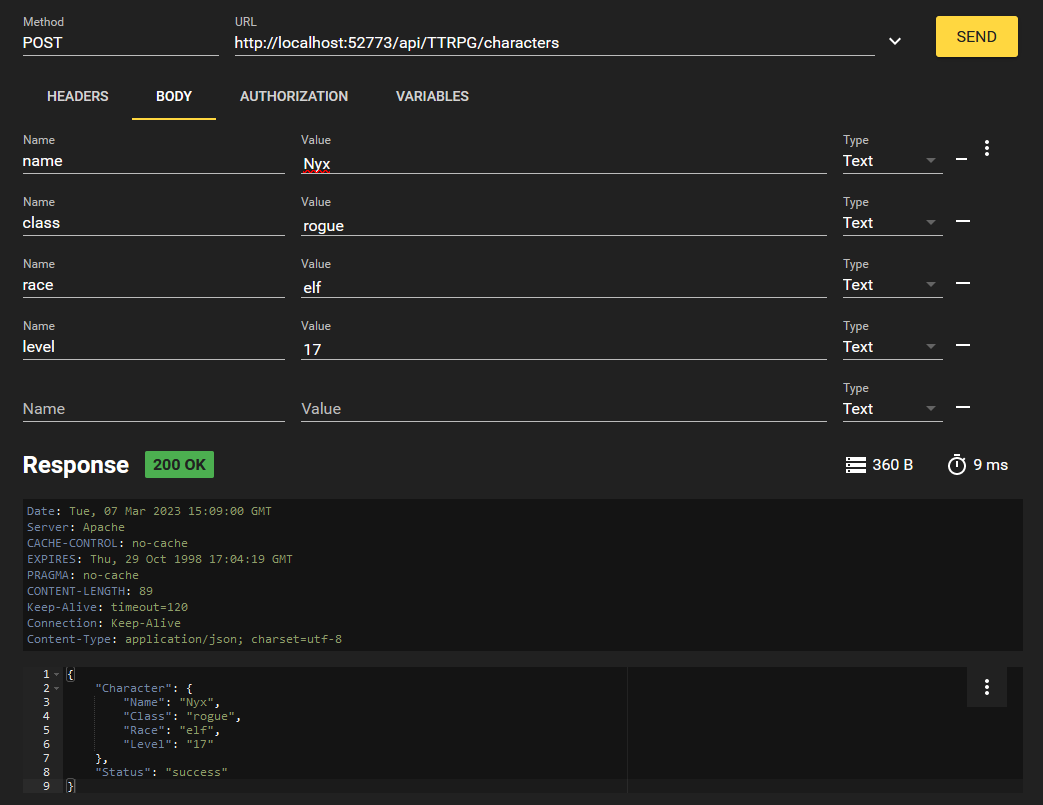
character creation

Using the bearer token as a header in the format of "Authorization: Bearer {JWTValue}". In a curl request, you can write this with -H "Authorization: Bearer {JWTValue}"

Let's create another character for fun, use whichever values you'd like.

Now let's trying listing out all characters that exist in the database.

listing characters

We get our two characters we made back! But what if we just wanted to access one? Well, we implemented that with the /characters/{charName} endpoint. We can format that request like this:

retrieving specific character

That's our REST API at work, folks! When done with your session, you can logout at the /logout endpoint using your JWT. This will revoke the JWT and blacklist it so you cannot use it again.

Conclusion

InterSystems IRIS version 2022.2+ features the ability to authenticate to a REST API using JSON web tokens (JWTs). This feature enhances security by limiting password use and setting an expiration date on access to the API.

I hope this primer on generating a REST API and securing it with JWTs through IRIS was helpful. Please let me know if it was! I appreciate any feedback.

3
11 1981
Article Ariel Glikman · Apr 15, 2025 4m read

If you look at the values.yaml of the IKO's Helm chart you'll find:

useIrisFsGroup:false

Let's break down what it is and in what situations you may want to set it to true.

FsGroup refers to the file system group.

By default, Kubernetes volumes are owned by root, but we need IRIS to own its files (IRIS in containers is installed under irisowner user). To get around this we employ one of two methods:

1) initContainers

0
0 98