#InterSystems IRIS

1 Follower · 5.4K Posts

InterSystems IRIS is a Complete Data Platform
InterSystems IRIS gives you everything you need to capture, share, understand, and act upon your organization’s most valuable asset – your data.
As a complete platform, InterSystems IRIS eliminates the need to integrate multiple development technologies. Applications require less code, fewer system resources, and less maintenance.

Question Touggourt · Nov 11, 2025

Hi guys,

    set resource = {}
   set resource.resourceType     = "Patient"
   do resource.%Set("active",1,"boolean")
   set resource.gender           = "female"
   set resource.birthDate        = "1984-12-24"
   set resource."_birthDate"     = {}
   set resource."_birthDate".id  = "123456"
   set resource."_birthDate".extension = []
   set extension               = {}
   set extension.url            = "http://example.org/fhir/StructureDefinition/Holiday"
   set extension.valueString   = "Christmas"
   do resource."_birthDate".extension.%Push(extension)
   write resource.toJson()
2
1 14
InterSystems Official Dipak Bhujbal · Nov 10, 2025

Overview

This release introduces the FHIR Server 2025.10.0, delivering the latest standards compliance and performance improvements. It also enhances the Health Connect Cloud (HCC)upgrade process for greater reliability and adds new flexibility to Network Connect through prefix list support in VPN configurations.

New Features and Enhancements

0
0 19
Question Attila Toth · Nov 10, 2025

Hello!

I'm trying to create some foreign tables to a PostgreSQL database. In some cases, columns with certain datatypes cannot be consumed by IRIS and the following error is thrown:

 [SQLCODE: <-237>:<Schema import for foreign table did not return column metadata>]

  [%msg: <Unkown data type returned by external database>]

For example: serial4 typed ID columns are typical examples. Is it possible, what's the best way of resolving these datatypes, which- seemingly- don't have proper JDBC metadata mappings?

0
0 21
Article Dmitry Maslennikov · Oct 5, 2025 5m read

Introduction

The InterSystems IRIS Data Platform has long been known for its performance, interoperability, and flexibility across programming languages. For years, developers could use IRIS with Python, Java, JavaScript, and .NET — but Go (or Golang) developers were left waiting.

Golang Logo

That wait is finally over.

The new go-irisnative driver brings GoLang support to InterSystems IRIS, implementing the standard database/sql API. This means Go developers can now use familiar database tooling, connection pooling, and query interfaces to build applications powered by IRIS.


Why GoLang Support Matters

GoLang is a language designed for simplicity, concurrency, and performance — ideal for cloud-native and microservices-based architectures. It powers some of the world’s most scalable systems, including Kubernetes, Docker, and Terraform.

Bringing IRIS into the Go ecosystem enables:

  • Lightweight, high-performance services using IRIS as the backend.
  • Native concurrency for parallel query execution or background processing.
  • Seamless integration with containerized and distributed systems.
  • Idiomatic database access through Go’s database/sql interface.

This integration makes IRIS a perfect fit for modern, cloud-ready Go applications.

25
0 282
Article Tani Frankel · Feb 13, 2024 3m read

Following 2 local Webinars we had focused on VS Code ["Intro" and "Beyond Basics"; in Hebrew], I prepared for the participants some related links of relevant resources which we sent as a follow-up. Sharing them here as well for the benefit of the Community.
You are all of course welcome to add more useful resources.

2
5 589
Article Andrew Sklyarov · Nov 8, 2025 4m read

When I started my journey with InterSystems IRIS, especially in Interoperability, one of the initial and common questions I had was: how can I run something on an interval or schedule? In this topic, I want to share two simple classes that address this issue. I'm surprised that some similar classes are not located somewhere in EnsLib. Or maybe I didn't search well? Anyway, this topic is not meant to be complex work, just a couple of snippets for beginners.

0
0 28
Article José Pereira · Nov 7, 2025 8m read

Window functions in InterSystems IRIS let you perform powerful analytics — like running totals, rankings, and moving averages — directly in SQL.
They operate over a "window" of rows related to the current row, without collapsing results like GROUP BY.
This means you can write cleaner, faster, and more maintainable queries — no loops, no joins, no temp tables.

In this article let's understand the mechanics of window functions by addressing some common data analisys tasks.


Introduction to SQL Window Functions in InterSystems IRIS

SQL window functions are a powerful tool for data analysis.
They allow you to compute aggregates and rankings across rows while preserving individual row visibility.
Whether you're building dashboards, reports, or complex analytics, window functions simplify your logic and boost performance.

Note: I'm not an expert in window functions, but I’d like to share the insights and resources that helped me understand them. Suggestions or corrections are very welcome!


🚀 Why Window Functions Matter

Have you ever written multiple SQL queries, or even procedural loops, just to calculate running totals, ranks, or differences between rows?

Window functions let you do all that in a single SQL query.

They bring powerful analytics directly into SQL — no extra joins, no temporary tables, and no procedural loops.


🧠 What Are Window Functions?

A window function performs a calculation across a set of rows that are somehow related to the current row — this set of rows is called a window.

As depicted in Figure 1, unlike GROUP BY, window functions don’t collapse rows. They allow you to compute aggregates while still keeping each row visible.

Differences between Aggragraions and Window FunctionsFigure 1 - Differences between Aggregations and Window Functions

The general syntax looks like this:

window_function_name(...) OVER (
  PARTITION BY column_name
  ORDER BY column_name
  ROWS BETWEEN ...
)

Where:

  • PARTITION BY defines groups of rows (like "per customer" or "per department").
  • ORDER BY defines the order of rows within each partition.
  • ROWS BETWEEN ... defines which subset of rows are visible to the function (the window frame).

⚙️ Why Use Window Functions?

Before window functions, developers often had to:

  • Run multiple queries to get intermediate results.
  • Use temporary tables or subqueries to merge partial aggregates.
  • Write procedural code in ObjectScript to simulate ranking or running totals.

Window functions solve this neatly — one query, no loops, no extra state to manage.


🧩 Example 1 — Running Total Per Customer

Let’s start with a simple example: compute the running total of each customer’s orders over time.

🛠️ Create and Populate Table for the example

CREATE TABLE Orders (
  OrderID INT,
  CustomerID INT,
  OrderDate DATE,
  OrderAmount DECIMAL(10,2)
)

INSERT INTO Orders (OrderID, CustomerID, OrderDate, OrderAmount)
SELECT 1, 101, '2023-01-01', 100.00 UNION
SELECT 2, 101, '2023-01-05', 150.00 UNION
SELECT 3, 102, '2023-01-02', 200.00 UNION
SELECT 4, 101, '2023-01-10', 50.00 UNION
SELECT 5, 102, '2023-01-07', 100.00 

❌ Without window functions — multiple queries

SELECT
  o1.CustomerID,
  o1.OrderDate,
  SUM(o2.OrderAmount) AS RunningTotal
FROM Orders o1
JOIN Orders o2
  ON o1.CustomerID = o2.CustomerID
  AND o2.OrderDate <= o1.OrderDate
GROUP BY o1.CustomerID, o1.OrderDate
ORDER BY o1.CustomerID, o1.OrderDate

Result:

CustomerIDOrderDateRunningTotal
1012023-01-01100
1012023-01-05250
1012023-01-10300
1022023-01-02200
1022023-01-07300

This works, but it needs a self-join and a GROUP BY, and becomes expensive for large datasets. Window functions allow to write a much more clean SQL query.

✅ With window functions — one query

SELECT
  CustomerID,
  OrderDate,
  SUM(OrderAmount) OVER (
    PARTITION BY CustomerID
    ORDER BY OrderDate
  ) AS RunningTotal
FROM Orders
ORDER BY CustomerID, OrderDate

Result:

CustomerIDOrderDateRunningTotal
1012023-01-01100
1012023-01-05250
1012023-01-10300
1022023-01-02200
1022023-01-07300

Let's break down each statement in the window function syntax:

  • PARTITION BY CustomerID Ensures that the running total is calculated separately for each customer. Without this, the sum would span across all customers.

  • ORDER BY OrderDate Defines the sequence of orders for each customer, so the running total accumulates in chronological order.

  • SUM(OrderAmount) OVER (...) This is the window function applied over the partitions. In this case, it computes the sum of OrderAmount for each row, accumulating them, including all previous rows in the same partition (customer) up to that point.
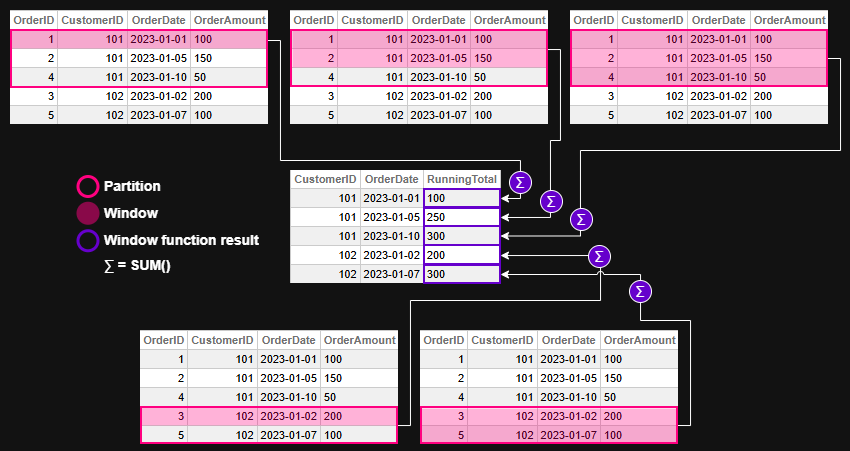
Window function evaluation - example 1Figure 2 - Window function evaluation for example 1

💡 Example 2 — Ranking Employees by Salary

🛠️ Create and Populate Table for the example

CREATE TABLE Employees (
  EmployeeID INT,
  Department VARCHAR(50),
  Name VARCHAR(100),
  Salary DECIMAL(10,2)
)

INSERT INTO Employees (EmployeeID, Department, Name, Salary)
SELECT 1, 'Sales', 'Alice', 70000 UNION
SELECT 2, 'Sales', 'Bob', 65000 UNION
SELECT 3, 'HR', 'Carol', 60000 UNION
SELECT 4, 'HR', 'Dave', 62000 UNION
SELECT 5, 'Sales', 'Eve', 72000

❌ Without window functions — Dynamic SQL and ObjectScript loops

ClassMethod RankEmployeesBySalary()
{
    Set tSQL = "SELECT Department, EmployeeID, Salary " _
              "FROM Employees ORDER BY Department, Salary DESC"
    Set tRS = ##class(%SQL.Statement).%ExecDirect(, tSQL)

    Set prevDept = ""
    Set rank = 0

    While tRS.%Next() {
        Set dept = tRS.%Get("Department")
        Set emp = tRS.%Get("EmployeeID")
        Set sal = tRS.%Get("Salary")

        If dept '= prevDept {
            Set rank = 1
        } Else {
            Set rank = rank + 1
        }

        Write "Dept: ", dept, " | Emp: ", emp, " | Rank: ", rank, " | Salary: ", sal, !
        Set prevDept = dept
    }
}

Result:

USER>Do ##class(tmp.Teste1).RankEmployeesBySalary()
Dept: HR | Emp: 4 | Rank: 1 | Salary: 62000
Dept: HR | Emp: 3 | Rank: 2 | Salary: 60000
Dept: Sales | Emp: 5 | Rank: 1 | Salary: 72000
Dept: Sales | Emp: 1 | Rank: 2 | Salary: 70000
Dept: Sales | Emp: 2 | Rank: 3 | Salary: 65000

✅ With window functions — one declarative SQL

SELECT
  Department,
  EmployeeID,
  Salary,
  RANK() OVER (
    PARTITION BY Department
    ORDER BY Salary DESC
  ) AS SalaryRank
FROM Employees
ORDER BY Department, SalaryRank

Result:

DepartmentEmployeeIDSalarySalaryRank
HR4620001
HR3600002
Sales5720001
Sales1700002
Sales2650003

Let's break down each statement in the window function syntax:

  • PARTITION BY Department
    Ensures that ranking is calculated separately within each department. Without this clause, employees would be ranked across the entire company, ignoring departmental boundaries.

  • ORDER BY Salary DESC
    Sorts employees within each department from highest to lowest salary. This determines the ranking order — higher salaries get lower rank numbers.

  • RANK() OVER (...)
    Applies the ranking function over each department's sorted list. It assigns a rank to each employee based on their salary, with ties receiving the same rank and gaps appearing in the sequence.

Window function evaluation - example 2Figure 3 - Window function evaluation for example 2


🧩 Example 3 — Moving Average of Daily Sales

Let’s illustrate how ROWS BETWEEN works with a moving average.

🛠️ Create and Populate Table for the example

CREATE TABLE DailySales (
  SaleDate DATE,
  Amount DECIMAL(10,2)
)

INSERT INTO DailySales (SaleDate, Amount)
SELECT '2023-01-01', 100 UNION 
SELECT '2023-01-02', 150 UNION
SELECT '2023-01-03', 200 UNION
SELECT '2023-01-04', 250 UNION
SELECT '2023-01-05', 300

❌ Without window functions — multiple queries and ObjectScript loops

ClassMethod MovingAverageWithoutWindow()
{
    // Query all sales ordered by date
    Set sql = "SELECT SaleDate, Amount FROM DailySales ORDER BY SaleDate"
    Set stmt = ##class(%SQL.Statement).%New()
    Set status = stmt.%Prepare(sql)
    If $$$ISERR(status) {
        Write "SQL Prepare failed: ", status, !
        Quit
    }

    Set rset = stmt.%Execute()

    // Store rows in memory for lookback
    Set rowCount = 0
    While rset.%Next() {
        Set rowCount = rowCount + 1
        Set sales(rowCount, "Date") = rset.%Get("SaleDate")
        Set sales(rowCount, "Amount") = rset.%Get("Amount")
    }

    // Loop through and calculate 3-day moving average
    For i = 1:1:rowCount {
        Set total = 0
        Set count = 0

        For j = i-2:1:i {
            If j >= 1 {
                Set total = total + sales(j, "Amount")
                Set count = count + 1
            }
        }

        Set movingAvg = total / count
        Write "Date: ", sales(i, "Date"), " | Amount: ", sales(i, "Amount"), " | MovingAvg: ", $FN(movingAvg, "", 2), !
    }
}

Result:

USER>Do ##class(tmp.Teste1).MovingAverageWithoutWindow()
Date: 66475 | Amount: 100 | MovingAvg: 100.00
Date: 66476 | Amount: 150 | MovingAvg: 125.00
Date: 66477 | Amount: 200 | MovingAvg: 150.00
Date: 66478 | Amount: 250 | MovingAvg: 200.00
Date: 66479 | Amount: 300 | MovingAvg: 250.00

✅ With window functions — one declarative SQL

SELECT
  SaleDate,
  Amount,
  AVG(Amount) OVER (
    ORDER BY SaleDate
    ROWS BETWEEN 2 PRECEDING AND CURRENT ROW
  ) AS MovingAvg
FROM DailySales
ORDER BY SaleDate

This computes the average of the current day and the two previous days — a rolling 3-day average.

Result:

SaleDateAmountMovingAvg
2023-01-01100100
2023-01-02150125
2023-01-03200150
2023-01-04250200
2023-01-05300250

Let's break down each statement in the window function syntax:

  • ORDER BY SaleDate
    Defines the chronological order of sales, which is essential for calculating a time-based moving average.

  • ROWS BETWEEN 2 PRECEDING AND CURRENT ROW
    Specifies the window frame: the current row and the two rows before it. This creates a rolling 3-day window for the average calculation.

  • AVG(Amount) OVER (...)
    Applies the window function to compute the average of Amount across the defined frame. For each row, it includes the current day and the two previous days in the calculation.

Window function evaluation - example 3Figure 4 - Window function evaluation for example 3

Note that there's no PARTITION BY in this example. This is because the goal is to calculate the moving average across all daily sales, not separately by category, region, or customer.

Using PARTITION BY would split the data into independent groups, causing the moving average to reset within each partition. Since we want a continuous rolling average over time — treating the dataset as a single chronological sequence — we omit PARTITION BY to keep the window unbroken. But off course you can use it if it makes sense for your query requirements.


🏁 Key Takeaway

Window functions let you express what used to require multiple queries or procedural code in a single, elegant SQL statement.

They make your queries more readable, your code more maintainable, and your analytics faster — all without leaving SQL.


🧭 Final Thoughts

Window functions in InterSystems IRIS offer a powerful and elegant way to perform complex analytics directly in SQL. Whether you're calculating running totals, assigning ranks, or computing moving averages, these functions simplify your logic and improve performance — all while keeping your queries readable and maintainable.

By embracing window functions, you unlock a deeper level of insight from your data without resorting to procedural code or convoluted joins. They’re not just a convenience — they’re a leap forward in how we think about SQL analytics.

You can checkout more details and more window function in the Window Functions reference in IRIS documentation.


This article was written with the help of AI tools to clarify concepts and improve readability.

0
0 55
Article Pietro Di Leo · Sep 24, 2025 23m read

Table of Contents

  1. Purpose of the article
  2. What containers are and why they make sense with IRIS
     2.1 Containers and images in a nutshell
     2.2 Why containers are useful for developers
     2.3 Why IRIS works well with Docker
  3. Prerequisites
  4. Installing the InterSystems IRIS image
     4.1 Using Docker Hub
     4.2 Pulling the image
  5. Running the InterSystems IRIS image
     5.1 Starting an IRIS container
     5.2 Checking container status
     5.3 Executing code in the container terminal
     5.4 Accessing the IRIS Management Portal
     5.5 Connecting the container to VS Code
     5.6 Stopping or removing the container
     5.7 Setting a specific password with a bind mount
     5.8 Using durable %SYS volumes
      5.8.1 What gets stored with durable %SYS
      5.8.2 How to enable durable %SYS
  6. Using Docker Compose
     6.1 Docker Compose example
     6.2 Running Docker Compose
  7. Using a Dockerfile to run custom source code
     7.1 Dockerfile example
     7.2 Docker Compose example
     7.3 Understanding layers, image tagging and build vs. run time
     7.4 Source code and init script
     7.5 Building the image with Dockerfile
     7.6 Running instructions in the containerized IRIS terminal
  8. Conclusion and what’s next
6
6 217
InterSystems Official Aya Heshmat · Mar 27, 2025 4m read

The Interoperability user interface now includes modernized user experiences for the DTL Editor and Production Configuration applications that are available for opt-in in all interoperability products. You can switch between the modernized and standard views. All other Interoperability screens remain in the Standard user interface. Please note that changes are limited to these two applications and we identify below the functionality that is currently available. 

23
4 707
Article Andreas Schneider · Apr 22, 2025 4m read

When using standard SQL or the object layer in InterSystems IRIS, metadata consistency is usually maintained through built-in validation and type enforcement. However, legacy systems that bypass these layers—directly accessing globals—can introduce subtle and serious inconsistencies.

2
0 150
Article Tomoko Furuzono · Nov 6, 2025 2m read

InterSystems FAQ rubric

When exporting using the Export() method of the %Library.Global class, if the export format (fourth argument: OutputFormat) is set to 7, "Block format/Caché block format (%GOF)," mapped globals cannot be exported (only globals in the default global database of the namespace are exported). To export mapped globals in "Block format/Caché block format (%GOF)," specify the database directory to which you want to map them in the first parameter of %Library.Global.Export().

An example of execution is shown below. 

0
0 24
Question Norman W. Freeman · Nov 5, 2025

The following regex is matching while I think it should not :

write$match("♥","\?") //print '1' (unexpected)

It should only match the '?' character. I think what happen is the ♥ character got converted to '?' (as it's not within regular ascii range) before being validated by the regex engine.

In fact, this give a clue about what happen : 

write$char($ascii("♥")) //print '?'

Is this an IRIS well known limitation, is there workarounds ? Should I report it to InterSystems ?

7
0 64
Article Ashok Kumar T · Oct 20, 2025 11m read

What is XML?

XML(eXtensible Markup Language) is a flexible, text-based, andplatform-independentformat used to store and transport data in a well-structured way that is both human- and machine-readable. XML permits users to define custom tags to describe the meaning and organization of their data. For example: <book><title>The Hitchhiker's Guide</title></book>.

3
5 163
Article Ashok Kumar T · Feb 17, 2025 6m read

What is JWT?

JWT (JSON Web Token) is an open standard (RFC 7519) that offers a lightweight, compact, and self-contained method for securely transmitting information between two parties. It is commonly used in web applications for authentication, authorization, and information exchange.

A JWT is typically composed of three parts:

1. JOSE (JSON Object Signing and Encryption) Header
2. Payload
3. Signature

These parts are encoded in Base64Url format and concatenated with dots (.) separating them.

Structure of a JWT

Header

{ "alg": "HS256", "typ": "JWT"}

Payload

3
8 389
InterSystems Official Carmen Logue · Nov 5, 2025

InterSystems IRIS Adaptive Analytics version 2025.4.1 is now available from the InterSystems Software Distribution page.  This release includes AtScale 2025.4.1 and is compatible with the existing  Adaptive Analytics User-Defined Aggregate Function (UDAF) file - 2024.1.  New features included in AtSCale's 2025 releases include:

  • Several MDX improvements to better handle null values and semi-additive measures like year-to-date.
  • New parameters to enable setting the visibility of calculations and calculation groups in BI tools.
  • Support for inbound query crossjoins that return empty cells
0
0 30
Article Pravin Barton · May 1, 2020 1m read

ObjectScript doesn't include any built-in method for appending one JSON dynamic array to another. Here's a code snippet I use that's equivalent to the JavaScript concat() method.

Call it with any number of arguments to concatenate them into a new array. If an argument is a dynamic array, its elements will be added. Otherwise the argument itself will be added.

ClassMethod ConcatArrays(pArgs...) As %DynamicArray
{
	set outArray = ##class(%DynamicArray).%New()
	for i=1:1:pArgs {
		set arg = pArgs(i)
		if ($IsObject(arg) && arg.%IsA("%DynamicArray")) {
			set iter = arg.%GetIterator()
			while iter.%GetNext(.key, .value) {
				do outArray.%Push(value)
			}
		} else {
			do outArray.%Push(arg)
		}
	}
	return outArray
}

Feel free to let me know if there's a better way to do this!

6
4 942
Article Theo Stolker · Feb 17, 2025 2m read

For one of our customers I had to integrate with the AFAS imageconnector endpoint /imageconnector/{imageId}?format={format}. This endpoint returns in a json message with the image as a base64-encoded string property, in addition to the mimetype for the image:

/// Image Object
Class Mycustomer.Model.AfasGet.Image Extends (%SerialObject, %XML.Adaptor, %JSON.Adaptor)
{
/// file data (base64 encoded)
Property Filedata As %String(%JSONFIELDNAME = "filedata");

/// MimeType e.g. "image/jpeg"
Property MimeType As %String(%JSONFIELDNAME = "mimetype");
}

In the Message class, we tried handling this like:

Property Image As Mycustomer.Model.AfasGet.Image;

/// AFAS GetImage response
/// get /imageconnector/{imageId}?format={format}
Method LoadFromResponse(httpResponse As %Net.HttpResponse, caller As %String = "") As %Status
{
	Set sc = $$$OK

	If $$$LOWER($Piece(httpResponse.ContentType,";",1))="application/json",httpResponse.StatusCode = "200" {
		set ..Image = ##class(Mycustomer.Model.AfasGet.Image).%New()
		set ..status = ..Image.%JSONImport(httpResponse.Data)
	}

	Return sc
}

This all worked fine until at some point the size of the filedata became larger than the $$$MaxStringLength (3641144), in which case a MAXSTRING exception was raised.

The logical next step was to change the type of the filedata property to %Stream.GlobalCharacter:

/// Image Object
Class Mycustomer.Model.AfasGet.Image Extends (%SerialObject, %XML.Adaptor, %JSON.Adaptor)
{
/// file data (base64 encoded)
Property Filedata As %Stream.GlobalCharacter(%JSONFIELDNAME = "filedata");

/// MimeType e.g. "image/jpeg"
Property MimeType As %String(%JSONFIELDNAME = "mimetype");
}

But that didn't work, %JSONImport() would still raise a MAXSTRING error.

I then tried Python, but as I am not a python wizard, I gave up on that route eventually.

Thanks to the answer from https://community.intersystems.com/user/steven-hobbs on https://community.intersystems.com/post/maxstring-trying-read-string-json-object#comment-250216, I then learned that it is possible and straightforward to retrieve json string properties into a stream using image.%Get("filedata", , "stream")):

Method LoadFromResponse(httpResponse As %Net.HttpResponse, caller As %String = "") As %Status
{
	Set sc = $$$OK

	If $$$LOWER($Piece(httpResponse.ContentType,";",1))="application/json",httpResponse.StatusCode = "200" {
		set ..Image = ##class(Mycustomer.Model.AfasGet.Image).%New()
		set image = {}.%FromJSON(httpResponse.Data)
		set ..Image.MimeType = image.mimetype
		set ..Image.Filedata = ##class(%Stream.GlobalCharacter).%New()
		do ..Image.Filedata.CopyFrom(image.%Get("filedata", , "stream"))
	}

	Return sc
}

I am still puzzled as how I would be able to instruct the %JSON.Adaptor class and use the built-in logic to map to a stream. If there is anyone out there that knows how to do this, please let me know!

3
1 283
Article Mario Sanchez Macias · Feb 19, 2025 4m read


So, you checked your server and saw that IRISTEMP is growing too much. There's no need to panic. Let’s investigate the issue before your storage runs out.

Step 1: Confirm the IRISTEMP Growth Issue

Before assuming IRISTEMP is the problem, let’s check its actual size.

Check the Free Space

Run the following command in the IRIS terminal:

%SYS>do ^%FREECNT

When prompted, enter:

Database directory to show free space for (*=All)? /<your_iris_directory>/mgr/iristemp/
4
4 338
Article Rob Tweed · Feb 26, 2025 6m read

Introduction

My guess is that most IRIS developers create their applications using its native ObjectScript language or, if using an external language, then most likely using either Java, Python or perhaps C++.

I suspect that only a minority have considered using JavaScript as their language of choice, which, if true, is a great shame, because, In my opinion and experience, JavaScript is the closest equivalent to ObjectScript in terms of its ability to integrate with the IRIS's underlying multi-dimensional database. 

1
2 270
Article Corentin Blondeau · Feb 24, 2025 4m read

Hello
This article follows up on the question I had asked the community UDP Adapter not working
In this article, I will present to you
1) What is "UDP"?
2) The current state of Iris with UDP
3) My solution with the UDP adapter


1) What is "UDP"?

UDP stands for User Datagram Protocol. It is one of the core protocols of the Internet Protocol (IP) suite, used for transmitting data over a network. Here are some key features of UDP:

4
4 257
Article Jinyao · Feb 21, 2025 4m read

Motivation

I didn't know about ObjectScript until I started my new job. Objectscript isn't actually a young programming language. Compared to C++, Java and Python, the community isn't as active, but we're keen to make this place more vibrant, aren't we?

I've noticed that some of my colleagues are finding it tricky to get their heads around the class relationships in these huge projects. There aren't any easy-to-use modern class diagram tool for ObjectScript.

Related Work

I have tried relavant works:

10
4 473
Article Andrew Sklyarov · Nov 2, 2025 7m read

Over time, while I was working with Interoperability on the IRIS Data Platform, I developed rules for organizing a project code into packages and classes. That is what is called a Naming Convention, usually. In this topic, I want to organize and share these rules. I hope it can be helpful for somebody.


4
2 82