0 Followers · 1.1K Posts

SQL is a standard language for storing, manipulating and retrieving data in relational databases.

Question Attila Toth · Nov 10, 2025

Hello!

I'm trying to create some foreign tables to a PostgreSQL database. In some cases, columns with certain datatypes cannot be consumed by IRIS and the following error is thrown:

 [SQLCODE: <-237>:<Schema import for foreign table did not return column metadata>]

  [%msg: <Unkown data type returned by external database>]

For example: serial4 typed ID columns are typical examples. Is it possible, what's the best way of resolving these datatypes, which- seemingly- don't have proper JDBC metadata mappings?

0
0 21
Article Muhammad Waseem · Feb 28, 2025 7m read

Hi Community, 
In this article, we will explore the concepts of Dynamic SQL and Embedded SQL within the context of InterSystems IRIS, provide practical examples, and examine their differences to help you understand how to leverage them in your applications.

InterSystems SQL provides a full set of standard relational features, including the ability to define table schema, execute queries, and define and execute stored procedures. You can execute InterSystems SQL interactively from the Management Portal or programmatically using a SQL shell interface. Embedded SQL enables you to embed SQL statements in your ObjectScript code, while Dynamic SQL enables you to execute dynamic SQL statements from ObjectScript at runtime. While static SQL queries offer predictable performance, dynamic and embedded SQL offer flexibility and integration, respectively.

8
4 376
Article José Pereira · Nov 7, 2025 8m read

Window functions in InterSystems IRIS let you perform powerful analytics — like running totals, rankings, and moving averages — directly in SQL.
They operate over a "window" of rows related to the current row, without collapsing results like GROUP BY.
This means you can write cleaner, faster, and more maintainable queries — no loops, no joins, no temp tables.

In this article let's understand the mechanics of window functions by addressing some common data analisys tasks.


Introduction to SQL Window Functions in InterSystems IRIS

SQL window functions are a powerful tool for data analysis.
They allow you to compute aggregates and rankings across rows while preserving individual row visibility.
Whether you're building dashboards, reports, or complex analytics, window functions simplify your logic and boost performance.

Note: I'm not an expert in window functions, but I’d like to share the insights and resources that helped me understand them. Suggestions or corrections are very welcome!


🚀 Why Window Functions Matter

Have you ever written multiple SQL queries, or even procedural loops, just to calculate running totals, ranks, or differences between rows?

Window functions let you do all that in a single SQL query.

They bring powerful analytics directly into SQL — no extra joins, no temporary tables, and no procedural loops.


🧠 What Are Window Functions?

A window function performs a calculation across a set of rows that are somehow related to the current row — this set of rows is called a window.

As depicted in Figure 1, unlike GROUP BY, window functions don’t collapse rows. They allow you to compute aggregates while still keeping each row visible.

Differences between Aggragraions and Window FunctionsFigure 1 - Differences between Aggregations and Window Functions

The general syntax looks like this:

window_function_name(...) OVER (
  PARTITION BY column_name
  ORDER BY column_name
  ROWS BETWEEN ...
)

Where:

  • PARTITION BY defines groups of rows (like "per customer" or "per department").
  • ORDER BY defines the order of rows within each partition.
  • ROWS BETWEEN ... defines which subset of rows are visible to the function (the window frame).

⚙️ Why Use Window Functions?

Before window functions, developers often had to:

  • Run multiple queries to get intermediate results.
  • Use temporary tables or subqueries to merge partial aggregates.
  • Write procedural code in ObjectScript to simulate ranking or running totals.

Window functions solve this neatly — one query, no loops, no extra state to manage.


🧩 Example 1 — Running Total Per Customer

Let’s start with a simple example: compute the running total of each customer’s orders over time.

🛠️ Create and Populate Table for the example

CREATE TABLE Orders (
  OrderID INT,
  CustomerID INT,
  OrderDate DATE,
  OrderAmount DECIMAL(10,2)
)

INSERT INTO Orders (OrderID, CustomerID, OrderDate, OrderAmount)
SELECT 1, 101, '2023-01-01', 100.00 UNION
SELECT 2, 101, '2023-01-05', 150.00 UNION
SELECT 3, 102, '2023-01-02', 200.00 UNION
SELECT 4, 101, '2023-01-10', 50.00 UNION
SELECT 5, 102, '2023-01-07', 100.00 

❌ Without window functions — multiple queries

SELECT
  o1.CustomerID,
  o1.OrderDate,
  SUM(o2.OrderAmount) AS RunningTotal
FROM Orders o1
JOIN Orders o2
  ON o1.CustomerID = o2.CustomerID
  AND o2.OrderDate <= o1.OrderDate
GROUP BY o1.CustomerID, o1.OrderDate
ORDER BY o1.CustomerID, o1.OrderDate

Result:

CustomerIDOrderDateRunningTotal
1012023-01-01100
1012023-01-05250
1012023-01-10300
1022023-01-02200
1022023-01-07300

This works, but it needs a self-join and a GROUP BY, and becomes expensive for large datasets. Window functions allow to write a much more clean SQL query.

✅ With window functions — one query

SELECT
  CustomerID,
  OrderDate,
  SUM(OrderAmount) OVER (
    PARTITION BY CustomerID
    ORDER BY OrderDate
  ) AS RunningTotal
FROM Orders
ORDER BY CustomerID, OrderDate

Result:

CustomerIDOrderDateRunningTotal
1012023-01-01100
1012023-01-05250
1012023-01-10300
1022023-01-02200
1022023-01-07300

Let's break down each statement in the window function syntax:

  • PARTITION BY CustomerID Ensures that the running total is calculated separately for each customer. Without this, the sum would span across all customers.

  • ORDER BY OrderDate Defines the sequence of orders for each customer, so the running total accumulates in chronological order.

  • SUM(OrderAmount) OVER (...) This is the window function applied over the partitions. In this case, it computes the sum of OrderAmount for each row, accumulating them, including all previous rows in the same partition (customer) up to that point.
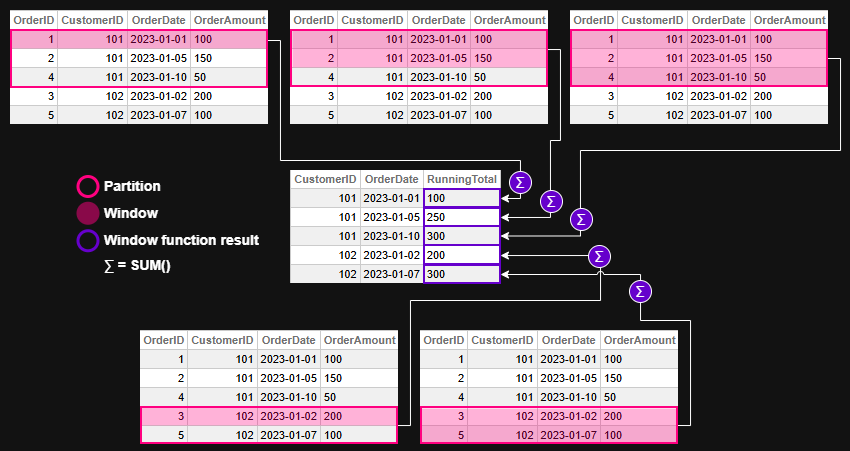
Window function evaluation - example 1Figure 2 - Window function evaluation for example 1

💡 Example 2 — Ranking Employees by Salary

🛠️ Create and Populate Table for the example

CREATE TABLE Employees (
  EmployeeID INT,
  Department VARCHAR(50),
  Name VARCHAR(100),
  Salary DECIMAL(10,2)
)

INSERT INTO Employees (EmployeeID, Department, Name, Salary)
SELECT 1, 'Sales', 'Alice', 70000 UNION
SELECT 2, 'Sales', 'Bob', 65000 UNION
SELECT 3, 'HR', 'Carol', 60000 UNION
SELECT 4, 'HR', 'Dave', 62000 UNION
SELECT 5, 'Sales', 'Eve', 72000

❌ Without window functions — Dynamic SQL and ObjectScript loops

ClassMethod RankEmployeesBySalary()
{
    Set tSQL = "SELECT Department, EmployeeID, Salary " _
              "FROM Employees ORDER BY Department, Salary DESC"
    Set tRS = ##class(%SQL.Statement).%ExecDirect(, tSQL)

    Set prevDept = ""
    Set rank = 0

    While tRS.%Next() {
        Set dept = tRS.%Get("Department")
        Set emp = tRS.%Get("EmployeeID")
        Set sal = tRS.%Get("Salary")

        If dept '= prevDept {
            Set rank = 1
        } Else {
            Set rank = rank + 1
        }

        Write "Dept: ", dept, " | Emp: ", emp, " | Rank: ", rank, " | Salary: ", sal, !
        Set prevDept = dept
    }
}

Result:

USER>Do ##class(tmp.Teste1).RankEmployeesBySalary()
Dept: HR | Emp: 4 | Rank: 1 | Salary: 62000
Dept: HR | Emp: 3 | Rank: 2 | Salary: 60000
Dept: Sales | Emp: 5 | Rank: 1 | Salary: 72000
Dept: Sales | Emp: 1 | Rank: 2 | Salary: 70000
Dept: Sales | Emp: 2 | Rank: 3 | Salary: 65000

✅ With window functions — one declarative SQL

SELECT
  Department,
  EmployeeID,
  Salary,
  RANK() OVER (
    PARTITION BY Department
    ORDER BY Salary DESC
  ) AS SalaryRank
FROM Employees
ORDER BY Department, SalaryRank

Result:

DepartmentEmployeeIDSalarySalaryRank
HR4620001
HR3600002
Sales5720001
Sales1700002
Sales2650003

Let's break down each statement in the window function syntax:

  • PARTITION BY Department
    Ensures that ranking is calculated separately within each department. Without this clause, employees would be ranked across the entire company, ignoring departmental boundaries.

  • ORDER BY Salary DESC
    Sorts employees within each department from highest to lowest salary. This determines the ranking order — higher salaries get lower rank numbers.

  • RANK() OVER (...)
    Applies the ranking function over each department's sorted list. It assigns a rank to each employee based on their salary, with ties receiving the same rank and gaps appearing in the sequence.

Window function evaluation - example 2Figure 3 - Window function evaluation for example 2


🧩 Example 3 — Moving Average of Daily Sales

Let’s illustrate how ROWS BETWEEN works with a moving average.

🛠️ Create and Populate Table for the example

CREATE TABLE DailySales (
  SaleDate DATE,
  Amount DECIMAL(10,2)
)

INSERT INTO DailySales (SaleDate, Amount)
SELECT '2023-01-01', 100 UNION 
SELECT '2023-01-02', 150 UNION
SELECT '2023-01-03', 200 UNION
SELECT '2023-01-04', 250 UNION
SELECT '2023-01-05', 300

❌ Without window functions — multiple queries and ObjectScript loops

ClassMethod MovingAverageWithoutWindow()
{
    // Query all sales ordered by date
    Set sql = "SELECT SaleDate, Amount FROM DailySales ORDER BY SaleDate"
    Set stmt = ##class(%SQL.Statement).%New()
    Set status = stmt.%Prepare(sql)
    If $$$ISERR(status) {
        Write "SQL Prepare failed: ", status, !
        Quit
    }

    Set rset = stmt.%Execute()

    // Store rows in memory for lookback
    Set rowCount = 0
    While rset.%Next() {
        Set rowCount = rowCount + 1
        Set sales(rowCount, "Date") = rset.%Get("SaleDate")
        Set sales(rowCount, "Amount") = rset.%Get("Amount")
    }

    // Loop through and calculate 3-day moving average
    For i = 1:1:rowCount {
        Set total = 0
        Set count = 0

        For j = i-2:1:i {
            If j >= 1 {
                Set total = total + sales(j, "Amount")
                Set count = count + 1
            }
        }

        Set movingAvg = total / count
        Write "Date: ", sales(i, "Date"), " | Amount: ", sales(i, "Amount"), " | MovingAvg: ", $FN(movingAvg, "", 2), !
    }
}

Result:

USER>Do ##class(tmp.Teste1).MovingAverageWithoutWindow()
Date: 66475 | Amount: 100 | MovingAvg: 100.00
Date: 66476 | Amount: 150 | MovingAvg: 125.00
Date: 66477 | Amount: 200 | MovingAvg: 150.00
Date: 66478 | Amount: 250 | MovingAvg: 200.00
Date: 66479 | Amount: 300 | MovingAvg: 250.00

✅ With window functions — one declarative SQL

SELECT
  SaleDate,
  Amount,
  AVG(Amount) OVER (
    ORDER BY SaleDate
    ROWS BETWEEN 2 PRECEDING AND CURRENT ROW
  ) AS MovingAvg
FROM DailySales
ORDER BY SaleDate

This computes the average of the current day and the two previous days — a rolling 3-day average.

Result:

SaleDateAmountMovingAvg
2023-01-01100100
2023-01-02150125
2023-01-03200150
2023-01-04250200
2023-01-05300250

Let's break down each statement in the window function syntax:

  • ORDER BY SaleDate
    Defines the chronological order of sales, which is essential for calculating a time-based moving average.

  • ROWS BETWEEN 2 PRECEDING AND CURRENT ROW
    Specifies the window frame: the current row and the two rows before it. This creates a rolling 3-day window for the average calculation.

  • AVG(Amount) OVER (...)
    Applies the window function to compute the average of Amount across the defined frame. For each row, it includes the current day and the two previous days in the calculation.

Window function evaluation - example 3Figure 4 - Window function evaluation for example 3

Note that there's no PARTITION BY in this example. This is because the goal is to calculate the moving average across all daily sales, not separately by category, region, or customer.

Using PARTITION BY would split the data into independent groups, causing the moving average to reset within each partition. Since we want a continuous rolling average over time — treating the dataset as a single chronological sequence — we omit PARTITION BY to keep the window unbroken. But off course you can use it if it makes sense for your query requirements.


🏁 Key Takeaway

Window functions let you express what used to require multiple queries or procedural code in a single, elegant SQL statement.

They make your queries more readable, your code more maintainable, and your analytics faster — all without leaving SQL.


🧭 Final Thoughts

Window functions in InterSystems IRIS offer a powerful and elegant way to perform complex analytics directly in SQL. Whether you're calculating running totals, assigning ranks, or computing moving averages, these functions simplify your logic and improve performance — all while keeping your queries readable and maintainable.

By embracing window functions, you unlock a deeper level of insight from your data without resorting to procedural code or convoluted joins. They’re not just a convenience — they’re a leap forward in how we think about SQL analytics.

You can checkout more details and more window function in the Window Functions reference in IRIS documentation.


This article was written with the help of AI tools to clarify concepts and improve readability.

0
0 55
Article Andreas Schneider · Apr 22, 2025 4m read

When using standard SQL or the object layer in InterSystems IRIS, metadata consistency is usually maintained through built-in validation and type enforcement. However, legacy systems that bypass these layers—directly accessing globals—can introduce subtle and serious inconsistencies.

2
0 150
Article Mario Sanchez Macias · Feb 19, 2025 4m read


So, you checked your server and saw that IRISTEMP is growing too much. There's no need to panic. Let’s investigate the issue before your storage runs out.

Step 1: Confirm the IRISTEMP Growth Issue

Before assuming IRISTEMP is the problem, let’s check its actual size.

Check the Free Space

Run the following command in the IRIS terminal:

%SYS>do ^%FREECNT

When prompted, enter:

Database directory to show free space for (*=All)? /<your_iris_directory>/mgr/iristemp/
4
4 338
Article Timothy Scott · Feb 28, 2025 7m read

High-Performance Message Searching in Health Connect

The Problem

Have you ever tried to do a search in Message Viewer on a busy interface and had the query time out? This can become quite a problem as the amount of data increases. For context, the instance of Health Connect I am working with does roughly 155 million Message Headers per day with 21 day message retention. To try and help with search performance, we extended the built-in SearchTable with commonly used fields in hopes that indexing these fields would result in faster query times. Despite this, we still couldn't get some of these queries to finish at all.

More Info Defining a Search Table Class.

image

For those of us working as HL7 integrators, we know that troubleshooting and responding to issues on a day-to-day basis is a huge part of our role. Quickly identifying and resolving these issues is critical to ensuring that we are maintaining the steady and accurate flow of data. Due to the poor search performance, we would have to gather very detailed information about each specific issue to find examples in Health Connect. Without a very narrow time frame (within a few minutes), we often were unable to get Message Viewer search to return any results before timing out. This caused a significant delay both in determining what the actual problem was and resolving it moving forward.

The Solution

This was not acceptable, so we had to find a solution in order to best serve our customers. Enter WRC.

image

We created a ticket, and I am happy to report a fix was identified. This fix involved going through our custom SearchTable fields and identifying which fields were not unique enough to warrant being treated as an index by the Message Viewer search.

For example, in our environment, MSH.4 (or FacilityID) is used to denote which physical hospital location the HL7 message is associated with. While this field is important to have on the SearchTable for ease of filtering, many messages come through each day for each facility. This means that it is inefficient to use this field as an index in the Message Viewer search. Counter to this would be a field like PID.18 (or Patient Account Number). The number of messages associated with each account number is very small, so using this field as an index greatly increases the speed of the search.

Adding the Unselective parameter to the appropriate items tells message search which ones to treat as indexes. This in essence modifies the SQL used to pull the messages. Below you will find the difference in queries, based on fields being used as index or not, and how you can use these queries to determine which fields should be Unselective.

Index vs NoIndex Queries

Unselective="false" (Indexed) SQL Query Plan

image

This query is looping over the SearchTable values and, for each row, cross-referencing the MessageHeader table. For a value that is unique and doesn’t have many messages associated with it (i.e. Patient Account Number), this is more efficient.

Unselective="true" (%NOINDEX) SQL Query Plan

image

This query is looping over the MessageHeader table and, for each row, cross-referencing the SearchTable values. For a value that has many results associated with it (i.e. FacilityID), this method is faster to return the results.

How to Identify Problem Fields

The best way I have found to identify which fields need to be marked as Unselective is with Show Query. Create a separate search using each field in Message Viewer (adding the SearchTable field via Add Criterion) then click Show Query to show you the actual SQL being used by Message Viewer to pull the messages based on the filters selected.

image

Our first example is using a field from the SearchTable that does not have the Unselected parameter added. Notice the EnsLib_HL7.SearchTable.PropId = 19 and EnsLib_HL7.SearchTable.PropValue = '2009036'. This indicates the SearchTable field added as a filter and what value is being checked. Keep in mind that the ProdId will be unique to each search table field and may change from environment to environment.

image

How to Add Show Query to Message Viewer

If you don’t have the Show Query button enabled in Message Viewer, you can set the following Global in your given namespace.

set ^Ens.Debug("UtilEnsMessages","sql")=1

Viewing the SQL Query Used by the Message Viewer

SQL - Unselective=“false”

SELECT TOP 100 
head.ID As ID, {fn RIGHT(%EXTERNAL(head.TimeCreated),999 )} As TimeCreated, 
head.SessionId As Session, head.Status As Status, 
CASE head.IsError 
WHEN 1 
THEN 'Error' ELSE 'OK' END As Error, head.SourceConfigName As Source, 
head.TargetConfigName As Target, head.SourceConfigName, head.TargetConfigName, 
head.MessageBodyClassName As BodyClassname, 
(SELECT LIST(PropValue) 
FROM EnsLib_HL7.SearchTable 
WHERE (head.MessageBodyId = DocId) And PropId=19) As SchTbl_FacilityID, 
EnsLib_HL7.SearchTable.PropId As SchTbl_PropId 
FROM Ens.MessageHeader head, EnsLib_HL7.SearchTable 
WHERE (((head.SourceConfigName = 'component_name' OR head.TargetConfigName = 'component_name')) 
AND head.MessageBodyClassName=(('EnsLib.HL7.Message')) 
AND (head.MessageBodyId = EnsLib_HL7.SearchTable.DocId) 
AND EnsLib_HL7.SearchTable.PropId = 19 AND EnsLib_HL7.SearchTable.PropValue = '2009036') 
ORDER BY head.ID Desc

Next, take that query into SQL and manually modify it to add %NOINDEX. This is what is telling the query to not treat this value as an index.

SQL - Unselective=”true” - %NOINDEX

SELECT TOP 100 
head.ID As ID, {fn RIGHT(%EXTERNAL(head.TimeCreated),999 )} As TimeCreated, 
head.SessionId As Session, head.Status As Status, 
CASE head.IsError 
WHEN 1 
THEN 'Error' ELSE 'OK' END As Error, head.SourceConfigName As Source, 
head.TargetConfigName As Target, head.SourceConfigName, head.TargetConfigName, 
head.MessageBodyClassName As BodyClassname, 
(SELECT LIST(PropValue) 
FROM EnsLib_HL7.SearchTable 
WHERE (head.MessageBodyId = DocId) And PropId=19) As SchTbl_FacilityID, 
EnsLib_HL7.SearchTable.PropId As SchTbl_PropId 
FROM Ens.MessageHeader head, EnsLib_HL7.SearchTable 
WHERE (((head.SourceConfigName = 'component_name' OR head.TargetConfigName = 'component_name')) 
AND head.MessageBodyClassName='EnsLib.HL7.Message' 
AND (head.MessageBodyId = EnsLib_HL7.SearchTable.DocId) 
AND EnsLib_HL7.SearchTable.PropId = 19 AND %NOINDEX EnsLib_HL7.SearchTable.PropValue = (('2009036'))) 
ORDER BY head.ID Desc

If there is a significant difference in the amount of time needed to return the first and second queries, then you have found a field that should be modified. In our case, we went from queries timing out after a few minutes to an almost instantaneous return.

Applying the Fix - Modifying Your Code

Once you have identified which fields need to be fixed, you can add the Unselective="true" to each affected Item in your custom SearchTable class. See the below example.

Custom SearchTable Class

/// Custom HL7 Search Table adds additional fields to index.
Class CustomClasses.SearchTable.CustomSearchTable Extends EnsLib.HL7.SearchTable
{

XData SearchSpec [ XMLNamespace = "http://www.intersystems.com/EnsSearchTable" ]
{
<Items>
		// Increase performance by setting Unselective="true" on fields that are not highly unique.
		// This essentially tells Message Search to not use an index on these fields.

		// facility ID in MSH.4
   		<Item DocType=""	PropName="FacilityID" Unselective="true">		[MSH:4]		</Item>
   		// Event Reason in EVN.4
   		<Item DocType=""	PropName="EventReason" Unselective="true">		[EVN:4]		</Item>
   		// Patient Account (Add PV1.19 to prebuilt PID.18 search)
   		<Item DocType=""	PropName="PatientAcct">		[PV1:19]	</Item>
   		// Document type
   		<Item DocType=""	PropName="DocumentType" Unselective="true">	[TXA:2]		</Item>
   		// Placer Order ID
   		<Item DocType=""	PropName="PlacerOrderID">	[OBR:2.1]	</Item>
   		// Filler Order ID
   		<Item DocType=""	PropName="FillerOrderID">	[OBR:3.1]	</Item>
   		// Universal Service ID
   		<Item DocType=""	PropName="ServiceID" Unselective="true">		[OBR:4.1]	</Item>
   		// Universal Service ID
   		<Item DocType=""	PropName="ProcedureName" Unselective="true">	[OBR:4.2]	</Item>		
   		// Diagnostic Service Section
   		<Item DocType=""	PropName="ServiceSectID" Unselective="true">	[OBR:24]	</Item>
   		// Appointment ID
   		<Item DocType=""	PropName="AppointmentID">	[SCH:2]		</Item>
   		// Provider Fields
   		<Item DocType=""	PropName="ProviderNameMFN">	[STF:3()]		</Item>
   		<Item DocType=""	PropName="ProviderIDsMFN">	[MFE:4().1]		</Item>
   		<Item DocType=""	PropName="ProviderIDsMFN">	[STF:1().1]		</Item>
   		<Item DocType=""	PropName="ProviderIDsMFN">	[PRA:6().1]		</Item>
	</Items>
}

Storage Default
{
<Type>%Storage.Persistent</Type>
}

}

Summary

Quick message searching is vital to day-to-day integration operations. By utilizing the Unselective property, it is now possible to maintain this functionality, despite an ever-growing database. With this quick and easy-to-implement change, you will be back on track to confidently providing service and troubleshooting issues in your Health Connect environment.

1
8 219
Question David.Satorres6134 · Oct 9, 2023

Hello all,

I'm trying to build a cube based on a linked table but seems that IRIS is not able to do it :O

Long story short, I have a linked table in IRIS that sources a Microsoft SQL table (using standard linked feature from the portal). It works fine, I can access it using SQL as many other times. On top of that, I've created in DeepSee (ok, Analytics) a cube that uses this class as source. It compiles correctly, no errors given. When I build it with 100 records, all goes well and using Analyzer I can see results.

1
0 195
Question Dmitrij Vladimirov · Oct 16, 2025

Hi community.
I have a query:

SELECT
nameField,
dateField,
anotherDateField
FROM
(      
SELECTMIN(someDate) as dateField,       
nameField,
anotherDateField
FROM $$$SOURCEWHERE $$$RESTRICT               
GROUPby someOtherField    
)
WHERE dateField >= anotherDateField

This query should filter the data by the minimum value of the somDate field, but it doesn't. It displays all values ​​together, regardless of the external filter. The exact same query (without the $$$ tokens, of course) works fine in a regular SQL runtime.
My guess is that the $$$RESTRICT does this

3
0 61
InterSystems Official Daniel Palevski · Oct 22, 2025

The 2025.1.2 and 2024.1.5 maintenance releases of InterSystems IRIS® data platform, InterSystems IRIS® for HealthTM, and HealthShare® Health Connect are now Generally Available (GA). These releases include the fixes for a number of recently issued alerts and advisories, including the following: 

0
0 59
Article Harshitha · Oct 22, 2025 2m read

Hello community,

I wanted to share my experience about working on Large Data projects. Over the years, I have had the opportunity to handle massive patient data, payor data and transactional logs while working in an hospital industry. I have had the chance to build huge reports which had to be written using advanced logics fetching data across multiple tables whose indexing was not helping me write efficient code.

Here is what I have learned about managing large data efficiently.

Choosing the right data access method.

As we all here in the community are aware of, IRIS provides multiple ways to access data. Choosing the right method, depends on the requirement.

  • Direct Global Access: Fastest for bulk read/write operations. For example, if i have to traverse through indexes and fetch patient data, I can loop through the globals to process millions of records. This will save a lot of time.
Set ToDate=+HSet FromDate=+$H-1ForSet FromDate=$O(^PatientD("Date",FromDate)) Quit:FromDate>ToDate  Do
. Set PatId=""ForSet PatId=$Order(^PatientD("Date",FromDate,PatID)) Quit:PatId=""Do
. . Write$Get(^PatientD("Date",FromDate,PatID)),!
  • Using SQL: Useful for reporting or analytical requirements, though slower for huge data sets.
6
1 102
Article Yuri Marx · Oct 2, 2024 14m read

In the modern world, the most valuable asset for companies is their data. Everything from business processes and applications to transactions is based on data which defines the success of the organization's operations, analysis, and decisions. In this scenario, the data structures need to be ready for frequent changes, yet in a managed and governed way. Otherwise, we will inevitably lose money, time, and quality of corporate solutions.For a long time, data management and governance were solely based on the data itself, with excellent backup, restoration, ACID (Atomicity, Consistency,

3
1 371
Question Mary George · Oct 8, 2025

Hi Team, 

Can I please check if anyone has built a simple web interface for maintaining custom SQL lookup class.   

We have a simple persistent class in HealthShare which is used for storing Pathology test codes. Test codes in this lookup class is used for message filtering and applying additional logic when processing pathology results/orders. 

We want to make this class available to external users from pathology (not the usual management portal users) to maintain so that they can add/edit/delete test codes as required. 

2
0 74
Question Krishnamuthu Venkatachalam · May 7, 2018

Is there a way to create a table for the results of a SQL statement ?

Example: Consider the below query and results.

Select ID,Name,DOB,Gender from EMS.EMS

RESULT 

ID NAME DOB Gender
1 Wijnschenk,Greta N. 03/09/2009 F
2 Klausner,Barbara L. 03/08/2014 M
3 Eastman,Liza X. 03/11/2000 F
4 O'Brien,Barb K. 03/07/2016 M
5 Anderson,Nataliya Y. 03/14/1991 F
6 Long,Debby Z. 03/12/1999 F
7 Rogers,Susan W. 03/12/1997 F
8 Ott,Lola J. 03/09/2009 F
9 Yu,Alice S. 03/14/1990 M
10 Wilson,Debby I. 03/12/1998 M
7
0 762
Article Iryna Mykhailova · Oct 13, 2025 8m read

In my previous article, Using LIKE with Variables and Patterns in SQL, we explored how the LIKE predicate behaves in different scenarios, from Embedded SQL to Dynamic SQL, and what happens to performance when wildcards and variables come into play. That piece was about getting comfortable writing a working LIKE query. But writing SQL that works is only the starting point. To build applications that are reliable, scalable, and secure, you need to understand the best practices that underpin all SQL, including queries that use LIKE.

This article takes the next step. We’ll look at a few key points to help strengthen your SQL code, avoid common pitfalls, and make sure your SELECT statements run not just correctly, but also efficiently and safely. I'll use SELECT statements with LIKE predicate as an example along the way, showing how these broader principles directly affect your queries and their results.

*This is what Gemini came up with for this article, kinda cute.

0
1 137
Article Pietro Di Leo · Oct 9, 2025 4m read

Introduction

In a previous article, I presented the IRIStool module, which seamlessly integrates the pandas Python library with the IRIS database. Now, I'm explaining how we can use IRIStool to leverage InterSystems IRIS as a foundation for intelligent, semantic search over healthcare data in FHIR format.

This article covers what I did to create the database for another of my projects, the FHIR Data Explorer. Both projects are candidates in the current InterSystems contest, so please vote for them if you find them useful.

You can find them at the Open Exchange:

In this article we'll cover:

  • Connecting to InterSystems IRIS database through Python
  • Creating a FHIR-ready database schema
  • Importing FHIR data with vector embeddings for semantic search
0
0 46
Article Pietro Di Leo · Oct 6, 2025 5m read

Hi everyone! 👋
I’m excited to share the project I’ve submitted to the current InterSystems .Net, Java, Python, and JavaScript Contest — it’s called IRIStool and Data Manager, and you can find it on the InterSystems Open Exchange and on my GitHub page.

1
2 67
Article Guilherme Tonelotti · Sep 25, 2025 2m read

When we need to integrate Caché/IRIS with other relational databases, one common question arises: “How do I set up the JDBC connection?”.
The official documentation doesn’t always provide a straightforward step-by-step guide, which can be frustrating, especially for beginners.

In this article, I’ll walk you through the entire process of configuring a JDBC connection with MySQL, from downloading the connector to linking tables in Caché/IRIS.

1
0 65
Question Gopal Mani · Oct 7, 2025

Hi Community,
I’m trying to execute a directory query in InterSystems IRIS using %SQL.Statement, but encountering an unexpected error.

Details:
The following command confirms that the directory exists:

Set dirPath="\\MYNETWORK_DRIVE\DFS-Shared_Product\GXM"
Write ##class(%File).DirectoryExists(dirPath)

It returns 1, meaning the path is valid and accessible.

However, when I try to execute this SQL query:

Set File=##Class(%SQL.Statement).%New()
Set Status=File.%PrepareClassQuery("%File","FileSet")
Set Result=File.%Execute(dirPath)
If Result.%SQLCODE {
    Write Result.%Message
}

I get the error:

3
0 62
Article Beatrice Zorzoli · Sep 10, 2025 4m read

I joined InterSystems less than a year ago. Diving into ObjectScript and IRIS was exciting, but also full of small surprises that tripped me up at the beginning. In this article I collect the most common mistakes I, and many new colleagues, make, explain why they happen, and show concrete examples and practical fixes. My goal is to help other new developers save time and avoid the same bumps in the road.

1. Getting lost among system classes and where to start

11
2 260
Article Arsh Hasan · Jan 14, 2025 1m read

In this tutorial, I will discuss how can you connect your IRIS data platform to sql server db  .

Prereq: 

4
3 409
Article Megumi Kakechi · Sep 25, 2025 2m read

InterSystems FAQ rubric

One way to optimize query performance is to use query parallelism on a per-query or system-wide basis (a standard feature).

This is a technique for dividing the execution of a particular query among processors on a multi-processor system. The query optimizer will execute parallel processing only if there is a possibility of benefiting from parallel processing. Parallel processing is only applicable to SELECT statements.

0
0 40
Article Alberto Fuentes · Sep 16, 2025 4m read

In the previous article, we saw how to build a customer service AI agent with smolagents and InterSystems IRIS, combining SQL, RAG with vector search, and interoperability.

In that case, we used cloud models (OpenAI) for the LLM and embeddings.

This time, we’ll take it one step further: running the same agent, but with local models thanks to Ollama.


Why run models locally?

Using LLMs in the cloud is the simplest option to get started:

  • ✅ Models already optimized and maintained
  • ✅ Easy access with a simple API
  • Serverless service: no need to worry about hardware or maintenance
  • ❌ Usage costs
  • ❌ Dependency on external services
  • ❌ Privacy restrictions when sending data

On the other hand, running models locally gives us:

  • ✅ Full control over data and environment
  • ✅ No variable usage costs
  • ✅ Possibility to fine-tune or adapt models with techniques such as LoRA (Low-Rank Adaptation), which allows training certain layers of the model to adapt it to your specific domain without retraining the entire model
  • ❌ Higher resource consumption on your server
  • ❌ Limitations on model size depending on your hardware

That’s where Ollama comes into play.


What is Ollama?

Ollama is a tool that makes it easy to run language models and embeddings on your own computer with a very simple experience:

  • Download models with an ollama pull
  • Run them locally, exposed as an HTTP API
  • Integrate them directly into your applications, just like you would with OpenAI

In short: the same API you’d use in the cloud, but running on your laptop or server.


Basic Ollama setup

First, install Ollama from its website and verify that it works:

ollama --version

Then, download a couple of models:

# Download an embeddings model
ollama pull nomic-embed-text:latest

# Download a language model
ollama pull llama3.1:8b

# See all available models
ollama list

You can test embeddings directly with a curl:

curl http://localhost:11434/api/embeddings -d '{
  "model": "nomic-embed-text:latest",
  "prompt": "Ollama makes it easy to run LLMs locally."
}'

Using Ollama in the IRIS agent

The Customer Support Agent Demo repository already includes the configuration for Ollama. You just need to:

  1. Download the models needed to run them in Ollama I used nomic-embed-text for vector search embeddings and devstral as the LLM.

  2. Configure IRIS to use Ollama embeddings with the local model:

INSERT INTO %Embedding.Config (Name, Configuration, EmbeddingClass, VectorLength, Description)
  VALUES ('ollama-nomic-config', 
          '{"apiBase":"http://host.docker.internal:11434/api/embeddings", 
            "modelName": "nomic-embed-text:latest"}',
          'Embedding.Ollama', 
          768,  
          'embedding model in Ollama');
  1. Adjust the column size to store vectors in the sample tables (the local model has a different vector size than the original OpenAI one).
ALTER TABLE Agent_Data.Products DROP COLUMN Embedding;
ALTER TABLE Agent_Data.Products ADD COLUMN Embedding VECTOR(FLOAT, 768);

ALTER TABLE Agent_Data.DocChunks DROP COLUMN Embedding;
ALTER TABLE Agent_Data.DocChunks ADD COLUMN Embedding VECTOR(FLOAT, 768);
  1. Configure the .env environment file to specify the models we want to use:
OPENAI_MODEL=devstral:24b-small-2505-q4_K_M
OPENAI_API_BASE=http://localhost:11434/v1
EMBEDDING_CONFIG_NAME=ollama-nomic-config
  1. Update the embeddings

Since we have a different embedding model than the original, we need to update the embeddings using the local nomic-embed-text:

python scripts/embed_sql.py
  1. Run the agent so that it uses the new configuration

The code will now use the configuration so that both embeddings and the LLM are served from the local endpoint.

With this configuration, you can ask questions such as:

  • “Where is my order #1001?”
  • “What is the return period?”

And the agent will use:

  • IRIS SQL for structured data
  • Vector search with Ollama embeddings (local)
  • Interoperability to simulate external API calls
  • A local LLM to plan and generate code that calls the necessary tools to obtain the answer

Conclusion

Thanks to Ollama, we can run our Customer Support Agent with IRIS without relying on the cloud:

  • Privacy and control of data
  • Zero cost per token
  • Total flexibility to test and adapt models (LoRA)

The challenge? You need a machine with enough memory and CPU/GPU to run large models. But for prototypes and testing, it’s a very powerful and practical option.


Useful references

0
5 92
Article Victoria Castillo · Mar 19, 2024 5m read

I have been walking through this with a few team members and as such I thought there might be others out there who could use it, especially if you work with HL7 & Ensemble/HealthConnect/HealthShare and never venture out past the Interoperability section. 

First, I would like to establish that this is an extension of the already established documentation on importing and exporting SQL data found here: https://docs.intersystems.com/iris20241/csp/docbook/DocBook.UI.Page.cls?KEY=GSQL_impexp#GSQL_impexp_import

2
1 666
Question Scott Roth · Sep 8, 2025

We currently have Business Operation that we built to use the EnsLib.SQL.OutboundAdapter so we can make Microsoft SQL Server Stored Procedure calls. The BO is attached to a Java Gateway Service.

Some of our MS SQL Databases have moved from being OnPrem to Azure Cloud. We have started seeing where we are receiving errors on the BO saying that we cannot connect to the Azure Database, but we never receive a Disconnect from the Azure Database.

2
0 37
Question Scott Roth · Aug 4, 2025

I am trying to help another group within our organization access a SQL Table that I have created to populate Epic Department Data within our environment and came across the ability to use SQL Seach REST Interface using iKnow.

However, I am having issues trying to get it to work via POSTMAN before I hand off the solution...

the POST URL... https://<servername>/api/iKnow/latest/TESTCLIN/table/osuwmc_Epic_Clarity.DepartmentMaster/search

where osuwmc_Epic_Clarity.DepartmentMaster is the table

In the body...

15
1 174