#Machine Learning (ML)

0 Followers · 179 Posts

Machine learning (ML) is a subset of artificial intelligence in the field of computer science that often uses statistical techniques to give computers the ability to "learn" with data, without being explicitly programmed.

Learn more.

InterSystems staff + admins Hide everywhere
Hidden post for admin
Article Thomas Dyar · Mar 25, 2025 2m read

Introduction

In InterSystems IRIS 2024.3 and subsequent IRIS versions, the AutoML component is now delivered as a separate Python package that is installed after installation. Unfortunately, some recent versions of Python packages that AutoML relies on have introduced incompatibilities, and can cause failures when training models (TRAIN MODEL statement). If you see an error mentioning "TypeError" and the keyword argument "fit_params" or "sklearn_tags", read on for a quick fix.

Root Cause

1
0 231
Article Alex Woodhead · Sep 13, 2025 4m read

Plug-N-Play on Pattern Match WorkBench

Article to announce pre-built pattern expressions are available from demo application.

AI deducing patterns require ten and more sample values to get warmed up.

The entry of a single value for a pattern has therefore been repurposed for retrieving pre-built patterns.

Example: Email address

Paste an sample value for example an email address in description and press "Pattern from Description".

The sample is tested against available built-in patterns and any matching patterns and descriptions are displayed.

0
0 55
Announcement Luciano Kalatalo · Jul 30, 2025

Why Randomization is Key When Splitting Data for Machine Learning

Post:
Essentially, Machine Learning is about learning from data. Having "good" data leads to better models, and more importantly, the quality of the information being used plays a crucial role in improving prediction accuracy.

One critical step in the process is how we separate our data into training and validation sets. If this isn’t done properly, we risk introducing bias, overfitting, or unrealistic performance expectations for the model.

In this article, we’ll explore:

0
0 37
Article Alex Woodhead · Jun 19, 2025 3m read

Audience

Those curious in exploring new GenerativeAI usecases.

Shares thoughts and rationale when training generative AI for pattern matching.

Challenge 1 - Simple but no simpler

A developer aspires to conceive an elegant solution to requirements.
Pattern matches ( like regular expressions ) can be solved for in many ways. Which one is the better code solution?
Can an AI postulate an elegant pattern match solution for a range of simple-to-complex data samples?

Consider the three string values:

  • "AA"
  • "BB"
  • "CC"
2
0 128
Article Alex Woodhead · Jul 1, 2025 3m read

Thank you community for translating an earlier article into Portuguese.
Am returning the favor with a new release of Pattern Match Workbench demo app.

Added support for Portuguese.

The labels, buttons, feedback messages and help-text for user interface are updated.

Pattern Descriptions can be requested for the new language.

The single AI Model for transforming user prompt into Pattern match code was fully retrained.

Values to Pattern Code Model also retrained

0
0 61
Article Kunal Pandey · May 12, 2025 1m read

Introducing Smart Clinical Sidechick — the intelligent, no-drama partner your EHR wishes it could be. She reads FHIR data in real time, interprets lab results without ghosting, and explains clinical alerts like she actually cares. Built with GPT-4 brains and YAML sass, she’s not here to replace your main EHR—just to make it look bad. Tired of irrelevant alerts and cryptic warnings? Sidechick serves up real, explainable insights, not vague “elevated risk” vibes. And when your backend crashes, she doesn’t panic—she self-heals. Secure, responsive, and (unlike your last vendor) emotionally

0
1 139
Article Kurro Lopez · Apr 14, 2025 14m read


As we all know, InterSystems is a great company.

Their products can be just as useful as they are complex.

Yet, our pride sometimes prevents us from admitting that we might not understand some concepts or products that InterSystems offers for us.

Today we are beginning a series of articles explaining how some of the intricate InterSystems products work, obviously simply and clearly.

In this essay, I will clarify what Machine Learning is and how to take advantage of it.... because this time, you WILL KNOW for sure what I am talking about.

1
8 314
Article Alex Woodhead · Mar 30, 2025 5m read

This article shares analysis in solution cycle for the Open Exchange application TOOT ( Open Exchange application )

The hypothesis

A button on a web page can capture the users voice. IRIS integration could manipulate the recordings to extract semantic meaning that IRIS vector search can then offer for new types of AI solution opportunity.

The fun semantic meaning chosen was for musical vector search, to build new skills and knowledge along the way.

Looking for simple patterns

0
0 107
Article Vladimir Prushkovskiy · Feb 26, 2024 6m read

In today's data landscape, businesses encounter a number of different challenges. One of them is to do analytics on top of unified and harmonized data layer available to all the consumers. A layer that can deliver the same answers to the same questions irrelative to the dialect or tool being used. InterSystems IRIS Data Platform answers that with and add-on of Adaptive Analytics that can deliver this unified semantic layer. There are a lot of articles in DevCommunity about using it via BI tools. This article will cover the part of how to consume it with AI and also how to put some insights back. Let's go step by step...

What is Adaptive Analytics?

You can easily find some definition in developer community website In a few words, it can deliver data in structured and harmonized form to various tools of your choice for further consumption and analysis. It delivers the same data structures to various BI tools. But... it can also deliver same data structures to your AI/ML tools!

Adaptive Analytics has and additional component called AI-Link that builds this bridge from AI to BI.

What exactly is AI-Link ?

It is a Python component that is designed to enable programmatic interaction with the semantic layer for the purposes of streamlining key stages of the machine learning (ML) workflow (for example, feature engineering).

With AI-Link you can:

  • programmatically access features of your analytical data model;
  • make queries, explore dimensions and measures;
  • feed ML pipelines; ... and deliver results back to your semantic layer to be consumed again by others (e.g. through Tableau or Excel).

As this is a Python library, it can be used in any Python environment. Including Notebooks. And in this article I'll give a simple example of reaching Adaptive Analytics solution from Jupyter Notebook with the help of AI-Link.

Here is git repository which will have the complete Notebook as example: https://github.com/v23ent/aa-hands-on

Pre-requisites

Further steps assume that you have the following pre-requisites completed:

  1. Adaptive Analytics solution up and running (with IRIS Data Platform as Data Warehouse)
  2. Jupyter Notebook up and running
  3. Connection between 1. and 2. can be established

Step 1: Setup

First, let's install needed components in our environment. That will download a few packages needed for further steps to work. 'atscale' - this is our main package to connect 'prophet' - package that we'll need to do predictions

pip install atscale prophet

Then we'll need to import key classes representing some key concepts of our semantic layer. Client - class that we'll use to establich a connection to Adaptive Analytics; Project - class to represent projects inside Adaptive Analytics; DataModel - class that will represent our virtual cube;

from atscale.client import Client
from atscale.data_model import DataModel
from atscale.project import Project
from prophet import Prophet
import pandas as pd 

Step 2: Connection

Now we should be all set to establish a connection to our source of data.

client = Client(server='http://adaptive.analytics.server', username='sample')
client.connect()

Go ahead and specify connection details of your Adaptive Analytics instance. Once you're asked for the organization respond in the dialog box and then please enter your password from the AtScale instance.

With established connection you'll then need to select your project from the list of projects published on the server. You'll get the list of projects as an interactive prompt and the answer should be the integer ID of the project. And then data model is selected automatically if it's the only one.

project = client.select_project()   
data_model = project.select_data_model()

Step 3: Explore your dataset

There are a number of methods prepared by AtScale in AI-Link component library. They allow to explore data catalog that you have, query data, and even ingest some data back. AtScale documentation has extensive API reference describing everything that is available. Let's first see what is our dataset by calling few methods of data_model:

data_model.get_features()
data_model.get_all_categorical_feature_names()
data_model.get_all_numeric_feature_names()

The output should look something like this image

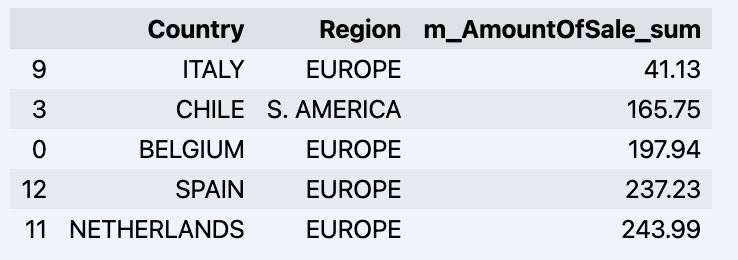
Once we've looked around a bit, we can query the actual data we're interested in using 'get_data' method. It will return back a pandas DataFrame containing the query results.

df = data_model.get_data(feature_list = ['Country','Region','m_AmountOfSale_sum'])
df = df.sort_values(by='m_AmountOfSale_sum')
df.head()

Which will show your datadrame: image

Let's prepare some dataset and quickly show it on the graph

import matplotlib.pyplot as plt

# We're taking sales for each date
dataframe = data_model.get_data(feature_list = ['Date','m_AmountOfSale_sum'])

# Create a line chart
plt.plot(dataframe['Date'], dataframe['m_AmountOfSale_sum'])

# Add labels and a title
plt.xlabel('Days')
plt.ylabel('Sales')
plt.title('Daily Sales Data')

# Display the chart
plt.show()

Output: image

Step 4: Prediction

The next step would be to actually get some value out of AI-Link bridge - let's do some simple prediction!

# Load the historical data to train the model
data_train = data_model.get_data(
    feature_list = ['Date','m_AmountOfSale_sum'],
    filter_less = {'Date':'2021-01-01'}
    )
data_test = data_model.get_data(
    feature_list = ['Date','m_AmountOfSale_sum'],
    filter_greater = {'Date':'2021-01-01'}
    )

We get 2 different datasets here: to train our model and to test it.

# For the tool we've chosen to do the prediction 'Prophet', we'll need to specify 2 columns: 'ds' and 'y'
data_train['ds'] = pd.to_datetime(data_train['Date'])
data_train.rename(columns={'m_AmountOfSale_sum': 'y'}, inplace=True)
data_test['ds'] = pd.to_datetime(data_test['Date'])
data_test.rename(columns={'m_AmountOfSale_sum': 'y'}, inplace=True)

# Initialize and fit the Prophet model
model = Prophet()
model.fit(data_train)

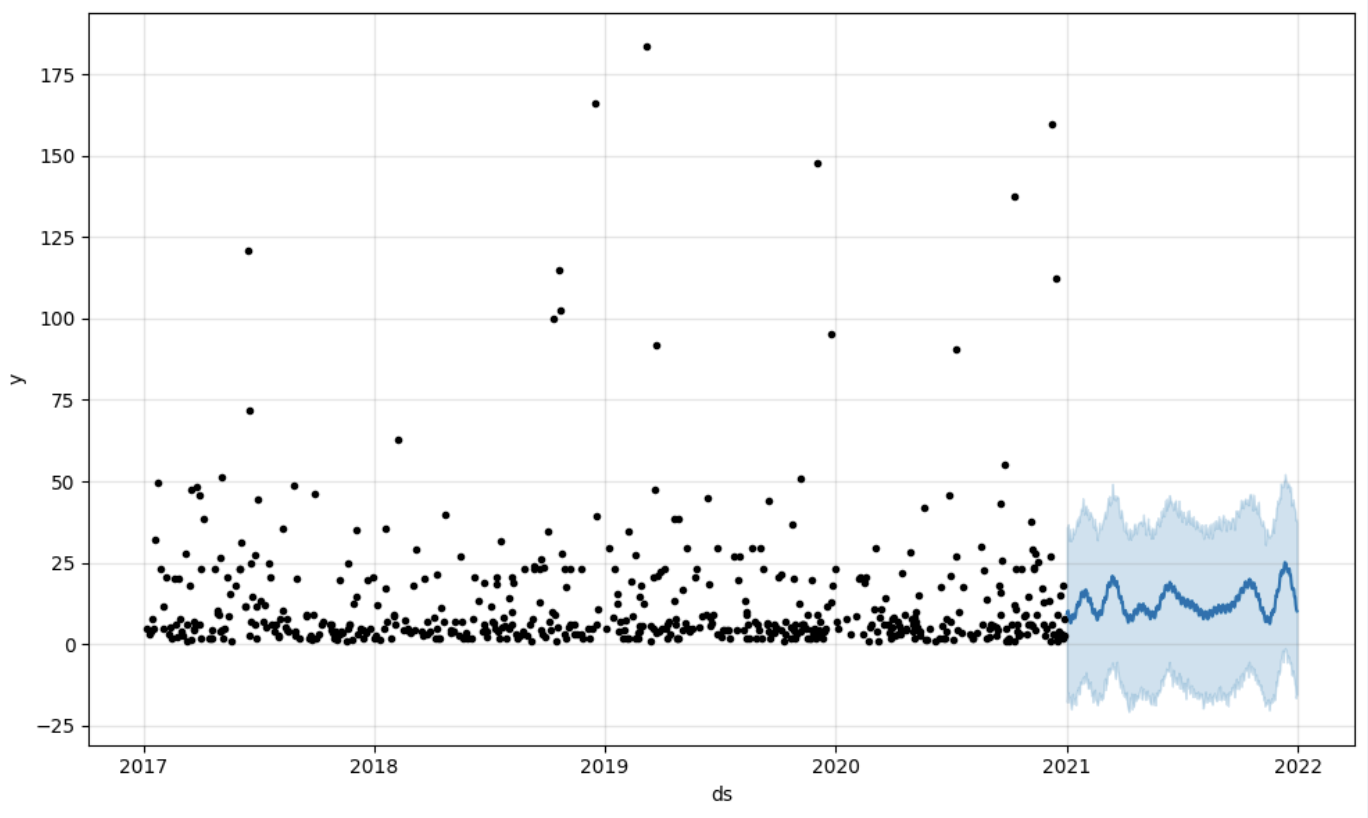
And then we create another dataframe to accomodate our prediction and display it on the graph

# Create a future dataframe for forecasting
future = pd.DataFrame()
future['ds'] = pd.date_range(start='2021-01-01', end='2021-12-31', freq='D')

# Make predictions
forecast = model.predict(future)
fig = model.plot(forecast)
fig.show()

Output: image

Step 5: Writeback

Once we've got our prediction in place we can then put it back to the data warehouse and add an aggregate to our semantic model to reflect it for other consumers. The prediction would be available through any other BI tool for BI analysts and business users. The prediction itself will be placed into our data warehouse and stored there.

from atscale.db.connections import Iris
db = Iris(
    username,
    host,
    namespace,
    driver,
    schema, 
    port=1972,
    password=None, 
    warehouse_id=None
    )

data_model.writeback(dbconn=db,
                    table_name= 'SalesPrediction',
                    DataFrame = forecast)

data_model.create_aggregate_feature(dataset_name='SalesPrediction',
                                    column_name='SalesForecasted',
                                    name='sum_sales_forecasted',
                                    aggregation_type='SUM')

Fin

That is it! Good luck with your predictions!

2
1 495
Article Muhammad Waseem · Sep 21, 2023 7m read

image

Hi Community,
In this article, I will demonstrate below steps to create your own chatbot by using spaCy (spaCy is an open-source software library for advanced natural language processing, written in the programming languages Python and Cython):

  • Step1: Install required libraries

  • Step2: Create patterns and responses file

  • Step3: Train the Model

  • Step4: Create ChatBot Application based on the trained model

So Let us start.

1
1 3648
Announcement Anastasia Dyubaylo · Jul 9, 2024

Hi Community,

Watch this video to learn about the PainChek artificial intelligence technology, which assesses patient pain at the hospital bedside, leverages InterSystems IRIS interoperability to connect to third-party electronic medical record systems:

⏯ Using Artificial Intelligence / Machine Learning for Pain Assessment in a Clinical Environment @ Global Summit 2023

0
0 203
Announcement Brenna Quirk · Jun 4, 2024

Looking to get started with generative AI? Try two brand-new learning paths. In Getting Started with Generative AI (2h 45m), learn the basics of interacting with GenAI. Then, try Developing Generative AI Applications (2h) to start developing your own GenAI application. Plus, earn badges for completing each path!

0
0 202
Article Alex Woodhead · Jan 26, 2024 8m read

Considering new business interest in applying Generative-AI to local commercially sensitive private data and information, without exposure to public clouds. Like a match needs the energy of striking to ignite, the Tech lead new "activation energy" challenge is to reveal how investing in GPU hardware could support novel competitive capabilities. The capability can reveal the use-cases that provide new value and savings.

Sharpening this axe begins with a functional protocol for running LLMs on a local laptop.

3
8 1593
Article Nicole Raimundo · May 15, 2024 9m read

DNA Similarity and Classification was developed as a REST API utilizing InterSystems Vector Search technology to investigate genetic similarities and efficiently classify DNA sequences. This is an application that utilizes artificial intelligence techniques, such as machine learning, enhanced by vector search capabilities, to classify genetic families and identify known similar DNAs from an unknown input DNA.

K-mer Analysis: Fundamentals in DNA Sequence Analysis

2
1 372
Announcement Anastasia Dyubaylo · Apr 8, 2024

Hey Community,

We have more exciting news! The new InterSystems online programming contest dedicated to Generative AI, Vector Search and Machine Learning is starting very soon! 

🏆 InterSystems Vector Search, GenAI and ML Contest 🏆

Duration: April 22 - May 19, 2024

Prize pool: $14,000


9
2 1390
Question Fabio Care · Dec 5, 2023

When trying to create a ML Model I ran into the problem, that AutoML apparantly isn't available on my IRIS instance.

I was able to use the following command successfully: CREATE MODEL ECLASSPREDICT PREDICTING (eClass) FROM SQLUSER.CRMSHOPARTIKEL

Then when trying to use TRAIN MODEL ECLASSPREDICT, I get the error from the image:


Roughly translates to : "-186: Modelprovider not available on this instance. #2822 %ML provider 'AutoML' is not available on this instance"

In my ML Configurations there are 3 standard configurations called %AutoML, %H20 and %PMML which I haven't changed.

10
0 412
Article André Dienes Friedrich · Sep 21, 2023 3m read

In the ever-evolving landscape of data science and machine learning, having the right tools at your disposal can make all the difference. In this article, we want to shine a spotlight on two essential Python libraries that have become indispensable for data scientists and machine learning practitioners alike: Matplotlib and scikit-learn.

Matplotlib: Crafting Visualizations with Precision

2
2 256
Article Muhammad Waseem · Sep 18, 2023 5m read


Hi Community
In this article, I will introduce my application IRIS-GenLab.
IRIS-GenLab is a generative AI Application that leverages the functionality of Flask web framework, SQLALchemy ORM, and InterSystems IRIS to demonstrate Machine Learning, LLM, NLP, Generative AI API, Google AI LLM, Flan-T5-XXL model, Flask Login and OpenAI ChatGPT use cases.

Application Features

0
1 409
Announcement John Murray · Jun 4, 2023

For several years now Visual Studio Code has supported the notebook coding paradigm with a maturing UX and an API that is enabling a notebook extensions ecosystem to grow. One of the best-known notebook platforms is Jupyter Notebooks. A Microsoft team publishes an extension that allows VS Code to handle .ipynb notebook files. These can either work against a local Python environment or connect to a Jupyter Server, which typically hosts remote Python environments with beefier resources.

What if your InterSystems IRIS environments, whether local on your workstation or remote in your organization / cloud, could operate as Jupyter Servers? And not only for Embedded Python but also for ObjectScript and SQL

"If we build it, will they come?"

5
2 879
Article Muhammad Waseem · Jul 4, 2023 6m read

As an AI language model, ChatGPT is capable of performing a variety of tasks like language translation, writing songs, answering research questions, and even generating computer code. With its impressive abilities, ChatGPT has quickly become a popular tool for various applications, from chatbots to content creation.
But despite its advanced capabilities, ChatGPT is not able to access your personal data. So in this article, I will demonstrate below steps to build custom ChatGPT AI by using LangChain Framework:

0
1 13010
Question Luis Angel Pérez Ramos · Jun 19, 2023

Hi community members!

I'm trying to deploy a container based on IRIS Community for Health ML image available from this url but when I start the container the memory consumption skyrockets to 99% making impossible to work with the instance (it never goes below the 95% of the memory). When I do the same with the IRIS Community for Health image it never goes over 80% of memory.

Is this a known problem? Should I try another version? Maybe have I just to sit down in a corner and cry like a baby?

2
0 357
Article sween · Jun 7, 2023 15m read
This post backs the demonstration at Global Summit 2023 "Demos and Drinks" with details most likely lost in the noise of the event.
This is a demonstration on how to use the FHIR SQL Capabilities of InterSystems FHIR Server along side the Super Awesome Identity and Resolution Solution, Zingg.ai to detect duplicate records in your FHIR repository, and the basic idea behind remediation of those resources with the under construction PID^TOO|| currently enrolled in the InterSystems Incubator program.  If you are into the "Compostable CDP" movement and want to master your FHIR Repository in place
0
1 440
Article Lucas Enard · Aug 2, 2022 8m read

On this GitHub you can find all the information on how to use a HuggingFace machine learning / AI model on the IRIS Framework using python.

1. iris-huggingface

Usage of Machine Learning models in IRIS using Python; For text-to-text, text-to-image or image-to-image models.

Here, models as example :

2. Installation

2.1. Starting the Production

While in the iris-local-ml folder, open a terminal and enter :

docker-compose up

The very first time, it may take a few minutes to build the image correctly and install all the needed modules for Python.

2.2. Access the Production

Following this link, access the production : Access the Production

2.3. Closing the Production

docker-compose down

How it works

For now, some models may not work with this implementation since everything is automatically done, which means, no matter what model you input, we will try to make it work through transformerspipeline library.

Pipeline is a powerful tool by the HuggingFace team that will scan the folder in which we downloaded the model, then understand what library it should use between PyTorch, Keras, Tensorflow or JAX to then load that model using AutoModel.
From here, by inputting the task, the pipeline knows what to do with the model, tokenizer or even feature-extractor in this folder, and manage your input automatically, tokenize it, process it, pass it into the model, then give back the output in a decoded form usable directly by us.

3. HuggingFace API

You must first start the demo, using the green Start button or Stop and Start it again to apply your config changes.

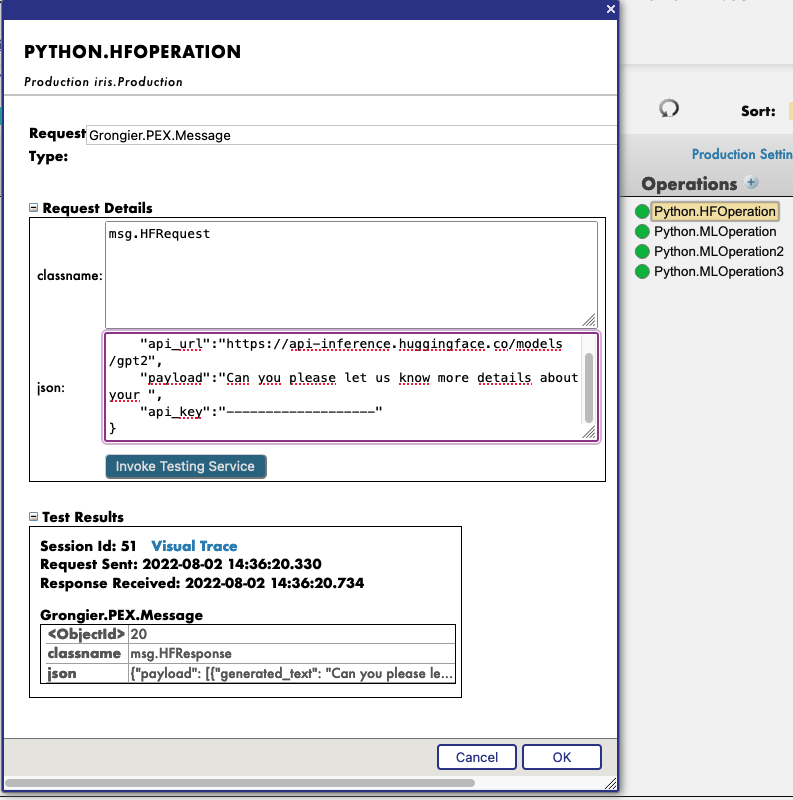
Then, by clicking on the operation Python.HFOperation of your choice, and selecting in the right tab action, you can test the demo.

In this test window, select :

Type of request : Grongier.PEX.Message

For the classname you must enter :

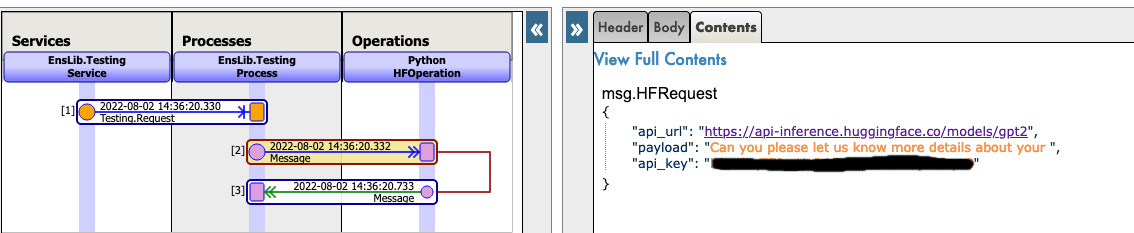
msg.HFRequest

And for the json, here is an example of a call to GPT2 :

{
    "api_url":"https://api-inference.huggingface.co/models/gpt2",
    "payload":"Can you please let us know more details about your ",
    "api_key":"----------------------"
}

Now you can click on Visual Trace to see in details what happened and see the logs.

NOTE that you must have an API key from HuggingFace before using this Operation ( the api-keys are free, you just need to register to HF )

NOTE that you can change the url to try any other models from HuggingFace, you may need to change the payload.

See as example:
sending hf reqhf reqhf resp

4. Use any model from the web

In the section we will teach you how to use almost any model from the internet, HuggingFace or not.

4.1. FIRST CASE : YOU HAVE YOUR OWN MODEL

In this case, you must copy paste your model, with the config, the tokenizer.json etc inside a folder inside the model folder.
Path : src/model/yourmodelname/

From here you must go to the parameters of the Python.MLOperation.
Click on the Python.MLOperation then go to settings in the right tab, then in the Python part, then in the %settings part. Here, you can enter or modify any parameters ( don't forget to press apply once your are done ).
Here's the default configuration for this case :
%settings

name=yourmodelname
task=text-generation

NOTE that any settings that are not name or model_url will go into the PIPELINE settings.

Now you can double-click on the operation Python.MLOperation and start it. You must see in the Log part the starting of your model.

From here, we create a PIPELINE using transformers that uses your config file find in the folder as seen before.

To call that pipeline, click on the operation Python.MLOperation , and select in the right tab action, you can test the demo.

In this test window, select :

Type of request : Grongier.PEX.Message

For the classname you must enter :

msg.MLRequest

And for the json, you must enter every arguments needed by your model.
Here is an example of a call to GPT2 :

{
    "text_inputs":"Unfortunately, the outcome",
    "max_length":100,
    "num_return_sequences":3
}

Click Invoke Testing Service and wait for the model to operate.

See for example:
sending ml req

Now you can click on Visual Trace to see in details what happened and see the logs.

See for example :
ml req

ml resp

4.2. SECOND CASE : YOU WANT TO DOWNLOAD A MODEL FROM HUGGINGFACE

In this case, you must find the URL of the model on HuggingFace;

4.2.1. Settings

From here you must go to the parameters of the Python.MLOperation.
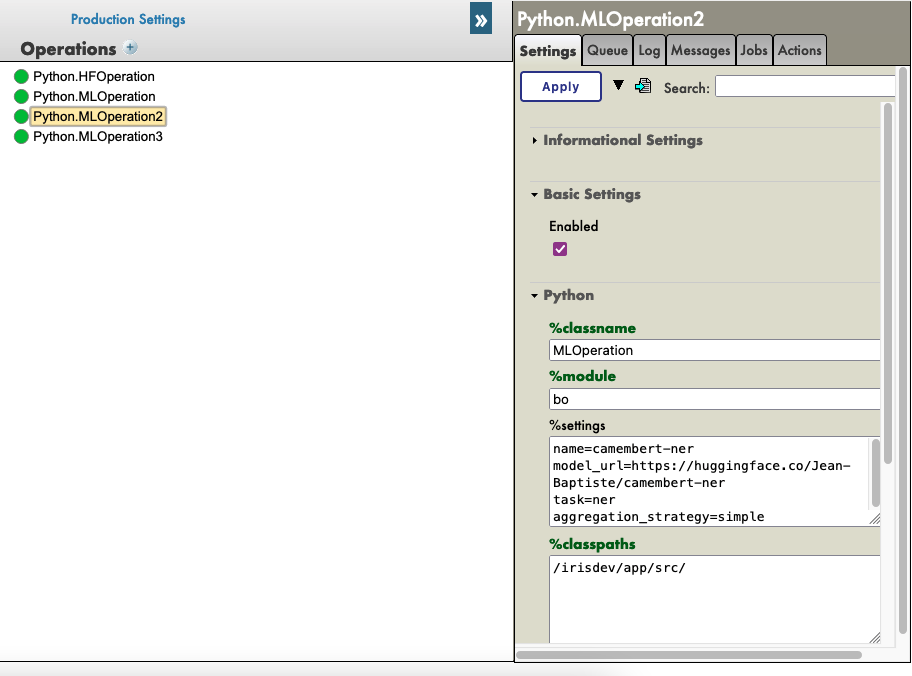
Click on the Python.MLOperation then go to settings in the right tab, then in the Python part, then in the %settings part. Here, you can enter or modify any parameters ( don't forget to press apply once your are done ).
Here's some example configuration for some models we found on HuggingFace :

%settings for gpt2

model_url=https://huggingface.co/gpt2
name=gpt2
task=text-generation

%settings for camembert-ner

name=camembert-ner
model_url=https://huggingface.co/Jean-Baptiste/camembert-ner
task=ner
aggregation_strategy=simple

%settings for bert-base-uncased

name=bert-base-uncased
model_url=https://huggingface.co/bert-base-uncased
task=fill-mask

%settings for detr-resnet-50

name=detr-resnet-50
model_url=https://huggingface.co/facebook/detr-resnet-50
task=object-detection

%settings for detr-resnet-50-protnic

name=detr-resnet-50-panoptic
model_url=https://huggingface.co/facebook/detr-resnet-50-panoptic
task=image-segmentation

NOTE that any settings that are not name or model_url will go into the PIPELINE settings, so in our second example, the camembert-ner pipeline requirers an aggregation_strategy and a task that are specified here while the gpt2 requirers only a task.

See as example:
settings ml ope2

Now you can double-click on the operation Python.MLOperation and start it.
You must see in the Log part the starting of your model and the downloading.
NOTE You can refresh those logs every x seconds to see the advancement with the downloads. dl in real time

From here, we create a PIPELINE using transformers that uses your config file find in the folder as seen before.

4.2.2. Testing

To call that pipeline, click on the operation Python.MLOperation , and select in the right tab action, you can test the demo.

In this test window, select :

Type of request : Grongier.PEX.Message

For the classname you must enter :

msg.MLRequest

And for the json, you must enter every arguments needed by your model.
Here is an example of a call to GPT2 ( Python.MLOperation ):

{
    "text_inputs":"George Washington lived",
    "max_length":30,
    "num_return_sequences":3
}

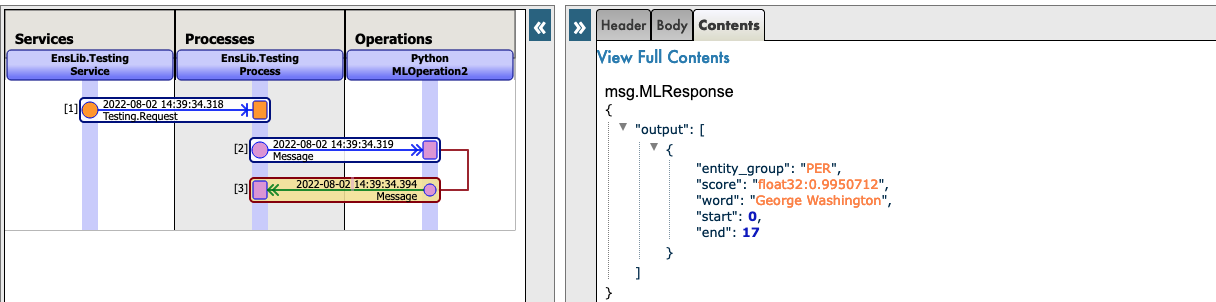
Here is an example of a call to Camembert-ner ( Python.MLOperation2 ) :

{
    "inputs":"George Washington lived in washington"
}

Here is an example of a call to bert-base-uncased ( Python.MLOperation3 ) :

{
    "inputs":"George Washington lived in [MASK]."
}

Here is an example of a call to detr-resnet-50 using an online url ( Python.MLOperationDETRRESNET ) :

{
    "url":"http://images.cocodataset.org/val2017/000000039769.jpg"
}

Here is an example of a call to detr-resnet-50-panoptic using the url as a path( Python.MLOperationDetrPanoptic ) :

{
    "url":"/irisdev/app/misc/000000039769.jpg"
}

Click Invoke Testing Service and wait for the model to operate.
Now you can click on Visual Trace to see in details what happened and see the logs.

NOTE that once the model was downloaded once, the production won't download it again but get the cached files found at src/model/TheModelName/.
If some files are missing, the Production will download them again.

See as example:
sending ml reqml reqml resp

See as example:
sending ml reqml resp

5. TroubleShooting

If you have issues, reading is the first advice we can give you, most errors are easily understood just by reading the logs as almost all errors will be captured by a try / catch and logged.

If you need to install a new module, or Python dependence, open a terminal inside the container and enter for example : "pip install new-module"
To open a terminal there are many ways,

  • If you use the InterSystems plugins, you can click in the below bar in VSCode, the one looking like docker:iris:52795[IRISAPP] and select Open Shell in Docker.
  • In any local terminal enter : docker-compose exec -it iris bash
  • From Docker-Desktop find the IRIS container and click on Open in terminal

Some models may require some changes for the pipeline or the settings for example, it is your task to add in the settings and in the request the right information.

6. Conclusion

From here you should be able to use any model that you need or own on IRIS.
NOTE that you can create a Python.MLOperation for each of your model and have them on at the same time.

5
1 832
Article Maria Nesterenko · Apr 20, 2023 5m read

Many factors affect a person's quality of life, and one of the most important is sleep. The quality of our sleep determines our ability to function during the day and affects our mental and physical health. Good quality sleep is critical to our overall health and well-being. Therefore, by analyzing indicators preceding sleep, we can determine the quality of our sleep. This is precisely the functionality of the Sheep's Galaxy application.

Sheep's Galaxy is a sample application that works with InterSystems' IntegratedML and IRIS Cloud SQL technologies and provides the user with a tool to analyze and improve sleep quality. The analysis of sleep takes into account factors such as noise levels, room lighting, sleep duration, caffeine consumption, and more, allowing the user to reconsider their sleep-related habits and create optimal conditions for sleep in the future.

Presentation video:

https://www.youtube.com/watch?v=eZ9Wak831x4&ab_channel=MariaGladkova

The app is based on the following technologies:

Frontend part:

To build this app we used Angular framework. It helped us to create a simple single page application. We used Angular v15, and all Angular components were implemented as standalones to streamline the authoring experience. We didn’t use Angular modules and it's a good practice to scale an app in the future if it need. We also used Smart Component Architecture – all components in our frontend application are divided into "smart" and "dumb" components. This concepts helps us to separate the business logic code and presentation code between these components. All business logic and requests to server are kept in the isolated services. To process our backend data we use RxJS - a library for composing asynchronous and event-based programs by using observable sequences. To style our app we used Angular Material - it is a User Interface component library which developers can use in their Angular projects to speed up development of elegant and consistent user interfaces. This library offers a lot of reusable and beautiful UI components - we added some of them like Cards, Inputs, Data Tables, Datepickers, and much more. Below we present an overview of typical user workflow. First, user goes through either the registration process, if using it for the first time, or through authorization screen.

image

Using the app, the user enters information about sleep, such as activity level during the day, number of cups of coffee, sleeping comfort, stress level and amount of positive emotions, as well as room light and bedtime.

image

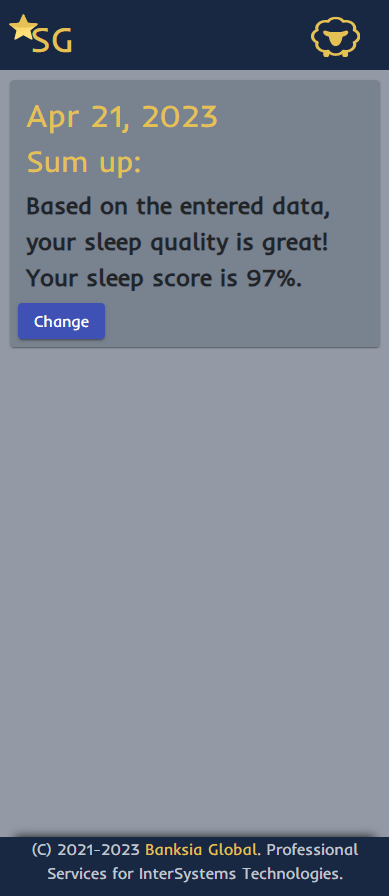
After each data entry, the user will receive a notification of sleep quality. This data is then analyzed using machine learning algorithms to provide users with insights into their sleep patterns.

image

Backend part:

Fastapi is a python framework based on two technologies: Pydantic and Starlette. It has the following features:

  • Is based on open standards: OpenAPI, JSON schema, OAuth2;
  • Automatic API documentation in swagger;
  • Dependencies implementation;
  • Uses features of modern python: type annotation, asyncio;
  • Supports synchronous and asynchronous code;

The project structure consists of routers with endpoints, models for each entity and processing services.

Each endpoint appears in the atomic documentation at /docs and endpoint fields have a relationship to the data models in the database.

image

Pydantic models automatically validate incoming and outgoing data.

image

The process of working with user data is built on the protocol, which allows you to work with data in a secure way.

image

The process of interaction with the database is implemented through IRIS SQL connection using the DB API.

image

IRIS Cloud SQL with IntegratedML:

First, you need to login to InterSystems Cloud Services Portal. Here you need to create a new IRIS Cloud SQL deployment. Be sure to include IntegratedML when you create a new deployment. When it's ready, you can obtain connection parameters to use in docker-compose.yml:

image

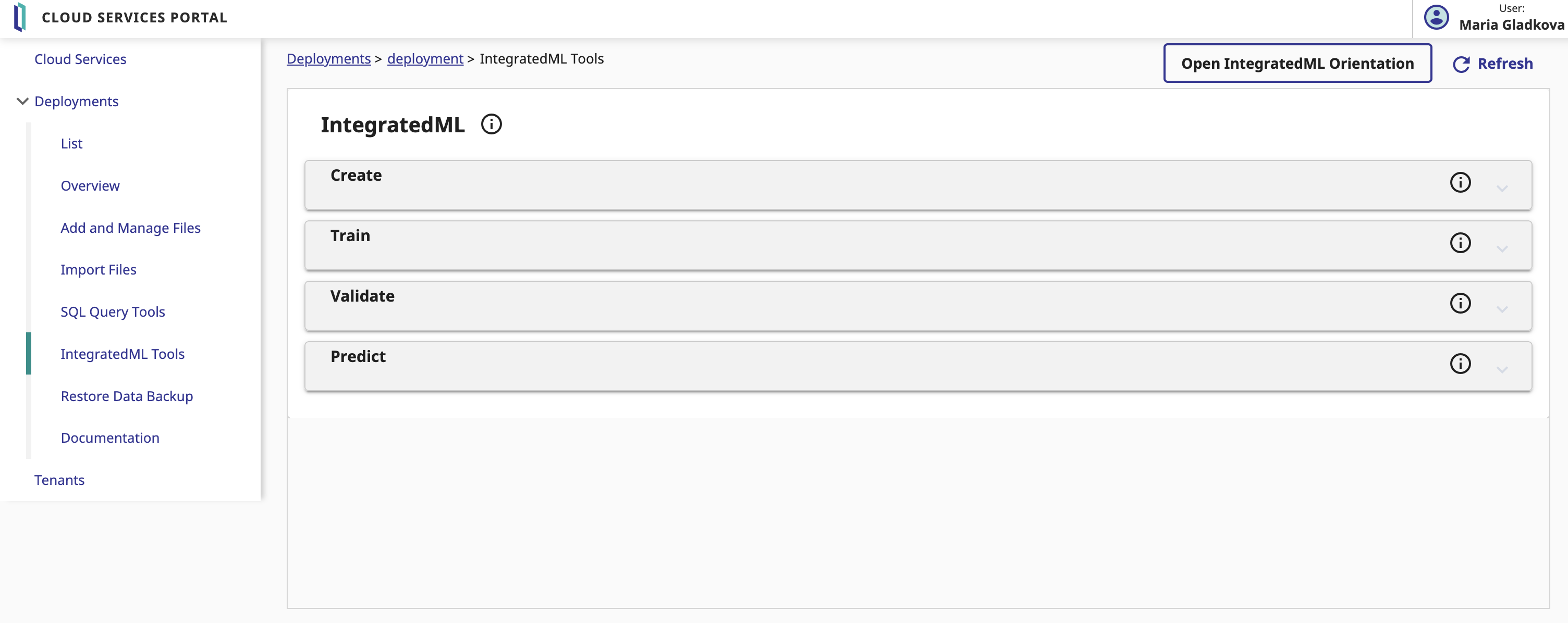
By opening 'IntegratedML Tools' menu you have access to create, train, validate your model, and have the ability to generate predictions on a selected field in your model table.

image

In our app, we predict sleep quality based on user data. To do this, we fill in the fields in the Prediction section as follows:

image

In the generated query, the prediction field contains a prediction of the quality of sleep, the probability_quality field contains the probability that the dream will be "qualitative".

Links:

To learn more about our project or use it as a template for your future work: https://openexchange.intersystems.com/package/Sheep%E2%80%99s-Galaxy

Thanks:

Our team would like to thank InterSystems and Banksia Global for an opportunity to work with cutting-edge technology on important issues.

Developers of project:

5
0 355