0 Followers · 150 Posts

Java Database Connectivity (JDBC) is an application programming interface (API) for the programming language Java, which defines how a client may access a database.

Currently could be downloaded from here.

Question Attila Toth · Nov 10, 2025

Hello!

I'm trying to create some foreign tables to a PostgreSQL database. In some cases, columns with certain datatypes cannot be consumed by IRIS and the following error is thrown:

 [SQLCODE: <-237>:<Schema import for foreign table did not return column metadata>]

  [%msg: <Unkown data type returned by external database>]

For example: serial4 typed ID columns are typical examples. Is it possible, what's the best way of resolving these datatypes, which- seemingly- don't have proper JDBC metadata mappings?

0
0 21
Article Andreas Schneider · Apr 22, 2025 4m read

When using standard SQL or the object layer in InterSystems IRIS, metadata consistency is usually maintained through built-in validation and type enforcement. However, legacy systems that bypass these layers—directly accessing globals—can introduce subtle and serious inconsistencies.

2
0 150
Article Davi Massaru Teixeira Muta · Oct 11, 2025 9m read

Technical Documentation — Quarkus IRIS Monitor System

1. Purpose and Scope

This module enables integration between Quarkus-based Java applications and InterSystems IRIS’s native performance monitoring capabilities.
It allows a developer to annotate methods with @PerfmonReport, which triggers IRIS’s ^PERFMON routines automatically around method execution, generating performance reports without manual intervention.


2. System Components

2.1 Annotation: @PerfmonReport

  • Defined as a CDI InterceptorBinding.
  • Can be applied to methods or classes.
  • Directs the framework to wrap method execution with IRIS monitoring logic.

2.2 Interceptor: PerfmonReportInterceptor

  • Intercepts calls to annotated methods.

  • Execution flow:

    1. Log start event (LOG.infof("INIT: …"))
    2. Call monitorSystem.startPerfmon()
    3. Proceed with context.proceed()
    4. In a finally block:
      • Call monitorSystem.generateReportPerfmon(...)
      • Call monitorSystem.stopPerfmon()
      • Log end event with execution time
  • Ensures that monitoring is always ended, even if an exception is thrown.

2.3 DAO Bean: MonitorSystem

  • CDI bean annotated with @ApplicationScoped.

  • Holds a single instance of IRIS initialized at startup.

  • Configuration injected via @ConfigProperty (JDBC URL, user, password).

  • Uses DriverManager.getConnection(...) to obtain a raw IRISConnection.

  • Contains methods:

    • startPerfmon()
    • generateReportPerfmon(String reportName)
    • stopPerfmon()
  • Each calls the appropriate ObjectScript methods in iris.src.dc.AdapterPerfmonProc via iris.classMethodVoid(...).

2.4 ObjectScript Adapter: iris.src.dc.AdapterPerfmonProc

  • Defines the routines that encapsulate ^PERFMON logic:

      Class iris.src.dc.AdapterPerfmonProc Extends %RegisteredObject
      {
          ClassMethod start() As %Status
          {
              Set namespace = $NAMESPACE
              zn "%SYS"
              set status = $$Stop^PERFMON()
              set status = $$Start^PERFMON()
              zn namespace
              return status
          }
    
          ClassMethod generateReport(nameReport As %String = "report.txt") As %Status
          {
              Set namespace = $NAMESPACE
              zn "%SYS"
              Set tempDirectory = ##class(%SYS.System).TempDirectory()
              set status = $$Report^PERFMON("R","R","P", tempDirectory_"/"_nameReport)
              zn namespace
    
              return status
          }
    
          ClassMethod stop() As %Status
          {
              Set namespace = $NAMESPACE
              zn "%SYS"
              Set status = $$Stop^PERFMON()
              zn namespace
    
              return status
          }
      }
    
  • Operates in namespace %SYS to access ^PERFMON routines, then returns to the original namespace.


3. Execution Flow

  1. A request enters the Quarkus application.

  2. The CDI interceptor detects the @PerfmonReport annotation and intercepts the method call.

  3. monitorSystem.startPerfmon() is invoked, triggering IRIS ^PERFMON monitoring.

  4. The business method executes normally (data access, transformations, logic, etc.).

  5. After the method returns or throws an exception, the interceptor ensures:

    • monitorSystem.generateReportPerfmon(...) is called to create a .txt performance report.
    • monitorSystem.stopPerfmon() is executed to stop the monitoring session.
    • The total Java-side execution time is logged using Logger.infof(...).
  6. The generated report file is stored in the IRIS temporary directory, typically: /usr/irissys/mgr/Temp/

    • The file name follows the pattern: <ClassName><MethodName><timestamp>.txt

4. Technical Challenges and Solutions

ChallengeSolution
ClassCastException when using pooled JDBC connectionsUse DriverManager.getConnection(...) to obtain a native IRISConnection instead of the pooled ConnectionWrapper.
Overhead from repeatedly opening connectionsMaintain a single IRIS instance within an @ApplicationScoped bean, initialized via @PostConstruct.
Ensuring ^PERFMON is always stopped even on exceptionsUse try-finally in the interceptor to call stopPerfmon() and generateReportPerfmon().
Configuration portabilityInject connection settings (jdbc.url, username, password) using @ConfigProperty and application.properties.
Managing concurrent monitor sessionsAvoid annotating highly concurrent endpoints. Future versions may implement session-level isolation.

5. Use Cases and Benefits

  • Enables real-time visibility into IRIS runtime activity from Java code.
  • Simplifies performance analysis and query optimization for developers.
  • Useful for benchmarking, profiling, and system regression testing.
  • Can serve as a lightweight performance audit trail for critical operations.

6. Practical Example of Use

The complete source code and deployment setup are available at:


6.1 Overview

The application runs a Quarkus server connected to an InterSystems IRIS instance configured with the FHIRSERVER namespace.
The ORM layer is implemented using Hibernate ORM with PanacheRepository, allowing direct mapping between Java entities and IRIS database classes.

When the application starts (via docker-compose up), it brings up:

  • The IRIS container, hosting the FHIR data model and ObjectScript routines (including AdapterPerfmonProc);
  • The Quarkus container, exposing REST endpoints and connecting to IRIS via the native JDBC driver.

6.2 REST Endpoint

A REST resource exposes a simple endpoint to retrieve patient information:

@Path("/patient")
public class PatientResource {

    @Inject
    PatientService patientService;

    @GET
    @Path("/info")
    @Produces(MediaType.APPLICATION_JSON)
    public PatientInfoDTO searchPatientInfo(@QueryParam("key") String key) {
        return patientService.patientGetInfo(key);
    }
}

This endpoint accepts a query parameter (key) that identifies the patient resource within the FHIR data repository.


### 6.3 Service Layer with @PerfmonReport

The PatientService class contains the business logic to retrieve and compose patient information. It is annotated with @PerfmonReport, which means each request to /patient/info triggers IRIS performance monitoring:

@ApplicationScoped
public class PatientService {

    @Inject
    PatientRepository patientRepository;

    @PerfmonReport
    public PatientInfoDTO patientGetInfo(String patientKey) {

        Optional<Patient> patientOpt = patientRepository.find("key", patientKey).firstResultOptional();
        Patient patient = patientOpt.orElseThrow(() -> new IllegalArgumentException("Patient not found"));

        PatientInfoDTO dto = new PatientInfoDTO();
        dto.setKey(patient.key);
        dto.setName(patient.name);
        dto.setAddress(patient.address);
        dto.setBirthDate(patient.birthDate != null ? patient.birthDate.toString() : null);
        dto.setGender(patient.gender);
        dto.setMedications(patientRepository.findMedicationTextByPatient(patientKey));
        dto.setConditions(patientRepository.findConditionsByPatient(patientKey));
        dto.setAllergies(patientRepository.findAllergyByPatient(patientKey));

        return dto;
    }
}

6.4 Execution Flow

A request is made to: GET /patient/info?key=Patient/4

Quarkus routes the request to PatientResource.searchPatientInfo().

The CDI interceptor detects the @PerfmonReport annotation in PatientService.patientGetInfo().

Before executing the service logic:

  • The interceptor invokes MonitorSystem.startPerfmon(), which calls the IRIS class iris.src.dc.AdapterPerfmonProc.start().

  • The method executes business logic, querying patient data using Hibernate PanacheRepository mappings.

After the method completes:

  • MonitorSystem.generateReportPerfmon() is called to create a performance report.

  • MonitorSystem.stopPerfmon() stops the IRIS performance monitor.

A .txt report is generated under: usr/irissys/mgr/Temp/

Example filename: PatientService_patientGetInfo_20251005_161906.txt

6.5 Result

The generated report contains detailed IRIS runtime statistics, for example:

                         Routine Activity by Routine

Started: 10/11/2025 05:07:30PM                    Collected: 10/11/2025 05:07:31PM

Routine Name                        RtnLines  % Lines   RtnLoads  RtnFetch  Line/Load Directory
----------------------------------- --------- --------- --------- --------- --------- ---------
Other                                     0.0       0.0       0.0       0.0         0
PERFMON                                  44.0       0.0       0.0       0.0         0 /usr/irissys/mgr/
%occLibrary                         3415047.0      34.1   48278.0       0.0      70.7 /usr/irissys/mgr/irislib/
iris.src.dc.AdapterPerfmonProc.1          7.0       0.0       2.0       0.0       3.5 /usr/irissys/mgr/FHIRSERVER/
%occName                            5079994.0      50.7       0.0       0.0         0 /usr/irissys/mgr/irislib/
%apiDDL2                            1078497.0      10.8   63358.0       0.0      17.0 /usr/irissys/mgr/irislib/
%SQL.FeatureGetter.1                 446710.0       4.5   66939.0       0.0       6.7 /usr/irissys/mgr/irislib/
%SYS.WorkQueueMgr                       365.0       0.0       1.0       0.0     365.0 /usr/irissys/mgr/
%CSP.Daemon.1                            16.0       0.0       1.0       0.0      16.0 /usr/irissys/mgr/irislib/
%SYS.TokenAuth.1                         14.0       0.0       5.0       0.0       2.8 /usr/irissys/mgr/
%Library.PosixTime.1                      2.0       0.0       0.0       0.0         0 /usr/irissys/mgr/irislib/
%SYS.sqlcq.uEXTg3QR7a7I7Osf9e8Bz...      52.0       0.0       1.0       0.0      52.0 /usr/irissys/mgr/
%SYS.SQLSRV                              16.0       0.0       0.0       0.0         0 /usr/irissys/mgr/
%apiOBJ                                 756.0       0.0       0.0       0.0         0 /usr/irissys/mgr/irislib/
FT.Collector.1                            0.0       0.0       0.0       0.0         0 /usr/irissys/mgr/
SYS.Monitor.FeatureTrackerSensor.1        0.0       0.0       0.0       0.0         0 /usr/irissys/mgr/
%SYS.Monitor.Control.1                    0.0       0.0       0.0       0.0         0 /usr/irissys/mgr/
%SYS.DBSRV.1                            252.0       0.0       4.0       0.0      63.0 /usr/irissys/mgr/
%sqlcq.FHIRSERVER.cls12.1                19.0       0.0       0.0       0.0         0 /usr/irissys/mgr/irislocaldata/
%sqlcq.FHIRSERVER.cls13.1                74.0       0.0       0.0       0.0         0 /usr/irissys/mgr/irislocaldata/
%sqlcq.FHIRSERVER.cls14.1                74.0       0.0       0.0       0.0         0 /usr/irissys/mgr/irislocaldata/
%sqlcq.FHIRSERVER.cls15.1                52.0       0.0       0.0       0.0         0 /usr/irissys/mgr/irislocaldata/
%SYS.System.1                             1.0       0.0       0.0       0.0         0 /usr/irissys/mgr/

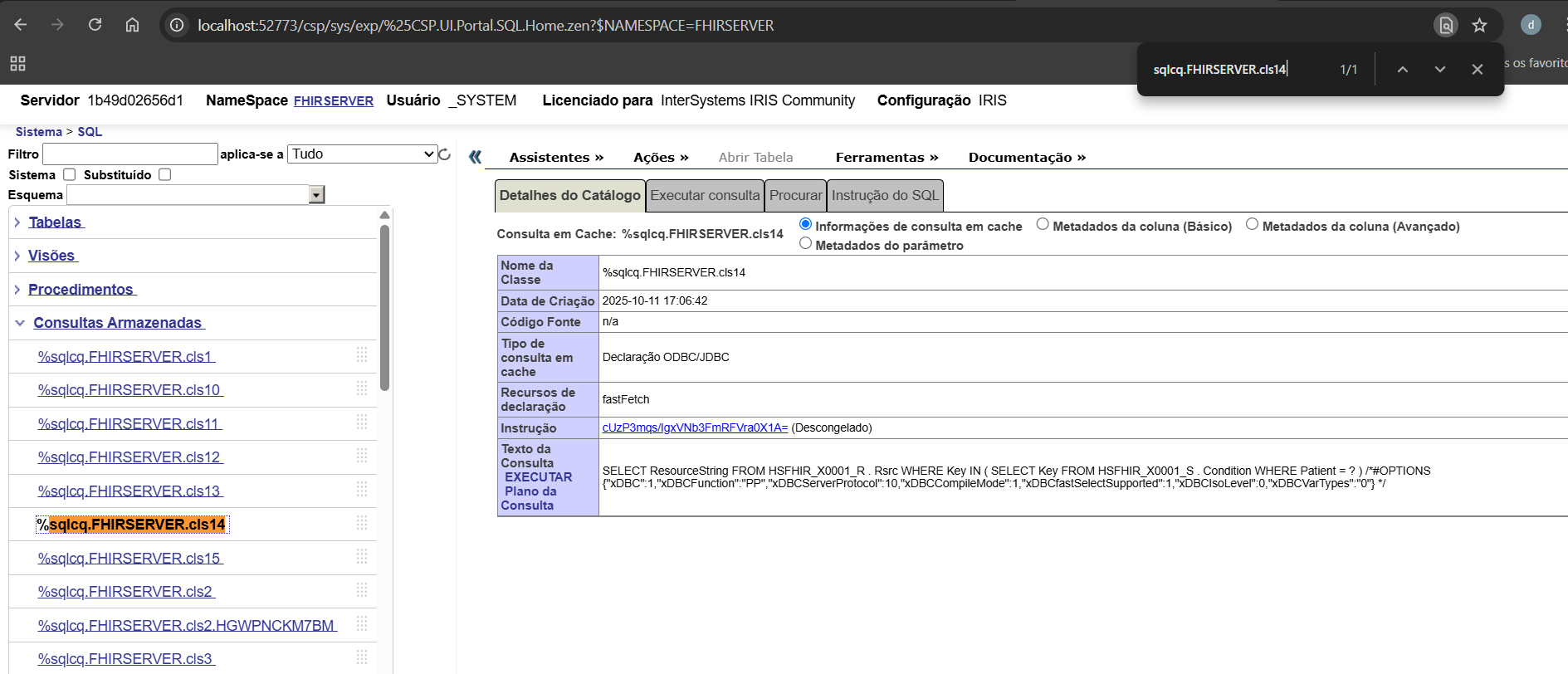
This data provides precise insight into what routines were executed internally by IRIS during that REST call — including SQL compilation, execution, and FHIR data access.

Insight: The %sqlcq.FHIRSERVER.* routines capture all SQL cache queries executed by Quarkus within the method. Monitoring these routines allows developers to analyze query execution, understand code behavior, and identify potential performance bottlenecks. This makes them a powerful tool for development and debugging of FHIR-related operations.

image

6.6 Summary

This example demonstrates how a standard Quarkus service can transparently leverage IRIS native monitoring tools using the @PerfmonReport annotation. It combines:

  • CDI interceptors (Quarkus)

  • Hibernate PanacheRepositories (ORM)

  • IRIS native ObjectScript routines (^PERFMON)

The result is a fully automated and reproducible performance profiling mechanism that can be applied to any service method in the application.

1
0 44
Article Guilherme Tonelotti · Sep 25, 2025 2m read

When we need to integrate Caché/IRIS with other relational databases, one common question arises: “How do I set up the JDBC connection?”.
The official documentation doesn’t always provide a straightforward step-by-step guide, which can be frustrating, especially for beginners.

In this article, I’ll walk you through the entire process of configuring a JDBC connection with MySQL, from downloading the connector to linking tables in Caché/IRIS.

1
0 65
Question Eugene.Forde · Aug 31, 2025

I’ve been exploring options for connecting Google Cloud Pub/Sub with InterSystems IRIS/HealthShare, but I noticed that IRIS doesn’t seem to ship with any native inbound/outbound adapters for Pub/Sub. Out of the box, IRIS offers adapters for technologies like Kafka, HTTP, FTP, and JDBC, which are great for many use cases, but Pub/Sub appears to be missing from the list.

Has anyone here implemented such an integration successfully?

For example:

2
1 75
Article Dimitri Olchanyi · Apr 8, 2025 2m read

Due to MySQL's interpretation of SCHEMA differing from the common SQL understanding (as seen in IRIS/SQL Server/Oracle), our automated Linked Table Wizard may encounter errors when attempting to retrieve metadata information to build the Linked Table.

(This also applies to Linked Procedures and Views)

When attempting to create a Linked Table through the Wizard, you will encounter an error that looks something like this:

6
0 161
Article Harry Tong · Jun 6, 2025 2m read

If you're migrating from Oracle to InterSystems IRIS—like many of my customers—you may run into Oracle-specific SQL patterns that need translation.

Take this example:

SELECT (TO_DATE('2023-05-12','YYYY-MM-DD') - LEVEL + 1) AS gap_date
FROM dual
CONNECT BY LEVEL <= (TO_DATE('2023-05-12','YYYY-MM-DD') - TO_DATE('2023-05-02','YYYY-MM-DD') + 1);

In Oracle:

1
0 99
Article Guillaume Rongier · Apr 9, 2019 3m read

IRIS and Ensemble are designed to act as an ESB/EAI. This mean they are build to process lots of small messages.

But some times, in real life we have to use them as ETL. The down side is not that they can't do so, but it can take a long time to process millions of row at once.

To improve performance, I have created a new SQLOutboundAdaptor who only works with JDBC.

BatchSqlOutboundAdapter

Extend EnsLib.SQL.OutboundAdapter to add batch batch and fetch support on JDBC connection.

Benchmark

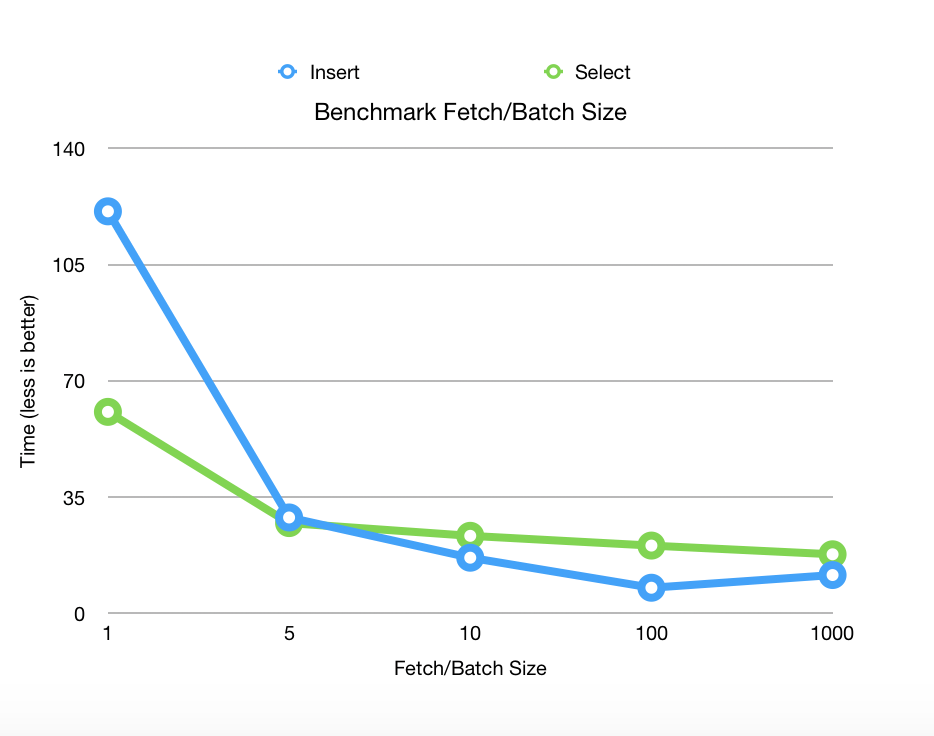
Benchmarks released on Postgres 11.2 with 1 000 000 rows fetched and 100 000 rows inserted on 2 columns.

alt text

Prerequisites

Can be used on IRIS or Ensemble 2017.2+.

Installing

Clone this repository

git clone https://github.com/grongierisc/BatchSqlOutboundAdapter.git

Use Grongier.SQL.SqlOutboundAdapter adaptor.

New methods from the adaptor

  • Method ExecuteQueryBatchParmArray(ByRef pRS As Grongier.SQL.GatewayResultSet, pQueryStatement As %String, pBatchSize As %Integer, ByRef pParms) As %Status
    • pRS is the ResultSet can be use as any EnsLib.SQL.GatewayResultSet
    • pQueryStatement is the SQL query you like to execute
    • pBatchSize is the fetch size JDBC parameter
  • Method ExecuteUpdateBatchParamArray(Output pNumRowsAffected As %Integer, pUpdateStatement As %String, pParms...) As %Status
    • pNumRowsAffected is the number of row inserted
    • pUpdateStatement is teh update/insert SQL statement
    • pParms is Caché Multidimensional Array
      • pParms indicate the number of row in batch
      • pParms(integer) indicate the number of parameters in the row
      • pParms(integer,integerParam) indicate the value of the parameter whose position is integerParam.
      • pParms(integer,integerParam,"SqlType") indicate the SqlType of the parameter whose position is integerParam, by default it will be $$$SqlVarchar

Example

  • Grongier.Example.SqlSelectOperation show an example of ExecuteQueryBatchParmArray
  • Grongier.Example.SqlSelectOperation show an example of ExecuteUpdateBatchParamArray

Content of this project

This adaptor include :

  • Grongier.SQL.Common
    • No modification, simple extend of EnsLib.SQL.Common
  • Grongier.SQL.CommonJ
    • No modification, simple extend of EnsLib.SQL.CommonJ
  • Grongier.SQL.GatewayResultSet
    • Extension of EnsLib.SQL.GatewayResultSet to gain the ablility to use fetch size.
  • Grongier.SQL.JDBCGateway
    • Use to allow compilation and support on Ensemble 2017.1 and lower
  • Grongier.SQL.OutboundAdapter
    • The new adaptor with :
      • ExecuteQueryBatchParmArray allow SQL query a distant database and specify the JDBC fetchSize
      • ExecuteUpdateBatchParamArray allow insertion in a distant database with JDBC addBatch and executeBatch
  • Grongier.SQL.Snapshot
    • Extend of EnsLib.SQL.Snapshot to handle Grongier.SQL.GatewayResultSet and the fetch size property
10
3 1851
Article Benjamin De Boe · Nov 9, 2023 3m read

With the release of InterSystems IRIS Cloud SQL, we're getting more frequent questions about how to establish secure connections over JDBC and other driver technologies. While we have nice summary and detailed documentation on the driver technologies themselves, our documentation does not go as far to describe individual client tools, such as our personal favourite DBeaver. In this article, we'll describe the steps to create a secure connection from DBeaver to your Cloud SQL deployment.

21
2 2085
Question Andrew Sklyarov · Mar 26, 2025

Here is my code:

Method getStocks(pRequest As Stock.Message.Req, Output pResponse As Ens.StreamContainer) As %Status
{
     s tSC = pRequest.NewResponse(.pResponse)
     q:$$$ISERR(tSC) tSC

     #dim pRS As EnsLib.SQL.GatewayResultSet

     s tSC = ..Adapter.ExecuteQuery(.pRS, "select jsonb_agg(s) #>> '{}' FROM prod.stocks s where s.""Warehouse"" = ?", pRequest.Warehouse)
     q:$$$ISERR(tSC) tSC

     s pResponse = ##class(Ens.StreamContainer).%New()
     s pResponse.Stream = ##class(%GlobalCharacterStream).%New()

3
0 197
Question Igor Pak · Mar 7, 2025

Hello, dear colleagues.

I need to connect to a remote JavaGateway from an Ensemble service.

I am trying to use the EnsLib.JavaGateway.Service with a remote host where the JVM is running.

I can successfully ping the remote Java Gateway from EnsLib.JavaGateway.Service, and Ensemble reports that the service status is OK.

There are no network issues, and all necessary ports are accessible.

My requests work without any problems when I specify localhost in EnsLib.JavaGateway.Service. However, when I specify a remote JVM, I get the following error:

1
0 115
Question Eduard Lebedyuk · May 18, 2016

In MySQL I have the following table:

CREATE TABLE `info` (
   `created` int(11)
);

And it is linked (via JDBC SQL Gateway) to Cache table mysql.info.  `created` field stores unix timestamp. So when I execute  this SQL in SMP:

SELECT created FROM mysql.info

I receive the following output (which is expected):

created
1435863691
1436300964

But I want to to display `created` field converted to ODBC timestamp format. To do that I call this SQL procedure

3
0 1007
Question Scott Roth · Jan 22, 2025

I am currently experiencing frustration with trying to Authenticate an Active Directory account through JDBC as the Hospital System moves from OnPrem SQL Server to using Azure SQL Server with Microsoft Entra Authentication.

Microsoft cannot give me a straight answer of what is required from a JDBC standpoint to authenticate from a Linux environment.

2
0 107
Question Scott Roth · Jan 8, 2025

We connect to MS SQL Databases using the Microsoft JDBC Driver 12.2 using the following URL

jdbc:sqlserver://<server>:<port>;database=<database name>;trustServerCertificate=true;integratedSecurity=true;authenticationScheme=NTLM;domain=osumc;authentication=NotSpecified

They want to migrate the databases to the Azure Cloud and in doing so we need the Authentication to change to go through Microsoft Entra. I was given the following URL

5
0 192
Article Scott Roth · Jan 24, 2025 3m read

Not sure there are many that connect to MS SQL to execute queries, stored procedures, etc, but our Healthsystem has many different MS SQL based databases we use within the Interoperability environment for various reasons.

With the push to moving from on-prem to the Cloud we ran into some difficulties with our SQL Gateway connections and knowing how to config them to use Microsoft Entra for Active Directory Authentication.

0
1 475
Article Andreas Schneider · Jan 12, 2025 1m read

Hi! I've extended my demo repository, andreas5588/demo-dbs-iris, to make it easy to test the FOREIGN SERVER and FOREIGN TABLE features in IRIS.

To achieve this, I created a namespace called FEDERATION. The idea is as follows:

  1. Set up JDBC connections for each namespace.
  2. Create a FOREIGN SERVER within the FEDERATION namespace for each connection.
  3. Define a FOREIGN TABLE a least for one table based on each foreign server.

The Script:  demo-dbs-iris/src/sql/02_create_foreign_server.sql

3
1 253
Article Sylvain Guilbaud · Apr 30, 2024 3m read

Production Configuration

This demo has an interoperability production with 16 items. 

Production Configuration HL7 + Kafka Producer

The first part of this demonstration consists of sending an HL7 SIU file which will be transmitted to the 2 other HL7 flows (HTTP and TCP), and transformed and transmitted to the Kafka server. HTTP and TCP flows will transform HL7 messages in the same way before sending them to Kafka as well.

  • 3 HL7 Business Services
  • 1 HL7 router
  • 2 HL7 Business Operations
  • one Business Operation sending the transformed messages to Kafka

Business Rule

3
4 474
Question Scott Roth · Nov 20, 2024

I am using a JDBC connection to MS SQL server to execute a stored procedure to select data and bring it into InterSystems as a EnsLib.SQL.Snapshot. I loop through the EnsLib.SQL.Snapshot using a while loop, but I also want to iterate through the Columns within that Row to do logic.

Is there a way to iterate through the Columns of the current Row of the EnsLib.SQL.Snapshot so I can apply logic/rules for further processing?

Thanks

Scott

4
0 131
Question Andreas Schneider · Sep 15, 2024

Has anyone successfully tested the new THROUGH command in IRIS 2024.2 with a FOREIGN SERVER?https://docs.intersystems.com/iris20242/csp/docbook/Doc.View.cls?KEY=RS…

I have connected from a Docker instance to a VM. I was able to successfully set up the JDBC connection through the UI.

I then configured a foreign server with this connection:

But I am unable to send a SQL 'THROUGH' to the DB. I always get a:

I've get the same message if i try it via Management Portal.
I've also tried this:

and this

11
0 364
Question Scott Roth · Oct 2, 2024

I have been trying to track down an issue we are seeing in our TEST environment with Memory usage.

We have Several BP's for years now that take a HL7 message, parse it apart, and make calls to a Custom EnsLib.SQL.OutboundAdapter to have it execute Insert/Select/Update/Delete stored procedures against a MS SQL Database via JDBC connection. We are using Microsoft's JDBC 12.2 driver to do this.

What we are seeing is that IRIS.WorkQueue globals are being defined for these calls but then the IRIS.WorkQueue is not being cleaned up and taking up large amounts of Memory.

5
0 141
Article Andrii Mishchenko · Sep 22, 2024 5m read

Introduction

Managing databases and performing CRUD operations are fundamental tasks for developers building data-driven applications. While many database management systems (DBMS) exist, they can be complex and cumbersome to interact with, especially when it comes to creating databases and tables, handling constraints, and performing real-time data operations through an API.

4
0 355
Article Murray Oldfield · Sep 24, 2024 7m read

Problems with Strings

I am accessing IRIS databases with JDBC (or ODBC) using Python. I want to fetch the data into a pandas dataframe to manipulate the data and create charts from it. I ran into a problem with string handling while using JDBC. This post is to help if anyone else has the same issues. Or, if there is an easier way to solve this, let me know in the comments!

I am using OSX, so I am unsure how unique my problem is. I am using Jupyter Notebooks, although the code would generally be the same if you used any other Python program or framework.

The JDBC problem

When I fetch data from the database the column descriptions and any string data are returned as data type java.lang.String. If you print string data data it will look like: "(p,a,i,n,i,n,t,h,e,r,e,a,r)" instead of the expected "painintherear".

This is probably because character strings of data type java.lang.String are coming through as an iterable or array when fetched using JDBC. This can happen if the Python-Java bridge you're using (e.g., JayDeBeApi, JDBC) is not automatically converting java.lang.String to a Python str in a single step.

Python's str string representation, in contrast, has the whole string as a single unit. When Python retrieves a normal str (e.g. via ODBC), it doesn't split into individual characters.

The JDBC Solution

To fix this issue, you must ensure that the java.lang.String is correctly converted into Python's str type. You can explicitly handle this conversion when processing the fetched data so it is not interpreted as an iterable or list of characters.

There are many ways to do this string manipulation; this is what I did.

import pandas as pd

import pyodbc

import jaydebeapi
import jpype

def my_function(jdbc_used)

    # Some other code to create the connection goes here
    
    cursor.execute(query_string)

    if jdbc_used:
        # Fetch the results, convert java.lang.String in the data to Python str
        # (java.lang.String is returned "(p,a,i,n,i,n,t,h,e,r,e,a,r)" Convert to str type "painintherear"
        results = []
        for row in cursor.fetchall():
            converted_row = [str(item) if isinstance(item, jpype.java.lang.String) else item for item in row]
            results.append(converted_row)

        # Get the column names and ensure they are Python strings 
        column_names = [str(col[0]) for col in cursor.description]

        # Create the dataframe
        df = pd.DataFrame.from_records(results, columns=column_names)
        
        # Check the results
        print(df.head().to_string())
        
    else:  
        # I was also testing ODBC
        # For very large result sets get results in chunks using cursor.fetchmany(). or fetchall()
        results = cursor.fetchall()
        # Get the column names
        column_names = [column[0] for column in cursor.description]
        # Create the dataframe
        df = pd.DataFrame.from_records(results, columns=column_names)

    # Do stuff with your dataframe

The ODBC problem

When using an ODBC connection, strings are not returned or are NA.

If you're connecting to a database that contains Unicode data (e.g., names in different languages) or if your application needs to store or retrieve non-ASCII characters, you must ensure that the data remains correctly encoded when passed between the database and your Python application.

The ODBC solution

This code ensures that string data is encoded and decoded using UTF-8 when sending and retrieving data to the database. It's especially important when dealing with non-ASCII characters or ensuring compatibility with Unicode data.

def create_connection(connection_string, password):
    connection = None

    try:
        # print(f"Connecting to {connection_string}")
        connection = pyodbc.connect(connection_string + ";PWD=" + password)

        # Ensure strings are read correctly
        connection.setdecoding(pyodbc.SQL_CHAR, encoding="utf8")
        connection.setdecoding(pyodbc.SQL_WCHAR, encoding="utf8")
        connection.setencoding(encoding="utf8")

    except pyodbc.Error as e:
        print(f"The error '{e}' occurred")

    return connection

connection.setdecoding(pyodbc.SQL_CHAR, encoding="utf8")

Tells pyodbc how to decode character data from the database when fetching SQL_CHAR types (typically, fixed-length character fields).

connection.setdecoding(pyodbc.SQL_WCHAR, encoding="utf8")

Sets the decoding for SQL_WCHAR, wide-character types (i.e., Unicode strings, such as NVARCHAR or NCHAR in SQL Server).

connection.setencoding(encoding="utf8")

Ensures that any strings or character data sent from Python to the database will be encoded using UTF-8, meaning Python will translate its internal str type (which is Unicode) into UTF-8 bytes when communicating with the database.


Putting it all together

Install JDBC

Install JAVA - use dmg

https://www.oracle.com/middleeast/java/technologies/downloads/#jdk23-mac

Update shell to set default version

$ /usr/libexec/java_home -V
Matching Java Virtual Machines (2):
    23 (arm64) "Oracle Corporation" - "Java SE 23" /Library/Java/JavaVirtualMachines/jdk-23.jdk/Contents/Home
    1.8.421.09 (arm64) "Oracle Corporation" - "Java" /Library/Internet Plug-Ins/JavaAppletPlugin.plugin/Contents/Home
/Library/Java/JavaVirtualMachines/jdk-23.jdk/Contents/Home
$ echo $SHELL
/opt/homebrew/bin/bash
$ vi ~/.bash_profile

Add JAVA_HOME to your path

export JAVA_HOME=$(/usr/libexec/java_home -v 23)
export PATH=$JAVA_HOME/bin:$PATH

Get the JDBC driver

https://intersystems-community.github.io/iris-driver-distribution/

Put the jar file somewhere... I put it in $HOME

$ ls $HOME/*.jar
/Users/myname/intersystems-jdbc-3.8.4.jar

Sample code

It assumes you have set up ODBC (an example for another day, the dog ate my notes...).

Note: this is a hack of my real code. Note the variable names.

import os

import datetime
from datetime import date, time, datetime, timedelta

import pandas as pd
import pyodbc

import jaydebeapi
import jpype

def jdbc_create_connection(jdbc_url, jdbc_username, jdbc_password):

    # Path to JDBC driver
    jdbc_driver_path = '/Users/yourname/intersystems-jdbc-3.8.4.jar'

    # Ensure JAVA_HOME is set
    os.environ['JAVA_HOME']='/Library/Java/JavaVirtualMachines/jdk-23.jdk/Contents/Home'
    os.environ['CLASSPATH'] = jdbc_driver_path

    # Start the JVM (if not already running)
    if not jpype.isJVMStarted():
        jpype.startJVM(jpype.getDefaultJVMPath(), classpath=[jdbc_driver_path])

    # Connect to the database
    connection = None

    try:
        connection = jaydebeapi.connect("com.intersystems.jdbc.IRISDriver",
                                  jdbc_url,
                                  [jdbc_username, jdbc_password],
                                  jdbc_driver_path)
        print("Connection successful")
    except Exception as e:
        print(f"An error occurred: {e}")

    return connection


def odbc_create_connection(connection_string):
    connection = None

    try:
        # print(f"Connecting to {connection_string}")
        connection = pyodbc.connect(connection_string)

        # Ensure strings are read correctly
        connection.setdecoding(pyodbc.SQL_CHAR, encoding="utf8")
        connection.setdecoding(pyodbc.SQL_WCHAR, encoding="utf8")
        connection.setencoding(encoding="utf8")

    except pyodbc.Error as e:
        print(f"The error '{e}' occurred")

    return connection

# Parameters

odbc_driver = "InterSystems ODBC"
odbc_host = "your_host"
odbc_port = "51773"
odbc_namespace = "your_namespace"
odbc_username = "username"
odbc_password = "password"

jdbc_host = "your_host"
jdbc_port = "51773"
jdbc_namespace = "your_namespace"
jdbc_username = "username"
jdbc_password = "password"

# Create connection and create charts

jdbc_used = True

if jdbc_used:
    print("Using JDBC")
    jdbc_url = f"jdbc:IRIS://{jdbc_host}:{jdbc_port}/{jdbc_namespace}?useUnicode=true&characterEncoding=UTF-8"
    connection = jdbc_create_connection(jdbc_url, jdbc_username, jdbc_password)
else:
    print("Using ODBC")
    connection_string = f"Driver={odbc_driver};Host={odbc_host};Port={odbc_port};Database={odbc_namespace};UID={odbc_username};PWD={odbc_password}"
    connection = odbc_create_connection(connection_string)


if connection is None:
    print("Unable to connect to IRIS")
    exit()

cursor = connection.cursor()

site = "SAMPLE"
table_name = "your.TableNAME"

desired_columns = [
    "RunDate",
    "ActiveUsersCount",
    "EpisodeCountEmergency",
    "EpisodeCountInpatient",
    "EpisodeCountOutpatient",
    "EpisodeCountTotal",
    "AppointmentCount",
    "PrintCountTotal",
    "site",
]

# Construct the column selection part of the query
column_selection = ", ".join(desired_columns)

query_string = f"SELECT {column_selection} FROM {table_name} WHERE Site = '{site}'"

print(query_string)
cursor.execute(query_string)

if jdbc_used:
    # Fetch the results
    results = []
    for row in cursor.fetchall():
        converted_row = [str(item) if isinstance(item, jpype.java.lang.String) else item for item in row]
        results.append(converted_row)

    # Get the column names and ensure they are Python strings (java.lang.String is returned "(p,a,i,n,i,n,t,h,e,a,r,s,e)"
    column_names = [str(col[0]) for col in cursor.description]

    # Create the dataframe
    df = pd.DataFrame.from_records(results, columns=column_names)
    print(df.head().to_string())
else:
    # For very large result sets get results in chunks using cursor.fetchmany(). or fetchall()
    results = cursor.fetchall()
    # Get the column names
    column_names = [column[0] for column in cursor.description]
    # Create the dataframe
    df = pd.DataFrame.from_records(results, columns=column_names)

    print(df.head().to_string())

# # Build charts for a site
# cf.build_7_day_rolling_average_chart(site, cursor, jdbc_used)

cursor.close()
connection.close()

# Shutdown the JVM (if you started it)
# jpype.shutdownJVM()
0
0 458
Question Joost Platenburg · Apr 27, 2018

LS,

I'm executing a query using JDBC on a PostgreSQL db:

SET statement_timeout TO 600000000; COMMIT SELECT * FROM bi_hour

The query is aborted with the following message:

FOUT #5023: Fout in Java Gateway: JDBC Gateway getClob(0,2) errorBad value for type long : active

The column 'blocked_status' contains the value 'active' is of type 'text'. I figure somewhere the SQL Gateway tries to convert the text value into a long but I can't find where, any suggestions?

4
0 415
Question Joseph Tsang · Mar 22, 2019

From time to time we develop an Ensemble Production with simple SQL Inbound data from external databases, we need to develop a few new classes. There are at least:

  • 1 Ens.Request class with the fields captured from the SQL ResultSet
  • 1 Business Service class using SQL Inbound Adaptor, and in the OnProcessInput(), copy the relevant field data from ResultSet to the new Ens.Request, and call either ..SendRequestSync() or ..SendRequestAsync().
3
0 465
Article Eyal Levin · Apr 9, 2024 1m read

Hi, I hope this post helps.

The bottom line: MAXLEN is relevant mostly for odbc/jdbc connections and you need to specify an appropriate value within your  tables (classes), otherwise the data might be truncated when you query it, or even fail when you try to insert data.

Long story:

7
0 449