0 Followers · 498 Posts

Health Level-7 or HL7 refers to a set of international standards for the transfer of clinical and administrative data between software applications used by various healthcare providers

Learn more

Question Colin Brough · Oct 3, 2025

Is there any way of saving a representation of the results of a query created in the Message Viewer to a file - most obviously CSV.

We are reasonably adept at creating queries. We'd like to be able to send the output to a file, rather than resorting to cut'n'pasting from the message viewer window...

Is this possible? (on any version of Ensemble/Iris?)

Desired output to file something like:

ID,TimeCreated,Session,Status,Error,Source,Target,Body_MSH_MessageControlId,.....
1,8888888,2025-08-20 05:03:14.324,8438123,Completed,OK,ICE ADT Validator,ICE ADT TCP,1z123456,20220822......
13
0 130
Article Ashok Kumar T · Oct 20, 2025 11m read

What is XML?

XML(eXtensible Markup Language) is a flexible, text-based, andplatform-independentformat used to store and transport data in a well-structured way that is both human- and machine-readable. XML permits users to define custom tags to describe the meaning and organization of their data. For example: <book><title>The Hitchhiker's Guide</title></book>.

3
5 163
Article Timothy Scott · Feb 28, 2025 7m read

High-Performance Message Searching in Health Connect

The Problem

Have you ever tried to do a search in Message Viewer on a busy interface and had the query time out? This can become quite a problem as the amount of data increases. For context, the instance of Health Connect I am working with does roughly 155 million Message Headers per day with 21 day message retention. To try and help with search performance, we extended the built-in SearchTable with commonly used fields in hopes that indexing these fields would result in faster query times. Despite this, we still couldn't get some of these queries to finish at all.

More Info Defining a Search Table Class.

image

For those of us working as HL7 integrators, we know that troubleshooting and responding to issues on a day-to-day basis is a huge part of our role. Quickly identifying and resolving these issues is critical to ensuring that we are maintaining the steady and accurate flow of data. Due to the poor search performance, we would have to gather very detailed information about each specific issue to find examples in Health Connect. Without a very narrow time frame (within a few minutes), we often were unable to get Message Viewer search to return any results before timing out. This caused a significant delay both in determining what the actual problem was and resolving it moving forward.

The Solution

This was not acceptable, so we had to find a solution in order to best serve our customers. Enter WRC.

image

We created a ticket, and I am happy to report a fix was identified. This fix involved going through our custom SearchTable fields and identifying which fields were not unique enough to warrant being treated as an index by the Message Viewer search.

For example, in our environment, MSH.4 (or FacilityID) is used to denote which physical hospital location the HL7 message is associated with. While this field is important to have on the SearchTable for ease of filtering, many messages come through each day for each facility. This means that it is inefficient to use this field as an index in the Message Viewer search. Counter to this would be a field like PID.18 (or Patient Account Number). The number of messages associated with each account number is very small, so using this field as an index greatly increases the speed of the search.

Adding the Unselective parameter to the appropriate items tells message search which ones to treat as indexes. This in essence modifies the SQL used to pull the messages. Below you will find the difference in queries, based on fields being used as index or not, and how you can use these queries to determine which fields should be Unselective.

Index vs NoIndex Queries

Unselective="false" (Indexed) SQL Query Plan

image

This query is looping over the SearchTable values and, for each row, cross-referencing the MessageHeader table. For a value that is unique and doesn’t have many messages associated with it (i.e. Patient Account Number), this is more efficient.

Unselective="true" (%NOINDEX) SQL Query Plan

image

This query is looping over the MessageHeader table and, for each row, cross-referencing the SearchTable values. For a value that has many results associated with it (i.e. FacilityID), this method is faster to return the results.

How to Identify Problem Fields

The best way I have found to identify which fields need to be marked as Unselective is with Show Query. Create a separate search using each field in Message Viewer (adding the SearchTable field via Add Criterion) then click Show Query to show you the actual SQL being used by Message Viewer to pull the messages based on the filters selected.

image

Our first example is using a field from the SearchTable that does not have the Unselected parameter added. Notice the EnsLib_HL7.SearchTable.PropId = 19 and EnsLib_HL7.SearchTable.PropValue = '2009036'. This indicates the SearchTable field added as a filter and what value is being checked. Keep in mind that the ProdId will be unique to each search table field and may change from environment to environment.

image

How to Add Show Query to Message Viewer

If you don’t have the Show Query button enabled in Message Viewer, you can set the following Global in your given namespace.

set ^Ens.Debug("UtilEnsMessages","sql")=1

Viewing the SQL Query Used by the Message Viewer

SQL - Unselective=“false”

SELECT TOP 100 
head.ID As ID, {fn RIGHT(%EXTERNAL(head.TimeCreated),999 )} As TimeCreated, 
head.SessionId As Session, head.Status As Status, 
CASE head.IsError 
WHEN 1 
THEN 'Error' ELSE 'OK' END As Error, head.SourceConfigName As Source, 
head.TargetConfigName As Target, head.SourceConfigName, head.TargetConfigName, 
head.MessageBodyClassName As BodyClassname, 
(SELECT LIST(PropValue) 
FROM EnsLib_HL7.SearchTable 
WHERE (head.MessageBodyId = DocId) And PropId=19) As SchTbl_FacilityID, 
EnsLib_HL7.SearchTable.PropId As SchTbl_PropId 
FROM Ens.MessageHeader head, EnsLib_HL7.SearchTable 
WHERE (((head.SourceConfigName = 'component_name' OR head.TargetConfigName = 'component_name')) 
AND head.MessageBodyClassName=(('EnsLib.HL7.Message')) 
AND (head.MessageBodyId = EnsLib_HL7.SearchTable.DocId) 
AND EnsLib_HL7.SearchTable.PropId = 19 AND EnsLib_HL7.SearchTable.PropValue = '2009036') 
ORDER BY head.ID Desc

Next, take that query into SQL and manually modify it to add %NOINDEX. This is what is telling the query to not treat this value as an index.

SQL - Unselective=”true” - %NOINDEX

SELECT TOP 100 
head.ID As ID, {fn RIGHT(%EXTERNAL(head.TimeCreated),999 )} As TimeCreated, 
head.SessionId As Session, head.Status As Status, 
CASE head.IsError 
WHEN 1 
THEN 'Error' ELSE 'OK' END As Error, head.SourceConfigName As Source, 
head.TargetConfigName As Target, head.SourceConfigName, head.TargetConfigName, 
head.MessageBodyClassName As BodyClassname, 
(SELECT LIST(PropValue) 
FROM EnsLib_HL7.SearchTable 
WHERE (head.MessageBodyId = DocId) And PropId=19) As SchTbl_FacilityID, 
EnsLib_HL7.SearchTable.PropId As SchTbl_PropId 
FROM Ens.MessageHeader head, EnsLib_HL7.SearchTable 
WHERE (((head.SourceConfigName = 'component_name' OR head.TargetConfigName = 'component_name')) 
AND head.MessageBodyClassName='EnsLib.HL7.Message' 
AND (head.MessageBodyId = EnsLib_HL7.SearchTable.DocId) 
AND EnsLib_HL7.SearchTable.PropId = 19 AND %NOINDEX EnsLib_HL7.SearchTable.PropValue = (('2009036'))) 
ORDER BY head.ID Desc

If there is a significant difference in the amount of time needed to return the first and second queries, then you have found a field that should be modified. In our case, we went from queries timing out after a few minutes to an almost instantaneous return.

Applying the Fix - Modifying Your Code

Once you have identified which fields need to be fixed, you can add the Unselective="true" to each affected Item in your custom SearchTable class. See the below example.

Custom SearchTable Class

/// Custom HL7 Search Table adds additional fields to index.
Class CustomClasses.SearchTable.CustomSearchTable Extends EnsLib.HL7.SearchTable
{

XData SearchSpec [ XMLNamespace = "http://www.intersystems.com/EnsSearchTable" ]
{
<Items>
		// Increase performance by setting Unselective="true" on fields that are not highly unique.
		// This essentially tells Message Search to not use an index on these fields.

		// facility ID in MSH.4
   		<Item DocType=""	PropName="FacilityID" Unselective="true">		[MSH:4]		</Item>
   		// Event Reason in EVN.4
   		<Item DocType=""	PropName="EventReason" Unselective="true">		[EVN:4]		</Item>
   		// Patient Account (Add PV1.19 to prebuilt PID.18 search)
   		<Item DocType=""	PropName="PatientAcct">		[PV1:19]	</Item>
   		// Document type
   		<Item DocType=""	PropName="DocumentType" Unselective="true">	[TXA:2]		</Item>
   		// Placer Order ID
   		<Item DocType=""	PropName="PlacerOrderID">	[OBR:2.1]	</Item>
   		// Filler Order ID
   		<Item DocType=""	PropName="FillerOrderID">	[OBR:3.1]	</Item>
   		// Universal Service ID
   		<Item DocType=""	PropName="ServiceID" Unselective="true">		[OBR:4.1]	</Item>
   		// Universal Service ID
   		<Item DocType=""	PropName="ProcedureName" Unselective="true">	[OBR:4.2]	</Item>		
   		// Diagnostic Service Section
   		<Item DocType=""	PropName="ServiceSectID" Unselective="true">	[OBR:24]	</Item>
   		// Appointment ID
   		<Item DocType=""	PropName="AppointmentID">	[SCH:2]		</Item>
   		// Provider Fields
   		<Item DocType=""	PropName="ProviderNameMFN">	[STF:3()]		</Item>
   		<Item DocType=""	PropName="ProviderIDsMFN">	[MFE:4().1]		</Item>
   		<Item DocType=""	PropName="ProviderIDsMFN">	[STF:1().1]		</Item>
   		<Item DocType=""	PropName="ProviderIDsMFN">	[PRA:6().1]		</Item>
	</Items>
}

Storage Default
{
<Type>%Storage.Persistent</Type>
}

}

Summary

Quick message searching is vital to day-to-day integration operations. By utilizing the Unselective property, it is now possible to maintain this functionality, despite an ever-growing database. With this quick and easy-to-implement change, you will be back on track to confidently providing service and troubleshooting issues in your Health Connect environment.

1
8 219
Question Robert Hildebrand · Oct 30, 2025

Hello,I am currently facing the task of retrieving or sending HL7 messages from a web API. Since we only send HL7 messages via internal sockets, web APIs are relatively new to me.The following is my plan for the new interface:I have created a new custom business service that periodically sends requests to a business process. In this business process, the HTTP request (HTTP.GenericMessage) is then created from scratch. The special feature is the "Authorisation" header field, where a signature is inserted, which consists of a base64-encoded hash value. The request is then sent to the API via a

4
0 51
Article Sanjib Pandey · Oct 17, 2025 13m read

Overview

This web interface is designed to facilitate the management of Data Lookup Tables via a user-friendly web page. It is particularly useful when your lookup table values are large, dynamic, and frequently changing. By granting end-users controlled access to this web interface (read, write, and delete permissions limited to this page), they can efficiently manage lookup table data according to their needs.

The data managed through this interface can be seamlessly utilized in HealthConnect rules or data transformations, eliminating the need for constant manual monitoring and management of the lookup tables and thereby saving significant time.

Note:
If the standard Data Lookup Table does not meet your mapping requirements, you can create a custom table and adapt this web interface along with its supporting class with minimal modifications. Sample class code is available upon request.

0
1 59
Article Cecilia Yang · Oct 10, 2025 2m read

To manage the accumulation of production data, InterSystems IRIS enables users to manage the database size by periodically purging the data. This purge can apply to messages, logs, business processes, and managed alerts.

Please check the documentation for more details on the settings of the purge task:
https://docs.intersystems.com/irislatest/csp/docbook/DocBook.UI.Page.cls?KEY=EGMG_purge#EGMG_purge_settings

0
0 44
Question Colin Brough · Sep 16, 2025

For historic reasons we've got a mix of ADT feeds coming out of our PAS (TrakCare) to a wide range of downstream systems. In particular, there are some that are direct from TrakCare to the downstream systems, and many more that pass through Ensemble as our integration engine.

This is complicating management of the integrations, and so we'd like everything to go through the integration engine. In other words move from the flow in the top of the diagram to the flow in the bottom of the diagram:

6
0 120
Question Martin Staudigel · Sep 17, 2025

Hello community,

is anybody located in the DACH area healthcare sector working with Dedalus Orbis as patient master and uses a custom HL7 schema for parsing Orbis message structures into Health Connect?

We're facing a migration and I ask myself if I have to create a schema by myself, based on the pdf documentation given by the company. This is a tedious task,  so hopefully there is somebody out there willing to share his or her experience.

Kind regards,

Martin 

2
0 55
Article Sanjib Pandey · Sep 26, 2025 19m read

Introduction

HL7 messages often contain multiple repeating segments such as NTE, AL1, OBX, ZTX, DG1, and others. These segments sometimes require individual processing and routing to different downstream systems. This technical paper introduces a configurable template designed to automate the splitting of these repeating HL7 segments, improving message handling and integration efficiency.

3
0 76
Question Saju Abraham · Sep 24, 2025

Our vendor is developing an interface API on their end to capture HL7 data on a Server Port, and they require us to send a pre-defined HL7 Order message for testing every hour until the API is completely operational.

Is it possible to accomplish that in a Business Operation automatically without utilizing a service or process? The BO is a standard TCP/IP connection.

I'm manually sending the message again from the Operations right now. I do not have access to the System Operation to use the Task Manager feature.

3
0 60
Article Eric Fortenberry · Dec 20, 2024 9m read

Your Mission

Let's pretend for a moment that you're an international action spy who's dedicated your life to keeping the people of the world safe from danger. You recieve the following mission:

Good day, Agent IRIS,

We're sorry for interrupting your vacation in the Bahamas, but we just received word from our London agent that a "time bomb" is set to detonate in a highly populated area in Los Angeles. Our sources say that the "time bomb" is set to trigger at 3:14 PM this afternoon.

Hurry, the people are counting on you!

The Problem

You rush to your feet and get ready to head to Los Angeles, but you quickly realize that you're missing a key piece of information; will the "time bomb" trigger at 3:14 PM Bahama-time or at 3:14 PM Los Angeles-time? ...or maybe even 3:14 PM London-time.

You quickly realize that the time you were provided (3:14 PM) does not give you enough information to determine when you need to be in Los Angeles.

The time you were provided (3:14 PM) was ambiguous. You need more information to determine an exact time.

Some Solutions

As you think over the problem, you realize there are methods of overcoming the ambiguity of time that you were provided:

  1. Your source could have provided the location to which the local time was 3:14 PM. For instance, Los Angeles, Bahamas, or London.

  2. Your source could have used a standard such as UTC (Coordinated Universal Time) to provide you an offset from an agreed-upon location (such as Greenwich, London).

The Happy Ending

You call your source and confirm that the time provided was indeed 3:14 PM Los Angeles-time. You are able to travel to Los Angeles, disarm the "time bomb" before 3:14 PM, and quickly return to the Bahamas to finish your vacation.

The Point

So, what is the point of this thought exercise? I doubt that any of us will encounter the problem presented above, but if you work with an application or code that moves data from one location to another (especially if the locations are in different time zones), you need to be aware of how to handle datetimes and time zones.

Time Zones are HARD!

Well, time zones aren't so bad. Daylight savings time and political boundaries make time zones difficult.

I thought I always understood the "general" idea of time zones: the planet is split into vertical slices by time zone, where each time zone is one hour behind the time zone to the East.
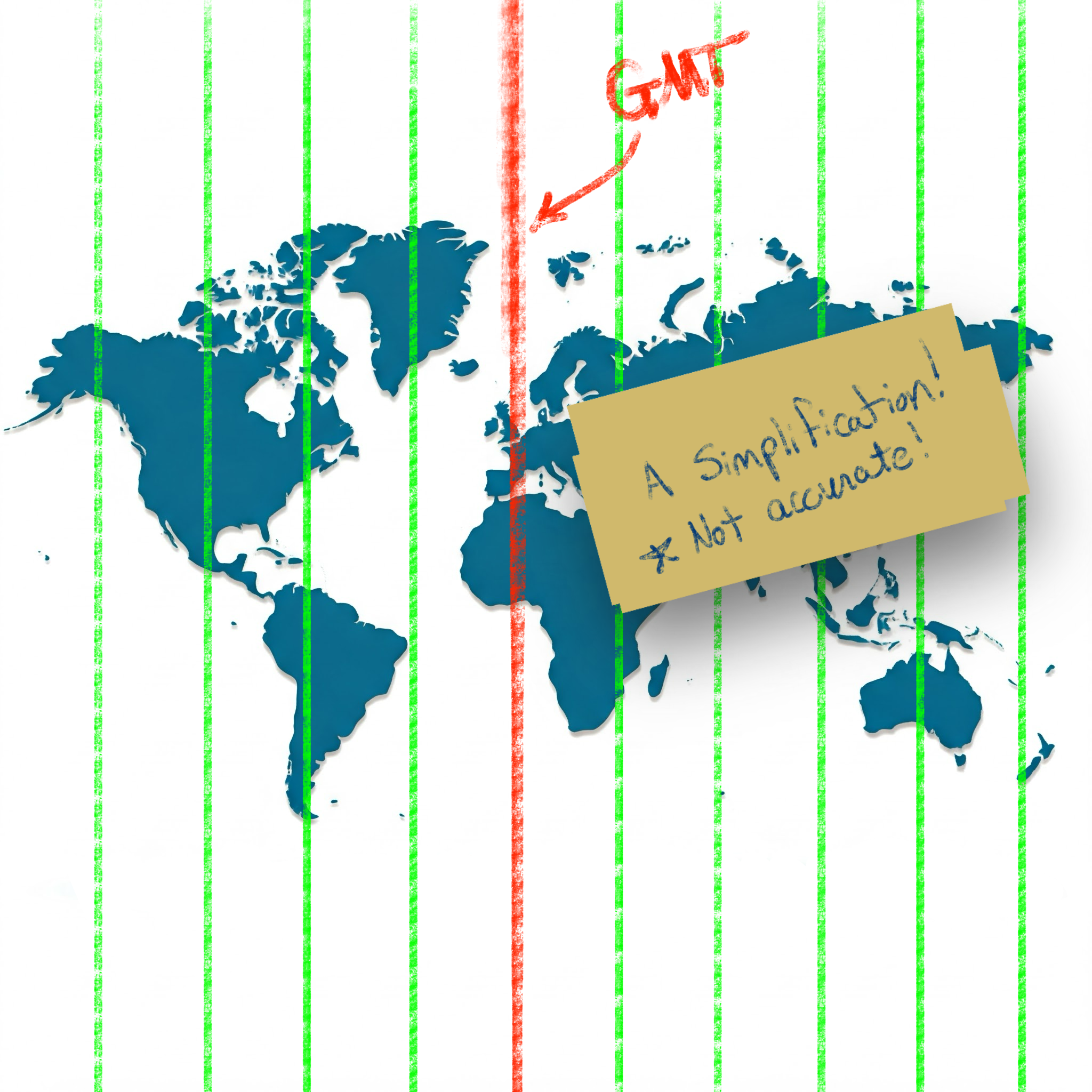
Simplification of time zones on a world map

While this simplification holds for many locations, unfortunately there are many exceptions to this rule.
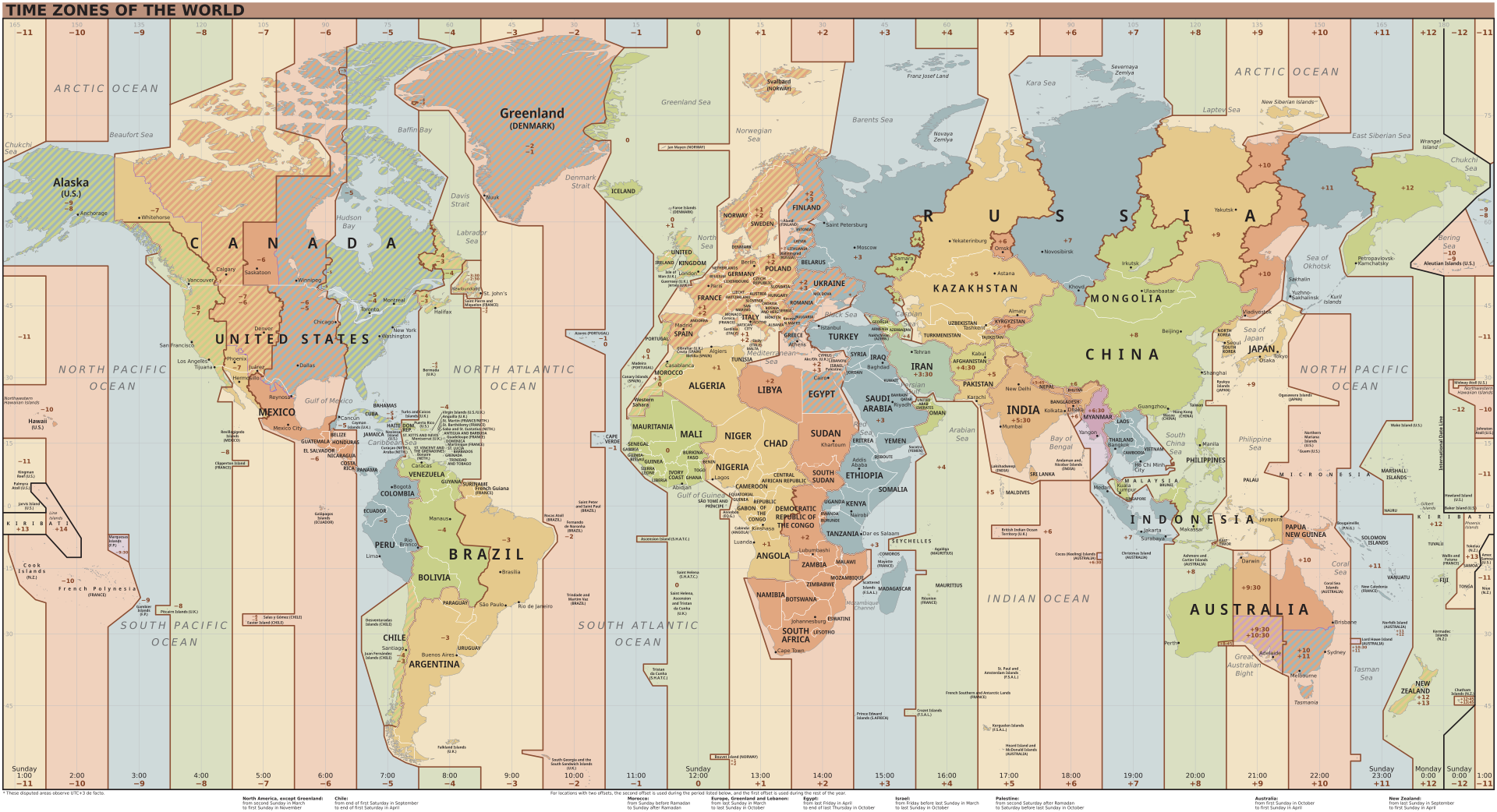
Time zones of the world (Wikipedia) Reference: Time zones of the world (Wikipedia)

Standardizing with UTC (the "Origin")

To simplify the language of conveying specific times, the world has settled on using UTC (Coordinated Universal Time). This standard sets the "origin" to the 0° longitude that goes through Greenwich, London.

Defining "Offset"

Using UTC as the basis, all other time zones can be defined relative to UTC. This relationship is referred to as the UTC offset.

If you have a local time and an offset, you no longer have an ambiguous time (as seen in our spy example above); you have a definite and specific time with no ambiguity.

The typical format used to show the UTC offset is ±HHMM[SS[.ffffff]].

  • A minus - sign indicates an offset to the West of UTC.
  • A plus + sign indicates an offset to the East of UTC.
  • HH indicates hours (zero-padded)
  • MM indicates minutes (zero-padded)
  • SS indicates seconds (zero-padded)
  • .ffffff indicates fractional seconds

For example, in America, the Eastern Standard Zime Zone (EST) is defined as -0500 UTC. This means that all locations in EST are 5 hours behind UTC. If the time is 9:00 PM at UTC, then the local time in EST is 4:00 PM.

In the Australian Central Western Standard Time Zone (ACWST), the offset is defined as +0845 UTC. If the time is 1:00 AM at UTC, then the local time in ACWST is 9:45 AM.

Daylight Savings Time

So, back to the time zone maps above. From the image, you can see that many time zones follow the political boundaries of countries and regions. This complicates time zone calculations slightly, but it is easy enough to wrap your mind around.

Unfortunately, there is one more factor to consider when working with times and time zones.

Let's look at Los Angeles.

On the map, the UTC offset for Los Angeles is -8 in Standard Time. Standard Time is typically followed during the winter months, whereas Daylight Savings Time is typically followed during the summer months.

Daylight Savings Time (DST) advances the clocks in a give time zone forward (typically by one hour during the summer months). There are several reasons that political regions might choose to follow DST (such as energy savings, better use of daylight, etc.). The difficulty and complexity of Daylight Savings Time is that DST is not consistently followed around the world. Depending on your location, your region may or may not follow DST.

Time Zone Database

Since the combination of political boundaries and Daylight Savings Time greatly increases the complexity of determining a specific time, a time zone database is needed to correctly map local times to specific times relative to UTC. The Internet Assigned Numbers Authority (IANA) Time Zone Database is the common source of time zone information used by operating systems and programming languages.

The database includes the names and aliases of all time zones, information about the offset, information about the use of Daylight Savings Time, time zone abbreviations, and which date ranges the various rules apply.

Copies of and information about the time zone database can be found on IANA's website.

Most UNIX systems have a copy of the database that gets updated with the operating system's package manager (typically installed in /usr/share/zoneinfo). Some programming languages have the database built-in. Others make it available by a library or can read the system's copy of the database.

Time Zone Names/Identifiers

The time zone database contains many names and aliases for specific time zones. Many of the entries include a country (or continent) and major city in the name. For example:

  • America/New_York
  • America/Los_Angeles
  • Europe/Rome
  • Australia/Melbourne

Conversion and Formatting Using ObjectScript

So, now we know about:

  • Local times (ambiguous times without an offset or location)
  • UTC offsets (the relative offset a timestamp or location is from the UTC "origin" in Greenwich, London)
  • Daylight Savings Time (an attempt at helping civilization at the expense of time zone offsets)
  • Time zone database (which includes information about time zones and Daylight Savings observance in many locations and regions)

Knowing this, how do we work with datetimes/time zones in ObjectScript?

***Note: I believe all the following statements are true about ObjectScript, but please let me know if I misstate how ObjectScript works with time zones and offsets.

Built-in Variables and Functions

If you need to convert timestamps between various formats within the system time zone of the process running IRIS, the built-in features of ObjectScript should be sufficient. Here is a brief listing of various time-related variables/functions in ObjectScript:

  • $ZTIMESTAMP / $ZTS

    • IRIS Internal format as a UTC value (offset +0000).
    • Format: ddddd,sssss.fffffff
  • $NOW(tzmins)

    • Current system local time with the given tzmins offset from UTC.
    • Does not take Daylight Savings Time into account.
    • By default, tzmins is based off of the $ZTIMEZONE variable.
    • Format: ddddd,sssss.fffffff
  • $HOROLOG

    • Current system local time (based on $ZTIMEZONE), taking Daylight Savings Time into account.
    • Format: ddddd,sssss.fffffff
  • $ZTIMEZONE

    • Returns or sets the system's local UTC offset in minutes.
  • $ZDATETIME() / $ZDT()

    • Converts $HOROLOG format to a specific display format.
    • Can be used to convert from system local time to UTC (+0000).
  • $ZDATETIMEH() / $ZDTH()

    • Converts a datetime string to internal $HOROLOG format.
    • Can be used to convert from UTC (+0000) to system local time.

As best as I can tell, these functions are only able to manipulate datetimes using the time zone of the local system. There does not appear to be a way to work with arbitrary time zones in ObjectScript.

Enter the tz Library on Open Exchange

To accommodate conversion to and from arbitrary time zones, I worked to create the tz - ObjectScript Time Zone Conversion Library.

This library accesses the time zone database installed on your system to provide support for converting timestamps between time zones and formats.

For instance, if you have time local to Los Angeles (America/Los_Angeles), you can convert it to the time zone used in the Bahamas (America/New_York) or the time zone used in London (Europe/London):

USER>zw ##class(tz.Ens).TZ("2024-12-20 3:14 PM", "America/Los_Angeles", "America/New_York")
"2024-12-20 06:14 PM"

USER>zw ##class(tz.Ens).TZ("2024-12-20 3:14 PM", "America/Los_Angeles", "Europe/London")
"2024-12-20 11:14 PM"

If you are given a timestamp with an offset, you can convert it to the local time in Eucla, Australia (Australia/Eucla), even if you don't know the original time zone:

USER>zw ##class(tz.Ens).TZ("2024-12-20 08:00 PM -0500", "Australia/Eucla")
"2024-12-21 09:45 AM +0845"

If you work with HL7 messages, the tz library has several methods exposed to Interoperability Rules and DTLs to help you easily convert between time zones, local times, times with offsets, etc.:

// Convert local time from one time zone to another 	 
set datetime = "20240102033045"
set newDatetime = ##class(tz.Ens).TZ(datetime,"America/New_York","America/Chicago")

// Convert local time to offset 	 
set datetime = "20240102033045"
set newDatetime = ##class(tz.Ens).TZOffset(datetime,"America/Chicago","America/New_York")

// Convert offset to local time 	 
set datetime = "20240102033045-0500"
set newDatetime = ##class(tz.Ens).TZLocal(datetime,"America/Chicago")

// Convert to a non-HL7 format 	 
set datetime = "20240102033045-0500"
set newDatetime = ##class(tz.Ens).TZ(datetime,"America/Chicago",,"%m/%d/%Y %H:%M:%S %z")

Summary

I appreciate you following me on this "international journey" where we encountered time zones, Daylight Savings Time, world maps, and "time bombs". Hopefully, this was able to shed some light on (and simplify) many of the complexities of working with datetimes and time zones.

Check out tz - ObjectScript Time Zone Conversion Library and let me know if you have any questions (or corrections/clarifications to something I said).

Thanks!

References/Interesting Links

4
5 441
Announcement Tani Frankel · Sep 1, 2025

#InterSystems Demo Games entry


⏯️ Being READY to Tackle Healthcare Enterprise Challenges in a Few Clicks

Managed Cloud Solutions to Help Streamline Your Health Services.

This demo showcases composing several InterSystems Managed Cloud Services to solve various use-cases.

The video is actually built of 6 short chapters (each ~2.5 minutes long) showing each part of the story, demoing a different service.

You can watch each "chapter" individually if you're interested in a specific service, but there is value in viewing the whole composition and observing the full flow.

  • 0:00Health Connect Cloud - Medical Device MQTT - HL7v2 for Hospital Operation Systems
  • 2:29FHIR Server & FHIR Transformation Service - HL7v2 to FHIR & Repository for Regulation & Exchange
  • 5:21FHIR SQL Builder - Providing standard relational access to FHIR data
  • 7:22 "FHIR IntelliChat" (see note below) - Natural human language chat with FHIR Server
  • 9:37OMOP Solution - FHIR to OMOP transformation & OMOP database with OHDSI tools compliance
  • 12:54InterSystems Data Studio for Health - Creating a multi data/app sources fabric 

[Note the "FHIR IntelliChat" part is not an actual formal InterSystems service, it is just a demonstration of a possibility (based on this solution by @José Pereira) ]

Presenters:
🗣 @Tani Frankel, Sales Engineer Manager, InterSystems
🗣 @Keren Skubach, Senior Sales Engineer, InterSystems
🗣 @Ariel Glikman, Sales Engineer, InterSystems

0
0 51
Question Anna Golitsyna · Aug 28, 2025

Studio's Find In Files finds nothing if CLS routines are included. The error is WIDE CHAR. After using ##class(%Studio.Project).FindInFiles programmatically and then ZW after the same error I strongly suspect that CodeWalkopdatecopyopt in EnsLib.InteropTools.HL7.Cloverleaf.Parser.cls  is to blame. I cannot even open this class, unlike other classes from EnsLib.InteropTools.HL7. This error prevents searching even if System Items are excluded and I would peg EnsLib as System. Any remedy besides updating IRIS? Assuming this is fixed in later IRIS versions.

2
0 57
Question Scott Roth · Aug 26, 2025

I have a need to create a specific Search Table outside of the EnsLib.HL7.SearchTable specifically for HL7 MFN messages in HealthShare Provider Directory.

Our Code is created in a different namespace then the main HSPD namespace and is mapped within the HSPD namespace mapping. 

I created a copy of EnsLib.HL7.SearchTable, named OSU.HL7.SearchTable what all needs mapped to make this new search table available in HSPD namespace?

If I go to Global within the Custom Code Namespace, I cannot see my new Search Table being created.

1
0 42
Question Chris Lambert · Aug 21, 2025

Hello,

I'm trying to get the Reply Action Code to work with the error message text.

I have this ACK:

MSH|^~\&|APP|FACIL|||20250821143621||ACK|CUEACK_20250821143621|P|2.4
MSA|AE||Failed to queue message

This is some of the Action Codes I've tried:

  • E*Failed to queue message=S
  • E*Failed=S
  • E*"Failed to queue message"=S
  • :E*Failed to queue message=S
  • :?E*Failed to queue message=S

It's not suspending the message however.

What am I doing wrong?

Thank you

2
0 69
Question Scott Roth · Aug 20, 2025

Using a WSDL and the SOAP wizard I created a WebServiceClient, and Operation to send an encoded message to a Vendor. But the vendor is now sending back an HL7 in the SOAP response.

I tried updating the Operation to Extend EnsLib.HL7.Operation.ReplyStandard, but still use the EnsLib.SOAP.OutboundAdapter. When I did this it broke my Operation and would not compile with the following error...

0
0 47
Question Scott Roth · Aug 15, 2025

Is there a way to Remove specific all Addresses from a Provider.Individual.Address before reinserting the Addresses from an HL7 message in Provider Directory?

Most fields we can call %clearFields() however since Addresses come from multiple locations we need to isolate and treat Addresses from this HL7 source as a snapshot.

Thanks

Scott

0
0 31
Article Harshitha · Aug 3, 2025 2m read

Working in healthcare IT as a young developer, especially on InterSystems TrakCare, you quickly realize one thing: it’s not just about HL7 messages or backend integrations. A hugepart of making TrakCare work smoothly for hospitals comes down to how it’s configured, customized, and supported on the application side.

That’s where people like me come in—techno-functional developers who understand both the tech and how it impacts actual hospital workflows.

We’re Not Just Techies (or Functional Consultants)

Our role sits right in the middle. We're the ones:

1
2 77
Article Ashok Kumar T · Jun 30, 2025 23m read

Overview

Fast Healthcare Interoperability Resources (FHIR) is a standardized framework developed by HL7 International to facilitate the exchange of healthcare data in a flexible, developer-friendly, and modern way. It leverages contemporary web technologies to ensure seamless integration and communication across healthcare systems.

Key FHIR Technologies

  • RESTful APIs for resource interaction
  • JSON and XML for data representation
  • OAuth2 for secure authorization and authentication
1
6 352
Job Ying Zhang · Jul 8, 2025

I am seeking work with InterSystems HealthConnect/Cache. My experience is working with Rules and DTLs, plus message search, and export of components.With 10 years of dedicated expertise in SOA and ESB platform development, I have successfully designed and implemented enterprise-level integration solutions for large organizations, driving significant improvements in system interoperability and business efficiency.I have actively developed and supported HL7 V2/V3 、FHIR、XML/JSON interfaces.I reside in China. Available for full-time or contract positions, with remote work options preferred.The

0
0 67
Announcement Larry Finlayson · Jun 30, 2025
    Building HL7 Integrations (3 days) – In Person (Boston, MA) July 22-24, 2025

    Build and configure HL7® V2 interfaces using InterSystems integration technologies
    This healthcare-focused 3-day course teaches implementation partners, integrators and analysts how to build HL7® integration solutions.
    Students build a production that processes and routes HL7 messages.
    Students learn how to work with the pre-built HL7 business services, business processes and business operations to receive and send HL7 messages. Students also learn how to transform HL7 messages using graphical tools in the

0
0 35
Question Will · Jun 25, 2025

My HL7 message got "AR" (rejected ack code) and went to the suspended queue.  I re-submitted it (without editing it) but forgot to write down the details before doing so.  It got "AA" and everything works fine from there.

Now (the next day) I want to check with the downstream system why they returned "AR" initially.  Is there a way to search for the original message the got an "AR", along with any returned error message please?

Thanks

W

2
0 67
Question Scott Roth · Jun 13, 2025

I have an application that is requires an Encoded HL7 message sent over SOAP over HTTPS using SSL/TLS... the Response that is return is also encoded, which I know how to Decode but not sure when I Decode the response how to Extract the HL7 message to send back to the router.

How do I capture the Routing Source System and parse the encoded message back into an HL7 format that would show on the trace viewer?

Below is an example...where I get the response and want to send it back to FeederScottRouting as an HL7 message that can be tied to the Parent ID of the sending request message?

4
0 95
Question Scott Roth · Jun 10, 2025

We have a vendor that is requiring that the HL7 sent to them is sent as an Encoded message inside a SOAP request but is sending back an HL7 message as the response. 

When the WSDL built the response, it was expecting an encoded message back. I updated the Request and Business Operation to expect an EnsLib.HL7.Message, however I am not sure how to handle the HL7 ACK to post it back to the sending message so it will not cause an Orphan message, and to parse it back correctly in the trace viewer.

When I do a $$$LOGINFO on the pResponse, I get back...

1
0 77
Question Justin Ruggles · Jun 17, 2025

I am trying to add a value to my concatenation string and the value is not being inserted in the right place. I am adding onto this code from another developer and cannot seem to get it to work. The only code I have added is underlined in bold red.

This is how the translated HL7 message looks:

OBX|1|CE|CDX^History||Specimen 1 Clinical History: CLINICAL HISTORY\.br\\.br\Specimen 2 Clinical History: CLINICAL HISTORY 2\.br\Specimen 1 Suspected Clinical Diagnosis\.br\Specimen 3 Clinical History: HISTORY 3\.br\Specimen 2 Suspected Clinical Diagnosis

This is how it should look:

0
0 63