In healthcare,interoperability is the ability of different information technology systems and software applications to communicate, exchange data, and use the information that has been exchanged.
What are best practices for JSON transformation in IRIS interoperability? This is for a non-healthcare use case, so any tools we happen to have around FHIR might not be available. The motivating use case is trimming down a verbose and needlessly complex REST API response to feed to an LLM - trying to reduce token usage and maybe get better results from less noisy data.
Interoperability on Python (IoP) is a proof-of-concept project designed to showcase the power of the InterSystems IRIS Interoperability Framework when combined with a Python-first approach.IoP leverages Embedded Python (a feature of InterSystems IRIS) to enable developers to write interoperability components in Python, which can seamlessly integrate with the robust IRIS platform. This guide has been crafted for beginners and provides a comprehensive introduction to IoP, its setup, and practical steps to create your first interoperability component. By the end of this article, you will get a clear understanding of how to use IoP to build scalable, Python-based interoperability solutions.
I would like to know which are the best practices of using Streams in Interoperability messages.
I have always use %Stream.GlobalCharacter properties to hold a JSON, or a base64 document, when creating messages. This is fine and I can see the content in Visual Trace without doing anything, so I can check what is happening and resolve issues if I have, or reprocess messages if something went wrong, because I have the content.
Been testing out the Production Validator toolkit, just to see what we can/not do with it. Seems really interesting and there seem to be some use cases for it that can really streamline some upgrades (or at least parts of upgrades) but I was running into so many hurdles with the documentation. I am curious if anyone else has used it. Did you experience any issues getting it working? Any clarification that you would have liked in the documentation? any use cases that you worked through that made it particularly valuable? etc? The hurdles I experienced included:
JSON (JavaScript Object Notation) is a lightweight, text-based format designed for structured data interchange. It represents data objects consisting of key–value pairs and arrays, and it is entirely language-independent.
Sometimes your client may request documentation of your BI or interoperability project in a formal document. In this case, MS Word is a good alternative, as it has an advanced editor that allows you to generate professional documentation. Now it's possible! The iris4word app has this functionality!
In this section, we will explore how to use Python as the primary language in IRIS, allowing you to write your application logic in Python while still leveraging the power of IRIS.
First, let's start by the official way of doing things, which is using the irispython interpreter.
You can use the irispython interpreter to run Python code directly in IRIS. This allows you to write Python code and execute it in the context of your IRIS application.
What is irispython?
irispython is a Python interpreter that is located in the IRIS installation directory (<installation_directory>/bin/irispython), and it is used to run Python code in the context of IRIS.
It will for you:
Set up the sys.path to include the IRIS Python libraries and modules.
This is done by the site.py file, which is located in <installation_directory>/lib/python/iris_site.py.
Allow you to import iris modules which is a special module that provides access to IRIS features and functionality like bridging any ObjectScript class to Python, and vice versa.
Fix permissions issues and dynamic loading of iris kernel libraries.
Example of using irispython
You can run the irispython interpreter from the command line:
<installation_directory>/bin/irispython
Let's run a simple example:
# src/python/article/irispython_example.py
import requests
import iris

def run():
    response = requests.get("https://2eb86668f7ab407989787c97ec6b24ba.api.mockbin.io/")

    my_dict = response.json()

    for key, value in my_dict.items():
        print(f"{key}: {value}")  # print message: Hello World

    return my_dict

if __name__ == "__main__":
    print(f"Iris version: {iris.cls('%SYSTEM.Version').GetVersion()}")
    run()
You can run this script using the irispython interpreter:
Virtual Environment: It's difficult to set up a virtual environment for your Python code in irispython.
Doesn't mean it is not possible, but it's difficult to do it due to virtual environment look by default to an interpreter called python or python3, which is not the case in IRIS.
In conclusion, using irispython allows you to write your application logic in Python while still leveraging the power of IRIS. However, it has its limitations with debugging and virtual environment setup.
Using WSGI
In this section, we will explore how to use WSGI (Web Server Gateway Interface) to run Python web applications in IRIS.
WSGI is a standard interface between web servers and Python web applications or frameworks. It allows you to run Python web applications in a web server environment.
IRIS supports WSGI, which means you can run Python web applications in IRIS using the built-in WSGI server.
How to use it
To use WSGI in IRIS, you need to create a WSGI application and register it with the IRIS web server.
Python Web Frameworks: You can use popular Python web frameworks like Flask or Django to build your web applications.
IRIS Integration: You can easily integrate your Python web applications with IRIS features and functionality.
Cons
Complexity: Setting up a WSGI application can be more complex than just using uvicorn or gunicorn with a Python web framework.
Conclusion
In conclusion, using WSGI in IRIS allows you to build powerful web applications using Python while still leveraging the features and functionality of IRIS.
DB-API
In this section, we will explore how to use the Python DB-API to interact with IRIS databases.
The Python DB-API is a standard interface for connecting to databases in Python. It allows you to execute SQL queries and retrieve results from the database.
How to use it
You can install it using pip:
pip install intersystems-irispython
Then, you can use the DB-API to connect to an IRIS database and execute SQL queries.
Example of using DB-API
You use it like any other Python DB-API, here is an example:
# src/python/article/dbapi_example.py
import iris

def run():
    # Connect to the IRIS database
# Open a connection to the server
    args = {
        'hostname':'127.0.0.1',
        'port': 1972,
        'namespace':'USER',
        'username':'SuperUser',
        'password':'SYS'
    }
    conn = iris.connect(**args)

    # Create a cursor
    cursor = conn.cursor()

    # Execute a query
    cursor.execute("SELECT 1")

    # Fetch all results
    results = cursor.fetchall()

    for row in results:
        print(row)

    # Close the cursor and connection
    cursor.close()
    conn.close()
if __name__ == "__main__":
    run()
You can run this script using any Python interpreter:
Standard Interface: The DB-API provides a standard interface for connecting to databases, making it easy to switch between different databases.
SQL Queries: You can execute SQL queries and retrieve results from the database using Python.
Remote access: You can connect to remote IRIS databases using the DB-API.
Cons
Limited Features: The DB-API only provides SQL access to the database, so you won't be able to use advanced IRIS features like ObjectScript or Python code execution.
Interactive Development: Jupyter Notebooks allow you to write and execute Python code interactively, which is great for data analysis and exploration.
Rich Output: You can display rich output, such as charts and tables, directly in the notebook.
Documentation: You can add documentation and explanations alongside your code, making
Cons
Tricky Setup: Setting up Jupyter Notebooks with IRIS can be tricky, especially with the kernel configuration.
Conclusion
In conclusion, using Jupyter Notebooks with IRIS allows you to write and execute Python code interactively while leveraging the features of IRIS. However, it can be tricky to set up, especially with the kernel configuration.
Bonus Section
Starting from this section, we will explore some advanced topics related to Python in IRIS, such as remote debugging Python code, using virtual environments, and more.
Most of these topics are not officially supported by InterSystems, but they are useful to know if you want to use Python in IRIS.
Using a native interpreter (no irispython)
In this section, we will explore how to use a native Python interpreter instead of the irispython interpreter.
This allows you to use virtual environments out of the box, and to use the Python interpreter you are used to.
How to use it
To use a native Python interpreter, you to have IRIS install locally on your machine, and you need to have the iris-embedded-python-wrapper package installed.
You can install it using pip:
pip install iris-embedded-python-wrapper
Next, you need to setup some environment variables to point to your IRIS installation:
Then, you can use the DB-API to connect to an IRIS database and execute SQL queries or any other Python code that uses the DB-API, like SQLAlchemy, Django, langchain, pandas, etc.
Example of using DB-API
You can use it like any other Python DB-API, here is an example:
# src/python/article/dbapi_community_example.py
import intersystems_iris.dbapi._DBAPI as dbapi

config = {
    "hostname": "localhost",
    "port": 1972,
    "namespace": "USER",
    "username": "_SYSTEM",
    "password": "SYS",
}

with dbapi.connect(**config) as conn:
    with conn.cursor() as cursor:
        cursor.execute("select ? as one, 2 as two", 1)   # second arg is parameter value
        for row in cursor:
            one, two = row
            print(f"one: {one}")
            print(f"two: {two}")
You can run this script using any Python interpreter:
from sqlalchemy import create_engine, text

COMMUNITY_DRIVER_URL = "iris://_SYSTEM:SYS@localhost:1972/USER"
OFFICIAL_DRIVER_URL = "iris+intersystems://_SYSTEM:SYS@localhost:1972/USER"
EMBEDDED_PYTHON_DRIVER_URL = "iris+emb:///USER"

def run(driver):
    # Create an engine using the official driver
    engine = create_engine(driver)

    with engine.connect() as connection:
        # Execute a query
        result = connection.execute(text("SELECT 1 AS one, 2 AS two"))

        for row in result:
            print(f"one: {row.one}, two: {row.two}")

if __name__ == "__main__":
    run(OFFICIAL_DRIVER_URL)
    run(COMMUNITY_DRIVER_URL)
    run(EMBEDDED_PYTHON_DRIVER_URL)
You can run this script using any Python interpreter:
Better Support: It has better support of SQLAlchemy, Django, langchain, and other Python libraries that use the DB-API.
Community Driven: It is maintained by the community, which means it is more likely to be updated and improved over time.
Compatibility: It is compatible with the official InterSystems DB-API, so you can switch between the official and community editions easily.
Cons
Speed: The community edition may not be as optimized as the official version, potentially leading to slower performance in some scenarios.
Debugging Python Code in IRIS
In this section, we will explore how to debug Python code in IRIS.
By default, debugging Python code in IRIS (in objectscript with the language tag or %SYS.Python) is not possible, but a community solution exists to allow you to debug Python code in IRIS.
This will install IoP and new ObjectScript classes that will allow you to debug Python code in IRIS.
Then, you can use the IOP.Wrapper class to wrap your Python code and enable debugging.
Class Article.DebuggingExample Extends %RegisteredObject
{
ClassMethod Run() As %Status
{
    set myScript = ##class(IOP.Wrapper).Import("my_script", "/irisdev/app/src/python/article/", 55550) // Adjust the path to your module
    Do myScript.run()
    Quit $$$OK
}
}
Then configure VsCode to use the IoP debugger by adding the following configuration to your launch.json file:
You can then set breakpoints in your Python code, and the debugger will stop at those breakpoints, allowing you to inspect variables and step through the code.
Video of remote debugging in action (for IoP but the concept is the same):
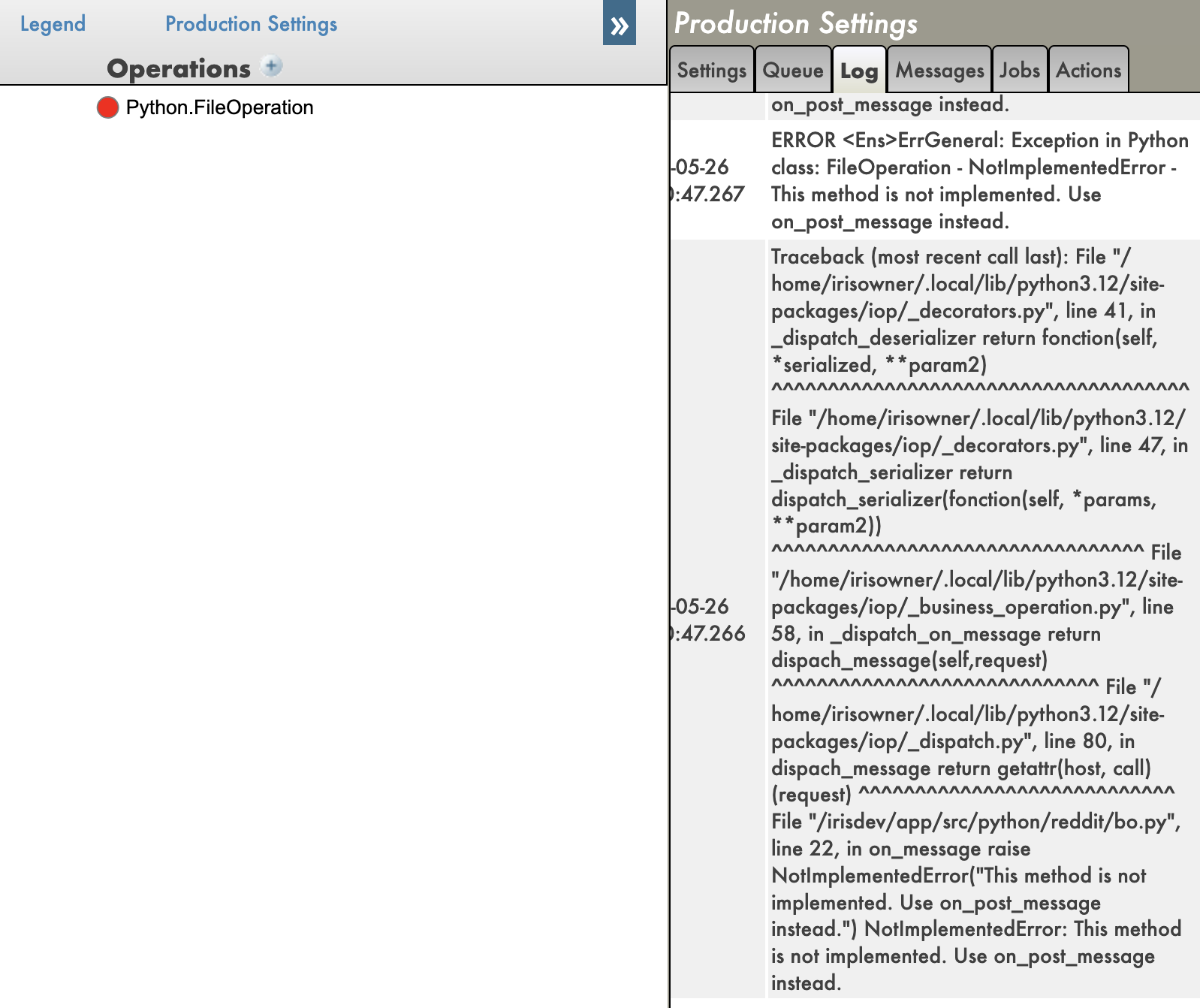
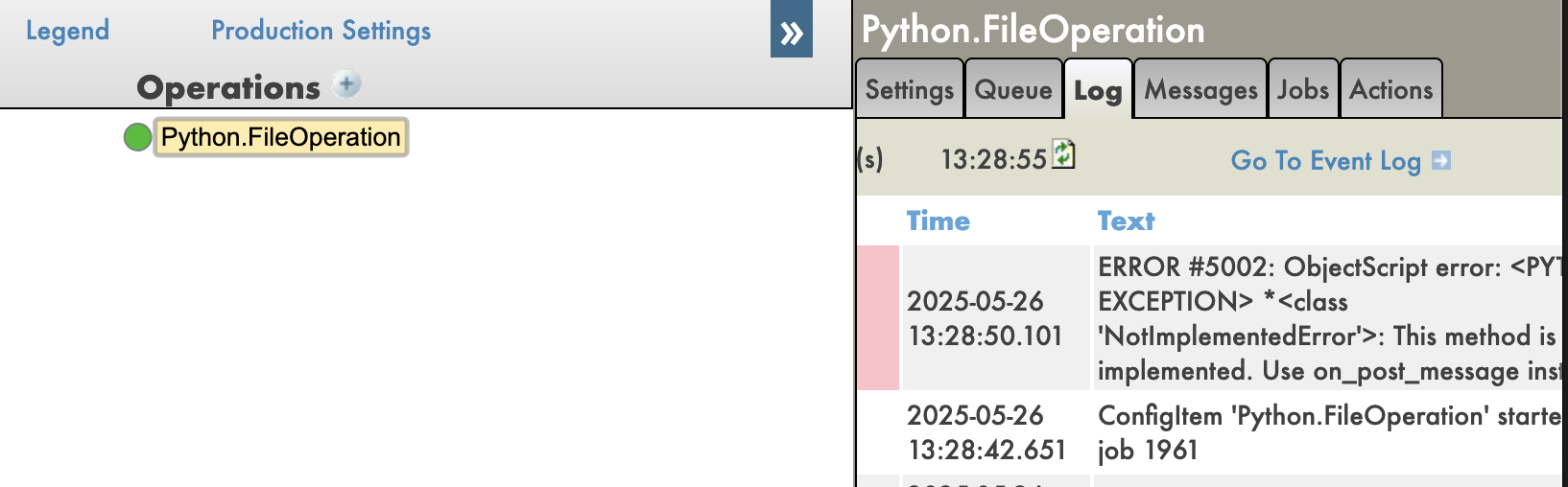
And you have also tracebacks in your Python code, which is very useful for debugging.
With tracebacks enabled:
With tracebacks disabled:
Pros
Remote Debugging: You can debug Python code running in IRIS remotely, which is IMO a game changer.
Python Debugging Features: You can use all the Python debugging features, such as breakpoints, variable inspection, and stepping through code.
Tracebacks: You can see the full traceback of errors in your Python code, which is very useful for debugging.
Cons
Setup Complexity: Setting up the IoP and the debugger can be complex, especially for beginners.
Community Solution: This is a community solution, so it may not be as stable or well-documented as official solutions.
Conclusion
In conclusion, debugging Python code in IRIS is possible using the IoP community solution, which allows you to use the Python debugger to debug your Python code running in IRIS. However, it requires some setup and may not be as stable as official solutions.
IoP (Interoperability on Python)
In this section, we will explore the IoP (Interoperability on Python) solution, which allows you to run Python code in IRIS in a python-first approach.
I have been developing this solution for a while now, this is my baby, it tries to solve or enhance all the previous points we have seen in this series of articles.
Key points of IoP:
Python First: You can write your application logic in Python, which allows you to leverage Python's features and libraries.
IRIS Integration: You can easily integrate your Python code with IRIS features and functionality.
Remote Debugging: You can debug your Python code running in IRIS remotely.
Tracebacks: You can see the full traceback of errors in your Python code, which is very useful for debugging.
Virtual Environments: You have a support of virtual environments, allowing you to manage dependencies more easily.
🐍❤️ As you can see, IoP provides a powerful way to integrate Python with IRIS, making it easier to develop and debug your applications.
You don't need to use irispython anymore, you don't have to set your sys.path manually, you can use virtual environments, and you can debug your Python code running in IRIS.
Conclusion
I hope you enjoyed this series of articles about Python in IRIS.
Feel free to reach out to me if you have any questions or feedback about this series of articles.
Sending emails is a common requirement in integration scenarios — whether for client reminders, automatic reports, or transaction confirmations. Static messages quickly become hard to maintain and personalize. This is where the templated_email module comes in, combining InterSystems IRIS Interoperability with the power of Jinja2 templates.
Why Jinja2 for Emails
Jinja2 is a popular templating engine from the Python ecosystem that enables fully dynamic content generation. It supports:
Fast Healthcare Interoperability Resources (FHIR) is a standardized framework developed by HL7 International to facilitate the exchange of healthcare data in a flexible, developer-friendly, and modern way. It leverages contemporary web technologies to ensure seamless integration and communication across healthcare systems.
Key FHIR Technologies
RESTful APIs for resource interaction
JSON and XML for data representation
OAuth2 for secure authorization and authentication
If you work with Productions, highlighting connections between Business Hosts is a very convenient feature, allowing developers to get a visual representation of a data flow.
This feature works by default with all system Business Hosts. If a user writes their own Business Services, Processes, or Operations, they must implement the OnGetConnections method for this functionality to work with their custom Business Hosts (or use Ens.DataType.ConfigName properties for connections). That said, the SMP shows only the first layer of connections of the selected Business Host. Sometimes, we need to get connections of connections recursively to build a complete data flow graph. Or we might need this connection information to check which downstream systems might be affected by a change upstream.
In this demo, InterSystems IRIS Interoperability comes alive in an amazing, game-like user experience based on our Ultimate Control Tower demo. We visualize machines in a virtual 3D factory building, interacting with InterSystems IRIS in real time—displaying current statuses and sensor data, simulating machine outages and predictive maintenance scenarios, and triggering workflow tasks and actions in InterSystems IRIS. By using a mobile app on a tablet—and even a VR headset for a fully immersive experience—we unleash the power of InterSystems IRIS.
I'm working with HealthShare, and need to create a user account for our development environment with specific access requirements. This user will need only to:
Review messaging and environments See production and namespaces NOT modify anything (read-only access)
After reviewing the documentation on user roles and rights management, I can see the default roles available in our system include:
We are still seeking feedback on our two new HealthShare Unified Care Record certification exam designs. This is your opportunity to tell us what knowledge, skills, and abilities are important for Certified HealthShare Unified Care Record Specialists.
The feedback surveys are open until July 20th, 2025. All participants are eligible to receive 7000 Global Masters points for each survey they complete!
I am seeking work with InterSystems HealthConnect/Cache. My experience is working with Rules and DTLs, plus message search, and export of components.With 10 years of dedicated expertise in SOA and ESB platform development, I have successfully designed and implemented enterprise-level integration solutions for large organizations, driving significant improvements in system interoperability and business efficiency.I have actively developed and supported HL7 V2/V3 、FHIR、XML/JSON interfaces.I reside in China. Available for full-time or contract positions, with remote work options preferred.The
A few weeks ago I published an API accelerator call Memoria, Is a very simple way to minimize the time and network traffic to and end-point, I hope could be useful.
TL;DR : You can toggle the DEBUG flag in the Security portal to make changes to be reflected in the application as you develop.
Code presentation
app.py
This is the main file of the application. It contains the Flask application and the endpoints.
from flask import Flask, jsonify, request
from models import Comment, Post, init_db

from grongier.pex import Director

import iris

app = Flask(__name__)
app.config['SQLALCHEMY_DATABASE_URI'] = 'iris+emb://IRISAPP'

db = init_db(app)
from flask import Flask, jsonify, request: Import the Flask library.
from models import Comment, Post, init_db: Import the models and the database initialization function.
from grongier.pex import Director: Import the Director class to bind the flask app to the IRIS interoperability framework.
import iris: Import the IRIS library.
app = Flask(__name__): Create a Flask application.
app.config['SQLALCHEMY_DATABASE_URI'] = 'iris+emb://IRISAPP': Set the database URI to the IRISAPP namespace.
The iris+emb URI scheme is used to connect to IRIS as an embedded connection (no need for a separate IRIS instance).
db = init_db(app): Initialize the database with the Flask application.
models.py
This file contains the SQLAlchemy models for the application.
from dataclasses import dataclass
from typing import List
from flask_sqlalchemy import SQLAlchemy

db = SQLAlchemy()

@dataclass
class Comment(db.Model):
    id:int = db.Column(db.Integer, primary_key=True)
    content:str = db.Column(db.Text)
    post_id:int = db.Column(db.Integer, db.ForeignKey('post.id'))

@dataclass
class Post(db.Model):
    __allow_unmapped__ = True
    id:int = db.Column(db.Integer, primary_key=True)
    title:str = db.Column(db.String(100))
    content:str = db.Column(db.Text)
    comments:List[Comment] = db.relationship('Comment', backref='post')
Not much to say here, the models are defined as dataclasses and are subclasses of the db.Model class.
The use of the __allow_unmapped__ attribute is necessary to allow the creation of the Post object without the comments attribute.
dataclasses are used to help with the serialization of the objects to JSON.
The init_db function initializes the database with the Flask application.
def init_db(app):
    db.init_app(app)

    with app.app_context():
        db.drop_all()
        db.create_all()
        # Create fake data
        post1 = Post(title='Post The First', content='Content for the first post')
        ...
        db.session.add(post1)
        ...
        db.session.commit()
    return db
db.init_app(app): Initialize the database with the Flask application.
with app.app_context(): Create a context for the application.
db.drop_all(): Drop all the tables in the database.
db.create_all(): Create all the tables in the database.
Create fake data for the application.
return the database object.
/iris endpoint
######################
# IRIS Query example #
######################

@app.route('/iris', methods=['GET'])
def iris_query():
    query = "SELECT top 10 * FROM %Dictionary.ClassDefinition"
    rs = iris.sql.exec(query)
    # Convert the result to a list of dictionaries
    result = []
    for row in rs:
        result.append(row)
    return jsonify(result)
This endpoint executes a query on the IRIS database and returns the top 10 classes present in the IRISAPP namespace.
Is anyone using DICOM Interoperability in IRIS for Health configured in Mirror?
I'm asking because I'm not sure how to handle where the DICOM messages are stored.
For some reason DICOM use the filesystem to store raw messages, the directory used can be configured in the StorageLocation production settings, obviously this is a big issue if/when a mirror failover occur.
Unfortunately in IRIS it's not possible to change the DICOM storage from file stream to global stream.
The Certification team of InterSystems Learning Services is developing two new HealthShare Unified Care Record certification exams, and we are reaching out to our community for feedback that will help us evaluate and establish the contents of the exams. Please note that these exams will replace our HealthShare Unified Care Record Technical Specialist exam that we plan to retire in January 2026. Certifications earned in this technology before the exam’s retirement will remain valid for five years from the date of achievement.
IRIS and Ensemble are designed to act as an ESB/EAI. This mean they are build to process lots of small messages.
But some times, in real life we have to use them as ETL. The down side is not that they can't do so, but it can take a long time to process millions of row at once.
To improve performance, I have created a new SQLOutboundAdaptor who only works with JDBC.
BatchSqlOutboundAdapter
Extend EnsLib.SQL.OutboundAdapter to add batch batch and fetch support on JDBC connection.
Benchmark
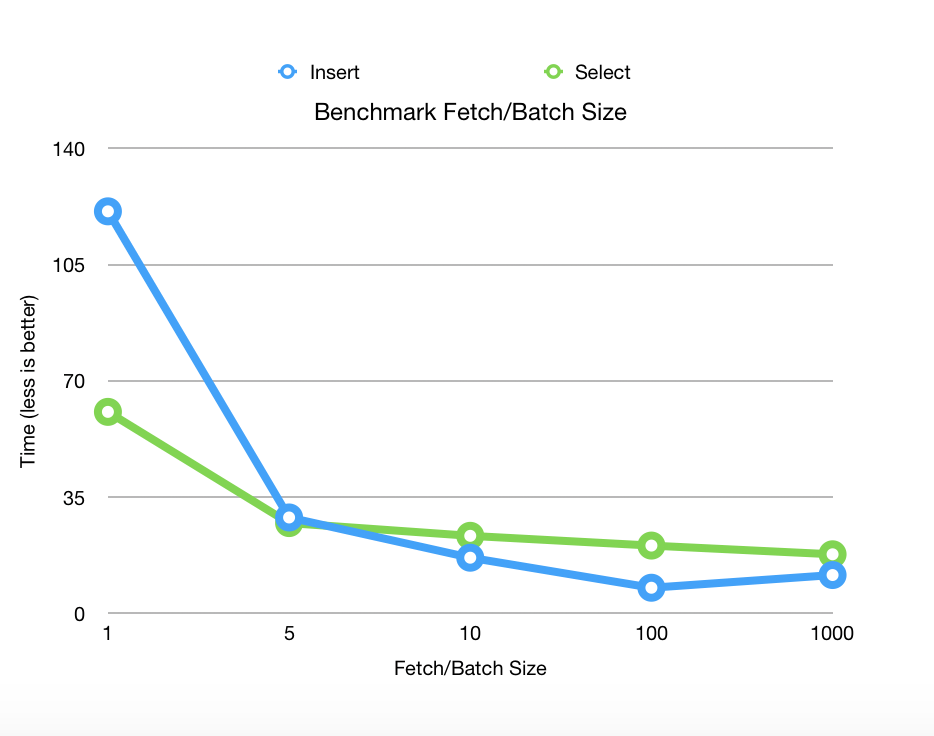
Benchmarks released on Postgres 11.2 with 1 000 000 rows fetched and 100 000 rows inserted on 2 columns.
Method ExecuteQueryBatchParmArray(ByRef pRS As Grongier.SQL.GatewayResultSet, pQueryStatement As %String, pBatchSize As %Integer, ByRef pParms) As %Status
pRS is the ResultSet can be use as any EnsLib.SQL.GatewayResultSet
pQueryStatement is the SQL query you like to execute
pBatchSize is the fetch size JDBC parameter
Method ExecuteUpdateBatchParamArray(Output pNumRowsAffected As %Integer, pUpdateStatement As %String, pParms...) As %Status
pNumRowsAffected is the number of row inserted
pUpdateStatement is teh update/insert SQL statement
pParms is Caché Multidimensional Array
pParms indicate the number of row in batch
pParms(integer) indicate the number of parameters in the row
pParms(integer,integerParam) indicate the value of the parameter whose position is integerParam.
pParms(integer,integerParam,"SqlType") indicate the SqlType of the parameter whose position is integerParam, by default it will be $$$SqlVarchar
Example
Grongier.Example.SqlSelectOperation show an example of ExecuteQueryBatchParmArray
Grongier.Example.SqlSelectOperation show an example of ExecuteUpdateBatchParamArray
Content of this project
This adaptor include :
Grongier.SQL.Common
No modification, simple extend of EnsLib.SQL.Common
Grongier.SQL.CommonJ
No modification, simple extend of EnsLib.SQL.CommonJ
Grongier.SQL.GatewayResultSet
Extension of EnsLib.SQL.GatewayResultSet to gain the ablility to use fetch size.
Grongier.SQL.JDBCGateway
Use to allow compilation and support on Ensemble 2017.1 and lower
Grongier.SQL.OutboundAdapter
The new adaptor with :
ExecuteQueryBatchParmArray allow SQL query a distant database and specify the JDBC fetchSize
ExecuteUpdateBatchParamArray allow insertion in a distant database with JDBC addBatch and executeBatch
Grongier.SQL.Snapshot
Extend of EnsLib.SQL.Snapshot to handle Grongier.SQL.GatewayResultSet and the fetch size property
You know that feeling when you get your blood test results and it all looks like Greek? That's the problem FHIRInsight is here to solve. It started with the idea that medical data shouldn't be scary or confusing – it should be something we can all use. Blood tests are incredibly common for checking our health, but let's be honest, understanding them is tough for most folks, and sometimes even for medical staff who don't specialize in lab work. FHIRInsight wants to make that whole process easier and the information more actionable.
🤖 Why We Built FHIRInsight
It all started with a simple but powerful question:
“Why is reading a blood test still so hard — even for doctors sometimes?”
If you’ve ever looked at a lab result, you’ve probably seen a wall of numbers, cryptic abbreviations, and a “reference range” that may or may not apply to your age, gender, or condition. It’s a diagnostic tool, sure — but without context, it becomes a guessing game. Even experienced healthcare professionals sometimes need to cross-reference guidelines, research papers, or specialist opinions to make sense of it all.
That’s where FHIRInsight steps in.
We didn’t build it just for patients — we built it for the people on the frontlines of care. For the doctors pulling back-to-back shifts, for the nurses catching subtle patterns in vitals, for every health worker trying to make the right call with limited time and lots of responsibility. Our goal is to make their jobs just a little bit easier — by turning dense, clinical FHIR data into something clear, useful, and grounded in real medical science. Something that speaks human.
FHIRInsight does more than just explain lab values. It also:
Provides contextual advice on whether a test result is mild, moderate, or severe
Suggests potential causes and differential diagnoses based on clinical signs
Recommends next steps — whether that’s follow-up tests, referrals, or urgent care
Leverages RAG (Retrieval-Augmented Generation) to pull in relevant scientific articles that support the analysis
Imagine a young doctor reviewing a patient’s anemia panel. Instead of Googling every abnormal value or digging through medical journals, they receive a report that not only summarizes the issue but cites recent studies or WHO guidelines that support the reasoning. That’s the power of combining AI and vector search over curated research.
And what about the patient?
They’re no longer left staring at a wall of numbers, wondering what something like “bilirubin 2.3 mg/dL” is supposed to mean — or whether they should be worried. Instead, they get a simple, thoughtful explanation. One that feels more like a conversation than a clinical report. Something they can actually understand — and bring into the discussion with their doctor, feeling more prepared and less anxious.
Because that’s what FHIRInsight is really about: turning medical complexity into clarity, and helping both healthcare professionals and patients make better, more confident decisions — together.
🔍 Under the Hood
Of course, all that simplicity on the surface is made possible by some powerful tech working quietly in the background.
Here’s what FHIRInsight is built on:
FHIR (Fast Healthcare Interoperability Resources) — This is the global standard for health data. It’s how we receive structured information like lab results, patient history, demographics, and encounters. FHIR is the language that medical systems speak — and we translate that language into something people can actually use.
Vector Search for RAG (Retrieval-Augmented Generation): FHIRInsight enhances its diagnostic reasoning by indexing scientific PDF papers and trusted URLs into a vector database using InterSystems IRIS native vector search. When a lab result looks ambiguous or nuanced, the system retrieves relevant content to support its recommendations — not from memory, but from real, up-to-date research.
Prompt Engineering for Medical Reasoning: We’ve fine-tuned our prompts to guide the LLM toward identifying a wide spectrum of blood-related conditions. Whether it’s iron deficiency anemia, coagulopathies, hormonal imbalances, or autoimmune triggers — the prompt guides the LLM through variations in symptoms, lab patterns, and possible causes.
LiteLLM Integration: A custom adapter routes requests to multiple LLM providers (OpenAI, Anthropic, Ollama, etc.) through a unified interface, enabling fallback, streaming, and model switching with ease.
All of this happens in a matter of seconds — turning raw lab values into explainable, actionable medical insight, whether you’re a doctor reviewing 30 patient charts or a patient trying to understand what your numbers mean.
🧩 Creating the LiteLLM Adapter: One Interface to Rule All Models
Behind the scenes, FHIRInsight’s AI-powered reporting is driven by LiteLLM — a brilliant abstraction layer that allows us to call over 100+ LLMs (OpenAI, Claude, Gemini, Ollama, etc.) through a single OpenAI-style interface.
But integrating LiteLLM into InterSystems IRIS required something more permanent and reusable than Python scripts tucked away in a Business Operation. So, we created our own LiteLLM Adapter.
Meet LiteLLMAdapter
This adapter class handles everything you’d expect from a robust LLM integration:
Accepts parameters like prompt, model, and temperature
Loads your environment variables (e.g., API keys) dynamically
To plug this into our interoperability production, we wrapped it in a dedicated Business Operation:
Handles production configuration via standard LLMModel setting
Integrates with the FHIRAnalyzer component for real-time report generation
Acts as a central “AI bridge” for any future components needing LLM access
Here’s the core flow simplified:
set response = ##class(dc.LLM.LiteLLMAdapter).CallLLM("Tell me about hemoglobin.", "openai/gpt-4o", 0.7)
write response
🧭 Conclusion
When we started building FHIRInsight, our mission was simple: make blood tests easier to understand — for everyone. Not just patients, but doctors, nurses, caregivers... anyone who’s ever stared at a lab result and thought, “Okay, but what does this actually mean?”
We’ve all been there.
By blending the structure of FHIR, the speed of InterSystems IRIS, the intelligence of LLMs, and the depth of real medical research through vector search, we created a tool that turns confusing numbers into meaningful stories. Stories that help people make smarter decisions about their health — and maybe even catch something early that would’ve gone unnoticed.
But FHIRInsight isn’t just about data. It’s about how we feel when we look at data. We want it to feel clear, supportive, and empowering. We want the experience to be... well, kind of like “vibecoding” healthcare — that sweet spot where smart code, good design, and human empathy come together.
We hope you’ll try it, break it, question it — and help us improve it.
Tell us what you’d like to see next. More conditions? More explainability? More personalization?
This is just the beginning — and we’d love for you to help shape what comes next.
IRIS supports CCDA and FHIR transformations out-of-the-box, yet the ability to access and view those features requires considerable setup time and product knowledge. The IRIS Interop DevTools application was designed to bridge that gap, allowing implementers to immediately jump in and view the built-in transformation capabilities of the product.
In addition to the IRIS XML, XPath, and CCDA Transformation environment, the Interop DevTools package now provides:
Hi Community, In this article, I will introduce my application iris-fhir-bridge IRIS-FHIR-Bridge is a robust interoperability engine built on InterSystems IRIS for Health, designed to transform healthcare data across multiple formats into FHIR and vice versa. It leverages the InterSystems FHIR Object Model (HS.FHIRModel.R4.*) to enable smooth data standardization and exchange across modern and legacy healthcare systems.
Profiling CCD Documents with LEAD North’s CCD Data Profiler Ever opened a CCD and been greeted by a wall of tangled XML? You’re not alone. Despite being a core format for clinical data exchange, CCD's are notoriously dense, verbose, and unfriendly to the human eye. For developers and analysts trying to validate their structure or extract meaningful insights, navigating these documents can feel more like archaeology than engineering.
Have you ever needed to change an IP or port before deploying an interface to production? Needed to remove items from an export? What about modifying the value(s) in a lookup table before deploying? Have you wanted to disable an interface before deploying? What about adding a comment, category, or alert setting to an interface before deploying to production?
If you’ve ever needed to make any changes to an interface or lookup table before deploying to production, then Export Editor is for you!
Let me introduce you to FHIRCraft, a lightweight tool to generate synthetic FHIR resources.
Now, you might be thinking: “But wait — doesn’t Synthea already do that, and with tons of resources?” Exactly — and that’s precisely why I created this app.
FHIRCraft is designed to generate simpler, smaller, and more focused FHIR resources. Unlike Synthea, it doesn’t aim to simulate entire patient histories or clinical workflows. Instead, it helps when you’re just getting started with FHIR — when you want to test things incrementally, or explore how specific resources behave in isolation.

.png)
.png)
.png)
.png)



.png)
