#Interoperability

0 Followers · 536 Posts

In healthcare, interoperability is the ability of different information technology systems and software applications to communicate, exchange data, and use the information that has been exchanged.

Article Andrew Sklyarov · Nov 8, 2025 4m read

When I started my journey with InterSystems IRIS, especially in Interoperability, one of the initial and common questions I had was: how can I run something on an interval or schedule? In this topic, I want to share two simple classes that address this issue. I'm surprised that some similar classes are not located somewhere in EnsLib. Or maybe I didn't search well? Anyway, this topic is not meant to be complex work, just a couple of snippets for beginners.

0
0 29
InterSystems Official Aya Heshmat · Mar 27, 2025 4m read

The Interoperability user interface now includes modernized user experiences for the DTL Editor and Production Configuration applications that are available for opt-in in all interoperability products. You can switch between the modernized and standard views. All other Interoperability screens remain in the Standard user interface. Please note that changes are limited to these two applications and we identify below the functionality that is currently available. 

23
4 707
Article Ashok Kumar T · Oct 20, 2025 11m read

What is XML?

XML(eXtensible Markup Language) is a flexible, text-based, andplatform-independentformat used to store and transport data in a well-structured way that is both human- and machine-readable. XML permits users to define custom tags to describe the meaning and organization of their data. For example: <book><title>The Hitchhiker's Guide</title></book>.

3
5 163
Article Laura Blázquez García · Feb 23, 2025 4m read

When we create a FHIR repository in IRIS, we have an endpoint to access information, create new resources, etc. But there are some resources in FHIR that probably we wont have in our repository, for example, Binary resource (this resource returns a document, like PDF for example).

I have created an example that when a Binary resource is requested, FHIR endpoint returns a response, like it exists in the repository. 

7
6 336
Article Corentin Blondeau · Feb 24, 2025 4m read

Hello
This article follows up on the question I had asked the community UDP Adapter not working
In this article, I will present to you
1) What is "UDP"?
2) The current state of Iris with UDP
3) My solution with the UDP adapter


1) What is "UDP"?

UDP stands for User Datagram Protocol. It is one of the core protocols of the Internet Protocol (IP) suite, used for transmitting data over a network. Here are some key features of UDP:

4
4 257
Article Timothy Scott · Feb 28, 2025 7m read

High-Performance Message Searching in Health Connect

The Problem

Have you ever tried to do a search in Message Viewer on a busy interface and had the query time out? This can become quite a problem as the amount of data increases. For context, the instance of Health Connect I am working with does roughly 155 million Message Headers per day with 21 day message retention. To try and help with search performance, we extended the built-in SearchTable with commonly used fields in hopes that indexing these fields would result in faster query times. Despite this, we still couldn't get some of these queries to finish at all.

More Info Defining a Search Table Class.

image

For those of us working as HL7 integrators, we know that troubleshooting and responding to issues on a day-to-day basis is a huge part of our role. Quickly identifying and resolving these issues is critical to ensuring that we are maintaining the steady and accurate flow of data. Due to the poor search performance, we would have to gather very detailed information about each specific issue to find examples in Health Connect. Without a very narrow time frame (within a few minutes), we often were unable to get Message Viewer search to return any results before timing out. This caused a significant delay both in determining what the actual problem was and resolving it moving forward.

The Solution

This was not acceptable, so we had to find a solution in order to best serve our customers. Enter WRC.

image

We created a ticket, and I am happy to report a fix was identified. This fix involved going through our custom SearchTable fields and identifying which fields were not unique enough to warrant being treated as an index by the Message Viewer search.

For example, in our environment, MSH.4 (or FacilityID) is used to denote which physical hospital location the HL7 message is associated with. While this field is important to have on the SearchTable for ease of filtering, many messages come through each day for each facility. This means that it is inefficient to use this field as an index in the Message Viewer search. Counter to this would be a field like PID.18 (or Patient Account Number). The number of messages associated with each account number is very small, so using this field as an index greatly increases the speed of the search.

Adding the Unselective parameter to the appropriate items tells message search which ones to treat as indexes. This in essence modifies the SQL used to pull the messages. Below you will find the difference in queries, based on fields being used as index or not, and how you can use these queries to determine which fields should be Unselective.

Index vs NoIndex Queries

Unselective="false" (Indexed) SQL Query Plan

image

This query is looping over the SearchTable values and, for each row, cross-referencing the MessageHeader table. For a value that is unique and doesn’t have many messages associated with it (i.e. Patient Account Number), this is more efficient.

Unselective="true" (%NOINDEX) SQL Query Plan

image

This query is looping over the MessageHeader table and, for each row, cross-referencing the SearchTable values. For a value that has many results associated with it (i.e. FacilityID), this method is faster to return the results.

How to Identify Problem Fields

The best way I have found to identify which fields need to be marked as Unselective is with Show Query. Create a separate search using each field in Message Viewer (adding the SearchTable field via Add Criterion) then click Show Query to show you the actual SQL being used by Message Viewer to pull the messages based on the filters selected.

image

Our first example is using a field from the SearchTable that does not have the Unselected parameter added. Notice the EnsLib_HL7.SearchTable.PropId = 19 and EnsLib_HL7.SearchTable.PropValue = '2009036'. This indicates the SearchTable field added as a filter and what value is being checked. Keep in mind that the ProdId will be unique to each search table field and may change from environment to environment.

image

How to Add Show Query to Message Viewer

If you don’t have the Show Query button enabled in Message Viewer, you can set the following Global in your given namespace.

set ^Ens.Debug("UtilEnsMessages","sql")=1

Viewing the SQL Query Used by the Message Viewer

SQL - Unselective=“false”

SELECT TOP 100 
head.ID As ID, {fn RIGHT(%EXTERNAL(head.TimeCreated),999 )} As TimeCreated, 
head.SessionId As Session, head.Status As Status, 
CASE head.IsError 
WHEN 1 
THEN 'Error' ELSE 'OK' END As Error, head.SourceConfigName As Source, 
head.TargetConfigName As Target, head.SourceConfigName, head.TargetConfigName, 
head.MessageBodyClassName As BodyClassname, 
(SELECT LIST(PropValue) 
FROM EnsLib_HL7.SearchTable 
WHERE (head.MessageBodyId = DocId) And PropId=19) As SchTbl_FacilityID, 
EnsLib_HL7.SearchTable.PropId As SchTbl_PropId 
FROM Ens.MessageHeader head, EnsLib_HL7.SearchTable 
WHERE (((head.SourceConfigName = 'component_name' OR head.TargetConfigName = 'component_name')) 
AND head.MessageBodyClassName=(('EnsLib.HL7.Message')) 
AND (head.MessageBodyId = EnsLib_HL7.SearchTable.DocId) 
AND EnsLib_HL7.SearchTable.PropId = 19 AND EnsLib_HL7.SearchTable.PropValue = '2009036') 
ORDER BY head.ID Desc

Next, take that query into SQL and manually modify it to add %NOINDEX. This is what is telling the query to not treat this value as an index.

SQL - Unselective=”true” - %NOINDEX

SELECT TOP 100 
head.ID As ID, {fn RIGHT(%EXTERNAL(head.TimeCreated),999 )} As TimeCreated, 
head.SessionId As Session, head.Status As Status, 
CASE head.IsError 
WHEN 1 
THEN 'Error' ELSE 'OK' END As Error, head.SourceConfigName As Source, 
head.TargetConfigName As Target, head.SourceConfigName, head.TargetConfigName, 
head.MessageBodyClassName As BodyClassname, 
(SELECT LIST(PropValue) 
FROM EnsLib_HL7.SearchTable 
WHERE (head.MessageBodyId = DocId) And PropId=19) As SchTbl_FacilityID, 
EnsLib_HL7.SearchTable.PropId As SchTbl_PropId 
FROM Ens.MessageHeader head, EnsLib_HL7.SearchTable 
WHERE (((head.SourceConfigName = 'component_name' OR head.TargetConfigName = 'component_name')) 
AND head.MessageBodyClassName='EnsLib.HL7.Message' 
AND (head.MessageBodyId = EnsLib_HL7.SearchTable.DocId) 
AND EnsLib_HL7.SearchTable.PropId = 19 AND %NOINDEX EnsLib_HL7.SearchTable.PropValue = (('2009036'))) 
ORDER BY head.ID Desc

If there is a significant difference in the amount of time needed to return the first and second queries, then you have found a field that should be modified. In our case, we went from queries timing out after a few minutes to an almost instantaneous return.

Applying the Fix - Modifying Your Code

Once you have identified which fields need to be fixed, you can add the Unselective="true" to each affected Item in your custom SearchTable class. See the below example.

Custom SearchTable Class

/// Custom HL7 Search Table adds additional fields to index.
Class CustomClasses.SearchTable.CustomSearchTable Extends EnsLib.HL7.SearchTable
{

XData SearchSpec [ XMLNamespace = "http://www.intersystems.com/EnsSearchTable" ]
{
<Items>
		// Increase performance by setting Unselective="true" on fields that are not highly unique.
		// This essentially tells Message Search to not use an index on these fields.

		// facility ID in MSH.4
   		<Item DocType=""	PropName="FacilityID" Unselective="true">		[MSH:4]		</Item>
   		// Event Reason in EVN.4
   		<Item DocType=""	PropName="EventReason" Unselective="true">		[EVN:4]		</Item>
   		// Patient Account (Add PV1.19 to prebuilt PID.18 search)
   		<Item DocType=""	PropName="PatientAcct">		[PV1:19]	</Item>
   		// Document type
   		<Item DocType=""	PropName="DocumentType" Unselective="true">	[TXA:2]		</Item>
   		// Placer Order ID
   		<Item DocType=""	PropName="PlacerOrderID">	[OBR:2.1]	</Item>
   		// Filler Order ID
   		<Item DocType=""	PropName="FillerOrderID">	[OBR:3.1]	</Item>
   		// Universal Service ID
   		<Item DocType=""	PropName="ServiceID" Unselective="true">		[OBR:4.1]	</Item>
   		// Universal Service ID
   		<Item DocType=""	PropName="ProcedureName" Unselective="true">	[OBR:4.2]	</Item>		
   		// Diagnostic Service Section
   		<Item DocType=""	PropName="ServiceSectID" Unselective="true">	[OBR:24]	</Item>
   		// Appointment ID
   		<Item DocType=""	PropName="AppointmentID">	[SCH:2]		</Item>
   		// Provider Fields
   		<Item DocType=""	PropName="ProviderNameMFN">	[STF:3()]		</Item>
   		<Item DocType=""	PropName="ProviderIDsMFN">	[MFE:4().1]		</Item>
   		<Item DocType=""	PropName="ProviderIDsMFN">	[STF:1().1]		</Item>
   		<Item DocType=""	PropName="ProviderIDsMFN">	[PRA:6().1]		</Item>
	</Items>
}

Storage Default
{
<Type>%Storage.Persistent</Type>
}

}

Summary

Quick message searching is vital to day-to-day integration operations. By utilizing the Unselective property, it is now possible to maintain this functionality, despite an ever-growing database. With this quick and easy-to-implement change, you will be back on track to confidently providing service and troubleshooting issues in your Health Connect environment.

1
8 219
Article Andrew Sklyarov · Nov 2, 2025 7m read

Over time, while I was working with Interoperability on the IRIS Data Platform, I developed rules for organizing a project code into packages and classes. That is what is called a Naming Convention, usually. In this topic, I want to organize and share these rules. I hope it can be helpful for somebody.


4
2 82
Article Eric Fortenberry · Feb 19, 2025 19m read

What is TLS?

TLS, the successor to SSL, stands for Transport Layer Security and provides security (i.e. encryption and authentication) over a TCP/IP connection. If you have ever noticed the "s" on "https" URLs, you have recognized an HTTP connection "secured" by SSL/TLS. In the past, only login/authorization pages on the web would use TLS, but in today's hostile internet environment, best practice indicates that we should secure all connections with TLS.

Why use TLS?

So, why would you implement TLS for HL7 connections? As data breaches, ransomware, and vulnerabilities continue to rise, every measure you take to add security to these valuable data feeds becomes more crucial. TLS is a proven, well-understood method of protecting data in transit.

TLS provides two main features that are beneficial to us: 1) encryption and 2) authentication.

Encryption

Encryption transforms the data in transit so that only the two parties in the conversation can read/understand the information being exchanged. In most cases, only the application processes involved in the TLS connection can interpret the data being transferred. This means that any bad actors on the communicating servers or networks will not be able to read the data, even if they happen to capture the raw TCP packets with a packet sniffer (think wiretapping, wireshark, tcpdump, etc.).

Without TLS

Authentication

Authentication insures that each side is communicating with their intended party and not an impostor. By relying on the exchange of certificates (and the associated proof-of-ownership verification that occurs during a TLS handshake), when using TLS, you can be certain that you are exchanging data with a trusted party. There are several attacks that involve tricking a server into communicating with a bad actor by redirecting traffic to the wrong server (for instance, DNS and ARP poisoning). When TLS is involved, the impostors would not only have to redirect traffic, but they would also have to steal the certificates and keys belonging to the trusted party.

Authentication not only protects against intentional attacks by hackers/bad actors, but it can also protect against accidental misconfigurations that could send data to the wrong system(s). For example, if you accidentally change the IP address of an HL7 connection to a server that is not using the expected certificate, the TLS handshake will fail verification before sending any data to the incorrect server.

Host Verification

When performing verification, a client has the option of performing host verification. This verification compares the IP or hostname used in the connection with the IPs and hostnames embedded in the certificate. If enabled and the connection IP/host does not match an IP/host found in the certificate, the TLS handshake will not succeed. You can find the IPs and hostnames in the "Subject" and "Subject Alternative Name" X.509 fields that are discussed below.

Proving Ownership of a Certificate with a Private Key

To prove ownership of the certificates exchanged with TLS, you also need access to the private key tied to the public key embedded in the certificate. We won't discuss the cryptography used to prove ownership with a private key, but you need to realize that access to your certificate's private key is necessary during the TLS handshake.

Mutual TLS

With most https connections made by your web browser, only the web server's authenticity/certificate is verified. Web servers typically do not authenticate the client with certificates. Instead, most web servers rely upon application-level client authentication (login forms, cookies, passwords, etc.).

With HL7, it is preferred that both sides of the connection are authenticated. When both sides are authenticated, it is called "mutual TLS". With mutual TLS, both the server and the client exchange their certificates and the other side verifies the provided certificates before continuing with the connection and exchanging data.

X.509 Certificates

X.509 Certificate Fields

To provide encryption and authentication, information about each party's public key and identity is exchanged in X.509 certificates. Below are some of the common fields of an X.509 certificate that we will focus on:

  • Serial Number: A number unique to a CA that identifies this specific certificate
  • Subject Public Key Info: Public key of the owner
  • Subject: Distinguished name (DN) of the server/service this certificate represents
    • This can be blank, if Subject Alternative Names are provided.
  • Issuer: Distinguished name (DN) of the CA that issued/signed this certificate
  • Validity Not Before: Start date that this certificate becomes valid
  • Validity Not After: Expiration date when this certificate becomes invalid
  • Basic Constraints: Indicates whether this is a CA or not
  • Key Usage: The intended usage of the public key provided by this certificate
    • Example values: digitalSignature, contentCommitment, keyEncipherment, dataEncipherment, keyAgreement, keyCertSign, cRLSign, encipherOnly, decipherOnly
  • Extended Key Usage: Additional intended usages of the public key provided by this certificate
    • Example values: serverAuth, clientAuth, codeSigning, emailProtection, timeStamping, OCSPSigning, ipsecIKE, msCodeInd, msCodeCom, msCTLSign, msEFS
    • Both serverAuth and clientAuth usages are needed for mutual TLS connections.
  • Subject Key Identifier: Identifies the subject's public key provided by this certificate
  • Authority Key Identifier: Identifies the issuer's public key used to verify this certificate
  • Subject Alternative Name: Contains one or more alternative names for this subject
    • DNS names and IP addresses are common alternative names provided in this field.
    • Subject Alternative Name is sometimes abbreviated SAN.
    • The DNS name or IP address used in the connection should be in this list or the Subject's Common Name for host verification to be successful.

Distinguished Names

The Subject and Issuer fields of an X.509 certificate are defined as Distinguished Names (DN). Distinguished names are made up of multiple attributes, where each attribute has the format <attr>=<value>. While not an exhaustive list, here are several common attributes found in Subject and Issuer fields:

AbbreviationNameExampleNotes
CNCommon NameCN=server1.domain.comUsually, the Fully Qualified Domain Name (FQDN) of a server/service
CCountryC=USTwo-Character Country Code
STState (or Province)ST=MassachusettsFull State/Province Name
LLocalityL=CambridgeCity, County, Region, etc.
OOrganizationO=Best CorporationOrganization's Name
OUOrganizational UnitOU=FinanceDepartment, Division, etc.

Given the examples in the table above, the full DN for this example would be C=US, ST=Massachusetts, L=Cambridge, O=Best Corporation, OU=Finance, CN=server1.domain.com

Note that the Common Name found in the Subject is used during host verification and normally matches the fully qualified domain name (FQDN) of the server or service associated with the certificate. The Subject Alternative Names from the certificate can also be used during host verification.

Certificate Expiration

The Validity Not Before and Validity Not After fields in the certificate provide a range of dates, between which, the given certificate is valid.

Typically, leaf certificates are valid for a year or two (though there is a push for web sites to reduce their expiration windows to much shorter ranges). Certificate authorities tend to have an expiration window of several years.

Certificate expiration is a necessary but inconvenient feature of TLS. Before adding TLS to your HL7 connections, be sure to have a plan for replacing the certificates prior to their expiration. Once a certificate expires, you will no longer be able to establish a TLS connection with it.

X.509 Certificate Formats

These X.509 certificate fields (along with others) are arranged in ASN.1 format and typically saved to file in one of the following formats:

  • DER (binary format)
  • PEM (base64)

An example PEM-encoding of an X.509 certificate:

-----BEGIN CERTIFICATE-----
MIIEVTCCAz2gAwIBAgIQMm4hDSrdNjwKZtu3NtAA9DANBgkqhkiG9w0BAQsFADA7
MQswCQYDVQQGEwJVUzEeMBwGA1UEChMVR29vZ2xlIFRydXN0IFNlcnZpY2VzMQww
CgYDVQQDEwNXUjIwHhcNMjUwMTIwMDgzNzU0WhcNMjUwNDE0MDgzNzUzWjAZMRcw
FQYDVQQDEw53d3cuZ29vZ2xlLmNvbTBZMBMGByqGSM49AgEGCCqGSM49AwEHA0IA
BDx/pIz8HwLWsWg16BG6YqeIYBGof9fn6z6QwQ2v6skSaJ9+0UaduP4J3K61Vn2v
US108M0Uo1R1PGkTvVlo+C+jggJAMIICPDAOBgNVHQ8BAf8EBAMCB4AwEwYDVR0l
BAwwCgYIKwYBBQUHAwEwDAYDVR0TAQH/BAIwADAdBgNVHQ4EFgQU3rId2EvtObeF
NL+Beadr56BlVZYwHwYDVR0jBBgwFoAU3hse7XkV1D43JMMhu+w0OW1CsjAwWAYI
KwYBBQUHAQEETDBKMCEGCCsGAQUFBzABhhVodHRwOi8vby5wa2kuZ29vZy93cjIw
JQYIKwYBBQUHMAKGGWh0dHA6Ly9pLnBraS5nb29nL3dyMi5jcnQwGQYDVR0RBBIw
EIIOd3d3Lmdvb2dsZS5jb20wEwYDVR0gBAwwCjAIBgZngQwBAgEwNgYDVR0fBC8w
LTAroCmgJ4YlaHR0cDovL2MucGtpLmdvb2cvd3IyLzlVVmJOMHc1RTZZLmNybDCC
AQMGCisGAQQB1nkCBAIEgfQEgfEA7wB2AE51oydcmhDDOFts1N8/Uusd8OCOG41p
wLH6ZLFimjnfAAABlIMTadcAAAQDAEcwRQIgf6SEH+xVO+nGDd0wHlOyVTbmCwUH
ADj7BJaSQDR1imsCIQDjJjt0NunwXS4IVp8BP0+1sx1BH6vaxgMFOATepoVlCwB1
AObSMWNAd4zBEEEG13G5zsHSQPaWhIb7uocyHf0eN45QAAABlIMTaeUAAAQDAEYw
RAIgBNtbWviWZQGIXLj6AIEoFKYQW4pmwjEfkQfB1txFV20CIHeouBJ1pYp6HY/n
3FqtzC34hFbgdMhhzosXRC8+9qfGMA0GCSqGSIb3DQEBCwUAA4IBAQCHB09Uz2gM
A/gRNfsyUYvFJ9J2lHCaUg/FT0OncW1WYqfnYjCxTlS6agVUPV7oIsLal52ZfYZU
lNZPu3r012S9C/gIAfdmnnpJEG7QmbDQZyjF7L59nEoJ80c/D3Rdk9iH45sFIdYK
USAO1VeH6O+kAtFN5/UYxyHJB5sDJ9Cl0Y1t91O1vZ4/PFdMv0HvlTA2nyCsGHu9
9PKS0tM1+uAT6/9abtqCBgojVp6/1jpx3sx3FqMtBSiB8QhsIiMa3X0Pu4t0HZ5j
YcAkxtIVpNJ8h50L/52PySJhW4gKm77xNCnAhAYCdX0sx76eKBxB4NqMdCR945HW
tDUHX+LWiuJX
-----END CERTIFICATE-----

As you can see, PEM encoding wraps the base64-encoded ASN.1 data of the certificate with -----BEGIN CERTIFICATE----- and -----END CERTIFICATE-----.

Building Trust with Certicate Authorities

On the open internet, it would be impossible for your web browser to know about and trust every website's certificate. There are just too many!

To get around this problem, your web browser delegates trust to a pre-determined set of certificate authorities (CAs). Certificate authorities are entities which verify that a person requesting a certificate for a web site or domain actually owns and is responsible for the server, domain, or business associated with the certificate request. Once the CA has verified an owner, it is able to issue the requested certificate.

Each certificate authority is represented by one or more X.509 certificates. These CA certificates are used to sign any certificates issued by the CA. If you look in the Issuer field of an X.509 certificate, you will find a reference to the CA certificate that created and signed this certificate.

If a certificate is created without a certificate authority, the certificate is called a self-signed certificate. You know a certificate is self-signed if the Subject and Issuer fields of the certificate match.

Generally, the CA will create a self-signed root certificate with a long expiration window. This root certificate will then be used to generate a couple of intermediate certificate authorities, that have a slightly shorter expiration window. The root CA will be securely locked down and rarely be used after creating the intermediate CAs. The intermediate CAs will be used to issue and sign leaf certificates on a day-to-day basis.

The reason for creating intermediate CAs instead of using the root CA directly is to minimize impact in the case of a breach or mishandled certificate. If a single intermediate CA is compromised, the company will still have the other CAs available to continue providing service.

Certificate Chains

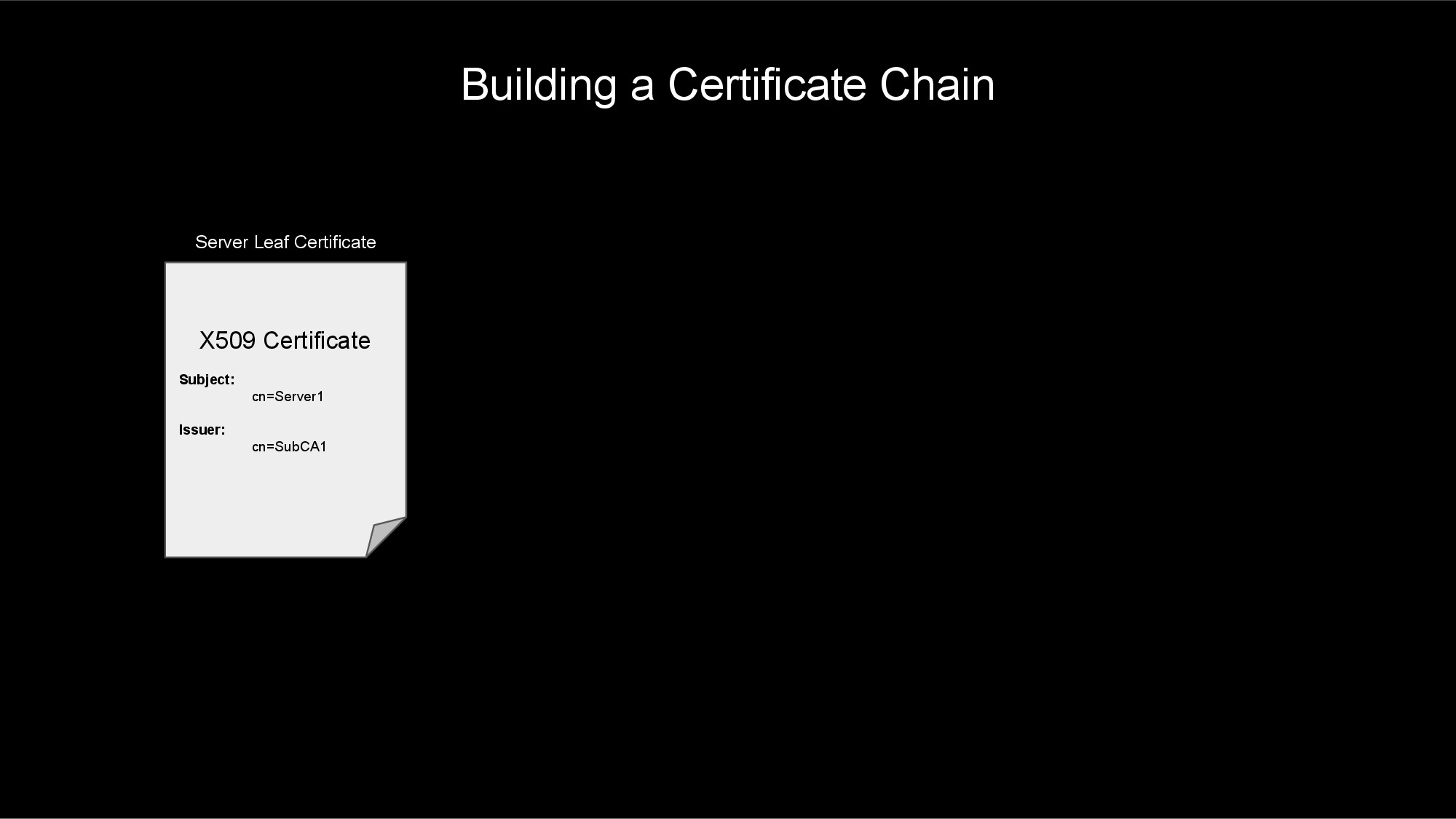
A connection's certificate and all of the CA certificates involved in issuing and signing this certificate can be arranged into a structure called a certificate chain. This certificate chain (as described below) will be used to verify and trust the connection's certificate.

If you follow a connection's leaf certificate to the issuing CA (using the Issuer field), and then from that CA walk to its issuer (and so on, until you reach a self-signed root certifcate) you would have walked the certificate chain.

Building a Certificate Chain

Trusting a Certificate

Your web browser and operating system typically maintains a list of trusted certificate authorities. When configuring an HL7 interface or other application, you will likely point your interface to a CA-bundle file that contains a list of trusted CAs. This file will usually contain a list of one or more CA certificates encoded in PEM format. For example:

# Maybe an Intermediate CA
-----BEGIN CERTIFICATE-----
MIIDQTCCAimgAwIBAgITBmyfz5m/jAo54vB4ikPmljZbyjANBgkqhkiG9w0BAQsF
...
rqXRfboQnoZsG4q5WTP468SQvvG5
-----END CERTIFICATE-----

# Maybe the Root CA
-----BEGIN CERTIFICATE-----
MIIDqDCCApCgAwIBAgIJAP7c4wEPyUj/MA0GCSqGSIb3DQEBBQUAMDQxCzAJBgNV
...
WyH8EZE0vkHve52Xdf+XlcCWWC/qu0bXu+TZLg==
-----END CERTIFICATE-----

When your web browser (or HL7 interface) attempts to make a TLS connection, it will use this list of trusted CA certificates to determine if it trusts the certificate exchanged during the TLS handshake.

The process will start at the leaf certificate and traverse the certificate chain to next CA certificate. If the CA certificate is not found in the trust store or CA-bundle, then the leaf certificate is not trusted, and the TLS connection fails.

If the CA certificate is found in the trust store or CA-bundle file, then the process continues walking up the certificate chain, verifying that each CA along the way is in the trust store. Once the root CA certificate at the top of the chain is verified (along with all of the intermediate CA certificates along the way), the process can trust the server's leaf certificate.

Determining Trust

The TLS Handshake

To add TLS to a TCP/IP connection (such as an HL7 feed), the client and server must perform a TLS handshake after the TCP/IP connection has been established. This handshake involves agreeing on encryption ciphers/methods, agreeing on TLS version, exchanging X.509 certificates, proving ownership of these certificates, and validating that each side trusts the other.

The high-level steps of a TLS handshake are:

  1. Client makes TCP/IP connection to the server.
  2. Client starts the TLS handshake.
  3. Server sends it's certificate (and proof-of-ownership) to the client.
  4. Client verifies the server certificate.
  5. If mutual TLS, the client sends it's certificate (and proof-of-ownership) to the server.
  6. If mutual TLS, the server verifies the client certificate.
  7. Client and server send encrypted data back and forth.

TLS Handshake

1. Client makes TCP/IP connection to the server.

During step #1, the client and server perform a TCP 3-way handshake to establish a TCP/IP connection between them. In a 3-way handshake:

  1. The client sends a SYN packet.
  2. The server sends a SYN-ACK packet.
  3. The client sends an ACK packet.

Once this handshake is complete, the TCP/IP connection is established. The next step is to start the TLS handshake.

2. Client starts the TLS handshake.

After a TCP connection is established, one of the sides must act as the client and start the TLS handshake. Typically, the process that initiated the TCP connection also is responsible for initiating the TLS handshake, but this can be flipped in rare cases.

To start the TLS handshake, the client sends a ClientHello message to the server. This message contains various options used to negotiate the security settings of the connection with the server.

3. Server sends it's certificate (and proof-of-ownership) to the client.

After receiving the client's ClientHello message, the server in turn responds with a ServerHello message. This includes the negotiated security settings.

Following the ServerHello message, the server will also send a Certificate and CertificateVerify message to the client. This shares the X.509 certificate chain with the client and provides proof-of-ownership of the associated private key for the certificate.

4. Client verifies the server certificate.

Once the client receives the ServerHello, Certificate, and CertificateVerify messages, the client will verify that the certificate is valid and trusted (by comparing the CAs to trusted CA-bundle files, the operating system certificate store, or web browser certificate store). The client will also do any host verification (see above) to make sure the connection address matches the certificate addresses/IPs.

5. If mutual TLS, the client sends it's certificate (and proof-of-ownership) to the server.

If this is a mutual TLS connection (determined by the server sending a CertificateRequest message), the client will send a Certificate message including its certificate chain and then a CertificateVerify message to prove ownership of the associated private key.

6. If mutual TLS, the server verifies the client certificate.

Again, if this is a mutual TLS connection, the server will verify that certificate chain sent by the client is valid and trusted.

7. Client and server send encrypted data back and forth.

If the TLS handshake makes it this far without failing, the client and server will exchange Finished messages to complete the handshake. After this, encrypted data can be sent back-and-forth between the client and the server.

Setting Up TLS on HL7 Interfaces

Congratulations on making it this far! Now that you know about TLS, how would you go about implementing TLS on your HL7 connections? In general, here are the steps that you will need to perform to setup TLS on your HL7 connections.

  1. Choose a certificate authority.
  2. Create a key and certificate signing request.
  3. Obtain your certificate from your CA.
  4. Obtain the certificate chain for your peer.
  5. Create an SSL config for the connection.
  6. Add the SSL config to the interface, bounce the interface, and verify message flow.

1. Choose a certificate authority.

The process you use to obtain a certificate and key for your server will greatly depend upon the security policies of your company. In most scenarios, you will end up with one of the following CAs signing your certificate:

  1. An internal, company CA will sign your certificate.
  • This is my favorite option, as your company already has the infrastructure in place to maintain certificates and CAs. You just need to work with the team that owns this infrastructure to get your own certificate for your HL7 interfaces.
  1. A public CA will sign your certificate.
  • This option is nice in the sense that the public CA also has all of the infrastructure in place to maintain certificates and CAs. This option is probably overkill for most HL7 interfaces, as public CAs typically provide certificates for the open internet; HL7 interfaces tend to connect over private intranet, not the public internet.
  • Obtaining certificates from a public CA may incur a cost, as well.
  1. A CA you create and maintain will sign your certificate.
  • This option may work well for you, but unfortunately, this means you bear the burden of maintaining and securing your CA configuration and software.
  • Use at your own risk!
  • This option is the most complex. Get ready for a steep learning curve.
  • You can use open source, proven software packages for managing your CA and certificates. The OpenSSL suite is a great option. Other options are EJBCA, step-ca, and cfssl.

2. Create a key and certificate signing request.

After you have chosen your CA, your next step is to create a private key and certificate signing request (CSR). How you generate the key and CSR will depend upon your company policy and the CA that you chose. For now, we'll just talk about the steps from a high-level.

When generating a private key, the associated public key is also generated. The public key will be embedded within your CSR and your signed certificate. These two keys will be used to prove ownership of your signed certificate when establishing a TLS connection.

CAUTION! Make sure that you save your private key in a secure location (preferably in a password-protected format). If you lose this key, your certificate will no longer be usable. If someone else gains access to this key, they will be able to impersonate your server.

The certificate signing request will include information about your server, your company, your public key, how you will use the certificate, etc. It will also include proof that you own the associated private key. This CSR will then be provided to your CA to generate and sign your certificate.

NOTE: When creating the CSR, make sure that you request an Extended Key Usage of both serverAuth and clientAuth, if you are using mutual TLS. Most CAs are used to signing certificates with only serverAuth key usage. Unfortunately, this means that the certificate can not be used as a client certificate in a mutual TLS connection.

3. Obtain your certificate from your CA.

After creating your key and CSR, submit the CSR to your certificate authority. After performing several checks, your CA should be able to provide you with a signed certificate and the associated certificate chain. You will want this certificate and chain saved in PEM format. If the CA provided your certificate in a different format, you will need to convert it using a tool like OpenSSL.

4. Obtain the certificate chain for your peer.

The previous steps were focused on obtaining a certificate for your server. You should be able to use this certificate (and the associated key) with each HL7 connection to/from this server. You will also have to obtain the certificate chains for each of the systems/peers to which you will be connecting.

The certificate chains for each peer will need to be saved in a file in PEM format. This CA-bundle will not need to contain the leaf certificates; it only needs to contain the intermediate and root CA certificates.

Be sure to provide your peer with a CA-bundle containing your intermediate and root CAs. This will allow them to trust your certificate when you make a connection.

5. Create an SSL config for the connection.

In InterSystems's Health Connect, you will need to create client and server SSL configs for each system that your server will be connecting to. These SSL configs will point to the associated system's CA-bundle file and will also point to your server's key and certificate files.

Client SSL configs are used on operations to initiate the TLS handshake. Server SSL configs are used on services to respond to TLS handshakes. If a system has both inbound services and outbound operations, you will need to configure both a client and server SSL config for that system.

To create a client SSL config:

  1. Go to System Administration > Security > SSL/TLS Configurations.
  2. Click Create New Configuration.
  3. Give your SSL configuration a Configuration Name and Description.
  4. Make sure your SSL configuration is Enabled.
  5. Choose Client as the Type.
  6. Choose Require for the Server certificate verification field. This performs host verification on the connection.
  7. Point File containing trusted Certificate Authority certificate(s) to the CA-bundle file that contains the intermediate and root CAs (in PEM format) for the system to which you are connecting.
  8. Point File containing this client's certificate to the file that holds your server's X.509 certificate in PEM format.
  9. Point File containing associated private key to the file containing your certificate's private key.
  10. Private key type will most likely be RSA. This should match the type of your private key.
  11. If you private key is password protected (as it should be), fill in the password in both the Private key password and Private key password (confirm) fields.
  12. You likely can leave the other fields to their default values.

To create a server SSL config:

  1. Go to System Administration > Security > SSL/TLS Configurations.
  2. Click Create New Configuration.
  3. Give your SSL configuration a Configuration Name and Description.
  4. Make sure your SSL configuration is Enabled.
  5. Choose Server as the Type.
  6. Choose Require for the Client certificate verification field. This will make sure that mutual TLS is performed.
  7. Point File containing trusted Certificate Authority certificate(s) to the CA-bundle file that contains the intermediate and root CAs (in PEM format) for the system to which you are connecting.
  8. Point File containing this server's certificate to the file that holds your server's X.509 certificate in PEM format.
  9. Point File containing associated private key to the file containing your certificate's private key.
  10. Private key type will most likely be RSA. This should match the type of your private key.
  11. If you private key is password protected (as it should be), fill in the password in both the Private key password and Private key password (confirm) fields.
  12. You likely can leave the other fields to their default values.

Creating SSL Configs

6. Add the SSL config to the interface, bounce the interface, and verify message flow.

Once you've created the client and server SSL configs, you are ready to activate TLS on the interfaces. On each service or operation, select the associated SSL config on the Connection Settings > SSL Configuration dropdown found on the Settings tab of the interface.

After bouncing the interface, you should see the connection reestablish. When a new message is tranferred, a Completed status indicates that TLS is working. If TLS is not working, every time a message is attempted, the connection will drop.

To help debug issues with TLS, you may need to use tools such as tcpdump, Wireshark, or OpenSSL's s_client utility.

Summary

This has been a very long deep-dive into the topic of SSL/TLS. There is so much more information that was not included in this article. Hopefully, this has provided you with enough of an overview of how TLS works that you can research the details and learn more information as needed.

If you are looking for an in-depth resource on TLS, check out Ivan Ristić's website, fiestyduck.com and book, Bulletproof TLS and PKI. I have found this book to be a great resource for learning more about the details of TLS.

1
6 466
Article Kate Lau · Oct 13, 2025 13m read

Hi all,

Let's do some more work about the testing data generation and export the result by REST API.😁

Here, I would like to reuse the datagen.restservice class which built in the pervious article Writing a REST api service for exporting the generated patient data in .csv

This time, we are planning to generate a FHIR bundle include multiple resources for testing the FHIR repository.

Here is some reference for you, if you want to know mare about FHIR The Concept of FHIR: A Healthcare Data Standard Designed for the Future

OK... Let's start😆

6
0 106
Question Scott Roth · Oct 22, 2025

I am looking for a way to capture Data Quality issues with the Source data that is populating HealthShare Provider Directory. 1 way is to use Managed Alerts, but since it could be multiple Providers and different messages it seems silly to alert on every message that has the error. Instead, I was thinking of using the Workflow Engine so it could populate a Worklist for someone to review and work.

Looking over the Demo.Workflow Engine example, I am not comprehending on how to send a task to the Workflow manager to populate the worklist from a DTL.

1
0 33
Question Kurro Lopez · Oct 21, 2025

Hi community,

I have a service that uses EnsLib.RecordMap.Service.FTPService to capture files in an FTP directory.

Instead of uploading them all at once, I would need to do so one at a time.

I have a class that extends this class because it preprocesses, saves everything in the RecordMap class, and then processes all the records at once.

When I invoke the BP, it does so through the method set tStatus = ..SendRequest(message, 1).

I've set the SynchronousSend flag to 1, but it continues processing all the files at once.

1
0 35
Article Cecilia Yang · Oct 10, 2025 2m read

To manage the accumulation of production data, InterSystems IRIS enables users to manage the database size by periodically purging the data. This purge can apply to messages, logs, business processes, and managed alerts.

Please check the documentation for more details on the settings of the purge task:
https://docs.intersystems.com/irislatest/csp/docbook/DocBook.UI.Page.cls?KEY=EGMG_purge#EGMG_purge_settings

0
0 44
Article Kate Lau · Oct 9, 2025 6m read

Hi,

It's me again😁, recently I am working on generating some fake patient data for testing purpose with the help of Chat-GPT by using Python. And, at the same time I would like to share my learning curve.😑

1st of all for building a custom REST api service is easy by extending the %CSP.REST

Creating a REST Service Manually

Let's Start !😂

1. Create a class datagen.restservice which extends  %CSP.REST 

Class datagen.restservice Extends%CSP.REST
{
Parameter CONTENTTYPE = "application/json";
}


2. Add a function genpatientcsv() to generate the patient data, and package it into csv string

3
1 76
Discussion Andrew Sklyarov · Oct 8, 2025

I know the next ones:

1. Place all different settings in environment variables. You have a different .env file for each environment, and you must add some code to Production for reading and setting these values. It's good for deploying into containers, but challenging for management when we have a large production. I mean, we have many settings that can vary depending on the environment: active flag, pool size, timeouts, and so on. Not only endpoints.

10
0 135
Announcement Derek Gervais · Oct 9, 2025

Hey Community,

The InterSystems team put on our monthly Developer Meetup with a triumphant return to CIC's Venture Café, the crowd including both new and familiar faces. Despite the shakeup in both location and topic, we had a full house of folks ready to listen, learn, and have discussions about health tech innovation!

0
0 32
Question Colin Brough · Sep 16, 2025

For historic reasons we've got a mix of ADT feeds coming out of our PAS (TrakCare) to a wide range of downstream systems. In particular, there are some that are direct from TrakCare to the downstream systems, and many more that pass through Ensemble as our integration engine.

This is complicating management of the integrations, and so we'd like everything to go through the integration engine. In other words move from the flow in the top of the diagram to the flow in the bottom of the diagram:

6
0 120
Article Andrew Sklyarov · Oct 3, 2025 8m read

I was really surprised that such a flexible integration platform with a rich toolset specifically for app connections has no out-of-the-box Enterprise Service Bus solution. Like Apache ServiceMix, Mule ESB, SAP PI/PO, etc, what’s the reason? What do you think? Has this pattern lost its relevance completely nowadays? And everybody moved to message brokers, maybe?

0
1 65
Article Kurro Lopez · Sep 29, 2025 13m read

I am truly excited to continue my "InterSystems for Dummies" series of articles, and today, we want to tell you everything about one of the most powerful features we have for interoperability.

Hey, even if you have already had a go, we plan to take a really close look at how to get the most out of them and make our production even better.

What Is Record Mapper?

In essence, a Record Mapper is a tool that lets you map data from text files to production messages and vice versa. The Management Portal interface, on the other hand, allows you to create a visual representation of a text file and a valid object model of that data to map them to a single persistent production message object.

Therefore, if you wish to import data from a CSV file into your persistent class, you can play with a couple of inbound classes to do it (by FTP or File directory... ). Do not rush, though! We will get to each of those points in due course.


TIP: All the examples and classes described in this article can be downloaded from the following link: https://github.com/KurroLopez/iris-recordmap-fordummies.git


How to Start?

Let's get to the point and specify our scenario!.

We need to import information from our customers, including their name, date of birth, national identification number, address, city, and country.

Open your IRIS portal and select Interoperability – Build – Record Maps: image

Create a new Record Map with the package and class name. image

In our example, the package name is Demo.Data, whereas the class name is PersonalInfo.

The first step is to configure the CSV file. What I mean by that is to determine the separator character if the string fields have double quotes, etc.. image

If you use Windows OS, the common record terminator is CRLF (Char(10) Char(12)).

Since my CSV file is a standard one, separated by a semicolon (;), I must define the character of the field separator.

Now, I am going to declare the fields of the customer profile (name, surname, date of birth, national identification number, address, city, and country). image

This is a basic definition, but you can set more conditions regarding your CSV file if you wish. image

Remember that by default, a %String field has a maximum length of 50 characters. Therefore, I will update this value to allow more characters in the address field (a maximum of 100).

I will also define the date format using the ISO layout (yyyy-mm-dd), which corresponds to the number 3.

In addition, I will make the first name, surname, and date of birth fields mandatory. image

Everything is ready! Let’s go and press the “Generate” button to create the persistent class! image

Let's take a look at the generated class:
/// THIS IS GENERATED CODE. DO NOT EDIT.<br/>
/// RECORDMAP: Generated from RecordMap 'Demo.Data.PersonalInfo'
/// on 2025-07-14 at 08:37:00.646 [2025-07-14 08:37:00.646 UTC]
/// by user SuperUser
Class Demo.Data.PersonalInfo.Record Extends (%Persistent, %XML.Adaptor, Ens.Request, EnsLib.RecordMap.Base) [ Inheritance = right, ProcedureBlock ]
{

Parameter INCLUDETOPFIELDS = 1;

Property Name As %String [ Required ];

Property Surname As %String [ Required ];

Property DateOfBirth As %Date(FORMAT = 3) [ Required ];

Property NationalId As %String;

Property Address As %String(MAXLEN = 100);

Property City As %String;

Property Country As %String;

Parameter RECORDMAPGENERATED = 1;

Storage Default
{
<Data name="RecordDefaultData">
<Value name="1">
<Value>%%CLASSNAME</Value>
</Value>
<Value name="2">
<Value>Name</Value>
</Value>
<Value name="3">
<Value>%Source</Value>
</Value>
<Value name="4">
<Value>DateOfBirth</Value>
</Value>
<Value name="5">
<Value>NationalId</Value>
</Value>
<Value name="6">
<Value>Address</Value>
</Value>
<Value name="7">
<Value>City</Value>
</Value>
<Value name="8">
<Value>Country</Value>
</Value>
<Value name="9">
<Value>Surname</Value>
</Value>
</Data>
<DataLocation>^Demo.Data.PersonalInfo.RecordD</DataLocation>
<DefaultData>RecordDefaultData</DefaultData>
<ExtentSize>2000000</ExtentSize>
<IdLocation>^Demo.Data.PersonalInfo.RecordD</IdLocation>
<IndexLocation>^Demo.Data.PersonalInfo.RecordI</IndexLocation>
<StreamLocation>^Demo.Data.PersonalInfo.RecordS</StreamLocation>
<Type>%Storage.Persistent</Type>
}

}

As you can see, each property has the name of the fields in our CSV file.

At this point, we will create a CSV file with the structure below to test our Record Mapper:

Name;Surname;DateOfBirth;NationalId;Address;City;Country Matthew O.;Wellington;1964-31-07;208-36-1552;1485 Stiles Street;Pittsburgh;USA Deena C.;Nixon;1997-03-03;495-26-8850;1868 Mandan Road;Columbia;USA Florence L.;Guyton;2005-04-10;21 069 835 790;Invalidenstrasse 82;Contwig;Germany Maximilian;Hahn;1945-10-17;92 871 402 258;Boxhagener Str. 97;Hamburg;Germany Amelio;Toledo Zavala;1976-06-07;93789292F;Plaza Mayor, 71;Carbajosa de la Sagrada;Spain

You can use it as a test now.

Click “Select sample file”, pick the sampling in /irisrun/repo/Samples, and choose PersonalInfo-Test.csvimage

At this moment, you can observe how your data is being imported: image

The Problems Grow

Just as you think everything is ready, you receive a new specification from your boss:

"We need the data to be able to load the client's phone number and store more than one of them (landline, cell phone, etc.)"

Ops… I need to upgrade my Record Map and add a phone number. However, it should have more than one of them… How can I do it?


Note: You can do it directly in the same class. Yet, I will create a new one for explanation purposes and store it in the examples. This way, you can review and run the code, following all the steps in this article.


Okay, it is time to reopen the Record Map we have just created.

Add the new field “Phone”, but remember to indicate that this field is “Repeating” this time. image

Since we have appointed this field as "Repeating", we must define the separator character for replicated data. This indicator is in the same place where we typically specify the field separator. image

Perfect! Let's load the example CSV file with phone numbers separated by #. image

If we take a look at the persistent class we produced, we can notice that the "Phone" field is of a type List of %String:

Property Phone As list Of %String(MAXLEN = 20);

Ok Kurro, but How Can We Upload This File?

It is a really nice question, my dear reader.

Intersystems IRIS provides us with two inbound classes: EnsLib.RecordMap.Service.FileServiceEnsLib.RecordMap.Service.FTPService

I will not go in depth with these classes because it would be too long. Yet, we can check out their main functions.

In summary, the service monitors processes in a defined folder, captures files stored in that directory, loads them, reads them line by line, and sends that record to the designated business process.

It happens in both the server and FTP directories.

Let's get to the point…


Note: I will present my examples using the EnsLib.RecordMap.Service.FileService class. However, EnsLib.RecordMap.Service.FTPService class has the same operations.


If you have downloaded the sample code, you should notice that a production has been built with two components:

A service class (EnsLib.RecordMap.Service.FileService), which will load the files, and a business class (Demo.BP.ProcessData), which will process each of the records read from the file. The latter, in this case, we will use ONLY to view communication traces.

It is important to configure some parameters in the business service class. image

File Path: It is a trail for the class to monitor whether any files are pending processing. When a file is placed in this directory, the upload process automatically triggers and sends each record to the class defined as Business Process.

File Spec: It is a file pattern to search for (by default, it is *, but we can define some files we wish to differentiate from other processes). For instance, we can have two inbound listening classes in the same directory, with each using a different RecordMap class. We can assign the extension .pi1 for the files to be processed by the PersonalInfo class, whereas .pi2 will flag files to be processed by the PersonalInfoPhone class.

Archive Path: It is a directory where files are moved after being processed.

Work Path: It is a trackway where the adapter should place the input file while processing the data in it. This setting is beneficial when the same filename is used for repeated file submissions. If WorkPath is not specified, the adapter will not move the file during processing.

Call Interval: It is the frequency (calculated in seconds) of the adapter checkups for input files in the specified locations.

RecordMap: It is the name of the RecordMap class, containing the definition of the data in the file.

Target Config Name: It is the name of the Business Process that handles the data stored in the file. image

Subdirectory Levels: It is a space where the process searches for a new file. For instance, if we have a process that adds a file every day (Monday, Tuesday, Wednesday, Thursday, and Friday), it will search all subdirectories starting from the root directory, provided that we specify level 1. By default, level 0 means that it will only search in the root directory.

Delete From Server: This function indicates that if the directory of processed files is not specified, the file will be deleted from the root directory.

File Access Timeout: It is a defined time (calculated in seconds) set to access the file. If the file is read-only or there is another problem obstructing access to the directory, it will display an error.

Header Count: It is an important feature indicating the number of headers to ignore. For example, if the file has a header specifying the fields it contains, you must reveal how many header lines it consists of, so that they can be ignored and only the data lines can be read.

Uploading a File

As I previously mentioned, the upload process is triggered when a file is placed in the process directory. Note: The following instructions are based on the sample code. In the “samples” folder, you can find the file PersonalInfoPhone-Test.csv. You should copy this file to the process folder, and it will be handled automatically.


NOTE: If you are working with a Docker sample, use the following command:

docker cp .\PersonalInfoPhone-Test.csv containerId:/opt/irisbuild/process/

containerId is the id of your container, ex: docker cp .\PersonalInfoPhone-Test.csv 66f96b825d43398ba6a1edcb2f02942dc799d09f1b906627e0563b1392a58da1:/opt/irisbuild/process/` image


For each record, it throws a call to the business process with all the data. image

Amazing job! With just a few steps, you managed to create a process that can read files from a directory and manage that data quickly and easily. What else could you possibly ask for in your Interoperability processes?

Complex Record Map

Nobody wants to have a complex life, but I promise you will fall in love with complex Record Maps!.

Complex Record Maps are precisely what their name indicates. It is a combination of several Record Maps that provides us with more complete and structured information.

Let's imagine that our boss came to us and gave us the following requirements:

“We need customer information with more phone numbers, including country codes and prefixes. We also need more contact addresses, including postal codes, countries, and state names.

One customer can have one phone number, two, or none.”

If we require more information about phone numbers and addresses, as we have previously seen, including this information in a single line would be too complicated. Let's separate the different parts we need:

  • Customer information that is required.
  • Phone numbers, which can be from 0 to 5.
  • Mailing address information, which can be from 0 to 2.

For each section, we will create an alias to differentiate what type of information it includes.

Let's build each of the sections:

Step 1 Design a new Record Map for customer information (First Name, Last Name, Date of Birth, and National Identity Document), and include an identifier to indicate that it is the USER section. image

The section name must be unique for "User" data types, since they are responsible for setting the columns and positions for each piece of information. The content should look like the following: USER|Matthew O.;Wellington;1964-07-31;208-36-1552 In BOLD, the section name, in ITALIC, the content.

Step 2 Create PHONE and ADDR sections for phone numbers and postal addresses.

Remember to specify the section name and activate the Complex Record Map option. imageimage

Now, we should have three classes:

  • Demo.Data.ComplexUser
  • Demo.Data.ComplexPhone
  • Demo.Data.ComplexAddress

Step 3 Complete the Complex Record Map.

Open the “Complex Record Maps” option: image

The first thing we can see here is a structure with a header and a footer. The header can be another Record Map to hold information from the data packet (e.g., user department information, etc).

Since these sections are optional, we will ignore them in our example. image

Set the name of this record (e.g., PersonalInfo), and add new records for each section. image

If we wish one of the sections to have repetitions, we must indicate the minimum and maximum repetition values. image

According to the specifications above, the file with the information will look like the following:

USER|Matthew O.;Wellington;1964-07-31;208-36-1552
PHONE|1;305;2089160
PHONE|1;805;9473136
ADDR|1485 Stiles Street;Pittsburgh;15286;PA;USA

If we want to upload a file, we require a service that can read these kinds of files, and Intersystems IRIS provides us with two inbound classes for that:

EnsLib.RecordMap.Service.ComplexBatchFileServiceEnsLib.RecordMap.Service.ComplexBatchFTPService As I mentioned earlier, we will use the EnsLib.RecordMap.Service.ComplexBatchFileService class as an example. However, the process for FTP is identical.

It uses the same configuration as the Record Map, except for the Header line number, because this kind of file does not need one: image

As I stated before, the upload process is triggered when a file is placed in the process directory.

Note: The following instructions are based on the sample code.

In the “samples” folder, you can find the file PersonalInfoComplex.txt. You should copy this file to the process folder, and it will handle things automatically.


NOTE: If you work with the Docker sample, use the following command:

docker cp .\ PersonalInfoComplex.txt containerId:/opt/irisbuild/process/

containerId is the id of your container, ex: docker cp .\ PersonalInfoComplex.txt 66f96b825d43398ba6a1edcb2f02942dc799d09f1b906627e0563b1392a58da1:/opt/irisbuild/process/


Here, we can see each row calling the Business Service: imageimageimage

As you must have realized by now, Record Maps are a powerful tool for importing data in a complex and structured way. It allows us to save information in related tables or process each piece of data independently.

Thanks to this tool, you can quickly create batch data loading processes and store them without having to perform complex data reading, field separation, data type validation, and so on.

I hope you find this article helpfull.

See you in the next “InterSystems for Dummies.”

2
5 211
Article Eric Fortenberry · Dec 20, 2024 9m read

Your Mission

Let's pretend for a moment that you're an international action spy who's dedicated your life to keeping the people of the world safe from danger. You recieve the following mission:

Good day, Agent IRIS,

We're sorry for interrupting your vacation in the Bahamas, but we just received word from our London agent that a "time bomb" is set to detonate in a highly populated area in Los Angeles. Our sources say that the "time bomb" is set to trigger at 3:14 PM this afternoon.

Hurry, the people are counting on you!

The Problem

You rush to your feet and get ready to head to Los Angeles, but you quickly realize that you're missing a key piece of information; will the "time bomb" trigger at 3:14 PM Bahama-time or at 3:14 PM Los Angeles-time? ...or maybe even 3:14 PM London-time.

You quickly realize that the time you were provided (3:14 PM) does not give you enough information to determine when you need to be in Los Angeles.

The time you were provided (3:14 PM) was ambiguous. You need more information to determine an exact time.

Some Solutions

As you think over the problem, you realize there are methods of overcoming the ambiguity of time that you were provided:

  1. Your source could have provided the location to which the local time was 3:14 PM. For instance, Los Angeles, Bahamas, or London.

  2. Your source could have used a standard such as UTC (Coordinated Universal Time) to provide you an offset from an agreed-upon location (such as Greenwich, London).

The Happy Ending

You call your source and confirm that the time provided was indeed 3:14 PM Los Angeles-time. You are able to travel to Los Angeles, disarm the "time bomb" before 3:14 PM, and quickly return to the Bahamas to finish your vacation.

The Point

So, what is the point of this thought exercise? I doubt that any of us will encounter the problem presented above, but if you work with an application or code that moves data from one location to another (especially if the locations are in different time zones), you need to be aware of how to handle datetimes and time zones.

Time Zones are HARD!

Well, time zones aren't so bad. Daylight savings time and political boundaries make time zones difficult.

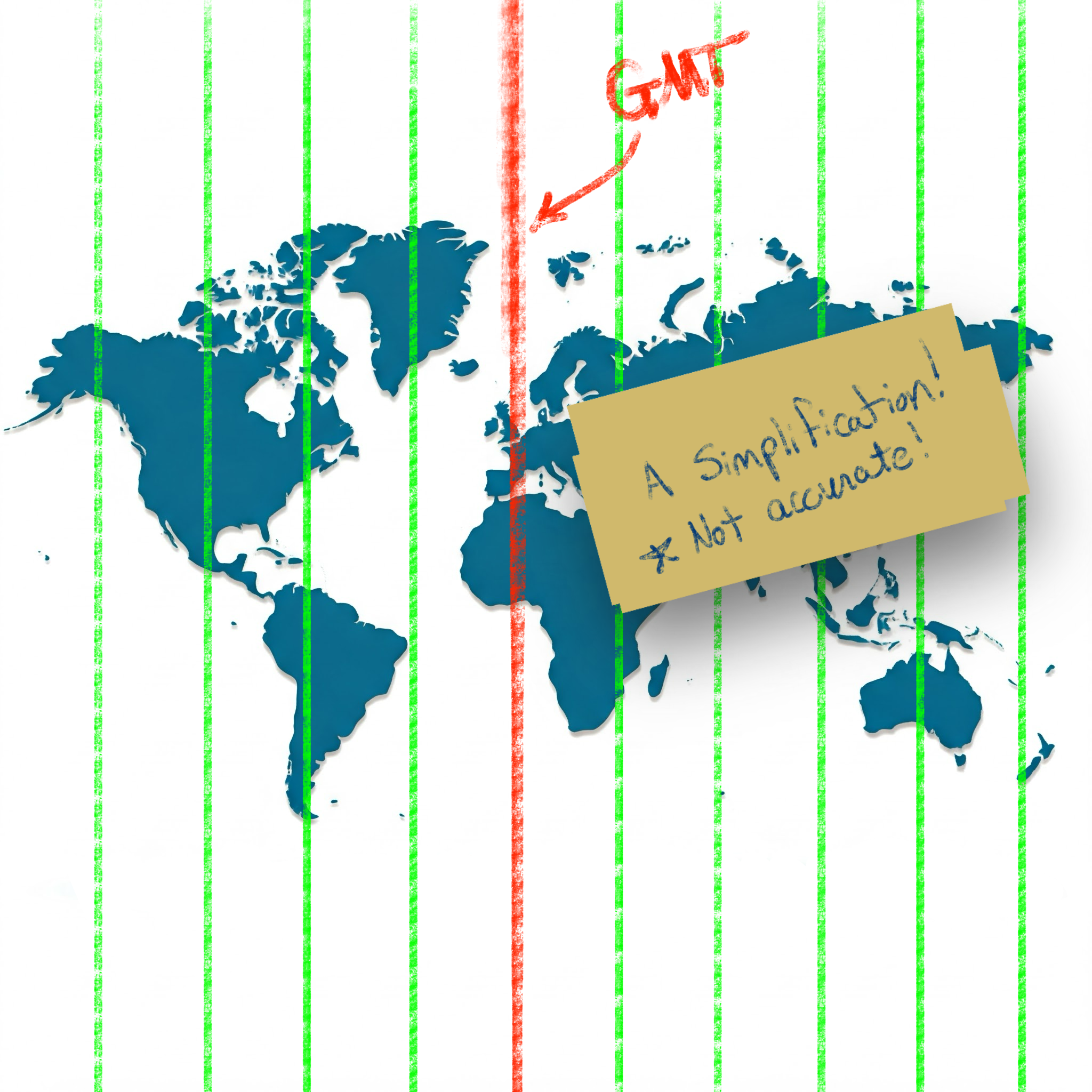
I thought I always understood the "general" idea of time zones: the planet is split into vertical slices by time zone, where each time zone is one hour behind the time zone to the East.

Simplification of time zones on a world map

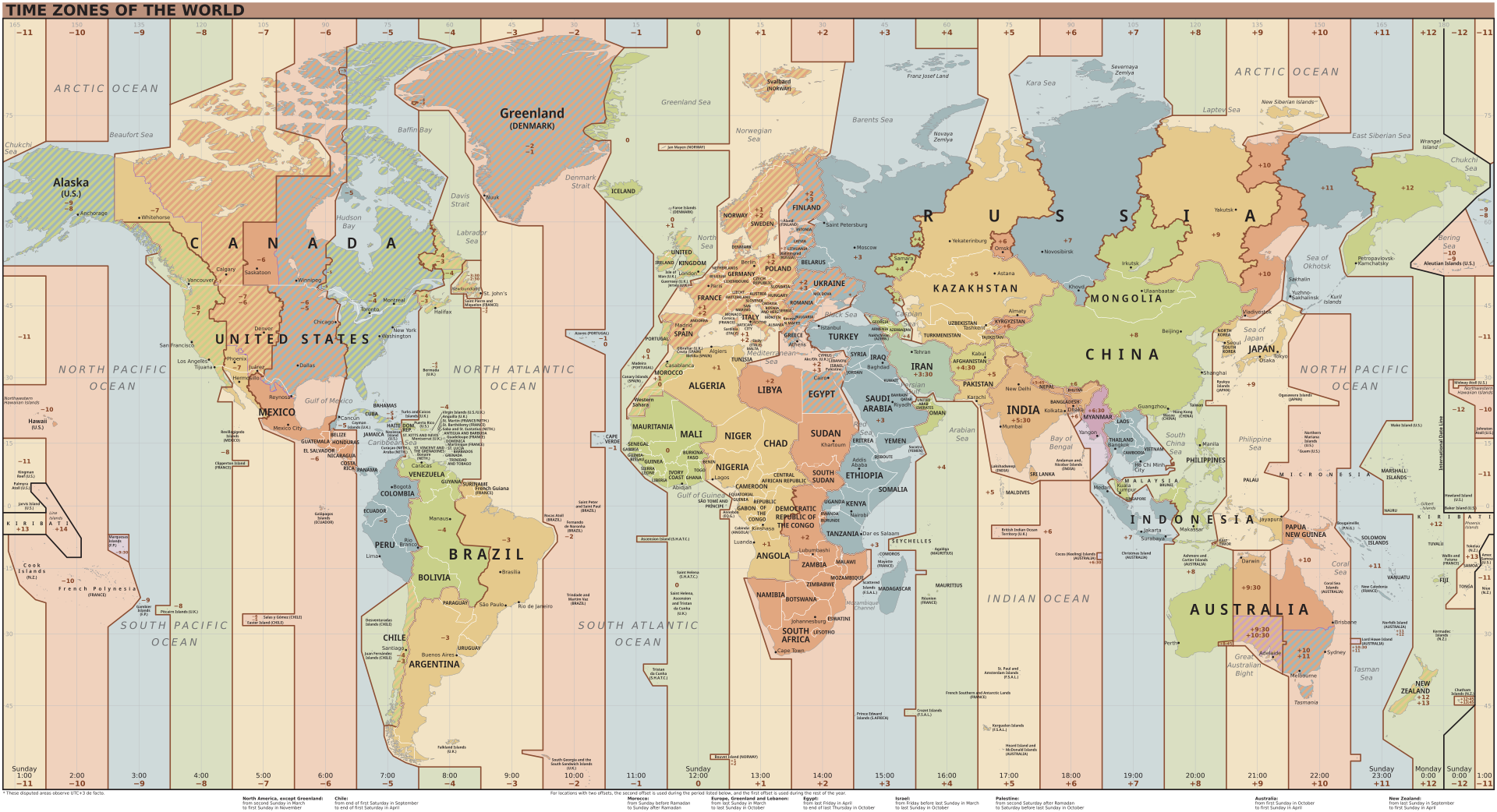
While this simplification holds for many locations, unfortunately there are many exceptions to this rule.

Time zones of the world (Wikipedia) Reference: Time zones of the world (Wikipedia)

Standardizing with UTC (the "Origin")

To simplify the language of conveying specific times, the world has settled on using UTC (Coordinated Universal Time). This standard sets the "origin" to the 0° longitude that goes through Greenwich, London.

Defining "Offset"

Using UTC as the basis, all other time zones can be defined relative to UTC. This relationship is referred to as the UTC offset.

If you have a local time and an offset, you no longer have an ambiguous time (as seen in our spy example above); you have a definite and specific time with no ambiguity.

The typical format used to show the UTC offset is ±HHMM[SS[.ffffff]].

  • A minus - sign indicates an offset to the West of UTC.
  • A plus + sign indicates an offset to the East of UTC.
  • HH indicates hours (zero-padded)
  • MM indicates minutes (zero-padded)
  • SS indicates seconds (zero-padded)
  • .ffffff indicates fractional seconds

For example, in America, the Eastern Standard Zime Zone (EST) is defined as -0500 UTC. This means that all locations in EST are 5 hours behind UTC. If the time is 9:00 PM at UTC, then the local time in EST is 4:00 PM.

In the Australian Central Western Standard Time Zone (ACWST), the offset is defined as +0845 UTC. If the time is 1:00 AM at UTC, then the local time in ACWST is 9:45 AM.

Daylight Savings Time

So, back to the time zone maps above. From the image, you can see that many time zones follow the political boundaries of countries and regions. This complicates time zone calculations slightly, but it is easy enough to wrap your mind around.

Unfortunately, there is one more factor to consider when working with times and time zones.

Let's look at Los Angeles.

On the map, the UTC offset for Los Angeles is -8 in Standard Time. Standard Time is typically followed during the winter months, whereas Daylight Savings Time is typically followed during the summer months.

Daylight Savings Time (DST) advances the clocks in a give time zone forward (typically by one hour during the summer months). There are several reasons that political regions might choose to follow DST (such as energy savings, better use of daylight, etc.). The difficulty and complexity of Daylight Savings Time is that DST is not consistently followed around the world. Depending on your location, your region may or may not follow DST.

Time Zone Database

Since the combination of political boundaries and Daylight Savings Time greatly increases the complexity of determining a specific time, a time zone database is needed to correctly map local times to specific times relative to UTC. The Internet Assigned Numbers Authority (IANA) Time Zone Database is the common source of time zone information used by operating systems and programming languages.

The database includes the names and aliases of all time zones, information about the offset, information about the use of Daylight Savings Time, time zone abbreviations, and which date ranges the various rules apply.

Copies of and information about the time zone database can be found on IANA's website.

Most UNIX systems have a copy of the database that gets updated with the operating system's package manager (typically installed in /usr/share/zoneinfo). Some programming languages have the database built-in. Others make it available by a library or can read the system's copy of the database.

Time Zone Names/Identifiers

The time zone database contains many names and aliases for specific time zones. Many of the entries include a country (or continent) and major city in the name. For example:

  • America/New_York
  • America/Los_Angeles
  • Europe/Rome
  • Australia/Melbourne

Conversion and Formatting Using ObjectScript

So, now we know about:

  • Local times (ambiguous times without an offset or location)
  • UTC offsets (the relative offset a timestamp or location is from the UTC "origin" in Greenwich, London)
  • Daylight Savings Time (an attempt at helping civilization at the expense of time zone offsets)
  • Time zone database (which includes information about time zones and Daylight Savings observance in many locations and regions)

Knowing this, how do we work with datetimes/time zones in ObjectScript?

***Note: I believe all the following statements are true about ObjectScript, but please let me know if I misstate how ObjectScript works with time zones and offsets.

Built-in Variables and Functions

If you need to convert timestamps between various formats within the system time zone of the process running IRIS, the built-in features of ObjectScript should be sufficient. Here is a brief listing of various time-related variables/functions in ObjectScript:

  • $ZTIMESTAMP / $ZTS

    • IRIS Internal format as a UTC value (offset +0000).
    • Format: ddddd,sssss.fffffff
  • $NOW(tzmins)

    • Current system local time with the given tzmins offset from UTC.
    • Does not take Daylight Savings Time into account.
    • By default, tzmins is based off of the $ZTIMEZONE variable.
    • Format: ddddd,sssss.fffffff
  • $HOROLOG

    • Current system local time (based on $ZTIMEZONE), taking Daylight Savings Time into account.
    • Format: ddddd,sssss.fffffff
  • $ZTIMEZONE

    • Returns or sets the system's local UTC offset in minutes.
  • $ZDATETIME() / $ZDT()

    • Converts $HOROLOG format to a specific display format.
    • Can be used to convert from system local time to UTC (+0000).
  • $ZDATETIMEH() / $ZDTH()

    • Converts a datetime string to internal $HOROLOG format.
    • Can be used to convert from UTC (+0000) to system local time.

As best as I can tell, these functions are only able to manipulate datetimes using the time zone of the local system. There does not appear to be a way to work with arbitrary time zones in ObjectScript.

Enter the tz Library on Open Exchange

To accommodate conversion to and from arbitrary time zones, I worked to create the tz - ObjectScript Time Zone Conversion Library.

This library accesses the time zone database installed on your system to provide support for converting timestamps between time zones and formats.

For instance, if you have time local to Los Angeles (America/Los_Angeles), you can convert it to the time zone used in the Bahamas (America/New_York) or the time zone used in London (Europe/London):

USER>zw ##class(tz.Ens).TZ("2024-12-20 3:14 PM", "America/Los_Angeles", "America/New_York")
"2024-12-20 06:14 PM"

USER>zw ##class(tz.Ens).TZ("2024-12-20 3:14 PM", "America/Los_Angeles", "Europe/London")
"2024-12-20 11:14 PM"

If you are given a timestamp with an offset, you can convert it to the local time in Eucla, Australia (Australia/Eucla), even if you don't know the original time zone:

USER>zw ##class(tz.Ens).TZ("2024-12-20 08:00 PM -0500", "Australia/Eucla")
"2024-12-21 09:45 AM +0845"

If you work with HL7 messages, the tz library has several methods exposed to Interoperability Rules and DTLs to help you easily convert between time zones, local times, times with offsets, etc.:

// Convert local time from one time zone to another 	 
set datetime = "20240102033045"
set newDatetime = ##class(tz.Ens).TZ(datetime,"America/New_York","America/Chicago")

// Convert local time to offset 	 
set datetime = "20240102033045"
set newDatetime = ##class(tz.Ens).TZOffset(datetime,"America/Chicago","America/New_York")

// Convert offset to local time 	 
set datetime = "20240102033045-0500"
set newDatetime = ##class(tz.Ens).TZLocal(datetime,"America/Chicago")

// Convert to a non-HL7 format 	 
set datetime = "20240102033045-0500"
set newDatetime = ##class(tz.Ens).TZ(datetime,"America/Chicago",,"%m/%d/%Y %H:%M:%S %z")

Summary

I appreciate you following me on this "international journey" where we encountered time zones, Daylight Savings Time, world maps, and "time bombs". Hopefully, this was able to shed some light on (and simplify) many of the complexities of working with datetimes and time zones.

Check out tz - ObjectScript Time Zone Conversion Library and let me know if you have any questions (or corrections/clarifications to something I said).

Thanks!

References/Interesting Links

4
5 441
Article Victoria Castillo · Mar 19, 2024 5m read

I have been walking through this with a few team members and as such I thought there might be others out there who could use it, especially if you work with HL7 & Ensemble/HealthConnect/HealthShare and never venture out past the Interoperability section. 

First, I would like to establish that this is an extension of the already established documentation on importing and exporting SQL data found here: https://docs.intersystems.com/iris20241/csp/docbook/DocBook.UI.Page.cls?KEY=GSQL_impexp#GSQL_impexp_import

2
1 666
Article Ashok Kumar T · Sep 8, 2025 19m read

FHIR Server

A FHIR Server is a software application that implements the FHIR (Fast Healthcare Interoperability Resources) standard, enabling healthcare systems to store, access, exchange, and manage healthcare data in a standardized manner.

Intersystems IRIS can store and retrieve the following FHIR resources:

  • Resource Repository – IRIS Native FHIR server can effortlessly store the FHIR bundles/resources directly in the FHIR repository.
  • FHIR Facade - the FHIR facade layer is a software architecture pattern used to expose a FHIR-compliant API on top of an existing one (often non-FHIR). It also streamlines the healthcare data system, including an electronic health record (EHR), legacy database, or HL7 v2 message store, without requiring the migration of all data into a FHIR-native system.

What is FHIR?

Fast Healthcare Interoperability Resources (FHIR) is a standardized framework created by HL7 International to facilitate the exchange of healthcare data in a flexible, developer-friendly, and modern way. It leverages contemporary web technologies to ensure seamless integration and communication across various healthcare systems.

0
3 224
Announcement Tani Frankel · Sep 1, 2025

#InterSystems Demo Games entry


⏯️ Being READY to Tackle Healthcare Enterprise Challenges in a Few Clicks

Managed Cloud Solutions to Help Streamline Your Health Services.

This demo showcases composing several InterSystems Managed Cloud Services to solve various use-cases.

The video is actually built of 6 short chapters (each ~2.5 minutes long) showing each part of the story, demoing a different service.

You can watch each "chapter" individually if you're interested in a specific service, but there is value in viewing the whole composition and observing the full flow.

  • 0:00Health Connect Cloud - Medical Device MQTT - HL7v2 for Hospital Operation Systems
  • 2:29FHIR Server & FHIR Transformation Service - HL7v2 to FHIR & Repository for Regulation & Exchange
  • 5:21FHIR SQL Builder - Providing standard relational access to FHIR data
  • 7:22 "FHIR IntelliChat" (see note below) - Natural human language chat with FHIR Server
  • 9:37OMOP Solution - FHIR to OMOP transformation & OMOP database with OHDSI tools compliance
  • 12:54InterSystems Data Studio for Health - Creating a multi data/app sources fabric 

[Note the "FHIR IntelliChat" part is not an actual formal InterSystems service, it is just a demonstration of a possibility (based on this solution by @José Pereira) ]

Presenters:
🗣 @Tani Frankel, Sales Engineer Manager, InterSystems
🗣 @Keren Skubach, Senior Sales Engineer, InterSystems
🗣 @Ariel Glikman, Sales Engineer, InterSystems

0
0 51
Article Robert Barbiaux · Sep 1, 2025 9m read

InterSystems IRIS interoperability production development involves using or writing various types of components. They include services (which handle incoming data), processes (which deal with the data flow and logic), and operations (which manage outgoing data or requests). Messages flowing through those components constantly require being adapted to consuming applications. Therefore,Data transformations are by far the most common component in interoperability productions.

0
0 91
Article Alberto Fuentes · Sep 1, 2025 7m read

Customer support questions span structured data (orders, products 🗃️), unstructured knowledge (docs/FAQs 📚), and live systems (shipping updates 🚚). In this post we’ll ship a compact AI agent that handles all three—using:

  • 🧠 Python + smolagents to orchestrate the agent’s “brain”
  • 🧰 InterSystems IRIS for SQL, Vector Search (RAG), and Interoperability (a mock shipping status API)

⚡ TL;DR (snack-sized)

  • Build a working AI Customer Support Agent with Python + smolagents orchestrating tools on InterSystems IRIS (SQL, Vector Search/RAG, Interoperability for a mock shipping API).
  • It answers real questions (e.g., “Was order #1001 delivered?”“What’s the return window?”) by combining tables, documents, and interoperability calls.
  • You’ll spin up IRIS in Docker, load schema and sample data, embed docs for RAG, register tools (SQL/RAG/API), and run the agent via CLI or Gradio UI.

image


🧭 What you’ll build

An AI Customer Support Agent that can:

  • 🔎 Query structured data (customers, orders, products, shipments) via SQL
  • 📚 Retrieve unstructured knowledge (FAQs & docs) via RAG on IRIS Vector Search
  • 🔌 Call a (mock) shipping API via IRIS Interoperability, with Visual Trace to inspect every call

Architecture (at a glance)

User ➜ Agent (smolagents CodeAgent)
               ├─ SQL Tool ➜ IRIS tables
               ├─ RAG Tool ➜ IRIS Vector Search (embeddings + chunks)
               └─ Shipping Tool ➜ IRIS Interoperability (mock shipping) ➜ Visual Trace

New to smolagents? It’s a tiny agent framework from Hugging Face where the model plans and uses your tools—other alternatives are LangGraph and LlamaIndex.


🧱 Prerequisites

  • 🐍 Python 3.9+
  • 🐳 Docker to run IRIS in a container
  • 🧑‍💻 VS Code handy to checkout the code
  • 🔑 OpenAI API key for the LLM + embeddings — or run locally with Ollama if you prefer

1) 🧩 Clone & set up Python

git clone https://github.com/intersystems-ib/customer-support-agent-demo
cd customer-support-agent-demo

python -m venv .venv
# macOS/Linux
source .venv/bin/activate
# Windows (PowerShell)
# .venv\Scripts\Activate.ps1

pip install -r requirements.txt
cp .env.example .env   # add your OpenAI key

2) 🐳 Start InterSystems IRIS (Docker)

docker compose build
docker compose up -d

Open the Management Portal (http://localhost:52773 in this demo).


3) 🗃️ Load the structured data (SQL)

From SQL Explorer (Portal) or your favorite SQL client:

LOAD SQL FROM FILE '/app/iris/sql/schema.sql' DIALECT 'IRIS' DELIMITER ';';
LOAD SQL FROM FILE '/app/iris/sql/load_data.sql' DIALECT 'IRIS' DELIMITER ';';

This is the schema you have just loaded: image

Run some queries and get familiar with the data. The agent will use this data to resolve questions:

-- List customers
SELECT * FROM Agent_Data.Customers;

-- Orders for a given customer
SELECT o.OrderID, o.OrderDate, o.Status, p.Name AS Product
FROM Agent_Data.Orders o
JOIN Agent_Data.Products p ON o.ProductID = p.ProductID
WHERE o.CustomerID = 1;

-- Shipment info for an order
SELECT * FROM Agent_Data.Shipments WHERE OrderID = 1001;

✅ If you see rows, your structured side is ready.


4) 📚 Add unstructured knowledge with Vector Search (RAG)

Create an embedding config (example below uses an OpenAI embedding model—tweak to taste):

INSERT INTO %Embedding.Config
  (Name, Configuration, EmbeddingClass, VectorLength, Description)
VALUES
  ('my-openai-config',
   '{"apiKey":"YOUR_OPENAI_KEY","sslConfig":"llm_ssl","modelName":"text-embedding-3-small"}',
   '%Embedding.OpenAI',
   1536,
   'a small embedding model provided by OpenAI');

Need the exact steps and options? Check the documentation

Then embed the sample content:

python scripts/embed_sql.py

Check the embeddings are already in the tables:

SELECT COUNT(*) AS ProductChunks FROM Agent_Data.Products;
SELECT COUNT(*) AS DocChunks     FROM Agent_Data.DocChunks;

🔎 Bonus: Hybrid + vector search directly from SQL with EMBEDDING()

A major advantage of IRIS is that you can perform semantic (vector) search right inside SQL and mix it with classic filters—no extra microservices needed. The EMBEDDING() SQL function generates a vector on the fly for your query text, which you can compare against stored vectors using operations like VECTOR_DOT_PRODUCT.

Example A — Hybrid product search (price filter + semantic ranking):

SELECT TOP 3
    p.ProductID,
    p.Name,
    p.Category,
    p.Price,
    VECTOR_DOT_PRODUCT(p.Embedding, EMBEDDING('headphones with ANC', 'my-openai-config')) score
FROM Agent_Data.Products p
WHERE p.Price < 200
ORDER BY score DESC

Example B — Semantic doc-chunk lookup (great for feeding RAG answers):

SELECT TOP 3
    c.ChunkID  AS chunk_id,
    c.DocID      AS doc_id,
    c.Title         AS title,
    SUBSTRING(c.ChunkText, 1, 400) AS snippet,
    VECTOR_DOT_PRODUCT(c.Embedding, EMBEDDING('warranty coverage', 'my-openai-config')) AS score
FROM Agent_Data.DocChunks c
ORDER BY score DESC

Why this is powerful: you can pre-filter by price, category, language, tenant, dates, etc., and then rank by semantic similarity—all in one SQL statement.


5) 🔌 Wire a live (mock) shipping API with Interoperability

The project exposes a tiny /api/shipping/status endpoint through IRIS Interoperability—perfect to simulate “real world” calls:

curl -H "Content-Type: application/json" \
  -X POST \
  -d '{"orderStatus":"Processing","trackingNumber":"DHL7788"}' \
  http://localhost:52773/api/shipping/status

Now open Visual Trace in the Portal to watch the message flow hop-by-hop (it’s like airport radar for your integration ✈️).


6) 🤖 Meet the agent (smolagents + tools)

Peek at these files:

  • agent/customer_support_agent.py — boots a CodeAgent and registers tools
  • agent/tools/sql_tool.py — parameterized SQL helpers
  • agent/tools/rag_tool.py — vector search + doc retrieval
  • agent/tools/shipping_tool.py — calls the Interoperability endpoint

The CodeAgent plans with short code steps and calls your tools. You bring the tools; it brings the brains using a LLM model


7) ▶️ Run it!

One-shot (quick tests)

python -m cli.run --email alice@example.com --message "Where is my order #1001?"
python -m cli.run --email alice@example.com --message "Show electronics that are good for travel"
python -m cli.run --email alice@example.com --message "Was my headphones order delivered, and what’s the return window?"

Interactive CLI

python -m cli.run --email alice@example.com

Web UI (Gradio)

python -m ui.gradio
# open http://localhost:7860

🛠️ Under the hood

The agent’s flow (simplified):

  1. 🧭 Plan how to resolve the question and what available tools must be used: e.g., “check order status → fetch returns policy ”.

  2. 🛤️ Call tools as needed

    • 🗃️ SQL for customers/orders/products
    • 📚 RAG over embeddings for FAQs/docs (and remember, you can prototype RAG right inside SQL using EMBEDDING() + vector ops as shown above)
    • 🔌 Interoperability API for shipping status
  3. 🧩 Synthesize: stitch results into a friendly, precise answer.

Add or swap tools as your use case grows: promotions, warranties, inventory, you name it.


🎁 Wrap-up

You now have a compact AI Customer Support Agent that blends:

  • 🧠 LLM reasoning (smolagents CodeAgent)
  • 🗃️ Structured data (IRIS SQL)
  • 📚 Unstructured knowledge (IRIS Vector Search + RAG) — with the bonus that EMBEDDING() lets you do hybrid + vector search directly from SQL
  • 🔌 Live system calls (IRIS Interoperability + Visual Trace)
0
1 101