#Best Practices

0 Followers · 298 Posts

Best Practices recommendations on how to develop, test, deploy and manage solutions on InterSystems Data Platforms better. 

InterSystems staff + admins Hide everywhere
Hidden post for admin
Article Anton Umnikov · Dec 4, 2020 7m read

IRIS External Table is an InterSystems Community Open Source Project, that allows you to use files, stored in the local file system and cloud object storage such as AWS S3 as SQL Tables. IRIS External Table

It can be found on Github https://github.com/intersystems-community/IRIS-ExternalTable Open Exchange https://openexchange.intersystems.com/package/IRIS-External-Table and is included in InterSystems Package Manager ZPM.

To instal External Table from GitHub use:

git clone https://github.com/antonum/IRIS-ExternalTable.git
iris session iris
USER>set sc = ##class(%SYSTEM.OBJ).LoadDir("<path-to>/IRIS-ExternalTable/src", "ck",,1)

To install with ZPM Package Manager use:

USER>zpm "install external-table"

Working with local files

Let’s create a simple file that looks like this:

a1,b1
a2,b2

Open your favorite editor and create the file or just use a command line in linux/mac:

echo $'a1,b1\na2,b2' > /tmp/test.txt

In IRIS SQL Create table to represent this file:

create table test (col1 char(10),col2 char(10))

Convert table to use external storage:

CALL EXT.ConvertToExternal(
    'test',
    '{
        "adapter":"EXT.LocalFile",
        "location":"/tmp/test.txt",
        "delimiter": ","
    }')

And finally – query the table:

select * from test

If everything works out as expected you should see output like:

col1	col2
a1	b1
a2	b2

Now get back to the editor, change the content of the file and rerun the SQL query. Ta-Da!!! You are reading new values from your local file in SQL.

col1	col2
a1	b1
a2	b99

Reading data from S3

At <https://covid19-lake.s3.amazonaws.com/index.html >you can get access to constantly updating data on COVID, stored by AWS in the public data lake.

Let’s try to access one of the data sources in this data lake: s3://covid19-lake/rearc-covid-19-nyt-data-in-usa/csv/us-states

If you have AWS command line tool installed – you can repeat the steps below. If not – skip straight to SQL part. You don’t need anything AWS – specific to be installed on your machine to follow along with SQL part.

$ aws s3 ls s3://covid19-lake/rearc-covid-19-nyt-data-in-usa/csv/us-states/
2020-12-04 17:19:10     510572 us-states.csv

$ aws s3 cp s3://covid19-lake/rearc-covid-19-nyt-data-in-usa/csv/us-states/us-states.csv .
download: s3://covid19-lake/rearc-covid-19-nyt-data-in-usa/csv/us-states/us-states.csv to ./us-states.csv

$ head us-states.csv 
date,state,fips,cases,deaths
2020-01-21,Washington,53,1,0
2020-01-22,Washington,53,1,0
2020-01-23,Washington,53,1,0
2020-01-24,Illinois,17,1,0
2020-01-24,Washington,53,1,0
2020-01-25,California,06,1,0
2020-01-25,Illinois,17,1,0
2020-01-25,Washington,53,1,0
2020-01-26,Arizona,04,1,0

So we have a file with a fairly simple structure. Five delimited fields.

To expose this S3 folder as the External Table – first, we need to create a "regular" table with the desired structure:

-- create external table
create table covid_by_state (
    "date" DATE, 
    "state" VARCHAR(20),
    fips INT,
    cases INT,
    deaths INT
)

Note that some field names like “Date” are reserved words in IRIS SQL and need to be surrounded by double quotes. Then – we need to convert this “regular” table to the “external” table, based on AWS S3 bucket and CSV type.

 -- convert table to external storage
call EXT.ConvertToExternal(
    'covid_by_state',
    '{
    "adapter":"EXT.AWSS3",
    "location":"s3://covid19-lake/rearc-covid-19-nyt-data-in-usa/csv/us-states/",
    "type": "csv",
    "delimiter": ",",
    "skipHeaders": 1
    }' 
)

If you'll look closely - EXT.ExternalTable procedures arguments are table name and then JSON string, containing multiple parameters, such as location to look for files, adapter to use, delimiter etc. Besides AWS S3 External Table supports Azure BLOB storage, Google Cloud Buckets and the local filesystem. GitHub Repo contains references for the syntax and options supported for all the formats.

And finally – query the table:

-- query the table
select top 10 * from covid_by_state order by "date" desc

[SQL]USER>>select top 10 * from covid_by_state order by "date" desc
2.	select top 10 * from covid_by_state order by "date" desc

date	state	fips	cases	deaths
2020-12-06	Alabama	01	269877	3889
2020-12-06	Alaska	02	36847	136
2020-12-06	Arizona	04	364276	6950
2020-12-06	Arkansas	05	170924	2660
2020-12-06	California	06	1371940	19937
2020-12-06	Colorado	08	262460	3437
2020-12-06	Connecticut	09	127715	5146
2020-12-06	Delaware	10	39912	793
2020-12-06	District of Columbia	11	23136	697
2020-12-06	Florida	12	1058066	19176

It takes understandably more time to query data from the remote table, then it is for the “IRIS native” or global based table, but it is completely stored and updated on the cloud and being pulled into IRIS behind the scenes.

Let’s explore a couple of more features of the External Table.

%PATH and tables, based on multiple files

In our example folder in the bucket contains just one file. More often then not it would have multiple files of the same structure where filename identifies either timestamp or deviceid of some other attribute that we’ll want to use in our queries.

%PATH field is automatically added to every External Table and contains full path to the file where row was retrieved from.

select top 5 %PATH,* from covid_by_state

%PATH	date	state	fips	cases	deaths
s3://covid19-lake/rearc-covid-19-nyt-data-in-usa/csv/us-states/us-states.csv	2020-01-21	Washington	53	1	0
s3://covid19-lake/rearc-covid-19-nyt-data-in-usa/csv/us-states/us-states.csv	2020-01-22	Washington	53	1	0
s3://covid19-lake/rearc-covid-19-nyt-data-in-usa/csv/us-states/us-states.csv	2020-01-23	Washington	53	1	0
s3://covid19-lake/rearc-covid-19-nyt-data-in-usa/csv/us-states/us-states.csv	2020-01-24	Illinois	17	1	0
s3://covid19-lake/rearc-covid-19-nyt-data-in-usa/csv/us-states/us-states.csv	2020-01-24	Washington	53	1	0

You can use this %PATH field in your SQL queries as any other field.

ETL data to “Regular Tables”

If your task is to load data from S3 into an IRIS table – you can use the External Table as an ETL tool. Just do:

INSERT INTO internal_table SELECT * FROM external_table

In our case, if we want to copy COVID data from S3 into the local table:

--create local table
create table covid_by_state_local (
    "date" DATE, 
    "state" VARCHAR(100),
    fips INT,
    cases INT,
    deaths INT
)
--ETL from External to Local table
INSERT INTO covid_by_state_local SELECT TO_DATE("date",'YYYY-MM-DD'),state,fips,cases,deaths FROM covid_by_state

JOIN between IRIS – native and External table. Federated queries

External Table is an SQL table. It can be joined with other tables, used in subselects and UNIONs. You can even combine the “Regular” IRIS table and two or more external tables from different sources in the same SQL query.

Try creating a regular table such as matching state names to state codes like Washington – WA. And Join it with our S3-Based table.

create table state_codes (name varchar(100), code char(2))
insert into state_codes values ('Washington','WA')
insert into state_codes values ('Illinois','IL')

select top 10 "date", state, code, cases from covid_by_state join state_codes on state=name

Change ‘join’ to ‘left join’ to include rows for which state code is not defined. As you can see - the result is a combination of data from S3 and your native IRIS table.

Secure access to data

AWS Covid Data Lake is public. Anyone can read data from it without any authentication or authorization. In real life you want access your data in secure way that would prevent strangers from peeking at your files. Full details of AWS Identity and Access Management (IAM) is outside of the scope of this article. But the minimum, you need to know is that you need at least AWS Account Access Key and Secret in order to access private data in your account. <https://docs.aws.amazon.com/general/latest/gr/aws-sec-cred-types.html#access-keys-and-secret-access-keys >

AWS Uses Account Key/Secret authentication to sign requests. https://docs.aws.amazon.com/general/latest/gr/aws-sec-cred-types.html#access-keys-and-secret-access-keys

If you are running IRIS External Table on EC2 instance, the recommended way of dealing with authentication is using EC2 Instance Roles https://docs.aws.amazon.com/AWSEC2/latest/UserGuide/iam-roles-for-amazon-ec2.html IRIS External Table would be able to use permissions of that role. No extra setup required.

On a local/non EC2 instance you need to specify AWS_ACCESS_KEY_ID and AWS_SECRET_ACCESS_KEY by either specifying environment variables or installing and configuring AWS CLI client.

export AWS_ACCESS_KEY_ID=AKIAEXAMPLEKEY
export AWS_SECRET_ACCESS_KEY=111222333abcdefghigklmnopqrst

Make sure that the environment variable is visible within your IRIS process. You can verify it by running:

USER>write $system.Util.GetEnviron("AWS_ACCESS_KEY_ID")

It should output the value of the key.

or install AWS CLI, following instruction here https://docs.aws.amazon.com/cli/latest/userguide/install-cliv2-linux.html and run:

aws configure

External Table then will be able to read the credentials from aws cli config files. Your interactive shell and IRIS process might be running under different accounts - make sure you run aws configure under the same account as your IRIS process.

4
2 1248
Article Murray Oldfield · Jun 6, 2017 17m read

I am often asked by customers, vendors or internal teams to explain CPU capacity planning for large production databases running on VMware vSphere.

In summary there are a few simple best practices to follow for sizing CPU for large production databases:

  • Plan for one vCPU per physical CPU core.
  • Consider NUMA and ideally size VMs to keep CPU and memory local to a NUMA node.
  • Right-size virtual machines. Add vCPUs only when needed.

Generally this leads to a couple of common questions:

  • Because of hyper-threading VMware lets me create VMs with 2x the number of physical CPUs. Doesn’t that double capacity? Shouldn’t I create VMs with as many CPUs as possible?
  • What is a NUMA node? Should I care about NUMA?
  • VMs should be right-sized, but how do I know when they are?

I answer these questions with examples below. Bust also remember, best practices are not written in stone. Sometimes you need to make compromises. For example, it is likely that large production database VMs will NOT fit in a NUMA node, and as we will see that’s OK. Best practices are guidelines that you will have to evaluate and validate for your applications and environment.

Although I am writing this with examples for databases running on InterSystems data platforms, the concepts and rules apply generally for capacity and performance planning for any large (Monster) VMs.


For virtualisation best practices and more posts on performance and capacity planning; [A list of other posts in the InterSystems Data Platforms and performance series is here.](https://community.intersystems.com/post/capacity-planning-and-performance-series-index)

Monster VMs

This post is mostly about deploying _Monster VMs _, sometimes called Wide VMs. The CPU resource requirements of high transaction databases mean they are often deployed on Monster VMs.

A monster VM is a VM with more Virtual CPUs or memory than a physical NUMA node.


# CPU architecture and NUMA

Current Intel processor architecture has Non-Uniform Memory Architecture (NUMA) architecture. For example, the servers I am using to run tests for this post have:

  • Two CPU sockets, each with a processor with 12 cores (Intel E5-2680 v3).
  • 256 GB memory (16 x 16GB RDIMM)

Each 12-core processor has its own local memory (128GB of RDIMMs and local cache) and can also access memory on other processors in the same host. Each 12-core package of CPU, CPU cache and 128 GB RDIMM memory is a NUMA node. To access memory on another processor NUMA nodes are connected by a fast inter-connect.

Processes running on a processor accessing local RDIMM and Cache memory have lower latency than going across the interconnect to access remote memory on another processor. Access across the interconnect increases latency, so performance is non-uniform. The same design applies to servers with more than two sockets. A four socket Intel server has four NUMA nodes.

ESXi understands physical NUMA and the ESXi CPU scheduler is designed to optimise performance on NUMA systems. One of the ways ESXi maximises performance is to create data locality on a physical NUMA node. In our example if you have a VM with 12 vCPU and less than 128GB memory, ESXi will assign that VM to run on one of the physical NUMA nodes. Which leads to the rule;

If possible size VMs to keep CPU and memory local to a NUMA node.

If you need a Monster VM larger than a NUMA node that is OK, ESXi does a very good job of automatically calculating and managing requirements. For example, ESXi will create virtual NUMA nodes (vNUMA) that intelligently schedule onto the physical NUMA nodes for optimal performance. The vNUMA structure is exposed to the operating system. For example, if you have a host server with two 12-core processors and a VM with 16 vCPUs ESXi may use eight physical cores on on each of two processors to schedule VM vCPUs, the operating system (Linux or Windows) will see two NUMA nodes.

It is also important to right-size your VMs and not allocate more resources than are needed as that can lead to wasted resources and loss of performance. As well as helping you size for NUMA, it is more efficient and will result in better performance, to have a 12 vCPU VM with high (but safe) CPU utilisation than a 24 vCPU VM with low or middling VM CPU utilisation, especially if there are other VMs on this host needing to be scheduled and competing for resources. This also re-enforces the rule;

Right-size virtual machines.

Note: There are differences between Intel and AMD implementations of NUMA. AMD has multiple NUMA nodes per processor. It’s been a while since I have seen AMD processors in a customer server, but if you have them review NUMA layout as part of your planning.


## Wide VMs and Licencing

For best NUMA scheduling configure wide VMs; Correction June 2017: Configure VMs with 1 vCPU per socket. For example, by default a VM with 24 vCPUs should be configured as 24 CPU sockets each with one core.

Follow VMware best practice rules .

Please see this post on the VMware blogs for examples. 

The VMware blog post goes into detail, but the author, Mark Achtemichuk, recommends the following rules of thumb:

  • While there are many advanced vNUMA settings, only in rare cases do they need to be changed from defaults.
  • Always configure the virtual machine vCPU count to be reflected as Cores per Socket, until you exceed the physical core count of a single physical NUMA node.
  • When you need to configure more vCPUs than there are physical cores in the NUMA node, evenly divide the vCPU count across the minimum number of NUMA nodes.
  • Don’t assign an odd number of vCPUs when the size of your virtual machine exceeds a physical NUMA node.
  • Don’t enable vCPU Hot Add unless you’re okay with vNUMA being disabled.
  • Don’t create a VM larger than the total number of physical cores of your host.

Caché licensing counts cores so this is not a problem, however for software or databases other than Caché specifying that a VM has 24 sockets could make a difference to software licensing so you must check with vendors.


# Hyper-threading and the CPU schedular

Hyper-threading (HT) often comes up in discussions, I hear; “hyper-threading doubles the number of CPU cores”. Which obviously at the physical level it can’t — you have as many physical cores as you have. Hyper-threading should be enabled and will increase system performance. An expectation is maybe 20% or more application performance increase, but the actual amount is dependant on the application and the workload. But certainly not double.

As I posted in the VMware best practice post, a good starting point for sizing large production database VMs is to assume is that the vCPU has full physical core dedication on the server —basically ignore hyper-threading when capacity planning. For example;

For a 24-core host server plan for a total of up to 24 vCPU for production database VMs knowing there may be available headroom.

Once you have spent time monitoring the application, operating system and VMware performance during peak processing times you can decide if higher VM consolidation is possible. In the best practice post I stated the rule as;

One physical CPU (includes hyper-threading) = One vCPU (includes hyper-threading).


## Why Hyper-threading does not double CPU

HT on Intel Xeon processors is a way of creating two logical CPUs on one physical core. The operating system can efficiently schedule against the two logical processors — if a process or thread on a logical processor is waiting, for example for IO, the physical CPU resources can be used by the other logical processor. Only one logical processor can be progressing at any point in time, so although the physical core is more efficiently utilised performance is not doubled.

With HT enabled in the host BIOS, when creating a VM you can configure a vCPU per HT logical processor. For example, on a 24-physical core server with HT enabled you can create a VM with up to 48 vCPUS. The ESXi CPU scheduler will optimise processing by running VMs processes on separate physical cores first (while still considering NUMA). I explore later in the post whether allocating more vCPUs than physical cores on a Monster database VM helps scaling.

co-stop and CPU scheduling

After monitoring host and application performance you may decide that some overcommitment of host CPU resources is possible. Whether this is a good idea will be very dependant on the applications and workloads. An understanding of the schedular and a key metric to monitor can help you be sure that you are not over committing host resources.

I sometimes hear; for a VM to be progressing there must be the same number of free logical CPUs as there are vCPUs in the VM. For example, a 12 vCPU VM must ‘wait’ for 12 logical CPUs to be ‘available’ before execution progresses. However it should be noted that ESXi after version 3 this is not the case. ESXi uses relaxed co-scheduling for CPU for better application performance.

Because multiple cooperating threads or processes frequently synchronise with each other not scheduling them together can increase latency in their operations. For example a thread waiting to be scheduled by another thread in a spin loop. For best performance ESXi tries to schedule as many sibling vCPUs together as possible. But the CPU scheduler can flexibly schedule vCPUs when there a multiple VMs competing for CPU resources in a consolidated environment. If there is too much time difference as some vCPUs make progress while siblings don’t (the time difference is called skew) then the leading vCPU will decide whether to stop itself (co-stop). Note that it is vCPUs that co-stop (or co-start), not the entire VM. This works very well when even when there is some over commitment of resources, however as you would expect; too much over commitment of CPU resources will inevitably impact performance. I show an example of over commitment and co-stop later in Example 2.

Remember it is not a flat-out race for CPU resources between VMs; the ESXi CPU scheduler’s job is to ensure that policies such as CPU shares, reservations and limits are followed while maximising CPU utilisation and to ensure fairness, throughput, responsiveness and scalability. A discussion of using reservations and shares to prioritise production workloads is beyond the scope of this post and dependant on your application and workload mix. I may revisit this at a later time if I find any Caché specific recommendations. There are many factors that come into play with the CPU scheduler, this section just skims the surface. For a deep dive see the VMware white paper and other links in the references at the end of the post.


# Examples

To illustrate the different vCPU configurations, I ran a series of benchmarks using a high transaction rate browser based Hospital Information System application. A similar concept to the DVD Store database benchmark developed by VMware.

The scripts for the benchmark are created based on observations and metrics from live hospital implementations and include high use workflows, transactions and components that use the highest system resources. Driver VMs on other hosts simulate web sessions (users) by executing scripts with randomised input data at set workflow transaction rates. A benchmark with a rate of 1x is the baseline. Rates can be scaled up and down in increments.

Along with the database and operating system metrics a good metric to gauge how the benchmark database VM is performing is component (also could be a transaction) response time as measured on the server. An example of a component is part of an end user screen. An increase in component response time means users would start to see a change for the worse in application response time. A well performing database system must provide consistent high performance for end users. In the following charts, I am measuring against consistent test performance and an indication of end user experience by averaging the response time of the 10 slowest high-use components. Average component response time is expected to be sub-second, a user screen may be made up of one component, or complex screens may have many components.

Remember you are always sizing for peak workload, plus a buffer for unexpected spikes in activity. I usually aim for average 80% peak CPU utilisation.

A full list of benchmark hardware and software is at the end of the post.


## Example 1. Right-sizing - single monster VM per host

It is possible to create a database VM that is sized to use all the physical cores of a host server, for example a 24 vCPU VM on the 24 physical core host. Rather than run the server “bare-metal” in a Caché database mirror for HA or introduce the complication of operating system failover clustering, the database VM is included in a vSphere cluster for management and HA, for example DRS and VMware HA.

I have seen customers follow old-school thinking and size a primary database VM for expected capacity at the end of five years hardware life, but as we know from above it is better to right-size; you will get better performance and consolidation if your VMs are not oversized and managing HA will be easier; think Tetris if there is maintenance or host failure and the database monster VM has to migrate or restart on another host. If transaction rate is forecast to increase significantly vCPUs can be added ahead of time during planned maintenance.

Note, 'hot add' CPU option disables vNUMA so do not use it for monster VMs.

Consider the following chart showing a series of tests on the 24-core host. 3x transaction rate is the sweet spot and the capacity planning target for this 24-core system.

  • A single VM is running on the host.
  • Four VM sizes were used to show performance at 12, 24, 36 and 48 vCPU.
  • Transaction rates (1x, 2x, 3x, 4x, 5x) were run for each VM size (if possible).
  • Performance/user experience is shown as component response time (bars).
  • Average CPU% utilisation in the guest VM (lines).
  • Host CPU utilisation reached 100% (red dashed line) at 4x rate for all VM sizes.

![24 Physical Core Host Single guest VM average CPU% and Component Response time ](https://community.intersystems.com/sites/default/files/inline/images/single_guest_vm.png "Single Guest VM")

There is a lot going on in this chart, but we can focus on a couple of interesting things.

  • The 24 vCPU VM (orange) scaled up smoothly to the target 3x transaction rate. At 3x rate the in-guest VM is averaging 76% CPU (peaks were around 91%). Host CPU utilisation is not much more than the guest VM. Component response time is pretty much flat up to 3x, so users are happy. As far as our target transaction rate — this VM is right-sized.

So much for right-sizing, what about increasing vCPUs, that means using hyper threads. Is it possible to double performance and scalability? The short answer is No!

In this case the answer can be seen by looking at component response time from 4x onwards. While the performance is ‘better’ with more logical cores (vCPUs) allocated, it is still not flat and as consistent as it was up to 3x. Users will be reporting slower response times at 4x no matter how many vCPUs are allocated. Remember at 4x the _host _ is already flat-lined at 100% CPU utilisation as reported by vSphere. At higher vCPU counts even though in-guest CPU metrics (vmstat) are reporting less than 100% utilisation this is not the case for physical resources. Remember the guest operating system does not know it is virtualised and is just reporting on resources presented to it. Also note the guest operating system does not see HT threads, all vCPUs are presented as physical cores.

The point is that database processes (there are more than 200 Caché processes at 3x transaction rate) are very busy and make very efficient use of processors, there is not a lot of slack for logical processors to schedule more work, or consolidate more VMs to this host. For example, a large part of Caché processing is happening in-memory so there is not a lot of wait on IO. So while you can allocate more vCPUs than physical cores there is not a lot to be gained because the host is already 100% utilised.

Caché is very good at handling high workloads. Even when the host and VM are at 100% CPU utilisation the application is still running, and transaction rate is still increasing — scaling is not linear, and as we can see response times are getting longer and user experience will suffer — but the application does not ‘fall off a cliff’ and although not a good place to be users can still work. If you have an application that is not so sensitive to response times it is good to know you can push to the edge, and beyond, and Caché still works safely.

Remember you do not want to run your database VM or your host at 100% CPU. You need capacity for unexpected spikes and growth in the VM, and ESXi hypervisor needs resources for all the networking, storage and other activities it does.

I always plan for peaks of 80% CPU utilisation. Even then sizing vCPU only up to the number of physical cores leaves some headroom for ESXi hypervisor on logical threads even in extreme situations.

If you are running a hyper-converged (HCI) solution you MUST also factor in HCI CPU requirements at the host level. See my previous post on HCI for more details. Basic CPU sizing of VMs deployed on HCI is the same as other VMs.

Remember, You must validate and test everything in your own environment and with your applications.


## Example 2. Over committed resources

I have seen customer sites reporting ‘slow’ application performance while the guest operating system reports there are CPU resources to spare.

Remember the guest operating system does not know it is virtualised. Unfortunately in-guest metrics, for example as reported by vmstat (for example in pButtons) can be deceiving, you must also get host level metrics and ESXi metrics (for example esxtop) to truly understand system health and capacity.

As you can see in the chart above when the host is reporting 100% utilisation the guest VM can be reporting a lower utilisation. The 36 vCPU VM (red) is reporting 80% average CPU utilisation at 4x rate while the host is reporting 100%. Even a right-sized VM can be starved of resources, if for example, after go-live other VMs are migrated on to the host, or resources are over-committed through badly configured DRS rules.

To show key metrics, for this series of tests I configured the following;

  • Two database VMs running on the host.
    • a 24vCPU running at a constant 2x transaction rate (not shown on chart).
    • a 24vCPU running at 1x, 2x, 3x (these metrics are shown on chart).

With another database using resources; at 3x rate, the guest OS (RHEL 7) vmstat is only reporting 86% average CPU utilisation and the run queue is only averaging 25. However, users of this system will be complaining loudly as the component response time shot up as processes are slowed.

As shown in the following chart Co-stop and Ready Time tell the story why user performance is so bad. Ready Time (%RDY) and CoStop (%CoStop) metrics show CPU resources are massively over committed at the target 3x rate. This should not really be a surprise as the host is running 2x (other VM) and this database VMs 3x rate.


![](https://community.intersystems.com/sites/default/files/inline/images/overcommit_3.png "Over-committed host")

The chart shows Ready time increases when total CPU load on the host increases.

Ready time is time that a VM is ready to run but cannot because CPU resources are not available.

Co-stop also increases. There are not enough free logical CPUs to allow the database VM to progress (as I detailed in the HT section above). The end result is processing is delayed due to contention for physical CPU resources.

I have seen exactly this situation at a customer site where our support view from pButtons and vmstat only showed the virtualised operating system. While vmstat reported CPU headroom user performance experience was terrible.

The lesson here is it was not until ESXi metrics and a host level view was made available that the real problem was diagnosed; over committed CPU resources caused by general cluster CPU resource shortage and to make the situation worse bad DRS rules causing high transaction database VMs to migrate together and overwhelm host resources.


## Example 3. Over committed resources

In this example I used a baseline 24 vCPU database VM running at 3x transaction rate, then two 24 vCPU database VMs at a constant 3x transaction rate.

The average baseline CPU utilisation (see Example 1 above) was 76% for the VM and 85% for the host. A single 24 vCPU database VM is using all 24 physical processors. Running two 24 vCPU VMs means the VMs are competing for resources and are using all 48 logical execution threads on the server.


![](https://community.intersystems.com/sites/default/files/inline/images/overcommit_2vm.png "Over-committed host")

Remembering that the host was not 100% utilised with a single VM, we can still see a significant drop in throughput and performance as two very busy 24 vCPU VMs attempt to use the 24 physical cores on the host (even with HT). Although Caché is very efficient using the available CPU resources there is still a 16% drop in database throughput per VM, and more importantly a more than 50% increase in component (user) response time.


## Summary

My aim for this post is to answer the common questions. See the reference section below for a deeper dive into CPU host resources and the VMware CPU schedular.

Even though there are many levels of nerd-knob twiddling and ESXi rat holes to go down to squeeze the last drop of performance out of your system, the basic rules are pretty simple.

For large production databases :

  • Plan for one vCPU per physical CPU core.
  • Consider NUMA and ideally size VMs to keep CPU and memory local to a NUMA node.
  • Right-size virtual machines. Add vCPUs only when needed.

If you want to consolidate VMs remember large databases are very busy and will heavily utilise CPUs (physical and logical) at peak times. Don't oversubscribe them until your monitoring tells you it is safe.


## References
## Tests

I ran the examples in this post on a vSphere cluster made up of two processor Dell R730’s attached to an all flash array. During the examples there was no bottlenecks on the network or storage.

  • Caché 2016.2.1.803.0

PowerEdge R730

  • 2x Intel(R) Xeon(R) CPU E5-2680 v3 @ 2.50GHz
  • 16x 16GB RDIMM, 2133 MT/s, Dual Rank, x4 Data Width
  • SAS 12Gbps HBA External Controller
  • HyperThreading (HT) on

PowerVault MD3420, 12G SAS, 2U-24 drive

  • 24x 24 960GB Solid State Drive SAS Read Intensive MLC 12Gbps 2.5in Hot-plug Drive, PX04SR
  • 2 Controller, 12G SAS, 2U MD34xx, 8G Cache

VMware ESXi 6.0.0 build-2494585

  • VMs are configured for best practice; VMXNET3, PVSCSI, etc.

RHEL 7

  • Large pages

Baseline 1x rate averaged 700,000 glorefs/second (database access/second). 5x rate averaged more than 3,000,000 glorefs/second for 24 vCPUs. The tests were allowed to burn in until constant performance is achieved and then 15 minute samples were taken and averaged.

These examples only to show the theory, you MUST validate with your own application!


7
0 6626
Article Evgeny Shvarov · Sep 3, 2023 5m read

While starting the development with IRIS we have a distribution kit or in case of Docker we are pulling the docker image and then often we need to initialize it and setup the development environment. We might need to create databases, namespaces, turn on/off some services, create resources. We often need to import code and data into IRIS instance and run some custom code to init the solution.

And there plenty of templates on Open Exchange where we suggest how to init REST, Interoperability, Analytics, Fullstack and many other templates with ObjectScript. What if we want to use only Python to setup the development environment for Embedded Python project with IRIS?

So, the recent release of Embedded Python template is the pure python boilerplate that could be a starting point for developers that build python projects with no need to use and learn ObjectScript. This article expresses how this template could be used to initialize IRIS. Here we go!

1
2 747
Article Tomoko Furuzono · Jun 1, 2023 1m read

InterSystems FAQ rubric

You can set the maximum size of the IRISTemp database at IRIS startup by setting a configuration parameter called MaxIRISTempSizeAtStart.

After setting, the system will truncate IRISTemp to the set value (MB) at the next IRIS startup. If the current size is less than the specified MaxIRISTempSizeAtStart, no truncation will occur. Also, if 0 is specified, truncation will not be performed, so the size will start without changing. (Default) Settings are made from the menu below.

1
0 713
InterSystems Official Mark Hanson · Feb 27, 2023 2m read

I wanted to provide a heads up of an improvement in how we generate and call method code in IRIS 2023.1.

A class in IRIS is composed of two main runtime components:

  1. Class Descriptor - A highly optimized list of methods, properties, class parameters that make up the class along with attributes associated with each of these e.g. public/private setting.
  2. ObjectScript code - A set of routines that contain the ObjectScript code to be executed when a method is called.
10
3 968
Article Zhong Li · Feb 15, 2023 11m read

A "big" or "small" ask for ChatGPT?


I tried OpenAI GPT's coding model a couple of weeks ago, to see whether it can do e.g. some message transformations between healthcare protocols. It surely "can", to a seemingly fair degree. 
It has been nearly 3 weeks, and it's a long, long time for ChatGPT, so I am wondering how quickly it grows up by now, and whether it could do some of integration engineer jobs for us, e.g. can it create an InterSystems COS DTL tool to turn the HL7 into FHIR message? 

Immediately I got some quick answers, in less than one minute or two.


Test

7
1 2738
Article Alex Woodhead · Jun 12, 2023 3m read

This article is a simple quick starter (what I did was) with SqlDatabaseChain.

Hope this ignites some interest.

Many thanks to:

sqlalchemy-iris author @Dmitry Maslennikov

Your project made this possible today.

The article script uses openai API so caution not to share table information and records externally, that you didn't intend to.

A local model could be plugged in , instead if needed.

Creating a new virtual environment

7
3 3612
Article Iryna Mykhailova · Mar 31, 2023 3m read

Saw the other day an article with the usage of the %ZEN package when working with JSON and decided to write an article describing a more modern approach. At some recent point, there was a big switch from using %ZEN.Auxiliary.* to dedicated JSON classes. This allowed to work with JSONs more organically.

Thus, at this point there are basically 3 main classes to work with JSON:

  • %Library.DynamicObject - provides a simple and efficient way to encapsulate and work with standard JSON documents. Also, there is a possibility instead of writing the usual code for creating an instance of a class like
set obj = ##class(%Library.DynamicObject).%New()

it is possible to use the following syntax

set obj = {}
  • %Library.DynamicArray - provides a simple yet efficient way to encapsulate and work with standard JSON  arrays. With arrays you can use the same approach as with objects, meaning that yu can either create an instance of the class
set array = ##class(%DynamicArray).%New()

or you can do it by using brackets []

set array = []
  • %JSON.Adaptor is a means for mapping ObjectScript objects (registered, serial or persistent) to JSON text or dynamic entities.
5
2 1888
Article Rizmaan Marikar · Mar 20, 2023 8m read

Introduction

Data analytics is a crucial aspect of business decision-making in today's fast-paced world. Organizations rely heavily on data analysis to make informed decisions and stay ahead of the competition. In this article, we will explore how data analytics can be performed using Pandas and Intersystems Embedded Python. We will discuss the basics of Pandas, the benefits of using Intersystems Embedded Python, and how they can be used together to perform efficient data analytics.

7
8 1588
Article Muhammad Waseem · Nov 29, 2021 3m read

In this article I will explain how to Authenticate, Authorize and Audit by code by using CSP Web Application along with Enabling /Disabling and Authenticate/Unauthenticate any Web Application.

Application Layout
 

5
3 1514
Article Alex Woodhead · Jun 13, 2023 3m read

Yet another example of applying LangChain to give some inspiration for new community Grand Prix contest.

I was initially looking to build a chain to achieve dynamic search of html of documentation site, but in the end it was simpler to borg the static PDFs instead.

Create new virtual environment

mkdir chainpdf

cd chainpdf

python -m venv .

scripts\activate 

pip install openai
pip install langchain
pip install wget
pip install lancedb
pip install tiktoken
pip install pypdf

set OPENAI_API_KEY=[ Your OpenAI Key ]

python

Prepare the docs

4
2 1345
Article Eduard Lebedyuk · May 10, 2018 9m read

In this series of articles, I'd like to present and discuss several possible approaches toward software development with InterSystems technologies and GitLab. I will cover such topics as:

  • Git 101
  • Git flow (development process)
  • GitLab installation
  • GitLab Workflow
  • Continuous Delivery
  • GitLab installation and configuration
  • GitLab CI/CD
  • Why containers?
  • Containers infrastructure
  • CD using containers

In the first article, we covered Git basics, why a high-level understanding of Git concepts is important for modern software development, and how Git can be used to develop software.

In the second article, we covered GitLab Workflow - a complete software life cycle process and Continuous Delivery.

In the third article, we covered GitLab installation and configuration and connecting your environments to GitLab

In the fourth article, we wrote a CD configuration.

In the fifth article, we talked about containers and how (and why) they can be used.

In the sixth article let's discuss main components you'll need to run a continuous delivery pipeline with containers and how they all work together.

In this article, we'll build Continuous Delivery configuration discussed in the previous articles.

10
4 2795
Article Iryna Mykhailova · Aug 2, 2022 8m read

Before we start talking about databases and different data models that exist, first we'd better talk about what a database is and how to use it.

A database is an organized collection of data stored and accessed electronically. It is used to store and retrieve structured, semi-structured, or raw data which is often related to a theme or activity.

At the heart of every database lies at least one model used to describe its data. And depending on the model it is based on, a database may have slightly different characteristics and store different types of data.

To write, retrieve, modify, sort, transform or print the information from the database, a software called Database Management System (DBMS) is used.

The size, capacity, and performance of databases and their respective DBMS have increased by several orders of magnitude. It has been made possible by technological advances in various areas, such as processors, computer memory, computer storage, and computer networks. In general, the development of database technology can be divided into four generations based on the data models or structure: navigational, relational, object and post-relational.

5
4 1873
Article Mark Bolinsky · Jan 4, 2022 3m read

Overview

We often run into connectivity problems with HealthShare (HS) deployments in Microsoft Azure that have multiple HealthShare components (instances or namespaces) installed on the same VM, especially when needing to communicate to other HS components while using the Azure Load Balancer (ILB) to provide mirror VIP functionality.  Details on how and why a load balancer is used with database mirroring can be found this community article.

1
1 956
Article sween · Jul 5, 2022 4m read
        

How to include IRIS Data into your Google Big Query Data Warehouse and in your Data Studio data explorations.  In this article we will be using Google Cloud Dataflow to connect to our InterSystems Cloud SQL Service  and build a job to persist the results of an IRIS query in Big Query on an interval. 

If you were lucky enough to get access to Cloud SQL at Global Summit 2022 as mentioned in "InterSystems IRIS: What's New, What's Next", it makes the example a snap, but you can pull this off with any publicly or vpc accessible listener you have provisioned instead.

Prerequisites

3
0 1112
Article Guillaume Rongier · Feb 7, 2022 25m read

1. interoperability-embedded-python

This proof of concept aims to show how the iris interoperability framework can be used with embedded python.

1.1. Table of Contents

1.2. Example

from grongier.pex import BusinessOperation,Message

class MyBusinessOperation(BusinessOperation):
    
    def on_init(self):
        #This method is called when the component is becoming active in the production

        self.log_info("[Python] ...MyBusinessOperation:on_init() is called")

        return

    def on_teardown(self):
        #This method is called when the component is becoming inactive in the production

        self.log_info("[Python] ...MyBusinessOperation:on_teardown() is called")

        return

    def on_message(self, message_input:MyRequest):
        # called from service/process/operation, message is of type MyRequest with property request_string

        self.log_info("[Python] ...MyBusinessOperation:on_message() is called with message:"+message_input.request_string)

        response = MyResponse("...MyBusinessOperation:on_message() echos")

        return response

@dataclass
class MyRequest(Message):

    request_string:str = None

@dataclass
class MyResponse(Message):

    my_string:str = None

1.3. Register a component

Thanks to the method grongier.pex.Utils.register_component() :

Start an embedded python shell :

/usr/irissys/bin/irispython

Then use this class method to add a python class to the component list for interoperability.

from grongier.pex import Utils

Utils.register_component(<ModuleName>,<ClassName>,<PathToPyFile>,<OverWrite>,<NameOfTheComponent>)

e.g :

from grongier.pex import Utils

Utils.register_component("MyCombinedBusinessOperation","MyCombinedBusinessOperation","/irisdev/app/src/python/demo/",1,"PEX.MyCombinedBusinessOperation")

This is a hack, this not for production.

2. Demo

The demo can be found inside src/python/demo/reddit/ and is composed of :

  • An adapter.py file that holds a RedditInboundAdapter that will, given a service, fetch Reddit recent posts.

  • A bs.py file that holds three services that does the same thing, they will call our Process and send it reddit post. One work on his own, one use the RedditInBoundAdapter we talked about earlier and the last one use a reddit inbound adapter coded in ObjectScript.

  • A bp.py file that holds a FilterPostRoutingRule process that will analyze our reddit posts and send it to our operations if it contains certain words.

  • A bo.py file that holds :

    • Two email operations that will send a mail to a certain company depending on the words analyzed before, one works on his own and the other one works with an OutBoundAdapter.
    • Two file operations that will write in a text file depending on the words analyzed before, one works on his own and the other one works with an OutBoundAdapter.

New json trace for python native messages : json-message-trace
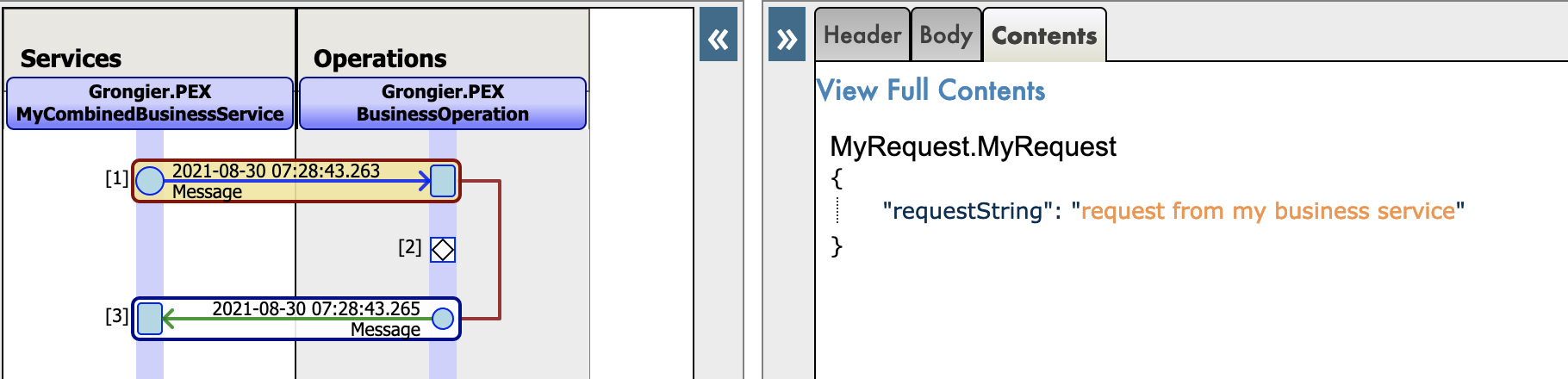
3. Prerequisites

Make sure you have git and Docker desktop installed.

4. Installation

4.1. With Docker

Clone/git pull the repo into any local directory

git clone https://github.com/grongierisc/interpeorability-embedded-python

Open the terminal in this directory and run:

docker-compose build

Run the IRIS container with your project:

docker-compose up -d

4.2. Without Docker

Install the grongier_pex-1.2.4-py3-none-any.whl on you local iris instance :

/usr/irissys/bin/irispython -m pip install grongier_pex-1.2.4-py3-none-any.whl

Then load the ObjectScript classes :

do $System.OBJ.LoadDir("/opt/irisapp/src","cubk","*.cls",1)

4.3. With ZPM

zpm "install pex-embbeded-python" 

4.4. With PyPI

pip3 install iris_pex_embedded_python

Import the ObjectScript classes, open an embedded python shell and run :

from grongier.pex import Utils
Utils.setup()

4.4.1. Known issues

If the module is not updated, make sure to remove the old version :

pip3 uninstall iris_pex_embedded_python

or manually remove the grongier folder in <iris_installation>/lib/python/

or force the installation with pip :

pip3 install --upgrade iris_pex_embedded_python --target <iris_installation>/lib/python/

5. How to Run the Sample

5.1. Docker containers

In order to have access to the InterSystems images, we need to go to the following url: http://container.intersystems.com. After connecting with our InterSystems credentials, we will get our password to connect to the registry. In the docker VScode addon, in the image tab, by pressing connect registry and entering the same url as before (http://container.intersystems.com) as a generic registry, we will be asked to give our credentials. The login is the usual one but the password is the one we got from the website.

From there, we should be able to build and compose our containers (with the docker-compose.yml and Dockerfile files given).

5.2. Management Portal and VSCode

This repository is ready for VS Code.

Open the locally-cloned interoperability-embedeed-python folder in VS Code.

If prompted (bottom right corner), install the recommended extensions.

IMPORTANT: When prompted, reopen the folder inside the container so you will be able to use the python components within it. The first time you do this it may take several minutes while the container is readied.

By opening the folder remote you enable VS Code and any terminals you open within it to use the python components within the container. Configure these to use /usr/irissys/bin/irispython

PythonInterpreter

5.3. Open the production

To open the production you can go to production.
You can also click on the bottom on the 127.0.0.1:52773[IRISAPP] button and select Open Management Portal then, click on [Interoperability] and [Configure] menus then click [productions] and [Go].

The production already has some code sample.

Here we can see the production and our pure python services and operations: interop-screenshot


New json trace for python native messages : json-message-trace

6. What's inside the repository

6.1. Dockerfile

A dockerfile which install some python dependancies (pip, venv) and sudo in the container for conviencies. Then it create the dev directory and copy in it this git repository.

It starts IRIS and activates %Service_CallIn for Python Shell. Use the related docker-compose.yml to easily setup additional parametes like port number and where you map keys and host folders.

This dockerfile ends with the installation of requirements for python modules.

Use .env/ file to adjust the dockerfile being used in docker-compose.

6.2. .vscode/settings.json

Settings file to let you immedietly code in VSCode with VSCode ObjectScript plugin

6.3. .vscode/launch.json

Config file if you want to debug with VSCode ObjectScript

Read about all the files in this article

6.4. .vscode/extensions.json

Recommendation file to add extensions if you want to run with VSCode in the container.

More information here

Archiecture

This is very useful to work with embedded python.

6.5. src folder

src
├── Grongier
│   └── PEX // ObjectScript classes that wrap python code
│       ├── BusinessOperation.cls
│       ├── BusinessProcess.cls
│       ├── BusinessService.cls
│       ├── Common.cls
│       ├── Director.cls
│       ├── InboundAdapter.cls
│       ├── Message.cls
│       ├── OutboundAdapter.cls
│       ├── Python.cls
│       ├── Test.cls
│       └── _utils.cls
├── PEX // Some example of wrapped classes
│   └── Production.cls
└── python
    ├── demo // Actual python code to run this demo
    |   `-- reddit
    |       |-- adapter.py
    |       |-- bo.py
    |       |-- bp.py
    |       |-- bs.py
    |       |-- message.py
    |       `-- obj.py
    ├── dist // Wheel used to implement python interoperability components
    │   └── grongier_pex-1.2.4-py3-none-any.whl
    ├── grongier
    │   └── pex // Helper classes to implement interoperability components
    │       ├── _business_host.py
    │       ├── _business_operation.py
    │       ├── _business_process.py
    │       ├── _business_service.py
    │       ├── _common.py
    │       ├── _director.py
    │       ├── _inbound_adapter.py
    │       ├── _message.py
    │       ├── _outbound_adapter.py
    │       ├── __init__.py
    │       └── _utils.py
    └── setup.py // setup to build the wheel

7. How it works

7.1. The __init__.pyfile

This file will allow us to create the classes to import in the code.
It gets from the multiple files seen earlier the classes and make them into callable classes. That way, when you wish to create a business operation, for example, you can just do:

from grongier.pex import BusinessOperation

7.2. The common class

The common class shouldn't be called by the user, it defines almost all the other classes.
This class defines:

on_init: The on_init() method is called when the component is started.
Use the on_init() method to initialize any structures needed by the component.

on_tear_down: Called before the component is terminated.
Use it to free any structures.

on_connected: The on_connected() method is called when the component is connected or reconnected after being disconnected.
Use the on_connected() method to initialize any structures needed by the component.

log_info: Write a log entry of type "info". :log entries can be viewed in the management portal.

log_alert: Write a log entry of type "alert". :log entries can be viewed in the management portal.

log_warning: Write a log entry of type "warning". :log entries can be viewed in the management portal.

log_error: Write a log entry of type "error". :log entries can be viewed in the management portal.

7.3. The business_host class

The business host class shouldn't be called by the user, it is the base class for all the business classes.
This class defines:

send_request_sync: Send the specified message to the target business process or business operation synchronously.
Parameters:

  • target: a string that specifies the name of the business process or operation to receive the request.
    The target is the name of the component as specified in the Item Name property in the production definition, not the class name of the component.
  • request: specifies the message to send to the target. The request is either an instance of a class that is a subclass of Message class or of IRISObject class.
    If the target is a build-in ObjectScript component, you should use the IRISObject class. The IRISObject class enables the PEX framework to convert the message to a class supported by the target.
  • timeout: an optional integer that specifies the number of seconds to wait before treating the send request as a failure. The default value is -1, which means wait forever.
    description: an optional string parameter that sets a description property in the message header. The default is None.

Returns: the response object from target.

Raises: TypeError: if request is not of type Message or IRISObject.


send_request_async: Send the specified message to the target business process or business operation asynchronously. Parameters:

  • target: a string that specifies the name of the business process or operation to receive the request.
    The target is the name of the component as specified in the Item Name property in the production definition, not the class name of the component.
  • request: specifies the message to send to the target. The request is an instance of IRISObject or of a subclass of Message.
    If the target is a built-in ObjectScript component, you should use the IRISObject class. The IRISObject class enables the PEX framework to convert the message to a class supported by the target.
  • description: an optional string parameter that sets a description property in the message header. The default is None.

Raises: TypeError: if request is not of type Message or IRISObject.


get_adapter_type: Name of the registred Adapter.

7.4. The inbound_adapter class

Inbound Adapter in Python are subclass from grongier.pex.InboundAdapter in Python, that inherit from all the functions of the common class.
This class is responsible for receiving the data from the external system, validating the data, and sending it to the business service by calling the BusinessHost process_input method. This class defines:

on_task: Called by the production framework at intervals determined by the business service CallInterval property.
The message can have any structure agreed upon by the inbound adapter and the business service.

Example of an inbound adapter ( situated in the src/python/demo/reddit/adapter.py file ):

from grongier.pex import InboundAdapter
import requests
import iris
import json

class RedditInboundAdapter(InboundAdapter):
    """
    This adapter use requests to fetch self.limit posts as data from the reddit
    API before calling process_input for each post.
    """
    def on_init(self):
        
        if not hasattr(self,'feed'):
            self.feed = "/new/"
        
        if self.limit is None:
            raise TypeError('no Limit field')
        
        self.last_post_name = ""
        
        return 1

    def on_task(self):
        self.log_info(f"LIMIT:{self.limit}")
        if self.feed == "" :
            return 1
        
        tSC = 1
        # HTTP Request
        try:
            server = "https://www.reddit.com"
            request_string = self.feed+".json?before="+self.last_post_name+"&limit="+self.limit
            self.log_info(server+request_string)
            response = requests.get(server+request_string)
            response.raise_for_status()

            data = response.json()
            updateLast = 0

            for key, value in enumerate(data['data']['children']):
                if value['data']['selftext']=="":
                    continue
                post = iris.cls('dc.Reddit.Post')._New()
                post._JSONImport(json.dumps(value['data']))
                post.OriginalJSON = json.dumps(value)
                if not updateLast:
                    self.LastPostName = value['data']['name']
                    updateLast = 1
                response = self.BusinessHost.ProcessInput(post)
        except requests.exceptions.HTTPError as err:
            if err.response.status_code == 429:
                self.log_warning(err.__str__())
            else:
                raise err
        except Exception as err: 
            self.log_error(err.__str__())
            raise err

        return tSC

7.5. The outbound_adapter class

Outbound Adapter in Python are subclass from grongier.pex.OutboundAdapter in Python, that inherit from all the functions of the common class.
This class is responsible for sending the data to the external system.

The Outbound Adapter gives the Operation the possibility to have a heartbeat notion. To activate this option, the CallInterval parameter of the adapter must be strictly greater than 0.

image

Example of an outbound adapter ( situated in the src/python/demo/reddit/adapter.py file ):

class TestHeartBeat(OutboundAdapter):

    def on_keepalive(self):
        self.log_info('beep')

    def on_task(self):
        self.log_info('on_task')

7.6. The business_service class

This class is responsible for receiving the data from external system and sending it to business processes or business operations in the production.
The business service can use an adapter to access the external system, which is specified overriding the get_adapter_type method.
There are three ways of implementing a business service:

  • Polling business service with an adapter - The production framework at regular intervals calls the adapter’s OnTask() method, which sends the incoming data to the the business service ProcessInput() method, which, in turn calls the OnProcessInput method with your code.

  • Polling business service that uses the default adapter - In this case, the framework calls the default adapter's OnTask method with no data. The OnProcessInput() method then performs the role of the adapter and is responsible for accessing the external system and receiving the data.

  • Nonpolling business service - The production framework does not initiate the business service. Instead custom code in either a long-running process or one that is started at regular intervals initiates the business service by calling the Director.CreateBusinessService() method.

Business service in Python are subclass from grongier.pex.BusinessService in Python, that inherit from all the functions of the business host.
This class defines:

on_process_input: Receives the message from the inbond adapter via the PRocessInput method and is responsible for forwarding it to target business processes or operations.
If the business service does not specify an adapter, then the default adapter calls this method with no message and the business service is responsible for receiving the data from the external system and validating it. Parameters:

  • message_input: an instance of IRISObject or subclass of Message containing the data that the inbound adapter passes in.
    The message can have any structure agreed upon by the inbound adapter and the business service.


Example of a business service ( situated in the src/python/demo/reddit/bs.py file ):

from grongier.pex import BusinessService

import iris

from message import PostMessage
from obj import PostClass

class RedditServiceWithPexAdapter(BusinessService):
    """
    This service use our python Python.RedditInboundAdapter to receive post
    from reddit and call the FilterPostRoutingRule process.
    """
    def get_adapter_type():
        """
        Name of the registred Adapter
        """
        return "Python.RedditInboundAdapter"

    def on_process_input(self, message_input):
        msg = iris.cls("dc.Demo.PostMessage")._New()
        msg.Post = message_input
        return self.send_request_sync(self.target,msg)

    def on_init(self):
        
        if not hasattr(self,'target'):
            self.target = "Python.FilterPostRoutingRule"
        
        return

7.7. The business_process class

Typically contains most of the logic in a production.
A business process can receive messages from a business service, another business process, or a business operation.
It can modify the message, convert it to a different format, or route it based on the message contents.
The business process can route a message to a business operation or another business process.
Business processes in Python are subclass from grongier.pex.BusinessProcess in Python, that inherit from all the functions of the business host.
This class defines:

on_request: Handles requests sent to the business process. A production calls this method whenever an initial request for a specific business process arrives on the appropriate queue and is assigned a job in which to execute.
Parameters:

  • request: An instance of IRISObject or subclass of Message that contains the request message sent to the business process.

Returns: An instance of IRISObject or subclass of Message that contains the response message that this business process can return to the production component that sent the initial message.


on_response: Handles responses sent to the business process in response to messages that it sent to the target.
A production calls this method whenever a response for a specific business process arrives on the appropriate queue and is assigned a job in which to execute.
Typically this is a response to an asynchronous request made by the business process where the responseRequired parameter has a true value.
Parameters:

  • request: An instance of IRISObject or subclass of Message that contains the initial request message sent to the business process.
  • response: An instance of IRISObject or subclass of Message that contains the response message that this business process can return to the production component that sent the initial message.
  • callRequest: An instance of IRISObject or subclass of Message that contains the request that the business process sent to its target.
  • callResponse: An instance of IRISObject or subclass of Message that contains the incoming response.
  • completionKey: A string that contains the completionKey specified in the completionKey parameter of the outgoing SendAsync() method.

Returns: An instance of IRISObject or subclass of Message that contains the response message that this business process can return to the production component that sent the initial message.


on_complete: Called after the business process has received and handled all responses to requests it has sent to targets.
Parameters:

  • request: An instance of IRISObject or subclass of Message that contains the initial request message sent to the business process.
  • response: An instance of IRISObject or subclass of Message that contains the response message that this business process can return to the production component that sent the initial message.

Returns: An instance of IRISObject or subclass of Message that contains the response message that this business process can return to the production component that sent the initial message.


Example of a business process ( situated in the src/python/demo/reddit/bp.py file ):

from grongier.pex import BusinessProcess

from message import PostMessage
from obj import PostClass

class FilterPostRoutingRule(BusinessProcess):
    """
    This process receive a PostMessage containing a reddit post.
    It then understand if the post is about a dog or a cat or nothing and
    fill the right infomation inside the PostMessage before sending it to
    the FileOperation operation.
    """
    def on_init(self):
        
        if not hasattr(self,'target'):
            self.target = "Python.FileOperation"
        
        return

    def on_request(self, request):

        if 'dog'.upper() in request.post.selftext.upper():
            request.to_email_address = 'dog@company.com'
            request.found = 'Dog'
        if 'cat'.upper() in request.post.selftext.upper():
            request.to_email_address = 'cat@company.com'
            request.found = 'Cat'

        if request.found is not None:
            return self.send_request_sync(self.target,request)
        else:
            return

7.8. The business_operation class

This class is responsible for sending the data to an external system or a local system such as an iris database.
The business operation can optionally use an adapter to handle the outgoing message which is specified overriding the get_adapter_type method.
If the business operation has an adapter, it uses the adapter to send the message to the external system.
The adapter can either be a PEX adapter, an ObjectScript adapter or a python adapter.
Business operation in Python are subclass from grongier.pex.BusinessOperation in Python, that inherit from all the functions of the business host.

7.8.1. The dispacth system

In a business operation it is possbile to create any number of function similar to the on_message method that will take as argument a typed request like this my_special_message_method(self,request: MySpecialMessage).

The dispatch system will automatically analyze any request arriving to the operation and dispacth the requests depending of their type. If the type of the request is not recognized or is not specified in any on_message like function, the dispatch system will send it to the on_message function.

7.8.2. The methods

This class defines:

on_message: Called when the business operation receives a message from another production component that can not be dispatched to another function.
Typically, the operation will either send the message to the external system or forward it to a business process or another business operation. If the operation has an adapter, it uses the Adapter.invoke() method to call the method on the adapter that sends the message to the external system. If the operation is forwarding the message to another production component, it uses the SendRequestAsync() or the SendRequestSync() method.
Parameters:

  • request: An instance of either a subclass of Message or of IRISObject containing the incoming message for the business operation.

Returns: The response object

Example of a business operation ( situated in the src/python/demo/reddit/bo.py file ):

from grongier.pex import BusinessOperation

from message import MyRequest,MyMessage

import iris

import os
import datetime
import smtplib
from email.mime.text import MIMEText

class EmailOperation(BusinessOperation):
    """
    This operation receive a PostMessage and send an email with all the
    important information to the concerned company ( dog or cat company )
    """

    def my_message(self,request:MyMessage):
        sender = 'admin@example.com'
        receivers = 'toto@example.com'
        port = 1025
        msg = MIMEText(request.toto)

        msg['Subject'] = 'MyMessage'
        msg['From'] = sender
        msg['To'] = receivers

        with smtplib.SMTP('localhost', port) as server:
            server.sendmail(sender, receivers, msg.as_string())
            print("Successfully sent email")

    def on_message(self, request):

        sender = 'admin@example.com'
        receivers = [ request.to_email_address ]


        port = 1025
        msg = MIMEText('This is test mail')

        msg['Subject'] = request.found+" found"
        msg['From'] = 'admin@example.com'
        msg['To'] = request.to_email_address

        with smtplib.SMTP('localhost', port) as server:
            
            # server.login('username', 'password')
            server.sendmail(sender, receivers, msg.as_string())
            print("Successfully sent email")

If this operation is called using a MyRequest message, the my_message function will be called thanks to the dispatcher, otherwise the on_message function will be called.

7.9. The director class

The Director class is used for nonpolling business services, that is, business services which are not automatically called by the production framework (through the inbound adapter) at the call interval.
Instead these business services are created by a custom application by calling the Director.create_business_service() method.
This class defines:

create_business_service: The create_business_service() method initiates the specified business service.
Parameters:

  • connection: an IRISConnection object that specifies the connection to an IRIS instance for Java.
  • target: a string that specifies the name of the business service in the production definition.

Returns: an object that contains an instance of IRISBusinessService

start_production: The start_production() method starts the production.
Parameters:

  • production_name: a string that specifies the name of the production to start.

stop_production: The stop_production() method stops the production.
Parameters:

  • production_name: a string that specifies the name of the production to stop.

restart_production: The restart_production() method restarts the production.
Parameters:

  • production_name: a string that specifies the name of the production to restart.

list_productions: The list_productions() method returns a dictionary of the names of the productions that are currently running.

7.10. The objects

We will use dataclass to hold information in our messages in a obj.py file.

Example of an object ( situated in the src/python/demo/reddit/obj.py file ):

from dataclasses import dataclass

@dataclass
class PostClass:
    title: str
    selftext : str
    author: str
    url: str
    created_utc: float = None
    original_json: str = None

7.11. The messages

The messages will contain one or more objects, located in the obj.py file.
Messages, requests and responses all inherit from the grongier.pex.Message class.

These messages will allow us to transfer information between any business service/process/operation.

Example of a message ( situated in the src/python/demo/reddit/message.py file ):

from grongier.pex import Message

from dataclasses import dataclass

from obj import PostClass

@dataclass
class PostMessage(Message):
    post:PostClass = None
    to_email_address:str = None
    found:str = None

WIP It is to be noted that it is needed to use types when you define an object or a message.

7.12. How to regsiter a component

You can register a component to iris in many way :

  • Only one component with register_component
  • All the component in a file with register_file
  • All the component in a folder with register_folder

7.12.1. register_component

Start an embedded python shell :

/usr/irissys/bin/irispython

Then use this class method to add a new py file to the component list for interoperability.

from grongier.pex import Utils
Utils.register_component(<ModuleName>,<ClassName>,<PathToPyFile>,<OverWrite>,<NameOfTheComponent>)

e.g :

from grongier.pex import Utils
Utils.register_component("MyCombinedBusinessOperation","MyCombinedBusinessOperation","/irisdev/app/src/python/demo/",1,"PEX.MyCombinedBusinessOperation")

7.12.2. register_file

Start an embedded python shell :

/usr/irissys/bin/irispython

Then use this class method to add a new py file to the component list for interoperability.

from grongier.pex import Utils
Utils.register_file(<File>,<OverWrite>,<PackageName>)

e.g :

from grongier.pex import Utils
Utils.register_file("/irisdev/app/src/python/demo/bo.py",1,"PEX")

7.12.3. register_folder

Start an embedded python shell :

/usr/irissys/bin/irispython

Then use this class method to add a new py file to the component list for interoperability.

from grongier.pex import Utils
Utils.register_folder(<Path>,<OverWrite>,<PackageName>)

e.g :

from grongier.pex import Utils
Utils.register_folder("/irisdev/app/src/python/demo/",1,"PEX")

7.12.4. migrate

Start an embedded python shell :

/usr/irissys/bin/irispython

Then use this static method to migrate the settings file to the iris framework.

from grongier.pex import Utils
Utils.migrate()

7.12.4.1. setting.py file

This file is used to store the settings of the interoperability components.

It has two sections :

  • CLASSES : This section is used to store the classes of the interoperability components.
  • PRODUCTIONS : This section is used to store the productions of the interoperability components.

e.g :

import bp
from bo import *
from bs import *

CLASSES = {
    'Python.RedditService': RedditService,
    'Python.FilterPostRoutingRule': bp.FilterPostRoutingRule,
    'Python.FileOperation': FileOperation,
    'Python.FileOperationWithIrisAdapter': FileOperationWithIrisAdapter,
}

PRODUCTIONS = [
    {
        'dc.Python.Production': {
        "@Name": "dc.Demo.Production",
        "@TestingEnabled": "true",
        "@LogGeneralTraceEvents": "false",
        "Description": "",
        "ActorPoolSize": "2",
        "Item": [
            {
                "@Name": "Python.FileOperation",
                "@Category": "",
                "@ClassName": "Python.FileOperation",
                "@PoolSize": "1",
                "@Enabled": "true",
                "@Foreground": "false",
                "@Comment": "",
                "@LogTraceEvents": "true",
                "@Schedule": "",
                "Setting": {
                    "@Target": "Host",
                    "@Name": "%settings",
                    "#text": "path=/tmp"
                }
            },
            {
                "@Name": "Python.RedditService",
                "@Category": "",
                "@ClassName": "Python.RedditService",
                "@PoolSize": "1",
                "@Enabled": "true",
                "@Foreground": "false",
                "@Comment": "",
                "@LogTraceEvents": "false",
                "@Schedule": "",
                "Setting": [
                    {
                        "@Target": "Host",
                        "@Name": "%settings",
                        "#text": "limit=10\nother<10"
                    }
                ]
            },
            {
                "@Name": "Python.FilterPostRoutingRule",
                "@Category": "",
                "@ClassName": "Python.FilterPostRoutingRule",
                "@PoolSize": "1",
                "@Enabled": "true",
                "@Foreground": "false",
                "@Comment": "",
                "@LogTraceEvents": "false",
                "@Schedule": ""
            }
        ]
    }
    }
]
7.12.4.1.1. CLASSES section

This section is used to store the classes of the interoperability components.

It aims to help to register the components.

This dictionary has the following structure :

  • Key : The name of the component
  • Value :
    • The class of the component (you have to import it before)
    • The module of the component (you have to import it before)
    • Another dictionary with the following structure :
      • module : Name of the module of the component (optional)
      • class : Name of the class of the component (optional)
      • path : The path of the component (mandatory)

e.g :

When Value is a class or a module:

import bo
import bp
from bs import RedditService

CLASSES = {
    'Python.RedditService': RedditService,
    'Python.FilterPostRoutingRule': bp.FilterPostRoutingRule,
    'Python.FileOperation': bo,
}

When Value is a dictionary :

CLASSES = {
    'Python.RedditService': {
        'module': 'bs',
        'class': 'RedditService',
        'path': '/irisdev/app/src/python/demo/'
    },
    'Python.Module': {
        'module': 'bp',
        'path': '/irisdev/app/src/python/demo/'
    },
    'Python.Package': {
        'path': '/irisdev/app/src/python/demo/'
    },
}
7.12.4.1.2. Productions section

This section is used to store the productions of the interoperability components.

It aims to help to register a production.

This list has the following structure :

  • A list of dictionary with the following structure :
    • dc.Python.Production : The name of the production
      • @Name : The name of the production
      • @TestingEnabled : The testing enabled of the production
      • @LogGeneralTraceEvents : The log general trace events of the production
      • Description : The description of the production
      • ActorPoolSize : The actor pool size of the production
      • Item : The list of the items of the production
        • @Name : The name of the item
        • @Category : The category of the item
        • @ClassName : The class name of the item
        • @PoolSize : The pool size of the item
        • @Enabled : The enabled of the item
        • @Foreground : The foreground of the item
        • @Comment : The comment of the item
        • @LogTraceEvents : The log trace events of the item
        • @Schedule : The schedule of the item
        • Setting : The list of the settings of the item
          • @Target : The target of the setting
          • @Name : The name of the setting
          • #text : The value of the setting

The minimum structure of a production is :

PRODUCTIONS = [
        {
            'UnitTest.Production': {
                "Item": [
                    {
                        "@Name": "Python.FileOperation",
                        "@ClassName": "Python.FileOperation",
                    },
                    {
                        "@Name": "Python.EmailOperation",
                        "@ClassName": "UnitTest.Package.EmailOperation"
                    }
                ]
            }
        } 
    ]

You can also set in @ClassName an item from the CLASSES section.

e.g :

from bo import FileOperation
PRODUCTIONS = [
        {
            'UnitTest.Production': {
                "Item": [
                    {
                        "@Name": "Python.FileOperation",
                        "@ClassName": FileOperation,
                    }
                ]
            }
        } 
    ]

As the production is a dictionary, you can add in value of the production dictionary an environment variable.

e.g :

import os

PRODUCTIONS = [
        {
            'UnitTest.Production': {
                "Item": [
                    {
                        "@Name": "Python.FileOperation",
                        "@ClassName": "Python.FileOperation",
                        "Setting": {
                            "@Target": "Host",
                            "@Name": "%settings",
                            "#text": os.environ['SETTINGS']
                        }
                    }
                ]
            }
        } 
    ]

7.13. Direct use of Grongier.PEX

If you don't want to use the register_component util. You can add a Grongier.PEX.BusinessService component directly into the management portal and configure the properties :

  • %module :
    • Module name of your python code
  • %classname :
    • Classname of you component
  • %classpaths
    • Path where you component is.
      • This can one or more Classpaths (separated by '|' character) needed in addition to PYTHON_PATH

e.g : component-config

8. Command line

Since version 2.3.1, you can use the command line to register your components and productions.

To use it, you have to use the following command :

iop 

output :

usage: python3 -m grongier.pex [-h] [-d DEFAULT] [-l] [-s START] [-k] [-S] [-r] [-M MIGRATE] [-e EXPORT] [-x] [-v] [-L]
optional arguments:
  -h, --help            display help and default production name
  -d DEFAULT, --default DEFAULT
                        set the default production
  -l, --lists           list productions
  -s START, --start START
                        start a production
  -k, --kill            kill a production (force stop)
  -S, --stop            stop a production
  -r, --restart         restart a production
  -M MIGRATE, --migrate MIGRATE
                        migrate production and classes with settings file
  -e EXPORT, --export EXPORT
                        export a production
  -x, --status          status a production
  -v, --version         display version
  -L, --log             display log

default production: PEX.Production

8.1. help

The help command display the help and the default production name.

iop -h

output :

usage: python3 -m grongier.pex [-h] [-d DEFAULT] [-l] [-s START] [-k] [-S] [-r] [-M MIGRATE] [-e EXPORT] [-x] [-v] [-L]
...
default production: PEX.Production

8.2. default

The default command set the default production.

With no argument, it display the default production.

iop -d

output :

default production: PEX.Production

With an argument, it set the default production.

iop -d PEX.Production

8.3. lists

The lists command list productions.

iop -l

output :

{
    "PEX.Production": {
        "Status": "Stopped",
        "LastStartTime": "2023-05-31 11:13:51.000",
        "LastStopTime": "2023-05-31 11:13:54.153",
        "AutoStart": 0
    }
}

8.4. start

The start command start a production.

To exit the command, you have to press CTRL+C.

iop -s PEX.Production

output :

2021-08-30 15:13:51.000 [PEX.Production] INFO: Starting production
2021-08-30 15:13:51.000 [PEX.Production] INFO: Starting item Python.FileOperation
2021-08-30 15:13:51.000 [PEX.Production] INFO: Starting item Python.EmailOperation
...

8.5. kill

The kill command kill a production (force stop).

Kill command is the same as stop command but with a force stop.

Kill command doesn't take an argument because only one production can be running.

iop -k 

8.6. stop

The stop command stop a production.

Stop command doesn't take an argument because only one production can be running.

iop -S 

8.7. restart

The restart command restart a production.

Restart command doesn't take an argument because only one production can be running.

iop -r 

8.8. migrate

The migrate command migrate a production and classes with settings file.

Migrate command must take the absolute path of the settings file.

Settings file must be in the same folder as the python code.

iop -M /tmp/settings.py

8.9. export

The export command export a production.

If no argument is given, the export command export the default production.

iop -e

If an argument is given, the export command export the production given in argument.

iop -e PEX.Production

output :

{
    "Production": {
        "@Name": "PEX.Production",
        "@TestingEnabled": "true",
        "@LogGeneralTraceEvents": "false",
        "Description": "",
        "ActorPoolSize": "2",
        "Item": [
            {
                "@Name": "Python.FileOperation",
                "@Category": "",
                "@ClassName": "Python.FileOperation",
                "@PoolSize": "1",
                "@Enabled": "true",
                "@Foreground": "false",
                "@Comment": "",
                "@LogTraceEvents": "true",
                "@Schedule": "",
                "Setting": [
                    {
                        "@Target": "Adapter",
                        "@Name": "Charset",
                        "#text": "utf-8"
                    },
                    {
                        "@Target": "Adapter",
                        "@Name": "FilePath",
                        "#text": "/irisdev/app/output/"
                    },
                    {
                        "@Target": "Host",
                        "@Name": "%settings",
                        "#text": "path=/irisdev/app/output/"
                    }
                ]
            }
        ]
    }
}

8.10. status

The status command status a production.

Status command doesn't take an argument because only one production can be running.

iop -x 

output :

{
    "Production": "PEX.Production",
    "Status": "stopped"
}

Status can be :

  • stopped
  • running
  • suspended
  • troubled

8.11. version

The version command display the version.

iop -v

output :

2.3.0

8.12. log

The log command display the log.

To exit the command, you have to press CTRL+C.

iop -L

output :

2021-08-30 15:13:51.000 [PEX.Production] INFO: Starting production
2021-08-30 15:13:51.000 [PEX.Production] INFO: Starting item Python.FileOperation
2021-08-30 15:13:51.000 [PEX.Production] INFO: Starting item Python.EmailOperation
...

9. Credits

Most of the code came from PEX for Python by Mo Cheng and Summer Gerry.

Works only on IRIS 2021.2 +

9
4 2127
Article Nicholai Mitchko · Oct 27, 2022 2m read
   _________ ___ ____  
  |__  /  _ \_ _|  _ \ 
    / /| |_) | || |_) |
   / /_|  __/| ||  __/ 
  /____|_|  |___|_|    

Starting in version 2021.1, InterSystems IRIS began shipping with a python runtime in the engine's kernel. However, there was no way to install packages from within the instance. The main draw of python is its enormous package ecosystem. With that in mind, I introduce my side project zpip, a pip wrapper that is callable from the iris terminal.

What is zpip?

zpip is a a wrapper for python pip that enables developers to quickly add packages to an instance through the InterSystems IRIS terminal.

Features

  • python pip wrapper for InterSystems IRIS
  • Install/Uninstall python packages
  • Installation adds zpip keyword to the language

Installing zpip

%SYS> zpm "install zpip"

TODO list

  • Callable API with statuses returned

Using zpip

All pip commands* are supported, however, any interactive command will require you to use the non-interactive version of the command. For example, to uninstall a package you'll need to use the -y in the command to confirm the process.

Install python packages with zpip

// Install multiple packages
// beautiful soup and requests libraries
%SYS> zpip "install requests bs4"

... in action:

%SYS>zpip "install emoji"

Processing /home/irisowner/.cache/pip/wheels/ae/80/43/3b56e58669d65ea9ebf38b9574074ca248143b61f45e114a6b/emoji-2.1.0-py3-none-any.whl
Installing collected packages: emoji
Successfully installed emoji-2.1.0

%SYS>

Specify a different install directory:

// Install to some other python package target
$SYS> zpip "install --target '/durable/iconfig/lib/python' emoji"

Uninstalling a python package

// Requires -y!
%SYS>zpip "uninstall -y emoji"
Found existing installation: emoji 2.1.0
Uninstalling emoji-2.1.0:
  Successfully uninstalled emoji-2.1.0

Other useful pip commands

list packages

// List Packages
%SYS> zpip "list"
Package                      Version    
---------------------------- -----------
absl-py                      1.1.0      
argon2-cffi                  21.3.0     
argon2-cffi-bindings         21.2.0     
asttokens                    2.0.5      
astunparse                   1.6.3      
attrs                        21.4.0     
backcall                     0.2.0      
beautifulsoup4               4.11.1     
bleach                       5.0.0      
bs4                          0.0.1   
...

Limitations

  • Interactive commands are unsupported
    • use -y for uninstalls
  • Search may not work depending on the system configuration
  • Uses the underlying os's pip infrastructure so your installation is dependant on the os's pip version.
6
1 820
Article Oliver Wilms · Mar 19, 2023 5m read

csp-log-tutorial

Prerequisites

Make sure you have git installed.

I created a git folder inside the IRIS mgr directory. I right clicked the git folder and chose Git Bash Here from the context menu.

git clone https://github.com/oliverwilms/csp-log-tutorial.git

Clone my csp-log-tutorial GitHub repo if you like to try it out for yourself.

I will describe in this tutorial how I try to use access.log and CSP.log files in webgateway pods to track requests and responses.

My team works with IRIS containers running on Red Hat OpenShift Container Platform (Kubernetes) in AWS. We deployed three webgateway pods receiving requests via a Network Load Balancer. The requests get processed in an InterOperability production running in three compute pods. We use Message Bank production running on mirrored data pods as one place to review all messages processed by any compute pod.

We tested our interfaces using feeder pods to send many request messages to the Network Load Balancer. We sent 100k messages and tested how long it would take to process all messages into the message bank and record the responses on the feeders. The count of banked messages in Message Bank and responses received by the feeders matched the number of incoming messages.

Recently we were asked to test pods failovers and Availability Zone fail-over. We delete individual pods with or without force and grace period. We simulate an availability zone failure by denying all incoming and outgoing traffic to a subnet (one of three availability zones) via the AWS console while feeders are sending many request messages to the Network Load Balancer. It has been quite challenging to account for all messages sent by the feeders.

The other day while one feeder sent 5000 messages, we simulated the AZ failure. The feeder received 4933 responses. The message bank banked 4937 messages.

We store access.log and CSP.log in the data directory on the webgateway pods. We added this line to the Dockerfile of our webgateway image:

RUN sed -i 's|APACHE_LOG_DIR=/var/log/apache2|APACHE_LOG_DIR=/irissys/data/webgateway|g' /etc/apache2/envvars

We set the Event Log Level in Web Gateway to Ev9r. screenshot

I created data0, data1, and data2 subdirectories for our three webgateway pods. I copy the CSP.log and access.log files from our three webgateway pods stored on persistent volumes:

oc cp iris-webgateway-0:/irissys/data/webgateway/access.log data0/access.log
oc cp iris-webgateway-1:/irissys/data/webgateway/access.log data1/access.log
oc cp iris-webgateway-2:/irissys/data/webgateway/access.log data2/access.log
oc cp iris-webgateway-0:/irissys/data/webgateway/CSP.log data0/CSP.log
oc cp iris-webgateway-1:/irissys/data/webgateway/CSP.log data1/CSP.log
oc cp iris-webgateway-2:/irissys/data/webgateway/CSP.log data2/CSP.log

I end up with three subdirectories each containing access.log and CSP.log files.

We count the number of requests processed in any webgateway pod using this command:

cat access.log | grep InComingOTW | wc -l

We count the number of requests and responses recorded in CSP.log using this command:

cat CSP.log | grep InComingOTW | wc -l

Normally we expect twice as many lines in CSP.log compared to access.log. Sometimes we find more lines in CSP.log than the expected double the number of lines in access.log. I remember seeing less lines than expected in CSP.log compared to what was in access.log at least once. We suspect this was due to a 500 response recorded in access.log, which was not recorded in CSP.log, properly because the webgateway pod was terminated.

How can I analyze many lines of requests and explain what happened?

I created persistent classes otw.wgw.apache and otw.wgw.csp to import lines from access.log and CSP.log. access.log contains one line per request and it includes the response status. CSP.log contains separate lines for requests and responses.

Open IRIS terminal and import the classes in src directory from csp-log-tutorial repo we had cloned earlier:

Set src="C:\InterSystems\IRISHealth\mgr\git\csp-log-tutorial\src"
Do $system.OBJ.LoadDir(src,"ck",,1)

If you do not have your own CSP.log file to analyze, you can import the one provided in csp-log-tutorial repo:

Set pFile="C:\InterSystems\IRISHealth\mgr\git\csp-log-tutorial\wg2_20230314_CSP.log"
Do ##class(otw.wgw.csp).ImportMessages(pFile,.pLines,.pFilter,1)

pLines and pFilter are output parameters which are not that important right now. pImport controls if the Extent gets deleted before importing data.

After we import data we can run SQL queries like this one:

SELECT count(*) FROM otw_wgw.csp where wgEvent='WebGateway.ProcessRequest'

If the count returned is an odd number, it indicates there is a mismatch between requests and responses.

We can run the next query to identify filenames in the requests that do not have a matching response:

select zFilename, count(*) from otw_wgw.csp group by zFilename having count(*) = 1

Please note that I use method CalcFilename to set the zFilename property before I save a line imported from CSP.log file.

I also incuded a sample access.log file which we can import like this: If you do not have your own CSP.log file to analyze, you can import the one provided in csp-log-tutorial repo:

Set pFile="C:\InterSystems\IRISHealth\mgr\git\csp-log-tutorial\wg2_20230314_access.log"
Do ##class(otw.wgw.apache).ImportMessages(pFile,.pLines,.pFilter,1)

We can run this query to get the count of messages related to this tutorial:

SELECT count(*) FROM otw_wgw.apache where Text like '%tutorial%'

What else do I want to do if I find the time?

I like to combine the data from apache and csp tables and possibly include data gathered from the compute pods.

I think I can use the data in access.log to determine when there was an outage on a webgateway pod.

1
0 389
Article Jimmy Xu · Oct 11, 2022 2m read

ZPM is designed to work with applications and modules for InterSystems IRIS Data Platform. It consists of two components, the ZPN Client which is a CLI to manage modules, and The Registry which is a database of modules and meta-information. We can use ZPM to search, install, upgrade, remove and publish modules. With ZPM you can install ObjectScript classes, Frontend applications, Interoperability productions, IRIS BI solutions, IRIS Datasets or any files such as Embedded Python wheels. 

Today this cookbook will go through 3 sections:

10
11 1399
Article Lucas Enard · Aug 2, 2022 8m read

On this GitHub you can find all the information on how to use a HuggingFace machine learning / AI model on the IRIS Framework using python.

1. iris-huggingface

Usage of Machine Learning models in IRIS using Python; For text-to-text, text-to-image or image-to-image models.

Here, models as example :

2. Installation

2.1. Starting the Production

While in the iris-local-ml folder, open a terminal and enter :

docker-compose up

The very first time, it may take a few minutes to build the image correctly and install all the needed modules for Python.

2.2. Access the Production

Following this link, access the production : Access the Production

2.3. Closing the Production

docker-compose down

How it works

For now, some models may not work with this implementation since everything is automatically done, which means, no matter what model you input, we will try to make it work through transformerspipeline library.

Pipeline is a powerful tool by the HuggingFace team that will scan the folder in which we downloaded the model, then understand what library it should use between PyTorch, Keras, Tensorflow or JAX to then load that model using AutoModel.
From here, by inputting the task, the pipeline knows what to do with the model, tokenizer or even feature-extractor in this folder, and manage your input automatically, tokenize it, process it, pass it into the model, then give back the output in a decoded form usable directly by us.

3. HuggingFace API

You must first start the demo, using the green Start button or Stop and Start it again to apply your config changes.

Then, by clicking on the operation Python.HFOperation of your choice, and selecting in the right tab action, you can test the demo.

In this test window, select :

Type of request : Grongier.PEX.Message

For the classname you must enter :

msg.HFRequest

And for the json, here is an example of a call to GPT2 :

{
    "api_url":"https://api-inference.huggingface.co/models/gpt2",
    "payload":"Can you please let us know more details about your ",
    "api_key":"----------------------"
}

Now you can click on Visual Trace to see in details what happened and see the logs.

NOTE that you must have an API key from HuggingFace before using this Operation ( the api-keys are free, you just need to register to HF )

NOTE that you can change the url to try any other models from HuggingFace, you may need to change the payload.

See as example:
sending hf reqhf reqhf resp

4. Use any model from the web

In the section we will teach you how to use almost any model from the internet, HuggingFace or not.

4.1. FIRST CASE : YOU HAVE YOUR OWN MODEL

In this case, you must copy paste your model, with the config, the tokenizer.json etc inside a folder inside the model folder.
Path : src/model/yourmodelname/

From here you must go to the parameters of the Python.MLOperation.
Click on the Python.MLOperation then go to settings in the right tab, then in the Python part, then in the %settings part. Here, you can enter or modify any parameters ( don't forget to press apply once your are done ).
Here's the default configuration for this case :
%settings

name=yourmodelname
task=text-generation

NOTE that any settings that are not name or model_url will go into the PIPELINE settings.

Now you can double-click on the operation Python.MLOperation and start it. You must see in the Log part the starting of your model.

From here, we create a PIPELINE using transformers that uses your config file find in the folder as seen before.

To call that pipeline, click on the operation Python.MLOperation , and select in the right tab action, you can test the demo.

In this test window, select :

Type of request : Grongier.PEX.Message

For the classname you must enter :

msg.MLRequest

And for the json, you must enter every arguments needed by your model.
Here is an example of a call to GPT2 :

{
    "text_inputs":"Unfortunately, the outcome",
    "max_length":100,
    "num_return_sequences":3
}

Click Invoke Testing Service and wait for the model to operate.

See for example:
sending ml req

Now you can click on Visual Trace to see in details what happened and see the logs.

See for example :
ml req

ml resp

4.2. SECOND CASE : YOU WANT TO DOWNLOAD A MODEL FROM HUGGINGFACE

In this case, you must find the URL of the model on HuggingFace;

4.2.1. Settings

From here you must go to the parameters of the Python.MLOperation.
Click on the Python.MLOperation then go to settings in the right tab, then in the Python part, then in the %settings part. Here, you can enter or modify any parameters ( don't forget to press apply once your are done ).
Here's some example configuration for some models we found on HuggingFace :

%settings for gpt2

model_url=https://huggingface.co/gpt2
name=gpt2
task=text-generation

%settings for camembert-ner

name=camembert-ner
model_url=https://huggingface.co/Jean-Baptiste/camembert-ner
task=ner
aggregation_strategy=simple

%settings for bert-base-uncased

name=bert-base-uncased
model_url=https://huggingface.co/bert-base-uncased
task=fill-mask

%settings for detr-resnet-50

name=detr-resnet-50
model_url=https://huggingface.co/facebook/detr-resnet-50
task=object-detection

%settings for detr-resnet-50-protnic

name=detr-resnet-50-panoptic
model_url=https://huggingface.co/facebook/detr-resnet-50-panoptic
task=image-segmentation

NOTE that any settings that are not name or model_url will go into the PIPELINE settings, so in our second example, the camembert-ner pipeline requirers an aggregation_strategy and a task that are specified here while the gpt2 requirers only a task.

See as example:
settings ml ope2

Now you can double-click on the operation Python.MLOperation and start it.
You must see in the Log part the starting of your model and the downloading.
NOTE You can refresh those logs every x seconds to see the advancement with the downloads. dl in real time

From here, we create a PIPELINE using transformers that uses your config file find in the folder as seen before.

4.2.2. Testing

To call that pipeline, click on the operation Python.MLOperation , and select in the right tab action, you can test the demo.

In this test window, select :

Type of request : Grongier.PEX.Message

For the classname you must enter :

msg.MLRequest

And for the json, you must enter every arguments needed by your model.
Here is an example of a call to GPT2 ( Python.MLOperation ):

{
    "text_inputs":"George Washington lived",
    "max_length":30,
    "num_return_sequences":3
}

Here is an example of a call to Camembert-ner ( Python.MLOperation2 ) :

{
    "inputs":"George Washington lived in washington"
}

Here is an example of a call to bert-base-uncased ( Python.MLOperation3 ) :

{
    "inputs":"George Washington lived in [MASK]."
}

Here is an example of a call to detr-resnet-50 using an online url ( Python.MLOperationDETRRESNET ) :

{
    "url":"http://images.cocodataset.org/val2017/000000039769.jpg"
}

Here is an example of a call to detr-resnet-50-panoptic using the url as a path( Python.MLOperationDetrPanoptic ) :

{
    "url":"/irisdev/app/misc/000000039769.jpg"
}

Click Invoke Testing Service and wait for the model to operate.
Now you can click on Visual Trace to see in details what happened and see the logs.

NOTE that once the model was downloaded once, the production won't download it again but get the cached files found at src/model/TheModelName/.
If some files are missing, the Production will download them again.

See as example:
sending ml reqml reqml resp

See as example:
sending ml reqml resp

5. TroubleShooting

If you have issues, reading is the first advice we can give you, most errors are easily understood just by reading the logs as almost all errors will be captured by a try / catch and logged.

If you need to install a new module, or Python dependence, open a terminal inside the container and enter for example : "pip install new-module"
To open a terminal there are many ways,

  • If you use the InterSystems plugins, you can click in the below bar in VSCode, the one looking like docker:iris:52795[IRISAPP] and select Open Shell in Docker.
  • In any local terminal enter : docker-compose exec -it iris bash
  • From Docker-Desktop find the IRIS container and click on Open in terminal

Some models may require some changes for the pipeline or the settings for example, it is your task to add in the settings and in the request the right information.

6. Conclusion

From here you should be able to use any model that you need or own on IRIS.
NOTE that you can create a Python.MLOperation for each of your model and have them on at the same time.

5
1 832
Article Murray Oldfield · May 25, 2023 12m read

I am often asked to review customers' IRIS application performance data to understand if system resources are under or over-provisioned.

This recent example is interesting because it involves an application that has done a "lift and shift" migration of a large IRIS database application to the Cloud. AWS, in this case.

A key takeaway is that once you move to the Cloud, resources can be right-sized over time as needed. You do not have to buy and provision on-premises infrastructure for many years in the future that you expect to grow into.

Continuous monitoring is required. Your application transaction rate will change as your business changes, the application use or the application itself changes. This will change the system resource requirements. Planners should also consider seasonal peaks in activity. Of course, an advantage of the Cloud is resources can be scaled up or down as needed.

For more background information, there are several in-depth posts on AWS and IRIS in the community. A search for "AWS reference" is an excellent place to start. I have also added some helpful links at the end of this post.

AWS services are like Lego blocks, different sizes and shapes can be combined. I have ignored networking, security, and standing up a VPC for this post. I have focused on two of the Lego block components;

  • Compute requirements.
  • Storage requirements.

Overview

The application is a healthcare information system used at a busy hospital group. The architecture components I am focusing on here include two database servers in an InterSystems mirror failover cluster.

Sidebar: Mirrors are in separate availability zones for additional high availability.


Compute requirements

EC2 Instance Types

Amazon EC2 provides a wide selection of instance types optimised for different use cases. Instance types comprise varying FIXED combinations of CPU and memory and fixed upper limits on storage and networking capacity. Each instance type includes one or more instance sizes.

EC2 instance attributes to look at closely include:

  • vCPU cores and Memory.
  • Maximum IOPS and IO throughput.

For IRIS applications like this one with a large database server, two types of EC2 instances are a good fit: 

  • EC2 R5 and R6i are in the Memory Optimised family of instances and are an ideal fit for memory-intensive workloads, such as IRIS. There is 8GB memory per vCPU.
  • EC2 M5 and M6i are in the General Purpose family of instances. There is 4GB memory per vCPU. They are used more for web servers, print servers and non-production servers.

Note: Not all instance types are available in all AWS regions. R5 instances were used in this case because the more recently released R6i was unavailable.

Capacity Planning

When an existing on-premises system is available, capacity planning means measuring current resource use, translating that to public cloud resources, and adding resources for expected short-term growth. Generally, if there are no other resource constraints, IRIS database applications scale linearly on the same processors; for example, imagine adding a new hospital to the group; increasing system use (transaction rate) by 20% will require 20% more vCPU resources using the same processor types. Of course, that's not guaranteed; validate your applications.

vCPU requirements

Before the migration, CPU utilisation peaked near 100% at busy times; the on-premises server has 26 vCPUs. A good rule of thumb is to size systems with an expected peak of 80% CPU utilisation. This allows for transient spikes in activity or other unusual activity. An example CPU utilisation chart for a typical day is shown below.

image

Monitoring the on-premises servers would prompt an increase in vCPUs to 30 cores to bring general peak utilisation below 80%. The customer was anticipating adding 20% transaction growth in the short term. So, a 20% buffer is added to the calculations, also allowing some extra headroom for the migration period.

A simple calculation is that 30 cores + 20% growth and migration buffer is 36 vCPU cores required

Sizing for the cloud

Remember, AWS EC2 instances in each family type come in fixed sizes of vCPU and memory and set upper limits on IOPS, storage, and network throughput.

For example, available instance types in the R5 and R6i families include:

  • 16 vCPUs and 128GB memory
  • 32 vCPUs and 256 GB memory
  • 48 vCPUs and 384 GB memory
  • 64 vCPUs and 512 GB memory
  • And so on.

Rule of thumb: A simplified way to size an EC2 instance from known on-premises metrics to the cloud is to round up the recommended on-premises vCPU requirements to the next available EC2 instance size.

Caveats: There can be many other considerations; for example, differences in on-premises and EC2 processor types and speeds, or having more performant storage in the cloud than an old on-premises system, can mean that vCPU requirements change, for example, more IO and more work can be done in less time, increasing peak vCPU utilisation. On-premises servers may have a full CPU processor, including hyper-threading, while cloud instance vCPUs are a single hyper thread. On the other hand, EC2 instances are optimised to offload some processing to onboard Nitro cards allowing the main vCPU cores to spend more cycles processing workloads, thus delivering better instance performance. But, in summary, the above rule is a good guide to start. The advantage of the cloud is that with continuous monitoring, you can plan and change the instance type to optimise performance and cost.

For example, to translate 30 or 36 vCPUs on-premises to similar EC2 instance types:

  • The r5.8xlarge has 32 vCPUs, 256 GB memory and a maximum of 30,000 IOPS.
  • The r512xlarge has 48 vCPUs, 384 GB memory and a maximum of 40,000 IOPS

Note the maximum IOPS. This will become important later in the story.

Results

An r512xlarge instance was selected for the IRIS database mirrors for the migration.

In the weeks after migration, monitoring showed the 48 vCPU instance type with sustained peaks near 100% vCPU utilisation. Generally, though, the processing peaked at around 70%. Well within the acceptable range, and if the periods of high utilisation can be traced to a process that can be optimised, there is plenty of headroom to consider right-sizing to a lower specification and cheaper EC2 instance type.

image

Sometime later, the instance type remained the same. A system performance check shows that the general peak vCPU utilisation has dropped to around 50%. However, there are still transient peaks near 100%.

image

Recommendation

Continuous monitoring is required. With constant monitoring, the system can be right-sized to achieve the necessary performance and be cheaper to run.

The transient spikes in vCPU utilisation should be investigated. For example, a report or batch job may be moved out of business hours, lowering the overall vCPU peak and lessening any adverse impact on interactive application users.

Review the storage IOPS and throughput requirements before changing the instance type; remember, instance types have fixed limits on maximum IOPS.

Instances can be right-sized by using failover mirroring. Simplified steps are:

  • Power off the backup mirror.
  • Power on the backup mirror using a smaller or larger instance with configuration changes to mount the EBS storage and account for a smaller memory footprint (think about things like Linux hugepages and IRIS global buffers).
  • Let the backup mirror catch up.
  • Failover the backup mirror to become primary.
  • Repeat, resize the remaining mirror, return it online, and catch up.

Note: During the mirror failover, there will be a short outage for all users, interfaces, etc. However, if ECP application servers are used, there can be no interruption to users. Application servers can also be part of an autoscaling solution.

Other cost-saving options include running the backup mirror on a smaller instance. However, there is a significant risk of reduced performance (and unhappy users) if a failover occurs at peak processing times.

Caveats: Instance vCPU and memory are fixed. Restarting with a smaller instance with a smaller memory footprint will mean a smaller global buffer cache, which can increase the database read IOPS. Please take into account the storage requirements before reducing the instance size. Automate and test rightsizing to minimise the risk of human error, especially if it is a common occurrence.


Storage requirements

Predictable storage IO performance with low latency is vital to provide scalability and reliability for your applications.

Storage types

Amazon Elastic Block Store (EBS) storage is recommended for most high transaction rate IRIS database applications. EBS provides multiple volume types that allow you to optimise storage performance and cost for a broad range of applications. SSD-backed storage is required for transactional workloads such as applications using IRIS databases.

Of the SSD storage types, gp3 volumes are generally recommended for IRIS databases to balance price and performance for transactional applications; however, for exceptional cases with very high IOPS or throughput, io2 can be used (typically for a higher cost). There are other options, such as locally attached ephemeral storage and third-party virtual array solutions. If you have requirements beyond io2 capabilities, talk to InterSystems about your needs.

Storage comes with limits and costs, for example;

  • gp3 volumes deliver a baseline performance of 3,000 IOPS and 125 MiBps at any volume size with single-digit millisecond latency 99% of the time for the base cost of the storage GB capacity. gp3 volumes can scale up to 16,000 IOPS and 1,000 MiBps throughput for an additional cost. Storage is priced per GB and on provisioned IOPS over the 3,000 IOPS baseline.
  • io2 volumes deliver a consistent baseline performance of up to 500 IOPS/GB to a maximum of 64,000 IOPS with single-digit millisecond latency 99.9% of the time. Storage is priced per GB and on provisioned IOPS.

Remember: EC2 instances also have limits on total EBS IOPS and throughput. For example, the r5.8xlarge has 32 vCPUs and a maximum of 30,000 IOPS. Not all instance types are optimised to use EBS volumes.

Capacity Planning

When an existing on-premises system is available, capacity planning means measuring current resource use, translating that to public cloud resources, and adding resources for expected short-term growth.

The two essential resources to consider are:

  • Storage capacity. How many GB of database storage do you need, and what is the expected growth? For example, you know your on-premises system's historical average database growth for a known transaction rate. In that case, you can calculate future database sizes based on any anticipated transaction rate growth. You will also need to consider other storage, such as journals.
  • IOPS and throughput. This is the most interesting and is covered in detail below.

Database requirements

Before the migration, database disk reads were peaking at around 8,000 IOPS.

image

Read plus Write IOPS was peaking above 40,000 on some days. Although, during business hours, the peaks are much lower.

image

The total throughput of reads plus writes was peaking at around 600 MB/s.

image

Remember, EC2 instances and EBS volumes have limits on IOPS AND throughput. Whichever limit is reached first will result in the throttling of that resource by AWS, causing performance degradation and likely impacting the users of your system. You must provision IOPS AND throughput.

Sizing for the cloud

For a balance of price and performance, gp3 volumes are used. However, in this case, the limit of 16,000 IOPS for a single gp3 volume is exceeded, and there is an expectation that requirements will increase in the future.

To allow for the provisioning of higher IOPS than is possible on a single gp3 volume, an LVM stripe is used.

For the migration, the database is deployed using an LVM stripe of four gp3 volumes with the following:

  • Provisioned 8,000 IOPS on each volume (for a total of 32,000 IOPS).
  • Provisioned throughput of 250 MB/s on each volume (for a total of 1,000 MB/s).

The exact capacity planning process was done for the Write Image Journal (WIJ) and transaction journal on-premises disks. The WIJ and journal disks were each provisoned on a single gp3 disk.

For more details and an example of using an LVM stripe, see: https://community.intersystems.com/post/using-lvm-stripe-increase-aws-ebs-iops-and-throughput

Rule of thumb: If your requirements exceed the limits of a single gp3 volume, investigate the cost difference between using LVM gp3 and io2 provisioned IOPS.

Caveats: Ensure the EC2 instance does not limit IOPS or throughput.

Results

In the weeks after migration, database write IOPS peaked at around 40,000 IOPS, similar to on-premises. However, the database reads IOPS were much lower.

Lower read IOPS is expected due to the EC2 instance having more memory available for caching data in global buffers. More application working set data in memory means it does not have to be called in from much slower SSD storage. Remember, the opposite will happen if you reduce the memory footprint.

image

During peak processing times, the database volume had spikes above 1 ms latency. However, the spikes are transient and will not impact the user's experience. Storage performance is excellent.

image

Later, a system performance check shows that although there are some peaks, generally, read IOPS is still lower than on-premises.

image

Recommendation

Continuous monitoring is required. With constant monitoring, the system can be right-sized to achieve the necessary performance and be cheaper to run.

An application process responsible for the 20 minutes of high overnight database write IOPS (chart not shown) should be reviewed to understand what it is doing. Writes are not affected by large global buffers and are still in the 30-40,000 IOPS range. The process could be completed with lower IOPS provisioning. However, there will be a measurable impact on database read latency if the writes overwhelm the IO path, adversely affecting interactive users. Read latency must be monitored closely if reads are throttled for an extended period.

The database disk IOPS and throughput provisioning can be adjusted via AWS APIs or interactively via the AWS console. Because four EBS volumes comprise the LVM disk, the IOPS and throughput attributes of the EBS volumes must be adjusted equally.

The WIJ and journal should also be continuously monitored to understand if any changes can be made to the IOPS and throughput provisioning.

Note: The WIJ volume has high throughput requirements (not IOPS) due to the 256 kB block size. WIJ volume IOPS may be under the baseline of 3,000 IOPS, but throughput is currently above the throughput baseline of 125 MB/s. Additional throughput is provisioned in the WIJ volume.

Caveats: Decreasing IOPS provisioning to throttle the period of high overnight writes will result in a longer write daemon cycle (WIJ plus random database writes). This may be acceptable if the writes finish within 30-40 seconds. However, there may be a severe impact on read IOPS and read latency and, therefore, the experience of interactive users on the system for 20 minutes or longer. Please be sure to proceed with caution.


Helpful links

AWS


1
3 1142
Article Anton Umnikov · Jan 21, 2021 26m read

In this article, we’ll build a highly available IRIS configuration using Kubernetes Deployments with distributed persistent storage instead of the “traditional” IRIS mirror pair. This deployment would be able to tolerate infrastructure-related failures, such as node, storage and Availability Zone failures. The described approach greatly reduces the complexity of the deployment at the expense of slightly extended RTO.

Figure 1 - Traditional Mirroring vs Kubernetes with Distributed Storage

All the source code for this article is available at https://github.com/antonum/ha-iris-k8s
TL;DR

Assuming you have a running 3 node cluster and have some familiarity with Kubernetes – go right ahead:

kubectl apply -f https://raw.githubusercontent.com/longhorn/longhorn/master/deploy/longhorn.yaml
kubectl apply -f https://github.com/antonum/ha-iris-k8s/raw/main/tldr.yaml

If you are not sure what the two lines above are about or don’t have the system to execute these on – skip to the “High Availability Requirements” section. We’ll explain things in the details as we go.

The first line installs Longhorn - open-source distributed Kubernetes storage. The second one installs InterSystems IRIS deployment, using Longhorn-based volume for Durable SYS.

Wait for all the pods to come up to the running state. kubectl get pods -A

You now should be able to access the IRIS management portal at http://<IRIS Service Public IP>:52773/csp/sys/%25CSP.Portal.Home.zen  (default password is 'SYS') and IRIS command line via:

kubectl exec -it iris-podName-xxxx -- iris session iris

Simulate the Failure

Now start messing around. But before you do it, try to add some data into the database and make sure it's there when IRIS is back online.

kubectl exec -it iris-6d8896d584-8lzn5 -- iris session iris
USER>set ^k8stest($i(^k8stest))=$zdt($h)_" running on "_$system.INetInfo.LocalHostName()
USER>zw ^k8stest
^k8stest=1
^k8stest(1)="01/14/2021 14:13:19 running on iris-6d8896d584-8lzn5"

Our "chaos engineering" starts here:

# Stop IRIS - Container will be restarted automatically
kubectl exec -it iris-6d8896d584-8lzn5 -- iris stop iris quietly
 
# Delete the pod - Pod will be recreated
kubectl delete pod iris-6d8896d584-8lzn5
 
# "Force drain" the node, serving the iris pod - Pod would be recreated on another node
kubectl drain aks-agentpool-29845772-vmss000001 --delete-local-data --ignore-daemonsets --force
 
# Delete the node - Pod would be recreated on another node
# well... you can't really do it with kubectl. Find that instance or VM and KILL it.
# if you have access to the machine - turn off the power or disconnect the network cable. Seriously!

High Availability Requirements


We are building a system that can tolerate a failure of the following:

  • IRIS instance within container/VM. IRIS – level failure.
  • Pod/Container failure.
  • Temporary unavailability of the individual cluster node. A good example would be the Availability Zone temporary goes off-line.
  • Permanent failure of individual cluster node or disk.

Basically, the scenarios we just tried in the “Simulate the failure” section.

If any of these failures occur, the system should get online without any human involvement and without data loss. Technically there are limits on what data persistence guarantees. IRIS itself can provide based on the Journal Cycle and transaction usage within an application: https://docs.intersystems.com/irisforhealthlatest/csp/docbook/Doc.View.cls?KEY=GCDI_journal#GCDI_journal_writecycle In any case, we are talking under two seconds for RPO (Recovery Point Objective).

Other components of the system (Kubernetes API Service, etcd database, LoadBalancer service, DNS and others) are outside of the scope and typically managed by the Managed Kubernetes Service such as Azure AKS or AWS EKS so we assume that they are highly available already.

Another way of looking at it – we are responsible for handling individual compute and storage component failures and assuming that the rest is taken care of by the infrastructure/cloud provider.

Architecture

When it comes to high availability for InterSystems IRIS, the traditional recommendation is to use mirroring. With mirroring you have two always-on IRIS instances synchronously replicating data. Each node maintains a full copy of the database and if the Primary node goes down, users reconnect to the Backup node. Essentially, with the mirroring approach, IRIS is responsible for the redundancy of both compute and storage.

With mirrors deployed in different availability zones, mirroring provides required redundancy for both compute and storage failure and allows for the excellent RTO (Recovery Time Objective or the time it takes for a system to get back online after a failure) of just a few seconds. You can find the deployment template for Mirrored IRIS on AWS Cloud here: https://community.intersystems.com/post/intersystems-iris-deployment%C2%A0guide-aws%C2%A0using-cloudformation-template

The less pretty side of mirroring is the complexity of setting it up, performing backup/restore procedures and the lack of replication for security settings and local non-database files.

Container orchestrators such as Kubernetes (wait, it’s 2021… are there any other left?!) provide compute redundancy via Deployment objectsautomatically restarting the failed IRIS Pod/Container in case of failure. That’s why you see only one IRIS node running on the Kubernetes architecture diagram. Instead of keeping a second IRIS node always running we outsource the compute availability to Kubernetes. Kubernetes will make sure that the IRIS pod be recreated in case the original pod fails for whatever reason.

Figure 2 Failover Scenario

So far so good… If IRIS node fails, Kubernetes just creates a new one. Depending on your cluster it takes anywhere between 10 and 90 seconds to get IRIS back online after the compute failure. It is a step down compared with just a couple of seconds for mirroring, but if it’s something you can tolerate in the unlikely event of the outage, the reward is the greatly reduced complexity. No mirroring to configure. No security setting and file replication to worry about.

Frankly, if you login inside the container, running IRIS in Kubernetes, you’ll not even notice that you are running inside the highly available environment. Everything looks and feels just like a single instance IRIS deployment.

Wait, what about storage? We are dealing with a database nevertheless … Whatever failover scenario we can imagine, our system should take care of the data persistence too. Mirroring relies on the compute, local to the IRIS node. If the node dies or just becomes temporarily unavailable – so does the storage for that node. That’s why in mirroring configuration IRIS takes care of replicating databases on the IRIS level.

We need storage that can not only preserve the state of the database upon container restart but also can provide redundancy for the event like node or entire segment of the network (Availability Zone) going down. Just a few years ago there was no easy answer to this. As you can guess from the diagram above – we have such an answer now. It is called distributed container storage.

Distributed storage abstracts underlying host volumes and presents them as one joint storage available to every node of the k8s cluster. We use Longhorn https://longhorn.io in this article; it’s free, open-source and fairly easy to install. But you can also take a look at others, such as OpenEBS, Portworx and StorageOS that would provide the same functionality. Rook Ceph is another CNCF Incubating project to consider. On the high end of the spectrum – there are enterprise-grade storage solutions such as NetApp, PureStorage and others.

Step by step guide

In TL;DR section we just installed the whole thing in one shot. Appendix B would guide you through step- by step installation and validation procedures.

Kubernetes Storage

Let’s step back for a second and talk about containers and storage in general and how IRIS fits into the picture.

By default all data inside the container is ephemeral. When the container dies, data disappears. In Docker, you can use the concept of volumes. Essentially it allows you to expose the directory on the host OS to the container.

docker run --detach
  --publish 52773:52773
  --volume /data/dur:/dur
  --env ISC_DATA_DIRECTORY=/dur/iconfig
  --name iris21 --init intersystems/iris:2020.3.0.221.0

In the example above we are starting the IRIS container and making the host-local ‘/data/dur’ directory accessible to the container at the ‘/dur’ mount point. So, if the container is storing anything inside this directory, it would be preserved and available to use on the next container start.

On the IRIS side of things, we can instruct IRIS to store all the data that needs to survive container restart in the specific directory by specifying ISC_DATA_DIRECTORY. Durable SYS is the name of the IRIS feature you might need to look for in the documentation https://docs.intersystems.com/irisforhealthlatest/csp/docbook/Doc.View.cls?KEY=ADOCK#ADOCK_iris_durable_running

In Kubernetes the syntax is different, but the concepts are the same.

Here is the basic Kubernetes Deployment for IRIS.

apiVersion: apps/v1
kind: Deployment
metadata:
  name: iris
spec:
  selector:
    matchLabels:
      app: iris
  strategy:
    type: Recreate
  replicas: 1
  template:
    metadata:
      labels:
        app: iris
    spec:
      containers:
      - image: store/intersystems/iris-community:2020.4.0.524.0
        name: iris
        env:
        - name: ISC_DATA_DIRECTORY
          value: /external/iris
        ports:
        - containerPort: 52773
          name: smp-http
        volumeMounts:
        - name: iris-external-sys
          mountPath: /external
      volumes:
      - name: iris-external-sys
        persistentVolumeClaim:
          claimName: iris-pvc


In the deployment specification above, ‘volumes’ part lists storage volumes. They can be available outside of the container, via persistentVolumeClaim such as ‘iris-pvc’. volumeMounts expose this volume inside the container. ‘iris-external-sys’ is the identifier that ties volume mount to the specific volume. In reality, we might have multiple volumes and this name is used just to distinguish one from another. You can call it ‘steve’ if you want.

Already familiar environment variable ISC_DATA_DIRECTORY directs IRIS to use a specific mount point to store all the data that needs to survive container restart.

Now let’s take a look at the Persistent Volume Claim iris-pvc.

apiVersion: v1
kind: PersistentVolumeClaim
metadata:
  name: iris-pvc
spec:
  storageClassName: longhorn
  accessModes:
    - ReadWriteOnce
  resources:
    requests:
      storage: 10Gi


Fairly straightforward. Requesting 10 gigabytes, mountable as Read/Write on one node only, using storage class of ‘longhorn’.

That storageClassName: longhorn is actually critical here.

Let’s look at what storage classes are available on my AKS cluster:

kubectl get StorageClass
NAME                             PROVISIONER                     RECLAIMPOLICY   VOLUMEBINDINGMODE   ALLOWVOLUMEEXPANSION   AGE
azurefile                        kubernetes.io/azure-file        Delete          Immediate           true                   10d
azurefile-premium                kubernetes.io/azure-file        Delete          Immediate           true                   10d
default (default)                kubernetes.io/azure-disk        Delete          Immediate           true                   10d
longhorn                         driver.longhorn.io              Delete          Immediate           true                   10d
managed-premium                  kubernetes.io/azure-disk        Delete          Immediate           true                   10d

There are few storage classes from Azure, installed by default and one from Longhorn that we installed as part of the very first command:

kubectl apply -f https://raw.githubusercontent.com/longhorn/longhorn/master/deploy/longhorn.yaml

If you comment out #storageClassName: longhorn in the Persistent Volume Claim definition, it will use storage class, currently marked as “default” which is a regular Azure Disk.

To illustrate why we need Distributed storage let’s repeat the “chaos engineering” experiments we described at the beginning of the article without longhorn storage. The first two scenarios (stop IRIS and delete the Pod) would successfully complete and systems would recover to the operational state. Attempting to either drain or kill the node would bring the system into a failed state.

#forcefully drain the node
kubectl drain aks-agentpool-71521505-vmss000001 --delete-local-data --ignore-daemonsets

kubectl describe pods ...   Type     Reason            Age                  From               Message   ----     ------            ----                 ----               -------   Warning  FailedScheduling  57s (x9 over 2m41s)  default-scheduler  0/3 nodes are available: 1 node(s) were unschedulable, 2 node(s) had volume node affinity conflict.

Essentially, Kubernetes would try to restart the IRIS pod on the cluster, but the node where it was originally started is not available and the other two nodes have “volume node affinity conflict”. With this storage type, the volume is available only on the node it was originally created since it is basically tied to the disk available on the node host.

With longhorn as a storage class, both “force drain” and “node kill” experiments succeed, and the IRIS pod is back into operation shortly. To achieve it Longhorn takes control over the available storage on the 3 nodes of the cluster and replicates the data across all three nodes. Longhorn promptly repairs cluster storage if one of the nodes becomes permanently unavailable. In our “node kill” scenario, the IRIS pod is restarted on another node right away using two remaining volume replicas.  Then, AKS provisions a new node to replace the lost one and as soon as it is ready, Longhorn kicks in and rebuilds required data on the new node. Everything is automatic, without your involvement.

Figure 3 Longhorn rebuilding volume replica on the replaced node

More about k8s deployment

Let’s take a look at some other aspects of our deployment:

apiVersion: apps/v1
kind: Deployment
metadata:
  name: iris
spec:
  selector:
    matchLabels:
      app: iris
  strategy:
    type: Recreate
  replicas: 1
  template:
    metadata:
      labels:
        app: iris
    spec:
      containers:
      - image: store/intersystems/iris-community:2020.4.0.524.0
        name: iris
        env:
        - name: ISC_DATA_DIRECTORY
          value: /external/iris
        - name: ISC_CPF_MERGE_FILE
          value: /external/merge/merge.cpf
        ports:
        - containerPort: 52773
          name: smp-http
        volumeMounts:
        - name: iris-external-sys
          mountPath: /external
        - name: cpf-merge
          mountPath: /external/merge
        livenessProbe:
          initialDelaySeconds: 25
          periodSeconds: 10
          exec:
            command:
            - /bin/sh
            - -c
            - "iris qlist iris | grep running"
      volumes:
      - name: iris-external-sys
        persistentVolumeClaim:
          claimName: iris-pvc
      - name: cpf-merge
        configMap:
          name: iris-cpf-merge


strategy: Recreate, replicas: 1 tells Kubernetes that at any given time it should maintain one and exactly one instance of IRIS pod running. This is what takes care of our “delete pod” scenario.

livenessProbe section makes sure that IRIS is always up inside the container and handles “IRIS is down” scenario. initialDelaySeconds allows for some grace period for IRIS to start. You might want to increase it if IRIS is taking a considerable time to start your deployment.

CPF MERGE feature of IRIS allows you to modify the content of the configuration file iris.cpf upon container start. See https://docs.intersystems.com/irisforhealthlatest/csp/docbook/DocBook.UI.Page.cls?KEY=RACS_cpf#RACS_cpf_edit_merge for relevant documentation. In this example I’m using Kubernetes Config Map to manage the content of the merge file: https://github.com/antonum/ha-iris-k8s/blob/main/iris-cpf-merge.yaml Here we adjust global buffers and gmheap values, used by IRIS instance, but everything you can find in iris.cpf file is a fair game. You can even change the default IRIS password using `PasswordHash` field in the CPF Merge file. Read more at: https://docs.intersystems.com/irisforhealthlatest/csp/docbook/Doc.View.cls?KEY=ADOCK#ADOCK_iris_images_password_auth

Besides Persistent Volume Claim https://github.com/antonum/ha-iris-k8s/blob/main/iris-pvc.yaml deployment https://github.com/antonum/ha-iris-k8s/blob/main/iris-deployment.yaml and ConfigMap with CPF Merge content https://github.com/antonum/ha-iris-k8s/blob/main/iris-cpf-merge.yaml our deployment needs a service that exposes IRIS deployment to the public internet: https://github.com/antonum/ha-iris-k8s/blob/main/iris-svc.yaml

kubectl get svc
NAME         TYPE           CLUSTER-IP    EXTERNAL-IP     PORT(S)           AGE
iris-svc     LoadBalancer   10.0.18.169   40.88.123.45   52773:31589/TCP   3d1h
kubernetes   ClusterIP      10.0.0.1      <none>          443/TCP           10d

External IP of the iris-svc can be used to access the IRIS management portal via http://40.88.123.45:52773/csp/sys/%25CSP.Portal.Home.zen. The default password is 'SYS'.

Backup/Restore and Storage Scaling

Longhorn provides web-based UI for configuring and managing volumes.

Identify the pod, running longhorn-ui component and establish port forwarding with kubectl:

kubectl -n longhorn-system get pods
# note the longhorn-ui pod id.

kubectl port-forward longhorn-ui-df95bdf85-gpnjv 9000:8000 -n longhorn-system

Longhorn UI will become available at http://localhost:9000

Figure 4 Longhorn UI

Besides high availability, most of the Kubernetes container storage solutions provide convenient options for backup, snapshots and restore. Details are implementation-specific, but the common convention is that backup is associated with the VolumeSnapshot. It is so for Longhorn. Depending on your Kubernetes version and provider you might also need to install volume snapshotter https://github.com/kubernetes-csi/external-snapshotter

`iris-volume-snapshot.yaml` is an example of such a volume snapshot. Before using it, you need to configure backups to either the S3 bucket or NFS volume in Longhorn. https://longhorn.io/docs/1.0.1/snapshots-and-backups/backup-and-restore/set-backup-target/

# Take crash-consistent backup of the iris volume
kubectl apply -f iris-volume-snapshot.yaml

For IRIS it is recommended that you execute External Freeze before taking the backup/snapshot and Thaw after. See details here: https://docs.intersystems.com/irisforhealthlatest/csp/documatic/%25CSP.Documatic.cls?LIBRARY=%25SYS&CLASSNAME=Backup.General#ExternalFreeze  

To increase the size of the IRIS volume - adjust storage request in persistent volume claim (file `iris-pvc.yaml`), used by IRIS.

...
  resources:
    requests:
      storage: 10Gi #change this value to required

Then, re-apply the pvc specification. Longhorn cannot actually apply this change while the volume is connected to the running Pod. Temporarily change replicas count to zero in the deployment so volume size can be increased.

High Availability – Overview

At the beginning of the article, we set some criteria for High Availability. Here is how we achieve it with this architecture:

Failure Domain

Automatically mitigated by

IRIS instance within container/VM. IRIS – level failure.

Deployment Liveness probe restarts container in case IRIS is down

Pod/Container failure.

Deployment recreates Pod

Temporary unavailability of the individual cluster node. A good example would be Availability Zone going off-line.

Deployment recreates pod on another node. Longhorn makes data available on another node.

Permanent failure of individual cluster node or disk.

Same as above + k8s cluster autoscaler replaces a damaged node with a new one. Longhorn rebuilds data on the new node.

Zombies and other things to consider

If you are familiar with running IRIS in the Docker containers, you might have used the `--init` flag.

docker run --rm -p 52773:52773 --init store/intersystems/iris-community:2020.4.0.524.0

The goal of this flag is to prevent the formation of the "zombie processes". In Kubernetes, you can either use ‘shareProcessNamespace: true’ (security considerations apply) or in your own containers utilize `tini`. Example Dockerfile with tini:

FROM iris-community:2020.4.0.524.0
...
# Add Tini
USER root
ENV TINI_VERSION v0.19.0
ADD https://github.com/krallin/tini/releases/download/${TINI_VERSION}/tini /tini
RUN chmod +x /tini
USER irisowner
ENTRYPOINT ["/tini", "--", "/iris-main"]

Starting 2021, all InterSystems provided container images would include tini by default.

You can further decrease the failover time for “force drain node/kill node” scenarios by adjusting few parameters:

Longhorn Pod Deletion Policy https://longhorn.io/docs/1.1.0/references/settings/#pod-deletion-policy-when-node-is-down and kubernetes taint-based eviction: https://kubernetes.io/docs/concepts/scheduling-eviction/taint-and-toleration/#taint-based-evictions

Disclaimer

As the InterSystems employee, I kinda have to put this in here: Longhorn is used in this article as an example of distributed Kubernetes Block Storage. InterSystems does not validate or issue an official support statement for individual storage solutions or products. You need to test and validate if any specific storage solution fits your needs.

Distributed storage might also have substantially different performance characteristics, comparing to node-local storage. Especially for write operations, where data must be written to multiple locations before it is considered to be in the persisted state. Make sure to test your workloads and understand the specific behaviour and options your CSI driver offers..

Basically, InterSystems does not validate and/or endorse specific storage solutions like Longhorn in the same way as we don’t validate individual HDD brands or server hardware manufacturers. I personally found Longhorn easy to work with and their development team extremely responsive and helpful at the project’s GitHub page. https://github.com/longhorn/longhorn 

Conclusion

Kubernetes ecosystem evolved significantly in the past few years and with the use of distributed block storage solutions, you now can build a Highly Available configuration that can sustain IRIS instance, cluster node and even Availability Zone failure.

You can outsource compute and storage high availability to Kubernetes components, resulting in a significantly simpler system to configure and maintain, comparing to the traditional IRIS mirroring. At the same time, this configuration might not provide the same RTO and storage – level performance as mirrored configuration.

In this article, we build a highly available IRIS configuration using Azure AKS as a managed Kubernetes and Longhorn distributed storage system. You can explore multiple alternatives such as AWS EKS, Google Kubernetes Engine for managed K8s, StorageOS, Portworx and OpenEBS as distributed container storage or even enterprise-level storage solutions such as NetApp, PureStorage, Dell EMC and others.

Appendix A. Creating Kubernetes Cluster in the cloud

Managed Kubernetes service from one of the public cloud providers is an easy way to create k8s cluster required for this setup. Azure’s AKS default configuration is ready out of the box to be used for the deployment described in this article.

Create a new AKS cluster with 3 nodes. Leave everything else default.

Figure 5 Create AKS cluster

Install kubectl on your computer locally: https://kubernetes.io/docs/tasks/tools/install-kubectl/

Register your AKS cluster with local kubectl


Figure 6 Register AKS cluster with kubectl

After that, you can get right back to the beginning of the article and install longhorn and IRIS deployment.

Installation on AWS EKS is a little bit more complicated. You need to make sure every instance in your node group has open-iscsi installed.

sudo yum install iscsi-initiator-utils -y

Installing Longhorn on GKE requires extra step, described here: https://longhorn.io/docs/1.0.1/advanced-resources/os-distro-specific/csi-on-gke/

Appendix B. Step by step installation

Step 1 – Kubernetes Cluster and kubectl

You need 3 nodes k8s cluster. Appendix A describes how to get one on Azure.

$ kubectl get nodes
NAME                                STATUS   ROLES   AGE   VERSION
aks-agentpool-29845772-vmss000000   Ready    agent   10d   v1.18.10
aks-agentpool-29845772-vmss000001   Ready    agent   10d   v1.18.10
aks-agentpool-29845772-vmss000002   Ready    agent   10d   v1.18.10

Step 2 – Install Longhorn

kubectl apply -f https://raw.githubusercontent.com/longhorn/longhorn/master/deploy/longhorn.yaml

Make sure all the pods in the ‘longhorn-system’ namespace are in the running state. It might take few minutes.

$ kubectl get pods -n longhorn-system
NAME                                       READY   STATUS    RESTARTS   AGE
csi-attacher-74db7cf6d9-jgdxq              1/1     Running   0          10d
csi-attacher-74db7cf6d9-l99fs              1/1     Running   1          11d
...
longhorn-manager-flljf                     1/1     Running   2          11d
longhorn-manager-x76n2                     1/1     Running   1          11d
longhorn-ui-df95bdf85-gpnjv                1/1     Running   0          11d

Refer to the Longhorn installation guide for details and troubleshooting https://longhorn.io/docs/1.1.0/deploy/install/install-with-kubectl

Step 3 – Clone the GitHub repo

$ git clone https://github.com/antonum/ha-iris-k8s.git
$ cd ha-iris-k8s
$ ls
LICENSE                   iris-deployment.yaml      iris-volume-snapshot.yaml
README.md                 iris-pvc.yaml             longhorn-aws-secret.yaml
iris-cpf-merge.yaml       iris-svc.yaml             tldr.yaml

Step 4 – deploy and validate components one by one

tldr.yaml file contains all the components needed for the deployment in one bundle. Here we’ll install them one by one and validate the setup of every one of them individually.

# If you have previously applied tldr.yaml - delete it.
$ kubectl delete -f https://github.com/antonum/ha-iris-k8s/raw/main/tldr.yaml

Create Persistent Volume Claim

$ kubectl apply -f iris-pvc.yaml persistentvolumeclaim/iris-pvc created

$ kubectl get pvc NAME       STATUS   VOLUME                                     CAPACITY   ACCESS MODES   STORAGECLASS   AGE iris-pvc   Bound    pvc-fbfaf5cf-7a75-4073-862e-09f8fd190e49   10Gi       RWO            longhorn       10s

Create Config Map

$ kubectl apply -f iris-cpf-merge.yaml

$ kubectl describe cm iris-cpf-merge Name:         iris-cpf-merge Namespace:    default Labels:       <none> Annotations:  <none>

Data

merge.cpf:

[config] globals=0,0,800,0,0,0 gmheap=256000 Events:  <none>

create iris deployment

$  kubectl apply -f iris-deployment.yaml deployment.apps/iris created

$ kubectl get pods                     NAME                    READY   STATUS              RESTARTS   AGE iris-65dcfd9f97-v2rwn   0/1     ContainerCreating   0          11s

note the pod name. You’ll use it to connect to the pod in the next command

$ kubectl exec -it iris-65dcfd9f97-v2rwn   -- bash

irisowner@iris-65dcfd9f97-v2rwn:~$ iris session iris Node: iris-65dcfd9f97-v2rwn, Instance: IRIS

USER>w $zv IRIS for UNIX (Ubuntu Server LTS for x86-64 Containers) 2020.4 (Build 524U) Thu Oct 22 2020 13:04:25 EDT

h<enter> to exit IRIS shell

exit<enter> to exit pod

access the logs of the IRIS container

$ kubectl logs iris-65dcfd9f97-v2rwn ... [INFO] ...started InterSystems IRIS instance IRIS 01/18/21-23:09:11:312 (1173) 0 [Utility.Event] Private webserver started on 52773 01/18/21-23:09:11:312 (1173) 0 [Utility.Event] Processing Shadows section (this system as shadow) 01/18/21-23:09:11:321 (1173) 0 [Utility.Event] Processing Monitor section 01/18/21-23:09:11:381 (1323) 0 [Utility.Event] Starting TASKMGR 01/18/21-23:09:11:392 (1324) 0 [Utility.Event] [SYSTEM MONITOR] System Monitor started in %SYS 01/18/21-23:09:11:399 (1173) 0 [Utility.Event] Shard license: 0 01/18/21-23:09:11:778 (1162) 0 [Database.SparseDBExpansion] Expanding capacity of sparse database /external/iris/mgr/iristemp/ by 10 MB.

create iris service

$ kubectl apply -f iris-svc.yaml    service/iris-svc created

$ kubectl get svc NAME         TYPE           CLUSTER-IP     EXTERNAL-IP    PORT(S)           AGE iris-svc     LoadBalancer   10.0.214.236   20.62.241.89   52773:30128/TCP   15s

Step 5 – Access management portal

Finally – connect to the management portal of the IRIS, using the external IP of the service: http://20.62.241.89:52773/csp/sys/%25CSP.Portal.Home.zen username _SYSTEM, Password SYS. You’ll be asked to change it on your first login.


16
8 3897
Article Dmitry Maslennikov · Feb 6, 2023 4m read

Let me introduce my new project, which is irissqlcli, REPL (Read-Eval-Print Loop)  for InterSystems IRIS SQL 

  • Syntax Highlighting
  • Suggestions (tables, functions)
  • 20+ output formats
  • stdin support
  • Output to files 

Install it with pip

pipinstallirissqlcli

Or run with docker

dockerrun-itcaretdev/irissqlcliirissqlcliiris://_SYSTEM:SYS@host.docker.internal:1972/USER

Connect to IRIS

$ irissqlcli iris://_SYSTEM@localhost:1972/USER -W
Password for _SYSTEM:
Server:  InterSystems IRIS Version 2022.3.0.606 xDBC Protocol Version 65
Version: 0.1.0
[SQL]_SYSTEM@localhost:USER> select $ZVERSION
+---------------------------------------------------------------------------------------------------------+
| Expression_1                                                                                            |
+---------------------------------------------------------------------------------------------------------+
| IRIS for UNIX (Ubuntu Server LTS for ARM64 Containers) 2022.3 (Build 606U) Mon Jan 30202309:05:12 EST |
+---------------------------------------------------------------------------------------------------------+
1 row in set
Time: 0.063s
[SQL]_SYSTEM@localhost:USER> help
+----------+-------------------+------------------------------------------------------------+
| Command  | Shortcut          | Description                                                |
+----------+-------------------+------------------------------------------------------------+
| .exit    | \q                | Exit.                                                      |
| .mode    | \T                | Change the table format used to output results.            |
| .once    | \o [-o] filename  | Append next result to an output file (overwrite using -o). |
| .schemas | \ds               | List schemas.                                              |
| .tables  | \dt [schema]      | List tables.                                               |
| \e       | \e                | Edit command with editor (uses $EDITOR).                   |
| help     | \?                | Show this help.                                            |
| nopager  | \n                | Disable pager, print to stdout.                            |
| notee    | notee             | Stop writing results to an output file.                    |
| pager    | \P [command]      | Set PAGER. Print the query results via PAGER.              |
| prompt   | \R                | Change prompt format.                                      |
| quit     | \q                | Quit.                                                      |
| tee      | tee [-o] filename | Append all results to an output file (overwrite using -o). |
+----------+-------------------+------------------------------------------------------------+
Time: 0.012s
[SQL]_SYSTEM@localhost:USER>
20
2 895
Article Eduard Lebedyuk · Apr 17, 2017 4m read

In this article I'll cover testing and debugging Caché web applications (mainly REST) with external tools. Second part covers Caché tools.

You wrote server-side code and want to test it from a client or already have a web application and it doesn't work. Here comes debugging. In this article I'll go from the easiest to use tools (browser) to the most comprehensive (packet analyzer), but first let's talk a little about most common errors and how they can be resolved.

2
5 3803