#InterSystems IRIS

1 Follower · 5.4K Posts

InterSystems IRIS is a Complete Data Platform
InterSystems IRIS gives you everything you need to capture, share, understand, and act upon your organization’s most valuable asset – your data.
As a complete platform, InterSystems IRIS eliminates the need to integrate multiple development technologies. Applications require less code, fewer system resources, and less maintenance.

Question Touggourt · Sep 25, 2025

Hi,

My understanding that in IRIS  we create an Inbound Adapter that would act like a Broker (connecting to server X) then have an MQTT outbound adapter to receive those messages?

Is there a quick sample that we could user to show how to setup these two Adapters, I started with this but I couldn’t for example find EnsLib.MQTT.Adapter.Inbound


and I guess here where I can set Server X IP & port


Not familiar with MQTT, I appreciate if you could take through how to setup a MQTT inbound & outbound adaptes ?

Thanks

1
0 47
Question Evan Gabhart · Sep 24, 2025

I am working on a tool that configures an instance to use a common default routine database across all custom Namespaces. For instances that already have distinct default routine databases for their Namespaces, this would involve a step of merging over all code from the current default routine databases to the new "super" routine database. This should be done in such a way that only merges contents in the default routine database (not mapped databases) and is able to detect/exclude contents that already exist in the target database.

11
0 108
Article Raef Youssef · Sep 23, 2025 4m read

Securing IRIS Integrations with Mutual TLS (mTLS): A Practical Guide

In today’s enterprise environments, secure communication between systems is not optional—it’s essential. Whether you're integrating InterSystems IRIS with cloud APIs, internal microservices, or third-party platforms, Mutual TLS (mTLS) offers a powerful way to ensure both ends of the connection are authenticated and encrypted.

This post walks through how to configure IRIS for mTLS and how to validate your certificates to avoid common pitfalls.


🔐 What is Mutual TLS (mTLS)?

TLS (Transport Layer Security) is the standard protocol for securing data in transit. In traditional TLS, only the server presents a certificate. Mutual TLS goes a step further: both the client and server present certificates to authenticate each other.

This bidirectional trust is ideal for:

  • Internal service-to-service communication
  • API integrations with sensitive data
  • Zero-trust architectures

🧰 Prerequisites

Before you begin, make sure you have:

  • ✅ A server certificate and private key for IRIS
  • ✅ A CA certificate to validate client certificates
  • ✅ A client certificate and private key for the external system
  • ✅ IRIS version 202X.X, which provides support for TLS 1.2 and higher

⚙️ Configuring IRIS for mTLS

1. IRIS as a Server (Accepting mTLS Connections)

🔸 Import Certificates

Use the System Management Portal or command line to import:

  • Server certificate
  • Server private key
  • CA certificate (to validate clients)

🔸 Create TLS Configuration

Go to:

System Administration > Security > SSL/TLS Configurations
  • Create a new configuration
  • Enable “Require client certificate”

🔸 Assign TLS to Listener

Apply the TLS configuration to the relevant service (e.g., web server, REST endpoint).

2. IRIS as a Client (Connecting to External Systems)

This section also applies to external client systems connecting to IRIS servers.

🔸 Import Client Certificates

Import the client certificate and private key into IRIS.

🔸 Configure Outbound TLS

Use ObjectScript to set up the connection:

set http = ##class(%Net.HttpRequest).%New()
set http.SSLConfiguration = "MyClientTLSConfig"
set http.Server = "api.external-system.com"
set http.Port = 443
set status = http.Get("/endpoint")

🧪 Testing Your Certificates for mTLS

Before deploying, validate your certificates to ensure they meet mTLS requirements.

1. Check Certificate Validity

openssl x509 -in client.crt -noout -text

Look for:

  • Validity dates
  • Subject and Issuer fields
  • Extended Key Usage (should include TLS Web Client Authentication as shown below)
X509v3 Extended Key Usage:
    TLS Web Client Authentication

2. Verify Private Key Matches Certificate

openssl x509 -noout -modulus -in client.crt | openssl md5
openssl rsa -noout -modulus -in client.key | openssl md5

The hashes should match.

3. Test mTLS Handshake with OpenSSL

openssl s_client -connect server.example.com:443   -cert client.crt -key client.key -CAfile ca.crt

This simulates a full mTLS handshake. Look for:

  • Verify return code: 0 (ok)
  • Successful certificate exchange

4. Validate Certificate Chain

openssl verify -CAfile ca.crt client.crt

Ensures the client certificate is trusted by the CA.


📊 mTLS Handshake Diagram

   ![image](/sites/default/files/inline/images/mtls_diagram.png)

🧯 Troubleshooting Tips

  • 🔍 Certificate chain incomplete? Ensure intermediate certs are included.
  • 🔍 CN/SAN mismatch? Match certificate fields with expected hostnames.
  • 🔍 Permission errors? Check file access rights on certs and keys.
  • 🔍 Handshake failures? Enable verbose logging in IRIS and OpenSSL.

✅ Conclusion

Mutual TLS is a cornerstone of secure system integration. With IRIS, configuring mTLS is straightforward—but validating your certificates is just as important. By following these steps, you’ll ensure your connections are encrypted, authenticated, and enterprise-grade secure.

0
1 81
Article Laurel James (GJS) · Sep 23, 2025 2m read

Following on from JediSoft’s announcement of the general availability of JediSoft IRISsync®, I wanted to show how it can help prevent configuration drift and ensure your failover is always ready. 

When managing InterSystems IRIS production servers, even a minor configuration change can cause significant issues if it’s not replicated in your mirror environments. Often, these differences go unnoticed until your failover environment breaks.

This common, but critical, problem can lead to unexpected downtime at a vital moment and impact your business continuity.

0
0 50
Article Eric Fortenberry · Dec 20, 2024 9m read

Your Mission

Let's pretend for a moment that you're an international action spy who's dedicated your life to keeping the people of the world safe from danger. You recieve the following mission:

Good day, Agent IRIS,

We're sorry for interrupting your vacation in the Bahamas, but we just received word from our London agent that a "time bomb" is set to detonate in a highly populated area in Los Angeles. Our sources say that the "time bomb" is set to trigger at 3:14 PM this afternoon.

Hurry, the people are counting on you!

The Problem

You rush to your feet and get ready to head to Los Angeles, but you quickly realize that you're missing a key piece of information; will the "time bomb" trigger at 3:14 PM Bahama-time or at 3:14 PM Los Angeles-time? ...or maybe even 3:14 PM London-time.

You quickly realize that the time you were provided (3:14 PM) does not give you enough information to determine when you need to be in Los Angeles.

The time you were provided (3:14 PM) was ambiguous. You need more information to determine an exact time.

Some Solutions

As you think over the problem, you realize there are methods of overcoming the ambiguity of time that you were provided:

  1. Your source could have provided the location to which the local time was 3:14 PM. For instance, Los Angeles, Bahamas, or London.

  2. Your source could have used a standard such as UTC (Coordinated Universal Time) to provide you an offset from an agreed-upon location (such as Greenwich, London).

The Happy Ending

You call your source and confirm that the time provided was indeed 3:14 PM Los Angeles-time. You are able to travel to Los Angeles, disarm the "time bomb" before 3:14 PM, and quickly return to the Bahamas to finish your vacation.

The Point

So, what is the point of this thought exercise? I doubt that any of us will encounter the problem presented above, but if you work with an application or code that moves data from one location to another (especially if the locations are in different time zones), you need to be aware of how to handle datetimes and time zones.

Time Zones are HARD!

Well, time zones aren't so bad. Daylight savings time and political boundaries make time zones difficult.

I thought I always understood the "general" idea of time zones: the planet is split into vertical slices by time zone, where each time zone is one hour behind the time zone to the East.
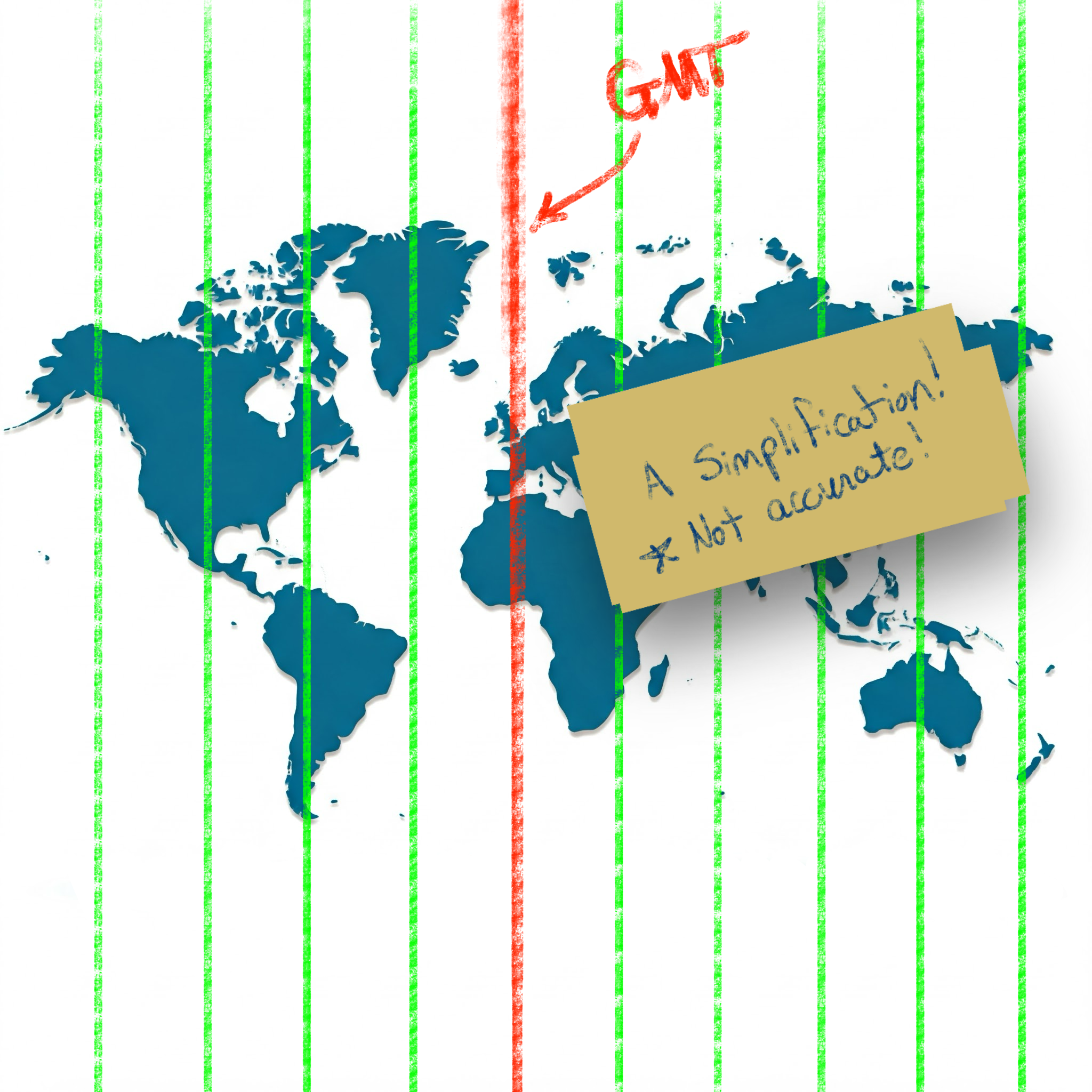
Simplification of time zones on a world map

While this simplification holds for many locations, unfortunately there are many exceptions to this rule.

Time zones of the world (Wikipedia) Reference: Time zones of the world (Wikipedia)

Standardizing with UTC (the "Origin")

To simplify the language of conveying specific times, the world has settled on using UTC (Coordinated Universal Time). This standard sets the "origin" to the 0° longitude that goes through Greenwich, London.

Defining "Offset"

Using UTC as the basis, all other time zones can be defined relative to UTC. This relationship is referred to as the UTC offset.

If you have a local time and an offset, you no longer have an ambiguous time (as seen in our spy example above); you have a definite and specific time with no ambiguity.

The typical format used to show the UTC offset is ±HHMM[SS[.ffffff]].

  • A minus - sign indicates an offset to the West of UTC.
  • A plus + sign indicates an offset to the East of UTC.
  • HH indicates hours (zero-padded)
  • MM indicates minutes (zero-padded)
  • SS indicates seconds (zero-padded)
  • .ffffff indicates fractional seconds

For example, in America, the Eastern Standard Zime Zone (EST) is defined as -0500 UTC. This means that all locations in EST are 5 hours behind UTC. If the time is 9:00 PM at UTC, then the local time in EST is 4:00 PM.

In the Australian Central Western Standard Time Zone (ACWST), the offset is defined as +0845 UTC. If the time is 1:00 AM at UTC, then the local time in ACWST is 9:45 AM.

Daylight Savings Time

So, back to the time zone maps above. From the image, you can see that many time zones follow the political boundaries of countries and regions. This complicates time zone calculations slightly, but it is easy enough to wrap your mind around.

Unfortunately, there is one more factor to consider when working with times and time zones.

Let's look at Los Angeles.

On the map, the UTC offset for Los Angeles is -8 in Standard Time. Standard Time is typically followed during the winter months, whereas Daylight Savings Time is typically followed during the summer months.

Daylight Savings Time (DST) advances the clocks in a give time zone forward (typically by one hour during the summer months). There are several reasons that political regions might choose to follow DST (such as energy savings, better use of daylight, etc.). The difficulty and complexity of Daylight Savings Time is that DST is not consistently followed around the world. Depending on your location, your region may or may not follow DST.

Time Zone Database

Since the combination of political boundaries and Daylight Savings Time greatly increases the complexity of determining a specific time, a time zone database is needed to correctly map local times to specific times relative to UTC. The Internet Assigned Numbers Authority (IANA) Time Zone Database is the common source of time zone information used by operating systems and programming languages.

The database includes the names and aliases of all time zones, information about the offset, information about the use of Daylight Savings Time, time zone abbreviations, and which date ranges the various rules apply.

Copies of and information about the time zone database can be found on IANA's website.

Most UNIX systems have a copy of the database that gets updated with the operating system's package manager (typically installed in /usr/share/zoneinfo). Some programming languages have the database built-in. Others make it available by a library or can read the system's copy of the database.

Time Zone Names/Identifiers

The time zone database contains many names and aliases for specific time zones. Many of the entries include a country (or continent) and major city in the name. For example:

  • America/New_York
  • America/Los_Angeles
  • Europe/Rome
  • Australia/Melbourne

Conversion and Formatting Using ObjectScript

So, now we know about:

  • Local times (ambiguous times without an offset or location)
  • UTC offsets (the relative offset a timestamp or location is from the UTC "origin" in Greenwich, London)
  • Daylight Savings Time (an attempt at helping civilization at the expense of time zone offsets)
  • Time zone database (which includes information about time zones and Daylight Savings observance in many locations and regions)

Knowing this, how do we work with datetimes/time zones in ObjectScript?

***Note: I believe all the following statements are true about ObjectScript, but please let me know if I misstate how ObjectScript works with time zones and offsets.

Built-in Variables and Functions

If you need to convert timestamps between various formats within the system time zone of the process running IRIS, the built-in features of ObjectScript should be sufficient. Here is a brief listing of various time-related variables/functions in ObjectScript:

  • $ZTIMESTAMP / $ZTS

    • IRIS Internal format as a UTC value (offset +0000).
    • Format: ddddd,sssss.fffffff
  • $NOW(tzmins)

    • Current system local time with the given tzmins offset from UTC.
    • Does not take Daylight Savings Time into account.
    • By default, tzmins is based off of the $ZTIMEZONE variable.
    • Format: ddddd,sssss.fffffff
  • $HOROLOG

    • Current system local time (based on $ZTIMEZONE), taking Daylight Savings Time into account.
    • Format: ddddd,sssss.fffffff
  • $ZTIMEZONE

    • Returns or sets the system's local UTC offset in minutes.
  • $ZDATETIME() / $ZDT()

    • Converts $HOROLOG format to a specific display format.
    • Can be used to convert from system local time to UTC (+0000).
  • $ZDATETIMEH() / $ZDTH()

    • Converts a datetime string to internal $HOROLOG format.
    • Can be used to convert from UTC (+0000) to system local time.

As best as I can tell, these functions are only able to manipulate datetimes using the time zone of the local system. There does not appear to be a way to work with arbitrary time zones in ObjectScript.

Enter the tz Library on Open Exchange

To accommodate conversion to and from arbitrary time zones, I worked to create the tz - ObjectScript Time Zone Conversion Library.

This library accesses the time zone database installed on your system to provide support for converting timestamps between time zones and formats.

For instance, if you have time local to Los Angeles (America/Los_Angeles), you can convert it to the time zone used in the Bahamas (America/New_York) or the time zone used in London (Europe/London):

USER>zw ##class(tz.Ens).TZ("2024-12-20 3:14 PM", "America/Los_Angeles", "America/New_York")
"2024-12-20 06:14 PM"

USER>zw ##class(tz.Ens).TZ("2024-12-20 3:14 PM", "America/Los_Angeles", "Europe/London")
"2024-12-20 11:14 PM"

If you are given a timestamp with an offset, you can convert it to the local time in Eucla, Australia (Australia/Eucla), even if you don't know the original time zone:

USER>zw ##class(tz.Ens).TZ("2024-12-20 08:00 PM -0500", "Australia/Eucla")
"2024-12-21 09:45 AM +0845"

If you work with HL7 messages, the tz library has several methods exposed to Interoperability Rules and DTLs to help you easily convert between time zones, local times, times with offsets, etc.:

// Convert local time from one time zone to another 	 
set datetime = "20240102033045"
set newDatetime = ##class(tz.Ens).TZ(datetime,"America/New_York","America/Chicago")

// Convert local time to offset 	 
set datetime = "20240102033045"
set newDatetime = ##class(tz.Ens).TZOffset(datetime,"America/Chicago","America/New_York")

// Convert offset to local time 	 
set datetime = "20240102033045-0500"
set newDatetime = ##class(tz.Ens).TZLocal(datetime,"America/Chicago")

// Convert to a non-HL7 format 	 
set datetime = "20240102033045-0500"
set newDatetime = ##class(tz.Ens).TZ(datetime,"America/Chicago",,"%m/%d/%Y %H:%M:%S %z")

Summary

I appreciate you following me on this "international journey" where we encountered time zones, Daylight Savings Time, world maps, and "time bombs". Hopefully, this was able to shed some light on (and simplify) many of the complexities of working with datetimes and time zones.

Check out tz - ObjectScript Time Zone Conversion Library and let me know if you have any questions (or corrections/clarifications to something I said).

Thanks!

References/Interesting Links
4
5 441
Announcement Anastasia Dyubaylo · Sep 18, 2025

Hey Community,

We're excited to invite you to the next InterSystems UKI Tech Talk webinar: 

👉AI Vector Search Technology in InterSystems IRIS

⏱ Date & Time: Thursday, September 25, 2025 10:30-11:30 UK

Speakers:
👨‍🏫 @Saurav Gupta, Data Platform Team Leader, InterSystems
👨‍🏫 @Ruby Howard, Sales Engineer, InterSystems

2025 Upcoming Tech Talk Social Tile template (6).png

0
0 47
Question Virat Sharma · Sep 13, 2025

Hi Team,

I've basic learning in Ensemble. I want to create a code as per following request. Please help in clearing following questions

We have a business process-AA. In this business process, we have onRequest method, here after performing some logic, I have to call a method ProcessAAlogic. 

2
0 68
Question Martin Nielsen · May 20, 2025

As the title says, I've noticed that files that gets saved to the disk where the database lies (.DAT file) in the stream directory, does not get purged. Is this expected and do we need to create our own schedule task to clean this folder up?

I could only find old answers that say this, however I find it a bit odd if that is the case because they are considered temporary files. Perhaps I do not handle the streams correctly in the code?

set fileToDisk = ##class(%Stream.FileBinary).%New()
set fileToDisk.Filename = fileDestinationPath
set copyStatus = fileToDisk.CopyFromAndSave(response.Data)
8
1 141
Job Andrew Sklyarov · Sep 17, 2025

Hi everyone,

I'm currently seeking a new position related to InterSystems technologies. My major skill is app integration and data flow development on the InterSystems IRIS platform (Interoperability). I develop high-load, mission-critical software. My coding background on Cache ObjectScript includes hundreds of data flows, thousands of Production business hosts, dozens of APIs, and other solutions on InterSystems IRIS. I worked to integrate such applications as SAP S/4HANA, Oracle Siebel, SAP Commerce Cloud, many custom apps, and all that can be integrated. I have also gained experience in various areas, including SQL, Java, Docker, IRIS administration, Apache Kafka, and Flutter (Dart).

0
0 80
Article Dimitri Olchanyi · Apr 8, 2025 2m read

Due to MySQL's interpretation of SCHEMA differing from the common SQL understanding (as seen in IRIS/SQL Server/Oracle), our automated Linked Table Wizard may encounter errors when attempting to retrieve metadata information to build the Linked Table.

(This also applies to Linked Procedures and Views)

When attempting to create a Linked Table through the Wizard, you will encounter an error that looks something like this:

6
0 161
Article Alberto Fuentes · Sep 16, 2025 4m read

In the previous article, we saw how to build a customer service AI agent with smolagents and InterSystems IRIS, combining SQL, RAG with vector search, and interoperability.

In that case, we used cloud models (OpenAI) for the LLM and embeddings.

This time, we’ll take it one step further: running the same agent, but with local models thanks to Ollama.


Why run models locally?

Using LLMs in the cloud is the simplest option to get started:

  • ✅ Models already optimized and maintained
  • ✅ Easy access with a simple API
  • Serverless service: no need to worry about hardware or maintenance
  • ❌ Usage costs
  • ❌ Dependency on external services
  • ❌ Privacy restrictions when sending data

On the other hand, running models locally gives us:

  • ✅ Full control over data and environment
  • ✅ No variable usage costs
  • ✅ Possibility to fine-tune or adapt models with techniques such as LoRA (Low-Rank Adaptation), which allows training certain layers of the model to adapt it to your specific domain without retraining the entire model
  • ❌ Higher resource consumption on your server
  • ❌ Limitations on model size depending on your hardware

That’s where Ollama comes into play.


What is Ollama?

Ollama is a tool that makes it easy to run language models and embeddings on your own computer with a very simple experience:

  • Download models with an ollama pull
  • Run them locally, exposed as an HTTP API
  • Integrate them directly into your applications, just like you would with OpenAI

In short: the same API you’d use in the cloud, but running on your laptop or server.


Basic Ollama setup

First, install Ollama from its website and verify that it works:

ollama --version

Then, download a couple of models:

# Download an embeddings model
ollama pull nomic-embed-text:latest

# Download a language model
ollama pull llama3.1:8b

# See all available models
ollama list

You can test embeddings directly with a curl:

curl http://localhost:11434/api/embeddings -d '{
  "model": "nomic-embed-text:latest",
  "prompt": "Ollama makes it easy to run LLMs locally."
}'

Using Ollama in the IRIS agent

The Customer Support Agent Demo repository already includes the configuration for Ollama. You just need to:

  1. Download the models needed to run them in Ollama I used nomic-embed-text for vector search embeddings and devstral as the LLM.

  2. Configure IRIS to use Ollama embeddings with the local model:

INSERT INTO %Embedding.Config (Name, Configuration, EmbeddingClass, VectorLength, Description)
  VALUES ('ollama-nomic-config', 
          '{"apiBase":"http://host.docker.internal:11434/api/embeddings", 
            "modelName": "nomic-embed-text:latest"}',
          'Embedding.Ollama', 
          768,  
          'embedding model in Ollama');
  1. Adjust the column size to store vectors in the sample tables (the local model has a different vector size than the original OpenAI one).
ALTER TABLE Agent_Data.Products DROP COLUMN Embedding;
ALTER TABLE Agent_Data.Products ADD COLUMN Embedding VECTOR(FLOAT, 768);

ALTER TABLE Agent_Data.DocChunks DROP COLUMN Embedding;
ALTER TABLE Agent_Data.DocChunks ADD COLUMN Embedding VECTOR(FLOAT, 768);
  1. Configure the .env environment file to specify the models we want to use:
OPENAI_MODEL=devstral:24b-small-2505-q4_K_M
OPENAI_API_BASE=http://localhost:11434/v1
EMBEDDING_CONFIG_NAME=ollama-nomic-config
  1. Update the embeddings

Since we have a different embedding model than the original, we need to update the embeddings using the local nomic-embed-text:

python scripts/embed_sql.py
  1. Run the agent so that it uses the new configuration

The code will now use the configuration so that both embeddings and the LLM are served from the local endpoint.

With this configuration, you can ask questions such as:

  • “Where is my order #1001?”
  • “What is the return period?”

And the agent will use:

  • IRIS SQL for structured data
  • Vector search with Ollama embeddings (local)
  • Interoperability to simulate external API calls
  • A local LLM to plan and generate code that calls the necessary tools to obtain the answer

Conclusion

Thanks to Ollama, we can run our Customer Support Agent with IRIS without relying on the cloud:

  • Privacy and control of data
  • Zero cost per token
  • Total flexibility to test and adapt models (LoRA)

The challenge? You need a machine with enough memory and CPU/GPU to run large models. But for prototypes and testing, it’s a very powerful and practical option.


Useful references

0
5 92
Question Jochen Roese · Sep 15, 2025

Hi,

so we introduced GIT in our workflow and we exported all files with $SYSTEM.OBJ.ExportUDL

Everything fine so far. But for some reason the export adds an extra line for classes (Routines are OK as far as I can see):

On Serverside it isn't there

The Problem is now that when we checkout a branch and a class changed we automatically compile it from the repository to a namespace that is made for the developer. E.g. DEV_001, DEV_002 and so on. 

2
0 48
Article Patrick Dunn · Sep 15, 2020 2m read

In the WRC, we often see customers raise questions regarding a new Web Gateway setup where the Management Portal half-loads, but doesn’t show images. This article will explain why this error occurs, as well as how to fix it. This explanation is focused on the Web Gateway serving InterSystems IRIS instances, but the same explanation should apply to the CSP Gateway serving Caché instances as well.

The Problem:

You just installed the Web Gateway on a stand-alone Web Server. When you go to load the Management Portal, you find that it cannot display or load images, like so:

Why this happens:

6
0 904
Announcement Kimi Niittyniemi · Sep 14, 2025

We are excited to announce the general availability of JediSoft IRISsync®, our new synchronization and comparison solution built on InterSystems IRIS technology.  IRISsync makes it easy to synchronize and compare IRIS instances.

IRISsync was voted runner-up in the "Most Likely to Use" category at InterSystems READY 2025 Demos and Drinks.

A huge thanks to everyone who supported us — we’re thrilled to see IRISsync resonating with the InterSystems user community!

0
0 74
Article Alex Woodhead · Sep 13, 2025 4m read

Plug-N-Play on Pattern Match WorkBench

Article to announce pre-built pattern expressions are available from demo application.

AI deducing patterns require ten and more sample values to get warmed up.

The entry of a single value for a pattern has therefore been repurposed for retrieving pre-built patterns.

Example: Email address

Paste an sample value for example an email address in description and press "Pattern from Description".

The sample is tested against available built-in patterns and any matching patterns and descriptions are displayed.

0
0 55
Question Rutvik ISM · Aug 19, 2025

I would like to learn about the binary and document reference FHIR Resources. For the PDF data stored in those resources. But I think Binary Resource for the Document PDF stored in FHIR, so this resource is best for it. So sometimes Large PDF 15-page (~35md) data converts into base64 then data length is ~50 lac charecters length of base64binary data. this data store in Binary Resource on data field https://www.hl7.org/fhir/R4/binary.html follow this url this resource used in my case. so it's support the 50 lac charecter of the base64 length? This resource can be Insert into IRIS?

3
0 81
Announcement Sergio Farago · Sep 11, 2025

Hello everyone!

We won’t lie to you, we’re really looking forward to this webinar. Because of its topic, speaker, and everything we’ll learn from it. We invite you to this webinar in Spanish: “Connecting Sensors with InterSystems IRIS” on Thursday, October 2, at 4:00 PM (CEST).


0
0 52
Question Touggourt · Sep 8, 2025

Hi, 
 

My understanding is that IRIS comes with Embedded Python in it, how can create a page using Python instead or Zen or CSP Pages?
maybe a small sample (like hello python page) to get the idea.
Thanks  

3
0 113
Article John Murray · Dec 18, 2024 1m read

A benefit of using Doxygenerate is that Doxygen does more than just HTML output. Tweak the Doxyfile that tells Doxygen what to do and you can easily create a PDF. Our example MARINA application yielded a 524-page PDF. Here's what page 94 looks like:

You can browse the whole file here.

In the screenshot above, notice how we only get details of the superclass that is part of the app (AuditHistory). The primary superclass, %Library.SerialObject, is shown faded and with no details of what BankDetails inherits from it.

1
1 275
Question Jean Millette · Aug 14, 2025

Is there a better way (i.e., without string commands) to remove the fractions of seconds from a %Library.PosixTime value?

This works, but seems inefficient:

set posix = 1154669852181849976w##class(%Library.PosixTime).LogicalToTimeStamp(posix)
2025-05-2712:06:15.003set str = ##class(%Library.PosixTime).LogicalToTimeStamp(posix)
set stripped = $P(str,".",1)
w##class(%Library.PosixTime).TimeStampToLogical(stripped)
1154669852181846976set newposix = ##class(%Library.PosixTime).TimeStampToLogical(stripped)
w##class(%Library.PosixTime).LogicalToTimeStamp(newposix)
2025-05-2712:06:15
9
0 133
Question Gigi La Course · Sep 9, 2025

I have a vendor that only wants results on patients that arrive to the ED via EMS/Ambulance.  The value I need for filtering is in the PV2;38. Some of the results requested do not allow the PV2 segment to be added to the schema in the EMR.  I was told that other orgs have used a lookup table that is populated with the PV1;19 value when an ADT messages that meets the criteria is sent in.  This table is then referenced in the business rule for the results that do not have PV2;38 and if Encounter number from result message exists on the Table, the result is sent.  Has anyone done this before?  

1
0 62
Article Victoria Castillo · Mar 19, 2024 5m read

I have been walking through this with a few team members and as such I thought there might be others out there who could use it, especially if you work with HL7 & Ensemble/HealthConnect/HealthShare and never venture out past the Interoperability section. 

First, I would like to establish that this is an extension of the already established documentation on importing and exporting SQL data found here: https://docs.intersystems.com/iris20241/csp/docbook/DocBook.UI.Page.cls?KEY=GSQL_impexp#GSQL_impexp_import

2
1 666