Hi,
I'm currently working on an IHE implementation, and we've hit some issues around categorising inbound CCD results (i.e. mapping lab and rad results to their relevant SDA types).
In healthcare, interoperability is the ability of different information technology systems and software applications to communicate, exchange data, and use the information that has been exchanged.
Hi,
I'm currently working on an IHE implementation, and we've hit some issues around categorising inbound CCD results (i.e. mapping lab and rad results to their relevant SDA types).
Hi Team, we are going to deliver a speech on a developer forum where most developers hv not used our tech before but using other database and integration technologies , Pls give us some key points on why they should adopt us and the benefits you can get, especially if you change your tech stack from others to IRIS. Thanks a lot!
In this post, we'll discuss our project that leverages Pulumi and Docker Compose to automate the deployment of InterSystems WSGI applications on AWS. The focus is on simplicity and efficiency, using pre-built infrastructure templates for provisioning and scaling AWS resources.
Is there a difference in outcome between the two screengrabs below?
In both cases, when certain conditions are met, a transformation is called and the output sent on to two targets. In the first case we surmise the transformation is called twice, and the output of the first run sent to the first target, the output of the second run to the second target. In the second case we surmise the transformation is called once, and the output duplicated and sent to the two targets.
Hello, I want to create PDF from HTML source. I found pandoc. I installed pandoc on IRIS container image. I created Interoperability production. I have setup REST service to receive HTML file in request body. I call pandoc command pandoc -o output.pdf input.html from a BPL process. I copy output.pdf file stream into response body. I save the response at the source. I get a file named output.pdf but it does not load in Acrobat. I suspect I am doing something wrong with headers (accept-encoding?) or maybe do I need to base64 encode the pdf file to transfer it via REST?
Hello all,
On one of my team's systems, we utilize a business operation with the EnsLib.SQL.OutboundAdapter to make SQL queries to another IRIS system using JDBC. To authenticate the connection, we utilize a user account on the target system.
Samba is the standard for file services interoperability across Linux, Unix, DOS, Windows, OS/2 and other OS. Since 1992, Samba has provided secure, stable and fast file services for all clients (OS and programs) using the SMB/CIFS protocol. Network administrators have used SAMBA to create shared network folders to allow company employees to create, edit and view corporate files as if they were on their computers locally, when these files are physically located on a network file server. It is possible to create a network folder in Linux and see it as a shared folder in Windows, for example.
I have challenged to create a bot application using Azure Bot that can retrieve and post data to IRIS for Health.
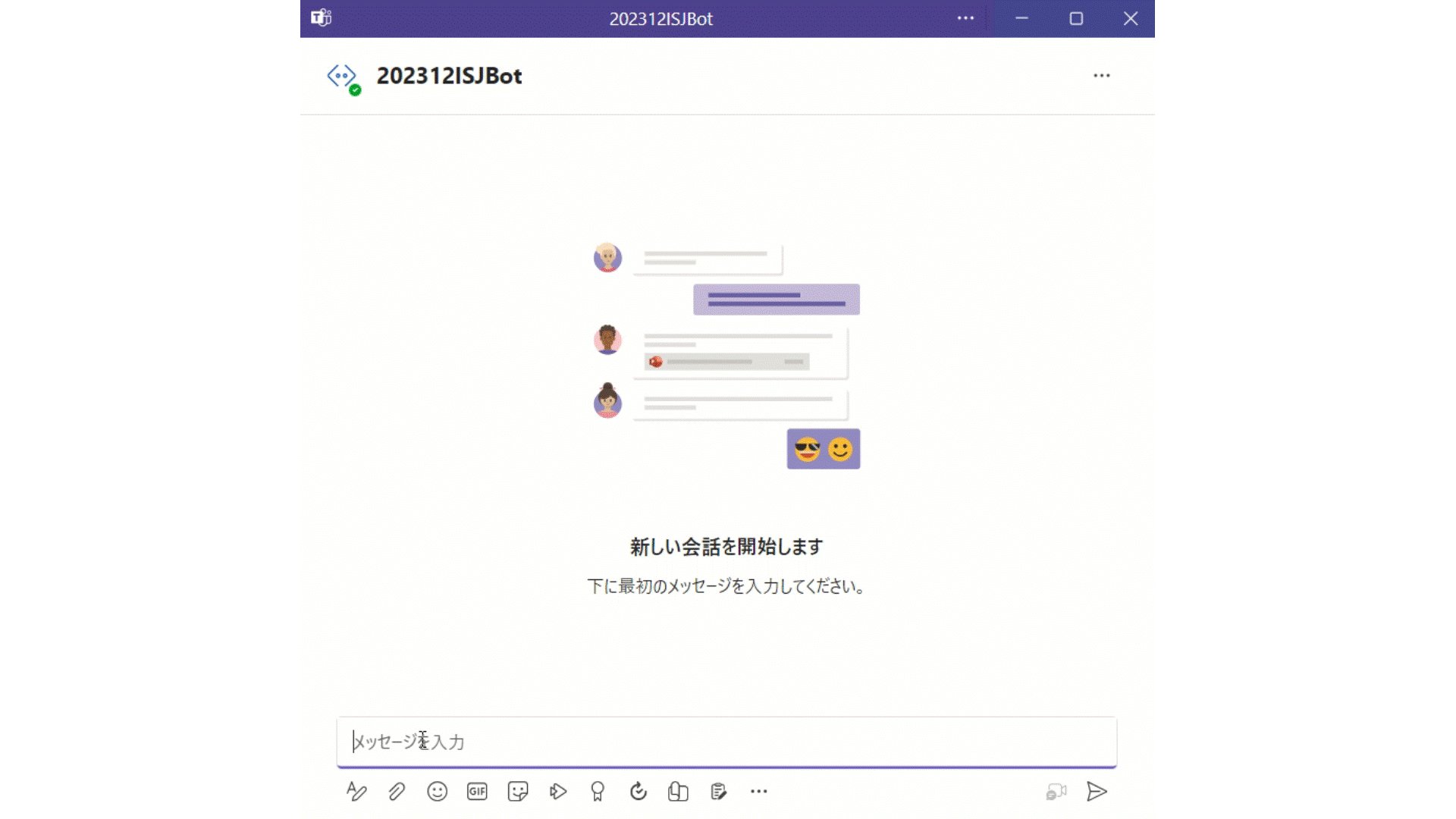
A patient's data has already been registered in the FHIR repository of IRIS for Health.
The patient's MRN is 1001. His name is Taro Yamada. (in Japanese :山田 太郎)
This bot can post new pulse oximeter readings as an observation resource linked to the patient.
I received some really excellent feedback from a community member on my submission to the Python 2024 contest. I hope its okay if I repost it here:
you build a container more than 5 times the size of pure IRIS
and this takes time
container start is also slow but completes
backend is accessible as described
a production is hanging around
frontend reacts
I fail to understand what is intended to show
the explanation is meant for experts other than me
The submission is here: https://openexchange.intersystems.com/package/IRIS-RAG-App
When registering the components: I used this command:"Utils.migrate("/external/src/CoreModel/Python/settings.py)" ;The error appears: "An error has occurred: iris.cls: error finding class",I changed with these two lines:result = subprocess.run(["iop", "-m", "/external/src/CoreModel/Python/settings.py"], stdout=subprocess.PIPE, stderr=subprocess.PIPE, check=True)subprocess.run(["iop", "-m", "/external/src/CoreModel/Python/settings.py"], stdout=subprocess.DEVNULL, stderr=subprocess.DEVNULL, check=True) also there is an error:"An error occurred: Command '['iop', '-m',
Up until recently, I have been toying around with REST/FHIR capabilities but only internally. Now I have a request to make REST API calls outside of our Network.
I am using an RSA 4096 key, because Microsoft Active Directory Services which generates the signed certificate could not handle the Elliptical Key (ECC) when I put the request in.
Welcome to the next chapter of my CI/CD series, where we discuss possible approaches toward software development with InterSystems technologies and GitLab. Today, we continue talking about Interoperability, specifically monitoring your Interoperability deployments. If you haven't yet, set up Alerting for all your Interoperability productions to get alerts about errors and production state in general.
Inactivity Timeout is a setting common to all Interoperability Business Hosts. A business host has an Inactive status after it has not received any messages within the number of seconds specified by the Inactivity Timeout field. The production Monitor Service periodically reviews the status of business services and business operations within the production and marks the item as Inactive if it has not done anything within the Inactivity Timeout period.
The default value is 0 (zero). If this setting is 0, the business host will never be marked Inactive, no matter how long it stands idle.
This is an extremely useful setting since it generates alerts, which, together with configured alerting, allows for real-time notifications about production issues. Business Host being idle means there might be some issues with production, integrations, or network connectivity worth looking into. However, Business Host can have only one constant Inactivity Timeout setting, which might generate unnecessary alerts during known periods of low traffic: nights, weekends, holidays, etc. In this article, I will outline several approaches towards dynamic Inactivity Timeout implementation. While I do provide a working example (currently running in production for one of our customers), this article is more of a guideline for building your own dynamic Inactivity Timeout implementation, so don't consider the proposed solution as the only alternative.
The interoperability engine maintains a special HostMonitor global, which contains each Business Host as a subscript and a timestamp of the last activity as a value. Instead of using Inactivity Timeout, we will monitor this global ourselves and generate alerts based on the state of the HostMonitor. HostMonitor is maintained regardless of the Inactivity Timeout value being set - it's always on.
To start with, here's how we can iterate the HostMonitor global:
Set tHost=""
For {
  Set tHost=$$$OrderHostMonitor(tHost)
  Quit:""=tHost
  Set lastActivity = $$$GetHostMonitor(tHost,$$$eMonitorLastActivity)
}
To create our Monitor Service, we need to perform the following checks for each Business Host:
Our code now looks like this:
Set tHost=""
For {
  Set tHost=$$$OrderHostMonitor(tHost)
  Quit:""=tHost
  Continue:'..InScope(tHost)
  Set lastActivity = $$$GetHostMonitor(tHost,$$$eMonitorLastActivity)
  Set tDiff = $$$timeDiff($$$timeUTC, lastActivity)
  Set tTimeout = ..GetTimeout(tDayTimeout)
  If (tDiff > tTimeout) && ((lastActivityReported="") || ($system.SQL.DATEDIFF("s",lastActivityReported,lastActivity)>0)) {
    Set tText = $$$FormatText("InactivityTimeoutAlert: Inactivity timeout of '%1' seconds exceeded for host '%2'", +$fn(tDiff,,0), tHost)
    Do ..SendAlert(##class(Ens.AlertRequest).%New($LB(tHost, tText)))
    Set $$$EnsJobLocal("LastActivity", tHost) = lastActivity
  }
}
You need to implement InScope and GetTimeout methods, which will actually hold your custom logic, and you're good to go.
In my example, there are Day Timeouts (which might be different for each Business Host, but with a default value) and Night Timeout (which is the same for all tracked Business Hosts), so the user needs to provide the following settings:
OperationA=120$SYSTEM.SQL.Functions.DAYOFWEEK(date-expression). By default, the returned values represent these days: 1 — Sunday, 2 — Monday, 3 — Tuesday, 4 — Wednesday, 5 — Thursday, 6 — Friday, 7 — Saturday.Here's the full code, but I don't think there's anything interesting in there. It just implements InScope and GetTimeout methods. You can use other criteria and adjust InScope and GetTimeout methods as needed.
There are two issues to speak of:
I explored these approaches before implementing the above solution:
InactivityTimeout settings when day/night starts. Initially, I tried to go this route but encountered a number of issues, mainly the requirement to restart all affected Business Hosts every time we changed the InactivityTimeout setting.InactivityTimeout. But an inactivity alert from Ens.MonitorServoce updates the LastActivity value, so from a Custom Alert Processor, I don't see a way to get "true" last activity timestamp (besides querying Ens.MessageHeader, I suppose?). And if it’s "night" – return the host state to OK, if it’s not nightly InactivityTimeout yet and suppress the alert.Ens.MonitorService does not seem possible except for OnMonitor callback, but it serves another purpose.Always configure alerting for all your Interoperability productions to get alerts about errors and production state in general. If static Inactivity timeout is not enough you can easily create a dynamic implementation.
If you're building solutions on IRIS and want to use Git, that's great! Just use VSCode with a local git repo and push your changes out to the server - it's that easy.
But what if:
From time to time we develop an Ensemble Production with simple SQL Inbound data from external databases, we need to develop a few new classes. There are at least:
.png)
Anyone here know if the Implementation Partner program is still open, and if so, is there anyone we can contact to get more details? I've tried reaching out via the form on the website, I've called and left a message, and then I called and talked to someone a few weeks ago who said they would "forward my info over", but we still haven't heard back from anyone. We just want to get more info on what it entails, but can't seem to get in touch with anybody to talk about it.
New in version 2023.3 (of InterSystems IRIS for Health) is a capability to perform FHIR profile-based validation.
 (*)
(*)
In this article I'll provide a basic overview of this capability.
If FHIR is important to you, you should definitely try out this new feature, so read on.
- setup a HTTP service
- input the Path to the FHIR Server
- input the URL to the FHIR service
- use the credential profiled
Test the FHIR Client
Trace the test result

Current triage systems often rely on the experience of admitting physicians. This can lead to delays in care for some patients, especially when faced with inexperienced residents or non-critical symptoms. Additionally, it can result in unnecessary hospital admissions, straining resources and increasing healthcare costs.
We focused our project on pregnant women and conducted a survey with friends of ours who work at a large hospital in São Paulo, Brazil, specifically in the area of monitoring and caring for pregnant women.
ChatIRIS Health Coach, a GPT-4 based agent that leverages the Health Belief Model as a psychological framework to craft empathetic replies. This article elaborates on the backend architecture and its components, focusing on how InterSystems IRIS supports the system's functionality.
The backend architecture of ChatIRIS Health Coach is built around the following key components:

The Scoring Agent evaluates user inputs to tailor the health advice based on psychological models, specifically the Health Belief Model. This involves dynamically adjusting belief scores to reflect the user's perceptions and concerns.
Initialization
ScoreOperation.on_init : Sets up the scoring agent with an initial prompt and belief map. This provides a framework for understanding and responding to user inputs.Belief Score Calculation
ScoreOperation.ask: Analyzes user inputs to calculate belief scores, which reflect the user’s perceptions of health risks and benefits, as well as barriers to taking preventive action.Prompt Creation
ScoreOperation.create_belief_prompt: Uses the belief scores to generate tailored prompts that address the user's specific concerns and motivations, enhancing the persuasive power of the responses.
The Retrieval-Augmented Generation (RAG) pipeline is a core feature that combines large language models with a robust retrieval system to provide contextually relevant responses. InterSystems IRIS is integral to this process, enhancing data retrieval through its vector store capabilities.
Initialization
IrisVectorOperation.init_data: Initializes the vector store with the initial knowledge base. This involves encoding the textual data into vector representations that capture semantic meanings.Query Processing
ChatProcess.ask: When a user query is received, the system invokes the VectorSearchRequest to perform a semantic search within the vector store. This ensures that the retrieved information is highly relevant to the user’s query, going beyond simple keyword matching.
By combining the RAG pipeline with the Scoring Agent, ChatIRIS can generate responses that are both contextually accurate and psychologically tailored. The backend processes involve:

The backend of ChatIRIS Health Coach leverages the powerful data handling and semantic search capabilities of InterSystems IRIS, combined with dynamic belief scoring to provide personalized and persuasive health coaching. This integration enhances the system’s ability to engage users effectively and motivate preventive health behaviors.
See a demo of ChatIRIS in action here.
💭 Find out more
ChatIRIS Health Coach, a GPT-4 based agent that leverages the Health Belief Model (Hochbaum, Rosenstock, & Kegels, 1952) as a psychological framework to craft empathetic replies.

The Health Belief Model suggests that individual health behaviours are shaped by personal perceptions of vulnerabilities to disease risk, alongside the perceived incentives and barriers to taking action.
Our approach disaggregates these concepts into 14 distinct belief scores, allowing us to dynamically monitor them over the course of the conversation.
In the context of preventive health actions (e.g. cancer screening, vaccinations), we find that the agent is fairly successful at picking up a person’s beliefs around health actions (e.g. perceived vulnerabilities and barriers). We demonstrate the agent’s capabilities in the specific instance of a colorectal cancer screening campaign.

ChatIRIS's technical framework is intricately designed to optimize the delivery of personalized healthcare advice through the integration of advanced AI techniques and robust data handling platforms. Central to this architecture is the use of InterSystems IRIS, particularly its vector store and vector search capabilities, which play a pivotal role in the Retrieval-Augmented Generation (RAG) pipeline. This section delves deeper into how these components contribute significantly to the functionality and effectiveness of ChatIRIS.

The RAG pipeline is a fundamental component of ChatIRIS, tasked with fetching pertinent information from a comprehensive database to produce contextually relevant responses. Here's how the RAG pipeline functions within the broader architecture:
InterSystems IRIS vector store is integral to enhancing the search functionality within the RAG pipeline. Below are the key advantages and functionalities provided by the vector store in this context:
The integration of vector search with the Health Belief Policy model allows ChatIRIS to align detailed medical information with psychological insights from user interactions. For example, if a user shows concern about vaccine side effects, the system can pull targeted information to address these fears effectively, making the chatbot’s responses more persuasive and reassuring.
This streamlined integration of InterSystems IRIS technologies enables ChatIRIS to function as a highly effective tool in promoting preventive health measures, leading to better health outcomes and improved public health engagement.
A practical demonstration of ChatIRIS’s capability can be seen in its pilot implementation for colorectal cancer screening. Initially, the chatbot gathers basic health details from the user and progressively addresses their concerns about the screening process, costs, and potential discomfort. By integrating responses from the Health Belief Policy model and the RAG pipeline, ChatIRIS efficiently addresses misconceptions and motivates users towards taking preventive actions.
💭 Find out more
Hi Community,
I'm looking for someone who has already made data ingestion into IRIS (or Caché) from Pentaho Data Integration.
Thanks in advance.
We have a custom business service that is triggered by a scheduled task. The service queries a table, iterates over the result set and sends a message on to a business process for each result. Happy path functionality is all fine.
However, when there is an error detected in the business service code, neither throwing an exception nor returning an error %Status behaves as we'd expect.
The OpenAPI Specification (OAS) defines a standard, language-agnostic interface to HTTP APIs which allows both humans and computers to discover and understand the capabilities of the service without access to source code, documentation, or through network traffic inspection. When properly defined, a consumer can understand and interact with the remote service with a minimal amount of implementation logic. While for SOAP based APIs there is a special wizard in InterSystems IRIS that cuts down orchestrations development time, not all APIs used in integrations are SOAP. That's why @Jaime Lerga suggested to add a wizard similar to the SOAP wizard to generate a REST client from OpenAPI specification. Implementation of this idea cuts down the development time of the REST API orchestrations with InterSystems IRIS. This idea is one of most popular ideas on the InterSystems ideas. This article, the third in the "Implemented Ideas" series, focuses on the OpenAPI Suite solution developed by @Lorenzo Scalese.
Is there a way to exclude specific members from a class when exporting to an XML or UDL file? Bonus question: is there a way to import from that file without overwriting those members that were excluded?
The use case is to export an interoperability production class without the ProductionDefinition XDATA. We plan to source control the production items through the Ensemble Deployment Manager, but we still need to export any custom code in the class definition itself.
The InterSystems IRIS has a series of facilitators to capture, persist, interoperate, and generate analytical information from data in XML format. This article will demonstrate how to do the following:
The InterSystems IRIS has many built-in adapters to capture data, including the next ones:
I recently had the need to monitor from HealthConnect the records present in a NoSQL database in the Cloud, more specifically Cloud Firestore, deployed in Firebase. With a quick glance I could see how easy it would be to create an ad-hoc Adapter to make the connection taking advantage of the capabilities of Embedded Python, so I got to work.
To start, we need an instance of the database on which we can perform the tests. By accessing the Firebase console, we have created a new project to which we have added the Firestore database.
There is a Link Procedure Wizard option within the Management Portal (System > SQL >Wizards > Link Procedure) which I had reliability issues with so I decided to use this solution instead.
You need to query an external SQL database to use the response within a namespace. This guide is assuming that you already have a working stored procedure in SSMS although you could instead use a SQL block within the operation. Stored procedures in SSMS are preferred to maintain integrity, Embedded SQL can get very confusing if you have a complicated SQL statement.
I was reading this article and I started to get lost in the sauce since I'm new to CCDA. I was wondering if you all had some recommendations for digging into some of the basics needed in order to assimilate this? For instance where it says "Some of the built-in logic for handling CCDAs is controlled by the IHE header....There is little visibility into this process in the product documentation." Are there examples or places where you have been able to find some insight into this sort of thing or maybe this is something that comes with experience?
Record maps are used to efficiently map files containing delimited records or fixed-width records to message classes used by the interoperability function, and to map files from interoperability function message classes to text files.
Record map mapping definitions can be created using the Management Portal, and we also provide a CSV record wizard that allows you to define while reading a CSV file.
To use a record map in production, just add a record map business service or business operation and specify the record map definition class you created.