#Best Practices

0 Followers · 298 Posts

Best Practices recommendations on how to develop, test, deploy and manage solutions on InterSystems Data Platforms better. 

InterSystems staff + admins Hide everywhere
Hidden post for admin
Article Tani Frankel · Feb 13, 2024 3m read

Following 2 local Webinars we had focused on VS Code ["Intro" and "Beyond Basics"; in Hebrew], I prepared for the participants some related links of relevant resources which we sent as a follow-up. Sharing them here as well for the benefit of the Community.
You are all of course welcome to add more useful resources.

2
5 589
Article Thomas Dyar · Mar 25, 2025 2m read

Introduction

In InterSystems IRIS 2024.3 and subsequent IRIS versions, the AutoML component is now delivered as a separate Python package that is installed after installation. Unfortunately, some recent versions of Python packages that AutoML relies on have introduced incompatibilities, and can cause failures when training models (TRAIN MODEL statement). If you see an error mentioning "TypeError" and the keyword argument "fit_params" or "sklearn_tags", read on for a quick fix.

Root Cause

1
0 232
Article sween · May 14, 2025 7m read

Real Time FHIR® to OMOP Transformation

This part of the OMOP Journey,  we reflect before attempting to challenge Scylla on how fortunate we are that InterSystems OMOP transform is built on the Bulk FHIR Export as the source payload.  This opens up hands off interoperability with the InterSystems OMOP transform across several FHIR® vendors, this time with the Google Cloud Healthcare API.

Google Cloud Healthcare API FHIR® Export

1
2 111
Article sween · Apr 23, 2025 6m read

Nearline FHIR® Ingestion to InterSystems OMOP from AWS HealthLake

This part of the OMOP Journey we reflect before attempting to challenge Scylla on how fortunate we are that InterSystems OMOP transform is built on the Bulk FHIR Export as the source payload.  This opens up hands off interoperability with the InterSystems OMOP transform across several FHIR® vendors, including Amazon Web Services HealthLake.

HealthLake Bulk FHIR Export
 

1
0 132
Article sween · Mar 31, 2025 8m read

Vanna.AI - Personalized AI InterSystems OMOP Agent

Along this OMOP Journey, from the OHDSI book to Achilles, you can begin to understand the power of the OMOP Common Data Model when you see the mix of well written R and SQL deriving results for large scale analytics that are shareable across organizations. I however do not have a third normal form brain and about a month ago on the Journey we employed Databricks Genie to generate sql for us utilizing InterSystems OMOP and Python interoperability. This was fantastic, but left some magic under the hood in Databricks on how the RAG "model" was being constructed and the LLM in use to pull it off.

This point in the OMOP Journey we met Vanna.ai on the same beaten path...

Vanna is a Python package that uses retrieval augmentation to help you generate accurate SQL queries for your database using LLMs. Vanna works in two easy steps - train a RAG “model” on your data, and then ask questions which will return SQL queries that can be set up to automatically run on your database. image

Vanna exposes all the pieces to do it ourselves with more control and our own stack against the OMOP Common Data Model.

The approach from the Vanna camp I found particularly fantastic, and conceptually it felt like a magic trick was being performed, and one could certainly argue that was exactly what was happening.

Vanna needs 3 choices to pull of its magic trick, a sql database, a vector database, and an LLM. Just envision a dealer handing you out three piles and making you choose from each one.

image

So if its not obvious, our sql database is InterSystems OMOP implementing the Common Data Model, our LLM of choice is Gemini, and for the quick and dirty evaluation we are using Chroma DB for a vector to get to the point quickly in python.

Gemini

So I cut a quick key and grew up a little bit and actually paid for it, I tried the free route with the rate limits of 50 prompts a day, and 1 per minute and it was unsettling... I may be happier being completely broke anyway, so we will see.

image

InterSystems OMOP

I am using my same fading trial as the [other posts](https://community.intersystems.com/smartsearch?search=OMOP+Journey). The CDM is loaded with about 100 patient pop per United State region with the pracs and orgs to boot.

image

Vanna

Let's turn the letters (get it?) notebook style and spin the wheel (get it again?) and put Vanna to work...
pip3 install 'vanna[chromadb,gemini,sqlalchemy-iris]'

Lets organize our pythons.

from vanna.chromadb import ChromaDB_VectorStore
from vanna.google import GoogleGeminiChat
from sqlalchemy import create_engine

import pandas as pd
import ssl
from sqlalchemy import create_engine
import time

Initialize the star of our show and introduce her to our model. Kind of weird right, Vanna (White) is a model.

class MyVanna(ChromaDB_VectorStore, GoogleGeminiChat):
    def __init__(self, config=None):
        ChromaDB_VectorStore.__init__(self, config=config)
        GoogleGeminiChat.__init__(self, config={'api_key': "shaazButt", 'model': "gemini-2.0-flash"})

vn = MyVanna()

Let's connect to our InterSystems OMOP Cloud deployment using sqlalchemy-iris from @caretdev. The work done with this dialect is quickly becoming the key ingredient for modern data interoperability of iris products in the data world.

engine = create_engine("iris://SQLAdmin:LordFauntleroy!!!@k8s-0a6bc2ca-adb040ad-c7bf2ee7c6-e6b05ee242f76bf2.elb.us-east-1.amazonaws.com:443/USER", connect_args={"sslcontext": context})

context = ssl.SSLContext(ssl.PROTOCOL_TLS_CLIENT)
context.verify_mode=ssl.CERT_OPTIONAL
context.check_hostname = False
context.load_verify_locations("vanna-omop.pem")

conn = engine.connect()

You define a function that takes in a SQL query as a string and returns a pandas dataframe. This gives Vanna a function that it can use to run the SQL on the OMOP Common Data Model.

def run_sql(sql: str) -> pd.DataFrame:
    df = pd.read_sql_query(sql, conn)
    return df

vn.run_sql = run_sql
vn.run_sql_is_set = True

Feeding the Model with a Menu

The information schema query may need some tweaking depending on your database. This is a good starting point. This will break up the information schema into bite-sized chunks that can be referenced by the LLM... If you like the plan, then uncomment this and run it to train Vanna.

df_information_schema = vn.run_sql("SELECT * FROM INFORMATION_SCHEMA.COLUMNS")

plan = vn.get_training_plan_generic(df_information_schema)
plan

vn.train(plan=plan)

Training

The following are methods for adding training data. Make sure you modify the examples to match your database. DDL statements are powerful because they specify table names, column names, types, and potentially relationships. These ddl's are generated with the now supported DataBaseConnector as outlined in this [post](https://community.intersystems.com/post/omop-odyssey-celebration-house-hades).
vn.train(ddl="""
--iris CDM DDL Specification for OMOP Common Data Model 5.4
--HINT DISTRIBUTE ON KEY (person_id)
CREATE TABLE omopcdm54.person (
			person_id integer NOT NULL,
			gender_concept_id integer NOT NULL,
			year_of_birth integer NOT NULL,
			month_of_birth integer NULL,
			day_of_birth integer NULL,
			birth_datetime datetime NULL,
			race_source_concept_id integer NULL,
			ethnicity_source_value varchar(50) NULL,
			ethnicity_source_concept_id integer NULL );
--HINT DISTRIBUTE ON KEY (person_id)
CREATE TABLE omopcdm54.observation_period (
			observation_period_id integer NOT NULL,
			person_id integer NOT NULL,
			observation_period_start_date date NOT NULL,
			observation_period_end_date date NOT NULL,
			period_type_concept_id integer NOT NULL );
--HINT DISTRIBUTE ON KEY (person_id)
CREATE TABLE omopcdm54.visit_occurrence (
			visit_occurrence_id integer NOT NULL,
			discharged_to_source_value varchar(50) NULL,
			preceding_visit_occurrence_id integer NULL );
--HINT DISTRIBUTE ON KEY (person_id)
CREATE TABLE omopcdm54.visit_detail (
			visit_detail_id integer NOT NULL,
			person_id integer NOT NULL,
			visit_detail_concept_id integer NOT NULL,
			provider_id integer NULL,
			care_site_id integer NULL,
			visit_detail_source_value varchar(50) NULL,
			visit_detail_source_concept_id Integer NULL,

--HINT DISTRIBUTE ON KEY (person_id)
CREATE TABLE omopcdm54.condition_occurrence (
			condition_occurrence_id integer NOT NULL,
			person_id integer NOT NULL,
			visit_detail_id integer NULL,
			condition_source_value varchar(50) NULL,
			condition_source_concept_id integer NULL,
			condition_status_source_value varchar(50) NULL );
--HINT DISTRIBUTE ON KEY (person_id)
CREATE TABLE omopcdm54.drug_exposure (
			drug_exposure_id integer NOT NULL,
			person_id integer NOT NULL,
			dose_unit_source_value varchar(50) NULL );
--HINT DISTRIBUTE ON KEY (person_id)
CREATE TABLE omopcdm54.procedure_occurrence (
			procedure_occurrence_id integer NOT NULL,
			person_id integer NOT NULL,
			procedure_concept_id integer NOT NULL,
			procedure_date date NOT NULL,
			procedure_source_concept_id integer NULL,
			modifier_source_value varchar(50) NULL );
--HINT DISTRIBUTE ON KEY (person_id)
CREATE TABLE omopcdm54.device_exposure (
			device_exposure_id integer NOT NULL,
			person_id integer NOT NULL,
			device_concept_id integer NOT NULL,
			unit_source_value varchar(50) NULL,
			unit_source_concept_id integer NULL );
--HINT DISTRIBUTE ON KEY (person_id)
CREATE TABLE omopcdm54.observation (
			observation_id integer NOT NULL,
			person_id integer NOT NULL,
			observation_concept_id integer NOT NULL,
			observation_date date NOT NULL,
			observation_datetime datetime NULL,
<SNIP>

""")

Sometimes you may want to add documentation about your business terminology or definitions, here I like to add the resource names from FHIR that were transformed to OMOP.

vn.train(documentation="Our business is to provide tools for generating evicence in the OHDSI community from the CDM")
vn.train(documentation="Another word for care_site is organization.")
vn.train(documentation="Another word for provider is practitioner.")

Now lets add all the data from the InterSystems OMOP Common Data Model, probably a better way to do this, but I get paid by the byte.

cdmtables = ["care_site", "cdm_source", "cohort", "cohort_definition", "concept", "concept_ancestor", "concept_class", "concept_relationship", "concept_synonym", "condition_era", "condition_occurrence", "cost", "death", "device_exposure", "domain", "dose_era", "drug_era", "drug_exposure", "drug_strength", "episode", "episode_event", "fact_relationship", "location", "measurement", "metadata", "note", "note_nlp", "observation", "observation_period", "payer_plan_period", "person", "procedure_occurrence", "provider", "relationship", "source_to_concept_map", "specimen", "visit_detail", "visit_occurrence", "vocabulary"]
for table in cdmtables:
    vn.train(sql="SELECT * FROM  WHERE OMOPCDM54." + table)
    time.sleep(60)

I added the ability for Gemini to see the data here, ensure you want to do this in your travels or give Google your OMOP data with slight of hand.

Lets do our best Pat Sajak, and boot the shiny Vanna app.

from vanna.flask import VannaFlaskApp
app = VannaFlaskApp(vn,allow_llm_to_see_data=True, debug=False)
app.run()

image

Skynet!

This is a bit hackish, but really where I want to go with AI future forward integrating with apps, here we ask in natural language a question, which returns a sql query, then we immediately use that query against the InterSystems OMOP deployment using sqlalchemy-iris.

while True:
    import io
    import sys
    old_stdout = sys.stdout
    sys.stdout = io.StringIO()  # Redirect stdout to a dummy stream

    question = 'How Many Care Sites are there in Los Angeles?'
    sys.stdout = old_stdout

    sql_query = vn.ask(question)
    print("Ask Vanna to generate a query from a question of the OMOP database...")
    #print(type(sql_query))
    raw_sql_to_send_to_sqlalchemy_iris = sql_query[0]
    print("Vanna returns the query to use against the database.")
    gar = raw_sql_to_send_to_sqlalchemy_iris.replace("FROM care_site","FROM OMOPCDM54.care_site")
    print(gar)
    print("Now use sqlalchemy-iris with the generated query back to the OMOP database...")

    result = conn.exec_driver_sql(gar)
    #print(result)
    for row in result:
        print(row[0])
    time.sleep(3)

Utilities

At any time you can inspect what OMOP data the Vanna package is able to reference. You can also remove training data if there's obsolete/incorrect information (you can do this through the UI too).
training_data = vn.get_training_data()
training_data
vn.remove_training_data(id='omop-ddl')

About Using IRIS Vectors

Wish me luck here, if I manage to crush all the things to crush and resist the sun coming out, Ill implement iris vectors in vanna with the following repo.

image

1
0 195
Article Raj Singh · Mar 27, 2024 2m read

In recent versions of IRIS, a powerful new data loading command has been introduced to SQL: LOAD DATA. This feature has been highly optimized to import data into IRIS extremely fast, allowing hundreds of gigabytes of data to be inserted in seconds instead of hours or days. 

This is a very exciting improvement. However, a big problem in the data loading experience still exists. Namely, the time and hassle it takes to:

  1. Define the schema for the table in which you want to load data.
  2. Figure out the syntax for the LOAD DATA command.
7
1 981
Article Timothy Leavitt · Apr 16, 2025 5m read

Thirteen years ago, I attained dual undergraduate degrees in electrical engineering and math, then promptly started full-time at InterSystems using neither. One of my most memorable and stomach-churning academic experiences was in Stats II. On an exam, I was solving a moderately difficult confidence interval problem. I was running out of time, so (being an engineer) I wrote out the definite integral on the exam paper, punched it into my graphing calculator, wrote an arrow with “calculator” over it, then wrote the result. My professor, affectionately known as “Dean, Dean, the Failing Machine,”

13
2 381
Article Iryna Mykhailova · Mar 16, 2023 6m read

InterSystems IRIS has quite a few different kinds properties. Let’s put them in order so that they make better sense.

First of all, I would divide them into categories:

  • Atomic or simple properties (all those %String, %Integer, %Data and other system or user datatypes)
  • References to stored objects
  • Built-in objects
  • Streams (both binary and character)
  • Collections (which are divided into arrays and lists)
  • Relationships (one-many and parent-children)

Some of these kinds of properties are quite straightforward. For example, atomic properties:

Property Name As %Name;Property DoB As %DateProperty Age As %Integer
4
3 614
Article Benjamin De Boe · Nov 9, 2023 3m read

With the release of InterSystems IRIS Cloud SQL, we're getting more frequent questions about how to establish secure connections over JDBC and other driver technologies. While we have nice summary and detailed documentation on the driver technologies themselves, our documentation does not go as far to describe individual client tools, such as our personal favourite DBeaver. In this article, we'll describe the steps to create a secure connection from DBeaver to your Cloud SQL deployment.

21
2 2085
Article Kurro Lopez · Mar 3, 2024 5m read

Hi community,

The aim of this article is to explain how to create messaging between IRIS and Microsoft Teams.

In my company, we wanted to monitor error messages, and we used the Ens.Alert class to redirect those error messages through a Business Operation that sent an email.
The problem was that we sent those error messages to a support account where there were many emails. We wanted something specific for a specific team.

So we investigated how to make these messages reach the development team directly and they could have, in real time, a notification of an error in our production.
In our company we use Microsoft Teams as a corporate tool, so we asked ourselves: How could we make these messages reach the IRIS development team?

15
8 881
Article sween · Mar 4, 2024 8m read

If you are a customer of the new InterSystems IRIS® Cloud SQL and InterSystems IRIS® Cloud IntegratedML® cloud offerings and want access to the metrics of your deployments and send them to your own Observability platform, here is a quick and dirty way to get it done by sending the metrics to Google Cloud Platform Monitoring (formerly StackDriver).

1
2 338
Article Maria Nesterenko · Mar 14, 2024 7m read

Artificial Intelligence (AI) is getting a lot of attention lately because it can change many areas of our lives. Better computer power and more data have helped AI do amazing things, like improving medical tests and making self-driving cars. AI can also help businesses make better decisions and work more efficiently, which is why it's becoming more popular and widely used. How can one integrate the OpenAI API calls into an existing IRIS Interoperability application?


6
4 582
Article José Pereira · Aug 2, 2024 28m read

An experiment on how to use the LangChain framework, IRIS Vector Search, and LLMs to generate IRIS-compatible SQL from user prompts.

This article was based in this notebook. You can run it with a ready to use environment with this application in OpenExchange.

Setup

First, we need to install the necessary libraries:

!pip install --upgrade --quiet langchain langchain-openai langchain-iris pandas

Next, we import the required modules and set up the environment:

import os
import datetime
import hashlib
from copy import deepcopy
from sqlalchemy import create_engine
import getpass
import pandas as pd
from langchain_core.prompts import PromptTemplate, ChatPromptTemplate
from langchain_core.example_selectors import SemanticSimilarityExampleSelector
from langchain_openai import OpenAIEmbeddings, ChatOpenAI
from langchain.docstore.document import Document
from langchain_community.document_loaders import DataFrameLoader
from langchain.text_splitter import CharacterTextSplitter
from langchain_core.output_parsers import StrOutputParser
from langchain.globals import set_llm_cache
from langchain.cache import SQLiteCache
from langchain_iris import IRISVector

We will use SQLiteCache to cache the LLM calls:

# Cache for LLM calls
set_llm_cache(SQLiteCache(database_path=".langchain.db"))

Set the IRIS database connection parameters:

# IRIS database connection parameters
os.environ["ISC_LOCAL_SQL_HOSTNAME"] = "localhost"
os.environ["ISC_LOCAL_SQL_PORT"] = "1972"
os.environ["ISC_LOCAL_SQL_NAMESPACE"] = "IRISAPP"
os.environ["ISC_LOCAL_SQL_USER"] = "_system"
os.environ["ISC_LOCAL_SQL_PWD"] = "SYS"

If the OpenAI API key is not already set in the environment, prompt the user to enter it:

if not "OPENAI_API_KEY" in os.environ:
    os.environ["OPENAI_API_KEY"] = getpass.getpass()

Create the connection string for the IRIS database:

# IRIS database connection string
args = {
    'hostname': os.getenv("ISC_LOCAL_SQL_HOSTNAME"), 
    'port': os.getenv("ISC_LOCAL_SQL_PORT"), 
    'namespace': os.getenv("ISC_LOCAL_SQL_NAMESPACE"), 
    'username': os.getenv("ISC_LOCAL_SQL_USER"), 
    'password': os.getenv("ISC_LOCAL_SQL_PWD")
}
iris_conn_str = f"iris://{args['username']}:{args['password']}@{args['hostname']}:{args['port']}/{args['namespace']}"

Establish the connection to the IRIS database:

# Connection to IRIS database
engine = create_engine(iris_conn_str)
cnx = engine.connect().connection

Prepare a dictionary to hold context information for the system prompt:

# Dict for context information for system prompt
context = {}
context["top_k"] = 3

Prompt Creation

To transform user inputs into SQL queries compatible with the IRIS database, we need to create an effective prompt for the language model. We start with an initial prompt that provides basic instructions for generating SQL queries. This template is derived from LangChain's default prompts for MSSQL and customized for the IRIS database.

# Basic prompt template with IRIS database SQL instructions
iris_sql_template = """
You are an InterSystems IRIS expert. Given an input question, first create a syntactically correct InterSystems IRIS query to run and return the answer to the input question.
Unless the user specifies in the question a specific number of examples to obtain, query for at most {top_k} results using the TOP clause as per InterSystems IRIS. You can order the results to return the most informative data in the database.
Never query for all columns from a table. You must query only the columns that are needed to answer the question. Wrap each column name in single quotes ('') to denote them as delimited identifiers.
Pay attention to use only the column names you can see in the tables below. Be careful to not query for columns that do not exist. Also, pay attention to which column is in which table.
Pay attention to use CAST(CURRENT_DATE as date) function to get the current date, if the question involves "today".
Use double quotes to delimit columns identifiers.
Return just plain SQL; don't apply any kind of formatting.
"""

This basic prompt configures the language model (LLM) to function as an SQL expert with specific guidance for the IRIS database. Next, we provide an auxiliary prompt with information about the database schema to avoid hallucinations.

# SQL template extension for including tables context information
tables_prompt_template = """
Only use the following tables:
{table_info}
"""

To enhance the accuracy of the LLM's responses, we use a technique called few-shot prompting. This involves presenting some examples to the LLM.

# SQL template extension for including few shots
prompt_sql_few_shots_template = """
Below are a number of examples of questions and their corresponding SQL queries.

{examples_value}
"""

We define the template for few-shot examples:

# Few shots prompt template
example_prompt_template = "User input: {input}\nSQL query: {query}"
example_prompt = PromptTemplate.from_template(example_prompt_template)

We build the user prompt using the few-shot template:

# User prompt template
user_prompt = "\n" + example_prompt.invoke({"input": "{input}", "query": ""}).to_string()

Finally, we compose all prompts to create the final one:

# Complete prompt template
prompt = (
    ChatPromptTemplate.from_messages([("system", iris_sql_template)])
    + ChatPromptTemplate.from_messages([("system", tables_prompt_template)])
    + ChatPromptTemplate.from_messages([("system", prompt_sql_few_shots_template)])
    + ChatPromptTemplate.from_messages([("human", user_prompt)])
)
prompt

This prompt expects the variables examples_value, input, table_info, and top_k.

Here is how the prompt is structured:

ChatPromptTemplate(
    input_variables=['examples_value', 'input', 'table_info', 'top_k'], 
    messages=[
        SystemMessagePromptTemplate(
            prompt=PromptTemplate(
                input_variables=['top_k'], 
                template=iris_sql_template
            )
        ), 
        SystemMessagePromptTemplate(
            prompt=PromptTemplate(
                input_variables=['table_info'], 
                template=tables_prompt_template
            )
        ), 
        SystemMessagePromptTemplate(
            prompt=PromptTemplate(
                input_variables=['examples_value'], 
                template=prompt_sql_few_shots_template
            )
        ), 
        HumanMessagePromptTemplate(
            prompt=PromptTemplate(
                input_variables=['input'], 
                template=user_prompt
            )
        )
    ]
)

To visualize how the prompt will be sent to the LLM, we can use placeholder values for the required variables:

prompt_value = prompt.invoke({
    "top_k": "<top_k>",
    "table_info": "<table_info>",
    "examples_value": "<examples_value>",
    "input": "<input>"
})
print(prompt_value.to_string())
System: 
You are an InterSystems IRIS expert. Given an input question, first create a syntactically correct InterSystems IRIS query to run and return the answer to the input question.
Unless the user specifies in the question a specific number of examples to obtain, query for at most <top_k> results using the TOP clause as per InterSystems IRIS. You can order the results to return the most informative data in the database.
Never query for all columns from a table. You must query only the columns that are needed to answer the question. Wrap each column name in single quotes ('') to denote them as delimited identifiers.
Pay attention to use only the column names you can see in the tables below. Be careful to not query for columns that do not exist. Also, pay attention to which column is in which table.
Pay attention to use CAST(CURRENT_DATE as date) function to get the current date, if the question involves "today".
Use double quotes to delimit columns identifiers.
Return just plain SQL; don't apply any kind of formatting.

System: 
Only use the following tables:
<table_info>

System: 
Below are a number of examples of questions and their corresponding SQL queries.

<examples_value>

Human: 
User input: <input>
SQL query: 

Now, we are ready to send this prompt to the LLM by providing the necessary variables. Let's move on to the next step when you're ready.

Providing Table Information

To create accurate SQL queries, we need to provide the language model (LLM) with detailed information about the database tables. Without this information, the LLM might generate queries that seem plausible but are incorrect due to hallucinations. Therefore, our first step is to create a function that retrieves table definitions from the IRIS database.

Function to Retrieve Table Definitions

The following function queries the INFORMATION_SCHEMA to get the table definitions for a specified schema. If a specific table is provided, it retrieves the definition for that table; otherwise, it retrieves definitions for all tables in the schema.

def get_table_definitions_array(cnx, schema, table=None):
    cursor = cnx.cursor()

    # Base query to get columns information
    query = """
    SELECT TABLE_SCHEMA, TABLE_NAME, COLUMN_NAME, DATA_TYPE, IS_NULLABLE, COLUMN_DEFAULT, PRIMARY_KEY, null EXTRA
    FROM INFORMATION_SCHEMA.COLUMNS
    WHERE TABLE_SCHEMA = %s
    """
    
    # Parameters for the query
    params = [schema]

    # Adding optional filters
    if table:
        query += " AND TABLE_NAME = %s"
        params.append(table)
    
    # Execute the query
    cursor.execute(query, params)

    # Fetch the results
    rows = cursor.fetchall()
    
    # Process the results to generate the table definition(s)
    table_definitions = {}
    for row in rows:
        table_schema, table_name, column_name, column_type, is_nullable, column_default, column_key, extra = row
        if table_name not in table_definitions:
            table_definitions[table_name] = []
        table_definitions[table_name].append({
            "column_name": column_name,
            "column_type": column_type,
            "is_nullable": is_nullable,
            "column_default": column_default,
            "column_key": column_key,
            "extra": extra
        })

    primary_keys = {}
    
    # Build the output string
    result = []
    for table_name, columns in table_definitions.items():
        table_def = f"CREATE TABLE {schema}.{table_name} (\n"
        column_definitions = []
        for column in columns:
            column_def = f"  {column['column_name']} {column['column_type']}"
            if column['is_nullable'] == "NO":
                column_def += " NOT NULL"
            if column['column_default'] is not None:
                column_def += f" DEFAULT {column['column_default']}"
            if column['extra']:
                column_def += f" {column['extra']}"
            column_definitions.append(column_def)
        if table_name in primary_keys:
            pk_def = f"  PRIMARY KEY ({', '.join(primary_keys[table_name])})"
            column_definitions.append(pk_def)
        table_def += ",\n".join(column_definitions)
        table_def += "\n);"
        result.append(table_def)

    return result

Retrieve Table Definitions for a Schema

For this example, we use the Aviation schema, which is available here.

# Retrieve table definitions for the Aviation schema
tables = get_table_definitions_array(cnx, "Aviation")
print(tables)

This function returns the CREATE TABLE statements for all tables in the Aviation schema:

[
    'CREATE TABLE Aviation.Aircraft (\n  Event bigint NOT NULL,\n  ID varchar NOT NULL,\n  AccidentExplosion varchar,\n  AccidentFire varchar,\n  AirFrameHours varchar,\n  AirFrameHoursSince varchar,\n  AirFrameHoursSinceLastInspection varchar,\n  AircraftCategory varchar,\n  AircraftCertMaxGrossWeight integer,\n  AircraftHomeBuilt varchar,\n  AircraftKey integer NOT NULL,\n  AircraftManufacturer varchar,\n  AircraftModel varchar,\n  AircraftRegistrationClass varchar,\n  AircraftSerialNo varchar,\n  AircraftSeries varchar,\n  Damage varchar,\n  DepartureAirportId varchar,\n  DepartureCity varchar,\n  DepartureCountry varchar,\n  DepartureSameAsEvent varchar,\n  DepartureState varchar,\n  DepartureTime integer,\n  DepartureTimeZone varchar,\n  DestinationAirportId varchar,\n  DestinationCity varchar,\n  DestinationCountry varchar,\n  DestinationSameAsLocal varchar,\n  DestinationState varchar,\n  EngineCount integer,\n  EvacuationOccurred varchar,\n  EventId varchar NOT NULL,\n  FlightMedical varchar,\n  FlightMedicalType varchar,\n  FlightPhase integer,\n  FlightPlan varchar,\n  FlightPlanActivated varchar,\n  FlightSiteSeeing varchar,\n  FlightType varchar,\n  GearType varchar,\n  LastInspectionDate timestamp,\n  LastInspectionType varchar,\n  Missing varchar,\n  OperationDomestic varchar,\n  OperationScheduled varchar,\n  OperationType varchar,\n  OperatorCertificate varchar,\n  OperatorCertificateNum varchar,\n  OperatorCode varchar,\n  OperatorCountry varchar,\n  OperatorIndividual varchar,\n  OperatorName varchar,\n  OperatorState varchar,\n  Owner varchar,\n  OwnerCertified varchar,\n  OwnerCountry varchar,\n  OwnerState varchar,\n  RegistrationNumber varchar,\n  ReportedToICAO varchar,\n  SeatsCabinCrew integer,\n  SeatsFlightCrew integer,\n  SeatsPassengers integer,\n  SeatsTotal integer,\n  SecondPilot varchar,\n  childsub bigint NOT NULL DEFAULT $i(^Aviation.EventC("Aircraft"))\n);',
    'CREATE TABLE Aviation.Crew (\n  Aircraft varchar NOT NULL,\n  ID varchar NOT NULL,\n  Age integer,\n  AircraftKey integer NOT NULL,\n  Category varchar,\n  CrewNumber integer NOT NULL,\n  EventId varchar NOT NULL,\n  Injury varchar,\n  MedicalCertification varchar,\n  MedicalCertificationDate timestamp,\n  MedicalCertificationValid varchar,\n  Seat varchar,\n  SeatbeltUsed varchar,\n  Sex varchar,\n  ShoulderHarnessUsed varchar,\n  ToxicologyTestPerformed varchar,\n  childsub bigint NOT NULL DEFAULT $i(^Aviation.AircraftC("Crew"))\n);',
    'CREATE TABLE Aviation.Event (\n  ID bigint NOT NULL DEFAULT $i(^Aviation.EventD),\n  AirportDirection integer,\n  AirportDistance varchar,\n  AirportElevation integer,\n  AirportLocation varchar,\n  AirportName varchar,\n  Altimeter varchar,\n  EventDate timestamp,\n  EventId varchar NOT NULL,\n  EventTime integer,\n  FAADistrictOffice varchar,\n  InjuriesGroundFatal integer,\n  InjuriesGroundMinor integer,\n  InjuriesGroundSerious integer,\n  InjuriesHighest varchar,\n  InjuriesTotal integer,\n  InjuriesTotalFatal integer,\n  InjuriesTotalMinor integer,\n  InjuriesTotalNone integer,\n  InjuriesTotalSerious integer,\n  InvestigatingAgency varchar,\n  LightConditions varchar,\n  LocationCity varchar,\n  LocationCoordsLatitude double,\n  LocationCoordsLongitude double,\n  LocationCountry varchar,\n  LocationSiteZipCode varchar,\n  LocationState varchar,\n  MidAir varchar,\n  NTSBId varchar,\n  NarrativeCause varchar,\n  NarrativeFull varchar,\n  NarrativeSummary varchar,\n  OnGroundCollision varchar,\n  SkyConditionCeiling varchar,\n  SkyConditionCeilingHeight integer,\n  SkyConditionNonCeiling varchar,\n  SkyConditionNonCeilingHeight integer,\n  TimeZone varchar,\n  Type varchar,\n  Visibility varchar,\n  WeatherAirTemperature integer,\n  WeatherPrecipitation varchar,\n  WindDirection integer,\n  WindDirectionIndicator varchar,\n  WindGust integer,\n  WindGustIndicator varchar,\n  WindVelocity integer,\n  WindVelocityIndicator varchar\n);'
]

With these table definitions, we can proceed to the next step, which is to integrate them into our prompt for the LLM. This ensures that the LLM has accurate and comprehensive information about the database schema when generating SQL queries.

Selecting the Most Relevant Tables

When working with databases, especially larger ones, sending the Data Definition Language (DDL) for all tables in a prompt can be impractical. While this approach might work for small databases, real-world databases often contain hundreds or thousands of tables, making it inefficient to process all of them.

Moreover, it’s unlikely that a language model needs to be aware of every table in the database to generate SQL queries effectively. To address this challenge, we can leverage semantic search capabilities to select only the most relevant tables based on the user's query.

Approach

We achieve this by using semantic search with IRIS Vector Search. Note that this method is most effective if your SQL element identifiers (such as tables, fields, and keys) have meaningful names. If your identifiers are arbitrary codes, consider using a data dictionary instead.

Steps

  1. Retrieve Table Information

First, extract the table definitions into a pandas DataFrame:

# Retrieve table definitions into a pandas DataFrame
table_def = get_table_definitions_array(cnx=cnx, schema='Aviation')
table_df = pd.DataFrame(data=table_def, columns=["col_def"])
table_df["id"] = table_df.index + 1
table_df

The DataFrame (table_df) will look something like this:

col_defid
0CREATE TABLE Aviation.Aircraft (\n Event bigi...1
1CREATE TABLE Aviation.Crew (\n Aircraft varch...2
2CREATE TABLE Aviation.Event (\n ID bigint NOT...3
  1. Split Definitions into Documents

Next, split the table definitions into Langchain Documents. This step is crucial for handling large chunks of text and extracting text embeddings:

loader = DataFrameLoader(table_df, page_content_column="col_def")
documents = loader.load()
text_splitter = CharacterTextSplitter(chunk_size=400, chunk_overlap=20, separator="\n")
tables_docs = text_splitter.split_documents(documents)
tables_docs

The resulting tables_docs list contains split documents with metadata, like so:

[Document(metadata={'id': 1}, page_content='CREATE TABLE Aviation.Aircraft (\n  Event bigint NOT NULL,\n  ID varchar NOT NULL,\n  ...'),
 Document(metadata={'id': 2}, page_content='CREATE TABLE Aviation.Crew (\n  Aircraft varchar NOT NULL,\n  ID varchar NOT NULL,\n  ...'),
 Document(metadata={'id': 3}, page_content='CREATE TABLE Aviation.Event (\n  ID bigint NOT NULL DEFAULT $i(^Aviation.EventD),\n  ...')]
  1. Extract Embeddings and Store in IRIS

Now, use the IRISVector class from langchain-iris to extract embedding vectors and store them:

tables_vector_store = IRISVector.from_documents(
    embedding=OpenAIEmbeddings(), 
    documents=tables_docs,
    connection_string=iris_conn_str,
    collection_name="sql_tables",
    pre_delete_collection=True
)

Note: The pre_delete_collection flag is set to True for demonstration purposes to ensure a fresh collection in each test run. In a production environment, this flag should generally be set to False.

  1. Find Relevant Documents

With the table embeddings stored, you can now query for relevant tables based on user input:

input_query = "List the first 2 manufacturers"
relevant_tables_docs = tables_vector_store.similarity_search(input_query, k=3)
relevant_tables_docs

For example, querying for manufacturers might return:

[Document(metadata={'id': 1}, page_content='GearType varchar,\n  LastInspectionDate timestamp,\n  ...'),
 Document(metadata={'id': 1}, page_content='AircraftModel varchar,\n  AircraftRegistrationClass varchar,\n  ...'),
 Document(metadata={'id': 3}, page_content='LocationSiteZipCode varchar,\n  LocationState varchar,\n  ...')]

From the metadata, you can see that only table ID 1 (Aviation.Aircraft) is relevant, which aligns with the query.

  1. Handling Edge Cases

While this approach is generally effective, it may not always be perfect. For instance, querying for crash sites might also return less relevant tables:

input_query = "List the top 10 most crash sites"
relevant_tables_docs = tables_vector_store.similarity_search(input_query, k=3)
relevant_tables_docs

Results might include:

[Document(metadata={'id': 3}, page_content='LocationSiteZipCode varchar,\n  LocationState varchar,\n  ...'),
 Document(metadata={'id': 3}, page_content='InjuriesGroundSerious integer,\n  InjuriesHighest varchar,\n  ...'),
 Document(metadata={'id': 1}, page_content='CREATE TABLE Aviation.Aircraft (\n  Event bigint NOT NULL,\n  ID varchar NOT NULL,\n  ...')]

Despite retrieving the correct Aviation.Event table twice, the Aviation.Aircraft table may also appear, which could be improved with additional filtering or thresholding. This is beyond the scope of this example and will be left for future implementations.

  1. Define a Function to Retrieve Relevant Tables

To automate this process, define a function to filter and return the relevant tables based on user input:

def get_relevant_tables(user_input, tables_vector_store, table_df):
    relevant_tables_docs = tables_vector_store.similarity_search(user_input)
    relevant_tables_docs_indices = [x.metadata["id"] for x in relevant_tables_docs]
    indices = table_df["id"].isin(relevant_tables_docs_indices)
    relevant_tables_array = [x for x in table_df[indices]["col_def"]]
    return relevant_tables_array

This function will help in efficiently retrieving only the relevant tables to send to the LLM, reducing the prompt length and improving overall query performance.

Selecting the Most Relevant Examples (Few-Shot Prompting)

When working with language models (LLMs), providing them with relevant examples helps ensure accurate and contextually appropriate responses. These examples, referred to as "few-shot" examples, guide the LLM in understanding the structure and context of the queries it should handle.

In our case, we need to populate the examples_value variable with a diverse set of SQL queries that cover a broad spectrum of IRIS SQL syntax and the tables available in the database. This helps prevent the LLM from generating incorrect or irrelevant queries.

Defining Example Queries

Below is a list of example queries designed to illustrate various SQL operations:

examples = [
    {"input": "List all aircrafts.", "query": "SELECT * FROM Aviation.Aircraft"},
    {"input": "Find all incidents for the aircraft with ID 'N12345'.", "query": "SELECT * FROM Aviation.Event WHERE EventId IN (SELECT EventId FROM Aviation.Aircraft WHERE ID = 'N12345')"},
    {"input": "List all incidents in the 'Commercial' operation type.", "query": "SELECT * FROM Aviation.Event WHERE EventId IN (SELECT EventId FROM Aviation.Aircraft WHERE OperationType = 'Commercial')"},
    {"input": "Find the total number of incidents.", "query": "SELECT COUNT(*) FROM Aviation.Event"},
    {"input": "List all incidents that occurred in 'Canada'.", "query": "SELECT * FROM Aviation.Event WHERE LocationCountry = 'Canada'"},
    {"input": "How many incidents are associated with the aircraft with AircraftKey 5?", "query": "SELECT COUNT(*) FROM Aviation.Aircraft WHERE AircraftKey = 5"},
    {"input": "Find the total number of distinct aircrafts involved in incidents.", "query": "SELECT COUNT(DISTINCT AircraftKey) FROM Aviation.Aircraft"},
    {"input": "List all incidents that occurred after 5 PM.", "query": "SELECT * FROM Aviation.Event WHERE EventTime > 1700"},
    {"input": "Who are the top 5 operators by the number of incidents?", "query": "SELECT TOP 5 OperatorName, COUNT(*) AS IncidentCount FROM Aviation.Aircraft GROUP BY OperatorName ORDER BY IncidentCount DESC"},
    {"input": "Which incidents occurred in the year 2020?", "query": "SELECT * FROM Aviation.Event WHERE YEAR(EventDate) = '2020'"},
    {"input": "What was the month with most events in the year 2020?", "query": "SELECT TOP 1 MONTH(EventDate) EventMonth, COUNT(*) EventCount FROM Aviation.Event WHERE YEAR(EventDate) = '2020' GROUP BY MONTH(EventDate) ORDER BY EventCount DESC"},
    {"input": "How many crew members were involved in incidents?", "query": "SELECT COUNT(*) FROM Aviation.Crew"},
    {"input": "List all incidents with detailed aircraft information for incidents that occurred in the year 2012.", "query": "SELECT e.EventId, e.EventDate, a.AircraftManufacturer, a.AircraftModel, a.AircraftCategory FROM Aviation.Event e JOIN Aviation.Aircraft a ON e.EventId = a.EventId WHERE Year(e.EventDate) = 2012"},
    {"input": "Find all incidents where there were more than 5 injuries and include the aircraft manufacturer and model.", "query": "SELECT e.EventId, e.InjuriesTotal, a.AircraftManufacturer, a.AircraftModel FROM Aviation.Event e JOIN Aviation.Aircraft a ON e.EventId = a.EventId WHERE e.InjuriesTotal > 5"},
    {"input": "List all crew members involved in incidents with serious injuries, along with the incident date and location.", "query": "SELECT c.CrewNumber AS 'Crew Number', c.Age, c.Sex AS Gender, e.EventDate AS 'Event Date', e.LocationCity AS 'Location City', e.LocationState AS 'Location State' FROM Aviation.Crew c JOIN Aviation.Event e ON c.EventId = e.EventId WHERE c.Injury = 'Serious'"}
]

Selecting Relevant Examples

Given the ever-expanding list of examples, it’s impractical to provide the LLM with all of them. Instead, we use IRIS Vector Search along with the SemanticSimilarityExampleSelector class to identify the most relevant examples based on user prompts.

Define the Example Selector:

example_selector = SemanticSimilarityExampleSelector.from_examples(
    examples,
    OpenAIEmbeddings(),
    IRISVector,
    k=5,
    input_keys=["input"],
    connection_string=iris_conn_str,
    collection_name="sql_samples",
    pre_delete_collection=True
)

Note: The pre_delete_collection flag is used here for demonstration purposes to ensure a fresh collection in each test run. In a production environment, this flag should be set to False to avoid unnecessary deletions.

Query the Selector:

To find the most relevant examples for a given input, use the selector as follows:

input_query = "Find all events in 2010 informing the Event Id and date, location city and state, aircraft manufacturer and model."
relevant_examples = example_selector.select_examples({"input": input_query})

The results might look like this:

[{'input': 'List all incidents with detailed aircraft information for incidents that occurred in the year 2012.', 'query': 'SELECT e.EventId, e.EventDate, a.AircraftManufacturer, a.AircraftModel, a.AircraftCategory FROM Aviation.Event e JOIN Aviation.Aircraft a ON e.EventId = a.EventId WHERE Year(e.EventDate) = 2012'},
 {'input': "Find all incidents for the aircraft with ID 'N12345'.", 'query': "SELECT * FROM Aviation.Event WHERE EventId IN (SELECT EventId FROM Aviation.Aircraft WHERE ID = 'N12345')"},
 {'input': 'Find all incidents where there were more than 5 injuries and include the aircraft manufacturer and model.', 'query': 'SELECT e.EventId, e.InjuriesTotal, a.AircraftManufacturer, a.AircraftModel FROM Aviation.Event e JOIN Aviation.Aircraft a ON e.EventId = a.EventId WHERE e.InjuriesTotal > 5'},
 {'input': 'List all aircrafts.', 'query': 'SELECT * FROM Aviation.Aircraft'},
 {'input': 'Find the total number of distinct aircrafts involved in incidents.', 'query': 'SELECT COUNT(DISTINCT AircraftKey) FROM Aviation.Aircraft'}]

If you specifically need examples related to quantities, you can query the selector accordingly:

input_query = "What is the number of incidents involving Boeing aircraft."
quantity_examples = example_selector.select_examples({"input": input_query})

The output may be:

[{'input': 'How many incidents are associated with the aircraft with AircraftKey 5?', 'query': 'SELECT COUNT(*) FROM Aviation.Aircraft WHERE AircraftKey = 5'},
 {'input': 'Find the total number of distinct aircrafts involved in incidents.', 'query': 'SELECT COUNT(DISTINCT AircraftKey) FROM Aviation.Aircraft'},
 {'input': 'How many crew members were involved in incidents?', 'query': 'SELECT COUNT(*) FROM Aviation.Crew'},
 {'input': 'Find all incidents where there were more than 5 injuries and include the aircraft manufacturer and model.', 'query': 'SELECT e.EventId, e.InjuriesTotal, a.AircraftManufacturer, a.AircraftModel FROM Aviation.Event e JOIN Aviation.Aircraft a ON e.EventId = a.EventId WHERE e.InjuriesTotal > 5'},
 {'input': 'List all incidents with detailed aircraft information for incidents that occurred in the year 2012.', 'query': 'SELECT e.EventId, e.EventDate, a.AircraftManufacturer, a.AircraftModel, a.AircraftCategory FROM Aviation.Event e JOIN Aviation.Aircraft a ON e.EventId = a.EventId WHERE Year(e.EventDate) = 2012'}]

This output includes examples that specifically address counting and quantities.

Future Considerations

While the SemanticSimilarityExampleSelector is powerful, it’s important to note that not all selected examples may be perfect. Future improvements may involve adding filters or thresholds to exclude less relevant results, ensuring that only the most appropriate examples are provided to the LLM.

Accuracy Test

To assess the performance of the prompt and SQL query generation, we need to set up and run a series of tests. The goal is to evaluate how well the LLM generates SQL queries based on user inputs, with and without the use of example-based few shots.

Function to Generate SQL Queries

We start by defining a function that uses the LLM to generate SQL queries based on the provided context, prompt, user input, and other parameters:

def get_sql_from_text(context, prompt, user_input, use_few_shots, tables_vector_store, table_df, example_selector=None, example_prompt=None):
    relevant_tables = get_relevant_tables(user_input, tables_vector_store, table_df)
    context["table_info"] = "\n\n".join(relevant_tables)

    examples = example_selector.select_examples({"input": user_input}) if example_selector else []
    context["examples_value"] = "\n\n".join([
        example_prompt.invoke(x).to_string() for x in examples
    ])
    
    model = ChatOpenAI(model="gpt-3.5-turbo", temperature=0)
    output_parser = StrOutputParser()
    chain_model = prompt | model | output_parser
    
    response = chain_model.invoke({
        "top_k": context["top_k"],
        "table_info": context["table_info"],
        "examples_value": context["examples_value"],
        "input": user_input
    })
    return response

Execute the Prompt

Test the prompt with and without examples:

# Prompt execution **with** few shots
input = "Find all events in 2010 informing the Event Id and date, location city and state, aircraft manufacturer and model."
response_with_few_shots = get_sql_from_text(
    context, 
    prompt, 
    user_input=input, 
    use_few_shots=True, 
    tables_vector_store=tables_vector_store, 
    table_df=table_df,
    example_selector=example_selector, 
    example_prompt=example_prompt,
)
print(response_with_few_shots)
SELECT e.EventId, e.EventDate, e.LocationCity, e.LocationState, a.AircraftManufacturer, a.AircraftModel
FROM Aviation.Event e
JOIN Aviation.Aircraft a ON e.EventId = a.EventId
WHERE Year(e.EventDate) = 2010
# Prompt execution **without** few shots
input = "Find all events in 2010 informing the Event Id and date, location city and state, aircraft manufacturer and model."
response_with_no_few_shots = get_sql_from_text(
    context, 
    prompt, 
    user_input=input, 
    use_few_shots=False, 
    tables_vector_store=tables_vector_store, 
    table_df=table_df,
)
print(response_with_no_few_shots)
SELECT TOP 3 "EventId", "EventDate", "LocationCity", "LocationState", "AircraftManufacturer", "AircraftModel"
FROM Aviation.Event e
JOIN Aviation.Aircraft a ON e.ID = a.Event
WHERE e.EventDate >= '2010-01-01' AND e.EventDate < '2011-01-01'

Utility Functions for Testing

To test the generated SQL queries, we define some utility functions:

def execute_sql_query(cnx, query):
    try:
        cursor = cnx.cursor()
        cursor.execute(query)
        rows = cursor.fetchall()
        return rows
    except:
        print('Error running query:')
        print(query)
        print('-'*80)
    return None

def sql_result_equals(cnx, query, expected):
    rows = execute_sql_query(cnx, query)
    result = [set(row._asdict().values()) for row in rows or []]
    if result != expected and rows is not None:
        print('Result not as expected for query:')
        print(query)
        print('-'*80)
    return result == expected
# SQL test for prompt **with** few shots
print("SQL is OK" if not execute_sql_query(cnx, response_with_few_shots) is None else "SQL is not OK")
    SQL is OK
# SQL test for prompt **without** few shots
print("SQL is OK" if not execute_sql_query(cnx, response_with_no_few_shots) is None else "SQL is not OK")
    error on running query: 
    SELECT TOP 3 "EventId", "EventDate", "LocationCity", "LocationState", "AircraftManufacturer", "AircraftModel"
    FROM Aviation.Event e
    JOIN Aviation.Aircraft a ON e.ID = a.Event
    WHERE e.EventDate >= '2010-01-01' AND e.EventDate < '2011-01-01'
    --------------------------------------------------------------------------------
    SQL is not OK

Define and Execute Tests

Define a set of test cases and run them:

tests = [{
    "input": "What were the top 3 years with the most recorded events?",
    "expected": [{128, 2003}, {122, 2007}, {117, 2005}]
},{
    "input": "How many incidents involving Boeing aircraft.",
    "expected": [{5}]
},{
    "input": "How many incidents that resulted in fatalities.",
    "expected": [{237}]
},{
    "input": "List event Id and date and, crew number, age and gender for incidents that occurred in 2013.",
    "expected": [{1, datetime.datetime(2013, 3, 4, 11, 6), '20130305X71252', 59, 'M'},
                 {1, datetime.datetime(2013, 1, 1, 15, 0), '20130101X94035', 32, 'M'},
                 {2, datetime.datetime(2013, 1, 1, 15, 0), '20130101X94035', 35, 'M'},
                 {1, datetime.datetime(2013, 1, 12, 15, 0), '20130113X42535', 25, 'M'},
                 {2, datetime.datetime(2013, 1, 12, 15, 0), '20130113X42535', 34, 'M'},
                 {1, datetime.datetime(2013, 2, 1, 15, 0), '20130203X53401', 29, 'M'},
                 {1, datetime.datetime(2013, 2, 15, 15, 0), '20130218X70747', 27, 'M'},
                 {1, datetime.datetime(2013, 3, 2, 15, 0), '20130303X21011', 49, 'M'},
                 {1, datetime.datetime(2013, 3, 23, 13, 52), '20130326X85150', 'M', None}]
},{
    "input": "Find the total number of incidents that occurred in the United States.",
    "expected": [{1178}]
},{
    "input": "List all incidents latitude and longitude coordinates with more than 5 injuries that occurred in 2010.",
    "expected": [{-78.76833333333333, 43.25277777777778}]
},{
    "input": "Find all incidents in 2010 informing the Event Id and date, location city and state, aircraft manufacturer and model.",
    "expected": [
        {datetime.datetime(2010, 5, 20, 13, 43), '20100520X60222', 'CIRRUS DESIGN CORP', 'Farmingdale', 'New York', 'SR22'},
        {datetime.datetime(2010, 4, 11, 15, 0), '20100411X73253', 'CZECH AIRCRAFT WORKS SPOL SRO', 'Millbrook', 'New York', 'SPORTCRUISER'},
        {'108', datetime.datetime(2010, 1, 9, 12, 55), '20100111X41106', 'Bayport', 'New York', 'STINSON'},
        {datetime.datetime(2010, 8, 1, 14, 20), '20100801X85218', 'A185F', 'CESSNA', 'New York', 'Newfane'}
    ]
}]

Accuracy Evaluation

Run the tests and calculate the accuracy:

def execute_tests(cnx, context, prompt, use_few_shots, tables_vector_store, table_df, example_selector, example_prompt):
    tests_generated_sql = [(x, get_sql_from_text(
            context, 
            prompt, 
            user_input=x['input'], 
            use_few_shots=use_few_shots, 
            tables_vector_store=tables_vector_store, 
            table_df=table_df,
            example_selector=example_selector if use_few_shots else None, 
            example_prompt=example_prompt if use_few_shots else None,
        )) for x in deepcopy(tests)]
    
    tests_sql_executions = [(x[0], sql_result_equals(cnx, x[1], x[0]['expected'])) 
                            for x in tests_generated_sql]
    
    accuracy = sum(1 for i in tests_sql_executions if i[1] == True) / len(tests_sql_executions)
    print(f'Accuracy: {accuracy}')
    print('-'*80)

Results

# Accuracy tests for prompts executed **without** few shots
use_few_shots = False
execute_tests(
    cnx,
    context, 
    prompt, 
    use_few_shots, 
    tables_vector_store, 
    table_df, 
    example_selector, 
    example_prompt
)
    error on running query: 
    SELECT "EventDate", COUNT("EventId") as "TotalEvents"
    FROM Aviation.Event
    GROUP BY "EventDate"
    ORDER BY "TotalEvents" DESC
    TOP 3;
    --------------------------------------------------------------------------------
    error on running query: 
    SELECT "EventId", "EventDate", "C"."CrewNumber", "C"."Age", "C"."Sex"
    FROM "Aviation.Event" AS "E"
    JOIN "Aviation.Crew" AS "C" ON "E"."ID" = "C"."EventId"
    WHERE "E"."EventDate" >= '2013-01-01' AND "E"."EventDate" < '2014-01-01'
    --------------------------------------------------------------------------------
    result not expected for query: 
    SELECT TOP 3 "e"."EventId", "e"."EventDate", "e"."LocationCity", "e"."LocationState", "a"."AircraftManufacturer", "a"."AircraftModel"
    FROM "Aviation"."Event" AS "e"
    JOIN "Aviation"."Aircraft" AS "a" ON "e"."ID" = "a"."Event"
    WHERE "e"."EventDate" >= '2010-01-01' AND "e"."EventDate" < '2011-01-01'
    --------------------------------------------------------------------------------
    accuracy: 0.5714285714285714
    --------------------------------------------------------------------------------
# Accuracy tests for prompts executed **with** few shots
use_few_shots = True
execute_tests(
    cnx,
    context, 
    prompt, 
    use_few_shots, 
    tables_vector_store, 
    table_df, 
    example_selector, 
    example_prompt
)
    error on running query: 
    SELECT e.EventId, e.EventDate, e.LocationCity, e.LocationState, a.AircraftManufacturer, a.AircraftModel
    FROM Aviation.Event e
    JOIN Aviation.Aircraft a ON e.EventId = a.EventId
    WHERE Year(e.EventDate) = 2010 TOP 3
    --------------------------------------------------------------------------------
    accuracy: 0.8571428571428571
    --------------------------------------------------------------------------------

Conclusion

The accuracy of SQL queries generated with examples (few shots) is approximately 49% higher compared to those generated without examples (85% vs. 57%).

References

9
5 618
Article Timothy Leavitt · Jul 8, 2020 7m read

Introduction

If you're solving complex problems in ObjectScript, you probably have a lot of code that works with %Status values. If you have interacted with persistent classes from an object perspective (%Save, %OpenId, etc.), you have almost certainly seen them. A %Status provides a wrapper around a localizable error message in InterSystems' platforms. An OK status ($$$OK) is just equal to 1, whereas a bad status ($$$ERROR(errorcode,arguments...)) is represented as a 0 followed by a space followed by a $ListBuild list with structured information about the error. $System.Status (see class reference) provides several handy APIs for working with %Status values; the class reference is helpful and I won't bother duplicating it here. There have been a few other useful articles/questions on the topic as well (see links at the end). My focus in this article will be on a few debugging tricks techniques rather than coding best practices (again, if you're looking for those, see links at the end).

8
12 2446
Article Chi Nguyen-Rettig · Mar 16, 2024 4m read

One of the pain points for maintaining HL7 interfaces is the need to run a reliable regression test upon deployment to new environments and after upgrades. The %UnitTest class allows unit tests to be created and packaged alongside interface code. Test data can also be maintained within the unit test class, allowing for quick and easily repeatable smoke-testing and regression testing.

##Resources:

##Scenario: A unit test class is created for each inbound feed based on the data profiling, routing, and mapping requirements.

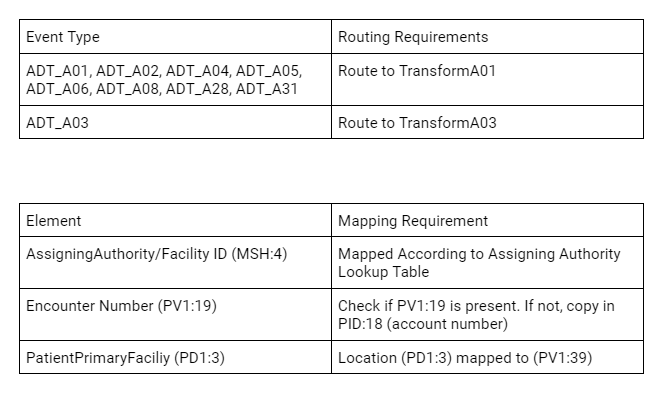
Sample requirements:

Functional Requirements

To test each scenario, we need to run through a sample of each event type and confirm the routing rules. We also need to confirm the specific mapping requirements and find sample data for each scenario.

##HL7 Production

The purpose for this UnitTest-RuleSet is to test a HL7 pipeline: Business serviceRouting RulesTransformation.

In this example created for the production shown below, the ADT process flow goes through several additional hops. A class extending the UnitTest.RuleSet.HL7 was modified to allow for handling more complex process flows.

Process Flow: FromHSROUTER.TESTAdtFromTESTAdt.ReorgSegmentProcessRouteTESTAdtTEST.ADTTransformHS.Gateway.HL7.InboundProcess

HL7 Production

##Create Unit Test Class

Create a TestAdtUnitTest class that extends UnitTest.RuleSet.HL7. (UnitTest.RuleSet.Example in the UnitTest-RuleSet repository contains an example of such a class.

*Note: In this example, everything was moved under HS.Local in HSCUSTOM for ease of testing. *

Signature:Class HS.Local.EG.UnitTest.TestAdtUnitTest Extends HS.Local.Util.UnitTest.RuleSet.HL7

##Class Structure Preview

The Unit Test class is organized with this layout:

Unit Test Class Layout

##Set Up Parameters

These class parameters are used to set up testing.

// Namespace where production is located
Parameter Namespace = "EGTEST";

// Base directory for unit tests

Parameter TestDirectory = "/tmp/unittest";

// sub-directory name for unit tests

Parameter TestSuite = "TEST-HL7ADT";

/// Override for different schema
Parameter HL7Schema = "2.5.1:ADT_A01";

/// Override with name of existing service on production
Parameter SourceBusinessServiceName = "FromHSROUTER.TESTAdt";

/// Override with name of existing business process routing engine on production
Parameter TargetConfigName = "FromTESTAdt.ReorgSegmentProcess";

/// Primary routing process name on production
Parameter PrimaryRoutingProcessName = "RouteTESTAdt";

/// Secondary routing process name on production
Parameter SecondaryRoutingProcessName = "TEST.ADTTransform";

Note: The primary and secondary routing processes are referenced in various test methods in order to test the output and results from two routing processes chained together.

##Create Sample Input Messages

To create a reusable Unit Test class, we save anonymized samples of each event type and any additional messages needed to fulfil the testing scenarios into the Unit Test class in XDATA blocks at the bottom of the file.

Example of an XDATA block:

The name SourceMessageA01 is used to reference the specific XDATA block.

XData SourceMessageA01
{
<test><![CDATA[
MSH|^~\&|Epic|TEST||TEST|20230911060119|RUBBLE|ADT^A01|249509431|P|2.2
EVN|A01|20230911060119||ADT_EVENT|RUBBLE^MATTHEW^BARNEY^D^^^^^TEST^^^^^UH|20230911060000|PHL^PHL^ADTEDI
ZVN||LS23450^LS-23450^^^^RTL
PID|1|000163387^^^MRN^MRN|000163387^^^MRN^MRN||FLINTSTONE^ANNA^WILMA||19690812|F|MURRAY^ANNA~FLINTSTONE^ANNA^R~FLINTSTONE^ANNA|B|100 BEDROCK WAY^^NORTH CHARLESTON^SC^29420-8707^US^P^^CHARLESTON|CHAR|(555)609-0969^P^PH^^^555^6090969~^NET^Internet^ANNAC1@YAHOO.COM~(555)609-0969^P^CP^^^555^6090969||ENG|M|CHR|1197112023|260-61-5801|||1|||||Non Veteran|||N
ZPD||MYCH||AC|||N||N
PD1|||TEST HOLLINGS CANCER CENTER^^10003|1134107873^LINK^MICHAEL^J^^^^^EPIC^^^^PNPI
ROL|1|UP|GENERAL|1134107873^LINK^MICHAEL^J^^^^^EPIC^^^^PNPI|20211115
NK1|1|GABLE^BETTY|PARENT||(555)763-5651^^PH^^^555^7635651||Emergency Contact 1
NK1|2|FLINTSTONE^FRED|Spouse|100 Bedrock way^^REMBERT^SC^29128^US|(888)222-2222^^PH^^^888^2222222|(888)222-3333^^PH^^^888^2223333|Emergency Contact 2
PV1|1|O|R1OR^RTOR^07^RT^R^^^^TEST RT OR|EL|||1386757342^HALSTEAD^LUCINDA^A.^^^^^EPIC^^^^PNPI|1386757342^HALSTEAD^LUCINDA^A.^^^^^EPIC^^^^PNPI||OTO||||PHYS|||1386757342^HALSTEAD^LUCINDA^A.^^^^^EPIC^^^^PNPI|SO||BCBS|||||||||||||||||||||ADMCONF|||20230911060000
PV2||PRV||||||20230911||||HOSP ENC|||||||||N|N||||||||||N
ZPV||||||||||||20230911060000
OBX|1|NM|PRIMARYCSN|1|1197112023||||||F
AL1|1|DA|900525^FISH CONTAINING PRODUCTS^DAM|3|Anaphylaxis|20210823
AL1|2|DA|568^PEANUT^HIC|3|Anaphylaxis|20221209
AL1|3|DA|12753^TREE NUT^HIC|3|Anaphylaxis|20221209
AL1|4|DA|1193^TREE NUTS^DAM|3|Anaphylaxis|20130524
AL1|5|DA|1554^HYDROCODONE^HIC||Other|20210728
AL1|6|DA|3102^POLLEN EXTRACTS^HIC||Other|20201204
AL1|7|DA|11754^SHELLFISH DERIVED^HIC||Other|20210728
DG1|1|I10|Q85.02^Neurofibromatosis, type 2^I10|Neurofibromatosis, type 2||ADMISSION DIAGNOSIS (CODED)
DG1|2|I10|D33.3^Benign neoplasm of cranial nerves^I10|Benign neoplasm of cranial nerves||ADMISSION DIAGNOSIS (CODED)
DG1|3|I10|J38.01^Paralysis of vocal cords and larynx, unilateral^I10|Paralysis of vocal cords and larynx, unilateral||ADMISSION DIAGNOSIS (CODED)
DG1|4||^NF2 (neurofibromatosis 2) [Q85.02]|NF2 (neurofibromatosis 2) [Q85.02]||ADMISSION DIAGNOSIS (TEXT)
DG1|5||^Acoustic neuroma [D33.3]|Acoustic neuroma [D33.3]||ADMISSION DIAGNOSIS (TEXT)
DG1|6||^Unilateral complete paralysis of vocal cord [J38.01]|Unilateral complete paralysis of vocal cord [J38.01]||ADMISSION DIAGNOSIS (TEXT)
GT1|1|780223|FLINTSTONE^ANNA^WILMA^^^^L||100 BEDROCK WAY^^NORTH CHARLESTON^SC^29420-8707^US^^^CHARLESTON|(555)609-0969^P^PH^^^555^6090969~(555)763-5651^P^CP^^^555^7635651||19690812|F|P/F|SL|248-61-5801|||||^^^^^US|||Full
ZG1||||1
IN1|1|BL90^BCBS/STATE EMP^PLANID||BCBS STATE|ATTN CLAIMS PROCESSING^PO BOX 100605^COLUMBIA^SC^29260-0605||(800)444-4311^^^^^800^4444311|002038404||||20140101||NPR||FLINTSTONE^THOMAS^^V|Sp|19661227|3310 DUBIN RD^^NORTH CHARLESTON^SC^29420^US|||1|||||||||||||1087807|ZCS49984141|||||||M|^^^^^US|||BOTH
IN3|1|||2||20230911|20230911|RUBBLE^MATTHEW^BARNEY^D|||NOT|||||(800)999-0000^^^^^800^9990000~(888)444-5555^^^^^888^4445555
ZIN|||||||FLINTSTONE^THOMAS^^V|||||16871492
]]></test>
}

Sample code to retrieve data from an XDATA block for use in testing:

set xdata=##class(%Dictionary.CompiledXData).%OpenId(..%ClassName(1)_"||"_XDataName,0)

Here’s the sample code from ** GetMessage**, a helper method used to read in and return the data from an XDATA block based on the block name.

ClassMethod GetMessage(XDataName As %String) As EnsLib.HL7.Message
{
	#dim SourceMessage as EnsLib.HL7.Message
	set xdata=##class(%Dictionary.CompiledXData).%OpenId(..%ClassName(1)_"||"_XDataName,0)
	quit:'$IsObject(xdata) $$$NULLOREF
	set lines=""
	while 'xdata.Data.AtEnd
	{
		set line=$ZSTRIP(xdata.Data.ReadLine(),"<w")
		continue:line=""
		continue:$Extract(line,1)="<" // ignore opening or closing XML tags and start CData tag
		continue:$Extract(line,1)="]" // ignore ]]> closing CDATA
		set lines=lines_($S($L(lines)=0:"",1:$C(..#NewLine)))_line
	}
	set SourceMessage=##class(EnsLib.HL7.Message).ImportFromString(lines,.tSC)
	quit:$$$ISERR(tSC) $$$NULLOREF
	set SourceMessage.DocType=..#HL7Schema
	set tSC=SourceMessage.PokeDocType(..#HL7Schema)
	quit SourceMessage
}

##Create Testing Methods

The Unit Test class also contains a Test method that programmatically sets up each test, injects the message into the production, and asserts that the resulting transformed message matches what is expected.

The test example contains these test methods:

  • TestMessageA01
  • TestMessageA02
  • TestMessageA03
  • TestMessageA04
  • TestMessageA05
  • TestMessageA06
  • TestMessageA08
  • TestMessageA28
  • TestMessageA31
  • TestCorrectAssigningAuthorityForA01
  • TestEncoutnerNumberPresent
  • TestPD1LocationMapped

Example Method: TestMessageA01 Method to test that A01 messages process without error and are routed to correct transform.

Method TestMessageA01()
{
	Set ReturnA01 = ..#SecondaryRoutingProcessName_":HS.Local.EG.ProfSvcs.Router.Base.ADT.TransformA01"
	#dim message as EnsLib.HL7.Message

    // Load new HL7Message per UnitTest
	set ..HL7Message=..GetMessage("SourceMessageA01")
	quit:'$IsObject(..HL7Message) $$$ERROR(5001,"Failed to correlate Xdata for Source Message")
	
	set routingProcess = ..#PrimaryRoutingProcessName

	set message=..HL7Message.%ConstructClone(1)
	do message.PokeDocType(message.DocType)
	do message.SetValueAt("SYSA","MSH:3.1")
	set expectSuccess=1
	set expectReturn="send:"_ReturnA01
	set expectReason="rule#8"
	do ..SendMessageToRouter(message,"TestMessageA01",routingProcess, expectSuccess, expectReturn, expectReason)
}

Note: SendMessageToRouter() is a method implemented in the UnitTest-RuleSet package.

Example Method: TestEncounterNumberPresent

The method below tests for specific resulting values in the message after the transform.

Method TestEncounterNumberPresent()
{
	#dim message as EnsLib.HL7.Message
	
    // Load new HL7Message per UnitTest
	set ..HL7Message=..GetMessage("SourceMessageA01")
	quit:'$IsObject(..HL7Message) $$$ERROR(5001,"Failed to correlate Xdata for Source Message")
	
	//source of transform process
	set routingProcess = ..#SecondaryRoutingProcessName
	set message=..HL7Message.%ConstructClone(1)
	do message.PokeDocType(message.DocType)
	do message.SetValueAt("SYSA","MSH:3.1")
	//Check that output has PV1:19 is not empty
	set expectSuccess=1
	set expectElement="PV1:19"
	set expectReturnVal="1197112023"
	do ..SendMessageReturnOutput(message,"TestMessageA01", routingProcess, expectSuccess, expectElement, expectReturnVal)
}

Note: SendMessageReturnOutput() is a method modified to return the output message for evaluation.

##How to Run the UnitTest

The %UnitTest class implementation depends on the ^UnitTestRoot global for the location of the unit test working folders.

There are two parameters used to set the folders:

// Base directory for unit tests
Parameter TestDirectory = "/tmp/unittest";

// sub-directory name for unit tests
Parameter TestSuite = "TEST-HL7ADT";

In this case, the class would expect the folder: /tmp/unittest/TEST-HL7ADT to exist in the environment where the unit test class is run.

Additionally, the custom implementation sets the ^UnitTestRoot global and changes to the specific namespace in the Namespace parameter.

To run from the terminal:

HSCUSTOM> do ##class(HS.Local.EG.UnitTest.TestAdtUnitTest).Debug()

The results of the run will be sprinted to the console. If any test fails, the overall test is considered failed. In addition to the terminal, you can also see the results from the management portal. Use the link from the output to open the URL.

##Snippet of Console Output

TestMessageA31 passed TestPD1LocationMapped() begins ... 14:50:20.104:...t.TestAdtUnitTest: TestPD1Location Sent LogMessage:SessionId was 130 LogMessage:Source Config Name name is :TEST.ADTTransform LogMessage:Message Body Id was 94 LogMessage:Expect Success is 0 LogMessage:Testing for value PV1:39 LogMessage:Found value AssertNotEquals:Expect No Match:TestPD1Location:ReturnValue= (failed) <<==== FAILED TEST-HL7ADT:HS.Local.EG.UnitTest.TestAdtUnitTest:TestPD1LocationMapped LogMessage:Duration of execution: .033106 sec. TestPD1LocationMapped failed HS.Local.EG.UnitTest.TestAdtUnitTest failed Skipping deleting classes TEST-HL7ADT failed

Use the following URL to view the result: http://192.168.1.229:52773/csp/sys/%25UnitTest.Portal.Indices.cls?Index=3&$NAMESPACE=EGTEST Some tests FAILED in suites: TEST-HL7ADT

##Viewing Results in the Management Portal

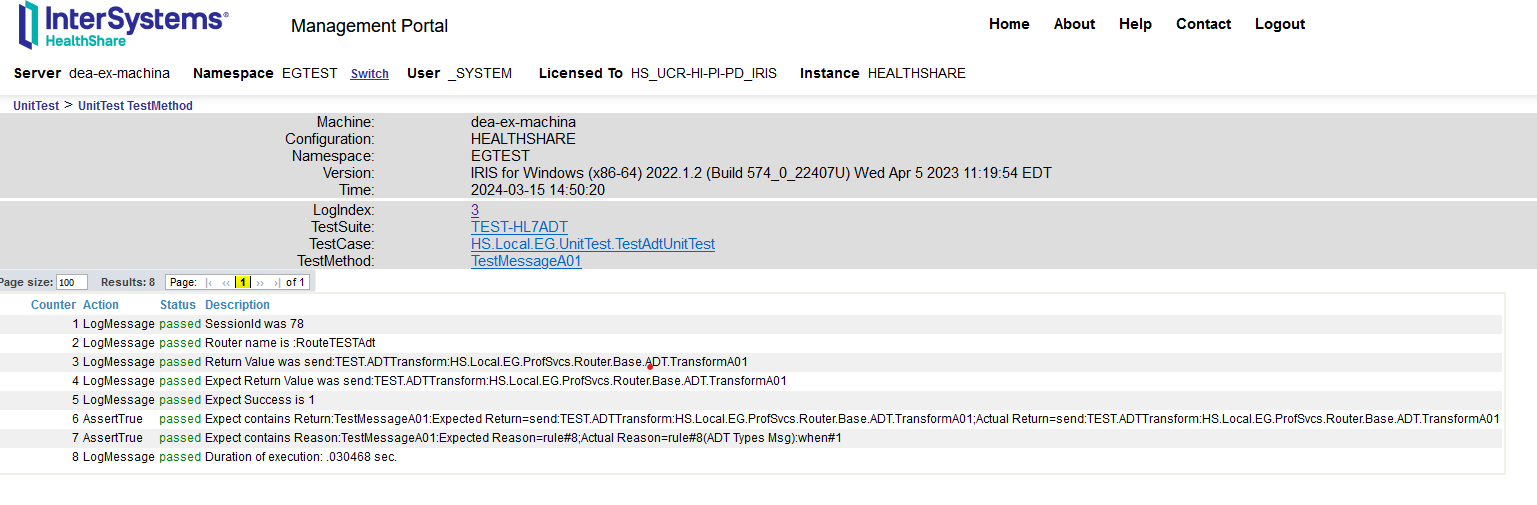
Use the URL displayed on the terminal and paste it into a browser to see the results. Clicking on the test name will provide additional details.

Unit Test in Management Portal

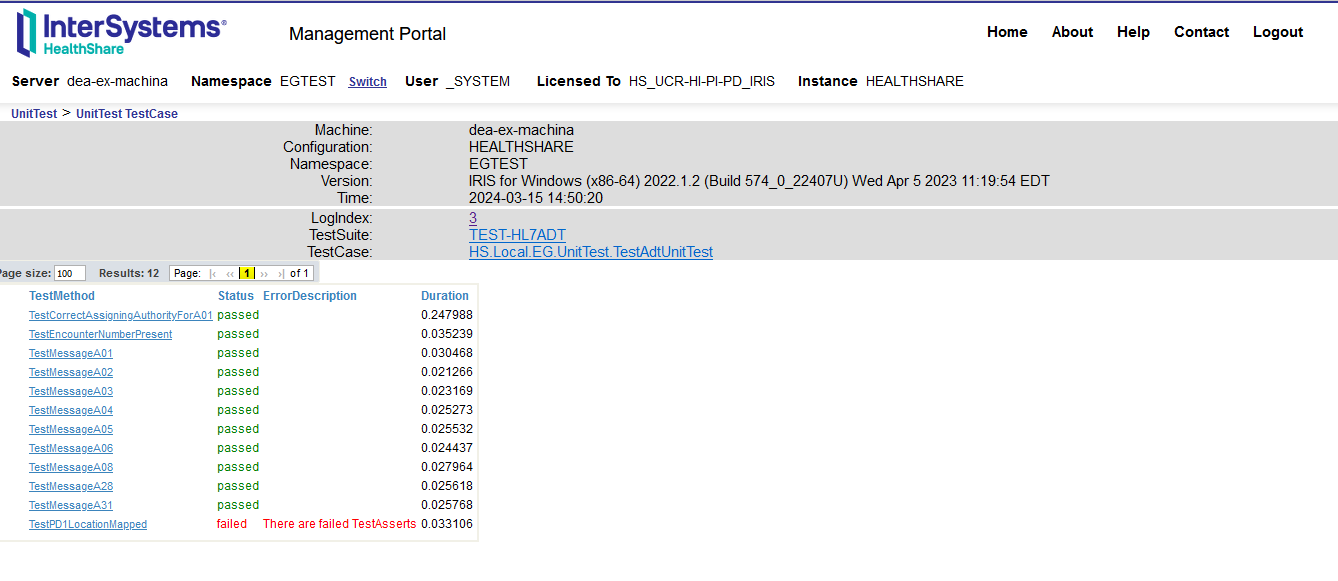
Clicking on each test link will display more information on the test:

UnitTest Results

##Conclusion Building Unit Test classes for each HL7 interface and packaging it with the interface code provides documentation of the testing process and sample data and also allows for quick regression testing of any updates or changes to the data or implementation.

Upon deployment, the Unit Test class serves as a self-contained smoke test to confirm the interface is complete and functional.

##Additional Considerations

  • The UnitTest_RuleSet framework can be adapted for CCDA unit testing. The routing tests are relatively similar to the HL7 example. To address the mapping requirements, the Unit Test class must be implemented to handle XSLT and XPaths.

  • QA resources can gather requirements and sample data to set up the Unit Test class before implementation begins.

  • Unit tests for all interfaces can be packaged together unter Unit Test Manager so that the entire package can be run at once to validate the existing configuration and code.

1
1 443
Article Iryna Mykhailova · Mar 24, 2024 3m read

What I find really useful about IRIS when teaching my subject of Postrelational databases is the fact that it is a multi model database. Which means that I can actually go into architecture and structure and all that only once but then show the usage of different models (like object, document, hierarchy) using the same language and approach. And it is not a huge leap to go from an object oriented programming language (like C#, Java etc) to an object oriented database.

However, along with advantages (which are many) come some drawbacks when we switch from object oriented model to relational. When I say that you can get access to the same data using different models I need to also explain how it is possible to work with lists and arrays from object model in relational table. With arrays it is very simple - by default they are represented as separate tables and that's the end of it. With lists - it's harder because by default it's a string. But one still wants to do something about it without damaging the structure and making this list unreadable in the object model.

So in this article I will showcase a couple of predicates and a function that are useful when working with lists, and not just as fields.

2
1 376
Article Roy Leonov · Mar 12, 2024 5m read

As an IT and cloud team manager with 18 years of experience with InterSystems technologies, I recently led our team in the transformation of our traditional on-premises ERP system to a cloud-based solution. We embarked on deploying InterSystems IRIS within a Kubernetes environment on AWS EKS, aiming to achieve a scalable, performant, and secure system. Central to this endeavor was the utilization of the AWS Application Load Balancer (ALB) as our ingress controller. 

3
9 672
Article Phillip Wu · Mar 24, 2024 5m read

Introduction

This is a quickstart guide to IRIS for Linux systems administrators who need to be able to support the IRIS DB as well as other normal infrastructure tasks.

IRIS is a DB system from Intersystems. An IRIS DB can hold code (in the form of a Class) or data (in the form of Globals). IRIS DB are Linux files called IRIS.DAT.

1
0 468
Article Brett Saviano · Dec 21, 2023 2m read

Have you ever been editing files in VS Code, but needed to check a global value or run a few ObjectScript commands? Now you can, with no setup required! If you have vscode-objectscript extension version 2.10.0 or later and are connected to InterSystems IRIS 2023.2 or later, you can now open a terminal connection to your server, regardless of where it's located.

There are three ways to open this new terminal:

  • The "Launch WebSocket Terminal" command in the command palette (Ctrl-Shift-P on Windows, Cmd-Shift-P on Mac): Launch WebSocket Terminal command

  • The VS Code integrated terminal's Profiles menu: terminal profiles menu

  • The Server Manager extension's server tree: server manager tree

The WebSocket Terminal supports many of the features of the standard ObjectScript shell like reads, namespace switches, interrupts and custom terminal prompts. However, in this post I'd like to highlight three features that are unique to it.

  • Command input is syntax colored, so you can be sure that your input is syntactically correct before running: syntax colored input

  • The terminal supports a multi-line editing mode, where a new line will be added upon pressing Enter instead of running the input. A new line will be added if there are unclosed left brace { or left parenthesis ( in the command input: multi-line input

  • It's fully integrated with VS Code's shell integration, so VS Code captures command input and output. This allows you to easily re-run commands and copy command output to the clipboard without having to highlight text with your cursor: command output

For a full list of features, see the official documentation. Have an idea for how we can improve this feature? We're happy to hear it! Post your suggestions on the extension's GitHub repository. All screenshots in this post use the new "InterSystems Default Dark Modern" VS Code theme, which is available in the InterSystems Language Server extension version 2.4.0 and later.

7
11 1756
Article Iryna Mykhailova · Mar 18, 2024 2m read

Recently, the question came up while discussing the access to the data stored in IRIS from different languages with my students if it was possible to initiate the connection and get data from Cloud solution (InterSystems IRIS CloudSQL) from Microsoft Excel, not the other way around. Considering the many varied ways one can get data in Excel (import data from external sources, connecting to databases using ODBC drivers, using power queries and web queries etc.) the obvious choice was to try ODBC driver. The only task left was to try to connect to the database in the cloud using the ODBC driver.

4
0 387
Article Andre Ribera · Mar 6, 2024 9m read

Introduction

As the health interoperability landscape expands to include data exchange across on-premise as well as hosted solutions, we are seeing an increased need to integrate with services such as cloud storage. One of the most prolifically used and well supported tools is the NoSQL database DynamoDB (Dynamo), provided by Amazon Web Services (AWS).

The challenge for IRIS implementations, as it relates to Dynamo and other modern web services, is that there is no native support for interacting with Dynamo and AWS within ObjectScript. Fortunately, we can utilize ObjectScript’s support for embedded Python to leverage AWS connectivity via Boto3 (Amazon’s Python SDK).

In this tutorial we are going to walk through the steps needed in order to put a single item into the Dynamo table.

Prerequisites and Assumptions

In order to connect to Dynamo you will need to have the following in place:

This tutorial assumes these are already in place and focuses on the actual connection to DynamoDB and writing to the table using ObjectScript and Embedded Python.

Use Case

Given a Dynamo table, “Employees”, we have the task of adding a single new employee to the table. We are going to pass in their “First_Name”, “Last_Name”, and “Employee_Number”. As we are new to the technology we are going to hard code the values, proving a successful connection and insertion into the table using Boto3.

An Overview

Once credentials have been provided the steps to connect to DynamoDB are as follows:

  1. Create a calling ClassMethod in ObjectScript
  2. Create a Method that will hold the connection logic using Embedded Python
  3. Import boto3 and Create the client
  4. Call the put_item method
  5. Optional: Return a %Status

There are few other hurdles that you may encounter and the end of this article will also address some of those encountered by the author.

Connecting to DynamoDB

Step 1: Create a calling ClassMethod in ObjectScript

Begin by creating a ClassMethod in ObjectScript. Since we are going to hard code the item being put into the table this is all that is needed.

The purpose of this method is to wrap the Python Method so that the ClassMethod may be called by another upstream operation.

ClassMethod writeToDynamoDB(tableName As %String)

For this use case a TableName is being passed in as a %String. The return value of %Status is needed only when the upstream operation needs a success/failure response.

Step 2: Create a Method that will hold the connection logic using Embedded Python

This Python Method will hold the actual logic for connecting to Dynamo. The method signature is written in ObjectScript but the method body is written in Python and syntax is enforced by Python standards.

ClassMethod writeToDynamoDBpython(tableName As %String) [ Language = python ]

We begin by using ClassMethod as when the code is compiled and run ObjectScript won’t see it when it is called. The same “tableName” will be handed to this method for the Embedded Python to work with so we will use the same variable name here (since these are just Strings the program needs no additional adjustments/transformations). We must also indicate the language to follow using the square bracket notation.

Step 3: Import boto3 and Create the Client

Python syntax requires importing libraries at the outset of your implementations. In this case we will be doing it inside the method body. Importing a Python library is normally done at the top of the file but as this an ObjectScript file doing the import outside of the method body would cause an exception.

ClassMethod writeToDynamoDBpython(tableName As %String) [ Language = python ]
{
    import boto3

    client = boto3.client('dynamodb')
}

Next, the client needs to be created in order to connect to Dynamo. Boto3 provides a straightforward way of creating that client however note that the service required MUST be passed in, e.g. ‘dynamodb’, otherwise it won’t connect to the correct services (other examples are ‘s3’, ‘cloudwatch’, etc.)

For this use case we will create a client that points to a docker container that has been set up to run an image of Dynamo so that we don’t accrue too many calls to AWS:

client = boto3.client(
    service_name='dynamodb', 
    region_name='us-east-1', 
    endpoint_url='http://host.docker.internal:8080'
)

Step 4: Call the put_item method

AWS provides extensive documentation regarding the many fields that may be included in the call to put_item(). In this use case we need only to send it the “First_Name”, “Last_Name”, and “Employee_Number” as follows:

response = client.put_item(
            TableName=tableName,
            Item={
                'First_Name': {
                    'S': 'Vic'
                },
                'Last_Name': {
                    'S': 'Cordova'
                },
                'Employee_Number': {
                     'N': '012345',
                }
)

There are two required fields from the standpoint of AWS: tableName and the item being inserted into the table, e.g. “Item”. When using this implementation of the client the format for the object being inserted takes a key:value form. The name of the object, e.g. ‘First_Name’, indicates the table column name. The following ‘S’ inside of the ‘First_Name’ object indicates to AWS that the associated value is of type String (there are of course other data types that may be noted here, i.e. ‘SS’ for Lists, ‘N’ for Numbers, etc.). This marker is required when using the client.

The complete Embedded Python method:

ClassMethod writeToDynamoDBpython(tableName As %String) [ Language = python ]
{
    import boto3

    client = boto3.client(
        service_name='dynamodb', 
        region_name='us-east-1', 
        endpoint_url='http://host.docker.internal:8080'
    )

    response = client.put_item(
            TableName=tableName,
            Item={
                'First_Name': {
                    'S': 'Vic'
                },
                'Last_Name': {
                    'S': 'Cordova'
                },
                'Employee_Number': {
                     'N': '012345',
                }
    )
}

Step 5: Call the Embedded Python Method from the ObjectScript Method

Now that the logic has been completed we are able to call the Python method from the ObjectScript method thus making the connection possible. This will take in the tablename and run the logic through Python, writing to Dynamo.

ClassMethod writeToDynamoDB(tableName As %String)
{
    DO ..writeToDynamoDBpython(tableName)
}

As this stands it is usable however any upstream callers may require a returned status. In order to accomplish this the following step will suggest some ways to indicate a success/failure to any calling operations.

Step 6: Optional: Return a %Status

In order to pass a success/failure status upstream consider the following edits:

ClassMethod writeToDynamoDB(tableName As %String) As %Status
    {
        #dim tSC As %Status = $$$OK
    
        Set pyStatus = ..writeToDynamoDBpython(tableName)
    
        If (pyStatus '= "OK") {Set tSC = $$$ERROR($$$GeneralError,"failed to write to DynamoDB")}
    
        Quit tSC
    }

ClassMethod writeToDynamoDBpython(ByRef tableName As %String) [ Language = python ]
{
    import boto3

    client = boto3.client(
        service_name='dynamodb', 
        region_name='us-east-1', 
        endpoint_url='http://host.docker.internal:8080'
    )
    
    result = "OK"

    try:
    response = client.put_item(
            TableName=tableName,
            Item={
                'First_Name': {
                    'S': 'Vic'
                },
                'Last_Name': {
                    'S': 'Cordova'
                },
                'Employee_Number': {
                     'N': '012345',
                }
   )
       except:
            result = "BAD"
            
    return result
}
  • Add %Status to the ObjectScript method’s definition.
  • Set up a status variable (e.g. “tSC”) to hold the $$OK macro.
  • Create a status variable in the Embedded Python method using a simple string, “OK”
  • Wrap you put_item() in a try/except. The “except:” should update the status variable to something other than “OK” in the case of a failed write.
  • Return the status string from the Python method.
  • Set up a variable that stores the value returned by the Python method (e.g. “ Set pyStatus = ..writeToDynamoDBpython(tableName)”)
  • Check the result of that response in ObjectScript using an if check. In the case of a failure, update the status variable (“tSC”) to be an $$ERROR($$GeneralError) adding an appropriate error message.
  • Finally, terminate the method using Quit and return the value of tSC to the upstream caller.

Potential Hurdles and Caveats

This implementation shows a simple example in order to provide the foundation from which an implementer may continue to explore based on their individual use-case and requirements.

Communication between ObjectScript and AWS may prove to be the most tricky as it necessitates an intermediary passing statuses and values back and forth in potentially disparate data types.

Another thing to note is that this implementation is hard-coded. In order to have a more programmatic approach, for example passing in a JSON string, edits like passing the JSON as a %DynamicObject and utilizing the .toJSON() method in ObjectScript in conjunction with leveraging Python’s ability to convert a JSON to a dictionary object using the load() method can be one approach.

Raising exceptions from Embedded Python is also a hurdle as the data types don’t line up. This implementation used Strings to indicate success/failure in conjunction with try/except and if-statements (as noted in the code snippet above) in order to perform some approximation of error handling. It is also worth mentioning that Python exceptions will be printed out, for example if required data is missing, without having to be passed to ObjectScript. The propagation of exceptions is what may require some finagling based on your individual use-case.

Summary/In Conclusion

In summary, establishing a connection to AWS using a Dynamo client, creating a wrapper method in ObjectScript, housing the put_item() logic in a ClassMethod that uses Embedded Python, and making the necessary adjustments per individual requirements makes interacting with Dynamo possible.

Referencing the Documentation will also prove to be very fruitful as there exists sufficient support on both the part of InterSystems and AWS.

Resources

4
0 416