Question Yone Moreno Jiménez · Nov 10, 2025

Hello, thanks for your time reading this question.

We are receiving each day, alerts from one of our four Production nodes. It always has the same text:

[InterSystems IRIS SEVERE ERROR gchciris4.canariasalud:ENSEMBLE] [Utility.Event] [SYSTEM MONITOR] CSPGatewayLatency(127.0.0.1:443) Alert: CSPGatewayLatency = 5001.304, 5001.233, 5000.964 (Max value is 2000).

We have looked for it in the documentation here:

https://docs.intersystems.com/latest/csp/docbook/DocBook.UI.Page.cls?KE…

We thought it was related to the following paragraph:

5
0 46
Question Rodolfo Pscheidt Jr · Nov 6, 2025

Hi community
I have a persistent data class where there are some properties that contain underscores in their names, for example:
Property "client_name" As %String(MAXLEN = 250) [ SqlFieldName = client_name ];
In Architect, I would like to use this property in an expression, in this field:

But I can't figure it out. If I use %source.client_name, it gives a compilation error. If I use %source."client_name", it treats it as the string "client_name" instead of getting the value from the field. Any suggestions on how to do this?

6
0 59
Question Mark OReilly · Nov 7, 2025

Trying to check date in DTL. 

Want to throw a custom error not the default one from the $ZDTH. It does in the try as will write "Error" when testing the DTL but the actual error not showing. Report errors is turned on.  I also tried the THROW logic from best practices but that doesn't work either. $SYSTEM.Status.DisplayError(status) does display what the error should be returned. 

5
0 45
Announcement Anastasia Dyubaylo · Oct 28, 2025

Hi Community,

Please welcome @Henry Pereira as our new Moderator in the Developer Community Team! 🎉

As an active member, Henry has consistently shared valuable insights, supported fellow developers, and driven meaningful discussions across the Community. His deep expertise and collaborative spirit make him a perfect fit to help guide and grow our Developer Community.

Let's greet Henry with a round of applause and look at his bio!

9
0 154
Article Robert Cemper · Nov 10, 2025 2m read

If one of your packages on OEX receives a review, you get notified by OEX only of YOUR own package.   
The rating reflects the experience of the reviewer with the status found at the time of review.   
It is kind of a snapshot and might have changed meanwhile.   
Reviews by other members of the community are marked by * in the last column.

I also placed a bunch of Pull Requests on GitHub when I found a problem I could fix.    
Some were accepted and merged, and some were just ignored.     
So if you made a major change and expect a changed review, just let me know.

0
0 15
Announcement Celeste Canzano · Nov 10, 2025

Hello InterSystems EHR community, 

InterSystems Certification is currently developing a certification exam for InterSystems EHR integration specialists, and if you match the exam candidate description below, we would like you to beta test the exam! The exam will be available for beta testing starting November 10, 2025. 

Please note, completion of the TrakCare Healthcare Messaging Framework (HMF) course is required for non-InterSystems employees to be eligible to take the beta. Please see Required Training under Exam Details below for more information about eligibility.
0
0 21
InterSystems Official Dipak Bhujbal · Nov 10, 2025

Overview

This release introduces the FHIR Server 2025.10.0, delivering the latest standards compliance and performance improvements. It also enhances the Health Connect Cloud (HCC)upgrade process for greater reliability and adds new flexibility to Network Connect through prefix list support in VPN configurations.

New Features and Enhancements

0
0 19
Question Attila Toth · Nov 10, 2025

Hello!

I'm trying to create some foreign tables to a PostgreSQL database. In some cases, columns with certain datatypes cannot be consumed by IRIS and the following error is thrown:

 [SQLCODE: <-237>:<Schema import for foreign table did not return column metadata>]

  [%msg: <Unkown data type returned by external database>]

For example: serial4 typed ID columns are typical examples. Is it possible, what's the best way of resolving these datatypes, which- seemingly- don't have proper JDBC metadata mappings?

0
0 21
Question Rudy Simons · Oct 31, 2025

Hi,

I'd like to report a really strange behavior of the Intersystems Lite Terminal after executing a simple ObjectScript instruction.

From the Intersystems Lite terminal, execute the following instructions:

- Set uniqueId = "12345678_1"
- Set uniqueId = $p(uniqueId,"_",1)_"_"_($p(uniqueId,"_",*)+1)
After executing the second instruction, the terminal closes without any error.

Even stranger, when the second instruction is executed with 2 instead of 1, it executes correctly:
- Set uniqueId = "12345678_1"
- Set uniqueId = $p(uniqueId,"_",1)_"_"_($p(uniqueId,"_",*)+2)
- Write uniqueId
12345678_3

4
0 55
Article Anastasia Dyubaylo · Nov 4, 2025 3m read

Every thriving community relies on members whose quiet dedication and deep expertise keep it growing stronger year after year. In the InterSystems Developer Community, one such pillar is @Megumi Kakechi, a long-time engineer and support specialist whose 17 years with InterSystems and 9 years on the Developer Community reflect a true passion for helping others learn, solve problems, and innovate.

👏 Let’s take a closer look at Megumi's remarkable journey and her impact on the InterSystems ecosystem.

10
0 130
Question Colin Brough · Oct 3, 2025

Is there any way of saving a representation of the results of a query created in the Message Viewer to a file - most obviously CSV.

We are reasonably adept at creating queries. We'd like to be able to send the output to a file, rather than resorting to cut'n'pasting from the message viewer window...

Is this possible? (on any version of Ensemble/Iris?)

Desired output to file something like:

ID,TimeCreated,Session,Status,Error,Source,Target,Body_MSH_MessageControlId,.....
1,8888888,2025-08-20 05:03:14.324,8438123,Completed,OK,ICE ADT Validator,ICE ADT TCP,1z123456,20220822......
13
0 130
Article Muhammad Waseem · Feb 28, 2025 7m read

Hi Community, 
In this article, we will explore the concepts of Dynamic SQL and Embedded SQL within the context of InterSystems IRIS, provide practical examples, and examine their differences to help you understand how to leverage them in your applications.

InterSystems SQL provides a full set of standard relational features, including the ability to define table schema, execute queries, and define and execute stored procedures. You can execute InterSystems SQL interactively from the Management Portal or programmatically using a SQL shell interface. Embedded SQL enables you to embed SQL statements in your ObjectScript code, while Dynamic SQL enables you to execute dynamic SQL statements from ObjectScript at runtime. While static SQL queries offer predictable performance, dynamic and embedded SQL offer flexibility and integration, respectively.

8
4 376
Announcement Anastasia Dyubaylo · Nov 8, 2025
Hello and welcome to the October 2025 Developer Community YouTube Recap.
InterSystems Ready 2025
By Don Woodlock, Sean Kennedy, Alex MacLeod, Erica Song, James Derrickson, Julie Smith, Kristen Nemes, Varun Saxena, Dimitri Fane, Jonathan Teich, Judy Charamand
By Thomas McCoy
By John Paladino, Mike Brand, Mike Fuller, Peter Cutts
By Stefan Wittmann, Raj Singh
 
0
0 15
Article Dmitry Maslennikov · Oct 5, 2025 5m read

Introduction

The InterSystems IRIS Data Platform has long been known for its performance, interoperability, and flexibility across programming languages. For years, developers could use IRIS with Python, Java, JavaScript, and .NET — but Go (or Golang) developers were left waiting.

Golang Logo

That wait is finally over.

The new go-irisnative driver brings GoLang support to InterSystems IRIS, implementing the standard database/sql API. This means Go developers can now use familiar database tooling, connection pooling, and query interfaces to build applications powered by IRIS.


Why GoLang Support Matters

GoLang is a language designed for simplicity, concurrency, and performance — ideal for cloud-native and microservices-based architectures. It powers some of the world’s most scalable systems, including Kubernetes, Docker, and Terraform.

Bringing IRIS into the Go ecosystem enables:

  • Lightweight, high-performance services using IRIS as the backend.
  • Native concurrency for parallel query execution or background processing.
  • Seamless integration with containerized and distributed systems.
  • Idiomatic database access through Go’s database/sql interface.

This integration makes IRIS a perfect fit for modern, cloud-ready Go applications.

25
0 282
Article Tani Frankel · Feb 13, 2024 3m read

Following 2 local Webinars we had focused on VS Code ["Intro" and "Beyond Basics"; in Hebrew], I prepared for the participants some related links of relevant resources which we sent as a follow-up. Sharing them here as well for the benefit of the Community.
You are all of course welcome to add more useful resources.

2
5 589
Article Andrew Sklyarov · Nov 8, 2025 4m read

When I started my journey with InterSystems IRIS, especially in Interoperability, one of the initial and common questions I had was: how can I run something on an interval or schedule? In this topic, I want to share two simple classes that address this issue. I'm surprised that some similar classes are not located somewhere in EnsLib. Or maybe I didn't search well? Anyway, this topic is not meant to be complex work, just a couple of snippets for beginners.

0
0 29
Article José Pereira · Nov 7, 2025 8m read

Window functions in InterSystems IRIS let you perform powerful analytics — like running totals, rankings, and moving averages — directly in SQL.
They operate over a "window" of rows related to the current row, without collapsing results like GROUP BY.
This means you can write cleaner, faster, and more maintainable queries — no loops, no joins, no temp tables.

In this article let's understand the mechanics of window functions by addressing some common data analisys tasks.


Introduction to SQL Window Functions in InterSystems IRIS

SQL window functions are a powerful tool for data analysis.
They allow you to compute aggregates and rankings across rows while preserving individual row visibility.
Whether you're building dashboards, reports, or complex analytics, window functions simplify your logic and boost performance.

Note: I'm not an expert in window functions, but I’d like to share the insights and resources that helped me understand them. Suggestions or corrections are very welcome!


🚀 Why Window Functions Matter

Have you ever written multiple SQL queries, or even procedural loops, just to calculate running totals, ranks, or differences between rows?

Window functions let you do all that in a single SQL query.

They bring powerful analytics directly into SQL — no extra joins, no temporary tables, and no procedural loops.


🧠 What Are Window Functions?

A window function performs a calculation across a set of rows that are somehow related to the current row — this set of rows is called a window.

As depicted in Figure 1, unlike GROUP BY, window functions don’t collapse rows. They allow you to compute aggregates while still keeping each row visible.

Differences between Aggragraions and Window FunctionsFigure 1 - Differences between Aggregations and Window Functions

The general syntax looks like this:

window_function_name(...) OVER (
  PARTITION BY column_name
  ORDER BY column_name
  ROWS BETWEEN ...
)

Where:

  • PARTITION BY defines groups of rows (like "per customer" or "per department").
  • ORDER BY defines the order of rows within each partition.
  • ROWS BETWEEN ... defines which subset of rows are visible to the function (the window frame).

⚙️ Why Use Window Functions?

Before window functions, developers often had to:

  • Run multiple queries to get intermediate results.
  • Use temporary tables or subqueries to merge partial aggregates.
  • Write procedural code in ObjectScript to simulate ranking or running totals.

Window functions solve this neatly — one query, no loops, no extra state to manage.


🧩 Example 1 — Running Total Per Customer

Let’s start with a simple example: compute the running total of each customer’s orders over time.

🛠️ Create and Populate Table for the example

CREATE TABLE Orders (
  OrderID INT,
  CustomerID INT,
  OrderDate DATE,
  OrderAmount DECIMAL(10,2)
)

INSERT INTO Orders (OrderID, CustomerID, OrderDate, OrderAmount)
SELECT 1, 101, '2023-01-01', 100.00 UNION
SELECT 2, 101, '2023-01-05', 150.00 UNION
SELECT 3, 102, '2023-01-02', 200.00 UNION
SELECT 4, 101, '2023-01-10', 50.00 UNION
SELECT 5, 102, '2023-01-07', 100.00 

❌ Without window functions — multiple queries

SELECT
  o1.CustomerID,
  o1.OrderDate,
  SUM(o2.OrderAmount) AS RunningTotal
FROM Orders o1
JOIN Orders o2
  ON o1.CustomerID = o2.CustomerID
  AND o2.OrderDate <= o1.OrderDate
GROUP BY o1.CustomerID, o1.OrderDate
ORDER BY o1.CustomerID, o1.OrderDate

Result:

CustomerIDOrderDateRunningTotal
1012023-01-01100
1012023-01-05250
1012023-01-10300
1022023-01-02200
1022023-01-07300

This works, but it needs a self-join and a GROUP BY, and becomes expensive for large datasets. Window functions allow to write a much more clean SQL query.

✅ With window functions — one query

SELECT
  CustomerID,
  OrderDate,
  SUM(OrderAmount) OVER (
    PARTITION BY CustomerID
    ORDER BY OrderDate
  ) AS RunningTotal
FROM Orders
ORDER BY CustomerID, OrderDate

Result:

CustomerIDOrderDateRunningTotal
1012023-01-01100
1012023-01-05250
1012023-01-10300
1022023-01-02200
1022023-01-07300

Let's break down each statement in the window function syntax:

  • PARTITION BY CustomerID Ensures that the running total is calculated separately for each customer. Without this, the sum would span across all customers.

  • ORDER BY OrderDate Defines the sequence of orders for each customer, so the running total accumulates in chronological order.

  • SUM(OrderAmount) OVER (...) This is the window function applied over the partitions. In this case, it computes the sum of OrderAmount for each row, accumulating them, including all previous rows in the same partition (customer) up to that point.
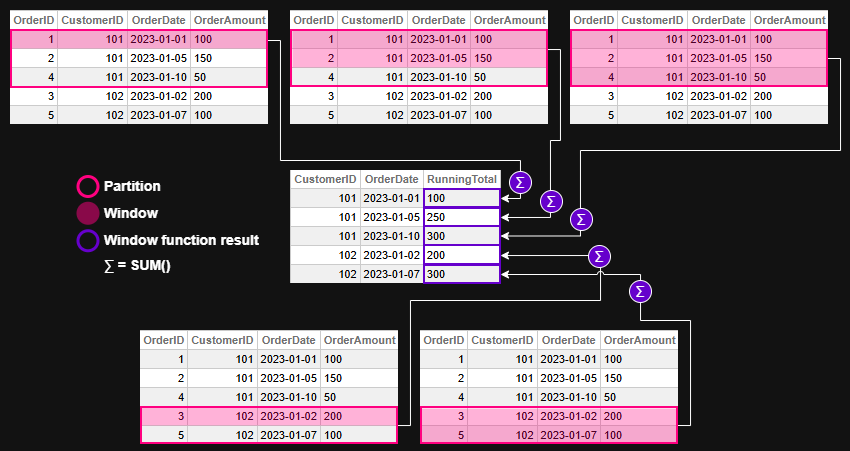
Window function evaluation - example 1Figure 2 - Window function evaluation for example 1

💡 Example 2 — Ranking Employees by Salary

🛠️ Create and Populate Table for the example

CREATE TABLE Employees (
  EmployeeID INT,
  Department VARCHAR(50),
  Name VARCHAR(100),
  Salary DECIMAL(10,2)
)

INSERT INTO Employees (EmployeeID, Department, Name, Salary)
SELECT 1, 'Sales', 'Alice', 70000 UNION
SELECT 2, 'Sales', 'Bob', 65000 UNION
SELECT 3, 'HR', 'Carol', 60000 UNION
SELECT 4, 'HR', 'Dave', 62000 UNION
SELECT 5, 'Sales', 'Eve', 72000

❌ Without window functions — Dynamic SQL and ObjectScript loops

ClassMethod RankEmployeesBySalary()
{
    Set tSQL = "SELECT Department, EmployeeID, Salary " _
              "FROM Employees ORDER BY Department, Salary DESC"
    Set tRS = ##class(%SQL.Statement).%ExecDirect(, tSQL)

    Set prevDept = ""
    Set rank = 0

    While tRS.%Next() {
        Set dept = tRS.%Get("Department")
        Set emp = tRS.%Get("EmployeeID")
        Set sal = tRS.%Get("Salary")

        If dept '= prevDept {
            Set rank = 1
        } Else {
            Set rank = rank + 1
        }

        Write "Dept: ", dept, " | Emp: ", emp, " | Rank: ", rank, " | Salary: ", sal, !
        Set prevDept = dept
    }
}

Result:

USER>Do ##class(tmp.Teste1).RankEmployeesBySalary()
Dept: HR | Emp: 4 | Rank: 1 | Salary: 62000
Dept: HR | Emp: 3 | Rank: 2 | Salary: 60000
Dept: Sales | Emp: 5 | Rank: 1 | Salary: 72000
Dept: Sales | Emp: 1 | Rank: 2 | Salary: 70000
Dept: Sales | Emp: 2 | Rank: 3 | Salary: 65000

✅ With window functions — one declarative SQL

SELECT
  Department,
  EmployeeID,
  Salary,
  RANK() OVER (
    PARTITION BY Department
    ORDER BY Salary DESC
  ) AS SalaryRank
FROM Employees
ORDER BY Department, SalaryRank

Result:

DepartmentEmployeeIDSalarySalaryRank
HR4620001
HR3600002
Sales5720001
Sales1700002
Sales2650003

Let's break down each statement in the window function syntax:

  • PARTITION BY Department
    Ensures that ranking is calculated separately within each department. Without this clause, employees would be ranked across the entire company, ignoring departmental boundaries.

  • ORDER BY Salary DESC
    Sorts employees within each department from highest to lowest salary. This determines the ranking order — higher salaries get lower rank numbers.

  • RANK() OVER (...)
    Applies the ranking function over each department's sorted list. It assigns a rank to each employee based on their salary, with ties receiving the same rank and gaps appearing in the sequence.

Window function evaluation - example 2Figure 3 - Window function evaluation for example 2


🧩 Example 3 — Moving Average of Daily Sales

Let’s illustrate how ROWS BETWEEN works with a moving average.

🛠️ Create and Populate Table for the example

CREATE TABLE DailySales (
  SaleDate DATE,
  Amount DECIMAL(10,2)
)

INSERT INTO DailySales (SaleDate, Amount)
SELECT '2023-01-01', 100 UNION 
SELECT '2023-01-02', 150 UNION
SELECT '2023-01-03', 200 UNION
SELECT '2023-01-04', 250 UNION
SELECT '2023-01-05', 300

❌ Without window functions — multiple queries and ObjectScript loops

ClassMethod MovingAverageWithoutWindow()
{
    // Query all sales ordered by date
    Set sql = "SELECT SaleDate, Amount FROM DailySales ORDER BY SaleDate"
    Set stmt = ##class(%SQL.Statement).%New()
    Set status = stmt.%Prepare(sql)
    If $$$ISERR(status) {
        Write "SQL Prepare failed: ", status, !
        Quit
    }

    Set rset = stmt.%Execute()

    // Store rows in memory for lookback
    Set rowCount = 0
    While rset.%Next() {
        Set rowCount = rowCount + 1
        Set sales(rowCount, "Date") = rset.%Get("SaleDate")
        Set sales(rowCount, "Amount") = rset.%Get("Amount")
    }

    // Loop through and calculate 3-day moving average
    For i = 1:1:rowCount {
        Set total = 0
        Set count = 0

        For j = i-2:1:i {
            If j >= 1 {
                Set total = total + sales(j, "Amount")
                Set count = count + 1
            }
        }

        Set movingAvg = total / count
        Write "Date: ", sales(i, "Date"), " | Amount: ", sales(i, "Amount"), " | MovingAvg: ", $FN(movingAvg, "", 2), !
    }
}

Result:

USER>Do ##class(tmp.Teste1).MovingAverageWithoutWindow()
Date: 66475 | Amount: 100 | MovingAvg: 100.00
Date: 66476 | Amount: 150 | MovingAvg: 125.00
Date: 66477 | Amount: 200 | MovingAvg: 150.00
Date: 66478 | Amount: 250 | MovingAvg: 200.00
Date: 66479 | Amount: 300 | MovingAvg: 250.00

✅ With window functions — one declarative SQL

SELECT
  SaleDate,
  Amount,
  AVG(Amount) OVER (
    ORDER BY SaleDate
    ROWS BETWEEN 2 PRECEDING AND CURRENT ROW
  ) AS MovingAvg
FROM DailySales
ORDER BY SaleDate

This computes the average of the current day and the two previous days — a rolling 3-day average.

Result:

SaleDateAmountMovingAvg
2023-01-01100100
2023-01-02150125
2023-01-03200150
2023-01-04250200
2023-01-05300250

Let's break down each statement in the window function syntax:

  • ORDER BY SaleDate
    Defines the chronological order of sales, which is essential for calculating a time-based moving average.

  • ROWS BETWEEN 2 PRECEDING AND CURRENT ROW
    Specifies the window frame: the current row and the two rows before it. This creates a rolling 3-day window for the average calculation.

  • AVG(Amount) OVER (...)
    Applies the window function to compute the average of Amount across the defined frame. For each row, it includes the current day and the two previous days in the calculation.

Window function evaluation - example 3Figure 4 - Window function evaluation for example 3

Note that there's no PARTITION BY in this example. This is because the goal is to calculate the moving average across all daily sales, not separately by category, region, or customer.

Using PARTITION BY would split the data into independent groups, causing the moving average to reset within each partition. Since we want a continuous rolling average over time — treating the dataset as a single chronological sequence — we omit PARTITION BY to keep the window unbroken. But off course you can use it if it makes sense for your query requirements.


🏁 Key Takeaway

Window functions let you express what used to require multiple queries or procedural code in a single, elegant SQL statement.

They make your queries more readable, your code more maintainable, and your analytics faster — all without leaving SQL.


🧭 Final Thoughts

Window functions in InterSystems IRIS offer a powerful and elegant way to perform complex analytics directly in SQL. Whether you're calculating running totals, assigning ranks, or computing moving averages, these functions simplify your logic and improve performance — all while keeping your queries readable and maintainable.

By embracing window functions, you unlock a deeper level of insight from your data without resorting to procedural code or convoluted joins. They’re not just a convenience — they’re a leap forward in how we think about SQL analytics.

You can checkout more details and more window function in the Window Functions reference in IRIS documentation.


This article was written with the help of AI tools to clarify concepts and improve readability.

0
0 55
Question Touggourt · Nov 6, 2025

Hi Guys,

I'm a newbie in term of MQTT clients & brokers, and I've created a MQTT adapter to connect to a broker and I asked our system admin for the user/pass and the URL and this where we got stuck.

The admin is saying that all he has is IP address to the PEM key to the server itself, so my question is, is the broker the server itself and the url is the url to the server or is the Broker an application (eg. Mosquito) that runs in a server and if that's the case and if its Mosquito,  where do I find the connection details to it (user/pass & URL) ?
Thanks

Thanks

1
0 23
Announcement Anastasia Dyubaylo · Nov 6, 2025

Hi Developers,

Following the resounding success of last year's new contest, we decided to repeat it. Please welcome 

🏆 Bringing Ideas to Reality Contest 🏆

Submit an application that implements an idea from the InterSystems Ideas Portal that has status Community Opportunity or Future Consideration, created before the publication of this announcement, and requires doing the actual programming 😉

Duration: November 17 - December 7, 2025

Prize pool: $12,000


0
0 72
Article Pietro Di Leo · Sep 24, 2025 23m read

Table of Contents

  1. Purpose of the article
  2. What containers are and why they make sense with IRIS
     2.1 Containers and images in a nutshell
     2.2 Why containers are useful for developers
     2.3 Why IRIS works well with Docker
  3. Prerequisites
  4. Installing the InterSystems IRIS image
     4.1 Using Docker Hub
     4.2 Pulling the image
  5. Running the InterSystems IRIS image
     5.1 Starting an IRIS container
     5.2 Checking container status
     5.3 Executing code in the container terminal
     5.4 Accessing the IRIS Management Portal
     5.5 Connecting the container to VS Code
     5.6 Stopping or removing the container
     5.7 Setting a specific password with a bind mount
     5.8 Using durable %SYS volumes
      5.8.1 What gets stored with durable %SYS
      5.8.2 How to enable durable %SYS
  6. Using Docker Compose
     6.1 Docker Compose example
     6.2 Running Docker Compose
  7. Using a Dockerfile to run custom source code
     7.1 Dockerfile example
     7.2 Docker Compose example
     7.3 Understanding layers, image tagging and build vs. run time
     7.4 Source code and init script
     7.5 Building the image with Dockerfile
     7.6 Running instructions in the containerized IRIS terminal
  8. Conclusion and what’s next
6
6 217
InterSystems Official Aya Heshmat · Mar 27, 2025 4m read

The Interoperability user interface now includes modernized user experiences for the DTL Editor and Production Configuration applications that are available for opt-in in all interoperability products. You can switch between the modernized and standard views. All other Interoperability screens remain in the Standard user interface. Please note that changes are limited to these two applications and we identify below the functionality that is currently available. 

23
4 707
Article Andreas Schneider · Apr 22, 2025 4m read

When using standard SQL or the object layer in InterSystems IRIS, metadata consistency is usually maintained through built-in validation and type enforcement. However, legacy systems that bypass these layers—directly accessing globals—can introduce subtle and serious inconsistencies.

2
0 150