0 Followers · 1.1K Posts

SQL is a standard language for storing, manipulating and retrieving data in relational databases.

Question Michael Davidovich · Apr 10, 2025

Hello,

Our software commonly returns a full result set to the client and we use the DataTables plugin to display table data.  This has worked well, but at datasets grow larger, we are trying to move some of these requests server-side so the server handles the bulk of the work rather than the client.  This has had me scratching my head in so many ways.  

I'm hoping I can get a mix of general best practice advice but also maybe some IRIS specific ideas.

Some background

6
0 152
Article Iryna Mykhailova · Mar 24, 2024 3m read

What I find really useful about IRIS when teaching my subject of Postrelational databases is the fact that it is a multi model database. Which means that I can actually go into architecture and structure and all that only once but then show the usage of different models (like object, document, hierarchy) using the same language and approach. And it is not a huge leap to go from an object oriented programming language (like C#, Java etc) to an object oriented database.

However, along with advantages (which are many) come some drawbacks when we switch from object oriented model to relational. When I say that you can get access to the same data using different models I need to also explain how it is possible to work with lists and arrays from object model in relational table. With arrays it is very simple - by default they are represented as separate tables and that's the end of it. With lists - it's harder because by default it's a string. But one still wants to do something about it without damaging the structure and making this list unreadable in the object model.

So in this article I will showcase a couple of predicates and a function that are useful when working with lists, and not just as fields.

2
1 376
Article lando miller · Mar 31, 2025 2m read

Prompt

Firstly, we need to understand what prompt words are and what their functions are.

Prompt Engineering

Hint word engineering is a method specifically designed for optimizing language models.
Its goal is to guide these models to generate more accurate and targeted output text by designing and adjusting the input prompt words.

Core Functions of Prompts

0
5 82
Question Dmitrii Baranov · Dec 17, 2024

I have a business service which is responsible for some batch operations with an SQL table. The process is generally slow but it is possible to scale the performance using multithreading and/or parallel processing and logical partitioning (postgres):


select id, col1, col2, mod(row_number() over (), 4) as partition from some_table;

Thus, a partition index will be assigned to each table row. The idea is to create several instances of my business service using pooling (e.g. Pool Size = 4) so each business service instance will be responsible to hande rows belonging to a certain partition, e.g.:

#Dim partition
Set partition = ..FindPoolIndex($this)
#Dim sql 
Set sql = "with tmp as (select id, col1, col2, mod(row_number() over (), 4) as partition from some_table) select * from tmp where partition = " _ partition

Is it possible to somehow programmatically find out the index of a pooled component in a pool?

6
0 158
Question Andrew Sklyarov · Mar 26, 2025

Here is my code:

Method getStocks(pRequest As Stock.Message.Req, Output pResponse As Ens.StreamContainer) As %Status
{
     s tSC = pRequest.NewResponse(.pResponse)
     q:$$$ISERR(tSC) tSC

     #dim pRS As EnsLib.SQL.GatewayResultSet

     s tSC = ..Adapter.ExecuteQuery(.pRS, "select jsonb_agg(s) #>> '{}' FROM prod.stocks s where s.""Warehouse"" = ?", pRequest.Warehouse)
     q:$$$ISERR(tSC) tSC

     s pResponse = ##class(Ens.StreamContainer).%New()
     s pResponse.Stream = ##class(%GlobalCharacterStream).%New()

3
0 197
InterSystems Official Daniel Palevski · Mar 26, 2025

InterSystems Announces General Availability of InterSystems IRIS, InterSystems IRIS for Health, and HealthShare Health Connect 2025.1

The 2025.1 release of InterSystems IRIS® data platform, InterSystems IRIS® for HealthTM, and HealthShare® Health Connect is now Generally Available (GA). This is an Extended Maintenance (EM) release.

Release Highlights

In this exciting release, users can expect several new features and enhancements, including:

0
1 286
Article Yuri Marx · Mar 10, 2025 5m read

The FHIR standard establishes a powerful but flexible data model that can smoothly adapt to the complexities of operational healthcare data management. This flexibility comes at the cost of a data model with many tables and relationships, even for simple data such as the patient's record of telephone numbers, addresses, and emails. It would easily require querying 4 different tables. However, FHIR SQL Builder eliminates this problem, allowing you to create visual projections (mappings) in web wizards. It lets you consolidate data from 4 or more tables into just 1 and gives you the advantage of

2
3 284
InterSystems Official Benjamin De Boe · Mar 12, 2025

Hi,

We’re launching an Early Access Program for an upcoming Table Partitioning feature that will help IRIS customers manage very large tables, and distribute row data and associated indices across databases and storage tiers. Table Partitioning cuts deep into the core of IRIS relational data management, so we want to make sure we get things right through working with a few engaged customers who can provide feedback on the initial deliverables, and fine-tune as needed.

11
0 266
Question Scott Roth · Mar 12, 2025

I have the need to query an external database and write the result set/snapshot to an internal %Persistent [ DdlAllowed ] table that I built. I have built inbound SQL Services before and write them externally to replace SSIS jobs, but how would querying a database via a Service and writing the data to an internal table work?

Can I just take the inbound query structure and write it to the class file of the internal table in a DTL? If so, what would be the Target? Or does this need to be done within a BPL as a Code block?

2
0 88
Article Dmitry Maslennikov · Mar 2, 2025 5m read

After so many years of waiting, we finally got an official driver available on Pypi

Additionally, found JDBC driver finally available on Maven already for 3 months,  and .Net driver on Nuget more than a month.

 As an author of so many implementations of IRIS support for various Python libraries, I wanted to check it. Implementation of DB-API means that it should be replaceable and at least functions defined in the standard. The only difference should be in SQL.

And the beauty of using already existing libraries, that they already implemented other databases by using DB-API standard, and these libraries already expect how driver should work.

I decided to test InterSystems official driver by implementing its support in SQLAlchemy-iris library.

7
4 284
Article Joe Fu · Mar 7, 2025 2m read

We recently changed the 'UserID" property in a "User" class from type of %String to be %Library.Username. This is for better consistency across our codebase regarding MAXLEN limit.

%Library.Username is a system wrapper datatype which extends %String and has a MAXLEN of 160. This change should have minimal/no impact on code behavior. However, we found that some SQL query cannot return expected rows after the change. Query will return empty values even if the entry is in the table.

3
0 106
Article Andre Larsen Barbosa · Feb 11, 2025 2m read


Unlike the movie mentioned in the image (for those who don't know, Matrix, 1999), the choice between Dynamic SQL and Embedded SQL is not a choice between truth and fantasy, but it is still a decision to be made.Below, I will try to make your choice easier. 

If your need is interactions between the client and the application (and consequently the database), Dynamic SQL may be more appropriate, as it "adapts" very easily to these query changes.However, this dynamism has a cost: with each new query, it is remodeled, which can have a higher cost to execute.Below is a simple example of a Python code snippet. 

16
5 536
Article Julio Esquerdo · Feb 10, 2025 8m read

Using SQL Gateway with Python, Vector Search, and Interoperability in InterSystems Iris

Part 3 – REST and Interoperability

Now that we have finished the configuration of the SQL Gateway and we have been able to access the data from the external database via python, and we have set up our vectorized base, we can perform some queries. For this in this part of the article we will use an application developed with CSP, HTML and Javascript that will access an integration in Iris, which then performs the search for data similarity, sends it to LLM and finally returns the generated SQL. The CSP page calls an API in Iris that receives the data to be used in the query, calling the integration. For more information about REST in the Iris see the documentation available at https://docs.intersystems.com/irislatest/csp/docbook/DocBook.UI.Page.cl…

1
0 115
Article Rahul Singhal · Mar 1, 2025 6m read

Introduction

To achieve optimized AI performance, robust explainability, adaptability, and efficiency in healthcare solutions, InterSystems IRIS serves as the core foundation for a project within the x-rAI multi-agentic framework. This article provides an in-depth look at how InterSystems IRIS empowers the development of a real-time health data analytics platform, enabling advanced analytics and actionable insights. The solution leverages the strengths of InterSystems IRIS, including dynamic SQL, native vector search capabilities, distributed caching (ECP), and FHIR interoperability. This innovative approach directly aligns with the contest themes of "Using Dynamic SQL & Embedded SQL," "GenAI, Vector Search," and "FHIR, EHR," showcasing a practical application of InterSystems IRIS in a critical healthcare context.

System Architecture

The Health Agent in x-rAI is built on a modular architecture that integrates multiple components:

Data Ingestion Layer: Fetches real-time health data from wearable devices using the Terra API.

Data Storage Layer: Utilizes InterSystems IRIS for storing and managing structured health data.

Analytics Engine: Leverages InterSystems IRIS's vector search capabilities for similarity analysis and insights generation.

Caching Layer: Implements distributed caching via InterSystems IRIS Enterprise Cache Protocol (ECP) to enhance scalability.

Interoperability Layer: Uses FHIR standards to integrate with external healthcare systems like EHRs.

Below is a high-level architecture diagram:

[Wearable Devices] --> [Terra API] --> [Data Ingestion] --> [InterSystems IRIS] --> [Analytics Engine]
                                                          ------[Caching Layer]------
                                                          ----[FHIR Integration]-----

Technical Implementation

1. Real-Time Data Integration Using Dynamic SQL

The Health Agent ingests real-time health metrics (e.g., heart rate, steps, sleep hours) from wearable devices via the Terra API. This data is stored in InterSystems IRIS using dynamic SQL for flexibility in query generation.

Dynamic SQL Implementation

Dynamic SQL allows the system to adaptively construct queries based on incoming data structures.

def index_health_data_to_iris(data):
    conn = iris_connect()
    if conn is None:
        raise ConnectionError("Failed to connect to InterSystems IRIS.")
    try:
        with conn.cursor() as cursor:
            query = """
                INSERT INTO HealthData (user_id, heart_rate, steps, sleep_hours)
                VALUES (?, ?, ?, ?)
            """
            cursor.execute(query, (
                data['user_id'],
                data['heart_rate'],
                data['steps'],
                data['sleep_hours']
            ))
            conn.commit()
            print("Data successfully indexed into IRIS.")
    except Exception as e:
        print(f"Error indexing health data: {e}")
    finally:
        conn.close()

Benefits of Dynamic SQL

Enables flexible query construction based on incoming data schemas.

Reduces development overhead by avoiding hardcoded queries.

Supports seamless integration of new health metrics without modifying the database schema.

2. Advanced Analytics with Vector Search

InterSystems IRIS’s native vector datatype and similarity functions were utilized to perform vector search on health data. This allowed the system to identify historical records similar to a user’s current health metrics.

Vector Search Workflow

Convert health metrics (e.g., heart rate, steps, sleep hours) into a vector representation.

Store vectors in a dedicated column in the HealthData table.

Perform similarity searches using VECTOR_SIMILARITY().

SQL Query for Vector Search

SELECT TOP 3 user_id, heart_rate, steps, sleep_hours,
       VECTOR_SIMILARITY(vec_data, ?) AS similarity
FROM HealthData
ORDER BY similarity DESC;

Python Integration

def iris_vector_search(query_vector):
    conn = iris_connect()
    if conn is None:
        raise ConnectionError("Failed to connect to InterSystems IRIS.")
    try:
        with conn.cursor() as cursor:
            query_vector_str = ",".join(map(str, query_vector))
            sql = """
                SELECT TOP 3 user_id, heart_rate, steps, sleep_hours,
                       VECTOR_SIMILARITY(vec_data, ?) AS similarity
                FROM HealthData
                ORDER BY similarity DESC;
            """
            cursor.execute(sql, (query_vector_str,))
            results = cursor.fetchall()
            return results
    except Exception as e:
        print(f"Error performing vector search: {e}")
        return []
    finally:
        conn.close()

Benefits of Vector Search

Enables personalized recommendations by identifying historical patterns.

Enhances explainability by linking current metrics to similar past cases.

Optimized for high-speed analytics through SIMD (Single Instruction Multiple Data) operations.

3. Distributed Caching for Scalability

To handle increasing volumes of health data efficiently, the Health Agent leverages InterSystems IRIS’s Enterprise Cache Protocol (ECP). This distributed caching mechanism reduces latency and enhances scalability.

Key Features of ECP

Local caching on application servers minimizes central database queries.

Automatic synchronization ensures consistency across all cache nodes.

Horizontal scaling enables dynamic addition of application servers.

Caching Workflow

Frequently accessed health records are cached locally on application servers.

Subsequent queries for the same records are served directly from the cache.

Updates to cached records trigger automatic synchronization with the central database.

Benefits of Caching

Reduces query response times by serving requests from local caches.

Improves system scalability by distributing workload across multiple nodes.

Minimizes infrastructure costs by reducing central server load.

4. FHIR Integration for Interoperability

InterSystems IRIS’s support for FHIR (Fast Healthcare Interoperability Resources) ensured seamless integration with external healthcare systems like EHRs.

FHIR Workflow Wearable device data is transformed into FHIR-compatible resources (e.g., Observation, Patient).

These resources are stored in InterSystems IRIS and made accessible via RESTful APIs.

External systems can query or update these resources using standard FHIR endpoints.

Benefits of FHIR Integration

Ensures compliance with healthcare interoperability standards.

Facilitates secure exchange of health data between systems.

Enables integration with existing healthcare workflows and applications.

Explainable AI Through Real-Time Insights

By combining InterSystems IRIS’s analytics capabilities with x-rAI’s multi-agentic reasoning framework, the Health Agent generates actionable and explainable insights. For example:

"User 123 had similar metrics (Heart Rate: 70 bpm; Steps: 9,800; Sleep: 7 hrs). Based on historical trends, maintaining your current activity levels is recommended."

This transparency builds trust in AI-driven healthcare applications by providing clear reasoning behind recommendations.

Conclusion The integration of InterSystems IRIS into x-rAI’s Health Agent showcases its potential as a robust platform for building intelligent and explainable AI systems in healthcare. By leveraging features like dynamic SQL, vector search, distributed caching, and FHIR interoperability, this project delivers real-time insights that are both actionable and transparent—paving the way for more reliable AI applications in critical domains like healthcare.

1
3 157
Article Parani.K · Mar 2, 2025 8m read

Parallel query hinting boosts certain query performances on multi-processor systems via parallel processing. The SQL optimizer determines when this is beneficial. On single-processor systems, this hint has no effect.

Parallel processing can be managed by:

  1.  Setting the auto parallel option system-wide.
    
  2. Using the %PARALLEL keyword in the FROM clause of specific queries.
    

%PARALLEL is ignored when it applied to:

  1. INSERT, UPDATE, and DELETE queries (Only SELECT queries benefit from this feature)
  2. The queries involving process-specific functions or variables
  3. A subquery correlated with an enclosing query.
  4. A subquery containing complex predicates, such as FOR SOME and FOR SOME %ELEMENT predicates.

Here are some reasons why Parallel Query Processing might be ignored, in addition to the previously mentioned ones:

  • Some complex queries may not benefit from parallel processing, even if they appear to do so initially.
  • Certain database configurations and settings may not support %PARALLEL processing.
  • Dependencies and relationships within the data structure could prevent effective parallelization.

%PARALLEL will not perform parallel processing in these scenarios:

  1.  Query includes both TOP and ORDER BY clauses, optimizing for fastest time-to-first-row.
    
  2.  Query references a view and returns a view ID.
    
  3.  Query uses customized storage formats or GLOBAL TEMPORARY tables or tables with extended global reference storage.
    
  4.  Query accesses a table with row-level security.
    
  5.  Data is stored in a remote database.
    
  6.  Process-level NLS collation doesn't match the NLS collation of all globals involved.
    

For more detailed options, considerations, and restrictions, refer to Configure Parallel Query Processing (Interystems Documentation) and Specify Optimization Hints in Queries. This topic was recently explored on top of a discussion in InterSystems Developer Community (DC), which inspired this article on IRIS, Caché, and Ensemble.

InterSystems IRIS supports parallel processing for both embedded SQL, dynamic SQL and SQL in QueryMethods. When the %PARALLEL keyword is being used in the FROM clause of a query to suggest parallel processing. The SQL optimizer will determine if the query can benefit from parallel processing and apply it where appropriate.

To utilize %PARALLEL processing in InterSystems IRIS effectively, several factors and limitations are needs to be considered for both system-wide and query-level settings to extract the full benefit.

In case of trying to achieve %PARALLEL processing with help of System-Wide Parallel Query Processing and Adaptive Mode is off, you can enable system-wide parallel query processing through Management Portal or $SYSTEM.SQL.Util.SetOption() Example

USER>w ##class(%SYSTEM.SQL.Util).GetOption("AutoParallel")
0
USER>d ##class(%SYSTEM.SQL.Util).SetOption("AutoParallel",1,.oldParVal)
 
USER>w ##class(%SYSTEM.SQL.Util).GetOption("AutoParallel")
1
USER>zw oldParVal
oldParVal=0

Other Important points to consider during the implementation of the %PARALLEL feature.

  •   When [AdaptiveMode](https://docs.intersystems.com/iris20242/csp/docbook/DocBook.UI.Page.cls?KEY=RACS_AdaptiveMode) is enabled, automatic parallel processing is applied to all SELECT queries, hinting them with %PARALLEL. However, not all queries may use parallel processing as the SQL Optimizer may decide otherwise.
    
  •   When we are trying to utilize this %PARALLEL feature, we must consider  [AutoParallelThreshold](https://docs.intersystems.com/iris20242/csp/docbook/Doc.View.cls?KEY=RACS_AutoParallelThreshold) as well (default value is 3200) and there is no use with this parameter in case [AutoParallel](https://docs.intersystems.com/iris20242/csp/docbook/DocBook.UI.Page.cls?KEY=RACS_AutoParallel) is disabled.
    
  •   The auto parallel threshold parameter affects whether a query runs in parallel, with higher values reducing the chance of parallel processing. The default value is 3200, adjustable via $SYSTEM.SQL.Util.SetOption("AutoParallelThreshold",n,.oldval).
    
  •   In sharded environments, parallel processing is used for all queries regardless of the threshold when Adaptive Mode is on.
    
  •   When AdaptiveMode Mode is enabled (set to 1) and AutoParallel is disabled, Adaptive Mode overrides the AutoParallel setting and activates parallel processing.
    

Example: Sample class with populated 100,000 records

 Class SQLClass.MyTest Extends (%Persistent, %Populate)
  {
    
    Property Name As %String(MAXLEN = 255);
    
    Property Age As %Integer(MAXVAL = 100, MINVAL = 1);
    
    Property Address As %String(MAXLEN = 255);
    
    Property City As %String(MAXLEN = 255);
    
    Property State As %String(MAXLEN = 255);
    
    Property Zip As %String(MAXLEN = 255);
    
    Property Country As %String(MAXLEN = 255);
    
    Property Comment As %String(MAXLEN = 255);
    
    Property Hobby As %String(MAXLEN = 255);
    
    Property JobTitle As %String(MAXLEN = 255);
    
    Property Company As %String(MAXLEN = 255);
    
    Property PhoneNumber As %String(MAXLEN = 255);
    
    Property Email As %String(MAXLEN = 255);
    
    Property Gender As %String(MAXLEN = 1);
    
    Property Ethnicity As %String(MAXLEN = 255);
    
    Property Race As %String(MAXLEN = 255);
    
    Property Religion As %String(MAXLEN = 255);
    
    Property MaritalStatus As %String(MAXLEN = 255);
    
    Property Children As %Integer(MAXVAL = 10, MINVAL = 0);
    
    Property Income As %Integer(MAXVAL = 100000, MINVAL = 0);
    
    Property Occupation As %String(MAXLEN = 255);
    
    Property Education As %String(MAXLEN = 255);
    
    Property HomePhone As %String(MAXLEN = 255);
    
    Property MobilePhone As %String(MAXLEN = 255);
    
    Property WorkPhone As %String(MAXLEN = 255);
    
    Property WorkEmail As %String(MAXLEN = 255);
    
    Property HomeEmail As %String(MAXLEN = 255);
    
    Property HomeAddress As %String(MAXLEN = 255);
    
    Property HomeCity As %String(MAXLEN = 255);
    
    Property HomeState As %String(MAXLEN = 255);
    
    Property HomeZip As %String(MAXLEN = 255);
    
    Property HomeCountry As %String(MAXLEN = 255);
    
    Property WorkAddress As %String(MAXLEN = 255);
    
    Property WorkCity As %String(MAXLEN = 255);
    
    Property WorkState As %String(MAXLEN = 255);
    
    Property WorkZip As %String(MAXLEN = 255);
    
    Property WorkCountry As %String(MAXLEN = 255);
    
    Property WorkPhoneNumber As %String(MAXLEN = 255);
    
    Property WorkMobilePhone As %String(MAXLEN = 255);
    
    Property WorkFax As %String(MAXLEN = 255);
    
    Property WorkWebsite As %String(MAXLEN = 255);
    
    Property WorkComments As %String(MAXLEN = 255);
    
    
    Index IdxAge On Age;
}

Test # 1Sample run without % PARALLEL (to display 10,000 records in SMP)

select * from SQLClass.MyTest where age>40
  • 3.2069 seconds
  • 10404 global references
  • 3325407 commands executed

Sample run with %PARALLEL(to display 10,000 records in SMP)

select * from %PARALLEL SQLClass.MyTest where age>40
  • 2.8681 seconds
  • 10404 global references
  • 3325407 commands executed

Test # 2 :Sample run without % PARALLEL (to display 1 record in SMP)

select COUNT(Children),MAX(Children),MIN(Children),AVG(Children) from SQLClass.MyTest where age>10
  • 0.4037 seconds
  • 46559 global references
  • 1459936 commands executed

Sample run with %PARALLEL (to display 1 record in SMP)

select COUNT(Children),MAX(Children),MIN(Children),AVG(Children) from %PARALLEL SQLClass.MyTest where age>10
  • 0.0845 seconds
  • 46560 global references
  • 1460418 commands executed

Example with embedded SQL

ClassMethod embeddedSQL() As %Status
{
    // w ##Class(SQLClass.MyTest).embeddedSQL()
    Set sc = $$$OK
    DO ClearBuffers^|"%SYS"|GLOBUFF()
    set stime=$p($zts,",",2)
    &sql(select COUNT(Children),MAX(Children),MIN(Children),AVG(Children) from SQLClass.MyTest where age>10)
    w:'SQLCODE "Without %Parallel : ",($p($zts,",",2)-stime),!
    DO ClearBuffers^|"%SYS"|GLOBUFF()
    set stime=$p($zts,",",2)
    &sql(select COUNT(Children),MAX(Children),MIN(Children),AVG(Children) from %PARALLEL SQLClass.MyTest where age>10)
    w:'SQLCODE "With %Parallel : ",($p($zts,",",2)-stime),!
    Return sc
}

Results (embedded SQL) : USER> D ##Class(SQLClass.MyTest).embeddedSQL() Removed 5466 blocks Without %Parallel : .355737 Removed 5217 blocks With %Parallel : .3407056

USER>

Example with dynamic SQL

ClassMethod dynamicSQL() As %Status
{
     // w ##Class(SQLClass.MyTest).dynamicSQL()
    Set sc = $$$OK
    DO ClearBuffers^|"%SYS"|GLOBUFF()
    set stime=$p($zts,",",2), recCnt=0
    Set rs=##class(%ResultSet).%New()
    Set sc=rs.Prepare("select COUNT(Children),MAX(Children),MIN(Children),AVG(Children) from SQLClass.MyTest where age>10")
    Set sc=rs.Execute()
    While(rs.Next()) {
	 	w "COUNT(Children) : ",rs.GetData(1),"; MAX(Children) : ",rs.GetData(2),"; MIN(Children) : ",rs.GetData(3),"; AVG(Children) : ",rs.GetData(4),!
    }
    w "Without %Parallel : ",($p($zts,",",2)-stime),!!!
    DO ClearBuffers^|"%SYS"|GLOBUFF()
    set stime=$p($zts,",",2), recCnt=0
    Set sc=rs.Prepare("select COUNT(Children),MAX(Children),MIN(Children),AVG(Children) from SQLClass.MyTest where age>10")
    Set sc=rs.Execute()
    While(rs.Next()) {
	 	w "COUNT(Children) : ",rs.GetData(1),"; MAX(Children) : ",rs.GetData(2),"; MIN(Children) : ",rs.GetData(3),"; AVG(Children) : ",rs.GetData(4),!
	}
    w "With %Parallel : ",($p($zts,",",2)-stime),!
    Return sc
}

Result (Dynamic SQL): USER>d ##Class(SQLClass.MyTest).dynamicSQL() Removed 22163 blocks COUNT(Children) : 89908; MAX(Children) : 10; MIN(Children) : 0; AVG(Children) : 5.021989144458780086 Without %Parallel : .4036913

Removed 5721 blocks COUNT(Children) : 89908; MAX(Children) : 10; MIN(Children) : 0; AVG(Children) : 5.021989144458780086 With %Parallel : .3693442

0
4 198
Article Alberto Fuentes · Jan 24, 2025 8m read

In the world of APIs, REST is very extended. But what happens when you need more flexibility in your data-fetching strategies? For instance letting the client to choose what fields is going to receive. Enter GraphQL, a query language for your APIs that provides a flexible alternative to REST.

In this post, we will:

  • Compare REST and GraphQL.
  • Dive into the basics of GraphQL: Queries, Mutations, and HTTP.
  • Build a simple GraphQL server implementation using Graphene, SQLAlchemy, and Flask over data in InterSystems IRIS.
  • Explore how to deploy your GraphQL server as a WSGI application in IRIS.

Grab a coffee ☕ and let's go:


REST vs. GraphQL: The Key Differences

Let’s start by comparing REST and GraphQL side by side:

FeatureRESTGraphQL
Data FetchingMultiple endpoints for resourcesSingle endpoint for all queries
FlexibilityPredefined responsesQuery exactly what you need
OverfetchingGetting too much data for client needsSolves overfetching
UnderfetchingNeeding multiple calls to get enough dataSolves underfetching
VersioningRequires version management (e.g. /api/v1/users)"Versionless" as clients can choose the fields they need. Also, schemas are typed and can evolve

The good news is that both use HTTP so they are pretty easy to consume from client applications.


Getting Started with GraphQL

GraphQL is built around three main concepts:

  1. Queries: Retrieve data from your API.

     query {
         allEmployees(hiredAfter: "2020-01-01") {
             name
             hiredon
         }
     }
    
  • query keyword indicates a read operation (although it can be omitted)
  • allEmployees is the field that represents a list of employees. In the server, a resolver function in the GraphQL schema will fetch the data. It takes (hiredAfter: "2020-01-01") as an argument that is used to filter data.
  • name and hiredon are subfields that we are selecting to be returned
  1. Mutations: Modify data

     mutation {
         createEmployee(name: "John", lastname: "Doe", position: "Developer", hiredon: "2021-11-30", departmentId: "1") {
             employee {
                 name
                 lastname
                 department {
                     name
                 }
             }
         }
     }
    
  • mutation indicates an operation that will modify data
  • createEmployee is the mutation field that handles the creation of a new employee (a resolver function in the GraphQL schema will handle that). It takes different arguments to define the new employee.
  • After creating the new employee, the mutation will return an object that includes details about the newly created employee (this is defined by employee and structure containing name, lastname and department with some nested fields).
  1. HTTP: Works over POST/GET requests to a single endpoint, typically /graphql.

For example, the previous query could be sent as:

curl -X POST \
  -H "Content-Type: application/json" \
  -d '{"query": "query { allEmployees(hiredAfter: \"2020-01-01\") { name hiredon } }"}' \
  http://localhost:5000/graphql

And the response data could be:

{"data":{"allEmployees":[{"name":"Alice","hiredon":"2020-06-15"},{"name":"Clara","hiredon":"2021-09-01"},{"name":"Eve","hiredon":"2022-01-05"},{"name":"Frank","hiredon":"2020-11-15"},{"name":"John","hiredon":"2021-11-30"},{"name":"Phileas","hiredon":"2023-11-27"}]}}

Building a GraphQL Server with InterSystems IRIS

We will use this tools ⚒️:

  • Graphene: To define GraphQL schemas and queries.
  • SQLAlchemy: For database interaction.
  • Flask: As the web framework.
  • InterSystems IRIS: Our data platform where we will storage data.

📝 You will find detailed instructions on setting up InterSystems IRIS Community and a Python virtual environment in iris-graphql-demo.

Now let's focus on the main steps you need to do.

Step 1: Define the Data Model

We will use a simple model with Employee and Department tables that will be created and populated in InterSystems IRIS.

Create a models.py file with:

from sqlalchemy import *
from sqlalchemy.orm import relationship, declarative_base, Session, scoped_session, sessionmaker, relationship, backref

engine = create_engine('iris://superuser:SYS@localhost:1972/USER')
db_session = scoped_session(sessionmaker(bind=engine))

Base = declarative_base()

Base.query = db_session.query_property()

class Department(Base):
    __tablename__ = 'departments'
    __table_args__ = {'schema': 'dc_graphql'}

    id = Column(Integer, primary_key=True)
    name = Column(String, nullable=False)
    description = Column(String)

    employees = relationship('Employee', back_populates='department')

class Employee(Base):
    __tablename__ = 'employees'
    __table_args__ = {'schema': 'dc_graphql'}

    id = Column(Integer, primary_key=True)
    name = Column(String, nullable=False)
    lastname = Column(String, nullable=False)
    hiredon = Column(Date)
    position = Column(String)
    department_id = Column(Integer, ForeignKey('dc_graphql.departments.id'))

    department = relationship('Department', back_populates='employees')

Step 2: Create the GraphQL Schema

Let's define the GraphQL Schema using Graphene using the models we have just defined.

In the related OpenExchange application you will find a version that also implements a mutation.

Create a schema.py file with this content:

import graphene
from graphene_sqlalchemy import SQLAlchemyObjectType, SQLAlchemyConnectionField
from models import db_session, Employee, Department

class DepartmentType(SQLAlchemyObjectType):
    class Meta:
        model = Department
        interfaces = ()

class EmployeeType(SQLAlchemyObjectType):
    class Meta:
        model = Employee
        interfaces = ()

class Query(graphene.ObjectType):
    all_departments = graphene.List(DepartmentType)
    all_employees = graphene.List(
        EmployeeType,
        hired_after=graphene.Date(),
        position=graphene.String()
    )

    def resolve_all_departments(self, info):
        return db_session.query(Department).all()

    def resolve_all_employees(self, info, hired_after=None, position=None):
        query = db_session.query(Employee)
        if hired_after:
            query = query.filter(Employee.hiredon > hired_after)
        if position:
            query = query.filter(Employee.position == position)
        return query.all()

schema = graphene.Schema(query=Query)

Step 3: Set Up Flask

And we will need also a Flask application that sets up the /graphql endpoint.

Create an app.py file like this:

from flask import Flask, request, jsonify
from flask_graphql import GraphQLView
from schema import schema

app = Flask(__name__)

@app.teardown_appcontext
def shutdown_session(exception=None):
    db_session.remove()

app.add_url_rule(
    '/graphql',
    view_func=GraphQLView.as_view(
        'graphql',
        schema=schema,
        graphiql=True,
    )
)

if __name__ == '__main__':
    app.run(debug=True)

Step 4: Create some data

We could create the tables and insert some data using SQL or ObjectScript.

But, if you are exploring the capabilities of Python + InterSystems IRIS I recommend you to use Python 🐍 directly.

Open an interactive Python session:

python

And then:

from models import db_session, engine, Base, Department, Employee

# this will create the tables for you in InterSytems IRIS
Base.metadata.create_all(bind=engine)

# add departments
engineering = Department(name='Engineering', description='Handles product development and technology')
hr = Department(name='Human Resources', description='Manages employee well-being and recruitment')
sales = Department(name='Sales', description='Responsible for sales and customer relationships')
db_session.add_all([engineering, hr, sales])

# add employees
employees = [
    Employee(name='Alice', lastname='Smith', hiredon=date(2020, 6, 15), position='Software Engineer', department=engineering),
    Employee(name='Bob', lastname='Brown', hiredon=date(2019, 3, 10), position='QA Engineer', department=engineering),
    Employee(name='Clara', lastname='Johnson', hiredon=date(2021, 9, 1), position='Recruiter', department=hr),
    Employee(name='David', lastname='Davis', hiredon=date(2018, 7, 22), position='HR Manager', department=hr),
    Employee(name='Eve', lastname='Wilson', hiredon=date(2022, 1, 5), position='Sales Executive', department=sales),
    Employee(name='Frank', lastname='Taylor', hiredon=date(2020, 11, 15), position='Account Manager', department=sales)
]
db_session.add_all(employees)
db_session.commit()

Step 5: Test your server

First, you will need to run your server:

python app.py

Then you can start testing your server using an included GraphiQL UI in http://localhost:5000/graphql.
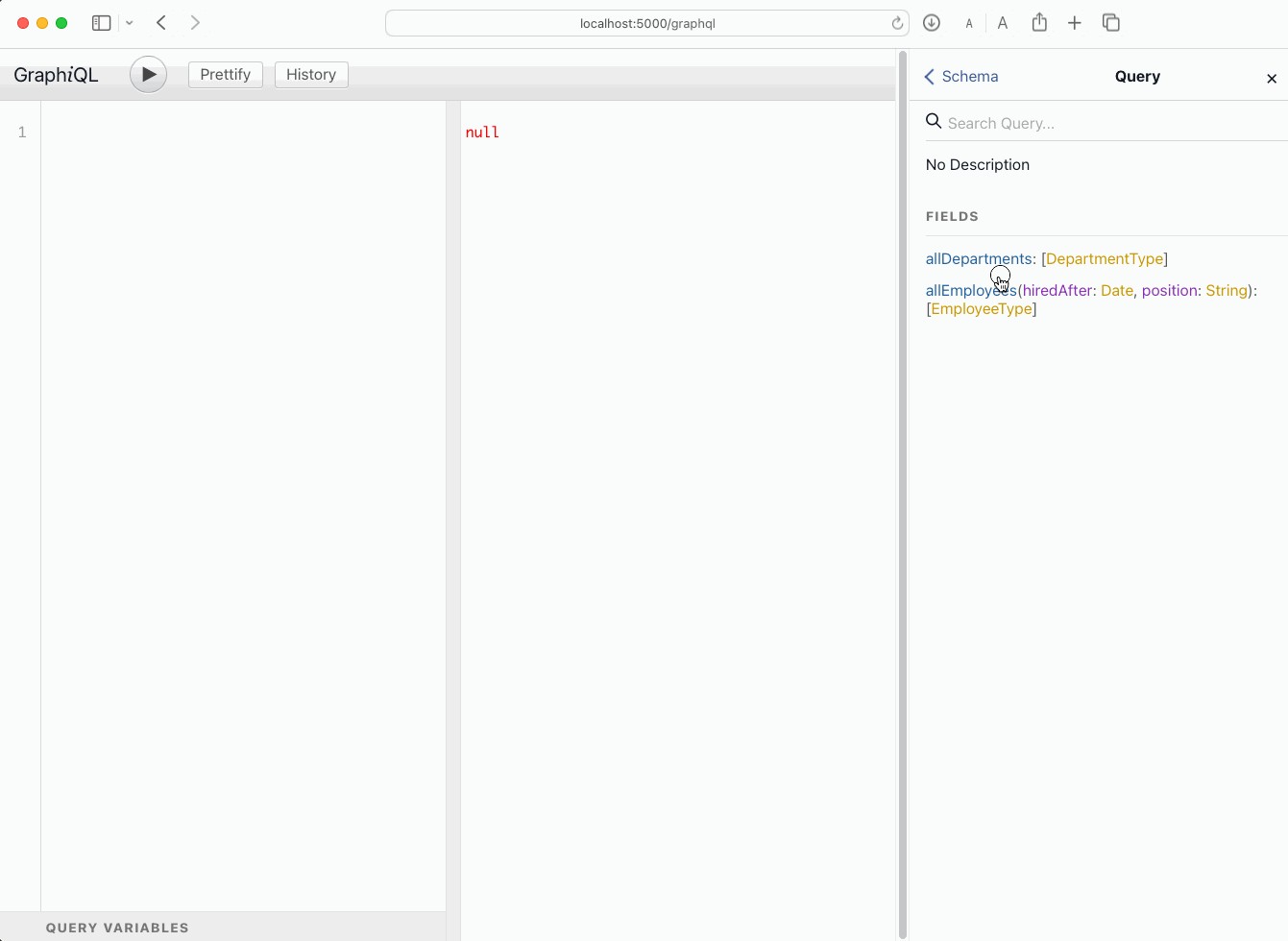
image


GraphQL Best Practices

If you need to work with very large datasets or you need pagination, consider using Relay. Relay introduces Edge and Node concepts for efficient pagination and handling of large datasets.

In the related OpenExchange application you will also find a GraphQL schema implementation using Relay.


Deploying Your WSGI Application in InterSystems IRIS

In case you don't know what WGSI is, just check this article WSGI Support Introduction and the related posts that explain how to deploy Flask, Django and FastAPI applications in IRIS by @Guillaume Rongier

In a nutshell, InterSystems IRIS can deploy WGSI applications now so you can deploy your GraphQL server.

You only need to set up a web application like this:

image

After that, your endpoint will be http://localhost:52773/graphqlserver/graphql


Conclusion

Congratulations! You’ve built a GraphQL server on top of InterSystems IRIS, explored its basic features, and even deployed it as a WSGI application. This demonstrates how flexible API approaches can integrate seamlessly with enterprise-grade data platforms like InterSystems IRIS.


If you are still awake, thanks for reading 😄! I'll give you a final fun fact:

  • Did you know that GraphQL was developed at Facebook in 2012 and open-sourced in 2015? Now it powers sites like GitHub, Shopify, and Twitter.
3
1 412
Announcement Celeste Canzano · Feb 24, 2025

Hi Everyone!

The Certification Team of InterSystems Learning Services is currently developing an InterSystems ObjectScript Specialist certification exam. Earlier this month we reached out to our community for feedback that will help us evaluate and establish the contents of this exam. We are still currently accepting responses and would love to hear your feedback!

Please note that this is one of two exams being developed to replace our InterSystems IRIS Core Solutions Developer exam. You can find more details about the other exam, InterSystems IRIS Developer Professional exam, here

0
0 79
Question Warren Oyco · Feb 21, 2025

Hi Community,

I've created a method in my File Service to do a cleanup for every file load. Currently, I've set it to delete data when LastUpdated date is greater than maxdate. However, I want to do a cleanup for every new file load. Any suggestions or advice on how to do this? Thanks!

Method Cleanup()
{

   Set tMaxDate = ""
   &SQL(SELECT Max(LastUpdated) into :tMaxDate
   FROM MC_Table_Data.Patient) 
 

   &SQL(DELETE MC_Table_Data.Patient WHERE LastUpdated<:tMaxDate)
}

0
0 73
Question omer · Jan 14, 2025

Hello,

So i want to use the INSERT OR UPDATE command so i can update a COUNTER for a given name:

INSERT OR UPDATE myTable
SET name='Omer',  counter = counter + 1;


as you can see with the above code - if the row is non-existent then we get an error because COUNTER is NULL! 
I tried the following to fix this but all have failed:


INSERT OR UPDATE myTable
SET name = 'Omer', 
    counter = CASE 
        WHEN counter IS NULL THEN 1 
        ELSE counter + 1
    END


INSERT OR UPDATE myTable SET name='Omer',counter = COALESCE(counter + 1, 1)

26
0 314
Announcement Ikram Shah · May 18, 2024

Hi Community,

This is a detailed, candid walkthrough of the IRIS AI Studio platform. I speak out loud on my thoughts while trying different examples, some of which fail to deliver expected results -  which I believe is a need for such a platform to explore different models, configurations and limitations. This will be helpful if you're interested in how to build 'Chat with PDF' or data recommendation systems using IRIS DB and LLM models.

2
2 274
InterSystems Official Daniel Palevski · Feb 19, 2025

February 19, 2025 – Alert: SQL Queries Returning Wrong Results

InterSystems has corrected two issues that can cause a small number of SQL queries to return incorrect results. In addition, InterSystems has corrected an inconsistency in date/time datatype handling that may lead to different, unexpected – yet correct – results for existing applications that rely on the earlier, inconsistent behavior.

DP-436825: SQL Queries with Lateral Join May Return Wrong Results

0
1 136
Question omer · Jan 13, 2025

Hello! 
So my question is quite simple, Do the different data models of Intersystems all support the ACID properties?
I assume that for the SQL data model implementation it does, But does it also work for global (i.e the hierarchical  data model)?
I searched the docs and the different articles, It seems for example that here its implied that the different data models of
Intersystems  DO indeed support the ACID properties and allow for safe insertion, deletion etc... in concurrent operations to the server that is.

Would love to get a clarification, Thx!

8
0 205
Article Julio Esquerdo · Feb 10, 2025 7m read

Using SQL Gateway with Python, Vector Search, and Interoperability in InterSystems Iris

Part 2 – Python and Vector Search

Since we have access to the data from our external table, we can use everything that Iris has to offer with this data. Let's, for example, read the data from our external table and generate a polynomial regression with it.

For more information on using python with Iris, see the documentation available at https://docs.intersystems.com/irislatest/csp/docbook/DocBook.UI.Page.cls?KEY=AFL_epython

Let's now consume the data from the external database to calculate a polynomial regression. To do this, we will use a python code to run a SQL that will read our MySQL table and turn it into a pandas dataframe:

0
0 120
Article Julio Esquerdo · Feb 10, 2025 4m read

Using SQL Gateway with Python, Vector Search, and Interoperability in InterSystems Iris

Part 1 - SQL Gateway

Hello

In this article we will look at the use of SQL Gateway in Iris. SQL Gateway allows Iris to have access to tables from other (external) database via ODBC or JDBC. We can access Tables or Views from various databases, such as Oracle, PostgreSQL, SQL Server, MySQL and others.

0
0 151
Question Eduard Lebedyuk · May 18, 2016

In MySQL I have the following table:

CREATE TABLE `info` (
   `created` int(11)
);

And it is linked (via JDBC SQL Gateway) to Cache table mysql.info.  `created` field stores unix timestamp. So when I execute  this SQL in SMP:

SELECT created FROM mysql.info

I receive the following output (which is expected):

created
1435863691
1436300964

But I want to to display `created` field converted to ODBC timestamp format. To do that I call this SQL procedure

3
0 1007