What is TLS?
TLS, the successor to SSL, stands for Transport Layer Security and provides security (i.e. encryption and authentication) over a TCP/IP connection. If you have ever noticed the "s" on "https" URLs, you have recognized an HTTP connection "secured" by SSL/TLS. In the past, only login/authorization pages on the web would use TLS, but in today's hostile internet environment, best practice indicates that we should secure all connections with TLS.
Why use TLS?
So, why would you implement TLS for HL7 connections? As data breaches, ransomware, and vulnerabilities continue to rise, every measure you take to add security to these valuable data feeds becomes more crucial. TLS is a proven, well-understood method of protecting data in transit.
TLS provides two main features that are beneficial to us: 1) encryption and 2) authentication.
Encryption
Encryption transforms the data in transit so that only the two parties in the conversation can read/understand the information being exchanged. In most cases, only the application processes involved in the TLS connection can interpret the data being transferred. This means that any bad actors on the communicating servers or networks will not be able to read the data, even if they happen to capture the raw TCP packets with a packet sniffer (think wiretapping, wireshark, tcpdump, etc.).

Authentication
Authentication insures that each side is communicating with their intended party and not an impostor. By relying on the exchange of certificates (and the associated proof-of-ownership verification that occurs during a TLS handshake), when using TLS, you can be certain that you are exchanging data with a trusted party. There are several attacks that involve tricking a server into communicating with a bad actor by redirecting traffic to the wrong server (for instance, DNS and ARP poisoning). When TLS is involved, the impostors would not only have to redirect traffic, but they would also have to steal the certificates and keys belonging to the trusted party.
Authentication not only protects against intentional attacks by hackers/bad actors, but it can also protect against accidental misconfigurations that could send data to the wrong system(s). For example, if you accidentally change the IP address of an HL7 connection to a server that is not using the expected certificate, the TLS handshake will fail verification before sending any data to the incorrect server.
Host Verification
When performing verification, a client has the option of performing host verification. This verification compares the IP or hostname used in the connection with the IPs and hostnames embedded in the certificate. If enabled and the connection IP/host does not match an IP/host found in the certificate, the TLS handshake will not succeed. You can find the IPs and hostnames in the "Subject" and "Subject Alternative Name" X.509 fields that are discussed below.
Proving Ownership of a Certificate with a Private Key
To prove ownership of the certificates exchanged with TLS, you also need access to the private key tied to the public key embedded in the certificate. We won't discuss the cryptography used to prove ownership with a private key, but you need to realize that access to your certificate's private key is necessary during the TLS handshake.
Mutual TLS
With most https connections made by your web browser, only the web server's authenticity/certificate is verified. Web servers typically do not authenticate the client with certificates. Instead, most web servers rely upon application-level client authentication (login forms, cookies, passwords, etc.).
With HL7, it is preferred that both sides of the connection are authenticated. When both sides are authenticated, it is called "mutual TLS". With mutual TLS, both the server and the client exchange their certificates and the other side verifies the provided certificates before continuing with the connection and exchanging data.
X.509 Certificates
X.509 Certificate Fields
To provide encryption and authentication, information about each party's public key and identity is exchanged in X.509 certificates. Below are some of the common fields of an X.509 certificate that we will focus on:
Serial Number: A number unique to a CA that identifies this specific certificateSubject Public Key Info: Public key of the ownerSubject: Distinguished name (DN) of the server/service this certificate represents
- This can be blank, if
Subject Alternative Names are provided.
Issuer: Distinguished name (DN) of the CA that issued/signed this certificateValidity Not Before: Start date that this certificate becomes validValidity Not After: Expiration date when this certificate becomes invalidBasic Constraints: Indicates whether this is a CA or notKey Usage: The intended usage of the public key provided by this certificate
- Example values: digitalSignature, contentCommitment, keyEncipherment, dataEncipherment, keyAgreement, keyCertSign, cRLSign, encipherOnly, decipherOnly
Extended Key Usage: Additional intended usages of the public key provided by this certificate
- Example values: serverAuth, clientAuth, codeSigning, emailProtection, timeStamping, OCSPSigning, ipsecIKE, msCodeInd, msCodeCom, msCTLSign, msEFS
- Both
serverAuth and clientAuth usages are needed for mutual TLS connections.
Subject Key Identifier: Identifies the subject's public key provided by this certificateAuthority Key Identifier: Identifies the issuer's public key used to verify this certificateSubject Alternative Name: Contains one or more alternative names for this subject
DNS names and IP addresses are common alternative names provided in this field.Subject Alternative Name is sometimes abbreviated SAN.- The DNS name or IP address used in the connection should be in this list or the
Subject's Common Name for host verification to be successful.
Distinguished Names
The Subject and Issuer fields of an X.509 certificate are defined as Distinguished Names (DN). Distinguished names are made up of multiple attributes, where each attribute has the format <attr>=<value>. While not an exhaustive list, here are several common attributes found in Subject and Issuer fields:
| Abbreviation | Name | Example | Notes |
|---|
| CN | Common Name | CN=server1.domain.com | Usually, the Fully Qualified Domain Name (FQDN) of a server/service |
| C | Country | C=US | Two-Character Country Code |
| ST | State (or Province) | ST=Massachusetts | Full State/Province Name |
| L | Locality | L=Cambridge | City, County, Region, etc. |
| O | Organization | O=Best Corporation | Organization's Name |
| OU | Organizational Unit | OU=Finance | Department, Division, etc. |
Given the examples in the table above, the full DN for this example would be C=US, ST=Massachusetts, L=Cambridge, O=Best Corporation, OU=Finance, CN=server1.domain.com
Note that the Common Name found in the Subject is used during host verification and normally matches the fully qualified domain name (FQDN) of the server or service associated with the certificate. The Subject Alternative Names from the certificate can also be used during host verification.
Certificate Expiration
The Validity Not Before and Validity Not After fields in the certificate provide a range of dates, between which, the given certificate is valid.
Typically, leaf certificates are valid for a year or two (though there is a push for web sites to reduce their expiration windows to much shorter ranges). Certificate authorities tend to have an expiration window of several years.
Certificate expiration is a necessary but inconvenient feature of TLS. Before adding TLS to your HL7 connections, be sure to have a plan for replacing the certificates prior to their expiration. Once a certificate expires, you will no longer be able to establish a TLS connection with it.
X.509 Certificate Formats
These X.509 certificate fields (along with others) are arranged in ASN.1 format and typically saved to file in one of the following formats:
- DER (binary format)
- PEM (base64)
An example PEM-encoding of an X.509 certificate:
-----BEGIN CERTIFICATE-----
MIIEVTCCAz2gAwIBAgIQMm4hDSrdNjwKZtu3NtAA9DANBgkqhkiG9w0BAQsFADA7
MQswCQYDVQQGEwJVUzEeMBwGA1UEChMVR29vZ2xlIFRydXN0IFNlcnZpY2VzMQww
CgYDVQQDEwNXUjIwHhcNMjUwMTIwMDgzNzU0WhcNMjUwNDE0MDgzNzUzWjAZMRcw
FQYDVQQDEw53d3cuZ29vZ2xlLmNvbTBZMBMGByqGSM49AgEGCCqGSM49AwEHA0IA
BDx/pIz8HwLWsWg16BG6YqeIYBGof9fn6z6QwQ2v6skSaJ9+0UaduP4J3K61Vn2v
US108M0Uo1R1PGkTvVlo+C+jggJAMIICPDAOBgNVHQ8BAf8EBAMCB4AwEwYDVR0l
BAwwCgYIKwYBBQUHAwEwDAYDVR0TAQH/BAIwADAdBgNVHQ4EFgQU3rId2EvtObeF
NL+Beadr56BlVZYwHwYDVR0jBBgwFoAU3hse7XkV1D43JMMhu+w0OW1CsjAwWAYI
KwYBBQUHAQEETDBKMCEGCCsGAQUFBzABhhVodHRwOi8vby5wa2kuZ29vZy93cjIw
JQYIKwYBBQUHMAKGGWh0dHA6Ly9pLnBraS5nb29nL3dyMi5jcnQwGQYDVR0RBBIw
EIIOd3d3Lmdvb2dsZS5jb20wEwYDVR0gBAwwCjAIBgZngQwBAgEwNgYDVR0fBC8w
LTAroCmgJ4YlaHR0cDovL2MucGtpLmdvb2cvd3IyLzlVVmJOMHc1RTZZLmNybDCC
AQMGCisGAQQB1nkCBAIEgfQEgfEA7wB2AE51oydcmhDDOFts1N8/Uusd8OCOG41p
wLH6ZLFimjnfAAABlIMTadcAAAQDAEcwRQIgf6SEH+xVO+nGDd0wHlOyVTbmCwUH
ADj7BJaSQDR1imsCIQDjJjt0NunwXS4IVp8BP0+1sx1BH6vaxgMFOATepoVlCwB1
AObSMWNAd4zBEEEG13G5zsHSQPaWhIb7uocyHf0eN45QAAABlIMTaeUAAAQDAEYw
RAIgBNtbWviWZQGIXLj6AIEoFKYQW4pmwjEfkQfB1txFV20CIHeouBJ1pYp6HY/n
3FqtzC34hFbgdMhhzosXRC8+9qfGMA0GCSqGSIb3DQEBCwUAA4IBAQCHB09Uz2gM
A/gRNfsyUYvFJ9J2lHCaUg/FT0OncW1WYqfnYjCxTlS6agVUPV7oIsLal52ZfYZU
lNZPu3r012S9C/gIAfdmnnpJEG7QmbDQZyjF7L59nEoJ80c/D3Rdk9iH45sFIdYK
USAO1VeH6O+kAtFN5/UYxyHJB5sDJ9Cl0Y1t91O1vZ4/PFdMv0HvlTA2nyCsGHu9
9PKS0tM1+uAT6/9abtqCBgojVp6/1jpx3sx3FqMtBSiB8QhsIiMa3X0Pu4t0HZ5j
YcAkxtIVpNJ8h50L/52PySJhW4gKm77xNCnAhAYCdX0sx76eKBxB4NqMdCR945HW
tDUHX+LWiuJX
-----END CERTIFICATE-----
As you can see, PEM encoding wraps the base64-encoded ASN.1 data of the certificate with -----BEGIN CERTIFICATE----- and -----END CERTIFICATE-----.
Building Trust with Certicate Authorities
On the open internet, it would be impossible for your web browser to know about and trust every website's certificate. There are just too many!
To get around this problem, your web browser delegates trust to a pre-determined set of certificate authorities (CAs). Certificate authorities are entities which verify that a person requesting a certificate for a web site or domain actually owns and is responsible for the server, domain, or business associated with the certificate request. Once the CA has verified an owner, it is able to issue the requested certificate.
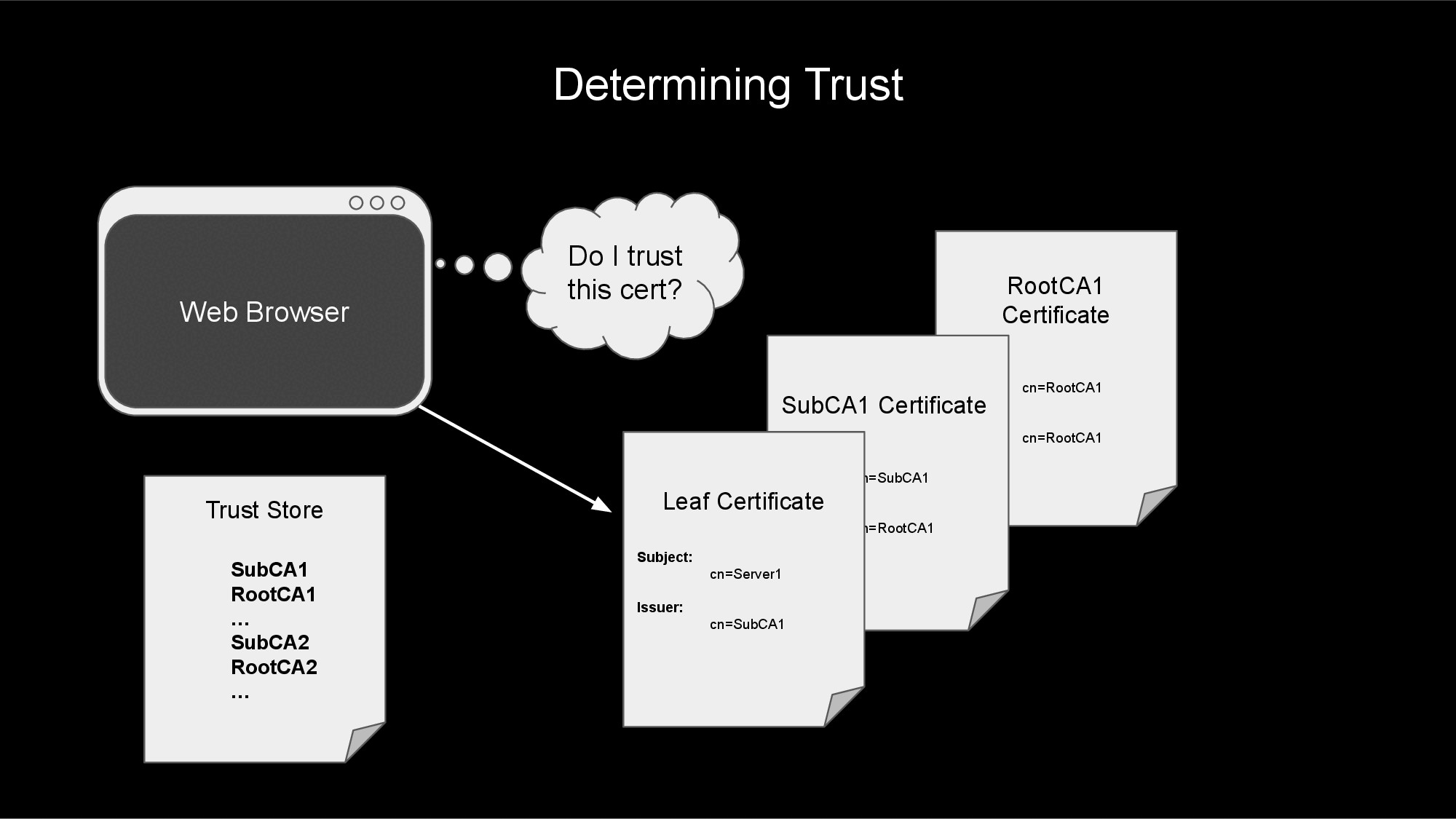
Each certificate authority is represented by one or more X.509 certificates. These CA certificates are used to sign any certificates issued by the CA. If you look in the Issuer field of an X.509 certificate, you will find a reference to the CA certificate that created and signed this certificate.
If a certificate is created without a certificate authority, the certificate is called a self-signed certificate. You know a certificate is self-signed if the Subject and Issuer fields of the certificate match.
Generally, the CA will create a self-signed root certificate with a long expiration window. This root certificate will then be used to generate a couple of intermediate certificate authorities, that have a slightly shorter expiration window. The root CA will be securely locked down and rarely be used after creating the intermediate CAs. The intermediate CAs will be used to issue and sign leaf certificates on a day-to-day basis.
The reason for creating intermediate CAs instead of using the root CA directly is to minimize impact in the case of a breach or mishandled certificate. If a single intermediate CA is compromised, the company will still have the other CAs available to continue providing service.
Certificate Chains
A connection's certificate and all of the CA certificates involved in issuing and signing this certificate can be arranged into a structure called a certificate chain. This certificate chain (as described below) will be used to verify and trust the connection's certificate.
If you follow a connection's leaf certificate to the issuing CA (using the Issuer field), and then from that CA walk to its issuer (and so on, until you reach a self-signed root certifcate) you would have walked the certificate chain.

Trusting a Certificate
Your web browser and operating system typically maintains a list of trusted certificate authorities. When configuring an HL7 interface or other application, you will likely point your interface to a CA-bundle file that contains a list of trusted CAs. This file will usually contain a list of one or more CA certificates encoded in PEM format. For example:
# Maybe an Intermediate CA
-----BEGIN CERTIFICATE-----
MIIDQTCCAimgAwIBAgITBmyfz5m/jAo54vB4ikPmljZbyjANBgkqhkiG9w0BAQsF
...
rqXRfboQnoZsG4q5WTP468SQvvG5
-----END CERTIFICATE-----

# Maybe the Root CA
-----BEGIN CERTIFICATE-----
MIIDqDCCApCgAwIBAgIJAP7c4wEPyUj/MA0GCSqGSIb3DQEBBQUAMDQxCzAJBgNV
...
WyH8EZE0vkHve52Xdf+XlcCWWC/qu0bXu+TZLg==
-----END CERTIFICATE-----
When your web browser (or HL7 interface) attempts to make a TLS connection, it will use this list of trusted CA certificates to determine if it trusts the certificate exchanged during the TLS handshake.
The process will start at the leaf certificate and traverse the certificate chain to next CA certificate. If the CA certificate is not found in the trust store or CA-bundle, then the leaf certificate is not trusted, and the TLS connection fails.
If the CA certificate is found in the trust store or CA-bundle file, then the process continues walking up the certificate chain, verifying that each CA along the way is in the trust store. Once the root CA certificate at the top of the chain is verified (along with all of the intermediate CA certificates along the way), the process can trust the server's leaf certificate.
The TLS Handshake
To add TLS to a TCP/IP connection (such as an HL7 feed), the client and server must perform a TLS handshake after the TCP/IP connection has been established. This handshake involves agreeing on encryption ciphers/methods, agreeing on TLS version, exchanging X.509 certificates, proving ownership of these certificates, and validating that each side trusts the other.
The high-level steps of a TLS handshake are:
- Client makes TCP/IP connection to the server.
- Client starts the TLS handshake.
- Server sends it's certificate (and proof-of-ownership) to the client.
- Client verifies the server certificate.
- If mutual TLS, the client sends it's certificate (and proof-of-ownership) to the server.
- If mutual TLS, the server verifies the client certificate.
- Client and server send encrypted data back and forth.

1. Client makes TCP/IP connection to the server.
During step #1, the client and server perform a TCP 3-way handshake to establish a TCP/IP connection between them. In a 3-way handshake:
- The client sends a
SYN packet. - The server sends a
SYN-ACK packet. - The client sends an
ACK packet.
Once this handshake is complete, the TCP/IP connection is established. The next step is to start the TLS handshake.
2. Client starts the TLS handshake.
After a TCP connection is established, one of the sides must act as the client and start the TLS handshake. Typically, the process that initiated the TCP connection also is responsible for initiating the TLS handshake, but this can be flipped in rare cases.
To start the TLS handshake, the client sends a ClientHello message to the server. This message contains various options used to negotiate the security settings of the connection with the server.
3. Server sends it's certificate (and proof-of-ownership) to the client.
After receiving the client's ClientHello message, the server in turn responds with a ServerHello message. This includes the negotiated security settings.
Following the ServerHello message, the server will also send a Certificate and CertificateVerify message to the client. This shares the X.509 certificate chain with the client and provides proof-of-ownership of the associated private key for the certificate.
4. Client verifies the server certificate.
Once the client receives the ServerHello, Certificate, and CertificateVerify messages, the client will verify that the certificate is valid and trusted (by comparing the CAs to trusted CA-bundle files, the operating system certificate store, or web browser certificate store). The client will also do any host verification (see above) to make sure the connection address matches the certificate addresses/IPs.
5. If mutual TLS, the client sends it's certificate (and proof-of-ownership) to the server.
If this is a mutual TLS connection (determined by the server sending a CertificateRequest message), the client will send a Certificate message including its certificate chain and then a CertificateVerify message to prove ownership of the associated private key.
6. If mutual TLS, the server verifies the client certificate.
Again, if this is a mutual TLS connection, the server will verify that certificate chain sent by the client is valid and trusted.
7. Client and server send encrypted data back and forth.
If the TLS handshake makes it this far without failing, the client and server will exchange Finished messages to complete the handshake. After this, encrypted data can be sent back-and-forth between the client and the server.
Setting Up TLS on HL7 Interfaces
Congratulations on making it this far! Now that you know about TLS, how would you go about implementing TLS on your HL7 connections? In general, here are the steps that you will need to perform to setup TLS on your HL7 connections.
- Choose a certificate authority.
- Create a key and certificate signing request.
- Obtain your certificate from your CA.
- Obtain the certificate chain for your peer.
- Create an SSL config for the connection.
- Add the SSL config to the interface, bounce the interface, and verify message flow.
1. Choose a certificate authority.
The process you use to obtain a certificate and key for your server will greatly depend upon the security policies of your company. In most scenarios, you will end up with one of the following CAs signing your certificate:
- An internal, company CA will sign your certificate.
- This is my favorite option, as your company already has the infrastructure in place to maintain certificates and CAs. You just need to work with the team that owns this infrastructure to get your own certificate for your HL7 interfaces.
- A public CA will sign your certificate.
- This option is nice in the sense that the public CA also has all of the infrastructure in place to maintain certificates and CAs. This option is probably overkill for most HL7 interfaces, as public CAs typically provide certificates for the open internet; HL7 interfaces tend to connect over private intranet, not the public internet.
- Obtaining certificates from a public CA may incur a cost, as well.
- A CA you create and maintain will sign your certificate.
- This option may work well for you, but unfortunately, this means you bear the burden of maintaining and securing your CA configuration and software.
- Use at your own risk!
- This option is the most complex. Get ready for a steep learning curve.
- You can use open source, proven software packages for managing your CA and certificates. The OpenSSL suite is a great option. Other options are EJBCA, step-ca, and cfssl.
2. Create a key and certificate signing request.
After you have chosen your CA, your next step is to create a private key and certificate signing request (CSR). How you generate the key and CSR will depend upon your company policy and the CA that you chose. For now, we'll just talk about the steps from a high-level.
When generating a private key, the associated public key is also generated. The public key will be embedded within your CSR and your signed certificate. These two keys will be used to prove ownership of your signed certificate when establishing a TLS connection.
CAUTION! Make sure that you save your private key in a secure location (preferably in a password-protected format). If you lose this key, your certificate will no longer be usable. If someone else gains access to this key, they will be able to impersonate your server.
The certificate signing request will include information about your server, your company, your public key, how you will use the certificate, etc. It will also include proof that you own the associated private key. This CSR will then be provided to your CA to generate and sign your certificate.
NOTE: When creating the CSR, make sure that you request an Extended Key Usage of both serverAuth and clientAuth, if you are using mutual TLS. Most CAs are used to signing certificates with only serverAuth key usage. Unfortunately, this means that the certificate can not be used as a client certificate in a mutual TLS connection.
3. Obtain your certificate from your CA.
After creating your key and CSR, submit the CSR to your certificate authority. After performing several checks, your CA should be able to provide you with a signed certificate and the associated certificate chain. You will want this certificate and chain saved in PEM format. If the CA provided your certificate in a different format, you will need to convert it using a tool like OpenSSL.
4. Obtain the certificate chain for your peer.
The previous steps were focused on obtaining a certificate for your server. You should be able to use this certificate (and the associated key) with each HL7 connection to/from this server. You will also have to obtain the certificate chains for each of the systems/peers to which you will be connecting.
The certificate chains for each peer will need to be saved in a file in PEM format. This CA-bundle will not need to contain the leaf certificates; it only needs to contain the intermediate and root CA certificates.
Be sure to provide your peer with a CA-bundle containing your intermediate and root CAs. This will allow them to trust your certificate when you make a connection.
5. Create an SSL config for the connection.
In InterSystems's Health Connect, you will need to create client and server SSL configs for each system that your server will be connecting to. These SSL configs will point to the associated system's CA-bundle file and will also point to your server's key and certificate files.
Client SSL configs are used on operations to initiate the TLS handshake. Server SSL configs are used on services to respond to TLS handshakes. If a system has both inbound services and outbound operations, you will need to configure both a client and server SSL config for that system.
To create a client SSL config:
- Go to
System Administration > Security > SSL/TLS Configurations. - Click
Create New Configuration. - Give your SSL configuration a
Configuration Name and Description. - Make sure your SSL configuration is
Enabled. - Choose
Client as the Type. - Choose
Require for the Server certificate verification field. This performs host verification on the connection. - Point
File containing trusted Certificate Authority certificate(s) to the CA-bundle file that contains the intermediate and root CAs (in PEM format) for the system to which you are connecting. - Point
File containing this client's certificate to the file that holds your server's X.509 certificate in PEM format. - Point
File containing associated private key to the file containing your certificate's private key. Private key type will most likely be RSA. This should match the type of your private key.- If you private key is password protected (as it should be), fill in the password in both the
Private key password and Private key password (confirm) fields. - You likely can leave the other fields to their default values.
To create a server SSL config:
- Go to
System Administration > Security > SSL/TLS Configurations. - Click
Create New Configuration. - Give your SSL configuration a
Configuration Name and Description. - Make sure your SSL configuration is
Enabled. - Choose
Server as the Type. - Choose
Require for the Client certificate verification field. This will make sure that mutual TLS is performed. - Point
File containing trusted Certificate Authority certificate(s) to the CA-bundle file that contains the intermediate and root CAs (in PEM format) for the system to which you are connecting. - Point
File containing this server's certificate to the file that holds your server's X.509 certificate in PEM format. - Point
File containing associated private key to the file containing your certificate's private key. Private key type will most likely be RSA. This should match the type of your private key.- If you private key is password protected (as it should be), fill in the password in both the
Private key password and Private key password (confirm) fields. - You likely can leave the other fields to their default values.

6. Add the SSL config to the interface, bounce the interface, and verify message flow.
Once you've created the client and server SSL configs, you are ready to activate TLS on the interfaces. On each service or operation, select the associated SSL config on the Connection Settings > SSL Configuration dropdown found on the Settings tab of the interface.
After bouncing the interface, you should see the connection reestablish. When a new message is tranferred, a Completed status indicates that TLS is working. If TLS is not working, every time a message is attempted, the connection will drop.
To help debug issues with TLS, you may need to use tools such as tcpdump, Wireshark, or OpenSSL's s_client utility.
Summary
This has been a very long deep-dive into the topic of SSL/TLS. There is so much more information that was not included in this article. Hopefully, this has provided you with enough of an overview of how TLS works that you can research the details and learn more information as needed.
If you are looking for an in-depth resource on TLS, check out Ivan Ristić's website, fiestyduck.com and book, Bulletproof TLS and PKI. I have found this book to be a great resource for learning more about the details of TLS.


.png)