#System Administration

0 Followers · 540 Posts

System administration refers to the management of one or more hardware and software systems.

Documentation on InterSystems system administration.

Question Evgeny Shvarov · Dec 14, 2016

Hi, Community!

We have our internal backup system which produces *.cbk files for Full, Incremental and Cumulative backup modes.

Does anyone have an automation procedure to restore this files on some target testing system, check the integrity and mark the files as "restorable"?

Please, share?

Thank you in advance!

2
0 473
Article John Murray · Dec 15, 2016 1m read

Last week I was onsite with a new customer of ours, implementing Deltanji to give them control of their development and deployment cycle. One particularly satisfying part of the visit was seeing their pleasure at how their production class now records its changes over time, allowing them to quickly diff the versions and see what configuration items have been added or what settings altered. ​

0
0 438
Question Eduard Lebedyuk · Dec 14, 2016

I have a server with public web application with Unauthenticated access and there seems to  be a problem that CSP session ends, but associated license persists for some time (hours). If several users log in, we can hit license limit and all the other users get 503 Service unavailable error.

We are currently debugging it and moving to authenticated web applications,  but is there a way to free these licenses quickly?

Here's how it looks like in SMP:


1
0 745
Article Murray Oldfield · Oct 1, 2016 10m read

One of the great availability and scaling features of Caché is Enterprise Cache Protocol (ECP). With consideration during application development distributed processing using ECP allows a scale out architecture for Caché applications. Application processing can scale to very high rates from a single application server to the processing power of up to 255 application servers with no application changes.

ECP was used widely for many years in TrakCare deployments I was involved in. A decade ago a 'big' x86 server from one of the major vendors might only have a total of eight cores. For larger deployments ECP was a way to scale out processing on commodity servers rather than a single large and expensive big iron enterprise server. Even the high core count enterprise servers had limits so ECP was also used to scale deployments on them as well.

Today most new TrakCare deployments or upgrades to current hardware do not require ECP for scaling. Current two-socket x86 production servers can have dozens of cores and huge memory. We see that with recent Caché versions TrakCare -- and many other Caché applications -- have predictable linear scaling with the ability to support incremental increases in users and transactions as CPU core counts and memory increase in a single server. In the field I see most new deployments are virtualised, even then VMs can scale as needed up to the size of the host server. If resource requirements are more than a single physical host can provide then ECP is used to scale out.

  • Tip:For simplified management and deployment scale within a single server before deploying ECP.

In this post I will show an example architecture and the basics of how ECP works then review performance considerations with a focus on storage.

Specific information on configuring ECP and application development is available in the online Caché Distributed Data Management Guide and there is an ECP learning track here on the community.

One of the other key features of ECP is increasing application availability, for details see the ECP section in the Caché high availability guide.


[A list of other posts in this series is here](https://community.intersystems.com/post/capacity-planning-and-performance-series-index)
# ECP Architecture Basics

The architecture and operation of ECP is conceptually simple, ECP provides a way to efficiently share data, locks, and executable code among multiple server systems. Viewed from the application server data and code are stored remotely on a Data server, but are cached in memory locally on the Application servers to provide efficient access to active data with minimal network traffic.

The Data server manages database reads and writes to persistent storage on disk while multiple Application servers are the workhorses of the solution performing most of the application processing.

Multi-tier architecture

ECP is a multi-tier architecture. There are different ways to describe processing tiers and the roles they perform, the following is what I find useful when describing web browser based Caché applications and is the model and terminology for my posts. I appreciate that there may be different ways to break down tiers, but for now lets use my way :)

A browser based application, for example using Caché Server Pages (CSP) uses a multi-tier architecture where presentation, application processing, and data management functions are logically separated. Logical 'servers' with different roles populate the tiers. Logical servers do not have to be kept on separate physical host or virtual servers, for cost effectiveness and manageability some or even all logical servers may be located on a single host or operating system instance. As deployments scale up servers may be split out to multiple physical or virtual hosts with ECP so spreading the processing workload as needed without change to the application.

Host systems may be physical or virtualised depending on your capacity and availability requirements. The following tiers and logical servers make up a deployment:

  • Presentation Tier: Includes the Web Server which acts as gateway between the browser-based clients and the application tier.
  • Application Tier: This is where the ECP Application server sits. As noted above this is a logical model where the application server does not have to be separate from the Data server, and are typically not required to be for all but the largest sites. This tier may also include other servers for specialised processing such as report servers.
  • Data Tier: This is where the Data server is located. The data server performs transaction processing and is the repository for application code and data stored in the Caché database. The Data Server is responsible for reading and writing to persistent disk storage.

Logical Architecture

The following diagram is a logical view of a browser based application when deployed as a three-tier architecture:
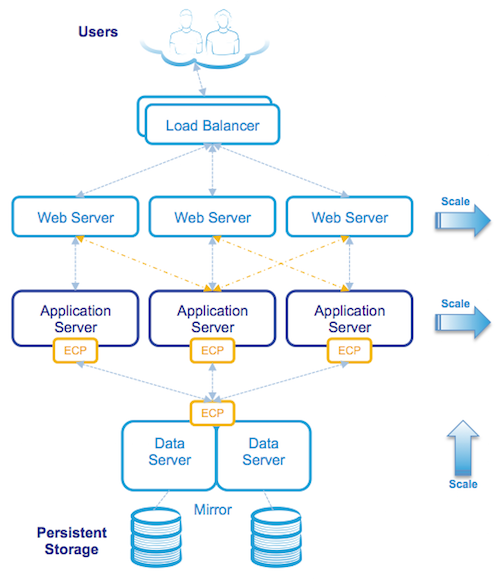
Although at first glance the architecture may look complicated it is still made up of the same components as a Caché system installed on a single server, but with the logical components installed on multiple physical or virtual servers. All communication between servers is via TCP/IP.

ECP Operation in the logical view

Starting from the top the diagram above shows users connecting securely to multiple load balanced web servers. The web servers pass CSP web page requests between the clients and the application tier (the Application servers) which perform any processing, allowing content to be created dynamically, and returns the completed page back to the client via the web server.

In this three-tier model application processing has been spread over multiple Application servers using ECP. The application simply treats the data (your application database) as if it was local to the Application server.

When an Application server makes a request for data it will attempt to satisfy the request from its local cache, if it cannot, ECP will request the necessary data from the Data server which may be able to satisfy the request from its own cache or if not will fetch the data from disk. The reply from the Data server to the Application server includes the database block(s) where that data was stored. These blocks are used and now cached on the Application server. ECP automatically takes care of managing cache consistency across the network and propagating changes back to the Data server. Clients enjoy fast responses because they frequently use locally cached data.

By default web servers communicate with a preferred Application server ensuring that the same Application server services subsequent requests for related data as the data is likely to already be in local cache.

  • Tip:As detailed in the Caché documentation avoid connecting users to application servers in a round-robin or load-balancing scheme wich impacts the benefit of caching on the application server. Ideally the same users or groups of users stay connected to the same application server.

The solution is scaled without user downtime at the Presentation Tier by adding web servers and at the Application Tier by adding additional Application servers. The Data tier is scaled by increasing CPU and memory on the Data servers.

Physical Architecture

The following diagram shows an example of physical hosts used in the same three-tier deployment as the three-tier logical architecture example:

Note that physical or virtualised hosts are deployed at each tier using an n+1 or n+2 model for 100% capacity in event of a host failure or scheduled maintenance. Because users are spread across multiple web and application servers, the failure of a single server affects a smaller population with users automatically reconnecting to one of the remaining servers.

The Data management tier is made highly available, for example located on a failover cluster (e.g. virtualization HA, InterSystems Database Mirroring, or traditional failover clustering) connected to one or more storage arrays. In the event of hardware or service failure clustering will restart the services on one of the surviving nodes in the cluster. As an added benefit, ECP has built-in resiliency and maintains transactional integrity in the event of a database node cluster failover, application users will observe a pause in processing until failover and automatic recovery completes and users then seamlessly resume without disconnection.

The same architecture can also be mapped to virtualised servers, for example VMware vSphere can be used to virtualise Application servers.

ECP Capacity Planning

As noted above the Data server manages database reads and writes to persistent disk while multiple Application servers are the workhorses of the solution performing most of the application processing. This is a key concept when considering system resource capacity planning, in summary:

  • The Data server (sometimes called the Database server) typically performs very little application processing so has low CPU requirements, but this server performs the majority of storage IO, so can have very high storage IOPS i.e. database reads and writes as well as journal writes (more on journal IO later).
  • The Application server performs most application processing so has high CPU requirements, but does very little storage IO.

Generally you size ECP server CPU, memory and IO requirements using the same rules as if you were sizing a very large single server solution while taking into account N+1 or N+2 servers for high availability.

Basic CPU and Storage sizing:

Imagine My_Application needs a peak 72 CPU cores for application processing (remember also accounting for headroom) and is expected to require 20,000 writes during write daemon cycle and a sustained peak 10,000 random database reads.

A simple back of the envelope sizing for virtual or physical servers is:

  • 4 x 32 CPU Application servers (3 servers + 1 for HA). Low IOPS requirements.
  • 2 x 10 CPU Data servers (Mirrored or Clustered for HA). Low latency IOPS requirement is 20K writes, 10K reads, plus WIJ and Journal.

Even though the Data server is doing very little processing it is sized at 8-10 CPUs to account for System and Caché processes. Application servers can be sized based on best price/performance per physical host and/or for availability. There will be some loss in efficiency as you scale out, but generally you can add processing in server blocks and expect a near linear increase in throughput. Limits are more likely to be found in storage IO first.

  • Tip:As usual for HA consider the effect of host, chassis or rack failures. When virtualising Application and Data servers on VMWare ensure vSphere DRS and affinity rules are applied to spread processing load and ensure availability.

Journal synchronisation IO requirements

An additional capacity planning consideration for ECP deployments is they require higher IO and impose a very stringent storage response time requiremenst to maintain scalability for journaling on the Data server due to journal synchronisation (a.k.a. a journal sync). Synchronisation requests can trigger writes to last block in the journal to ensure data durability.

Although your milage may vary; at a typical customer site running high transaction rates I often see journal write IOPS on non ECP configurations in the 10's per second. With ECP on a busy system you can see 100's to 1,000's of write IOPS on the journal disk because of the ECP imposed journal sync's.

  • Tip:If you display mgstat or look at mgstat in pButtons on a busy system you will see Jrnwrts (Journal Writes) which you will be accounting for in your storage IO resource planning. On an ECP Data server there are also Journal Synchronistion writes to the journals disk that are not displayed in mgstat, to see these you will need to look at operating system metrics for your journal disk, for example with iostat.

What are journal syncs?

Journal syncs are necessary for:

  • Ensuring data durability and recoverability in the event of a failure on the data server.
  • They also are triggers for ensuring cache coherency between application servers.

In non-ECP configurations modifications to a Caché database are written to journal buffers (128 x 64K buffers) which are written to journal files on disk by the journal daemon as they fill or every two seconds. Caché allocates 64k for an entire buffer, and these are always re-used instead of destroyed and recreated and Caché just keeps track of the ending offset. In most cases (unless there are a massive updates happening at once) the journal writes are very small.

In ECP systems there is also journal synchronisation. A journal sync can be defined as re-writing the relevant portion of the current journal buffer to disk to ensure the journal is always current on disk. So there are many re-writes of a portion of the same journal block (anywhere between 2k and 64k in size) from journal sync requests.

Events on an ECP client that can trigger a journal sync request are updates (SET or KILL), or a LOCK. For example for each SET or KILL the current journal buffer is written (or rewritten) to disk. On very busy systems journal syncs can be bundled or deferred into multiple sync requests in a single sync operation.

Capacity planning for journal syncs

For sustained throughput average write response time for journal sync must be:

  • <=0.5 ms with maximum of <=1 ms.

For more information see the IO requirements table in this post: Part 6 - Caché storage IO profile.

  • Tip:When using Caché Database Mirroring with ECP journal syncs are applied on both primary and backup mirror node journal disks. This should not be a concern as a rule of mirror configuration is both nodes will be configured as equals for storage IO.

You will have to validate specific IO metrics for you own systems, the aim of this section is to share with you that there are very strict response time requirements and understanding where to look for metrics.

Summary

This post is an orientation to ECP and additional metrics to consider during capacity planning. In the near future I hope we can share results of recent benchmarking of Caché and ECP on some very large systems. As usual please let me know if you have any questions or anything to add through the comments. On twitter @murray_oldfield

6
2 3492
Question Manoj Jayaraj · Dec 5, 2016

Hello folks,

      We have recently upgraded the cache (5.x) to cache 2016. All are working perfectly. But i am struggling in Telnet.

Working Good,

      when i connect to telnet it automatically gets the username(for example when we give the system ip addr(148.168.2.50), the ip address is taken as username) and directly goto the Password field in Telnet on old cache (5.x).

Now my problem is,

      I can't get the same from my new upgrade instance 2016. When i connect to telnet  it directly goes to username field but not to password field.

What is the problem ?

5
0 554
Article Mark Bolinsky · Dec 5, 2016 26m read

Enterprises need to grow and manage their global computing infrastructures rapidly and efficiently while simultaneously optimizing and managing capital costs and expenses. Amazon Web Services (AWS) and Elastic Compute Cloud (EC2) computing and storage services meet the needs of the most demanding Caché based application by providing
 a highly robust global computing infrastructure.

0
3 8508
Question Chip Gore · Nov 23, 2016

Hi -

I know that when specifying Caché password rules (i.e. what constitutes a valid password definition) that the "Pattern Matching" logic is what is getting leveraged under the covers to enforce the "A Password Must conform to X" rule. I was hoping that people could share some more sophisticated pattern matching rules. (in particular, I was wondering what a rule that would require non-repeating mixture of letter, numbers, & punctuation of an overall minimal size)

3
0 734
Question Dmitry Maslennikov · Nov 24, 2016

Just curious how many companies use in their work Docker containers, I mean not only with InterSystems products. And if such companies exist, which of them uses docker and doesn't  use it for InterSystems products  by some reasons. What are the reasons? For companies which already uses InterSystems in containers, how do you use it? Development environment, testing or even in production ?

And if you don't use but thought about it, what are the reasons which stop you.

As for me, I've been using InterSystems Caché inside a Docker container in some different cases:

2
0 873
Article Can (Jon) Gencler · Nov 8, 2016 5m read
Importance and Collection of Exact Version Information ($zv / $zversion)
 
The explanation of:
- why collecting $zv is important (The WHY),
- what the components of $zv mean (The WHAT),
- and how to collect $zv (The HOW). 
(The Ultimate $zv Guide to the ISC Galaxy in large, friendly letters)
4
1 1668
Article Murray Oldfield · Nov 12, 2016 5m read

Index

This is a list of all the posts in the Data Platforms’ capacity planning and performance series in order. Also a general list of my other posts. I will update as new posts in the series are added.


You will notice that I wrote some posts before IRIS was released and refer to Caché. I will revisit the posts over time, but in the meantime, Generally, the advice for configuration is the same for Caché and IRIS. Some command names may have changed; the most obvious example is that anywhere you see the ^pButtons command, you can replace it with ^SystemPerformance.


While some posts are updated to preserve links, others will be marked as strikethrough to indicate that the post is legacy. Generally, I will say, "See: some other post" if it is appropriate.


Capacity Planning and Performance Series

Generally, posts build on previous ones, but you can also just dive into subjects that look interesting.


Other Posts

This is a collection of posts generally related to Architecture I have on the Community.


Murray Oldfield Principle Technology Architect InterSystems

Follow the community or @murrayoldfield on Twitter

0
7 6484
Question sansa stark · Nov 10, 2016

Hi All,

We are accessing the InterSystems`s cache database via UNIX ODBC and displaying the data in PHP website . Recently we have upgraded the PHP version to 5.6.  We are getting the nondisplayable characters (�) for only strings. But the numbers and date fields are displaying correctly. 

While querying the database via ISQL everything working fine (No Special characters).

I have looked around the internet and found the PHP 5.6 changed the default character to UTF-8.

For this issue anything, we can do from cache side.

cache version :

3
0 1499
Article Jorma Sinnamo · Nov 8, 2016 4m read

This is the first article in a series discussing how to regain disk space from Caché databases at the operating system level. This introductory article discusses Caché database growth and gives an overview of various methods you can use to return unused disk space that is allocated to database files back to the file system. But before we talk about returning space to the file system, let’s first review how does it get allocated in the first place.

0
0 1988
InterSystems Official Andreas Dieckow · Nov 7, 2016
Starting with the Field Test of 2017.1 InterSystems products will include Feature Tracker. It is enabled by default during the Field Test and is explained more fully in the product documentation included below. Information collected by Feature Tracker is limited to technology usage information and instance identification.  This tool has been carefully crafted to not transmit sensitive information related to customer applications or data. It is important to note that sharing of information about your system is under your control and the information being shared with InterSystems is always
0
0 956
Question Tirthankar Bachhar · Nov 4, 2016

As per the documentation of QueueCountAlert:Number of messages on this item's queue needed to trigger an Alert message to be sent. Note that no further alerts will be sent unless the number of messages on the queue drops below 80% of this number and then rises again to this number.Note that this alert will be sent even if AlertOnError is False.Zero means no alerts of this type will be sent.Now, the question is,If QueueCountAlert is set to 10, and the queue size become 11 we will be getting email once.Now, if queue count does not decrease, and keeps increasing further after sometime, how do we

6
0 558
Question Nikita Savchenko · Nov 2, 2016

Hello community!

I am trying to set up Startup Tag^Routine field for the UnknownUser as follows:

And my simple routine is the next:

Calling do ZitRoStart^ZitRo in the terminal prints "Hello", but when opening Caché Terminal it results with the next:

And the terminal closes.

// Cache for Windows (x86-64) 2016.2 (Build 636U) Wed Apr 13 2016 20:58:35 EDT

What am I doing wrong in setup?

Thank you very much!

6
0 817
Article Isaac Aaron · Jun 21, 2016 1m read

Hello

I have noticed that Cache (2016.1 at the time of writing) doesn't come with a systemd startup script for RHEL7.

Here is a small example script I have built.

[Unit]
Description=Intersystems Cache

[Service]
Type=forking
ExecStart=/bin/bash -c '/usr/cachesys/cstart 2>&1 | logger -t cache_start'
ExecStop=/bin/bash -c '/usr/cachesys/cstop quietly 2>&1 | logger -t cache_stop'
RemainAfterExit=yes

[Install]
WantedBy=multi-user.target

The file should be placed as /usr/lib/systemd/system/cache.service

After saving the file, use these commands to install and run the Cache service

8
0 2280
Article Murray Oldfield · Apr 1, 2016 3m read

A short post for now to answer a question that came up. In post two of this series I included graphs of performance data extracted from pButtons. I was asked off-line if there is a quicker way than cut/paste to extract metrics for mgstat etc from a pButtons .html file for easy charting in Excel.

See: - Part 2 - Looking at the metrics we collected

pButtons compiles data it collects into a single html file to make it easier to send to WRC and review the collated data. However, especially for pButtons run over long collection times like 24 hours, some of the time based data like mgstat, vmstat etc is easier to review graphically to look for trends or patterns.

I know it sounds crazy to roll up pButtons data into an html file then spend time unpacking it… but remember that pButtons is tool for WRC to grab a view of many system metrics to help trouble-shoot performance problems. The system level metrics and Caché metrics can be run individually, but it is convenient for me to use pButtons in this series to capture and analyse performance metrics because I know that all Caché installations will have a copy - or can download a copy - and all the basic metrics are available for different operating systems in a single file. It is also convenient for you to be able to capture these metrics every day with one simple routine if you are not collecting the data any other way.

Feb 2017. I have rewritten the scripts in this article in Python and added charting including interactive html. I think the Python utilities are much more useful . Please see Yape - Yet another pButtons extractor (and automatically create charts)

Extracting pButtons performance metrics to a csv file

Because I use an Apple laptop I have the Unix operating system, so its natural to write a quick shell script to extract the data to a csv file. The following script extracts mgstat, vmstat or Windows Performance Monitor data from a pButtons .html file. The example below uses Perl which is installed on most *nix systems, but there are endless possibilities using other scripting languages or powershell on Windows.

I will show you how I do the extraction so you have all the information you to do the same with your favourite tools. The key is that the html file has markers in the file to delimit the metrics. For example mgstat is bracketed by:

<!-- beg_mgstat -->

and

<!-- end_mgstat -->

In the mgstat section there is some other descriptor information, followed by the heading line of the mgstat output. There are similar markers for vmstat and win_perfmon.

This simple script simply looks for the beginning marker then outputs everything from the header line to the line before the end marker.

#!/usr/bin/perl

# extract_pButtons.pl - Simple extractor for pButtons

# usage: ./extract_pButtons.pl <input pButtons> <search start> <search first line output>

# pButtons has the following markers in the html source
# Metrics   					Parameters to pass
# --------  					-------------------
# mgstat						mgstat Date
# windows performance monitor	win_perfmon Time
# vmstat 						vmstat fre

# usage example - Search for mgstat and redirect to .csv file
# ./extract_pButtons.pl DB1_20160211_0001_24Hour_5Sec.html mgstat Date > myMgstatOutput.csv

# usage example - Process a set of html files          
# for i in $(ls *.html); do ./extract_pButtons.pl ${i} vmstat fre > ${i}.vmstat.csv ; done

# usage example - Pipeline to add commas 
# ./extract_pButtons.pl P570A_CACHE_20150418_0030_day.html vmstat fre | ./make_csv.pl >P570A_CACHE_20150418_0030_day.html.vmstat.csv

$filename=$ARGV[0];
$string=$ARGV[1];
$firstLine=$ARGV[2];

$searchBeg="beg_".$string;
$search2=$firstLine;
$foundEnd="end_".$string;

$foundString=0;
$printIt=0;
$break=0;

open HTMLFILEIN, "<".$filename or die "Bad input file";

while (<HTMLFILEIN>) {

	if (/$searchBeg/) {
			$foundString=1;
		}

	# Look for first actual line - use something on header line
	if (($foundString==1) && (/$search2/)) {
			$printIt=1;
		}
 
	 # No more data	
	if (/$foundEnd/) {
			$break=1;
		}

	if ($break==0) {
	
		if ($printIt==1) {
			print;
		}
	}	

}

close HTMLFILEIN;

As shown in the # comments at the start of the script extract_pButtons.pl can either output data to the screen or redirect output to a csv file or use pipelining in a longer workflow, for example to charting utilities. I use open source gnuplot, but excel is OK as well.

Add commas to space delimited text file

The following short perl script is handy to turn the output of vmstat or other text file to a comma delimited file for easier processing.

#!/usr/bin/perl

# Convert space delimited text file to csv

# Usage example 1: 
# Will create backup file vmstat.csv.bak and original file called vmstat.csv will be updated
# ./make_csv.pl freecnt.csv


# Usage example 2:
# No backup, original vmstat.txt file stays same, new output csv file
# ./make_csv.pl < vmstat.txt >freecnt.csv


use strict;

# create .bak backup file for each change
$^I = ".bak";


while (<>) {
	# remove leading blanks; substitute 1 or more blanks for a single comma
	s/^ +//;s/ +/,/g;
	print;
 }

Summary

I encourage you to look at the .html source of the pButtons file to get an idea of what it contains. There is more than just the system metrics. For example you will see a list of the commands run by pButtons and version information at the top of the .html file.

If you use a windows script for extracting or charting data or have a better or different workflow I encourage you to share with a post to the Developer Community.

2
0 1577
Article Andrew Krammen · Nov 4, 2016 4m read

This is a follow-up to Murray's article for scripting pButtons data extraction on Unix/MacOS:     Extracting pButtons data to CSV for UNIX/MacOS

###Extracting pButtons data to a CSV file on Windows

PowerShell scripting was used in this article because it is available by default on Windows platforms.

The script, Extract_pButtons.ps1, will search the given pButtons file until it finds the marker for the beginning of the section. The section will be printed line-by-line, from the header to the line before the section end marker.

Additional parameters are passed in to the script to include the header line and convert the output to CSV format (spaces will be replaced with commas and any leading spaces on each line are removed). The mgstat and win-perfmon sections are already in comma-delimited format whereas vmstat is not.

<# Extract_pButtons.ps1
#
# Usage:    ./Extract_pButtons.ps1 <input pButtons> <input searchName> <header text> <convert to CSV>
#
# pButtons has the following markers in the html source:
# Metrics                          Parameters to pass
# -------                          -------------------
# mgstat                             mgstat Date 0
# Windows performance monitor        win_perfmon Time 0
# vmstat                             vmstat fre 1
#
# Usage examples:
#   Search for mgstat and redirect to .csv file:
#     ./Extract_pButtons.ps1 CACHE_20161018_0001_24hours.html mgstat Date 0 > mgstatOuptut.csv
#
#   Search for vmstat, convert to CSV, include header, and redirect to .csv file:
#     ./Extract_pButtons.ps1 CACHE_20161018_0001_24hours.html vmstat fre 1 > vmstatOutput.csv
#
#   Search for win_perfmon and redirect to .csv file:
#     ./Extract_pButtons.ps1 CACHE_20161018_0001_24hours.html win_perfmon Time 0 > winperfmonOutput.csv
#>

Param(
    [string]$pButtonFilePath,
    [string]$searchName,
    [string]$headerText,
    [bool]$convertToCSV
)

# Resolve the full path of the pButtons file and open for reading.
$pButtonFilePath = Resolve-Path $pButtonFilePath
$fileReader = [System.IO.File]::OpenText($pButtonFilePath)

try { 
    $printHeader = 0
    $foundString = 0
    $line = $fileReader.ReadLine()
    while (($line -ne $null) -and (-Not $line.Contains("end_"+$searchName))) {
        # When desired section is found, read each line until the end of section is found
        if ($line.Contains("beg_"+$searchName)) {
            $foundString = 1
        }
             
        # Start extracting at the header line
        if (($foundString -eq 1) -and ($line.Contains($headerText))) {
            $printHeader = 1
        }

        # Print out the current line and read the next line
        if ($printHeader -eq 1) {
            # If specified, convert spaces to commas (remove leading space)
            if ($convertToCSV -eq 1) {
                $line = $line.Trim() -Replace '\s+',','
            }
            # Print out the current line
            $line
        }
        $line = $fileReader.ReadLine()
     }
} 
finally {
    $fileReader.Close()
}

Note: Windows PowerShell default execution policy does not permit any scripts to run. At PowerShell prompt type get-help about_signing to understand PowerShell policy and instructions for enabling script execution.

###Extracting multiple pButtons files in a directory

PowerShell does not seem to have a simple approach to looping through all files in a directory so I created a secondary script to provide this functionality: Extract_Directory.ps1

Given a directory path, the script filters for files ending in .html and calls ./Extract_pButtons.ps1 for each file. This script also accepts the same parameters for printing the header, converting to CSV, and also allows for an output file name to append for each pButtons file.

<# Extract_Directory.ps1
#
# Usage:  ./Extract_Directory.ps1 <input_Directory> <input_searchName> <header text> <convert to CSV><output filename>
#
# Process a list of html files for mgstat data:
#   ./Extract_Directory.ps1 C:\Users\akrammen\Documents mgstat Date 0 mgstatOutput.csv
#
# Process a list of html files for vmstat data:
#   ./Extract_Directory.ps1 C:\Users\akrammen\Documents vmstat fre 1 vmstatOutput.csv
#>
Param(
    [string]$directoryPath,
    [string]$searchName,
    [string]$headerText,
    [bool]$convertCSV,
    [string]$outputFileName
)

# Get all files from the given directory, filter *.html extensions
$filelist = Get-ChildItem $directoryPath -Filter *.html

# For each pButtons file in the directory, extract the section data
for ($i=0; $i -lt $filelist.Count; $i++) {
    $filename = $filelist[$i].FullName

    # If an output file name is defined, write to the new file
    if ($outputFileName.Length -gt 0) {
        $outfile = $filename.SubString(0,$filename.IndexOf(".html")) + "_" + $outputFileName
        # Call Extract_pButtons.ps1 for each file
        ./Extract_pButtons.ps1 $filename $searchName $headerText $convertCSV > $outfile
    } else {    # Print results to the screen
        # Call Extract_pButtons.ps1 for each file
        ./Extract_pButtons.ps1 $filename $searchName $headerText $convertCSV
    }  
}

###Summary As Murray suggested, review the pButtons .html files to gain a better understanding of what information is contained within as well as how the file is structured. This knowledge will not only make scripting the data manipulation easier but may help discover data that is useful for performance investigations.

PowerShell is not the only option available for Windows but exists by default. I created a similar script using VBScript with a similar level of complexity which can be included if anyone is interested.

0
0 898
Article Jeff Morgan · Oct 17, 2016 2m read

When running the built in Ensemble Purge task (Ens.Util.Tasks.Purge) there are three parameters DaysToKeep, BodiesToo, and KeepIntegrity.  This article focuses on the KeepIntegrity boolean parameter, but more information about running this task can be found here:

http://docs.intersystems.com/latest/csp/docbook/DocBook.UI.Page.cls?KEY…

KeepIntegrity determines which Ensemble Messages are marked for deletion within the time specified by DaysToKeep. 

2
1 1173
Article Alexey Maslov · Sep 30, 2016 2m read

After reading Stephen Wilson's article "Windows 7 performs shutdown too fast for Cache to close and so it gets forced down" I've recalled another solution that was based on Local Group Policy, which allows to control extra actions that should occur on computer startup or shutdown. How to add a computer shutdown script is well documented in MS Technet article. In short:

1
0 1083