Importance and Collection of Exact Version Information ($zv / $zversion)
The answer to most problems and questions depend on the version of the product used. Sometimes the major release version (i.e. 2016.1) is sufficient. However, the maintenance release version, the build, and/or the adhoc information are often necessary. The exact version information also contains information on the OS (what OS and its architecture) and the character encoding of the product (8-bit vs Unicode), which can be useful or necessary to know.
Some situations where the exact version information is necessary include (but are not limited to) looking at our internal code to determine whether a certain development change (fixing a bug or introducing a new feature) is in the customer’s version; determining the exact code location of an error; or trying to reproduce the behavior seen.
The most comprehensive version information is obtained from the $ZVersion ($zv) string.
The WHAT:
Cache for UNIX (Red Hat Enterprise Linux for x86-64) 2016.1.1 (Build 108U) Wed Jul 6 2016 16:02:29 EDT
Cache for UNIX (Apple Mac OS X for x86-64) 2016.1 (Build 531U) Tue Aug 11 2015 23:54:30 EDT
Cache for UNIX (IBM AIX for System Power System-64) 2016.1 (Build 653) Tue Mar 1 2016 17:25:29 EST
Cache for UNIX (Oracle Solaris for SPARC-64) 2016.1.1 (Build 108U) Wed Jul 6 2016 16:13:11 EDT
Cache for UNIX (HP HP-UX for Itanium) 2015.2.1 (Build 705_0_16197U) Fri Mar 11 2016 12:33:38 EST
Cache for Windows (x86-64) 2015.2.2 (Build 811U) Thu Mar 3 2016 12:55:48 EST
Cache for OpenVMS/IA64 V8.x (Itanium) 2014.1.3 (Build 775 + Adhoc 14741) 8-JAN-2015 03:41:01.57
Cache for OpenVMS/ALPHA V8.x (Alpha) 2014.1.3 (Build 775 + Adhoc 14809) 29-JAN-2015 21:39:56.22
Cache for OpenVMS/IA64 V8.x (Itanium) 2012.1.2 (Build 702U + Adhoc 12945) 24-JUL-2013 17:36:08.03
Cache for Windows (x86-64) 2013.1 (Build 446_0_13965U) Thu May 15 2014 18:18:59 EDT
The HOW:
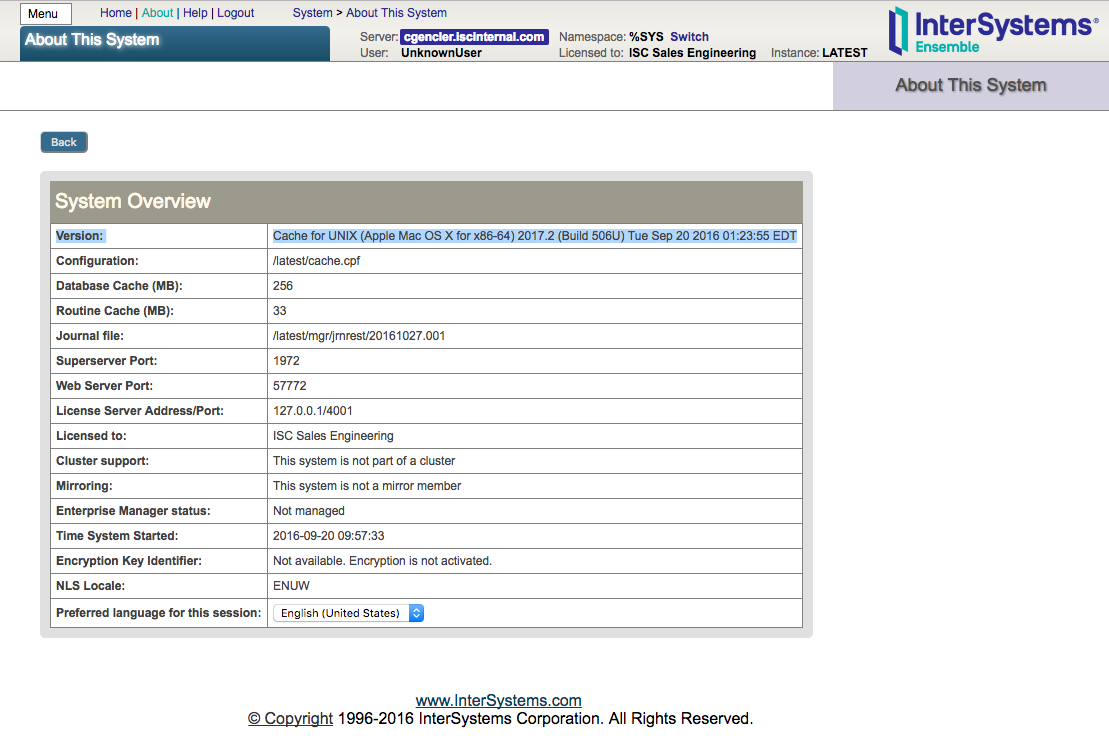
1) From the Management Portal, you can get the version information by navigating to the About link. The Version item shows the $zv string. If this is a HealthShare instance, $zv will be followed by the component version information.
3) Another method to get the $zv information is through the cconsole.log, which can be found under the instance’s mgr directory. However for HealthShare, this does not include the component information. Sending the cconsole.log might be particularly useful if there have been recent upgrades and hence multiple $zv's or the cconsole.log is already needed by the WRC problem.
...
09/20/16-09:57:32:186 (83645) 0 Allocated 364MB shared memory: 256MB global buffers, 35MB routine buffers
09/20/16-09:57:32:196 (83645) 0 Jrn info from prior WIJ (imflags: 0):
    wdpass: 0
    jrnwdpass: 34
    fspec: /latest/mgr/jrnrest/20160920.007
    filecnt: 6
    fileoff: 0
    prevfcnt: 6
    prevfileoeff: 0
    min trans cnt: 6
    min trans index: 205816
09/20/16-09:57:32:207 (83645) 0
CSTART of Cache for UNIX (Apple Mac OS X for x86-64) 2017.2 (Build 506U) Tue Sep 20 2016 01:23:55 EDT.
    in /latest/mgr
    with wij: /latest/mgr/CACHE.WIJ
    from: /latest/mgr/
09/20/16-09:57:32:207 (83645) 0
  OS=[Darwin], version=[Darwin Kernel Version 15.6.0: Thu Jun 23 18:25:34 PDT 2016; root:xnu-3248.60.10~1/RELEASE_X86_64], release=[15.6.0], machine=[x86_64]
  nodename=[cgencler.iscinternal.com].
  numasyncwijbuf: 0, swdwrtmax: 64, wijdirectio: off, synctype: 3
  System Initialized.
...
4) Similarly, if the WRC problem needs a ^Buttons, ^pButtons, cstat, CacheHung, Diagnostic Report the $zv information will be included in these reports (again, for HealthShare, these will not include the component information).
Comments
To expand on Can's point about HealthShare version strings, don't forget that in a federated (as opposed to centralized) HealthShare Information Exchange Environment, you will have more than one instance of HealthShare.
In some cases, we support running different versions of HealthShare on different instances. If that's the case, please be sure to include the Full HealthShare Version string write ##class(%ZHSLIB.HealthShareMgr).VersionInfo() of all instances since they MIGHT be different!
We use TRC, which has a dropdown full of different versions (for some reason, all of them). Why the disparity? Also, why not make this a profile field that is saved in the WRC/TRC system so your customers don't have to look it up or copy/paste it every time? In our case we use CCR, not sure if that's typical, but it has all our environments and their version info. Why can't I just select which environment/system I'm reporting a ticket for in TRC/WRC?
Customers often have many systems, e.g., they may have live, stage, or dev environments or be testing a new version, so unfortunately it isn't reliable or practical for us to keep track of a customer's version. HealthShare also has multiple components, which may be upgraded separately.
I wasn't suggesting you manage it. In our case, we already have all the info in CCR. Integrate that. If you don't have CCR, let me manage my environments in some sort of interface so I can just select it when I submit a new TRC.
Your response of "Healthshare is really confusing" is the exact reason you should seek out opportunities to simplify things for your customers.