1. IRIS RAG Demo

This demo showcases the powerful synergy between IRIS Vector Search and RAG (Retrieval Augmented Generation), providing a cutting-edge approach to interacting with documents through a conversational interface. Utilizing InterSystems IRIS's newly introduced Vector Search capabilities, this application sets a new standard for retrieving and generating information based on a knowledge base.
The backend, crafted in Python and leveraging the prowess of IRIS and IoP, the LLM model is orca-mini and served by the ollama server.
The frontend is an chatbot written with Streamlit.
1.1. What is RAG?
RAG stand for Retrieval Augmented Generation, it bring the ability to use an LLM model (GPT-3.5/4, Mistral, Orca, etc.) with a knowledge base.
Why is it important? Because it allows to use an knowledge base to answer questions, and use the LLM to generate the answer.
For example, if you ask "What is the grongier.pex module?" directly to the LLM, it will not be able to answer, because it does not know what is this module (and maybe you don't know it either 🤪).
But if you ask the same question to RAG, it will be able to answer, because it will use the knowledge base that know what grongier.pex module is to find the answer.
Now that you know what is RAG, let's see how it works.
1.2. Introducing IRIS Vector Search and Its Impact on RAG
IRIS Vector Search revolutionizes how applications can interact with large volumes of unstructured data. By embedding Vector Search into a RAG framework, this demo not only demonstrates the capability to query complex information but also to generate contextually relevant responses. This is a significant leap forward, as it allows for a deeper and more nuanced understanding of the content, far surpassing traditional keyword-based search methods.
1.3. How IRIS Vector Search Empowers RAG
The integration of IRIS Vector Search within a RAG application framework brings the concept of "chat with your documents" to life. By leveraging vector embeddings for document retrieval, IRIS Vector Search enables the application to understand and match the semantic context of user queries with relevant documents in the knowledge base. This method ensures highly accurate and context-aware responses, enhancing the overall user experience.
1.4. How it works?
First, we need to understand how LLMS works. LLMS are trained to predict the next word, given the previous words. So, if you give it a sentence, it will try to predict the next word, and so on. Easy, right?
To interact with an LLM, usually you need to give it a prompt, and it will generate the rest of the sentence. For example, if you give it the prompt What is the grongier.pex module?, it will generate the rest of the sentence, and it will look like this:
I'm sorry, but I'm not familiar with the Pex module you mentioned. Can you please provide more information or context about it?
Ok, as expected, it does not know what is the grongier.pex module. But what if we give it a prompt that contains the answer? For example, if we give it the prompt What is the grongier.pex module? It is a module that allows you to do X, Y and Z., it will generate the rest of the sentence, and it will look like this:
The grongier.pex module is a module that allows you to do X, Y and Z.
Ok, now it knows what is the grongier.pex module.
But what if we don't know what is the grongier.pex module? How can we give it a prompt that contains the answer?
Well, that's where the knowledge base comes in.
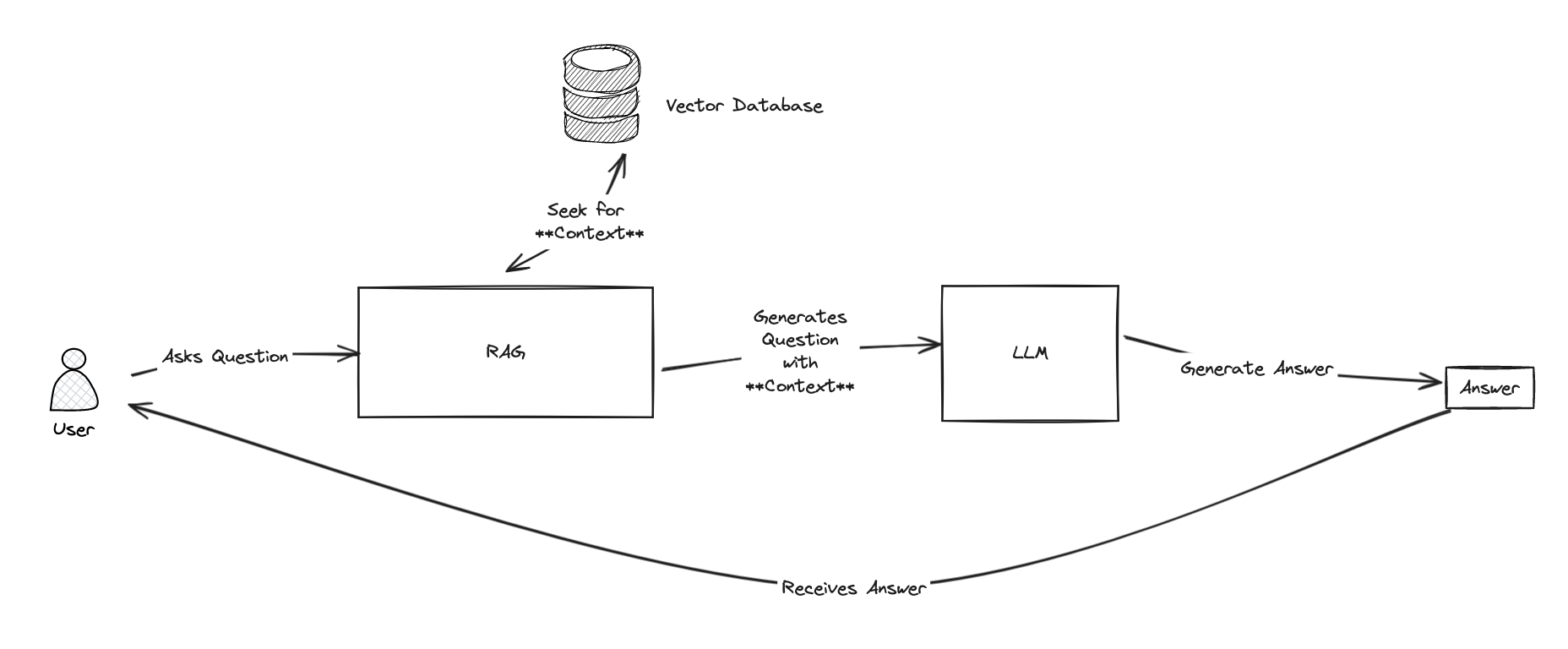
The whole idea of RAG is to use the knowledge base to find the context, and then use the LLM to generate the answer.
To find the context, RAG will use a retriever. The retriever will search the knowledge base for the most relevant documents, and then RAG will use the LLM to generate the answer.
To search the knowledge base, we will use vector search.
Vector search is a technique that allows to find the most relevant documents given a query. It works by converting the documents and the query into vectors, and then computing the cosine similarity between the query vector and the document vectors. The higher the cosine similarity, the more relevant the document is.
For more information about vector search, you can read this article. (Thanks @Dmitry Maslennikov for the article)

Now that we know how RAG works, let's see how to use it.
1.5. Installation the demo
Just clone the repo and run the docker-compose up command.
git clone https://github.com/grongierisc/iris-rag-demo
cd iris-rag-demo
docker-compose up
⚠️ everything is local, nothing is sent to the cloud, so be patient, it can take a few minutes to start.
1.6. Usage
Once the demo is started, you can access the frontend at http://localhost:8051.
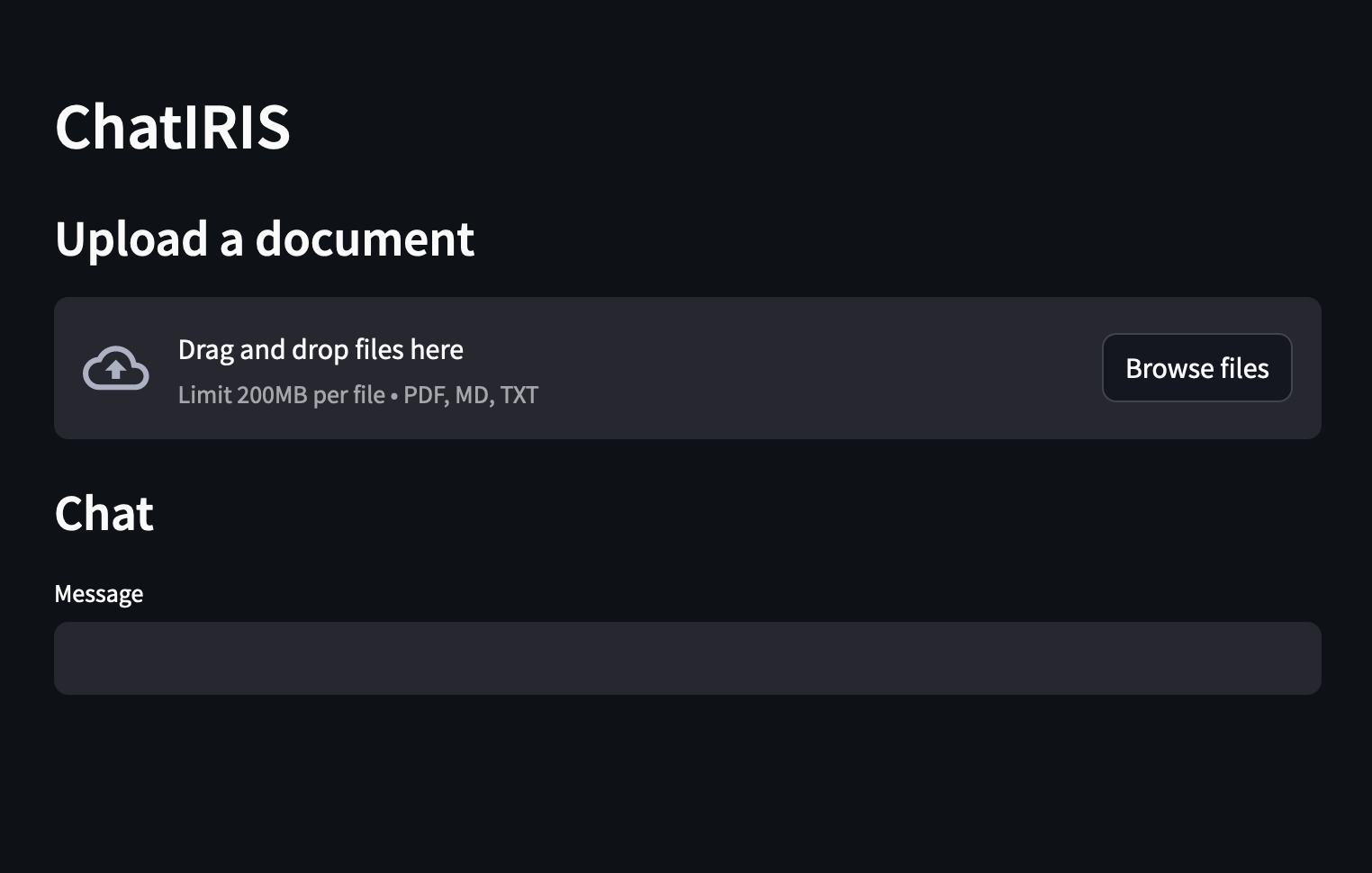
You can ask questions about the IRIS, for example:
- What is the grongier.pex module?
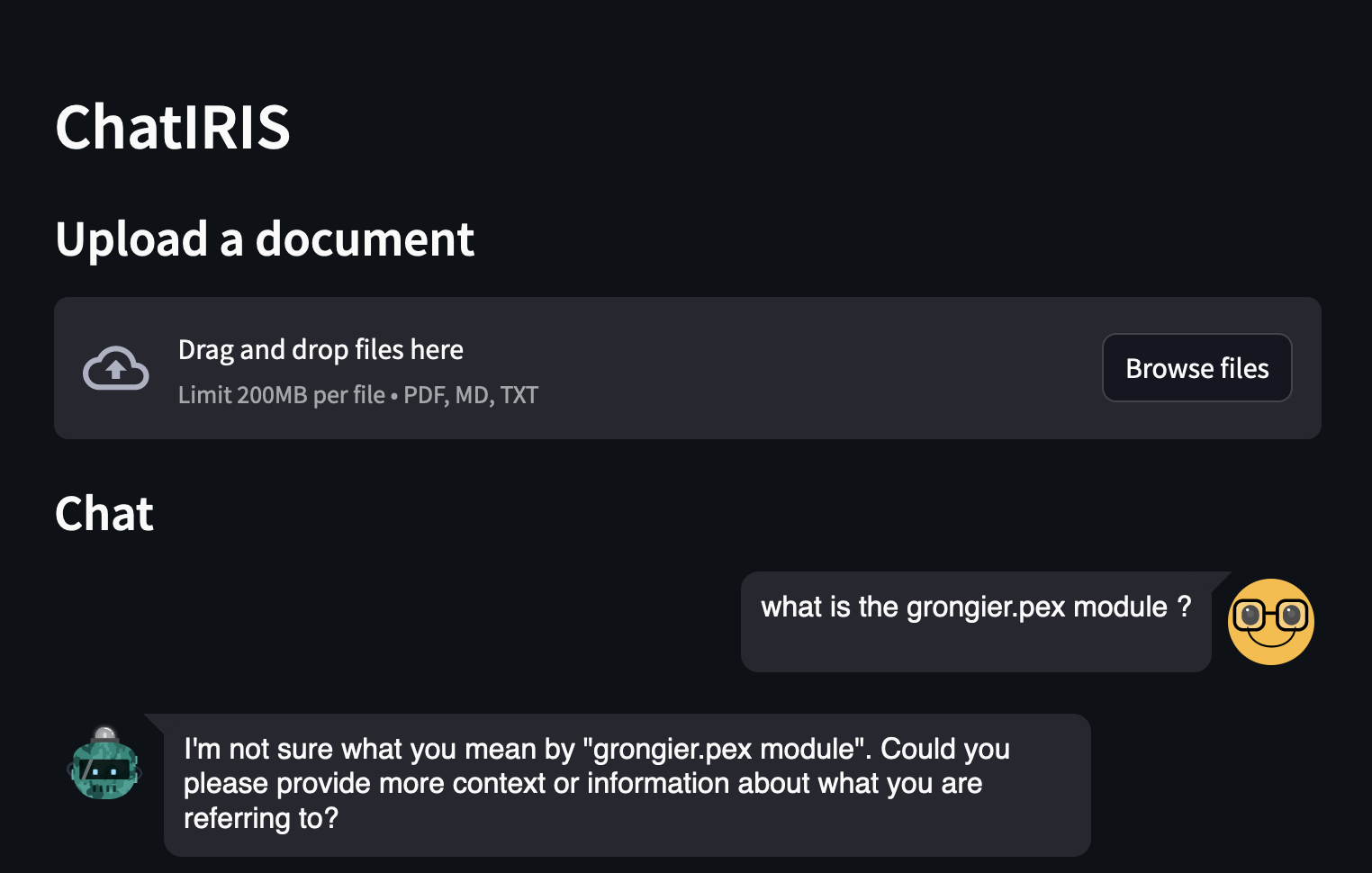
As you can see, the answer is not very good, because the LLM does not know what is the grongier.pex module.
Now, let's try with RAG:
Upload the grongier.pex module documentation, it's located in the docs folder, file grongier.pex.md.
And ask the same question:
- What is the grongier.pex module?
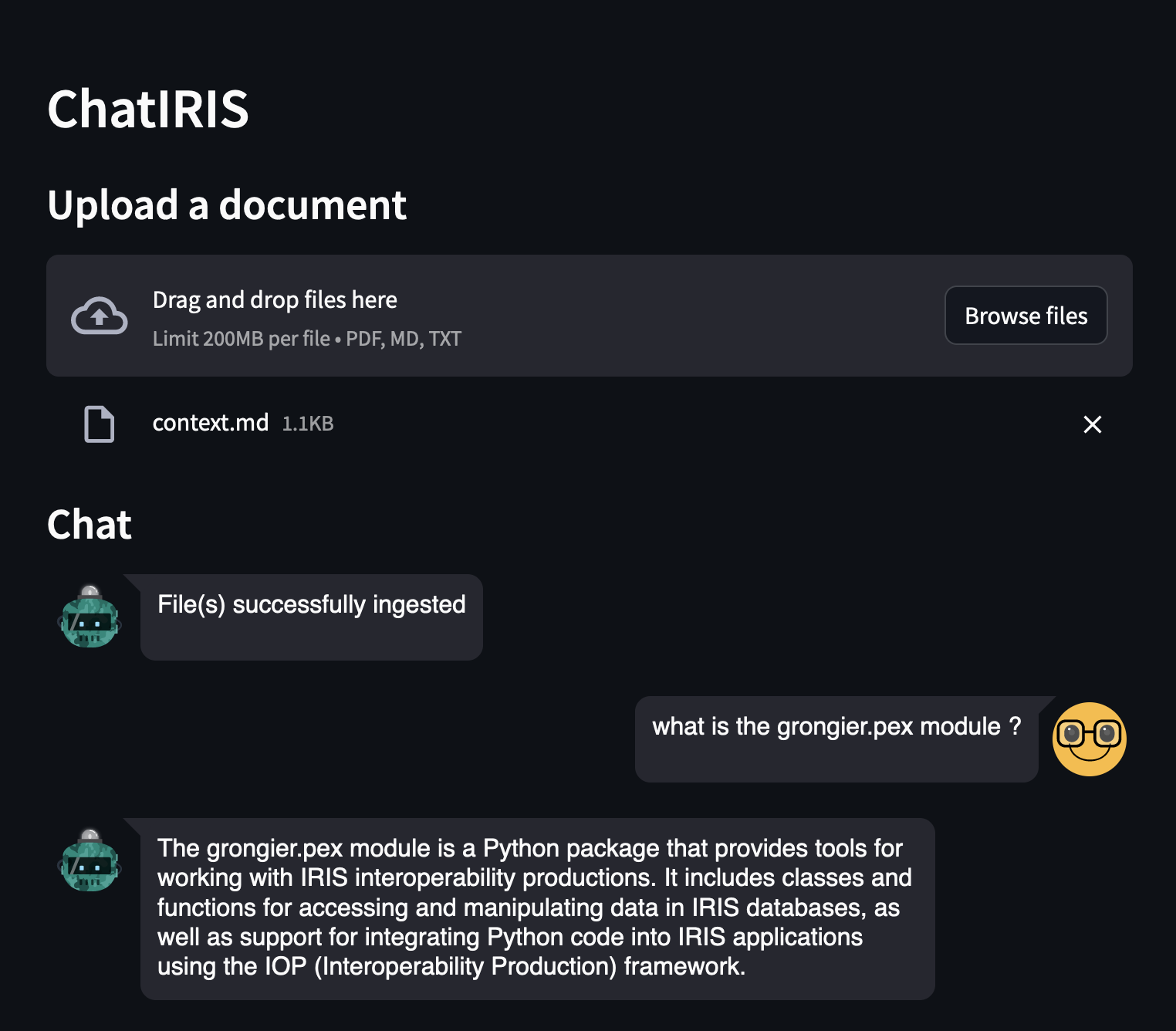
As you can see, the answer is much better, because the LLM now knows what is the grongier.pex module.
You see details in the logs:
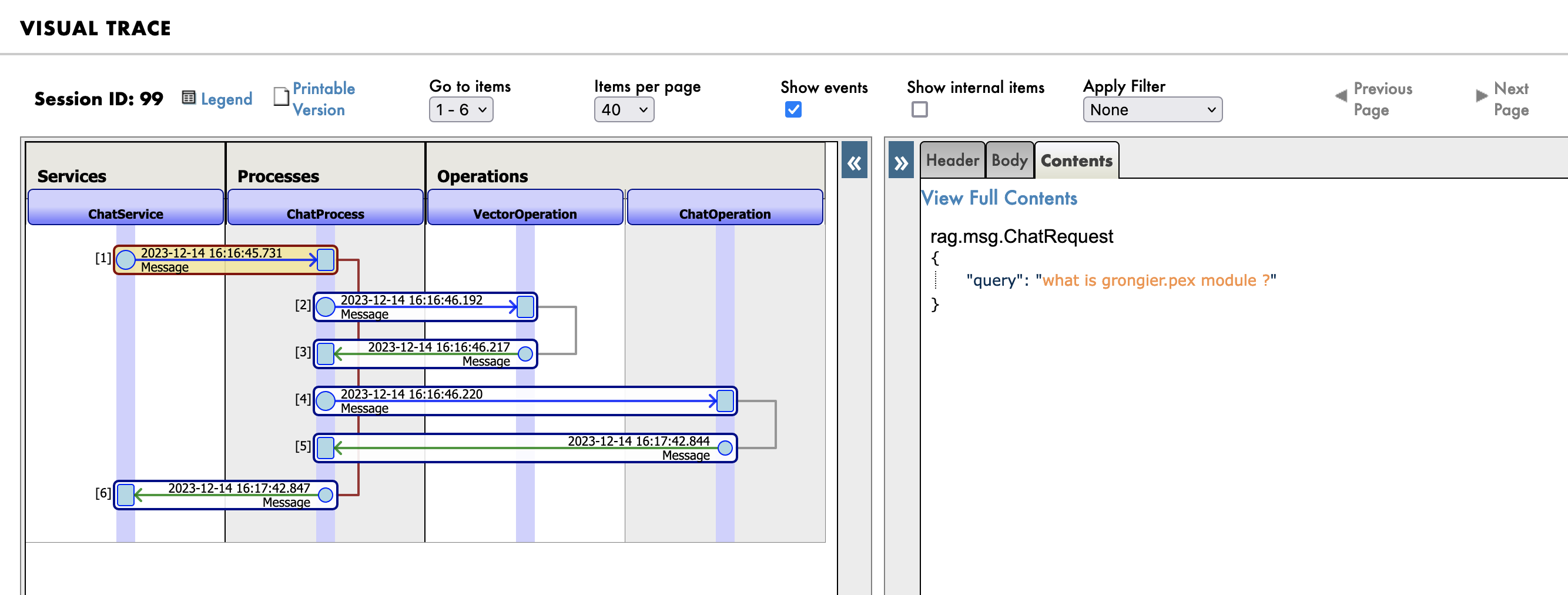
Go to the management portal at http://localhost:53795/csp/irisapp/EnsPortal.ProductionConfig.zen?$NAMESPACE=IRISAPP&$NAMESPACE=IRISAPP& and click on the Messages tab.
First you will see the message sent to the RAG process:
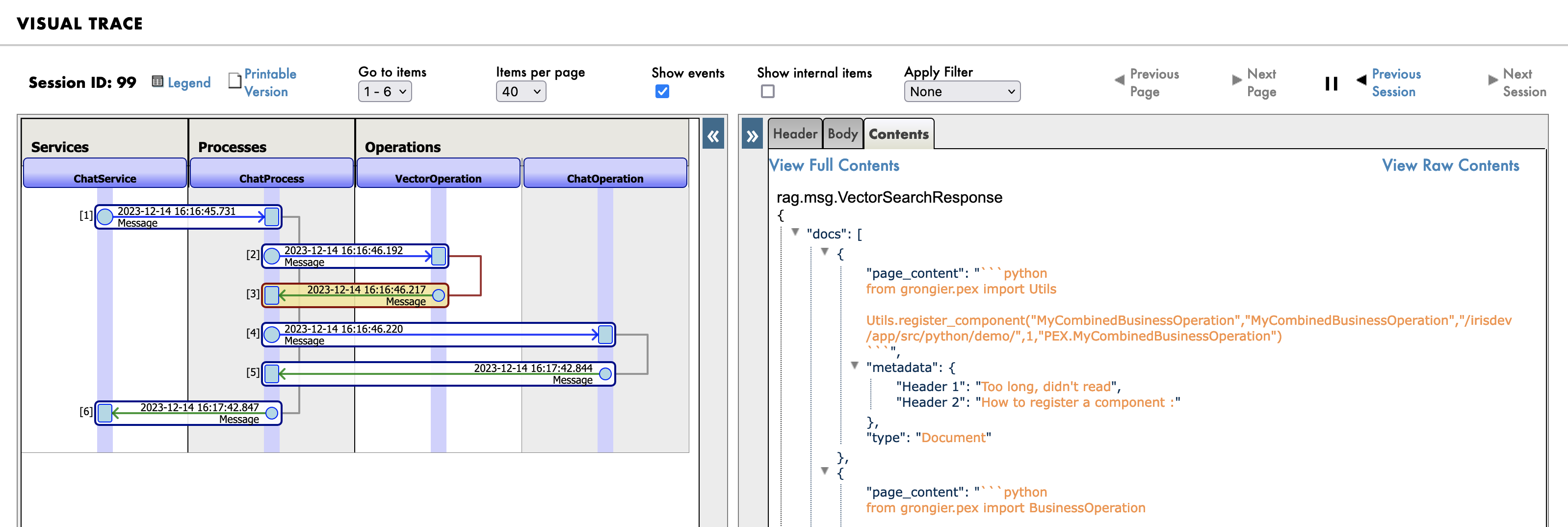
Then the search query in the knowledge base (vector database):
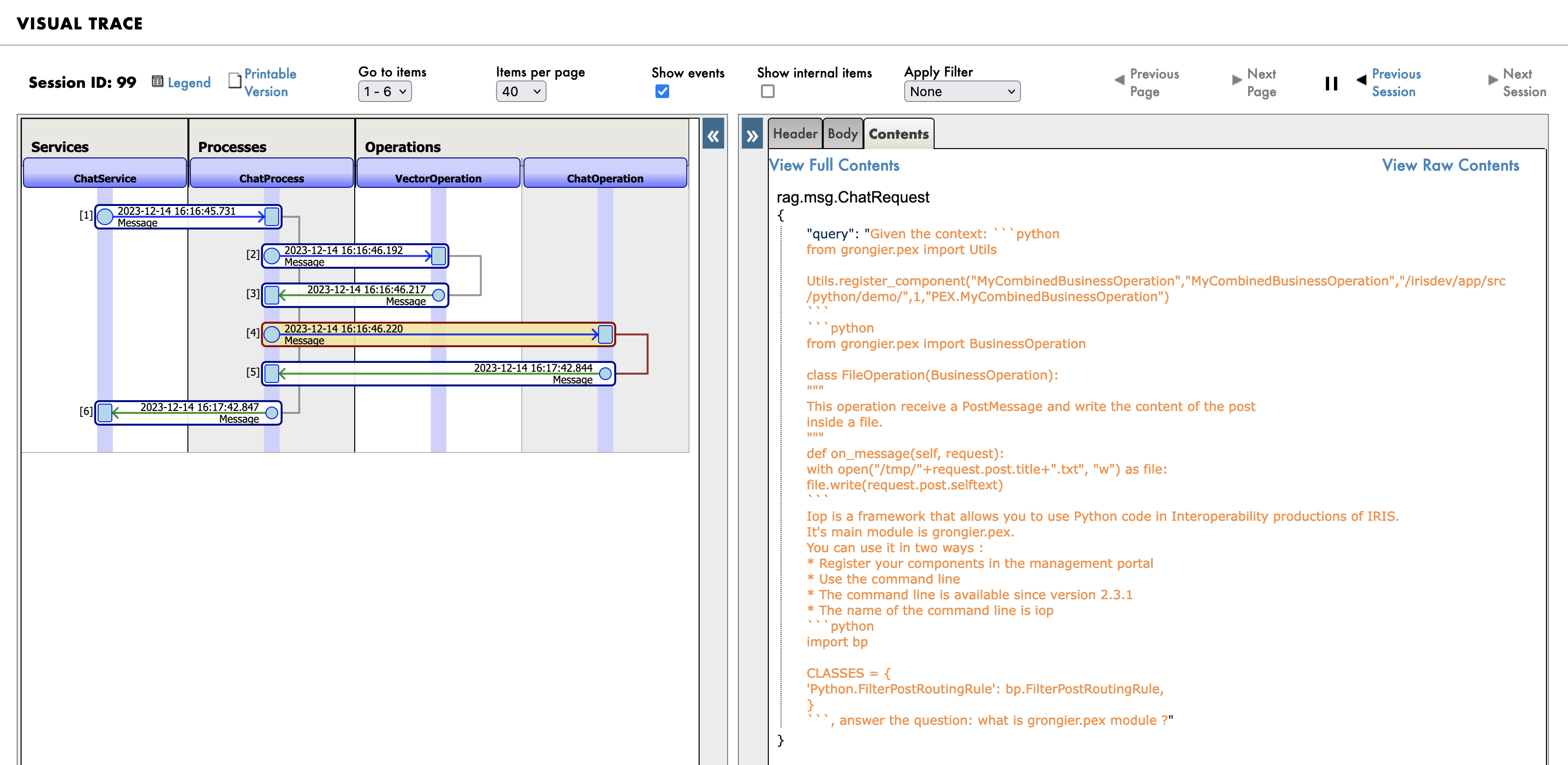
And finally the new prompt sent to the LLM:
1.7. How the demo works?
The demo is composed of 3 parts:
- The frontend, written with Streamlit
- The backend, written with Python and IRIS
- The knowledge base Chroma an vector database
- The LLM, Orca-mini, served by the Ollama server
1.7.1. The frontend
The frontend is written with Streamlit, it's a simple chatbot that allows you to ask questions.
Nothing fancy here, just a simple chatbot.
import os
import tempfile
import time
import streamlit as st
from streamlit_chat import message

from grongier.pex import Director

_service = Director.create_python_business_service("ChatService")

st.set_page_config(page_title="ChatIRIS")


def display_messages():
    st.subheader("Chat")
    for i, (msg, is_user) in enumerate(st.session_state["messages"]):
        message(msg, is_user=is_user, key=str(i))


def process_input():
    if st.session_state["user_input"] and len(st.session_state["user_input"].strip()) > 0:
        user_text = st.session_state["user_input"].strip()
        with st.spinner(f"Thinking about {user_text}"):
            rag_enabled = False
            if len(st.session_state["file_uploader"]) > 0:
                rag_enabled = True
            time.sleep(1) # help the spinner to show up
            agent_text = _service.ask(user_text, rag_enabled)

        st.session_state["messages"].append((user_text, True))
        st.session_state["messages"].append((agent_text, False))


def read_and_save_file():

    for file in st.session_state["file_uploader"]:
        with tempfile.NamedTemporaryFile(delete=False,suffix=f".{file.name.split('.')[-1]}") as tf:
            tf.write(file.getbuffer())
            file_path = tf.name

        with st.spinner(f"Ingesting {file.name}"):
            _service.ingest(file_path)
        os.remove(file_path)

    if len(st.session_state["file_uploader"]) > 0:
        st.session_state["messages"].append(
            ("File(s) successfully ingested", False)
        )

    if len(st.session_state["file_uploader"]) == 0:
        _service.clear()
        st.session_state["messages"].append(
            ("Clearing all data", False)
        )

def page():
    if len(st.session_state) == 0:
        st.session_state["messages"] = []
        _service.clear()

    st.header("ChatIRIS")

    st.subheader("Upload a document")
    st.file_uploader(
        "Upload document",
        type=["pdf", "md", "txt"],
        key="file_uploader",
        on_change=read_and_save_file,
        label_visibility="collapsed",
        accept_multiple_files=True,
    )

    display_messages()
    st.text_input("Message", key="user_input", on_change=process_input)


if __name__ == "__main__":
    page()
💡 I'm just using :
_service = Director.create_python_business_service("ChatService")
To create a binding between the frontend and the backend.
ChatService is a simple business service in the interoperabilty production.
1.7.2. The backend
The backend is written with Python and IRIS.
It's composed of 3 parts:
- The business service
- entry point of the frontend
- The business proess
- perform the search in the knowledge base if needed
- Tow business operations
- One for the knowledge base
- Ingest the documents
- Search the documents
- Clear the documents
- One for the LLM
1.7.2.1. The business service
The business service is a simple business service that allows :
- To upload documents
- To ask questions
- To clear the vector database
from grongier.pex import BusinessService

from rag.msg import ChatRequest, ChatClearRequest, FileIngestionRequest

class ChatService(BusinessService):

    def on_init(self):
        if not hasattr(self, "target_chat"):
            self.target_chat = "ChatProcess"
        if not hasattr(self, "target_vector"):
            self.target_vector = "VectorOperation"

    def ingest(self, file_path: str):
        # build message
        msg = FileIngestionRequest(file_path=file_path)
        # send message
        self.send_request_sync(self.target_vector, msg)

    def ask(self, query: str, rag: bool = False):
        # build message
        msg = ChatRequest(query=query)
        # send message
        response = self.send_request_sync(self.target_chat, msg)
        # return response
        return response.response

    def clear(self):
        # build message
        msg = ChatClearRequest()
        # send message
        self.send_request_sync(self.target_vector, msg)
Basically, it's just a pass-through between to operation and process.
1.7.2.2. The business process
The business process is a simple process that allows to search the knowledge base if needed.
from grongier.pex import BusinessProcess

from rag.msg import ChatRequest, ChatResponse, VectorSearchRequest

class ChatProcess(BusinessProcess):
    """
    the aim of this process is to generate a prompt from a query
    if the vector similarity search returns a document, then we use the document's content as the prompt
    if the vector similarity search returns nothing, then we use the query as the prompt
    """
    def on_init(self):
        if not hasattr(self, "target_vector"):
            self.target_vector = "VectorOperation"
        if not hasattr(self, "target_chat"):
            self.target_chat = "ChatOperation"

        # prompt template
        self.prompt_template = "Given the context: \n {context} \n Answer the question: {question}"


    def ask(self, request: ChatRequest):
        query = request.query
        prompt = ""
        # build message
        msg = VectorSearchRequest(query=query)
        # send message
        response = self.send_request_sync(self.target_vector, msg)
        # if we have a response, then use the first document's content as the prompt
        if response.docs:
            # add each document's content to the context
            context = "\n".join([doc['page_content'] for doc in response.docs])
            # build the prompt
            prompt = self.prompt_template.format(context=context, question=query)
        else:
            # use the query as the prompt
            prompt = query
        # build message
        msg = ChatRequest(query=prompt)
        # send message
        response = self.send_request_sync(self.target_chat, msg)
        # return response
        return response
It's really simple, it just send a message to the knowledge base to search the documents.
If the knowledge base returns documents, then it will use the documents content as the prompt, otherwise it will use the query as the prompt.
1.7.2.3. The LLM operation
The LLM operation is a simple operation that allows to generate the answer.
class ChatOperation(BusinessOperation):

    def __init__(self):
        self.model = None

    def on_init(self):
        self.model = Ollama(base_url="http://ollama:11434",model="orca-mini")

    def ask(self, request: ChatRequest):
        return ChatResponse(response=self.model(request.query))
It's really simple, it just send a message to the LLM to generate the answer.
1.7.2.4. The Vector operation
The vector operation is a simple operation that allows to ingest documents, search documents and clear the vector database.
class VectorOperation(BusinessOperation):

    def __init__(self):
        self.text_splitter = None
        self.vector_store = None

    def on_init(self):
        self.text_splitter = RecursiveCharacterTextSplitter(chunk_size=1024, chunk_overlap=100)
        self.vector_store = Chroma(persist_directory="vector",embedding_function=FastEmbedEmbeddings())

    def ingest(self, request: FileIngestionRequest):
        file_path = request.file_path
        file_type = self._get_file_type(file_path)
        if file_type == "pdf":
            self._ingest_pdf(file_path)
        elif file_type == "markdown":
            self._ingest_markdown(file_path)
        elif file_type == "text":
            self._ingest_text(file_path)
        else:
            raise Exception(f"Unknown file type: {file_type}")

    def clear(self, request: ChatClearRequest):
        self.on_tear_down()

    def similar(self, request: VectorSearchRequest):
        # do a similarity search
        docs = self.vector_store.similarity_search(request.query)
        # return the response
        return VectorSearchResponse(docs=docs)

    def on_tear_down(self):
        docs = self.vector_store.get()
        for id in docs['ids']:
            self.vector_store.delete(id)

    def _get_file_type(self, file_path: str):
        if file_path.lower().endswith(".pdf"):
            return "pdf"
        elif file_path.lower().endswith(".md"):
            return "markdown"
        elif file_path.lower().endswith(".txt"):
            return "text"
        else:
            return "unknown"

    def _store_chunks(self, chunks):
        ids = [str(uuid.uuid5(uuid.NAMESPACE_DNS, doc.page_content)) for doc in chunks]
        unique_ids = list(set(ids))
        self.vector_store.add_documents(chunks, ids = unique_ids)

    def _ingest_text(self, file_path: str):
        docs = TextLoader(file_path).load()
        chunks = self.text_splitter.split_documents(docs)
        chunks = filter_complex_metadata(chunks)

        self._store_chunks(chunks)

    def _ingest_pdf(self, file_path: str):
        docs = PyPDFLoader(file_path=file_path).load()
        chunks = self.text_splitter.split_documents(docs)
        chunks = filter_complex_metadata(chunks)

        self._store_chunks(chunks)

    def _ingest_markdown(self, file_path: str):
        # Document loader
        docs = TextLoader(file_path).load()

        # MD splits
        headers_to_split_on = [
            ("#", "Header 1"),
            ("##", "Header 2"),
        ]

        markdown_splitter = MarkdownHeaderTextSplitter(headers_to_split_on=headers_to_split_on)
        md_header_splits = markdown_splitter.split_text(docs[0].page_content)

        # Split
        chunks = self.text_splitter.split_documents(md_header_splits)
        chunks = filter_complex_metadata(chunks)

        self._store_chunks(chunks)
If the documents are too big, then the vector database will not be able to store them, so we need to split them into chunks.
If the documents is a PDF, then we will use the PyPDFLoader to load the PDF, otherwise we will use the TextLoader to load the document.
Then we will split the document into chunks using the RecursiveCharacterTextSplitter.
Finally, we will store the chunks into the vector database.
If the documents is a Markdown, then we will use the MarkdownHeaderTextSplitter to split the document into chunks.
We also use the the headers to split the document into chunks.
1.8. General remarks
All of this can be done with langchains, but I wanted to show you how to do it with the interoperability framework. And make it more accessible to everyone to understand how it works.

.png)






.png)