Image search like Google's is a nice feature that wonder me - as almost anything related to image processing.
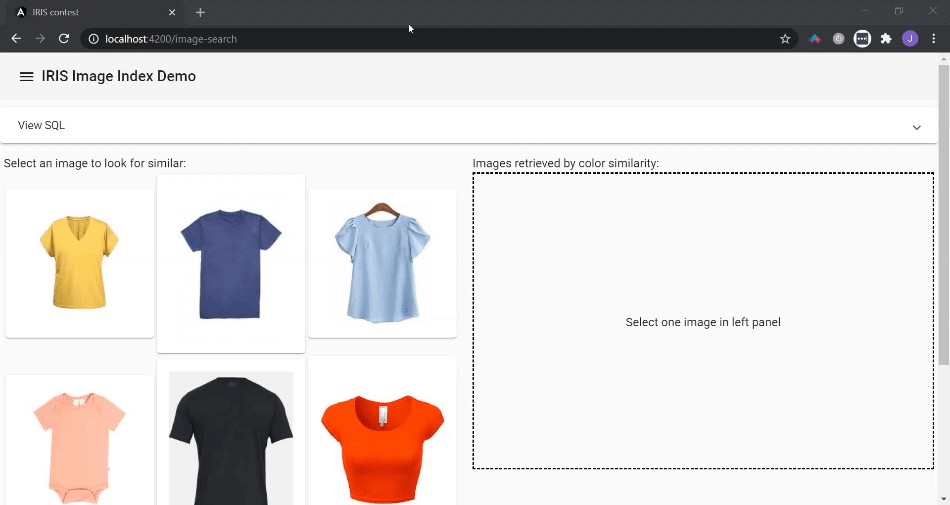
A few months ago, InterSystems released a preview for Python Embedded. As Python has a lot of libs for deal with image processing, I decided to start my own attemptive to play with a sort of image search - a much more modest version in deed :-)
---
A tast of theory 🤓
In order to do an image search system, fist it's necessary select a set of features to be extracted from images - these features are also called descriptors. The range of each component of this descriptors creates a so called feature space, and each instance of it it's called a vector. The number d of components needed to describe the vectors, defines the feature space and vectors dimensionality, called d-dimensional.

Figure 1 - A 3-dimensional feature space and a descriptor vector in such space.
Credits: https://tinyurl.com/ddd76dln
---
Once defined the descriptors set, all you have to do in order to search for an image in the database, is extract the same descriptors from a searching image and compare them to descriptors for images in database - previously extracted.
In this work, it was just use the dominant color for the image as descriptor (I said that it was a modest version...). As a RGB representation for colors was used, the feature space is a 3-dimensional one - 3d for short. Each vector in such space has 3 components - (r,g,b), in range [0, 255].

Figure 2 - The 3-dimensional RGB feature space
Credits: https://www.baslerweb.com/fp-1485687434/media/editorial/content_images/faqs/faq_RGB_1.gif
---
In signal processing it's very common have n-dimensional spaces with values for n much bigger than 3; in fact, you could combine a lot of descriptors in a same vector in order to get better accuracy. This is called feature selection and it's a very important step in classification/recognition tasks.
It's also common normalize dimension range in [0, 1], but for means of simplicity this work uses the default [0, 255] range.
The advantage of modeling features as vectors is the possibility of compare them throught distances metrics. There're a lot of distances, each one having its pros and cons, depending if you're looking for performance or accuracy. In this work, I choose easy to calculated distances - manhattan and chebyshev, which are basically absolute differences with a reasonable accuracy.

Figure 3 - A representation of some distances metrics
Credits: https://i0.wp.com/dataaspirant.com/wp-content/uploads/2015/04/cover_post_final.png
---
Functional Index
But this is just the tools needed to compare images based on their content. If you hasn't a nice query language like SQL, you'll end up with tedious methods and parameters for searching... Furthermore, by using SQL, you can combine this index with others well know operators, creating complex queries.
It's here where InterSystems Functional Index are very handful.
A function index is a class that implements the abstract class %Library.FunctionalIndex which you implements some methods in order to handle with index task in a SQL statement. This methods handle insertions, deletions and updates basically.
/// Functional Indexing to be used to optimize queries on image data
Class dc.multimodel.ImageIndex.Index Extends %Library.FunctionalIndex [ System = 3 ]
{

/// Feature space cardinality
/// As this class is intended to index image in RGB space, its cardinality is 3
Parameter Cardinality = 3;

/// This method is invoked when an existing instance of a class is deleted.
ClassMethod DeleteIndex(pID As %CacheString, pArg... As %Binary) [ CodeMode = generator, ServerOnly = 1 ]
{
	If (%mode '= "method") {
		$$$GENERATE("Set indexer = ##class(dc.multimodel.ImageIndex.Indexer).GetInstance("""_%class_""", """_%property_""")")
		$$$GENERATE("Set indexer.Cardinality = "_..#Cardinality)
		$$$GENERATE("Do indexer.Delete(pID, pArg...)")
	}
	Return $$$OK
}

ClassMethod Find(pSearch As %Binary) As %Library.Binary [ CodeMode = generator, ServerOnly = 1, SqlProc ]
{
	If (%mode '= "method") {
		$$$GENERATE("Set result = """"")
		$$$GENERATE("Set result = ##class(dc.multimodel.ImageIndex.SQLFind).%New()")
		$$$GENERATE("Set indexer = ##class(dc.multimodel.ImageIndex.Indexer).GetInstance("""_%class_""", """_%property_""")")
		$$$GENERATE("Set indexer.Cardinality = "_..#Cardinality)
		$$$GENERATE("Set result.Indexer = indexer")
		$$$GENERATE("Do result.PrepareFind(pSearch)")
		$$$GENERATE("Return result")
	}
	Return $$$OK
}

/// This method is invoked when a new instance of a class is inserted into the database.
ClassMethod InsertIndex(pID As %CacheString, pArg... As %Binary) [ CodeMode = generator, ServerOnly = 1 ]
{
	If (%mode '= "method") {
		$$$GENERATE("Set indexer = ##class(dc.multimodel.ImageIndex.Indexer).GetInstance("""_%class_""", """_%property_""")")
		$$$GENERATE("Set indexer.Cardinality = "_..#Cardinality)
		$$$GENERATE("Do indexer.Insert(pID, pArg...)")
	}
	Return $$$OK
}

ClassMethod PurgeIndex() [ CodeMode = generator, ServerOnly = 1 ]
{
	If (%mode '= "method") {
		$$$GENERATE("Set indexer = ##class(dc.multimodel.ImageIndex.Indexer).GetInstance("""_%class_""", """_%property_""")")
		$$$GENERATE("Set indexer.Cardinality = "_..#Cardinality)
		$$$GENERATE("Set indexGbl = indexer.GetIndexLocation()")
		$$$GENERATE("Do indexer.Purge()")
	}
	Return $$$OK
}

/// This method is invoked when an existing instance of a class is updated.
ClassMethod UpdateIndex(pID As %CacheString, pArg... As %Binary) [ CodeMode = generator, ServerOnly = 1 ]
{
	If (%mode '= "method") {
		$$$GENERATE("Set indexer = ##class(dc.multimodel.ImageIndex.Indexer).GetInstance("""_%class_""", """_%property_""")")
		$$$GENERATE("Set indexer.Cardinality = "_..#Cardinality)
		$$$GENERATE("Do indexer.Update(pID, pArg...)")
	}
	Return $$$OK
}

}
I hided some implementation code due readability; you can check out the code in OpenExchange link.
Another abstract class must be implemented - %SQL.AbstractFind, in order to make available the use of %FIND operator to instruct the SQL engine to use your custom index.
A much more detailed and friendly explanation for functional indexes is given by @alexander-koblov, as a great example on functional index as well. I strongly recommend read it.
If you'd like to go further, you can play with source code for InterSystems %iFind and %UIMA indexes.
In this work, I setup a simple persistence test class, where images path are stored, and a custom index for image search is defined for this field.
Class dc.multimodel.ImageIndex.Test Extends %Persistent
{

Property Name As %String;

Property ImageFile As %String(MAXLEN = 1024);

Index idxName On Name [ Type = bitmap ];

Index idxImageFile On (ImageFile) As dc.multimodel.ImageIndex.Index;
Note that idxImageFile is a custom index (dc.multimodel.ImageIndex.Index) for the Image field (which stores image path).
Python (and COS) time!
So, functional index abstract classes will give you the entry points where you could perform feature extraction and searching when SQL statements are executed. Now, it's the Python turn!
You can import and run Python code in a COS context by using embedded Python. For instance, to extract the dominant color from images:
Method GetDominantColorRGB(pFile As %String, ByRef pVector) As %Status
{
  Set sc = $$$OK
  Try {
    Set json = ##class(%SYS.Python).Import("json")
    Set fastcolorthief = ##class(%SYS.Python).Import("fast_colorthief")
    Set imagepath = pFile
    Set dominantcolor = fastcolorthief."get_dominant_color"(imagepath, 1)
    Set vector = {}.%FromJSON(json.dumps(dominantcolor))
    Set n = ..Cardinality - 1
    For i = 0:1:n {
      Set pVector(i) = vector.%Get(i)
    }
  } Catch(e) {
    Set sc = e.AsStatus()
  }
  Return sc
}
In this method, two Python libs are imported (json and fast_colorthief). The lib fast_colorthief returns a Python 3-d array like representation with the values for RGB; the other lib - json, serialize such array into a %DynamicArray.
The dominant color is extracted for every record that is inserted or updated - once functional index raises calls for InsertIndex and UpdateIndex methods as response for inserts and updates in the table. These features are stored in the table global index:
Method Insert(pID As %CacheString, pArgs... As %Binary)
{
	// pArgs(1) has the image path
	$$$ThrowOnError(..GetDominantColor(pArgs(1), .rgb))
	Set idxGbl = ..GetIndexLocation()
	Set @idxGbl@("model", pID) = ""
  	Merge @idxGbl@("model", pID, "rgb") = rgb
  	Set @idxGbl@("last-modification") = $ZTIMESTAMP
}

Method Update(pID As %CacheString, pArg... As %Binary)
{
	// pArgs(1) has the image path
  	Set idxGbl = ..GetIndexLocation()
  	Do ..GetDominantColor(pArg(1), .rgb)
  	Kill @idxGbl@("model", pID)
  	Set @idxGbl@("model", pID) = ""
  	Merge @idxGbl@("model", pID, "rgb") = rgb
  	Set @idxGbl@("last-modification") = $ZTIMESTAMP
}
In the same way, when records are removed, functional index raises calls for DeleteIndex and PurgeIndex methods. This turn, features must be removed from table index global:
Method Delete(pID As %CacheString, pArg... As %Binary)
{
  	Set idxGbl = ..GetIndexLocation()
  	Kill @idxGbl@("model", pID)
  	Set @idxGbl@("last-modification") = $ZTIMESTAMP
}

Method Purge(pID As %CacheString, pArg... As %Binary)
{
  	Set idxGbl = ..GetIndexLocation()
  	Kill @idxGbl
  	Set @idxGbl@("last-modification") = $ZTIMESTAMP
}
Global index is retrieved by introspection in the persistent class:
Method GetIndexLocation() As %String
{
	Set storage = ##class(%Dictionary.ClassDefinition).%OpenId(..ClassName).Storages.GetAt(1).IndexLocation
	Return $NAME(@storage@(..IndexName))
}
When users uses the index in WHERE clauses, the method Find() is raised by function index. The query statement is passed in order to you analyse it and decide what to do. In this work, parameters are serialized in JSON in order to make its parse easier. Query parameter has the following structure:
SELECT ImageFile
FROM dc_multimodel_ImageIndex.Test
WHERE ID %FIND search_index(idxImageFile, '{"color_similarity":{"image":"/data/img/test/161074693598711.jpg","first":5,"strategy":"knn"}}')
In such statement, you can see the use of %FIND operator and search_index function. This is how SQL access our custom index.
Parameters for search_index defines which index to search - idxImageFile, in this case; and what value to send to index. In this work, the index expect a JSON object, with an object configuration defining: (i) the image path, (ii) a limit for results, and (iii) a search strategy.
A search strategy is just what algorithm to use to perform the search tast. Currently, it's implemented two strategies: (i) fullscan and (ii) knn, which stands for k-neareast neighbors.
The fullscan strategy is just an exhaustive search measuring the distance between the searched image and every image stored in database.
Method FullScanFindStrategy(ByRef pSearchVector, ByRef pResult) As %Status
{
	Set sc = $$$OK
	Try {
		Set idxGbl = ..Indexer.GetIndexLocation()
		Set rankGbl = ..Indexer.GetRankLocation()

		Set id = $ORDER(@idxGbl@("model", ""))
		While (id '= "") {
			If ($ISVALIDNUM(id)) {
				Merge vector = @idxGbl@("model", id, "rgb")
				Set distance = ..Indexer.GetL1Distance(.pSearchVector, .vector)
				Set result(distance, id) = ""
			}
			Set id = $ORDER(@idxGbl@("model", id))
		}

		Kill @rankGbl@(..ImagePath, ..FindStrategy)
		If (..First '= "") {
			Set c = 0
			Set distance = $ORDER(result(""))
			While (distance '= "") && (c < ..First) {
				Merge resultTmp(distance) = result(distance)

				Set id = $ORDER(result(distance, ""))
				While (id '= "") {
					Set @rankGbl@(..ImagePath, ..FindStrategy, id) = distance
					Set id = $ORDER(result(distance, id))
				}

				Set c = c + 1
				Set distance = $ORDER(result(distance))
			}
			Kill result
			Merge result = resultTmp
		}

		Merge pResult = result
	}
	Catch ex {
		Set sc = ex.AsStatus()
	}
	Return sc
}
The KNN strategy uses a more sophisticated approach. It uses a Python lib to create a tree structure called Ball Tree. Such tree is suitable for efficient search in a n-dimensional space.
Method KNNFindStrategy(ByRef pSearchVector, ByRef pResult) As %Status
{
	Do ..Log(" ------ KNNFindStrategy ------ ")
	Set sc = $$$OK
	Try {
		Set idxGbl = ..Indexer.GetIndexLocation()
		Set rankGbl = ..Indexer.GetRankLocation()

		Set json = ##class(%SYS.Python).Import("json")
		Set knn = ##class(%SYS.Python).Import("knn")

		Set first = ..First
		Set k = $GET(first, 5)

		Set n = ..Indexer.Cardinality - 1
		Set x = ""
		For i = 0:1:n {
			Set $LIST(x, * + 1) = pSearchVector(i)
		}
		Set x = "[["_$LISTTOSTRING(x, ",")_"]]"

		$$$ThrowOnError(..CreateOrUpdateKNNIndex())
		Set ind = knn.query(x, k, idxGbl)
		Set ind = {}.%FromJSON(json.dumps(ind.tolist()))
		Set ind = ind.%Get(0)

		Kill result
		Kill @rankGbl@(..ImagePath, ..FindStrategy)
		Set n = k - 1
		For i=0:1:n {
			Set id = ind.%Get(i)
			Set result(i, id) = ""
			Set @rankGbl@(..ImagePath, ..FindStrategy, id) = i
		}
		Merge pResult = result
	}
	Catch ex {
		Set sc = ex.AsStatus()
	}
	Return sc
}
The Python code for generate the ball tree is showed below:
from sklearn.neighbors import BallTree
import numpy as np
import pickle
import base64
import irisnative

def get_iris():
  ip = "127.0.0.1"
  port = 1972
  namespace = "USER"
  username = "superuser"
  password = "SYS"

  connection = irisnative.createConnection(ip,port,namespace,username,password)
  dbnative = irisnative.createIris(connection)

  return (connection, dbnative)

def release_iris(connection):
  connection.close()

def normalize_filename(filename):
  filename = filename.encode('UTF-8')
  return base64.urlsafe_b64encode(filename).decode('UTF-8')

def create_index(index_global, cardinality):
  connection, dbnative = get_iris()
  X = get_data(dbnative, index_global, cardinality)
  tree = BallTree(X, metric = "chebyshev")
  filename = f"/tmp/${normalize_filename(index_global)}.p"
  pickle.dump(tree, open(filename, "wb"))
  release_iris(connection)
  return tree

def get_data(dbnative, index_global, cardinality):
  X = []
  iter_ = dbnative.iterator(index_global, "model")
  for subscript, value in iter_.items():
    id_ = subscript
    v = []
    for i in range(cardinality):
      v.append(
        dbnative.get(index_global, "model", id_, "rgb", i) / 255
      )
    X.append(v)
  return X

def query(x, k, index_global):
  filename = f"/tmp/${normalize_filename(index_global)}.p"
  tree = pickle.load(open(filename, "rb"))
  x = eval(x)
  x_ = [xi / 255 for xi in x[0]]
  dist, ind = tree.query([x_], k)
  return ind
When an image is being searched, the custom index calls the query method from ball tree object in Python. You can also note the use of IRIS Native API in order to access index global RGB values for ball tree build.
For order images by similarity, it was developed a SQL procedure which transverse a global that stores distances previously calculated for each image searched:
Method DiffRank(pSearch As %Binary, pId As %String) As %Float
{
	Set search = {}.%FromJSON(pSearch)
	If (search.%IsDefined("color_similarity")) {
		Set config = search.%Get("color_similarity")
		Set imagePath = config.%Get("image")
		If (config.%IsDefined("strategy")) {
			Set findStrategy = config.%Get("strategy")
		}
		Set rankGbl = ..Indexer.GetRankLocation()
		Set rank = $GET(@rankGbl@(imagePath, findStrategy, pId))
		Return rank
	}
	Return ""
}
So, you can change the SQL statement to order the result by similarity:
SELECT ImageFile, dc_multimodel_ImageIndex.Test_idxImageFileDiffRank('{"color_similarity":{"image":"/data/img/test/161074693598711.jpg","first":5,"strategy":"knn"}}', id) AS DiffRank
FROM dc_multimodel_ImageIndex.Test
WHERE ID %FIND search_index(idxImageFile, '{"color_similarity":{"image":"/data/img/test/161074693598711.jpg","first":5,"strategy":"knn"}}')
ORDER BY DiffRank
Conclusion
The aim of this work was to show how to combine functional index definition in COS with calls for Python code using their amazing libraries. Furthermore, by using this technique, you can access complex features provided by Python libs in SQL statements, allowing you to add new features to your applications.





.png)
