asdfg asfg asfdfgh asg asgf

InterSystems Caché is a multi-model DBMS and application server. See more details here.
InterSystems Caché is a multi-model DBMS and application server. See more details here.
asdfg asfg asfdfgh asg asgf
Trying to check date in DTL.
Want to throw a custom error not the default one from the $ZDTH. It does in the try as will write "Error" when testing the DTL but the actual error not showing. Report errors is turned on. I also tried the THROW logic from best practices but that doesn't work either. $SYSTEM.Status.DisplayError(status) does display what the error should be returned.
.png)
Hi Community,
In this article, we will explore the concepts of Dynamic SQL and Embedded SQL within the context of InterSystems IRIS, provide practical examples, and examine their differences to help you understand how to leverage them in your applications.
InterSystems SQL provides a full set of standard relational features, including the ability to define table schema, execute queries, and define and execute stored procedures. You can execute InterSystems SQL interactively from the Management Portal or programmatically using a SQL shell interface. Embedded SQL enables you to embed SQL statements in your ObjectScript code, while Dynamic SQL enables you to execute dynamic SQL statements from ObjectScript at runtime. While static SQL queries offer predictable performance, dynamic and embedded SQL offer flexibility and integration, respectively.
The Interoperability user interface now includes modernized user experiences for the DTL Editor and Production Configuration applications that are available for opt-in in all interoperability products. You can switch between the modernized and standard views. All other Interoperability screens remain in the Standard user interface. Please note that changes are limited to these two applications and we identify below the functionality that is currently available.
When using standard SQL or the object layer in InterSystems IRIS, metadata consistency is usually maintained through built-in validation and type enforcement. However, legacy systems that bypass these layers—directly accessing globals—can introduce subtle and serious inconsistencies.
When exporting using the Export() method of the %Library.Global class, if the export format (fourth argument: OutputFormat) is set to 7, "Block format/Caché block format (%GOF)," mapped globals cannot be exported (only globals in the default global database of the namespace are exported). To export mapped globals in "Block format/Caché block format (%GOF)," specify the database directory to which you want to map them in the first parameter of %Library.Global.Export().
An example of execution is shown below.
So, you checked your server and saw that IRISTEMP is growing too much. There's no need to panic. Let’s investigate the issue before your storage runs out.
Before assuming IRISTEMP is the problem, let’s check its actual size.
Run the following command in the IRIS terminal:
%SYS>do ^%FREECNTWhen prompted, enter:
Database directory to show free space for (*=All)? /<your_iris_directory>/mgr/iristemp/I didn't know about ObjectScript until I started my new job. Objectscript isn't actually a young programming language. Compared to C++, Java and Python, the community isn't as active, but we're keen to make this place more vibrant, aren't we?
I've noticed that some of my colleagues are finding it tricky to get their heads around the class relationships in these huge projects. There aren't any easy-to-use modern class diagram tool for ObjectScript.
Related Work
I have tried relavant works:
For example, I'm creating a customer at front end interface. I want to list down all the routines and child sub routines that are called at backend in mumps/cache. What's the best way to do it?
Yes, that's right, a Cache 2017.1 question. Let's all take a trip in the Wayback Machine.
$System.Util.GetEnviron("USERPROFILE") returns "C:\WINDOWS\system32\config\systemprofile". I don't know what that is, but that folder doesn't even exist. The correct value which I need is "C:\Users\robert.steed", as seen via the Windows command line "set" command.
I am regularly contacted by customers about memory sizing when they get alerts that free memory is below a threshold, or they observe that free memory has dropped suddenly. Is there a problem? Will their application stop working because it has run out of memory for running system and application processes? Nearly always, the answer is no, there is nothing to worry about. But that simple answer is usually not enough. What's going on?
Consider the chart below. It is showing the output of the free metric in vmstat. There are other ways to display a system's free memory, for example, the free -m command. Sometimes, free memory will gradually disappear over time. However, the chart below is an extreme example, but it is a good example to illustrate what's going on.

As you can see, at around 2 am, some memory is freed, then suddenly drops close to zero. This system is running the IntelliCare EHR application on the InterSystems IRIS database. The vmstat information came from a ^SystemPerformance HTML file that collects vmstat, iostat and many other system metrics. What else is going on on this system? It is the middle of the night, so I don't expect much is happening in the hospital. Let's look at iostat for the database volumes.

There is a burst of reads at the same time as the free memory drops. The drop in reported free memory aligns with a spike in large block-sized reads (2048 KB request size) shown in iostat for the database disk. This is very likely a backup process or file copy operation. Ok, so correlation isn't causation, but this is worth looking at, and it turns out, explains what's going on.
Let's look at some other output from ^SystemPerformance. The command free -m is run at the same rate as vmstat (for example, every 5 seconds), and is output with a date and time stamp, so we can also chart the counters in free -m.
The counters are:
free -m.Low free memory is not a shortage, but rather the system utilising "free" memory for caching. This is normal Linux behaviour! The backup process is reading large amounts of data, which Linux aggressively caches in the buffer/cache memory. The Linux kernel converts "free" memory into "cache" memory to speed up I/O operations.
The filesystem cache is designed to be dynamic. If a process requires memory, it will be immediately reclaimed. This is a normal part of Linux memory management.
For performance and to reserve memory for IRIS shared memory, the best practice for production IRIS deployments on servers with large memory is to use Linux Huge Pages. For IntelliCare, a rule of thumb I use is to use 8 GB memory per core and around 75% of memory for IRIS shared memory -- Routine and Global buffers, GMHEAP, and other shared memory structures. How shared memory is divided up depends on application requirements. Your requirements could be completely different. For example, using that CPU to memory ratio, is 25% enough for your application IRIS processes and OS processes?
InterSystems IRIS uses direct I/O for database and journal files, which bypasses the filesystem cache. Its shared memory segments (globals, routines, gmheap, etc.) are allocated from Huge Pages.
free -m.This explains why the free -m metrics look "low" even though the IRIS database itself is not starved of memory.
From above, in free -m, the relevant lines are:
Available is a good indicator — it includes reclaimable cache and buffers, showing what’s actually available for new processes without swapping. What processes? For a review, have a look at InterSystems Data Platforms and Performance Part 4 - Looking at Memory . A simple list is: Operating system, other non-IRIS application processes, and IRIS processes.
Let's look at a chart of the free -m output.
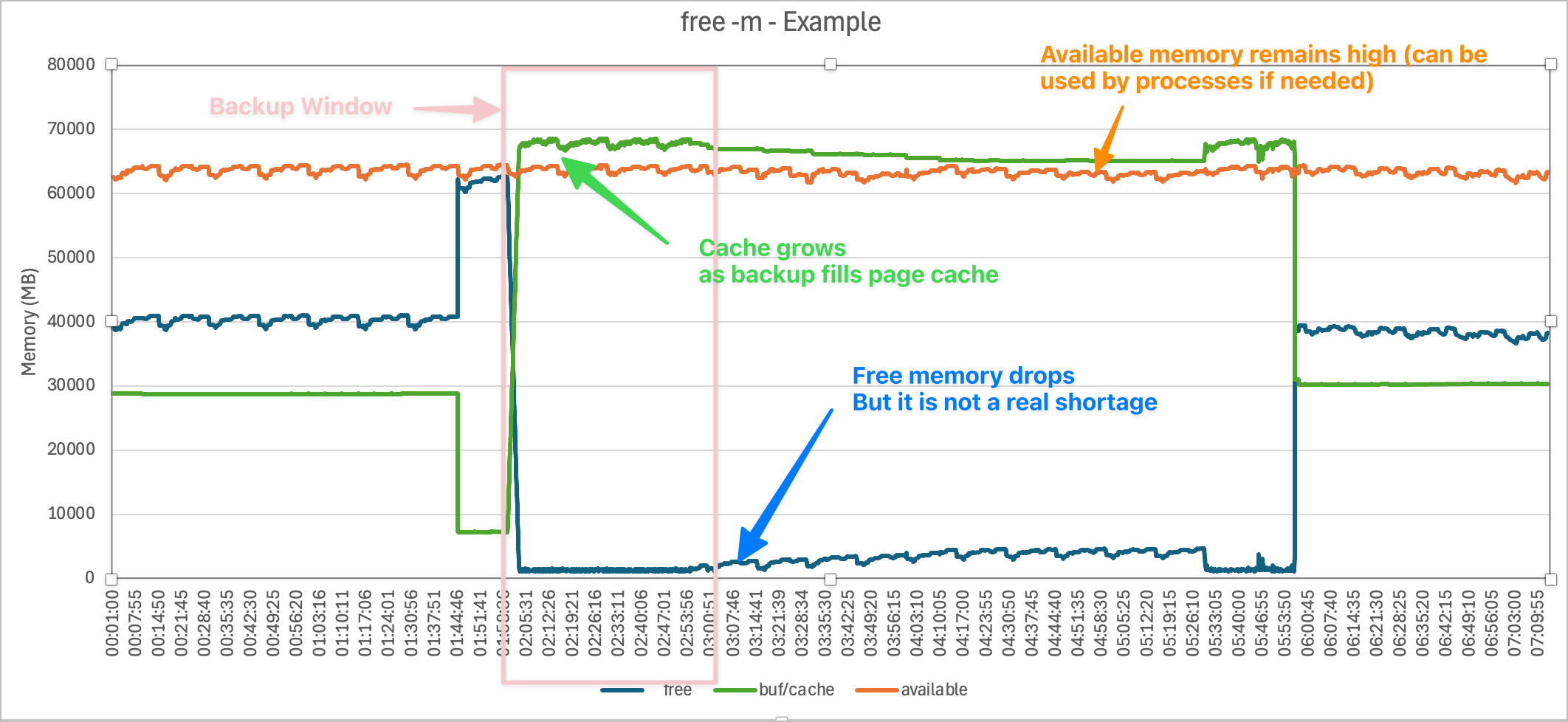
Although free drops near zero during the backup, available remains much higher (tens of GB). That means the system could provide that memory to processes if needed.
By default, free -m does not show huge pages directly. To see them, you need /proc/meminfo entries like HugePages_Total, HugePages_Free, and Hugepagesize.
Because the OS reserves huge pages at startup, they are effectively invisible to
free -m. They are locked away from the general memory pool.
available column, which shows the system still has sufficient headroom.It is common not to use Huge Pages on non-production or systems with limited memory -- performance gains of Huge Pages are usually not significant under 64 GB, although it is still best practice to use Huge Pages to protect IRIS shared memory.
Sidebar. I have seen sites get into trouble by allocating Huge Pages smaller than shared memory, which causes IRIS to try and start with very small global buffers or fail to start if memlock is used (consider memlock=192 for production systems).
Without Huge Pages, IRIS shared memory segments (globals, routines, gmheap, etc.) are allocated from normal OS memory pages. This would show up under “used” memory in free -m. It would also contribute to “available” going lower, because that memory can’t easily be reclaimed.
YES!
For memory protection. IRIS shared memory is protected from:
The command used in ^SystemPerformance for a 24-hour collection (17280 seconds) with 5 second tick is:
free -m -s 5 -c 17280 | awk '{now=strftime(""%m/%d/%y %T""); print now "" "" $0; fflush()}' > ","/filepath/logs/20250315_000100_24hours_5sec_12.log
Hi,
I'm trying to run some scripting in Windows. I'm using an instance of the IRISHealth community.
I'm just trying to run a simple sequence of commands so I can run irissession in a non-interactive mode, like:
irissession.exe IRISHEALTH -U "%SYS" < "myprogram.iris"
The contents of my program.iris are, for instance, these ones, to run an online backup:
set$namespace="%SYS"set cbk = "C:\Test1.cbk"set log = "C:\Test1.log"w$$BACKUP^DBACK("","F","MyBackup",cbk,"Y",log,"NOINPUT","Y","Y", 1000, "Test1")
HALT
The execution starts, but then gets completely hung, I see infinitely:
Hello community,
I wanted to share my experience about working on Large Data projects. Over the years, I have had the opportunity to handle massive patient data, payor data and transactional logs while working in an hospital industry. I have had the chance to build huge reports which had to be written using advanced logics fetching data across multiple tables whose indexing was not helping me write efficient code.
Here is what I have learned about managing large data efficiently.
Choosing the right data access method.
As we all here in the community are aware of, IRIS provides multiple ways to access data. Choosing the right method, depends on the requirement.
Set ToDate=+HSet FromDate=+$H-1ForSet FromDate=$O(^PatientD("Date",FromDate)) Quit:FromDate>ToDate  Do
. Set PatId=""ForSet PatId=$Order(^PatientD("Date",FromDate,PatID)) Quit:PatId=""Do
. . Write$Get(^PatientD("Date",FromDate,PatID)),!Hello!!!
Data migration often sounds like a simple "move data from A to B task" until you actually do it. In reality, it is a complex process that blends planning, validation, testing, and technical precision.
Over several projects where I handled data migration into a HIS which runs on IRIS (TrakCare), I realized that success comes from a mix of discipline and automation.
Here are a few points which I want to highlight.
1. Start with a Defined Data Format.
Before you even open your first file, make sure everyone, especially data providers, clearly understands the exact data format you expect. Defining templates early avoids unnecessary bank-and-forth and rework later.
While Excel or CSV formats are common, I personally feel using a tab-delimited text file (.txt) for data upload is best. It's lightweight, consistent, and avoids issues with commas inside text fields.
PatID   DOB Gender  AdmDate
10001   2000-01-02  M   2025-10-01
10002   1998-01-05  F   2025-10-05
10005   1980-08-23  M   2025-10-15
Make sure that the date formats given in the file is correct and constant throughout the file because all these files are usually converted from an Excel file and an Basic excel user might make mistakes while giving you the date formats wrong. Wrong date formats can irritate you while converting into horolog.
Starting out with ObjectScript, it is really exciting, but it can also feel a little unusual if you're used to other languages. Many beginners trip over the same hurdles, so here are a few "gotchas" you'll want to watch out for. (Also few friendly tips to avoid them)
NAMING THINGS RANDOMLY
We have all been guilty of naming something Test1 or MyClass just to move on quickly. But once your project grows, these names become a nightmare.
➡ Pick clear, consistent names from the start. Think of it as leaving breadcrumbs for your future self and your teammates.
MIXING UP GLOBALS AND VARIABLES
This web interface is designed to facilitate the management of Data Lookup Tables via a user-friendly web page. It is particularly useful when your lookup table values are large, dynamic, and frequently changing. By granting end-users controlled access to this web interface (read, write, and delete permissions limited to this page), they can efficiently manage lookup table data according to their needs.
The data managed through this interface can be seamlessly utilized in HealthConnect rules or data transformations, eliminating the need for constant manual monitoring and management of the lookup tables and thereby saving significant time.
Note:
If the standard Data Lookup Table does not meet your mapping requirements, you can create a custom table and adapt this web interface along with its supporting class with minimal modifications. Sample class code is available upon request.
gj :: configExplorer is a new VS Code extension integrating with Server Manager and leveraging Structurizr to produce configuration diagrams of your servers.
Here's a short introductory video.
By using the InterSystems IRIS Native API for Node.js it avoids the need for any support code to be installed on the servers. This technology choice also qualifies it for entry into the current Developer Community contest.
The initial release focuses on two aspects of server configuration:
Suggestions for what to add next are welcome, as is general feedback.
Some languages have the concept of a garbage collector for automatic memory management. I'd like to know if something like this exists in InterSystems Caché in the context of routines, %CSP.REST, or %CSP.Page.
The question arises from the %Close() method of the %RegisteredObject class. This indicates that I need to manually clear the object from memory if it's no longer in use, or in the web context, if the request has completed. Is this correct? Or am I completely wrong?
Thank you!
Deploying new IRIS instances can be a time-consuming task, especially when setting up multiple environments with mirrored configurations.
I’ve encountered this issue many times and want to share my experience and recommendations for using Ansible to streamline the IRIS installation process. My approach also includes handling additional tasks typically performed before and after installing IRIS.
This code provide the configured production items with enabled or disabled status.
Include (Ensemble, EnsUI, EnsUtil)
Class Test.ProductionConfig
{
I am creating a class to validate JSON body of requests. When I use the method %ValidateObject to check errors in the object, if I define some properties with %DynamicObject or %DynamicArray and use the Required parameter, this method does not work, it ignores validation, only works with properties %String, %Integer etc.
In my previous article introducing gj :: configExplorer I flagged up how an apparent bug in the Windows elements of the Native API for Node.js means it's not currently available to run in VS Code on a Windows desktop. In a comment on that article I offered a workaround, but this requires a Docker-equipped Linux host you can SSH to.
If you don't have a suitable target it's now possible to leverage your local Windows Docker Desktop. Here's how:
When we need to integrate Caché/IRIS with other relational databases, one common question arises: “How do I set up the JDBC connection?”.
The official documentation doesn’t always provide a straightforward step-by-step guide, which can be frustrating, especially for beginners.
In this article, I’ll walk you through the entire process of configuring a JDBC connection with MySQL, from downloading the connector to linking tables in Caché/IRIS.
Hi Community,
I’m trying to execute a directory query in InterSystems IRIS using %SQL.Statement, but encountering an unexpected error.
Details:
The following command confirms that the directory exists:
Set dirPath="\\MYNETWORK_DRIVE\DFS-Shared_Product\GXM"
Write ##class(%File).DirectoryExists(dirPath)
It returns 1, meaning the path is valid and accessible.
However, when I try to execute this SQL query:
Set File=##Class(%SQL.Statement).%New()
Set Status=File.%PrepareClassQuery("%File","FileSet")
Set Result=File.%Execute(dirPath)
If Result.%SQLCODE {
    Write Result.%Message
}
I get the error:
Hi all,
I'm developing a Azure Pipeline to automate the deployment process in Caché.
I use selfhosted agent to execute code im my Caché Server.
My problem is that cession execution via cmd always terminate with exit code 1 and the pipeline finishes with error, but the execution in Caché is fine, the method executed returns $$$OK
I use the following line to execute a class in Caché.
C:\InterSystems\Cache\bin\csession.exe CACHE -U %RELEASE_TRIGGERINGARTIFACT_ALIAS% "##Class(sgf.pipeline.DeploymentManager).ProcessDeployment()"
Bellow printscreen of execution in Azure:.png)
The problem is the exit code 1
InterSystems FAQ rubric
The ^%GCMP utility can be used to compare the contents of two globals.
For example, to compare ^test and ^test in the USER and SAMPLES namespaces, it would look like this:
*In the example below, 700 identical globals are created in the two namespaces, and the contents of one of them is changed to make it the detection target.
I'm trying to access the Bearer token from the Authorization header in my REST service class, but I'm getting a 500 Internal Server Error when I try to use %request.GetCgiEnv("HTTP_AUTHORIZATION").
My Environment:
EnsLib.REST.Service with HTTP Inbound Adapterhttp://ip:port/api-kiosk/patientDataMy Code:
objectscript
In Studio, is it possible to call a dialog with a single input text field inside a custom Studio.Extension.Base.CheckIn method?
Update: The AI Bot just answered, not sure why it was at loss before I posted.
InterSystems FAQ rubric
One way to optimize query performance is to use query parallelism on a per-query or system-wide basis (a standard feature).
This is a technique for dividing the execution of a particular query among processors on a multi-processor system. The query optimizer will execute parallel processing only if there is a possibility of benefiting from parallel processing. Parallel processing is only applicable to SELECT statements.