#Best Practices

0 Followers · 298 Posts

Best Practices recommendations on how to develop, test, deploy and manage solutions on InterSystems Data Platforms better. 

InterSystems staff + admins Hide everywhere
Hidden post for admin
Article Mikhail Khomenko · Apr 20, 2020 14m read

This article is a continuation of Deploying InterSystems IRIS solution on GKE Using GitHub Actions, in which, with the help of GitHub Actions pipeline, our zpm-registry was deployed in a Google Kubernetes cluster created by Terraform. In order not to repeat, we’ll take as a starting point that:

1
1 721
Article Bob Binstock · May 16, 2018 6m read

InterSystems supports use of the InterSystems IRIS Docker images it provides on Linux only. Rather than executing containers as native processes, as on Linux platforms, Docker for Windows creates a Linux VM running under Hyper-V, the Windows virtualizer, to host containers. These additional layers add complexity that prevents InterSystems from supporting Docker for Windows at this time.

12
6 4365
Article Mikhail Khomenko · Mar 12, 2020 23m read

Imagine you want to see what InterSystems can give you in terms of data analytics. You studied the theory and now you want some practice. Fortunately, InterSystems provides a project that contains some good examples: Samples BI. Start with the README file, skipping anything associated with Docker, and go straight to the step-by-step installation. Launch a virtual instance, install IRIS there, follow the instructions for installing Samples BI, and then impress the boss with beautiful charts and tables. So far so good. 

Inevitably, though, you’ll need to make changes.

1
1 1238
Article Mikhail Khomenko · Feb 11, 2020 17m read

In an earlier article (hope, you’ve read it), we took a look at the CircleCI deployment system, which integrates perfectly with GitHub. Why then would we want to look any further? Well, GitHub has its own CI/CD platform called GitHub Actions, which is worth exploring. With GitHub Actions, you don’t need to rely on some external, albeit cool, service.

In this article we’re going to try using GitHub Actions to deploy the server part of  InterSystems Package Manager, ZPM-registry, on Google Kubernetes Engine (GKE).

1
1 1051
Article Bernd Mueller · Jan 30, 2018 13m read

Some time ago I got a WRC case transferred where a customer asks for the availability of a raw DEFLATE compression/decompression function built-in Caché.

When we talk about DEFLATE we need to talk about Zlib as well, since Zlib is the de-facto standard free compression/decompression library developed in the mid-90s.

Zlib works on particular DEFLATE compression/decompression algorithm and the idea of encapsulation within a wrapper (gzip, zlib, etc.).
https://en.wikipedia.org/wiki/Zlib

6
2 2766
Article Mikhail Khomenko · Dec 23, 2019 12m read

Last time we deployed a simple IRIS application to the Google Cloud. Now we’re going to deploy the same project to Amazon Web Services using its Elastic Kubernetes Service (EKS).

We assume you’ve already forked the IRIS project to your own private repository. It’s called <username>/my-objectscript-rest-docker-template in this article. <root_repo_dir> is its root directory.

Before getting started, install the AWS command-line interface and, for Kubernetes cluster creation, eksctl, a simple CLI utility. For AWS you can try to use aws2, but you’ll need to set aws2 usage in kube config file as described here.

1
2 1625
Article Eduard Lebedyuk · Mar 4, 2016 7m read

It was InterSystems hackathon time and our team, consisting of Artem Viznyuk and me had Arduino board (one) and various parts of it (in overabundance). And so like that our course of action was set - like all other Arduino beginners, we decided to build a weather station. But with data persistent storage in Caché and visualization in DeepSee!

8
0 1807
Article Timothy Leavitt · Jan 15, 2020 9m read

Introduction and Motivation

A unit of ObjectScript code (a ClassMethod, say) may produce a variety of unexpected side effects by interacting with parts of the system outside of its own scope and not properly cleaning up. As a non-exhaustive list, these include:

  • Transactions
  • Locks
  • I/O devices
  • SQL cursors
  • System flags and settings
  • $Namespace
  • Temporary files
7
6 1527
Article Henry Pereira · Sep 16, 2019 6m read

In an ever-changing world, companies must innovate to stay competitive. This ensures that they’ll make decisions with agility and safety, aiming for future results with greater accuracy.
Business Intelligence (BI) tools help companies make intelligent decisions instead of relying on trial and error. These intelligent decisions can make the difference between success and failure in the marketplace.
Microsoft Power BI is one of the industry’s leading business intelligence tools. With just a few clicks, Power BI makes it easy for managers and analysts to explore a company’s data. This is important because when data is easy to access and visualize, it’s much more like it’ll be used to make business decisions. 


8
2 3050
Article Mikhail Khomenko · Nov 18, 2019 9m read

Most of us are more or less familiar with Docker. Those who use it like it for the way it lets us easily deploy almost any application, play with it, break something and then restore the application with a simple restart of the Docker container.InterSystems also likes Docker.The InterSystems OpenExchange projectcontains a number of examples that run InterSystems IRIS images in Docker containers that are easy to download and run. You’ll also find other useful components, such as the Visual Studio IRIS plugin.It’s easy enough to run IRIS in Docker with additional code for specific use cases, but

1
4 996
Article Murray Oldfield · Feb 20, 2017 3m read

Note (October 2022): yape has been deprecated and replaced by YASPE, there is no more development on yape.


Note (June 2019): A lot has changed, for the latest details go here

Note (Sept 2018): There have been big changes since this post first appeared, I suggest using the Docker Container version, the project and details for running as a container are still in the same place  published on GitHub so you can download, run - and modify if you need to.

Working with customers on performance reviews, capacity planning and trouble-shooting I am often unpacking and reviewing Caché and Operating System metrics from pButtons. Rather than wade through html files cutting and pasting sections to be graphed in excel  I published a post a while ago with a utility to unpack pButtons metrics  written using unix shell, perl and awk scripting. While this is a useful time-saver its not the full story… I also use scripts to automatically chart the metrics for quick review and inclusion in reports. However these charting scripts are not easily maintained and become especially messy when there is site specific configuration needed, for example list of disks for iostat or windows perfmon, so I never publicly published the graphing utilities. But I am happy to say there is a much simpler solution now.

Serendipity occurred when I was at a customer site looking at system performance with Fabian and he showed me what he was doing using useful Python modules for charting . This is a much more flexible and maintainable solution than the scripts I was using. And the ease of integrating Python modules for file management and charting, including interactive html you can share, means the output can be much more useful. Taking Fabians posts as a base I wrote Yape to quickly and simply extract then chart customer pButtons files in several formats. The project is  published on GitHub so you can download, run and modify if you need to.

Overview

At the moment this process has two steps.

Step 1. extract_pButtons.py

Extract interesting sections from pButtons and write to .csv files for opening with excel or processing with charting with graph_pButtons.py.

Step 2. graph_pButtons.py

Chart files created at step 1. Currently output can be line or dot charts as .png or asinteractive .html with options to pan, zoom, print, etc.

Readme.md on GitHub has details on how to set up and run the two python scripts and will be the most up to date reference.

Other Notes

As an example: Using the options for adding prefixes to the output and input directories you can easily walk a directory with a set (e.g. a weeks) pButtons html files and output to a separate directory for each pButtons file.

for i in `ls *.html`; do ./extract_pButtons.py $i -p ${i}_; done

for i in `ls *.html`; do ./graph_pButtons.py ./${i}_metrics -p ${i}_; done

In the short term while I continue with the series on Caché capacity planning and performance I will use the charts created with these utilities.

I have tested on OSX, but not on Windows. You should be able to install and run Python on windows, please leave feedback on your experience with Windows. I suspect you will have to make changes to the file path slashes for example.

Note: Until a few weeks ago I had never written anything in Python, so if you are a Python expert there may be some things in the code that are not best practice. However I use the scripts nearly every day so I will continue to make improvements. I expect my Python skills will improve — but please feel free to ‘educate’ me if you some see something that should be corrected!

If you find the scripts useful let me know and check back regularly to get new features and updates.

5
2 1991
Article Murray Oldfield · Apr 1, 2016 2m read

Previously I showed you how to run pButtons to start collecting performance metrics that we are looking at in this series of posts.


##Update: May 2020.

Since this post was written several years ago, we have moved from Caché to IRIS. See the comments for an updated link to the documentation for pButtons (Caché) and SystemPerformance (IRIS). Also, a note on how to update your systems to the latest versions of the performance tools.


pButtons is compatible with Caché version 5 and later and is included with recent distributions of InterSystems data platforms (HealthShare, Ensemble and Caché). This post reminds you that you should download and install the latest version of pButttons.

The latest version is always available for download:

Update:See the comments below for details

To check which version you have installed now, you can run the following:

%SYS>write $$version^pButtons()

Note 1:

  • The current version of pButtons will require a license unit; future distributions will address this requirement.
  • With this distribution of pButtons, versioning has changed. — The prior version of pButtons was 1.16c — This new distribution is version 5.

Note 2:

  • pButtons version 5 also corrects a problem introduced with version 1.16a that could result in prolonged collection times. Version 1.16a was included with Caché 2015.1.0. If you have pButtons version 1.16a through 1.16c, you should download pButtons version 5 from the FTP site.

More detailed information on pButtons is available in the files included with the download and in the online Caché documentation.

2
0 1693
Article Eduard Lebedyuk · Jul 16, 2019 4m read

When I describe InterSystems IRIS to more technically-minded people, I always start with how it is a multimodel DBMS at its core.

In my opinion that is its main advantage (on the DBMS side). And the data is stored only once. You just choose the access API you want to use.

  • You want some sort of summary for your data? Use SQL!
  • Do you want to work extensively with one record? Use objects!
  • Want to access or set one value and you know the key? Use globals!

On first blush it's a nice story - short and concise and it gets the message across, but when people really start working with InterSystems IRIS the questions start. How are classes and tables and globals related? What are they to each other? How's the data really stored?

In this article I would try to answer these questions and explain what's really going on.

Part one. Model bias.

People working with data are often biased towards the model they work with.

Developers think in objects. For them databases and tables are boxes you interact with via CRUD (Create-Read-Update-Delete, preferably over ORM) but the underlying conceptual model is objects (of course it's mainly true for developers in object-oriented languages - so most of us).

On the other hand, as a consequence of spending so much time in relational DBMSes, DBAs often think of data as tables. Objects are just wrappers over rows in this case.

And with InterSystems IRIS, a persistent class is also a table, which stores data in global, so some clarification is required.

Part two. An example.

Let's say you created class Point:

Class try.Point Extends %Persistent [DDLAllowed]
{
    Property X;
    Property Y;
}

You can also create the same class with DDL/SQL:

CREATE Table try.Point (
    X VARCHAR(50),
    Y VARCHAR(50))

After compilation, our new class would have auto-generated a storage structure which maps data that is natively stored in globals to columns (or properties if you're an object-oriented thinker):

Storage Default
{
<Data name="PointDefaultData">
    <Value name="1">
        <Value>%%CLASSNAME</Value>
    </Value>
    <Value name="2">
        <Value>X</Value>
    </Value>
    <Value name="3">
        <Value>Y</Value>
    </Value>
</Data>
<DataLocation>^try.PointD</DataLocation>
<DefaultData>PointDefaultData</DefaultData>
<IdLocation>^try.PointD</IdLocation>
<IndexLocation>^try.PointI</IndexLocation>
<StreamLocation>^try.PointS</StreamLocation>
<Type>%Library.CacheStorage</Type>
}

What is going on here?

From the bottom-up (bold words are important, ignore the rest):

  • Type: generated storage type, in our case the default storage for persistent objects
  • StreamLocation - global where we store streams
  • IndexLocation - global for indices
  • IdLocation - global where we store ID autoincremental counter
  • DefaultData - storage XML element which maps global value to columns/properties
  • DataLocation - global in which to store data

Now our "DefaultData" is PointDefaultData so let's look closer at its structure. Essentially it says that global node has this structure:

  • 1 - %%CLASSNAME
  • 2 - X
  • 3 - Y

So we might expect our global to look like this:

^try.PointD(id) = %%CLASSNAME, X, Y

But if we output our global it would be empty because we didn't add any data:

zw ^try.PointD

Let's add one object:

set p = ##class(try.Point).%New()
set p.X = 1
set p.Y = 2
write p.%Save()

And here's our global

zw ^try.PointD
^try.PointD=1
^try.PointD(1)=$lb("",1,2)

As you see our expected structure %%CLASSNAME, X, Y is set with $lb("",1,2) which corresponds to X and Y properties of our object (%%CLASSNAME is system property, ignore it).

We can also add a row via SQL:

INSERT INTO try.Point (X, Y) VALUES (3,4)

Now our global looks like this:

zw ^try.PointD
^try.PointD=2
^try.PointD(1)=$lb("",1,2)
^try.PointD(2)=$lb("",3,4)

So the data we add via objects or SQL are stored in globals according to storage definitions (side note: you can manually modify the storage definition by replacing X and Y in PointDefaultData - check what happens to the new data!).

Now, what happens when we want to execute a SQL query?

SELECT * FROM try.Point

It is translated into ObjectScript code that iterates over the ^try.PointD global and populates columns based on the storage definition - the PointDefaultData part of it precisely.

Now for modifications. Let's delete all the data from the table:

DELETE FROM try.Point

And let's see our global at this point:

zw ^try.PointD
^try.PointD=2

Note that only ID counter is left, so new object/row would have an ID=3. Also our class and table continue to exist.

But what happens when we run:

DROP TABLE try.Point

It would destroy the table, the class, and delete the global.

zw ^try.PointD

If you followed this example, I hope you now have a better understanding of how globals, classes and tables integrate and complement each other. Using the right API for the job at hand results in faster, more agile, less buggy development.

1
5 1626
Article Allyson Gerace · Feb 6, 2019 13m read

This is the first in a pair of articles on SQL indices.

Part 1 - Know your indices

What is an index, anyway?

Picture the last time you went to a library. Typically they have books sorted by subject matter (and then author and title), and each shelf has an end-plate with a code describing the subject of its books. If you wanted to collect books of a certain subject, instead of walking across every aisle and reading the inside cover of every book, you could head straight for the bookshelf labelled with your desired subject matter and choose your books.

2
6 2189
Article Daniel Kutac · Feb 11, 2019 4m read

Hi guys,

Couple days ago, a customer approached me with the wish to enhance their existing legacy application, that uses SOAP (Web)Services so it shares the same authorization with their new application API based on REST. As their new application uses OAuth2, the challenge was clear; how to pass access token with SOAP request to the server.

After spending some time on Google, it turned out, that one of possible ways of doing so was adding an extra header element to the SOAP envelope and then making sure the WebService implementation does what is needed to validate the access token.

1
3 12073
Article Murray Oldfield · Jun 5, 2019 2m read

If a picture is worth a thousand words, what's a video worth? Certainly more than typing a post.

Please check out my "Coding talks" on InterSystems Developers YouTube:

1. Analysing InterSystems IRIS System Performance with Yape. Part 1: Installing Yape

Running Yape in a container.

2. Yape Container SQLite iostat InterSystems

Extracting and plotting pButtons data including timeframes and iostat.

3
2 1632
Article Mikhail Khomenko · Jan 13, 2020 16m read

Last time we launched an IRIS application in the Google Cloud using its GKE service.

And, although creating a cluster manually (or through gcloud) is easy, the modern Infrastructure-as-Code (IaC) approach advises that the description of the Kubernetes cluster should be stored in the repository as code as well. How to write this code is determined by the tool that’s used for IaC.

In the case of Google Cloud, there are several options, among them Deployment Manager and Terraform. Opinions are divided as to which is better: if you want to learn more, read this Reddit thread Opinions on Terraform vs. Deployment Manager? and the Medium article Comparing GCP Deployment Manager and Terraform

1
2 1525
Article sween · Nov 7, 2019 5m read

Loading your IRIS Data to your Google Cloud Big Query Data Warehouse and keeping it current can be a hassle with bulky Commercial Third Party Off The Shelf ETL platforms, but made dead simple using the iris2bq utility.

Let's say IRIS is contributing to workload for a Hospital system, routing DICOM images, ingesting HL7 messages,  posting FHIR resources, or pushing CCDA's to next provider in a transition of care.  Natively, IRIS persists these objects in various stages of the pipeline via the nature of the business processes and anything you included along the way.  Lets send that up to Google Big Query to augment and compliment the rest of our Data Warehouse data and ETL (Extract Transform Load) or ELT (Extract Load Transform) to our hearts desire.

A reference architecture diagram may be worth a thousand words, but 3 bullet points may work out a little bit better:

  • It exports the data from IRIS into DataFrames
  • It saves them into GCS as .avro to keep the schema along the data: this will avoid to specify/create the BigQuery table schema beforehands.
  • It starts BigQuery jobs to import those .avro into the respective BigQuery tables you specify.


3
0 1265
Article Mikhail Khomenko · Aug 16, 2017 20m read

Hello! This article continues the article "Making Prometheus Monitoring for InterSystems Caché". We will take a look at one way of visualizing the results of the work of the ^mgstat tool. This tool provides the statistics of Caché performance, and specifically the number of calls for globals and routines (local and over ECP), the length of the write daemon’s queue, the number of blocks saved to the disk and read from it, amount of ECP traffic and more. ^mgstat can be launched separately (interactively or by a job), and in parallel with another performance measurement tool, ^pButtons.

10
4 3231
Article Peter Steiwer · Feb 25, 2019 1m read

AnalyzeThis is a tool for getting a personalized preview of your own data inside of InterSystems BI. This allows you to get first hand experience with InterSystems BI and understand the power and value it can bring to your organization. In addition to getting a personalized preview of InterSystems BI through an import of a CSV file with your data, Classes and SQL Queries are now supported as Data Sources in v1.1.0!

4
0 648
Article Peter Steiwer · Dec 12, 2019 2m read

DeepSeeButtons is available on Open Exchange! This tool will generate a diagnostic report of your DeepSee environment.

The report consists of multiple sections. These sections range from System Details to Caché/InterSystems IRIS logs to Cube information. In addition to simply providing information about the environment, some common recommended configurations are checked. If a recommended configuration is not used, an alert is displayed highlighting that the environment configuration does not match the recommended configuration.

1
0 526
Article Eduard Lebedyuk · Mar 14, 2018 10m read

Intro

For many in today's interoperability landscape, REST reigns supreme. With the overabundance of tools and approaches to REST API development, what tools do you choose and what do you need to plan for before writing any code? This article focuses on design patterns and considerations that allow you to build highly robust, adaptive, and consistent REST APIs. Viable approaches to challenges of CORS support and authentication management will be discussed, along with various tips and tricks and best tools for all stages of REST API development. Learn about the open-source REST APIs available for InterSystems IRIS Data Platform and how they tackle the challenge of ever-increasing API complexity. The article is a write-up for a recent webinar on the same topic.

2020 Note

A year and a half passed since I wrote this article. I think it's still relevant but I'd like to showcase some exciting new features that make developing REST APIs easier than ever:

Contents

  • REST API architecture
  • Brokers
  • Separation of brokers
  • Broker parameters
  • Code generalization
  • CORS
  • Authentication
  • Development Tools
  • Examples
  • JSON
  • Conclusions
  • Links

REST API architecture

I hope that the reader is familiar with the REST API and the basics of its implementation using InterSystems technologies. Many articles, webinars, and training courses are devoted to this topic. In any case, the first thing I would like to start with is a common high-level architecture of your application, which includes the REST API. It can look like this:
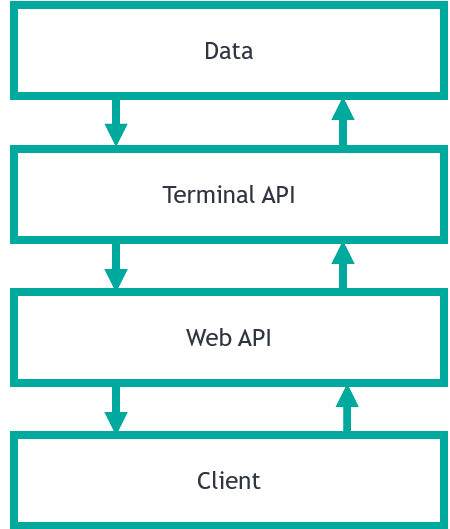
REST API architecture

Here we can see the main layers of the application:

Data

Persistent data, such as classes.

Terminal API

This is a layer that manages the data. All interaction with data should be done through this API. Methods of this API do not write to the device, they only return one of:

  • Object
  • Status or exception

Web API

Converts an incoming request into a form understood by terminal API and calls it. The result returned by the terminal API is converted into client-readable form (usually JSON) returned to the client. Web API does not interact with data directly. I use the term Web API and not the REST API because Web API can be implemented using a different architecture, for example, based on the WebSocket protocol, which is also supported by the InterSystems platform.

Client

Usually written in JavaScript (but not necessarily) this is the application that is available to the end user. This level should not interact directly with the database, implement business logic or store the state of the application. At this level, only the simplest business logic is usually available: interfaces, preliminary input validation, simple data operations (sorting, grouping, aggregation), etc.

This separation removes complexity from your application, facilitates its debugging. This approach is called a multitier architecture.

Brokers

Brokers are classes which contain your REST API logic. They:

  • Are subclasses of %CSP.REST
  • Contain routes which match URLs to methods in your code

For example, we have this route:

<Route Url="/path/:param1/:param2" Method="GET" Call="Package.Class:ClassMethod" />

If the client sends GET request to /path/10/20 the ClassMethod of Package.Class would be called with arguments 10 and 20.

Brokers separation

«Physical» separation

Since there can be many routes in a REST API, one broker would soon be overloaded with methods. To prevent this, divide the brokers into several classes as follows:

«Physical» separation

Where:

  • Abstract broker converts requests, checks CORS requests and performs other technical tasks unrelated to REST API logic.
  • Brokers 1..N contain methods that process requests by calling terminal API methods and returning terminal API responses to the client.

«Logical» separation and versioning

Usually, brokers contain routes matching URLs to called methods, but they also contain Maps which pass requests from one broker to another. Here's how that works:

<Map Prefix="/form" Forward="Destination.Broker"/>

In this example, all requests starting from /form are passed to Destination.Broker. It makes broker separation possible. Brokers should be separated by:
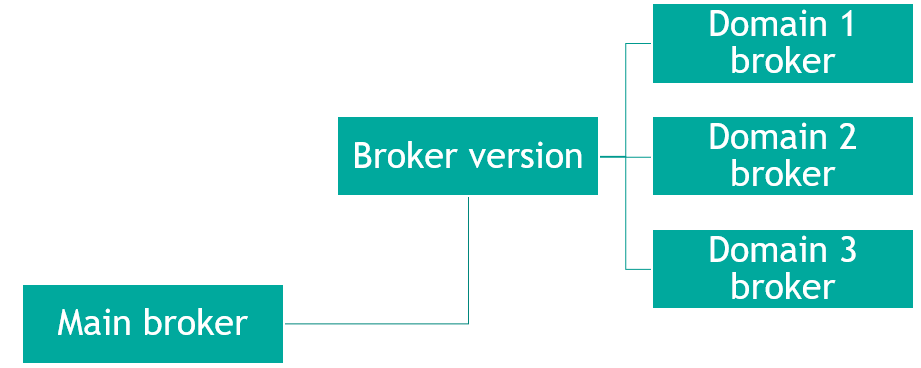
  • Version
  • Domain

«Logical» separation

Broker parameters

Here are the recomended parameters for REST brokers:

Parameter CONTENTTYPE = {..#CONTENTTYPEJSON};
Parameter CHARSET = "UTF-8";
Parameter UseSession As BOOLEAN = 1;

Where

  • CONTENTTYPE — adds information about response being JSON.
  • CHARSET — converts the response into UTF8.
  • UseSession — use sessions to track users, more on that in Authentication.

Since all brokers are inherited from one abstract broker, it is sufficient to specify these parameters once in the abstract broker (remember, that only parameters of the primary superclass are inherited).

Code generalization

One of the problems that often arise when developing a REST API is copy-pasting code from one broker to another, which begets a large number of routes, and copied code and is a bad practice. To avoid this, I recommend using code generation with the %Dictionary package which contains all meta information that you may need for method generators. An example of a large scale use of code generation is RESTForms library. Finally, the use of code generation allows you to achieve greater uniformity of your REST API.

CORS

Cross-origin resource sharing (CORS) is a mechanism that allows restricted resources (e.g. fonts) on a web page to be requested from another domain outside the domain from which the first resource was served. To enable access to your REST API using CORS, add the following parameter to the broker:

Parameter HandleCorsRequest = 1;

This would allow access to REST API by pages from any other domain. This is unsafe and therefore you must also override the OnHandleCorsRequest method, its signature:

ClassMethod OnHandleCorsRequest(pUrl As %String) As %Status {}

This method should check request origin and allow access only from whitelisted origins. Here's a method to get origin:

ClassMethod GetOrigins() As %String
{
    set url = %request.GetCgiEnv("HTTP_REFERER")
    return $p(url,"/",1,3) // get http(s)://origin.com:port
}

Authentication

In order for one user to consume one license and work within one session, you need to configure your REST and CSP applications in the System Management Portal so that the following conditions are met:

  1. All brokers effectively have Parameter UseSession = 1;
  2. All web applications allow only authenticated (i.e. password) access.
  3. All web applications have reasonable Session timeout (i.e. 900, 3600).
  4. All web applications have the same GroupById value.
  5. All web applications have the same cookie path.

Development Tools

For debugging, you can use external tools like:

  • REST client (Postman) - is a primary debugging tool for a REST API developer. It allows saving and documenting requests, prettification of JSON responses, sending requests into several environments, and provides many other tools for a developer.
  • Intercepting proxy server (Fiddler) - allows a developer to intercept, display, edit and duplicate requests.
  • Packet analyzer (Wireshark) - helps in the cases of broken packets, encoding problems, analysis of the remote headless system and other situations when the above-mentioned tools are not enough.

I strongly recommend against using command line tools such as curl and wget. Also, I have written a series of articles (Part 1 - external tools, Part 2 - internal tools) about various approaches to REST API (and not only REST API) debugging.

Examples

Some examples of working REST APIs.

InterSystems IRIS provides several REST APIs in %API package

  • Atelier
  • API management
  • InterSystems: DocDB
  • InterSystems: BI
  • InterSystems: Text Analytics
  • InterSystems: UIMA

Additionally documentation has a tutorial on REST. There are several courses on REST on Learning.InterSystems.com.

And there are some Open-sourced REST APIs available on GitHub.

InterSystems IRIS: BI - MDX2JSON

MDX2JSON — REST API for MDX2JSON transformation. Also provides metainformation about Cubes, Dashboards, Widgets and other elements. Available since 2014.1+. Client is a web-based renderer for InterSystems IRIS: BI Dashboards built with AngularJS and highcharts. Here's how it looks:
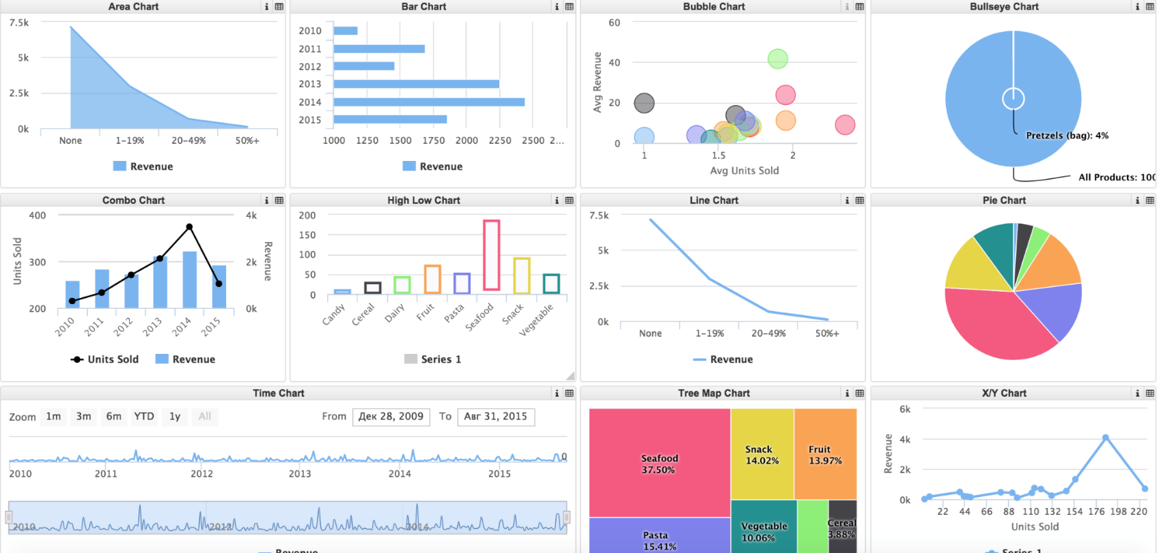
DeepSeeWeb

InterSystems IRIS: Interoperability Workflow

Workflow is a module that allows users to participate in the execution of automated business processes. Workflow REST API exposes users' tasks. Available since 2014.1+. Web client provides visualization:
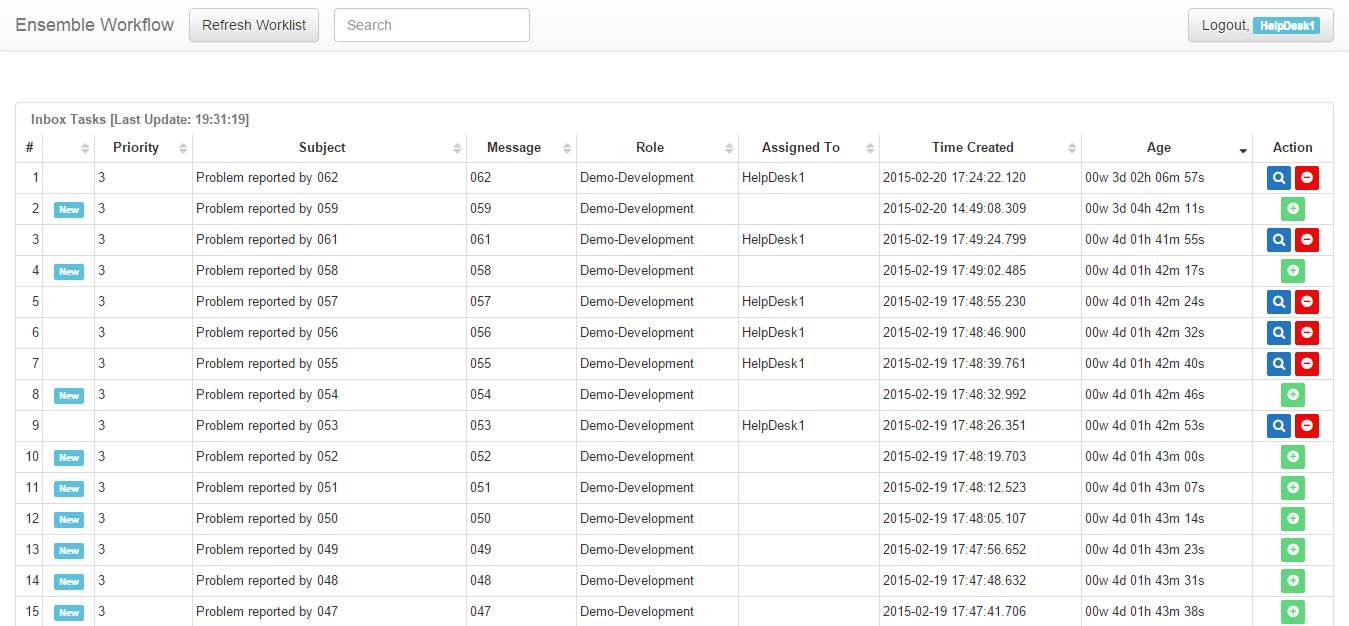
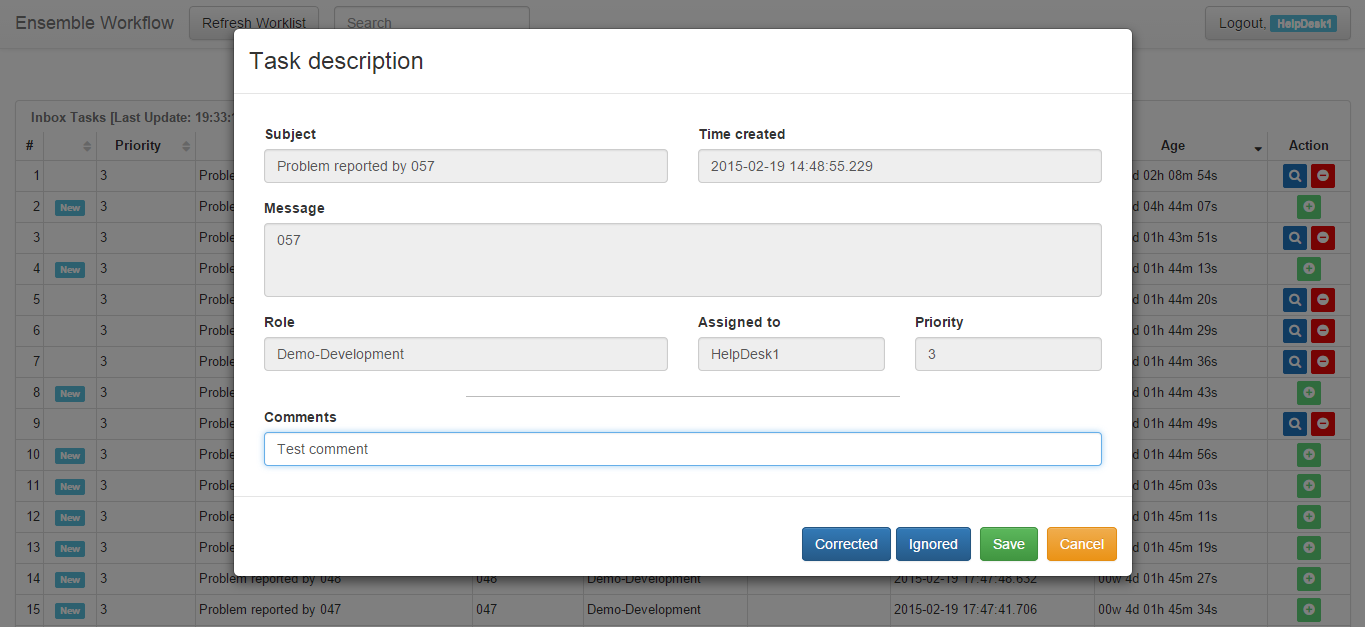
EnsembleWorkflowUI

EnsembleWorkflowUI

RESTForms

RESTForms facilitates the creation of new REST APIs by providing a robust self-discovery generic REST API solution. Available since 2016.1+. I have written about RESTForms in detail: part 1, part 2.

Some routes available in RESTForms:

MethodURLDescriptions
GETform/infoList all RESTForms enabled classes
GETform/info/allGet metainformation about all available classes
GETform/info/:classGet metainformation about one available classes
GETform/object/:class/:idGet object by id and class
GETform/object/:class/:id/:propertyGet object property by id, class and property name
POSTform/object/:classCreate object
PUTform/object/:class/:idUpdate object via dynamic object
PUTform/object/:classUpdate object via classic object
DELETEform/object/:class/:idDelete object
GETform/objects/:class/:queryExecute SQL query

This project actively uses code generalization (using code generation and %Dictionary package). Clients are available on Angular and React, and they look like this:
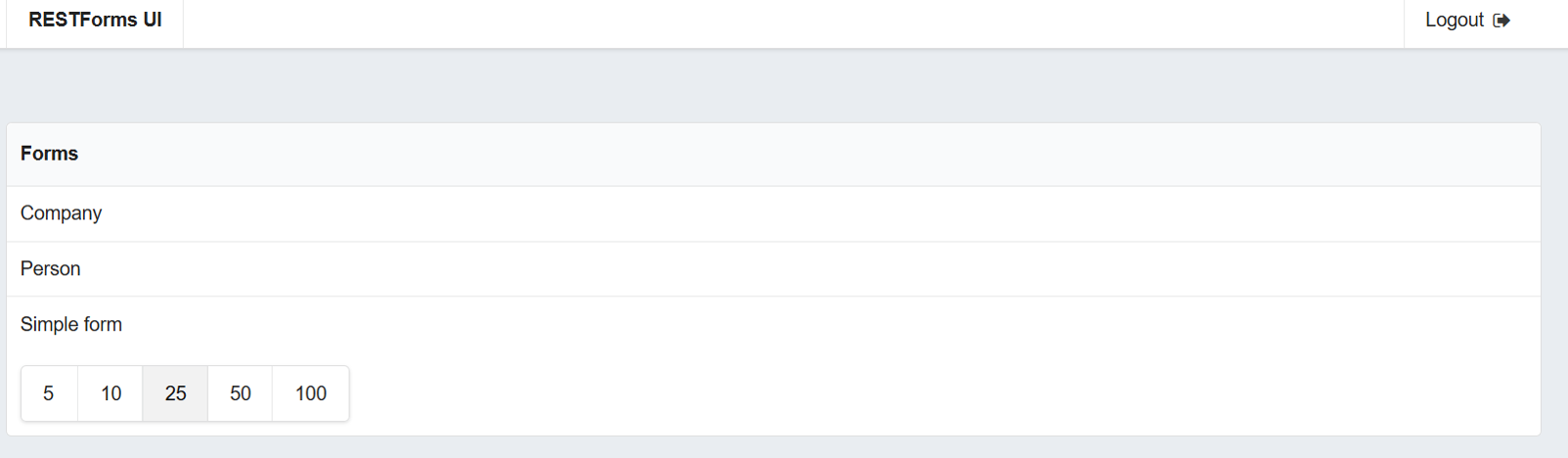
RESTForms

JSON

JavaScript Object Notation is text serialization format often used in REST API. JSON support in InterSystems products was available since version 2009.2, but have seen considerable improvements in version 2016.2. Documentation has a whole book about JSON.

Conclusions

  • REST is one of the most popular and widely accepted API technologies
  • If you are providing a REST API, you can choose among several client technologies, including but not limited to:
    • JavaScript (AngularJS, React, ExtJS, ...)
    • Mobile apps (Cordova and similar technologies or native apps)
  • InterSystems technologies allow you to create REST APIs with ease

Links
5
6 3038
Article Patrick Jamieson · Apr 22, 2019 8m read

Launching IRIS Using Docker

This brief document will walk through the steps to launch IRIS community edition using Docker on the MAC. For those new to Docker, the first two pages explain how to install Docker, and run some basic commands that will be needed to get the IRIS community edition running. Experienced Docker users can skip directly to page three.

3
4 2486
Article Sean Connelly · Apr 12, 2017 5m read

Does anyone NOT use a debugger? I can't remember the last time I did. It's not because I don't dislike them, I just don't need to use them. The main reason for this is because I have a certain development methodology that either produces less bugs, catches them at a unit test level, or makes tracking them down much easier.

Here are my tips...

1. Write your own COS cheat-sheet.

17
6 1647
Article Pravin Barton · Mar 28, 2019 2m read

ObjectScript has at least three ways of handling errors (status codes, exceptions, SQLCODE, etc.). Most of the system code uses statuses but exceptions are easier to handle for a number of reasons. Working with legacy code you spend some time translating between the different techniques. I use these snippets a lot for reference. Hopefully they're useful to others as well.

5
23 3887