#Best Practices

0 Followers · 298 Posts

Best Practices recommendations on how to develop, test, deploy and manage solutions on InterSystems Data Platforms better. 

InterSystems staff + admins Hide everywhere
Hidden post for admin
Article Murray Oldfield · May 22, 2018 9m read

This post provides useful links and an overview of best practice configuration for low latency storage IO by creating LVM Physical Extent (PE) stripes for database disks on InterSystems Data Platforms; InterSystems IRIS, Caché, and Ensemble.

Consistent low latency storage is key to getting the best database application performance. For applications running on Linux, Logical Volume Manager (LVM) is often used for database disks, for example, because of the ability to grow volumes and filesystems or create snapshots for online backups. For database applications, the parallelism of writes using LVM PE striped logical volumes can also help increase performance for large sequential reads and writes by improving the efficiency of the data I/O.


This post has a focus on using LVM PE stripes with HCI and was also prompted by publication of the white paper Software Defined Data Centers (SDDC) and Hyper-Converged Infrastructure (HCI) – Important Considerations for InterSystems Clients here on the community. The white paper recommended “use of LVM PE striping with Linux virtual machines, which spreads IO across multiple disk groups” and to “Use of the Async IO with the rtkaio library for all databases and write image journal (WIJ) files with Linux virtual machines”. This post provides some context to those requirements and examples.


NOTE:

Currently there are multiple Hyper-Converged, Converged and Software Defined vendor platforms, rather than provide detailed instructions for each I have used the configuration of InterSystems IRIS or Caché on Red Hat Enterprise Linux (RHEL) 7.4 running on VMware ESXi and vSAN as the example in this post. However, the basic process is similar for other solutions, especially at the InterSystems IRIS or Caché and operating system level. If you are unsure how to translate these instructions to other platforms, please contact the respective vendor’s support for their best practice. InterSystems technology experts can also advise directly with customers and vendors or through the community.

It’s also worth noting that the guidance on LVM PE striping in this post can be applied to both HCI and “traditional” storage.


Do you have to use LVM striping?

For traditional storage such as disk arrays, the short answer is no. It is not mandatory especially with modern all-flash storage arrays to run LVM striped volumes for your database disks if your performance is ok now and you have no requirement for LVM then you do not have to change.

However, as stated above; LVM stripes are recommended for database disks on Hyper-Converged and storage solutions like Nutanix and VMware vSAN to allow for more host nodes and disk groups to be used in IO operations.

Why use LVM Stripes for Data Platforms?

LVM stripes are especially recommended for the database disks on HCI to mitigate the performance overhead of some features of the architecture, such as to lessen the impact of the Write Daemon (WD) on database writes and journal writes. Using an LVM stripe spreads the database write burst across more disk devices and multiple disk groups.  In addition, this post also shows how to increase the parallelism of the large IO size Write Image Journal (WIJ) which lessens the impact on latency for other IOs.

Note: In this post when I say “disk” I mean NVMe, Optane, SATA or SAS SSD, or any other flash storage devices.

vSAN storage architecture Overview

HCI storage, for example, when running ESXi on vSAN, uses two disk tiers; a cache tier and a capacity tier. For an all-flash architecture (you must use all flash - do not use spinning disks!) all writes go to the cache tier with data then ultimately destaged to the capacity tier. Reads come from the capacity tier (or possibly from cache on the Cache tier). Each host in the HCI cluster can have one or more disk groups. Where there are disk groups, for example with vSAN, each disk group is made up of a cache disk and multiple capacity disks. For example, the cache disk is a single NVMe disk and the capacity disks are three or more write intensive SAS SSD disks.

For further details on HCI, including vSAN disk groups, see the community post Hyper-Converged Infrastructure (HCI) on the community or contact your HCI vendor.

LVM Striped logical volumes overview

A good overview of Linux LVM is available on the Red Hat Support web site and also other places, for example, this tutorial for system administrators is very good.

Data Platforms storage IO

It is important you understand the types of IO generated by InterSystems Data Platforms. An overview of storage IO patterns is available on the community.


Process to create LVM PE stripe

Prerequisites and procedure

Before we dive into the process you should also remember that other variables can come into play that impact storage performance. Simply creating an LVM stripe is not a guarantee of optimal performance, you will also have to consider the storage type, and the whole IO path, including IO queues and queue depth.

This example is for VMware, the InterSystems IRIS VMware best practice guide should also be read and recommendations applied. Especially considerations for storage such as separation of storage IO types across PVSCSI controllers.

Overview

The following example is for best practice using InterSystems IRIS or Caché on Red Hat Enterprise Linux (RHEL) 7.4 running on VMware ESXi and vSAN 6.7.

The following steps are outlined below;

  1. ESXi configuration
  2. RHEL configuration
  3. Caché / InterSystems IRIS configuration

1. ESXi Configuration

a) Create VMDK disks

You must create disks as per the InterSystems IRIS VMware best practice guide; Databases, journal and WIJ are on separate PVSCI devices.

Create the number of VMDKs depending on your sizing requirements. In this example, the database file system will be made up of four 255GB VMDK disks that will be striped together to create a 900GB logical disk for the database filesystem.

Steps:

  1. Power off the VM before adding the VMDKs,
  2. In the vCenter console create multiple disks (VMDKs) at 255GB each, all disks in a single LVM stripe must be associated with the same PVSCSI controller.
  3. Power on the VM. During power on the new disks will be created at the operating system, for example /dev/sdi etc.

Why create multiple 255 GB VMDKs? in vSAN storage components are created in chunks of 256GB, keeping the VMDK size just under 256 GB we are trying force the components to be on separate disk groups. Enforcing another level of striping (This has been the case in my testing, but I cannot guarantee that vSAN will actually do this).

Note: During creation vSAN spreads the disk components across all hosts and across disk groups for availability. For example in the case of Failures To Tolerate (FTT) set to 2 there are three copies of each disk component plus two small witness components all on separate hosts. In the event of a disk group, host or network failure the application continues without data loss using the remaining disk component. It is possible to overthink this process! With HCI solutions like vSAN, there is no control over what physical disk the components that make up the VMDKs will reside on at any point in time. In fact, due to maintenance, resynchronisation, or rebuilds, the VMDKs could move to different disk groups or hosts over time. This is OK.


2. RHEL Configuration

a) Confirm RHEL IO scheduler is NOOP for each of the disk devices.

The best practice is to use the ESXi kernel’s scheduler. For more information on setting the scheduler see the Red Hat knowledge base article. We recommend using the option to set for all devices at boot time. To validate you have set the scheduler correctly you can display the current setting for a disk device, for example in this case /dev/sdi as follows;

[root@db1 ~]# cat /sys/block/sdi/queue/scheduler
[noop] deadline cfq

You can see noop is enabled because it is highlighted between the square brackets.

b) Create striped LVM and XFS file system

We are now ready to create the LVM stripe and database filesystem in RHEL. Following is an example of the steps involved, note the made-up names vgmydb, lvmydb01, and path /mydb/db would be substituted for your environment.

Steps

1. Create the Volume Group with new disk devices using the vgcreate command.

vgcreate -s 4M <vg name> <list of all disks just created>

For example, if disks /dev/sdh, /dev/sdi, /dev/sdj and /dev/sdk were created:

vgcreate -s 4M vgmydb /dev/sd[h-k]

2. Create the striped Logical Volume using the lvcreate command. A minimum of four disks is recommended. Start with a 4MB stripe, however with very large logical volumes you may be prompted for a larger size such as 16M.

lvcreate -n <lv name> -L <size of LV> -i <number of disks in volume group> -I 4MB <vg name>

For example to create the 900GB disk with 4 stripes and stripe size of 4 MB :

lvcreate -n lvmydb01 -L 900G -i 4 -I 4M vgmydb

3. Create the database file system using the mkfs command.

mkfs.xfs -K <logical volume device>

For example:

mkfs.xfs -K /dev/vgmydb/lvmydb01

4. Create the file system mount point, for example:

mkdir /mydb/db

5. Edit /etc/fstab with following mount entries and mount the file system. For example:

/dev/mapper/vgmydb-lvmydb01 /mydb/db xfs defaults 0 0

6. Mount the new filesystem.

mount /mydb/db

3. Caché/InterSystems IRIS configuration

In this section we will configure:

  • Asynchronous and direct IO for optimal write performance on the database and WIJ. This also enables direct IO for database read operations.

NOTE: Because direct IO bypasses filesystem cache, OS file copy operations including Caché Online Backup will be VERY slow when direct IO is configured.

For added performance and lowest latency for the WIJ on RHEL (this is not supported on SUSE since SUSE 9), and to lessen the impact on other IO we will also configure:

  • Use of the rtkaio library for RHEL systems using Caché. Note: IRIS does not need this library.

NOTE: For Caché, Ensemble, and HealthShare distributions beginning with version 2017.1.0. on Linux (only if a backup or async mirror member is configured to use the rtkaio library) you must apply RJF264, available via Ad Hoc distribution from InterSystems Worldwide Response Center (WRC).  

Steps

The procedure is to:

  1. Shutdown Caché
  2. edit the <install_directory>/cache.cpf file
  3. Restart Caché.

In the cache.cpf file add the following three lines to the top of [config] stanza, leaving other lines unchanged, as shown in the example below;

[config]
wduseasyncio=1
asyncwij=8

For RHEL Caché (not IRIS) also add the following to the [config] section:

LibPath=/lib64/rtkaio/

Note: When Caché restarts the lines will be sorted in alphabetical order in the [config] stanza.


Summary

This post gave an example of creating a 900GB LVM PE stripe and creating a file system for a database disk on vSAN. To get the best performance from the LVM stripe you also learned how to configure Caché/InterSystems IRIS for asynchronous IO for database writes and the WIJ.

4
1 4849
Article Dmitry Maslennikov · Jul 13, 2019 6m read

I wanted to write it as a comment to article of @Evgeny Shvarov . But it happens to be so long, so, decided to post it separately.

Image result for docker clean all images

I would like to add a bit of clarification about how docker uses disk space and how to clean it.  I use macOS, so, everything below, is mostly for macOS, but docker commands suit any platform.

6
3 7157
Article Simon Sha · Mar 19, 2021 2m read

cAdvisor (short for container Advisor) analyzes and exposes resource usage and performance data from running containers. cAdvisor exposes Prometheus metrics out of the box. 

https://prometheus.io/docs/guides/cadvisor/

Prometheus is integrated in SAM. This makes it possible to leverage the cAdvisor metrics and expose them via Prometheus and Grafana.

Since cAdvisor listens on port 8080, which conflicts with the Nginx port, you can choose to change the Nginx port to accommodate that.

Configuration Steps:

1. Change nginx port.

modify nghix.conf:

    server {
        listen 9991; 

2
0 1453
Article Lorenzo Scalese · Apr 15, 2021 6m read

Hi Developers,

Writing a script for the application deployment can be very interesting to ensure rapid deployment without forgetting anything. config-api is a library to help developers to write configuration scripts based on a JSON document.

Implemented features :

  • Set system settings.
  • Set security settings.
  • Enable services.
  • Configure namespaces, databases, mapping.
  • Export existing configuration.
  • All features are exposed with a RESTful API.

This library is focused on IRIS configuration to help applications deployment. So, config-api doesn't import\compile code feature, considering it should be the role of your application installer module or the client registry. config-api could be used with the ZPM client to configure IRIS settings on module deployment, we learn how to combine this library with ZPM in another article.

Install

zpm “install config-api”

If you aren't a ZPM user, download the latest version in XML format with dependencies release page import and compile.

First step

Let’s write a simple configuration JSON document to set a few system settings.
In this first document we :

  • Enable journal Freeze on error.
  • Set limit journal size to 256 MB.
  • Set SystemMode to development.
  • Increase the locksiz.
  • Increase the LockThreshold.
Set config = {
  "Journal": {                                /* Service class Api.Config.Journal */
       "FreezeOnError":1,
       "FileSizeLimit":256
   },
   "SQL": {                                    /* Service class Api.Config.SQL */
       "LockThreshold" : 2500
   },
   "config": {                                 /* Service class Api.Config.config */
       "locksiz" : 33554432
   },
   "Startup":{                                 /* Service class Api.Config.Startup */
       "SystemMode" : "DEVELOPMENT"
   }
}
Set sc = ##class(Api.Config.Services.Loader).Load(config)

configuration JSON document structure

The first level keys (Journal,SQL,config,Startup) are related to classes in %SYS namespace (using an intermediate class in Api.Config.Services package). It means Journal support all properties available in Config.Journal, SQLall properties in Config.SQL, etc...

Output :

2021-03-31 18:31:54 Start load configuration
2021-03-31 18:31:54 {
  "Journal":{
    "FreezeOnError":1,
            "FileSizeLimit":256
  },
  "SQL":{
    "LockThreshold":2500
  },
  "config":{
    "locksiz":33554432
  },
  "Startup":{
    "SystemMode":"DEVELOPMENT"
  }
}
2021-03-31 18:31:54  * Journal
2021-03-31 18:31:54    + Update Journal ... OK
2021-03-31 18:31:54  * SQL
2021-03-31 18:31:54    + Update SQL ... OK
2021-03-31 18:31:54  * config
2021-03-31 18:31:54    + Update config ... OK
2021-03-31 18:31:54  * Startup
2021-03-31 18:31:54    + Update Startup ... OK

Trick : The Load method is compatible with a string argument, in this case, the string must be a filename to a JSON configuration document (stream object is also permitted).

Create an application environment

In this section, we write a configuration document to create :

  • A namespace "MYAPP".
  • 4 databases (MYAPPDATA, MYAPPCODE, MYAPPARCHIVE,MYAPPLOG)
  • 1 CSP Web Application (/csp/zwebapp).
  • 1 REST Web Application (/csp/zrestapp).
  • Setup globals mapping.
Set config = {
    "Defaults":{
        "DBDIR" : "${MGRDIR}",
        "WEBAPPDIR" : "${CSPDIR}",
        "DBDATA" : "${DBDIR}myappdata/",
        "DBARCHIVE" : "${DBDIR}myapparchive/",
        "DBCODE" : "${DBDIR}myappcode/",
        "DBLOG" : "${DBDIR}myapplog/"
    },
    "SYS.Databases":{
        "${DBDATA}" : {"ExpansionSize":128},
        "${DBARCHIVE}" : {},
        "${DBCODE}" : {},
        "${DBLOG}" : {}
    },
    "Databases":{
        "MYAPPDATA" : {
            "Directory" : "${DBDATA}"
        },
        "MYAPPCODE" : {
            "Directory" : "${DBCODE}"
        },
        "MYAPPARCHIVE" : {
            "Directory" : "${DBARCHIVE}"
        },
        "MYAPPLOG" : {
            "Directory" : "${DBLOG}"
        }
    },
    "Namespaces":{
        "MYAPP": {
            "Globals":"MYAPPDATA",
            "Routines":"MYAPPCODE"
        }
    },
    "Security.Applications": {
        "/csp/zrestapp": {
            "DispatchClas" : "my.dispatch.class",
            "Namespace" : "MYAPP",
            "Enabled" : "1",
            "AuthEnabled": "64",
            "CookiePath" : "/csp/zrestapp/"
        },
        "/csp/zwebapp": {
            "Path": "${WEBAPPDIR}zwebapp/",
            "Namespace" : "MYAPP",
            "Enabled" : "1",
            "AuthEnabled": "64",
            "CookiePath" : "/csp/zwebapp/"
        }
    },
    "MapGlobals":{
        "MYAPP": [{
            "Name" : "Archive.Data",
            "Database" : "MYAPPARCHIVE"
        },{
            "Name" : "App.Log",
            "Database" : "MYAPPLOG"
        }]
    }
}
Set sc = ##class(Api.Config.Services.Loader).Load(config)

Output :

2021-03-31 20:20:07 Start load configuration
2021-03-31 20:20:07 {
  "SYS.Databases":{
    "/usr/irissys/mgr/myappdata/":{
      "ExpansionSize":128
    },
    "/usr/irissys/mgr/myapparchive/":{
    },
    "/usr/irissys/mgr/myappcode/":{
    },
    "/usr/irissys/mgr/myapplog/":{
    }
  },
  "Databases":{
    "MYAPPDATA":{
      "Directory":"/usr/irissys/mgr/myappdata/"
    },
    "MYAPPCODE":{
      "Directory":"/usr/irissys/mgr/myappcode/"
    },
    "MYAPPARCHIVE":{
      "Directory":"/usr/irissys/mgr/myapparchive/"
    },
    "MYAPPLOG":{
      "Directory":"/usr/irissys/mgr/myapplog/"
    }
  },
  "Namespaces":{
    "MYAPP":{
      "Globals":"MYAPPDATA",
      "Routines":"MYAPPCODE"
    }
  },
  "Security.Applications":{
    "/csp/zrestapp":{
      "DispatchClas":"my.dispatch.class",
      "Namespace":"MYAPP",
      "Enabled":"1",
      "AuthEnabled":"64",
      "CookiePath":"/csp/zrestapp/"
    },
    "/csp/zwebapp":{
      "Path":"/usr/irissys/csp/zwebapp/",
      "Namespace":"MYAPP",
      "Enabled":"1",
      "AuthEnabled":"64",
      "CookiePath":"/csp/zwebapp/"
    }
  },
  "MapGlobals":{
    "MYAPP":[
      {
        "Name":"Archive.Data",
        "Database":"MYAPPARCHIVE"
      },
      {
        "Name":"App.Log",
        "Database":"MYAPPLOG"
      }
    ]
  }
}
2021-03-31 20:20:07  * SYS.Databases
2021-03-31 20:20:07    + Create /usr/irissys/mgr/myappdata/ ... OK
2021-03-31 20:20:07    + Create /usr/irissys/mgr/myapparchive/ ... OK
2021-03-31 20:20:07    + Create /usr/irissys/mgr/myappcode/ ... OK
2021-03-31 20:20:07    + Create /usr/irissys/mgr/myapplog/ ... OK
2021-03-31 20:20:07  * Databases
2021-03-31 20:20:07    + Create MYAPPDATA ... OK
2021-03-31 20:20:07    + Create MYAPPCODE ... OK
2021-03-31 20:20:07    + Create MYAPPARCHIVE ... OK
2021-03-31 20:20:07    + Create MYAPPLOG ... OK
2021-03-31 20:20:07  * Namespaces
2021-03-31 20:20:07    + Create MYAPP ... OK
2021-03-31 20:20:07  * Security.Applications
2021-03-31 20:20:07    + Create /csp/zrestapp ... OK
2021-03-31 20:20:07    + Create /csp/zwebapp ... OK
2021-03-31 20:20:07  * MapGlobals
2021-03-31 20:20:07    + Create MYAPP Archive.Data ... OK
2021-03-31 20:20:07    + Create MYAPP App.Log ... OK

It works! The configuration is successfully loaded.

In the next article, we learn how to use config-api with ZPM to deploy your application.

The app is submitted for the contest, vote for it if you like it ;-) .

Thanks for reading.

19
0 966
Article Chris Stewart · Apr 21, 2017 3m read

So, one day you're working away at WidgetsDirect, the leading supplier of widget and widget accessories, when your boss asks you to develop the new customer facing portal to allow the client base to access the next generation of Widgets..... and he wants you to use Angular 1.x to read into the department's Caché server.   

There's only one problem:  You've never used Angular, and don't know how to make it talk to Caché.

This guide is going to walk through the process of setting up a full Angular stack which communicates with a Caché backend using JSON over REST.  

11
5 6970
Article John Murray · Mar 3, 2016 2m read

The purpose of this post is to raise the profile of a powerful mechanism that has long been available to us, and to open a discussion about ways in which it can be used or abused.

You can read more detail about the mechanism here. To summarize, your class definition can use the Projection keyword to reference one or more projection classes. A projection class can implement methods that get invoked at key points in the lifecycle of your class.

A projection class must extend %Projection.AbstractProjection and will typically implement at least one or the following methods:

18
0 1653
Article Michael Braam · Jun 2, 2021 3m read

InterSystems SAM is a great tool to monitor your InterSystems IRIS and InterSystems IRIS For Health clusters on prem or in a cloud environment. This article describes how you can implement a customized alert handler. This is currently an undocumented and most likely an unknown feature of InterSystems SAM. With future releases it will be probably made easier to leverage this useful concept.

In the interest of shortness, I will only mention InterSystems IRIS in this article, but the following applies to InterSystems IRIS and InterSystems IRIS For Health. 

2
1 877
Article Erik Hemdal · Oct 31, 2016 8m read

Here are a few examples of conversions and operations you might need, along with links to documentation where you can learn more.

At the time I wrote this, Eastern Daylight Time was in effect for my Caché system.

How Caché keeps the time and date

Caché has a simple time format, with a longer range of recognized dates compared to some other technologies.

The current time is maintained in a special variable $HOROLOG ($H):

USER>WRITE $H64146,54027USER>

The first integer is the count of days since December 31, 1840. The second integer is the count of seconds since midnight of the current day.

4
1 14941
Article Eduard Lebedyuk · Aug 7, 2020 5m read

In this article, I will show how you can easily containerize  .Net/Java Gateways.

For our example, we will develop an Integration with Apache Kafka.

And to interoperate with Java/.Net code we will use PEX .

Architecture

Our solution will run completely in docker and look like this:

Java Gateway

First of all, let's develop Java Operation to send messages into Kafka. The code can be written in your IDE of choice and it can look like this.

In short:

7
1 1401
Article Jose-Tomas Salvador · Apr 8, 2020 6m read

This time I want to talk about something not specific to InterSystems IRIS, but that I think is important if you want to work with Docker and your server at work is a PC or laptop with Windows 10 Pro or Enterprise.

As you likely know, containers technology comes basically from Linux world and, nowadays, is on Linux hosts were it shows maximum potential. Those who use Windows on a normal basis see that both, Microsoft and Docker, have done important efforts during these last years that allow us to run containers based on Linux images on our Windows system in a really easy way... but it's something not supported for production systems and, this is the big problem, is not reliable if we want to keep persistent data outside of containers, in the host system,... mostly due to the big differences between Windows and Linux file systems. In the end, Docker for Windows itself uses a small linux virtual machine (MobiLinux) to run the containers... it does it transparently for the windows user... and it works perfectly well if, as I said, you don't require that your databases survive longer than the container...

Well,...let's get to the point,... the point is that many times, to avoid issues and simplify, we need a full Linux system and, if our server is based on Windows, the only way of having it is through a virtual machine. At least till WSL2 in Windows is released, but that will be another story and sure it'll take a bit of time to become robust enough.

In this article, I'll tell you, step by step, how to install an environment where you'll be able to work, if you need it, with Docker containers on an Ubuntu system in your Windows server. Let's go...

11
3 29689
Article Katherine Reid · Dec 6, 2016 7m read

When using Studio, ODBC or a terminal connection to Caché or Ensemble, you may have wondered how to secure the connection. One option is to add TLS (aka SSL) to your connection. The Caché client applications - TELNET, ODBC and Studio - all understand how to add TLS to the connection. They just need to be configured to do it.

Configuring these clients is easier in 2015.1 and later. I'm going to be discussing this new method. If you're already using the old, legacy method, it will continue to work, but I would recommend you consider switching to the new one.

Background

These client applications can be installed on a machine which does not have the server install. They can't depend on having access to the normal places to store settings, such as the CACHESYS database or cpf file. Instead, their settings for which certificates or protocols to accept are stored in a text file. Many of the settings in this file are similar to settings in an SSL/TLS configuration in the management portal.

Where is the settings file?

You will have to create your own file. The client installer doesn't create one for you.

By default the settings file is called SSLDefs.ini and should be put in the InterSystems\Cache directory under the directory for 32-bit common program files. This directory is found in the Windows environment variable CommonProgramFiles(x86) on 64-bit Windows or CommonProgramFiles on 32-bit Windows.

For example, on Windows 8.1, the default file would be:

C:\Program Files (x86)\Common Files\InterSystems\Cache\SSLdefs.ini

If you would like to change this, you will have to tell the client executables where to find the settings file. You can do this by defining the environment variable ISC_SSLconfigurations and setting it to the entire path and file name of your file. You may need administrator permissions to do this.

What's in the settings file?

The file has two types of sections. The first type matches connections with TLS configurations. For example, it might tell Studio to use the section named "Default Settings" to find its TLS parameters when connecting to development.intersystems.com.

The second type defines the TLS settings to use for the connection. For example, these would define what Certificate Authority to expect the server's certificate to be signed by. The settings in these sections are very similar to the settings in an SSL/TLS configuration on a Caché or Ensemble server.

The first type of section looks like this:

[Development Server]
Address=10.100.0.17
Port=1972
TelnetPort=23​
SSLConfig=DefaultSettings​

The name in brackets can be anything you want. It's only there to make it easier for you to keep track of which connection this is.

The Address, Port, and TelnetPort settings are used to decide which connections should match this section. Either IP addresses or DNS names can be used for the address on 2016.1 or later clients. Both the address and either the Port or TelnetPort must match where the client application is connecting to in order for the configuration to be used.

The final parameter (SSLConfig) is the name of the configuration to get TLS settings from. It needs to match the name of one of the configurations in the file.

The second type of section looks like this:

[DefaultSettings]
VerifyPeer=2
VerifyHost=1
CAfile=c:\InterSystems\certificates\CAcert.pem
CertFile=c:\InterSystems\certificates\ClientCert.pem
KeyFile=c:\InterSystems\certificates\ClientKey.key
Password=
KeyType=2
Protocols=24
CipherList=ALL:!aNULL:!eNULL:!EXP:!SSLv2 

The name of the section is listed on the first line: [DefaultSettings] and matches the name listed in the SSLConfig parameter of the example first section above. Therefore, this config will be used for connections to the 10.100.0.17 server on port 1972 or port 23.

Using copy and paste on the example above often causes non-printing characters in your text file. Please make sure you have removed any extra characters, for example, by saving the file as text only and re-opening it.

Here's a description of what the parameters mean:

  • VerifyPeer

    Options for this are 0=none, 1=request, and 2=require. Require is the recommended value. If you choose none, it is possible for a malicious server to pretend to be the server you mean to connect to. If you choose require, you'll need to fill in a Certificate Authority that you trust to verify certificates for the CAFile value. This is the equivalent of "Server certificate verification" in the portal. (Note: request doesn't make sense for a client configuration, but I've included it here so you can understand why the options are 0 and 2.)

  • VerifyHost

Options for this are 0=none, 1=required. This option checks that the server's certificate lists the host name or IP you've asked to connect to in the Subject's Common Name or subjectAlternativeName fields. This field does not have an equivalent in the portal, but is the same type of check as the SSLCheckServerIdentity property of the %Net.HttpRequest class. It is only configurable if your client is using Caché / Ensemble 2018.1 or later, or any version of InterSystems IRIS Data Platform.

  • CAfile

    The path to the trusted Certificate Authority (CA) file. This should be the CA that signed the certificate of the other side (the server), not your own certificate. This should be filled in if you have picked a VerifyPeer value of 2. This is the equivalent of "File containing trusted Certificate Authority certificate(s)" in the portal. Certificates must be in PEM format.

  • CertFile

    The path to your own certificate. This should be blank if your client doesn't have one. This is the equivalent of "File containing this client's certificate" in the portal. Certificates must be in PEM format.

  • KeyFile

    The path to the matching private key for CertFile. This should be filled in if you have a CertFile, and blank if you don't. This is the equivalent of "File containing associated private key" in the portal.

  • Password

    The password needed to decrypt your private key. This should be blank if you're not using a certificate for this client, or if the certificate's private key is not encrypted on disk.

  • KeyType

    Is your private key RSA (2) or DSA (1)? The value is only relevant for configurations which have CertFile and KeyFile set. If you're not sure which it is, your key is probably RSA.

  • Protocols

    This is a decimal representation of bit values for the versions of SSL/TLS supported. The options are: 1=SSLv2, 2=SSLv3, 4=TLSv1, 8=TLSv1.1, 16=TLSv1.2. SSLv2 and SSLv3 have known problems and are not recommended. More than one version may be specfied by adding numbers. For example, 24 is TLSv1.1 and TLSv1.2. This the equivalent of the "Protocols" checkboxes in the portal. (Note: the 8 and 16 bits aren't in 2015.1. If you want to use them, you need to upgrade to 2015.2 or higher.)

  • CipherList

    This is the equivalent of "Enabled ciphersuites" in the portal. This controls exactly which types of encryption and hashing will be acceptable to this client. ALL:!aNULL:!eNULL:!EXP:!SSLv2 is the default value for this setting in the management portal. If you're having trouble with your connection, it's probably not this. Changing this can make your connection less secure by allowing weak encryption. You can find more information about this value on the openssl website.

Final notes

That's all you need to do! If you create your file and put it in the known location, it will automatically be used if the name or IP address and port you're connecting to match one of the connections listed in the file.

Server setup

This article is about how to configure the client side of your connection to use SSL, but don't forget that the server you're connecting to also needs to understand how to accept SSL. The documentation on setting the SuperServer to use SSL can be found here:

http://docs.intersystems.com/latest/csp/docbook/DocBook.UI.Page.cls?KEY=GCAS_ssltls#GCAS_ssltls_superserver

And the documentation configuring the Telnet service is here:

http://docs.intersystems.com/latest/csp/docbook/DocBook.UI.Page.cls?KEY=GCAS_ssltls#GCAS_ssltls_telnet_svr

The $SYSTEM.Security.Users.SetTelnetSSLSetting() method allows you to control whether the Telnet server allows or requires SSL to be used. It is available in 2016.1 and later.

DSN configuration

You do not need to change the DSN for an ODBC connection as long as you have a matching connection address and port in your settings file. SSL will be used even if Password is selected for the authentication method in the DSN. The Password with SSL/TLS and SSL/TLS server name options were for the pre-2015.1 style of configuring SSL for ODBC.

Documentation link

Documentation on TLS for client applications is now available on the IRIS docs site:

https://irisdocs.intersystems.com/irislatest/csp/docbook/DocBook.UI.Page.cls?KEY=GCAS_ssltls#GCAS_ssltls_windotinifile

7
4 6168
Article Phillip Booth · Jan 30, 2020 3m read

Over the last couple of weeks the Solution Architecture team has been working to finish off our 2019 workload: this included open-sourcing the Readmission Demo that was brought to HIMSS last year, so we could make it available to anyone looking for an interactive-way of exploring the tooling provided by IRIS.

2
2 1426
Article Bob Binstock · Apr 26, 2021 9m read

Like hardware hosts, virtual hosts in public and private clouds can develop resource bottlenecks as workloads increase. If you are using and managing InterSystems IRIS instances deployed in public or private clouds, you may have encountered a situation in which addressing performance or other issues requires increasing the capacity of an instance's host (that is, vertically scaling).

1
0 511
Article Evgeny Shvarov · Feb 24, 2020 10m read

Hi Developers!

Many of you publish your InterSystems ObjectScript libraries on Open Exchange and Github.

But what do you do to ease the usage and collaboration to your project for developers?

In this article, I want to introduce the way how to introduce an easy way to launch and contribute to any ObjectScript project just by copying a standard set of files to your repository.

Let's go!

21
6 2429
Article Eduard Lebedyuk · May 21, 2018 10m read

Managed File Transfer (MFT) feature of InterSystems IRIS enables easy inclusion of a third-party file transfer service directly into an InterSystems IRIS production. Currently, DropBox, Box, and Kiteworks cloud disks are available.

In this article, I'd like to describe how to add more cloud storage platforms.

Here's what we're going to talk about:

  • What is MFT
  • Reference: Dropbox
    • Connection
    • Interoperability
    • Direct access
  • Interfaces you need to implement
    • Connection
    • Logic
  • Installation
5
0 716
Article Eduard Lebedyuk · Mar 24, 2017 9m read

In my previous article, we reviewed possible use-cases for macros, so let’s now proceed to a more comprehensive example of macros usability. In this article we will design and build a logging system.

Logging system

Logging system is a useful tool for monitoring the work of an application that saves a lot of time during debugging and monitoring. Our system would consist of two parts:

  • Storage class (for log records)
  • Set of macros that automatically add a new record to the log
6
10 3417
Article Tony Pepper · May 25, 2016 5m read

New Tool Available

Please see PerfTools IO Test Suite for a later version of the Random Read IO tool.

Purpose

This tool is used to generate random read Input/Output (IO) from within the database. The goal of this tool is to drive as many jobs as possible to achieve target IOPS and ensure acceptable disk response times are sustained. Results gathered from the IO tests will vary from configuration to configuration based on the IO sub-system. Before running these tests ensure corresponding operating system and storage level monitoring are configured to capture IO performance metrics for later analysis.

17
3 3897
Article Guillaume Rongier · Oct 15, 2020 9m read

Swift-FHIR-Iris

iOS app to export HealthKit data to InterSystems IRIS for Health (or any FHIR repository)

main

Table of Contents

Goal of this demo

The objective is to create an end-to-end demonstration of the FHIR protocol.

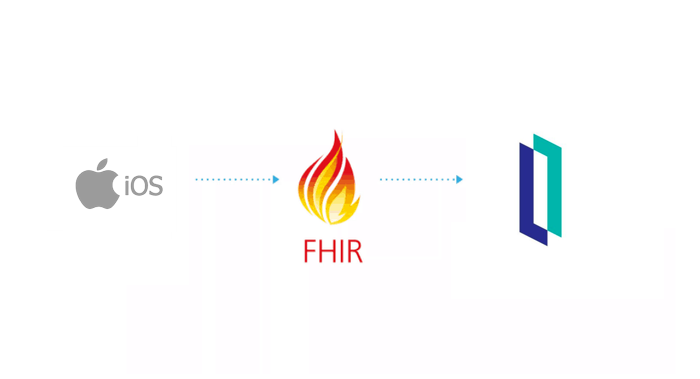
What I mean by end-to-end, from an information source such as an iPhone. Collect your health data in Apple format (HealthKit), transform it into FHIR and then send it to the InterSystems IRIS for Health repository.

This information must be accessible via a web interface.

TL;DR: iPhone -> InterSystems FHIR -> Web Page.

How-To run this demo

Prerequisites

  • For the client part (iOS)
    • Xcode 12
  • For the server and Web app
    • Docker

Install Xcode

Not much to say here, open the AppStore, search for Xcode, Install.

Open the SwiftUi project

Swift is Apple's programming language for iOS, Mac, Apple TV and Apple Watch. It is the replacement for objective-C.

Double click on Swift-FHIR-Iris.xcodeproj

Open the simulator by a click on the top left arrow.

xcode

Configure the simulator

Go to Health

Click Steps

Add Data

simulator

Lunch the InterSystems FHIR Server

In the root folder of this git, run the following command:

docker-compose up -d

At the end of the building process you will be able to connect to the FHIR repository :

http://localhost:32783/fhir/portal/patientlist.html

portal

This portal was made by @diashenrique.

With some modification to handle Apple's activity footsteps.

Play with the iOS app

The app will first request you to accept to share some information.

Click on authorize

authorize

Then you can test the FHIR server by clicking on 'Save and test server'

The default settings point to the docker configuration.

If succeed, you can enter your patient information.

First Name, Last Name, Birthday, Genre.

The save the patient to Fhir. A pop-up will show you your unique Fhir ID.

savepatient

Consult this patient on the portal:

Go to: http://localhost:32783/fhir/portal/patientlist.html

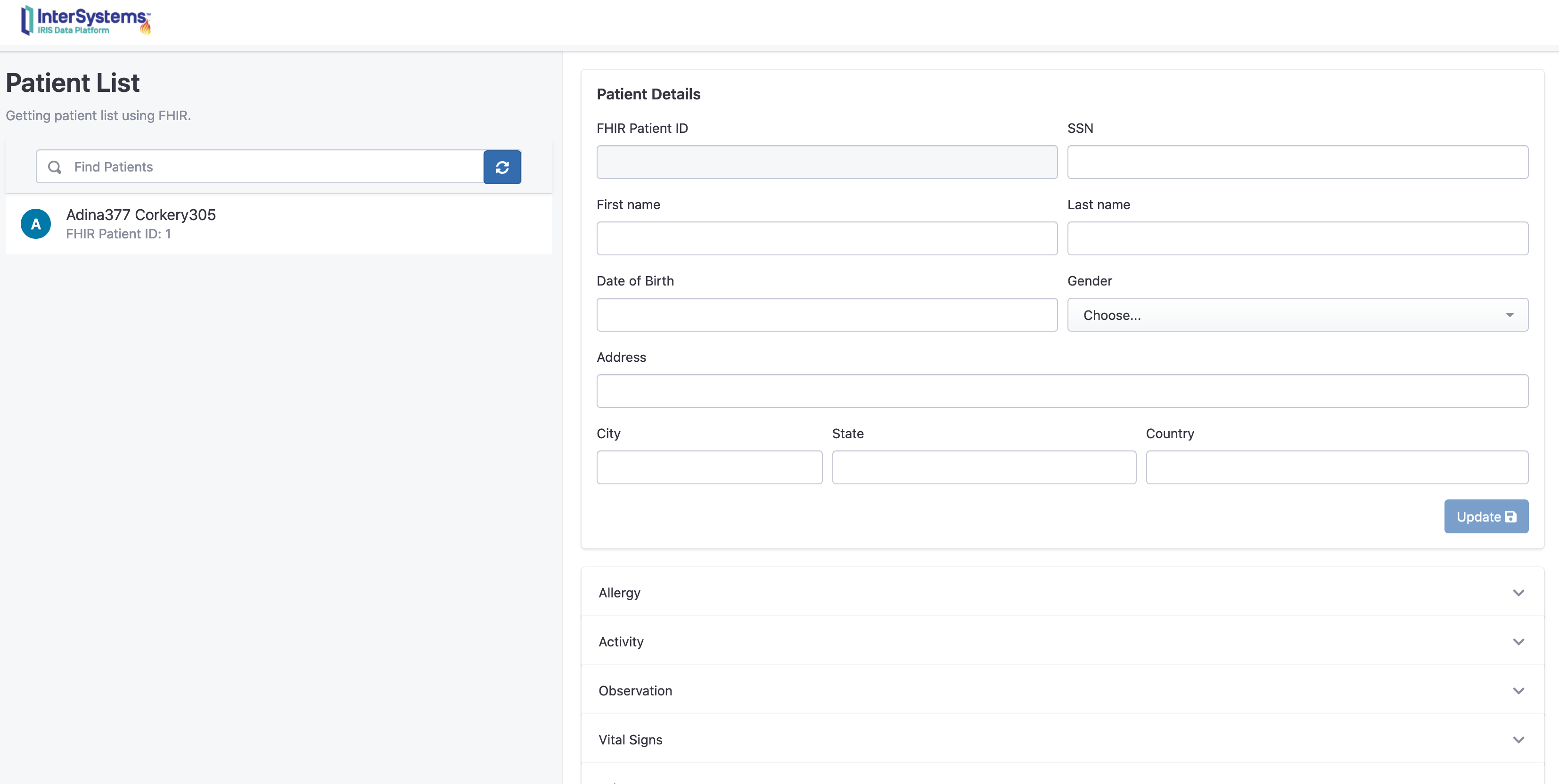
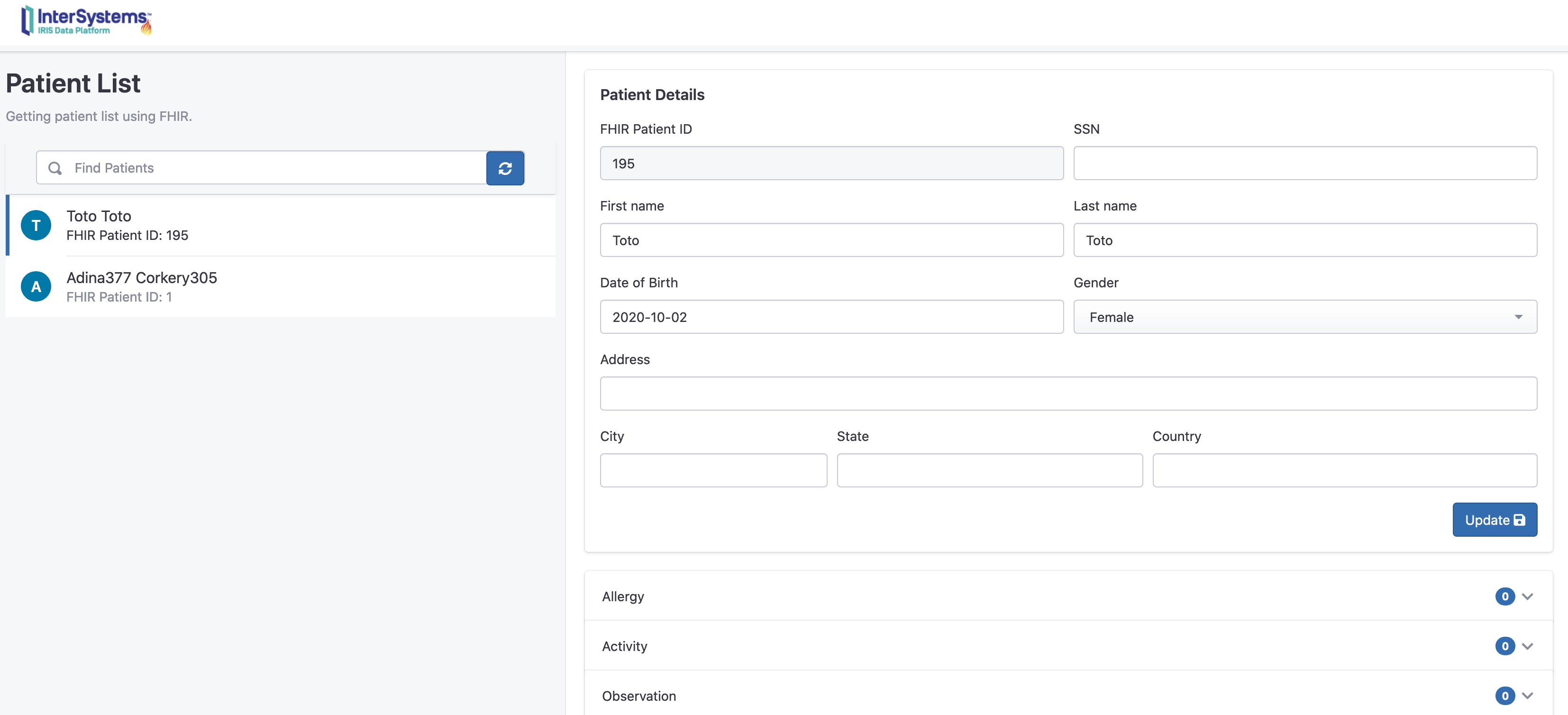
We can see here, that there is a new patient "toto" with 0 activities.

patient portal

Send her activities:

Go back to the iOS application and click on Step count

This panel summaries the step count of the week. In our case 2 entries.

Now you can send them to InterSystems IRIS FHIR by a click on send.

ios send

Consult the new activities on the portal:

We can see now that Toto has two new observation and activities.

portal activites

You can event click on the chart button to display it as a chart.

portal charts

How it works

iOS

Most of this demo is built on SwiftUI.

https://developer.apple.com/xcode/swiftui/

Who is the latest framework for iOS and co.

How to check authorization for health data works

It's in the SwiftFhirIrisManager class.

This class is a singleton and it will be carrying all around the application with @EnvironmentObject annotation.

More info at : https://www.hackingwithswift.com/quick-start/swiftui/how-to-use-environmentobject-to-share-data-between-views

The requestAuthorization method:

    // Request authorization to access HealthKit.
    func requestAuthorization() {
        // Requesting authorization.
        /// - Tag: RequestAuthorization
        
        let writeDataTypes: Set<HKSampleType> = dataTypesToWrite()
        let readDataTypes: Set<HKObjectType> = dataTypesToRead()
        
        // requset authorization
        healthStore.requestAuthorization(toShare: writeDataTypes, read: readDataTypes) { (success, error) in
            if !success {
                // Handle the error here.
            } else {
                
                DispatchQueue.main.async {
                    self.authorizedHK = true
                }
                
            }
        }
    }

Where healthStore is the object of HKHealthStore().

The HKHealthStore is like the database of healthdata in iOS.

dataTypesToWrite and dataTypesToRead are the object we would like to query in the database.

The authorization need a purpose and this is done in the Info.plist xml file by adding:

    <key>NSHealthClinicalHealthRecordsShareUsageDescription</key>
    <string>Read data for IrisExporter</string>
    <key>NSHealthShareUsageDescription</key>
    <string>Send data to IRIS</string>
    <key>NSHealthUpdateUsageDescription</key>
    <string>Write date for IrisExporter</string>

How to connect a FHIR Repository

For this part I used the FHIR package from Smart-On-FHIR : https://github.com/smart-on-fhir/Swift-FHIR

The class used is the FHIROpenServer.

    private func test() {
        
        progress = true
        
        let url = URL(string: self.url)

        swiftIrisManager.fhirServer = FHIROpenServer(baseURL : url! , auth: nil)
        
        swiftIrisManager.fhirServer.getCapabilityStatement() { FHIRError in
            
            progress = false
            showingPopup = true
            
            if FHIRError == nil {
                showingSuccess = true
                textSuccess = "Connected to the fhir repository"
            } else {
                textError = FHIRError?.description ?? "Unknow error"
                showingSuccess = false
            }
            
            return
        }
 
    }

This create a new object fhirServer in the singleton swiftIrisManager.

Next we use the getCapabilityStatement()

If we can retrieve the capabilityStatement of the FHIR server this mean we successfully connected to the FHIR repository.

This repository is not in HTTPS, by default apple bock this kind of communication.

To allow HTTP support, the Info.plist xml file is edited like this:

    <key>NSAppTransportSecurity</key>
    <dict>
        <key>NSExceptionDomains</key>
        <dict>
            <key>localhost</key>
            <dict>
                <key>NSIncludesSubdomains</key>
                <true/>
                <key>NSExceptionAllowsInsecureHTTPLoads</key>
                <true/>
            </dict>
        </dict>
    </dict>

How to save a patient in the FHIR Repository

Basic operation by first checking if the patient already exists in the repository

Patient.search(["family": "\(self.lastName)"]).perform(fhirServer)

This search for patient with the same family name.

Here we can imaging other scenarios like with Oauth2 and JWT token to join the patientid and his token. But for this demo we keep things simple.

Next if the patient exist, we retrieve it, otherwise we create the patient :

    func createPatient(callback: @escaping (Patient?, Error?) -> Void) {
        // Create the new patient resource
        let patient = Patient.createPatient(given: firstName, family: lastName, dateOfBirth: birthDay, gender: gender)
        
        patient?.create(fhirServer, callback: { (error) in
            callback(patient, error)
        })
    }

How to extract data from the HealthKit

It's done by querying the healthkit Store (HKHealthStore())

Here we are querying for footsteps.

Prepare the query with the predicate.

        //Last week
        let startDate = swiftFhirIrisManager.startDate
        //Now
        let endDate = swiftFhirIrisManager.endDate

        print("Collecting workouts between \(startDate) and \(endDate)")

        let predicate = HKQuery.predicateForSamples(withStart: startDate, end: endDate, options: HKQueryOptions.strictEndDate)

Then the query itself with his type of data (HKQuantityType.quantityType(forIdentifier: .stepCount)) and the predicate.

func queryStepCount(){
        
        //Last week
        let startDate = swiftFhirIrisManager.startDate
        //Now
        let endDate = swiftFhirIrisManager.endDate

        print("Collecting workouts between \(startDate) and \(endDate)")

        let predicate = HKQuery.predicateForSamples(withStart: startDate, end: endDate, options: HKQueryOptions.strictEndDate)

        let query = HKSampleQuery(sampleType: HKQuantityType.quantityType(forIdentifier: .stepCount)!, predicate: predicate, limit: HKObjectQueryNoLimit, sortDescriptors: nil) { (query, results, error) in
            
            guard let results = results as? [HKQuantitySample] else {
                   return
            }
       
            process(results, type: .stepCount)
        
        }

        healthStore.execute(query)

    }

How to transform HealthKit data to FHIR

For this part, we use the Microsoft package HealthKitToFHIR

https://github.com/microsoft/healthkit-to-fhir

This is a usefull package that offer factories to transform HKQuantitySample to FHIR Observation

     let observation = try! ObservationFactory().observation(from: item)
      let patientReference = try! Reference(json: ["reference" : "Patient/\(patientId)"])
      observation.category = try! [CodeableConcept(json: [
          "coding": [
            [
              "system": "http://terminology.hl7.org/CodeSystem/observation-category",
              "code": "activity",
              "display": "Activity"
            ]
          ]
      ])]
      observation.subject = patientReference
      observation.status = .final
      print(observation)
      observation.create(self.fhirServer,callback: { (error) in
          if error != nil {
              completion(error)
          }
      })

Where item is an HKQuantitySample in our case a stepCount type.

The factory does most of the job of converting 'unit' and 'type' to FHIR codeableConcept and 'value' to FHIR valueQuantity.

The reference to the patientId is done manually by casting a json fhir reference.

let patientReference = try! Reference(json: ["reference" : "Patient/\(patientId)"])

Same is done for the category :

      observation.category = try! [CodeableConcept(json: [
          "coding": [
            [
              "system": "http://terminology.hl7.org/CodeSystem/observation-category",
              "code": "activity",
              "display": "Activity"
            ]
          ]
      ])]

At last the observation is created in the fhir repository :

      observation.create(self.fhirServer,callback: { (error) in
          if error != nil {
              completion(error)
          }
      })

Backend (FHIR)

Not much to say, it's based on the fhir template form the InterSystems community :

https://openexchange.intersystems.com/package/iris-fhir-template

Frontend

It's based on Henrique works who is a nice front end for FHIR repositories made in jquery.

https://openexchange.intersystems.com/package/iris-fhir-portal

6
0 1208
Article Evgeny Shvarov · Mar 20, 2020 3m read

Hi colleagues!

Every day Johns Hopkins University publishes new data on coronavirus COVID-19 pandemic status.

I built a simple InterSystems IRIS Analytics dashboard using InterSystems IRIS Community Edition in docker deployed on GCP Kubernetes which shows key measures of the disease outbreak.

This dashboard is an example of how information from CSV could be analyzed with IRIS Analytics and deployed to GCP Kubernetes in a form of InterSystems IRIS Community Edition.

Added the interactive map of the USA:

13
3 1082
Article Ray Fucillo · Sep 2, 2020 7m read

While the integrity of Caché and InterSystems IRIS databases is completely protected from the consequences of system failure, physical storage devices do fail in ways that corrupt the data they store.  For that reason, many sites choose to run regular database integrity checks, particularly in coordination with backups to validate that a given backup could be relied upon in a disaster.  Integrity check may also be acutely needed by the system administrator in response to a disaster involving storage corruption.  Integrity check must read every block of the globals being checked (if not already

8
9 2278
Article Zhong Li · Jan 27, 2020 7m read

Keywords: Python, JDBC, SQL, IRIS, Jupyter Notebook, Pandas, Numpy, and Machine Learning 

1. Purpose

This is another 5-minute simple note on invoking the IRIS JDBC driver via Python 3 within i.e. a Jupyter Notebook, to read from and write data  into an IRIS database instance via SQL syntax, for demo purpose. 

1
2 3041
Article Bob Kuszewski · Jun 19, 2020 5m read

Migrate from Java Business Host to PEX

With the release PEX in InterSystems IRIS 2020.1 and InterSystems IRIS for Health 2020.1, customers have a better way to build Java into productions than the Java Business Host. PEX provides a complete set of APIs for building interoperability components and is available in both Java and .NET. The Java Business Host has been deprecated and will be retired in a future release.

Advantages of PEX

  • Allows developers to create any Production component in either Java or .NET
  • More complex message structures can be passed between components
  • Simplified settings
  • Simplified development workflow with no need for ObjectScript.

The rest of this article focuses on how to migrate existing Java Business Host code to PEX.

Overview

The classes and interfaces used for PEX are different from Java Business Host (JBH). We'll provide an overview of the differences here, but the full documentation will give you more depth.

Converting a Business Service from Java Business Host to PEX

In order to build a PEX Business Service, you need to implement com.intersystems.enslib.pex.BusinessService instead of com.intersystems.gateway.bh.BusinessService.

The design pattern used by PEX for Business Service has changed from one where the service is expected to start a thread to produce messages to one where the service implements a function that is called periodically to produce messages.

In JBH, your code would look something like this

  @Override
  public boolean OnInit(Production p) throws Exception {
    production = p;

    if (messageThread == null) {
      Messager messager = new Messager();
      messageThread = new Thread(messager);
      messageThread.start();
    }
  
    return true;
  }

In PEX, you just need to implement three functions

  public void OnInit() throws Exception {
    // Initialization
    return;
  }

  public Object OnProcessInput(Object messageInput) throws Exception {
    // Here is where you call SendMessage() or SendMessageAsync()

    return null;
  }

  public void OnTearDown() throws Exception {
    // Shut down
    return;
  }

You'll also need to change how settings are used, messages delivered, and logging is done. More on those below.

Converting a Business Operation from Java Business Host to PEX

In order to build a PEX Business Operation, you need to implement com.intersystems.enslib.pex.BusinessOperation instead of com.intersystems.gateway.bh.BusinessOperation.

The design pattern for Business Operations is structurally the same between JBH and PEX, but the parameters to two main entry points have changed.

Changes to OnInit()

In PEX, OnInit() takes no parameters.

Changes to OnMessage()

In PEX, OnMessage() is given a generic Object instead of the String used in JBH. This allows the author of the production to pass any sort of message desired.

In JBH your application might have looked something like this

  public boolean OnMessage(String message) throws Exception {
    // Business logic here
    return true;
  }

In PEX, the parameter is a generic Java Object that you need to cast appropriately, which allows you to transmit more complex messages than just strings. Here's an example of how to extract a request that is a file stream.

  public Object OnMessage(Object request) throws Exception {
    com.intersystems.jdbc.IRISObject streamContainer = (com.intersystems.jdbc.IRISObject)request;
    com.intersystems.jdbc.IRISObject str = (com.intersystems.jdbc.IRISObject)streamContainer.get("Stream");
    String originalFilename = (String)streamContainer.get("OriginalFilename");

    Long contentSize = (Long)str.get("Size");
    String content = (String)str.invoke("Read", contentSize);

    // Business logic here

    return null;
  }

You'll also need to change how settings are used, messages delivered, and logging is done. More on those below.

Settings

Declaration of settings has been simplified.

In JBH configuration was declared via a SETTINGS string and fetched via code that looks something like this:

  String setting = production.GetSetting("Min");
  if (!setting.isEmpty()) {
    min = Integer.parseInt(setting);
  }

In PEX, settings are just public member fields. These are automatically populated when the class is instantiated.

  public int Min = 0;

Any public member field is available to be set in your production as long as the member field is a base Java type (String, int, etc.).

Messages

Message sending is more powerful. In JBH messages are sent as strings. In PEX, messages are sent as objects - either IRISObject, for objects that are defined in ObjectScript, or a subclass of com.intersystems.enslib.pex.Message, for classes defined in Java.

In JBH, your code would look like this

  production.SendRequest(value.toString());

In PEX, it would be something like this

  MyExampleMessageClass req = new MyExampleMessageClass("message to send"); 
  SendRequestAsync(Target, req);

Logging

Logging functions are all similar, just named differently.

In PEX, you'd log an informational message via LOGINFO()

  LOGINFO("Received message");

Object Gateway

The Java Business Host needed its own gateway. With PEX, you can use a single Java gateway for all your Java needs. Or you can use many gateways. It's up to you. Here's a good introduction to the java gateway.

Conclusion and Feedback

If you haven't tried PEX yet, what are you waiting for? PEX provides the ability to solve a far wider array of business problems with less code, plus you can now do everything in .NET as well.

If you have any questions or problems moving your JBH application to PEX, please reach out myself or the WRC.

4
1 923
Article Eduard Lebedyuk · Feb 5, 2016 11m read

Class Queries in InterSystems IRIS (and Cache, Ensemble, HealthShare) is a useful tool that separates SQL queries from Object Script code. Basically, it works like this: suppose that you want to use the same SQL query with different arguments in several different places.In this case you can avoid code duplication by declaring the query body as a class query and then calling this query by name. This approach is also convenient for custom queries, in which the task of obtaining the next row is defined by a developer. Sounds interesting? Then read on!

17
7 7569
Article Steven Hobbs · Oct 8, 2019 7m read

$LIST string format and %DynamicArray and %DynamicObject classes

IRIS, and previously Cache, contain several different ways to create a sequence containing a mixture of data values.  A data sequence that has been available for many years is the $LIST string.  Another more recent data sequence is the %DynamicArray class, which along with the %DynamicObject class, is part of the IRIS support for JSON string representation.  These two sequences involve very different tradeoffs.

$LIST String Format

4
10 3292
Article Mikhail Khomenko · May 15, 2017 12m read

Prometheus is one of the monitoring systems adapted for collecting time series data.

Its installation and initial configuration are relatively easy. The system has a built-in graphic subsystem called PromDashfor visualizing data, but developers recommend using a free third-party product called Grafana. Prometheus can monitor a lot of things (hardware, containers, various DBMS's), but in this article, I would like to take a look at the monitoring of a Caché instance (to be exact, it will be an Ensemble instance, but the metrics will be from Caché). If you are interested – read along.

9
5 4458
Article Michael Smart · Oct 7, 2016 4m read

One useful feature of our REST framework is the ability for a dispatch class to identify request prefixes and forward them to another dispatch class. This approach of modularizing your URL map will improve code readability, enable you to easily maintain separate versions of an interface, and provide a means to protect API calls that only certain users will be allowed to access.

Overview

1
0 3931
Article Chris Stewart · Apr 17, 2017 4m read

So, one day you're working away at WidgetsDirect, the leading supplier of widget and widget accessories, when your boss asks you to develop the new customer facing portal to allow the client base to access the next generation of Widgets..... and he wants you to use Angular 1.x to read into the department's Caché server.   

There's only one problem:  You've never used Angular, and don't know how to make it talk to Caché.

This guide is going to walk through the process of setting up a full Angular stack which communicates with a Caché backend using JSON over REST.  

Part 1 - Setup

23
3 5069