#Artificial Intelligence (AI)

0 Followers · 306 Posts

Artificial Intelligence (AI) is the simulation of human intelligence processes by machines, especially computer systems. These processes include learning (the acquisition of information and rules for using the information), reasoning (using rules to reach approximate or definite conclusions) and self-correction.

Learn more.

InterSystems staff + admins Hide everywhere
Hidden post for admin
Article Crystal Cheong · May 14, 2024 4m read

ChatIRIS Health Coach, a GPT-4 based agent that leverages the Health Belief Model (Hochbaum, Rosenstock, & Kegels, 1952) as a psychological framework to craft empathetic replies.

image

Health Belief Model

The Health Belief Model suggests that individual health behaviours are shaped by personal perceptions of vulnerabilities to disease risk, alongside the perceived incentives and barriers to taking action.

Our approach disaggregates these concepts into 14 distinct belief scores, allowing us to dynamically monitor them over the course of the conversation.

In the context of preventive health actions (e.g. cancer screening, vaccinations), we find that the agent is fairly successful at picking up a person’s beliefs around health actions (e.g. perceived vulnerabilities and barriers). We demonstrate the agent’s capabilities in the specific instance of a colorectal cancer screening campaign.

image

Architecture

ChatIRIS's technical framework is intricately designed to optimize the delivery of personalized healthcare advice through the integration of advanced AI techniques and robust data handling platforms. Central to this architecture is the use of InterSystems IRIS, particularly its vector store and vector search capabilities, which play a pivotal role in the Retrieval-Augmented Generation (RAG) pipeline. This section delves deeper into how these components contribute significantly to the functionality and effectiveness of ChatIRIS.

image

Retrieval-Augmented Generation (RAG) Pipeline

The RAG pipeline is a fundamental component of ChatIRIS, tasked with fetching pertinent information from a comprehensive database to produce contextually relevant responses. Here's how the RAG pipeline functions within the broader architecture:

  1. User Input Processing: Initially, user inputs are analyzed to extract key health queries or concerns. This analysis helps in identifying the context and specifics of the information required.
  2. Activation of Vector Search: The RAG pipeline employs vector search technology from InterSystems IRIS’s vector store to locate the most relevant information. This process involves converting text data into vector representations, which are then used to perform semantic searches across the extensive knowledge base.
  3. Data Retrieval: By leveraging the vector search capabilities, the system efficiently sifts through large volumes of data to find matches that are semantically close to the query vectors. This ensures that the responses generated are not only accurate but also specifically tailored to the user’s expressed needs.

Role of InterSystems IRIS Vector Store

InterSystems IRIS vector store is integral to enhancing the search functionality within the RAG pipeline. Below are the key advantages and functionalities provided by the vector store in this context:

  1. Semantic Understanding: The vector store allows for the encoding of text into high-dimensional space, capturing the semantic meanings of words beyond simple keyword matching. This is crucial for understanding complex medical terminology and user expressions in healthcare contexts.
  2. Speed and Efficiency: Vector search is known for its ability to provide rapid responses, even when dealing with large datasets. This is particularly important for ChatIRIS, where timely and relevant responses can significantly impact user engagement and satisfaction.
  3. Scalability: As ChatIRIS expands to accommodate more users and increasingly complex health queries, the scalability of the vector store ensures that the system can handle growing data volumes without degradation in performance.
  4. Continuous Learning and Updating: The vector store supports dynamic updating and learning, meaning it can incorporate new research, health guidelines, and user feedback to refine its search capabilities continuously. This helps keep the chatbot’s responses up-to-date with the latest medical advice and practices.

Integration with Health Belief Policy Model

The integration of vector search with the Health Belief Policy model allows ChatIRIS to align detailed medical information with psychological insights from user interactions. For example, if a user shows concern about vaccine side effects, the system can pull targeted information to address these fears effectively, making the chatbot’s responses more persuasive and reassuring.

This streamlined integration of InterSystems IRIS technologies enables ChatIRIS to function as a highly effective tool in promoting preventive health measures, leading to better health outcomes and improved public health engagement.

Case Study and Practical Implementation

A practical demonstration of ChatIRIS’s capability can be seen in its pilot implementation for colorectal cancer screening. Initially, the chatbot gathers basic health details from the user and progressively addresses their concerns about the screening process, costs, and potential discomfort. By integrating responses from the Health Belief Policy model and the RAG pipeline, ChatIRIS efficiently addresses misconceptions and motivates users towards taking preventive actions.


💭 Find out more

3
2 391
Article José Pereira · May 14, 2024 11m read

TL;DR

This article introduces using the langchain framework supported by IRIS for implementing a Q&A chatbot, focusing on Retrieval Augmented Generation (RAG). It explores how IRIS Vector Search within langchain-iris facilitates storage, retrieval, and semantic search of data, enabling precise and up-to-date responses to user queries. Through seamless integration and processes like indexing and retrieval/generation, RAG applications powered by IRIS enable the capabilities of GenAI systems for InterSystems developers.

A notebook and a complete Q&A chatbot application using the topics discussed here are provided to help readers to fix the concepts.

Table of contents:

Langchain Q&A chatbot example

This article explores the langchain's Q&A chatbot example, focusing on its indexing and retrieval/generation components for building RAG applications. It details data loading, segmentation, and indexing, alongside retrieval and answer generation processes. You can find the original example here and an adaptation to use IRIS as its vector store by using Vector Search and langchain-iris here.

Note that in this article we are going to focus on explaining the concepts used by implementing the Q&A chatbot. So, you should to refer to those sources in order to get the full source code.

What is RAG and its role in Q&A chatbots

RAG, or Retrieval Augmented Generation, stands as a technique for enriching the knowledge base of Language Model (LLM) systems by integrating supplementary data beyond their initial training set. While LLMs possess the ability to reason across diverse topics, they are confined to the public data they were trained on up to a particular cutoff date. To empower AI applications to process private or more recent data effectively, RAG supplements the model's knowledge with specific information as required. This is an alternative way to fine tuning LLMs, which could be expensive.

Within the realm of Q&A chatbots, RAG plays a pivotal role in handling unstructured data queries, comprising two key components: indexing and retrieval/generation.

Indexing commences with the ingestion of data from a source, followed by its segmentation into smaller, more manageable chunks for efficient processing. These segmented chunks are then stored and indexed, often utilizing embeddings models and vector databases, ensuring swift and accurate retrieval during runtime.

During retrieval and generation, upon receiving a user query, the system generates an embedding vector using the same embedding model used in the indexing phase, and then retrieves pertinent data chunks from the index utilizing a retriever component. These retrieved segments are then passed to the LLM for answer generation.

Thus, RAG empowers Q&A chatbots to access and leverage both structured and unstructured data sources, thereby enhancing their capability to furnish precise and up-to-date responses to user queries through the utilization of embeddings models and vector databases as an alternative to LLM fine tuning.

IRIS Vector search

InterSystems IRIS Vector Search is a new feature which enables semantic search and generative AI capabilities within databases. It allows users to query data based on its meaning rather than its raw content, leveraging retrieval-augmented generation (RAG) architecture. This technology transforms unstructured data, like text, into structured vectors, facilitating efficient processing and response generation.

The platform supports the storage of vectors in a compressed and performant VECTOR type within relational schemas, allowing for seamless integration with existing data structures. Vectors represent the semantic meaning of language through embeddings, with similar meanings reflected by proximity in a high-dimensional geometric space.

By comparing input vectors with stored vectors using operations like dot product, users can algorithmically determine semantic similarity, making it ideal for tasks like information retrieval. IRIS also offers efficient storage and manipulation of vectors through dedicated VECTOR types, enhancing performance for operations on large datasets.

To utilize this capability, text must be transformed into embeddings through a series of steps involving text preprocessing and model instantiation. InterSystems IRIS supports seamless integration of Python code for embedding generation alongside ObjectScript for database interaction, enabling smooth implementation of vector-based applications.

You can check out the Vector Search documentation and usage examples here.

langchain-iris

In short, langchain-iris is the way to use IRIS Vector Search with the langchain framework.

InterSystems IRIS Vector Search aligns closely with langchain's vector store requirements. IRIS stores and retrieves embedded data, crucial for similarity searches. With its VECTOR type, IRIS supports storing embeddings, enabling semantic search over unstructured data and facilitating seamless document processing into the vector store.

By leveraging operations like dot product comparisons, IRIS facilitates algorithmic determination of semantic similarity, ideal for langchain's similarity search.

Thus, langchain-iris allows the development of RAG applications with langchain framework supported by InterSystems IRIS data platform. For more information on langchain-iris, check out here.

Using IRIS as the langchain vector store

In order to use IRIS as the vector storage to RAG application using langchain, you must first import langchain-iris, like this:

pip install langchain-iris

After that, you can use the method from_documents() from IRISVector class, like this:

db = IRISVector.from_documents(
    embedding=embeddings,
    documents=docs,
    collection_name=COLLECTION_NAME,
    connection_string=CONNECTION_STRING,
)

Where:

  • embeddings is a langchain.embeddings instance of some embedding model - like OpenAI or Hugging Faces, for instance.
  • documents is an array of strings that will be applied to the embedding model and the resulting vectors stored in IRIS. Generally, the document should be splitted due size limitations of embedding models and better managing of it; the langchain framework provides several splitters.
  • collection_name is the table name where the documents (or its fragments) and its embedding vectors will be stored.
  • connections_string is a DBAPI connection string to IRIS, in this format: iris://<username>:<password>@<hostname>:<iris_port>/<namespace>

Check out the complete code of the hello world example in langchain-iris repo.

A deeper look on the whole process

Here, we are going to focus on how to use IRIS as langchain’s vector store through langchain-iris and how it works. To get a better understanding, please first refer to the langchain Q&A chatbot example, which provides a great explanation on each section of its code.

As you can see in the original example, the Chroma vector database is used, by its langchain’s vector store implementation:

from langchain_chroma import Chroma
…
vectorstore = Chroma.from_documents(documents=splits, embedding=OpenAIEmbeddings())

So, in order to use IRIS instead, just change the Chroma vector store by langchain-iris:

vectorstore = IRISVector.from_documents(
    embedding=OpenAIEmbeddings(),
    documents=splits,
    collection_name="chatbot_docs",
    connection_string=iris://_SYSTEM:SYS@localhost:1972/USER',
)

Now, you are all set to use IRIS in the langchain’s Q&A chatbot example. You can check out the whole example source code in this notebook.

After running the example, a table is created in the SQLUser schema (IRIS default schema) by langchain-iris. Note that its name came from the collection name set in langchain-iris:
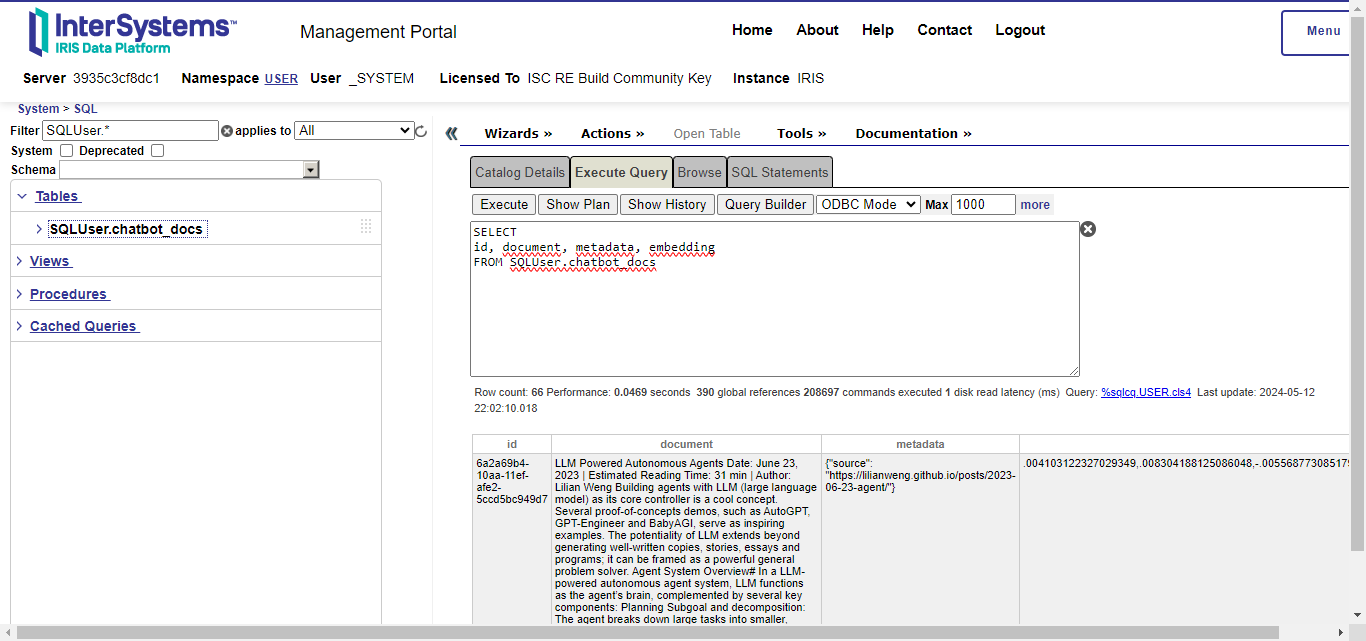
Table created by langchain-iris to stored RAG documents and its embeddings

You can also note four columns:

  • id: the document ID.
  • document: the document or a fragment of it, if a text splitter was used.
  • metadata: a JSON object containing information about the document.
  • embedding: the embedding vector which represents the document in a high vectorial space; this is the VECTOR type of IRIS Vector Search.

This is the indexing step, i.e, when langchain applies the embedding model to each document splitted fragment and stores its vector in IRIS with the fragment itself and a metadata.

As said before, langchaing provides splitters to break documents into fragments that fit the limits of embedding models and for enhance the retrieval process. Also we saw that those fragments and its corresponding embedding vectors are stored into a table in IRIS by langchain-iris. Now, in order to implement a RAG application, it’s necessary to query for most relevant documents stored into IRIS, given a query string. This is done by implementation of langchain retrievers.

You can create a retriever for documents stored in IRIS like this:

retriever = vectorstore.as_retriever()

With this retriever, you can query for most similar documents given a natural language query. The langchain framework will use the same embedding model used in the indexing step to extract a vector from the query. This way, document fragments with similar semantic content to the query could be retrieved.

For illustration, let’s use the langchain example, which indexes a web page with information about LLM agents. This page explaing several concepts, like task decomposition. Let's check out what the retriever returns given a query like “What are the approaches to Task Decomposition?":
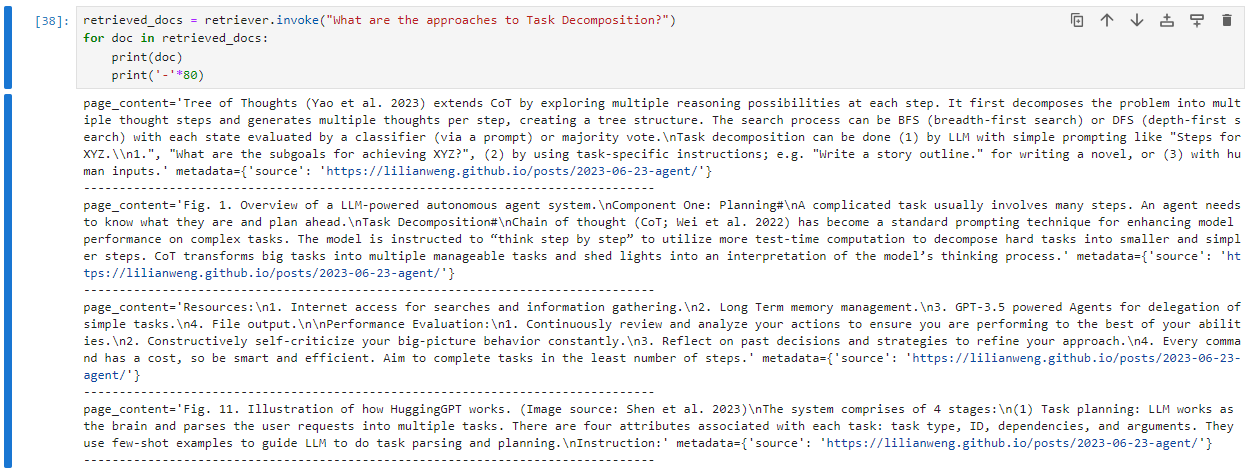
Retrieved result for query about task decomposition

Now, let's do the same query - semantically speaking but syntactically different, i.e., using different words with similar meaning and see what the Vector Search engine returns:
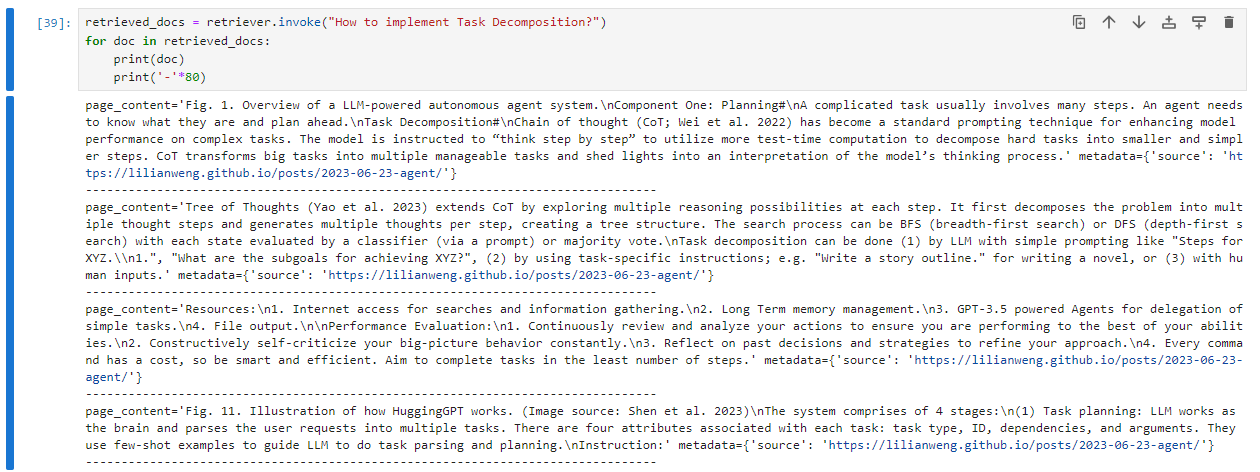
Retrieved result for similar query about task decomposition

You can note that the results are practically the same, even with passing different query strings. This means that the embedding vectors are somehow abstracting the semantics in documents and query strings.

To get more evidences of such a semantic query capability, let's now keeping ask about task decomposition, but this time, asking for its downsides:
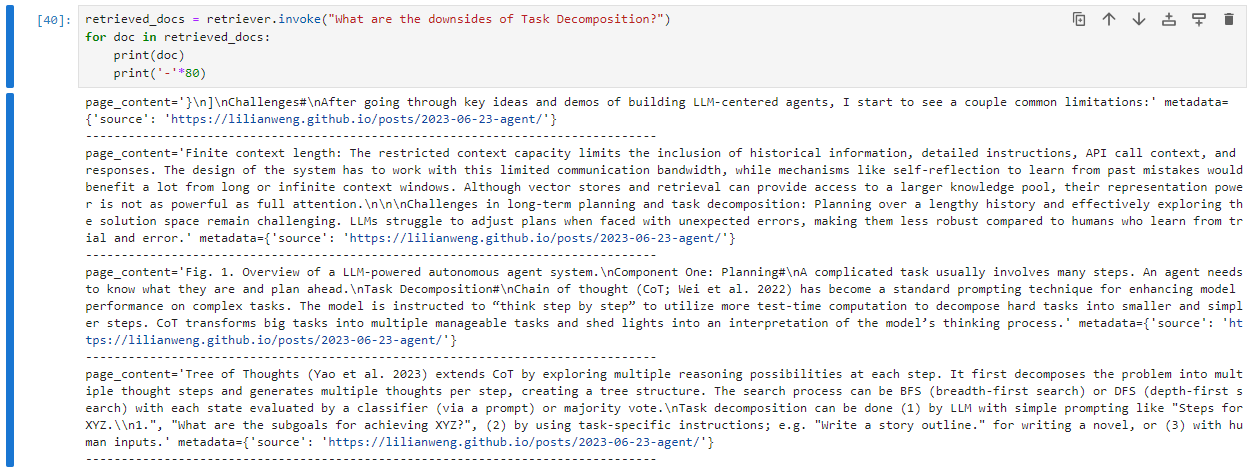
Retrieved result for query about task decomposition downsides

Note that this time the most relevant results are different from the previous one. Furthermore, the first results haven't the word ‘downside’, but related words like ‘challenges’, ‘limitation’ and ‘restricted’.

This reinforces the capability of semantic search of embedding vectors in vector databases.

After the retrieval step, the most relevant documents are appended as context information to the user query that will be sent to the LLM process. For instance (adapted from this page):

from langchain import hub

prompt = hub.pull("rlm/rag-prompt")

user_query = "What are the approaches to Task Decomposition?"
retrieved_docs = [doc.page_content for doc in retriever.invoke(user_query)]

example_messages = prompt.invoke(
    {"context": "filler context", "question": user_query}
).to_messages()
print(example_messages[0].content)

This code will generate a prompt like this, which you can see the retrieved documents being used as context to the LLM align its response:

"""
You are an assistant for question-answering tasks. Use the following pieces of retrieved context to answer the question. If you don't know the answer, just say that you don't know. Use three sentences maximum and keep the answer concise.
Question: What are the approaches to Task Decomposition?
Context: Tree of Thoughts (Yao et al. 2023) extends CoT by exploring multiple ... (truncated in the sake of brevity)
Answer:
"""

So, the RAG application can enhance its accuracy while respecting the size limits of LLM prompt.

Final words

In conclusion, the integration of IRIS Vector Search with the langchain framework opens new horizons for the development of Q&A chatbots and other applications reliant on semantic search and generative AI for InterSystems developers community.

The seamless integration of IRIS as the vector store through langchain-iris simplifies the implementation process, offering developers a robust and efficient solution for managing and querying large datasets of structured and unstructured information.

Through indexing, retrieval, and generation processes, RAG applications powered by IRIS Vector Search can effectively leverage both public and private data sources, enriching the capabilities of AI systems based on LLMs and providing users with more comprehensive and up-to-date responses.

To finalize, if you want to get more deep and see a complete application implementing these concepts along side other features like interoperability and business hosts to communicate with external APIs like OpenAI and Telegram, check out our application iris-medicopilot. We are planning to cover such an application in more detail in a next article.

See you!

3
3 479
Article Lucas Fernandes · May 16, 2024 2m read

The introduction of InterSystems' "Vector Search" marks a paradigm shift in data processing. This cutting-edge technology employs an embedding model to transform unstructured data, such as text, into structured vectors, resulting in significantly enhanced search capabilities. Inspired by this breakthrough, we've developed a specialized search engine tailored to companies.

We harness generative artificial intelligence to generate comprehensive summaries of these companies, delivering users a powerful and informative tool.

1
1 130
Announcement Ikram Shah · May 16, 2024

Hi Community,

Here is a brief walkthrough on the capabilities of IRIS AI Studio platform. It covers one complete flow from loading data into IRIS DB as vector embeddings and retrieving information through 4 different channels (search, chat, recommender and similarity). In the latest release, added docker support for local installation and live version to explore. 

0
1 148
Article Ikram Shah · May 12, 2024 5m read


Problem

Do you resonate with this - A capability and impact of a technology being truly discovered when it's packaged in a right way to it's audience. Finest example would be, how the Generative AI took off when ChatGPT was put in the public for easy access and not when Transformers/RAG's capabilities were identified. At least a much higher usage came in, when the audience were empowered to explore the possibilities.  

Motivation

6
6 562
Article Ikram Shah · May 15, 2024 6m read

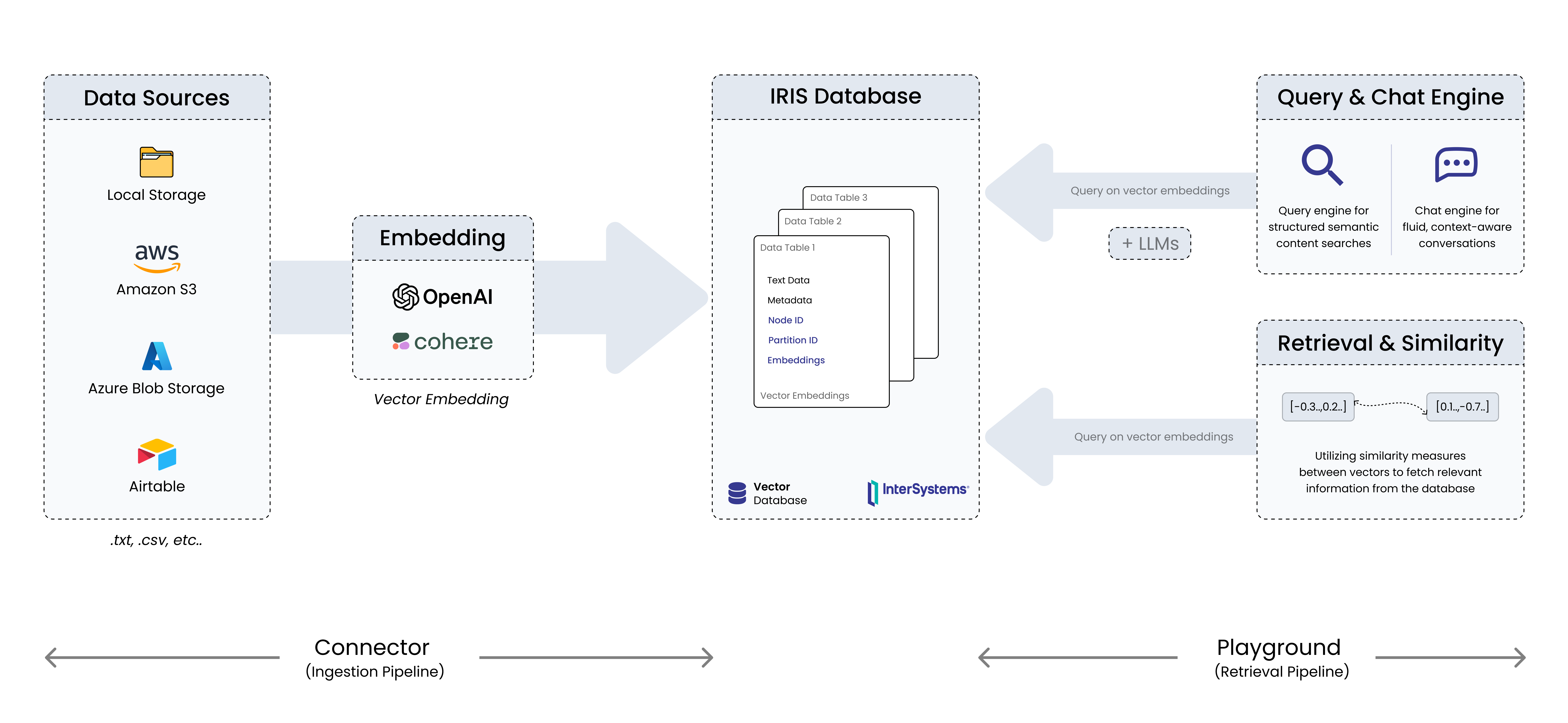
In the previous article, we saw different modules in IRIS AI Studio and how it could help explore GenAI capabilities out of IRIS DB seamlessly, even for a non-technical stakeholder. In this article, we will deep dive into "Connectors" module, the one that enables users to seamlessly load data from local or cloud sources (AWS S3, Airtable, Azure Blob) into IRIS DB as vector embeddings, by also configuring embedding settings like model and dimensions. 

New Updates  ⛴️ 

2
2 367
Announcement Anastasia Dyubaylo · Apr 8, 2024

Hey Community,

We have more exciting news! The new InterSystems online programming contest dedicated to Generative AI, Vector Search and Machine Learning is starting very soon! 

🏆 InterSystems Vector Search, GenAI and ML Contest 🏆

Duration: April 22 - May 19, 2024

Prize pool: $14,000


9
2 1390
Article Robbie Luman · Jan 12, 2024 7m read

With the advent of Embedded Python, a myriad of use cases are now possible from within IRIS directly using Python libraries for more complex operations. One such operation is the use of natural language processing tools such as textual similarity comparison.

Setting up Embedded Python to Use the Sentence Transformers Library

4
4 640
Announcement Evgeny Shvarov · Apr 18, 2024

Hi Developers!

Here're the technology bonuses for the InterSystems Vector Search, GenAI, and ML contest 2024 that will give you extra points in the voting:

  • Vector Search usage - 5
  • IntegratedML usage - 3
  • Embedded Python - 3
  • LLM AI or LangChain usage: Chat GPT, Bard, and others - 3
  • Questionnaire - 2
  • Docker container usage - 2 
  • ZPM Package deployment - 2
  • Online Demo - 2
  • Implement InterSystems Community Idea - 4
  • Find a bug in Vector Search, or Integrated ML, or Embedded Python - 2
  • First Article on Developer Community - 2
  • Second Article On DC - 1
  • First Time Contribution - 3
  • Video on YouTube - 3
  • Suggest a new idea - 1

See the details below.<--break-><--break->

0
0 345
Article Veerarajan Karunanithi · Feb 27, 2024 4m read

What is Unstructured Data?
Unstructured data refers to information lacking a predefined data model or organization. In contrast to structured data found in databases with clear structures (e.g., tables and fields), unstructured data lacks a fixed schema. This type of data includes text, images, videos, audio files, social media posts, emails, and more.

Why Are Insights from Unstructured Data Important?
According to an IDC (International Data Corporation) report, 80% of worldwide data is projected to be unstructured by 2025, posing a significant concern for 95% of businesses. Forbes Article
 

3
0 453
Article Luis Angel Pérez Ramos · Mar 27, 2024 6m read

As you have seen in the latest community publications, InterSystems IRIS has included since version 2024.1 the possibility of including vector data types in its database and based on this type of data vector searches have been implemented. Well, these new features reminded me of the article I published a while ago that was based on facial recognition using Embedded Python.

Introduction

2
2 532
Article xuanyou du · Jan 30, 2024 1m read

I created this application considering how to convert images such as prescription forms into FHIR messages

It recognizes the text in the image through OCR technology and extracts it, which is then transformed into fhir messages through AI (LLA language model).

Finally, sending the message to the fhir server of IntereSystems can verify whether the message meets the fhir requirements. If approved, it can be viewed on the select page.

4
1 240
Announcement Alki Iliopoulou · Dec 22, 2023

Hi Community,

Round 2 of the GenAI Crowdsourcing Mini-Contest is here! Everyone can join, even if you missed Round 1. You have $5 million in fantasy funds to invest in up to 5 promising submissions.

🎁 Rewards

  • The top-funded submission of Round 1 will emerge victorious.
  • The mastermind of the winning concept earns 5,000 points, while 3 astute "investor(s)" backing the winning idea get a chance to receive 200 bonus points each.

Dive into the game, strategically allocate your virtual investments, and aim for maximum returns! Deadline: Dec 31st, 2023

5
2 356
Article Guillaume Rongier · Dec 18, 2023 13m read

1. IRIS RAG Demo

IRIS RAG Demo

This demo showcases the powerful synergy between IRIS Vector Search and RAG (Retrieval Augmented Generation), providing a cutting-edge approach to interacting with documents through a conversational interface. Utilizing InterSystems IRIS's newly introduced Vector Search capabilities, this application sets a new standard for retrieving and generating information based on a knowledge base. The backend, crafted in Python and leveraging the prowess of IRIS and IoP, the LLM model is orca-mini and served by the ollama server. The frontend is an chatbot written with Streamlit.

1.1. What is RAG?

RAG stand for Retrieval Augmented Generation, it bring the ability to use an LLM model (GPT-3.5/4, Mistral, Orca, etc.) with a knowledge base.

Why is it important? Because it allows to use an knowledge base to answer questions, and use the LLM to generate the answer.

For example, if you ask "What is the grongier.pex module?" directly to the LLM, it will not be able to answer, because it does not know what is this module (and maybe you don't know it either 🤪).

But if you ask the same question to RAG, it will be able to answer, because it will use the knowledge base that know what grongier.pex module is to find the answer.

Now that you know what is RAG, let's see how it works.

1.2. Introducing IRIS Vector Search and Its Impact on RAG

IRIS Vector Search revolutionizes how applications can interact with large volumes of unstructured data. By embedding Vector Search into a RAG framework, this demo not only demonstrates the capability to query complex information but also to generate contextually relevant responses. This is a significant leap forward, as it allows for a deeper and more nuanced understanding of the content, far surpassing traditional keyword-based search methods.

1.3. How IRIS Vector Search Empowers RAG

The integration of IRIS Vector Search within a RAG application framework brings the concept of "chat with your documents" to life. By leveraging vector embeddings for document retrieval, IRIS Vector Search enables the application to understand and match the semantic context of user queries with relevant documents in the knowledge base. This method ensures highly accurate and context-aware responses, enhancing the overall user experience.

1.4. How it works?

First, we need to understand how LLMS works. LLMS are trained to predict the next word, given the previous words. So, if you give it a sentence, it will try to predict the next word, and so on. Easy, right?

To interact with an LLM, usually you need to give it a prompt, and it will generate the rest of the sentence. For example, if you give it the prompt What is the grongier.pex module?, it will generate the rest of the sentence, and it will look like this:

I'm sorry, but I'm not familiar with the Pex module you mentioned. Can you please provide more information or context about it?

Ok, as expected, it does not know what is the grongier.pex module. But what if we give it a prompt that contains the answer? For example, if we give it the prompt What is the grongier.pex module? It is a module that allows you to do X, Y and Z., it will generate the rest of the sentence, and it will look like this:

The grongier.pex module is a module that allows you to do X, Y and Z.

Ok, now it knows what is the grongier.pex module.

But what if we don't know what is the grongier.pex module? How can we give it a prompt that contains the answer? Well, that's where the knowledge base comes in.

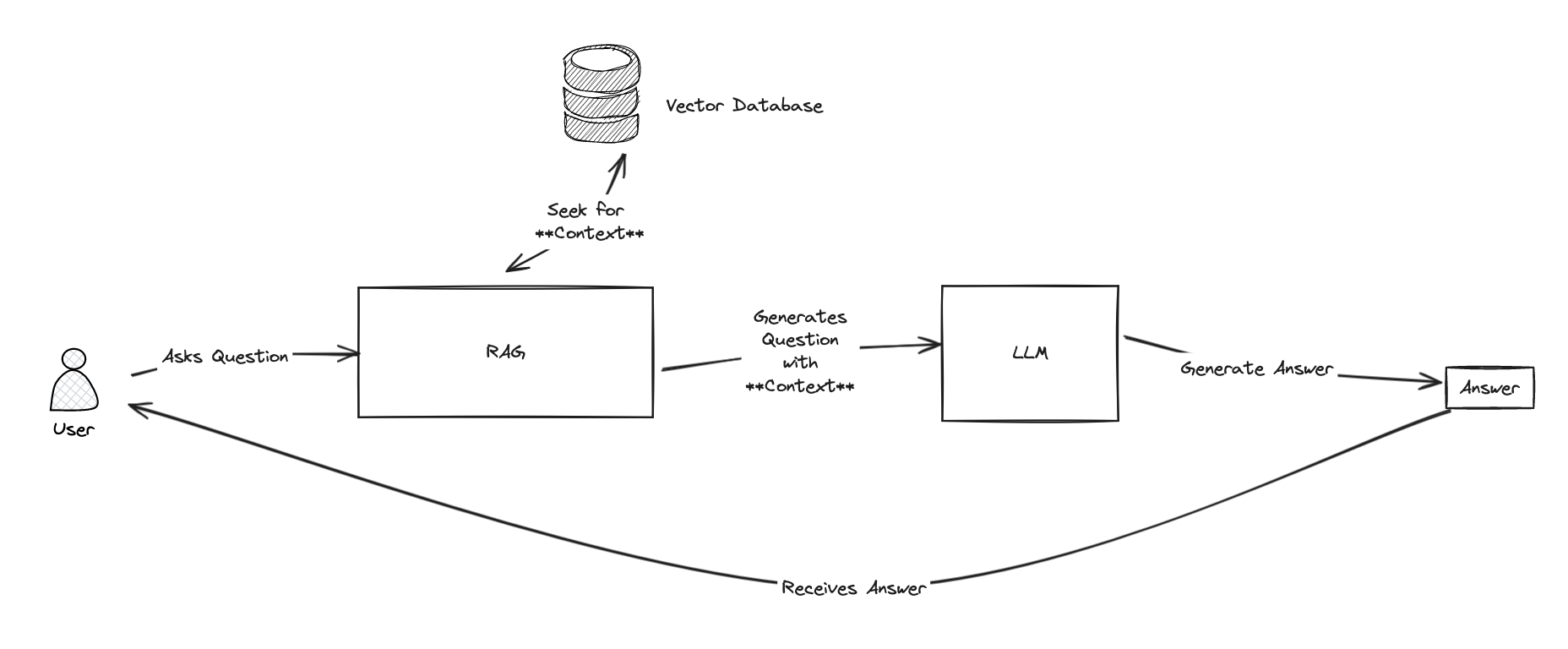
RAG

The whole idea of RAG is to use the knowledge base to find the context, and then use the LLM to generate the answer.

To find the context, RAG will use a retriever. The retriever will search the knowledge base for the most relevant documents, and then RAG will use the LLM to generate the answer.

To search the knowledge base, we will use vector search.

Vector search is a technique that allows to find the most relevant documents given a query. It works by converting the documents and the query into vectors, and then computing the cosine similarity between the query vector and the document vectors. The higher the cosine similarity, the more relevant the document is.

For more information about vector search, you can read this article. (Thanks @Dmitry Maslennikov for the article)

Vector Search

Now that we know how RAG works, let's see how to use it.

1.5. Installation the demo

Just clone the repo and run the docker-compose up command.

git clone https://github.com/grongierisc/iris-rag-demo
cd iris-rag-demo
docker-compose up

⚠️ everything is local, nothing is sent to the cloud, so be patient, it can take a few minutes to start.

1.6. Usage

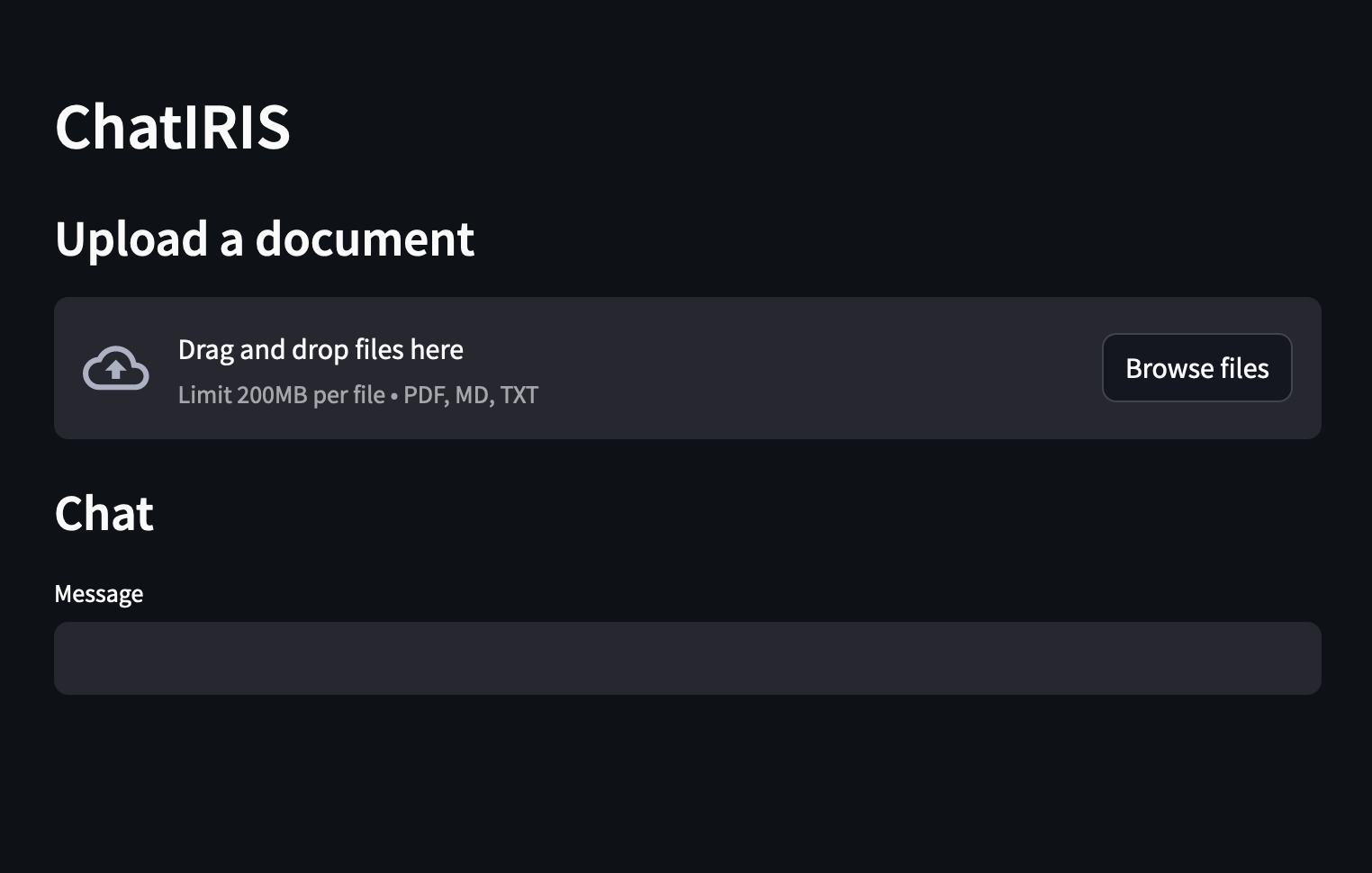
Once the demo is started, you can access the frontend at http://localhost:8051.

Frontend

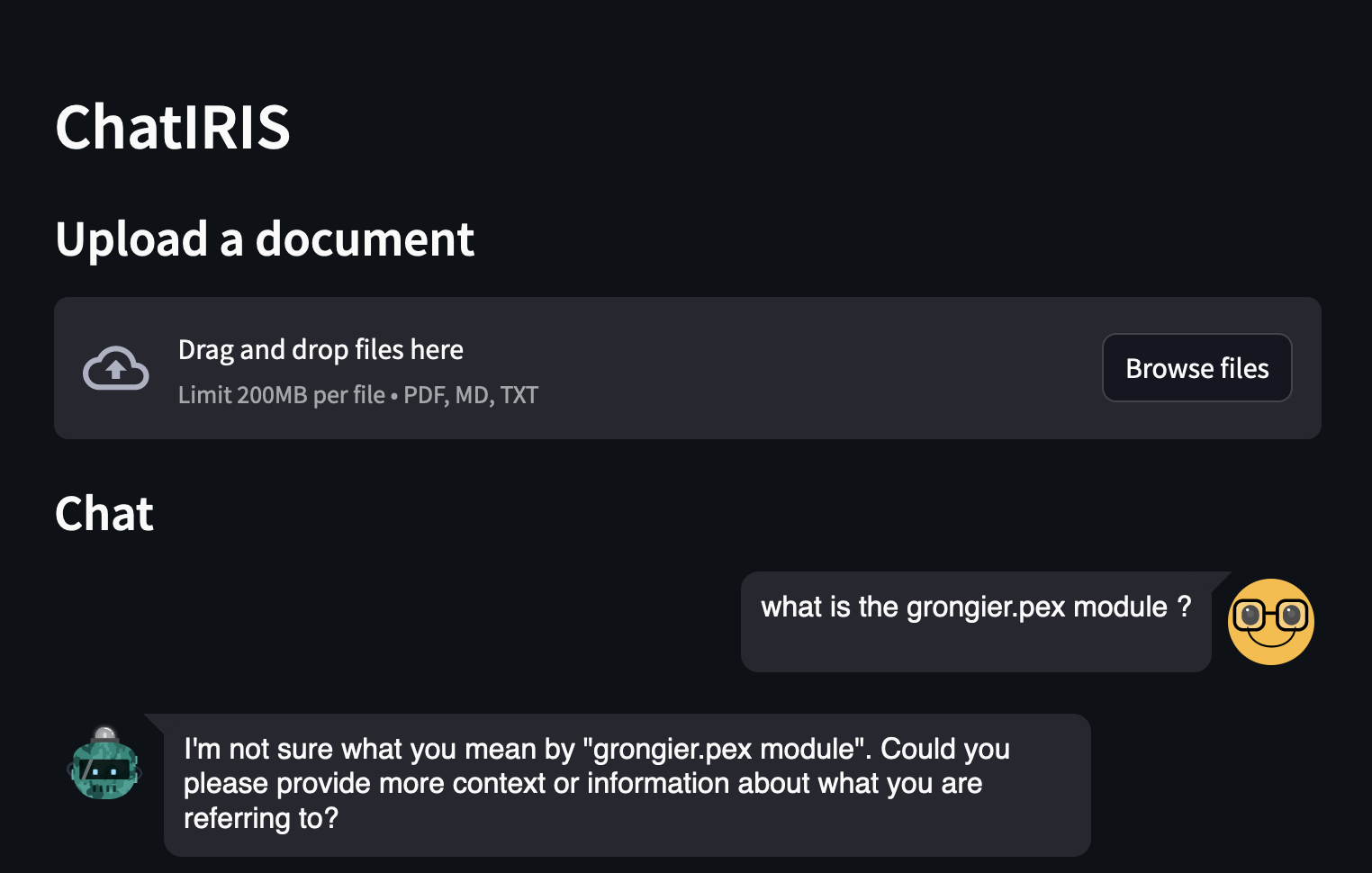
You can ask questions about the IRIS, for example:

  • What is the grongier.pex module?

Question

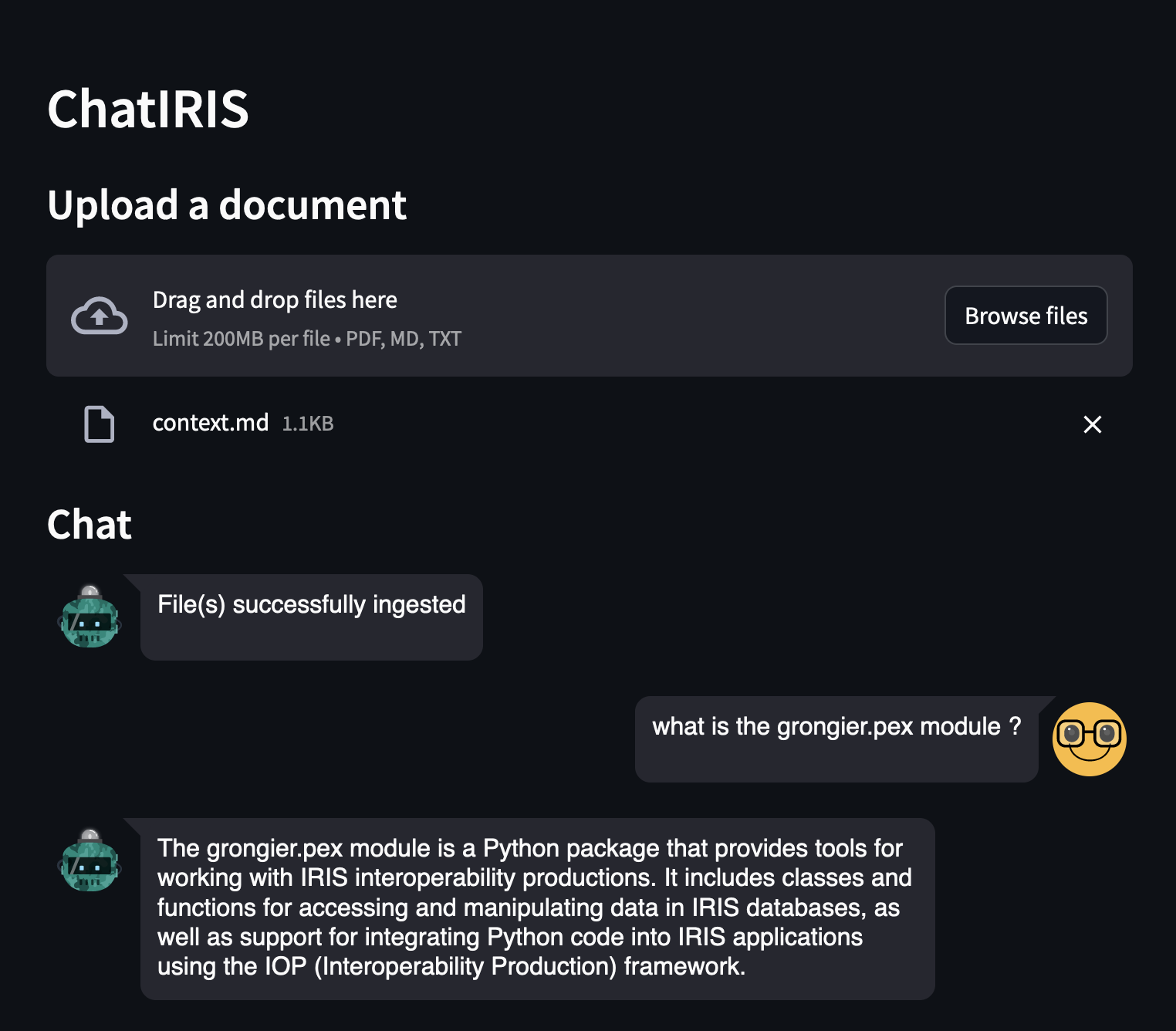
As you can see, the answer is not very good, because the LLM does not know what is the grongier.pex module.

Now, let's try with RAG:

Upload the grongier.pex module documentation, it's located in the docs folder, file grongier.pex.md.

And ask the same question:

  • What is the grongier.pex module?

Question

As you can see, the answer is much better, because the LLM now knows what is the grongier.pex module.

You see details in the logs:

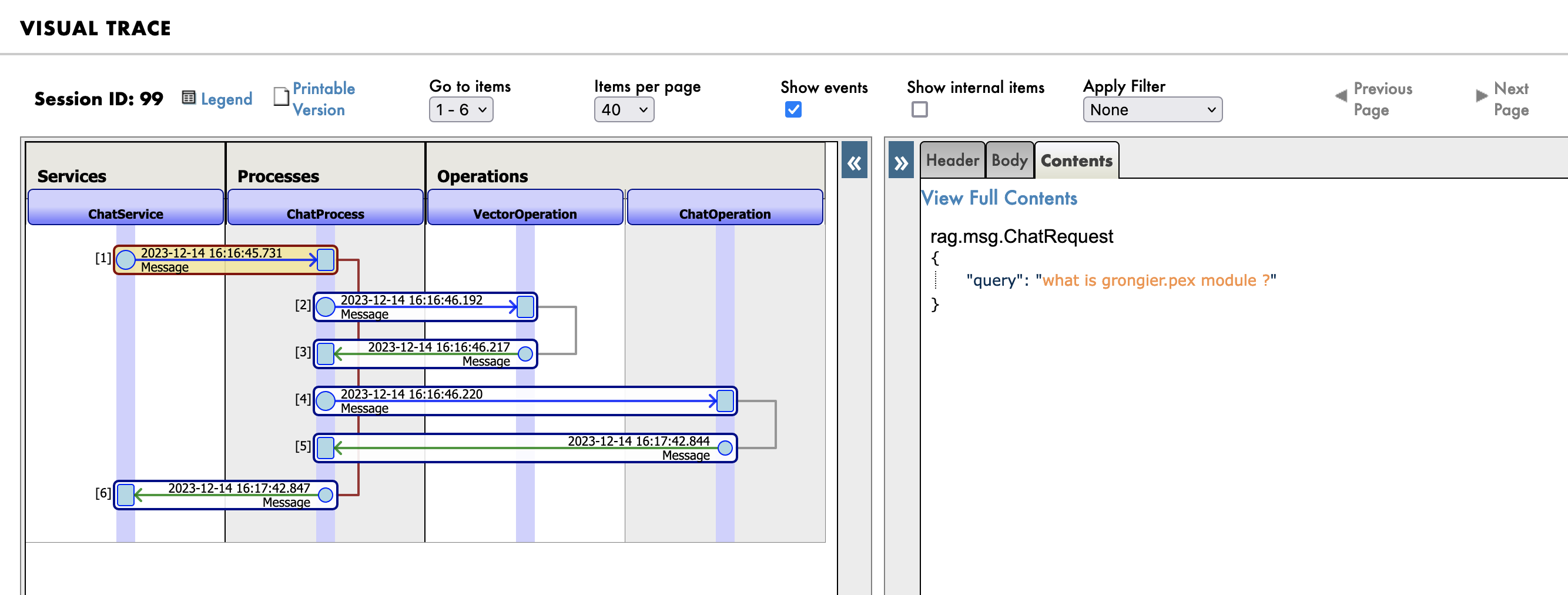
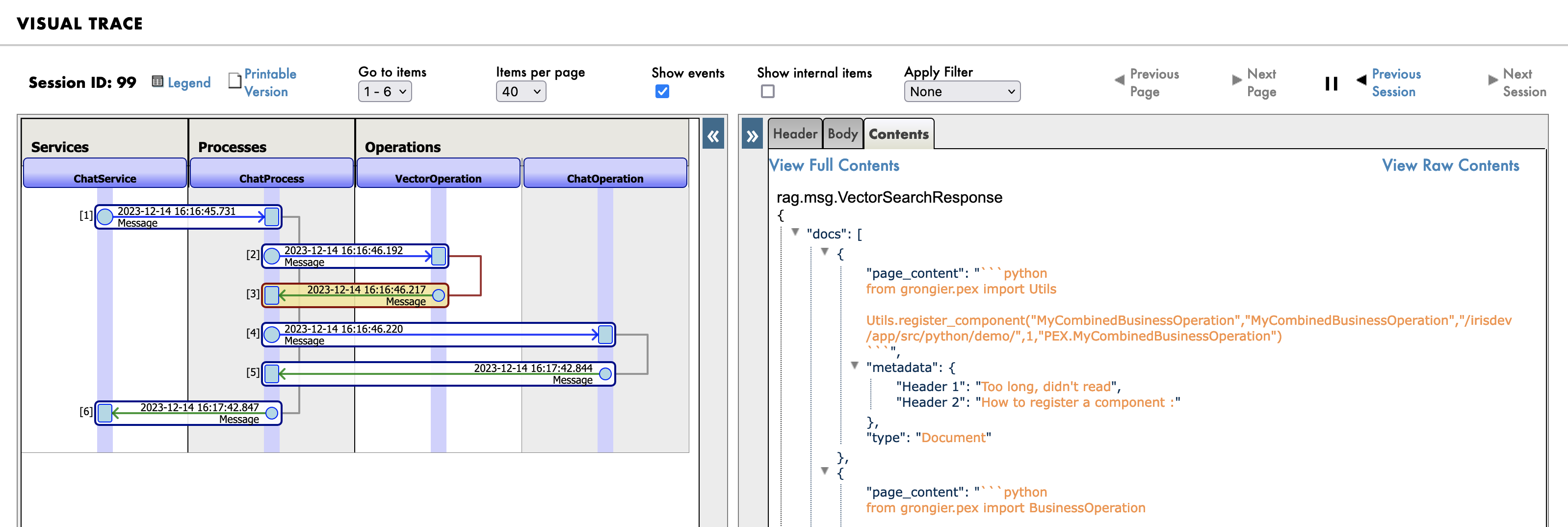
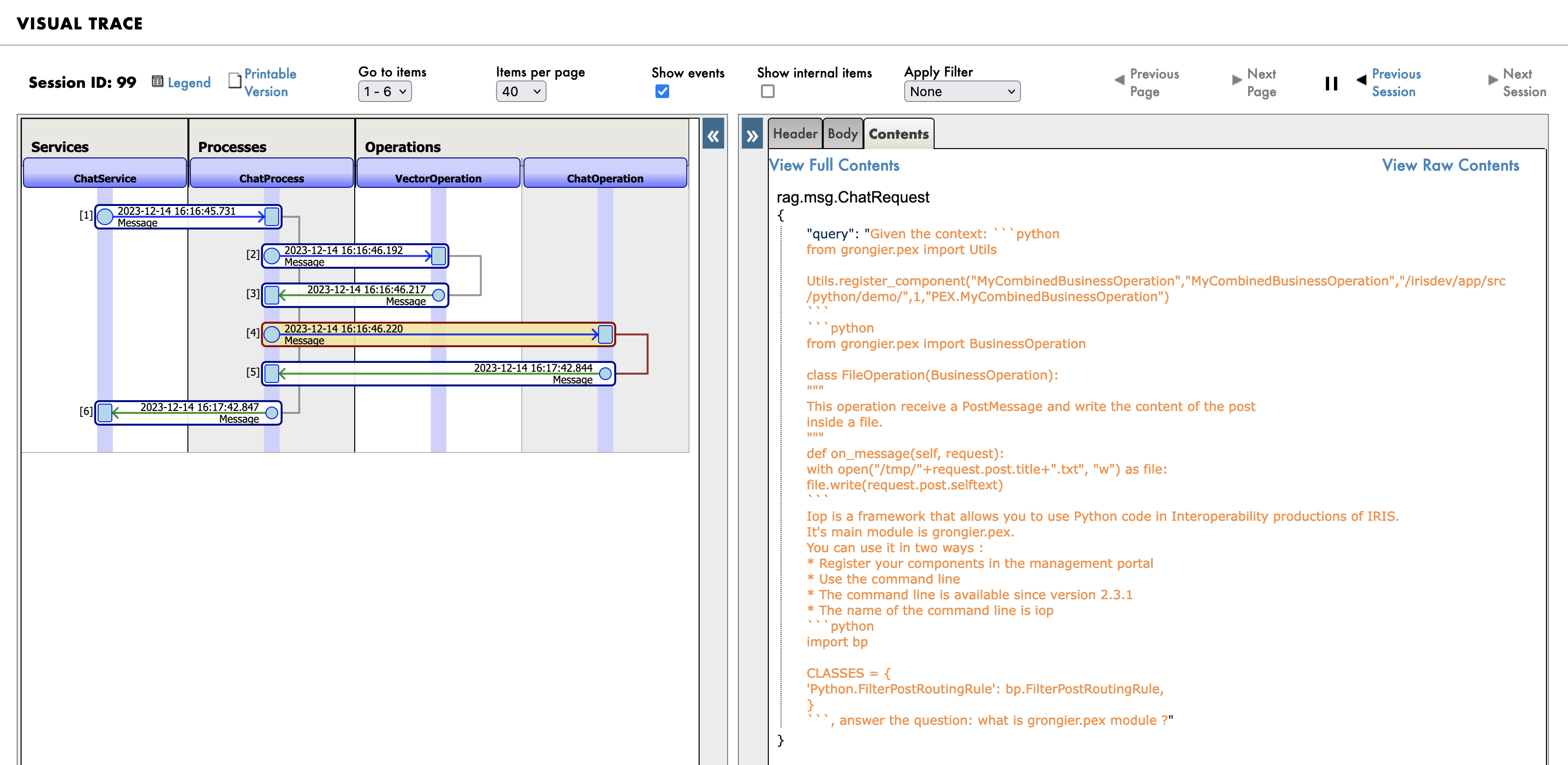
Go to the management portal at http://localhost:53795/csp/irisapp/EnsPortal.ProductionConfig.zen?$NAMESPACE=IRISAPP&$NAMESPACE=IRISAPP& and click on the Messages tab.

First you will see the message sent to the RAG process:

Message

Then the search query in the knowledge base (vector database):

Message

And finally the new prompt sent to the LLM:

Message

1.7. How the demo works?

The demo is composed of 3 parts:

  • The frontend, written with Streamlit
  • The backend, written with Python and IRIS
  • The knowledge base Chroma an vector database
  • The LLM, Orca-mini, served by the Ollama server

1.7.1. The frontend

The frontend is written with Streamlit, it's a simple chatbot that allows you to ask questions.

Nothing fancy here, just a simple chatbot.

import os
import tempfile
import time
import streamlit as st
from streamlit_chat import message

from grongier.pex import Director

_service = Director.create_python_business_service("ChatService")

st.set_page_config(page_title="ChatIRIS")


def display_messages():
    st.subheader("Chat")
    for i, (msg, is_user) in enumerate(st.session_state["messages"]):
        message(msg, is_user=is_user, key=str(i))


def process_input():
    if st.session_state["user_input"] and len(st.session_state["user_input"].strip()) > 0:
        user_text = st.session_state["user_input"].strip()
        with st.spinner(f"Thinking about {user_text}"):
            rag_enabled = False
            if len(st.session_state["file_uploader"]) > 0:
                rag_enabled = True
            time.sleep(1) # help the spinner to show up
            agent_text = _service.ask(user_text, rag_enabled)

        st.session_state["messages"].append((user_text, True))
        st.session_state["messages"].append((agent_text, False))


def read_and_save_file():

    for file in st.session_state["file_uploader"]:
        with tempfile.NamedTemporaryFile(delete=False,suffix=f".{file.name.split('.')[-1]}") as tf:
            tf.write(file.getbuffer())
            file_path = tf.name

        with st.spinner(f"Ingesting {file.name}"):
            _service.ingest(file_path)
        os.remove(file_path)

    if len(st.session_state["file_uploader"]) > 0:
        st.session_state["messages"].append(
            ("File(s) successfully ingested", False)
        )

    if len(st.session_state["file_uploader"]) == 0:
        _service.clear()
        st.session_state["messages"].append(
            ("Clearing all data", False)
        )

def page():
    if len(st.session_state) == 0:
        st.session_state["messages"] = []
        _service.clear()

    st.header("ChatIRIS")

    st.subheader("Upload a document")
    st.file_uploader(
        "Upload document",
        type=["pdf", "md", "txt"],
        key="file_uploader",
        on_change=read_and_save_file,
        label_visibility="collapsed",
        accept_multiple_files=True,
    )

    display_messages()
    st.text_input("Message", key="user_input", on_change=process_input)


if __name__ == "__main__":
    page()

💡 I'm just using :

_service = Director.create_python_business_service("ChatService")

To create a binding between the frontend and the backend.

ChatService is a simple business service in the interoperabilty production.

1.7.2. The backend

The backend is written with Python and IRIS.

It's composed of 3 parts:

  • The business service
    • entry point of the frontend
  • The business proess
    • perform the search in the knowledge base if needed
  • Tow business operations
    • One for the knowledge base
      • Ingest the documents
      • Search the documents
      • Clear the documents
    • One for the LLM
      • Generate the answer

1.7.2.1. The business service

The business service is a simple business service that allows :

  • To upload documents
  • To ask questions
  • To clear the vector database
from grongier.pex import BusinessService

from rag.msg import ChatRequest, ChatClearRequest, FileIngestionRequest

class ChatService(BusinessService):

    def on_init(self):
        if not hasattr(self, "target_chat"):
            self.target_chat = "ChatProcess"
        if not hasattr(self, "target_vector"):
            self.target_vector = "VectorOperation"

    def ingest(self, file_path: str):
        # build message
        msg = FileIngestionRequest(file_path=file_path)
        # send message
        self.send_request_sync(self.target_vector, msg)

    def ask(self, query: str, rag: bool = False):
        # build message
        msg = ChatRequest(query=query)
        # send message
        response = self.send_request_sync(self.target_chat, msg)
        # return response
        return response.response

    def clear(self):
        # build message
        msg = ChatClearRequest()
        # send message
        self.send_request_sync(self.target_vector, msg)

Basically, it's just a pass-through between to operation and process.

1.7.2.2. The business process

The business process is a simple process that allows to search the knowledge base if needed.

from grongier.pex import BusinessProcess

from rag.msg import ChatRequest, ChatResponse, VectorSearchRequest

class ChatProcess(BusinessProcess):
    """
    the aim of this process is to generate a prompt from a query
    if the vector similarity search returns a document, then we use the document's content as the prompt
    if the vector similarity search returns nothing, then we use the query as the prompt
    """
    def on_init(self):
        if not hasattr(self, "target_vector"):
            self.target_vector = "VectorOperation"
        if not hasattr(self, "target_chat"):
            self.target_chat = "ChatOperation"

        # prompt template
        self.prompt_template = "Given the context: \n {context} \n Answer the question: {question}"


    def ask(self, request: ChatRequest):
        query = request.query
        prompt = ""
        # build message
        msg = VectorSearchRequest(query=query)
        # send message
        response = self.send_request_sync(self.target_vector, msg)
        # if we have a response, then use the first document's content as the prompt
        if response.docs:
            # add each document's content to the context
            context = "\n".join([doc['page_content'] for doc in response.docs])
            # build the prompt
            prompt = self.prompt_template.format(context=context, question=query)
        else:
            # use the query as the prompt
            prompt = query
        # build message
        msg = ChatRequest(query=prompt)
        # send message
        response = self.send_request_sync(self.target_chat, msg)
        # return response
        return response

It's really simple, it just send a message to the knowledge base to search the documents.

If the knowledge base returns documents, then it will use the documents content as the prompt, otherwise it will use the query as the prompt.

1.7.2.3. The LLM operation

The LLM operation is a simple operation that allows to generate the answer.


class ChatOperation(BusinessOperation):

    def __init__(self):
        self.model = None

    def on_init(self):
        self.model = Ollama(base_url="http://ollama:11434",model="orca-mini")

    def ask(self, request: ChatRequest):
        return ChatResponse(response=self.model(request.query))

It's really simple, it just send a message to the LLM to generate the answer.

1.7.2.4. The Vector operation

The vector operation is a simple operation that allows to ingest documents, search documents and clear the vector database.


class VectorOperation(BusinessOperation):

    def __init__(self):
        self.text_splitter = None
        self.vector_store = None

    def on_init(self):
        self.text_splitter = RecursiveCharacterTextSplitter(chunk_size=1024, chunk_overlap=100)
        self.vector_store = Chroma(persist_directory="vector",embedding_function=FastEmbedEmbeddings())

    def ingest(self, request: FileIngestionRequest):
        file_path = request.file_path
        file_type = self._get_file_type(file_path)
        if file_type == "pdf":
            self._ingest_pdf(file_path)
        elif file_type == "markdown":
            self._ingest_markdown(file_path)
        elif file_type == "text":
            self._ingest_text(file_path)
        else:
            raise Exception(f"Unknown file type: {file_type}")

    def clear(self, request: ChatClearRequest):
        self.on_tear_down()

    def similar(self, request: VectorSearchRequest):
        # do a similarity search
        docs = self.vector_store.similarity_search(request.query)
        # return the response
        return VectorSearchResponse(docs=docs)

    def on_tear_down(self):
        docs = self.vector_store.get()
        for id in docs['ids']:
            self.vector_store.delete(id)
        
    def _get_file_type(self, file_path: str):
        if file_path.lower().endswith(".pdf"):
            return "pdf"
        elif file_path.lower().endswith(".md"):
            return "markdown"
        elif file_path.lower().endswith(".txt"):
            return "text"
        else:
            return "unknown"

    def _store_chunks(self, chunks):
        ids = [str(uuid.uuid5(uuid.NAMESPACE_DNS, doc.page_content)) for doc in chunks]
        unique_ids = list(set(ids))
        self.vector_store.add_documents(chunks, ids = unique_ids)
        
    def _ingest_text(self, file_path: str):
        docs = TextLoader(file_path).load()
        chunks = self.text_splitter.split_documents(docs)
        chunks = filter_complex_metadata(chunks)

        self._store_chunks(chunks)
        
    def _ingest_pdf(self, file_path: str):
        docs = PyPDFLoader(file_path=file_path).load()
        chunks = self.text_splitter.split_documents(docs)
        chunks = filter_complex_metadata(chunks)

        self._store_chunks(chunks)

    def _ingest_markdown(self, file_path: str):
        # Document loader
        docs = TextLoader(file_path).load()

        # MD splits
        headers_to_split_on = [
            ("#", "Header 1"),
            ("##", "Header 2"),
        ]

        markdown_splitter = MarkdownHeaderTextSplitter(headers_to_split_on=headers_to_split_on)
        md_header_splits = markdown_splitter.split_text(docs[0].page_content)

        # Split
        chunks = self.text_splitter.split_documents(md_header_splits)
        chunks = filter_complex_metadata(chunks)

        self._store_chunks(chunks)

If the documents are too big, then the vector database will not be able to store them, so we need to split them into chunks.

If the documents is a PDF, then we will use the PyPDFLoader to load the PDF, otherwise we will use the TextLoader to load the document.

Then we will split the document into chunks using the RecursiveCharacterTextSplitter.

Finally, we will store the chunks into the vector database.

If the documents is a Markdown, then we will use the MarkdownHeaderTextSplitter to split the document into chunks. We also use the the headers to split the document into chunks.

1.8. General remarks

All of this can be done with langchains, but I wanted to show you how to do it with the interoperability framework. And make it more accessible to everyone to understand how it works.

3
2 1087
Announcement Renée Sardelli · Dec 12, 2023


Hi Community,

InterSystems Innovation Acceleration Team invites you to take part in the GenAI Crowdsourcing Mini-Contest.

GenAI is a powerful and complex technology. Today, we invite you to become an innovator and think big about the problems it might help solve in the future.

What do you believe is important to transform with GenAI?

Your concepts could be the next big thing, setting new benchmarks in technology!


Contest Structure

     1. Round 1 - Pain Point / Problem Submission:

2
3 417
Article Kurro Lopez · Dec 8, 2023 8m read


Artificial intelligence is not limited only to generating images through text with instructions or creating narratives with simple directions.

You can also make variations of a picture or include a special background to an already existing one.

Additionally, you can obtain the transcription of audio regardless of its language and the speed of the speaker.

So, let's analyze how the file management works.

2
1 518
Article Yuri Marx · Nov 27, 2023 2m read

Currently, many digital artists use generative AI technology as a support to accelerate the delivery of their work. Nowadays it is possible to generate a corresponding image from a text sentence. There are several market solutions for this, including some available to be used through APIs. See some at this link: https://www.analyticsvidhya.com/blog/2023/08/ai-image-generators/.

5
2 358
Article Zhong Li · Feb 15, 2023 11m read

A "big" or "small" ask for ChatGPT?


I tried OpenAI GPT's coding model a couple of weeks ago, to see whether it can do e.g. some message transformations between healthcare protocols. It surely "can", to a seemingly fair degree. 
It has been nearly 3 weeks, and it's a long, long time for ChatGPT, so I am wondering how quickly it grows up by now, and whether it could do some of integration engineer jobs for us, e.g. can it create an InterSystems COS DTL tool to turn the HL7 into FHIR message? 

Immediately I got some quick answers, in less than one minute or two.


Test

7
1 2738
Article Alex Woodhead · Jun 12, 2023 3m read

This article is a simple quick starter (what I did was) with SqlDatabaseChain.

Hope this ignites some interest.

Many thanks to:

sqlalchemy-iris author @Dmitry Maslennikov

Your project made this possible today.

The article script uses openai API so caution not to share table information and records externally, that you didn't intend to.

A local model could be plugged in , instead if needed.

Creating a new virtual environment

7
3 3612
Article Alex Woodhead · Jun 13, 2023 3m read

Yet another example of applying LangChain to give some inspiration for new community Grand Prix contest.

I was initially looking to build a chain to achieve dynamic search of html of documentation site, but in the end it was simpler to borg the static PDFs instead.

Create new virtual environment

mkdir chainpdf

cd chainpdf

python -m venv .

scripts\activate 

pip install openai
pip install langchain
pip install wget
pip install lancedb
pip install tiktoken
pip install pypdf

set OPENAI_API_KEY=[ Your OpenAI Key ]

python

Prepare the docs

4
2 1345
Article Muhammad Waseem · Sep 18, 2023 5m read


Hi Community
In this article, I will introduce my application IRIS-GenLab.
IRIS-GenLab is a generative AI Application that leverages the functionality of Flask web framework, SQLALchemy ORM, and InterSystems IRIS to demonstrate Machine Learning, LLM, NLP, Generative AI API, Google AI LLM, Flan-T5-XXL model, Flask Login and OpenAI ChatGPT use cases.

Application Features

0
1 409
Article Ikram Shah · Jul 6, 2023 4m read

FHIR has revolutionized the healthcare industry by providing a standardized data model for building healthcare applications and promoting data exchange between different healthcare systems. As the FHIR standard is based on modern API-driven approaches, making it more accessible to mobile and web developers. However, interacting with FHIR APIs can still be challenging especially when it comes to querying data using natural language.

4
2 1380
Announcement Olga Zavrazhnova · Jul 11, 2023

Our next Developer Meetup will take place on July 26, 17:30 pm at the CIC Venture Café in Cambridge.

Join us to learn Generative AI Use Cases + Reference Architecture in Healthcare, witness the demo of LLMs in Healthcare and share your thoughts on the topic.

RSVP here


0
0 376
Article José Pereira · Jul 9, 2023 3m read

As said in the previous article about the iris-fhir-generative-ai experiment, the project logs all events for analysis. Here we are going to discuss two types of analysis covered by analytics embedded in the project:

  • Users prompts
  • Execution errors

In order to extract useful data to apply analytics, we used the iknowpy library - an opensource library for Natural Language Processing based in the iKnow for IRIS Data Platform. It makes possible identifies entities (phrases) and their semantic context in natural language text in several languages.

Here it's used to extract concepts from data of each log. Check the method SaveConcepts() in the class LogConceptTable for more details.

So, we create a IRIS BI Cube for counting concepts and relate them with other dimensions, like log types and descriptions, for instance.

After you got some prompts answered, you are ready to build the cube. You can do this by accessing the cube manager and hit the Build button, or do it programatically:

ZN "USER"
Do ##class(%DeepSee.Utils).%BuildCube("LogAnalyticsCube")

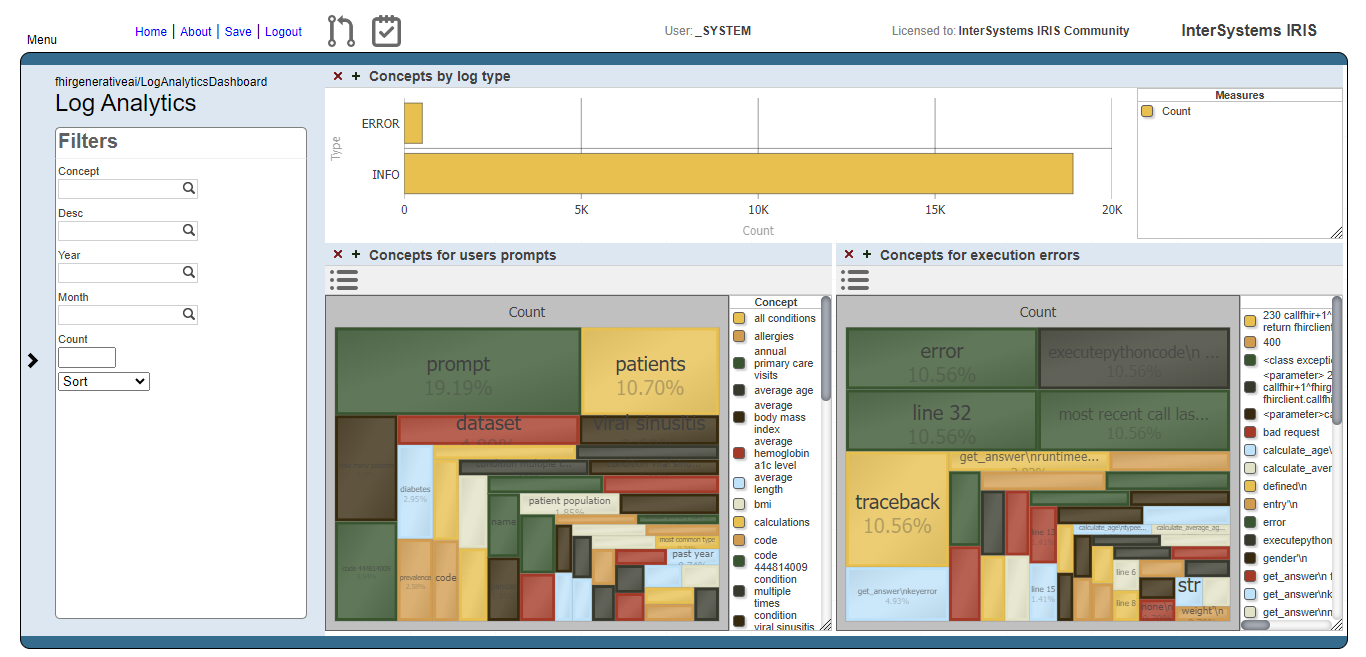
With this cube, we create a dashboard which people can get insights about how the prompts are going in terms of what users are asking and if those prompts are beeing executed or not.

Fig.1 - Log Analytics Dashboard

Fig.1 - Log Analytics Dashboard

Users prompts analysis

The image below shows the result of the users prompts analysis after running the methods DoAccuracyTests and DoAccuracyExtendedSetTests() of the class fhirgenerativeai.Tests(). It uses a treemap to show the most prevelent concepts.

Fig.2 - Detail of users prompts

Fig.2 - Detail of users prompts

As you can see, the most prevelent concepts are meaningless concepts like prompt, code, dataset etc.

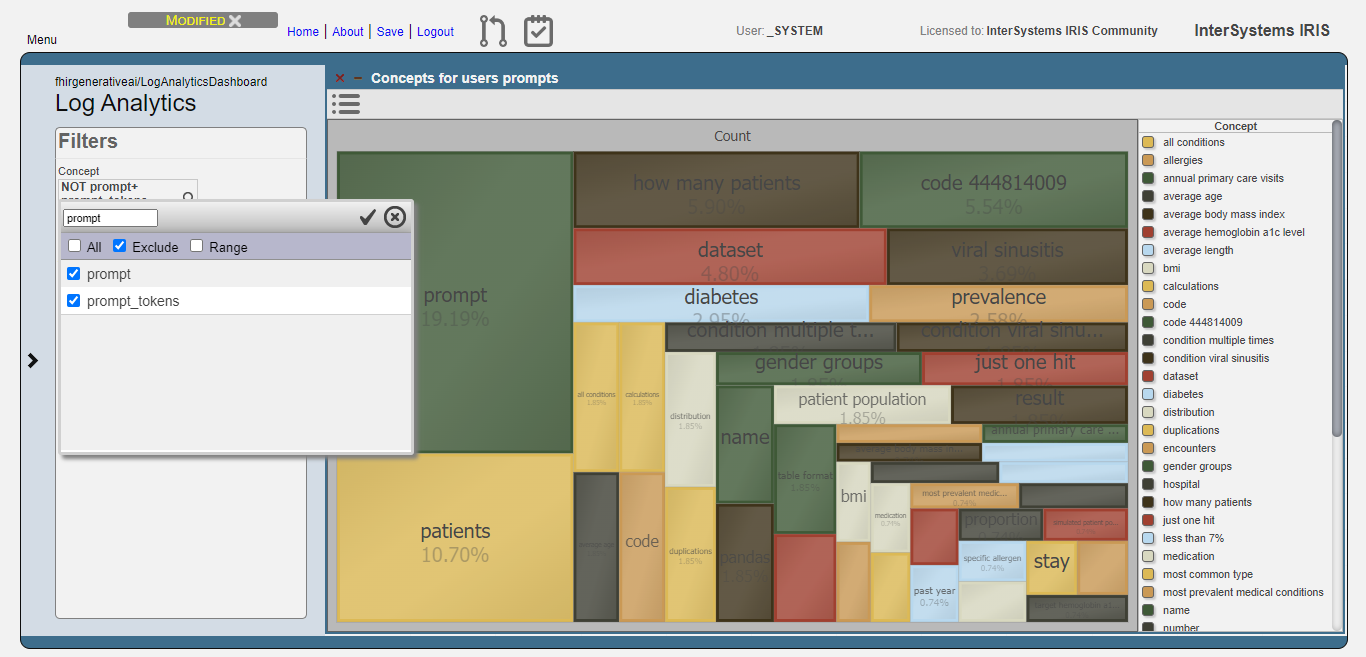
Let's exclude these concepts from the analysis:

Fig.3 - Exclusion of meaningless concepts

Fig.3 - Exclusion of meaningless concepts

Then, get the top 10 concepts:

Fig.4 - Top 10 concepts for users prompts

Fig.4 - Top 10 concepts for users prompts

Now, we can see that users are asking questions rearging patients, and conditions like viral sinusitis and diabetes, for instance. This could lead system administrators to get insights about what users are expecting and proceed to attend such needs.

Execution errors analysis

For the execution errors analysis, we have the same visualization as the users prompts. But now, displaying concepts related to execution errors.

Fig.5 - Details of execution errors

Fig.5 - Details of execution errors

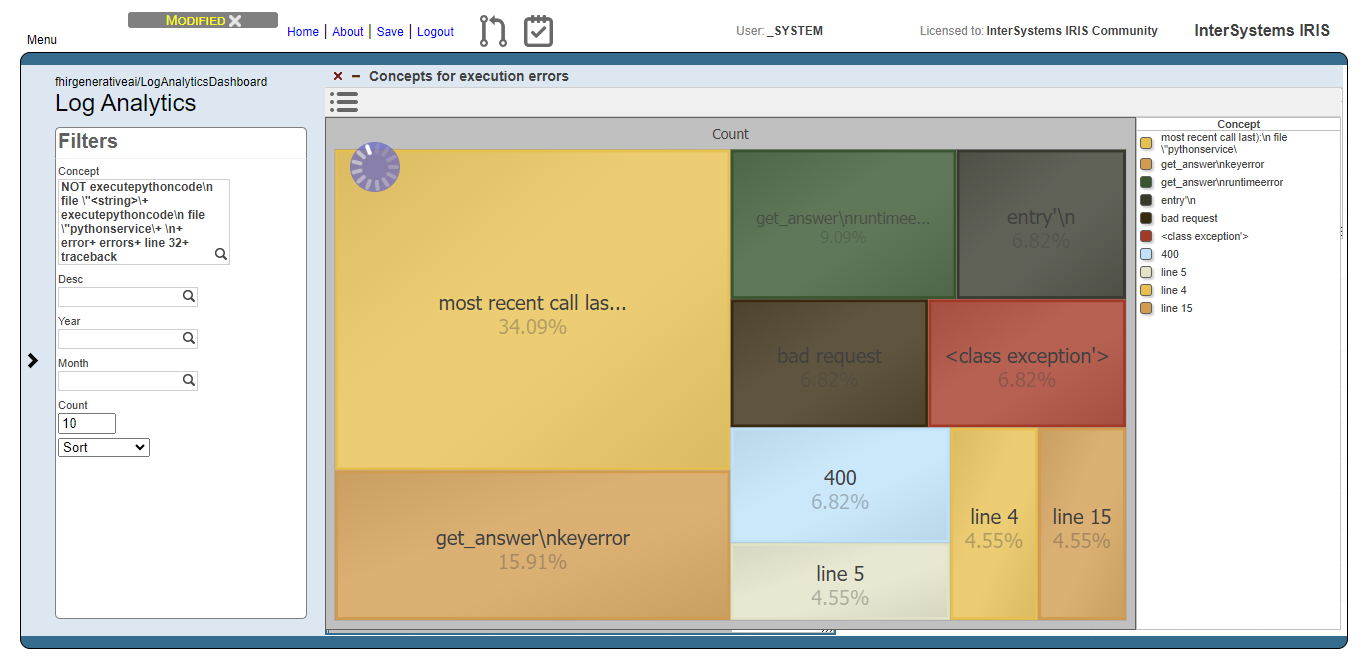
And like for the users prompts analysis, we exclude meaningless concepts and got just the top 10 concepts:

Fig.6 - Top 10 concepts for execution errors

Fig.6 - Top 10 concepts for execution errors

Now we can note, for instance, that concepts like "bad request" and 400 (the HTTP code for bad request error) are relevant. This means that the AI model are generating code that tends to setting invalid FHIR requests.

0
1 293
Article Sowmiya Nagarajan · Jul 5, 2023 7m read

Previous postUsing AI to Simplify Clinical Documents Storage, Retrieval and Search

This post explores the potential of OpenAI's advanced language models to revolutionize healthcare through AI-powered transcription and summarization. We will delve into the process of leveraging OpenAI's cutting-edge APIs to convert audio recordings into written transcripts and employ natural language processing algorithms to extract crucial insights for generating concise summaries.

2
2 1758