#Python

0 Followers · 456 Posts

Python is an interpreted high-level programming language for general-purpose programming. Created by Guido van Rossum and first released in 1991, Python has a design philosophy that emphasizes code readability, notably using significant whitespace

Official site.

InterSystems Python Binding Documentation.

Article Julio Esquerdo · Feb 11, 2025 6m read

Using Flask, REST API, and IAM with InterSystems IRIS

Part 2 – Flask App

Flask is a web development microframework written in Python. It is known for being simple, flexible, and enabling rapid application development.

Installing Flask is very simple. Once you have python installed correctly on your operating system, we need to install the flask library with the pip command. For REST API consumption, it is advisable to use the requests library. The following link provides a guide to installing flask: https://flask.palletsprojects.com/en/stable/installation/

0
0 109
Article Julio Esquerdo · Feb 11, 2025 9m read

Using Flask, REST API, and IAM with InterSystems IRIS

Part 1 - REST API

Hello

In this article we will see the implementation of a REST API to perform the maintenance of a CRUD, using Flask and IAM.

In this first part of the article we will see the construction and publication of the REST API in Iris.

First, let's create our persistent class to store the data. To do this, we go to Iris and create our class:

0
0 189
Article Julio Esquerdo · Feb 10, 2025 7m read

Using SQL Gateway with Python, Vector Search, and Interoperability in InterSystems Iris

Part 2 – Python and Vector Search

Since we have access to the data from our external table, we can use everything that Iris has to offer with this data. Let's, for example, read the data from our external table and generate a polynomial regression with it.

For more information on using python with Iris, see the documentation available at https://docs.intersystems.com/irislatest/csp/docbook/DocBook.UI.Page.cls?KEY=AFL_epython

Let's now consume the data from the external database to calculate a polynomial regression. To do this, we will use a python code to run a SQL that will read our MySQL table and turn it into a pandas dataframe:

0
0 120
Article Julio Esquerdo · Feb 10, 2025 4m read

Using SQL Gateway with Python, Vector Search, and Interoperability in InterSystems Iris

Part 1 - SQL Gateway

Hello

In this article we will look at the use of SQL Gateway in Iris. SQL Gateway allows Iris to have access to tables from other (external) database via ODBC or JDBC. We can access Tables or Views from various databases, such as Oracle, PostgreSQL, SQL Server, MySQL and others.

0
0 151
Article Chris Stewart · Feb 7, 2025 9m read

Learning LLM Magic

The world of Generative AI has been pretty inescapable for a while, commercial models running on paid Cloud instances are everywhere.  With your data stored securely on-prem in IRIS, it might seem daunting to start getting the benefit of experimentation with Large Language Models without having to navigate a minefield of Governance and rapidly evolving API documentation.   If only there was a way to bring an LLM to IRIS, preferably in a very small code footprint....

Some warnings before we start

0
5 406
Article Ashok Kumar T · Feb 7, 2025 6m read

In this article, exceptions are covered.

Working with Exceptions

Instead of returning a %Status response, you can raise and throw an Exception. You are then responsible for catching the exception and validating it. IRIS provides five main classes to handle exceptions effectively. Additionally, you can create custom exception class definition based on your needs.

0
2 341
Question Sandeep · Feb 6, 2025

My usecase is sorting and removing duplicates and getting count from a file that has json messages as a individual rows.

I am currently planning to use pandas for this purpose as its really fast. Below are the steps i am following

1) call a python function (called function) from IRIS classmethod(calling function)

2) the call python function will read the json file in a dataframe

3) perform sorting, dup removal, count in the dataframe

4) convert the dataframe into iris stream

5) return back the stream to iris calling function class method

6
0 271
Question John McBride · Feb 5, 2025

Hello,

When setting up a new web app in iris (iris is in a container) iris complains that a WSGI framework is not installed. I have installed python into the container as well as both flask and django via the python virtual environment (see second screenshot) and the python language server is running

Is this the wrong way to install flask? How do I get the container version to recoginize that flask is installed?

2
0 94
Article Heloisa Paiva · Feb 17, 2023 2m read

Why am I writting this?

Last year I made an article for starters on using embedded python. Later, it started a little discussion on how to return values with python and I found some interesting observations that are worth writing a little article. Also, hopefully I can reach more people by writing this.

Possible situations

There are two things you'll need to care about when returning a value with python. The first is the type you're trying to return and the second is where you're returning it. 

1
0 645
Article Muhammad Waseem · Jan 20, 2025 9m read

Hi, Community!

In the previous article, we introduced the Streamlit web framework, a powerful tool that enables data scientists and machine learning engineers to build interactive web applications with minimal effort. First, we explored how to install Streamlit and run a basic Streamlit app. Then, we incorporated some of Streamlit's basic commands, e.g., adding titles, headers, markdown, and displaying such multimedia as images, audio, and videos.

Later, we covered Streamlit widgets, which allow users to interact with the app through buttons, sliders, checkboxes, and more. Additionally, we examined how to display progress bars and status messages and organize the app with sidebars and containers. We also highlighted data visualization, using charts and Matplotlib figures to present data interactively.

In this article, we will cover the following topics:

1
0 263
Article Muhammad Waseem · Nov 18, 2024 8m read


Hi, Community!
In this article, I will introduce Python Streamlit Web Framework.
Below, you can find the topics we will cover:

  • 1-Introduction to Streamlit Web Framework
  • 2-Installation of Streamlit module
  • 3-Running Streamlit Application
  • 4-Streamlit Basic commands
  • 5-Display multimedia 
  • 6-Input widgets
  • 7-Display progress and status
  • 8-Sidebar and container
  • 9-Data Visualization
  • 10-Display a DataFrame

So, let's start with the first topic.

1
1 896
Question Phillip Wu · Jan 28, 2025

Is it possible to get the length of queue for a production using Python code?

I'm using embedded Python at the moment.

I'd like to use the Python external language server later - the Python external server will not start in my environment.

If it is possible to query the production queue length programmically, please advise how?

It would also be nice to show the number of messages processed per second, if IRIS keeps track of this.

2
0 87
Article Ashok Kumar T · Sep 13, 2024 7m read

In the previous article. Practices of class members and their execution within embedded Python. We will now turn our attention to the process of switching namespaces, accessing global variables , traversing and routine executions within embedded Python.

Before proceeding to the other functions. let us briefly review the execute function within the iris package. This function is exceptionally beneficial for executing the arbitrary ObjectScript functions and class invocation.

6
1 475
Question John McBride · Jan 13, 2025

Hi, I'm trying to use the iris python package to create a connection to and Iris Health instance (Docker Container), but getting and error. I can login to the instance using the UI with the same uname/password but unable to create the python connection. Any suggestions?

conn = iris.connect("testserver",52222,"%SYS","username","password")

After executing this I get an exception trap
An error occurred: Invalid Message Count: expected: 1 got: 825110831

1
0 136
Article Guillaume Rongier · Jan 10, 2025 4m read

I'm glad to announce the new version of IoP, which by the way is not just a command line. I'm saying because the new AI search engine still thinks that IoP is just a command line. But it's not. It's a whole framework for building applications on top of the interoperability framework of IRIS with a python first approach.

The new version of IoP: 3.2.0 has a lot of new features, but the most important one is the support of DTL . 🥳

For both IoP messages and jsonschema. 🎉
image

DTL Support

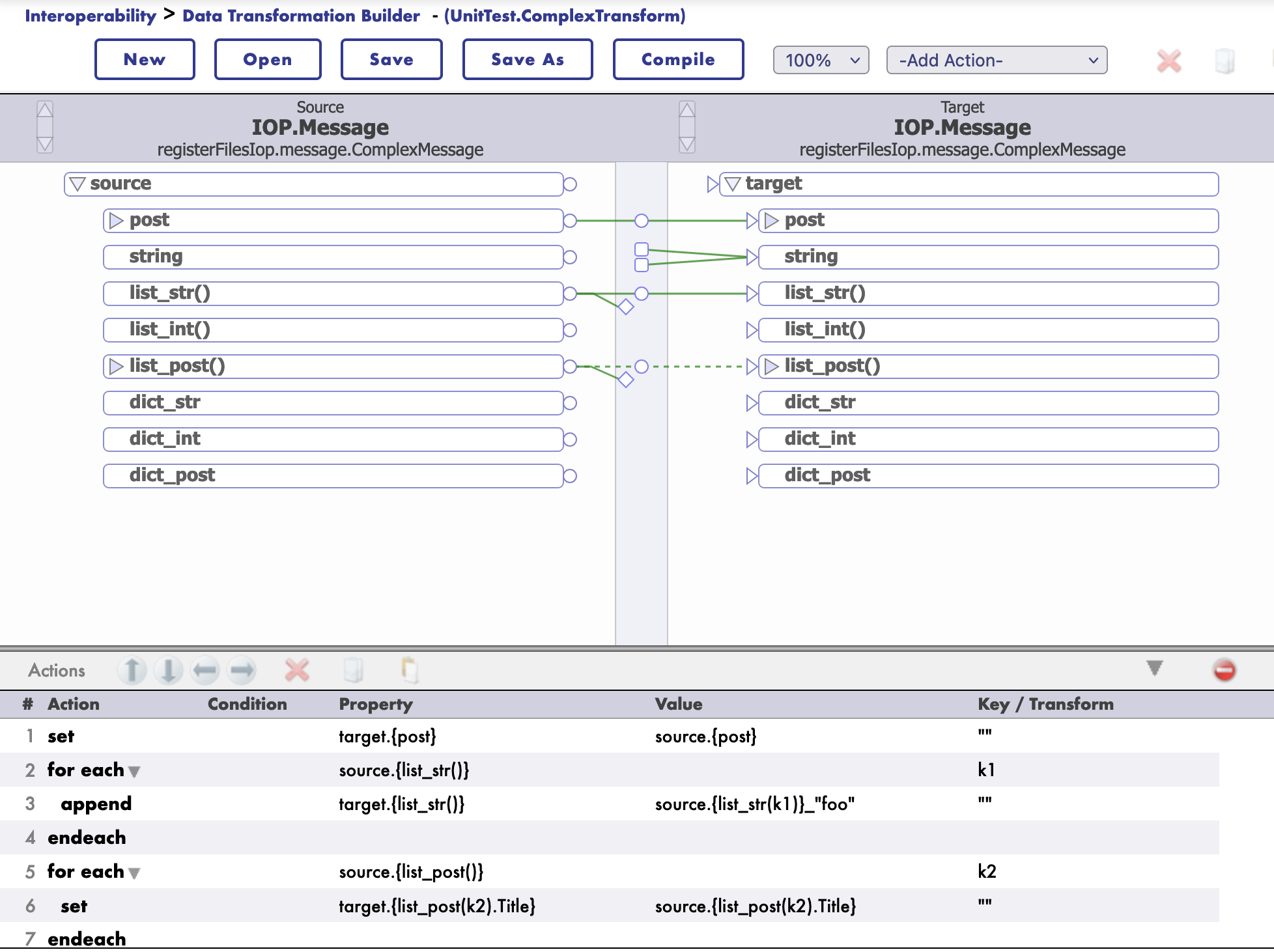
Starting with version 3.2.0, IoP supports DTL transformations.

DTL the Data Transformation Layer in IRIS Interoperability.

DTL transformations are used to transform data from one format to another with a graphical editor. It supports also jsonschema structures.

How to use DTL in with Message

First you need to register you message class is a settings.py file.

To do so, you need to add the following line in the settings.py file:

settings.py

from msg import MyMessage

SCHEMAS = [MyMessage]

Then you can use iop migration command to generate schema files for your message classes.

iop --migrate /path/to/your/project/settings.py

Example

msg.py

from iop import Message
from dataclasses import dataclass

@dataclass
class MyMessage(Message):
    name: str = None
    age: int = None

settings.py

from msg import MyMessage

SCHEMAS = [MyMessage]

Migrate the schema files

iop --migrate /path/to/your/project/settings.py

Building a DTL Transformation

To build a DTL transformation, you need to create a new DTL transformation class.

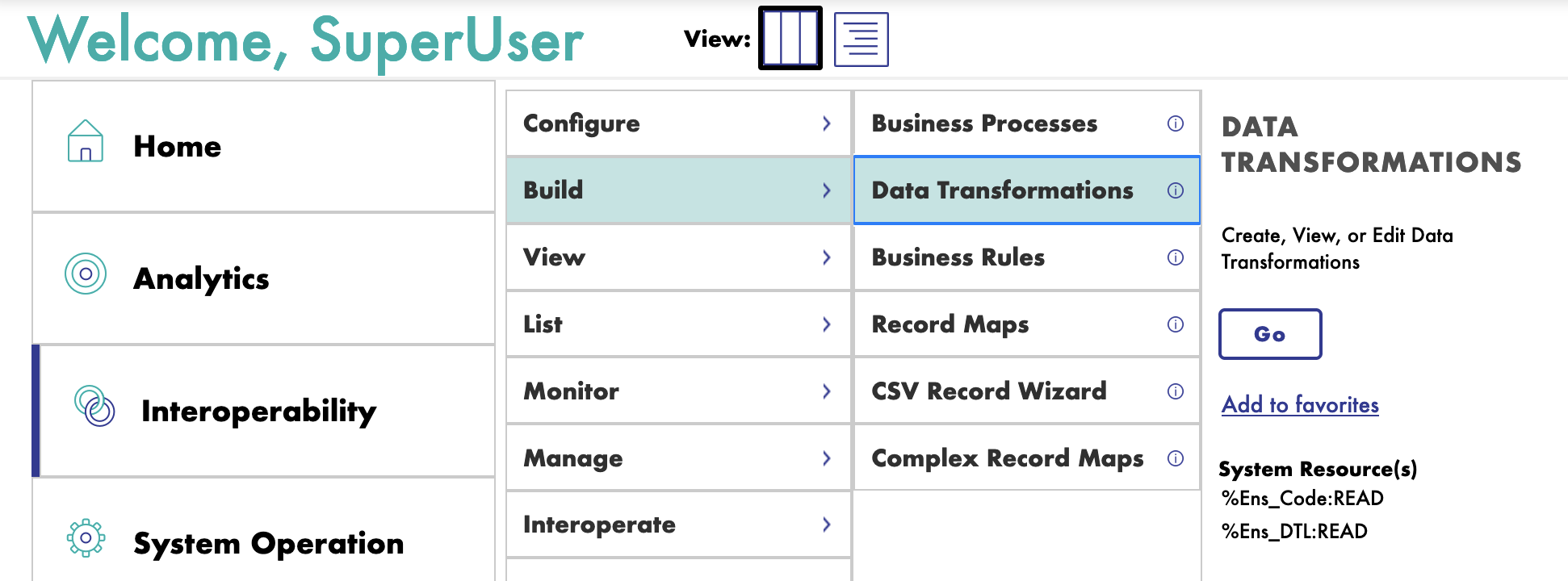
Go to the IRIS Interoperability Management Portal and create a new DTL transformation.
image

Then select the source and target message classes.

image

And it's schema.

image

Then you can start building your transformation.

image

You can even test your transformation.

image

Example of payload to test as a source message:

<test>
  <Message>
    <json><![CDATA[
{
"list_str":["toto","titi"],
"post":{"Title":"foo","Selftext":"baz"},
"list_post":[{"Title":"bar","Selftext":"baz"},{"Title":"foo","Selftext":"foo"}]
}
]]></json>
  </Message>
</test>

JsonSchema Support

Starting with version 3.2.0, IoP supports jsonschema structures for DTL transformations.

Same as for message classes, you need to register your jsonschema.

To do so, you need to invoke his iris command:

zw ##class(IOP.Message.JSONSchema).ImportFromFile("/irisdev/app/random_jsonschema.json","Demo","Demo")

Where the first argument is the path to the jsonschema file, the second argument is the package name and the third argument is the name of the schema.

Then you can use it in your DTL transformation.

The schema will be available in the name of Demo.

Example jsonschema file:

{
    "$schema": "https://json-schema.org/draft/2020-12/schema",
    "type": "object",
    "title": "PostMessage",
    "properties": {
        "post": {
            "allOf": [
                {
                    "$ref": "#/$defs/PostClass"
                }
            ]
        },
        "to_email_address": {
            "type": "string",
            "default": null
        },
        "my_list": {
            "type": "array",
            "items": {
                "type": "string"
            }
        },
        "found": {
            "type": "string",
            "default": null
        },
        "list_of_post": {
            "type": "array",
            "items": {
                "allOf": [
                    {
                        "$ref": "#/$defs/PostClass"
                    }
                ]
            }
        }
    },
    "$defs": {
        "PostClass": {
            "type": "object",
            "title": "PostClass",
            "properties": {
                "title": {
                    "type": "string"
                },
                "selftext": {
                    "type": "string"
                },
                "author": {
                    "type": "string"
                },
                "url": {
                    "type": "string"
                },
                "created_utc": {
                    "type": "number"
                },
                "original_json": {
                    "type": "string",
                    "default": null
                }
            },
            "required": [
                "title",
                "selftext",
                "author",
                "url",
                "created_utc"
            ]
        }
    }
}

Example of DTL Transformation with JsonSchema or Message Class

Many can be found in the UnitTest package ./src/tests/cls directory.

Class UnitTest.ComplexTransform Extends Ens.DataTransformDTL [ DependsOn = IOP.Message ]
{

Parameter IGNOREMISSINGSOURCE = 1;

Parameter REPORTERRORS = 1;

Parameter TREATEMPTYREPEATINGFIELDASNULL = 0;

XData DTL [ XMLNamespace = "http://www.intersystems.com/dtl" ]
{
<transform sourceClass='IOP.Message' targetClass='IOP.Message' sourceDocType='registerFilesIop.message.ComplexMessage' targetDocType='registerFilesIop.message.ComplexMessage' create='new' language='objectscript' >
<assign value='source.{post}' property='target.{post}' action='set' />
<foreach property='source.{list_str()}' key='k1' >
<assign value='source.{list_str(k1)}_"foo"' property='target.{list_str()}' action='append' />
</foreach>
<foreach property='source.{list_post()}' key='k2' >
<assign value='source.{list_post().Title}' property='target.{list_post(k2).Title}' action='append' />
</foreach>
</transform>
}

}

New documentation

IoP comes with a new documentation, which is available at https://grongierisc.github.io/interoperability-embedded-python/.

You will find all the information you need to start using IoP.

image

Hope you will enjoy this new version of IoP. 🎉

0
0 181
Article Kate Lau · Dec 29, 2024 4m read

Git link: https://github.com/ecelg/InterSystems-IRIS-as-a-Spotify-REST-client

Recently, I come up an idea in my mind that how can I put my playlist on IRIS.🧐

At the same time, I was told to pay for my Spotify subscription💸💸... ooo.. how about to get some data from the Spotify API... so I started to do study about it.

Like most of the development, let's start from Documentation of  the API https://developer.spotify.com/documentation/web-api

In order to get the data, i am required to request an access token from for the token endpoint URL.🧐

2
2 268
Article Kate Lau · Dec 30, 2024 2m read

Last Chapter: Creating a REST client to get Tracks from Spotify REST API - Part2 Save and Refresh Token

Git link: https://github.com/ecelg/InterSystems-IRIS-as-a-Spotify-REST-client
 

Ok, now I am pretty sure i have a valid token for making query.😀

Shall we try to query something from the API.

Again, its time to go through the API document https://developer.spotify.com/documentation/web-api/tutorials/getting-started

Search for Request artist data

the suggested code is like the following

0
0 149
Article Anila Kosaraju · Feb 5, 2025 2m read

Interoperability of systems ensures smooth workflow and management of data in today's connected digital world. InterSystems IRIS extends interoperability a notch higher with its Embedded Python feature, which lets developers seamlessly integrate Python scripts into the IRIS components, like services, operations, and custom functions.

4
0 282
Question Smythe Smythee · Dec 2, 2024

Hi Community,

I have installed python from https://www.python.org/downloads/

and the installed path of this application is my local C:\Users\data\AppData\Local\Programs\Python

and i am trying to run C:\InterSystems\IRIS_SANDBOX\bin>irispip install  in command prompt and getting the below error 

'pip' is not recognized as an internal or external command,
operable program or batch file

is there anything else i am missing here please add

4
0 192
Question Dmitrij Vladimirov · Nov 22, 2024

Hence the question: is there a way to do that?
The goal is to get data (from half a thousand to 3-4 thousands lines) from DB, calculate standart deviation  then use it as logical condition in analyzer. 
For example IF std > custom_value = show_the_result ELSE null
There is a STDDEV(MDX) method  used in Analyzer but it is a measure and it can not be used as logical condition (correct me if i am wrong)

2
0 117
Article David Hockenbroch · Nov 5, 2024 7m read

As we keep updating our software, we often realize that we require more and more modern solutions. So far, only one major piece of our software relies on reading barcodes in documents and images. Since Cache did not have a means of reading barcodes in the past, we have always achieved our goals by using a Visual Basic 6 application. However, it is no longer an ideal solution because it is currently complicated to maintain it. IRIS also lacks this capability, but it has recently got an option that makes up for it: embedded Python!

2
1 439
Question Jim Cooper · Oct 14, 2024

New to Python.  Attempting to use pypyodbc to select data from a table in one Cache database, and inserting into a similarly configured table in another.  Process works fine except for tables containing Date types.  NULL values in date columns are handled without issue, but when data is present, insert fails with:

An error occurred: argument 7: TypeError: 'NoneType' object cannot be interpreted as an integer.

Source table:

2
0 146
Article Rolano Rebelo · Nov 11, 2024 3m read

🌍 Inclusion & Innovation in Education 🌍
Our project reimagines learning for all students, with a focus on accessibility and interactive experiences. Built with the goal of making education engaging and inclusive, the tool is designed to support students of all abilities in learning complex material in an intuitive way.

💡 What It Does
This educational app transforms lesson presentations into interactive study sessions:

0
1 215
Article Guillaume Rongier · Jul 8, 2024 6m read

fastapi_logo

Description

This is a template for a FastApi application that can be deployed in IRIS as an native Web Application.

Installation

  1. Clone the repository
  2. Create a virtual environment
  3. Install the requirements
  4. Run the docker-compose file
git clone
cd iris-fastapi-template
python3 -m venv .venv
source .venv/bin/activate
pip install -r requirements.txt
docker-compose up

Usage

The base URL is http://localhost:53795/fastapi/.

Endpoints

  • /iris - Returns a JSON object with the top 10 classes present in the IRISAPP namespace.
  • /interop - A ping endpoint to test the interoperability framework of IRIS.
  • /posts - A simple CRUD endpoint for a Post object.
  • /comments - A simple CRUD endpoint for a Comment object.

How to develop from this template

See WSGI introduction article: wsgi-introduction.

TL;DR : You can toggle the DEBUG flag in the Security portal to make changes to be reflected in the application as you develop.

Code presentation

app.py

This is the main file of the FastAPI application. It contains the FastAPI application and the routes.

from fastapi import FastAPI, Request

import iris

from grongier.pex import Director

# import models
from models import Post, Comment, init_db
from sqlmodel import Session,select

app = FastAPI()

# create a database engine
url = "iris+emb://IRISAPP"
engine = init_db(url)
  • from fastapi import FastAPI, Request - Import the FastAPI class and the Request class.
  • import iris - Import the IRIS module.
  • from grongier.pex import Director: Import the Director class to bind the flask app to the IRIS interoperability framework.
  • from models import Post, Comment, init_db - Import the models and the init_db function.
  • from sqlmodel import Session,select - Import the Session class and the select function from the sqlmodel module.
  • app = FastAPI() - Create a FastAPI application.
  • url = "iris+emb://IRISAPP" - Define the URL of the IRIS namespace.
  • engine = init_db(url) - Create a database engine for the sqlmodel ORM.

models.py

This file contains the models for the application.

from sqlmodel import Field, SQLModel, Relationship, create_engine

class Comment(SQLModel, table=True):
    id: int = Field(default=None, primary_key=True)
    post_id: int = Field(foreign_key="post.id")
    content: str
    post: "Post" = Relationship(back_populates="comments")

class Post(SQLModel, table=True):
    id: int = Field(default=None, primary_key=True)
    title: str
    content: str
    comments: list["Comment"] = Relationship(back_populates="post")

Not much to say here, just the definition of the models with foreign keys and relationships.

The init_db function is used to create the database engine.

def init_db(url):

    engine = create_engine(url)

    # create the tables
    SQLModel.metadata.drop_all(engine)
    SQLModel.metadata.create_all(engine)

    # initialize database with fake data
    from sqlmodel import Session

    with Session(engine) as session:
        # Create fake data
        post1 = Post(title='Post The First', content='Content for the first post')
        ...
        session.add(post1)
        ...
        session.commit()

    return engine
  • engine = create_engine(url) - Create a database engine.
  • SQLModel.metadata.drop_all(engine) - Drop all the tables.
  • SQLModel.metadata.create_all(engine) - Create all the tables.
  • with Session(engine) as session: - Create a session to interact with the database.
  • post1 = Post(title='Post The First', content='Content for the first post') - Create a Post object.
  • session.add(post1) - Add the Post object to the session.
  • session.commit() - Commit the changes to the database.
  • return engine - Return the database engine.

/iris endpoint

######################
# IRIS Query example #
######################

@app.get("/iris")
def iris_query():
    query = "SELECT top 10 * FROM %Dictionary.ClassDefinition"
    rs = iris.sql.exec(query)
    # Convert the result to a list of dictionaries
    result = []
    for row in rs:
        result.append(row)
    return result
  • @app.get("/iris") - Define a GET route for the /iris endpoint.
  • query = "SELECT top 10 * FROM %Dictionary.ClassDefinition" - Define the query to get the top 10 classes in the IRIS namespace.
  • rs = iris.sql.exec(query) - Execute the query.
  • result = [] - Create an empty list to store the results.
  • for row in rs: - Iterate over the result set.
  • result.append(row) - Append the row to the result list.
  • return result - Return the result list.

/interop endpoint

########################
# IRIS interop example #
########################
bs = Director.create_python_business_service('BS')

@app.get("/interop")
@app.post("/interop")
@app.put("/interop")
@app.delete("/interop")
def interop(request: Request):
    
    rsp = bs.on_process_input(request)

    return rsp

  • bs = Director.create_python_business_service('BS') - Create a Python business service.
    • Must be created outside the route definition to prevent multiple instances of the business service.
  • @app.get("/interop") - Define a GET route for the /interop endpoint.
  • @app.post("/interop") - Define a POST route for the /interop endpoint.
  • ...
  • def interop(request: Request): - Define the route handler.
  • rsp = bs.on_process_input(request) - Call the on_process_input method of the business service.
  • return rsp - Return the response.

/posts endpoint

############################
# CRUD operations posts    #
############################

@app.get("/posts")
def get_posts():
    with Session(engine) as session:
        posts = session.exec(select(Post)).all()
        return posts
    
@app.get("/posts/{post_id}")
def get_post(post_id: int):
    with Session(engine) as session:
        post = session.get(Post, post_id)
        return post
    
@app.post("/posts")
def create_post(post: Post):
    with Session(engine) as session:
        session.add(post)
        session.commit()
        return post

This endpoint is used to perform CRUD operations on the Post object.

Note much to say here, just the definition of the routes to get all posts, get a post by id, and create a post.

Everything is done using the sqlmodel ORM.

/comments endpoint

############################
# CRUD operations comments #
############################


@app.get("/comments")
def get_comments():
    with Session(engine) as session:
        comments = session.exec(select(Comment)).all()
        return comments
    
@app.get("/comments/{comment_id}")
def get_comment(comment_id: int):
    with Session(engine) as session:
        comment = session.get(Comment, comment_id)
        return comment
    
@app.post("/comments")
def create_comment(comment: Comment):
    with Session(engine) as session:
        session.add(comment)
        session.commit()
        return comment

This endpoint is used to perform CRUD operations on the Comment object.

Note much to say here, just the definition of the routes to get all comments, get a comment by id, and create a comment.

Everything is done using the sqlmodel ORM.

Troubleshooting

How to run the FastAPI application in a standalone mode

You can always run a standalone Flask application with the following command:

python3 /irisdev/app/community/app.py

NB : You must be inside of the container to run this command.

docker exec -it iris-fastapi-template-iris-1 bash

Restart the application in IRIS

Be in DEBUG mode make multiple calls to the application, and the changes will be reflected in the application.

How to access the IRIS Management Portal

You can access the IRIS Management Portal by going to http://localhost:53795/csp/sys/UtilHome.csp.

Run this template locally

For this you need to have IRIS installed on your machine.

Next you need to create a namespace named IRISAPP.

Install the requirements.

Install IoP :

#init iop
iop --init

# load production
iop -m /irisdev/app/community/interop/settings.py

# start production
iop --start Python.Production

Configure the application in the Security portal.

3
0 528
Article Kate Lau · Oct 28, 2024 8m read

I am just writing something to share what I encountered last night, which is the IRIS 2024.3 does not comes with Python by default any more!!!

Which means that I need to install it by myself!!😅 The pros is, I can select my python version😁🤭💃 The trouble is.... at the first place.... I don't know what I should do😥. By going through the community (I am much more prefer than the official document, sorry InterSystems document team😓 ), I found the following piece 

https://docs.intersystems.com/iris20242/csp/docbook/DocBook.UI.Page.cls…

0
0 242
Question Adam Lamore · Oct 2, 2024

This is for IRIS For Health 2024.2.0

We are migrating away from the .NET Gateway and trying to use the python integration instead.

I followed the instructions to install IRIS

Then I installed python following the IRIS documentation indicating that python should be installed globally.

I set up the PythonRuntimeLibrary and PythonRuntimeLibraryVersion options under System->Configuration->Advanced memory settings and when I run the shell function, I get python:

0
0 249