#Monitoring

0 Followers · 166 Posts

Monitoring is a process of controlling and management of performance and availability of software applications.

Article Andrew Sklyarov · Oct 3, 2025 8m read

I was really surprised that such a flexible integration platform with a rich toolset specifically for app connections has no out-of-the-box Enterprise Service Bus solution. Like Apache ServiceMix, Mule ESB, SAP PI/PO, etc, what’s the reason? What do you think? Has this pattern lost its relevance completely nowadays? And everybody moved to message brokers, maybe?

0
1 65
Announcement Kimi Niittyniemi · Sep 14, 2025

We are excited to announce the general availability of JediSoft IRISsync®, our new synchronization and comparison solution built on InterSystems IRIS technology.  IRISsync makes it easy to synchronize and compare IRIS instances.

IRISsync was voted runner-up in the "Most Likely to Use" category at InterSystems READY 2025 Demos and Drinks.

A huge thanks to everyone who supported us — we’re thrilled to see IRISsync resonating with the InterSystems user community!

0
0 74
Article Yuri Marx · Aug 8, 2025 11m read

This article outlines the process of utilizing the renowned Jaeger solution for tracing InterSystems IRIS applications. Jaeger is an open-source product for tracking and identifying issues, especially in distributed and microservices environments. This tracing backend that emerged at Uber in 2015 was inspired by Google's Dapper and Twitter's OpenZipkin. It later joined the Cloud Native Computing Foundation (CNCF) as an incubating project in 2017, achieving graduated status in 2019. This guide will demonstrate how to operate the containerized Jaeger solution integrated with IRIS.

2
5 173
Question Yone Moreno Jiménez · Jul 15, 2025

Hello InterSystems Community,

I'm working with HealthShare, and need to create a user account for our development environment with specific access requirements. This user will need only to:

    Review messaging and environments
    See production and namespaces
    NOT modify anything (read-only access)

After reviewing the documentation on user roles and rights management, I can see the default roles available in our system include:

Ensemble/Interoperability Roles:

2
0 63
Question Yone Moreno Jiménez · Jun 23, 2025

Hello, good morning, thank you so much for reading this question. ☺️🙂👍

We are developing a code to get information about our Production's items: services, processes and operations.

We know we can get various configurations of a given item: Category, Port, Enabled...

But we wonder how we could get the date time of the last mesage (most recent) received in an item.

To give a code snippet a small section of the code we have developed (and tested), it looks like:

2
0 81
Article Kurro Lopez · Mar 3, 2024 5m read

Hi community,

The aim of this article is to explain how to create messaging between IRIS and Microsoft Teams.

In my company, we wanted to monitor error messages, and we used the Ens.Alert class to redirect those error messages through a Business Operation that sent an email.
The problem was that we sent those error messages to a support account where there were many emails. We wanted something specific for a specific team.

So we investigated how to make these messages reach the development team directly and they could have, in real time, a notification of an error in our production.
In our company we use Microsoft Teams as a corporate tool, so we asked ourselves: How could we make these messages reach the IRIS development team?

15
8 881
Article sween · Mar 4, 2024 8m read

If you are a customer of the new InterSystems IRIS® Cloud SQL and InterSystems IRIS® Cloud IntegratedML® cloud offerings and want access to the metrics of your deployments and send them to your own Observability platform, here is a quick and dirty way to get it done by sending the metrics to Google Cloud Platform Monitoring (formerly StackDriver).

1
2 338
Article sween · May 6, 2025 13m read

 Hello IRIS Fans and Welcome to IRIS iRacing!

Here were going to take 3 laps of your time and demonstrate how I wired up my Racing SIM to IRIS for "As Real Time as It Gets" Metrics reporting.  I missed the window for the contest, which happens quite often, but I still ended up 3rd I think in the demo race in the video below.

Technical Salad

Below are the technical ingredients for this demonstration for a salad you can post on Instragram.

0
0 152
Article Lorenzo Scalese · Apr 8, 2025 10m read

Introduction

Database performance has become a critical success factor in a modern application environment. Therefore identifying and optimizing the most resource-intensive SQL queries is essential for guaranteeing a smooth user experience and maintaining application stability. 

This article will explore a quick approach to analyzing SQL query execution statistics on an InterSystems IRIS instance to identify areas for optimization within a macro-application.

Rather than focusing on real-time monitoring, we will set up a system that collects and analyzes statistics pre-calculated by IRIS once an hour.  This approach, while not enabling instantaneous monitoring, offers an excellent compromise between the wealth of data available and the simplicity of implementation. 

We will use Grafana for data visualization and analysis, InfluxDB for time series storage, and Telegraf for metrics collection.  These tools, recognized for their power and flexibility, will allow us to obtain a clear and exploitable view.

More specifically, we will detail the configuration of Telegraf to retrieve statistics. We will also set up the integration with InfluxDB for data storage and analysis, and create customized dashboards in Grafana. This will help us quickly identify queries requiring special attention.

To facilitate the orchestration and deployment of these various components, we will employ Docker.

logos.png

0
3 273
Question Guilherme Silva · Mar 18, 2025

Hi, 

i'm with a trouble to take the api/monitor/alerts using prometheus.

i'm using prometheus 3.2.1 with IRIS 2022.1, the api metrics is working fine, but with the alerts, i'm receiving the following error:
 

and this is the answer in the request:

it apears the iris is not using the right way to answer the OpenMetrics the way Prometheus want.

Someone already see this?

3
0 125
Article Stav Bendarsky · Feb 3, 2025 6m read

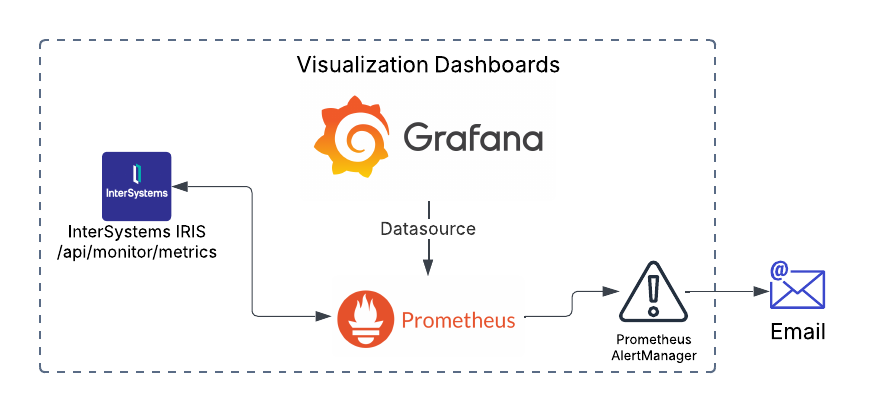
Monitoring your IRIS deployment is crucial. With the deprecation of System Alert and Monitoring (SAM), a modern, scalable solution is necessary for real-time insights, early issue detection, and operational efficiency. This guide covers setting up Prometheus and Grafana in Kubernetes to monitor InterSystems IRIS effectively. 

This guide assumes you already have an IRIS cluster deployed using the InterSystems Kubernetes Operator (IKO), which simplifies deployment, integration and mangement.


Why Prometheus and Grafana?

10
13 656
Question Anderson Negreli · Oct 31, 2024

I built a monitoring system in Grafana using the IRIS API /api/monitor/metrics (reading with Prometheus) but I noticed that the RAM usage shown was below that shown by the operating system.
I installed the Zabbix agent and the usage values ​​were higher, but with a line with the same highs and lows but shifted.
The metric in the API is iris_phys_mem_percent_used, described as "Percent of physical memory (RAM) currently in use", in Zabbix it is the Item tag: "component: memory" item: "Memory utilization".


Image below of the graphs in Grafana:

2
0 149
Question Steve Pisani · Sep 16, 2024

IRIS Health Monitor is part of System Monitor (see here).
The intention is to further process the captured sensor reading in order to identify the "health" of a system by checking the sensor reading values against pre-defined Base, Min and Max absolute values, and alert accordingly. Additionally,  instead of absolute values, you can create Charts (which can be different for different periods of a day), that contain a learned minimum and maximum value after a time spent by the system (at least 24 hours) analysing sensor readings.

0
1 104
Article sween · Sep 10, 2024 4m read

So if you are following from the previous post or dropping in now, let's segway to the world of eBPF applications and take a look at Parca, which builds on our brief investigation of performance bottlenecks using eBPF, but puts a killer app on top of your cluster to monitor all your iris workloads, continually, cluster wide!  

Continous Profiling with Parca, IRIS Workloads Cluster Wide

0
2 289
Article sween · Sep 9, 2024 14m read

I attended Cloud Native Security Con in Seattle with full intention of crushing OTEL day, then perusing the subject of security applied to Cloud Native workloads the following days leading up to CTF as a professional excercise. This was happily upended by a new understanding of eBPF, which got my screens, career, workloads, and atitude a much needed upgrade with new approaches to solving workload problems. 

So I made it to the eBPF party and have been attending clinic after clinic on the subject ever since, here I would like to "unbox" eBPF as a technical solution, mapped directly to what we do in practice (even if its a bit off), and step through eBPF through my experimentation on supporting InterSystems IRIS Workloads, particularly on Kubernetes, but not necessarily void on standalone workloads.

eBee Steps with eBPF and InterSystems IRIS Workloads

0
3 327
Question Scott Roth · Oct 2, 2019

We are constantly running into issues where there are billions of Orphaned messages in our system that cause problems, and we have to manually run a cleanup to fix performance issues.

 In the following article about orphaned messages... https://community.intersystems.com/post/ensemble-orphaned-messages it mentions either programmatically eliminating the Orphaned messages or using a Utility like Demo.Util.CleanupSet in ENSDEMO.

I have had it explained to me is basically all messages have to go somewhere, if they aren't then it creates orphaned messages. 

7
2 938
Article Eduard Lebedyuk · Feb 9, 2024 6m read

Welcome to the next chapter of my CI/CD series, where we discuss possible approaches toward software development with InterSystems technologies and GitLab. Today, we continue talking about Interoperability, specifically monitoring your Interoperability deployments. If you haven't yet, set up Alerting for all your Interoperability productions to get alerts about errors and production state in general.

Inactivity Timeout is a setting common to all Interoperability Business Hosts. A business host has an Inactive status after it has not received any messages within the number of seconds specified by the Inactivity Timeout field. The production Monitor Service periodically reviews the status of business services and business operations within the production and marks the item as Inactive if it has not done anything within the Inactivity Timeout period. The default value is 0 (zero). If this setting is 0, the business host will never be marked Inactive, no matter how long it stands idle.

This is an extremely useful setting since it generates alerts, which, together with configured alerting, allows for real-time notifications about production issues. Business Host being idle means there might be some issues with production, integrations, or network connectivity worth looking into. However, Business Host can have only one constant Inactivity Timeout setting, which might generate unnecessary alerts during known periods of low traffic: nights, weekends, holidays, etc. In this article, I will outline several approaches towards dynamic Inactivity Timeout implementation. While I do provide a working example (currently running in production for one of our customers), this article is more of a guideline for building your own dynamic Inactivity Timeout implementation, so don't consider the proposed solution as the only alternative.

Idea

The interoperability engine maintains a special HostMonitor global, which contains each Business Host as a subscript and a timestamp of the last activity as a value. Instead of using Inactivity Timeout, we will monitor this global ourselves and generate alerts based on the state of the HostMonitor. HostMonitor is maintained regardless of the Inactivity Timeout value being set - it's always on.

Implementation

To start with, here's how we can iterate the HostMonitor global:

Set tHost=""
For { 
  Set tHost=$$$OrderHostMonitor(tHost) 
  Quit:""=tHost
  Set lastActivity = $$$GetHostMonitor(tHost,$$$eMonitorLastActivity)
}

To create our Monitor Service, we need to perform the following checks for each Business Host:

  1. Decide if the Business Host is under the scope of our Dynamic Inactivity Timeout at all (for example, high-traffic hl7 interfaces can work with the usual Inactivity Timeout).
  2. If the Business Host is in scope, we need to calculate the time since the last activity.
  3. Now, based on inactivity time and any number of conditions (day/night time, day of week), we need to decide if we do want to send an alert.
  4. If we want to send an alert record, we need to record the Last Activity time so that we won't send an alert twice.

Our code now looks like this:

Set tHost=""
For { 
  Set tHost=$$$OrderHostMonitor(tHost) 
  Quit:""=tHost
  Continue:'..InScope(tHost)
  Set lastActivity = $$$GetHostMonitor(tHost,$$$eMonitorLastActivity)
  Set tDiff = $$$timeDiff($$$timeUTC, lastActivity)
  Set tTimeout = ..GetTimeout(tDayTimeout)
  If (tDiff > tTimeout) && ((lastActivityReported="") || ($system.SQL.DATEDIFF("s",lastActivityReported,lastActivity)>0)) {
    Set tText = $$$FormatText("InactivityTimeoutAlert: Inactivity timeout of '%1' seconds exceeded for host '%2'", +$fn(tDiff,,0), tHost)
    Do ..SendAlert(##class(Ens.AlertRequest).%New($LB(tHost, tText)))
    Set $$$EnsJobLocal("LastActivity", tHost) = lastActivity
  } 
}

You need to implement InScope and GetTimeout methods, which will actually hold your custom logic, and you're good to go. In my example, there are Day Timeouts (which might be different for each Business Host, but with a default value) and Night Timeout (which is the same for all tracked Business Hosts), so the user needs to provide the following settings:

  • Scopes: List of Business Host names (or parts of names) paired with their custom DayTimeout value, one per line. Only Business Hosts that are in scope (satisfy $find(host, scope) condition for at least one scope) would be tracked. Leave empty to monitor all Business Hosts. Example: OperationA=120
  • DayStart: Seconds since 00:00:00, after which a day starts. It must be lower than DayEnd. I.e. 06:00:00 AM is 6*3600 = 21600
  • DayEnd: Seconds since 00:00:00, after which a day ends. It must be higher than DayStart. I.e. 08:00:00 PM is (12+8)*3600 = 72000
  • DayTimeout: Default timeout value in seconds to raise alerts during the day.
  • NightTimeout: Timeout value in seconds to raise alerts during the night.
  • WeekendDays: Days of Week which are considered Weekend. Comma separated. For Weekend, NightTimeout applies 24 hours a day. Example: 1,7 Check the date's DayOfWeek value by running: $SYSTEM.SQL.Functions.DAYOFWEEK(date-expression). By default, the returned values represent these days: 1 — Sunday, 2 — Monday, 3 — Tuesday, 4 — Wednesday, 5 — Thursday, 6 — Friday, 7 — Saturday.

Here's the full code, but I don't think there's anything interesting in there. It just implements InScope and GetTimeout methods. You can use other criteria and adjust InScope and GetTimeout methods as needed.

Issues

There are two issues to speak of:

  • No yellow icon for Inactive Business Hosts (since the host's InactivityTimeout setting value is zero).
  • Out-of-host setting - developers need to remember to update this custom monitoring service each time they add a new Business Host and want to use dynamic inactivity timeouts.

Alternatives

I explored these approaches before implementing the above solution:

  1. Create the Business Service that changes InactivityTimeout settings when day/night starts. Initially, I tried to go this route but encountered a number of issues, mainly the requirement to restart all affected Business Hosts every time we changed the InactivityTimeout setting.
  2. In the custom Alert processor, add rules that, instead of sending the alert, suppress it if it's nightly InactivityTimeout. But an inactivity alert from Ens.MonitorServoce updates the LastActivity value, so from a Custom Alert Processor, I don't see a way to get "true" last activity timestamp (besides querying Ens.MessageHeader, I suppose?). And if it’s "night" – return the host state to OK, if it’s not nightly InactivityTimeout yet and suppress the alert.
  3. Extending Ens.MonitorService does not seem possible except for OnMonitor callback, but it serves another purpose.

Conclusion

Always configure alerting for all your Interoperability productions to get alerts about errors and production state in general. If static Inactivity timeout is not enough you can easily create a dynamic implementation.

Links

1
0 1287
Announcement Olga Zavrazhnova · Jun 27, 2024

Hi Community, 

Watch this video to learn about the Monitoring and Alerting Capabilities of InterSystems IRIS.

🗣  Presenter: @Mark BolinskyPrincipal Technology Architect, InterSystems

This demo was prepared for one of our past online developer roundtables. We encourage you to ask your specific questions about this topic in the comments section, and we will invite our experts to answer them!

Useful Links:

0
1 175
Announcement Henrique Dias · May 15, 2024

Hello developers, 

Our project was designed to optimize patient clinical outcomes by reducing hospitalization time and supporting the development of resident and novice physicians. Additionally, it contributes to lowering financial waste in the healthcare system by improving the monitoring of pregnant patients, thereby decreasing risks and enhancing their safety.

Using the most accessible tool, the smartphone, was the obvious choice to make patients' lives easier.

2
0 181
Announcement Olga Zavrazhnova · Apr 9, 2024

Hi Developers,

Join us at the upcoming Developer Roundtable on April 25th at 9 am ET | 3 pm CET. 📍
We will have 2 topics covered by the invited experts and open discussion as always.

Tech Talks:
➡ Practical Usage of Embedded Python - by Stefan Wittmann Product Manager, InterSystems

▶ Recording: 


1
0 208
Article Chad Severtson · Apr 12, 2023 8m read

Spoilers: Daily Integrity Checks are not only a best practice, but they also provide a snapshot of global sizes and density. 
Update 2024-04-16:
  As of IRIS 2024.1, Many of the below utilities now offer a mode to estimate the size with <2% error on average with orders of magnitude improvements in performance and IO requirements. I continue to urge regular Integrity Checks, however there are situations where more urgent answers are needed.

5
5 2218
Discussion Scott Roth · Nov 28, 2023

With System Alerting and Monitoring (SAM) being deprecated in the near future..

  • What is everyone's go-to for Monitoring IRIS? 
  • What is readily available?
  • What is the cost surrounding it?

Just trying to get ideas floating around of what we might need to start looking at to satisfy IT leadership.

Thanks

Scott

10
0 520