Ensemble supports Data Transformation Language (DTL) for describing data transformations. DTL is an XML language. Ensemble provides wizards and graphical tools for creating, editing, and testing DTL transformations. A data transformation is a Caché class like the following. If you prefer you can use Studio to edit the class definition directly and bypass the wizards and graphical tools.
Want to throw a custom error not the default one from the $ZDTH. It does in the try as will write "Error" when testing the DTL but the actual error not showing. Report errors is turned on. I also tried the THROW logic from best practices but that doesn't work either. $SYSTEM.Status.DisplayError(status) does display what the error should be returned.
The Interoperability user interface now includes modernized user experiences for the DTL Editor and Production Configuration applications that are available for opt-in in all interoperability products. You can switch between the modernized and standard views. All other Interoperability screens remain in the Standard user interface. Please note that changes are limited to these two applications and we identify below the functionality that is currently available.
The RGS, AIS, AIL and AIP are all under the RGS group. The one RGS segment that comes in will be copied across the group. If 3 AIS segments come in then I need 3 RGS groups, if 2 I need 2 RGS groups etc.
InterSystems IRIS interoperability production development involves using or writing various types of components. They include services (which handle incoming data), processes (which deal with the data flow and logic), and operations (which manage outgoing data or requests). Messages flowing through those components constantly require being adapted to consuming applications. Therefore,Data transformations are by far the most common component in interoperability productions.
Is there a way to Remove specific all Addresses from a Provider.Individual.Address before reinserting the Addresses from an HL7 message in Provider Directory?
Most fields we can call %clearFields() however since Addresses come from multiple locations we need to isolate and treat Addresses from this HL7 source as a snapshot.
JSON (JavaScript Object Notation) is a lightweight, text-based format designed for structured data interchange. It represents data objects consisting of key–value pairs and arrays, and it is entirely language-independent.
In this section, we will explore how to use Python as the primary language in IRIS, allowing you to write your application logic in Python while still leveraging the power of IRIS.
First, let's start by the official way of doing things, which is using the irispython interpreter.
You can use the irispython interpreter to run Python code directly in IRIS. This allows you to write Python code and execute it in the context of your IRIS application.
What is irispython?
irispython is a Python interpreter that is located in the IRIS installation directory (<installation_directory>/bin/irispython), and it is used to run Python code in the context of IRIS.
It will for you:
Set up the sys.path to include the IRIS Python libraries and modules.
This is done by the site.py file, which is located in <installation_directory>/lib/python/iris_site.py.
Allow you to import iris modules which is a special module that provides access to IRIS features and functionality like bridging any ObjectScript class to Python, and vice versa.
Fix permissions issues and dynamic loading of iris kernel libraries.
Example of using irispython
You can run the irispython interpreter from the command line:
<installation_directory>/bin/irispython
Let's run a simple example:
# src/python/article/irispython_example.py
import requests
import iris

def run():
    response = requests.get("https://2eb86668f7ab407989787c97ec6b24ba.api.mockbin.io/")

    my_dict = response.json()

    for key, value in my_dict.items():
        print(f"{key}: {value}")  # print message: Hello World

    return my_dict

if __name__ == "__main__":
    print(f"Iris version: {iris.cls('%SYSTEM.Version').GetVersion()}")
    run()
You can run this script using the irispython interpreter:
Virtual Environment: It's difficult to set up a virtual environment for your Python code in irispython.
Doesn't mean it is not possible, but it's difficult to do it due to virtual environment look by default to an interpreter called python or python3, which is not the case in IRIS.
In conclusion, using irispython allows you to write your application logic in Python while still leveraging the power of IRIS. However, it has its limitations with debugging and virtual environment setup.
Using WSGI
In this section, we will explore how to use WSGI (Web Server Gateway Interface) to run Python web applications in IRIS.
WSGI is a standard interface between web servers and Python web applications or frameworks. It allows you to run Python web applications in a web server environment.
IRIS supports WSGI, which means you can run Python web applications in IRIS using the built-in WSGI server.
How to use it
To use WSGI in IRIS, you need to create a WSGI application and register it with the IRIS web server.
Python Web Frameworks: You can use popular Python web frameworks like Flask or Django to build your web applications.
IRIS Integration: You can easily integrate your Python web applications with IRIS features and functionality.
Cons
Complexity: Setting up a WSGI application can be more complex than just using uvicorn or gunicorn with a Python web framework.
Conclusion
In conclusion, using WSGI in IRIS allows you to build powerful web applications using Python while still leveraging the features and functionality of IRIS.
DB-API
In this section, we will explore how to use the Python DB-API to interact with IRIS databases.
The Python DB-API is a standard interface for connecting to databases in Python. It allows you to execute SQL queries and retrieve results from the database.
How to use it
You can install it using pip:
pip install intersystems-irispython
Then, you can use the DB-API to connect to an IRIS database and execute SQL queries.
Example of using DB-API
You use it like any other Python DB-API, here is an example:
# src/python/article/dbapi_example.py
import iris

def run():
    # Connect to the IRIS database
# Open a connection to the server
    args = {
        'hostname':'127.0.0.1',
        'port': 1972,
        'namespace':'USER',
        'username':'SuperUser',
        'password':'SYS'
    }
    conn = iris.connect(**args)

    # Create a cursor
    cursor = conn.cursor()

    # Execute a query
    cursor.execute("SELECT 1")

    # Fetch all results
    results = cursor.fetchall()

    for row in results:
        print(row)

    # Close the cursor and connection
    cursor.close()
    conn.close()
if __name__ == "__main__":
    run()
You can run this script using any Python interpreter:
Standard Interface: The DB-API provides a standard interface for connecting to databases, making it easy to switch between different databases.
SQL Queries: You can execute SQL queries and retrieve results from the database using Python.
Remote access: You can connect to remote IRIS databases using the DB-API.
Cons
Limited Features: The DB-API only provides SQL access to the database, so you won't be able to use advanced IRIS features like ObjectScript or Python code execution.
Interactive Development: Jupyter Notebooks allow you to write and execute Python code interactively, which is great for data analysis and exploration.
Rich Output: You can display rich output, such as charts and tables, directly in the notebook.
Documentation: You can add documentation and explanations alongside your code, making
Cons
Tricky Setup: Setting up Jupyter Notebooks with IRIS can be tricky, especially with the kernel configuration.
Conclusion
In conclusion, using Jupyter Notebooks with IRIS allows you to write and execute Python code interactively while leveraging the features of IRIS. However, it can be tricky to set up, especially with the kernel configuration.
Bonus Section
Starting from this section, we will explore some advanced topics related to Python in IRIS, such as remote debugging Python code, using virtual environments, and more.
Most of these topics are not officially supported by InterSystems, but they are useful to know if you want to use Python in IRIS.
Using a native interpreter (no irispython)
In this section, we will explore how to use a native Python interpreter instead of the irispython interpreter.
This allows you to use virtual environments out of the box, and to use the Python interpreter you are used to.
How to use it
To use a native Python interpreter, you to have IRIS install locally on your machine, and you need to have the iris-embedded-python-wrapper package installed.
You can install it using pip:
pip install iris-embedded-python-wrapper
Next, you need to setup some environment variables to point to your IRIS installation:
Then, you can use the DB-API to connect to an IRIS database and execute SQL queries or any other Python code that uses the DB-API, like SQLAlchemy, Django, langchain, pandas, etc.
Example of using DB-API
You can use it like any other Python DB-API, here is an example:
# src/python/article/dbapi_community_example.py
import intersystems_iris.dbapi._DBAPI as dbapi

config = {
    "hostname": "localhost",
    "port": 1972,
    "namespace": "USER",
    "username": "_SYSTEM",
    "password": "SYS",
}

with dbapi.connect(**config) as conn:
    with conn.cursor() as cursor:
        cursor.execute("select ? as one, 2 as two", 1)   # second arg is parameter value
        for row in cursor:
            one, two = row
            print(f"one: {one}")
            print(f"two: {two}")
You can run this script using any Python interpreter:
from sqlalchemy import create_engine, text

COMMUNITY_DRIVER_URL = "iris://_SYSTEM:SYS@localhost:1972/USER"
OFFICIAL_DRIVER_URL = "iris+intersystems://_SYSTEM:SYS@localhost:1972/USER"
EMBEDDED_PYTHON_DRIVER_URL = "iris+emb:///USER"

def run(driver):
    # Create an engine using the official driver
    engine = create_engine(driver)

    with engine.connect() as connection:
        # Execute a query
        result = connection.execute(text("SELECT 1 AS one, 2 AS two"))

        for row in result:
            print(f"one: {row.one}, two: {row.two}")

if __name__ == "__main__":
    run(OFFICIAL_DRIVER_URL)
    run(COMMUNITY_DRIVER_URL)
    run(EMBEDDED_PYTHON_DRIVER_URL)
You can run this script using any Python interpreter:
Better Support: It has better support of SQLAlchemy, Django, langchain, and other Python libraries that use the DB-API.
Community Driven: It is maintained by the community, which means it is more likely to be updated and improved over time.
Compatibility: It is compatible with the official InterSystems DB-API, so you can switch between the official and community editions easily.
Cons
Speed: The community edition may not be as optimized as the official version, potentially leading to slower performance in some scenarios.
Debugging Python Code in IRIS
In this section, we will explore how to debug Python code in IRIS.
By default, debugging Python code in IRIS (in objectscript with the language tag or %SYS.Python) is not possible, but a community solution exists to allow you to debug Python code in IRIS.
This will install IoP and new ObjectScript classes that will allow you to debug Python code in IRIS.
Then, you can use the IOP.Wrapper class to wrap your Python code and enable debugging.
Class Article.DebuggingExample Extends %RegisteredObject
{
ClassMethod Run() As %Status
{
    set myScript = ##class(IOP.Wrapper).Import("my_script", "/irisdev/app/src/python/article/", 55550) // Adjust the path to your module
    Do myScript.run()
    Quit $$$OK
}
}
Then configure VsCode to use the IoP debugger by adding the following configuration to your launch.json file:
You can then set breakpoints in your Python code, and the debugger will stop at those breakpoints, allowing you to inspect variables and step through the code.
Video of remote debugging in action (for IoP but the concept is the same):
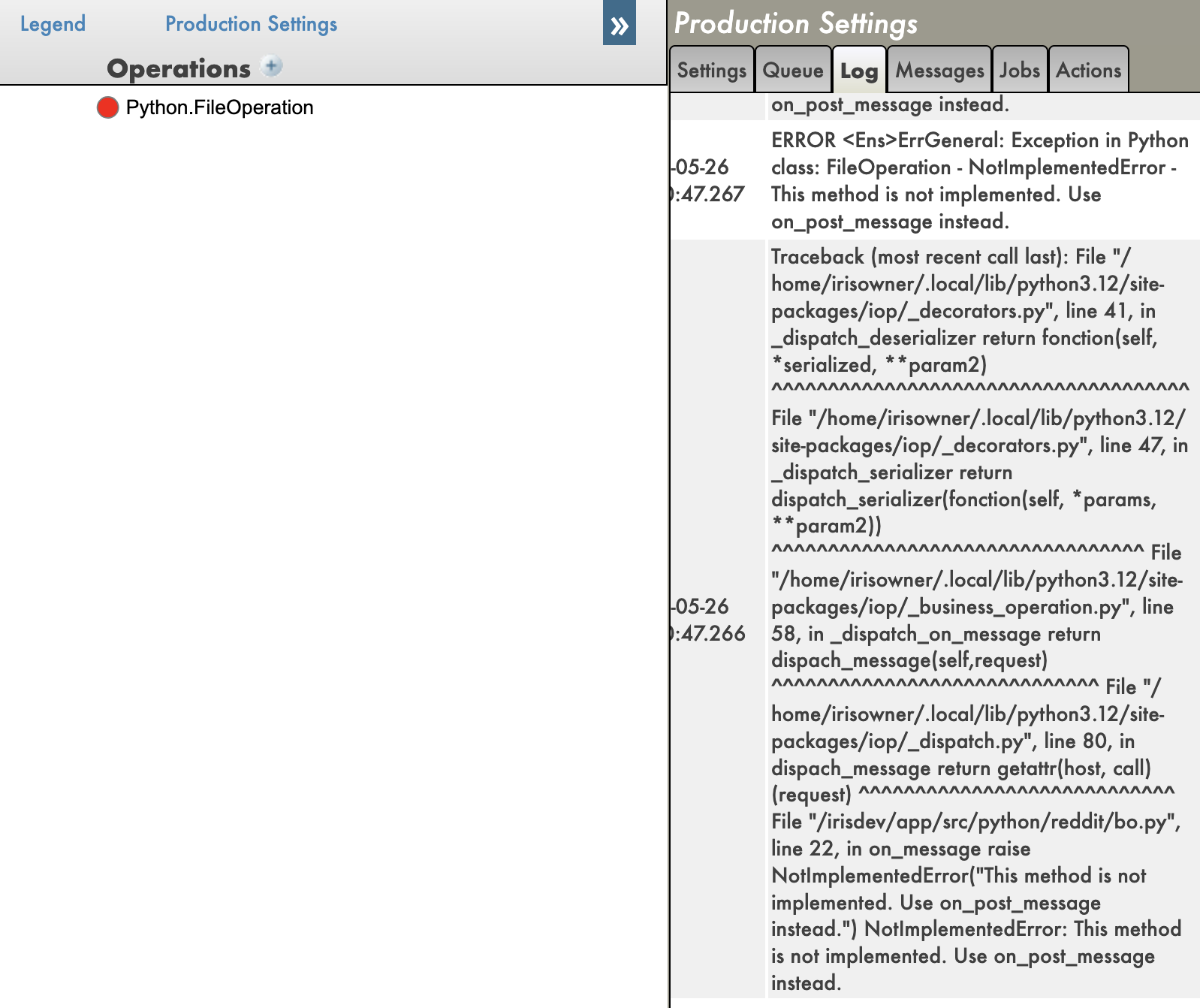
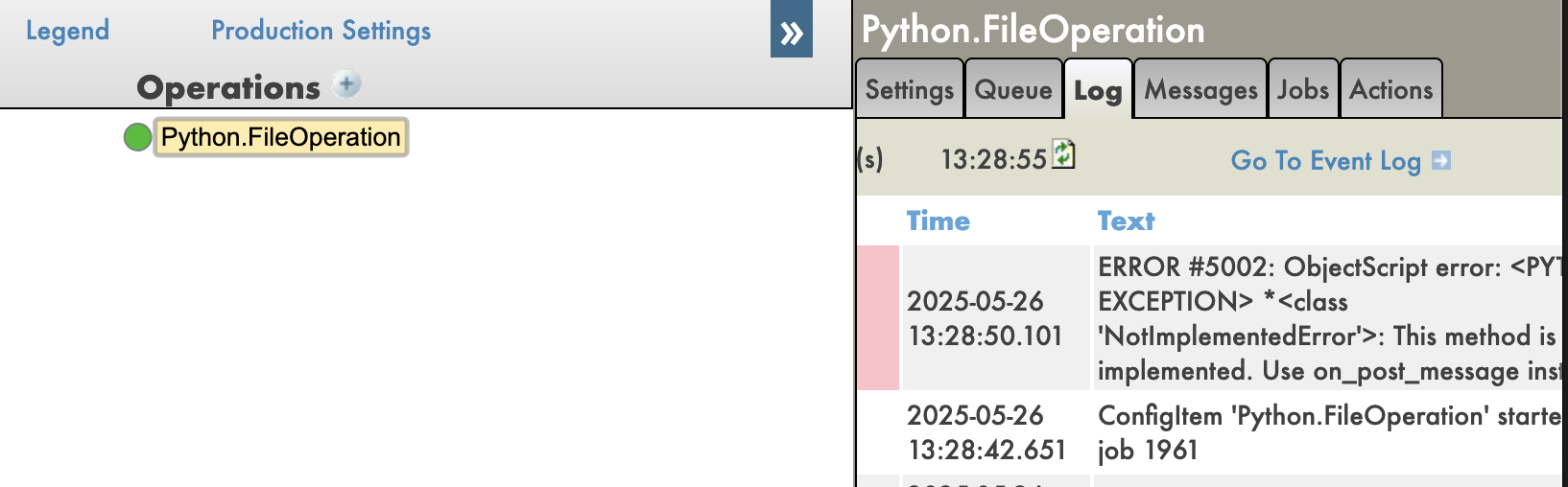
And you have also tracebacks in your Python code, which is very useful for debugging.
With tracebacks enabled:
With tracebacks disabled:
Pros
Remote Debugging: You can debug Python code running in IRIS remotely, which is IMO a game changer.
Python Debugging Features: You can use all the Python debugging features, such as breakpoints, variable inspection, and stepping through code.
Tracebacks: You can see the full traceback of errors in your Python code, which is very useful for debugging.
Cons
Setup Complexity: Setting up the IoP and the debugger can be complex, especially for beginners.
Community Solution: This is a community solution, so it may not be as stable or well-documented as official solutions.
Conclusion
In conclusion, debugging Python code in IRIS is possible using the IoP community solution, which allows you to use the Python debugger to debug your Python code running in IRIS. However, it requires some setup and may not be as stable as official solutions.
IoP (Interoperability on Python)
In this section, we will explore the IoP (Interoperability on Python) solution, which allows you to run Python code in IRIS in a python-first approach.
I have been developing this solution for a while now, this is my baby, it tries to solve or enhance all the previous points we have seen in this series of articles.
Key points of IoP:
Python First: You can write your application logic in Python, which allows you to leverage Python's features and libraries.
IRIS Integration: You can easily integrate your Python code with IRIS features and functionality.
Remote Debugging: You can debug your Python code running in IRIS remotely.
Tracebacks: You can see the full traceback of errors in your Python code, which is very useful for debugging.
Virtual Environments: You have a support of virtual environments, allowing you to manage dependencies more easily.
🐍❤️ As you can see, IoP provides a powerful way to integrate Python with IRIS, making it easier to develop and debug your applications.
You don't need to use irispython anymore, you don't have to set your sys.path manually, you can use virtual environments, and you can debug your Python code running in IRIS.
Conclusion
I hope you enjoyed this series of articles about Python in IRIS.
Feel free to reach out to me if you have any questions or feedback about this series of articles.
Watch this video to learn about AI Co-Pilot, which simplifies DTL coding and offers personalized assistance which makes it accessible to users with varying levels of technical expertise:
I am making a FHIR request against Epic, in when I get the Response back using "fromDao" I am extracting the stream into HS.FHIRModel.R4.Patient. However, the patient's name comes back as name within a list that references HS.FHIRModel.R4.SeqOfHumanName.
How do I extract the name from HS.FHIRModel.R4.SeqOfHumanName?
Do I have to then do another "fromDao" to pull the list into string format?
How do I navigate around the lists that are in a FHIRModel response, to extract the string values?
I am receiving a FHIR response bundle back with a resource of patient. Using fromDao, I attempted to take the stream and put it into FHIRModel.R4.Patient but it is not mapping correctly. When I attempt to take FHIRModel.R4.Patient and write it out using toString(), all I am seeing is the resource
{"resourceType":"Patient"}
so the response is not mapping correctly to FHIRModel.R4.Patient. How have others handled this? Do I need to translate it to an SDA since it does fit the model format?
I was wondering if anyone had a way to automate creating the Query String for a FHIR Request?
Using HS.FHIRServer.Interop.Request in my development I have to specify the following...
I was wondering.... if my source had variable number of fields if there was a way to automate the build for the QueryString when doing a Patient Search?
I am trying to replicate a way to use FHIR as a way to query the EMR instead of using a MS SQL Stored Procedure that is populated via HL7 ADT to query.
Building HL7 Integrations (3 days) – In Person (Boston, MA) July 22-24, 2025
Build and configure HL7® V2 interfaces using InterSystems integration technologies
This healthcare-focused 3-day course teaches implementation partners, integrators and analysts how to build HL7® integration solutions.
Students build a production that processes and routes HL7 messages.
Students learn how to work with the pre-built HL7 business services, business processes and business operations to receive and send HL7 messages. Students also learn how to transform HL7 messages using graphical tools in the
I am trying to add a value to my concatenation string and the value is not being inserted in the right place. I am adding onto this code from another developer and cannot seem to get it to work. The only code I have added is underlined in bold red.
My team is exploring options for handling timezone offsets in DTL and we’re wondering if there are any built-in methods available — ideally low-code or no-code solutions. Specifically, we're looking for a way to adjust timestamps based on the date and whether Daylight Saving Time (DST) is in effect.
For example, if an HL7 message has an MSH-7 value of 20250518144529, it should be converted to 20250518144529-0500 (Central Daylight Time), but if the timestamp were 20250218144529, it should be 20250218144529-0600 (Central Standard Time).
It is really useful but we have this code in many places that we are trying to consolidate it in one place.
We do not want to split it at the first stage in our rules as there is a lot of messages that go to sink. So we are trying for specific rules and the incoming hl7 matches certain rules and classified for certain downstream systems that it is then split and transformed.
Transform the object obtained in first point into another one using DTL
Sends the second object to an operation
The Business Process is created with BPL, and objects are stored in BP context. When I execute this Process, in the 3rd point the object obtained in first transformation doesn't exist. It's empty.
I have tried to make transformation before making CALL's, I mean:
As part of a process to generate FHIR XML bundles from HL7 messages, I have a subtransform transforming segments of an MDM_T02 message into a section of XML (EnsLib.EDI.XML.Document). So far this has worked well although I've encountered strange behaviour when making use of an xmlns attribute, whereby the attribute's name is duplicated despite the schema and DTL editor displaying it correctly.
Here's a snippet of the div.xmlns definition from the XSD schema used
Has anyone else encountered this? Any help is much appreciated
We are receiving an ORU message and the vendor is requesting that we append a new OBX segment at the end of the message and I wanted to reach out to see what options might be available.
So far, I tried the append action in the DTL editor with a single OBX-3 field but it seems to be appending to the field directly instead of creating a new OBX. I've started looking into if whether I could use a function but wanted to first check with the experts on the Discussion here in case there's an easier way to accomplish this. Thank you.
I am struggling with returning a SQL Query Result that may have multiple rows that can be searched.
set query = "SELECT Facility FROM FROM osuwmc_EnterpriseDirDB.RelationshipMedCtrID WHERE OSUmedcenterID = ?"SET rset = ##class(%SQL.Statement).%New()
 SET qStatus = rset.%Prepare(query)
 SET rset = rset.%Execute($Get(ID))
 do rset.%Display()
I need to take the values that are returned and say search them for a single value. How would I go about returning the EnsLib.SQL.Snapshot into a Array or List for it to be searchable.
For all Prosthetics orders: when ORC-1(Order Control) is "NW" (New Order), need to update OBR-18(Placer Field 1) based on PV1-2 (Patient Class) value. assumption is that the selection logic is that all prosthetics orders with OBR-18 field is always blank. Description : If PV1-2 is I, insert I in OBR-18 If PV1-2 is O, insert O in OBR-18 If PV1-2 is E, insert O in OBR-18 If PV1-2 is P, insert O in OBR-18 If PV1-2 is R, insert O in OBR-18 If PV1-2 is B, insert O in OBR-18
For all Prosthetics orders: when ORC-1(Order Control) is "NW" (New Order), need to update OBR-18(Placer Field 1) based on PV1-2 (Patient Class) value. assumption is that the selection logic is that all prosthetics orders with OBR-18 field is always blank. Description : If PV1-2 is I, insert I in OBR-18 If PV1-2 is O, insert O in OBR-18 If PV1-2 is E, insert O in OBR-18 If PV1-2 is P, insert O in OBR-18 If PV1-2 is R, insert O in OBR-18 If PV1-2 is B, insert O in OBR-18
Trying to start investigating an error we are seeing with multiple of the same messages getting sent to the same vendor. We receive an HL7 message with an RTF embedded from our EMR, send it through a DTL to just update the Patient Class, and then send it onto the Operation which is TCP.
We are receiving the report in text format and it has special characters like ', - like that in the text. Source system is using the UTF8 encoding format hence the text is showing as ' � ' . Is there a way to convert the utf8 to actual character in the DTL.
I was using VSCode to edit a DTL because it seemed easier to copy/paste code from parts of the DTL I was editing. I tried to add <sql> tag and code to call a SELECT statement, but when I compiled I got the following error...
ERROR <Ens>ErrInvalidDTL: Invalid DTL
> ERROR #5490: Error running generator for method 'GetSourceDocType:osuwmc.Epic.MFN.DTL.EpicMFN949002Normalization'
ERROR: Ens.DataTransformDTL.cls(GetSourceDocType) of generated code compiling subclass 'osuwmc.Epic.MFN.DTL.EpicMFN949002Normalization'