#Tips & Tricks

0 Followers · 317 Posts

Pieces of experience in InterSystems Technology which solve some particular problem in elegant or unusual way.

Article Peter Steiwer · Nov 26, 2019 3m read

When designing a hierarchy in DeepSee, a child member must have only one parent member. In the case where a child corresponds to two parents, the results can become unreliable. In the case where two similar members exist, their keys must be changed so that they are unique. We will take a look at two examples to see when this happens and how to prevent it.

Example 1

There are a handful of states with a city named Boston. In my sample data, I have records from both Boston, MA and Boston, NY. My dimension is defined as:

1
1 903
Article Evgeny Shvarov · Feb 19, 2022 2m read

Hi developers!

As you probably noticed in IRIS 2021 the names of globals are random.

And if you create IRIS classes with DDL and want to be sure what global was created you probably would want to provide a name.

And indeed you can do it. 

Use WITH %CLASSPARAMETER DEFAULTGLOBAL='^GLobalName' in CREATE Table to make it work. Documentation. See the example below:

11
0 667
Article Evgeny Shvarov · Feb 19, 2022 2m read

Hey developers!

Sometimes we need to insert or refer to the data of classes directly in globals.

And maybe a lot of you expect that data structure of global with records is:

^Sample.Person(Id)=$listbuild("",col1,col2,...,coln).

And this article is a heads up, that this is not always true, don't expect it as granted!

1
0 453
Article Muhammad Waseem · Jan 11, 2022 2m read

In this article I will explain the usage of %SQL_Diag.Result and %SQL_Diag.Message table along with all-new LOAD DATA functionality.

It is recommended to go through LOAD DATA documentation first. 

After successful operation LOAD DATA insert one record in %SQL_Diag.Result table and details are inserted in %SQL_Diag.Message table


Below is the basic command when table is already created and source file does not contain header row. 

LOAD DATA FROM FILE 'C://TEMP/mydata.txt' 
INTO MyTable

The file name must include a .txt or .csv (comma-separated values) suffix and both source and target have the same sequence of data columns.

Loading from File Source: Header

1
0 337
Article Jose-Tomas Salvador · Nov 9, 2021 3m read

For some years I missed being able to offer, to everybody interested in ObjectScript, a tutorial more or less complete, to start with ObjectScript. Something that could help more and make things easier to those new developers that come to our technology... something intermediate, halfway between the common "Hello World!", that doesn't really get you further, and the "Advanced Training", that is unaffordable because of lack of time,etc.

If there were something truly helpful not only as an introduction to the ecosystem, but as a starting point, as a boost, to really start to walk into ObjectScript and move forward by yourself... wouldn't that be awesome?

7
0 820
Article Oliver Wilms · Jan 16, 2022 2m read

I participate in InterSystems Datasets Contest. I created dataset-finance and analyze-dataset-finance apps along with Online Demo.

The username is _SYSTEM and password is SYS. I created an online demo with a pretty dashboard here:

 https://finance.demo.community.intersystems.com/dsw/index.html#/login?from=%2FUSER%2FGenerated%2FSamples%20for%20finance.dashboard

 I wanted to create my own pivot table and went to regular management portal:

 https://finance.demo.community.intersystems.com/csp/sys/UtilHome.csp

 We can access Analyzer in USER namespace directly: 

0
0 214
Article Evgeny Shvarov · Jan 9, 2022 2m read

Hi folks!

Sometimes we need the docker image of the InterSystems IRIS solution we build to be published on some docker registry. The cases could be:

  1. Deploy it then in Kubernetes cluster
  2. Let your pal run the image of your public repo without building it locally.

You can push the image to Docker Hub Registry or Github Registry.

In this very short article, I provide a way how to do it automatically on every push to your GitHub repository.

0
2 352
Article Sylvain Guilbaud · Oct 6, 2016 3m read

to dismount/mount a database, use Dismount() and Mount() methods in SYS.Database class available in %SYS namespace.
NB: the database ID is its Directory

You'll find  some examples of how to dismount/mount and check if a database is mounted (Mounted=1) or not (Mounted=0), and quickly see all the attributes of a database (via zwrite)

2
1 2831
Article David Hockenbroch · Nov 12, 2021 7m read

Pouring The Coffee: Creating and scheduling a task

Don't you wish a fresh, hot cup of coffee could be waiting for you right when you get into the office? Let's automate that!

Cache and IRIS come with a built-in Task Manager, which should have a familiar feel to those used to using the Windows task scheduler or using cron on Linux. Your user account will need access to the %Admin_Task resource to use it, and you can access it in the management portal under System Operation -> Task Manager. When first installed, there are roughly 20 types of task that you can schedule.

7
6 1740
Article Jean Millette · Nov 5, 2021 2m read

One of our apps uses a class query to support a ZEN Report and works just fine in that report, producing the expected results every time. We’ve since migrated to InterSystems Reports and noticed that, for a report using the same class query, 100s of extra rows with the same column values appear at its bottom.

We eliminated InterSystems Reports as the source of the problem by recreating the same “extra rows” issue with an Excel spreadsheet calling the same class query as a stored procedure.

0
1 357
Article Evgeny Shvarov · Aug 5, 2021 1m read

Hi folks!

Want to share a lifehack with you on ObjectScript highlighiting withing VSCode for script files.

Script files are just files with lines of ObjectScript that we feed anywhere, e.g. into IRIS during Docker baking procedure.

Typical usecase - here is the Scriptfile

here is the Dockerfile where we feed it.

And here is how it looks like usually in VSCode:

Screenshot 2021-08-05 at 09 51 06

Coudl be more beautiful, right?

0
0 550
Article Jose-Tomas Salvador · Apr 8, 2020 6m read

This time I want to talk about something not specific to InterSystems IRIS, but that I think is important if you want to work with Docker and your server at work is a PC or laptop with Windows 10 Pro or Enterprise.

As you likely know, containers technology comes basically from Linux world and, nowadays, is on Linux hosts were it shows maximum potential. Those who use Windows on a normal basis see that both, Microsoft and Docker, have done important efforts during these last years that allow us to run containers based on Linux images on our Windows system in a really easy way... but it's something not supported for production systems and, this is the big problem, is not reliable if we want to keep persistent data outside of containers, in the host system,... mostly due to the big differences between Windows and Linux file systems. In the end, Docker for Windows itself uses a small linux virtual machine (MobiLinux) to run the containers... it does it transparently for the windows user... and it works perfectly well if, as I said, you don't require that your databases survive longer than the container...

Well,...let's get to the point,... the point is that many times, to avoid issues and simplify, we need a full Linux system and, if our server is based on Windows, the only way of having it is through a virtual machine. At least till WSL2 in Windows is released, but that will be another story and sure it'll take a bit of time to become robust enough.

In this article, I'll tell you, step by step, how to install an environment where you'll be able to work, if you need it, with Docker containers on an Ubuntu system in your Windows server. Let's go...

11
3 29689
Article Robert Cemper · Mar 27, 2021 3m read

Testing ECP-based applications often take quite some effort for setup and preparation.
I have created a Docker-based workbench that allows you to have it quick at hands.
And if you crash it? You just give your containers a fresh start.
The whole setup runs code-based during the start-up of your instance.
In that sense, it is also a portable coding example using ZPM and the objectscript-docker-template

 see Video

3
0 657
Article Tani Frankel · Apr 7, 2021 1m read

In Studio you could open a class directly via it's name, without having to traverse the package tree with multiple clicks until arriving at the desired class.

You would Ctrl + O or (File -> Open) and be able to simply type in the class name, for example:

You press Enter, and viola - the class is opened.

How do you achieve this in VSCode?

1
0 766
Article Evgeny Shvarov · Jan 27, 2021 1m read

Hi folks!

Just a very short note on if you want to add a cute Open Exchange shield like this:

 in your GitHub repo you can do it by entering one line like this:

[![Gitter](https://img.shields.io/badge/Available%20on-Intersystems%20Open%20Exchange-00b2a9.svg)](https://openexchange.intersystems.com/package/csvgen)

In the URL place the path to your OEX page.

Thanks to the participants of contest for such a neat shield )

What other helpful Github shields do you know? Please share in the comments?

0
0 395
Article Igor Titarenko · Sep 10, 2020 3m read

One of the leading benefits of ObjectScript is the speed and efficiency it allows for an experienced developer. Let's look at an example of how you can benefit from ObjectScript today.

Suppose you have a class that stores the names of your users. We'll call the class Data.User, and give it a string property Name. Next, we will need a method to create a new user or update an existing one. A naive, simplistic approach might look like this example:

10
0 726
Article Robert Cemper · Oct 9, 2018 3m read

*** archived ***

The question has come up several times and I saw mixed answers and no quick example

My personal preference is using CPIPE device as you get back exactly the output you will get at the command line interface of your OS .
The tricky thing is to stop reading in time.
The example just displays what you normally see in your console.
it becomes useful if you look for things that you can't get from any $system.whatever()

e.g.
- your servers IP address or addresses depending on your configuration.  
- pinging any other server to see if it is still visible on the network
- running nslookup 

5
4 2544
Discussion Dmitry Maslennikov · Nov 9, 2020

Let's imagine you have to implement a method with a definition

/// Set value to %session.Data
ClassMethod setValue(params...) As %Status
{
}

How it should work

do ..setValue("key1", "val")

is equal to

set %session.Data("key1") = "val"

and 

do ..setValue("key1", "key2", "key3", "key4", "val")

is equal to 

set %session.Data("key1", "key2", "key3", "key4") = "val"

so, quite simple, any amount of arguments, while the latest one is a value, and any previous is an index, should accept at least 2 arguments.

How would you implement this method?

15
0 330
Article Sergey Mikhailenko · Oct 20, 2020 11m read

In this article, we'll talk about an application that I use every day when monitoring applications and integration solutions on the InterSystems IRIS platform and finding errors when they occur.

While looking for a solution for logging object changes in InterSystems IRIS, Ensemble, and Caché DBMS, I came across a great article about logging with macros. Inspired by the idea, I forked the project the paper had described and adapted it to some specific needs. The resulting solution is implemented as a panel subclass, %CSP.Util.Pane, which has the main window for commands, the Run button, and enabled command configuration.

This application enables viewing and editing global arrays, executing queries (including JDBC and ODBC), emailing search results as zipped XLS files, viewing and editing objects, as well as several simple graphs for system protocols.

The apptools-admin application is based on jQuery-UI, UiKit, chart.js, and jsgrid.js. You are welcome to have a look at the source code.

###Installation All installation methods are described in detail in the repo. However, the simplest approach is to use the package manager command:

zpm "install apptools-admin"

[apptools-admin]        Reload START
[apptools-admin]        Reload SUCCESS
[apptools-admin]        Module object refreshed.
[apptools-admin]        Validate START
[apptools-admin]        Validate SUCCESS
[apptools-admin]        Compile START
[apptools-admin]        Compile SUCCESS
[apptools-admin]        Activate START
[apptools-admin]        Configure START
 
http://hp-msw:52773/apptools/apptools.core.LogInfo.cls
http://hp-msw:52773/apptools/apptools.Tabs.PanelUikitPermissMatrx.cls?autoload=Matrix
[apptools-admin]        Configure SUCCESS
[apptools-admin]        Activate SUCCESS

The first suggested link must be opened in the address field of the browser. And in the loaded panel enter ? and press the "Execute" button. The application then displays command examples.

###Commands In the panel, you can run utilities, view and edit globals, and execute queries. Each launch is saved in history in the context of the namespace, so it can be found and repeated. In this context, the word "launch" means starting the execution of commands, and commands will mean everything that we enter in the panel. This screenshot shows an example of a global array ^%apptools.History view command

As you know, automatic error detection and notifications can be handled by popular solutions like Prometheus. But often the severity of errors can be assessed visually.

Very often I need to quickly get information about bugs in production in all namespaces. For this, I implemented a utility:

##class(apptools.core.Production).FindAndDrawAllErr

This starts a daily search request for errors for each namespaces that contains working products, and allows you to view these errors with a quick transition to visual tracing. You can run this utility like any others in the apptools panel with the xec prefix.

All useful commands can be memorized in the global extensions, in the context of the scope, to be found and repeated at any time.

###Globals A large part of the apptools-admin application is dedicated to working with globals. Globals can be viewed in reverse order, as well as by applying a filter on both the link and the data. The displayed notes can be edited or deleted.
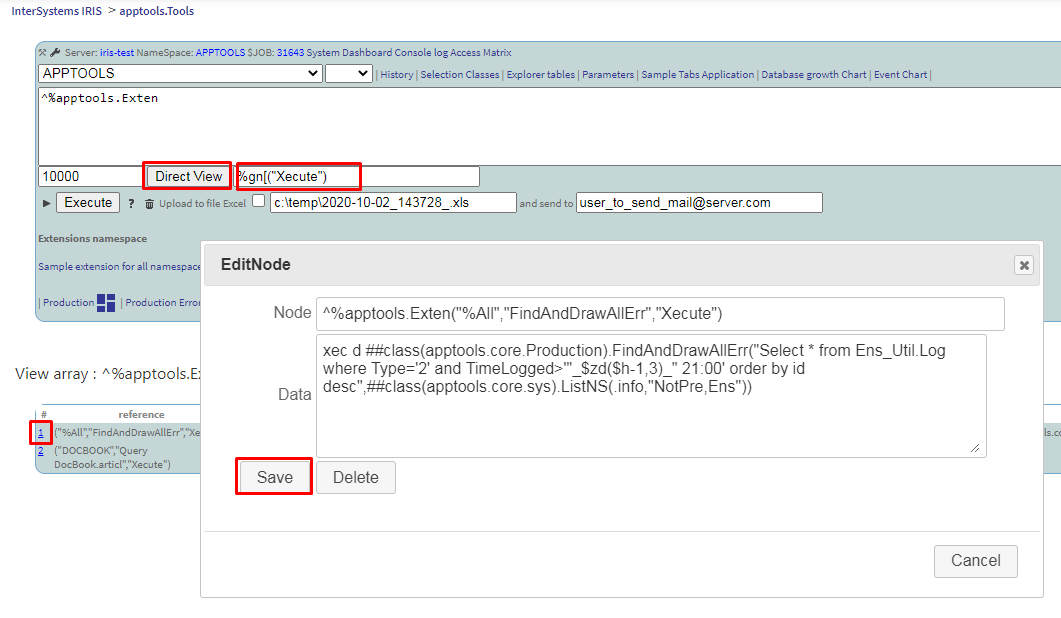
You can enter the * wildcard after the global name to get a list of globals with additional characteristics.

A second * will add a new field, Allocated MB.

A third one will add the Used MB field. This syntax resolves to a Union of the two reports, and the asterisks divide the report that is typically rather long into manageable sections.

When you get a report as a list of globals (in the screenshot above), you can follow the active links to view the global itself. You can also view and edit the global in the standard way from the management portal, by clicking R or W in the Permission field.

Quite often, writing to the global is used to log the states of variables and objects when debugging a project. I use special macros for this:

set $$$AppL("MSW","anyText")=$$$AppObJs(%request)

In this example, $$$AppL forms a link to a glob with the ^log prefix, and the date and time in the index value.

$$$AppObJs is the object serialization macro.

You can view the protocol global in the panel, and the object can be displayed in the window fully formatted.

###Query The function that sees almost as much use as globals is query. You run this function by entering a statement as a command.

For example, you can perform an SQL statement.

You can also save the result in the global ^mtempSQLGN.

Subsequently, the saved result in the global can be displayed in the panel. ![

###Converting Reports to Excel Format One of the things that was missing in the standard management portal was the ability to execute queries configured in the database JDBC or ODBC sources, output the results in XLS format, and then archive and send the file via email.

To achieve this in the application, you simply select the Upload to Excel file checkbox before executing the command.

This feature saves a lot of time in my daily routine, and allows me to successfully incorporate ready-made modules into new applications and integrated solutions.

To enable this functionality, you first need to configure the path for creating files on the server, user credentials, as well as the mail server. For that, in turn, you need to edit the nodes of the global program settings, ^%apptools.Setting.

###Saving Reports Globally Quite often, you need to save the results of a report execution to the global. For this, you can use these procedures:

functions
For JDBC:##class(apptools.core.sys).SqlToDSN
For ODBC:##class(apptools.core.sys).SaveGateway
For SQL:##class(apptools.core.sys).SaveSQL
For Query:##class(apptools.core.sys).SaveQuery

For example, using the ##class(apptools.core.sys).SaveQuery function, saves the result of the query %SYSTEM.License:Counts to the global ^mtempGN.

You can then display in the panel what you’ve saved with the following command:

result ^mtempGN("%SYSTEM.License:Counts", 0)

https://lh5.googleusercontent.com/KCIekwZw3guq79GWxVdHYdAbWQc4u97-dr-hWT26lYE2oEzUTSkwCE4ki1zvNqRFBg6dKQshSqcy3YSgUbjFKgX3v7Ecpa5Bm_NEQuZhP8Fn8p1gzrmAdTR-Cg9jBeVcNWGukW3a

###Enhanced Functionality Modules What else simplified and automated my work? Changes that enabled me to execute custom modules when forming a query string. I can embed new functionality into the report on the fly — like active links for additional operations on the data. Let’s see some examples.

We display the query result in the browser using the function:

##class(apptools.core.LogInfoPane).DrawSQL

Let's add the word marking function ##class(apptools.core.LogInfo).MarkRed to parameter 5. In the same way, you can supplement the output with additional features, for example, active links or tooltips.

The globals editor in this solution is implemented according to the same principle.

Here's a list of functions for outputting globals and queries in tabular form:

functions
For globals:##class(apptools.core.LogInfoPane).DrawArray("^mtempSQLGN")
For SQL:##class(apptools.core.LogInfoPane).DrawSQL("select * From %SYS.ProcessQuery")
For Query:##class(apptools.core.LogInfoPane).DrawSQL("query %SYSTEM.License:Counts")
For global result:##class(apptools.core.LogInfoPane).DrawSQL("result ^mtempSQLGN")

Working with the apptools.core.Parameter Class This link will open the CSP application in a browser in the context of an instance on which apptools-admin is installed:

http://localhost:52773/apptools/apptools.Form.Exp.cls?NSP=APP&SelClass=apptools.core.Parameter

Or select the active link in the panel. The CSP application will be loaded for editing instances of stored classes, in this example: apptools.core.Parameter.
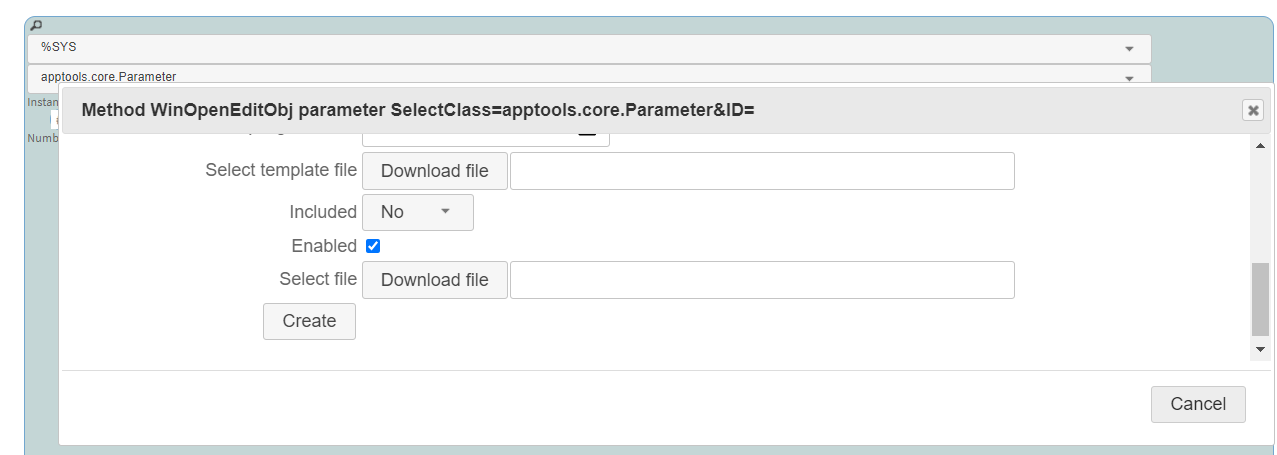
###Creating a apptools.core.Parameter via the Table Navigator If you open this link in a browser in the context of the instance on which apptools-admin is installed:

http://localhost:52773/apptools/apptools.Form.Exp.cls?panel=AccordionExp&NSP=APP

Or select the active link in the panel.

The CSP application will be loaded for navigating the stored classes with the ability to edit them.

###An example of a simple CSP application If you open this link in a browser in the context of the instance on which apptools-admin is installed:

http://localhost:52773/apptools/apptools.Tabs.PanelSample.cls

Or select the active link in the panel. This example also shows the ability to edit class instances apptools.core.Parameter.

###Graphs To visualize database growth, the application offers a page that displays a graph of the monthly measured database size. This graph is derived from the IRIS file.log (cconsole.log for Caché) on records "Expand" retrospectively from the current day.

The program traverses the protocol, finds the database extension records and subtracts the incremental megabytes from the current database size. It turns out a graph of the growth of databases.

For example, the screenshot below shows a graph of events in InterSystems IRIS formed by the protocol file.
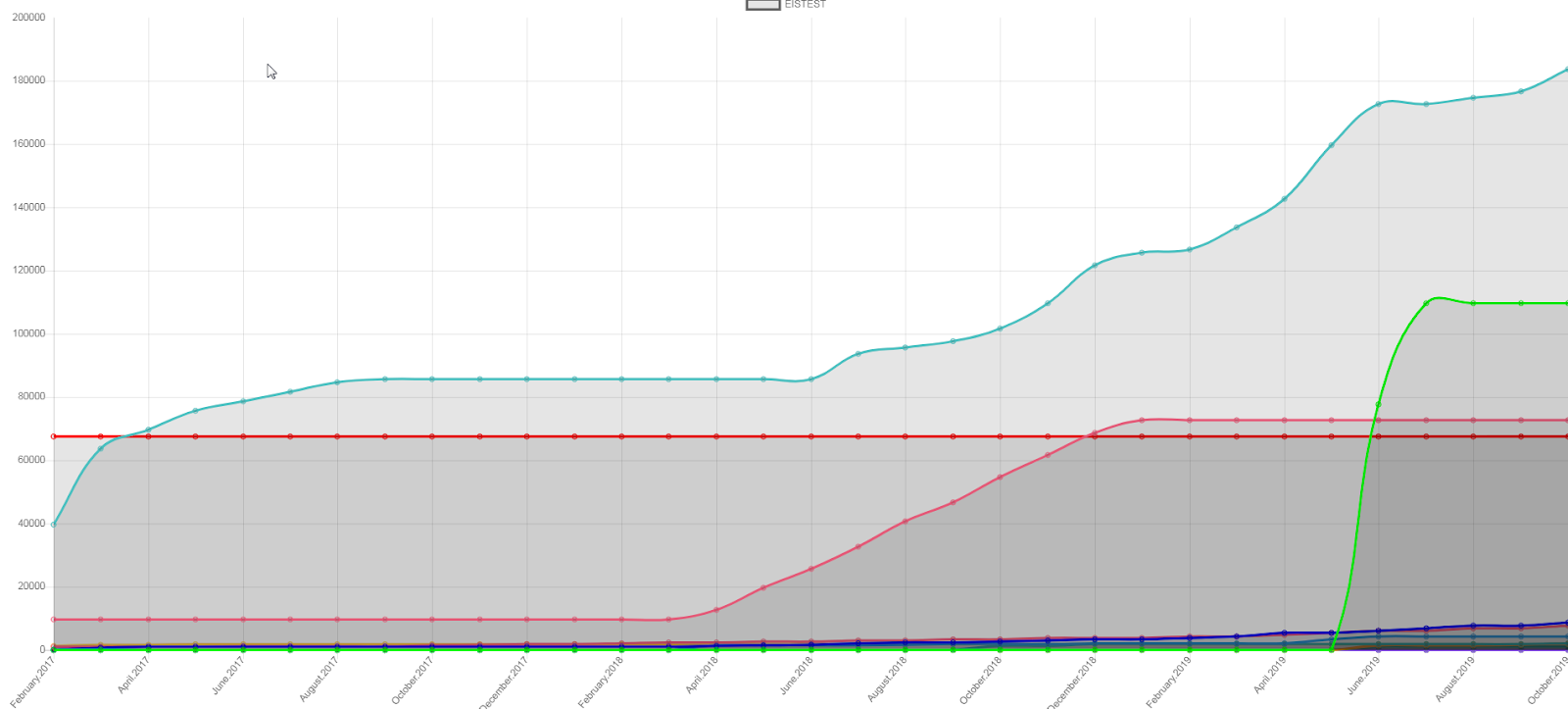
Another example below: a schedule of events in the system based on the system protocol file.log (cconsole.log).

###Summary The application we’ve discussed in this article was designed to help me perform my daily tasks. It includes a set of modules which you can use as building blocks for a custom administrator tool. I would be very glad if you found it useful in your work. You are welcome to add your wishes and suggestions as tasks to the project repo.

0
0 440
Article Henrique Dias · Aug 26, 2020 3m read

Hi Community, 

I shared my experience working with FHIR for the first time in this article.

In that article, I wrote how I explored the FHIR Resources and talked about the information that I found useful in FHIR documentation.

The first version of my app only shows the information that FHIR Resource provides. 

I wanted to make the user able to update the patient details, so I to search for an example of how to do it. 

The Github page of fhir.js has an example of how to update a resource. 

Looking at this example made me think that it was effortless. 

2
0 1165