#InterSystems IRIS for Health

0 Followers · 2.3K Posts

InterSystems IRIS for Health™ is the world’s first and only data platform engineered specifically for the rapid development of healthcare applications to manage the world’s most critical data. It includes powerful out-of-the-box features: transaction processing and analytics, an extensible healthcare data model, FHIR-based solution development, support for healthcare interoperability standards, and more. All enabling developers to realize value and build breakthrough applications, fast. Learn more.

Announcement Jeff Fried · Sep 10, 2019

Preview kits are now published via the WRC's preview download site for:

  • InterSystems IRIS 2019.1.1
  • InterSystems IRIS for Health 2019.1.1
  • HealthShare Health Connect 2019.1.1

The build number for these releases is 2019.1.1.608.0.


This is a maintenance release and includes changes in a number of areas, as described in the online documentation here.

It also includes three new features, described in the online documentation here:

  • Support for the InterSystems API Manager,
  • In-place conversion from Caché and Ensemble to InterSystems IRIS
  • X12 element validation.


0
0 431
Announcement Jacquie Clermont · Sep 6, 2019

Hi Community,

Our latest issues of Developments  and Developments Healthcare Edition have been posted to the Developments Archive site, where you'll also find other previous issues. Learn about InterSystems API Manager, preview releases of InterSystem IRIS and IRIS for Health, and live webinars this month about how you can easily move your Ensemble or Caché applications to InterSystems IRIS. 
 

Optimize your investment in InterSystems technology by subscribing to these and other InterSystems publications.

0
0 273
Announcement John Murray · Sep 6, 2019

We've just published an update to the Serenji extension for VS Code. Starting with this version (3.0.7) you can now debug the code that implements your REST services. Here's a taster:

Read more about Serenji on Open Exchange.

0
2 534
Question Robert Marsden · Aug 12, 2019

Hello All.

In need of some help.

We are currently migrating Interfaces from JCAPS to HealthConnect 19.1 and have done a lot of work on our Dev server.  I am looking to copy/export this work over to the Test server and have managed to export the production and Rules, HL7 custom Schemas etc.  The only thing left now are the Data Transformations but so far I can only find ways of copying the transformations over individually.  Is there some way to copy all of the transformations we have produced in our namespace to another server in one go?  

Thanks

4
0 440
Announcement Jacquie Clermont · Aug 5, 2019

Hi Community:

If you're interested in the future of InterSystems technology, you won't want to miss these nine Global Summit sessions on our hottest technologies:

Roadmap Sessions

  • Business Intelligence (BI) & Analytics Roadmap
  • In-Place InterSystems IRIS™ Conversions 
  • InterSystems IRIS Adoption Guide
  • InterSystems IRIS Cloud Roadmap
  • Partner Hub: An Overview
  • Personas: Your Team's Quiet Partners
  • Selling InterSystems to Your Manager
  • Showcase: InterSystems IRIS Directions
  • User Experience Feedback: Focus on BI

REGISTER SOON. Early bird rates end August 30.

Thank you,

Jacquie

0
0 333
InterSystems Official Andreas Dieckow · Jul 23, 2019

Preview releases are now available for the 2019.3 version of InterSystems IRIS and IRIS for Health!


Container images are available via the WRC's preview download site.

The version number for these releases is 2019.3.0.302.0


Public announcements will be made shortly, with separate announcements for each product.


InterSystems IRIS Data Platform 2019.3 is a CD (continuous delivery) release of InterSystems IRIS.  It has many new capabilities including:

Continuous Delivery Releases of InterSystems IRIS

InterSystems API Manager

Node-level Architecture for Sharding and SQL Support

Infrastructure and Cloud Deployment Improvements

Port Authority for Monitoring Port Usage in Interoperability Productions

X12 Element Validation in Interoperability Productions

New Framework for Coding Business Hosts in Java

Java and .NET Gateway Reentrancy

1
4 511
Article Guillaume Rongier · Jul 4, 2019 1m read

Has you may know, EnsDemo from Ensemble are not available anymore on IRIS.

This is a good thing, Iris is cloud oriented, it must be light, fast. Now the new way of sharing samples or modules is through git, continuous integration and OpenExchange.

But, in some cases you want to go back to your good old samples from EnsDemo to get inspiration or best practices.

Good news, there is a git for that :

How to use it ?

Clone this repository

git clone https://github.com/grongierisc/InstallEnsDemoLite.git

And run install.sh

1
2 1235
Article Stephen De Gabrielle · Jun 26, 2019 1m read

This is more for my memory that anything else but I thought I'd share it because it often comes up in comments, but is not in the InterSystems documentation. 

There is a wonderful utility called ^REDEBUG that increases the level of logging going into mgr\cconsole.log. 

You activate it by

a) start terminal/login

b) zn "%SYS"

c) do ^REDEBUG

d) change logging level to FFFFFFFF

0
1 1488
InterSystems Official Pete Greskoff · Jun 25, 2019

InterSystems has corrected a memory leak in applications that pass by reference to a formal parameter that accepts a variable number of arguments.

This problem exists for:

  • InterSystems IRIS Data Platform – all currently released versions
  • InterSystems IRIS for Health – all currently released versions
  • HealthShare Health Connect 2019.1.0

If this defect occurs, the process partition will eventually be exhausted, resulting in a <STORE> error.

0
0 381
Question James DeLurgio · Jun 13, 2019

Hello,

I'm new to Iris for Health and I'm trying to get some experience using it.  I've subscribed to the Intersystems Iris for Health software in AWS marketplace.  I successfully spun up the EC2 instance with the default security group.  The try-iris instance is healthy and successfully starts within EC2.  I've also successfully changed the default password too.

 However, I'm unable to authenticate into the management portal.  The portal launches okay though I keep getting an access denied.  I'm also unable to authenticate into a session from the EC2 instance.

2
0 524
InterSystems Official Jeff Fried · Jun 10, 2019

The 2019.2 version of InterSystems IRIS for Health is now Generally Available!

Container images for IRIS for Health are available via the WRC's  download siteThe build number for these releases is 2019.2.0.107.0.

InterSystems IRIS for Health  2019.2  is the first CD (continuous delivery) release of IRIS for Health.  It has many new capabilities including:

0
0 340
InterSystems Official RB Omo · Jun 6, 2019

InterSystems has corrected a defect that can result in application data integrity issues following an abnormal shutdown.

This problem exists for:

  • Caché and Ensemble 2018.1.2
  • HealthShare Health Connect (HSAP) 15.032 on Core version 2018.1.2
  • InterSystems IRIS Data Platform 2019.1
  • InterSystems IRIS for Health 2019.1
  • HealthShare Health Connect 2019.1

The defect breaks the journal sync guarantee that all updates in the journal buffer have been written to the journal file. The failure is silent: it does not generate an error message and there is no entry about it in any log file.

0
0 562
InterSystems Official Jeff Fried · May 9, 2019

The preview release of IRIS for Health 2019.2 is now  available - give it a try!

Container images are available via the WRC's preview download site.

The build number for these releases is 2019.2.0.100.0.


InterSystems IRIS for Health  2019.2  is the first CD (continuous delivery) release of IRIS for Health.  It has many new capabilities including:

0
0 369
Announcement Evgeny Shvarov · Apr 6, 2019

Hi Community!

This is the update on what are the new applications submitted on OpenExchange in March 2019

New Applications

isc-tar  published by @Dmitry Maslennikov 

Compact files as TAR or Extract files from TAR files

Light weight EXCEL download v.1.0 published by @Robert Cemper 

This is the working example of a light weight export to EXCEL based on data in SAMPLES namespace. Good old CSP is well equipped to produce HTML tables accepted from EXCEL as input. With modern Browsers you don't even need and tags. So the required code around your SQL result set is really slim. And you are free to add any formatting you need either by HTML or in SQL.

PythonGateway v.0.7 published by @Eduard Lebedyuk 

Python Gateway for InterSystems Data Platforms.

Adopted Bitmaps v.1.0 published by @Robert Cemper 

This is a running example of the Bitmap Adoption

WebSockets Tutorial v.1.0 published by @Lily Taub 

A short tutorial on WebSockets in InterSystems IRIS 2018.1+ and Caché 2016.2+

Sync Data with DSTIME v.1.0.0 published by @Robert Cemper

Other Sync-Tools just work from Caché/IRIS to Caché/IRIS. Synchronizing your data to some external DB you requires some other solution. DSTIME can do it.

HL7 and SMS Interoperability Demo v.1.3 published by @Amir Samary 

This demo shows how easy it is to integrate an Electronic Medical Record system that is sending HL7 messages with AWS.

0
0 245
InterSystems Official Thomas Carroll · Feb 14, 2019

Breaking news!

InterSystems just announced the availability of the InterSystems IRIS for Health™ Data Platform across the Amazon Web ServicesGoogle Cloud, and Microsoft Azure marketplaces.

With access to InterSystems unified data platform on all three major cloud providers, developers and customers have flexibility to rapidly build and scale the digital applications driving the future of care on the platform of their choice. 

To learn more please follow this link

0
0 569
Announcement Evgeny Shvarov · Oct 2, 2018

Hi Community!

I'm pleased to announce that we've just launched the new product in the family of InterSystems Data Platforms:

InterSystems IRIS for Health

IRIS for Health — is the world’s first and only data platform engineered specifically for healthcare. It empowers you to rapidly create and scale the industry’s next breakthrough applications.

0
1 531
Article Murray Oldfield · Mar 11, 2016 8m read

In the last post we scheduled 24-hour collections of performance metrics using pButtons. In this post we are going to be looking at a few of the key metrics that are being collected and how they relate to the underlying system hardware. We will also start to explore the relationship between Caché (or any of the InterSystems Data Platforms) metrics and system metrics. And how you can use these metrics to understand the daily beat rate of your systems and diagnose performance problems.


[A list of other posts in this series is here](https://community.intersystems.com/post/capacity-planning-and-performance-series-index)

Edited Oct 2016...Example of script to extract pButtons data to a .csv file is here.Edited March 2018... Images had disappeared, added them back in.


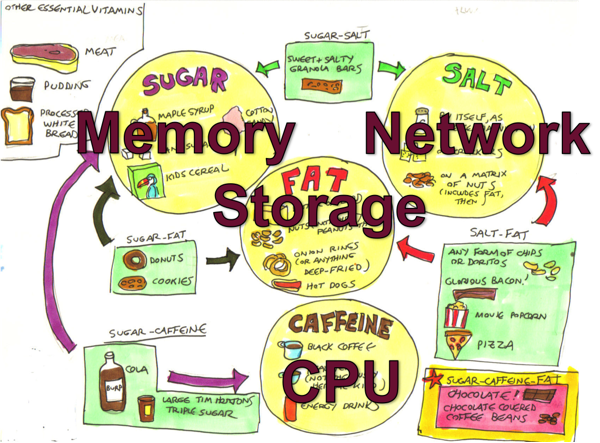
Hardware food groups

Hardware Food Groups

As you will see as we progress through this series of posts the server components affecting performance can be itemised as:

  • CPU
  • Memory
  • Storage IO
  • Network IO

If any of these components is under stress then system performance and user experience will likely suffer. These components are all related to each other as well, changes to one component can affect another, sometimes with unexpected consequences. I have seen an example where fixing an IO bottleneck in a storage array caused CPU usage to jump to 100% resulting in even worse user experience as the system was suddenly free to do more work but did not have the CPU resources to service increased user activity and throughput.

We will also see how Caché system activity has a direct impact on server components. If there are limited storage IO resources a positive change that can be made is increasing system memory and increasing memory for Caché global buffers which in turn can lower system storage read IO (but perhaps increase CPU!).

One of the most obvious system metrics to monitor regularly or check when users report problems is CPU usage. Looking at top or nmon on Linux or AIX, or Windows Performance Monitor. Because most system administrators look at CPU data regularly, especially if it is presented graphically, a quick glance gives you a good feel for the current health of your system -- what is normal or a sudden spike in activity that might be abnormal or indicates a problem. In this post we are going to look quickly at CPU metrics, but will concentrate on Caché metrics, we will start by looking at mgstat data and how looking at the data graphically can give a feel for system health at a glance.

Introduction to mgstat

mgstat is one of the Caché commands included and run in pButtons. mgstat is a great tool for collecting basic performance metrics to help you understand your systems health. We will look at mgstat data collected from a 24 hour pButtons, but if you want to capture data outside pButtons mgstat can also be run on demand interactively or as a background job from Caché terminal.

To run mgstat on demand from the %SYS namespace the general format is.

do mgstat(sample_time,number_of_samples,"/file_path/file.csv",page_length)

For example to run a background job for a one hour run with 5 seconds sample period and output to a csv file.

job ^mgstat(5,720,"/data/mgstat_todays_date_and_time.csv")

For example to display to the screen but dropping some columns use the dsp132 entry. I will leave as homework for you to check the output to understand the difference.

do dsp132^mgstat(5,720,"",60)

Detailed information of the columns in mgstat can be found in the Caché Monitoring Guide in the most recent Caché documentation: InterSystems online documentation

Looking at mgstat data

pButtons has been designed to be collated into a single HTML file for easy navigation and packaging for sending to WRC support specialists to diagnose performance problems. However when you run pButtons for yourself and want to graphically display the data it can be separated again to a csv file for processing into graphs, for example with Excel, by command line script or simple cut and paste.

In this post we will dig into just a few of the mgstat metrics to show how even a quick glance at data can give you a feel for whether the system is performing well or there are current or potential problems that will effect the user experience.

Glorefs and CPU

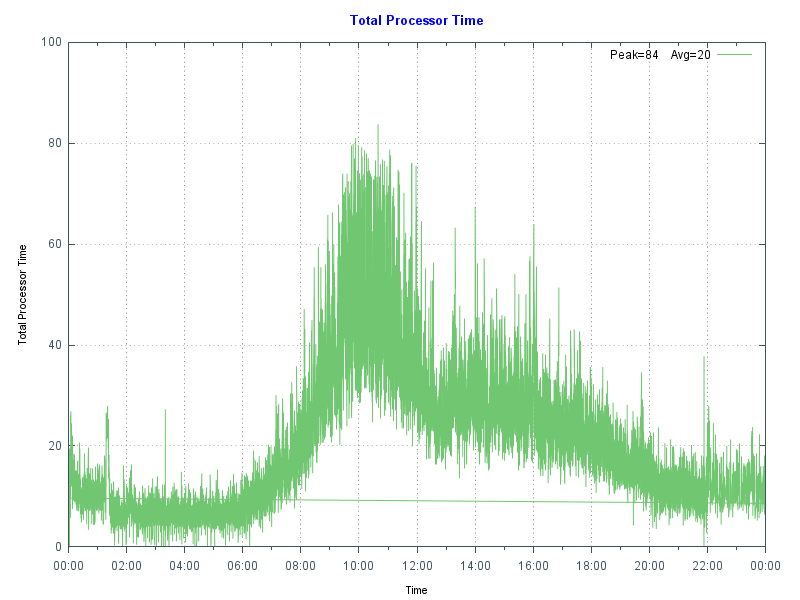
The following chart shows database server CPU usage at a site running a hospital application at a high transaction rate. Note the morning peak in activity when there are a lot of outpatient clinics with a drop-off at lunch time then tailing off in the afternoon and evening. In this case the data came from Windows Performance Monitor _(Total)% Processor Time - the shape of the graph fits the working day profile - no unusual peaks or troughs so this is normal for this site. By doing the same for your site you can start to get a baseline for "normal". A big spike, especially an extended one can be an indicator of a problem, there is a future post that focuses on CPU.

CPU Time

As a reference this database server is a Dell R720 with two E5-2670 8-core processors, the server has 128 GB of memory, and 48 GB of global buffers.

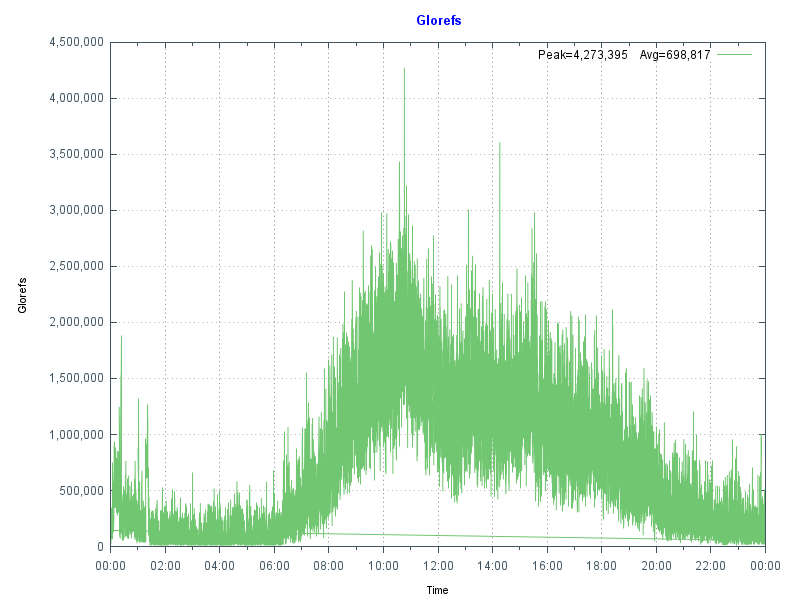
The next chart shows more data from mgstat — Glorefs (Global references) or database accesses for the same day as the CPU graph. Glorefs Indicates the amount of work that is occurring on behalf of the current workload; although global references consume CPU time, they do not always consume other system resources such as physical reads because of the way Caché uses the global memory buffer pool.

Global References

Typical of Caché applications there is a very strong correlation between Glorefs and CPU usage.

Another way of looking at this CPU and gloref data is to say that reducing glorefs will reduce CPU utilisation, enabling deployment on lower core count servers or to scale further on existing systems. There may be ways to reduce global reference by making an application more efficient, we will revisit this concept in later posts.

PhyRds and Rdratio

The shape of data from graphing mgstat data PhyRds (Physical Reads) and Rdratio (Read ratio) can also give you an insight into what to expect of system performance and help you with capacity planning. We will dig deeper into storage IO for Caché in future posts.

PhyRds are simply physical read IOPS from disk to the Caché databases, you should see the same values reflected in operating system metrics for logical and physical disks. Remember looking at operating system IOPS may be showing IOPS coming from non-Caché applications as well. Sizing storage and not accounting for expected IOPS is a recipe for disaster, you need to know what IOPS your system is doing at peak times for proper capacity planning. The following graph shows PhyRds between midnight and 15:30.

Physical Reads

Note the big jump in reads between 05:30 and 10:00. With other shorter peaks at 11:00 and just before 14:00. What do you think these are caused by? Do you see these type of peaks on your servers?

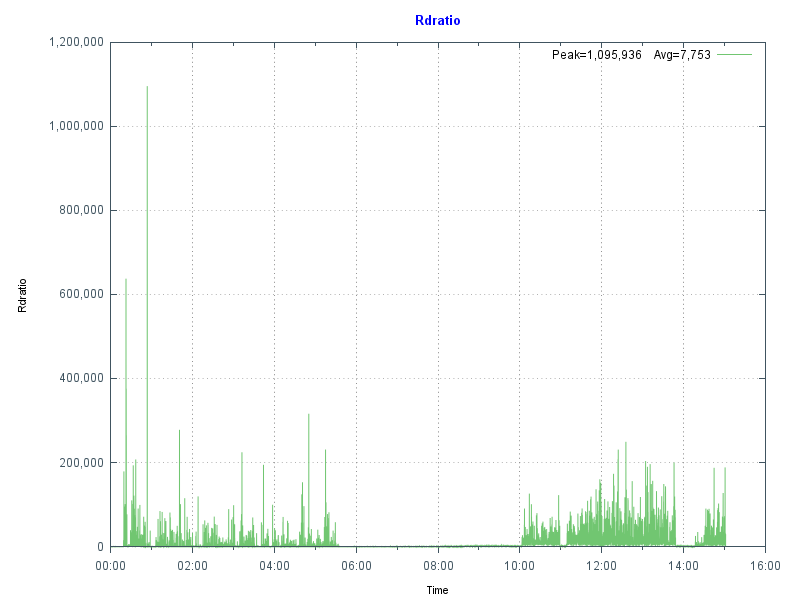
Rdratio is a little more interesting — it is the ratio of logical block reads to physical block reads. So a ratio of how many reads are from global buffers (logical) from memory and how many are from disk which is orders of magnitude slower. A high Rdratio is a good thing, dropping close to zero for extended periods is not good.

Read Ratio

Note that the same time as high reads Rdratio drops close to zero. At this site I was asked to investigate when the IT department started getting phone calls from users reporting the system was slow for extended periods. This had been going on seemingly at random for several weeks when I was asked to look at the system.

Because pButtons had been scheduled for daily 24-hour runs it was relatively simple to go back through several weeks data to start seeing a pattern of high PhyRds and low Rdratio which correlated with support calls.

After further analysis the cause was tracked to a new shift worker who was running several reports entering 'bad' parameters combined with badly written queries without appropriate indexes causing the high database reads. This accounted for the seemingly random slowness. Because these long running reports are reading data into global buffers the result is interactive user’s data is being fetched from physical storage, rather than memory as well as storage being stressed to service the reads.

Monitoring PhyRds and Rdratio will give you an idea of the beat rate of your systems and maybe allow you to track down bad reports or queries. There may be valid reason for high PhyRds -- perhaps a report must be run at a certain time. With modern 64-bit operating systems and servers with large physical memory capacity you should be able to minimise PhyRds on your production systems.

If you do see high PhyRds on your system there are a couple of strategies you can consider:

  • Improve the performance by increasing the number of database (global) buffers (and system memory).
  • Long running reports or extracts can be moved out of business hours.
  • Long running read only reports, batch jobs or data extracts can be run on a separate shadow server or asynchronous mirror to minimise the impact on interactive users and to offload system resource use such as CPU and IOPS.

Usually low PhyRds is a good thing and it's what we aim for when we size systems. However if you have low PhyRds and users are complaining about performance there are still things that can be checked to ensure storage is not a bottleneck - the reads may be low because the system cannot service any more. We will look at storage closer in a future post.

Summary

In this post we looked at how graphing the metrics collected in pButtons can give a health check at a glance. In upcoming posts I will dig deeper into the relationship between the system and Caché metrics and how you can use these to plan for the future.

10
2 4230
Article Murray Oldfield · Apr 8, 2016 17m read

This post will guide you through the process of sizing shared memory requirements for database applications running on InterSystems data platforms. It will cover key aspects such as global and routine buffers, gmheap, and locksize, providing you with a comprehensive understanding. Additionally, it will offer performance tips for configuring servers and virtualizing IRIS applications. Please note that when I refer to IRIS, I include all the data platforms (Ensemble, HealthShare, iKnow, Caché, and IRIS).


[A list of other posts in this series is here](https://community.intersystems.com/post/capacity-planning-and-performance-series-index)

When I first started working with Caché, most customer operating systems were 32-bit, and memory for an IRIS application was limited and expensive. Commonly deployed Intel servers had only a few cores, and the only way to scale up was to go with big iron servers or use ECP to scale out horizontally. Now, even basic production-grade servers have multiple processors, dozens of cores, and minimum memory is hundreds of GB or TB. For most database installations, ECP is forgotten, and we can now scale application transaction rates massively on a single server.

A key feature of IRIS is the way we use data in shared memory usually referred to as database cache or global buffers. The short story is that if you can right size and allocate 'more' memory to global buffers you will usually improve system performance - data in memory is much faster to access than data on disk. Back in the day, when 32-bit systems ruled, the answer to the question how much memory should I allocate to global buffers? It was a simple - as much as possible! There wasn't that much available anyway, so sums were done diligently to calculate OS requirements, the number of and size of OS and IRIS processes and real memory used by each to find the remainder to allocate as large a global buffer as possible.

The tide has turned

If you are running your application on a current-generation server, you can allocate huge amounts of memory to an IRIS instance, and a laissez-faire attitude often applies because memory is now "cheap" and plentiful. However, the tide has turned again, and pretty much all but the very largest systems I see deployed now are virtualized. So, while 'monster' VMs can have large memory footprints if needed, the focus still comes back to the right sizing systems. To make the most of server consolidation, capacity planning is required to make the best use of available host memory.

What uses memory?

Generally, there are four main consumers of memory on an IRIS database server:

  • Operating System, including filesystem cache.
  • If installed, other non-IRIS applications.
  • IRIS processes.
  • IRIS shared memory (includes global and routine buffers and GMHEAP).

At a high level, the amount of physical memory required is simply added up by adding up the requirements of each of the items on the list. All of the above use real memory, but they can also use virtual memory. A key part of capacity planning is to size a system so that there is enough physical memory so that paging does not occur or is minimized, or at least minimize or eliminate hard page faults where memory has to be brought back from disk.

In this post I will focus on sizing IRIS shared memory and some general rules for optimising memory performance. The operating system and kernel requirements vary by operating system but will be several GB in most cases. File system cache varies and is will be whatever is available after the other items on the list take their allocation.

IRIS is mostly processes - if you look at the operating system statistics while your application is running you will see cache processes (e.g. iris or iris.exe). So a simple way to observe what your application memory requirements are is to look at the operating system metrics. For example with vmstat or ps on Linux or Windows process explorer and total the amount of real memory in use, extrapolating for growth and peak requirements. Be aware that some metrics report virtual memory which includes shared memory, so be careful to gather real memory requirements.

Sizing Global buffers - A simplified way

One of the capacity planning goals for a high transaction database is to size global buffers so that as much of the application database working set is in memory as possible. This will minimise read IOPS and generally improve the application's performance. We also need to strike a balance so that other memory users, such as the operating system and IRIS process, are not paged out and there is enough memory for the filesystem cache.

I showed an example of what can happen if reads from disk are excessive in Part 2 of this series. In that case, high reads were caused by a bad report or query, but the same effect can be seen if global buffers are too small, forcing the application to be constantly reading data blocks from disk. As a sidebar, it's also worth noting that the landscape for storage is always changing - storage is getting faster and faster with advances in SSDs and NVMe, but data in memory close to the running processes is still best.

Of course, every application is different, so it's important to say, "Your mileage may vary" but there are some general rules which will get you started on the road to capacity planning shared memory for your application. After that you can tune for your specific requirements.

Where to start?

Unfortunately, there is no magic answer. However, as I discussed in previous posts, a good practice is to size the system CPU capacity so that for a required peak transaction rate, the CPU will be approximately 80% utilized at peak processing times, leaving 20% headroom for short-term growth or unexpected spikes in activity.

For example, when I am sizing TrakCare systems I know CPU requirements for a known transaction rate from benchmarking and reviewing customer site metrics, and I can use a broad rule of thumb for Intel processor-based servers:

Rule of thumb: Physical memory is sized at n GB per CPU core for servers running IRIS.

  • For example, for TrakCare database servers, a starting point of n is 8 GB. But this can vary, and servers may be right-sized after the application has been running for a while -- you must monitor your systems continuously and do a formal performance review, for example, every six or 12 months.

Rule of thumb: Allocate n% of memory to IRIS global buffers.

  • For small to medium TrakCare systems, n% is 60%, leaving 40% of memory for the operating system, filesystem cache, and IRIS processes. You may vary this, say to 50%, if you need a lot of filesystem cache or have a lot of processes. Or make it a higher percentage as you use very large memory configurations on large systems.
  • This rule of thumb assumes only one IRIS instance on the server.

For example, if the application needs 10 CPU cores, the VM would have 80 GB of memory, 48 GB for global buffers, and 32 GB for everything else.

Memory sizing rules apply to physical or virtualized systems, so the same 1 vCPU: 8 GB memory ratio applies to TrakCare VMs.

Tuning global buffers

There are a few items to observe to see how effective your sizing is. You can observe free memory outside IRIS with operating system tools. Set up as per your best calculations, then observe memory usage over time, and if there is always free memory, the system can be reconfigured to increase global buffers or to right-size a VM.

Another key indicator of good global buffer sizing is having read IOPS as low as possible, which means IRIS cache efficiency will be high. You can observe the impact of different global buffer sizes on PhyRds and RdRatio with mgstat; an example of looking at these metrics is in Part 2 of this series. Unless you have your entire database in memory, there will always be some reads from disk; the aim is simply to keep reads as low as possible.

Remember your hardware food groups and get the balance right. More memory for global buffers will lower read IOPS but possibly increase CPU utilization because your system can now do more work in a shorter time. Lowering IOPS is pretty much always a good thing, and your users will be happier with faster response times.

See the section below for applying your requirements to physical memory configuration.

For virtual servers, plan not to ever oversubscribe your production VM memory. This is especially true for IRIS shared memory; more on this below.

Is your application's sweet spot 8GB of physical memory per CPU core? I can't say, but see if a similar method works for your application, whether 4GB or 10GB per core. If you have found another method for sizing global buffers, please leave a comment below.

Monitoring Global Buffer usage

The IRIS utility ^GLOBUFF displays statistics about what your global buffers are doing at any point in time. For example to display the top 25 by percentage:

do display^GLOBUFF(25)

For example, output could look like this:

Total buffers: 2560000    Buffers in use: 2559981  PPG buffers: 1121 (0.044%)

Item  Global                             Database          Percentage (Count)
1     MyGlobal                           BUILD-MYDB1        29.283 (749651)
2     MyGlobal2                          BUILD-MYDB2        23.925 (612478)
3     CacheTemp.xxData                   CACHETEMP          19.974 (511335)
4     RTx                                BUILD-MYDB2        10.364 (265309)
5     TMP.CachedObjectD                  CACHETEMP          2.268 (58073)
6     TMP                                CACHETEMP          2.152 (55102)
7     RFRED                              BUILD-RB           2.087 (53428)
8     PANOTFRED                          BUILD-MYDB2        1.993 (51024)
9     PAPi                               BUILD-MYDB2        1.770 (45310)
10    HIT                                BUILD-MYDB2        1.396 (35727)
11    AHOMER                             BUILD-MYDB1        1.287 (32946)
12    IN                                 BUILD-DATA         0.803 (20550)
13    HIS                                BUILD-DATA         0.732 (18729)
14    FIRST                              BUILD-MYDB1        0.561 (14362)
15    GAMEi                              BUILD-DATA         0.264 (6748)
16    OF                                 BUILD-DATA         0.161 (4111)
17    HISLast                            BUILD-FROGS        0.102 (2616)
18    %Season                            CACHE              0.101 (2588)
19    WooHoo                             BUILD-DATA         0.101 (2573)
20    BLAHi                              BUILD-GECKOS       0.091 (2329)
21    CTPCP                              BUILD-DATA         0.059 (1505)
22    BLAHi                              BUILD-DATA         0.049 (1259)
23    Unknown                            CACHETEMP          0.048 (1222)
24    COD                                BUILD-DATA         0.047 (1192)
25    TMP.CachedObjectI                  CACHETEMP          0.032 (808)

This could be useful in several ways, for example, to see how much of your working set is kept in memory. If you find this utility is useful please make a comment below to enlighten other community users on why it helped you.

Sizing Routine Buffers

Routines your application is running, including compiled classes, are stored in routine buffers. The goal of sizing shared memory for routine buffers is for all your routine code to be loaded and stay resident in routine buffers. Like global buffers, it is expensive and inefficient to read routines off disk. The maximum size of routine buffers is 1023 MB. As a rule you want more routine buffers than you need as there is always a big performance gain to have routines cached.

Routine buffers are made up of different sizes. By default, IRIS determines the number of buffers for each size; at install time, the defaults for 2016.1 are 4, 16 and 64 KB. It is possible to change the allocation of memory for different sizes; however, to start your capacity planning, it is recommended to stay with IRIS defaults unless you have a special reason for changing. For more information, see routines in the IRIS documentation “config” appendix of the IRIS Parameter File Reference and Memory and Startup Settings in the “Configuring IRIS” chapter of the IRIS System Administration Guide.

As your application runs, routines are loaded off disk and stored in the smallest buffer the routine will fit. For example, if a routine is 3 KB, it will ideally be stored in a 4 KB buffer. If no 4 KB buffers are available, a larger one will be used. A routine larger than 32 KB will use as many 64 KB routine buffers as needed.

Checking Routine Buffer Use

mgstat metric RouLas

One way to understand if the routine buffer is large enough is the mgstat metric RouLas (routine loads and saves). A RouLas is a fetch from or save to disk. A high number of routine loads/saves may show up as a performance problem; in that case, you can improve performance by increasing the number of routine buffers.

cstat

If you have increased routine buffers to the maximum of 1023 MB and still find high RouLas a more detailed examination is available so you can see what routines are in buffers and how much is used with cstat command.

ccontrol stat cache -R1  

This will produce a listing of routine metrics including a list of routine buffers and all the routines in cache. For example a partial listing of a default IRIS install is:

Number of rtn buf: 4 KB-> 9600, 16 KB-> 7200, 64 KB-> 2400, 
gmaxrouvec (cache rtns/proc): 4 KB-> 276, 16 KB-> 276, 64 KB-> 276, 
gmaxinitalrouvec: 4 KB-> 276, 16 KB-> 276, 64 KB-> 276, 

Dumping Routine Buffer Pool Currently Inuse
 hash   buf  size sys sfn inuse old type   rcrc     rtime   rver rctentry rouname
   22: 8937  4096   0   1     1   0  D  6adcb49e  56e34d34    53 dcc5d477  %CSP.UI.Portal.ECP.0 
   36: 9374  4096   0   1     1   0  M  5c384cae  56e34d88    13 908224b5  %SYSTEM.WorkMgr.1 
   37: 9375  4096   0   1     1   0  D  a4d44485  56e34d88    22 91404e82  %SYSTEM.WorkMgr.0 
   44: 9455  4096   0   0     1   0  D  9976745d  56e34ca0    57 9699a880  SYS.Monitor.Health.x
 2691:16802 16384   0   0     7   0  P  da8d596f  56e34c80    27 383da785  START
   etc
   etc 	

"rtns/proc" on the 2nd line above is saying that 276 routines can be cached at each buffer size as default.

Using this information another approach to sizing routine buffers is to run your application and list the running routines with cstat -R1. You could then calculate the routine sizes in use, for example put this list in excel, sort by size and see exactly what routines are in use. If your are not using all buffers of each size then you have enough routine buffers, or if you are using all of each size then you need to increase routine buffers or can be more direct about configuring the number of each bucket size.

Lock table size

The locksiz configuration parameter is the size (in bytes) of memory allocated for managing locks for concurrency control to prevent different processes from changing a specific element of data at the same time. Internally, the in-memory lock table contains the current locks, along with information about the processes that hold those locks.

Since memory used to allocate locks is taken from GMHEAP, you cannot use more memory for locks than exists in GMHEAP. If you increase the size of locksiz, increase the size of GMHEAP to match as per the formula in the GMHEAP section below. Information about application use of the lock table can be monitored using the system management portal (SMP), or more directly with the API:

set x=##class(SYS.Lock).GetLockSpaceInfo().

This API returns three values: "Available Space, Usable Space, Used Space". Check Usable space and Used Space to roughly calculate suitable values (some lock space is reserved for lock structure). Further information is available in IRIS documentation.

Note: If you edit the locksiz setting, changes take place immediately.

GMHEAP

The GMHEAP (the Generic Memory Heap) configuration parameter is defined as: Size (in kilobytes) of the generic memory heap for IRIS. This is the allocation from which the Lock table, the NLS tables, and the PID table are also allocated.

Note: Changing GMHEAP requires a IRIS restart.

To assist you in sizing for your application information about GMHEAP usage can be checked using the API:

%SYSTEM.Config.SharedMemoryHeap

This API also provides the ability to get available generic memory heap and recommends GMHEAP parameters for configuration. For example, the DisplayUsage method displays all memory used by each of the system components and the amount of available heap memory. Further information is available in the IRIS documentation.

write $system.Config.SharedMemoryHeap.DisplayUsage()

The RecommendedSize method can give you an idea of GMHEAP usage and recommendations at any point in time. However, you will need to run this multiple times to build up a baseline and recommendations for your system.

write $system.Config.SharedMemoryHeap.RecommendedSize()

Rule of thumb: Once again your application mileage will vary, but somewhere to start your sizing could be one of the following:

(Minimum 128MB) or (64 MB * number of cores) or (2x locksiz) or whichever is larger.

Remember GMHEAP must be sized to include the lock table. 

Large/Huge pages

The short story is that huge pages on Linux have a positive effect on increasing system performance. However, the benefits will only be known if you test your application with and without huge pages. The benefits of huge pages for IRIS database servers are more than just performance -- which may only be ~10% improvement at best. There are other reasons to use huge pages; When IRIS uses huge pages for shared memory, you guarantee that the memory is available for shared memory and not fragmented.

Note: By default, when huge/large pages are configured, InterSystems IRIS attempts to utilize them on startup. If there is not enough space, InterSystems IRIS reverts to standard pages. However, you can use the memlock parameter to control this behavior and fail at startup if huge/large page allocation fails.

As a sidebar for TrakCare, we do not automatically specify huge pages for non-production servers/VMs with small memory footprints ( for example less than 8GB) or utility servers (for example print servers) running IRIS because allocating memory for huge pages may end up orphaning memory, or sometimes a bad calculation that undersizes huge pages means IRIS starts not using huge pages which is even worse. As per our docs, remember that when using huge pages to configure and start IRIS without huge pages, look at the total shared memory at startup and then use that to calculate huge pages. Configuring Huge and Large Pages

Danger! Windows Large Pages and Shared Memory

IRIS uses shared memory on all platforms and versions, and it's a great performance booster, including on Windows, where it is always used. However, there are particular issues unique to Windows that you need to be aware of.

When IRIS starts, it allocates a single, large chunk of shared memory to be used for database cache (global buffers), routine cache (routine buffers), the shared memory heap, journal buffers, and other control structures. On IRIS startup, shared memory can be allocated using small or large pages. On Windows 2008 R2 and later, IRIS uses large pages by default; however, if a system has been running for a long time, due to fragmentation, contiguous memory may not be able to be allocated at IRIS startup, and IRIS can instead start using small pages.

Unexpectedly starting IRIS with small pages can cause it to start with less shared memory than defined in the configuration, or it may take a long time to start or fail to start. I have seen this happen on sites with a failover cluster where the backup server has not been used as a database server for a long time.

Tip: One mitigation strategy is periodically rebooting the offline Windows cluster server. Another is to use Linux.

Physical Memory

The best configuration for the processor dictates physical memory. A bad memory configuration can significantly impact performance.

Intel Memory configuration best practice

This information applies to Intel processors only. Please confirm with vendors what rules apply to other processors.

Factors that determine optimal DIMM performance include:

  • DIMM type
  • DIMM rank
  • Clock speed
  • Position to the processor (closest/furthest)
  • Number of memory channels
  • Desired redundancy features.

For example, on Nehalem and Westmere servers (Xeon 5500 and 5600) there are three memory channels per processor and memory should be installed in sets of three per processor. For current processors (for example, E5-2600), there are four memory channels per processor, so memory should be installed in sets of four per processor.

When there are unbalanced memory configurations — where memory is not installed in sets of three/four or memory DIMMS are different sizes, unbalanced memory can impose a 23% memory performance penalty.

Remember that one of the features of IRIS is in-memory data processing, so getting the best performance from memory is important. It is also worth noting that for maximum bandwidth servers should be configured for the fastest memory speed. For Xeon processors maximum memory performance is only supported at up to 2 DIMMs per channel, so the maximum memory configurations for common servers with 2 CPUs is dictated by factors including CPU frequency and DIMM size (8GB, 16GB, etc).

Rules of thumb:

  • Use a balanced platform configuration: populate the same number of DIMMs for each channel and each socket
  • Use identical DIMM types throughout the platform: same size, speed, and number of ranks.
  • For physical servers, round up the total physical memory in a host server to the natural break points—64GB, 128GB, and so on—based on these Intel processor best practices.

VMware Virtualisation considerations

I will follow up in future with another post with more guidelines for when IRIS is virtualized. However the following key rule should be considered for memory allocation:

Rule: Set VMware memory reservation on production systems.

As we have seen above when IRIS starts, it allocates a single, large chunk of shared memory to be used for global and routine buffers, GMHEAP, journal buffers, and other control structures.

You want to avoid any swapping for shared memory so set your production database VMs memory reservation to at least the size of IRIS shared memory plus memory for IRIS processes and operating system and kernel services. If in doubt reserve the full production database VMs memory.

As a rule if you mix production and non-production servers on the same systems do not set memory reservations on non-production systems. Let non-production servers fight out whatever memory is left ;). VMware often calls VMs with more than 8 CPUs 'monster VMs'. High transaction IRIS database servers are often monster VMs. There are other considerations for setting memory reservations on monster VMs, for example if a monster VM is to be migrated for maintenance or due to a High Availability triggered restart then the target host server must have sufficient free memory. There are stratagies to plan for this I will talk about them in a future post along with other memory considerations such as planning to make best use of NUMA.

Summary

This is a start to capacity planning memory, a messy area - certainly not as clear cut as sizing CPU. If you have any questions or observations please leave a comment.

As this entry is posted I am on my way to Global Summit 2016. If you are attending this year I will be talking about performance topics with two presentations, or I am happy to catch up with you in person in the developers area.

3
9 11083
Article Murray Oldfield · Oct 1, 2016 10m read

One of the great availability and scaling features of Caché is Enterprise Cache Protocol (ECP). With consideration during application development distributed processing using ECP allows a scale out architecture for Caché applications. Application processing can scale to very high rates from a single application server to the processing power of up to 255 application servers with no application changes.

ECP was used widely for many years in TrakCare deployments I was involved in. A decade ago a 'big' x86 server from one of the major vendors might only have a total of eight cores. For larger deployments ECP was a way to scale out processing on commodity servers rather than a single large and expensive big iron enterprise server. Even the high core count enterprise servers had limits so ECP was also used to scale deployments on them as well.

Today most new TrakCare deployments or upgrades to current hardware do not require ECP for scaling. Current two-socket x86 production servers can have dozens of cores and huge memory. We see that with recent Caché versions TrakCare -- and many other Caché applications -- have predictable linear scaling with the ability to support incremental increases in users and transactions as CPU core counts and memory increase in a single server. In the field I see most new deployments are virtualised, even then VMs can scale as needed up to the size of the host server. If resource requirements are more than a single physical host can provide then ECP is used to scale out.

  • Tip:For simplified management and deployment scale within a single server before deploying ECP.

In this post I will show an example architecture and the basics of how ECP works then review performance considerations with a focus on storage.

Specific information on configuring ECP and application development is available in the online Caché Distributed Data Management Guide and there is an ECP learning track here on the community.

One of the other key features of ECP is increasing application availability, for details see the ECP section in the Caché high availability guide.


[A list of other posts in this series is here](https://community.intersystems.com/post/capacity-planning-and-performance-series-index)
# ECP Architecture Basics

The architecture and operation of ECP is conceptually simple, ECP provides a way to efficiently share data, locks, and executable code among multiple server systems. Viewed from the application server data and code are stored remotely on a Data server, but are cached in memory locally on the Application servers to provide efficient access to active data with minimal network traffic.

The Data server manages database reads and writes to persistent storage on disk while multiple Application servers are the workhorses of the solution performing most of the application processing.

Multi-tier architecture

ECP is a multi-tier architecture. There are different ways to describe processing tiers and the roles they perform, the following is what I find useful when describing web browser based Caché applications and is the model and terminology for my posts. I appreciate that there may be different ways to break down tiers, but for now lets use my way :)

A browser based application, for example using Caché Server Pages (CSP) uses a multi-tier architecture where presentation, application processing, and data management functions are logically separated. Logical 'servers' with different roles populate the tiers. Logical servers do not have to be kept on separate physical host or virtual servers, for cost effectiveness and manageability some or even all logical servers may be located on a single host or operating system instance. As deployments scale up servers may be split out to multiple physical or virtual hosts with ECP so spreading the processing workload as needed without change to the application.

Host systems may be physical or virtualised depending on your capacity and availability requirements. The following tiers and logical servers make up a deployment:

  • Presentation Tier: Includes the Web Server which acts as gateway between the browser-based clients and the application tier.
  • Application Tier: This is where the ECP Application server sits. As noted above this is a logical model where the application server does not have to be separate from the Data server, and are typically not required to be for all but the largest sites. This tier may also include other servers for specialised processing such as report servers.
  • Data Tier: This is where the Data server is located. The data server performs transaction processing and is the repository for application code and data stored in the Caché database. The Data Server is responsible for reading and writing to persistent disk storage.

Logical Architecture

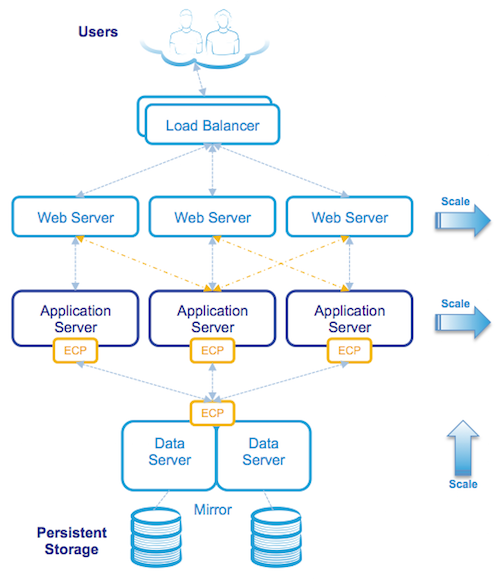
The following diagram is a logical view of a browser based application when deployed as a three-tier architecture:

Although at first glance the architecture may look complicated it is still made up of the same components as a Caché system installed on a single server, but with the logical components installed on multiple physical or virtual servers. All communication between servers is via TCP/IP.

ECP Operation in the logical view

Starting from the top the diagram above shows users connecting securely to multiple load balanced web servers. The web servers pass CSP web page requests between the clients and the application tier (the Application servers) which perform any processing, allowing content to be created dynamically, and returns the completed page back to the client via the web server.

In this three-tier model application processing has been spread over multiple Application servers using ECP. The application simply treats the data (your application database) as if it was local to the Application server.

When an Application server makes a request for data it will attempt to satisfy the request from its local cache, if it cannot, ECP will request the necessary data from the Data server which may be able to satisfy the request from its own cache or if not will fetch the data from disk. The reply from the Data server to the Application server includes the database block(s) where that data was stored. These blocks are used and now cached on the Application server. ECP automatically takes care of managing cache consistency across the network and propagating changes back to the Data server. Clients enjoy fast responses because they frequently use locally cached data.

By default web servers communicate with a preferred Application server ensuring that the same Application server services subsequent requests for related data as the data is likely to already be in local cache.

  • Tip:As detailed in the Caché documentation avoid connecting users to application servers in a round-robin or load-balancing scheme wich impacts the benefit of caching on the application server. Ideally the same users or groups of users stay connected to the same application server.

The solution is scaled without user downtime at the Presentation Tier by adding web servers and at the Application Tier by adding additional Application servers. The Data tier is scaled by increasing CPU and memory on the Data servers.

Physical Architecture

The following diagram shows an example of physical hosts used in the same three-tier deployment as the three-tier logical architecture example:

Note that physical or virtualised hosts are deployed at each tier using an n+1 or n+2 model for 100% capacity in event of a host failure or scheduled maintenance. Because users are spread across multiple web and application servers, the failure of a single server affects a smaller population with users automatically reconnecting to one of the remaining servers.

The Data management tier is made highly available, for example located on a failover cluster (e.g. virtualization HA, InterSystems Database Mirroring, or traditional failover clustering) connected to one or more storage arrays. In the event of hardware or service failure clustering will restart the services on one of the surviving nodes in the cluster. As an added benefit, ECP has built-in resiliency and maintains transactional integrity in the event of a database node cluster failover, application users will observe a pause in processing until failover and automatic recovery completes and users then seamlessly resume without disconnection.

The same architecture can also be mapped to virtualised servers, for example VMware vSphere can be used to virtualise Application servers.

ECP Capacity Planning

As noted above the Data server manages database reads and writes to persistent disk while multiple Application servers are the workhorses of the solution performing most of the application processing. This is a key concept when considering system resource capacity planning, in summary:

  • The Data server (sometimes called the Database server) typically performs very little application processing so has low CPU requirements, but this server performs the majority of storage IO, so can have very high storage IOPS i.e. database reads and writes as well as journal writes (more on journal IO later).
  • The Application server performs most application processing so has high CPU requirements, but does very little storage IO.

Generally you size ECP server CPU, memory and IO requirements using the same rules as if you were sizing a very large single server solution while taking into account N+1 or N+2 servers for high availability.

Basic CPU and Storage sizing:

Imagine My_Application needs a peak 72 CPU cores for application processing (remember also accounting for headroom) and is expected to require 20,000 writes during write daemon cycle and a sustained peak 10,000 random database reads.

A simple back of the envelope sizing for virtual or physical servers is:

  • 4 x 32 CPU Application servers (3 servers + 1 for HA). Low IOPS requirements.
  • 2 x 10 CPU Data servers (Mirrored or Clustered for HA). Low latency IOPS requirement is 20K writes, 10K reads, plus WIJ and Journal.

Even though the Data server is doing very little processing it is sized at 8-10 CPUs to account for System and Caché processes. Application servers can be sized based on best price/performance per physical host and/or for availability. There will be some loss in efficiency as you scale out, but generally you can add processing in server blocks and expect a near linear increase in throughput. Limits are more likely to be found in storage IO first.

  • Tip:As usual for HA consider the effect of host, chassis or rack failures. When virtualising Application and Data servers on VMWare ensure vSphere DRS and affinity rules are applied to spread processing load and ensure availability.

Journal synchronisation IO requirements

An additional capacity planning consideration for ECP deployments is they require higher IO and impose a very stringent storage response time requiremenst to maintain scalability for journaling on the Data server due to journal synchronisation (a.k.a. a journal sync). Synchronisation requests can trigger writes to last block in the journal to ensure data durability.

Although your milage may vary; at a typical customer site running high transaction rates I often see journal write IOPS on non ECP configurations in the 10's per second. With ECP on a busy system you can see 100's to 1,000's of write IOPS on the journal disk because of the ECP imposed journal sync's.

  • Tip:If you display mgstat or look at mgstat in pButtons on a busy system you will see Jrnwrts (Journal Writes) which you will be accounting for in your storage IO resource planning. On an ECP Data server there are also Journal Synchronistion writes to the journals disk that are not displayed in mgstat, to see these you will need to look at operating system metrics for your journal disk, for example with iostat.

What are journal syncs?

Journal syncs are necessary for:

  • Ensuring data durability and recoverability in the event of a failure on the data server.
  • They also are triggers for ensuring cache coherency between application servers.

In non-ECP configurations modifications to a Caché database are written to journal buffers (128 x 64K buffers) which are written to journal files on disk by the journal daemon as they fill or every two seconds. Caché allocates 64k for an entire buffer, and these are always re-used instead of destroyed and recreated and Caché just keeps track of the ending offset. In most cases (unless there are a massive updates happening at once) the journal writes are very small.

In ECP systems there is also journal synchronisation. A journal sync can be defined as re-writing the relevant portion of the current journal buffer to disk to ensure the journal is always current on disk. So there are many re-writes of a portion of the same journal block (anywhere between 2k and 64k in size) from journal sync requests.

Events on an ECP client that can trigger a journal sync request are updates (SET or KILL), or a LOCK. For example for each SET or KILL the current journal buffer is written (or rewritten) to disk. On very busy systems journal syncs can be bundled or deferred into multiple sync requests in a single sync operation.

Capacity planning for journal syncs

For sustained throughput average write response time for journal sync must be:

  • <=0.5 ms with maximum of <=1 ms.

For more information see the IO requirements table in this post: Part 6 - Caché storage IO profile.

  • Tip:When using Caché Database Mirroring with ECP journal syncs are applied on both primary and backup mirror node journal disks. This should not be a concern as a rule of mirror configuration is both nodes will be configured as equals for storage IO.

You will have to validate specific IO metrics for you own systems, the aim of this section is to share with you that there are very strict response time requirements and understanding where to look for metrics.

Summary

This post is an orientation to ECP and additional metrics to consider during capacity planning. In the near future I hope we can share results of recent benchmarking of Caché and ECP on some very large systems. As usual please let me know if you have any questions or anything to add through the comments. On twitter @murray_oldfield

6
2 3492
Article Murray Oldfield · Nov 12, 2016 5m read

Index

This is a list of all the posts in the Data Platforms’ capacity planning and performance series in order. Also a general list of my other posts. I will update as new posts in the series are added.


You will notice that I wrote some posts before IRIS was released and refer to Caché. I will revisit the posts over time, but in the meantime, Generally, the advice for configuration is the same for Caché and IRIS. Some command names may have changed; the most obvious example is that anywhere you see the ^pButtons command, you can replace it with ^SystemPerformance.


While some posts are updated to preserve links, others will be marked as strikethrough to indicate that the post is legacy. Generally, I will say, "See: some other post" if it is appropriate.


Capacity Planning and Performance Series

Generally, posts build on previous ones, but you can also just dive into subjects that look interesting.


Other Posts

This is a collection of posts generally related to Architecture I have on the Community.


Murray Oldfield Principle Technology Architect InterSystems

Follow the community or @murrayoldfield on Twitter

0
7 6484
Article Mark Bolinsky · Jul 1, 2016 17m read

++Update: August 2, 2018

This article provides a reference architecture as a sample for providing robust performing and highly available applications based on InterSystems Technologies that are applicable to Caché, Ensemble, HealthShare, TrakCare, and associated embedded technologies such as DeepSee, iKnow, Zen and Zen Mojo.

Azure has two different deployment models for creating and working with resources: Azure Classic and Azure Resource Manager. The information detailed in this article is based on the Azure Resource Manager model (ARM).

4
0 12483