#Interoperability

0 Followers · 536 Posts

In healthcare, interoperability is the ability of different information technology systems and software applications to communicate, exchange data, and use the information that has been exchanged.

Article José Pereira · Jun 5, 2022 6m read

IRIS Megazord

In the first article about IRIS Megazord, Henrique explains what drove us to create such an application. It basic is a composition of these previous project which we did:

But we also started the development of a new feature, called Flow Editor. In this article we are going to know more about it.

IRIS Flow Editor

The aim of this feature is to test a new way to create IRIS Interoperability productions, as Henrique explained in the previous article.

In this way, users are presented to a graphical editor in which they can express information processing flows by drawing graphs. Each node in those graphs have one on these responsibilities:

  • Grab data from a source
  • Send data to a target
  • Receive data, process it and forward it to another node
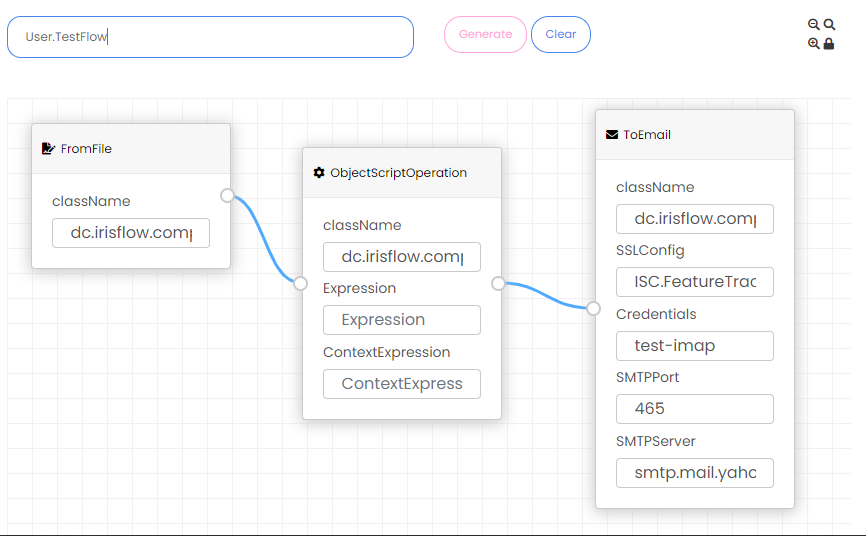
Sample flowSample flow

After defining a flow, users should ask for a IRIS Interoperability production generation. In this generation process, each of those nodes are mapped to a Business Service or a Business Operation.
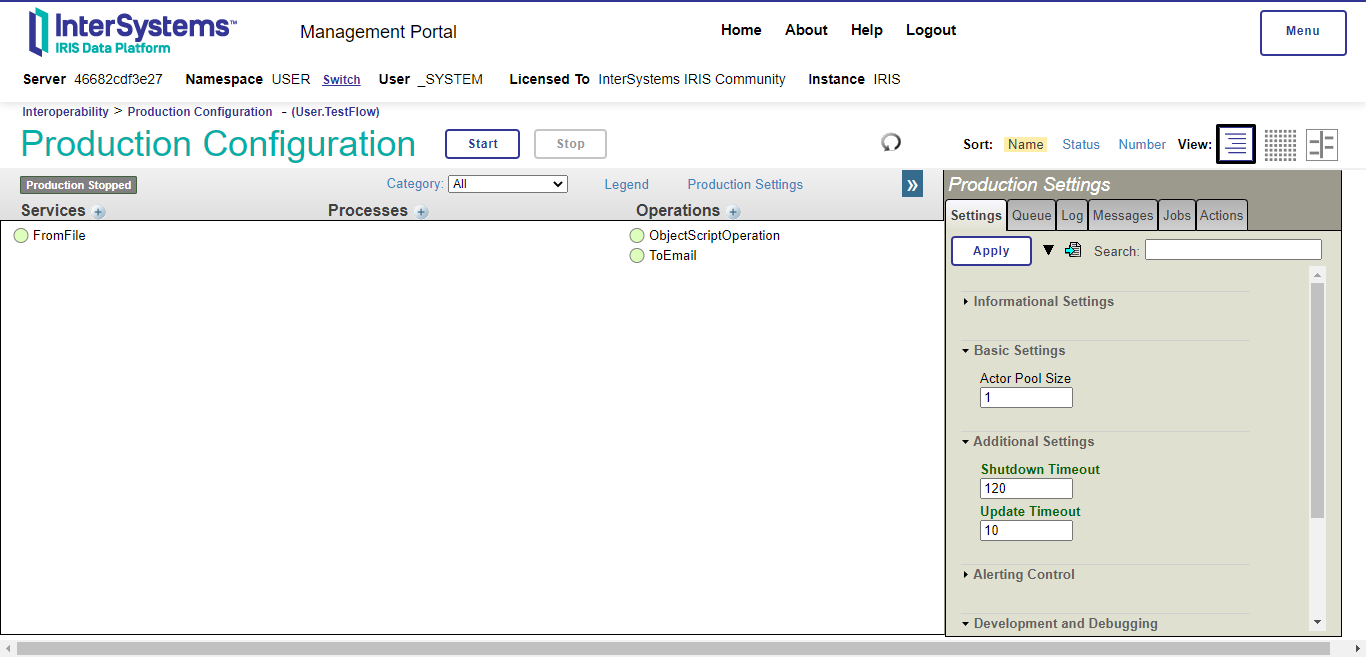
IRIS Interoperability production created from the previous sample flowIRIS Interoperability production created from the previous sample flow

We are planning to use Business Process in future.

In the next sections, we are going to go deeper in the architecture of how this mapping process is done.

Nodes

As said before, each node in the flow is responsible for a task - grabbing, sending or processing data.

Nodes which grab data are mapped to Business Services. Nodes which send or process data are mapped to Business Operations.

All Business Services and Operations created by Flow Editor, must inherit from dc.irisflow.components.IrisFlowBusinessService and dc.irisflow.components.IrisFlowBusinessOperation, respectively. In short, these classes provide callbacks for creation and consumption of data in the flow, and define a target for the next Business Host that must be called.
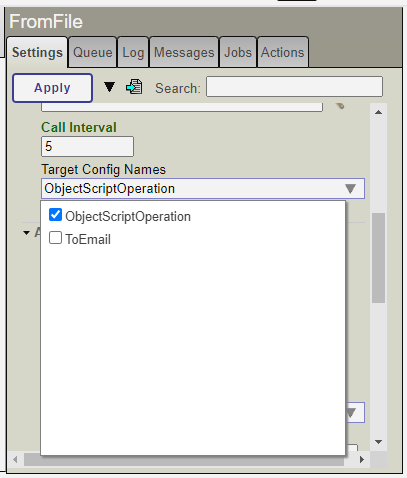
Target setting presented in all Business Hosts created by the Flow EditorTarget setting presented in all Business Hosts created by the Flow Editor

The Flow Editor mapping process was designed to allow that any existing IRIS Interoperability Business Host (Services and Operations) could be adapted to be used. Such adaptation is done by creating new classes inheriting from the original Business Host and from the Flow Editor ones.

For instance, we had inherited classes from the IRIS Interoperability library to process files and emails. Classes available in the community are eligible as well, like the Telegram one created by Nikolay Soloviev.

Currently we had 9 nodes available:

  • FromFHIRaaS: uses the dc.irisflow.components.fhiraas.FHIRaaSInboundAdapter Business Adapter (developed in this project) to send request to a FHIRaaS account in order to get FHIR resources and send them to is output
  • FromTelegram: uses the Telegram.TelegramInboundAdapter Business Adapter to receive messages from a Telegram Bot sending them to a target
  • ToTelegram: Sends to a Telegram Bot data from its input
  • FromEmail(POP3): uses the EnsLib.EMail.InboundAdapter Business Adapter to grab emails and send them to its output
  • ToEmail: uses the EnsLib.EMail.OutboundAdapter Business Adapter to send emails using its input in the email body
  • FromFile: uses the EnsLib.File.PassthroughService Business Service to read files in a directory and send them to its output
  • ToFile: uses the EnsLib.File.PassthroughOperation Business Operation to write its input in files
  • ObjectScriptOperation: let users to define custom ObjectScript code for inputs come from another nodes and sends the processed data in its output
  • SimpleEchoOperation: just add a prefix in its input and sends it for its output - for test only purposes
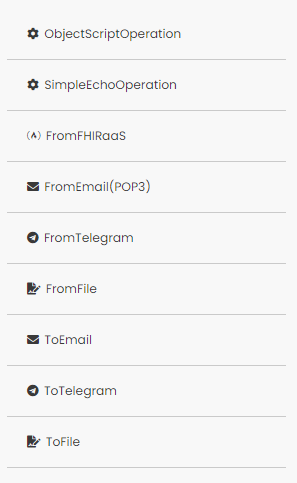
Currently flow nodesCurrently flow nodes

Generic messages

One of the simplifications that we would like to introduce in this project was the lack of need for message definitions. So we defined a generic message template, the dc.irisflow.components.GenericMessage class.

This class inherits from Ens.StreamContainer, which gives a generic stream storage for data.

So, all data grabbed, sent or processed by Business Hosts created from Flow Editor, uses data stored in a stream, in a property called Stream.

Besides the Stream property, the generic message also has another one called Context. This property was created to store any data which acts as a metadata in Flow nodes.

For instance, the ToTelegram node accepts a property in the Context called ChatId. If that property is present and with a valid Telegram chat id, then such value is used to identify the recipient of the message.

Flow examples

Here we are going to see some animations showing some examples of flows created in the Flow Editor.

FHIRaaS patient notification

In this project, we introduced the FHIRaaSService and the FHIRaaSInboundAdapter. These classes let users grab FHIR resources from a FHIRaaS account and process it in a flow.

In this example, a Patient resource is grabbed from an ID using the FromFHIRaaS node.

Then, this resource is sent to the ObjectScriptOperation. This node lets you to define custom ObjectScript code for process data came from its input and its context, in properties Expression and ContextExpression, respectively.

For this example, the following pieces of code were used for Expression and ContextExpression:

Set input = {}.%FromJSON(input)
Do ##class(Ens.Util.Trace).WriteTrace("user",$classname(),"","Patient ID: "_input.id)
Quit "Hi "_input.name.%Get(0).given.%Get(0)_"! This is a reminder for your appointment!"
Set input = {}.%FromJSON(input)
Set record = $G(^MyDatabase(input.id))
If (record '= "") {
	Set email = $LG(record, 1)
	Set telegram = $LG(record, 2)
	Do ##class(Ens.Util.Trace).WriteTrace("user",$classname(),"",email)
	Do ##class(Ens.Util.Trace).WriteTrace("user",$classname(),"",telegram)

	Set st = ##class(Ens.Config.Credentials).GetCredentialsObj(.credObj, "", "Ens.Config.Credentials", telegram)
	Set context.ChatId = credObj.Password
} Else {
	Do ##class(Ens.Util.Trace).WriteTrace("user", $classname(), "", "No record for patient "_input.id)
}
Quit context

The Expression code extracts the Patient ID and Name from the FHIR resource sent to its input.

The CodeExpression also extracts the Patient ID but here it is used to query in a global the Telegram chat id stored in a IRIS Credential. After it retrieves the chat id, this code adds it to the Context property of the generated message sent to the output.

Finally, the processed message is sent to the ToTelegram node, which retrieves the text stored in the Stream property and sends it to the chat id stored in the ChatId property from the Context property from the generic message.

By this way we set up a simple flow which could be used to notify patients stored in a FHIRaaS account.
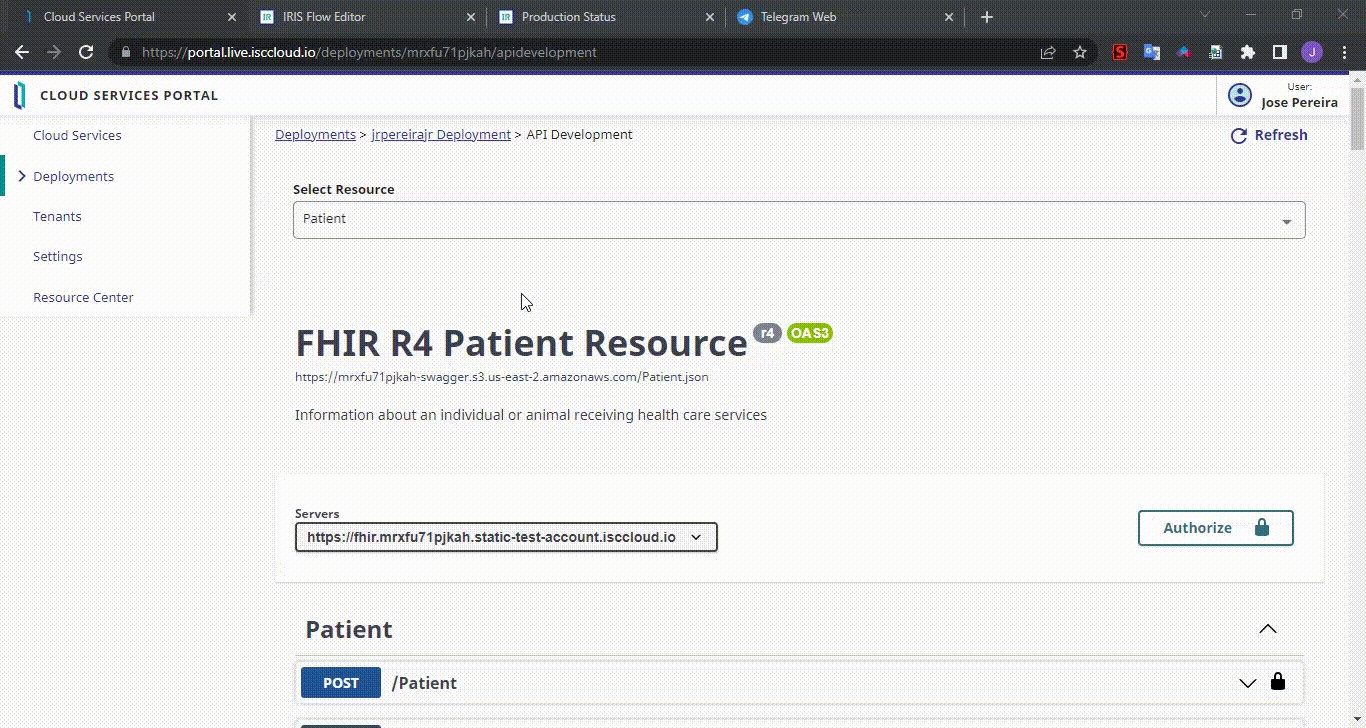
FHIRaaS sampleFHIRaaS sample

Telegram echo

The first one is a simple application which grabs data coming from a Telegram Bot, adds a prefix to it and sends it back to the same Bot.

Sample of a simple echo application using a Telegram BotSample of a simple echo application using a Telegram Bot

Conclusion

In this article, a feature of IRIS Megazord, the Editor Flow was detailed.

As we saw, we can use any existing Business Hosts and Adapters created for IRIS Interoperability to be used in a different way for production creation. And new ones could be developed as well.

Also this is an experimental project, so your feedback and contribution are always welcome!

0
0 391
Article Henrique Dias · May 31, 2022 3m read


A few months ago, Jose and I were discussing the article Video Smart Data Services (Vision & Demo) from @Amir Samary and during that discussion, we started wondering what kind of feature would be nice to have on a future IRIS solution. 

One of the desired features is to have an IRIS iPaaS solution as I questioned here in this comment.

These last months gave me the opportunity to work with different projects and technologies, and put me in touch with applications like Tray.io or Workato, and now I can see how great an IRIS iPaaS solution could be.

0
0 298
Announcement Marcus Wurlitzer · May 29, 2022

Hi, I am glad to announce another submission to OpenExchange and the current contest, the FHIR Pseudonymization Proxy. The FHIR Pseudonymization Proxy adds a transparent pseudonymization layer to any existing FHIR server, enabling clients to perform queries on the FHIR server – which may contain personal identifying information – and receive an on-the-fly pseudonymized version of the data.

0
2 350
Question Federico Raimondo · Jan 20, 2020

Hi everyone, 

I am currently performing a patient merge thorug ADT^40 HL7 messages. In order to do that, I am following this guide which I found on the ducumentation: http://10.41.11.210:57772/csp/docbook/DocBook.UI.Page.cls?KEY=HESUP_ch_IHE#HESUP_IHE_configuring_registry_PIX
My main issue regards the fact that I can't update the PatientID and the SourcePatientID of the HS_Registry.Document table of the prior patient, wheras, I find only the new anagraphic on the HS_Registry.Patient table.

1
0 1180
Question Steve Pisani · Apr 1, 2022

Hi

I have an a Ens.Request subclass (Invoice) that has a relationship property to another persistent class (InvoiceItems), with properties of its own and the inverse relationship defined referring back to Invoice. 

When building a DTL with these classes, the Relationship’s inverse relationship (Invoice, within InvoiceDetails) is displayed.   

Can this be hidden ? 

thanks

5
0 360
Article Nicholai Mitchko · Apr 12, 2022 7m read

Programmatic Production Access

To Programmatically Edit Productions (interfaces) you can use a combination of the interoperability apis and SQL queries.

Current Namespace

At a high level, it is important to know the namespace and production you are working in at the moment.

// Object script 
// The active namespace is stored in this variable
$$$NAMESPACE 
// Print namespace
Write $$$NAMESPACE
# Python
import iris
# The active namespace is returned from this method
iris.utils._OriginalNamespace()
# Print namespace
print(iris.utils._OriginalNamespace())
>>> DEMONSTRATION

Current Production (active or last run production)

Also, it is important to know the name of your production, you can get the active production in a namespace using the following APIs

// ObjectScript
USER>ZN "DEMONSTRATION"
// Get current or last run production
DEMONSTRATION>W ##class(Ens.Director).GetActiveProductionName()
>>> Hospital.HospitalProduction
#  Python
import os
os.environ['IRISNAMESPACE'] = 'DEMONSTRATION'
import iris
active_production = iris.cls('Ens.Director').GetActiveProductionName()
print(active_production)
>>> Hospital.HospitalProduction

Finding Items in a production

You can use objectscript or python to find active items in the production

1. SQL Query for Items in production

SELECT Name FROM Ens_Config.Item Where Production = 'Hospital.HospitalProduction'
-- 
['From_Athena_Multi']
['From_Athena_Multi_Router']
['From_Cerner_ADT']
['From_Cerner_ADT_Router']
['From_Cerner_Orders']
['From_Cerner_Orders_Router']
['From_Dictaphone_Results']
['From_Dictaphone_Results_Router']
['From_Lab_Results']
['From_Lab_Results_Router']
['From_Radiology_Results']
['From_Radiology_Results_Router']
['HS.IHE.XDSb.DocumentSource.Operations']
['HS.IHE.XDSb.Repository.Operations']
['To_Cerner_Results']
['To_Dictaphone']
['To_Intellilab']
['To_Lab']
['To_Radiology']
-- 

2. SQL Query for Active Items in Production

SELECT Name, ClassName 
FROM Ens_Config.Item 
WHERE Production = 'Hospital.HospitalProduction' 
  AND Enabled = 1

-- 
Name	                                ClassName
To_Radiology	                        EnsLib.HL7.Operation.FileOperation
To_Lab	                                EnsLib.HL7.Operation.FileOperation
To_Dictaphone	                        EnsLib.HL7.Operation.FileOperation
From_Cerner_ADT	                        EnsLib.HL7.Service.FileService
From_Cerner_ADT_Router	                EnsLib.HL7.MsgRouter.RoutingEngine
From_Radiology_Results_Router	        EnsLib.HL7.MsgRouter.RoutingEngine
From_Lab_Results_Router	                EnsLib.HL7.MsgRouter.RoutingEngine
From_Dictaphone_Results_Router	        EnsLib.HL7.MsgRouter.RoutingEngine
To_Intellilab	                        EnsLib.HL7.Operation.FileOperation
To_Cerner_Results	                    EnsLib.HL7.Operation.FileOperation
From_Cerner_Orders_Router	            EnsLib.HL7.MsgRouter.RoutingEngine
From_Athena_Multi_Router	            EnsLib.HL7.MsgRouter.RoutingEngine
HS.IHE.XDSb.DocumentSource.Operations	HS.IHE.XDSb.DocumentSource.Operations
-- 

3. Object Access for Production Items

// ObjectScript 
// Access to get all items in the active production
// Returns list of items
ClassMethod ListItemsInProduction()
{
    Set productionName =  ##class(Ens.Director).GetActiveProductionName()
    Set items = []
    &sql(Declare curr cursor FOR Select Name into :newId from Ens_Config.Item Where Production = :productionName)
    &sql(OPEN curr)
    For {
        &sql(FETCH curr)
        Quit:SQLCODE
        Do items.%Push(newId)
    }
    &sql(CLOSE curr)
    quit items
}

>>> zw ##class(ISC.SE.ProductionTools).ListItemsInProduction()

["From_Athena_Multi","From_Athena_Multi_Router","From_Cerner_ADT","From_Cerner_ADT_Router","From_Cerner_Orders","From_Cerner_Orders_Router","From_Dictaphone_Results","From_Dictaphone_Results_Router"
,"From_Lab_Results","From_Lab_Results_Router","From_Radiology_Results","From_Radiology_Results_Router","HS.IHE.XDSb.DocumentSource.Operations","HS.IHE.XDSb.Repository.Operations","To_Cerner_Results"
,"To_Dictaphone","To_Intellilab","To_Lab","To_Radiology"]  ; <DYNAMIC ARRAY>
# Python
# Get Dataframe of active production items

import os
# Set environment variables
os.environ['IRISNAMESPACE'] = 'DEMONSTRATION'
import iris

def getActiveProductionItems():
    productionName = iris.cls('Ens.Director').GetActiveProductionName()
    df = iris.sql.exec("SELECT Name FROM Ens_Config.Item Where Production = '{}'".format(productionName))
    return df

production_items_df = getActiveProductionItems().dataframe()

#                                      name
# 0                       From_Athena_Multi
# 1                From_Athena_Multi_Router
# 2                         From_Cerner_ADT
# 3                  From_Cerner_ADT_Router
# 4                      From_Cerner_Orders
# 5               From_Cerner_Orders_Router
# 6                 From_Dictaphone_Results
# 7          From_Dictaphone_Results_Router
# 8                        From_Lab_Results
# 9                 From_Lab_Results_Router
# 10                 From_Radiology_Results
# 11          From_Radiology_Results_Router
# 12  HS.IHE.XDSb.DocumentSource.Operations
# 13      HS.IHE.XDSb.Repository.Operations
# 14                      To_Cerner_Results
# 15                          To_Dictaphone
# 16                          To_Intellilab
# 17                                 To_Lab
# 18                           To_Radiology

Manipulating Production via API

1. Adding Component

// ObjectScript
set productionName = ##class(Ens.Director).GetActiveProductionName()
//create a new xml file service
set classname="EnsLib.XML.FileService"	//class of this item
set name="NewService"			//config name
set item=##class(Ens.Config.Item).%New(classname)

set item.Name=name
set item.Comment = "Test Service"
set item.PoolSize = "1"
set item.Enabled = 1
do item.%Save()
//	
// open the production class
// set prod="Test.configtest"	//production name set manually
// OR
set prod = productionName
set prodObj=##class(Ens.Config.Production).%OpenId(prod)
//save the new item
set tSC=prodObj.Items.Insert(item)
set tSC=prodObj.SaveToClass(item)
set tSC=prodObj.%Save()

// DELETE item from above
set tSC = prodObj.RemoveItem(item)
set tSC = prodObj.SaveToClass()
set tSC=prodObj.%Save()
# Python
import os
os.environ['IRISNAMESPACE'] = 'DEMONSTRATION'
import iris
active_production = iris.cls('Ens.Director').GetActiveProductionName()
print("Current Production {}".format(active_production))

# Metadata about component
classname="EnsLib.XML.FileService"	 # class of this item
name="NewService"			         # config name
item=iris.cls('Ens.Config.Item')._New(classname) # Make new component
item.Name=name
item.Comment = "Test Service"
item.PoolSize = "1"
item.Enabled = 1
item._Save()

# open the production class
# prod="Test.configtest"	# production name manually set
# OR use the active production from above
prod = active_production

prodObj=iris.cls('Ens.Config.Production')._OpenId(prod)
# save the production after we insert that item to it
tSC=prodObj.Items.Insert(item)
tSC=prodObj.SaveToClass(item)
tSC=prodObj._Save()

# DELETE item from above
tSC = prodObj.RemoveItem(item)
tSC = prodObj.SaveToClass()
tSC=prodObj._Save()

2. Disabling / Enabling Component

// ObjectScript
set productionName = ##class(Ens.Director).GetActiveProductionName()
set itemName = "My.Inbound.HL7"
// Required for Enable Item
Set componentName = productionName _ "||" _ itemName _ "|"
// Disable or enable
Set enable = 1 // or 0
Do ##class(Ens.Director).EnableConfigItem(componentName, enable, 1)

/// Enable or disable a ConfigItem in a Production. The Production may be running or not.
/// The pConfigItemName argument gives the name of the config item to be enabled or disabled
/// In the case of multiple matching items with the same config name, if any is already enabled then
///  the pEnable=1 option will do nothing and the pEnable=0 option will disable the running matching
///   production item, or if not running then the first matching enabled item that it finds.
///   
/// See method Ens.Director.ParseConfigName() for full syntax of the ConfigItem name specification string.
ClassMethod EnableConfigItem(pConfigItemName As %String, pEnable As %Boolean = 1, pDoUpdate As %Boolean = 1)
# Python
import os
os.environ['IRISNAMESPACE'] = 'DEMONSTRATION'
import iris

active_production = iris.cls('Ens.Director').GetActiveProductionName()
item_name = "My.Inbound.HL7"
componentName = active_production + "||" + item_name + "|"

enable = 1 # or 0
iris.cls('Ens.Director').EnableConfigItem(componentName, enable, 1)

Production Status via API

// ObjectScript
/// This method returns the production status via the output parameters.
/// pProductionName: Returns the production name when the status is running, suspended or troubled.
/// pState: Outputs production status. The valid values are:
///          $$$eProductionStateRunning == 1
///          $$$eProductionStateStopped == 2
///          $$$eProductionStateSuspended == 3
///          $$$eProductionStateTroubled == 4
Set sc = ##class(Ens.Director).GetProductionStatus(.productionName, .productionState) 
Write productionName, " -- ", productionState
import os
# Set namespace the hard way
os.environ['IRISNAMESPACE'] = 'DEMONSTRATION'

import iris

# TEST 2 with output variables
productionName, productionState = iris.ref('productionName'), iris.ref('productionState')
status = iris.cls('Ens.Director').GetProductionStatus(productionName, productionState) 

print("Status: {}".format(status))
# see .value
print("Production: {}".format(productionName.value))
# see .value
print("Production State: {}".format(productionState.value))
3
4 1010
Article Sarah Matthews · Apr 8, 2022 3m read

Introduction

Hi Community,

This article is aimed at developers implementing DICOM productions, specifically for cases with third-party endpoints that cannot handle the DIMSE timeout themselves.

For DICOM applications, the DIMSE timeout is a maximum time to wait for the next DICOM request (-RQ) or a response to a request (-RSP), after an association has been established. Unlike the ARTIM (association establishment) and TXTIM (data transfer) timeouts, the DIMSE timeout lives at a higher level than individual PDUs, with the application-level request/response logic.

1
0 976
Announcement Nermin Kibrislioglu Uysal · Mar 15, 2022

Hello Everyone,


The Certification Team of InterSystems Learning Services has updated exam objectives for our HL7 Interface Specialist certification exam and we need input from our implementation community.  

How do I provide my input? We will present you with a list of job tasks, and you will rate them on their importance and other factors.  

How much effort is involved? It takes about 30-45 minutes to fill out the survey. You can be anonymous or identify yourself and ask us to get back to you. 

How can you access the survey? You can access the survey here  

0
0 278
Question Renato Araujo · Mar 8, 2022

Hello everyone!

I am writing a SQL CALL (using JDBC) to a stored procedure that outputs a structured object (Oracle Object).

However, the adapter method is not accepting the corresponding JDBC Data Type STRUCT for the output parameter, returning the following error:

ERRO #5023: Erro no Gateway Remoto: JDBC Gateway SP execute(0) error 0: Remote JDBC error: ORA-06550: line 1, column 7:
PLS-00306: wrong number or types of arguments in call to 'AGUARDAR_EVENTO'
ORA-06550: line 1, column 7:
PL/SQL: Statement ignored

Declaration of Output parameter:

0
0 516
Question Eduard Lebedyuk · Jul 6, 2020

I'm building a .Net Core Gateway container. Here's the issue.

As a final step I'm building a .Net Core 2.1 library. It has a runnable dependency - .Net Gateway, which I need to start first.

However dotnet publish generates .runtimeconfig.json and .deps.json only for my library and not for my dependency (.Net Gateway).

Is there a way to force dotnet to generate .runtimeconfig.json and .deps.json for a dependency?

I have tried:

  <PropertyGroup>
    <GenerateRuntimeConfigurationFiles>true</GenerateRuntimeConfigurationFiles>
    <GenerateDependencyFile>true</GenerateDependencyFile> 
   <CopyLocalLockFileAssemblies>true</CopyLocalLockFileAssemblies>
  </PropertyGroup>

but it did not help.

As a workaround I can copy my app .runtimeconfig.json to the dependency .runtimeconfig.json but it seems hacky (it also prevents me from building self-contained Gateway container). Is there a better option?

I have prepared the test case, if anyone wants to try it:

git clone https://github.com/eduard93/gerenate-runtimeconfig.json.git
cd gerenate-runtimeconfig.json
docker build --tag mbs .
docker run --name mbs mbs
docker rm mbs --force

If you remove the comment from Line 24 in the Dockerfile with the copy workaround the image would run successfully.

Without workaround I get this error:

A fatal error was encountered. The library 'libhostpolicy.so' required to execute the application was not found in '/app/'.
Failed to run as a self-contained app. If this should be a framework-dependent app, add the /app/IRISGatewayCore21.runtimeconfig.json file specifying the appropriate framework.
2
0 8752
Question Carl Emberger · Dec 6, 2021

EnsLib.File.PassthroughService replaces spaces with underscores in filenames.

Example:

File name of GWUH_9999_GWUHMRN_9999_99999_Chart Note_999999.pdf lands in receiving folder as GWUH_9999_GWUHMRN_9999_99999_Chart_Note_999999.pdf.

The same behavior is occurring when the file is saved to the archive folder.

Has anyone encountered this issue and devised a fix or workaround?

1
0 446
Question Nael Nasereldeen · Oct 26, 2021

Hi,

I wonder if anyone tackled the following problem-

Sending a mail with an embedded image is straight forward using %Net.SMTP

status=Message.AttachFile(Dir,FileName)

Message.TextData.Write("..<img src=""cid:xyz.png"">..")

Outlook displays such an Email as expected- with the image in the body of the mail.

Gmail displays the image as an attached file.

There are a lot of suggestions online about this, but none is working for me.

Did anyone face and solved this issue?

Regards,

Nael Naseraldeen

6
0 492