#Dashboards

0 Followers · 93 Posts

DeepSee Dashboard is a web application which displays a set of widgets where every widget is displaying a particular measure or the pivot.

Documentation.

Question Elisa Pischedda · Nov 11, 2025

Hi everyone, on HealthShare Unified Care Record 2024.1.0 Build, we're using the Analytics section to create a dashboard containing a time chart showing a cumulative curve of the number of documents indexed in the registry for each documentSource of each repository. We tried the following steps: we created a cube whose dimensions are the CreationDate, SourceValue, and repositoryUniqueID of the HS_Registry.Document table; in the Analytics section, we created a pivot table that lists the document creation date on each row, along with as many columns as each repository's documentSources. However,

4
0 35
Article Pietro Di Leo · Oct 6, 2025 4m read
2
0 73
Article Robert Cemper · Sep 22, 2025 2m read

Finishing my previous example for multiple IRIS instances, I tried
to compose a local single instance version.  The step from the external
Python app to a version using embedded Python seemed to be obvious.
This was a wrong assumption, as some Python libraries just refused installation
into my local Windows-based environment.

3
2 68
Question Riccardo Villa · Jul 15, 2025

Hello,

I need to expose InterSystems HealthInsight dashboards over the internet to external operators. The authentication flow is managed externally. When a user is authenticated, our system receives an HTTP request with specific headers (e.g., operator’s fiscal code and hospital identifier) that we need to extract in order to:

  • Authorize the user to access the dashboards.
  • Apply row-level security on the dashboards, filtering the data by hospital and user role.

I created a new Web Application on IRIS as shown in the screenshot:

2
0 68
Question steven Henry · Jul 10, 2025

Hello my friends,

I have a problem with Objectscript, why the value of address become like this ?

everything works fine except the Address,

this is my code, do I need something to make this into real address ? should I put something in my code ? 

 set paper=obj.PAADMPAPMIDR.PAPMIPAPERDR

            if '$isobject(paper) continue

            set Address=paper.PAPERStName

thank you for your help

Best Regards,

Steven Henry

3
0 70
Question DJ Pavucsko · Oct 28, 2024

Hi, I'm new to the Analytics world in Intersystems and was attempting to print and/or export selected rows from a detail listing in a pivot on a dashboard.  I am able to print and/or export all the rows; but if I select a specific set of rows, it prints out the entire detail listing; not the selected rows. Please advise on the best approach to accomplish this task.  Thanks.

2
0 125
Question Virat Sharma · Jun 18, 2024

Hi Community,

I seek your assistance for below scenario.

Scenario-1: How to add filter or where clause while displaying data with listing fields ( I have not used Custom SQL listing to display this data).

For below table, I have created a Cube Student and I have created listing fields of the columns mentioned in the table. Also I have created the pivot and  I am able to create the same table as shown below.

0
0 127
Question Virat Sharma · May 29, 2024

Hi All,

I am working on SQL based KPI in IRIS BI. I want to remove below highlighted search text box in "auto" filter type.

We cannot use other type like only dropdown etc. Is there a way we can do this ? 

One way I can see is writing own control instead of using default control but I am not aware how to do this. I didn't find any sample code for this. 

Is there any sample code available for writing custom control which I can refer.

Please assist

1
0 150
Article Evgeniy Potapov · Oct 18, 2023 7m read

Creating information dashboards, pivot tables, and widgets is an important step in analysis that provides valuable sources of information for informed decision-making. The IRIS BI platform offers many opportunities to create and customize these elements. In this article, we will take a closer look at the basic techniques for developing them and the importance of using them.

1. Dashboards:

Dashboards are visual tools that combine different data in one interface for more effective monitoring and analysis. Creating a dashboard on the IRIS BI platform involves several key steps:

1
0 542
Article Evgeniy Potapov · Oct 11, 2023 7m read

When analyzing data, there is often a need to look at specific indicators more thoroughly and to highlight sections of information of particular interest to a user.

 For instance, examining the data dynamics for specific regions or dates can help us uncover some hidden trends and patterns that will allow us to make an informed decision about our project in the future.

0
1 446
Question Yashpalsinh Gohil · Jun 26, 2023

Hello, 

Our team is working on building dashboard for internal reference and monitoring. 

We would like to have details like Interface Name, Current Status, Last Messages Processed at, IP & Port, Serve/Instance/Production Environment name etc. 

If there is any built-in service which we can utilize or any pre-compiled code that we can utilize to build such dashboard. 

At this moment want to keep it basic, but moving forward will enhance with more advance features. 

Please suggest, any help will be appreciated. 

Thanks,

Yash 

0
0 295
Question Larry Pinsky · Apr 26, 2023

I am wondering if anyone has created a custom dashboard that can be accessed outside of the Ensemble environment.  What I am looking to do is create a dashboard accessible from a person's computer, on the same company network as Ensemble, that can display information regarding specific services, operations, processes, queues, etc.  I don't want to give a user access to Ensemble, just allow them to display a page in their browser to give them the information they need to make sure their processes are running.

3
1 302
Article Murray Oldfield · Nov 14, 2019 6m read

Released with no formal announcement in IRIS preview release 2019.4 is the /api/monitor service exposing IRIS metrics in Prometheus format. Big news for anyone wanting to use IRIS metrics as part of their monitoring and alerting solution. The API is a component of the new IRIS System Alerting and Monitoring (SAM) solution that will be released in an upcoming version of IRIS.

However, you do not have to wait for SAM to start planning and trialling this API to monitor your IRIS instances. In future posts, I will dig deeper into the metrics available and what they mean and provide example interactive dashboards. But first, let me start with some background and a few questions and answers.

IRIS (and Caché) is always collecting dozens of metrics about itself and the platform it is running on. There have always been multiple ways to collect these metrics to monitor Caché and IRIS. I have found that few installations use IRIS and Caché built-in solutions. For example, History Monitor has been available for a long time as a historical database of performance and system usage metrics. However, there was no obvious way to surface these metrics and instrument systems in real-time.

IRIS platform solutions (along with the rest of the world) are moving from single monolithic applications running on a few on-premises instances to distributed solutions deployed 'anywhere'. For many use cases existing IRIS monitoring options do not fit these new paradigms. Rather than completely reinvent the wheel InterSystems looked to popular and proven current Open Source solutions for monitoring and alerting.

Prometheus?

Prometheus is a well known and widely deployed open source monitoring system based on proven technology. It has a wide variety of plugins. It is designed to work well within the cloud environment, but also is just as useful for on-premises. Plugins include operating systems, web servers such as Apache and many other applications. Prometheus is often used with a front end client, for example, Grafana, which provides a great UI/UX experience that is extremely customisable.

Grafana?

Grafana is also open source. As this series of posts progresses, I will provide sample templates of monitoring dashboards for common scenarios. You can use the samples as a base to design dashboards for what you care about. The real power comes when you combine IRIS metrics in context with metrics from your whole solution stack. From the platform components, operating system, IRIS and especially when you add instrumentation from your applications.

Haven't I seen this before?

Monitoring IRIS and Caché with Prometheus and Grafana is not new. I have been using these applications for several years to monitor my development and test systems. If you search the Developer Community for "Prometheus", you will find other posts (for example, some excellent posts by Mikhail Khomenko) that show how to expose Caché metrics for use by Prometheus.

The difference now is that the /api/monitor API is included and enabled by default. There is no requirement to code your own classes to expose metrics.


Prometheus Primer

Here is a quick orientation to Prometheus and some terminology. I want you to see the high level and to lay some groundwork and open the door to how you think of visualising or consuming the metrics provided by IRIS or other sources.

Prometheus works by scraping or pulling time series data exposed from applications as HTTP endpoints (APIs such as IRIS /api/monitor). Exporters and client libraries exist for many languages, frameworks, and open-source applications — for example, for web servers like Apache, operating systems, docker, Kubernetes, databases, and now IRIS.

Exporters are used to instrument applications and services and to expose relevant metrics on an endpoint for scraping. Standard components such as web servers, databases, and the like - are supported by core exporters. Many other exporters are available open-source from the Prometheus community.

Prometheus Terminology

A few key terms are useful to know:

  • Targets are where the services are that you care about, like a host or application or services like Apache or IRIS or your own application.
  • Prometheus scrapes targets over HTTP collecting metrics as time-series data.
  • Time-series data is exposed by applications, for example, IRIS or via exporters.
  • Exporters are available for things you don't control like Linux kernel metrics.
  • The resulting time-series data is stored locally on the Prometheus server in a database **.
  • The time-series database can be queried using an optimised query language (PromQL). For example, to create alerts or by client applications such as Grafana, to display the metrics in a dashboard.

** Spoiler Alert; For security, scaling, high availability and some other operational efficiency reasons, for the new SAM solution the database used for Prometheus time-series data is IRIS! However, access to the Prometheus database -- on IRIS -- is transparent, and applications such as Grafana do not know or care.

Prometheus Data Model

Metrics returned by the API are in Prometheus format. Prometheus uses a simple text-based metrics format with one metric per line, the format is;

<identifier> [ (time n, value n), ....]

Metrics can have labels as (key, value) pairs. Labels are a powerful way to filter metrics as dimensions. As an example, examine a single metric returned for IRIS /api/monitor. In this case journal free space:

iris_jrn_free_space{id="WIJ",dir=”/fast/wij/"} 401562.83

The identifier tells you what the metric is and where it came from:

iris_jrn_free_space

Multiple labels can be used to decorate the metrics, and then used to filter and query. In this example, you can see the WIJ and the directory where the WIJ is stored:

id="WIJ",dir="/fast/wij/"

And a value: 401562.83 (MB).


What IRIS metrics are available?

The preview documentation has a list of metrics. However, be aware there may be changes. You can also simply query the /api/monitor/metrics endpoint and see the list. I use Postman which I will demonstrate in the next community post.


What should I monitor?

Keep these points in mind as you think about how you will monitor your systems and applications.

  • When you can, instrument key metrics that affect users.
    • Users don't care that one of your machines is short of CPU.
    • Users care if the service is slow or having errors.
    • For your primary dashboards focus on high-level metrics that directly impact users.
  • For your dashboards avoid a wall of graphs.
    • Humans can't deal with too much data at once.
    • For example, have a dashboard per service.
  • Think about services, not machines.
    • Once you have isolated a problem to one service, then you can drill down and see if one machine is the problem.

References

Documentation and downloads for: Prometheus and Grafana

I presented a pre-release overview of SAM (including Prometheus and Grafana) at InterSystems Global Summit 2019 you can find the link at InterSystems learning services. If the direct link does not work go to the InterSystems learning services web site and search for: "System Alerting and Monitoring Made Easy"

Search here on the community for "Prometheus" and "Grafana".
2
7 2165
Question Mike Rowland · Jan 17, 2023

I built a dashboard to show hourly instrument capacities based on a term list. The term list consists of the TestInstrumentID and the number of tests that instrument can perform in 1 hour. The calculation works correctly and the data is accurate but periodically if you go to check the dashboard the percentages all get changed to 100% across every hour. If you check it later or add an additional site to the filter then the percentages correct themselves. I don't know what's causing this or how to troubleshoot it because it does calculate correctly but is not consistent. 

6
0 299
Article Murray Oldfield · Nov 18, 2019 8m read

The following steps show you how to display a sample list of metrics available from the /api/monitor service.

In the last post, I gave an overview of the service that exposes IRIS metrics in Prometheus format. The post shows how to set up and run IRIS preview release 2019.4 in a container and then list the metrics.


This post assumes you have Docker installed. If not, go and do that now for your platform :)


Step 1. Download and run the IRIS preview in docker

Follow the download instructions at Preview Distributions to download the Preview Licence Key and an IRIS Docker image. For the example, I have chosen InterSystems IRIS for Health 2019.4.

Follow the instructions at First Look InterSystems Products in Docker Containers. If you are familiar with containers, jump to the section titled: Download the InterSystems IRIS Docker Image.

The following terminal output illustrates the processes I used to load the docker image. The docker load command may take a couple of minutes to run;

$ pwd
/Users/myhome/Downloads/iris_2019.4

$ ls
InterSystems IRIS for Health (Container)_2019.4.0_Docker(Ubuntu)_12-31-2019.ISCkey	irishealth-2019.4.0.379.0-docker.tar

$ docker load -i irishealth-2019.4.0.379.0-docker.tar
762d8e1a6054: Loading layer [==================================================>]  91.39MB/91.39MB
e45cfbc98a50: Loading layer [==================================================>]  15.87kB/15.87kB
d60e01b37e74: Loading layer [==================================================>]  12.29kB/12.29kB
b57c79f4a9f3: Loading layer [==================================================>]  3.072kB/3.072kB
b11f1f11664d: Loading layer [==================================================>]  73.73MB/73.73MB
22202f62822e: Loading layer [==================================================>]  2.656GB/2.656GB
50457c8fa41f: Loading layer [==================================================>]   14.5MB/14.5MB
bc4f7221d76a: Loading layer [==================================================>]  2.048kB/2.048kB
4db3eda3ff8f: Loading layer [==================================================>]  1.491MB/1.491MB
Loaded image: intersystems/irishealth:2019.4.0.379.0

$ docker images
REPOSITORY                TAG                 IMAGE ID            CREATED             SIZE
intersystems/irishealth   2019.4.0.379.0      975a976ad1f4        3 weeks ago         2.83GB

For simplicity copy the key file to a folder location you will use for persistent storage and rename to iris.key;

$ mkdir -p /Users/myhome/iris/20194
$ cp 'InterSystems IRIS for Health (Container)_2019.4.0_Docker(Ubuntu)_12-31-2019.ISCkey' /Users/myhome/iris/20194/iris.key

$ cd /Users/myhome/iris/20194
$ ls
iris.key

Start IRIS using the folder you created for persistent storage;

$  docker run --name iris --init --detach --publish 52773:52773 --volume `pwd`:/external intersystems/irishealth:2019.4.0.379.0 --key /external/iris.key

$ docker ps -a
CONTAINER ID        IMAGE                                    COMMAND                  CREATED              STATUS                        PORTS                      NAMES
009e52c121f0        intersystems/irishealth:2019.4.0.379.0   "/iris-main --key /e…"   About a minute ago   Up About a minute (healthy)   0.0.0.0:52773->52773/tcp   iris

Cool! You can now connect to the System Management Portal on the running container. I used login/password SuperUser/SYS; you will be prompted to change the password first time.

Navigate to Web Applications. System > Security Management > Web Applications

You will see a Web Application: /api/monitor this is the service exposing IRIS metrics.

You do not have to do anything to return metrics, it just works.


Step 2. Preview metrics

In later posts, we will scrape this endpoint with Prometheus or SAM to collect metrics at set intervals. But for now, let us see the full list of metrics returned for this instance. A simple way, for example on Linux and OSX, is to issue an HTTP GET using the curl command. For example; on my (pretty much inactive) container the list starts with;

$ curl localhost:52773/api/monitor/metrics
:
:
iris_cpu_usage 0
iris_csp_activity{id="127.0.0.1:52773"} 56
iris_csp_actual_connections{id="127.0.0.1:52773"} 8
iris_csp_gateway_latency{id="127.0.0.1:52773"} .588
iris_csp_in_use_connections{id="127.0.0.1:52773"} 1
iris_csp_private_connections{id="127.0.0.1:52773"} 0
iris_csp_sessions 1
iris_cache_efficiency 35.565
:
:
And so on. The list can be very long on a production system. I have dumped the full list at the end of the post.

Another useful way is to use the Postman application, but there are other ways. Assuming you have installed Postman for your platform, you can issue an HTTP GET and see the metrics returned.

Summary

That is all for now. In the next post, I will start with collecting the data in Prometheus and look at a sample Grafana dashboard.

Full list from preview container

A production system will have more metrics available. As you can see from some of the labels, for example; {id="IRISLOCALDATA"} there are some metrics that are per-database or for CPU by process type {id="CSPDMN"}.

iris_cpu_pct{id="CSPDMN"} 0
iris_cpu_pct{id="CSPSRV"} 0
iris_cpu_pct{id="ECPWorker"} 0
iris_cpu_pct{id="GARCOL"} 0
iris_cpu_pct{id="JRNDMN"} 0
iris_cpu_pct{id="LICENSESRV"} 0
iris_cpu_pct{id="WDSLAVE"} 0
iris_cpu_pct{id="WRTDMN"} 0
iris_cpu_usage 0
iris_csp_activity{id="127.0.0.1:52773"} 57
iris_csp_actual_connections{id="127.0.0.1:52773"} 8
iris_csp_gateway_latency{id="127.0.0.1:52773"} .574
iris_csp_in_use_connections{id="127.0.0.1:52773"} 1
iris_csp_private_connections{id="127.0.0.1:52773"} 0
iris_csp_sessions 1
iris_cache_efficiency 35.850
iris_db_expansion_size_mb{id="ENSLIB"} 0
iris_db_expansion_size_mb{id="HSCUSTOM"} 0
iris_db_expansion_size_mb{id="HSLIB"} 0
iris_db_expansion_size_mb{id="HSSYS"} 0
iris_db_expansion_size_mb{id="IRISAUDIT"} 0
iris_db_expansion_size_mb{id="IRISLOCALDATA"} 0
iris_db_expansion_size_mb{id="IRISSYS"} 0
iris_db_expansion_size_mb{id="IRISTEMP"} 0
iris_db_free_space{id="ENSLIB"} .055
iris_db_free_space{id="HSCUSTOM"} 2.3
iris_db_free_space{id="HSLIB"} 113
iris_db_free_space{id="HSSYS"} 9.2
iris_db_free_space{id="IRISAUDIT"} .094
iris_db_free_space{id="IRISLOCALDATA"} .34
iris_db_free_space{id="IRISSYS"} 6.2
iris_db_free_space{id="IRISTEMP"} 20
iris_db_latency{id="ENSLIB"} 0.030
iris_db_latency{id="HSCUSTOM"} 0.146
iris_db_latency{id="HSLIB"} 0.027
iris_db_latency{id="HSSYS"} 0.018
iris_db_latency{id="IRISAUDIT"} 0.017
iris_db_latency{id="IRISSYS"} 0.020
iris_db_latency{id="IRISTEMP"} 0.021
iris_db_max_size_mb{id="ENSLIB"} 0
iris_db_max_size_mb{id="HSCUSTOM"} 0
iris_db_max_size_mb{id="HSLIB"} 0
iris_db_max_size_mb{id="HSSYS"} 0
iris_db_max_size_mb{id="IRISAUDIT"} 0
iris_db_max_size_mb{id="IRISLOCALDATA"} 0
iris_db_max_size_mb{id="IRISSYS"} 0
iris_db_max_size_mb{id="IRISTEMP"} 0
iris_db_size_mb{id="HSLIB",dir="/usr/irissys/mgr/hslib/"} 1321
iris_db_size_mb{id="HSSYS",dir="/usr/irissys/mgr/hssys/"} 21
iris_db_size_mb{id="ENSLIB",dir="/usr/irissys/mgr/enslib/"} 209
iris_db_size_mb{id="IRISSYS",dir="/usr/irissys/mgr/"} 113
iris_db_size_mb{id="HSCUSTOM",dir="/usr/irissys/mgr/HSCUSTOM/"} 11
iris_db_size_mb{id="IRISTEMP",dir="/usr/irissys/mgr/iristemp/"} 21
iris_db_size_mb{id="IRISAUDIT",dir="/usr/irissys/mgr/irisaudit/"} 1
iris_db_size_mb{id="IRISLOCALDATA",dir="/usr/irissys/mgr/irislocaldata/"} 1
iris_directory_space{id="HSLIB",dir="/usr/irissys/mgr/hslib/"} 53818
iris_directory_space{id="HSSYS",dir="/usr/irissys/mgr/hssys/"} 53818
iris_directory_space{id="ENSLIB",dir="/usr/irissys/mgr/enslib/"} 53818
iris_directory_space{id="IRISSYS",dir="/usr/irissys/mgr/"} 53818
iris_directory_space{id="HSCUSTOM",dir="/usr/irissys/mgr/HSCUSTOM/"} 53818
iris_directory_space{id="IRISTEMP",dir="/usr/irissys/mgr/iristemp/"} 53818
iris_directory_space{id="IRISAUDIT",dir="/usr/irissys/mgr/irisaudit/"} 53818
iris_disk_percent_full{id="HSLIB",dir="/usr/irissys/mgr/hslib/"} 10.03
iris_disk_percent_full{id="HSSYS",dir="/usr/irissys/mgr/hssys/"} 10.03
iris_disk_percent_full{id="ENSLIB",dir="/usr/irissys/mgr/enslib/"} 10.03
iris_disk_percent_full{id="IRISSYS",dir="/usr/irissys/mgr/"} 10.03
iris_disk_percent_full{id="HSCUSTOM",dir="/usr/irissys/mgr/HSCUSTOM/"} 10.03
iris_disk_percent_full{id="IRISTEMP",dir="/usr/irissys/mgr/iristemp/"} 10.03
iris_disk_percent_full{id="IRISAUDIT",dir="/usr/irissys/mgr/irisaudit/"} 10.03
iris_ecp_conn 0
iris_ecp_conn_max 2
iris_ecp_connections 0
iris_ecp_latency 0
iris_ecps_conn 0
iris_ecps_conn_max 1
iris_glo_a_seize_per_sec 0
iris_glo_n_seize_per_sec 0
iris_glo_ref_per_sec 7
iris_glo_ref_rem_per_sec 0
iris_glo_seize_per_sec 0
iris_glo_update_per_sec 2
iris_glo_update_rem_per_sec 0
iris_journal_size 2496
iris_journal_space 50751.18
iris_jrn_block_per_sec 0
iris_jrn_entry_per_sec 0
iris_jrn_free_space{id="WIJ",dir="default"} 50751.18
iris_jrn_free_space{id="primary",dir="/usr/irissys/mgr/journal/"} 50751.18
iris_jrn_free_space{id="secondary",dir="/usr/irissys/mgr/journal/"} 50751.18
iris_jrn_size{id="WIJ"} 100
iris_jrn_size{id="primary"} 2
iris_jrn_size{id="secondary"} 0
iris_license_available 31
iris_license_consumed 1
iris_license_percent_used 3
iris_log_reads_per_sec 5
iris_obj_a_seize_per_sec 0
iris_obj_del_per_sec 0
iris_obj_hit_per_sec 2
iris_obj_load_per_sec 0
iris_obj_miss_per_sec 0
iris_obj_new_per_sec 0
iris_obj_seize_per_sec 0
iris_page_space_per_cent_used 0
iris_phys_mem_per_cent_used 95
iris_phys_reads_per_sec 0
iris_phys_writes_per_sec 0
iris_process_count 29
iris_rtn_a_seize_per_sec 0
iris_rtn_call_local_per_sec 10
iris_rtn_call_miss_per_sec 0
iris_rtn_call_remote_per_sec 0
iris_rtn_load_per_sec 0
iris_rtn_load_rem_per_sec 0
iris_rtn_seize_per_sec 0
iris_sam_get_db_sensors_seconds .000838
iris_sam_get_jrn_sensors_seconds .001024
iris_system_alerts 0
iris_system_alerts_new 0
iris_system_state 0
iris_trans_open_count 0
iris_trans_open_secs 0
iris_trans_open_secs_max 0
iris_wd_buffer_redirty 0
iris_wd_buffer_write 0
iris_wd_cycle_time 0
iris_wd_proc_in_global 0
iris_wd_size_write 0
iris_wd_sleep 10002
iris_wd_temp_queue 42
iris_wd_temp_write 0
iris_wdwij_time 0
iris_wd_write_time 0
iris_wij_writes_per_sec 0

10
6 1597
Question Julie Bolinsky · Nov 13, 2022

I would like to define an advanced filter within my pivot table that allows me to look at diagnosis codes, or at procedure codes - but I do not want to hard code values within the pivot table definition (get the %OR defined).

I would like to be able to allow my dashboard user to chose what specific diagnosis codes or procedure codes they are interested in. So for example one user may want to look for # of patients with cancer dx or patients who have had a radiation procedure.

How can I accomplish this OR feature using dashboard filters?

2
0 429
Article Evgeniy Potapov · Jun 3, 2022 3m read

It is very interesting to compare different BI technologies. It is curious to me what the differences are in functionality, development tools, speed and usability.

For this application, I chose a dataset with water conditions in various European countries. This is an open source dataset containing observational data from 1991 to 2017.

The team and I decided to make a model based on this BI dataset using IRIS BI, Tableau, PowerBI and InterSystems Reports (powered by Logi Reports).

For the frontend, we made a web interface in PythonFlask via Embedded Python.

0
0 314
Article Muhammad Waseem · May 30, 2022 3m read

Hi Community,

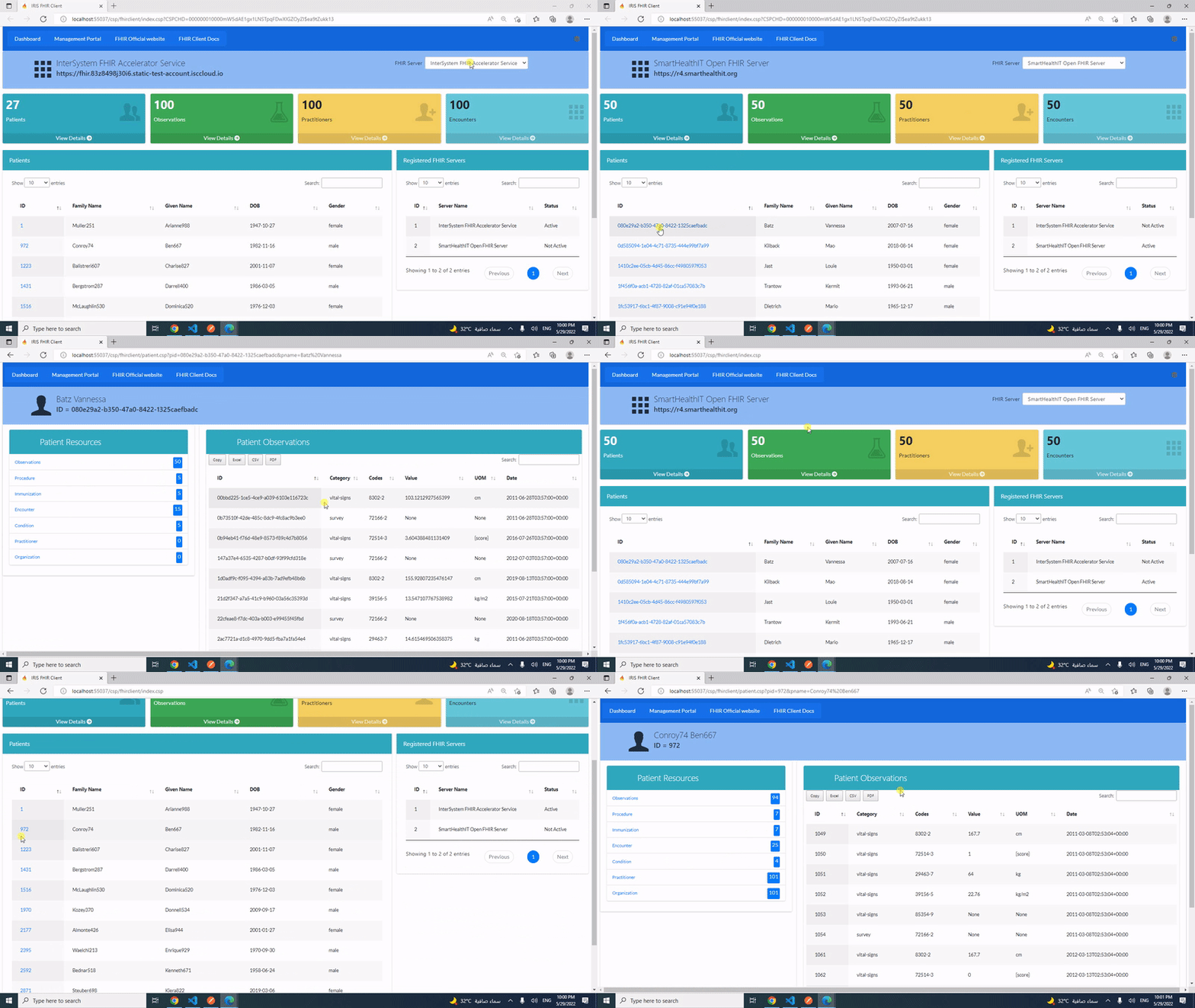
This post is a introduction of my open exchange iris-fhir-client application.

 iris-fhir-client can connect to any open FHIR Server by using embedded python with the help of fhirpy Library.
Get Resource information by terminal and by using CSP web application.

2
0 964
Article Evgeniy Potapov · Feb 27, 2022 2m read

We are happy to share interesting information with you, as well as tell you why Python is good, where it is used.

Among the most used libraries are NumPy and Pandas. NumPy (Numerical Python) is used to sort large datasets. It simplifies mathematical operations and their vectorization on arrays. Pandas offers two data structures: Series (a list of elements) and Data Frames (a table with multiple columns). This library converts data into a Data Frame, allowing you to remove and add new columns, as well as perform various operations.

1
2 747
Question Chip Gore · Jul 24, 2018

Hi -

I'm trying to get my Combo Chart to dynamically scale the Y axis, but it's not doing what I would like. The 1st Y series, if the MAX value is set to null, scales the chart and the series fine, but then the subsequent Y axis are not to that same scale. Each "null" Max'ed series is setting it's own scale based only on it's own ranges and not in sync with anything else.

Is there a way to force all of the "null" scaled columns to be in the SAME scale as each other AND be dynamic.

1
0 293
Article Muhammad Waseem · Feb 24, 2022 2m read

Hi, Community,

This post will demonstrate how to display data on the web by using Embedded Python , Python Flask Web Framework and Jquery datatable
image

We will display processes from %SYS.ProcessQuery table.

Step 1: Add table to HTML page and write below javascript code to display passed data from app.py :

HTML

  <table id="myTable" class="table table-bordered table-striped">                 
   </table>

Javascript

0
0 2039
Article Muhammad Waseem · Feb 22, 2022 5m read

Hi Community,

This post is a introduction of my openexchange iris-python-apps application. Build by using Embedded Python and Python Flask Web Framework
Application also demonstrates some of the Python functionalities like Data Science, Data Plotting, Data Visualization and QR Code generation.

image


 Features

  •  Responsive bootstrap IRIS Dashboard

  •  View dashboard details along with interoperability events log and messages.

  •  Use of Python plotting from IRIS

  •  Use of Jupyter Notebook

  •  Introduction to Data Science, Data Plotting and Data Visualization.

  •  QR Code generator from python.

1
0 6555
Article Evgeniy Potapov · Feb 3, 2022 2m read

Maybe someday you will need to use Adaptive Analytics but there is little information about this, so I decided to write an article on how to start developing a dashboard on Tableau using the Atscale cube.

PC preparation

You need a driver to connect. I use Cloudera Hive. You can download the driver from the official site:
https://www.cloudera.com/downloads/connectors/hive/odbc/2-6-1.html
Registration is required, and you can do it right there for free. You also need to know your OS and bit depth in order to choose the right version for download.
Installation is simple, no explanation required.

0
0 650
Article Evgeniy Potapov · Jan 14, 2022 1m read

I'm happy to share with the community a web server log dataset from our longtime customer, an operating company.

Their webserver operates on Apache webserver and contains data which can be useful to analyse a load and search engines activity.

After installing the project, you will get the data for a few months that can show a typical load and activity of clients, robots and also you can see how it depends on day of week, holidays and time of a day.

The Cube is also included in package.

So you can use my previous project (Promjet-Stats) and see dataset in dashboards.

0
0 688