As we all know, Caché is a great database that accomplishes lots of tasks within itself. However, what do you do when you need to access an external database? One way is to use the Caché SQL Gateway via JDBC. In this article, my goal is to answer the following questions to help you familiarize yourself with the technology and debug some common problems.
Outline
Before we dive into these questions, let us quickly discuss the architecture of the JDBC SQL Gateway. To make it simple, you can think of the architecture as Cache making a TCP connection to a Java process, called the Gateway process. The Gateway process then connects to a remote database, such as Caché, Oracle, or SQL Server, using the driver specified for that database. For further information about the architecture of the SQL Gateway, please refer to the documentation on Using the Caché SQL Gateway.
Connection Parameters
When connecting to a remote database, you need to provide the following parameters:
- username
- password
- driver name
- URL
- class path
Connecting to a Caché Database
For example, if you need to connect to a Caché instance using the SQL Gateway via JDBC, you need to navigate to [System Administration] -> [Configuration] -> [Connectivity] -> [SQL Gateway Connections] in the System Management Portal (SMP). Then click "Create New Connection" and specify "JDBC" as the type of connection.
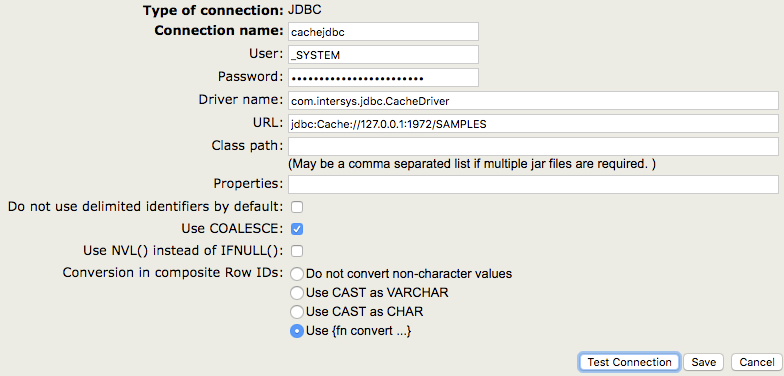
When connecting to a Caché system, the driver name must always be com.intersys.jdbc.CacheDriver, as shown in the screenshot. If you are connecting to a third party database, then you will need to use a different driver name (see Connecting to Third Party Databases below).
When connecting to Caché databases, you do not need to specify a class path because the JAR file is automatically loaded.
The URL parameter will also vary depending upon the database to which you are connecting. For Caché databases, you should use a URL in the form
jdbc:Cache://[server_address]:[superserver_port]/[namespace]
Connecting to Third Party Databases
A common third party database is Oracle. Below is an example configuration.
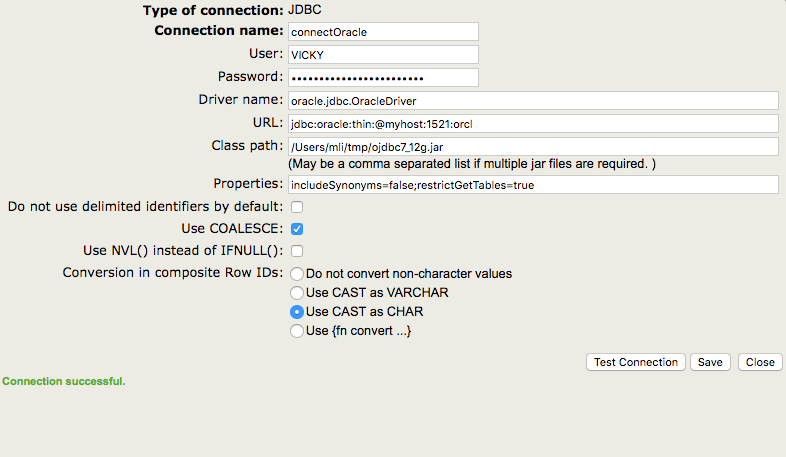
As you can see, the driver name and URL have different patterns than what we used for the previous connection. In addition, I specified a class path in this example, because I need to use Oracle's driver to connect to their database.
As you can imagine, SQL Server uses different URL and driver name patterns.
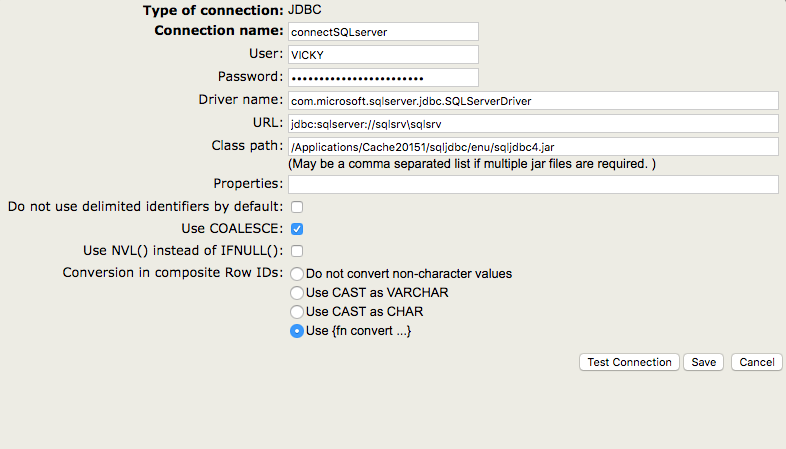
You can test if the values are valid by clicking the "Test Connection" button. To create the connection, click "Save".
JDBC Gateway vs Java Gateway Business Service
First of all, the JDBC gateway and the Java gateway service are completely independent from each other. The JDBC gateway can be used on all Caché-based systems, whereas the Java gateway business service only exists as a part of Ensemble. In addition, the Java gateway service uses a different process from what the JDBC gateway uses. For details on the Java gateway business service, please see The Java Gateway Business Service.
Tools and Methods
Below are 5 common tools and methods used to solve problems with the JDBC SQL Gateway. My intention is to discuss these tools first and show you some examples of when to use them in the next section.
1. Logs
A. Driver Log vs Gateway Log
When using JDBC gateway, the corresponding log is the JDBC SQL gateway log. As we have discussed earlier, the JDBC gateway is used when Caché needs to access external databases, which means Caché is the client. The driver log, however, corresponds to using the InterSystems' JDBC driver to access a Caché database from an external application, which means Caché the server. If you have a connection from a Caché database to another Caché database, both log types could be useful.
In our documentation, the section on enabling the driver log is called "Enabling Logging for JDBC", and the section on enabling the gateway log is called "Enabling Logging for the JDBC SQL Gateway".
Even though the two logs both include the word "JDBC", they are completely independent. The scope of this article is about the JDBC gateway, so I will further discuss the gateway log. For information on the driver log, please refer to Enabling Driver Log.
B. Enabling Gateway Log
If you are using the Caché JDBC SQL Gateway, then you need to do the following to enable logging: in the Management Portal, go to [System Administration] > [Configuration] > [Connectivity] > [JDBC Gateway Settings]. Specify a value for JDBC gateway log. This should be the full path and name of a log file (for example, /tmp/jdbcGateway.log). The file will be automatically created if it does not exist, but the directory will not be. Caché will start the JDBC SQL Gateway with logging for you.
If you are using the Java Gateway business service in Ensemble, please see Enabling Java Gateway Logging in Ensemble for information on how to enable logging.
C. Analyzing a Gateway Log
Now you have collected a gateway log, you may wonder: what is the structure of the log and how do I read it? Good questions! Here I will provide some basic information to get you started. Unfortunately, fully intepreting the log is not always possible without access to the source code, so for complex situations, please do not hesitate to contact the InterSystems' Worldwide Response Center (WRC)!
To demystify the structure of the log, remember it is always a chunk of data followed by a description of what it does. For example, see this image with some basic syntax highlighting:

In order to make sense of what Received means here, you need to remember the gateway log records interactions between the gateway and the downstream database. Thus, Received means the gateway received the information from Caché/Ensemble. In the above example, the gateway received the text of a SELECT query. The meanings of different msgId values can be found in internal code. The 33 we see here means "Prepare Statement".
The log itself also provides driver information, which is good to check when debugging issues. Here is an example,
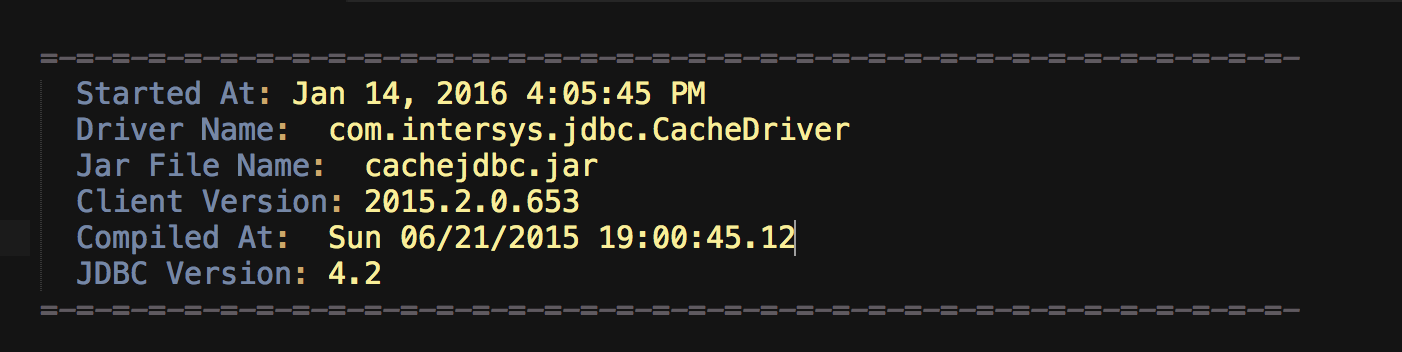
As we can see, the Driver Name is com.intersys.jdbc.CacheDriver, which is the name of the driver used to connect to the Gateway process. The Jar File Name is cachejdbc.jar, which is the name of the jar file located at <cache_install_directory>\lib\.
2. Finding the Gateway Process
To find the gateway process, you can run the ps command. For example,
ps -ef | grep java
This ps command displays information about the Java process, including the port number, the jar file, the log file, the Java process ID, and the command that started the Java process.
Here is an example of the result of the command:
mlimbpr15:~ mli$ ps -ef | grep java
17182 45402 26852   0 12:12PM ??         0:00.00 sh -c java -Xrs -classpath /Applications/Cache20151/lib/cachegateway.jar:/Applications/Cache20151/lib/cachejdbc.jar com.intersys.gateway.JavaGateway 62972 /Applications/Cache20151/mgr/JDBC.log 2>&1
17182 45403 45402   0 12:12PM ??         0:00.22 /usr/bin/java -Xrs -classpath /Applications/Cache20151/lib/cachegateway.jar:/Applications/Cache20151/lib/cachejdbc.jar com.intersys.gateway.JavaGateway 62972 /Applications/Cache20151/mgr/JDBC.log
502 45412 45365   0 12:12PM ttys000    0:00.00 grep java
On Windows, you can check the task manager to find information about the gateway process.
3. Starting and Stopping the Gateway
There are two ways to start and stop the gateway:
- Through the SMP
- Using the Terminal
A. Through the SMP
You can start and stop the gateway in the SMP by accessing [System Administration] -> [Configuration] -> [Connectivity] -> [JDBC Gateway Server].

B. Using the Terminal
On Unix machines, you can also start the gateway from the terminal. As we discussed in the previous section, the result of ps -ef | grep java contains the command that started the Java process, which in the above example is:
java -Xrs -classpath /Applications/Cache20151/lib/cachegateway.jar:/Applications/Cache20151/lib/cachejdbc.jar com.intersys.gateway.JavaGateway 62972 /Applications/Cache20151/mgr/JDBC.log
To stop the gateway from the terminal, you could kill the process. The Java process ID is the second number from the line that contains the above command, which in the above example is 45402. Thus, to stop the gateway, you can run:
kill 45402
4. Writing a Java Program
Running a Java program to connect to a downstream database is a great way to test the connection, verify the query, and help isolate the cause of a given issue. I'm attaching an example of a Java program that makes a connection to SQL Server and prints out a list of all tables. I will explain why this may be useful in the next section.
import java.sql.*;
import java.sql.Date;
import java.util.*;
import java.lang.reflect.Method;
import java.io.InputStream;
import java.io.ByteArrayInputStream;
import java.math.BigDecimal;
import javax.sql.*;

// Author: Vicky Li
// This program makes a connection to SQL Server and retrieves all tables. The output is a list of tables.

public class TestConnection {
    public static void main(String[] args) {
        try {
            Class.forName("com.microsoft.sqlserver.jdbc.SQLServerDriver");
            //please replace url, username, and password with the correct parameters
            Connection conn = DriverManager.getConnection(url,username,password);

            System.out.println("connected");

            DatabaseMetaData meta = conn.getMetaData();
            ResultSet res = meta.getTables(null, null, null, new String[] {"TABLE"});
            System.out.println("List of tables: ");
            while (res.next()) {
                System.out.println(
                    "   " + res.getString("TABLE_CAT") +
                    ", " + res.getString("TABLE_SCHEM") +
                    ", " + res.getString("TABLE_NAME") +
                    ", " + res.getString("TABLE_TYPE")
                );
            }
        } catch (Exception e) {
            e.printStackTrace();
        }
    }
}
To run this Java program (or any Java program), you need to first compile the .java file, which in our case is called TestConnection.java. Then a new file will be generated at the same location, which you can then run with the following command on a UNIX system:
java -cp "<path to driver>/sqljdbc4.jar:lib/*:." TestConnection
On Windows, you can run the following command:
java -cp "<path to driver>/sqljdbc4.jar;lib/*;." TestConnection
5. Taking a jstack Trace
As the name suggests, jstack prints Java stack traces of Java threads. This tool can become handy when you need a better understanding of what the Java process is doing. For example, if you see the Gateway process hanging on a certain message in the gateway log, you might want to collect a jstack trace. I want to point out that jstack is a low level tool that should only be used when other methods, such as analyzing the gateway log, don't solve the problem.
Before you collect a jstack trace, you need to make sure that the JDK is installed. Here is the command to collect a jstack trace:
jstack -F <pid> > /<path to file>/jstack.txt
where the pid is the process ID of the gateway process, which can be obtained from running the ps command, such as ps -ef | grep java. For information on how to find the pid, please revisit Starting and Stopping the Gateway.
Now, here are some special considerations for Red Hat machines. In the past, there had been trouble attaching jstack to the JDBC Gateway process (as well as the Java Gateway business service process started by Ensemble) on some versions of Red Hat, so the best way to collect a jstack trace on Red Hat is to start the gateway process manually. For instructions, please refer to Collecting a jstack Trace on Red Hat.
Common Types of Problems and Approaches to Solve Them
1. Problem: Java is not installed correctly
In this situation, check the Java version and environment variables.
To check the Java version, you can run the following from a terminal:
java -version
If you get the error java: Command not found, then the Cache process cannot find the location of the Java executables. This can usually be fixed by putting the Java executables on the PATH. If you run into issues with this, feel free to contact the Worldwide Response Center (WRC).
2. Problem: Connection failure
A good diagnostic for connection failures is to verify whether the gateway process starts. You can do so by either checking the gateway log or the gateway process. On modern versions, you can also go to the SMP and visit [System Administration] -> [Configuration] -> [Connectivity] -> [JDBC Gateway Server], and check whether the page shows "JDBC Gateway is running".
If the gateway process isn't running, then it's likely that Java is not installed correctly or you are using the wrong port; if the gateway process is running, then it's likely that the connection parameters are wrong.
For the former situation, please refer to the previous section and double check the port number. I'll further discuss the latter situation here.
It is the customer's responsibility to use the correct connection parameters:
- username
- password
- driver name
- URL
- class path
You can test whether you have the correct parameters by any of the following three ways:
Use the "Test Connection" button after selecting a connection name in [System Administration] -> [Configuration] -> [Connectivity] -> [SQL Gateway Connections].
Note: on modern systems, "Test Connection" gives useful error messages; on older systems, the JDBC gateway log is necessary to find more information about the failure.
Run the following command line from a Caché terminal to test the connection:
d $SYSTEM.SQLGateway.TestConnection(<connection name>)
Run a Java program to make a connection. The program you write can be similar to the example we discussed earlier.
3. Problem: mismatch between how Caché understands JDBC and how the remote database understands JDBC, such as:
- datatype problems
- stored procedure with output parameters
- streams
For this category, it is often more helpful to work with the Worldwide Response Center (WRC). Here is what we often do to determine if the issue is within our internal code or with the remote database (or with the driver):
Footnotes
The Java Gateway Business Service
The Ensemble Business Service class name is EnsLib.JavaGateway.Service, and the adapter class is EnsLib.JavaGateway.ServiceAdapter. The Ensemble session first creates a connection to the Java Gateway Server, which is a Java process. The architecture is similar to the architecture of JDBC SQL Gateway, except the Java process is managed by the Business Operation. For more details, please refer to the documentation.
Enabling Driver Log
To enable the driver log, you need to append a log file name to the end of the JDBC connection string. For example, if the original connection string looks like:
jdbc:Cache://127.0.0.1:1972/USER
To enable logging, add a file (jdbc.log) to the end of the connection string, so that it looks like this:
jdbc:Cache://127.0.0.1:1972/USER/jdbc.log
The log file will be saved to the working directory of the Java application.
Enabling Java Gateway Logging in Ensemble
If you are using the Java gateway business service in Ensemble to access another database, then to enable logging you need to specify the path and name of a log file (for example, /tmp/javaGateway.log) in the "Log File" field in the Java gateway service. Please note that the path has to exist.
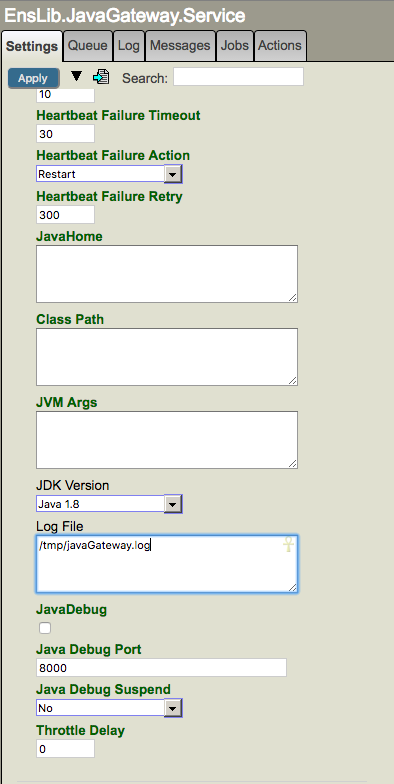
Remember, the Java gateway connection used by the Ensemble production is separate from connections used by linked tables or other productions. Thus, if you are using Ensemble, you need to collect the log in the Java gateway service. The code that starts the Java gateway service uses the "Log File" parameter in Ensemble, and does not use the setting in the Caché SQL Gateway in the SMP as described previously.
Collecting a jstack Trace on Red Hat
The key here is to start the gateway process manually, and the command to start the gateway can be obtained from running ps -ef | grep java. Below are complete steps to follow when collecting a jstack trace on Red Hat when running either the JDBC gateway or the Java gateway business service.
Make sure JDK is installed.
In a terminal, run ps -ef | grep java. Get the following two pieces of information from the result:
a. Copy the command that started the gateway. It should look something like this: java -Xrs -classpath /Applications/Cache20151/lib/cachegateway.jar:/Applications/Cache20151/lib/cachejdbc.jar com.intersys.gateway.JavaGateway 62972 /Applications/Cache20151/mgr/JDBC2.log
b. Get the Java process ID (pid), which is the second number from the line that contains the above command.
Kill the process with kill <pid>.
Run the command you copied from Step 2.a. to start a gateway process manually.
Take a look at the gateway log (in our example, it is located at /Applications/Cache20151/mgr/JDBC2.log) and make sure you see a entries like >> LOAD_JAVA_CLASS: com.intersys.jdbc.CacheDriver. This step is just to verify that a call to the gateway is successfully made.
In a new terminal, run ps -ef | grep java to get the pid of the gateway process.
Gather a jstack trace: jstack -F <pid> > /tmp/jstack.txt
