#Best Practices

0 Followers · 298 Posts

Best Practices recommendations on how to develop, test, deploy and manage solutions on InterSystems Data Platforms better. 

InterSystems staff + admins Hide everywhere
Hidden post for admin
Article Mark Bolinsky · Mar 18, 2016 9m read

++ Update: August 1, 2018

The use of the InterSystems Virtual IP (VIP) address built-in to Caché database mirroring has certain limitations. In particular, it can only be used when mirror members reside the same network subnet. When multiple data centers are used, network subnets are not often “stretched” beyond the physical data center due to added network complexity (more detailed discussion here). For similar reasons, Virtual IP is often not usable when the database is hosted in the cloud.

Network traffic management appliances such as load balancers (physical or virtual) can be used to achieve the same level of transparency, presenting a single address to the client applications or devices. The network traffic manager automatically redirects clients to the current mirror primary’s real IP address. The automation is intended to meet the needs of both HA failover and DR promotion following a disaster. 

12
6 6808
Article Eduard Lebedyuk · Dec 1, 2016 8m read

In this article I would like to present the RESTForms project - generic REST API backend for modern web applications.

The idea behind the project is simple -after I wrote several REST APIs I realized that generally, REST API consists of two parts:

  • Work with persistent classes
  • Custom business logic

And, while you'll have to write your own custom business logic, RESTForms provides all things related to working with persistent classes right out of the box.
Use cases

  • You already have a data model in Caché and you want to expose some (or all) of the information in a form of REST API
  • You are developing a new Caché application and you want to provide a REST API
23
3 5358
Article Murray Oldfield · Mar 11, 2016 8m read

In the last post we scheduled 24-hour collections of performance metrics using pButtons. In this post we are going to be looking at a few of the key metrics that are being collected and how they relate to the underlying system hardware. We will also start to explore the relationship between Caché (or any of the InterSystems Data Platforms) metrics and system metrics. And how you can use these metrics to understand the daily beat rate of your systems and diagnose performance problems.


[A list of other posts in this series is here](https://community.intersystems.com/post/capacity-planning-and-performance-series-index)

Edited Oct 2016...Example of script to extract pButtons data to a .csv file is here.Edited March 2018... Images had disappeared, added them back in.


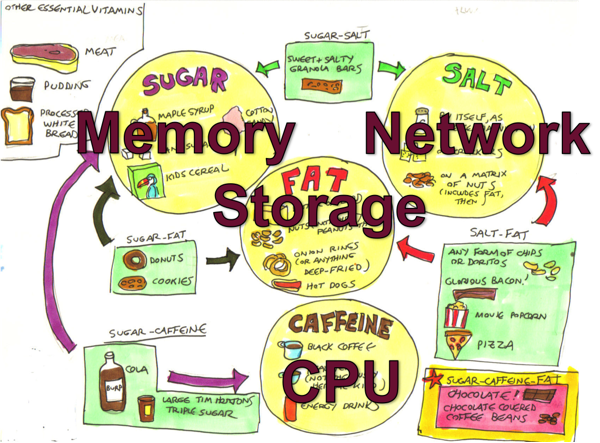
Hardware food groups

Hardware Food Groups

As you will see as we progress through this series of posts the server components affecting performance can be itemised as:

  • CPU
  • Memory
  • Storage IO
  • Network IO

If any of these components is under stress then system performance and user experience will likely suffer. These components are all related to each other as well, changes to one component can affect another, sometimes with unexpected consequences. I have seen an example where fixing an IO bottleneck in a storage array caused CPU usage to jump to 100% resulting in even worse user experience as the system was suddenly free to do more work but did not have the CPU resources to service increased user activity and throughput.

We will also see how Caché system activity has a direct impact on server components. If there are limited storage IO resources a positive change that can be made is increasing system memory and increasing memory for Caché global buffers which in turn can lower system storage read IO (but perhaps increase CPU!).

One of the most obvious system metrics to monitor regularly or check when users report problems is CPU usage. Looking at top or nmon on Linux or AIX, or Windows Performance Monitor. Because most system administrators look at CPU data regularly, especially if it is presented graphically, a quick glance gives you a good feel for the current health of your system -- what is normal or a sudden spike in activity that might be abnormal or indicates a problem. In this post we are going to look quickly at CPU metrics, but will concentrate on Caché metrics, we will start by looking at mgstat data and how looking at the data graphically can give a feel for system health at a glance.

Introduction to mgstat

mgstat is one of the Caché commands included and run in pButtons. mgstat is a great tool for collecting basic performance metrics to help you understand your systems health. We will look at mgstat data collected from a 24 hour pButtons, but if you want to capture data outside pButtons mgstat can also be run on demand interactively or as a background job from Caché terminal.

To run mgstat on demand from the %SYS namespace the general format is.

do mgstat(sample_time,number_of_samples,"/file_path/file.csv",page_length)

For example to run a background job for a one hour run with 5 seconds sample period and output to a csv file.

job ^mgstat(5,720,"/data/mgstat_todays_date_and_time.csv")

For example to display to the screen but dropping some columns use the dsp132 entry. I will leave as homework for you to check the output to understand the difference.

do dsp132^mgstat(5,720,"",60)

Detailed information of the columns in mgstat can be found in the Caché Monitoring Guide in the most recent Caché documentation: InterSystems online documentation

Looking at mgstat data

pButtons has been designed to be collated into a single HTML file for easy navigation and packaging for sending to WRC support specialists to diagnose performance problems. However when you run pButtons for yourself and want to graphically display the data it can be separated again to a csv file for processing into graphs, for example with Excel, by command line script or simple cut and paste.

In this post we will dig into just a few of the mgstat metrics to show how even a quick glance at data can give you a feel for whether the system is performing well or there are current or potential problems that will effect the user experience.

Glorefs and CPU

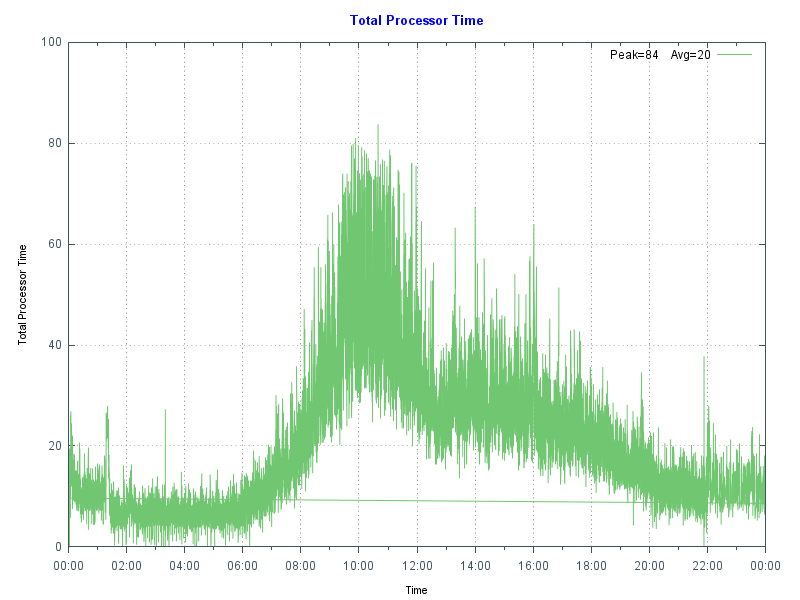
The following chart shows database server CPU usage at a site running a hospital application at a high transaction rate. Note the morning peak in activity when there are a lot of outpatient clinics with a drop-off at lunch time then tailing off in the afternoon and evening. In this case the data came from Windows Performance Monitor _(Total)% Processor Time - the shape of the graph fits the working day profile - no unusual peaks or troughs so this is normal for this site. By doing the same for your site you can start to get a baseline for "normal". A big spike, especially an extended one can be an indicator of a problem, there is a future post that focuses on CPU.

CPU Time

As a reference this database server is a Dell R720 with two E5-2670 8-core processors, the server has 128 GB of memory, and 48 GB of global buffers.

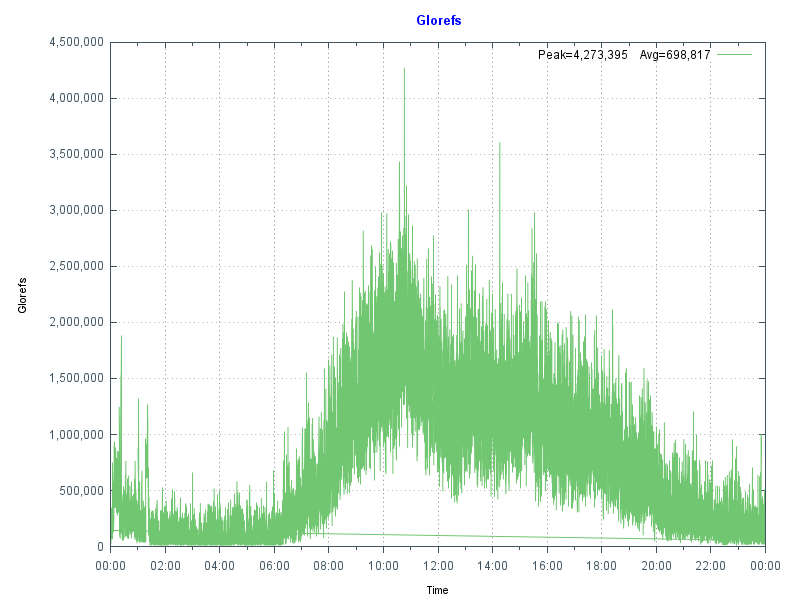
The next chart shows more data from mgstat — Glorefs (Global references) or database accesses for the same day as the CPU graph. Glorefs Indicates the amount of work that is occurring on behalf of the current workload; although global references consume CPU time, they do not always consume other system resources such as physical reads because of the way Caché uses the global memory buffer pool.

Global References

Typical of Caché applications there is a very strong correlation between Glorefs and CPU usage.

Another way of looking at this CPU and gloref data is to say that reducing glorefs will reduce CPU utilisation, enabling deployment on lower core count servers or to scale further on existing systems. There may be ways to reduce global reference by making an application more efficient, we will revisit this concept in later posts.

PhyRds and Rdratio

The shape of data from graphing mgstat data PhyRds (Physical Reads) and Rdratio (Read ratio) can also give you an insight into what to expect of system performance and help you with capacity planning. We will dig deeper into storage IO for Caché in future posts.

PhyRds are simply physical read IOPS from disk to the Caché databases, you should see the same values reflected in operating system metrics for logical and physical disks. Remember looking at operating system IOPS may be showing IOPS coming from non-Caché applications as well. Sizing storage and not accounting for expected IOPS is a recipe for disaster, you need to know what IOPS your system is doing at peak times for proper capacity planning. The following graph shows PhyRds between midnight and 15:30.

Physical Reads

Note the big jump in reads between 05:30 and 10:00. With other shorter peaks at 11:00 and just before 14:00. What do you think these are caused by? Do you see these type of peaks on your servers?

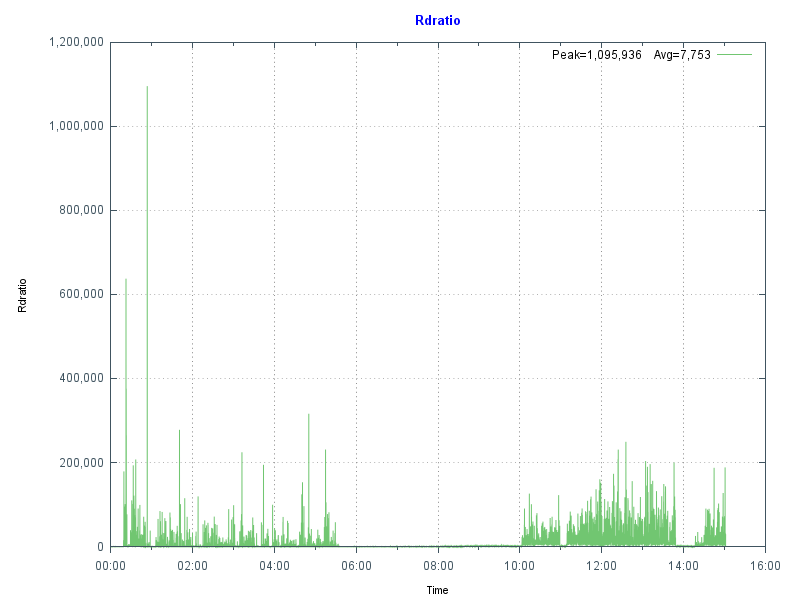
Rdratio is a little more interesting — it is the ratio of logical block reads to physical block reads. So a ratio of how many reads are from global buffers (logical) from memory and how many are from disk which is orders of magnitude slower. A high Rdratio is a good thing, dropping close to zero for extended periods is not good.

Read Ratio

Note that the same time as high reads Rdratio drops close to zero. At this site I was asked to investigate when the IT department started getting phone calls from users reporting the system was slow for extended periods. This had been going on seemingly at random for several weeks when I was asked to look at the system.

Because pButtons had been scheduled for daily 24-hour runs it was relatively simple to go back through several weeks data to start seeing a pattern of high PhyRds and low Rdratio which correlated with support calls.

After further analysis the cause was tracked to a new shift worker who was running several reports entering 'bad' parameters combined with badly written queries without appropriate indexes causing the high database reads. This accounted for the seemingly random slowness. Because these long running reports are reading data into global buffers the result is interactive user’s data is being fetched from physical storage, rather than memory as well as storage being stressed to service the reads.

Monitoring PhyRds and Rdratio will give you an idea of the beat rate of your systems and maybe allow you to track down bad reports or queries. There may be valid reason for high PhyRds -- perhaps a report must be run at a certain time. With modern 64-bit operating systems and servers with large physical memory capacity you should be able to minimise PhyRds on your production systems.

If you do see high PhyRds on your system there are a couple of strategies you can consider:

  • Improve the performance by increasing the number of database (global) buffers (and system memory).
  • Long running reports or extracts can be moved out of business hours.
  • Long running read only reports, batch jobs or data extracts can be run on a separate shadow server or asynchronous mirror to minimise the impact on interactive users and to offload system resource use such as CPU and IOPS.

Usually low PhyRds is a good thing and it's what we aim for when we size systems. However if you have low PhyRds and users are complaining about performance there are still things that can be checked to ensure storage is not a bottleneck - the reads may be low because the system cannot service any more. We will look at storage closer in a future post.

Summary

In this post we looked at how graphing the metrics collected in pButtons can give a health check at a glance. In upcoming posts I will dig deeper into the relationship between the system and Caché metrics and how you can use these to plan for the future.

10
2 4230
Article Luca Ravazzolo · Feb 2, 2018 4m read

Container Images

In this second post on containers fundamentals, we take a look at what container images are.

What is a container image?

A container image is merely a binary representation of a container.

A running container or simply a container is the runtime state of the related container image.

Please see the first post that explains what a container is.

1
0 2422
Announcement Evgeny Shvarov · Jan 7, 2018

Hi, Community!

Please find the digest of the best articles you posted on DC in 2017 regarding InterSystems Data platform.

We had 280 articles in 2017 and split them into 3 categories: posts gathered most of the views, most voted posts and most commented posts. 

Here we go!

TOP 20 Most viewed

Vue.js: getting started with a basic HTML/REST/JSON example, by Ward De Backer  1936

InterSystems Data Platforms and performance – VM Backups and Caché freeze/thaw scripts, by Murray Oldfield  1752

Node.js: create a basic web app with React - part 1, by Ward De Backer  1670

0
0 441
Article Murray Oldfield · Nov 9, 2017 3m read

A request came from a customer to estimate how long it would take to encrypt a database with cvencrypt utility.

This question is a little bit like how long is a piece of string — it depends. But its an interesting question. The answer primarily depends on the performance of CPU and storage on the target platform the customer is using, so the answer is more about coming up with a simple methodology that can be used to benchmark the CPU and storage while running cvencrypt.

Methodology

  1. Copy a large and representative CACHE.DAT file to target storage
  2. Create a keyfile via System Management Portal (includes a key)
  3. Run the cvencrypt over your sample CACHE.DAT file (as below)

The following shows the process once the test file is in place:

# ccontrol all
Instance Name     Version ID        Port   Directory
----------------  ----------------  -----  --------------------------------
up >H20162            2016.2.1.803.0    56772  /hs/h20162

# ls -l
total 54967296
-rw-r--r-- 1 root root 56286511104 Oct 27 10:31 CACHE.DAT

# date; /hs/h20162/bin/cvencrypt -dbfile CACHE.DAT -outkeyfile /hs/h20162/mgr/syd_enc_key -outuser xxx -outpass xxx; date

Output:

Fri Oct 27 10:36:53 AEDT 2017

Cache for UNIX (Red Hat Enterprise Linux for x86-64) 2016.2.1 (Build 803) Wed Oct 26 2016 12:30:49 EDT
Stand-alone encryption utility for Cache databases and journal files

Database has 6870912 blocks.
Encrypting.
Processed:
6870912 blocks (done!)
Fri Oct 27 10:43:25 AEDT 2017
#

So we can see from above that:

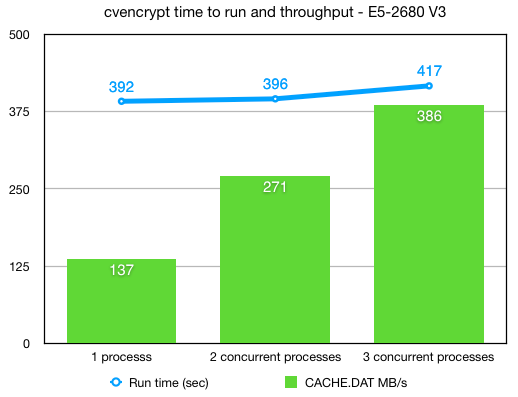
Bytes/sec = 56,286,511,104 bytes /392 seconds = 156,351,420 bytes/sec = 156 MB/sec

This test is on our lab system in Sydney. But remember; your milage will vary and you will have to test on your own systems. I have included details of the set up I used at the end of the post.

Running multiple encryptions in parallel

During a conversion downtime must be kept to a minimum, so I was interested whether running multiple cvencrypt processes in parallel was scalable. It is. Up to the IO limits of the storage and CPU you can run multiple cvencrypt processes in parallel. So with careful planning you should be able to play Tetris and encrypt multiple databases in the shortest time.

The following chart shows a nice scaling (not quite linear) as multiple processes are running in parallel.

Script to test in parallel

This is how I ran the parallel tests. Set up multiple CACHE.DAT files in subdirectories — I used copies of the same file, but you will want to test on a copy of your database.

For the test I laid the files out in a simple tree:

# ls -l *
-rw-r--r-- 1 root root 56286511104 Oct 26 21:57 CACHE.DAT
-rwxr-xr-x 1 root root         189 Oct 26 22:29 enc_p.sh
-rw-r--r-- 1 root root         241 Oct 26 19:56 syd_enc_key

db1:
total 54967296
-rw-r--r-- 1 root root 56286511104 Oct 26 22:33 CACHE.DAT

db2:
total 54967296
-rw-r--r-- 1 root root 56286511104 Oct 26 22:46 CACHE.DAT

db3:
total 54967296
-rw-r--r-- 1 root root 56286511104 Oct 26 22:54 CACHE.DAT
#

The simple script enc_p.sh runs the cvencrypt:

# cat ./enc_p.sh

#!/bin/sh
echo "Start " ${1} " "  `date`
/hs/h20162/bin/cvencrypt -dbfile ./db${1}/CACHE.DAT -outkeyfile ./syd_enc_key -outuser xxx -outpass xxx
echo "End " ${1} " " `date`
#

Iterate over the subdirectories:

# for i in 1 2 3; do ( ./enc_p.sh $i & ) ; done

Test system configuration

Red Hat 7.4, using xfs disk on LVM2. On VMWare 6.5.

Dell PowerEdge R730 Servers

  • 2 x Intel Xeon E5-2680 v3 2.5GHz,30M Cache,9.60GT/s QPI,Turbo,HT,12C/24T (120W)

Dell PowerVault MD3420 Storage

  • 24 x 960GB Solid State Drive SAS Read Intensive MLC 12Gbps 2.5in Hot-plug Drives
  • Dual 8GB Cache Controller (Each controller contains 8GB of cache for a total of 16GB of cache which is mirrored with the other controller’s cache for high availability. )
  • One 24-disk RAID6 disk group.
0
1 1127
Article Murray Oldfield · Apr 8, 2016 17m read

This post will guide you through the process of sizing shared memory requirements for database applications running on InterSystems data platforms. It will cover key aspects such as global and routine buffers, gmheap, and locksize, providing you with a comprehensive understanding. Additionally, it will offer performance tips for configuring servers and virtualizing IRIS applications. Please note that when I refer to IRIS, I include all the data platforms (Ensemble, HealthShare, iKnow, Caché, and IRIS).


[A list of other posts in this series is here](https://community.intersystems.com/post/capacity-planning-and-performance-series-index)

When I first started working with Caché, most customer operating systems were 32-bit, and memory for an IRIS application was limited and expensive. Commonly deployed Intel servers had only a few cores, and the only way to scale up was to go with big iron servers or use ECP to scale out horizontally. Now, even basic production-grade servers have multiple processors, dozens of cores, and minimum memory is hundreds of GB or TB. For most database installations, ECP is forgotten, and we can now scale application transaction rates massively on a single server.

A key feature of IRIS is the way we use data in shared memory usually referred to as database cache or global buffers. The short story is that if you can right size and allocate 'more' memory to global buffers you will usually improve system performance - data in memory is much faster to access than data on disk. Back in the day, when 32-bit systems ruled, the answer to the question how much memory should I allocate to global buffers? It was a simple - as much as possible! There wasn't that much available anyway, so sums were done diligently to calculate OS requirements, the number of and size of OS and IRIS processes and real memory used by each to find the remainder to allocate as large a global buffer as possible.

The tide has turned

If you are running your application on a current-generation server, you can allocate huge amounts of memory to an IRIS instance, and a laissez-faire attitude often applies because memory is now "cheap" and plentiful. However, the tide has turned again, and pretty much all but the very largest systems I see deployed now are virtualized. So, while 'monster' VMs can have large memory footprints if needed, the focus still comes back to the right sizing systems. To make the most of server consolidation, capacity planning is required to make the best use of available host memory.

What uses memory?

Generally, there are four main consumers of memory on an IRIS database server:

  • Operating System, including filesystem cache.
  • If installed, other non-IRIS applications.
  • IRIS processes.
  • IRIS shared memory (includes global and routine buffers and GMHEAP).

At a high level, the amount of physical memory required is simply added up by adding up the requirements of each of the items on the list. All of the above use real memory, but they can also use virtual memory. A key part of capacity planning is to size a system so that there is enough physical memory so that paging does not occur or is minimized, or at least minimize or eliminate hard page faults where memory has to be brought back from disk.

In this post I will focus on sizing IRIS shared memory and some general rules for optimising memory performance. The operating system and kernel requirements vary by operating system but will be several GB in most cases. File system cache varies and is will be whatever is available after the other items on the list take their allocation.

IRIS is mostly processes - if you look at the operating system statistics while your application is running you will see cache processes (e.g. iris or iris.exe). So a simple way to observe what your application memory requirements are is to look at the operating system metrics. For example with vmstat or ps on Linux or Windows process explorer and total the amount of real memory in use, extrapolating for growth and peak requirements. Be aware that some metrics report virtual memory which includes shared memory, so be careful to gather real memory requirements.

Sizing Global buffers - A simplified way

One of the capacity planning goals for a high transaction database is to size global buffers so that as much of the application database working set is in memory as possible. This will minimise read IOPS and generally improve the application's performance. We also need to strike a balance so that other memory users, such as the operating system and IRIS process, are not paged out and there is enough memory for the filesystem cache.

I showed an example of what can happen if reads from disk are excessive in Part 2 of this series. In that case, high reads were caused by a bad report or query, but the same effect can be seen if global buffers are too small, forcing the application to be constantly reading data blocks from disk. As a sidebar, it's also worth noting that the landscape for storage is always changing - storage is getting faster and faster with advances in SSDs and NVMe, but data in memory close to the running processes is still best.

Of course, every application is different, so it's important to say, "Your mileage may vary" but there are some general rules which will get you started on the road to capacity planning shared memory for your application. After that you can tune for your specific requirements.

Where to start?

Unfortunately, there is no magic answer. However, as I discussed in previous posts, a good practice is to size the system CPU capacity so that for a required peak transaction rate, the CPU will be approximately 80% utilized at peak processing times, leaving 20% headroom for short-term growth or unexpected spikes in activity.

For example, when I am sizing TrakCare systems I know CPU requirements for a known transaction rate from benchmarking and reviewing customer site metrics, and I can use a broad rule of thumb for Intel processor-based servers:

Rule of thumb: Physical memory is sized at n GB per CPU core for servers running IRIS.

  • For example, for TrakCare database servers, a starting point of n is 8 GB. But this can vary, and servers may be right-sized after the application has been running for a while -- you must monitor your systems continuously and do a formal performance review, for example, every six or 12 months.

Rule of thumb: Allocate n% of memory to IRIS global buffers.

  • For small to medium TrakCare systems, n% is 60%, leaving 40% of memory for the operating system, filesystem cache, and IRIS processes. You may vary this, say to 50%, if you need a lot of filesystem cache or have a lot of processes. Or make it a higher percentage as you use very large memory configurations on large systems.
  • This rule of thumb assumes only one IRIS instance on the server.

For example, if the application needs 10 CPU cores, the VM would have 80 GB of memory, 48 GB for global buffers, and 32 GB for everything else.

Memory sizing rules apply to physical or virtualized systems, so the same 1 vCPU: 8 GB memory ratio applies to TrakCare VMs.

Tuning global buffers

There are a few items to observe to see how effective your sizing is. You can observe free memory outside IRIS with operating system tools. Set up as per your best calculations, then observe memory usage over time, and if there is always free memory, the system can be reconfigured to increase global buffers or to right-size a VM.

Another key indicator of good global buffer sizing is having read IOPS as low as possible, which means IRIS cache efficiency will be high. You can observe the impact of different global buffer sizes on PhyRds and RdRatio with mgstat; an example of looking at these metrics is in Part 2 of this series. Unless you have your entire database in memory, there will always be some reads from disk; the aim is simply to keep reads as low as possible.

Remember your hardware food groups and get the balance right. More memory for global buffers will lower read IOPS but possibly increase CPU utilization because your system can now do more work in a shorter time. Lowering IOPS is pretty much always a good thing, and your users will be happier with faster response times.

See the section below for applying your requirements to physical memory configuration.

For virtual servers, plan not to ever oversubscribe your production VM memory. This is especially true for IRIS shared memory; more on this below.

Is your application's sweet spot 8GB of physical memory per CPU core? I can't say, but see if a similar method works for your application, whether 4GB or 10GB per core. If you have found another method for sizing global buffers, please leave a comment below.

Monitoring Global Buffer usage

The IRIS utility ^GLOBUFF displays statistics about what your global buffers are doing at any point in time. For example to display the top 25 by percentage:

do display^GLOBUFF(25)

For example, output could look like this:

Total buffers: 2560000    Buffers in use: 2559981  PPG buffers: 1121 (0.044%)

Item  Global                             Database          Percentage (Count)
1     MyGlobal                           BUILD-MYDB1        29.283 (749651)
2     MyGlobal2                          BUILD-MYDB2        23.925 (612478)
3     CacheTemp.xxData                   CACHETEMP          19.974 (511335)
4     RTx                                BUILD-MYDB2        10.364 (265309)
5     TMP.CachedObjectD                  CACHETEMP          2.268 (58073)
6     TMP                                CACHETEMP          2.152 (55102)
7     RFRED                              BUILD-RB           2.087 (53428)
8     PANOTFRED                          BUILD-MYDB2        1.993 (51024)
9     PAPi                               BUILD-MYDB2        1.770 (45310)
10    HIT                                BUILD-MYDB2        1.396 (35727)
11    AHOMER                             BUILD-MYDB1        1.287 (32946)
12    IN                                 BUILD-DATA         0.803 (20550)
13    HIS                                BUILD-DATA         0.732 (18729)
14    FIRST                              BUILD-MYDB1        0.561 (14362)
15    GAMEi                              BUILD-DATA         0.264 (6748)
16    OF                                 BUILD-DATA         0.161 (4111)
17    HISLast                            BUILD-FROGS        0.102 (2616)
18    %Season                            CACHE              0.101 (2588)
19    WooHoo                             BUILD-DATA         0.101 (2573)
20    BLAHi                              BUILD-GECKOS       0.091 (2329)
21    CTPCP                              BUILD-DATA         0.059 (1505)
22    BLAHi                              BUILD-DATA         0.049 (1259)
23    Unknown                            CACHETEMP          0.048 (1222)
24    COD                                BUILD-DATA         0.047 (1192)
25    TMP.CachedObjectI                  CACHETEMP          0.032 (808)

This could be useful in several ways, for example, to see how much of your working set is kept in memory. If you find this utility is useful please make a comment below to enlighten other community users on why it helped you.

Sizing Routine Buffers

Routines your application is running, including compiled classes, are stored in routine buffers. The goal of sizing shared memory for routine buffers is for all your routine code to be loaded and stay resident in routine buffers. Like global buffers, it is expensive and inefficient to read routines off disk. The maximum size of routine buffers is 1023 MB. As a rule you want more routine buffers than you need as there is always a big performance gain to have routines cached.

Routine buffers are made up of different sizes. By default, IRIS determines the number of buffers for each size; at install time, the defaults for 2016.1 are 4, 16 and 64 KB. It is possible to change the allocation of memory for different sizes; however, to start your capacity planning, it is recommended to stay with IRIS defaults unless you have a special reason for changing. For more information, see routines in the IRIS documentation “config” appendix of the IRIS Parameter File Reference and Memory and Startup Settings in the “Configuring IRIS” chapter of the IRIS System Administration Guide.

As your application runs, routines are loaded off disk and stored in the smallest buffer the routine will fit. For example, if a routine is 3 KB, it will ideally be stored in a 4 KB buffer. If no 4 KB buffers are available, a larger one will be used. A routine larger than 32 KB will use as many 64 KB routine buffers as needed.

Checking Routine Buffer Use

mgstat metric RouLas

One way to understand if the routine buffer is large enough is the mgstat metric RouLas (routine loads and saves). A RouLas is a fetch from or save to disk. A high number of routine loads/saves may show up as a performance problem; in that case, you can improve performance by increasing the number of routine buffers.

cstat

If you have increased routine buffers to the maximum of 1023 MB and still find high RouLas a more detailed examination is available so you can see what routines are in buffers and how much is used with cstat command.

ccontrol stat cache -R1  

This will produce a listing of routine metrics including a list of routine buffers and all the routines in cache. For example a partial listing of a default IRIS install is:

Number of rtn buf: 4 KB-> 9600, 16 KB-> 7200, 64 KB-> 2400, 
gmaxrouvec (cache rtns/proc): 4 KB-> 276, 16 KB-> 276, 64 KB-> 276, 
gmaxinitalrouvec: 4 KB-> 276, 16 KB-> 276, 64 KB-> 276, 

Dumping Routine Buffer Pool Currently Inuse
 hash   buf  size sys sfn inuse old type   rcrc     rtime   rver rctentry rouname
   22: 8937  4096   0   1     1   0  D  6adcb49e  56e34d34    53 dcc5d477  %CSP.UI.Portal.ECP.0 
   36: 9374  4096   0   1     1   0  M  5c384cae  56e34d88    13 908224b5  %SYSTEM.WorkMgr.1 
   37: 9375  4096   0   1     1   0  D  a4d44485  56e34d88    22 91404e82  %SYSTEM.WorkMgr.0 
   44: 9455  4096   0   0     1   0  D  9976745d  56e34ca0    57 9699a880  SYS.Monitor.Health.x
 2691:16802 16384   0   0     7   0  P  da8d596f  56e34c80    27 383da785  START
   etc
   etc 	

"rtns/proc" on the 2nd line above is saying that 276 routines can be cached at each buffer size as default.

Using this information another approach to sizing routine buffers is to run your application and list the running routines with cstat -R1. You could then calculate the routine sizes in use, for example put this list in excel, sort by size and see exactly what routines are in use. If your are not using all buffers of each size then you have enough routine buffers, or if you are using all of each size then you need to increase routine buffers or can be more direct about configuring the number of each bucket size.

Lock table size

The locksiz configuration parameter is the size (in bytes) of memory allocated for managing locks for concurrency control to prevent different processes from changing a specific element of data at the same time. Internally, the in-memory lock table contains the current locks, along with information about the processes that hold those locks.

Since memory used to allocate locks is taken from GMHEAP, you cannot use more memory for locks than exists in GMHEAP. If you increase the size of locksiz, increase the size of GMHEAP to match as per the formula in the GMHEAP section below. Information about application use of the lock table can be monitored using the system management portal (SMP), or more directly with the API:

set x=##class(SYS.Lock).GetLockSpaceInfo().

This API returns three values: "Available Space, Usable Space, Used Space". Check Usable space and Used Space to roughly calculate suitable values (some lock space is reserved for lock structure). Further information is available in IRIS documentation.

Note: If you edit the locksiz setting, changes take place immediately.

GMHEAP

The GMHEAP (the Generic Memory Heap) configuration parameter is defined as: Size (in kilobytes) of the generic memory heap for IRIS. This is the allocation from which the Lock table, the NLS tables, and the PID table are also allocated.

Note: Changing GMHEAP requires a IRIS restart.

To assist you in sizing for your application information about GMHEAP usage can be checked using the API:

%SYSTEM.Config.SharedMemoryHeap

This API also provides the ability to get available generic memory heap and recommends GMHEAP parameters for configuration. For example, the DisplayUsage method displays all memory used by each of the system components and the amount of available heap memory. Further information is available in the IRIS documentation.

write $system.Config.SharedMemoryHeap.DisplayUsage()

The RecommendedSize method can give you an idea of GMHEAP usage and recommendations at any point in time. However, you will need to run this multiple times to build up a baseline and recommendations for your system.

write $system.Config.SharedMemoryHeap.RecommendedSize()

Rule of thumb: Once again your application mileage will vary, but somewhere to start your sizing could be one of the following:

(Minimum 128MB) or (64 MB * number of cores) or (2x locksiz) or whichever is larger.

Remember GMHEAP must be sized to include the lock table. 

Large/Huge pages

The short story is that huge pages on Linux have a positive effect on increasing system performance. However, the benefits will only be known if you test your application with and without huge pages. The benefits of huge pages for IRIS database servers are more than just performance -- which may only be ~10% improvement at best. There are other reasons to use huge pages; When IRIS uses huge pages for shared memory, you guarantee that the memory is available for shared memory and not fragmented.

Note: By default, when huge/large pages are configured, InterSystems IRIS attempts to utilize them on startup. If there is not enough space, InterSystems IRIS reverts to standard pages. However, you can use the memlock parameter to control this behavior and fail at startup if huge/large page allocation fails.

As a sidebar for TrakCare, we do not automatically specify huge pages for non-production servers/VMs with small memory footprints ( for example less than 8GB) or utility servers (for example print servers) running IRIS because allocating memory for huge pages may end up orphaning memory, or sometimes a bad calculation that undersizes huge pages means IRIS starts not using huge pages which is even worse. As per our docs, remember that when using huge pages to configure and start IRIS without huge pages, look at the total shared memory at startup and then use that to calculate huge pages. Configuring Huge and Large Pages

Danger! Windows Large Pages and Shared Memory

IRIS uses shared memory on all platforms and versions, and it's a great performance booster, including on Windows, where it is always used. However, there are particular issues unique to Windows that you need to be aware of.

When IRIS starts, it allocates a single, large chunk of shared memory to be used for database cache (global buffers), routine cache (routine buffers), the shared memory heap, journal buffers, and other control structures. On IRIS startup, shared memory can be allocated using small or large pages. On Windows 2008 R2 and later, IRIS uses large pages by default; however, if a system has been running for a long time, due to fragmentation, contiguous memory may not be able to be allocated at IRIS startup, and IRIS can instead start using small pages.

Unexpectedly starting IRIS with small pages can cause it to start with less shared memory than defined in the configuration, or it may take a long time to start or fail to start. I have seen this happen on sites with a failover cluster where the backup server has not been used as a database server for a long time.

Tip: One mitigation strategy is periodically rebooting the offline Windows cluster server. Another is to use Linux.

Physical Memory

The best configuration for the processor dictates physical memory. A bad memory configuration can significantly impact performance.

Intel Memory configuration best practice

This information applies to Intel processors only. Please confirm with vendors what rules apply to other processors.

Factors that determine optimal DIMM performance include:

  • DIMM type
  • DIMM rank
  • Clock speed
  • Position to the processor (closest/furthest)
  • Number of memory channels
  • Desired redundancy features.

For example, on Nehalem and Westmere servers (Xeon 5500 and 5600) there are three memory channels per processor and memory should be installed in sets of three per processor. For current processors (for example, E5-2600), there are four memory channels per processor, so memory should be installed in sets of four per processor.

When there are unbalanced memory configurations — where memory is not installed in sets of three/four or memory DIMMS are different sizes, unbalanced memory can impose a 23% memory performance penalty.

Remember that one of the features of IRIS is in-memory data processing, so getting the best performance from memory is important. It is also worth noting that for maximum bandwidth servers should be configured for the fastest memory speed. For Xeon processors maximum memory performance is only supported at up to 2 DIMMs per channel, so the maximum memory configurations for common servers with 2 CPUs is dictated by factors including CPU frequency and DIMM size (8GB, 16GB, etc).

Rules of thumb:

  • Use a balanced platform configuration: populate the same number of DIMMs for each channel and each socket
  • Use identical DIMM types throughout the platform: same size, speed, and number of ranks.
  • For physical servers, round up the total physical memory in a host server to the natural break points—64GB, 128GB, and so on—based on these Intel processor best practices.

VMware Virtualisation considerations

I will follow up in future with another post with more guidelines for when IRIS is virtualized. However the following key rule should be considered for memory allocation:

Rule: Set VMware memory reservation on production systems.

As we have seen above when IRIS starts, it allocates a single, large chunk of shared memory to be used for global and routine buffers, GMHEAP, journal buffers, and other control structures.

You want to avoid any swapping for shared memory so set your production database VMs memory reservation to at least the size of IRIS shared memory plus memory for IRIS processes and operating system and kernel services. If in doubt reserve the full production database VMs memory.

As a rule if you mix production and non-production servers on the same systems do not set memory reservations on non-production systems. Let non-production servers fight out whatever memory is left ;). VMware often calls VMs with more than 8 CPUs 'monster VMs'. High transaction IRIS database servers are often monster VMs. There are other considerations for setting memory reservations on monster VMs, for example if a monster VM is to be migrated for maintenance or due to a High Availability triggered restart then the target host server must have sufficient free memory. There are stratagies to plan for this I will talk about them in a future post along with other memory considerations such as planning to make best use of NUMA.

Summary

This is a start to capacity planning memory, a messy area - certainly not as clear cut as sizing CPU. If you have any questions or observations please leave a comment.

As this entry is posted I am on my way to Global Summit 2016. If you are attending this year I will be talking about performance topics with two presentations, or I am happy to catch up with you in person in the developers area.
3
9 11083
Article Murray Oldfield · Nov 25, 2016 23m read

Hyper-Converged Infrastructure (HCI) solutions have been gaining traction for the last few years with the number of deployments now increasing rapidly. IT decision makers are considering HCI when scoping new deployments or hardware refreshes especially for applications already virtualised on VMware. Reasons for choosing HCI include; dealing with a single vendor, validated interoperability between all hardware and software components, high performance especially IO, simple scalability by addition of hosts, simplified deployment and simplified management.

I have written this post with an introduction for a reader who is new to HCI by looking at common features of HCI solutions. I then review configuration choices and recommendations for capacity planning and performance when deploying applications built on InterSystems data platform with specific examples for database applications. HCI solutions rely on flash storage for performance so I also include a section on characteristics and use cases of selected flash storage options.

Capacity planning and performance recommendations in this post are specific to VMWare vSAN. However vSAN is not alone in the growing HCI market, there are other HCI vendors, notably Nutanix which also has an increasing number of deployments. There is a lot of commonality between features no matter which HCI vendor you choose so I expect the recommendations in this post are broadly relevant. But the best advice in all cases is to discuss the recommendations from this post with HCI vendors taking into account your application specific requirements.


[A list of other posts in the InterSystems Data Platforms and performance series is here.](https://community.intersystems.com/post/capacity-planning-and-performance-series-index)
# What is HCI?

Strictly speaking converged solutions have been around for a long time, however in this post I am talking about current HCI solutions for example from Wikipedia: "Hyperconvergence moves away from multiple discrete systems that are packaged together and evolve into software-defined intelligent environments that all run in commodity, off-the-shelf x86 rack servers...."

So is HCI a single thing?

No. When talking to vendors you must remember HCI has many permutations; Converged and Hyper-converged are more a type of architecture not a specific blueprint or standard. Due to the commodity nature of HCI hardware the market has multiple vendors differentiating themselves at the software layer and/or other innovative ways of combining compute, network, storage and management.

Without going down too much of a rat hole here, as an example solutions labeled HCI can have storage inside the servers in a cluster or have more traditional configuration with a cluster of servers and separate SAN storage -- possibly from different vendors -- that has also been tested and validated for interoperability and managed from a single control plane. For capacity and performance planning you must consider solutions where storage is in an array connected over a SAN fabric (e.g. Fibre Channel or Ethernet) have a different performance profile and requirements to the case where the storage pool is software defined and located inside each of a cluster of server nodes with storage processing on the servers.

So what is HCI again?

For this post I am focusing on HCI and specifically VMware vSAN where storage is physically inside the host servers. In these solutions the HCI software layer enables the internal storage in each of multiple nodes in a cluster performing processing to act like one shared storage system. So another driver of HCI is even though there is a cost for HCI software there could also be significant savings using HCI when compared to solutions using enterprise storage arrays.

For this post I am talking about solutions where HCI combines compute, memory, storage, network and management software into a cluster of virtualised x86 servers.

Common HCI characteristics

As mentioned above VMWare vSAN and Nutanix are examples of HCI solutions. Both have similar high level approaches to HCI and are good examples of the format:

  • VMware vSAN requires VMware vSphere and is available on multiple vendors hardware. There are many hardware choices available but these are strictly dependent on VMware's vSAN Hardware Compatibility List (HCL). Solutions can be purchased prepackaged and preconfigured for example EMC VxRail or you can purchase components on the HCL and build-your-own.
  • Nutanix can also be purchased and deployed as an all-in-one solution including hardware in preconfigured blocks with up to four nodes in a 2U appliance. Nutanix solution is also available as a build-your-own software solution validated on other vendors hardware.

There are some variations in implementation, but generally speaking HCI have common features that will inform your planning for performance and capacity:

  • Virtual Machines (VMs) run on hypervisors such as VMware ESXi but also others including Hyper-V or Nutanix Acropolis Hypervisor (AHV). Nutanix can also be deployed using ESXi.
  • Host servers are often combined into blocks of compute, storage and network. For example a 2U Appliance with four nodes.
  • Multiple host servers are combined into a cluster for management and availability.
  • Storage is tiered, either all-flash or a hybrid with a flash cache tier plus spinning disks as a capacity tier.
  • Storage is presented as a pool which is software defined including data placement and policies for capacity, performance and availability.
  • Capacity and IO performance are scaled by adding hosts to the cluster.
  • Data is written to storage on multiple cluster nodes synchronously so the cluster can tolerate host or component failures without data loss.
  • VM availability and load balancing is provided by the hypervisor for example vMotion, VMware HA, and DRS.

As I noted above there are also other HCI solutions with twists on this list such as support for external storage arrays, storage only nodes... the list is a long as the list of vendors.

HCI adoption is gathering pace and competition between the vendors is driving innovation and performance improvements. It is also worth noting that HCI is a basic building block for cloud deployment.


# Are InterSystems' products supported on HCI?

It is InterSystems policy and procedure to verify and release InterSystems’ products against processor types and operating systems including when operating systems are virtualised. Please note InterSystems Advisory: Software Defined Data Centers (SDDC) and Hyper-Converged Infrastructure (HCI).

For example: Caché 2016.1 running on Red Hat 7.2 operating system on vSAN on x86 hosts is supported.

Note: If you do not write your own applications you must also check your application vendors support policy.


# vSAN Capacity Planning

This section highlights considerations and recommendations for deployment of VMware vSAN for database applications on InterSystems data platforms -- Caché, Ensemble and HealthShare. However you can also use these recommendations as a general list of configuration questions for reviewing with any HCI vendor.


VM vCPU and memory

As a starting point use the same capacity planning rules for your database VMs' vCPU and memory as you already use for deploying your applications on VMware ESXi with the same processors.

As a refresher for general CPU and memory sizing for Caché a list of other posts in this series is here: Capacity planning and performance series index.

One of the features of HCI systems is very low storage IO latency and high IOPS capability. You may remember from the 2nd post in this series the hardware food groups graphic showing CPU, memory, storage and network. I pointed out that these components are all related to each other and changes to one component can affect another, sometimes with unexpected consequences. For example I have seen a case of fixing a particularly bad IO bottleneck in a storage array caused CPU usage to jump to 100% resulting in even worse user experience as the system was suddenly free to do more work but did not have the CPU resources to service increased user activity and throughput. This effect is something to bear in mind when you are planning your new systems if your sizing model is based on performance metrics from less performant hardware. Even though you will be upgrading to newer servers with newer processors your database VM activity must be monitored closely in case you need to right-size due to lower latency IO on the new platform.

Also note, as detailed later you will also have to account for software defined storage IO processing when sizing physical host CPU and memory resources.


Storage capacity planning

To understand storage capacity planning and put database recommendations in context you must first understand some basic differences between vSAN and traditional ESXi storage. I will cover these first then break down all the best practice recommendations for Caché databases.

vSAN storage model

At the heart of vSAN and HCI in general is software defined storage (SDS). The way data is stored and managed is very different to using a cluster of ESXi servers and a shared storage array. One of the advantages of HCI is there are no LUNs, instead pool(s) of storage that are allocated to VMs as needed with policies describing capabilities for availability, capacity, and performance per-VMDK.

For example; imagine a traditional storage array consisting of shelves of physical disks configured together as various sized disk groups or disk pools with different numbers and/or types of disk depending on performance and availability requirements. Disk groups are then presented as a number of logical disks (storage array volumes or LUNs) which are in turn presented to ESXi hosts as datastores and are formatted as VMFS volumes. VMs are represented as files in the datastores. Database best practice for availability and performance recommends at minimum separate disk groups and LUNs for database (random access), journals (sequential), and any others (such as backups or non-production systems, etc).

vSAN is different; storage from the vSAN is allocated using storage policy-based management (SPBM). Policies can be created using combinations of capabilities, including the following (but there are more);

  • Failures To Tolerate (FTT) which dictates the number of redundant copies of data.
  • Erasure coding (RAID-5 or RAID-6) for space savings.
  • Disk stripes for performance.
  • Thick or thin disk provisioning (thin by default on vSAN).
  • Others...

VMDKs (individual VM disks) are created from the vSAN storage pool by selecting appropriate policies. So instead of creating disk groups and LUNs on the array with a set attributes, you define the capabilities of storage as policies in vSAN using SPBM; for example "Database" would be different to "Journal", or whatever others you need. You set the capacity and select the appropriate policy when you create disks for your VM.

Another key concept is a VM is no longer a set of files on a VMDK datastore but is stored as a set of storage objects. For example your database VM will be made up of multiple objects and components including the VMDKs, swap, snapshots, etc. vSAN SDS manages all the mechanics of object placement to meet the requirements of the policies you selected.


Storage tiers and IO performance planning

To ensure high performance there are two tiers of storage;

  • Cache tier - Must be high endurance flash.
  • Capacity tier - Flash or for hybrid uses spinning disks.

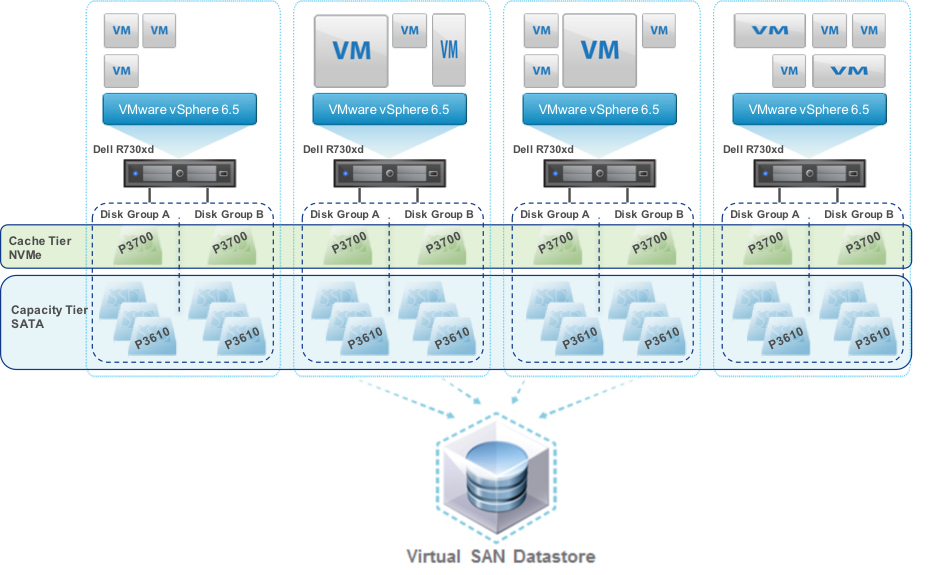
As shown in the graphic below storage is divided into tiers and disk groups. In vSAN 6.5 each disk group includes a single cache device and up to seven spinning disks or flash devices. There can be up to five disk groups so possibly up to 35 devices per host. The figure below shows an all-flash vSAN cluster with four hosts, each host has two disk groups each with one NVMe cache disk and three SATA capacity disks.


vSAN all-flash storage example

Figure 1. vSAN all-flash storage showing tiers and disk groups


When considering how to populate tiers and the type of flash for cache and capacity tiers you must consider the IO path; for the lowest latency and maximum performance writes go to the cache tier then software coalesces and de-stages the writes to the capacity tier. Cache use depends on deployment model, for example in vSAN hybrid configurations 30% of the cache tier is write cache, in the case of all-flash 100% of cache tier is write cache -- reads are from low latency flash capacity tier.

There will be a performance boost using all-flash. With larger capacity and durable flash drives available today the time has come where you should be considering whether you need spinning disks. The business case for flash over spinning disk has been made over recent years and includes much lower cost/IOPS, performance (lower latency), higher reliability (no moving parts to fail, less disks to fail for required IOPS), lower power and heat profile, smaller footprint, and so on. You will also benefit from additional HCI features, for example vSAN will only allow deduplication and compression on all-flash configurations.

  • Recommendation: For best performance and lower TCO consider all-flash.

For best performance the cache tier should have the lowest latency, especially for vSAN as there is only a single cache device per disk group.

  • Recommendation: If possible choose NVMe SSDs for the cache tier although SAS is still OK.
  • Recommendation: Choose high endurance flash devices in the cache tier to handle high I/O.

For SSDs at the capacity tier there is negligible performance difference between SAS and SATA SSDs. You do not need to incur the cost of NVMe SSD at the capacity tier for database applications. However in all cases ensure you are using enterprise class SATA SSDs with features such as power failure protection.

  • Recommendation: Choose high capacity SATA SSDs for capacity tier.
  • Recommendation: Choose enterprise SSDs with power failure protection.

Depending on your timetable new technologies such as such as 3D Xpoint with higher IOPS, lower latency, higher capacity and higher durability may be available. There is a breakdown of flash storage at the end of this post.

  • Recommendation: Watch for new technologies to include such as 3D Xpoint for cache AND capacity tier.

As I mentioned above you can have up to five disk groups per host and a disk group is made up of one flash device and up to seven devices at the capacity tier. You could have a single disk group with one flash device and as much capacity as you need, or multiple disk groups per host. There are advantages to having multiple disk groups per host:

  • Performance: Having multiple flash devices at the tiers will increase the IOPS available per host.
  • Failure domain: Failure of a cache disk impacts the entire disk group, although availability is maintained as vSAN rebuilds automatically.

You will have to balance availability, performance and capacity, but in general having multiple disk groups per host is a good balance.

  • Recommendation: Review storage requirements, consider multiple disk groups per host.

What performance should I expect?

A key requirement for good application user experience is low storage latency; the usual recommendation is that database read IO latency should be below 10ms. Refer to the table from Part 6 of this series here for details.

For Caché database workloads tested using the default vSAN storage policy and Caché RANREAD utility I have observed sustained 100% random read IO over 30K IOPS with less than 1ms latency for all-flash vSAN using Intel S3610 SATA SSDs at the capacity tier. Considering that a basic rule of thumb for Caché databases is to size instances to use memory for as much database IO as possible all-flash latency and IOPS capability should provide ample headroom for most applications. Remember memory access times are still orders of magnitude lower than even NVMe flash storage.

As always remember your mileage will vary; storage policies, number of disk groups and number and type of disks etc will influence performance so you must validate on your own systems!


Capacity and performance planning

You can calculate the raw TB capacity of a vSAN storage pool roughly as the total size of disks in the capacity tier. In our example configuration in figure 1 there are a total of 24 x INTEL S3610 1.6TB SSDs:

Raw capacity of cluster: 24 x 1.6TB = 38.4 TB

However available capacity is much different and where calculations get messy and is dependent on configuration choices; which policies are used (such as FTT which dictates how many copies of data) and also whether deduplication and compression have been enabled.

I will step through selected policies and discuss their implications for capacity and performance and recommendations for a database workload.

All ESXi deployments I see are made up of multiple VMs; for example, TrakCare a unified healthcare information system built on InterSystems’ health informatics platform, HealthShare is at its heart at least one large (monster) database server VM which is absolutely fits the description "tier-1 business critical application". However a deployment also includes combinations of other single purpose VMs such as production web servers, print servers, etc. As well as test, training and other non-production VMs. Usually all deployed in a single ESXi cluster. While I focus on database VM requirements remember that SPBM can be tailored per VMDK for all your VMs.

Deduplication and Compression

For vSAN deduplication and compression is a cluster-wide on/off setting. Deduplication and compression can only be enabled when you are using an all-flash configuration. Both features are enabled together.

At first glance deduplication and compression seems to be a good idea - you want to save space, especially if you are using (more expensive) flash devices at the capacity tier. While there are space savings with deduplication and compression my recommendation is that you do not enable this feature for clusters with large production databases or where data is constantly being overwritten.

Deduplication and compression does add some processing overhead on the host, maybe in the range of single digit %CPU utilization, but this is not the primary reason not recommending for databases.

In summary vSAN attempts to deduplicate data as it is written to the capacity tier within the scope of a single disk group using 4K blocks. So in our example at figure 1 data objects to be deduplicated would have to exists in the capacity tier of the same disk group. I am not convinced we will see much savings on Caché database files which are basically very large files filled with 8K database blocks with unique pointers, contents, etc. Secondly vSAN will only attempt to compress duplicated blocks, and will only consider blocks compressed if compression reaches 50% or more. If the deduplicated block does not compress to 2K it is written uncompressed. While there may be some duplication of operating system or other files the real benefit of deduplication and compression would be for clusters deployed for VDI.

Another caveat is the impact of a (albeit rare) failure of one device in a disk group on the whole group when deduplication and compression is on. The whole disk group is marked "unhealthy" which has a cluster wide impact: because the group is marked unhealthy all the data on a disk group will be evacuated off that group to other places, then the device must be replaced and vSAN will resynchronise the objects to rebalance.

  • Recommendation: For database deployments do not enable compression and deduplication.

Sidebar: InterSystems database mirroring.

For mission critical tier-1 Caché database application instances requiring the highest availability I recommend InterSystems synchronous database mirroring, even when virtualised. Virtualised solutions have HA built in; for example VMWare HA, however additional advantages of also using mirroring include:

  • Separate copies of up-to-date data.
  • Failover in seconds (faster than restarting a VM then operating System then recovering Caché).
  • Failover in case of application/Caché failure (not detected by VMware).

I am guessing you have spotted the flaw in enabling deduplication when you have mirrored databases on the same cluster? You will be attempting to deduplicate your mirror data. Generally not sensible and also a processing overhead.

Another consideration when deciding whether to mirror databases on HCI is the total storage capacity required. vSAN will be making multiple copies of data for availability, this data storage will be doubled again by mirroring. You will need to weigh the small incremental increase in uptime over what VMware HA provides against the additional cost of storage.

For maximum uptime you can create two clusters so that each node of the database mirror is in a completely independent failure domain. However take note of the total servers and storage capacity to provide this level of uptime.


Encryption

Another consideration is where you choose to encrypt data at rest. You have several choices in the IO stack including;

  • Using Caché database encryption (encrypts database only).
  • At Storage (e.g. hardware disk encryption at SSD).

Encryption will have a very small impact on performance, but can have a big impact on capacity if you choose to enable deduplication or compression in HCI. If you do choose deduplication and/or compression you would not want to be using Caché database encryption because it would negate any gains as encrypted data is random by design and does not compress well. Consider the protection point or risk they are trying to protect from, for example theft of file vs. theft of device.

  • Recommendation: Encrypt at the lowest layer as possible in the IO stack for a minimal level of encryption. However the more risk you want to protect move higher up the stack.

Failures To Tolerate (FTT)

FTT sets a requirement on the storage object to tolerate at least n number of concurrent host, network, or disk failures in the cluster and still ensure the availability of the object. The default is 1 (RAID-1); the VM’s storage objects (e.g. VMDK) are mirrored across ESXi hosts.

So vSAN configuration must contain at least n + 1 replicas (copies of the data) which also means there are 2n + 1 hosts in the cluster.

For example to comply with a number of failures to tolerate = 1 policy, you need three hosts at a minimum at all times -- even if one host fails. So to account for maintenance or other times when a host is taken off-line you need four hosts.

  • Recommendation: A vSAN cluster must have a minimum four hosts for availability.

Note there is also exceptions; a Remote Office Branch Office (ROBO) configuration that is designed for two hosts and a remote witness VM.


Erasure Coding

The default storage method on vSAN is RAID-1 -- data replication or mirroring. Erasure coding is RAID-5 or RAID-6 with storage objects/components distributed across storage nodes in the cluster. The main benefit of erasure coding is better space efficiency for the same level of data protection.

Using the calculation for FTT in the previous section as an example; for a VM to tolerate two failures using a RAID-1 there must be three copies of storage objects meaning a VMDK will consume 300% of the base VMDK size. RAID-6 also allows a VM to tolerate two failures and only consumes 150% the size of the VMDK.

The choice here is between performance and capacity. While the space saving is welcome you should consider your database IO patterns before enabling erasure coding. Space efficiency benefits come at the price of the amplification of I/O operations which is higher again during times of component failure so for best database performance use RAID-1.

  • Recommendation: For production databases do not enable erasure coding. Enable for non-production.

Erasure coding also impacts the number of hosts required in your cluster. For for example for RAID-5 you need a minimum of four nodes in the cluster, for RAID-6, you need a minimum of six nodes.

  • Recommendation: Consider the cost of additional hosts before planning to configure erasure coding.

Striping

Striping offers opportunity for performance improvements but will likely only help with hybrid configurations.

  • Recommendation: For production databases do not enable striping.

Object Space Reservation (thin or thick provisioning)

The name for this setting comes from vSAN using objects to store components of your VMs (VMDKs etc). By default all VMs provisioned to a VSAN datastore have object space reservation of 0% (thin provisioned) which leads to space savings and also enables vSAN more freedom for placement of data. However for your production databases best practice is to use 100% reservation(thick provisioned) where space is allocated at creation. For vSAN this will be Lazy Zeroed – where 0’s are written as each block is first written to. There are a few reasons for choosing 100% reservation for production databases; there will be less delay when database expansions occur, and you are guaranteeing that storage will be available when you need it.

  • Recommendation: For production database disks use 100% reservation.
  • Recommendation: For non-production instances leave storage thin provisioned.

When should I turn on features?

You can generally enable availability and space saving features after using the systems for some time, that is; when there are active VMs and users on the system. However there will be performance and capacity impact. Additional replicas of data in addition to the original are needed so additional space is required while data is synchronised. My experience is that enabling these type of features on clusters with large databases can take a very long time and expose the possibility of reduced availability.

  • Recommendation: Spend time up front to understand and configure storage features and functionality such as deduplication and compression before go-live and definitely before large databases are loaded.

There are other considerations such as leaving free space for disk balancing, failure etc. The point is you will have to take into account the recommendations in this post with vendor specific choices to understand your raw disk requirements.

  • Recommendation: There are many features and permutations. Work out your total GB capacity requirements as a starting point, review recommendations in this post [and with your application vendor] then talk to your HCI vendor.

Storage processing overhead

You must consider the overhead of storage processing on the hosts. Storage processing otherwise handled by the processors on an enterprise storage array is now being computed on each host in the cluster.

The amount of overhead per host will be dependent on workload and what storage features are enabled. My observations with basic testing I have done with Caché on vSAN shows that processing requirements are not excessive, especially when you consider the number of cores available on current servers. VMware recommends planning for 5-10% host CPU usage

The above can be a starting point for sizing but remember your mileage will vary and you will need to confirm.

  • Recommendation: Plan for worst case of 10% CPU utilisation and then monitor your real workload.

Network

Review vendor requirements -- assume minimum 10GbE NICs -- multiple NICs for storage traffic, management (e.g. vMotion), etc. I can tell you from painful experience that an enterprise class network switch is required for optimal operation of the cluster -- after all - all writes are sent synchronously over the network for availability.

  • Recommendation: Minimum 10GbE switched network bandwidth for storage traffic. Multiple NICs per host as per best practice.

Flash Storage Overview

Flash storage is a requirement of HCI so it is good to review where flash storage is today and where its going in the near future.

The short story is whether you use HCI or not if you are not deploying your applications using storage with flash today it is likely that your next storage purchase will include flash.

Storage today and tomorrow

Let us review the capabilities of commonly deployed storage solutions and be sure we are clear with the terminology.

Spinning disk

  • Old faithful. 7.2, 10K or 15K HDD spinning disks with SAS or SATA interface. Low IOPS per disk. Can be high capacity but that means the IOPS per GB are decreasing. For performance typically data is striped across multiple disks to achieve 'just enough' IOPS with high capacity.

SSD disk - SATA and SAS

  • Today flash is usually deployed as SAS or SATA interface SSDs using NAND flash. There is also some DRAM in the SSD as a write buffer. Enterprise SSDs include power loss protection - in event of power failure contents of DRAM are flushed to NAND.

SSD disk - NVMe

  • Similar to SSD disk but uses NVMe protocol (not SAS or SATA) with NAND flash. NVMe media attach via PCI Express (PCIe) bus allowing the system to talk directly without the overhead of host bus adapters and storage fabrics resulting in much lower latency.

Storage Array

  • Enterprise Arrays provide protection and the ability to scale. It is more common today that storage is either a hybrid array or all-flash. Hybrid arrays have a cache tier of NAND flash plus one or more capacity tiers using 7.2, 10K or 15K spinning disks. NVMe arrays are also becoming available.

Block-Mode NVDIMM

  • These devices are shipping today and are used when extremely low latencies are required. NVDIMMs sit in a DDR memory socket and provide latencies around 30ns. Today they ship in 8GB modules so are not likely to be used for legacy database applications, but new scale-out applications may take advantage of this performance.

3D XPoint

This is a future technology - not available in November 2016.

  • Developed by Micron and Intel. Also known as Optane (Intel) and QuantX (Micron).
  • Will not be available until at least 2017 but compared to NAND promises higher capacity, >10x more IOPS, >10x lower latency with extremely high Endurance and consistent performance.
  • First availability will use NVMe protocol.

SSD device Endurance

SSD device endurance is an important consideration when choosing drives for cache and capacity tiers. The short story is that flash storage has a finite life. Flash cells in an SSD can only be deleted and rewritten a certain number of times (no restrictions apply to reads). Firmware in the device manages spreading writes around the drive to maximise the life of the SSD. Enterprise SSDs also typically have more real flash capacity than visible to achieve longer life (over-provisioned), for example an 800GB drive may have more than 1TB of flash.

The metric to look for and discuss with your storage vendor is full Drive Writes Per Day (DWPD) guaranteed for a certain number of years. For example; An 800GB SSD at 1 DWPD for 5 years can have 800GB per day written for 5 years. So the higher the DWPD (and years) the higher the endurance. Another metric simply switches the calculation to show SSD devices specified in Terabytes Written (TBW); The same example has TBW of 1,460 TB (800GB * 365 days * 5 years). Either way you get an idea of the life of the SSD based on your expected IO.


Summary

This post covers the most important features to consider when deploying HCI and specifically VMWare vSAN version 6.5. There are vSAN features I have not not covered, if I have not mentioned a feature assume you should use the defaults. However if you have any questions or observations I am happy to discuss via the comments section.

I expect to return to HCI in future posts, this certainly is an architecture that is on the upswing so I expect to see more InterSystems customers deploying on HCI.


7
1 3753
Article Eduard Lebedyuk · Oct 18, 2016 7m read

In this article I would like to tell you about macros in InterSystems Caché. A macro is a symbolic name that is replaced with a set of instructions during compilation. A macro can “unfold” in various instruction sets each time it is called, depending on the parameters passed to it and activated scenarios. This can be both static code and the result of ObjectScript execution. Let's take a look at how you can use them in your application.

3
0 2468
Article Benjamin De Boe · Apr 3, 2017 11m read

If you've worked with iKnow domain definitions, you know they allow you to easily define multiple data locations iKnow needs to fetch its data from when building a domain. If you've worked with DeepSee cube definitions, you'll know how they tie your cube to a source table and allow you to not just build your cube, but also synchronize it, only updating the facts that actually changed since the last time you built or synced the cube. As iKnow also supports loading from non-table data sources like files, globals and RSS feeds, the same tight synchronization link doesn't come out of the box. In this article, we'll explore two approaches for modelling DeepSee-like synchronization from table data locations using callbacks and other features of the iKnow domain definition infrastructure.

2
0 456
Article Benjamin De Boe · Jul 4, 2016 8m read

After a five-part series on sample iKnow applications (parts 1, 2, 3, 4, 5), let's turn to a new feature coming up in 2017.1: the iKnow REST APIs, allowing you to develop rich web and mobile applications. Where iKnow's core COS APIs already had 1:1 projections in SQL and SOAP, we're now making them available through a RESTful service as well, in which we're trying to offer more functionality and richer results with fewer buttons and less method calls. This article will take you through the API in detail, explaining the basic principles we used when defining them and exploring the most important ones to get started.

1
0 1565
Article Murray Oldfield · Feb 26, 2016 13m read

Ansible helped me solve the problem of quickly deploying Caché and application components for Data Platforms benchmarks. You can use the same tools and methodology for standing up your test labs, training systems, development or other environments. If you deploy applications at customer sites you could automate much of the deployment and ensure that system, Caché and your application are configured to your applications best practice standards.

4
0 2758
Article Murray Oldfield · Oct 1, 2016 10m read

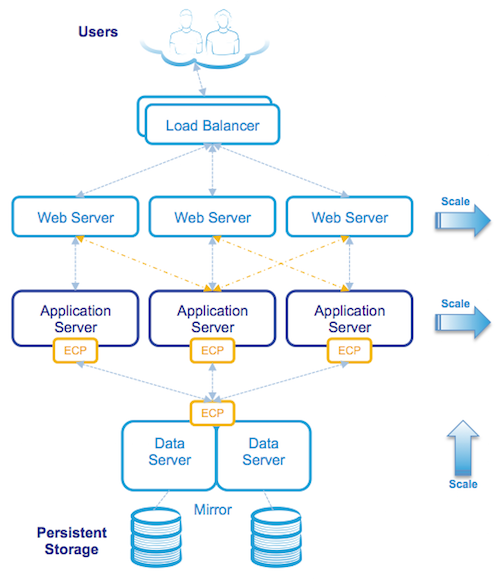
One of the great availability and scaling features of Caché is Enterprise Cache Protocol (ECP). With consideration during application development distributed processing using ECP allows a scale out architecture for Caché applications. Application processing can scale to very high rates from a single application server to the processing power of up to 255 application servers with no application changes.

ECP was used widely for many years in TrakCare deployments I was involved in. A decade ago a 'big' x86 server from one of the major vendors might only have a total of eight cores. For larger deployments ECP was a way to scale out processing on commodity servers rather than a single large and expensive big iron enterprise server. Even the high core count enterprise servers had limits so ECP was also used to scale deployments on them as well.

Today most new TrakCare deployments or upgrades to current hardware do not require ECP for scaling. Current two-socket x86 production servers can have dozens of cores and huge memory. We see that with recent Caché versions TrakCare -- and many other Caché applications -- have predictable linear scaling with the ability to support incremental increases in users and transactions as CPU core counts and memory increase in a single server. In the field I see most new deployments are virtualised, even then VMs can scale as needed up to the size of the host server. If resource requirements are more than a single physical host can provide then ECP is used to scale out.

  • Tip:For simplified management and deployment scale within a single server before deploying ECP.

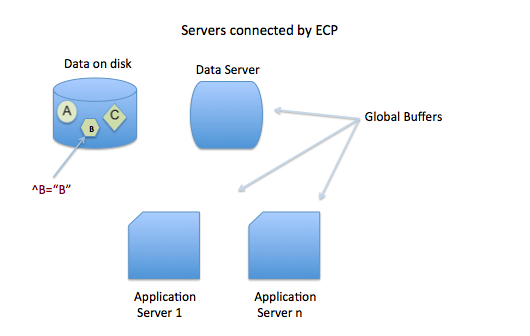
In this post I will show an example architecture and the basics of how ECP works then review performance considerations with a focus on storage.

Specific information on configuring ECP and application development is available in the online Caché Distributed Data Management Guide and there is an ECP learning track here on the community.

One of the other key features of ECP is increasing application availability, for details see the ECP section in the Caché high availability guide.


[A list of other posts in this series is here](https://community.intersystems.com/post/capacity-planning-and-performance-series-index)
# ECP Architecture Basics

The architecture and operation of ECP is conceptually simple, ECP provides a way to efficiently share data, locks, and executable code among multiple server systems. Viewed from the application server data and code are stored remotely on a Data server, but are cached in memory locally on the Application servers to provide efficient access to active data with minimal network traffic.

The Data server manages database reads and writes to persistent storage on disk while multiple Application servers are the workhorses of the solution performing most of the application processing.

Multi-tier architecture

ECP is a multi-tier architecture. There are different ways to describe processing tiers and the roles they perform, the following is what I find useful when describing web browser based Caché applications and is the model and terminology for my posts. I appreciate that there may be different ways to break down tiers, but for now lets use my way :)

A browser based application, for example using Caché Server Pages (CSP) uses a multi-tier architecture where presentation, application processing, and data management functions are logically separated. Logical 'servers' with different roles populate the tiers. Logical servers do not have to be kept on separate physical host or virtual servers, for cost effectiveness and manageability some or even all logical servers may be located on a single host or operating system instance. As deployments scale up servers may be split out to multiple physical or virtual hosts with ECP so spreading the processing workload as needed without change to the application.

Host systems may be physical or virtualised depending on your capacity and availability requirements. The following tiers and logical servers make up a deployment:

  • Presentation Tier: Includes the Web Server which acts as gateway between the browser-based clients and the application tier.
  • Application Tier: This is where the ECP Application server sits. As noted above this is a logical model where the application server does not have to be separate from the Data server, and are typically not required to be for all but the largest sites. This tier may also include other servers for specialised processing such as report servers.
  • Data Tier: This is where the Data server is located. The data server performs transaction processing and is the repository for application code and data stored in the Caché database. The Data Server is responsible for reading and writing to persistent disk storage.

Logical Architecture

The following diagram is a logical view of a browser based application when deployed as a three-tier architecture:

Although at first glance the architecture may look complicated it is still made up of the same components as a Caché system installed on a single server, but with the logical components installed on multiple physical or virtual servers. All communication between servers is via TCP/IP.

ECP Operation in the logical view

Starting from the top the diagram above shows users connecting securely to multiple load balanced web servers. The web servers pass CSP web page requests between the clients and the application tier (the Application servers) which perform any processing, allowing content to be created dynamically, and returns the completed page back to the client via the web server.

In this three-tier model application processing has been spread over multiple Application servers using ECP. The application simply treats the data (your application database) as if it was local to the Application server.

When an Application server makes a request for data it will attempt to satisfy the request from its local cache, if it cannot, ECP will request the necessary data from the Data server which may be able to satisfy the request from its own cache or if not will fetch the data from disk. The reply from the Data server to the Application server includes the database block(s) where that data was stored. These blocks are used and now cached on the Application server. ECP automatically takes care of managing cache consistency across the network and propagating changes back to the Data server. Clients enjoy fast responses because they frequently use locally cached data.

By default web servers communicate with a preferred Application server ensuring that the same Application server services subsequent requests for related data as the data is likely to already be in local cache.

  • Tip:As detailed in the Caché documentation avoid connecting users to application servers in a round-robin or load-balancing scheme wich impacts the benefit of caching on the application server. Ideally the same users or groups of users stay connected to the same application server.

The solution is scaled without user downtime at the Presentation Tier by adding web servers and at the Application Tier by adding additional Application servers. The Data tier is scaled by increasing CPU and memory on the Data servers.

Physical Architecture

The following diagram shows an example of physical hosts used in the same three-tier deployment as the three-tier logical architecture example:

Note that physical or virtualised hosts are deployed at each tier using an n+1 or n+2 model for 100% capacity in event of a host failure or scheduled maintenance. Because users are spread across multiple web and application servers, the failure of a single server affects a smaller population with users automatically reconnecting to one of the remaining servers.

The Data management tier is made highly available, for example located on a failover cluster (e.g. virtualization HA, InterSystems Database Mirroring, or traditional failover clustering) connected to one or more storage arrays. In the event of hardware or service failure clustering will restart the services on one of the surviving nodes in the cluster. As an added benefit, ECP has built-in resiliency and maintains transactional integrity in the event of a database node cluster failover, application users will observe a pause in processing until failover and automatic recovery completes and users then seamlessly resume without disconnection.

The same architecture can also be mapped to virtualised servers, for example VMware vSphere can be used to virtualise Application servers.

ECP Capacity Planning

As noted above the Data server manages database reads and writes to persistent disk while multiple Application servers are the workhorses of the solution performing most of the application processing. This is a key concept when considering system resource capacity planning, in summary:

  • The Data server (sometimes called the Database server) typically performs very little application processing so has low CPU requirements, but this server performs the majority of storage IO, so can have very high storage IOPS i.e. database reads and writes as well as journal writes (more on journal IO later).
  • The Application server performs most application processing so has high CPU requirements, but does very little storage IO.

Generally you size ECP server CPU, memory and IO requirements using the same rules as if you were sizing a very large single server solution while taking into account N+1 or N+2 servers for high availability.

Basic CPU and Storage sizing:

Imagine My_Application needs a peak 72 CPU cores for application processing (remember also accounting for headroom) and is expected to require 20,000 writes during write daemon cycle and a sustained peak 10,000 random database reads.

A simple back of the envelope sizing for virtual or physical servers is:

  • 4 x 32 CPU Application servers (3 servers + 1 for HA). Low IOPS requirements.
  • 2 x 10 CPU Data servers (Mirrored or Clustered for HA). Low latency IOPS requirement is 20K writes, 10K reads, plus WIJ and Journal.

Even though the Data server is doing very little processing it is sized at 8-10 CPUs to account for System and Caché processes. Application servers can be sized based on best price/performance per physical host and/or for availability. There will be some loss in efficiency as you scale out, but generally you can add processing in server blocks and expect a near linear increase in throughput. Limits are more likely to be found in storage IO first.

  • Tip:As usual for HA consider the effect of host, chassis or rack failures. When virtualising Application and Data servers on VMWare ensure vSphere DRS and affinity rules are applied to spread processing load and ensure availability.

Journal synchronisation IO requirements

An additional capacity planning consideration for ECP deployments is they require higher IO and impose a very stringent storage response time requiremenst to maintain scalability for journaling on the Data server due to journal synchronisation (a.k.a. a journal sync). Synchronisation requests can trigger writes to last block in the journal to ensure data durability.

Although your milage may vary; at a typical customer site running high transaction rates I often see journal write IOPS on non ECP configurations in the 10's per second. With ECP on a busy system you can see 100's to 1,000's of write IOPS on the journal disk because of the ECP imposed journal sync's.

  • Tip:If you display mgstat or look at mgstat in pButtons on a busy system you will see Jrnwrts (Journal Writes) which you will be accounting for in your storage IO resource planning. On an ECP Data server there are also Journal Synchronistion writes to the journals disk that are not displayed in mgstat, to see these you will need to look at operating system metrics for your journal disk, for example with iostat.

What are journal syncs?

Journal syncs are necessary for:

  • Ensuring data durability and recoverability in the event of a failure on the data server.
  • They also are triggers for ensuring cache coherency between application servers.

In non-ECP configurations modifications to a Caché database are written to journal buffers (128 x 64K buffers) which are written to journal files on disk by the journal daemon as they fill or every two seconds. Caché allocates 64k for an entire buffer, and these are always re-used instead of destroyed and recreated and Caché just keeps track of the ending offset. In most cases (unless there are a massive updates happening at once) the journal writes are very small.

In ECP systems there is also journal synchronisation. A journal sync can be defined as re-writing the relevant portion of the current journal buffer to disk to ensure the journal is always current on disk. So there are many re-writes of a portion of the same journal block (anywhere between 2k and 64k in size) from journal sync requests.

Events on an ECP client that can trigger a journal sync request are updates (SET or KILL), or a LOCK. For example for each SET or KILL the current journal buffer is written (or rewritten) to disk. On very busy systems journal syncs can be bundled or deferred into multiple sync requests in a single sync operation.

Capacity planning for journal syncs

For sustained throughput average write response time for journal sync must be:

  • <=0.5 ms with maximum of <=1 ms.

For more information see the IO requirements table in this post: Part 6 - Caché storage IO profile.

  • Tip:When using Caché Database Mirroring with ECP journal syncs are applied on both primary and backup mirror node journal disks. This should not be a concern as a rule of mirror configuration is both nodes will be configured as equals for storage IO.

You will have to validate specific IO metrics for you own systems, the aim of this section is to share with you that there are very strict response time requirements and understanding where to look for metrics.

Summary

This post is an orientation to ECP and additional metrics to consider during capacity planning. In the near future I hope we can share results of recent benchmarking of Caché and ECP on some very large systems. As usual please let me know if you have any questions or anything to add through the comments. On twitter @murray_oldfield

6
2 3492
Article Mark Bolinsky · Dec 5, 2016 26m read

Enterprises need to grow and manage their global computing infrastructures rapidly and efficiently while simultaneously optimizing and managing capital costs and expenses. Amazon Web Services (AWS) and Elastic Compute Cloud (EC2) computing and storage services meet the needs of the most demanding Caché based application by providing
 a highly robust global computing infrastructure.

0
3 8508
Article Murray Oldfield · Nov 12, 2016 5m read

Index

This is a list of all the posts in the Data Platforms’ capacity planning and performance series in order. Also a general list of my other posts. I will update as new posts in the series are added.


You will notice that I wrote some posts before IRIS was released and refer to Caché. I will revisit the posts over time, but in the meantime, Generally, the advice for configuration is the same for Caché and IRIS. Some command names may have changed; the most obvious example is that anywhere you see the ^pButtons command, you can replace it with ^SystemPerformance.


While some posts are updated to preserve links, others will be marked as strikethrough to indicate that the post is legacy. Generally, I will say, "See: some other post" if it is appropriate.


Capacity Planning and Performance Series

Generally, posts build on previous ones, but you can also just dive into subjects that look interesting.


Other Posts

This is a collection of posts generally related to Architecture I have on the Community.


Murray Oldfield Principle Technology Architect InterSystems

Follow the community or @murrayoldfield on Twitter

0
7 6484
Article Cindy Olsen · Nov 8, 2016 7m read

In this post I would like to talk about the syslog table.  I will cover what it is, how you look at it, what the entries really are, and why it may be important to you.  The syslog table can contain important diagnostic information.  If your system is having any problems, it is important to understand how to look at this table and what information is contained there.

1
2 2834
Article Murray Oldfield · Apr 1, 2016 3m read

A short post for now to answer a question that came up. In post two of this series I included graphs of performance data extracted from pButtons. I was asked off-line if there is a quicker way than cut/paste to extract metrics for mgstat etc from a pButtons .html file for easy charting in Excel.

See: - Part 2 - Looking at the metrics we collected

pButtons compiles data it collects into a single html file to make it easier to send to WRC and review the collated data. However, especially for pButtons run over long collection times like 24 hours, some of the time based data like mgstat, vmstat etc is easier to review graphically to look for trends or patterns.

I know it sounds crazy to roll up pButtons data into an html file then spend time unpacking it… but remember that pButtons is tool for WRC to grab a view of many system metrics to help trouble-shoot performance problems. The system level metrics and Caché metrics can be run individually, but it is convenient for me to use pButtons in this series to capture and analyse performance metrics because I know that all Caché installations will have a copy - or can download a copy - and all the basic metrics are available for different operating systems in a single file. It is also convenient for you to be able to capture these metrics every day with one simple routine if you are not collecting the data any other way.

Feb 2017. I have rewritten the scripts in this article in Python and added charting including interactive html. I think the Python utilities are much more useful . Please see Yape - Yet another pButtons extractor (and automatically create charts)

Extracting pButtons performance metrics to a csv file

Because I use an Apple laptop I have the Unix operating system, so its natural to write a quick shell script to extract the data to a csv file. The following script extracts mgstat, vmstat or Windows Performance Monitor data from a pButtons .html file. The example below uses Perl which is installed on most *nix systems, but there are endless possibilities using other scripting languages or powershell on Windows.

I will show you how I do the extraction so you have all the information you to do the same with your favourite tools. The key is that the html file has markers in the file to delimit the metrics. For example mgstat is bracketed by:

<!-- beg_mgstat -->

and

<!-- end_mgstat -->

In the mgstat section there is some other descriptor information, followed by the heading line of the mgstat output. There are similar markers for vmstat and win_perfmon.

This simple script simply looks for the beginning marker then outputs everything from the header line to the line before the end marker.

#!/usr/bin/perl

# extract_pButtons.pl - Simple extractor for pButtons

# usage: ./extract_pButtons.pl <input pButtons> <search start> <search first line output>

# pButtons has the following markers in the html source
# Metrics   					Parameters to pass
# --------  					-------------------
# mgstat						mgstat Date
# windows performance monitor	win_perfmon Time
# vmstat 						vmstat fre

# usage example - Search for mgstat and redirect to .csv file
# ./extract_pButtons.pl DB1_20160211_0001_24Hour_5Sec.html mgstat Date > myMgstatOutput.csv

# usage example - Process a set of html files          
# for i in $(ls *.html); do ./extract_pButtons.pl ${i} vmstat fre > ${i}.vmstat.csv ; done

# usage example - Pipeline to add commas 
# ./extract_pButtons.pl P570A_CACHE_20150418_0030_day.html vmstat fre | ./make_csv.pl >P570A_CACHE_20150418_0030_day.html.vmstat.csv

$filename=$ARGV[0];
$string=$ARGV[1];
$firstLine=$ARGV[2];

$searchBeg="beg_".$string;
$search2=$firstLine;
$foundEnd="end_".$string;

$foundString=0;
$printIt=0;
$break=0;

open HTMLFILEIN, "<".$filename or die "Bad input file";

while (<HTMLFILEIN>) {

	if (/$searchBeg/) {
			$foundString=1;
		}

	# Look for first actual line - use something on header line
	if (($foundString==1) && (/$search2/)) {
			$printIt=1;
		}
 
	 # No more data	
	if (/$foundEnd/) {
			$break=1;
		}

	if ($break==0) {
	
		if ($printIt==1) {
			print;
		}
	}	

}

close HTMLFILEIN;

As shown in the # comments at the start of the script extract_pButtons.pl can either output data to the screen or redirect output to a csv file or use pipelining in a longer workflow, for example to charting utilities. I use open source gnuplot, but excel is OK as well.

Add commas to space delimited text file

The following short perl script is handy to turn the output of vmstat or other text file to a comma delimited file for easier processing.

#!/usr/bin/perl

# Convert space delimited text file to csv

# Usage example 1: 
# Will create backup file vmstat.csv.bak and original file called vmstat.csv will be updated
# ./make_csv.pl freecnt.csv


# Usage example 2:
# No backup, original vmstat.txt file stays same, new output csv file
# ./make_csv.pl < vmstat.txt >freecnt.csv


use strict;

# create .bak backup file for each change
$^I = ".bak";


while (<>) {
	# remove leading blanks; substitute 1 or more blanks for a single comma
	s/^ +//;s/ +/,/g;
	print;
 }

Summary

I encourage you to look at the .html source of the pButtons file to get an idea of what it contains. There is more than just the system metrics. For example you will see a list of the commands run by pButtons and version information at the top of the .html file.

If you use a windows script for extracting or charting data or have a better or different workflow I encourage you to share with a post to the Developer Community.

2
0 1577
Article Benjamin De Boe · Nov 3, 2016 16m read

This article contains the tutorial document for a Global Summit academy session on Text Categorization and provides a helpful starting point to learn about Text Categorization and how iKnow can help you to implement Text Categorization models. This document was originally prepared by Kerry Kirkham and Max Vershinin and should work based on the sample data provided in the SAMPLES namespace.

0
1 759
Article Murray Oldfield · Sep 30, 2016 1m read

I saw someone recently refer to ECP as magic. It certainly seems so, and there is a lot of very clever engineering to make it work. But the following sequence of diagrams is a simple view of how data is retrieved and used across a distributed architecture.

For more more on ECP including capacity planning follow this link: Data Platforms and Performance - Part 7 ECP for performance, scalability and availability

To start

  • There are three globals on disk ^A, ^B and ^C.
  • Global ^B equals "B"
  • There is one Data server and two or more Application servers.
  • The diagrams show the cache (global buffers) on each server.


A user on Application server 1 requests the contents of ^B, and the sequence starts, see if you can follow along.


For more more on ECP including capacity planning follow this link: Data Platforms and Performance - Part 7 ECP for performance, scalability and availability

0
0 1310
Article Benjamin De Boe · Sep 9, 2016 4m read

In a conference call earlier this week, a customer described how they built an iKnow domain with clinical notes and now wanted to filter the contents of that domain based on the patient's diagnosis codes. With such filters, they wanted to explore the corellations between iKnow entities and certain diagnosis codes, first through the Knowledge Portal to get a good sense of the sort of entities and then through more analytical means with the aim of eventually building smart early warning systems.

0
0 300
Article Benjamin De Boe · Aug 4, 2016 7m read

In previous articles on iKnow, we described a number of demo applications (iKnow demo apps parts 1234 & 5) that are either part of the regular kit or can be easily installed from GitHub. All of those applications assumed you already had your iKnow domain ready, with your data of interest loaded and ready for exploration. In this article, we'll shed more light on how exactly you can get to that stage: how you define and then build a domain.

0
0 986
Article Mark Bolinsky · Jul 1, 2016 17m read

++Update: August 2, 2018

This article provides a reference architecture as a sample for providing robust performing and highly available applications based on InterSystems Technologies that are applicable to Caché, Ensemble, HealthShare, TrakCare, and associated embedded technologies such as DeepSee, iKnow, Zen and Zen Mojo.

Azure has two different deployment models for creating and working with resources: Azure Classic and Azure Resource Manager. The information detailed in this article is based on the Azure Resource Manager model (ARM).

4
0 12483
Article Mark Bolinsky · Feb 3, 2016 2m read

During recent large scale benchmarking activities, we were seeing excessive %sys CPU time that negatively impacted scaling of the application.

Problem

We have found that a lot of the time was spent in the localtime() system call due to the TZ environment variable not being set.  A simple test routine was created to confirm the observation, and the elapse time differences and CPU resources needed with TZ set versus TZ not set were astonishing.  It was discovered that the inherit use of stat() system calls to /etc/local_time from localtime() are very expensive when TZ is not set.

Recommendation

5
0 2893
Article Erik Hemdal · Jun 17, 2016 5m read

Setting the TZ Environment Variable on Linux

The Update Checklist for v2015.1 recommends setting the TZ environment variable on Linux platforms and points to the manpage for tzset. This is recommended to improve the performance of Cache’s time-related functions. You can find out more about this here:

https://community.intersystems.com/post/linux-tz-environment-variable-not-being-set-and-impact-caché

The manpage on my CentOS 7 test system (RHEL 6 says the same) has this to say:

0
0 139831
Article Alexander Koblov · May 20, 2016 12m read

Order is a necessity for everyone, but not everyone understands it in the same way (Fausto Cercignani)

Disclaimer: This article uses Russian language and Cyrillic alphabet as examples, but is relevant for anyone who uses Caché in a non-English locale.Please note that this article refers mostly to NLS collations, which are different than SQL collations. SQL collations (such as SQLUPPER, SQLSTRING, EXACT which means no collation, TRUNCATE, etc.) are actual functions that are explicitly applied to some values, and whose results are sometimes explicitly stored in the global subscripts. When stored in subscripts, these values would naturally follow the NLS collation in effect (“SQL and NLS Collations”).

Everything in Caché is stored in globals: data, metadata, classes, routines. Globals are persistent. Global nodes are ordered by subscript values, and stored on storage devices, not in insertion order, but in sorted order for better search and disk fetch performance:

USER>set ^a(10)=""
USER>set ^a("фф")=""
USER>set ^a("бб")=""
USER>set ^a(2)=""
USER>zwrite ^a
^a(2)=""
^a(10)=""
^a("бб")=""
^a("фф")=""

During sorting, Caché distinguishes numbers and strings — 2 is treated as number and sorts before 10. Command ZWrite and functions $Order and $Query return global subscripts in the same order these subscripts are stored: first empty string (you cannot use it as subscript), then negative numbers, zero, positive numbers, then strings in the order defined by collation (collation).

Standard collation in Caché is called (unsurprisingly) — Caché standard. It sorts each string accordingly to their Unicode character codes.

Collation for local arrays in current process is defined by locale (Management Portal > System administration > Configuration > System Configuration > National Language Settings > Locale Definitions). Russian locale for Caché Unicode installations is rusw, and default collation for rusw is Cyrillic3. Other possible collations in the rusw locale are Caché standard, Cyrillic1, Cyrillic3, Cyrillic4, Ukrainian1.

ClassMethod ##class(%Collate).SetLocalName() sets collation for local arrays in current process:

USER>write ##class(%Collate).GetLocalName()
Cyrillic3
USER>write ##class(%Collate).SetLocalName("Cache standard")
1
USER>write ##class(%Collate).GetLocalName()
Cache standard
USER>write ##class(%Collate).SetLocalName("Cyrillic3")
1
USER>write ##class(%Collate).GetLocalName()
Cyrillic3

For every collation, there is a fellow collation that sorts numbers as strings. Name of that collation contains “ string” in the end:

USER>write ##class(%Collate).SetLocalName("Cache standard string")
1
USER>kill test
 
USER>set test(10) = "", test(2) = "", test("фф") = "", test("бб") = ""
 
USER>zwrite test
test(10)=""
test(2)=""
test("бб")=""
test("фф")=""
 
USER>write ##class(%Collate).SetLocalName("Cache standard")
1
USER>kill test
 
USER>set test(10) = "", test(2) = "", test("фф") = "", test("бб") = ""

USER>zwrite test
test(2)=""
test(10)=""
test("бб")=""
test("фф")=""

Caché standard and Cyrillic3

Caché standard sorts characters accordingly to their codes:

 write ##class(%Library.Collate).SetLocalName("Cache standard"),!
 write ##class(%Library.Collate).GetLocalName(),!
 set letters = "абвгдеёжзийклмнопрстуфхцчщщьыъэюя"
 set letters = letters _ $zconvert(letters,"U")
 kill test

 //fill local array “test” with data
 for i=1:1:$Length(letters) {
     set test($Extract(letters,i)) = ""
 }
 
 //print test subscripts in sorted order
 set l = "", cnt = 0
 for  {
     set l = $Order(test(l))
     quit:l=""
     write l, " ", $Ascii(l),","
     set cnt = cnt + 1
     write:cnt#8=0 !
 }

USER>do ^testcol
1
Cache standard
Ё 1025,А 1040,Б 1041,В 1042,Г 1043,Д 1044,Е 1045,Ж 1046,
З 1047,И 1048,Й 1049,К 1050,Л 1051,М 1052,Н 1053,О 1054,
П 1055,Р 1056,С 1057,Т 1058,У 1059,Ф 1060,Х 1061,Ц 1062,
Ч 1063,Щ 1065,Ъ 1066,Ы 1067,Ь 1068,Э 1069,Ю 1070,Я 1071,
а 1072,б 1073,в 1074,г 1075,д 1076,е 1077,ж 1078,з 1079,
и 1080,й 1081,к 1082,л 1083,м 1084,н 1085,о 1086,п 1087,
р 1088,с 1089,т 1090,у 1091,ф 1092,х 1093,ц 1094,ч 1095,
щ 1097,ъ 1098,ы 1099,ь 1100,э 1101,ю 1102,я 1103,ё 1105,

Cyrillic letters are printed in the same order they go in Russian alphabet, except ‘ё’ and ‘Ё’. Their Unicode character codes are out of order. ‘Ё’ should be collated between ‘Е’ and ‘Д’ and ‘ё’ between ‘е’ and ‘д‘. That’s why Russian locale needs its own collation — Cyrillic3, which has letters in the same order as in Russian alphabet:

USER>do ^testcol
1
Cyrillic3
А 1040,Б 1041,В 1042,Г 1043,Д 1044,Е 1045,Ё 1025,Ж 1046,
З 1047,И 1048,Й 1049,К 1050,Л 1051,М 1052,Н 1053,О 1054,
П 1055,Р 1056,С 1057,Т 1058,У 1059,Ф 1060,Х 1061,Ц 1062,
Ч 1063,Щ 1065,Ъ 1066,Ы 1067,Ь 1068,Э 1069,Ю 1070,Я 1071,
а 1072,б 1073,в 1074,г 1075,д 1076,е 1077,ё 1105,ж 1078,
з 1079,и 1080,й 1081,к 1082,л 1083,м 1084,н 1085,о 1086,
п 1087,р 1088,с 1089,т 1090,у 1091,ф 1092,х 1093,ц 1094,
ч 1095,щ 1097,ъ 1098,ы 1099,ь 1100,э 1101,ю 1102,я 1103,

Caché ObjectScript has a special binary operator ]] — «sorts after». It returns 1, if subscript with first operand sorts after subscript with second operand, and 0 otherwise:

USER>write ##class(%Library.Collate).SetLocalName("Cache standard"),!
1
USER>write "А" ]] "Ё"
1
USER>write ##class(%Library.Collate).SetLocalName("Cyrillic3"),!
1
USER>write "А" ]] "Ё"
0

Globals and collations

Different globals in the same database may have different collation. Each database has a configuration option — default collation for new globals. Right after the installation all databases except USER use the default collation of Caché standard. Default collation for USER database is determined by installation locale. For rusw it is Cyrillic3.

To create a global with collation that is non-default for its database use ##class(%GlobalEdit).Create method:

USER>kill ^a
USER>write ##class(%GlobalEdit).Create(,"a",##class(%Collate).DisplayToLogical("Cache standard"))

There is a collation column for each global In list of globals in Management Portal (System Explorer > Globals).

You cannot change collation of existing global. You should create global with new collation and copy data with Merge command. To do mass conversion of globals use ##class(SYS.Database).Copy()

Cyrillic4, Cyrillic3, and umlauts

It turns out that conversion of string subscript to internal format takes noticeably more time with Cyrillic3 collation than with Caché standard collation, therefore insert and lookup for global (or local) array with Cyrliic3 collation is slower. Caché 2014.1 contains new collation — Cyrillic4 that has the same correct order of letters as Cyrillic3 and better performance.

for collation="Cache standard","Cyrillic3","Cyrillic4" {
     write ##class(%Library.Collate).SetLocalName(collation),!
     write ##class(%Library.Collate).GetLocalName(),!
     do test(100000)
 }
 quit
test(C)
 set letters = "абвгдеёжзийклмнопрстуфхцчщщьыъэюя"
 set letters = letters _ $zconvert(letters,"U")
 
 kill test
 write "test insert: "
 //fill local array “test” with data
 set z1=$zh
 for c=1:1:C {
     for i=1:1:$Length(letters) {
         set test($Extract(letters,i)_"плюс длинное русское слово" _ $Extract(letters,i)) = ""
     }
 }
 write $zh-z1,!
 
 //looping through test subscripts
 write "test $Order: "
 set z1=$zh
 for c=1:1:C {
     set l = ""
     for  {
         set l = $Order(test(l))
         quit:l=""
     }
 }
 write $zh-z1,!

USER>do ^testcol
1
Cache standard
test insert: 1.520673
test $Order: 2.062228
1
Cyrillic3
test insert: 3.541697
test $Order: 5.938042
1
Cyrillic4
test insert: 1.925205
test $Order: 2.834399

Cyrillic4 is not the default collation for rusw locale yet, but you can define your own locale based on rusw and specify Cyrillic4 as default collation for local arrays. Or you can set Cyrillic4 as the default new collation for globals in database settings.

Cyrillic3 is slower than Caché standard and Cyrillic4 because it is based on algorithm that is more general than sorting two strings based on individual character codes.

In German language letter ß should be collated as ss during sorting. Caché respects that rule:

USER>write ##class(%Collate).GetLocalName()
German3
USER>set test("Straßer")=1
USER>set test("Strasser")=1
USER>set test("Straster")=1
USER>zwrite test
test("Strasser")=1
test("Straßer")=1
test("Straster")=1

Please notice the sorting order of strings in subscripts. Particularly, that first four letters of first string are “Stras”, then “Straß”, and then again “Stras”. It is impossible to sort strings in that manner if collation is just a sorting based on the codes of separate characters.

Another example is the Finnish language where ’v’ and ‘w’ should be collated as the same letter. Russian language collation rules are simpler — giving each letter some particular code and then sorting by these codes is enough. That allowed to improve performance of collation Cyrillic4 over Cyrillic3.

Collation and SQL

Don’t confuse collation of array with SQL collation. The latter one is conversion applied to the string before comparison or using it as a subscript in index global. Default SQL Collation in Caché is SQLUPPER. This collation converts all characters to uppercase, removes space characters and adds one space at the beginning of the string. Other SQL Collations (EXACT, SQLSTRING, TRUNCATE) are described in the documentation.

It’s easy to mess things up when different globals in the same database have different collation, and local arrays have other collation. SQL uses CACHETEMP database for temporary data. Default collation for globals in CACHETEMP might be different from collation for Caché installation locale.

There is one main rule — for ORDER BY in SQL queries to return rows in expected order, collation of globals where data and indexes of relevant tables are stored should be the same as the default collation of CACHETEMP database and collation of local arrays. For more details — see the paragraph in documentation “SQL and NLS Collations”.

Let’s create test class:

Class Collation.test Extends %Persistent
{

Property Name As %String;

Property Surname As %String;

Index SurInd On Surname;

ClassMethod populate()
{
    do ..%KillExtent()
    
    set t = ..%New()
    set t.Name = "Павел", t.Surname = "Ёлкин"
    write t.%Save()
    
    set t = ..%New()
    set t.Name = "Пётр", t.Surname = "Иванов"
    write t.%Save()

    set t = ..%New()
    set t.Name = "Прохор", t.Surname = "Александров"
    write t.%Save()
}

}

Populate class with data (later you can try to use words from the previous example with the German language):

USER>do ##class(Collation.test).populate()

Run the query:

![](https://community.intersystems.com/sites/default/files/inline/images/0-order-by-name-wrong.png)

That is the unexpected result. The main question is why names are not ordered alphabetically? (Павел, Пётр, Прохор)? Let’s look at query plan:

![](https://community.intersystems.com/sites/default/files/inline/images/1-order-by-name-plan.png)

Key words in this plan are “populates temp-file”. SQL engine decided to use temporary structure to run this query. Although called “file”, really this is process-private global and in some cases local array. Subscripts of this global are values to order by, in this particular case — person names. Process-private globals are stored in CACHETEMP database and default collation for new globals in CACHETEMP is Caché standard.

Another reasonable question is why ‘ё’ is returned at the top and not at the bottom (remember, in Caché Standard ‘ё’ is sorted after all Russian letters and ‘Ё’ — before). Subscripts of temporary global are not exact value of Name field, but uppercased values of Name (SQLUPPER is default SQL collation for strings), and therefore ‘Ё’ is returned before other characters.

Modifying default collation using %Exact function, we would receive still incorrect, but at least expected result with ‘ё’ sorted after other letters.

![](https://community.intersystems.com/sites/default/files/inline/images/2-order-by-exact-name.png)

For now, let’s not change default collation of CACHETEMP — let’s check queries with Surname column. Index on this column is stored in ^Collation.testI global. Collation of that global is Cyrillic3, so we should see correct row order:

![](https://community.intersystems.com/sites/default/files/inline/images/3-order-by-surname-wrong.png)

Wrong again — ‘Ё’ should go between ‘А’ and ‘И’. Look at the query plan:

![](https://community.intersystems.com//sites/default/files/inline/images/4-order-by-surname-plan.png)

Index data is not enough to output original values of Surname field because SQLUPPER is applied to values in SurInd index. SQL Engine decided to use values from the table itself and sort values in temporary file, just like it did before with Name column.

We can state in the query that we are OK with surnames in uppercase. The order will be correct because rows will be taken directly from index global ^Collation.testI:

![](https://community.intersystems.com//sites/default/files/inline/images/5-order-by-surname-sqlupper.png)

Query plan is as expected:

![](https://community.intersystems.com//sites/default/files/inline/images/6-order-by-surname-sqlupper-plan.png)

Now let’s do what we should have been done long ago — change default collation of CACHETEMP database to Cyrillic3 (or Cyrillic4).

Queries that use temporary files will output rows in correct order:

![](https://community.intersystems.com//sites/default/files/inline/images/7-order-by-name-ok.png)
![](https://community.intersystems.com//sites/default/files/inline/images/8-order-by-surname-ok.png)

Summary

  • If you don’t care for nuances of local alphabets — use collation Caché standard.
  • Some collations (Cyrillic4) have better performance than others (Cyrillic3).
  • Check that CACHETEMP has the same collation as your main database and local arrays.
7
1 3115
Article Alexander Koblov · Jan 29, 2016 9m read

The object and relational data models of the Caché database support three types of indexes, which are standard, bitmap, and bitslice. In addition to these three native types, developers can declare their own custom types of indexes and use them in any classes since version 2013.1. For example, iFind text indexes use that mechanism.

1
1 2253