Article Davi Massaru Teixeira Muta · Oct 11, 2025 9m read

Technical Documentation — Quarkus IRIS Monitor System

1. Purpose and Scope

This module enables integration between Quarkus-based Java applications and InterSystems IRIS’s native performance monitoring capabilities.
It allows a developer to annotate methods with @PerfmonReport, which triggers IRIS’s ^PERFMON routines automatically around method execution, generating performance reports without manual intervention.


2. System Components

2.1 Annotation: @PerfmonReport

  • Defined as a CDI InterceptorBinding.
  • Can be applied to methods or classes.
  • Directs the framework to wrap method execution with IRIS monitoring logic.

2.2 Interceptor: PerfmonReportInterceptor

  • Intercepts calls to annotated methods.

  • Execution flow:

    1. Log start event (LOG.infof("INIT: …"))
    2. Call monitorSystem.startPerfmon()
    3. Proceed with context.proceed()
    4. In a finally block:
      • Call monitorSystem.generateReportPerfmon(...)
      • Call monitorSystem.stopPerfmon()
      • Log end event with execution time
  • Ensures that monitoring is always ended, even if an exception is thrown.

2.3 DAO Bean: MonitorSystem

  • CDI bean annotated with @ApplicationScoped.

  • Holds a single instance of IRIS initialized at startup.

  • Configuration injected via @ConfigProperty (JDBC URL, user, password).

  • Uses DriverManager.getConnection(...) to obtain a raw IRISConnection.

  • Contains methods:

    • startPerfmon()
    • generateReportPerfmon(String reportName)
    • stopPerfmon()
  • Each calls the appropriate ObjectScript methods in iris.src.dc.AdapterPerfmonProc via iris.classMethodVoid(...).

2.4 ObjectScript Adapter: iris.src.dc.AdapterPerfmonProc

  • Defines the routines that encapsulate ^PERFMON logic:

      Class iris.src.dc.AdapterPerfmonProc Extends %RegisteredObject
      {
          ClassMethod start() As %Status
          {
              Set namespace = $NAMESPACE
              zn "%SYS"
              set status = $$Stop^PERFMON()
              set status = $$Start^PERFMON()
              zn namespace
              return status
          }
    
          ClassMethod generateReport(nameReport As %String = "report.txt") As %Status
          {
              Set namespace = $NAMESPACE
              zn "%SYS"
              Set tempDirectory = ##class(%SYS.System).TempDirectory()
              set status = $$Report^PERFMON("R","R","P", tempDirectory_"/"_nameReport)
              zn namespace
    
              return status
          }
    
          ClassMethod stop() As %Status
          {
              Set namespace = $NAMESPACE
              zn "%SYS"
              Set status = $$Stop^PERFMON()
              zn namespace
    
              return status
          }
      }
    
  • Operates in namespace %SYS to access ^PERFMON routines, then returns to the original namespace.


3. Execution Flow

  1. A request enters the Quarkus application.

  2. The CDI interceptor detects the @PerfmonReport annotation and intercepts the method call.

  3. monitorSystem.startPerfmon() is invoked, triggering IRIS ^PERFMON monitoring.

  4. The business method executes normally (data access, transformations, logic, etc.).

  5. After the method returns or throws an exception, the interceptor ensures:

    • monitorSystem.generateReportPerfmon(...) is called to create a .txt performance report.
    • monitorSystem.stopPerfmon() is executed to stop the monitoring session.
    • The total Java-side execution time is logged using Logger.infof(...).
  6. The generated report file is stored in the IRIS temporary directory, typically: /usr/irissys/mgr/Temp/

    • The file name follows the pattern: <ClassName><MethodName><timestamp>.txt

4. Technical Challenges and Solutions

ChallengeSolution
ClassCastException when using pooled JDBC connectionsUse DriverManager.getConnection(...) to obtain a native IRISConnection instead of the pooled ConnectionWrapper.
Overhead from repeatedly opening connectionsMaintain a single IRIS instance within an @ApplicationScoped bean, initialized via @PostConstruct.
Ensuring ^PERFMON is always stopped even on exceptionsUse try-finally in the interceptor to call stopPerfmon() and generateReportPerfmon().
Configuration portabilityInject connection settings (jdbc.url, username, password) using @ConfigProperty and application.properties.
Managing concurrent monitor sessionsAvoid annotating highly concurrent endpoints. Future versions may implement session-level isolation.

5. Use Cases and Benefits

  • Enables real-time visibility into IRIS runtime activity from Java code.
  • Simplifies performance analysis and query optimization for developers.
  • Useful for benchmarking, profiling, and system regression testing.
  • Can serve as a lightweight performance audit trail for critical operations.

6. Practical Example of Use

The complete source code and deployment setup are available at:


6.1 Overview

The application runs a Quarkus server connected to an InterSystems IRIS instance configured with the FHIRSERVER namespace.
The ORM layer is implemented using Hibernate ORM with PanacheRepository, allowing direct mapping between Java entities and IRIS database classes.

When the application starts (via docker-compose up), it brings up:

  • The IRIS container, hosting the FHIR data model and ObjectScript routines (including AdapterPerfmonProc);
  • The Quarkus container, exposing REST endpoints and connecting to IRIS via the native JDBC driver.

6.2 REST Endpoint

A REST resource exposes a simple endpoint to retrieve patient information:

@Path("/patient")
public class PatientResource {

    @Inject
    PatientService patientService;

    @GET
    @Path("/info")
    @Produces(MediaType.APPLICATION_JSON)
    public PatientInfoDTO searchPatientInfo(@QueryParam("key") String key) {
        return patientService.patientGetInfo(key);
    }
}

This endpoint accepts a query parameter (key) that identifies the patient resource within the FHIR data repository.


### 6.3 Service Layer with @PerfmonReport

The PatientService class contains the business logic to retrieve and compose patient information. It is annotated with @PerfmonReport, which means each request to /patient/info triggers IRIS performance monitoring:

@ApplicationScoped
public class PatientService {

    @Inject
    PatientRepository patientRepository;

    @PerfmonReport
    public PatientInfoDTO patientGetInfo(String patientKey) {

        Optional<Patient> patientOpt = patientRepository.find("key", patientKey).firstResultOptional();
        Patient patient = patientOpt.orElseThrow(() -> new IllegalArgumentException("Patient not found"));

        PatientInfoDTO dto = new PatientInfoDTO();
        dto.setKey(patient.key);
        dto.setName(patient.name);
        dto.setAddress(patient.address);
        dto.setBirthDate(patient.birthDate != null ? patient.birthDate.toString() : null);
        dto.setGender(patient.gender);
        dto.setMedications(patientRepository.findMedicationTextByPatient(patientKey));
        dto.setConditions(patientRepository.findConditionsByPatient(patientKey));
        dto.setAllergies(patientRepository.findAllergyByPatient(patientKey));

        return dto;
    }
}

6.4 Execution Flow

A request is made to: GET /patient/info?key=Patient/4

Quarkus routes the request to PatientResource.searchPatientInfo().

The CDI interceptor detects the @PerfmonReport annotation in PatientService.patientGetInfo().

Before executing the service logic:

  • The interceptor invokes MonitorSystem.startPerfmon(), which calls the IRIS class iris.src.dc.AdapterPerfmonProc.start().

  • The method executes business logic, querying patient data using Hibernate PanacheRepository mappings.

After the method completes:

  • MonitorSystem.generateReportPerfmon() is called to create a performance report.

  • MonitorSystem.stopPerfmon() stops the IRIS performance monitor.

A .txt report is generated under: usr/irissys/mgr/Temp/

Example filename: PatientService_patientGetInfo_20251005_161906.txt

6.5 Result

The generated report contains detailed IRIS runtime statistics, for example:

                         Routine Activity by Routine

Started: 10/11/2025 05:07:30PM                    Collected: 10/11/2025 05:07:31PM

Routine Name                        RtnLines  % Lines   RtnLoads  RtnFetch  Line/Load Directory
----------------------------------- --------- --------- --------- --------- --------- ---------
Other                                     0.0       0.0       0.0       0.0         0
PERFMON                                  44.0       0.0       0.0       0.0         0 /usr/irissys/mgr/
%occLibrary                         3415047.0      34.1   48278.0       0.0      70.7 /usr/irissys/mgr/irislib/
iris.src.dc.AdapterPerfmonProc.1          7.0       0.0       2.0       0.0       3.5 /usr/irissys/mgr/FHIRSERVER/
%occName                            5079994.0      50.7       0.0       0.0         0 /usr/irissys/mgr/irislib/
%apiDDL2                            1078497.0      10.8   63358.0       0.0      17.0 /usr/irissys/mgr/irislib/
%SQL.FeatureGetter.1                 446710.0       4.5   66939.0       0.0       6.7 /usr/irissys/mgr/irislib/
%SYS.WorkQueueMgr                       365.0       0.0       1.0       0.0     365.0 /usr/irissys/mgr/
%CSP.Daemon.1                            16.0       0.0       1.0       0.0      16.0 /usr/irissys/mgr/irislib/
%SYS.TokenAuth.1                         14.0       0.0       5.0       0.0       2.8 /usr/irissys/mgr/
%Library.PosixTime.1                      2.0       0.0       0.0       0.0         0 /usr/irissys/mgr/irislib/
%SYS.sqlcq.uEXTg3QR7a7I7Osf9e8Bz...      52.0       0.0       1.0       0.0      52.0 /usr/irissys/mgr/
%SYS.SQLSRV                              16.0       0.0       0.0       0.0         0 /usr/irissys/mgr/
%apiOBJ                                 756.0       0.0       0.0       0.0         0 /usr/irissys/mgr/irislib/
FT.Collector.1                            0.0       0.0       0.0       0.0         0 /usr/irissys/mgr/
SYS.Monitor.FeatureTrackerSensor.1        0.0       0.0       0.0       0.0         0 /usr/irissys/mgr/
%SYS.Monitor.Control.1                    0.0       0.0       0.0       0.0         0 /usr/irissys/mgr/
%SYS.DBSRV.1                            252.0       0.0       4.0       0.0      63.0 /usr/irissys/mgr/
%sqlcq.FHIRSERVER.cls12.1                19.0       0.0       0.0       0.0         0 /usr/irissys/mgr/irislocaldata/
%sqlcq.FHIRSERVER.cls13.1                74.0       0.0       0.0       0.0         0 /usr/irissys/mgr/irislocaldata/
%sqlcq.FHIRSERVER.cls14.1                74.0       0.0       0.0       0.0         0 /usr/irissys/mgr/irislocaldata/
%sqlcq.FHIRSERVER.cls15.1                52.0       0.0       0.0       0.0         0 /usr/irissys/mgr/irislocaldata/
%SYS.System.1                             1.0       0.0       0.0       0.0         0 /usr/irissys/mgr/

This data provides precise insight into what routines were executed internally by IRIS during that REST call — including SQL compilation, execution, and FHIR data access.

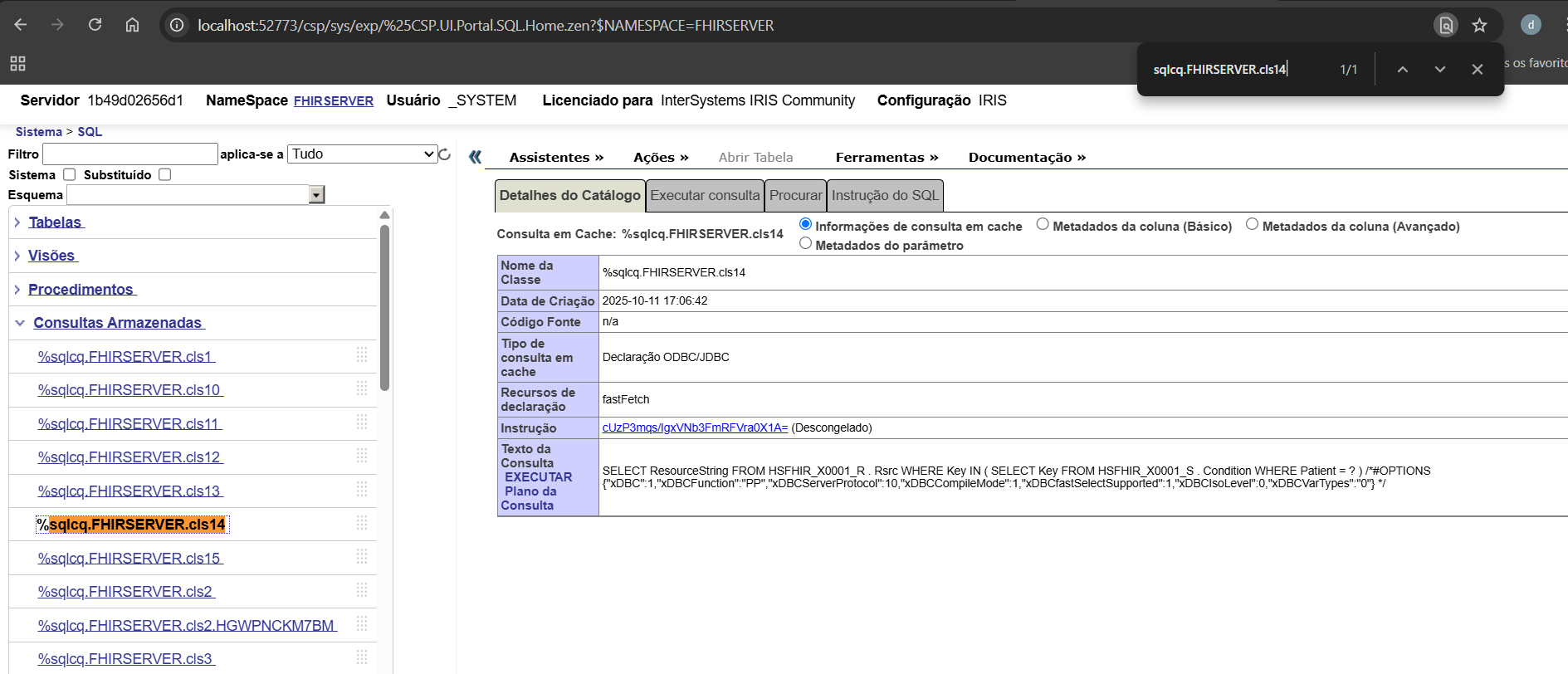
Insight: The %sqlcq.FHIRSERVER.* routines capture all SQL cache queries executed by Quarkus within the method. Monitoring these routines allows developers to analyze query execution, understand code behavior, and identify potential performance bottlenecks. This makes them a powerful tool for development and debugging of FHIR-related operations.
image

6.6 Summary

This example demonstrates how a standard Quarkus service can transparently leverage IRIS native monitoring tools using the @PerfmonReport annotation. It combines:

  • CDI interceptors (Quarkus)

  • Hibernate PanacheRepositories (ORM)

  • IRIS native ObjectScript routines (^PERFMON)

The result is a fully automated and reproducible performance profiling mechanism that can be applied to any service method in the application.

1
0 44
Question Davi Massaru Teixeira Muta · Nov 21, 2024

Is it possible to check retroactive LOCK history?
 

context:

I found it in the application error log. Some LOCK errors - ERROR #5803
Is it possible to somehow identify the point in the job or process code that caused these locks?

At the moment I no longer have table LOCKS on the server, but I would like, if possible, to check the time at which the incidents occurred.

1
0 150
Question Davi Massaru Teixeira Muta · Sep 3, 2024

I encountered an unexpected behavior while working with the $ZTIMEH and $ZTIME functions, specifically with times between 12:00 and 13:00. Here's what I observed:

W $ZTIMEH("08:50:38.975411826")
Output: 31838 

W $ZTIME(31838,1)
Output: 08:50:38
 

This behavior is correct as $ZTIME returns the expected time of 08:50:38.

However, with the following example:
 

W $ZTIMEH("12:05:38.975411826")
Output: 338

W $ZTIME(338,1)
Output: 00:05:38
 

This seems incorrect to me. $ZTIME should have returned 12:05:38, but instead it returns 00:05:38.

2
0 142
Article Davi Massaru Teixeira Muta · Apr 10, 2024 3m read

If you have system tables implementing the "VERSIONPROPERTY" functionality, you may encounter error 5800. This article explains how this error occurs and provides solutions to resolve the issue.

When version checking is implemented, the property specified by VERSIONPROPERTY is automatically incremented each time an instance of the class is updated (either by objects or SQL).

For example:

ClassMethod RunVersionChange() As %Status
{
    Set sample = ##class(dado.TblSample).%OpenId("42")
    Write !,"VERSIONPROPERTY value: "_ sample.VersionCheck
    
    Do sample.StatusSetObjectId("AL")
    DO sample.%Save()
    WRITE !,!,"SAVED",!

    Write !,"VERSIONPROPERTY value: "_ sample.VersionCheck
}

After executing the %Save() command, the VersionCheck property of the object was incremented by 1.

This feature is useful for performing evaluations and audits of database records.

In CACHÉ/IRIS, the same object extending a %Persistent class can have its OREF sharing within the same process.

For example:

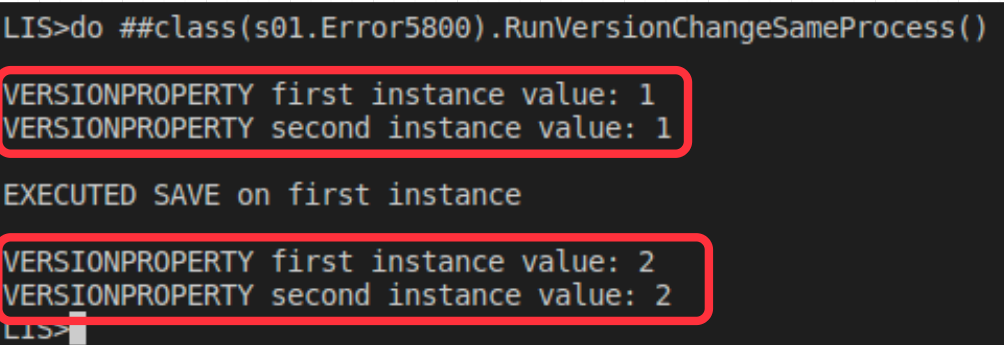
ClassMethod RunVersionChangeSameProcess() As %Status
{
    Set firstInstance = ##class(dado.TblSample).%OpenId("42")
    Set secondInstance = ##class(dado.TblSample).%OpenId("42")

    Write !,"VERSIONPROPERTY first instance value: "_ firstInstance.VersionCheck
    Write !,"VERSIONPROPERTY second instance value: "_ secondInstance.VersionCheck
    
    Do firstInstance.StatusSetObjectId("QR")
    Do firstInstance.%Save()
    WRITE !,!,"EXECUTED SAVE on first instance ",!

    Write !,"VERSIONPROPERTY first instance value: "_ firstInstance.VersionCheck
    Write !,"VERSIONPROPERTY second instance value: "_ secondInstance.VersionCheck
}

This implies that, as long as they are in the same process, the VersionCheck defined in VERSIONPROPERTY of the dado.TblSample table will always be up-to-date across its instances.

However, when making a change in different processes, the same behavior is not true, as demonstrated in the example:

ClassMethod RunVersionChangeTwoProcess() As %Status
{
    Set sample = ##class(dado.TblSample).%OpenId("42")

    Try {
        Do sample.StatusSetObjectId("AL")
        $$$THROWONERROR(sc,sample.%Save())

        Write !,"VERSIONPROPERTY BEFORE EXECUTING JOB: "_ sample.VersionCheck

        JOB ##class(s01.Error5800).RunVersionChange()
        hang 2
        
        Do sample.StatusSetObjectId("EP")
        Write !,"VERSIONPROPERTY AFTER EXECUTING JOB: "_ sample.VersionCheck

        Write !,"TRY RUN SAVE: "
        $$$THROWONERROR(sc,sample.%Save())

    }
    Catch ex {
        WRITE !,!,"In the CATCH block"
        WRITE !,"Error code=",ex.Code
        
        Do sample.%Reload()
        Write !,!,"VERSIONPROPERTY AFTER Reload: "_ sample.VersionCheck
    }
}

In this example, the JOB line JOB ##class(s01.Error5800).RunVersionChange() is performed after an instance of tblSample, however process 2 made a change to the same record already instantiated in JOB 1, ending it before tblSample.%Save() in the first process, causing VersionCheck desynchronization between processes.

This leads to ERROR 5800:

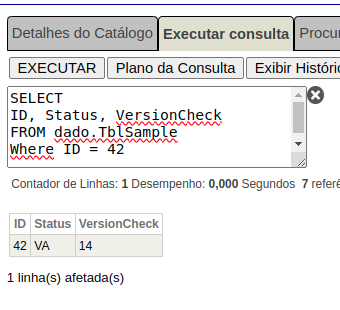
Upon consulting the record in the database, we find that the VersionCheck is at an older version compared to process 1:

To avoid the problem, after asynchronous calls that can change the same database record, it is recommended to use %Reload before making the necessary changes, as in the example:


ClassMethod RunVersionChangeTwoProcessWithReload() As %Status
{
    Set sample = ##class(dado.TblSample).%OpenId("42")

    Try {
        Do sample.StatusSetObjectId("AL")
        $$$THROWONERROR(sc,sample.%Save())

        Write !,"VERSIONPROPERTY BEFORE EXECUTING JOB: "_ sample.VersionCheck

        JOB ##class(s01.Error5800).RunVersionChange()
        hang 2

        Do sample.%Reload()
        Do sample.StatusSetObjectId("EP")
        Write !,"VERSIONPROPERTY AFTER EXECUTING JOB: "_ sample.VersionCheck

        Write !,"TRY RUN SAVE: "
        $$$THROWONERROR(sc,sample.%Save())

    }
    Catch ex {
        WRITE !,!,"In the CATCH block"
        WRITE !,"Error code=",ex.Code

        Do sample.%Reload()
        Write !,!,"VERSIONPROPERTY AFTER Reload: "_ sample.VersionCheck
    }
}
0
0 273
Article Davi Massaru Teixeira Muta · Nov 26, 2023 8m read

Introduction

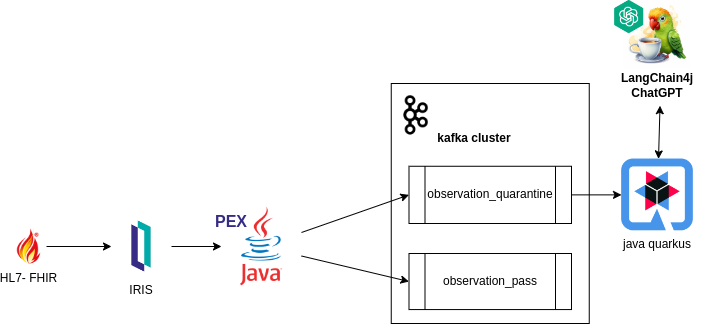
This article aims to explore how the FHIR-PEX system operates and was developed, leveraging the capabilities of InterSystems IRIS.

Streamlining the identification and processing of medical examinations in clinical diagnostic centers, our system aims to enhance the efficiency and accuracy of healthcare workflows. By integrating FHIR standards with InterSystems IRIS database Java-PEX, the system help healthcare professionals with validation and routing capabilities, ultimately contributing to improved decision-making and patient care.

how it works

  • IRIS Interoperability: Receives messages in the FHIR standard, ensuring integration and compatibility with healthcare data.

  • Information Processing with 'PEX Java': Processes FHIR-formatted messages and directs them to Kafka topics based on globally configured rules in the database, facilitating efficient data processing and routing, especially for examinations directed to quarantine.

  • Handling Kafka Returns via External Java Backend: Interprets only the examinations directed to quarantine, enabling the system to handle returns from Kafka through an external Java backend. It facilitates the generation of prognostic insights for healthcare professionals through Generative AI, relying on consultations of previous examination results for the respective patients.

Development

Through the PEX (Production EXtension) by InterSystems, a extensibility tool enabling enhancement and customization of system behavior, we crafted a Business Operation. This component is tasked with processing incoming messages in the FHIR format within the system. As example follows:

import com.intersystems.enslib.pex.*;
import com.intersystems.jdbc.IRISObject;
import com.intersystems.jdbc.IRIS;
import com.intersystems.jdbc.IRISList;
import com.intersystems.gateway.GatewayContext;

import org.apache.kafka.clients.producer.*;
import org.apache.kafka.common.serialization.*;

import com.fasterxml.jackson.databind.JsonNode;
import com.fasterxml.jackson.databind.ObjectMapper;

import java.io.FileInputStream;
import java.io.IOException;
import java.util.Properties;

public class KafkaOperation extends BusinessOperation {
// Connection to InterSystems IRIS
private IRIS iris;

// Connection to Kafka
private Producer<Long, String> producer;

// Kafka server address (comma separated if several)
public String SERVERS;

// Name of our Producer
public String CLIENTID;

/// Path to Config File
public String CONFIG;

public void OnInit() throws Exception {
[...]
}

public void OnTearDown() throws Exception {
[...]
}

public Object OnMessage(Object request) throws Exception {
    IRISObject req = (IRISObject) request;
    LOGINFO("Received object: " + req.invokeString("%ClassName", 1));

    // Create record
    String value = req.getString("Text");
    String topic = getTopicPush(req);
    final ProducerRecord<Long, String> record = new ProducerRecord<>(topic, value);

    // Send new record
    RecordMetadata metadata = producer.send(record).get();

    // Return record info
    IRISObject response = (IRISObject)(iris.classMethodObject("Ens.StringContainer","%New",topic+"|"+metadata.offset()));
    return response;
}

private Producer<Long, String> createProducer() throws IOException {
[...]
}

private String getTopicPush(IRISObject req) {
[...]
}

[...]
}

`

Within the application, the getTopicPush method takes on the responsibility of identifying the topic to which the message will be sent.

The determination of which topic the message will be sent to is contingent upon the existence of a rule in the "quarantineRule" global, as read within IRIS.

String code = FHIRcoding.path("code").asText();
String system = FHIRcoding.path("system").asText();

IRISList quarantineRule = iris.getIRISList("quarantineRule",code,system);

 String reference = quarantineRule.getString(1);
 String value = quarantineRule.getString(2);

 String observationValue = fhir.path("valueQuantity").path("value").asText()

When the global ^quarantineRule exists, validation of the FHIR object can be validated.

private boolean quarantineValueQuantity(String reference, String value, String observationValue) {
    LOGINFO("quarantine rule reference/value: " + reference + "/" + value);
    double numericValue = Double.parseDouble(value);
    double numericObservationValue = Double.parseDouble(observationValue);

    if ("<".equals(reference)) {
        return numericObservationValue < numericValue;
    }
    else if (">".equals(reference)) {
        return numericObservationValue > numericValue;
    }
    else if ("<=".equals(reference)) {
        return numericObservationValue <= numericValue;
    }
    else if (">=".equals(reference)) {
        return numericObservationValue >= numericValue;
    }
    
    return false;
}

Practical Example:

When defining a global, such as:

Set ^quarantineRule("59462-2","http://loinc.org") = $LB(">","500") 

This establishes a rule to "59462-2" code and ""http://loinc.org"" system in the global ^quarantineRule, specifying a condition where the value when greater than 500 is defined as quarantine. In the application, the getTopicPush method can then use this rule to determine the appropriate topic for sending the message based on the validation outcome.

Given the assignment, the JSON below would be sent to quarantine since it matches the condition specified by having:

 {
          "system": "http://loinc.org",
          "code": "59462-2",
          "display": "Testosterone"
}

"valueQuantity": { "value": 550, "unit": "ng/dL", "system": "http://unitsofmeasure.org", "code": "ng/dL" }

FHIR Observation:

{
    "resourceType": "Observation",
    "id": "3a8c7d54-1a2b-4c8f-b54a-3d2a7efc98c9",
    "status": "final",
    "category": [
      {
        "coding": [
          {
            "system": "http://terminology.hl7.org/CodeSystem/observation-category",
            "code": "laboratory",
            "display": "laboratory"
          }
        ]
      }
    ],
    "code": {
      "coding": [
        {
          "system": "http://loinc.org",
          "code": "59462-2",
          "display": "Testosterone"
        }
      ],
      "text": "Testosterone"
    },
    "subject": {
      "reference": "urn:uuid:274f5452-2a39-44c4-a7cb-f36de467762e"
    },
    "encounter": {
      "reference": "urn:uuid:100b4a8f-5c14-4192-a78f-7276abdc4bc3"
    },
    "effectiveDateTime": "2022-05-15T08:45:00+00:00",
    "issued": "2022-05-15T08:45:00.123+00:00",
    "valueQuantity": {
      "value": 550,
      "unit": "ng/dL",
      "system": "http://unitsofmeasure.org",
      "code": "ng/dL"
    }
}

The Quarkus Java application

After sending to the desired topic, a Quarkus Java application was built to receive examinations in quarantine.

@ApplicationScoped
 public class QuarentineObservationEventListener {

@Inject
PatientService patientService;

@Inject
EventBus eventBus;

@Transactional
@Incoming("observation_quarantine")
public CompletionStage<Void> onIncomingMessage(Message<QuarentineObservation> quarentineObservationMessage) {
	var quarentineObservation = quarentineObservationMessage.getPayload();
	var patientId = quarentineObservation.getSubject()
			.getReference();
	var patient = patientService.addObservation(patientId, quarentineObservation);
	publishSockJsEvent(patient.getId(), quarentineObservation.getCode()
			.getText());
	return quarentineObservationMessage.ack();
}

private void publishSockJsEvent(Long patientId, String text) {
	eventBus.publish("monitor", MonitorEventDto.builder()
			.id(patientId)
			.message(" is on quarentine list by observation ." + text)
			.build());
}
 }

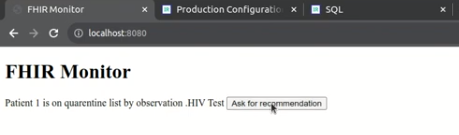
This segment of the system is tasked with persisting the information received from Kafka, storing it in the patient's observations within the database, and notifying the occurrence to the monitor.

The monitor

Finally, the system's monitor is responsible for providing a simple front-end visualization. This allows healthcare professionals to review patient/examination data and take necessary actions.

Implementation of langchainPT

Through the monitor, the system enables healthcare professionals to request recommendations from the Generative AI.

@Unremovable
@Slf4j
@ApplicationScoped
public class PatientRepository {
	@Tool("Get anamnesis information for a given patient id")
	public Patient getAnamenisis(Long patientId) {
		log.info("getAnamenisis called with id " + patientId);
		Patient patient = Patient.findById(patientId);
		return patient;
	}

	@Tool("Get the last clinical results for a given patient id")
	public List<Observation> getObservations(Long patientId) {
		log.info("getObservations called with id " + patientId);
		Patient patient = Patient.findById(patientId);
		return patient.getObservationList();
	}

}

segue implementação de langchain4j

@RegisterAiService(chatMemoryProviderSupplier = RegisterAiService.BeanChatMemoryProviderSupplier.class, tools = {PatientRepository.class})
public interface PatientAI {

	@SystemMessage("""
			You are a health care assistant AI. You have to recommend exams for patients based on history information.
			""")
	@UserMessage("""
			 Your task is to recommend clinical exams for the patient id {patientId}.

			 To complete this task, perform the following actions:
			 1 - Retrieve anamnesis information for patient id {patientId}.
			 2 - Retrieve the last clinical results for patient id {patientId}, using the property 'name' as the name of exam and 'value' as the value.
			 3 - Analyse results against well known conditions of health care.

			 Answer with a **single** JSON document containing:
			 - the patient id in the 'patientId' key
			 - the patient weight in the 'weight' key
			 - the exam recommendation list in the 'recommendations' key, with properties exam, reason and condition.
			 - the 'explanation' key containing an explanation of your answer, especially about well known diseases.

			Your response must be just the raw JSON document, without ```json, ``` or anything else.
			 """)
	String recommendExams(Long patientId);
}

In this way, the system can assist healthcare professionals in making decisions and carrying out actions.

Video demo

VIDEO

Authors

NOTE:

The application https://openexchange.intersystems.com/package/fhir-pex is currently participating in the InterSystems Java Contest 2023. Feel free to explore the solution further, and please don't hesitate to reach out if you have any questions or need additional information. We recommend running the application in your local environment for a hands-on experience. Thank you for the opportunity 😀!

3
0 441
Question Davi Massaru Teixeira Muta · Dec 13, 2022

HI ! I'm working on a caché upgrade to IRIS.

in some abstration cls classes, to get a property was used $METHOD(..Obj, propertyName_"Get").
On Caché 2018,  had as a return property value, if the property does not exists, an exception of type <PROPERTY DOES NOT EXIST> throwed

Now, on IRIS 2022.1,  will always be throwed an exception of type "<METHOD DOES NOT EXIST>".

I can change  $METHOD  to  $PROPERTY, but as it is an abstract class, I cannot guarantee the type of the referenced Object, if the property is encapsulated or private, I need call $METHOD(..Obj, propertyName_"Get").

8
1 463
Question Davi Massaru Teixeira Muta · Mar 29, 2020

Hello everyone!

I have an abstract class representing the possible inputs for an Enum field, in the following way: 

Class system.dto.sector.SectorStatusEnum  [ Abstract ]{Parameter Active = 1;Parameter Inactive = 2;Parameter Production = 3;Parameter Upkeep = 4;}

I need to create a persistent class referencing the abstract class in the status field, so that the result of the operation is the same as the example:

9
0 1421