#System Administration

0 Followers · 540 Posts

System administration refers to the management of one or more hardware and software systems.

Documentation on InterSystems system administration.

Question Scott Roth · Nov 10, 2025

Can someone give me an explanation of how Local.PD.Linkage.Definition.Individual works? This was setup by another company as part of our implementation.

Below is my configuration..

We are getting a lot of matches on Given Name, but then the Family Name does not match at all, so I am wondering if these need to be adjusted. I just don't understand if they need to be positive or negative.

if I use the MLE CALIBRATION MONITOR, it seems that none of the values should be negative.

2
0 23
Article Mario Sanchez Macias · Feb 19, 2025 4m read


So, you checked your server and saw that IRISTEMP is growing too much. There's no need to panic. Let’s investigate the issue before your storage runs out.

Step 1: Confirm the IRISTEMP Growth Issue

Before assuming IRISTEMP is the problem, let’s check its actual size.

Check the Free Space

Run the following command in the IRIS terminal:

%SYS>do ^%FREECNT

When prompted, enter:

Database directory to show free space for (*=All)? /<your_iris_directory>/mgr/iristemp/
4
4 338
Question Scott Roth · Oct 24, 2025

According to the Documentation  EnsLib.Workflow.TaskRequest has the following fields...

  • %Action
  • %Command
  • %FormFields
  • %FormTemplate
  • %FormValues
  • %Message
  • %Priority
  • %Subjext
  • %TaskHandler
  • %Title
  • %UserName

I want to be able to capture the Source, Session ID, and any other Identifiers outside of the Error so it will show up on the Task List.

I am struggling how to build a csp template for me to be able to capture additional fields to send to the Workflow Operation.

0
0 30
Article John Murray · Oct 6, 2025 1m read

gj :: configExplorer is a new VS Code extension integrating with Server Manager and leveraging Structurizr to produce configuration diagrams of your servers.

Here's a short introductory video.

By using the InterSystems IRIS Native API for Node.js it avoids the need for any support code to be installed on the servers. This technology choice also qualifies it for entry into the current Developer Community contest.

The initial release focuses on two aspects of server configuration:

  • Namespaces and databases
  • ECP connectivity

Suggestions for what to add next are welcome, as is general feedback.

6
0 104
Article Enzo Medina · Oct 10, 2025 9m read

Deploying new IRIS instances can be a time-consuming task, especially when setting up multiple environments with mirrored configurations.

I’ve encountered this issue many times and want to share my experience and recommendations for using Ansible to streamline the IRIS installation process. My approach also includes handling additional tasks typically performed before and after installing IRIS.

2
3 72
Article John Murray · Oct 9, 2025 2m read

In my previous article introducing gj :: configExplorer I flagged up how an apparent bug in the Windows elements of the Native API for Node.js means it's not currently available to run in VS Code on a Windows desktop. In a comment on that article I offered a workaround, but this requires a Docker-equipped Linux host you can SSH to.

If you don't have a suitable target it's now possible to leverage your local Windows Docker Desktop. Here's how:

  1. Open a new VS Code window.
1
0 39
Question Mark Sharman · Sep 30, 2025

At the moment, we have 10 HealthShare instance servers (5 x mirrored pairs), where we implement an External Backup approach, using the freeze/thaw commands against whichever server of the pair is the backup mirror member, to complete a VM level backup. These backups are stored to a disk within our control, to purge as required. This approach allows us to deliver a zero downtime backup approach.

2
0 65
Article Robert Cemper · Sep 22, 2025 2m read

Finishing my previous example for multiple IRIS instances, I tried
to compose a local single instance version.  The step from the external
Python app to a version using embedded Python seemed to be obvious.
This was a wrong assumption, as some Python libraries just refused installation
into my local Windows-based environment.

3
2 68
Article Raef Youssef · Sep 23, 2025 4m read

Securing IRIS Integrations with Mutual TLS (mTLS): A Practical Guide

In today’s enterprise environments, secure communication between systems is not optional—it’s essential. Whether you're integrating InterSystems IRIS with cloud APIs, internal microservices, or third-party platforms, Mutual TLS (mTLS) offers a powerful way to ensure both ends of the connection are authenticated and encrypted.

This post walks through how to configure IRIS for mTLS and how to validate your certificates to avoid common pitfalls.


🔐 What is Mutual TLS (mTLS)?

TLS (Transport Layer Security) is the standard protocol for securing data in transit. In traditional TLS, only the server presents a certificate. Mutual TLS goes a step further: both the client and server present certificates to authenticate each other.

This bidirectional trust is ideal for:

  • Internal service-to-service communication
  • API integrations with sensitive data
  • Zero-trust architectures

🧰 Prerequisites

Before you begin, make sure you have:

  • ✅ A server certificate and private key for IRIS
  • ✅ A CA certificate to validate client certificates
  • ✅ A client certificate and private key for the external system
  • ✅ IRIS version 202X.X, which provides support for TLS 1.2 and higher

⚙️ Configuring IRIS for mTLS

1. IRIS as a Server (Accepting mTLS Connections)

🔸 Import Certificates

Use the System Management Portal or command line to import:

  • Server certificate
  • Server private key
  • CA certificate (to validate clients)

🔸 Create TLS Configuration

Go to:

System Administration > Security > SSL/TLS Configurations
  • Create a new configuration
  • Enable “Require client certificate”

🔸 Assign TLS to Listener

Apply the TLS configuration to the relevant service (e.g., web server, REST endpoint).

2. IRIS as a Client (Connecting to External Systems)

This section also applies to external client systems connecting to IRIS servers.

🔸 Import Client Certificates

Import the client certificate and private key into IRIS.

🔸 Configure Outbound TLS

Use ObjectScript to set up the connection:

set http = ##class(%Net.HttpRequest).%New()
set http.SSLConfiguration = "MyClientTLSConfig"
set http.Server = "api.external-system.com"
set http.Port = 443
set status = http.Get("/endpoint")

🧪 Testing Your Certificates for mTLS

Before deploying, validate your certificates to ensure they meet mTLS requirements.

1. Check Certificate Validity

openssl x509 -in client.crt -noout -text

Look for:

  • Validity dates
  • Subject and Issuer fields
  • Extended Key Usage (should include TLS Web Client Authentication as shown below)
X509v3 Extended Key Usage:
    TLS Web Client Authentication

2. Verify Private Key Matches Certificate

openssl x509 -noout -modulus -in client.crt | openssl md5
openssl rsa -noout -modulus -in client.key | openssl md5

The hashes should match.

3. Test mTLS Handshake with OpenSSL

openssl s_client -connect server.example.com:443   -cert client.crt -key client.key -CAfile ca.crt

This simulates a full mTLS handshake. Look for:

  • Verify return code: 0 (ok)
  • Successful certificate exchange

4. Validate Certificate Chain

openssl verify -CAfile ca.crt client.crt

Ensures the client certificate is trusted by the CA.


📊 mTLS Handshake Diagram
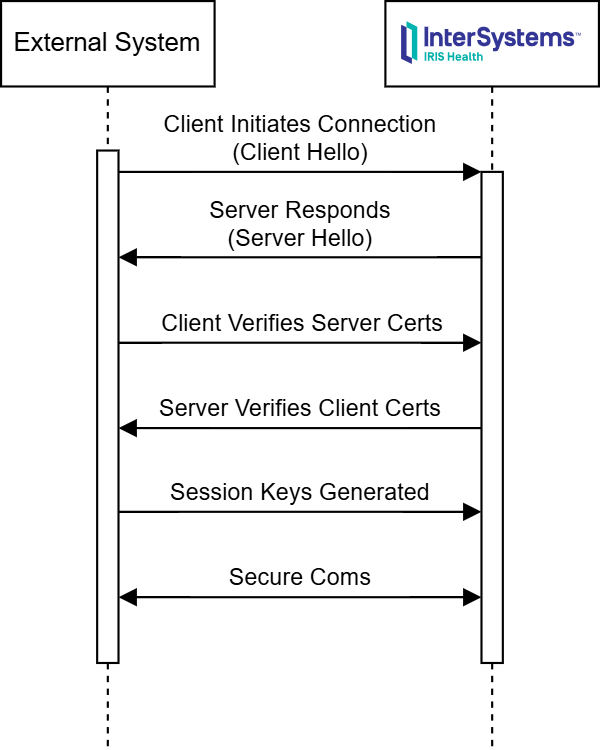
   ![image](/sites/default/files/inline/images/mtls_diagram.png)

🧯 Troubleshooting Tips

  • 🔍 Certificate chain incomplete? Ensure intermediate certs are included.
  • 🔍 CN/SAN mismatch? Match certificate fields with expected hostnames.
  • 🔍 Permission errors? Check file access rights on certs and keys.
  • 🔍 Handshake failures? Enable verbose logging in IRIS and OpenSSL.

✅ Conclusion

Mutual TLS is a cornerstone of secure system integration. With IRIS, configuring mTLS is straightforward—but validating your certificates is just as important. By following these steps, you’ll ensure your connections are encrypted, authenticated, and enterprise-grade secure.
0
1 82
Question André-Claude Gendron · Jul 31, 2025

Hi everyone,

I’m working with an existing InterSystems IRIS server that hosts several web applications and namespace-specific code and data. I’d like to reverse-engineer the current environment into a %Installer.Manifest file so I can store it in Git and manage its changes.

My goal is to:

  • Track the application setup and configuration in version control
  • Rebuild environments consistently (namespaces, CSP apps, security roles, etc.)
  • Possibly automate deployments later on
1
2 60
Question Elisa Pischedda · Jul 17, 2025

Good morning everyone,In the facility we're working in, we have two separate installations for testing and production. In the test environment, we have production processes running properly, and we need to replicate production processes and settings in the production environment. Until now, when we move from a test environment to a production environment, we currently export the test classes, import them into production, and manually configure the production environment by connecting Services, Processes, and Operations and configuring the settings. We tried exporting the production environment

3
1 81
Question Colin Brough · Jul 1, 2025

Is it possible to audit code changes in a namespace?

Ideally what we'd like to be able to do is check which classes were compiled (or deleted) in a time period, eg in last 3 months, and which user made those changes. Even better would be an audit of what those changes were, but that's less important (for us, as we can probably find that information in other ways).

6
1 111
Question Scott Roth · Jun 11, 2025

I have created a New Database/Namespace within our TEST environment on both the Primary and Backup of the mirror. When I go to create the database/namespace on the DR node I am getting "Cannot open file '/ensemble/TEST/iris.cpf_...." while the cpf file that it references does not exist. Anyone have any clue to why this might be happening?

3
0 87
Question Thembelani Mlalazi · May 29, 2025

I am trying to log in to the Web Gateway Management and I have missed placed the password to access the system I have tried 

changing the password under local settings in the CSP.ini  and that has managed to change the password to access the gateway but cannot log me into the management area I have followed a post here and read here and I seem not to get the answers that actual explain how I can get to the web gateway management.

3
1 123
Discussion Enrico Parisi · Mar 20, 2025

Once upon a time in Ensemble Management Portal the pool size of each component (Business Host) within the production was displayed in the Production Configuration page.

This information was very useful, especially when a production have tens or hundreds of components.

Now days the pool size is no longer displayed in the Production Configuration page and to get the pool size you need to click in each and every host in your production.
What if you have hundreds of business hosts and you need to check the pool size of each? It's a nightmare!

0
0 92
Question Dmitrii Baranov · Mar 18, 2025

I have two instances of IRIS, one is Production and another one is Staging (both managed by Docker) and I want to set up a full daily recover of the Staging server from a full backup of the Production server. I know how to do this manually using the DBREST utility, as well as how to make a copy of the database by making a full copy of the durable directory (however this option requires a full stop of the Production-database). What is the best way to automatically restore all databases from a full backup using scripting?

1
0 76
Article Stav Bendarsky · Feb 3, 2025 6m read

Monitoring your IRIS deployment is crucial. With the deprecation of System Alert and Monitoring (SAM), a modern, scalable solution is necessary for real-time insights, early issue detection, and operational efficiency. This guide covers setting up Prometheus and Grafana in Kubernetes to monitor InterSystems IRIS effectively. 

This guide assumes you already have an IRIS cluster deployed using the InterSystems Kubernetes Operator (IKO), which simplifies deployment, integration and mangement.


Why Prometheus and Grafana?

10
13 656
Article Luis Angel Pérez Ramos · Feb 14, 2025 3m read

Hi beloved members of the Community!

It is very common in the daily life of IRIS or Health Connect users that it is necessary to install new instances or update the ones they already have and in many cases it is not these same users who carry out the installation, but rather systems personnel who often do not take into account the particularities of the assignment of permissions necessary for the installation.

0
2 204
Article Sylvain Guilbaud · Jan 31, 2025 1m read

In a containerized environment, you can manage your container time via the TZ variable or via the /etc/timezone and /etc/localtime directories:

environment:
      - TZ=Europe/Paris
volumes:
    - "/etc/timezone:/etc/timezone:ro"
    - "/etc/localtime:/etc/localtime:ro"

You can find complete examples here:

IRIS Community

IRISHealth_Community

IRIS production

IRISHealth production

0
0 101