#Object Data Model

0 Followers · 499 Posts

An object data model is that data or code is composed of modules that combine data and procedures that work on the data.

Learn more.

Article Sean Klingensmith · Nov 18, 2016 10m read

As a developer, you have probably spent at least some time writing repetetive code. You may have even found yourself wishing you could generate the code programmatically. If this sounds familiar, this article is for you!

We'll start with an example. Note: the following examples use the %DynamicObject interface, which requires Caché 2016.2 or later. If you are unfamiliar with this class, check out the documentation here: Using JSON in Caché. It's really cool!

##Example

You have a %Persistent class that you use to store data. Now, suppose that you are ingesting some data in JSON format, using the %DynamicObject interface. How do you map the %DynamicObject structure to your class? One solution is to simply write code to copy the values over directly:

Class Test.Generator Extends %Persistent 
{
Property SomeProperty As %String;

Property OtherProperty As %String;

ClassMethod FromDynamicObject(dynobj As %DynamicObject) As Test.Generator
{
	set obj = ..%New()
	set obj.SomeProperty = dynobj.SomeProperty
	set obj.OtherProperty = dynobj.OtherProperty
	quit obj
}
}

However, this will get tedious (not to mention difficult to maintain) if there are many properties, or if you use this pattern for multiple classes. This is where method generators can help! Simply put, when using a method generator, instead of writing the code for a given method, you write some code that the class compiler will run to generate the code for the method. Does this sound confusing? It really isn't. Let us look at an example:

Class Test.Generator Extends %Persistent
{
ClassMethod Test() As %String [ CodeMode = objectgenerator ]
{
	do %code.WriteLine(" write ""This is a method Generator!"",!")
	do %code.WriteLine(" quit ""Done!""")

	quit $$$OK
}
}

We use the parameter CodeMode = objectgenerator to indicate that the current method is a method generator, and not a normal method. What does this method do? In order to debug method generators, it is useful to look at the generated code for the class. In our case, this will be in an INT routine named Test.Generator.1.INT. You can open this in Studio by typing Ctrl+Shift+V, or you can just open the routine from the Studio "Open" dialog, or from Atelier.

In the INT code, you can find the implementation for this method:

zTest() public {
 write "This is a method Generator!",!
 quit "Done!" }

As you can see, the method implementation simply contains the text that is written to the %code object. %code is a special type of stream object (%Stream.MethodGenerator). The code written to this stream can contain any code valid in a MAC routine, including macros, preprocessor directives, and embedded SQL. There are a couple of things to keep in mind when working with method generators:

  • The method signature applies to the target method you are generating. The generator code should always return a Status code indicating either success or an error condition.

  • The code written to %code must be valid ObjectScript (method generators with other language modes are outside the scope of this article). This means, among other things, that lines containing commands must start with whitespace. Note that the two WriteLine() calls in the example begin with a space.

In addition to the %code variable (representing the generated method), the compiler makes the metadata for the current class available in the following variables:

  • %class
  • %method
  • %compiledclass
  • %compiledmethod
  • %parameter

The first four of these variables are instances of %Dictionary.ClassDefinition, %Dictionary.MethodDefinition, %Dictionary.CompiledClass%Dictionary.CompiledMethod, respectively. %parameter is a subscripted array of parameter names and values defined in the class.

The main difference (for our purposes) between %class and %compiledclass is that %class only contains metadata for class members (properties, methods, etc.) defined in the current class. %compiledclass will contain these members, but will also contain metadata for all inherited members. In addition, type information referenced from %class will appear exactly as specified in the class code, whereas types in %compiledclass (and %compiledmethod) will be expanded to the full classname. For instance, %String will be expanded to %Library.String, and class names without a package specified will be expanded to the full Package.Class name. You can see the class reference for these classes for further information.

Using this information, we can build a method generator for our %DynamicObject example:

ClassMethod FromDynamicObject(dynobj As %DynamicObject) As Test.Generator [ CodeMode = objectgenerator ]
{
	do %code.WriteLine(" set obj = ..%New()")
	for i=1:1:%class.Properties.Count() {
		set prop = %class.Properties.GetAt(i)
		do %code.WriteLine(" if dynobj.%IsDefined("""_prop.Name_""") {")
		do %code.WriteLine("   set obj."_prop.Name_" = dynobj."_prop.Name)
		do %code.WriteLine(" }")
	}
	
	do %code.WriteLine(" quit obj")
	quit $$$OK
}

This creates the following code:

zFromDynamicObject(dynobj) public {
 set obj = ..%New()
 if dynobj.%IsDefined("OtherProperty") {
   set obj.OtherProperty = dynobj.OtherProperty
 }
 if dynobj.%IsDefined("SomeProperty") {
   set obj.SomeProperty = dynobj.SomeProperty
 }
 quit obj }

As you can see, this generates code to set each property defined in this class. Our Implementation excludes inherited properties, but we could easily include them by using %compiledclass.Properties instead of %class.Properties. We also added a check to see if the property exists in the %DynamicObject before attempting to set it. This isn't strictly necessary, since referencing a property that does not exists from a %DynamicObject will not result in an error, but it is helpful if any of the properties in the class define a default value. If we didn't perform this check, the default value would always be overwritten by this method.

Method generators can be very powerful when combined with inheritance. We can take the FromDynamicObject() method generator and put it in an abstract class. Now if we want to write a new class that needs to be able to be deserialized from a %DynamicObject, all we need to do is to extend this class to enable this functionality. The class compiler will run the method generator code when compiling each subclass, creating a custom implementation for that class.

Debugging Method Generators

Basic debugging

Using method generators adds a level indirection to your programming. This can cause some problems when trying to debug our generator code. Let's look at an example. Consider the following method:

Method PrintObject() As %Status [ CodeMode = objectgenerator ]
{
	if (%class.Properties.Count()=0)&&($get(%parameter("DISPLAYEMPTY"),0)) {
		do %code.WriteLine(" write ""{}"",!")
	} elseif %class.Properties.Count()=1 {
		set pname = %class.Properties.GetAt(1).Name
		do %code.WriteLine(" write ""{ "_pname_": ""_.."_pname_"_""}"",!")
	} elseif %class.Properties.Count()>1 {
		do %code.WriteLine(" write ""{"",!")
		for i=1:1:%class.Properties.Count() {
			set pname = %class.Properties.GetAt(i).Name
			do %code.WriteLine(" write """_pname_": ""_.."_pname_",!")
		}
		do %code.WriteLine(" write ""}""")
	}
	
	do %code.WriteLine(" quit $$$OK")
	quit $$$OK
}

This is a simple method designed to print the contents of an object. It will output the objects using a different format depending on the number of properties: an object with multiple properties will be printed on multiple lines, while an object with zero or one properties will be printed on one line. Additionally the object introduces a Parameter DISPLAYEMTPY, which will control whether to suppress output for objects with zero properties. However, there is a problem with the code. For a class with zero properties, the object isn't being output correctly:

TEST>set obj=##class(Test.Generator).%New()

TEST>do obj.PrintObject()

TEST>

We expect this to output an empty object "{}", not nothing. To debug this we can look in the INT code to see what is happening. However, upon opening the INT code, you find that there is no definition for zPrintObject()! Don't take my word for it, compile the code and look for yourself. Go on... I'll wait.

OK. Back? What's going on here? Astute readers may have figured out the initial problem: There is a typo in the first clause of the IF statement The default for the DISPLAYEMPTY parameter should be 1 not 0. It should be: $get(%parameter("DISPLAYEMPTY"),1) not $get(%parameter("DISPLAYEMPTY"),0). This explains the behavior. But why wasn't the method in the INT code? It was still executable. We didn't get a <METHOD DOES NOT EXIST> error; the method just didn't do anything. Now that we see the mistake, let's look at what the code would have been if it were in the INT code. Since we failed to satisfy any of the conditions in the if ... elseif ... construct the code would simply be:

zPrintObject() public {
	quit 1 }

Notice that this code doesn't actually do anything; it just returns a literal value. It turns out that the Caché class compiler is pretty clever. In certain situations it can detect that the code for a method doesn't need to be executed, and can optimize away the INT code for the method. This is a great optimization, since dispatching from the kernel to the INT code can involve a fair amount of overhead, especially for simple methods.

Note that this behavior isn't specific to method generators. Try compiling the following method, and looking for it in the INT code:

ClassMethod OptimizationTest() As %Integer
{
	quit 10
}

Looking in the INT code can be very helpful when debugging your method generator code. This will tell you what the generator really produced. However, you have to be careful to realize that there are some cases when the generated code will not appear in the INT code. If this is happening unnexpectedly, there is likely a bug in the generator code that is causing it to fail to generate any meaningful code.

Using a debugger

As we saw, if there is a problem with the generated code, we can see it by looking at the INT code. We can also debug the method normally using ZBREAK or the Studio debugger. You might be wondering if there is a way to debug the method generator code itself. Of course, you can always add "write" statements to the method generator or set debug globals like a caveman. But there has to be a better way, right?

The answer is "Yes", but in order to understand how, we need to get some background on how the class compiler works. Broadly speaking, when the class compiler compiles a class it will first parse the class definition and generate the metadata for the class. It is essentially generating the data for the %class and %compiledclass variables we discussed earlier. Next it generates the INT code for all the methods. During this step, it will create a separate routine to contain the generation code for all the method generators. This routine is named <classname>.G1.INT. It then executes the code in the *.G1 routine to generate the code for the methods, and stores them in the <classname>.1.INT routine with the rest of the class's methods. It can then compile this routine and voila! We have our compiled class! This is of course a gross simplification of a very complex piece of software - but it will do for our purposes.

This *.G1 routine sounds interesting. Let's take a look!

	;Test.Generator3.G1
	;(C)InterSystems, method generator for class Test.Generator3.  Do NOT edit.
	Quit
	;
FromDynamicObject(%class,%code,%method,%compiledclass,%compiledmethod,%parameter) public {
	do %code.WriteLine(" set obj = ..%New()")
	for i=1:1:%class.Properties.Count() {
		set prop = %class.Properties.GetAt(i)
		do %code.WriteLine(" if dynobj.%IsDefined("""_prop.Name_""") {")
		do %code.WriteLine("   set obj."_prop.Name_" = dynobj."_prop.Name)
		do %code.WriteLine(" }")
	}
	do %code.WriteLine(" quit obj")
	quit 1
 Quit 1 }

You may be used to editing the INT code for a class and adding debug code. Normally that's fine, if a little primitive. However, that is not going to work here. In order to execute this code, we need to recompile the class. (It is called by the class compiler, after all.) But recompiling the class will regenerate this routine, wiping out any changes we made. Fortunately we can use ZBreak or the Studio debugger to walk through this code. Since we now know the name of the routine, using ZBreak is pretty straightforward:

TEST>zbreak FromDynamicObject^Test.Generator.G1

TEST>do $system.OBJ.Compile("Test.Generator","ck")

Compilation started on 11/14/2016 17:13:59 with qualifiers 'ck'
Compiling class Test.Generator
FromDynamicObject(%class,%code,%method,%compiledclass,%compiledmethod,%parameter) publ
            ^
ic {
<BREAK>FromDynamicObject^Test.Generator.G1
TEST 21e1>write %class.Name
Test.Generator
TEST 21e1>

Using the Studio Debugger is also simple. You can set a breakpoint in the *.G1.MAC routine, and configure the debug target to invoke $System.OBJ.Compile() on the class:

$System.OBJ.Compile("Test.Generator","ck")

And now you are up and debugging.

Conclusion

This article has been a brief overview of method generators. For further information, please check out the documentation below:

2
3 3506
Question Stephan Gertsobbe · Jul 13, 2019

Hi all,

we are wondering if anybody has a reporting tool that is capable using IRIS Objects?

I know there are things like Crystal Reports and others out there who can read the SQL Data throug ODBC but we need the capability of using object methods while running the report.

Since now we where using a JAVA based report generator (ReportWeaver) but since the object binding for JAVA doesn't exist anymore in IRIS data platform, did any of you have an alternative report generator?

Looking forward to any answers

cheers

Stephan

2
0 415
Question Florian Hansmann · Jul 9, 2019

Hey Intersystems-Developer,

I have already used that and know its possible, but can't find it anymore :(

I need dynamic access on proxy objects. For example:

set key = "lastName"

set name = obj.name

set lastName = obj.key <- Not possible 

set lastName = obj.GetAt(key) <- Not possible

How can I get access to that object with my dynamic variable "key" ?

Best regards. 

3
0 341
Question Evgeny Shvarov · Jun 28, 2019

Hi guys!

As you know there are two (at least) ways to get the stored value of the property of InterSystems IRIS class if you know the ID of an instance (or a record).

1. Get it by as a property of an instance with "Object access":

ClassMethod GetPropertyForID(stId As %Integer) As %String

{

set obj=..%OpenId(stId)

return obj.StringData

}

2. Get it as a value of a column of the record with "SQL access":

18
0 1241
Article Kyle Baxter · Sep 9, 2016 5m read

Have some free text fields in your application that you wish you could search efficiently?  Tried using some methods before but found out that they just cannot match the performance needs of your customers?  Do I have one weird trick that will solve all your problems?  Don’t you already know!?  All I do is bring great solutions to your performance pitfalls!

As usual, if you want the TL;DR (too long; didn’t read) version, skip to the end.  Just know you are hurting my feelings.

11
2 2784
Question Scott Roth · May 1, 2019

Is there a way to get an inventory list of the Services, Processes, Routing, and Operations that are on the system. We get asked constantly from different departments to justify the number of personal we have. We are currently on 2015.2.2, with our upgrade to 2019 set for later this year.

Thanks

Scott

1
0 307
Article Dmitrii Kuznetsov · Mar 31, 2019 20m read

How Tax Service, OpenStreetMap, and InterSystems IRIS
could help developers get clean addresses


Pieter Brueghel the Younger, Paying the Tax (The Tax Collector), 1640

In my previous article, we just skimmed the surface of objects. Let's continue our reconnaissance. Today's topic is a tough one. It's not quite BIG DATA, but it's still the data not easy to work with: we're talking about fairly large amounts of data. It won't all fit into RAM at once, and some of it won't even fit on the drive (not due to lack of space, but because there's a lot of junk). The name of our subject is FIAS DB: the Federal Information Address System database - the databases of addresses in Russia. The archive is 5.5 GB. And it's a compressed XML file. After extraction, it will be a full 53 GB (set aside 110 GB for extraction). And when you start to parse and convert it, that 110 GB won't be enough. There won't be enough RAM either.

0
2 577
Question Steve Hayworth · Mar 25, 2019

First time post, also a new Cache developer, hence the <Beginner> tag.

If our data has Predefined terms in a dictionary, and a user can add terms on their own, can the terms exist in different tables?

Lets call the tables "Terms" and the user data in "UserTerms".

If a third class definition has a property of "Term" can it not be either Terms or UserTerms?

I'm leaning towards using a Subclass strategy where the pseudo "Parent" (forgive me) is  Dictionary.Term and the child is along the lines of Dictionary.Term.User

5
0 385
Question Oliver Wilms · Jan 29, 2019

Hello,

We have defined four BPL Business Processes. One gets occasionally errors when pool size is two. No errors happen with pool size one. The error happens on calling %Save() on a large objects with many references to other objects.

Error #5803: Failed to acquire exclusive lock on instance of 'classname'.

Error #5002: Cache error: <ROLLFAIL> %TRollBack+10^%occTransaction

The error happens on a particular large object.

Our FileService gets the same Errors #5803 and #5002 with class 'EnsLib.EDI.X12.Document'

3
0 606
Question Kumaresan Ramakrishnan · Jan 25, 2019

Hi, 

what is reason of this error (Not all parameters bound/registered ). this is not happening consistently.

those are class method parameters

Query GetWorkItemsByEncounterID(encounterID As %Integer, userId As %Integer, IsSuperOrDev As %Integer = -1, facilityAccessListCSV As %String(MAXLEN=32000), locationAccessListCSV As %Library.String(MAXLEN=32000), skipReferralFilter = 0) As %SQLQuery [ SqlName = spGetWorkItemsByEncounterID, SqlProc ]
 

1
0 736
Question Gigi La Course · Jan 22, 2019

Our lab system is now sending DSC segments in large Pathology results in the ORU message that is followed by a partial continuation message with only MSH and OBX segments.  the  pointer is in the MSH;14 in the subsequent message.  I believe the goal is to concatenate the first and second message but imagine this will require some custom functions which I have not done much of.  Anyone already tackled this by chance? 

Initial message:

1
0 333
Question Thembelani Mlalazi · Dec 3, 2018

I have an application which is distributed across maybe 5 servers since it has over a thousand users at a time we had an upgrade to the application last week and I had an integration build that uses the REST service (  ##class(%Net.HttpResponse) but since the upgrade the integration has not be able to communicate with the application tried testing my URL through Postman and all seems ok but if I test direct  I get a 500 error anything that I need to check on please or any advice on how to check what's going on. I have used SoapUI with 200 result so as postman and swagger

2
0 593
Question Nicki Vallentgoed · Jun 2, 2017

I've been wondering about some code that I have come across a lot over the years.

Let's assume I have class Cinema and class Film.
Conceptually the data in these classes are never really physically deleted but only flagged as such, due to business requirements.

What I find is that developers tend to create a 3rd class "CinemaFilms", in a child relationship to parent Cinema, with a reference to Film. Rather than a one-to-many between Cinema and Film. 

Class CinemaFilms
{

Relationship cinema As Cinema [ Cardinality = parent, Inverse = Films];
Property film As Film;
}
5
1 1453
Question Dhaval Shah · Jan 24, 2019

Hi All,

Actually I am trying to implement a RESt API where in I will get ZIPCODE as request and I need to call external API which will take ZIPCODE as input and give State and City in response.

But the problem is the request is in XML Format and also response is in XML format.

Example :

https://XYZ.com/ABC.dll?API=CSLookUP&XML=<CSLookupRequest USERID="USERID">
<ZipCode ID='0'>
<Zip5>20024</Zip5>
</ZipCode>
</CityStateLookupRequest>

and in Response 

2
0 753
Question Thembelani Mlalazi · Jan 22, 2019

I need to select my result into a list and be able to loop through the list when query finished any help appreciated here is where I am

##sql(SELECT %ID INTO :IDArray() FROM MergeHyland.TypeTwoDimesionCollection WHERE GUID = :Key AND EndDate IS NULL)
for I=1;1:$LISTLENGTH(IDArray)

{

w $Data(IDArray),i


}

2
0 1598
Article Dmitrii Kuznetsov · Jan 21, 2019 10m read

Headache-free stored objects: a simple example of working with InterSystems Caché objects in ObjectScript and Python

Neuschwanstein Castle

Tabular data storages based on what is formally known as the relational data model will be celebrating their 50th anniversary in June 2020. Here is an official document – that very famous article.  Many thanks for it to Doctor Edgar Frank Codd. By the way, the relational data model is on the list of the most important global innovations of the past 100 years published by Forbes.

On the other hand, oddly enough, Codd viewed relational databases and SQL as a distorted implementation of his theory.  For general guidance, he created 12 rules that any relational database management system must comply with (there are actually 13 rules). Honestly speaking, there is zero DBMS's on the market that observes at least Rule 0. Therefore, no one can call their DBMS 100% relational :) If you know any exceptions, please let me know.

0
3 917
Article John Kumpf · Jan 14, 2019 2m read

This is a quick note on what happens when, on your CSP page, you call a cache script which returns a %Boolean and store that value in a javascript variable.

When you call a script with language="cache" and returntype="%Boolean" from a javascript script, the return value is interpreted as a string, not as a boolean.

Here's an example:

A cache script that returns (in theory) a "false" value:

<script language="cache" method="giveMeAFalse" arguments="" returntype="%Boolean" procedureblock='1'>
return 0
</script>

A javascript method that logs what the value's actually interpreted as:

3
0 608
Question Ting Wang · Dec 10, 2018

I created the Process to extract the required data from ADT message to a Dynamic Object. I wanted to send the JSON stream to EnsLib.File.PassthroughOperation operation and generate a file with the content of JSON stream.

Here are the codes for Process:

set oMetadata = ... /// metadata is from ADT message which is dynamic object

set jsonRequest = ##class(%ZEN.Auxiliary.jsonProvider).%ObjectToJSON(oMetadata)
set tSC = ..SendRequestAsync(..JSONOperation,jsonRequest,0,,..MetadataContext)  /// send the jsonRequest to operation

8
0 1267
Question Scott Roth · Dec 21, 2018

Has anyone called any outside Javascript code from inside their class files? I asked a long time ago if there was a way to manipulate an image within Cache Object Script, and since Cache doesn't have any image libraries its not really possible. However I have found Javascript to resize an image and wonder how hard it would be to mesh the two together.

Can anyone share any examples?

Thanks

Scott

9
1 1642
Question Chip Gore · Jan 2, 2019

Hi -

I'm wondering if anyone has coded up a means to create an extension for a %Persistent class from a base class to a sub-class without making a ton of assumptions about the Global structure. I'm trying to create a new "extension" record that would have the same ID as the Base Class 

Class BaseRecord Extends %Persistent

and

Class SubRecord Extends BaseRecord

where I would have an instance of a "BaseRecord" and I want to turn it into a "SubRecord" instance and have all of the existing references to the BaseRecord survive.

7
0 550
Article Sergey Mikhailenko · Jan 23, 2018 20m read

This article was written as an attempt to share the experience of installing the InterSystems Caché DBMS for production environment. We all know that the development configuration of a DBMS is very different from real-life conditions. As a rule, development is carried out in “hothouse conditions” with a bare minimum of security measures, but when we publish our project online, we must ensure its reliable and uninterrupted operation in a very aggressive environment.

##The process of installing the InterSystems Caché DBMS with maximum security settings

OS security settings

The first step is the operating system. You need to do the following:

  • Minimize the rights of the technical account of the Caché DBMS
  • Rename the administrator account of the local computer.
  • Leave the necessary minimum of users in the OS.
  • Timely install security updates for the OS and used services.
  • Use and regularly update anti-virus software
  • Disable or delete unused services.
  • Limit access to database files
  • Limit the rights to Caché data files (leave owner and DB admin rights only)

For UNIX/Linux systems, create the following group and user types prior to installation:

  • Owner user ID
  • Management group ID
  • Internal Caché system group ID
  • Internal Caché user ID

InterSystems Caché installation-time security settings

InterSystems, the DBMS developer, strongly recommends deploying applications on Caché 2015.2 and newer versions only.

During installation, you need to perform the following actions:

Select the “Locked Down” installation mode

Select the “Custom Setup” option, then select only the bare minimum of components that are required for the work of the application

During installation, choose the SuperServer port that is different from the standard TCP port 1972

During installation, specify the port of the internal web server that is different from the standard TCP port 57772

Specify a Caché instance location path that is different from the standard one (the default option for Windows systems is C:\lnterSystems\Cache, for UNIX/Linux systems — /usr/Cachesys)

Post-installation Caché security settings

The following actions need to be performed after installation (most of them are already performed in the “Locked down” installation mode):

All services and resources that are not used by application should be disabled.

For services using network access, IP addresses that can be used for remote interaction must be explicitly specified.

Unused CSP web applications must be disabled.

Access without authentication and authorization must be disabled.

Access to the CSP Gateway must be password-protected and restricted.

Audit must be enabled.

The Data encryption option must be enabled for the configuration file.

To ensure the security of system settings, Security Advisor must be launched from the management portal and its recommendations must be followed. [Home] > [Security Management] > [Security Advisor]

For services (Services section):

Ability to set % globals should be turned off — the possibility to modify % globals must be disabled, since such globals are often used for system code and modification of such variables can lead to unpredictable consequences. Unauthenticated should be off — unauthenticated access must be disabled. Unauthenticated access to the service makes it accessible to all users. Service should be disabled unless required — if a service is not used, it must be disabled. Access to any service that is not used by an application can provide an unjustifiably high level of access to the entire system. Service should use Kerberos authentication — access through any other authentication mechanism does not provide the maximum level of security Service should have client IP addresses assigned — IP addresses of connections to the services must be specified explicitly. Limiting the list of IP addresses that will be allowed to connect let you have greater control over connections to Caché Service is Public — public services allow all users, including the UnknownUser account that requires no authentication, to get unregulated access to Caché

Applications (CSP, Privileged Routine, and Client Applications)

Application is Public — Public applications allow all users, including the UnknownUser account that requires no authentication, to get unregulated access to Caché Application conditionally grants the %AII role — a system cannot be considered secure if an application can potentially delegate all privileges to its users. Applications should not delegate all privileges Application grants the %AII role — the application explicitly delegates all privileges to its users. Applications should not delegate all privileges

#1.Managing users ##1.1 Managing system accounts You need to make sure that unused system accounts are disabled or deleted, and that passwords are changed for used system accounts. To identify such accounts, you need to use the Security Advisor component of the management portal. To do it, go to the management portal here: [Home] > [Security Management] > [Security Advisor]. Change corresponding users’ passwords in all records in the Users section where Recommendations = “Password should be changed from default password”. Form_Advisor

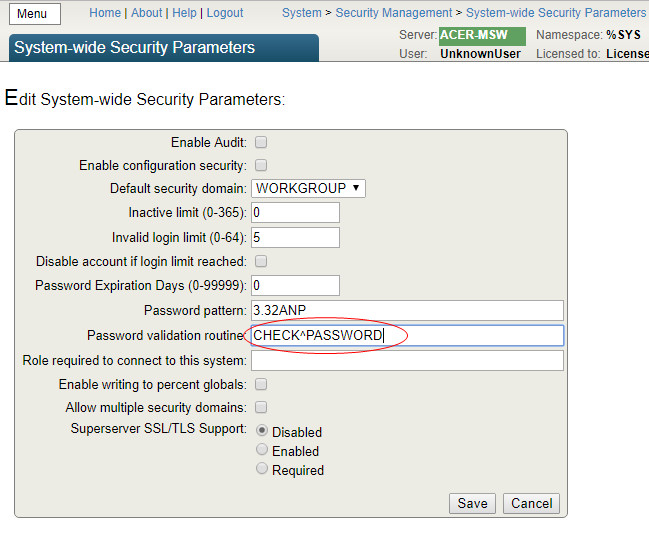
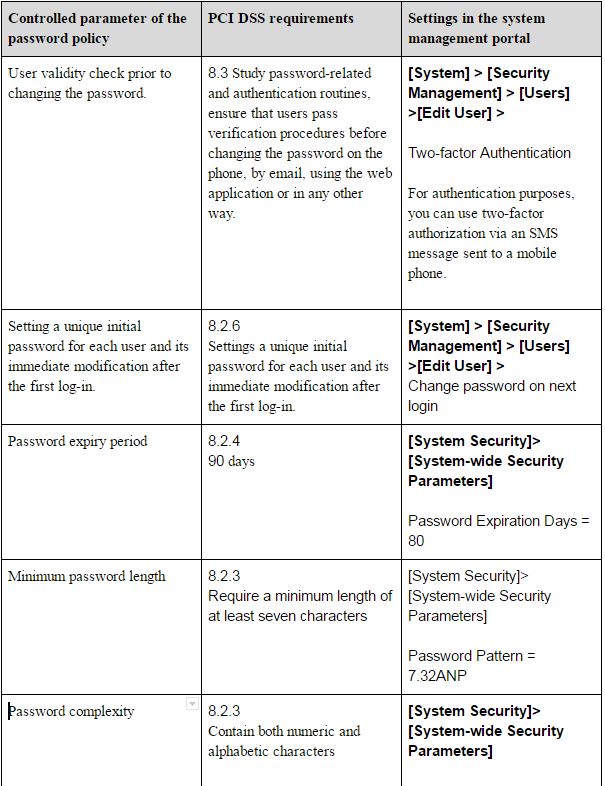
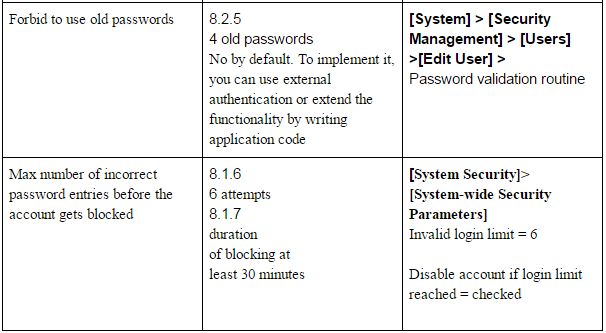
##1.2 Managing privileges accounts If the DBMS has several administrators, a personal account should be created for each of them with just a minimum of privileges required for their job. ##1.3 Managing rights and privileges When delegating access rights, you should use the minimum privileges principle. That is, you should forbid everything and then provide a bare minimum of rights required for this particular role. When granting privileges, you should use a role-based approach – that is, assign rights to a role, not a user, then assign a role to the necessary user. ##1.4 Delegation of access rights In order to check security settings in terms of access rights delegation, launch Security Advisor. You need to perform the following actions depending on the recommendations provided by Security Advisor. To roles: This role holds privileges on the Auditing database — this role has privileges for accessing the auditing database. Read access makes it possible to use audit data in an inappropriate way. Write access makes it possible to compromise the audit data This role holds the %Admin_Secure privilege — This role includes the %Admin_Secure resource, which allows holder to change access privileges for any user This role holds WRITE privilege on the CACHESYS database — this role allows users to write to the CACHESYS system database, thus making it possible to change the system code and Caché system settings Users: At least 2 and at most 5 users should have the %AII role — at least 2 and no more than 5 users can have the %Аll role. Too few users with this role may result in problems with access during emergencies; too many users may jeopardize the overall security of the system. This user holds the %AII role — this user has the %Аll role. You need to verify the necessity of assigning this role to the user. UnknownUser account should not have the %AII role — the system cannot be considered secure if UnknownUser has the %Аll role. Account has never been used — this account has never been used. Unused accounts may be used for unauthorized access to the system. Account appears dormant and should be disabled — the account is inactive and must be disabled. Inactive accounts (ones that haven’t been used for 30 days) may be used for unauthorized access. Password should be changed from default password — the default password value must be changed. After deleting a user, make sure that roles and privileges created by this user have been deleted, if they are no longer required. ##1.5 Configuring the password policy Password case sensitivity is enabled in Caché by default. The password policy is applied through the following section of the management portal: [Home]>[Security Management] > [System Security Settings] > [System-wide Security Parameters]. The configuration of the necessary password complexity is carried out by specifying a password template in the Password Pattern parameter. By default, maximum security uses Password Pattern = 8.32ANP, which means that passwords must be 8 – 32 characters long, contain numbers, characters, and punctuation marks. The “Password validation routine” parameter is used for invoking specific password validity checking algorithms. A detailed description is provided in [1], section “Password Strength and Password Policies”. In addition to using internal mechanisms, authentication in Caché can be delegated to the operating system, Kerberos or LDAP servers. Just recently, I had to check whether the Caché DBMS complied with the new edition of PCI DSS 3.2, the main security standard of the bank card industry adopted in April 2016. Compliance of Caché DBMS security settings with the requirements of the PCI DSS version 3.2 [5] standardTable1Table2

##1.6 Configuration of terminating an inactive database connection Database disconnect settings for inactive user sessions depend on the type of connection to Caché. For SQL and object access via TCP, the parameter is set in the [Home] > [Configuration] > [SQL Settings] > [General SQL Settings] section of the management portal. Look for a parameter called TCP Keep Alive interval (in seconds): set it to 900, which will correspond to 15 minutes. For web access, this parameter is specified in the “No Activity Timeout” for [Home] > [Configuration] > [CSP Gateway Management]. Replace the default parameter with 900 seconds and enable the “Apply time-out to all connections” parameter #2 Event logging ##2.1 General settings To enable auditing, you need to enable this option for the entire Caché DBMS instance. To do it, open the system management portal, navigate to the auditing management page (([Home] > [Security Management] > [Auditing]** and make sure that the “Disable Auditing” option is available, and “Enable Auditing” is unavailable. The opposite will mean that auditing is disabled. If auditing is disabled, it should be enabled by selecting the “Enable Auditing” command from the menu. You can view the event log through the system management portal: [Home] > [Security Management] > [Auditing] > [View Audit Database]Form_Audit

There are also system classes (utilities) for viewing the event log. The log contains the following records, among others: -Date and time -Event type -Account name (user identification) Access to audit data is managed by the %DB_CACHEAUDIT resource. To disable public access to this resource, you need to make sure that both Read and Write operations are closed for Public access in its properties. Access to the list of resources is provided through the system management portal [Home] > [Security Management] > [Resources] > [Edit Resource]. Select the necessary resource, then click the Edit link. By default, the %DB_CACHEAUDIT resource has the same-name role %DB_CACHEAUDIT. To limit access to logs, you need to define a list of users with this role, which can be done in the system management portal: [Home] > [Security Management] > [Roles] > [Edit Role], then use the Edit button in the %DB_CACHEAUDIT role ##2.2 List of logged event types ###2.2.1 Logging of access to tables containing bank card details (PCI DSS 10.2.1) Logging of access to tables (datasets) containing bank card data is performed with the help of the following mechanisms:

  1. A system auditing mechanism that makes records of the “ResourceChange” type whenever access rights are changed for a resource responsible for storing bank card information (access to the audit log is provided from the system management portal: [Home] > [Security Management] > [Auditing] > [View Audit Database]);
  2. On the application level, it is possible to log access to a particular record by registering an application event in the system and calling it from your application when a corresponding event takes place. [System] > [Security Management] > [Configure User Audit Events] > [Edit Audit Event] ###2.2.2 Logging attempts to use administrative privileges (PCI DSS 10.2.2) The Caché DBMS logs the actions of all users and the configuration of the logging method is carried out by specifying the events that should be logged [Home] > [Security Management] > [Auditing] > [Configure SystemEvents] Logging of all system events needs to be enabled. ###2.2.3 Logging of event log changes (PCI DSS 10.2.3) The Caché DBMS uses a single audit log that cannot be changed, except for the natural change of its content and error entries, log purging, the change of audited events, which add corresponding AuditChange entries to the log. The task of logging the AuditChange event is accomplished by enabling the auditing of all events (see 2.2.2). ###2.2.4 Logging of all unsuccessful attempts to obtain logical access (PCI-DSS 10.2.4) The task of logging an unsuccessful attempt to obtain logical access is accomplished through enabling the auditing of all events (see 2.2.2). When an attempt to obtain logical access is registered, a LoginFailure event is created in the audit log. ###2.2.5 Logging of attempts to obtain access to the system (PCI DSS 10.2.5) The task of logging an attempt to access the system is accomplished by enabling the auditing of all events (see 2.2.2). When an unsuccessful attempt to obtain access is registered, a “LoginFailure” event is created in the audit log. A successful log-in creates a “Login” event in the log. ###2.2.6 Logging of audit parameter changes (PCI DSS 10.2.6) The task of logging changes in audit parameters is accomplished by enabling the auditing of all events (see 2.2.2). When an attempt to obtain logical access is made, an “AuditChange” event is created in the audit log. ###2.2.7 Logging of the creation and deletion of system objects (PCI DSS 10.2.7) The Caché DBMS logs the creation, modification, and removal of the following system objects: roles, privileges, resources, users. The task of logging the creation and deletion of system objects is accomplished by enabling the auditing of all events (see 2.2.2). When a system object is created, changed or removed, the following events are added to the audit log: “ResourceChange”, “RoleChange”, “ServiceChange”, “UserChange”. ##2.3 Protection of event logs You need to make sure that access to the %DB_CACHEAUDIT resource is restricted. That is, only the admin and those responsible for log monitoring have read and write rights to this resource. Following the recommendations above, I have managed to install Caché in the maximum security mode. To demonstrate compliance with the requirements of PCI DSS section 8.2.5 “Forbid the use of old passwords”, I created a small application that will be launched by the system when the user attempts to change the password and will validate whether it has been used before.

To install this program, you need to import the source code using Caché Studio, Atelier or the class import page through the control panel


ROUTINE PASSWORD
PASSWORD ; password verification program
#include %occInclude
CHECK(Username,Password) PUBLIC {
if '$match(Password,"(?=.*[0-9])(?=.*[a-zA-Z]).{7,}") quit $$$ERROR($$$GeneralError,"Password does not match the standard PCI_DSS_v3.2")
	set Remember=4 ; the number of most recent passwords that cannot be used according to PCI-DSS
	set GlobRef="^PASSWORDLIST" ; The name of the global link
	set PasswordHash=$System.Encryption.SHA1Hash(Password)
	if $d(@GlobRef@(Username,"hash",PasswordHash)){
	 	quit $$$ERROR($$$GeneralError,"This password has already been used ")
	}
	set hor=""
	for i=1:1 {
	 	; Traverse the nods chronologically from new to old ones
	 	set hor=$order(@GlobRef@(Username,"datetime",hor),-1)
	 	quit:hor=""
	 	; Delete the old one that’s over the limit
	 	if i>(Remember-1) {
		 	set hash=$g(@GlobRef@(Username,"datetime",hor))
		 	kill @GlobRef@(Username,"datetime",hor)
		 	kill:hash'="" @GlobRef@(Username,"hash",hash)
	 	}
	}
	; Save the current one
	set @GlobRef@(Username,"hash",PasswordHash)=$h
	set @GlobRef@(Username,"datetime",$h)=PasswordHash
	quit $$$OK
}

Let’s save the name of the program in the management portal. Form_Password

It happened so that my product configuration was different from the test one not only in terms of security but also in terms of users. In my case, there were thousands of them, which made it impossible to create a new user by copying settings from an existing one. Form_EditUser

DBMS developers limited list output to 1000 elements. After talking to the InterSystems WRC technical support service, I learned that the problem could be solved by creating a special global node in the system area using the following command:


%SYS>set ^CacheTemp.MgtPortalSettings($Username,"MaxUsers")=5000

This is how you can increase the number of users shown in the dropdown list. I explored this global a bit and found a number of other useful settings of the current user. However, there is a certain inconvenience here: this global is mapped to the temporary CacheTemp database and will be removed after the system is restarted. This problem can be solved by saving this global before shutting down the system and restoring it after the system is restarted. To this end, I wrote two programs,^%ZSART and ^%ZSTOP, with the required functionality.

The source code of the %ZSTOP program


%ZSTOP() {
	Quit	
}
/// save users’ preferences in a non-killable global
SYSTEM() Public {
	merge ^tmpMgtPortalSettings=^CacheTemp.MgtPortalSettings
	quit
}

The source code of the %ZSTART program


%ZSTART() {
	Quit	
}
///	restore users’ preferences from a non-killable global
SYSTEM() Public {
	if $data(^tmpMgtPortalSettings) merge ^CacheTemp.MgtPortalSettings=^tmpMgtPortalSettings
	quit
}

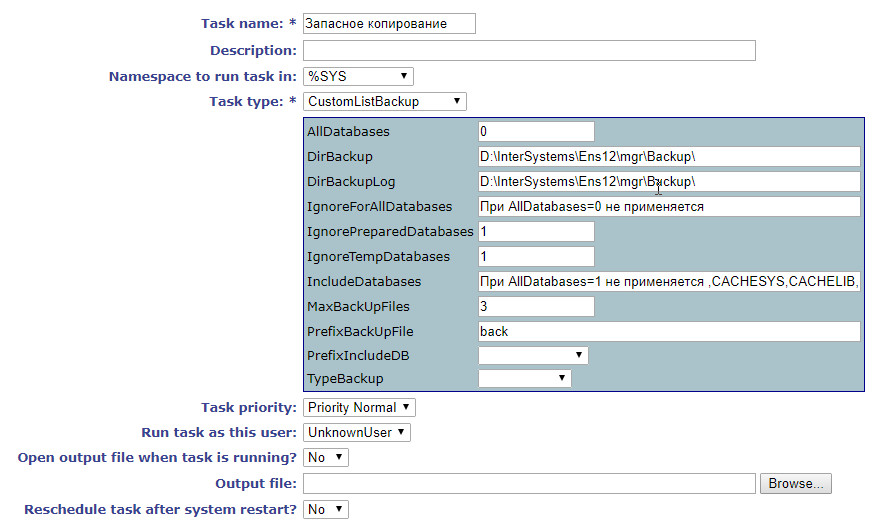
Going back to security and the requirements of the standard, we can’t ignore the backup procedure. The PCI DSS standard imposes certain requirements for backing up both data and event logs. In Caché, all logged events are saved to the CACHEAUDIT database that can be included in the list of backed up databases along with other ones. The Caché DBMS comes with several pre-configured backup jobs, but they didn’t always work for me. Every time I needed something particular for a project, it wasn’t there in “out-of-the-box” jobs. In one project, I had to automate the control over the number of backup copies with an option of automatic purging of the oldest ones. In another project, I had to estimate the size of the future backup file. In the end, I had to write my own backup task. CustomListBackup.cls


Include %occKeyword
/// Backup task class
Class App.Task.CustomListBackup Extends %SYS.Task.Definition [ LegacyInstanceContext ]
{
/// If ..AllDatabases=1, include all databases into the backup copy ..PrefixIncludeDB and ..IncludeDatabases are ignored
Property AllDatabases As %Integer [ InitialExpression = 0 ];
/// If ..AllDatabases=1, include all databases into the backup copy, excluding from ..IgnoreForAllDatabases (comma-delimited)
Property IgnoreForAllDatabases As %String(MAXLEN = 32000) [ InitialExpression = "Not applied if AllDatabases=0 " ];
/// If ..IgnoreTempDatabases=1, exclude temporary databases
Property IgnoreTempDatabases As %Integer [ InitialExpression = 1 ];
/// If ..IgnorePreparedDatabases=1, exclude pre-installed databases
Property IgnorePreparedDatabases As %Integer [ InitialExpression = 1 ];
/// If ..AllDatabases=0 and PrefixIncludeDB is not empty, we will be backing up all databases starting with ..PrefixIncludeDB
Property PrefixIncludeDB As %String [ SqlComputeCode = {S {*}=..ListNS()}, SqlComputed ];
/// If ..AllDatabases=0, back up all databases from ..IncludeDatabases (comma-delimited)
Property IncludeDatabases As %String(MAXLEN = 32000) [ InitialExpression = {"Not applied if AllDatabases=1"_..ListDB()} ];
/// Name of the task on the general list
Parameter TaskName = "CustomListBackup";
/// Path for the backup file
Property DirBackup As %String(MAXLEN = 1024) [ InitialExpression = {##class(%File).NormalizeDirectory("Backup")} ];
/// Path for the log
Property DirBackupLog As %String(MAXLEN = 1024) [ InitialExpression = {##class(%File).NormalizeDirectory("Backup")} ];
/// Backup type (Full, Incremental, Cumulative)
Property TypeBackup As %String(DISPLAYLIST = ",Full,Incremental,Cumulative", VALUELIST = ",Full,Inc,Cum") [ InitialExpression = "Full", SqlColumnNumber = 4 ];
/// Backup file name prefix
Property PrefixBackUpFile As %String [ InitialExpression = "back" ];
/// The maximum number of backup files, delete the oldest ones
Property MaxBackUpFiles As %Integer [ InitialExpression = 3 ];
ClassMethod DeviceIsValid(Directory As %String) As %Status
{
	If '##class(%Library.File).DirectoryExists(Directory) quit $$$ERROR($$$GeneralError,"Directory does not exist")
	quit $$$OK
}
ClassMethod CheckBackup(Device, MaxBackUpFiles, del = 0) As %Status
{
	set path=##class(%File).NormalizeFilename(Device)
	quit:'##class(%File).DirectoryExists(path) $$$ERROR($$$GeneralError,"Folder "_path_" does not exist")
	set max=MaxBackUpFiles
	set result=##class(%ResultSet).%New("%File:FileSet")
	set st=result.Execute(path,"*.cbk",,1)
	while result.Next()
	{	If result.GetData(2)="F"	{
			continue:result.GetData(3)=0
			set ts=$tr(result.GetData(4),"-: ")
			set ts(ts)=$lb(result.GetData(1),result.GetData(3))			
		}
	}
	#; Let’s traverse all the files starting from the newest one
	set i="" for count=1:1 { set i=$order(ts(i),-1) quit:i=""
		#; Get the increase in bytes as a size difference with the previous backup
		if $data(size),'$data(delta) set delta=size-$lg(ts(i),2)
		#; Get the size of the most recent backup file in bytes
		if '$data(size) set size=$lg(ts(i),2)
		#; If the number of backup files is larger or equals to the upper limit, delete the oldest ones along with logs
		if count'$g(free) $$$ERROR($$$GeneralError,"Estimated size of the new backup file is larger than the available disk space:("_$g(size)_"+"_$g(delta)_")>"_$g(free))
	quit $$$OK
}
Method OnTask() As %Status
{
	do $zu(5,"%SYS")
	set list=""
	merge oldDBList=^SYS("BACKUPDB")
	kill ^SYS("BACKUPDB")
	#; Adding new properties for the backup task
	set status=$$$OK
	try {
		##; Check the number of database copies, delete the oldest one, if necessary
		##; Check the remaining disk space and estimate the size of the new file
		set status=..CheckBackup(..DirBackup,..MaxBackUpFiles,1)
		quit:$$$ISERR(status)
		#; All databases
		if ..AllDatabases {
			set vals=""
			set disp=""
			set rss=##class(%ResultSet).%New("Config.Databases:List")
			do rss.Execute()
			while rss.Next(.sc) {
				if ..IgnoreForAllDatabases'="",(","_..IgnoreForAllDatabases_",")[(","_$zconvert(rss.Data("Name"),"U")_",") continue
				if ..IgnoreTempDatabases continue:..IsTempDB(rss.Data("Name"))
				if ..IgnorePreparedDatabases continue:..IsPreparedDB(rss.Data("Name"))
				set ^SYS("BACKUPDB",rss.Data("Name"))=""
			}
		}
		else {
			#; if the PrefixIncludeDB property is not empty, we’ll back up all DB’s with names starting from ..PrefixIncludeDB
			if ..PrefixIncludeDB'="" {
					set rss=##class(%ResultSet).%New("Config.Databases:List")
					do rss.Execute(..PrefixIncludeDB_"*")
					while rss.Next(.sc) {
						if ..IgnoreTempDatabases continue:..IsTempDB(rss.Data("Name"))
						set ^SYS("BACKUPDB",rss.Data("Name"))=""
					}
			}
			#; Include particular databases into the list
			if ..IncludeDatabases'="" {
				set rss=##class(%ResultSet).%New("Config.Databases:List")
				do rss.Execute("*")
				while rss.Next(.sc) {
					if ..IgnoreTempDatabases continue:..IsTempDB(rss.Data("Name"))
					if (","_..IncludeDatabases_",")'[(","_$zconvert(rss.Data("Name"),"U")_",") continue
					set ^SYS("BACKUPDB",rss.Data("Name"))=""
				}
			}
		}
		do ..GetFileName(.backFile,.logFile)
		set typeB=$zconvert($e(..TypeBackup,1),"U")
		set:"FIC"'[typeB typeB="F"
		set res=$$BACKUP^DBACK("",typeB,"",backFile,"Y",logFile,"NOINPUT","Y","Y","","","")
		if 'res set status=$$$ERROR($$$GeneralError,"Error: "_res)
	} catch {	set status=$$$ERROR($$$GeneralError,"Error: "_$ze)
				set $ze=""
	 }
	kill ^SYS("BACKUPDB")
	merge ^SYS("BACKUPDB")=oldDBList
	quit status
}
/// Get file names
Method GetFileName(aBackupFile, ByRef aLogFile) As %Status
{
	set tmpName=..PrefixBackUpFile_"_"_..TypeBackup_"_"_$s(..AllDatabases:"All",1:"List")_"_"_$zd($h,8)_$tr($j($i(cnt),3)," ",0)
	do {
		s aBackupFile=##class(%File).NormalizeFilename(..DirBackup_"/"_tmpName_".cbk")
	} while ##class(%File).Exists(aBackupFile)
	set aLogFile=##class(%File).NormalizeFilename(..DirBackupLog_"/"_tmpName_".log")
	quit 1
}
/// Check if the database is pre-installed
ClassMethod IsPreparedDB(name)
{
	if (",ENSDEMO,ENSEMBLE,ENSEMBLEENSTEMP,ENSEMBLESECONDARY,ENSLIB,CACHESYS,CACHELIB,CACHETEMP,CACHE,CACHEAUDIT,DOCBOOK,USER,SAMPLES,")[(","_$zconvert(name,"U")_",") quit 1
	quit 0
}
/// Check if the database is temporary
ClassMethod IsTempDB(name)
{
	quit:$zconvert(name,"U")["TEMP" 1
	quit:$zconvert(name,"U")["SECONDARY" 1
	quit 0
}
/// Get a comma-delimited list of databases
ClassMethod ListDB()
{
	set list=""
	set rss=##class(%ResultSet).%New("Config.Databases:List")
	do rss.Execute()
	while rss.Next(.sc) {
		set list=list_","_rss.Data("Name")
	}
	quit list
}
ClassMethod ListNS() [ Private ]
{
	set disp=""
	set tRS = ##class(%ResultSet).%New("Config.Namespaces:List")
	set tSC = tRS.Execute()
	While tRS.Next() {	
				set disp=disp_","_tRS.GetData(1)
	}
	set %class=..%ClassName(1)
	$$$comSubMemberSet(%class,$$$cCLASSproperty,"PrefixIncludeDB",$$$cPROPparameter,"VALUELIST",disp)
	quit ""
}
ClassMethod oncompile() [ CodeMode = generator ]
{
	$$$defMemberKeySet(%class,$$$cCLASSproperty,"PrefixIncludeDB",$$$cPROPtype,"%String")
	set updateClass=##class("%Dictionary.ClassDefinition").%OpenId(%class)
	set updateClass.Modified=0
	do updateClass.%Save()
	do updateClass.%Close()
}
}

All our major concerns are addressed here: limitation of the number of copies, removal of old copies, estimation of the size of the new file, different methods of selecting or excluding databases from the list. Let’s import it into the system and create a new task using the Task manager.

And include the database into the list of copied databases. All of the examples above are provided for Caché 2016.1 and are intended for educational purposes only. They can only be used in a product system after serious testing. I will be happy if this code helps you do your job better or avoid making mistakes. Github repository

The following materials were used for writing this article:

  1. Caché Security Administration Guide (InterSystems)
  2. Caché Installation Guide. Preparing for Caché Security (InterSystems)
  3. Caché System Administration Guide (InterSystems)
  4. Introduction to Caché. Caché Security (InterSystems)
  5. PCI DSS.RU. Requirements and the security audit procedure. Version 3.2
2
5 1875