#InterSystems Package Manager (IPM)

0 Followers · 142 Posts

InterSystems Package Manager (IPM) is a tool to deploy the packages and solutions into InterSystems IRIS with dependencies.

Download Package Manager client.

InterSystems staff + admins Hide everywhere
Hidden post for admin
Question Jonathan Lent · May 6, 2021

I'm just starting off with ZPM and noticed that examples of library-type packages and full applications abound, but I have not unearthed any that demonstrate packaging an interop production. It doesn't seem like it would be too big of a jump from a full application to an interop production, but that is likely ignorance speaking.

So, does anybody know if this is possible/advisable -- or if I am just way off on the intent of ZPM?

Thanks!

3
0 266
Announcement Nikolay Solovyev · Apr 2, 2021

ZPM-Registry – is the package registry for the ZPM package manager.

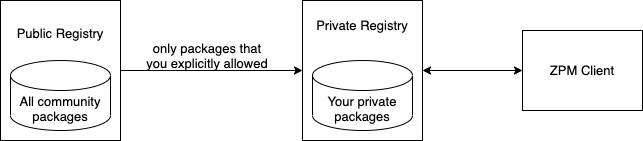
As you probably know, the ZPM package manager is configured by default to work with the public community registry https://pm.community.intersystems.com/, which currently has more than 150 packages published.
You can install and configure your own registry for use in your organization.

Starting from version 1.1.2, zpm-registry includes the Proxy feature.
Now you can link your own registry to another (for example, the public registry of the community).


2
1 470
Article Evgeny Shvarov · Jan 24, 2020 3m read

Hi Developers!

Recently we released the updated version 0.1.3 of ObjectScript Package Manager (ZPM) which comes with the support of simplified ObjectScript sources folder structure.

What 'simplified' does mean?

Before 0.1.3 ZPM expected the following structure:

/src

---/cls  - for ObjectScript classes

---/cls/package_name/class_name.cls

---/cls/package_name/class_name2.cls

---/mac - or Mac ObjectScript routines

---/mac/package_name/mac_routine.mac

---/mac/package_name/mac_routine2.mac

---/inc - for ObjectScript macro include files.

---/inc/package_name/include_file.inc
3
1 969
Discussion Evgeny Shvarov · Mar 4, 2021

Hi Developers!

Thank you for using ZPM Package Manager and contributing more and more useful packages to the public registry!

But as you already aware ZPM packages are always deployed with source code.

Do you think we need to add the option to deploy without source code - e.g. if you want to deploy a commercial package?

Will you develop commercial modules if there will be an option and deploy it with ZPM?

How do you deploy commercial applications today?

10
0 326
Article Evgeny Shvarov · Mar 3, 2021 2m read

Hi folks!

Sometimes when we develop a mockup or PoC there is a need for a simple interface that will provide data in IRIS in JSON against SQL queries.

And recently I contributed a simple module that does exactly that:

accepts SQL string and returns the JSON.

How to install? Just call:

zpm "install sql-rest"

If you install it in a namespace X it will setup a /sql endpoint to your system that will accept POST requests with SQL string and will return the result for you for the data available in the namespace X.

0
2 506
Article Evgeny Shvarov · Feb 9, 2021 3m read

Hi developers!

Recently we announced the preview of Embedded Python technology in InterSystems IRIS.

Check the Sneak Peak video by @Robert.Kuszewski.

Embedded python gives the option to load and run python code in the InterSystems IRIS server. You can either use library modules from Python pip, like numpy, pandas, etc, or you can write your own python modules in the form of standalone py files.

So once you are happy with the development phase of the IRIS Embedded Python solution there is another very important question of how the solution could be deployed.

One of the options you can consider is using the ZPM Package manager which is described in this article.

5
0 1015
Article Evgeny Shvarov · Mar 20, 2020 3m read

Hi colleagues!

Every day Johns Hopkins University publishes new data on coronavirus COVID-19 pandemic status.

I built a simple InterSystems IRIS Analytics dashboard using InterSystems IRIS Community Edition in docker deployed on GCP Kubernetes which shows key measures of the disease outbreak.

This dashboard is an example of how information from CSV could be analyzed with IRIS Analytics and deployed to GCP Kubernetes in a form of InterSystems IRIS Community Edition.

Added the interactive map of the USA:

13
3 1082
Article Evgeny Shvarov · Jan 24, 2021 2m read

Hi developers!

Often we need to deploy some data along with code pieces of the application.

And for InterSystems IRIS developers the question could sound: "How can I deploy the data I have in globals?"

InterSystems IRIS Globals Model QuickStart | InterSystems

Here I want to suggest to you one of the approaches - deploying global data using the ZPM package manager.

0
0 470
Announcement Evgeny Shvarov · Jan 24, 2021

Hi developers!

Sometimes we need to test this or that library, framework, or function vs some dataset. And often we want to deal with some meaningful data.

Recently I added two very simple but meaningful datasets that could be installed with one line.

Titanic Dataset

Application

Contains 800+ records about passengers from the famous cruise liner. The dataset could be installed with:

zpm "install dataset-titanic"

This installs one class dc.data.Titanic with 800+ records.

Countries dataset

Application

The dataset contains data about 167 countries such as population, surface, capital, the average life expectancy. The dataset could be installed as:

zpm "install dataset-countries"

This installs one class dc.data.Countries and the global with data.

0
1 271
Announcement Evgeny Shvarov · Nov 18, 2020

Hooray! 

I'm pleased to announce that 100 ZPM modules are available in the public InterSystems IRIS zpm-repository! Now!

Thank you, developers! This is great that you adopt ZPM Package manager that fast and share your open source add-on libraries for InterSystems IRIS in a form of ZPM packages which means that each of them could be installed as:

USER>zpm "install module-name"

Wish to see the next milestone of 1,000 modules soon in 2021!

Thank you!

4
1 262
Announcement Olga Zavrazhnova · Oct 19, 2020

Hi Community, 

You may know that you get rewarded with points on Global Masters for each your application published on Open Exchange. Recently we introduced bonus points for ZPM applications. So now, you getextra 400 points foreach ZPM application! Points are automatically adjusted. 
Check out points & available rewards on Global Masters - and see you there today!

0
0 223
Article Timothy Leavitt · Aug 27, 2020 7m read

Introduction

In a previous article, I discussed patterns for running unit tests via the  InterSystems Package Manager. This article goes a step further, using GitHub actions to drive test execution and reporting. The motivating use case is running CI for one of my Open Exchange projects, AppS.REST (see the introductory article for it here). You can see the full implementation from which the snippets in this article were taken on GitHub; it could easily serve as a template for running CI for other projects using the ObjectScript package manager.

Features demonstrated implementation include:

0
2 929
Article Evgeny Shvarov · Aug 2, 2020 1m read

Hi Developers!

As you know the application errors live in ^ERRORS global. They appear there if you call:

d e.Log() 

in a Catch section of Try-Catch.

With @Robert Cemper's approach, you can now use SQL to examine it.

Inspired by Robert's module I introduced a simple IRIS Analytics module which shows these errors in a dashboard:

5
1 387
Discussion Evgeny Shvarov · Jun 11, 2020

Hi Devs!

A few months ago I raised a discussion on the naming convention for ZPM modules.

And you free to put your name or your organization name for the packages you want to have your personal or company's brand.

But if you contribute to community, we suggested to have "community." package for all such libraries.

But the name is too long.

What if we use "isc." instead?  Which can be read as "isc ->InterSystemsCommunity". Short and unique.

What do you think?

 
19
1 579
Announcement Anastasia Dyubaylo · Jun 9, 2020

Hi Community!

We're pleased to invite all the developers to the upcoming "ZPM – Package Manager for InterSystems IRIS" webinar on June 18th at 11:00 AM EDT. 

You will learn about the ObjectScript Package Manager Client called ZPM.

Speaker: 
@Evgeny Shvarov, InterSystems Developer Ecosystem Manager


What is ZPM and what awaits you at this webinar?

2
2 551
Article Evgeny Shvarov · Jun 16, 2020 3m read

Hi, folks!

We released a new version of ZPM, with one revolutionary feature, and a set of great enhancements, amongst of which, are:

  • module.xml boilerplate generator
  • test server
  • CLI commands order change,
  • and more!

See the details below

1. Official test server

To check if your package is published in the registry and then installed from it, use the test registry: https://test.pm.community.intersystems.com/registry/ login: test password: PassWord42

To switch to the test registry use the command

repo -r -n registry -url https://test.pm.community.intersystems.com/registry/ -user test -pass PassWord42

Once a day, the test registry is updated and all data in it is reset

2. New commands for the most frequent actions with the module

Previously, to publish a module in the current registry, you had to use the module-action command, e.g., module-action mymodule publish, and it could be written shorter mymodule publish.

Now you can use the publish command: publish mymodule - with the organic word order

Commands which support Command module-name order:

  • reload
  • compile
  • test
  • package
  • verify
  • publish

3. Generate command

Using the generate command, you can create a module.xml file template in a second.

Usage:

  • generate -template /my/project Creates a module.xml file with fictional data in /my/project
    After that you must open and edit this file to change module meta information and specify module resources (classes, csp pages, globals, test)

  • generate /my/project Without -template (or -t) flag this command creates a module.xml file in an interactive mode. Just answer several questions. Use -author (-a) flag to add information about module author

zpm: USER>generate /temp/zzzz

Enter module name: zzzz
Enter module version: 1.0.0 => 1.0.1
Enter module description: module description
Enter module keywords: module keywords
Enter module source folder: src => 

Existing Web Applications:
    /csp/user
    Enter a comma separated list of web applications or * for all: /csp/user
    Enter path to csp files for /csp/user:  src/web
Dependencies:
    Enter module:version or empty string to continue: sslclient:1.0.1
    Enter module:version or empty string to continue: 
zpm: USER>

4. Globals location

Now Globals are expected in /src/gbl (but not in /gbl ) This is not back-compatible, so please update your modules.

5. Version command

Version command displays currently installed zpm version number; shows locally installed zpm registry and connected remote repository and their version.

zpm: USER>version

 zpm 0.2.2
 Locally installed zpm-registry not found
https://pm.community.intersystems.com - 0.0.2

6.Switching back to a public repository

Run the following command to switch back to the public repository:

zpm: USER>repo -r -n registry -url https://pm.community.intersystems.com/

Stay tuned! Your collaboration, feedback, bug-reports are very welcome!
1
1 400