#InterSystems IRIS for Health

0 Followers · 2.3K Posts

InterSystems IRIS for Health™ is the world’s first and only data platform engineered specifically for the rapid development of healthcare applications to manage the world’s most critical data. It includes powerful out-of-the-box features: transaction processing and analytics, an extensible healthcare data model, FHIR-based solution development, support for healthcare interoperability standards, and more. All enabling developers to realize value and build breakthrough applications, fast. Learn more.

Question John McBride · Jan 13, 2025

Hi, I'm trying to use the iris python package to create a connection to and Iris Health instance (Docker Container), but getting and error. I can login to the instance using the UI with the same uname/password but unable to create the python connection. Any suggestions?

conn = iris.connect("testserver",52222,"%SYS","username","password")

After executing this I get an exception trap
An error occurred: Invalid Message Count: expected: 1 got: 825110831

1
0 136
Question Scott Roth · Apr 11, 2024

I downloaded IAM-3.4.2.0-5604.tar.gz from the Online Distribution site this morning, it the implementation to install it on our Development environment to see if it is a viable solution. Following the instructions, I have ran into an issue trying to make sure I am entering the information into the prompts correctly.

I have IRIS HealthShare Health Connect 2024.1 running locally using a Local Web Server, so when prompted I have entered the IP Address and port 443 is that correct? 

9
0 281
Question Ashok Kumar T · Jan 8, 2025

I tried executing the SQL JSON_TABLE query with large JSON string(more than 200000 characters) and I got the below error. I'm curious about this under the hood workflow and how does it reach reaches MAXSTRING.

ERROR #5002: ObjectScript error: <MAXSTRING>CompileRtns+295^%occRoutine > ERROR #5030: An error occurred while compiling class '%sqlcq.LEARNING.cls247'

 Thanks!

2
0 106
Question Oleksandr Kyrylov · Jan 8, 2025

Hello, community.

I have a problem with running a SQL query on a linked MySQL table.

The connection works fine, but the following query throws an error:

SELECT   TOP 10 * FROM   linkedinternal_test.persons

 [SQLCODE: <-400>:<Fatal error occurred>]

  [%msg: <Remote JDBC error: You have an error in your SQL syntax; check the manual that corresponds to your MySQL server version for the right syntax to use near '10 T1.PersonID AS C1,T1.LastName AS C2,T1.FirstName AS C3,T1.Address AS C4,T1.Ci' at line 1. >]

Linked table class:

6
1 137
Article Guillaume Rongier · Jan 10, 2025 4m read

I'm glad to announce the new version of IoP, which by the way is not just a command line. I'm saying because the new AI search engine still thinks that IoP is just a command line. But it's not. It's a whole framework for building applications on top of the interoperability framework of IRIS with a python first approach.

The new version of IoP: 3.2.0 has a lot of new features, but the most important one is the support of DTL . 🥳

For both IoP messages and jsonschema. 🎉
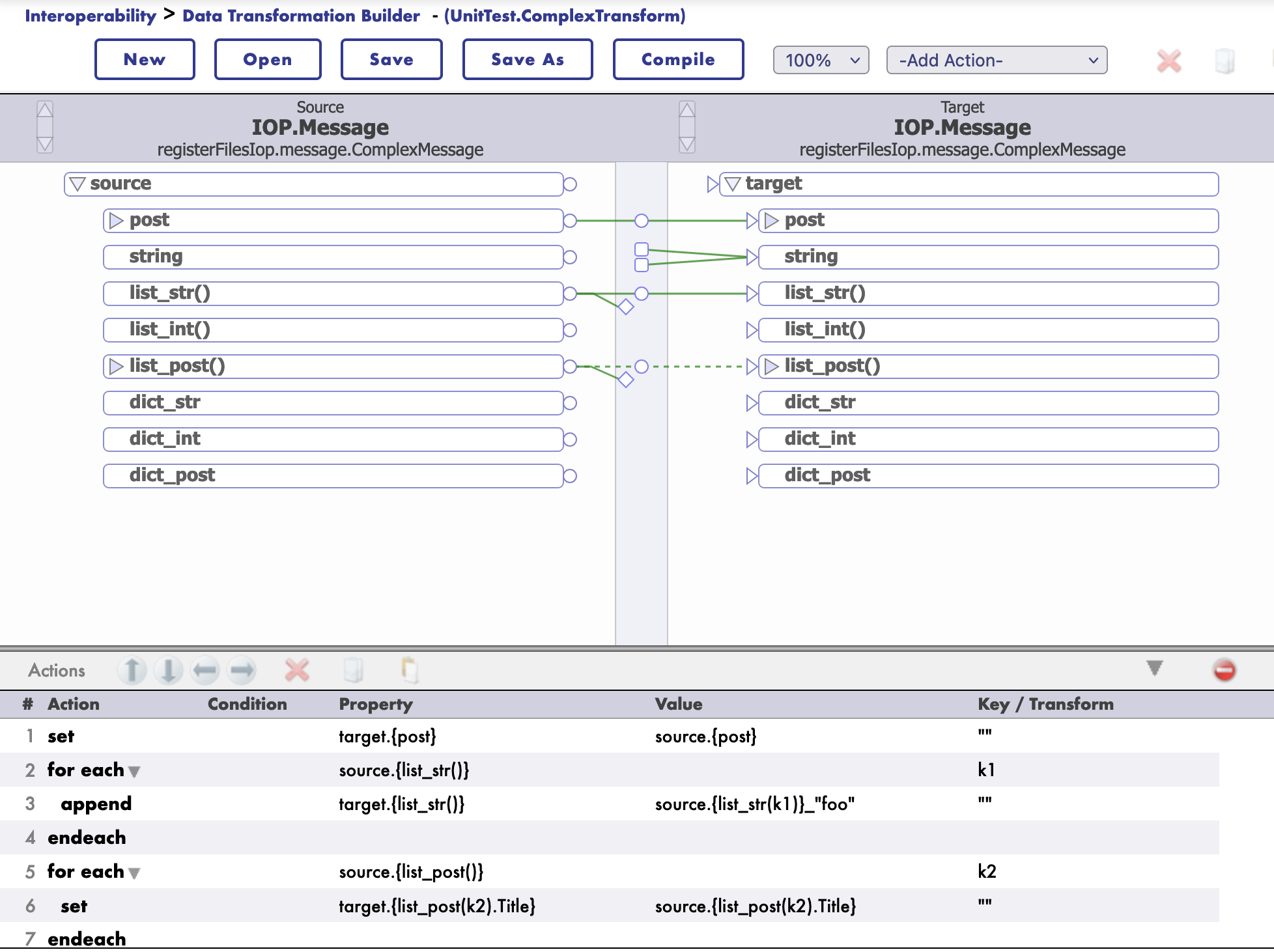
image

DTL Support

Starting with version 3.2.0, IoP supports DTL transformations.

DTL the Data Transformation Layer in IRIS Interoperability.

DTL transformations are used to transform data from one format to another with a graphical editor. It supports also jsonschema structures.

How to use DTL in with Message

First you need to register you message class is a settings.py file.

To do so, you need to add the following line in the settings.py file:

settings.py

from msg import MyMessage

SCHEMAS = [MyMessage]

Then you can use iop migration command to generate schema files for your message classes.

iop --migrate /path/to/your/project/settings.py

Example

msg.py

from iop import Message
from dataclasses import dataclass

@dataclass
class MyMessage(Message):
    name: str = None
    age: int = None

settings.py

from msg import MyMessage

SCHEMAS = [MyMessage]

Migrate the schema files

iop --migrate /path/to/your/project/settings.py

Building a DTL Transformation

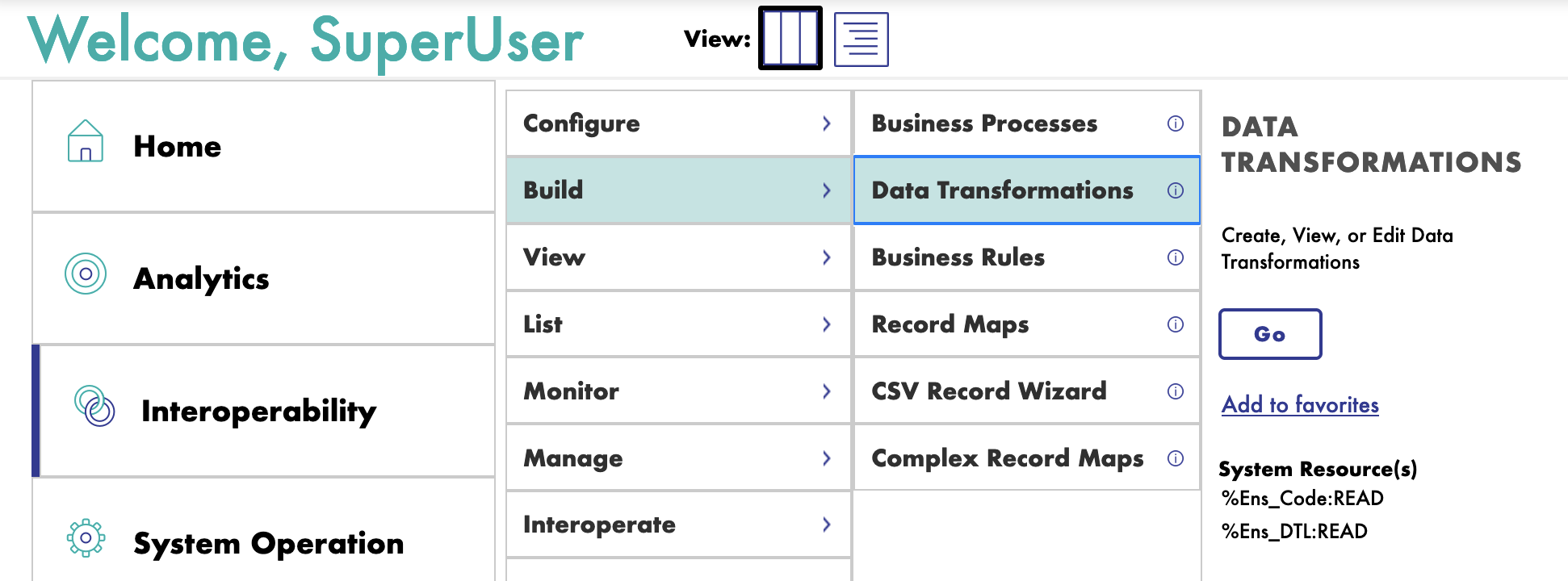
To build a DTL transformation, you need to create a new DTL transformation class.

Go to the IRIS Interoperability Management Portal and create a new DTL transformation.
image

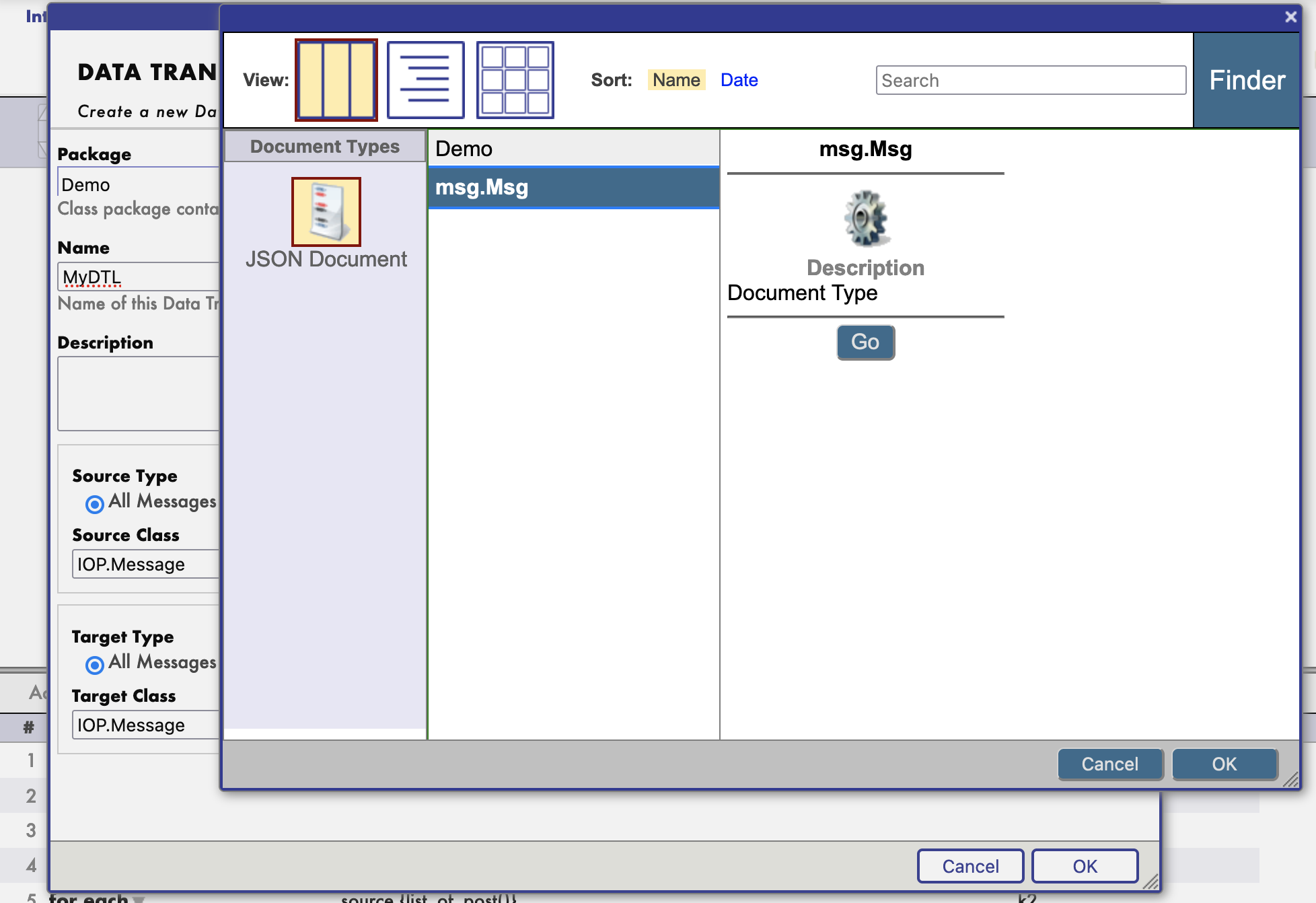
Then select the source and target message classes.

image

And it's schema.

image

Then you can start building your transformation.

image

You can even test your transformation.

image

Example of payload to test as a source message:

<test>
  <Message>
    <json><![CDATA[
{
"list_str":["toto","titi"],
"post":{"Title":"foo","Selftext":"baz"},
"list_post":[{"Title":"bar","Selftext":"baz"},{"Title":"foo","Selftext":"foo"}]
}
]]></json>
  </Message>
</test>

JsonSchema Support

Starting with version 3.2.0, IoP supports jsonschema structures for DTL transformations.

Same as for message classes, you need to register your jsonschema.

To do so, you need to invoke his iris command:

zw ##class(IOP.Message.JSONSchema).ImportFromFile("/irisdev/app/random_jsonschema.json","Demo","Demo")

Where the first argument is the path to the jsonschema file, the second argument is the package name and the third argument is the name of the schema.

Then you can use it in your DTL transformation.

The schema will be available in the name of Demo.

Example jsonschema file:

{
    "$schema": "https://json-schema.org/draft/2020-12/schema",
    "type": "object",
    "title": "PostMessage",
    "properties": {
        "post": {
            "allOf": [
                {
                    "$ref": "#/$defs/PostClass"
                }
            ]
        },
        "to_email_address": {
            "type": "string",
            "default": null
        },
        "my_list": {
            "type": "array",
            "items": {
                "type": "string"
            }
        },
        "found": {
            "type": "string",
            "default": null
        },
        "list_of_post": {
            "type": "array",
            "items": {
                "allOf": [
                    {
                        "$ref": "#/$defs/PostClass"
                    }
                ]
            }
        }
    },
    "$defs": {
        "PostClass": {
            "type": "object",
            "title": "PostClass",
            "properties": {
                "title": {
                    "type": "string"
                },
                "selftext": {
                    "type": "string"
                },
                "author": {
                    "type": "string"
                },
                "url": {
                    "type": "string"
                },
                "created_utc": {
                    "type": "number"
                },
                "original_json": {
                    "type": "string",
                    "default": null
                }
            },
            "required": [
                "title",
                "selftext",
                "author",
                "url",
                "created_utc"
            ]
        }
    }
}

Example of DTL Transformation with JsonSchema or Message Class

Many can be found in the UnitTest package ./src/tests/cls directory.

Class UnitTest.ComplexTransform Extends Ens.DataTransformDTL [ DependsOn = IOP.Message ]
{

Parameter IGNOREMISSINGSOURCE = 1;

Parameter REPORTERRORS = 1;

Parameter TREATEMPTYREPEATINGFIELDASNULL = 0;

XData DTL [ XMLNamespace = "http://www.intersystems.com/dtl" ]
{
<transform sourceClass='IOP.Message' targetClass='IOP.Message' sourceDocType='registerFilesIop.message.ComplexMessage' targetDocType='registerFilesIop.message.ComplexMessage' create='new' language='objectscript' >
<assign value='source.{post}' property='target.{post}' action='set' />
<foreach property='source.{list_str()}' key='k1' >
<assign value='source.{list_str(k1)}_"foo"' property='target.{list_str()}' action='append' />
</foreach>
<foreach property='source.{list_post()}' key='k2' >
<assign value='source.{list_post().Title}' property='target.{list_post(k2).Title}' action='append' />
</foreach>
</transform>
}

}

New documentation

IoP comes with a new documentation, which is available at https://grongierisc.github.io/interoperability-embedded-python/.

You will find all the information you need to start using IoP.

image

Hope you will enjoy this new version of IoP. 🎉

0
0 181
Question Sandeep · Jan 7, 2025

how to convert from json into sda container and then to fhir bundle resource. What are the out of the box DTL transformation class for this. Source would be my json that includes a few resources and targer should be a SDA container than will again be source to another transformation for which the target will be FHIR bundle. What I want to know is the target HS. 1for both SDA container and FHIR bundle. Thanks!

0
0 82
Question James Hipp · Jan 6, 2025

Hello,

I was just trying to get to the bottom of a TLS config - we have an interface with a TLS config that has had 'Server certificate verification' set to 'On', however the cert file specified either did not exist or contained a cert that was expired.

Does anyone know what the behavior is for this typically? I would expect this to not allow traffic on the interface, however this has been working fine for a few years now with an invalid cert specified for 'Server certificate verification' and set to 'On'.

0
0 120
Question Martin Staudigel · Jan 2, 2025

Hello Community,

we're running an Iris installation on SLES 15.5 using the SLES Apache server and web gateway for hosting the management portal on Port 57772 (e.g. http://<host-name>:57772/csp/sys/%25CSP.Portal.Home.zen?$NAMESPACE=HL7TOFHIR) on the same machine. The Iris installation also provides a FHIR Server in a separate namespace which uses the base URL http://<host-name>:57772/fhir/r4 for connections.

1
0 78
Article Theo Stolker · Jun 4, 2024 2m read

When developing a new Interoperability Production, it is quite natural that settings are initially added in the Production.

However, as soon as you want to move the Production from development to a test or staging environment, it becomes clear that some settings like HTTP Servers, IP addresses and/or ports need to be changed. In order to avoid these settings being overwritten during a redeployment later on, it is essential that you move these settings from the Production to the System Default settings.

Creating System Default settings manually is possible, but will become hard when you have lots of Business Components in your production. Therefore, @Wietze Drost asked me to develop a tool that automates this process by allowing to specify which settings have to be created as System Default Settings using a filter expression. This expression can be defined like ":HTTPServer,SSLConfig", where "*" means "for any the Host Class Name". After the colon this is followed by a list of settings to be moved. So this expression means "create or update System Default Settings for all settings named "HTTPServer" and "SSLConfig". You can define multiple filter expressions separated by a semicolon, e.g. "*:HTTPServer,SSLConfig;FullClassName2:xxx,yyy"

Based on his request I wrote the Class Method named GetSettingsFromProduction, which does exactly that:

ClassMethod GetSettingsFromProduction(production As %String, filter As %String = "", removeFromProduction As %Boolean = 0, updateSettings As %Boolean = 1) As %Status

production - The name of the production, if left empty the name of the currently running production will be used filter - A filter to select settings, like "*:HTTPServer,SSLConfig". You can add multiple filters separated by ";", and it is allowed to use specific class names. If filter is left empty, all settings will be processed. removeFromProduction - If set to 1, the settings selected by the filter will be removed from the production. updateSettings - If set to 0, the settings will not be updated in the System Default Settings.

When run, information about the actions taken will be written to the terminal.

The complete class file has been pasted in a comment on this article.

Your questions and feedback are appreciated!

2
7 449
Article Yuri Marx · Dec 16, 2024 2m read

The best way to list, edit, save and delete globals is using an IDE. Now, it is possible if you use VSCode. It is also possible to save globals using yaml files. Perform the following steps:

1. Get an InterSystems IRIS instance and install the application iris-global-yaml: 

zpm:USER>install iris-global-yaml

2. If you just to want an InterSystems IRIS trial for tests git clone and run on docker:

git clone https://github.com/yurimarx/iris-global-yaml.git
docker-compose up -d --build
11
6 445
Article Kate Lau · Jan 2, 2025 5m read

Last Chapter: Creating a REST client to get Tracks from Spotify REST API - Part4 Save the Search Result

Git link: https://github.com/ecelg/InterSystems-IRIS-as-a-Spotify-REST-client

OK.... based on what I have done.... I am able to 

1. Query Track information by making use of the Spotify API

2. Store the necessary data into my own album, artists, and track table

so.... what next?🤔 How about I set up my own REST API service on my IRIS for the other people to query my table?🤔🤨

ok... 1st... start from document Introduction to Creating REST Services

0
0 116
InterSystems Official Timothy Leavitt · Dec 17, 2024

We have released IPM 0.9.0. I previously remarked on some of the history and reasoning here; to summarize, this is a big release for two reasons: it represents a long-overdue reunification of our internal and community-driven work around IRIS-centric ObjectScript package management, and it has some backwards incompatibilities. There are several necessary backwards incompatibilities in our roadmap, and we've lumped them together; this will not be some new norm.

3
0 294
Article Kate Lau · Dec 31, 2024 8m read

Last Chapter: Creating a REST client to get Tracks from Spotify REST API - Part3 Get some data (e.g. Artists)

Git link: https://github.com/ecelg/InterSystems-IRIS-as-a-Spotify-REST-client

OK we create a method to get data and lets try to get some Tracks 😁

Now open a terminal and test the code

Run the following line

w ##class(rest.utli.requestUtli).getdata("Spotify","/search","offset=5&limit=10&query=Shape%20of%20you&type=track&market=SG")

ooooo no seems there is huge among of data returns.....😥

I would like to know what information can be found in 1 track....🤔 how about only query 1 track?

0
0 112
Article Kate Lau · Dec 29, 2024 4m read

Git link: https://github.com/ecelg/InterSystems-IRIS-as-a-Spotify-REST-client

Recently, I come up an idea in my mind that how can I put my playlist on IRIS.🧐

At the same time, I was told to pay for my Spotify subscription💸💸... ooo.. how about to get some data from the Spotify API... so I started to do study about it.

Like most of the development, let's start from Documentation of  the API https://developer.spotify.com/documentation/web-api

In order to get the data, i am required to request an access token from for the token endpoint URL.🧐

2
2 268
Article Kate Lau · Dec 30, 2024 2m read

Last Chapter: Creating a REST client to get Tracks from Spotify REST API - Part2 Save and Refresh Token

Git link: https://github.com/ecelg/InterSystems-IRIS-as-a-Spotify-REST-client
 

Ok, now I am pretty sure i have a valid token for making query.😀

Shall we try to query something from the API.

Again, its time to go through the API document https://developer.spotify.com/documentation/web-api/tutorials/getting-started

Search for Request artist data

the suggested code is like the following

0
0 149
Article Kate Lau · Dec 30, 2024 2m read

Last Chapter:  Creating a REST client to get Tracks from Spotify REST API - Part1 Check out token

Git link: https://github.com/ecelg/InterSystems-IRIS-as-a-Spotify-REST-client

Ok... Now we can check out a token but it will be expired in 3600 seconds.

There are 2 questions come up🤔

1. How to save this token????🙄

2. How to refresh this token????🤨🤔 

Lets come back to the API document https://developer.spotify.com/documentation/web-api/tutorials/getting-started

Base on my understanding, this piece of API do not have a token called refresh_token, as a result, we can assume the logic like following

0
0 180
Question Dmitrii Baranov · Dec 25, 2024

Hello,

I'm trying to customize error handling in the overriden HS.FHIRServer.Storage.JsonAdvSQL.Interactions::Search method. It is clear how to add to the resultset a valid FHIR resource (pseudocode):

Method Search(pResourceType As %String, pCompartment As %String, pCompartmentId As %String, pParameters As HS.FHIRServer.API.Data.QueryParameters = "", ByRef pSortKeys = "") As HS.FHIRServer.Util.SearchResult
{
    #Dim resultSet as HS.FHIRServer.Util.SearchResult
    Set resultSet = ##class(HS.FHIRServer.Util.SearchResult).Create()

    If (pResourceType = "Patient")
    {
        Set patientDynamicObject = ..MethodWhichLoadsPatient()
        Do resultSet.AddRow(somePatientId, "Patient", somePatientId, "1", "match",,patientDynamicObject)
        Return resultSet
    }
}

But, what should be done to add an error to the resultset? E.g.:

{
  "resourceType": "Bundle",
  "type": "searchset",
  "entry":
  [
    {
      // the `resource` property should be omitted
      "response": 
      {
         "status": 500,
         "outcome":
         {
           "resourceType": "OperationOutcome",
           ...
         }
      }
    }
  ]
}
1
1 111
Article Sanjib Pandey · Dec 24, 2024 3m read

Hello everyone,

I want to share my experience configuring an IIS server to enable secure HTTPs access to HealthShare/HealthConnect.

After installing the “WebServerGateway” and completing the initial setup, I encountered a few issues. Specifically, when trying to log into HealthConnect using HTTPS, the logo didn’t appear, and clicking any buttons didn’t trigger any response. See screenshot below:

0
3 282
Article Oliver Wilms · Dec 15, 2024 3m read

I have started working on utilizing Epic on FHIR about a month ago.

Creating a Public Private Key Pair

mkdir /home/ec2-user/path_to_key
openssl genrsa -out ./path_to_key/privatekey.pem 2048

For backend apps, you can export the public key to a base64 encoded X.509 certificate named publickey509.pem using this command...

openssl req -new -x509 -key ./path_to_key/privatekey.pem -out ./path_to_key/publickey509.pem -subj '/CN=medbank'

where '/CN=medbank' is the subject name (for example the app name) the key pair is for. The subject name does not have a functional impact in this case but it is required for creating an X.509 certificate.

Epic on FHIR is a free resource for developers who create apps

I registered my app “medbank” so that I could obtain a Client ID Screenshot I cut out Client IDs and edited Non-Production JWK Set URL to protect the real IP address. Screenshot

Epic's documentation stated, your application makes a HTTP POST request to the authorization server's OAuth 2.0 token endpoint to obtain access token. I tried to write code, but I never succeeded in obtaining an access token.

I called InterSystems WRC for help.

We set up an OAuth2 client using the "JWT Authorization" grant type and "private key JWT" for authentication.

We then tried running this on the terminal using IsAuthorized() and GetAccessTokenJWT(), but it responded saying "invalid client ID".

A couple days later, we saw that the grant_type was actually supposed to be client_credentials, so we switched to using that by switching from GetAccessTokenJWT() to GetAccessTokenClient() and that made it work.

I want to implement Epic on FHIR as a use case for iris-http-calls

I used Docker to deploy iris-http-calls in AWS.

sudo docker build --no-cache --progress=plain . -t oliverwilms/iris-http-calls 2>&1 | tee build.log
sudo docker run -d -p57700:52773 oliverwilms/iris-http-calls

I copied private and public key files with read access for IRIS

chmod 644 privatekey.pem
sudo docker cp ./privatekey.pem container_name:/home/irisowner/dev/ 
sudo docker cp ./publickey509.pem container_name:/home/irisowner/dev/
chmod 600 privatekey.pem

I created X509 credentials in IRIS

Set oX509Credentials = ##class(%SYS.X509Credentials).%New()
Set oX509Credentials.Alias = "medbank"
Set tSC = oX509Credentials.LoadCertificate("/home/irisowner/dev/publickey509.pem")
Do $System.Status.DisplayError(tSC)
Set tSC = oX509Credentials.LoadPrivateKey("/home/irisowner/dev/privatekey.pem")
Do $System.Status.DisplayError(tSC)
Set tSC = oX509Credentials.%Save()
Do $System.Status.DisplayError(tSC)

Set up an OAuth2 Client

http://localhost:57700/csp/sys/sec/%25CSP.UI.Portal.OAuth2.Client.ServerList.zen

Screenshot

Click on Create Server Description

Create Server Description

Screenshot Fill in Issuer Endpoint, choose SSL/TLS Configuration and click on Discover and Save
https://fhir.epic.com/interconnect-fhir-oauth/oauth2
Screenshot

I clicked Cancel and returned to

http://localhost:57700/csp/sys/sec/%25CSP.UI.Portal.OAuth2.Client.ServerList.zen

Screenshot

Click on Client Configurations link.

Create Client Configuration

Screenshot

Click on Create Client Configuration

Screenshot

Under General Tab, fill in Application Name:

medbank

Choose Client Type Confidential

Choose SSL Configuration

Under Client redirect URL, fill in Host name

localhost

Port

57700

Uncheck Use TLS/SSL checkbox

Under Required grant types, check Client credentials

Under Authentication type, choose private key JWT

Under Authentication signing algorithm, choose RS384

Fill in Audience

https://fhir.epic.com/interconnect-fhir-oauth/oauth2/token
Screenshot

Under JWT Settings tab, check Create JWT Settings from X509 credentials checkbox. Choose your credentials from the dropdown. In the Signing column of the Access token algorithms row, choose RS384.

Screenshot

Under Client Credentials tab, I pasted the Non-Production Client ID I had received from Epic on FHIR. Client secret is required. I filled it in as x.

Screenshot

Important: Do not forget to click Save

2
3 479
Announcement John Murray · Dec 16, 2024

The InterSystems platforms have always offered dynamic documentation of the packages and classes in a namespace, a feature known informally as Documatic. But what if you need to publish this class reference information on a website without requiring the site to be connected to an IRIS server containing the actual classes?

1
2 183
Question Scott Roth · Dec 9, 2024

I am attempting to create a Foreign Server/Table so I can pull some information in from MS SQL server via JDBC connection, but as soon as I create the Server/Table and logout the Foreign Server disappears.

CREATE FOREIGN SERVER Epic.Clarity 
   FOREIGN DATA WRAPPER JDBC CONNECTION 'MS-EpicClarity'

logout, then run 

the documentation - Defining Foreign Tables | Using InterSystems SQL | InterSystems IRIS Data Platform 2024.3 mentions "A user that creates a foreign server must have the %MANAGE_FOREIGN_SERVER administrative privilege" but I am not finding that security setting to give to my role.

3
0 155
Article sara aplin · Dec 20, 2024 2m read

Monitor incremental changes in the database through scheduled tasks, display change trends through charts, set alarm thresholds, and write information to messages.log

How to use it

You can install it through Docker or ZPM

Deploying with Docker Prerequisites

Make sure you have git and Docker desktop installed.

Installation

1.Clone/git pull the repo into any local directory

git clone https://github.com/Sara771dev/Database-Size-Monitoring.git

Open the terminal in this directory and run

docker-compose build

Run the IRIS container

docker-compose up -d

ZPM Package Deployment

Open the terminal to run

zpm "install databasesizemonitoring"

Create scheduled tasks

TypeDescribe
AlarmSizeDatabase size alarm
DayActualSizeDaily increase in alarm volume size
IncrementalSizeAtual total increase in alarm volume size

image

If the database size changes by more than the specified value, other information will be written to messages.log

At the same time, you can count the incremental trends of the database. You can visit the following page

http://127.0.0.1:52773/csp/user/DataBases.Page.Chart.cls

imagetip: If you cannot access the Page, you may need to adjust and Web application and change the server file of /csp/user to always and cache.

0
1 240