#Angular

0 Followers · 89 Posts

Angular (or AngularJS )is a JavaScript-based open-source front-end web application framework mainly maintained by Google and by a community of individuals and corporations to address many of the challenges encountered in developing single-page applications.

Official site.

Article Yuri Marx · Nov 30, 2022 14m read

Intersystems IRIS for Health has excellent support for the FHIR industry standard. The main features are:
1. FHIR Server
2. FHIR Database
3. REST and ObjectScript API for CRUD operations on FHIR resources (patient, questionnaire, vaccines, etc.)

This article demonstrates how to use each of these features, as well as presenting an angular frontend for creating and viewing Quiz-like FHIR resources.

Step 1 - deploying your FHIR Server using InterSystems IRIS for Health

0
1 1153
Article Maria Nesterenko · Nov 25, 2022 3m read

Brainstorming the project we would build to showcase in the current female health themed InterSystems FHIR Contest, our girl band decided that we need to do something practical for the ordinary user and to solve some burning issues of the modern life. This discussion led to the idea of creating a project that will help women not to forget their health in daily grind - FemTech Reminder.

Project presentation video:

https://www.youtube.com/watch?v=LaHJYejc-5I

image

The FemTech Reminder project contains four main components:

  • Reminder server is based on InterSystems IRIS for Health;
  • GUI part is made with Angular;
  • Bot in Telegram;
  • FHIR server hosted in InterSystems Cloud.

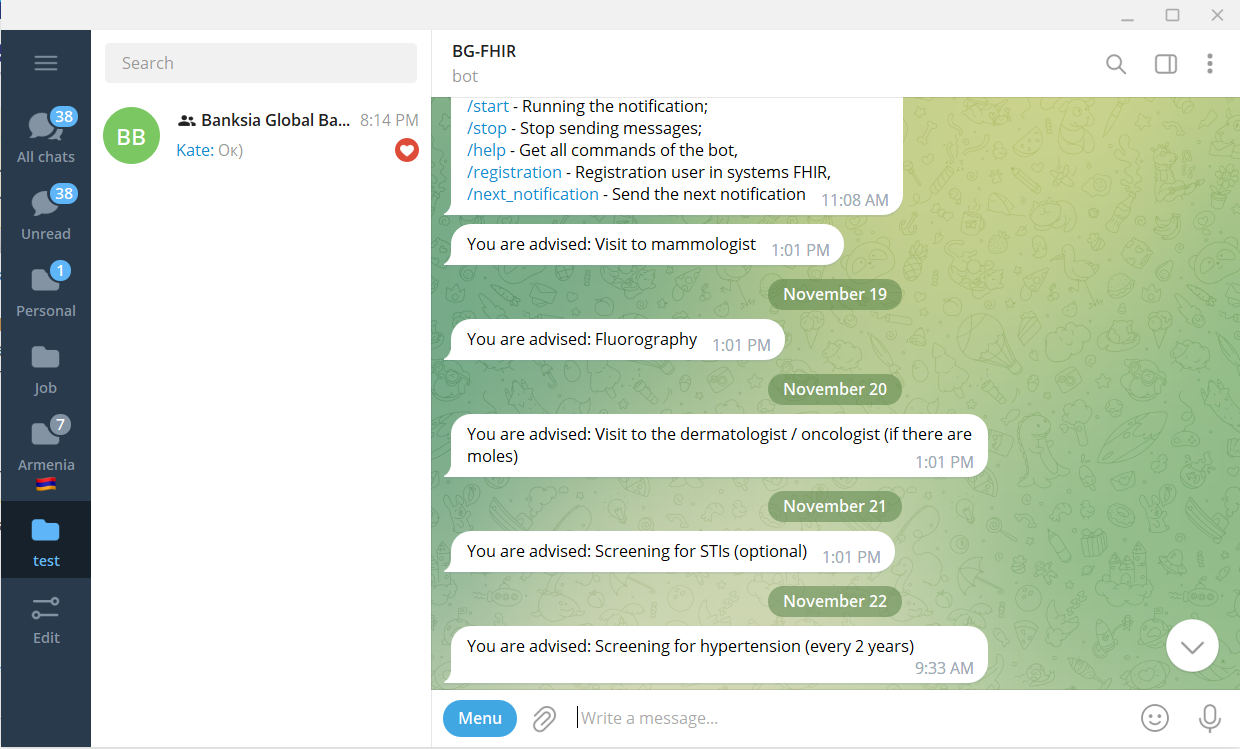
The user communicates with our system via a chatbot. It allows the user to get notifications directly into the messenger without installing additional software. Using a bot, the user can register in Reminder service and associate their profile with a patient record on the FHIR server, allowing us to receive notifications based on patient information in the future. The Reminder server sends notifications once a day, analyzing user data.

image

Three types of notifications are implemented at the time of publication of this article.

Age Notifications:

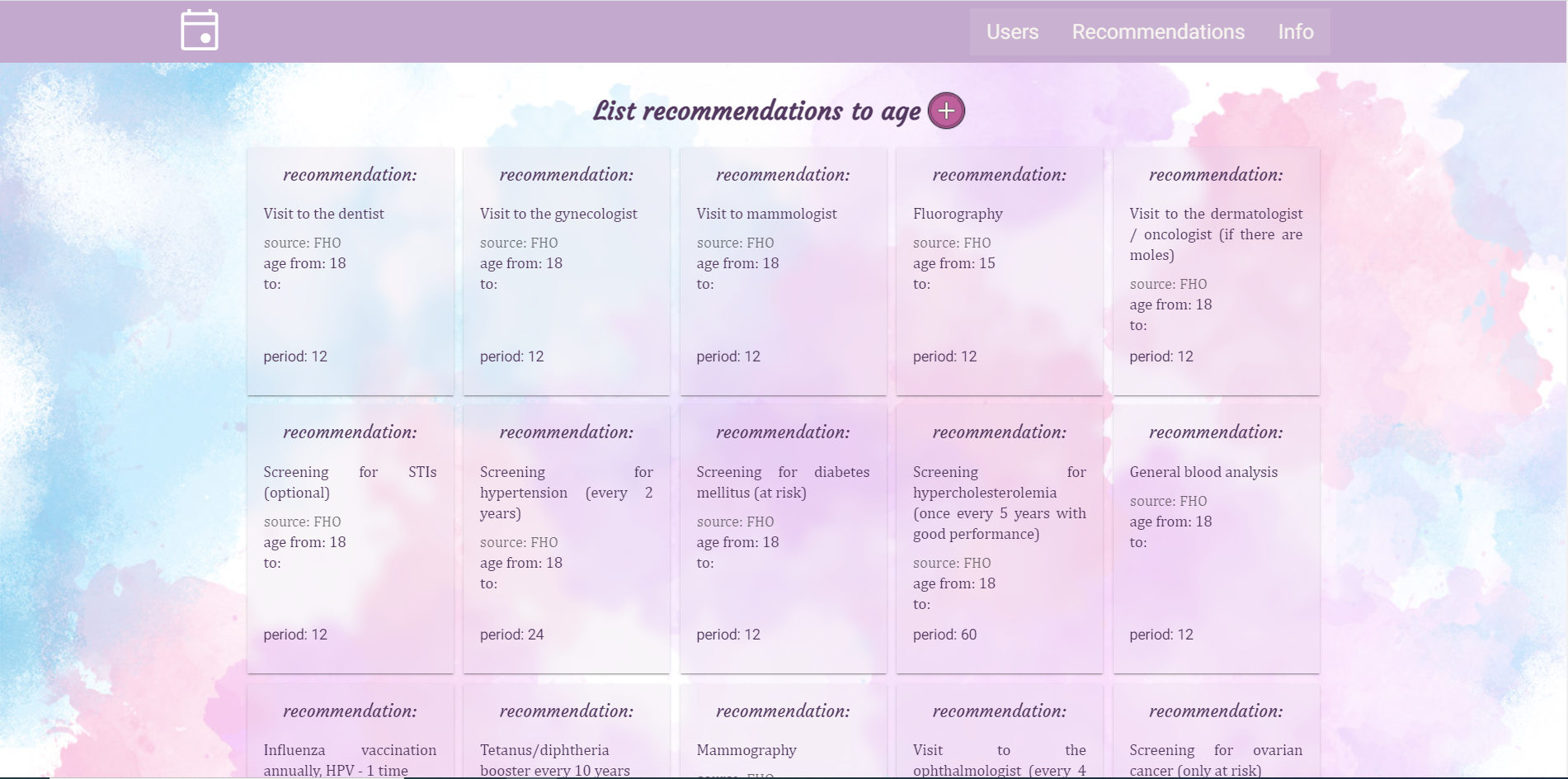
Notifications with age-specific recommendations are based on Worldwide Health Organization (WHO) recommendations regarding medical checkup. This type of notification is characterized by age range and frequency of notifications. The server decides sending notifications to the user by analyzing these criteria.

You can view all recommendations using the GUI.

image

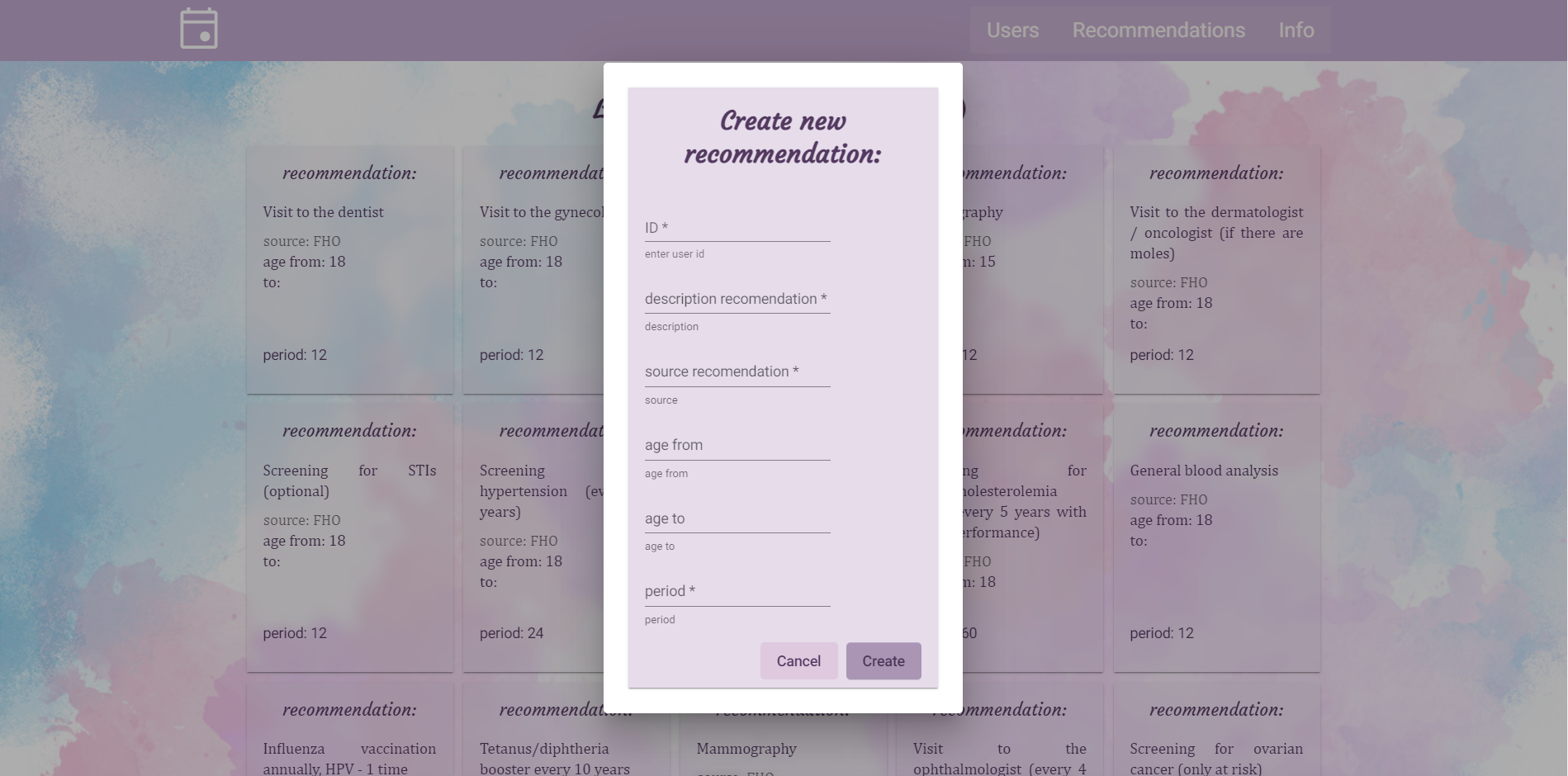
The web interface also allows you to add recommendations.

image

Pregnancy notification:

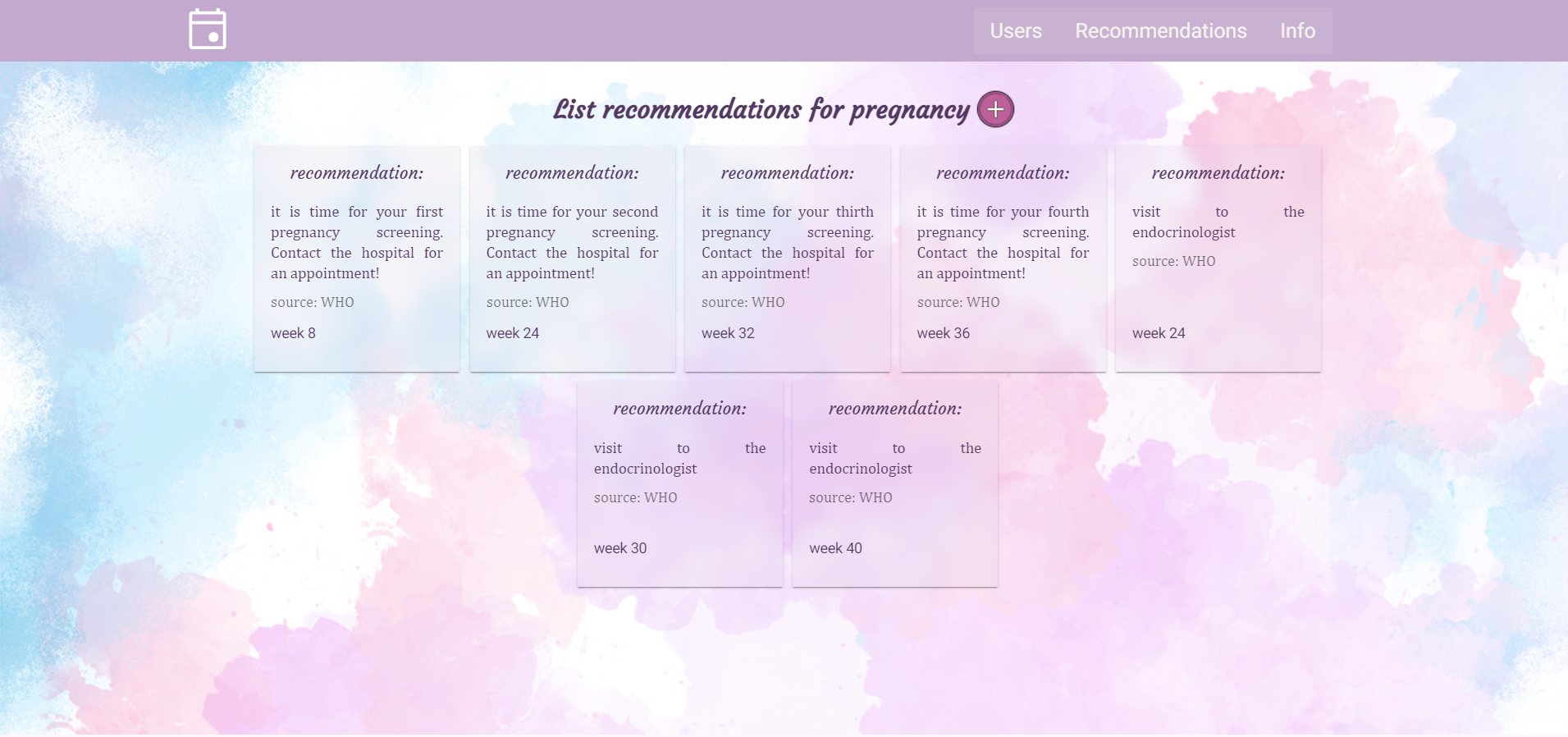
Pregnancy recommendations based on the recommendations of the WHO prenatal care model. While sending a notification, the system checks the patient’s week of pregnancy, it is calculated based on FHIR server's pregnancy observation record.

image

Appointment notifications:

Appointment notifications will be sent the day after the doctor’s visit. The patient will get a recommendation from the FHIR server, which was filed by their doctor during the visit.

To learn more about our project or use it as a template for your future work: https://openexchange.intersystems.com/package/FemTech-Reminder

Thanks:

Our team would like to thank InterSystems and Banksia Global for an opportunity to work with cutting-edge technology on important present-day female issues. We hope that our bot-reminder open-source project will help our colleagues to innovate and solve complex healthcare issues to help women to feel good and stay healthy.

Developers of project:

2
0 513
Article Sergei Sarkisian · Jun 30, 2022 8m read

Hi! My name is Sergei Sarkisian and I’m creating Angular frontend for more than 7 years working in InterSystems. As the Angular is very popular framework, our developers, customers and partners often choose it as part of the stack for their applications.

I would like to start series of articles which will cover different aspects of Angular: concepts, how-to, best practices, advanced topics and more. This series will target people who already familiar with Angular and wouldn’t cover basic concepts. As I’m in the process of building articles roadmap, I would like to begin with highlighting some important features in most recent Angular release.

Strictly typed forms

This is, probably, the most wanted feature of Angular in recent couple of years. With Angular 14 developers now able to use all the strict types checking functionality of TypeScript with Angular Reactive Forms.

FormControl class is now generic and takes the type of the value it holds.

/* Before Angular 14 */
const untypedControl = new FormControl(true);
untypedControl.setValue(100); // value is set, no errors

// Now
const strictlyTypedControl = new FormControl<boolean>(true);
strictlyTypedControl.setValue(100); // you will receive the type checking error message here

// Also in Angular 14
const strictlyTypedControl = new FormControl(true);
strictlyTypedControl.setValue(100); // you will receive the type checking error message here

As you see, the first and the last examples are almost the same but have different results. This happens because in Angular 14 new FormControl class infer types from initial value developer provided. So if value true was provided, Angular sets type boolean | null for this FormControl. Nullable value needed for .reset() method which nulls the values if no value provided.

An old, untyped FormControl class was converted to UntypedFormControl (the same is for UntypedFormGroup, UntypedFormArray and UntypedFormBuilder) which is practically an alias for FormControl<any>. If you are upgrading from previous version of Angular, all of your FormControl class mentions will be replaced with UntypedFormControl class by Angular CLI.

Untyped* classes are used with specific goals:

  1. Make your app work absolutely the same as it was before the transition from previous version (remember that new FormControl will infer the type from initial value).
  2. Make sure that all of FormControl<any> uses are intended. So you will need to change any UntypedFormControl to FormControl<any> by yourself.
  3. To provide developers more flexibility (we will cover this below)

Remember that if your initial value is null then you will need explicitly specify the FormControl type. Also, there is a bug in TypeScript which requires of doing the same if your initial value is false.

For the form Group you can also define the interface and just pass this interface as type for the FormGroup. In this case TypeScript will infer all the types inside the FormGroup.

interface LoginForm {
    email: FormControl<string>;
    password?: FormControl<string>;
}

const login = new FormGroup<LoginForm>({
    email: new FormControl('', {nonNullable: true}),
    password: new FormControl('', {nonNullable: true}),
});

FormBuilder’s method .group() now has generic attribute which can accept your predefined interface as in example above where we manually created FormGroup:

interface LoginForm {
    email: FormControl<string>;
    password?: FormControl<string>;
}

const fb = new FormBuilder();
const login = fb.group<LoginForm>({
    email: '',
    password: '',
});

As our interface has only primitive nonnullable types, it can be simplified with new nonNullable FormBuilder property (which contains NonNullableFormBuilder class instance which can also be created directly):

const fb = new FormBuilder();
const login = fb.nonNullable.group({
    email: '',
    password: '',
});

❗ Note that if you use nonNullable FormBuilder or if you set nonNullable option in FormControl, then when you call .reset() method it will use initial FormControl value as a reset value.

Also, it’s very important to note that all the properties in this.form.value will be marked as optional. Like this:

const fb = new FormBuilder();
const login = fb.nonNullable.group({
    email: '',
    password: '',
});

// login.value
// {
//   email?: string;
//   password?: string;
// }

This happens because when you disable any FormControl inside the FormGroup, the value of this FormControl will be deleted from form.value

const fb = new FormBuilder();
const login = fb.nonNullable.group({
    email: '',
    password: '',
});

login.get('email').disable();
console.log(login.value);

// {
//   password: ''
// }

To get the whole form object you should use .getRawValue() method:

const fb = new FormBuilder();
const login = fb.nonNullable.group({
    email: '',
    password: '',
});

login.get('email').disable();
console.log(login.getRawValue());

// {
//   email: '',
//   password: ''
// }

Advantages of strictly typed forms:

  1. Any property and method returning the FormControl / FormGroup values is now strictly typed. E.g. value, getRawValue(), valueChanges.
  2. Any method of changing FormControl value is now type safe: setValue(), patchValue(), updateValue()
  3. FormControls are now strictly typed. It also applies to .get() method of FormGroup. This will also prevent you from accessing the FormControls that don’t exist at compile time.

New FormRecord class

The downside of a new FormGroup class is that it lost it’s dynamic nature. Ones defined, you won’t be able to add or remove FormControls from it on the fly.

To address this problem Angular presents new class – FormRecord. FormRecord is practically the same as FormGroup, but it’s dynamic and all of it’s FormControls should have the same type.

folders: new FormRecord({
  home: new FormControl(true, { nonNullable: true }),
  music: new FormControl(false, { nonNullable: true })
});

// Add new FormContol to the group 
this.foldersForm.get('folders').addControl('videos', new FormControl(false, { nonNullable: true }));

// This will throw compilation error as control has different type
this.foldersForm.get('folders').addControl('books', new FormControl('Some string', { nonNullable: true }));

And as you see, this has another limitation – all the FormControls must be of the same type. If you really need both dynamic and heterogenous FormGroup, you should use UntypedFormGroup class to define your form.

Moduleless (standalone) components

This feature still marked as experimental, but it is interesting one. It allows you to define components, directives and pipes without including them in any module.

The concept isn’t fully ready yet, but we are already able to build an application without ngModules.

To define a standalone component you need to use new standalone property in Component/Pipe/Directive decorator:

@Component({
  selector: 'app-table',
  standalone: true,
  templateUrl: './table.component.html'
})
export class TableComponent {
}

In this case this component can’t be declared in any NgModule. But it can be imported in NgModules and in other standalone components.

Each standalone component/pipe/directive now have mechanism to import it’s dependencies directly in the decorator:

@Component({
  standalone: true,
  selector: 'photo-gallery',
  // an existing module is imported directly into a standalone component
  // CommonModule imported directly to use standard Angular directives like *ngIf
  // the standalone component declared above also imported directly
  imports: [CommonModule, MatButtonModule, TableComponent],
  template: `
    ...
    <button mat-button>Next Page</button>
    <app-table *ngIf="expression"></app-table>
  `,
})
export class PhotoGalleryComponent {
}

As I mentioned above, you can import standalone components in any existing ngModule. No more imports of entire sharedModule, we can import only things we really need. This is also a good strategy to start using new standalone components:

@NgModule({
  declarations: [AppComponent],
  imports: [BrowserModule, HttpClientModule, TableComponent], // import our standalone TableComponent
  bootstrap: [AppComponent]
})
export class AppModule {}

You can create standalone component with Angular CLI by typing:

ng g component --standalone user

Bootstrap moduleless application

If you want to get rid of all the ngModules in your application, you will need to bootstrap your app differently. Angular has new function for that which you need to call in main.ts file:

bootstrapApplication(AppComponent);

The second parameter of this function will allow you to define the providers you need across your app. As most of the providers are usually exist in the modules, Angular (for now) requires to use a new importProvidersFrom extraction function for them:

bootstrapApplication(AppComponent, { providers: [importProvidersFrom(HttpClientModule)] });

Lazy load standalone component route:

Angular has new lazy-loading route function loadComponent which exists exactly for loading standalone components:

{ 
  path: 'home',
  loadComponent: () => import('./home/home.component').then(m => m.HomeComponent)
}

loadChildren now doesn’t only allow you to lazy load ngModule, but also to load children routes directly from the routes file:

{ 
  path: 'home',
  loadChildren: () => import('./home/home.routes').then(c => c.HomeRoutes)
}

Some notes at the moment of article writing

  • The standalone components feature is still in experimental stage. It will get much better in the future with moving to Vite builder instead of Webpack, better tooling, faster build times, more robust app architecture, easier testing and more. But now many of this things are missing, so we didn’t receive the whole package, but at least we can start to develop our Apps with new Angular paradigm in mind.
  • IDEs and Angular tools are not fully ready yet to statically analyze new standalone entities. As you need to import all the dependencies in each standalone entity, in case if you miss something, the compiler can miss it also and fail you in the runtime. This will improve with time, but now it requires more attention to imports from developers.
  • There are no global imports presented in Angular at the moment (as it done in Vue, for example), so you need to import absolutely each dependency in every standalone entity. I hope that it will be solved in future version as the main goal of this feature as I see is to reduce the boilerplate and make things easier.

That’s all for today. See you!

1
0 1493
Article Sergei Sarkisian · Jul 18, 2022 12m read

Hi! Today I would like to talk about one of the most important architectural patterns in Angular.

The pattern itself is not related to Angular directly, but as Angular is component-driven framework, this pattern is one of the most essential for building modern Angular applications.

Container-Presentation pattern

It is believed that good components should be small, focused, independent, testable and most important - reusable.

If your component is making server calls, contains business logic, tightly coupled to other components, knows too much about other component’s or services’ internals, then it become bigger, harder to test, harder to extend, harder to reuse and harder to modify. To solve these problems the pattern “Container-Presentation” exists.

Generally, all the components can be divided in two groups: Container (smart) and Presentational (dumb) components.

Container components can get data from services (but should not call server APIs directly), contain some business-logic and serve data to services or children components. Usually, container components are those we specify as routed components in our routing configuration (but not always, of course).

Presentational components must only take data as input and display it on the screen in some way. They can react on user inputs, but only by changing its local isolated state. All the communications with the rest of the app should be done by emitting custom events. These components should be highly reusable.

For better context I will name some examples of container and presentational components:

Container: AboutPage, UserPage, AdminPanel, OrderPage, etc.

Presentational: Button, Calendar, Table, ModalDialog, TabView, etc.

Example of a crazy button

Let’s look at extremely bad example of misusing the components approach I faced myself in one of the real projects.

@Component({
  selector: 'app-button',
  template: `<button class="className" (click)=onClick()>{{label}}</button>`
})
export class ButtonComponent {
  @Input() action = '';
  @Input() className = '';
  @Input() label = '';

  constructor(
    private router: Router,
    private orderService: OrderService,
    private scanService: ScanService,
    private userService: UserService
  ) {}

  onClick() {
    if (this.action === 'registerUser') {
      const userFormData = this.userService.form.value;
      // some validation of user data
      // ...
      this.userService.registerUser(userFormData);
    } else if (this.action === 'scanDocument') {
      this.scanService.scanDocuments();
    } else if (this.action === 'placeOrder') {
      const orderForm = this.orderService.form.values;
      // some validation and business logic related to order form
      // ...
      this.orderService.placeOrder(orderForm);
    } else if (this.action === 'gotoUserAccount') {
      this.router.navigate('user-account');
    } // else if ...
  }
}

I simplified it for better readability, but in reality things was much worse. This is a button component which contains all of the possible actions user can invoke by clicking button – making API calls, validating forms, retrieving information from the services and more. You can imagine how fast such component can become a hell in even relatively small application. The code of such button component I found (and then refactored) was more than 2000 lines long. Insane!

When I asked the developer who wrote it, why he decided to put all of this logic in the single component, he said that this is “encapsulation” 🙀

Let’s remember what qualities good components should have:

Small - this button with 2000+ lines of code isn’t small. And it will become bigger every time someone will need another button for different action.

Focused - this button do a lot of absolutely unrelated things and can’t be called focused.

Independent - this button is tightly coupled with several services and forms, and changing any of them will affect the button.

Testable - no comments.

Reusable - it is not reusable at all. You need to modify component’s code every time you want to use it for action it doesn’t have, and you will get all the unneeded actions and dependencies this button has.

Moreover, this button component hides native HTML button under the hood, blocking access to its properties for developer. This is a good example of how component should not be written.

Let’s put some very simple example of component which uses this button component and then will try to refactor them with Container-Presentation pattern.

@Component({
  selector: 'app-registration-form',
  template: `<form [formGroup]="userService.form">
  <input type="text" [formControl]="userService.form.get('username')" placeholder="Nickname">
  <input type="password" [formControl]="userService.form.get('password')" placeholder="Password">
  <input type="password" [formControl]="userService.form.get('passwordConfirm')" placeholder="Confirm password">
  <app-button className="button accent" label="Register" action="registerUser"></app-button>
</form>
`
})
export class RegistrationFormComponent {
  constructor(public userService: UserService) {}
}

You can see that there is no logic inside this component – the form stored in a service, and the button contains all the logic invoking by click on it. So our button now have all the logic unrelated to its behavior, and smarter than its parent component which is directly related to the actions processed by button.

Refactor button component with Container-Presentation pattern

Let’s separate the functions of these two components. Button should be presentational component – small and reusable. Registration form which contains the button can be container component which will hold business logic and communications with services layer.

We will not cover the part with unhiding the native button (I will probably cover this in some future article), but will focus mainly on architectural aspect of relation between these two components.

Refactored button component (presentational)

@Component({
  selector: 'app-button',
  template: `<button class="className" (click)=onClick()>{{label}}</button>`
})
export class ButtonComponent {
  @Input() className = '';
  @Input() label = '';

  @Output() click: EventEmitter = new EventEmitter();

  onClick() {
     this.click.emit();
  }
}

As you see, our refactored button is very simple. It has only two Inputs and one Output. Inputs are used for taking data from parent component and display it to user (modify button look with classes and display button label). Output is used for custom event which will be fired every time user click our button.

This component is small, focused, independent, testable and reusable. It does not contain any logic unrelated to behavior of the component itself. It has no idea of internals of rest of the application and can be safely imported and used in any part of the application or even in the other applications.

Refactored registration form component (container)

@Component({
  selector: 'app-registration-form',
  template: `<form [formGroup]="userService.form">
  <input type="text" [formControl]="userService.form.get('username')" placeholder="Nickname">
  <input type="password" [formControl]="userService.form.get('password')" placeholder="Password">
  <input type="password" [formControl]="userService.form.get('passwordConfirm')" placeholder="Confirm password">
  <app-button className="button accent" label="Register" (click)="registerUser()"></app-button>
</form>
`
})
export class RegistrationFormComponent {
  constructor(public userService: UserService) {}

  registerUser() {
    const userFormData = this.userService.form.value;
    // some validation of user data
    // ...
    this.userService.registerUser(userFormData);
  }
}

You can see that our registration form now uses button and reacts on its click event with calling registerUser method. The logic of this method is tightly related to this form, so it is good place to put it here.

This was pretty simple example and we have only two levels in the component tree. There are some pitfalls with this pattern when you have more levels in your component tree.

More sophisticated example

This is not a real world example, but I hope it will help to understand possible issues with this pattern.

Imagine we have such component tree (from top to bottom):

user-orders - top-level component. It is container component which talks to services layer, receives data about user and their orders, passes it further the tree and renders the list of the orders.

user-orders-summary - middle level component. It is presentational component which renders the bar above the user orders list with total number of orders.

cashback - bottom level (leaf) component. It is presentational component which displays the total amount of user’s cashback and has a button to withdraw it to bank account.

Top-level container component

Let’s look on our top-level user-orders container component.

@Component({
  selector: 'user-orders',
  templateUrl: './user-orders.component.html'
})
export class UserOrdersComponent implements OnInit {
  user$: Observable<User>;
  orders$: Observable<Order[]>;

  constructor(
    private ordersService: OrdersService,
    private userService: UserService
  ) {}

  ngOnInit() {
      this.user$ = this.userService.user$;
      this.orders$ = this.ordersService.getUserOrders();
  }

onRequestCashbackWithdrawal() {
    this.ordersService.requestCashbackWithdrawal()
      .subscribe(() => /* notification to user that cashback withdrawal has been requested */);
    }
}
<div class="orders-container">
    <user-orders-summary
        [orders]="orders$ | async"
        [cashbackBalanace]="(user$  | async).cashBackBalance"
        (requestCashbackWithdrawal)="onRequestCashbackWithdrawal($event)"
    >
    </user-orders-summary>

    <div class="orders-list">
      <div class="order" *ngFor="let order of (orders$ | async)"></div>
    </div>
</div>

As you can see, user-orders component defines two observables: user$ and orders$, using async pipe in template to subscribe to them. It passes the data to presentational component user-orders-summary and also renders a list of orders. Also it talks to service layer reacting on custom event requestCashbackWithdrawal emitted from user-orders-summary.

Middle level presentational component

@Component({
  selector: 'user-orders-summary',
  template: `
    <div class="total-orders">Total orders: {{orders?.length}}</div>
    <cashback [balance]="cashbackBalanace" (requestCashbackWithdrawal)="onRequestCashbackWithdrawal($event)"></cashback>
	`, 
  changeDetection: ChangeDetectionStrategy.OnPush
})
export class UserOrdersSummaryComponent {
    @Input() orders: Order[];
    @Input() cashbackBalanace: string;

    @Output() requestCashbackWithdrawal = new EventEmitter();

    onRequestCashbackWithdrawal() {
        this.requestCashbackWithdrawal.emit();
    }
}

This component is designed very similarly to our refactored button component. It renders the data received through its inputs and emits custom event on some user action. It does not call any services and does not contain any business logic. So this is the pure presentational component which uses another presentational cashback component.

Bottom level presentational component

@Component({
    selector: 'cashback',
    template: `
<div class="cashback">
  <span class="balance">Your cashback balance: {{balance}}</span>
  <button class="button button-primary" (click)="onRequestCashbackWithdrawal()">Withdraw to Bank Account</button>
</div>
`,
    styleUrls: ['./cashback.component.css']
})
export class CashackComponent {
    @Input() balance: string;

    @Output() requestCashbackWithdrawal = new EventEmitter();

    onRequestCashbackWithdrawal() {
        this.requestCashbackWithdrawal.emit();
    }
}

This is another presentational component which only receives the data through input and throw events with output. Pretty simple and reusable, but we have some problems in our component tree.

You probably noticed that user-orders-summary component and cashback component have similar Inputs (cashbackBalanace and balance) and same Output (requestCashbackWithdrawal). That’s because our container component is too far from deepest presentational component. And the more tree levels we will have with this design, the worse the problem will become. Let’s look at this problems closer.

Issue 1 - Extraneous properties in middle level presentational components

Our user-orders-summary receives cashbackBalanace Input just to pass it further down the tree but not even use it by itself. If you face such situation, this is one of the markers that you probably may have component tree design flaw. Real life components may have a lot of inputs and outputs, and with this design you will have a lot of “proxy” inputs which will make your middle level components less reusable (as you tight them to children components) and a lot of repeatable code.

Issue 2 - Custom event bubbling from down to top-level components

This issue is very similar to previous one, but related to component’s outputs. As you can see, requestCashbackWithdrawal custom event is repeated in cashback and user-orders-summary components. That again happens because our container component is too far in the tree from the deepest presentational component. And it also makes our middle component non-reusable by itself.

There are at least two possible solutions to this problems.

1st – make your middle level components more content agnostic using ngTemplateOutlet and expose your deeper components to container components directly. We will pass this for today as it deserves separate article.

2nd – redesign your component tree.

Refactoring our component tree

Let’s refactor our code to see how we can solve the problems with extraneous properties and event bubbling in middle level component.

Refactored top-level component

@Component({
  selector: 'user-orders',
  templateUrl: './user-orders.component.html'
})
export class UserOrdersComponent implements OnInit {
  orders$: Observable<Order[]>;

  constructor(
    private ordersService: OrdersService,
  ) {}

  ngOnInit() {
      this.orders$ = this.ordersService.getUserOrders();
  }
}
<div class="orders-container">
    <user-orders-summary [orders]="orders$ | async"></user-orders-summary>

    <div class="orders-list">
      <div class="order" *ngFor="let order of (orders$ | async)"></div>
    </div>
</div>

We removed the user$ observable and onRequestCashbackWithdrawal() method from our top-level container component. It is much simpler now and passes only the data needed to render user-orders-summary component itself, but not its child cashback component.

Middle level refactored component

@Component({
  selector: 'user-orders-summary',
  template: `
    <div class="total-orders">Total orders: {{orders?.length}}</div>
    <cashback></cashback>
	`, 
  changeDetection: ChangeDetectionStrategy.OnPush
})
export class UserOrdersSummaryComponent {
    @Input() orders: Order[];
}

It is also simplified a lot. Now it only has one Input and renders the total number of orders.

Bottom level refactored component

@Component({
    selector: 'cashback',
    template: `
<div class="cashback">
  <span class="balance">Your cashback balance: {{ (user$ | async).cashbackBalance }}</span>
  <button class="button button-primary" (click)="onRequestCashbackWithdrawal()">Withdraw to Bank Account</button>
</div>
`,
    styleUrls: ['./cashback.component.css']
})
export class CashackComponent implements OnInit {
  user$: Observable<User>;

  constructor(
     private ordersService: OrdersService,
     private userService: UserService
  ) {}

  ngOnInit() {
    this.user$ = this.userService.user$;
  }

  onRequestCashbackWithdrawal() {
    this.ordersService.requestCashbackWithdrawal()
      .subscribe(() => /* notification to user that cashback withdrawal has been requested */);
    }
  }
}

Wow. As you can see, it is not presentational anymore. Now it looks very similar to our top-level component, so it is container component down the component tree. This refactoring allowed us to simplify the whole component tree design and APIs and logic of our two components up the component tree.

What about reusability of our new cashback component? It is still reusable, as it contains only the logic related to the component itself, so it is still independent.

The new design of our component tree seems to be more maintainable, more streamlined and more atomized. We have no bubbling events now, we have no repeatable inputs through the component tree and overall design is much simpler. We achieved this by putting additional container component down the component tree. This method can be used to simplify your component tree design, but you should have good understanding which components in your tree are suitable for being containers without big loss in reusability, and which should be pure presentational components. That’s always a subject of balance and design choices when you create your app’s architecture.

It’s very easy to misunderstand the Container-Presentation pattern and think that container components can only be top-level components (intuitively, they contain all the other components in the local component tree). But this is not the case, container components can be on any level of the component tree, and as you saw, even on the leaf level. I like to call them smart components because for me it’s much clear that these components will contain some business logic and can be presented anywhere in the component tree.

Afterword

I hope at this moment you have better overview on Container-Presentation pattern and possible issues with its implementation.

I tried to keep it as simple as possible, but there is a ton of information available related to this pattern.

If you have any questions or notes, feel free to reach me in the comments.

The next article will be about changeDetectionStrategy in Angular (which is highly related to this post).

See you!

0
0 1218
Article Yuri Marx · Jul 13, 2022 3m read

The Carbon Footprint Counter application uses the GHG Protocol to measure carbon emissions on enterprises. The GHG protocol establishes comprehensive global standardized frameworks to measure and manage greenhouse gas (GHG) emissions from private and public sector operations, value chains and mitigation actions.

Building on a 20-year partnership between World Resources Institute (WRI) and the World Business Council for Sustainable Development (WBCSD), GHG Protocol works with governments, industry associations, NGOs, businesses and other organizations. (source: https://ghgprotocol.org/about-us).

2
0 621
Article Tani Frankel · May 6, 2020 2m read

While reviewing our documentation for our ^pButtons (in IRIS renamed as ^SystemPerformance) performance monitoring utility, a customer told me: "I understand all of this, but I wish it could be simpler… easier to define profiles, manage them etc.".

After this session I thought it would be a nice exercise to try and provide some easier human interface for this.

The first step in this was to wrap a class-based API to the existing pButtons routine.

I was also able to add some more "features" like showing what profiles are currently running, their time remaining to run, previously running processes and more.

The next step was to add on top of this API, a REST API class.

With this artifact (a pButtons REST API) in hand, one can go ahead and build a modern UI on top of that.

For example -

15
4 1301
Question Markus Böckmann · Jun 8, 2022

Hi guys,

has anyone done a simple angular searchbar with a REST API on Caché in the back?

I've done this Let's write an Angular 1.x app with a Caché REST backendhere in the community and it

works fine for me.

The REST in Caché is already developed but im hanging at the searchbar in Angular, don't know how to solve this.

Has somebody an example to help me out?

Any help would be appreciated.

0
1 295
Question Abraham Wasswa · May 1, 2022

Given I have a property 

Class All.AllBooks Extends %Library.Persistent
{

Property ID As %Integer;

Property Title As User.Book;

}


In the class method

ClassMethod GetABookById(id As %Integer) As %Status
{

SET MyBooks = ##class(All.Allbooks).%OpenId(id)

SET obj = {

     "ID" : (MyBooks.%Id())

     "Title" : (MyBooks.Title)

}

WRITE obj.%ToJSON()

Quit 1
}


How do Access the foreign key in JSON() data

7
0 643
Announcement Michael Pine · Oct 5, 2021

As of today, the Angular Clone CCR page is now live for CCR Beta Users.   Beta testers will be sent to the Angular clone page from anywhere you would normally clone a CCR. No existing functionality will be lost.

Any issues or feedback can be reported here or in your regular support channels. 

Many thanks to our CCR UI beta testers!  If you would like to join the beta tester program, you can enable the checkbox on your CCR user page here.

Other pages in Beta: Create CCR Page

Pages coming soon: Merge, Groups

1
0 166
Article Chris Stewart · Apr 21, 2017 3m read

So, one day you're working away at WidgetsDirect, the leading supplier of widget and widget accessories, when your boss asks you to develop the new customer facing portal to allow the client base to access the next generation of Widgets..... and he wants you to use Angular 1.x to read into the department's Caché server.   

There's only one problem:  You've never used Angular, and don't know how to make it talk to Caché.

This guide is going to walk through the process of setting up a full Angular stack which communicates with a Caché backend using JSON over REST.  

11
5 6970
Article Dmitry Maslennikov · Oct 6, 2020 6m read

Let's imagine if you would like to write some real web application, for instance, some simple clone of medium.com. Such sort of application can be written using any different language on the backend side, or with any framework on the frontend side. So many ways to do the same application, and you can look at this project. Which offers a bunch of frontends and backends realizations for exactly the same application. And you can easily mix them, any chosen frontend should work with any backend.

Let me introduce the same application realization for InterSystems IRIS on a backend side.

3
1 998
Article Guillaume Rongier · Nov 23, 2020 1m read

Introduction

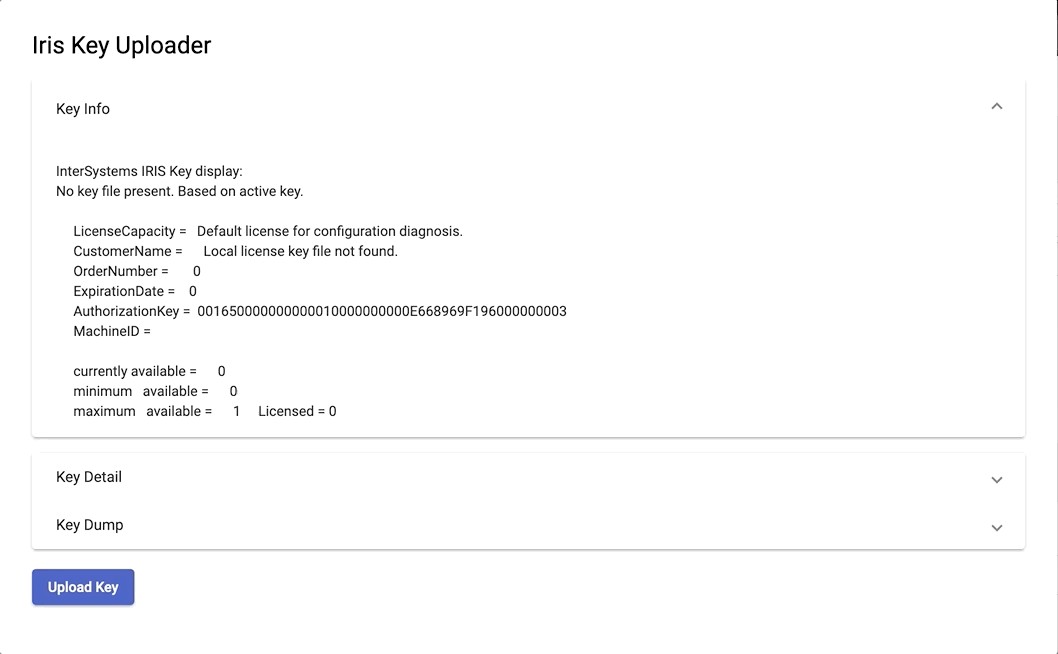
This is iris-key-uploader a frontend in Angular with it's rest API.

The aim of this project is to easily import key file to Iris from a web ui.

Why this project

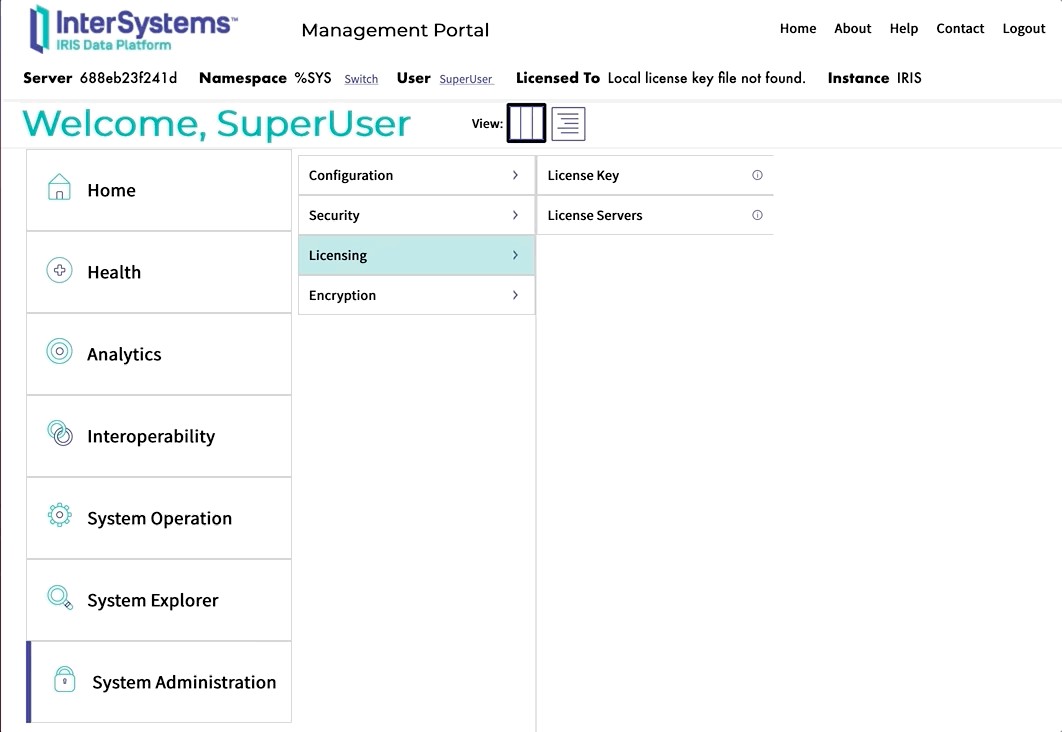
Unfortunatly the IRIS panel to change key doesn't give the opportunity to upload the license.

Panel

As you can see, you can only browse from the server side.

What if, you don't have a direct access to it ?

You would like to have a simple web page to upload the new key and activate it.

This is the purpose of this project.

Demo

Demo

UI

http://localhost:52773/keyuploader/index.html

Build

Run the server

docker-compose up -d

Install with ZPM

zpm "install iris-key-uploader"

Remarques

This is working even if the instance doesn't have any key. In fact, without key IRIS have one LU (License Unit) available.

6
0 545
Question Krishnamuthu Venkatachalam · Mar 26, 2021

Dear Folks,

I have recently studied deepsee and developed few dashboards needed for our web app users. I am trying to embed them in our existing web app which uses angular with delegated user access. I need to embed the native IRIS dashboard into it. ( I can't use Highcharts or any other js tools). 

How do I setup the dashboards to work with delegated authentication (Without providing access to management portal or other parts) ? Also should I use the default csp/{Namespace}/_DeepSee.UserPortal.DashboardViewer.zen? or any other web application URL ?

Thanks

1
0 232
Job Neerav Verma · Jan 27, 2021

Hello fellow community members,

I would like to offer my services as an Intersystems Professional and am available to work on projects. 

I have more than a decade experience into  Intersystems stack of technologies including IRIS, Ensemble, Healthshare, Healthconnect, Cache Objectscript, Mumps, Zen, Analytics etc. with companies spread over US and UK  involved in multiple domains.

0
0 474
Article Chris Stewart · Apr 17, 2017 4m read

So, one day you're working away at WidgetsDirect, the leading supplier of widget and widget accessories, when your boss asks you to develop the new customer facing portal to allow the client base to access the next generation of Widgets..... and he wants you to use Angular 1.x to read into the department's Caché server.   

There's only one problem:  You've never used Angular, and don't know how to make it talk to Caché.

This guide is going to walk through the process of setting up a full Angular stack which communicates with a Caché backend using JSON over REST.  

Part 1 - Setup

23
3 5069
Announcement Ben Spead · Sep 18, 2020

Earlier this year, we launched a beta program for the new CCR Angular UI.  As almost all of the known issues and gaps have been addressed, we are getting ready to launch the new angular UI for all users. 

Anyone using CCR is strongly encouraged to enable the beta flag on their account and confirm that the new pages work as required in order to prevent surprises at cut-over time.  At this point, cut-over will tentatively be late-November.

Please check it out and provide feedback (good or bad) on your experiences!

0
1 332
Article Evgeny Shvarov · Nov 3, 2017 3m read

There are several options how to deliver user interface(UI) for DeepSee BI solutions. The most common approaches are:

  • use native DeepSee Dashboards, get web UI in Zen and deliver it in your web apps.
  • use DeepSee REST API, get and build your own UI widgets and dashboards.

The 1st approach is good because of the possibility to build BI dashboards without coding relatively fast, but you are limited with preset widgets library which is expandable but with a lot of development efforts.

The 2nd provides you the way to use any comprehensive js framework (D3, Highcharts, etc) to visualize your DeepSee data, but you need to code widgets and dashboards on your own.

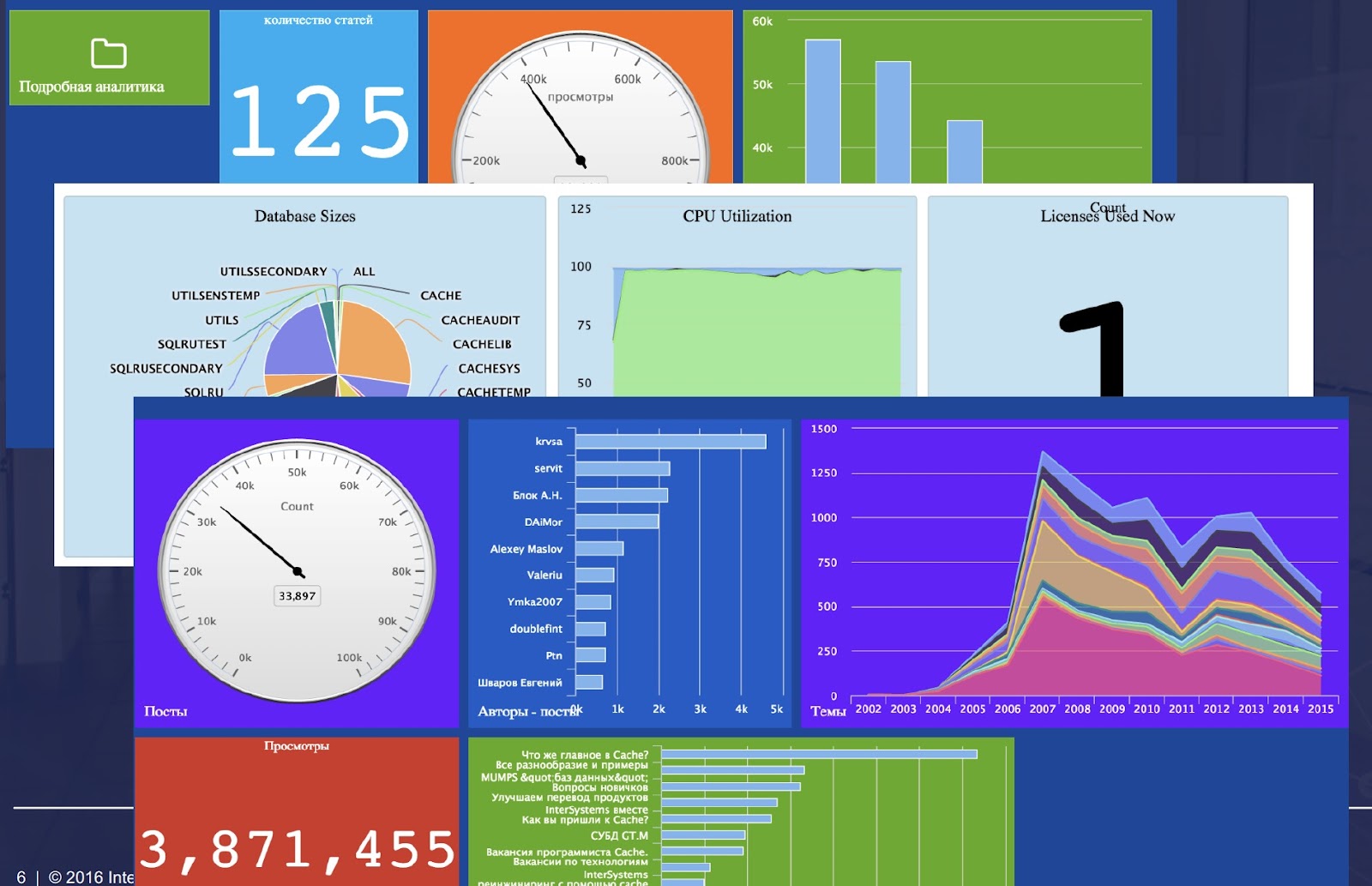
Today I want to tell you about yet another approach which combines both listed above and provides Angular based web UI for DeepSee Dashboards -  DeepSee Web library.

16
5 2573
Question Vivek Nayak · Dec 31, 2019

Hi Team,

I want to save image/file using inter system iris web api.

I am sending file as Base64 formate  in JSON object to api .and I want to save it at D/Images folder.

please refer below code that i was tried.

Obj.OrganizationLogoBase64--> has base64 value of image

Set decode = $System.Encryption.Base64Decode(Obj.OrganizationLogoBase64)

set file = ##class(%Stream.GlobalBinary).%New()

    do file.Write(decode)

9
0 997
Question John Kumpf · Oct 16, 2019

Hi all,

This might be a stupid question, but I'm going to ask it anyway. 

My goal is to write a scss file, pack it as part of a local library (Something like my_library.tgz), npm install that library into a different project and then import that scss file in one of the scss files in the new project.

Simply having the scss file exist in the library before I pack it didn't seem to work; the file wasn't under node modules after the npm install.  Am I doing something wrong, or are there extra steps I have to take?

Thanks in advance.

5
0 5900
Article Ben Spead · Sep 12, 2017 1m read

The Widgets Direct sample application highlights many aspects of how to use InterSystems technologies to build a modern web application.  Features include:

  • Angular Material + AngularJS + JSON + REST based interactive application with Step by Step instructions on how it was built
  • Example scripts for server-side source control configuration with Perforce
  • %UnitTest logic for automated regression testing
  • %Installer class for automated instance installation from source control 
  • Scripts for Continuous Integration (CI) with Jenkins
  • Docker Manifest for automated provisioning of an instance
5
0 1544
Article Semion Makarov · Oct 22, 2018 7m read

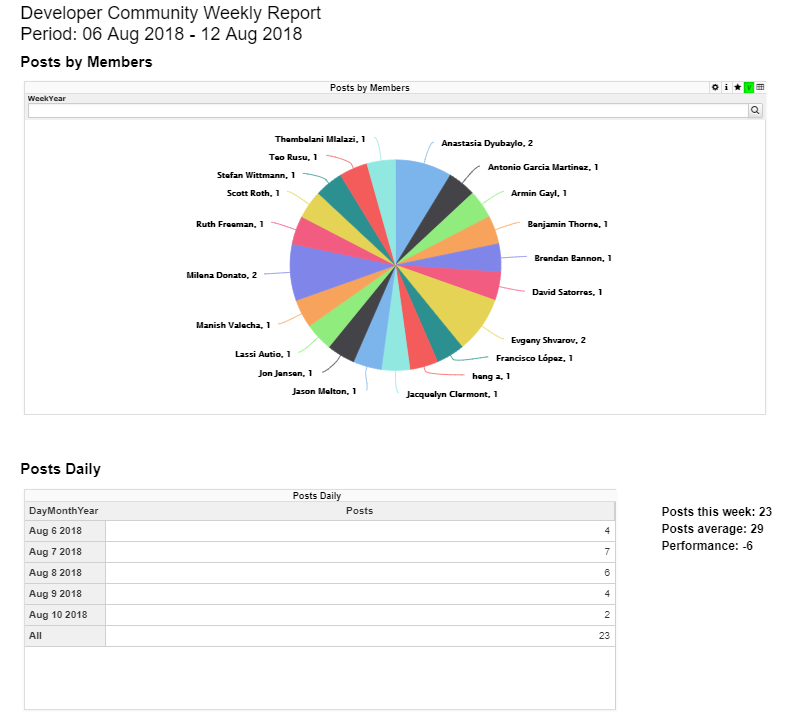
Users of analytical applications often need to generate and send out PDF reports comprised of elements of the analytical panel. In the InterSystems stack, this task is solved using the DSW Reports project that is an extension of DeepSeeWeb. In this article, we will explain how to use DSW Reports for generating PDF reports and emailing them.

What is DSW Reports?

The InterSystems IRIS Business Intelligence (formerly known as DeepSee) is used for developing analytical applications and is a part of InterSystems IRIS Data Platform. There is a separate project called DeepSeeWeb that uses a more modern web interface (AngularJS) for visualizing analytical panels of InterSystems IRIS BI. To interact with the server side, DeepSeeWeb uses MDX2JSON, a project that provides REST API access to InterSystems IRIS BI.

DSW Reports is a DeepSeeWeb extension written in AngularJS that implements the key functionality for automatic report generation. DSW Reports uses DeepSeeWeb for rendering widgets and MDX2JSON for processing MDX requests.

Capabilities:

  • Rendering of selected widgets with predefined filters.
  • Output of execution results for arbitrary MSD requests.
  • Automatic printing and emailing of PDF reports.
  • Customization of reports via CSS

HTML-report

Report generation

In order to generate a report in DSW Reports, you need to create just two files:

  • index.html — the skeleton and the main page of the report, usually remains unchanged.
  • config.js — report configuration that is changed for different types of reports and is responsible for populating the report with data.

The report configuration file must contain the getConfiguration function.

// General report settings
function getConfiguration(params){...}

The getConfiguration function accepts a params object containing parameters from the URL and an additional "server" parameter that is the address of the server. The "server" parameter has the following form: protocol://host:port.

Thanks to the params object, you can pass any data to your report via the URL string. For instance, if you need to change widget filters to your liking, you can pass the “filter” parameter in the URL and it becomes accessible via the params object.

//<protocol://host:port>/dsw/reports/report_dir/index.html?filter=NOW
function getConfiguration(params){
    var filter = params["filter"]; // filter = "NOW"
}

The getConfiguration function returns an object with 3 properties:

  • REPORT_NAME — report name
  • BLOCKS — array of report blocks
  • NAMESPACE — namespace containing data for the report

Let’s take a closer look at an array of blocks called BLOCKS. A block is an object containing widget settings, settings of calculable fields, and so on.

Block view:


{
    "title": String,            //Block title
    "note": String,             //Notes under the block. Can contain HTML code
    "widget": {                 //Widget iframe settings:
        "url": String,          //URL of the iframe source
        "height": Number,       // iframe height
        "width": Number         // iframe width
    },
    "totals":[{                 //Settings of values calculated using MDX
        "mdx": String           //MDX request
        "strings": [{           //Value strings from the request
            "title": String,    //String title. Can use HTML.
            "value": String,    //Default string value
            "value_append": String, //Suffix for the value. 
                                //Can be used for %, $ and other symbols. 
                                //% converts the value in to a percentage (x * 100).
                                //Can use HTML.
            "row": Number       //Number of the row from the MDX request
                                //that the value is taken from. 
                                //The default value is 0.
     },{...}]
},{...}]}

All the fields are necessary. If you don’t need a field, better leave it as a blank row.

Block example
{
     title: "Persons",
     note: "",
     widget: {
        url: server + "/dsw/index.html#!/d/KHAB/Khabarovsk%20Map.dashboard" + 
        "?widget=1&height=420&ns=" + namespace,
        width: 700,
        height: 420
     }
}
Another example
{
    title: "Khabarovsky krai",
    note: "Something note (only static)",
    widget: {
        url: server + "/dsw/index.html#!/d/KHAB/Khabarovsk%20Map.dashboard" + 
        "?widget=0&height=420&isLegend=true&ns=" + namespace,
        width: 495,
        height: 420
    },
    totals: [{
       mdx: "SELECT NON EMPTY " + 
      "[Region].[H1].[Region].CurrentMember.Properties(\"Population\") ON 0,"+
      "NON EMPTY {[Region].[H1].[Region].&[Khabarovsk]," + 
      "[Region].[H1].[Region].&[Komsomolsk-on-Amur],"+
      "[Region].[H1].[Region].&[Komsomolsky district]} ON 1 FROM [KHABCUBE]",
       strings: [{
            title: "Khabarovsk: ",
            value: "None",
            value_append: " ppl"
        }, {
            title: "Komsomolsk-on-Amur: <br />",
            value: "None",
            value_append: " ppl",
            row: 1
        }, {
            title: "Komsomolsky district: <br />",
            value: "None",
            value_append: " ppl",
            row: 2
        }]
    }]
}

What do I fill a block with?

The main fields for filling out in a block are “url” for widget settings and “mdx” for the settings of calculable values.

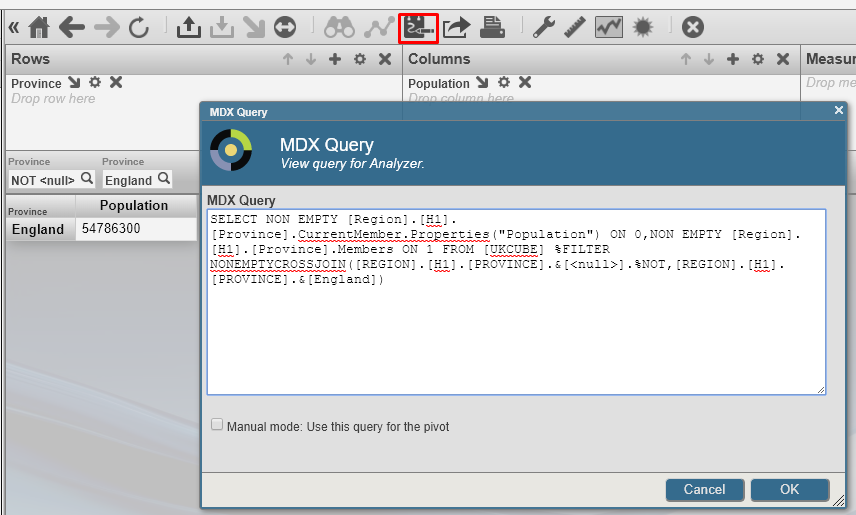
  • MDX can be composed manually, but we recommend doing it with the help of Analyzer, a built-in constructor from InterSystems IRIS BI/DeepSee. Analyzer

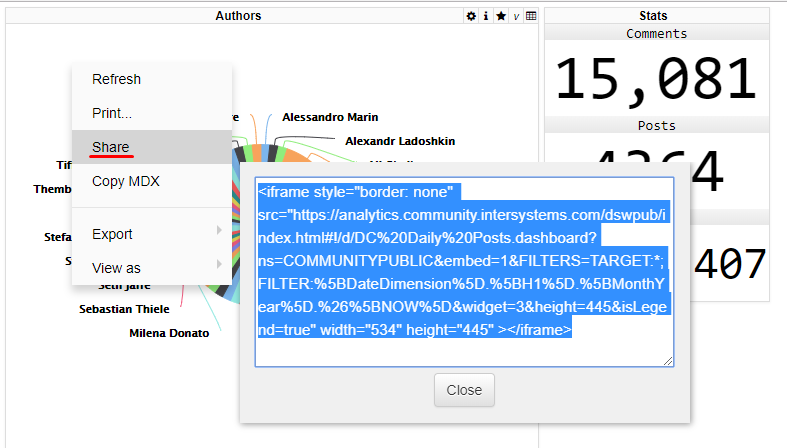
  • The URL value can be obtained from DeepSeeWeb. Widgets built into a report are iframe elements pulling data from DeepSeeWeb widgets. In order to get a link to the source, select “Share” from the widget’s context menu. Share

Report customization

Report libraries come with a file called style.css that enables you to customize the appearance of the report. It contains a standard set of classes controlling every element of the report. You can also add your own style classes and use them in the index.html file.

Emailing reports

Let’s assume that the report is ready and saved to the reports folder in DeepSeeWeb. It means that the interactive HTML report is now accessible via a link. So what do you need to do to convert it to PDF and email it? It can be done automatically by pthantomjs and the built-in SMTP client. More information about installing and configuring phantomjs can be found here (windows, ubuntu). After that, you will need to configure the SMTP client and create a task in the Task Manager.

SMTP settings

All settings are configured in the terminal.

  1. First, you need to configure your email settings
// SMTP configuration function
do ##class(DSW.Report.EmailSender).setConfig(server, port, username, password, sender, SSLConfig)
  • server — the SMTP server address.
  • port — the port for incoming messages.
  • username and password — authentication details.
  • sender — the sender’s email address.
  • SSLConfigOptional. The name of the SSL-configuration.
  1. You will then need to put together a list of recipients
// A function for adding a user
do ##class(DSW.Report.EmailSender).addRecipient(email)
// A function for removing a user
do ##class(DSW.Report.EmailSender).deleteRecipient(email)
  1. Once the previous steps are completed, you can start sending out emails
// A function that starts the email dispatch
do ##class(DSW.Report.Task).Run(url, reportname)
  • url — a link to the report.
  • reportname — the name of the report. Used for PDF generation.

Launching the automatic mailout

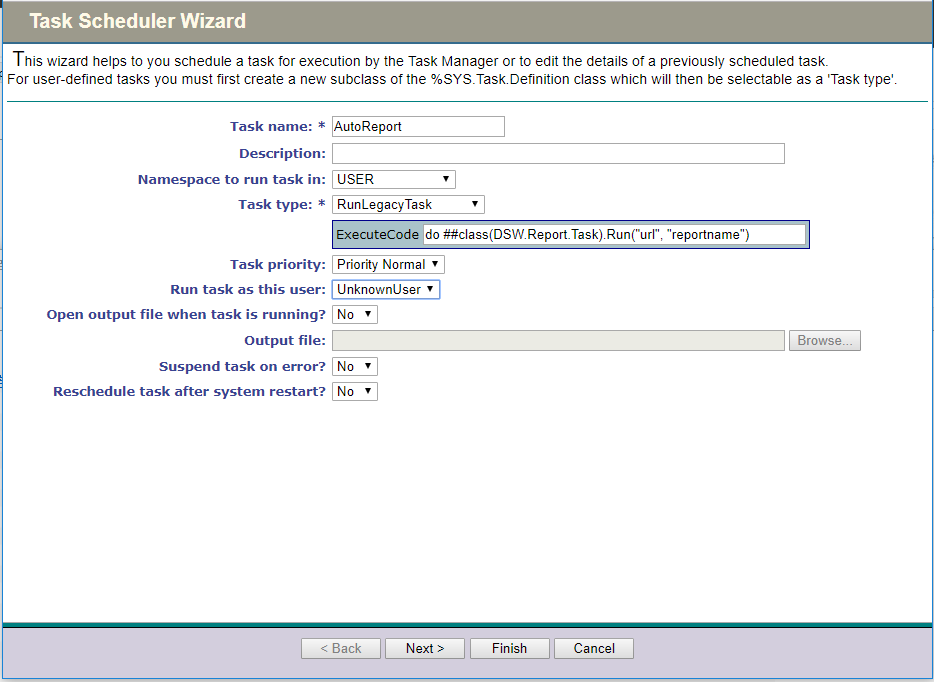
Let’s use the Task Manager to automate the mailout process. We need to create a new task with the following parameters:

  1. The first page lets you configure the namespace and specify the function for launching the mailout task. Task1

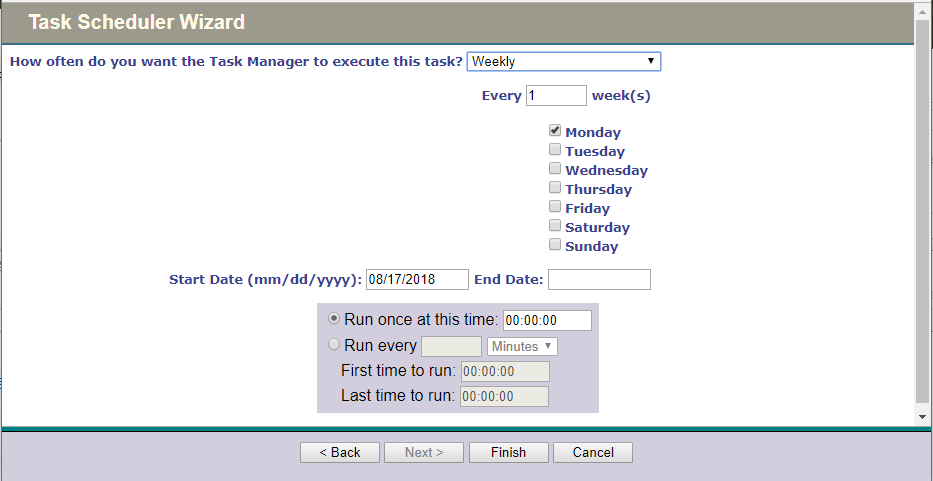
  2. You can configure the time and periodicity of task execution on the second page. Task2

  3. The last step is to click the “Finish” button.

That’s it, with all of these manipulations behind us, we have an automatically generated report consisting of DeepSeeWeb widgets that is emailed in the PDF format at a particular time.

  • An example of a ready report can be found here
  • The configuration file for this report is here
  • Here you can subscribe to the weekly report delivery
  • Link to the repository
0
1 644