#Analytics

0 Followers · 286 Posts

This tag relates to the discussions on the development of analytics and business intelligence solutions, visualization, KPI and other business metrics management.

Article Yuri Marx · Dec 24, 2020 3m read

The InterSystems IRIS has a very nice container class to allows you have your Dashboards as classes source code. It is %DeepSee.UserLibrary.Container.

With this class is possible group all your dashboard and pivot table definitions.

This is useful to automatically create your dashboards when you build your docker project and other automation scenarios.

See:

4
1 284
Article Yuri Marx · Dec 21, 2020 2m read

Today, is important analyze the content into portals and websites to get informed, analyze the concorrents, analyze trends, the richness and scope of content of websites. To do this, you can alocate people to read thousand of pages and spend much money or use a crawler to extract website content and execute NLP on it. You will get all necessary insights to analyze and make precise decisions in a few minutes.

Gartner defines web crawler as: "A piece of software (also called a spider) designed to follow hyperlinks to their completion and to return to previously visited Internet addresses".

3
3 373
Article José Pereira · Dec 25, 2020 2m read

Hi guys!

I'd like to present you my new project: iris-analytics-notebook, a notebook approach to use IRIS analytics capabilities.

Project description

In past few years, notebooks tools like Jupyter are gaining popularity due its natural way to express ideias.

An almost unipresent tool for data scientists, notebook can also help to improve the impact of analytics tools for all sort of users.

This project is my attemp to implement a simple notebook system, combining IRIS Analytics capabilities, with a custom notebook system - largelly inspired by Jupyter notebooks.

With this project you can:

  • Create pivot tables for IRIS Analytics cubes and display the results in table and/or chart layouts
  • Import an IRIS Analytics dashboard
  • Express ideas througth powerfull text styling capabilities provided by Markdown format.

Please, notice that this project is in early developement, so a lot of planned features aren't implemented yet. But the main ideia of nootebook and its different sort of cells is already avaialble.

Application screencasts

Using the notebook UI:

Forking a notebook:

Technologies used:

The pivot table feature is provided by IRIS Analytics Business Intelligence REST API. This powerfull API allows you to get virtually all information about data sources managed by IRIS Analytics, their dimensions, measures, filters, as perform MDX queries as well.

IRIS Analytics also allows you to embed dashboards into your application. So, I decided to release a feature which you can embed IRIS Analytics dashboards into your notebook.

Front end was built using Angular and Angular Material, among other libraries. Markdown is processed by ngx-markdown.

A simple API for saving notebooks was developed using RESTForms2 project.

This project also uses ZPM to install demo data sources to be used (Samples-BI and iris-analytics-template).

Credits

This project used the project iris-sample-rest-angular as angular and REST template.

0
0 260
Article Yuri Marx · Dec 23, 2020 6m read

Web Crawling is a technique used to extract root and related content (HTML, Videos, Images, etc.) from websites to your local disk. This is allows you apply NLP to analyze the content and get important insights. This article detail how to do web crawling and NLP.

To do web crawling you can choose a tool in Java or Python. In my case I'm using Crawler4J. (https://github.com/yasserg/crawler4j).

Crawler4j is an open source web crawler for Java which provides a simple interface for crawling the Web. Using it, you can setup a multi-threaded web crawler in few minutes.

0
1 905
Question Henrique Dias · Dec 16, 2020

Hi everyone, 

I'm creating something to test the Analytics capabilities. 

I have a table with 100k records. Consulting the data using ^%G or SELECT, everything is working fine. 

But, when I create a Cube using this same class as Source, the Build results in only 1 fact.

I would like to know if anyone else faces the same situation before and have some guidance. 

Some details:

6
0 313
Announcement Anastasia Dyubaylo · Dec 5, 2020

Hi Community!

We are pleased to invite all the developers to the upcoming InterSystems Analytics Contest Kick-off Webinar! The topic of this webinar is dedicated to the Analytics contest.

On this webinar, we’ll demo the iris-analytics-template and answer the questions on how to develop, build, and deploy Analytics applications using InterSystems IRIS.

Date & Time: Monday, December 7 — 12:00 PM EDT

Speakers:  
🗣 @Carmen Logue, InterSystems Product Manager - Analytics and AI
🗣 @Evgeny Shvarov, InterSystems Developer Ecosystem Manager


4
0 282
Article Sam Duncan · Dec 2, 2020 2m read

InterSystems IRIS Business Intelligence provides the Cube Registry as an interface for managing and scheduling build and synchronize tasks for your cubes. The Cube Event Monitor is a new tool on Open Exchange to help you keep track of those events' status and performance, the number of records being updated, and any build errors (errors when processing individual records) that have occurred. The tool consists of the following components:

1
1 432
Announcement Evgeny Shvarov · Dec 3, 2020

Hi Developers!

Here're the technology bonuses for the InterSystems Multi-Model Contest that will give you extra points in the voting:

  • InterSystems IRIS BI 
  • InterSystems IRIS NLP
  • IntegratedML
  • Real data usage
  • InterSystems Reports
  • ZPM Package deployment
  • Docker container usage

See the details below.

4
0 289
Article Yuri Marx · Nov 20, 2020 2m read

According IDC, 80% of all data produced are NoSQL. See:

There are digital documents, scanned documents, online and offline texts, blob content into SQL, images, videos and audio. Imagine a Corporate Analytics initiative without all these data to analyze and support decisions?

In all the world, many projects are using techonologies to transform these NoSQL data into textual content, to allows analyze it. See:

0
2 317
Article Jin Kim · Mar 19, 2020 10m read

Hi Developers and Interface Engineers!

I'd like to share with you how you can help your organization today obtain a better understanding of key message processing metrics (i.e. average message processing times, number of inbound messages, number of outbound messages, etc.)! Given the embedded IRIS database powering integration, you already have all the data you need -- you just need to put the data to use and present them in a user-friendly format!

3
1 812
Article José Pereira · Aug 26, 2020 3m read

Hi guys.

Recently, I get interest in FHIR in order to run for the IRIS for Health FHIR contest. As a beginner on this topic, I've heard somewhat about it, but I didn't know how complex and powerful was FHIR. As pointed out by @Henrique.GonçalvesDias here, you can model several aspects of the patient history and other related entities.

Fortunately, the DC provide very nice material about FHIR and how IRIS for Health could help us to deal with such complexity.

By providing features like transform several health formats to FHIR, and FHIR data could being accessed via SQL or REST, IRIS for Health leads a nice support for perform analytics and reporting tasks.

In this context, I developed a basic technology example project, which I present an example on how to take advantage of the FHIR SQL schema created by IRIS for Health to design a dashboard to provide basic patient analysis. As analytic provider, I used IRIS Analytics (aka DeepSee) and Microsoft Power BI.

The features for transformation from several formats to FHIR helps a lot if your data comes from different sources. Once your data model is based on FHIR SQL schema, much of the ETL work could be done by IRIS Interoperability workflows.

Finally, the REST API. This feature leads to a bunch of applications. In context of my project, I used it to provide reporting view for drill through operations. And as FHIR defines standard resources, you can use read to use - or customize - UI frameworks specifics for FHIR, like fhir-ui, for instance.

As result, if you take a look at the project, you could get some basic ideas on how to:

  • Perform basic ETL tasks
  • Cube modeling and management
  • Basic dashboard design, using IRIS and Power BI
  • Use of REST API for reporting details about patients
  • Use of a React/Material Design framework specific for FHIR

I created some documents explaining details about each of these features. Please, check it out:

Hope that could guide and inspire beginners (like me) and give some contribution to experienced people.

See you, José

5
0 375
Article Evgeny Shvarov · Aug 2, 2020 1m read

Hi Developers!

As you know the application errors live in ^ERRORS global. They appear there if you call:

d e.Log() 

in a Catch section of Try-Catch.

With @Robert Cemper's approach, you can now use SQL to examine it.

Inspired by Robert's module I introduced a simple IRIS Analytics module which shows these errors in a dashboard:

5
1 387
Article Renato Banzai · Jul 14, 2020 5m read

This is my introduction to a series of posts explaining how to create an end-to-end Machine Learning system.

Starting with one problem

Our IRIS Development Community has several posts without tags or wrong tagged. As the posts keep growing the organization of each tag and the experience of any community member browsing the subjects tends to decrease.

First solutions in mind

We can think some usual solutions for this scenario, like:

  • Take a volunteer to read all posts and fix the mistakes.
  • Pay a company to fix all mistakes.
  • Send an email to each post writer to review the texts from past.

My Solution

picture

What if we could teach a machine to do this job?

picture We have a lot of examples on cartoons, anime or movies to remember what can be wrong by teaching a machine...

Machine Learning

Machine Learning is a very broad topic and I will do my best to explain my vision of the topic. Backing to the problem that we still need to solve: If we take look at the usual solutions all of then consider interpretation of a text. And how can we teach a machine to read a text, understand the correlation of the text with a tag? First we need to explore the data and take some insights about it.

Classification? Regression?

When you start to study Machine Learning both of these above therms are always used. But how to know what do you need to go deep? -Classification: A classification machine learning algorithm predicts discrete values.
-Regression: A regression machine learning algorithm predicts continuous values. Looking at our problem we need to predict discrete values (all tags exists)

It's all about data!

All posts data was provided here.

Post

SELECT 
 id, Name, Tags, Text 
FROM Community.Post 
Where  
not text is null              
order by id
idNameTagsText
1946Introduction to Web ServicesWeb Development,Web ServicesThis video is an introduction to web services. It explains what web services are, their usage, and how to administer them. Web Services are also known as "SOAP". This session includes information on security and security policy.
1951Tools for CachéCachéThis Tech Tip reviews various tools available from the Caché in the Windows System Tray. You will see how to access the Studio IDE, Terminal, the System Management Portal, SQL, Globals, Documentation, Class Reference, and Remote System Access.
1956Getting Started with CachéCachéGetting Started with Caché will introduce Caché and its architecture. We will also look at the development tools, documentation and samples available.

Tags

IDDescription
.NETNET Framework (pronounced dot net) is a software framework developed by Microsoft that runs primarily on Microsoft Windows. Official site. .NET support in InterSystems Data Platform.
.NET ExperienceInterSystems .NET Experience reveals the options of interoperability between .NET and InterSystems IRIS Data Platform. See more details here. .NET official site
AIArtificial Intelligence (AI) is the simulation of human intelligence processes by machines, especially computer systems. These processes include learning (the acquisition of information and rules for using the information), reasoning (using rules to reach approximate or definite conclusions) and self-correction. Learn more.
APIApplication Programming Interface (API) is a set of subroutine definitions, protocols, and tools for building application software. In general terms, it is a set of clearly defined methods of communication between various software components. Learn more.

Now we know how the data looks like. But know the data design isn't enough to create a Machine Learning Model.

What is a Machine Learning Model?

A machine learning model is a combination of a Machine Learning Algorithm with Data. After combining a technique with data a model can start predicting.

Accuracy

If you think that ML Models never make mistakes you should understand better the model accuracy. I few words accuracy is how the model perform in predictions. Usually accuracy is expressed in percent like numbers. So someone say "I had created a model with 70% accuracy". This means that for 70% of predictions, the model will predict correctly. The other 30% will go with the wrong prediction.

NLP - Natural Language Processing

NLP is a field of Machine Learning that works with the ability of a computer to understand and analyse human language. And yes our problem can be solved with NLP.

Using Machine Learning Algorithms

Most of Machine Learning Algorithms has one thing in common: they use as input NUMBERS. Yes I know... this was the most difficult to understand how to create Machine Learning models.

If all the posts and tags are text how does the model could work?

Good part of the work in a ML Solution is transform the data into something that can be used in a algorithm. This work is called Feature Engineering. In this case is more complicated because the data are unstructured. But a short explantion is* I transformed each word of text in a unique id represented by a number. SKLearn and other python libs should help you to do this in a easy way.

Demonstration

I have deployed the trained model as a demo here: http://iris-ml-suite.eastus.cloudapp.azure.com/

What's next?

In next post I'll show the code and ways to do all the modeling. Don't miss!

If this article help you or you like the content vote:

This application is at the current contest on open exchange, you can vote in https://openexchange.intersystems.com/contest/current in my application iris-ml-suite

11
2 562
Article José Pereira · Jul 17, 2020 8m read

Following up the previous part, it's time to take advantages for IntegratedML VALIDATION MODEL statement, to provide information in order to monitor your ML models. You can watch it in action here

The code presented here was derived from examples provided by either InterSystems IntegragedML Template or IRIS documentation, my contribution was mainly mashing up such codes. It's a simple example intended to be a start for discussions and future works.

Note: The code presented here is for explanation purpose only. If you want to try it, I developed an example application - iris-integratedml-monitor-example, which is competing in the InterSystems IRIS AI Contest. Please, after read this article, you can check it out and, if you like it, vote for me! :)

Content

Part I:

Part II:

Monitoring ML performance

In order to monitor your ML model, you'll need, at least, two features:

  1. Performance metrics provider
  2. Monitor and Notification service

Fortunately, IRIS provide us with both of such required features.

Getting ML models performance metrics

As we saw in previous part, IntegratedML provides the VALIDATE MODEL statement for calculate the following performance parameters:

  • Accuracy: how good your model is (values close to 1 means high correct answer rates)
  • Precision: how good your model deal with false positives (values close to 1 means high no false positives rates)
  • Recall: how good your model deal with false negatives (values close to 1 means high no false negatives rates)
  • F-Measure: another way to measure accuracy, used when accuracy are not performing well (values close to 1 means high correct answer rate)

Note: these definitions are not formal, actually they are pretty shallow! I encourage you to take some time in order to understand them.

The cool thing is that each time you call VALIDATE MODEL, IntegrateML stores its performance metric, and we can take advantages on such feature for monitoring.

Monitoring engine

InterSystems IRIS provides the System Monitor framework to deal with monitoring task. It also let you to define custom rules in order to trigger notifications based on predicates applied on such metrics.

By default, a bunch of metrics for disc, memory, process, network etc are provided. Furthermore, System Monitor also let you to extend monitors to cover a endless possibilities. Such custom monitor are called Application Monitor in System Monitor terminology.

You can get more information on System Monitor here.

Putting all together

So far, we have a way to get the values of performance metric of each model validation and, a tool which could trigger alerts based on custom rules applyed to custom metrics source... Ok, it's time to mash up them.

First, we need to create a custom application monitor class, by extending %Monitor.Abstract class and implement methods Initialize and GetSample as well.

Class MyMetric.IntegratedMLModelsValidation Extends %Monitor.Adaptor
{

/// Initialize the list of models validation metrics.
Method Initialize() As %Status
{
    Return $$$OK
}

/// Get routine metric sample. 
/// A return code of $$$OK indicates there is a new sample instance. 
/// Any other return code indicates there is no sample instance. 
Method GetSample() As %Status
{
    Return $$$OK
}

}

System monitors issues regular calls to monitor classes in order to get a set of metrics called samples. Such samples could be just monitored or used to check if alert rules must be raised. You define the structure of such samples by defining standard non-internal properties in monitior class. It's important to note here that you must specify, in parameter INDEX, one of those properties to act like a primary key of each sample - otherwise a duplicate key error will be thrown.

Class MyMetric.IntegratedMLModelsValidation1 Extends %Monitor.Adaptor
{

Parameter INDEX = "ModelTrainedName";

/// Name of the model definition
Property ModelName As %Monitor.String;

/// Name of the trained model being validated
Property ModelTrainedName As %Monitor.String;

/// Validation error (if encountered)
Property StatusCode As %Monitor.String;

/// Precision
Property ModelMetricPrecision As %Monitor.Numeric;

/// Recall
Property ModelMetricRecall As %Monitor.Numeric;

/// F-Measure
Property ModelMetricFMeasure As %Monitor.Numeric;

/// Accuracy
Property ModelMetricAccuracy As %Monitor.Numeric;

...

}

The method Initialize is called once for each monitor call and, method GetSample is called until it return 0.

So, we could setup an SQL on IntegrateML validation history to provide metrics information to the monitor, implementing Initialize and GetSample methods:

/// Initialize the list of models validation metrics.
Method Initialize() As %Status
{
	// Get the latest validation for each model validated by VALIDATION MODEL statement
	Set sql = 
	"SELECT MODEL_NAME, TRAINED_MODEL_NAME, STATUS_CODE, %DLIST(pair) AS METRICS_LIST FROM ("_
		"SELECT m.*, $LISTBUILD(m.METRIC_NAME, m.METRIC_VALUE) pair, r.STATUS_CODE "_
		"FROM INFORMATION_SCHEMA.ML_VALIDATION_RUNS r "_
		"JOIN INFORMATION_SCHEMA.ML_VALIDATION_METRICS m "_
		"ON m.MODEL_NAME = r.MODEL_NAME "_
			"AND m.TRAINED_MODEL_NAME = r.TRAINED_MODEL_NAME "_
			"AND m.VALIDATION_RUN_NAME = r.VALIDATION_RUN_NAME "_
		"GROUP BY m.MODEL_NAME, m.METRIC_NAME "_
		"HAVING r.COMPLETED_TIMESTAMP = MAX(r.COMPLETED_TIMESTAMP)"_
	") "_
	"GROUP BY MODEL_NAME"
    Set stmt = ##class(%SQL.Statement).%New()
    $$$THROWONERROR(status, stmt.%Prepare(sql))
    Set ..Rspec = stmt.%Execute()
    Return $$$OK
}

/// Get routine metric sample. 
/// A return code of $$$OK indicates there is a new sample instance. 
/// Any other return code indicates there is no sample instance. 
Method GetSample() As %Status
{
    Set stat = ..Rspec.%Next(.sc)
    $$$THROWONERROR(sc, sc)

    // Quit if we have done all the datasets
    If 'stat {
        Quit 0
    }

    // populate this instance
    Set ..ModelName = ..Rspec.%Get("MODEL_NAME")
    Set ..ModelTrainedName = ..Rspec.%Get("TRAINED_MODEL_NAME")_" ["_$zdt($zts,3)_"]"
    Set ..StatusCode = ..Rspec.%Get("STATUS_CODE")
    Set metricsList = ..Rspec.%Get("METRICS_LIST")
    Set len = $LL(metricsList)
    For iMetric = 1:1:len {
	    Set metric = $LG(metricsList, iMetric)
	    Set metricName = $LG(metric, 1)
	    Set metricValue = $LG(metric, 2)
	    Set:(metricName = "PRECISION") ..ModelMetricPrecision = metricValue
	    Set:(metricName = "RECALL") ..ModelMetricRecall = metricValue
	    Set:(metricName = "F-MEASURE") ..ModelMetricFMeasure = metricValue
	    Set:(metricName = "ACCURACY") ..ModelMetricAccuracy = metricValue
    }

    // quit with return value indicating the sample data is ready
    Return $$$OK
}

After compiling the monitor class, you need to restart System Monitor in order to system realize that a new monitor was created and is ready to use. You could use both ^%SYSMONMGR routine or %SYS.Monitor class to do this.

A simple use case

Ok, so far we have the necessary tools to collect, monitor and issue alerts on ML performance metrics. Now, it's time to define a custom alert rule and simulate a scenario which a deployed ML model starts to get your performance negatively affected.

First, we must configure an email alert and its trigger rule. This could be done using ^%SYSMONMGR routine. However, in order to make things easier, I created a setup method which set all e-mail configuration and alert rule. You need to replace values between <> with your e-mail server and account parameters.

ClassMethod NotificationSetup()
{
	// Set E-mail parameters
	Set sender = "<your e-mail address>"
	Set password = "<your e-mail password>"
	Set server = "<SMTP server>"
	Set port = "<SMTP server port>"
	Set sslConfig = "default"
	Set useTLS = 1
	Set recipients = $LB("<comma-separated receivers for alerts>")
	Do ##class(%Monitor.Manager).AppEmailSender(sender)
	Do ##class(%Monitor.Manager).AppSmtpServer(server, port, sslConfig, useTLS)
	Do ##class(%Monitor.Manager).AppSmtpUserName(sender)
	Do ##class(%Monitor.Manager).AppSmtpPassword(password)
	Do ##class(%Monitor.Manager).AppRecipients(recipients)
	
	// E-mail as default notification method
	Do ##class(%Monitor.Manager).AppNotify(1)
	
	// Enable e-mail notifications
	Do ##class(%Monitor.Manager).AppEnableEmail(1)
	
	Set name  = "perf-model-appointments-prediction"
	Set appname = $namespace
	Set action = 1
	Set nmethod = ""
	Set nclass = ""
	Set mclass = "MyMetric.IntegratedMLModelsValidation"
	Set prop = "ModelMetricAccuracy"
	Set expr = "%1 < .8"
	Set once = 0
	Set evalmethod = ""
	// Create an alert
	Set st = ##class(%Monitor.Alert).Create(name, appname, action, nmethod, nclass, mclass, prop, expr, once, evalmethod)
	$$$THROWONERROR(st, st)
	
	// Restart monitor
	Do ##class(MyMetric.Install).RestartMonitor()
}

In previous method, an alert will be issued after monitor get accuracy values less than 90%.

Now that our alert rule is setup, let's create, train and validate a show/no-show prediction model with the first 500 records and validate it through first 600 records.

Note: seed parameter is just for guarantee reproducibility (i.e., no random values) and normally must be avoid in production.

-- Creates the model
CREATE MODEL AppointmentsPredection PREDICTING (Show) FROM MedicalAppointments USING {\"seed\": 3}
-- Train it using first 500 records from dataset
TRAIN MODEL AppointmentsPredection FROM MedicalAppointments WHERE ID <= 500 USING {\"seed\": 3}
-- Show model information
SELECT * FROM INFORMATION_SCHEMA.ML_TRAINED_MODELS
|   | MODEL_NAME             | TRAINED_MODEL_NAME      | PROVIDER | TRAINED_TIMESTAMP       | MODEL_TYPE     | MODEL_INFO                                        |
|---|------------------------|-------------------------|----------|-------------------------|----------------|---------------------------------------------------|
| 0 | AppointmentsPredection | AppointmentsPredection2 | AutoML   | 2020-07-12 04:46:00.615 | classification | ModelType:Logistic Regression, Package:sklearn... |

Note that IntegrateML, by using AutoML as provider (PROVIDER column), infers from the dataset provided, a classification model (MODEL_TYPE column), with Logistic Regression algorithm, from scikit-learn library (MODEL_INFO column). Important to highlight here the "Garbage In, Garbage Out" rule - i.e. model quality is directly related to data quality.

Now, let's continue with model validation.

-- Calculate performace metrics of model using first 600 records (500 from trainning set + 100 for test)
VALIDATE MODEL AppointmentsPredection FROM MedicalAppointments WHERE ID < 600 USING {\"seed\": 3}
-- Show validation metrics
SELECT * FROM INFORMATION_SCHEMA.ML_VALIDATION_METRICS WHERE MODEL_NAME = '%s'
| METRIC_NAME              | Accuracy | F-Measure | Precision | Recall |
|--------------------------|----------|-----------|-----------|--------|
| AppointmentsPredection21 | 0.9      | 0.94      | 0.98      | 0.91   |

The model could be used to perform predictions by using the PREDICT statement:

SELECT PREDICT(AppointmentsPredection) As Predicted, Show FROM MedicalAppointments  WHERE ID <= 500
|     | Predicted | Show  |
|-----|-----------|-------|
| 0   | 0         | False |
| 1   | 0         | False |
| 2   | 0         | False |
| 3   | 0         | False |
| 4   | 0         | False |
| ... | ...       | ...   |
| 495 | 1         | True  |
| 496 | 0         | True  |
| 497 | 1         | True  |
| 498 | 1         | True  |
| 499 | 1         | True  |

Then, let's simulate adding 200 new records (totalling 800 records) to the model in such way its accuracy is decreased to 87%.

-- Calculate performace metrics of model using first 800 records
VALIDATE MODEL AppointmentsPredection FROM MedicalAppointments WHERE ID < **800** USING {\"seed\": 3}
-- Show validation metrics
SELECT * FROM INFORMATION_SCHEMA.ML_VALIDATION_METRICS WHERE MODEL_NAME = '%s'
| METRIC_NAME              | Accuracy | F-Measure | Precision | Recall |
|--------------------------|----------|-----------|-----------|--------|
| AppointmentsPredection21 | 0.9      | 0.94      | 0.98      | 0.91   |
| AppointmentsPredection22 | 0.87     | 0.93      | 0.98      | 0.88   |

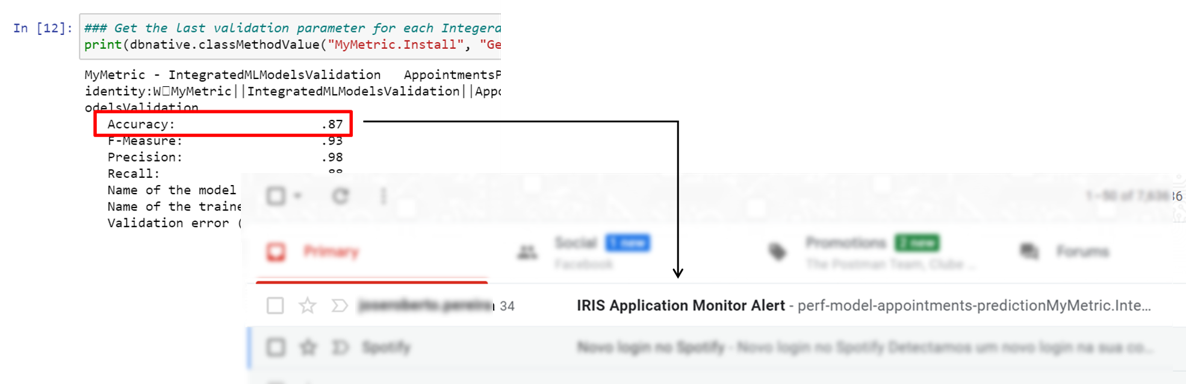
As we setup early a rule to issue an e-mail notification if accuracy is less than 90%, System Monitor realize that it's time to trigger such alert to related e-mail(s) account(s).
In e-mail body, you could find information about the alert, such its name, application monitor and its metrics values that triggered the alert.
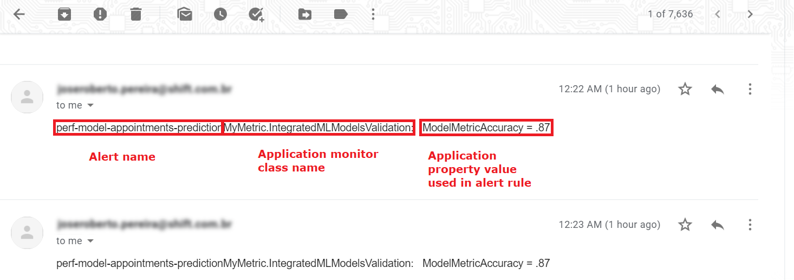
Thus, such situation will be notifed to people who could take some action in order to deal with it. For instance, an action could be simply retrain model, but in some cases a more elaborated approach may be necessary.

Certainly, you could elaborate more on monitor metrics and create better alerts. For example, imagine you have several ML models running with different people responsible for each of them. You could use the model name metric and setup specific alert rules, for specific e-mails receivers.

System Monitor also let you to raise a ClassMethod instead of sending an e-mail. So, you could execute complex logic when an alert is raised, like automatically retrain the model, for instance.

Note that, as System Monitor will regularly runs Initialize and GetSample method, such methods need to be carefully designed in order to don't demand so much system's resources.

Future works

As noticed by Benjamin De Boe, IRIS introduces a new way to customize your monitoring task - the SAM tool. My first impressions was very positives, SAM is integrated with market standard monitoring technologies like Grafana and Prometheus. So, why not go ahead and test how to improve this work with such new features? But this is material for a future work.... :)

Well, this is it! I hope this could be useful for you in some way. See you!

0
1 301
Article José Pereira · Jul 15, 2020 5m read

A few months ago, I read this interesting article from MIT Technology Review, explaing how COVID-19 pandemic are issuing challenges to IT teams worldwide regarding their machine learning (ML) systems.

Such article inspire me to think about how to deal with performance issues after a ML model was deployed.

I simulated a simple performance issue scenario in an Open Exchange technology example application - iris-integratedml-monitor-example, which is competing in the InterSystems IRIS AI Contest. Please, after read this article, you can check it out and, if you like it, vote for me! :)

Content

Part I:

Part II:

IRIS IntegratedML and ML systems

Before talking about COVID-19 and how it's affecting ML systems worldwide, let's quickly talk about InterSystems IRIS IntegratedML.

By automating task like feature selection and its integration with standard SQL data manipulation language, IntegratedML could help us with the task of develop and deploy a ML solution.

For instance, after a properly manipulation and analisys on data from medical appointments, you can setup a ML model for predicting patients show/no-show using these SQL statements:

CREATE MODEL AppointmentsPredection PREDICTING (Show) FROM MedicalAppointments
TRAIN MODEL AppointmentsPredection FROM MedicalAppointments
VALIDATE MODEL AppointmentsPredection FROM MedicalAppointments

AutoML provider will choose the set of features and ML algortim which best performs. In this case, AutoML provider selected Logistic Regression model using scikit-learn library, obtaining 90% of accuracy.

|   | MODEL_NAME             | TRAINED_MODEL_NAME      | PROVIDER | TRAINED_TIMESTAMP       | MODEL_TYPE     | MODEL_INFO                                        |
|---|------------------------|-------------------------|----------|-------------------------|----------------|---------------------------------------------------|
| 0 | AppointmentsPredection | AppointmentsPredection2 | AutoML   | 2020-07-12 04:46:00.615 | classification | ModelType:Logistic Regression, Package:sklearn... |
| METRIC_NAME              | Accuracy | F-Measure | Precision | Recall |
|--------------------------|----------|-----------|-----------|--------|
| AppointmentsPredection21 | 0.9      | 0.94      | 0.98      | 0.91   |

Once your ML model is already integrated to SQL, you can seamlessly integrate it to your existing booking system in order to improve its performance, by using estimations on which patient will be present and who won't:

SELECT PREDICT(AppointmentsPredection) As Predicted FROM MedicalAppointments WHERE ID = ?

You can learn more about IntegrateML here. If you want a little bit more detail about this simple prediction model, you can refer to here.

However, as AI/ML models are designed to adapt to society behaviour, directly or not, they probably will be affect a lot when such behaviour changes quickly. Recently, we (sadly) could experiment such scenario due COVID-19 pandemic.

Between the old and new normal

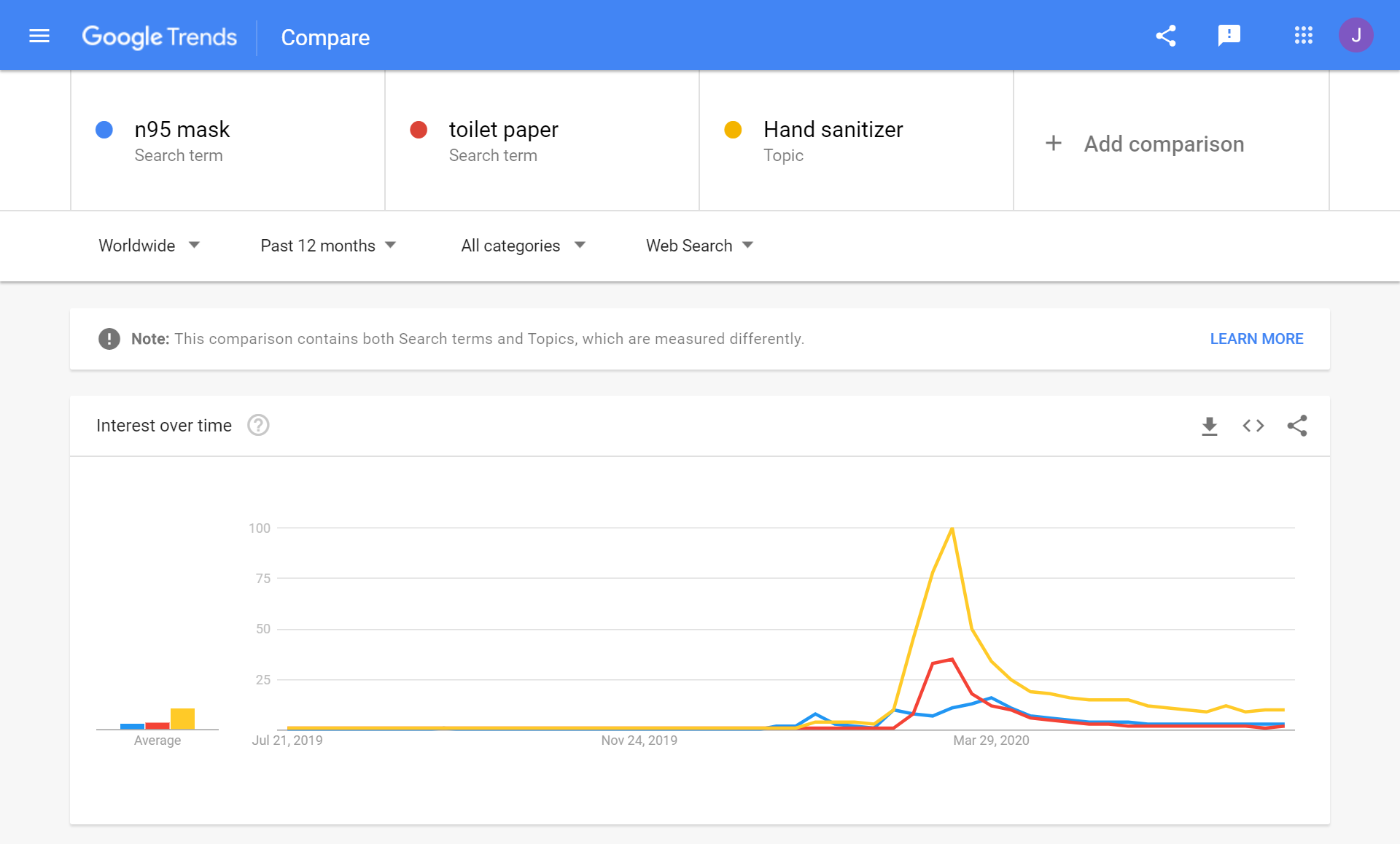
As explained in the MIT Technology Review's article, COVID-19 pandemic has been changing remarkably and quickly society's behaviour. I ran some queries in Google Trends, for terms cited in the article, like N95 mask, toilet paper and hand sanitizer, in order to confirm an increasing on their popularity, as pandemic spread worldwide:

As quoted in the article:

"But they [changes by COVID-19] have also affected artificial intelligence, causing hiccups for the algorithms that run behind the scenes in inventory management, fraud detection, marketing, and more. Machine-learning models trained on normal human behavior are now finding that normal has changed, and some are no longer working as they should."

I.e., between the "old normal" and the"new normal" we're experiencing a "new abnormal".
Another interesting quote also from article:

"Machine-learning models are designed to respond to changes. But most are also fragile; they perform badly when input data differs too much from the data they were trained on. (...) AI is a living, breathing engine."

The article goes on giving examples of AI/ML model that suddenly start to get their performance negatively affected, or need to be urgently altered. Some examples:

  • Retailers companies which ran out of stock after bulk orders for unsual products;
  • Skewed advices from investments recommendations services based on sentiment analysis of media posts, due their pessimist content;
  • Automated phrases generators for advisements which starts to generate unsuitable content, due new context;
  • Amazon changing its sellers recommendation system to choose who handle their own deliveries, in order to avoid over demand on its warehouses' logistic.

Thus, we need to monitor our AI/ML models in order to guarantee their reliability and keep helping our customers.

So far, hope I could show you that create, train and deploy your ML model isn't the whole story - you need keep track on it. In next article, I'll show you how to use IRIS %Monitor.Abstract framework to monitor your ML system's performance and, setting alerts triggers based on monitor's metrics.

In the meanwhile, I'd love to know if you had experienced some sort of issue raised by theses pandemics times, and how are you dealing with it in the comments section!

Stay tuned (and safe 😊)!

2
0 507
Article Peter Steiwer · Jun 26, 2020 1m read

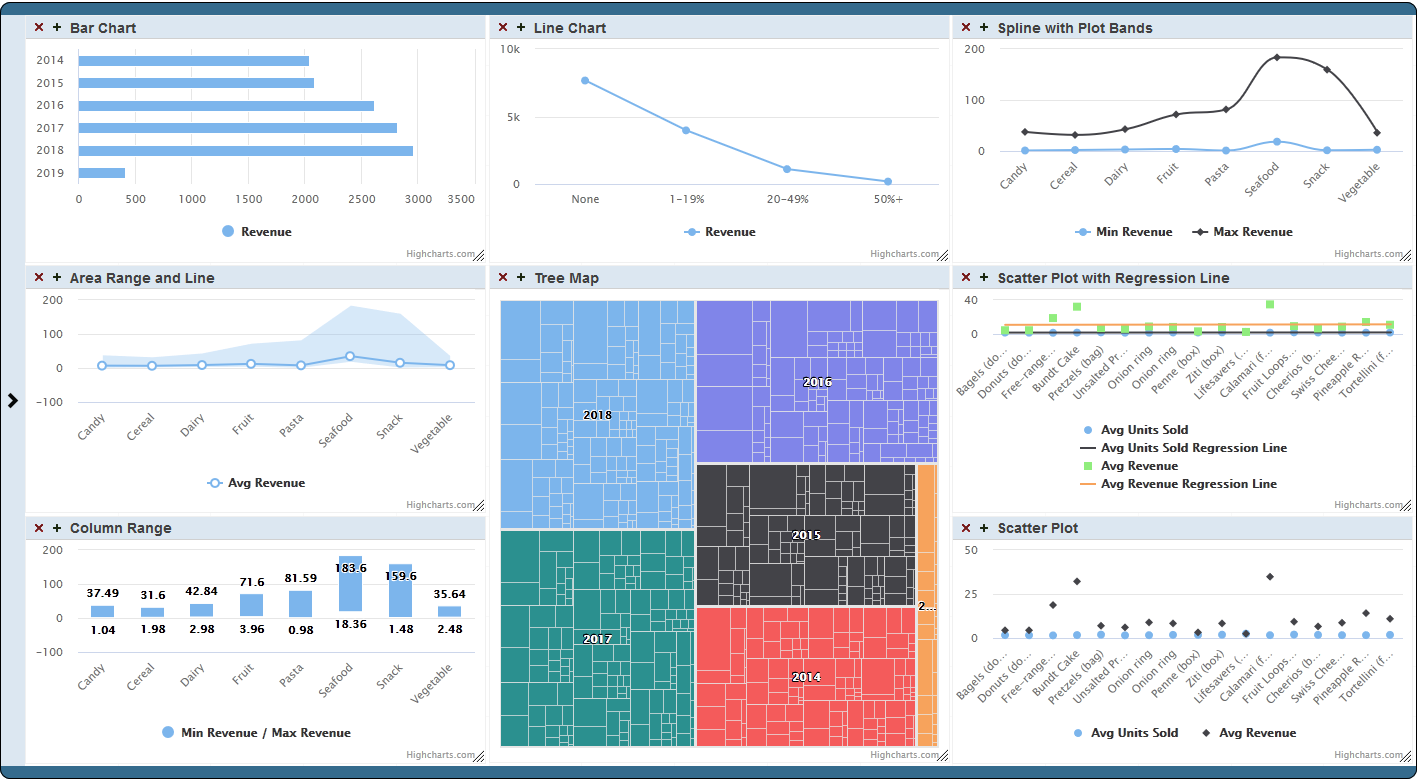
Now available on Open Exchange is a library of third party charts available to use within DeepSee/InterSystems IRIS BI dashboards. To start, simply download and install, select the new portlet as the widget type, then select the chart type that you desire. If you don't find the type of chart you are looking for, you can easily extend the portlet to implement your desired chart type. These new chart types can be used within existing dashboards or you can create new dashboards using them.

0
0 1140
Article Yuri Marx · Jun 26, 2020 1m read

Inter

Intersystems IRIS is a complete platform to get insights from SQL and NoSQL data. It is possible get data from Interoperability adapters or using a set of IRIS tables as data sources and model BI or NLP Cubes, covering all type of data (other tools are limited to SQL). There are the option to enable intensive analytics processing using Spark too. So you can model your analysis using IRIS web analyzers (many tools use desktop tools) and than visualize and produce insights using IRIS Dashboards and IRIS User Portal or your third party options, using open options like MDX and REST.

0
3 337
Question Lucas Bourré · Jun 17, 2020

Hello Community,

I hope you are well.
I encounter a problem on IRIS for Unix 2020.1  when I try to create a PDF from a simple Dashboard on Deepsee : 

When I click on this widget , a tab appear and is loading for ~30 seconds, then shows 'error loading the PDF File ' :


I am also using DeepSee Web, and i encounter a problem if I try to Export the graph as a PDF : 

Is there a link between both problem ? ( If I fix the print widget, the PDF Export will also be fixed ? ) 

9
0 364
Article Zhong Li · Jun 12, 2020 8m read

Keywords:  PyODBC, unixODBC, IRIS, IntegratedML, Jupyter Notebook, Python 3

Purpose

A few months ago I touched on a brief note on "Python JDBC connection into IRIS", and since then I referred to it more frequently than my own scratchpad hidden deep in my PC. Hence, here comes up another 5-minute note on how to make "Python ODBC connection into IRIS".

ODBC and PyODBC seem pretty easy to set up in a Windows client, yet every time I stumbled a bit somewhere on setting up an unixODBC and PyODBC client in a Linux/Unix-style server.

0
1 2149