This article is a continuation of this post.
In the previous article, we discussed the development of business processes, which are part of the components required for system integration and serve as a production coordinator.
This article will discuss creating a business service, which is the information input window for production.
And finally, the last component of “Let's Use Interoperability!”
The business service provides a window of input for information sent from outside IRIS, with or without using the adapter for external I/F.
There are three types of business services in the sample (links in parentheses are links to the sample code):
- Business services for files using inbound adapters(Start.FileBS)
- Business services for Web services using the SOAP inbound adapter(Start.WS.WebServiceBS)
- Business service called by stored procedure or REST without using an adapter(Start.NonAdapterBS)
Different connection methods used for inputting information will only increase the number of business services; however, the processing done within a business service is
Create a request message to be sent
using externally inputted information and
simply call the business component
It's effortless.
Now, let's outline how to create components that use file-inbound adapters.
Business services are written in scripts, which can be created in VSCode or Studio (see this article on using VSCode).
1. Business services for files using inbound adapters(Start.FileBS)
If you create a class in VSCode, you should create a class that inherits from Ens.BusinessService. As for adapters, you can use the ADAPTER parameter as ADAPTER class name (e.g., specify a file-inbound adapter class).
If you do not use the adapter, no configuration is required.
Class Start.FileBS Extends Ens.BusinessService
{
Parameter ADAPTER = "EnsLib.File.InboundAdapter";
In the file-inbound adapter, you can specify the directory to be monitored in Settings→File Path for the production's business service.

If the file located in the "File Path" matches the information specified in the "File Spec," it opens the file as a stream object. It defines it as the first variable when calling the business service ProcessInput().
When ProcessInput() is started, OnProcessInput() is automatically called. OnProcessInput() is passed directly to OnProcessInput() with the parameters passed to ProcessInput().

In OnProcessInput() the initial statement gets the information from the file stream object, which is passed as the first parameter, then creates a message to be given to the next component, writes the process of calling the next component, and completes the basic logic.
【Memo】
For Studio, launch the Business Services Wizard in the New Creation menu, select the adapter and press the Finish button.
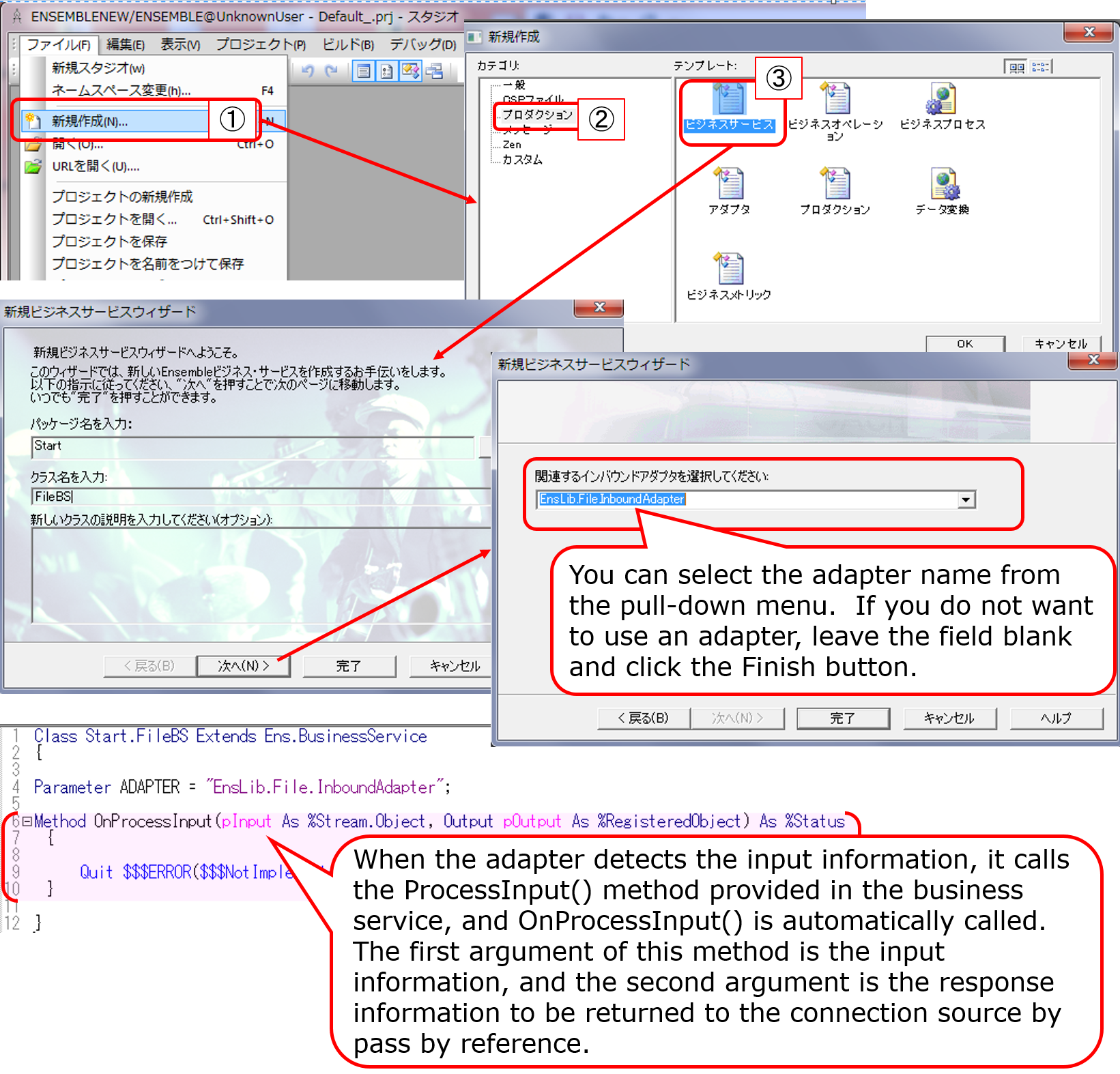
The OnProcessInput() method definition is as follows:
Method OnProcessInput(pInput As %Stream.Object, Output pOutput As %RegisteredObject) As %Status
pInput is provided with an instance of the %Stream.FileCharacter class for text files or the %Stream.FileBinary class for binary files.
In the sample, a file in text format will be inputted, and we have written it to accept multi-line requests and one request per line.
AtEnd property is set to 1 when EndOfFile is deteced. You can use this property to stop loop.
In a loop, we read the lines using the ReadLine() method, which enables us to obtain information about the contents of the file one line at a time (see the documentation for file adapter details).
Compose the message, retrieving information line by line. Then, we execute the ..SendRequestAsync() method, which calls the other components.
When executing the method, the first parameter should be the name of the component you want to call as a string, and the second parameter should be the request message you have created.
Note that the ..SendRequestAsync() is an asynchronous call and does not wait for a response.
Memo:There is also SendRequestSync() for synchronous calls.。
The sample code is as follows:

Reference:explanation of the usage of the $piece() function in the above example text
$piece(“string”, ”delimiter mark”, ”position number”)
The function to set/get a string with a delimiter, in the sample, to get the first and second value of comma-separated data, is written with the following syntax:
set request.Product=$piece(record,",",1)
set request.Area=$piece(record,",",2)
Now, let's check the function of Start.FileBS as it appeared in the above description.
In the sample production, the "File Path" was set to /irisdev/src, and the "File Spec" was set to check.txt. Either prepare the same directory or change it to a different directory and register the sample data in the check.txt file using the following format: purchased product name, name of the city.
※If you are using the sample container, please rename [Test-check.txt] in the src directory under the directory created by the git clone.


2. Business services for Web services using the SOAP inbound adapter (Start.WS.WebServiceBS)
Next, we will outline the creation of business services for Web services.
The Business Service Class for Web Services acts as a Web Service Provider = Web Service Server.
In the sample, we have two parameters in the Web service method for this sample production to have information sent from the Web service client. The web method uses the data entered in the parameters to create a message class and call other components.
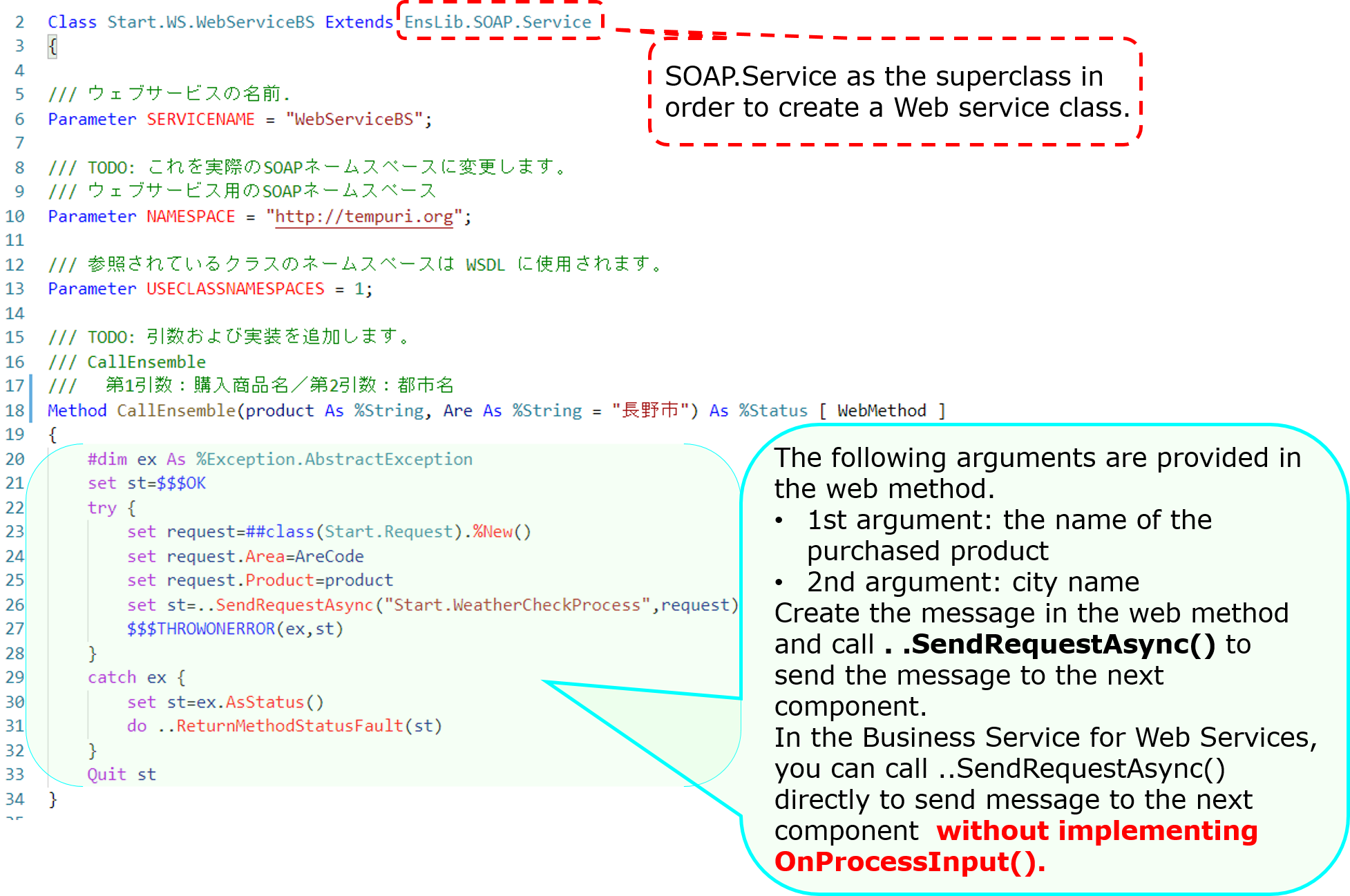
When you define a Web service class, a test screen is created. However, it is not shown by default.
Log in to IRIS (or start a terminal), go to the namespace where the production is located and do the following:
For your reference:Access to the Catalog and Test Pages
Here is a sample code configuration in the setting where the container was started with docker-compose up -d (run in the %SYS namespace)
set $namespace="%SYS"
set ^SYS("Security","CSP","AllowClass","/csp/user/","%SOAP.WebServiceInfo")=1
set ^SYS("Security","CSP","AllowClass","/csp/user/","%SOAP.WebServiceInvoke")=1
【Attention】Please note that the sentence is case-sensitive and should be written with care. Also, depending on the namespace in which the product is used, the specified script changes. The example sentence is written on the assumption that the sample is imported into the USER namespace.
If you import the sample code into the ABC namespace, the fourth subscript should be "/csp/abc/."
Once the configuration is complete, go to the following URL:
http://localhost:52773/csp/user/Start.WS.WebServiceBS.cls

If you want to provide the WSDL to your Web services client, specify WSDL=1 at the end of the following URL
http://localhost:52773/csp/user/Start.WS.WebServiceBS.cls?WSDL
3. Business services called by stored procedures or REST without using adapters(Start.NonAdapterBS)
Next, we will introduce the Business Service without adapters (Start.NonAdapterBS).
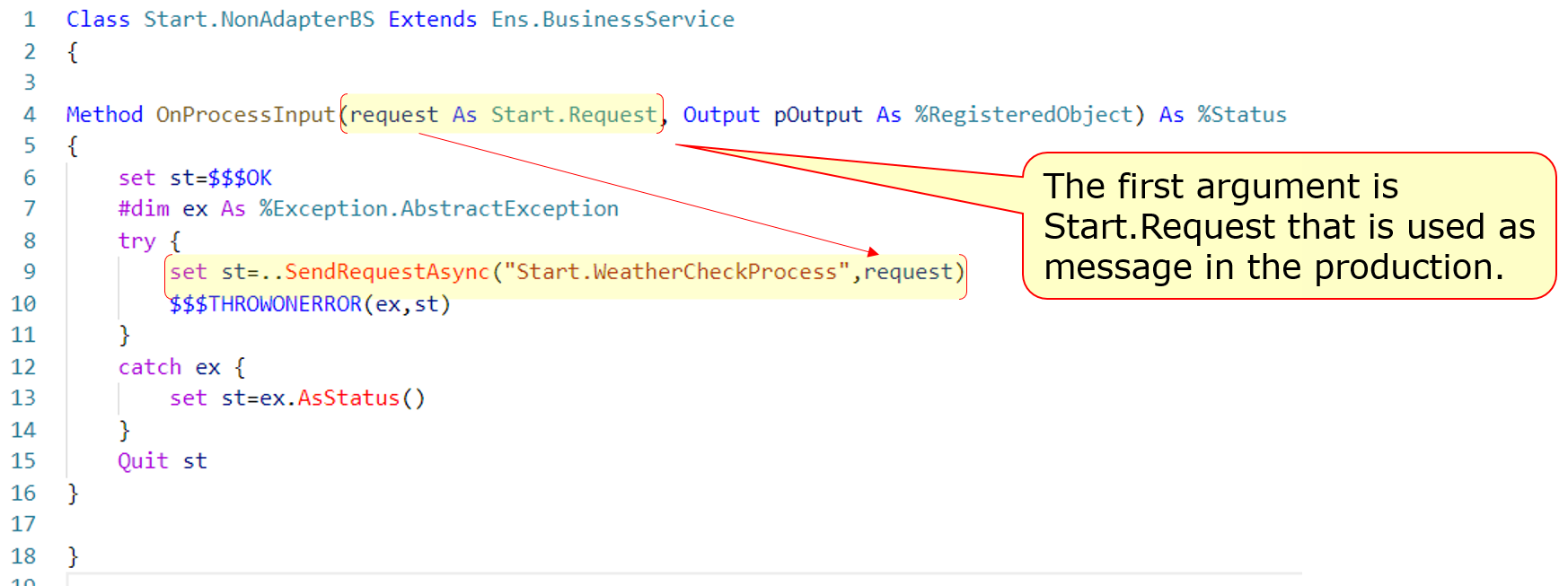
For business services that use adapters, the adapter calls the business service's ProcessInput() method to detect the information.
If you don't use adapters, you can still call the ProcessInput() method, but this method is not public. Therefore, if you implement a business service that does not use adapters, you will need to consider ProcessInput().
The sample utilizes the following two methods:
Now, here's an example of a stored procedure.

After adding a business service (Start.NonAdapterBS) that does not use adapters to the production (state added in the sample), run the following stored procedure
call Start.Utils_CallProduction('piroshki','Russia')

A resulting trace of the running result is as follows:

Next, here is an example of creating a dispatch class for REST:

The XML described in the XData Url Map defines which methods are called in response to the URL at the time of the REST call.
The example describes a definition that calls the WeatherCheck() method when the URL of the /weather/first parameter (purchased product name)/ second parameter (name of the city) are provided in the GET request.
<Route Url="/weather/:product/:arecode" Method="GET" Call="WeatherCheck"/>
Then, define the base URL for the above URL in the Management Portal's Web Application Path Settings screen, and it is complete.
See this article for more details on the configuration.
Once it is ready, try to run the information using a business service that allows you to send the REST information.
Example)http://localhost:52773/start/weather/Takoyaki/Osaka


If you do not use an adapter, as ProcessInput() cannot be called directly from outside, we have created an object for the business service in the logic executed through REST or stored procedures (using the CreateBusinessService() method of the Ens.Director class) and called ProcessInput()
If you use an adapter, the adapter detects the input and stores the information in a unique object and passes it to the business service. In contrast, if you don't use an adapter, the rest is pretty much the same, only the difference is in the above-mentioned part of the process.
.png) The business service is simply designed to use the information entered outside IRIS to create request messages and call business components.
The business service is simply designed to use the information entered outside IRIS to create request messages and call business components.
Throughout the sample production, we were able to see the following:
Different components play different roles in making a production run (business services, business processes, business operations).
To transmit information between components, use the message.
Messages are stored in the database unless deleted and thus can be traced at any time.
Some adapters simplify the process of around the connection.
These are the basic operations on how to use Interoperability in IRIS.
There are also record maps (see: FAQ TOPIC) and data conversion tools that are useful for input and output of CSV files and other format-specific files.
As well as this series, there is also an article on simple IoT applications developed with InterSystems IRIS using Interoperability. Please check it out.
Besides, IRIS for Health also supports FHIR and HL7 (including SS-MIX2) transmissions.
I would be pleased to explain it in another post. If you have something of interest to share, please leave a comment!
Finally, training courses are also available to learn how to use Interoperability.
If you'd like to take the time to try it out with an instructor, please consider joining one of our training courses!
