Hey Developers,
This week is a voting week for the InterSystems Interoperability contest! So, it's time to give your vote to the best solutions built with InterSystems IRIS.
🔥 You decide: VOTING IS HERE 🔥

How to vote? Details below.
In healthcare, interoperability is the ability of different information technology systems and software applications to communicate, exchange data, and use the information that has been exchanged.
Hey Developers,
This week is a voting week for the InterSystems Interoperability contest! So, it's time to give your vote to the best solutions built with InterSystems IRIS.
🔥 You decide: VOTING IS HERE 🔥
How to vote? Details below.
Hi Developers!
Here're the technology bonuses for the InterSystems Interoperability Contest 2021 that will give you extra points in the voting:
See the details below.
Hi contestants!
We've introduced a set of bonuses for the projects for the Interoperability Contest 2021!
Here are projects that scored it:
In companies, most of the time, we have test, stage and production environments.
It is very common that we, the developers, do not have the right to modify or touch the production directly because all the modifications must be traced in a versioning tool and tested before a production release.
However, a read access to the production (especially to the traces) can allow us to better understand a possible bug.
That's why I propose this ZPM module that creates a new role in IRIS that allows access to the productions and this only in read-only with access to the visual traces.

This is a simple install of a new role : #Ready_Only_Interop.
The objective of this role is to visualize:
In a secure way, no action is permitted.
Open IRIS Namespace with Interoperability Enabled. Open Terminal and call:
zpm "install readonly-interoperability"
You can have a demo of this role, from this git repository.
Use the user Viewer with password SYS.
Clone/git pull the repo into any local directory
$ git clone https://github.com/intersystems-community/iris-interoperability-template.git
Open the terminal in this directory and run:
$ docker-compose build
$ docker-compose up -d
Open the production.
With this link you will able to visualize but not modify any thing.
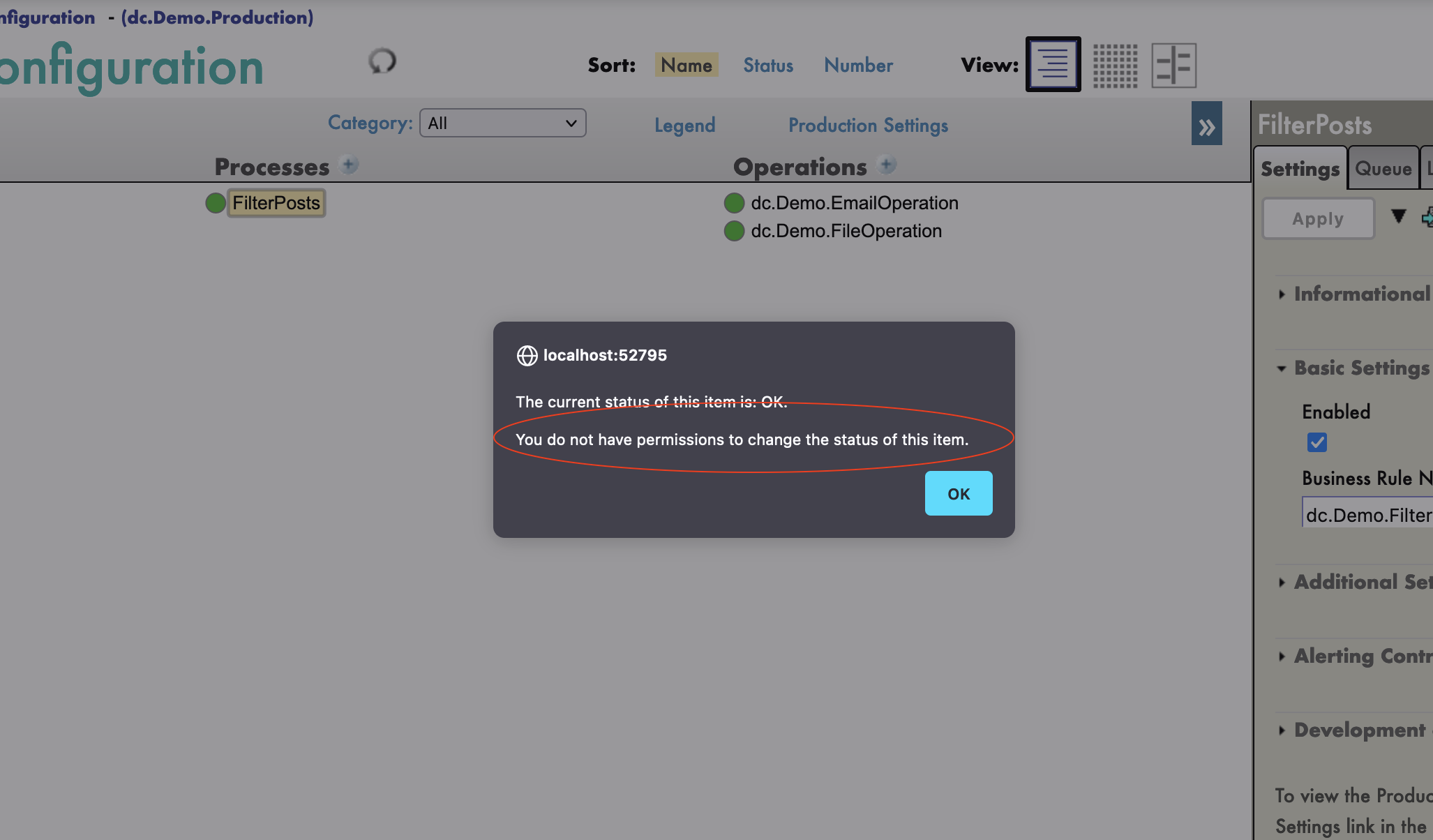
See traces : trace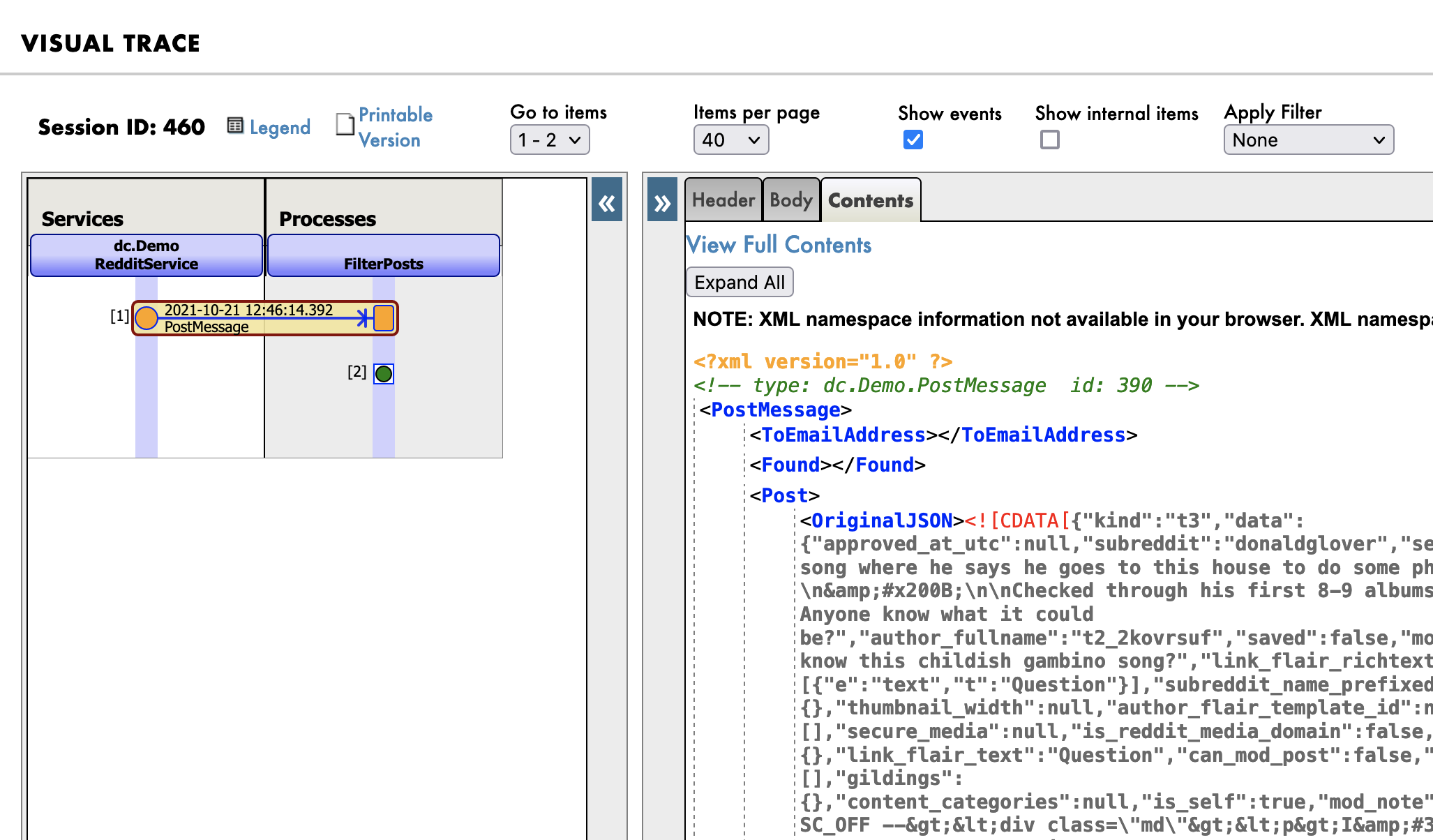
Example :
The challange was from the SQL privileges to enable the message viewer.
This part was quiet tricky, because all the SQL privileges have to be promoted by hand of each Interoperabilty Namespace.
Hi Community,
The InterSystems IRIS has a good connector to do Hadoop using Spark. But the market offers other excellent alternative to Big Data Hadoop access, the Apache Hive. See the differences:
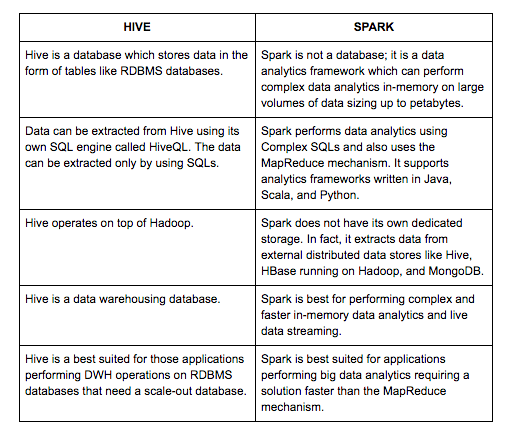
Source: https://dzone.com/articles/comparing-apache-hive-vs-spark
I created a PEX interoperability service to allows you use Apache Hive inside your InterSystems IRIS apps. To try it follow these steps:
1. Do a git clone to the iris-hive-adapter project:
$ git clone https://github.com/yurimarx/iris-hive-adapter.git2. Open the terminal in this directory and run:
I work as an Integration Engineer for United States Department of Veterans Affairs (VA). I work on a Health Connect production which processes many RecordMap files. I do not fully understand RecordMaps and I wanted to develop an application for the Interoperability contest where I could learn more about working with RecordMaps. I browsed InterSystems documentation for inspiration on how to start. I was happy to find CSV Record Wizard. I had created a CSV file for my Analytics contest entry. I wanted to use it to test the CSV Record Wizard. It was not obvious how to use it. The dialogue in
Hey Developers,
Welcome to the next InterSystems online programming competition:
🏆 InterSystems Interoperability Contest 🏆
Duration: October 04-24, 2021
Our prize pool increased to $9,450!

Hey Developers!
We're pleased to announce the next competition of creating open-source solutions using InterSystems IRIS or IRIS for Health! Please join:
⚡️ InterSystems Interoperability Contest ⚡️
Duration: November 2-22, 2020

Hello All,
InterSystems Certification has redesigned their IRIS Integration certification exam, and we again need input from our community to help validate the topics. Here's your chance to have your say in the knowledge, skills, and abilities that a certified InterSystems IRIS Integration Specialist should possess. And, yes, we'd like to hear from you Ensemble users as well!
Here's the exam title and the definition:
InterSystems IRIS Integration Specialist
An IT professional who:
This training course is addressed to beginners who would like to discover the IRIS Interoperability framework. We will be using Docker and VSCode.
GitHub: https://github.com/grongierisc/formation-template
The goal of this formation is to learn InterSystems' interoperability framework, and particularly the use of:
TABLE OF CONTENTS:
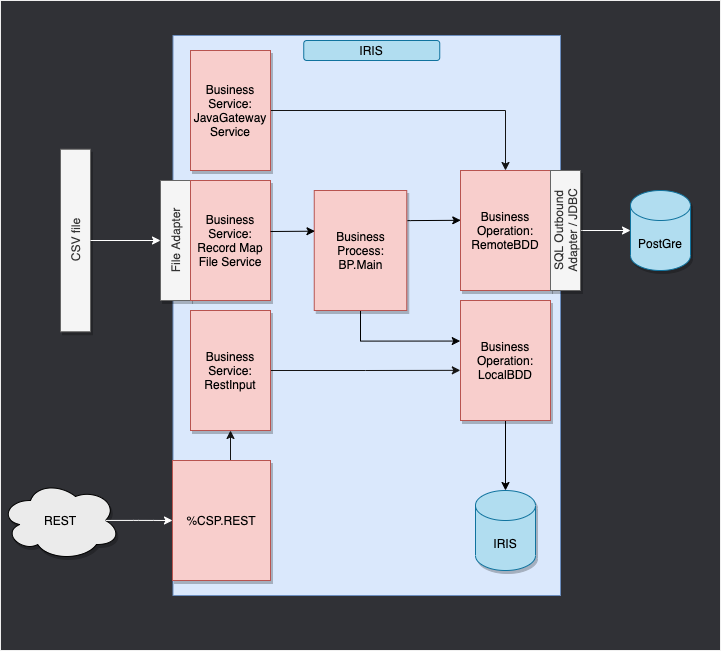
This is the IRIS Framework.
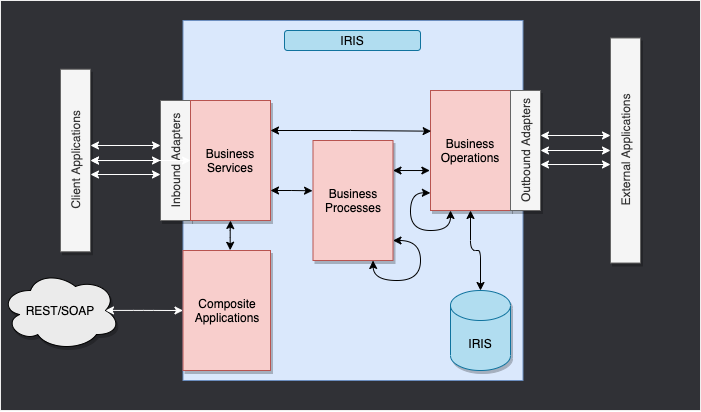
The components inside of IRIS represent a production. Inbound adapters and outbound adapters enable us to use different kind of format as input and output for our databse. The composite applications will give us access to the production through external applications like REST services.
The arrows between them all of this components are messages. They can be requests or responses.
In our case, we will read lines in a csv file and save it into the IRIS database.
We will then add an operation that will enable us to save objects in an extern database too, using JDBC. This database will be located in a docker container, using postgre.
Finally, we will see how to use composite applications to insert new objects in our database or to consult this database (in our case, through a REST service).
The framework adapted to our purpose gives us:
For this formation, you'll need:
In order to have access to the InterSystems images, we need to go to the following url: http://container.intersystems.com. After connecting with our InterSystems credentials, we will get our password to connect to the registry. In the docker VScode addon, in the image tab, by pressing connect registry and entering the same url as before (http://container.intersystems.com) as a generic registry, we will be asked to give our credentials. The login is the usual one but the password is the one we got from the website.
From there, we should be able to build and compose our containers (with the docker-compose.yml and Dockerfile files given).
We will open a Management Portal. It will give us access to an webpage where we will be able to create our production. The portal should be located at the url: http://localhost:52775/csp/sys/UtilHome.csp?$NAMESPACE=IRISAPP. You will need the following credentials:
LOGIN: SuperUser
PASSWORD: SYS
A part of the things we will be doing will be saved locally, but all the processes and productions are saved in the docker container. In order to persist all of our progress, we need to export every class that is created through the Management Portal with the InterSystems addon ObjectScript:
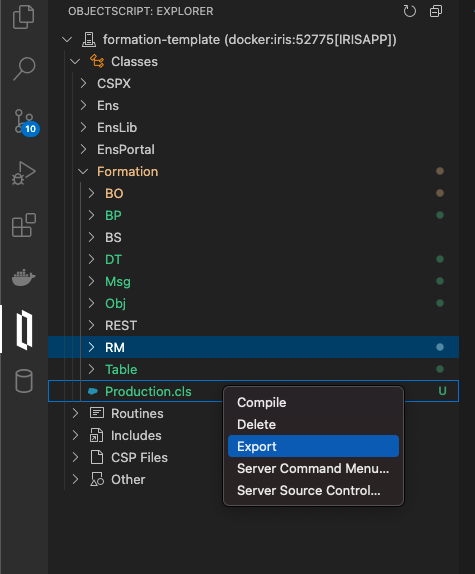
We will have to save our Production, Record Map, Business Processes and Data Transfromation this way. After that, when we close our docker container and compose it up again, we will still have all of our progress saved locally (it is, of course, to be done after every change through the portal). To make it accessible to IRIS again we need to compile the exported files (by saving them, InterSystems addons take care of the rest).
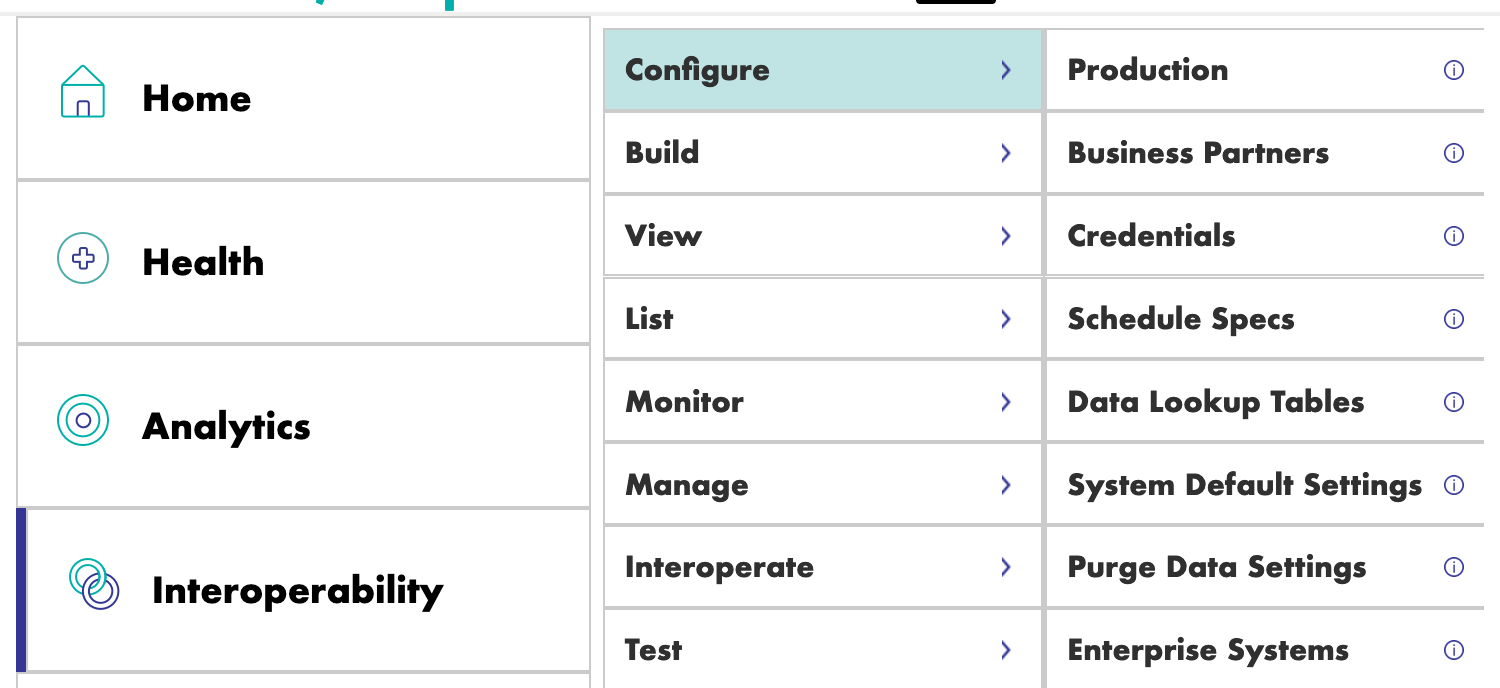
We can now create our first production. For this, we will go through the [Interoperability] and [Configure] menus:
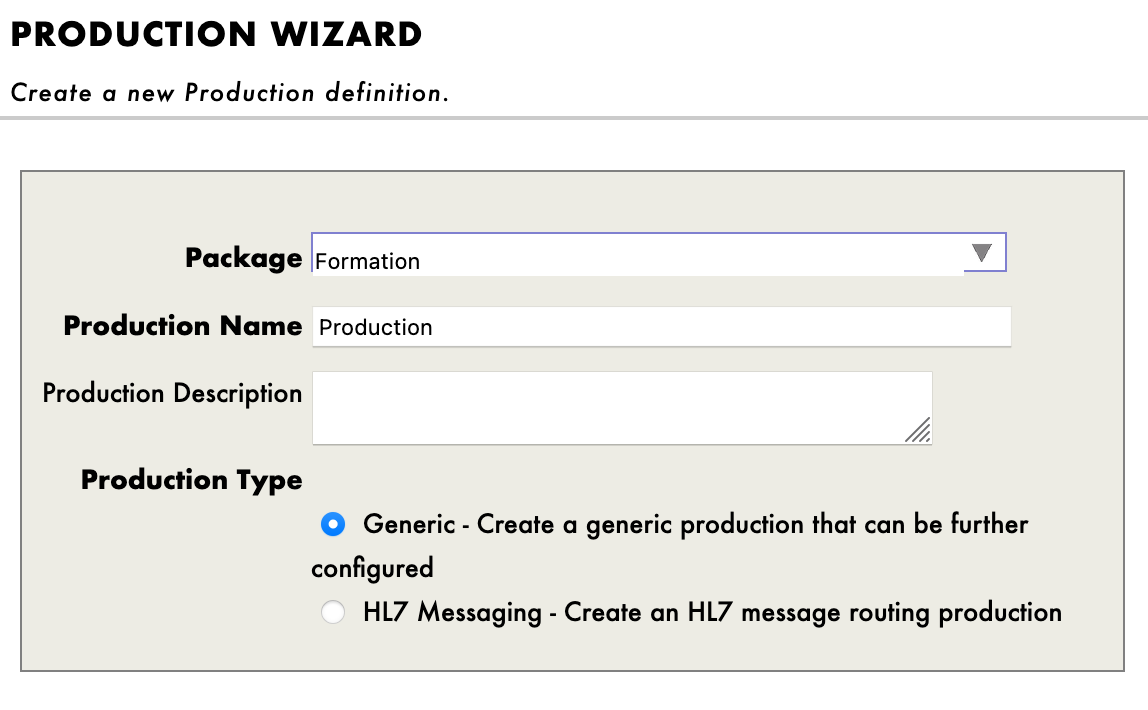
We then have to press [New], select the [Formation] package and chose a name for our production:
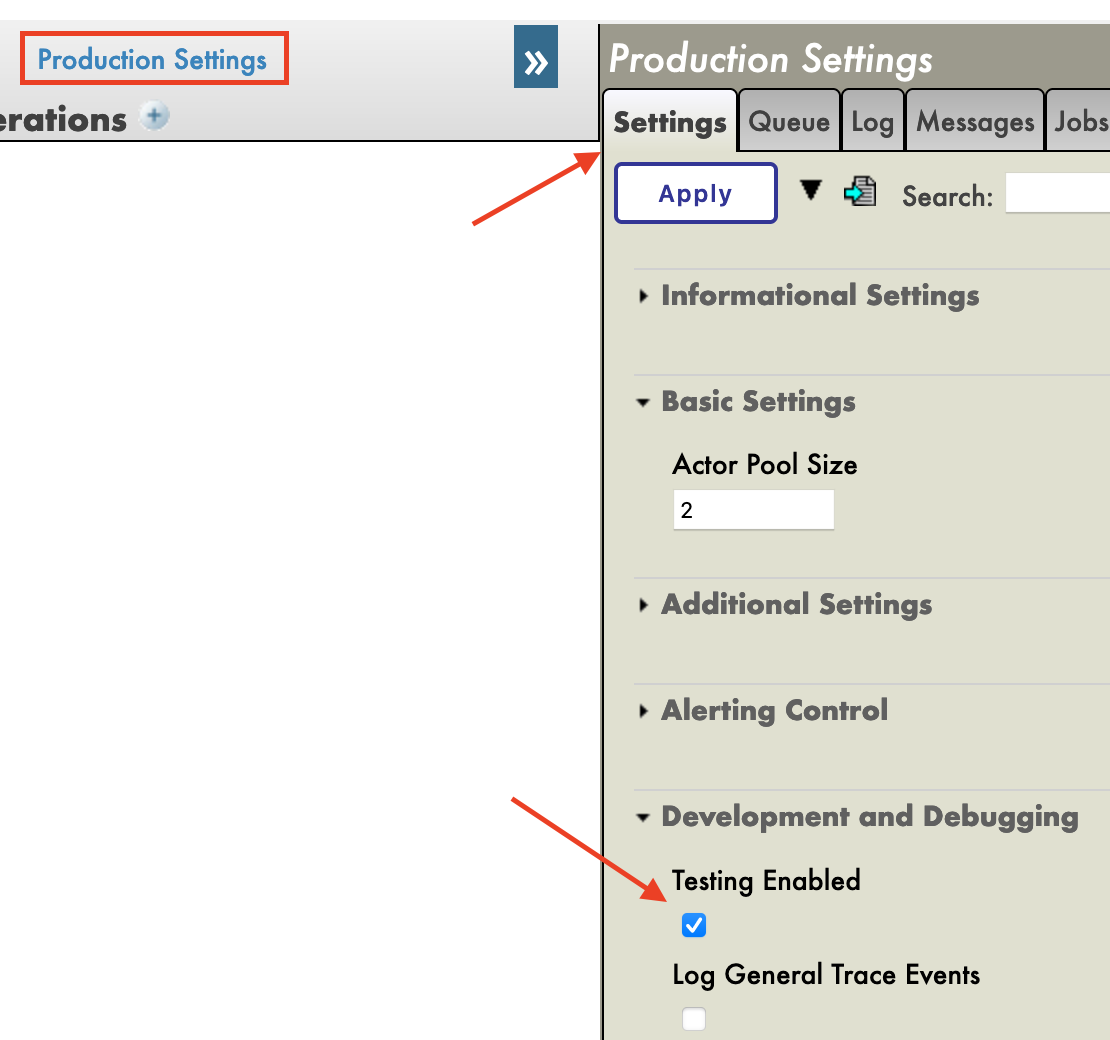
Immediatly after creating our production, we will need to click on [Production Settings] just above the [Operations] section. In the right sidebar menu, we will have to activate [Testing Enabled] in the [Development and Debugging] part of the [Settings] tab (don't forget to press [Apply]).
In this first production we will now add Business Operations.
A Business Operation (BO) is a specific operation that will enable us to send requests from IRIS to an external application / system. It can also be used to directly save in IRIS what we want.
We will create those operations in local, that is, in the Formation/BO/ file. Saving the files will compile them in IRIS.
For our first operation we will save the content of a message in the local database.
We need to have a way of storing this message first.
Storage classes in IRIS extends the type %Persistent. They will be saved in the intern database.
In our Formation/Table/Formation.cls file we have:
Class Formation.Table.Formation Extends %Persistent
{

Property Name As %String;

Property Salle As %String;

}
Note that when saving, additional lines are automatically added to the file. They are mandatory and are added by the InterSystems addons.
This message will contain a Formation object, located in the Formation/Obj/Formation.cls file:
Class Formation.Obj.Formation Extends (%SerialObject, %XML.Adaptor)
{

Property Nom As %String;

Property Salle As %String;

}
The Message class will use that Formation object, src/Formation/Msg/FormationInsertRequest.cls:
Class Formation.Msg.FormationInsertRequest Extends Ens.Request
{

Property Formation As Formation.Obj.Formation;

}
Now that we have all the elements we need, we can create our operation, in the Formation/BO/LocalBDD.cls file:
Class Formation.BO.LocalBDD Extends Ens.BusinessOperation
{

Parameter INVOCATION = "Queue";

Method InsertLocalBDD(pRequest As Formation.Msg.FormationInsertRequest, Output pResponse As Ens.StringResponse) As %Status
{
    set tStatus = $$$OK

    try{
        set pResponse = ##class(Ens.Response).%New()
        set tFormation = ##class(Formation.Table.Formation).%New()
        set tFormation.Name = pRequest.Formation.Nom
        set tFormation.Salle = pRequest.Formation.Salle
        $$$ThrowOnError(tFormation.%Save())
    }
    catch exp
    {
        Set tStatus = exp.AsStatus()
    }

    Quit tStatus
}

XData MessageMap
{
<MapItems>
    <MapItem MessageType="Formation.Msg.FormationInsertRequest">
        <Method>InsertLocalBDD</Method>
    </MapItem>
</MapItems>
}

}
The MessageMap gives us the method to launch depending on the type of the request (the message sent to the operation).
As we can see, if the operation received a message of the type Formation.Msg.FormationInsertRequest, the InsertLocalBDD method will be called. This method will save the message in the IRIS local database.
We now need to add this operation to the production. For this, we use the Management Portal. By pressing the [+] sign next to [Operations], we have access to the [Business Operation Wizard]. There, we chose the operation class we just created in the scrolling menu.
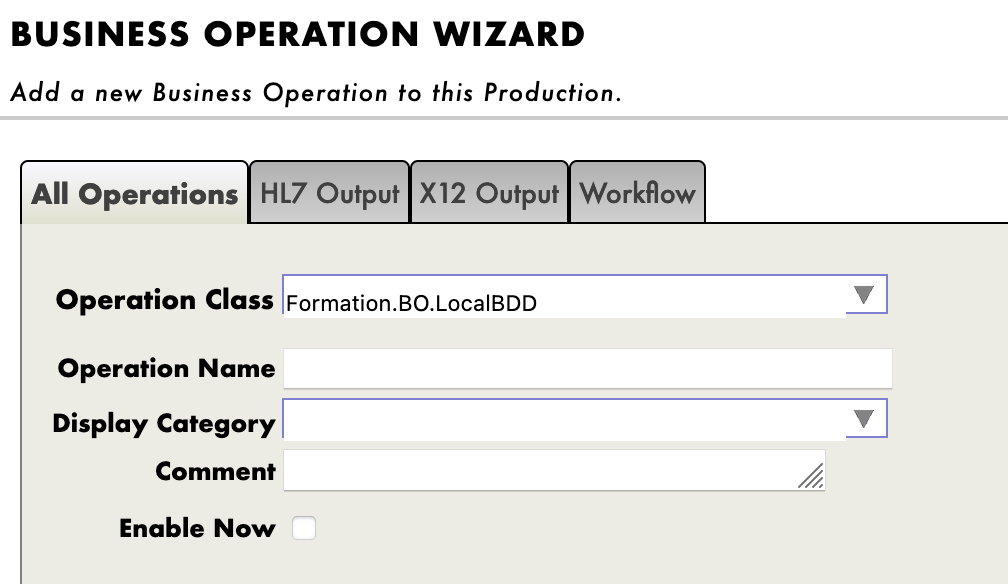
Double clicking on the operation will enable us to activate it. After that, by selecting the operation and going in the [Actions] tabs in the right sidebar menu, we should be able to test the operation (if not see the production creation part to activate testings / you may need to start the production if stopped).
By doing so, we will send the operation a message of the type we declared earlier. If all goes well, the results should be as shown below:
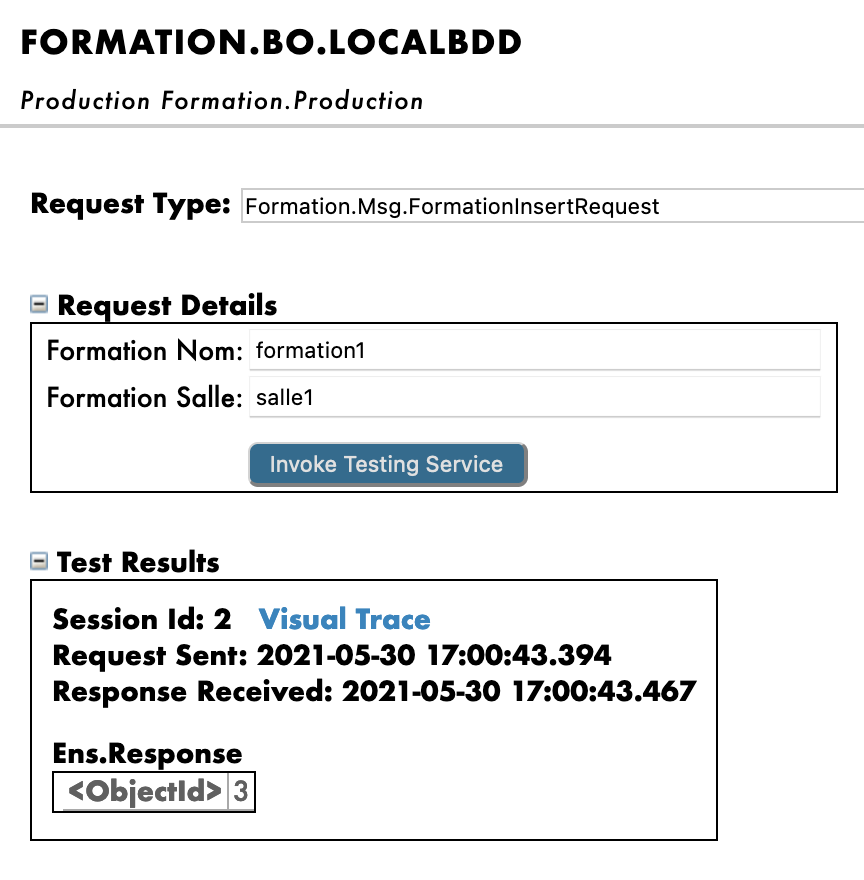
Showing the visual trace will enable us to see what happened between the processes, services and operations. here, we can see the message being sent to the operation by the process, and the operation sending back a response (that is just an empty string).
Business Processes (BP) are the business logic of our production. They are used to process requests or relay those requests to other components of the production.
Business Processes are created within the Management Portal:
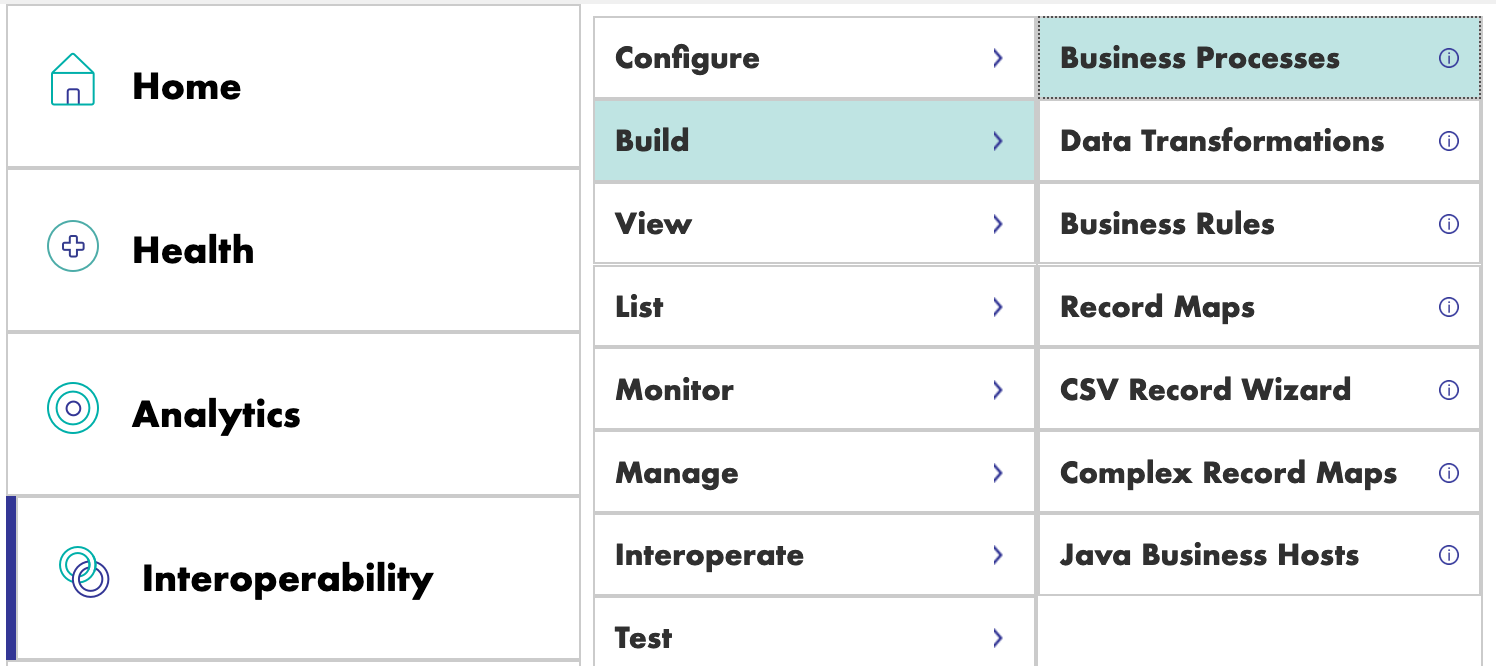
We are now in the Business Process Designer. We are going to create a simple BP that will call our operation:

A BP has a Context. It is composed of a request class, the class of the input, and of a response class, the class of the output. Business Processes only have one input and one output. It is also possible to add properties.
Since our BP will only be used to call our BO, we can put as request class the message class we created (we don't need an output as we just want to insert into the database).
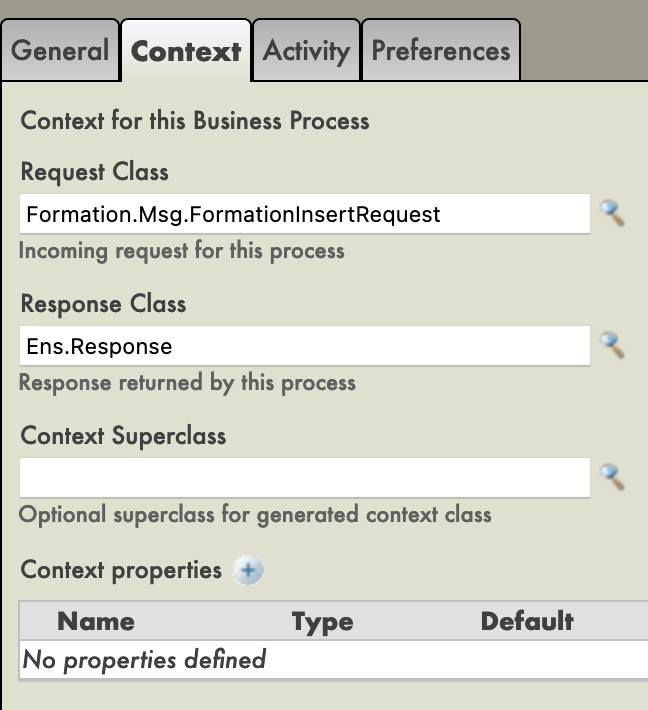
We then chose the target of the call function : our BO. That operation, being called has a callrequest property. We need to bind that callrequest to the request of the BP (they both are of the class Formation.Msg.FormationInsertRequest), we do that by clicking on the call function and using the request builder:

We can now save this BP (in the package ‘Formation.BP‘ and under the name ‘InsertLocalBDD‘ or 'Main', for example). Just like the operations, the processes can be instantiated and tested through the production configuration, for that they need to be compiled beforehand (on the Business Process Designer screen).
Our Process for now only passes the message to our Operation. We are going to complexify it so that the BP will take as input one line of a CSV file.
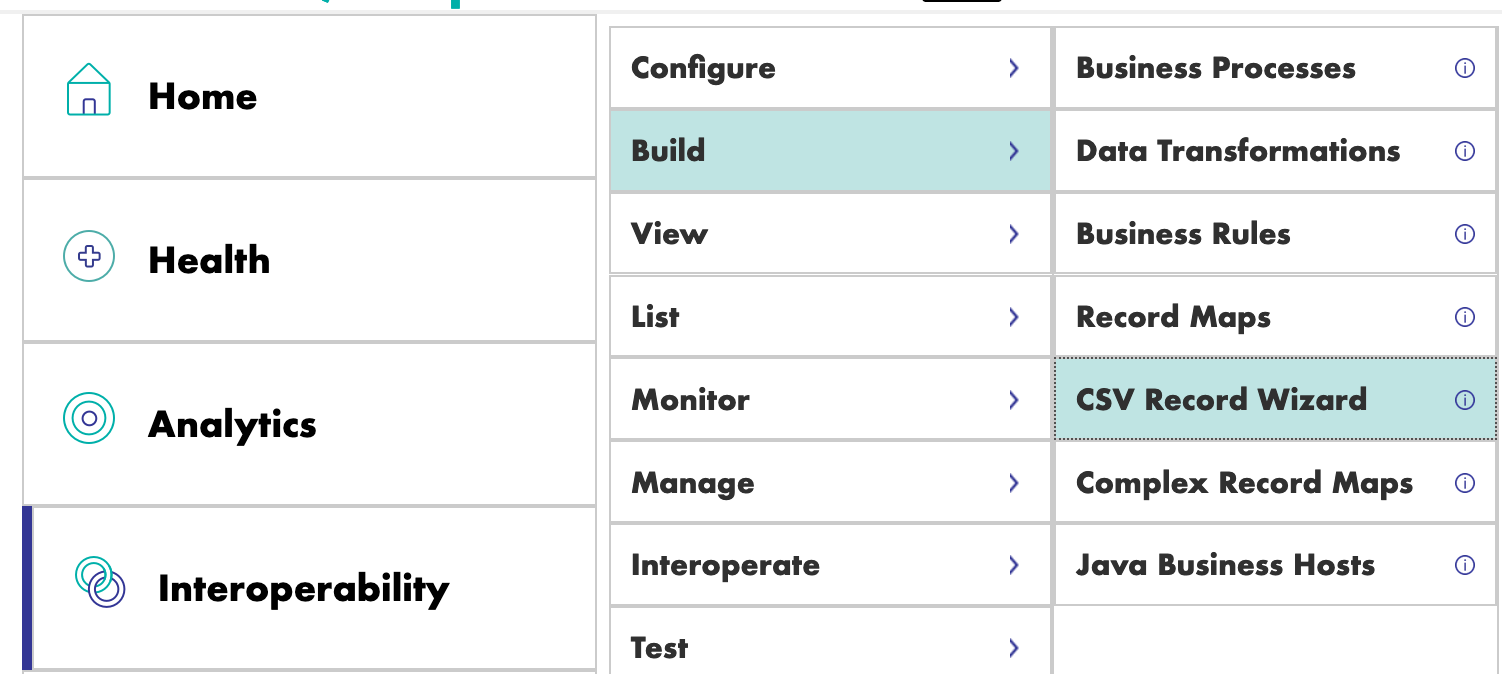
In order to read a file and put its content into a file, we need a Record Map (RM). There is a Record Mapper specialized for CSV files in the [Interoperability > Build] menu of the management portal:
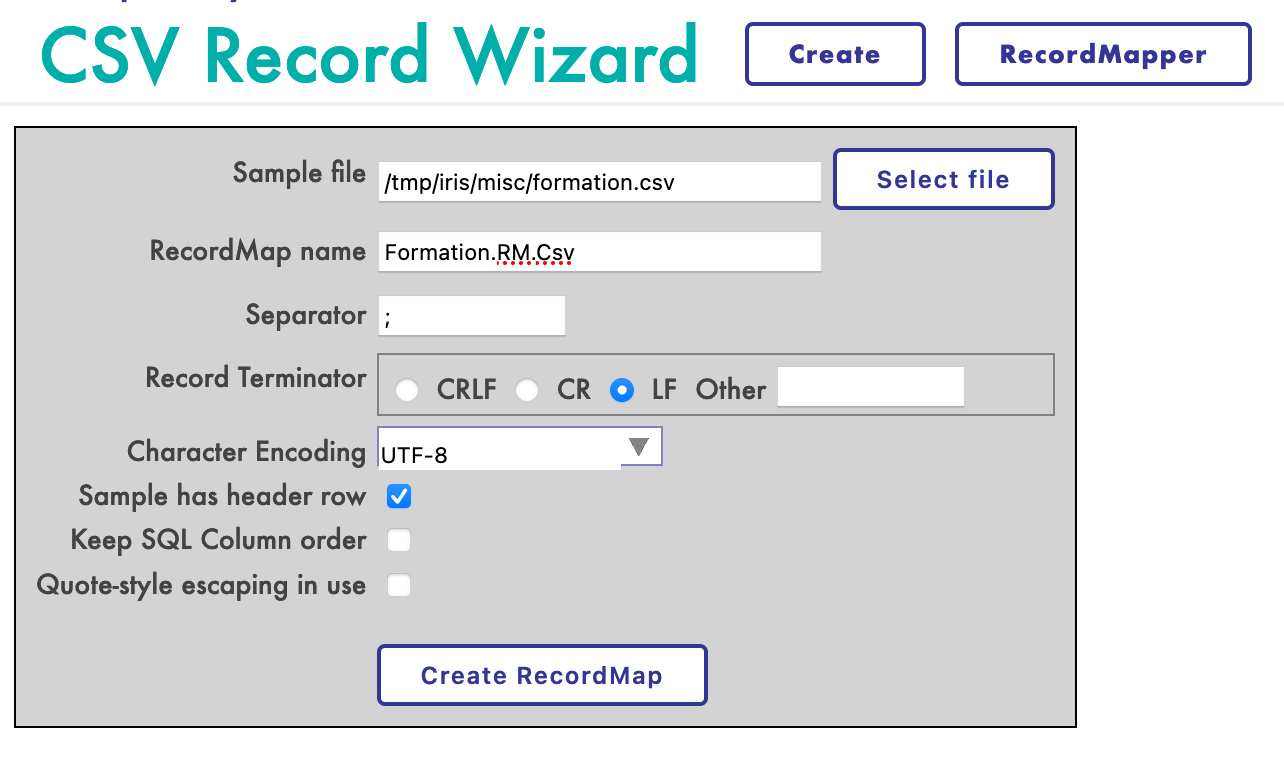
We will create the mapper like this:
You should now have this Record Map:
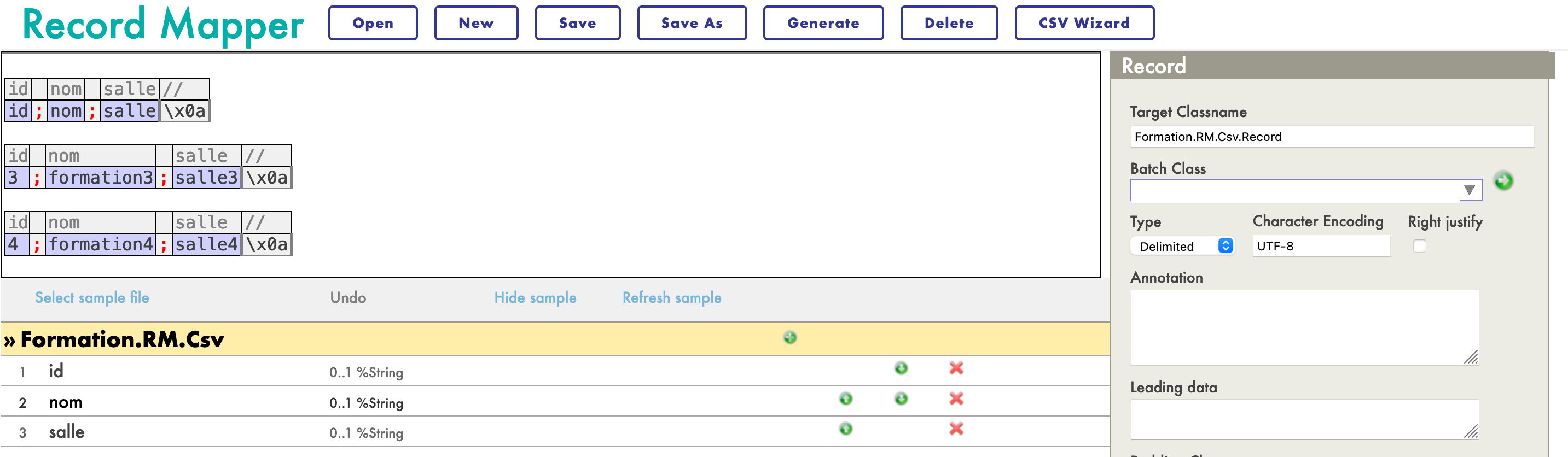
Now that the Map is created, we have to generate it (with the Generate button). We now need to have a Data Transformation from the record map format and an insertion message.
We will find the Data Transformation (DT) Builder in the [Interoperability > Builder] menu. We will create our DT like this (if you can't find Formation.RM.Csv.Record, maybe you didn't generate the record map):
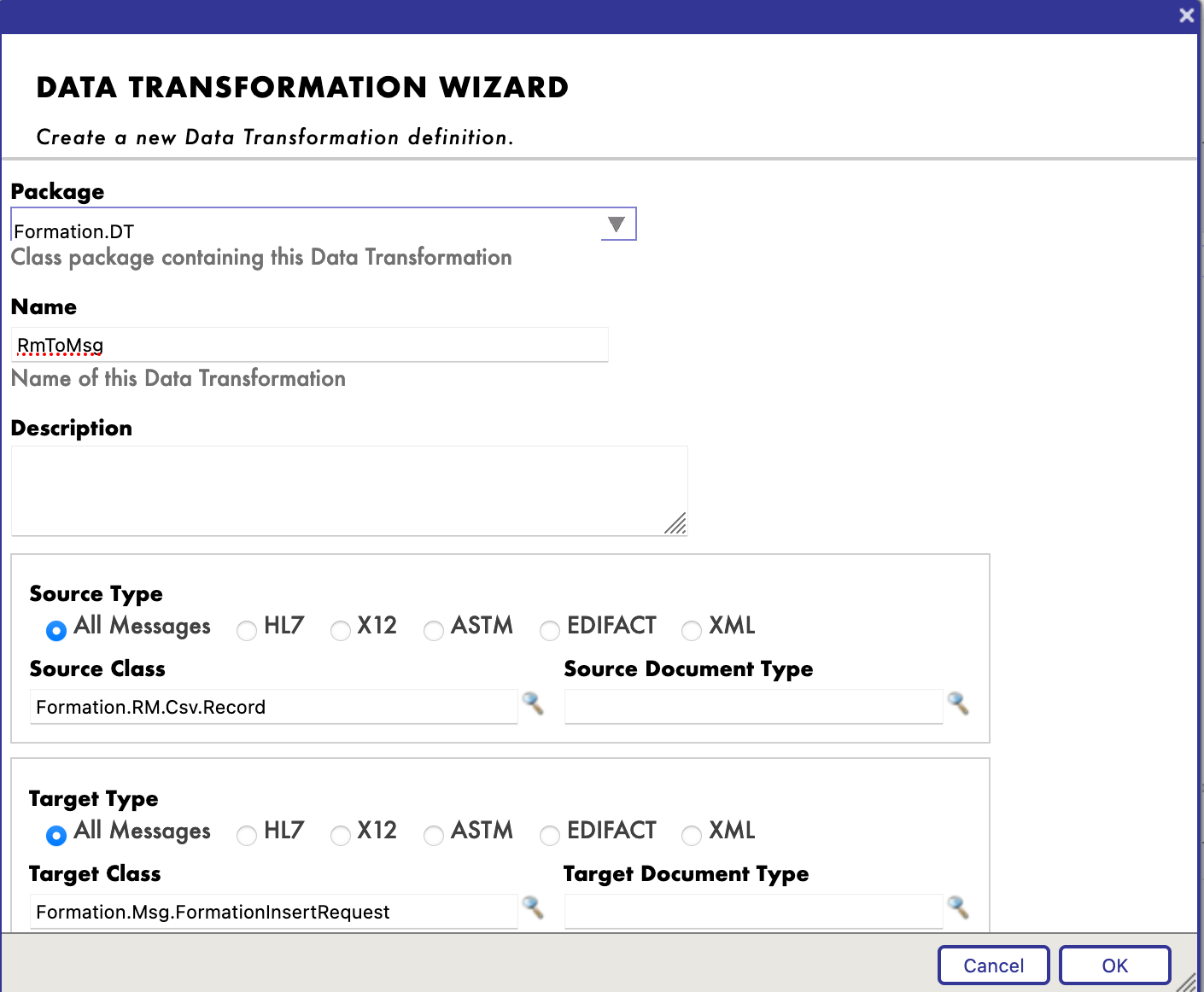
Now, we can map the different fields together:

The first thing we have to change is the BP's request class, since we need to have in input the Record Map we created.
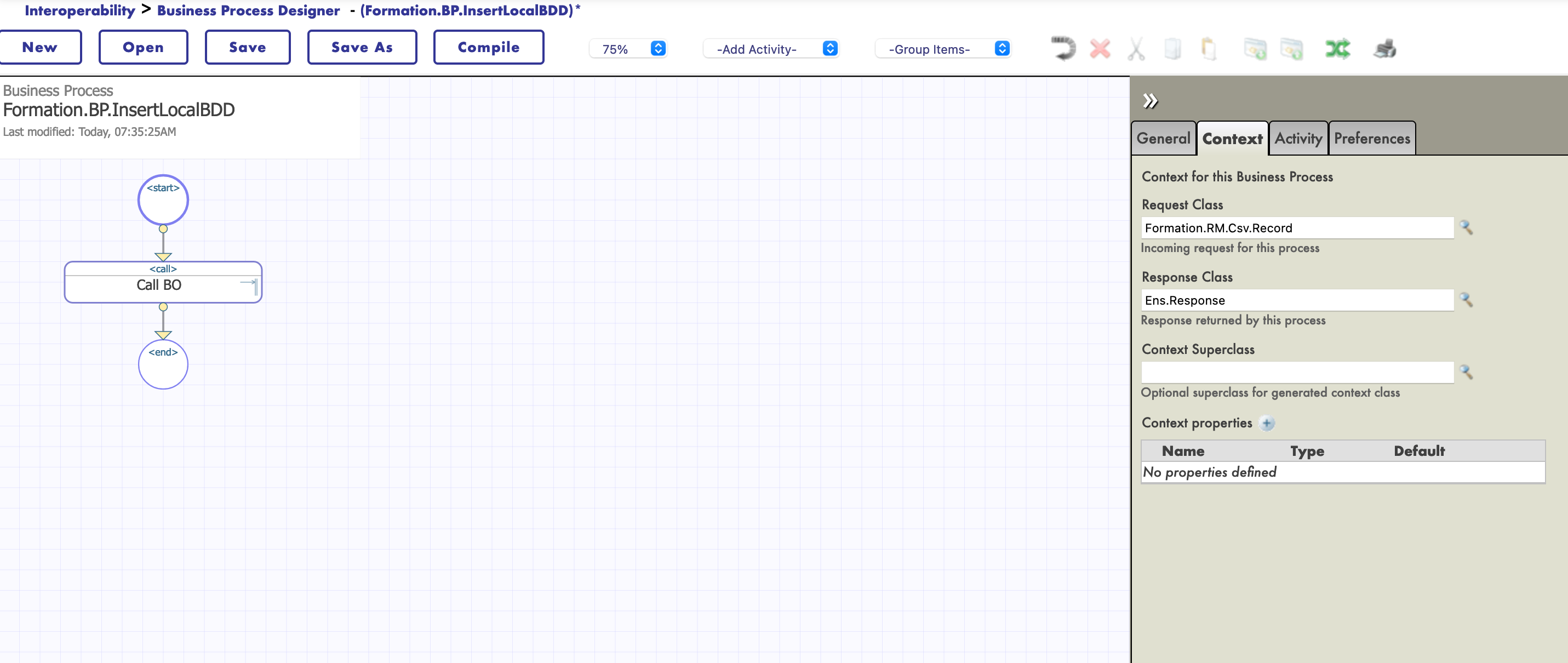
We can then add our transformation (the name of the process doesn't change anything, from here we chose to name it Main):

The transform activity will take the request of the BP (a Record of the CSV file, thanks to our Record Mapper), and transform it into a FormationInsertRequest message. In order to store that message to send it to the BO, we need to add a property to the context of the BP.
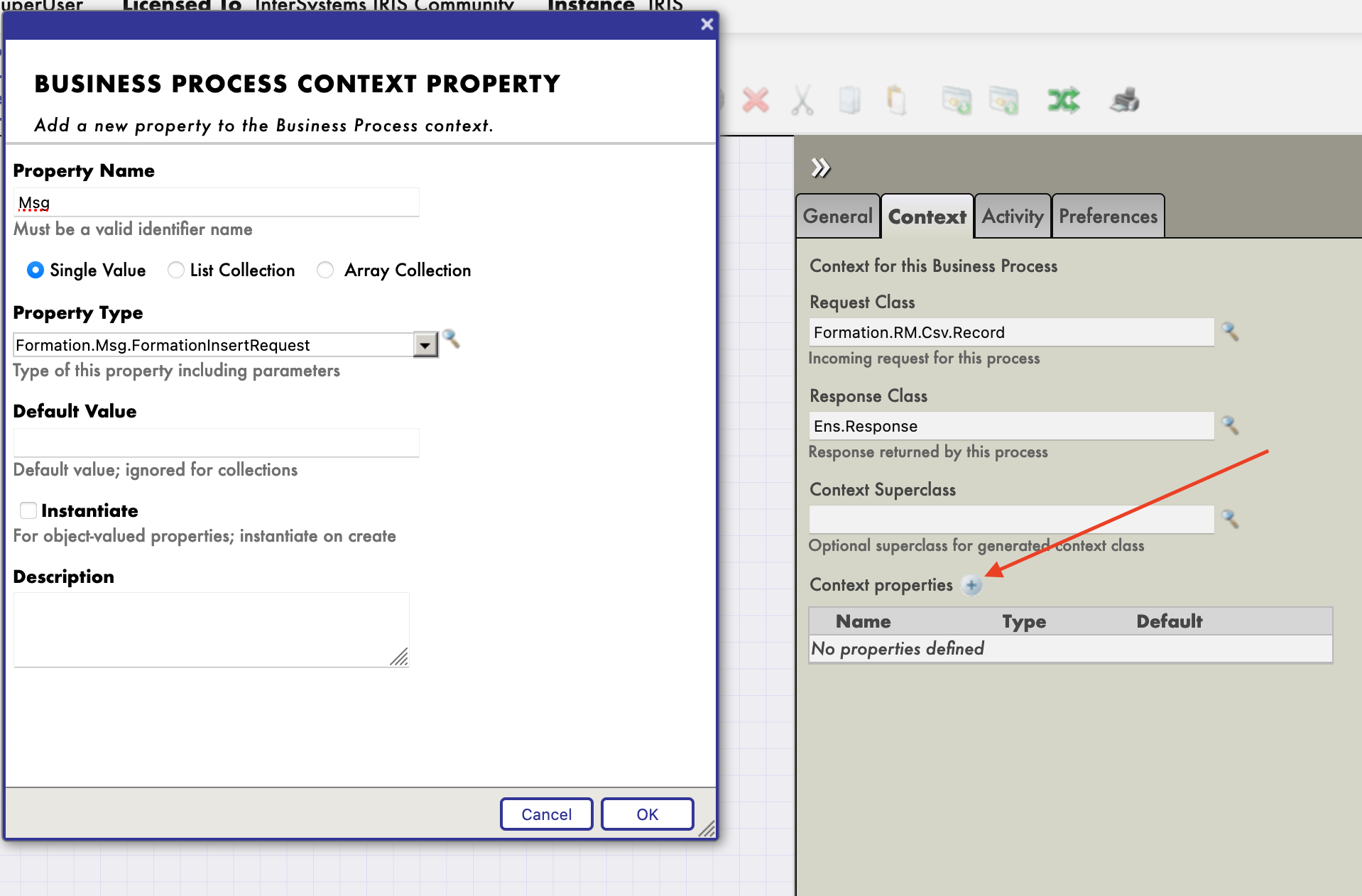
We can now configure our transform function so that it takes it input as the input of the BP and saves its output in the newly created property. The source and target of the RmToMsg transformation are respectively request and context.Msg:
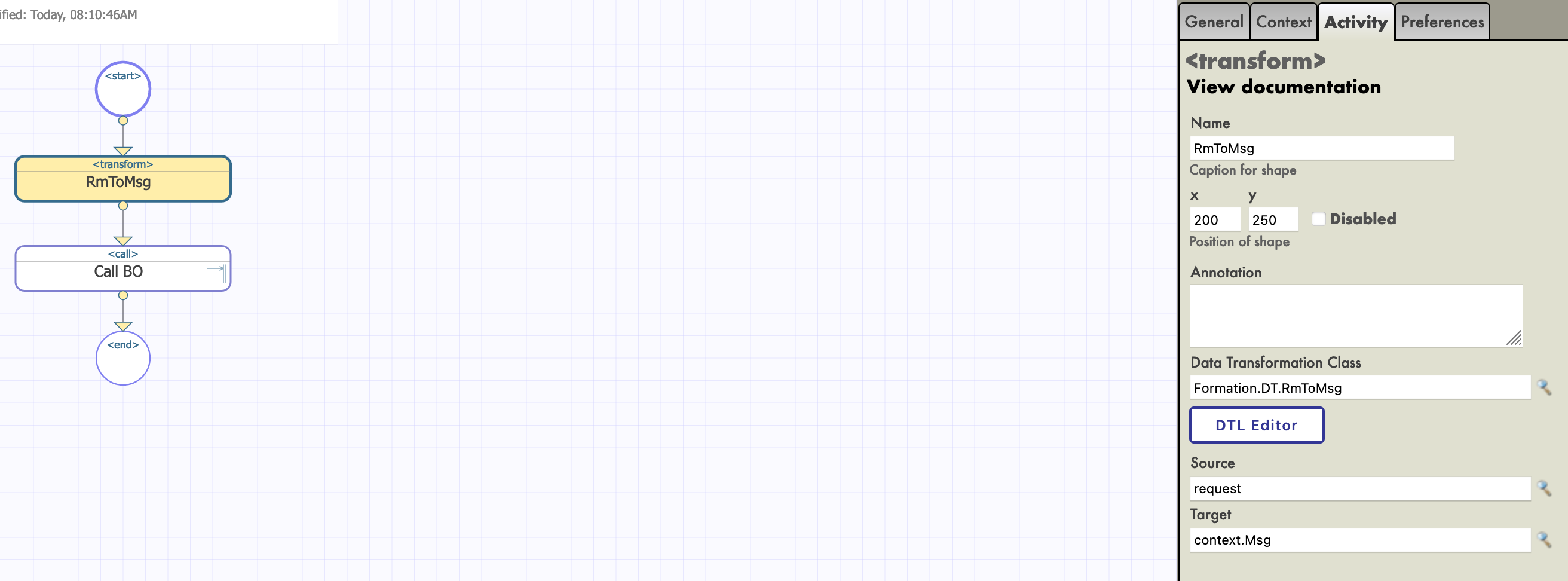
We need to do the same for Call BO. Its input, or callrequest, is the value stored in context.msg:

In the end, the flow in the BP can be represented like this:
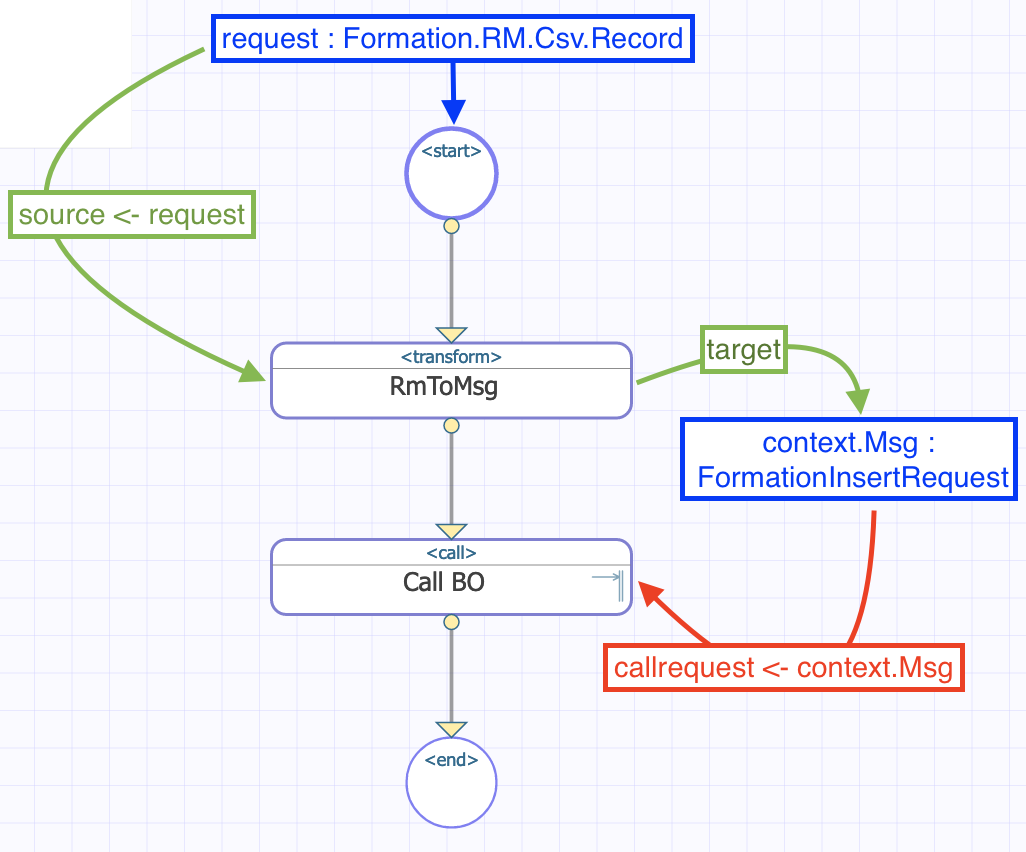
With the [+] sign, we can add our new process to the production (if not already done). We also need a generic service to use the record map, we use EnsLib.RecordMap.Service.FileService (we add it with the [+] button next to services). We then parameter this service:

We should now be able to test our BP.
We test the whole production this way:

In System Explorer > SQL menu, you can execute the command
SELECT
ID, Name, Salle
FROM Formation_Table.Formation
to see the objects we just saved.
In this section, we will create an operation to save our objects in an extern database. We will be using the JDBC API, as well as the other docker container that we set up, with postgre on it.
Our new operation, in the file Formation/BO/RemoteBDD.cls is as follows:
Include EnsSQLTypes

Class Formation.BO.RemoteBDD Extends Ens.BusinessOperation
{

Parameter ADAPTER = "EnsLib.SQL.OutboundAdapter";

Property Adapter As EnsLib.SQL.OutboundAdapter;

Parameter INVOCATION = "Queue";

Method InsertRemoteBDD(pRequest As Formation.Msg.FormationInsertRequest, Output pResponse As Ens.StringResponse) As %Status
{
	set tStatus = $$$OK

	try{
		set pResponse = ##class(Ens.Response).%New()
		set ^inc = $I(^inc)
		set tInsertSql = "INSERT INTO public.formation (id, nom, salle) VALUES(?, ?, ?)"
		$$$ThrowOnError(..Adapter.ExecuteUpdate(.nrows,tInsertSql,^inc,pRequest.Formation.Nom, pRequest.Formation.Salle ))
	}
	catch exp
	{
		Set tStatus = exp.AsStatus()
	}

	Quit tStatus
}

XData MessageMap
{
<MapItems>
	<MapItem MessageType="Formation.Msg.FormationInsertRequest">
		<Method>InsertRemoteBDD</Method>
	</MapItem>
</MapItems>
}

}
This operation is similar to the first one we created. When it will receive a message of the type Formation.Msg.FormationInsertRequest, it will use an adapter to execute SQL requests. Those requests will be sent to our postgre database.
Now, through the Management Portal, we will instantiate that operation (by adding it with the [+] sign in the production).
We will also need to add the JavaGateway for the JDBC driver in the services. The full name of this service is EnsLib.JavaGateway.Service.

We now need to configure our operation. Since we have set up a postgre container, and connected its port 5432, the value we need in the following parameters are:
DSN:
jdbc:postgresql://db:5432/DemoDataJDBC Driver:
org.postgresql.DriverJDBC Classpath:
/tmp/iris/postgresql-42.2.14.jar
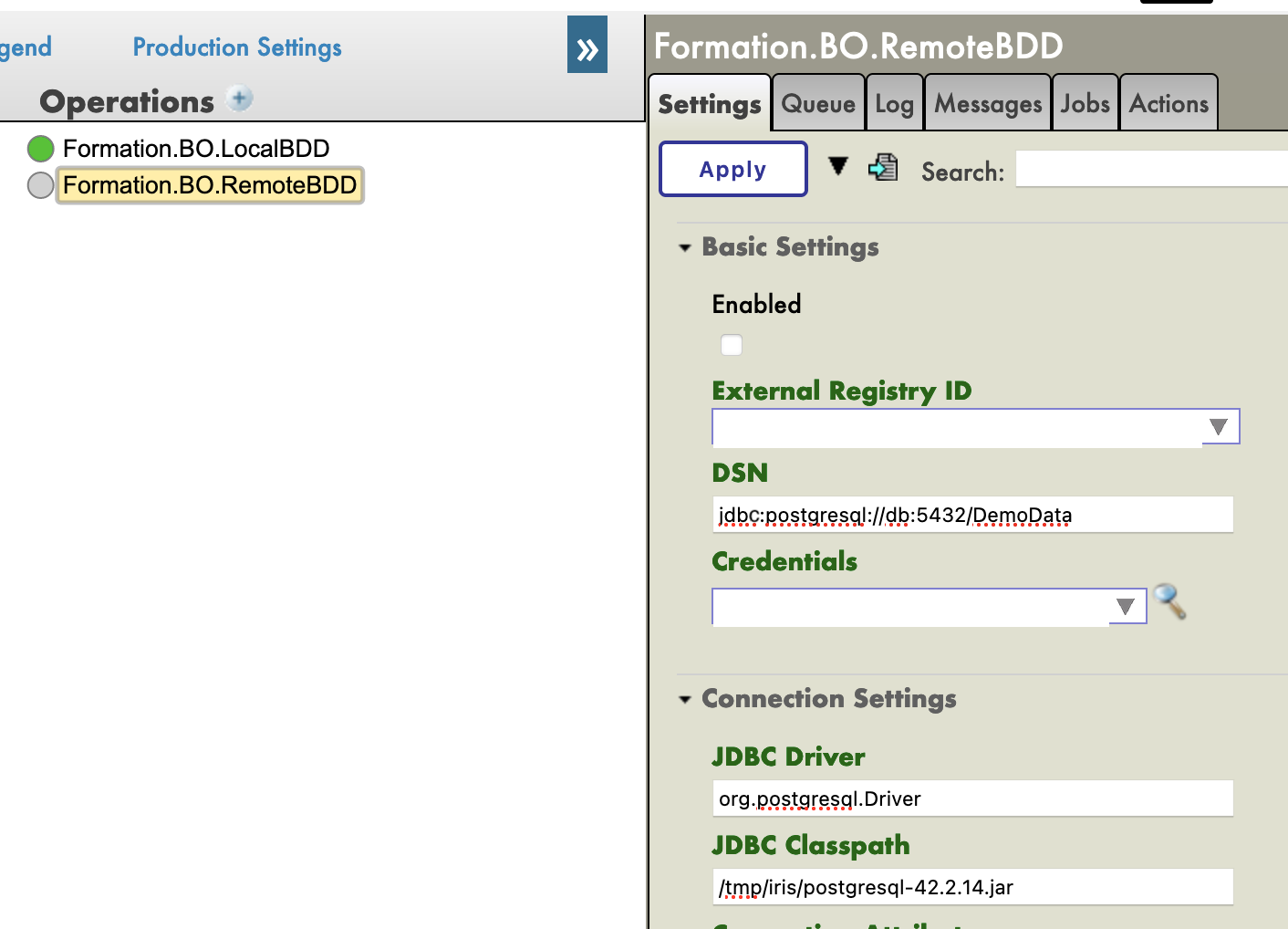
Finally, we need to configure the credentials to have access to the remote database. For that, we need to open the Credential Viewer:
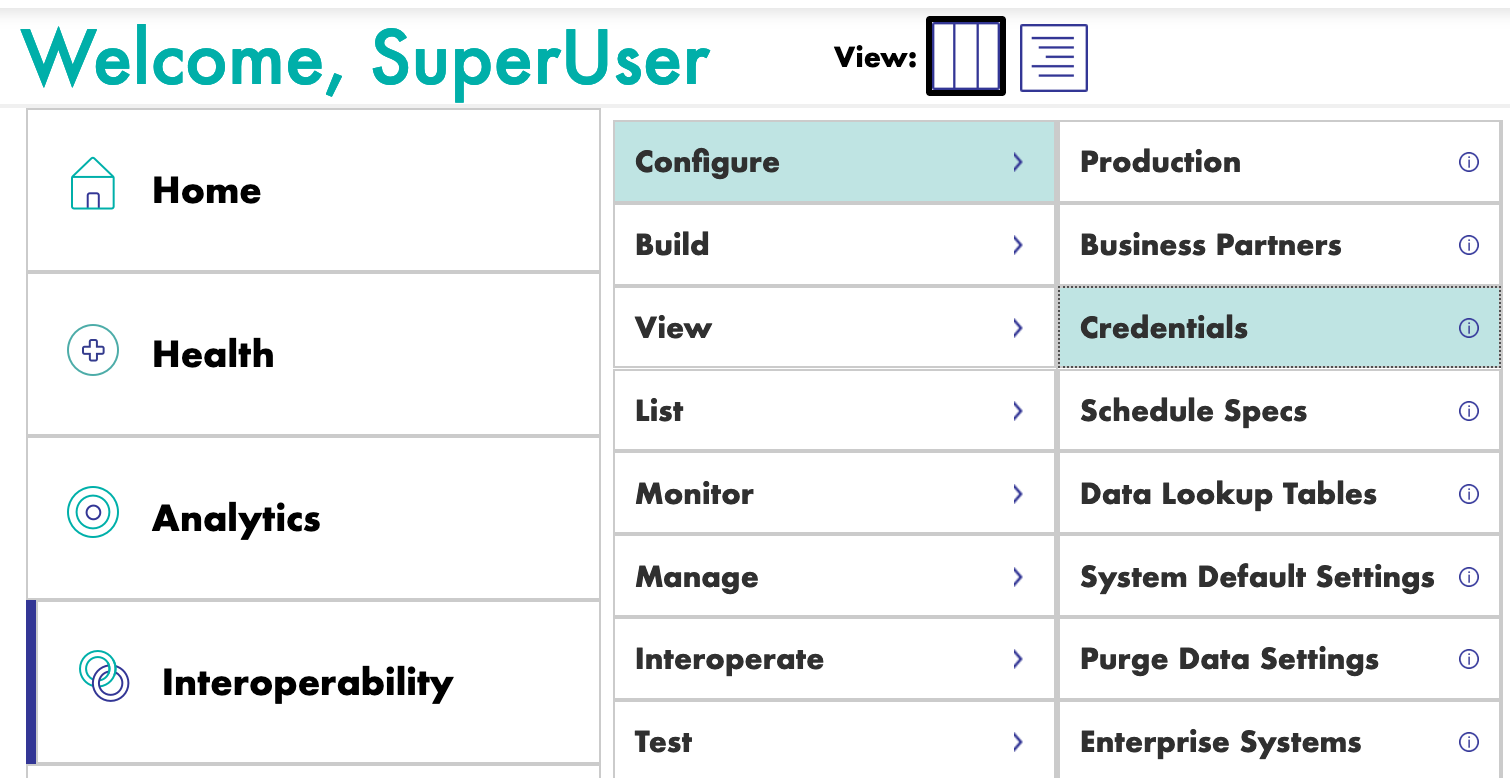
The login and password are both DemoData, as we set up in the docker-compose.yml file.

Back to the production, we can add "Postgre" in the [Credential] field in the settings of our operation (it should be in the scrolling menu). Before being able to test it, we need to add the JGService to the operation. In the [Settings] tab, in the [Additional Settings]:
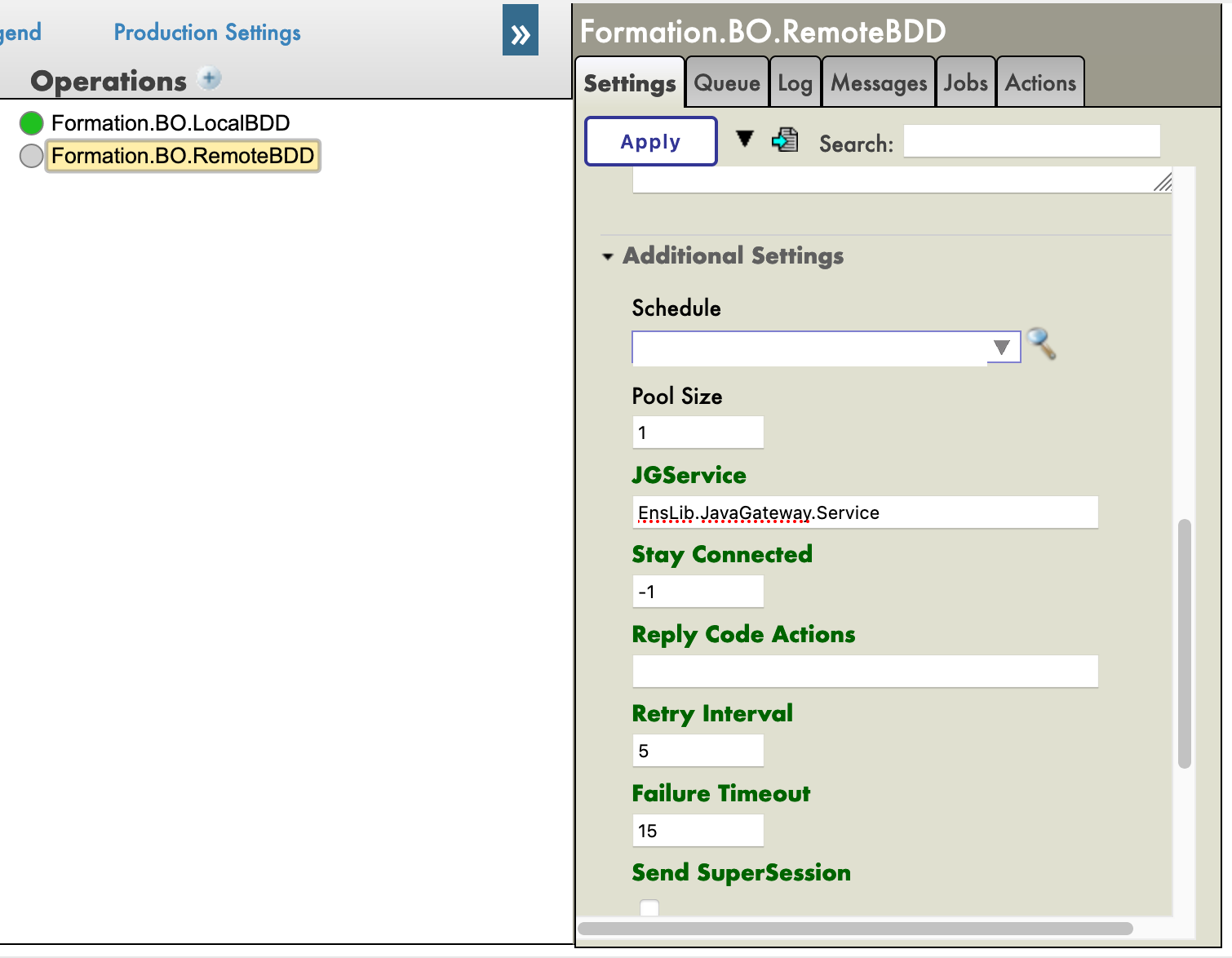
When testing the visual trace should show a success:
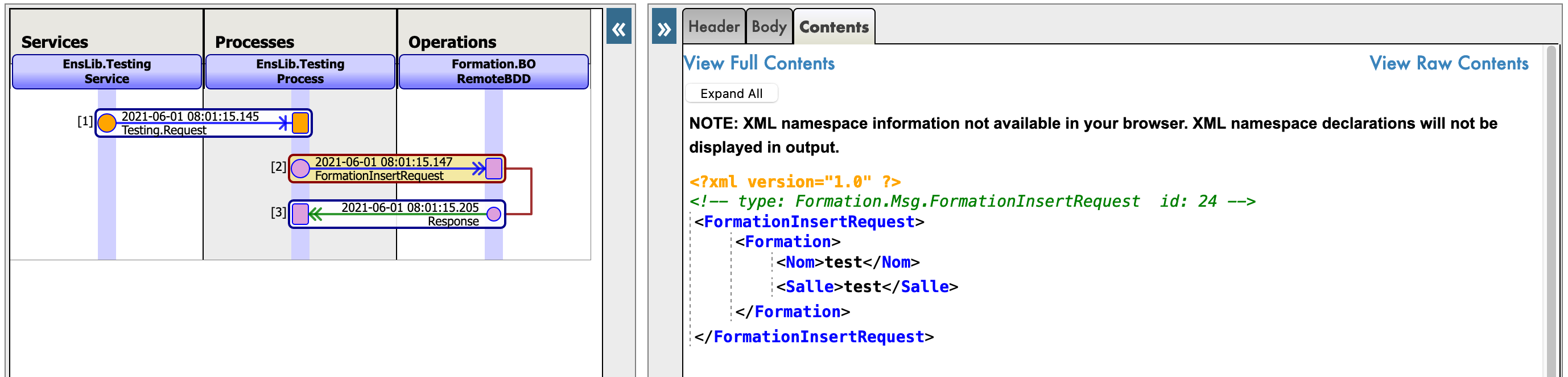
We have successfully connected with an extern database.
As an exercise, it could be interesting to modify BO.LocalBDD so that it returns a boolean that will tell the BP to call BO.RemoteBDD depending on the value of that boolean.
Hint: This can be done by changing the type of reponse LocalBDD returns and by adding a new property to the context and using the if activity in our BP.
First, we need to have a response from our LocalBDD operation. We are going to create a new message, in the Formation/Msg/FormationInsertResponse.cls:
Class Formation.Msg.FormationInsertResponse Extends Ens.Response
{

Property Double As %Boolean;

}
Then, we change the response of LocalBDD by that response, and set the value of its boolean randomly (or not):
Method InsertLocalBDD(pRequest As Formation.Msg.FormationInsertRequest, Output pResponse As Formation.Msg.FormationInsertResponse) As %Status
{
    set tStatus = $$$OK

    try{
        set pResponse = ##class(Formation.Msg.FormationInsertResponse).%New()
        if $RANDOM(10) < 5 {
            set pResponse.Double = 1
        }
        else {
            set pResponse.Double = 0
        }
...
We will now create a new process (copied from the one we made), where we will add a new context property, of type %Boolean:
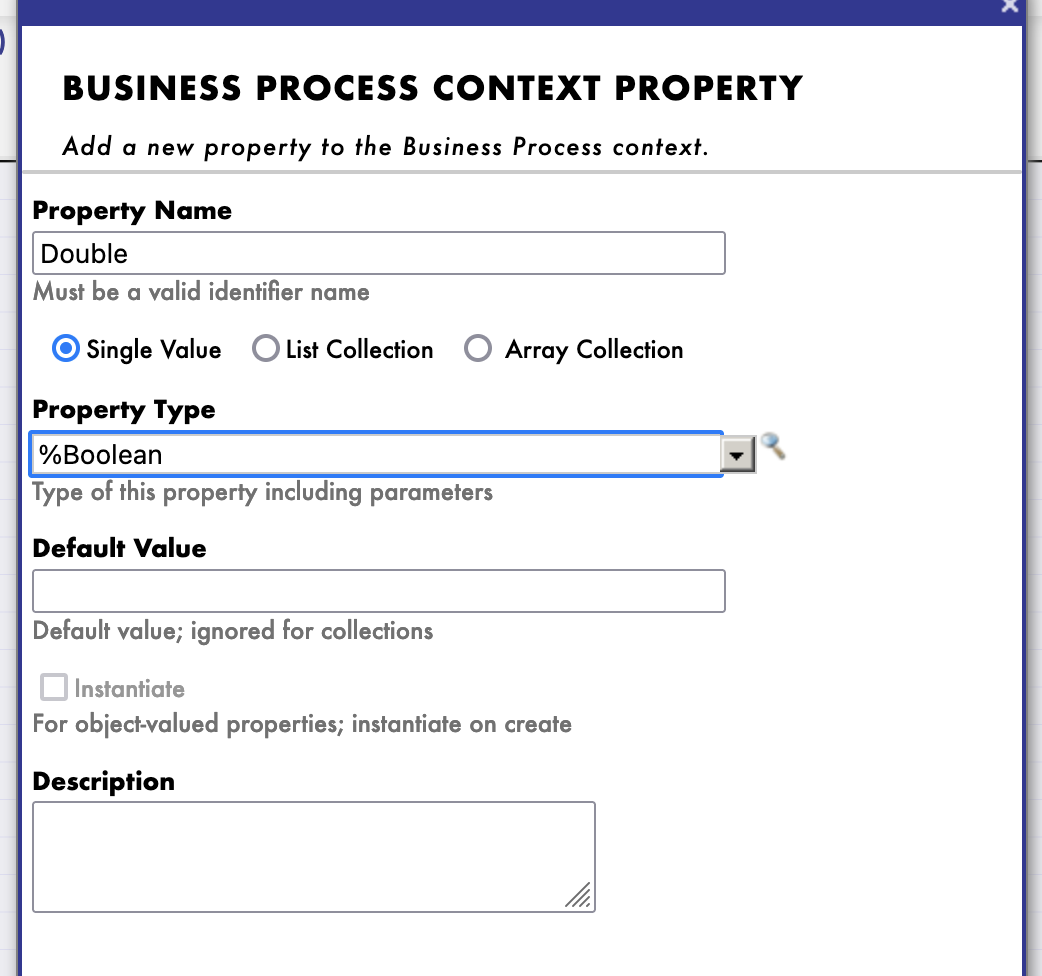
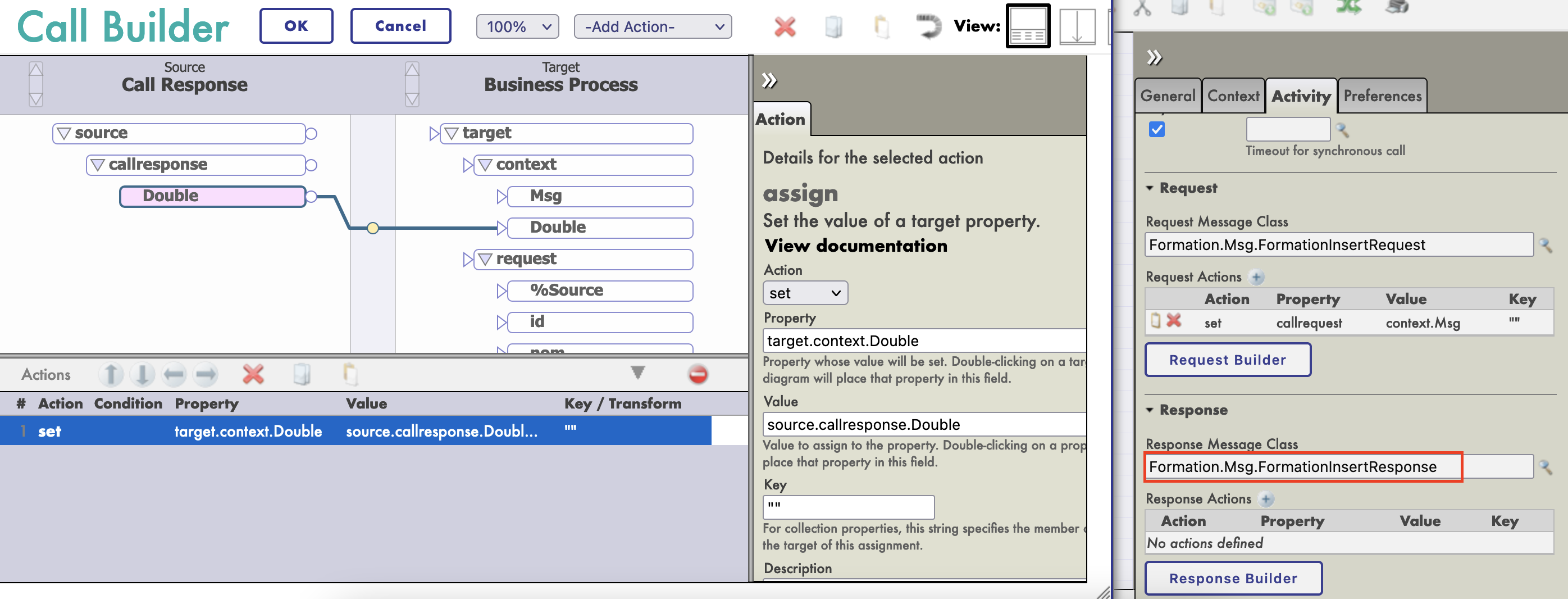
This property will be filled with the value of the callresponse.Double of our operation call (we need to set the [Response Message Class] to our new message class):
We then add an if activity, with the context.Double property as condition:
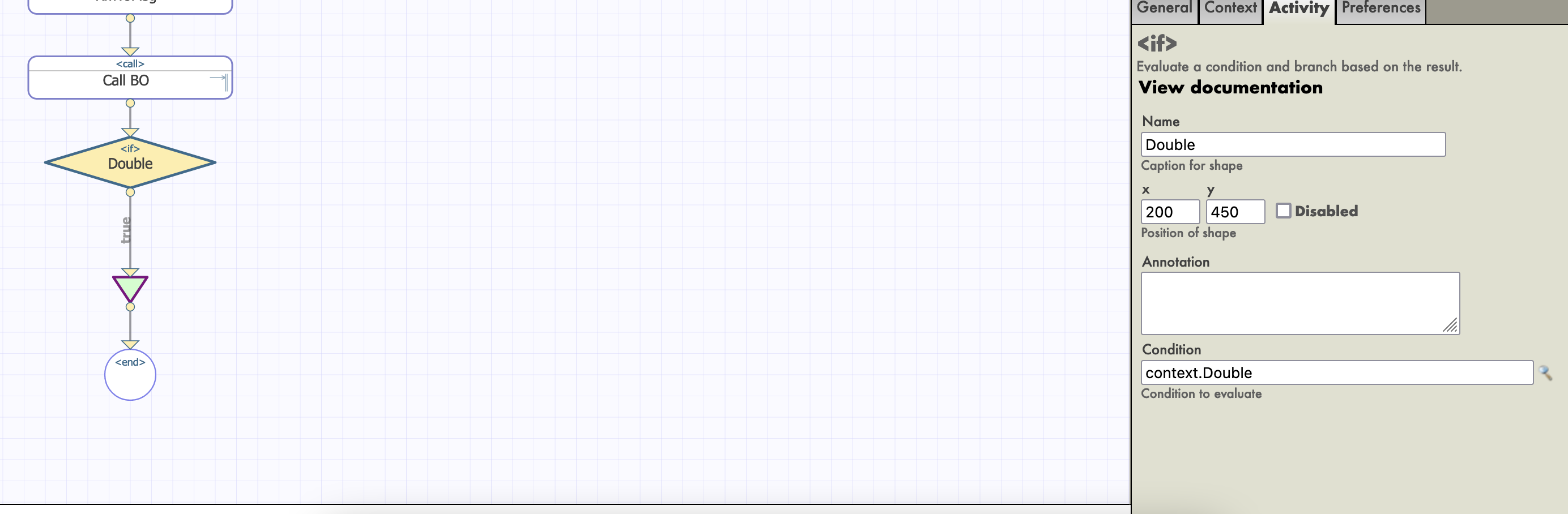
VERY IMPORTANT : we need to uncheck Asynchronous in the settings of our LocallBDD Call, or the if activity will set off before receiving the boolean response.
Finally we set up our call activity with as a target the RemoteBDD BO:
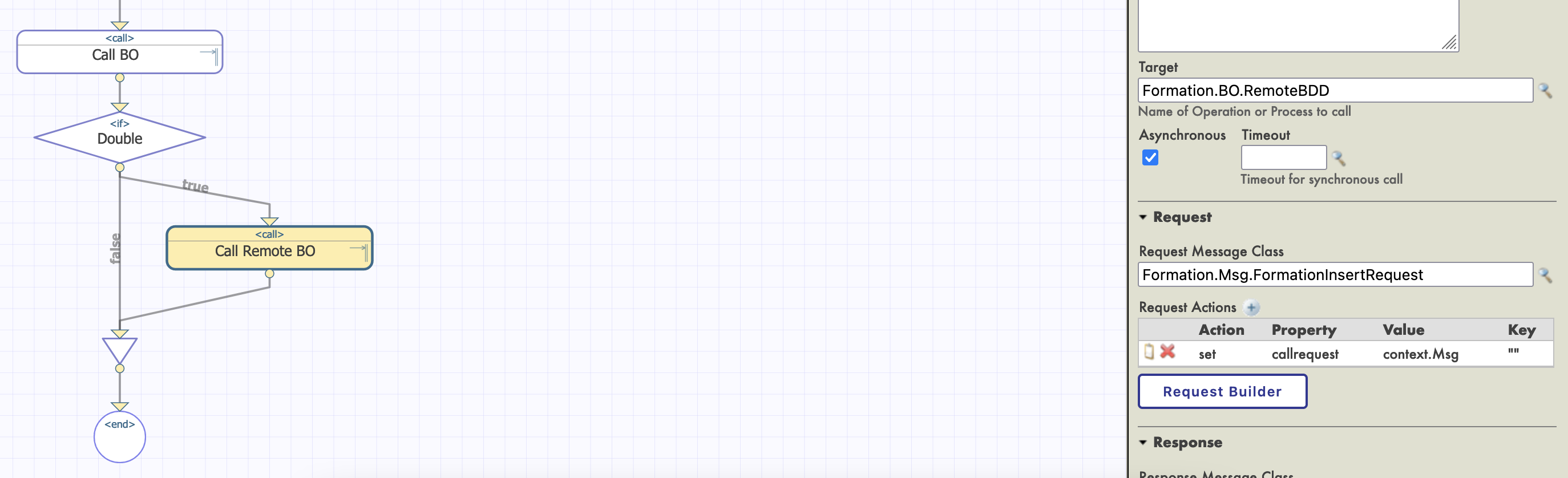
To complete the if activity, we need to drag another connector from the output of the if to the join triangle below. As we won't do anything if the boolean is false, we will leave this connector empty.
After compiling and instantiating, we should be able to test our new process. For that, we need to change the Target Config Name of our File Service.
In the trace, we should have approximately half of objects read in the csv saved also in the remote database.
In this part, we will create and use a REST Service.
To create a REST service, we need a cless that extends %CSP.REST, in Formation/REST/Dispatch.cls we have:
Class Formation.REST.Dispatch Extends %CSP.REST
{

/// Ignore any writes done directly by the REST method.
Parameter IgnoreWrites = 0;

/// By default convert the input stream to Unicode
Parameter CONVERTINPUTSTREAM = 1;

/// The default response charset is utf-8
Parameter CHARSET = "utf-8";

Parameter HandleCorsRequest = 1;

XData UrlMap [ XMLNamespace = "http://www.intersystems.com/urlmap" ]
{
<Routes>
  <!-- Get this spec -->
  <Route Url="/import" Method="post" Call="import" />
</Routes>
}

/// Get this spec
ClassMethod import() As %Status
{
  set tSc = $$$OK

  Try {

      set tBsName = "Formation.BS.RestInput"
      set tMsg = ##class(Formation.Msg.FormationInsertRequest).%New()

      set body = $zcvt(%request.Content.Read(),"I","UTF8")
      set dyna = {}.%FromJSON(body)

      set tFormation = ##class(Formation.Obj.Formation).%New()
      set tFormation.Nom = dyna.nom
      set tFormation.Salle = dyna.salle

      set tMsg.Formation = tFormation

      $$$ThrowOnError(##class(Ens.Director).CreateBusinessService(tBsName,.tService))

      $$$ThrowOnError(tService.ProcessInput(tMsg,.output))

  } Catch ex {
      set tSc = ex.AsStatus()
  }

  Quit tSc
}

}
This class contains a route to import an object, bound to the POST verb:
<Routes>
  <!-- Get this spec -->
  <Route Url="/import" Method="post" Call="import" />
</Routes>
The import method will create a message that will be sent to a Business Service.
We are going to create a generic class that will route all of its sollicitations towards TargetConfigNames. This target will be configured when we will instantiate this service. In the Formation/BS/RestInput.cls file we have:
Class Formation.BS.RestInput Extends Ens.BusinessService
{

Property TargetConfigNames As %String(MAXLEN = 1000) [ InitialExpression = "BuisnessProcess" ];

Parameter SETTINGS = "TargetConfigNames:Basic:selector?multiSelect=1&context={Ens.ContextSearch/ProductionItems?targets=1&productionName=@productionId}";

Method OnProcessInput(pDocIn As %RegisteredObject, Output pDocOut As %RegisteredObject) As %Status
{
    set status = $$$OK

    try {

        for iTarget=1:1:$L(..TargetConfigNames, ",") {
		    set tOneTarget=$ZStrip($P(..TargetConfigNames,",",iTarget),"<>W")  Continue:""=tOneTarget
		    $$$ThrowOnError(..SendRequestSync(tOneTarget,pDocIn,.pDocOut))
	    }
    } catch ex {
        set status = ex.AsStatus()
    }

    Quit status
}

}
Back to the production configuration, we add the service the usual way. In the [Target Config Names], we put our BO LocalBDD:
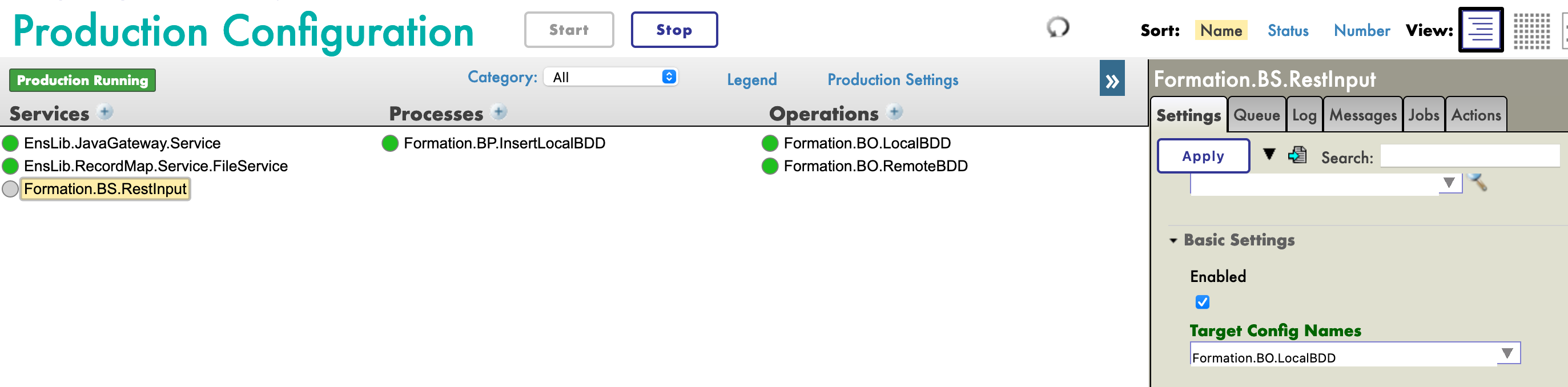
To use this service, we need to publish it. For that, we use the [Edit Web Application] menu:

Finally, we can test our service with any kind of REST client:
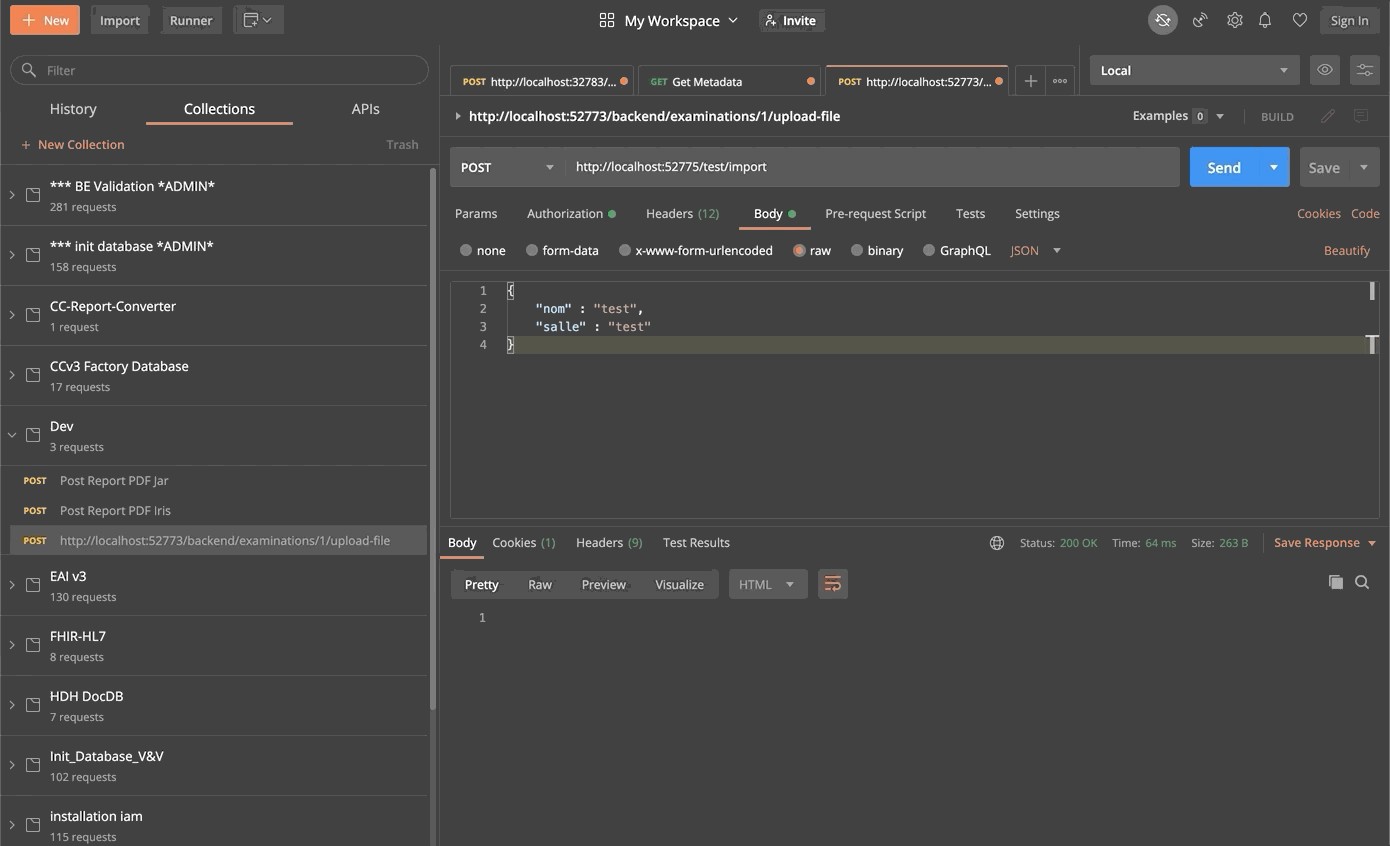
Through this formation, we have created a production that is able to read lines from a csv file and save the read data into both the IRIS database and an extern database using JDBC. We also added a REST service in order to use the POST verb to save new objects.
We have discovered the main elements of InterSystems' interoperability Framework.
We have done so using docker, vscode and InterSystems' IRIS Management Portal.
Hi Community,
New video is already on InterSystems Developers YouTube:
I want to start this project and wants to know the best practices, you guys using to arrange the project. I have done lot of mvc projects and API's in c#. But Intersystems is new to me. Please give me some suggestions like how can I Arrange the objects. Like for eg. Where can I store the productions objects like services,process and operations. will that be like under each resouces folder name? and what are the base classes, and how can I store them? basically please give me some idea about how Can I arrange them .
Thank you
Sai
I'm using Deferred Response.
After I have obtained a token, is it possible to retrieve initial request somehow?
Hey Developers,
New video is already on InterSystems Developers YouTube:
Hi,
I am getting below error while starting production
ERROR <Ens>ErrException: <CLASS DOES NOT EXIST>zgetProductionItems+29^Ens.Director.1 *HS.FHIRServer.Interop.Service -- logged as '-' number - @''
Thanks
In my Business Operation I need to execute a bookkeeping method every X seconds.
How can I do that?
There are two workarounds (I dislike both):
Thoughts?
Hi,
How to import production from online lab to local windows 10 instance?
Thanks
I have attached a document that describes the product I have developed called NiPaRobotica Pharmacy. This is an interface I developed that accepts Pharmacy Dispense Requests and converts the line items on the order into dispense dialogues which it sends to pharmacy robots. I deployed the interface into 3 Hospital pharmacies two of which had 6 robots that were arranged in such a way that the dispense chutes channelled medications to desks by the pharmacists sitting in windows serving 1200 patients a day. The robots cut the average waiting time from 2 hours down to one hour. I then deployed the
Alerts are automatic notifications triggered by specified events or thresholds being exceeded.
I have a Business Service connected to a machine with ~100 sensors. BS receives sensor values once a second.
Several conditions determine if a Business Service should raise an alert (it's a list of: sensor id > threshold).
I have three questions:
Hey Developers,
Learn how to search for FHIR resources with a variety of query options:
Hi,
I want that only users authorized for particular business component able to view them. How to hide unauthorized components in production?
Thanks
Hello,
We have a simple BS that Extends Ens.BusinessService with an ADAPTER = "EnsLib.File.InboundAdapter";
The "incoming" folder has more than 4M files, so we get the following error:
ERREUR <Ens>ErrException: <STORE>zFileSetExecute+38 ^%Library.File.1
Is there any simple workaround this ?
Hi,
I want to restrict user for any modification in the business host settings while testing the production. How can I achieve the desire ?
Thanks
Hi,
How to view Messages centrally from Multiple Productions by using Enterprise Message Viewer?
Thanks
Hi,
Currently I am getting field number while hovering on the HL7 Message Viewer Content.
How can I get field name instead of field number?
Thanks
Hi,
I want to disable auto retrieve functionality in Production Monitor But Auto Update checkbox is not appearing in Production Monitor.
Looking Forward
Thanks
I heard about Message Bank when we started redesigning a Health Connect production to run in containers in the cloud. Since there will be multiple IRIS containers, we were directed to utilize Message Bank as one place to view messages and logs from all containers.
How does Message Bank work?
I added Message Bank operation to our Interoperability Production. It automatically sends messages and event logs to the Message Bank.
Resending Messages
I have some system with heavy production. There are about 500GB of journals daily. And I'm looking at the ways, how to decrease the amount of data that appeared there.
I found no way, on how to split have the journal separately for mirroring databases and for others. So, I'm thinking about moving some of the globals to CACHETEMP. So, they will disappear from journals. So, thinking about Ens.* globals, I have about 30% of data in journals just for such data. Which production data can be safely moved to CACHETEMP, with no issues for mirroring?
Hi
Is there any way to schedule a production to run only during office hours ?
Thanks
