Will the Atelier plug-in work with newer versions of Eclipse?
Photon is getting a bit old and I'd like to use the latest version.
One additional question; Does Atelier work with JDK 11?
Dave
Atelier is InterSystems’ Eclipse-based development environment. It enables you to rapidly build solutions that leverage the performance, scalability, connectivity, and reliability of InterSystems’ comprehensive data platform.
Watch "Getting Started with Atelier" videos.
Attention! Please put an Atelier version and/or InterSystems Data Platform server version in your Atelier question.
Will the Atelier plug-in work with newer versions of Eclipse?
Photon is getting a bit old and I'd like to use the latest version.
One additional question; Does Atelier work with JDK 11?
Dave
I was searching for the most simple way to connect from visual studio code to my local instance via terminal without having to change any window.
I know this can also be achieved via telnet but seems a bit overhead if you're in your local machine.
For me the simplest sollution is to open a terminal window in VS Code, navigate to the /bin folder of your instance installation and run .\csession.exe INSTANCENAME
For simplicity you can just include your /bin folder in your path so you don't even need to navigate there
Hello,
We would like to submit a JSON using Ensemble. Here we have the JSON structure:
{
"app_id": "e47322de-64c8-43c5-a1b7-42aa6409eb48",
"headings": {"en":"Cita Atencion Primaria","es":"Cita Atencion Primaria"},
"subtitle": {"en":"C.P. ISORA","es":"C.P. ISORA"},
"contents": {"en": "Next appointment", "es": "Siguiente cita"},
"data":{
"centro": "C.P. ISORA",
"fecha": "yyyy/mm/dd",
"hora": "hh:mm",
"profesional": "nombre del profesional",
Hello,
I have a little problem that appears to my newest program. One of the purpose of my program is to transfer a file from a path to another one.
Another person/entity places the file into a specific file ( let's call it \\Server\) but the problem is that my service (a simple EnsLib.File.PassthroughService) takes it and places it directly into my other path. The pdf file is very big and it happens almost all the time that the size of the output file is not the same as in input and so is corrupted.
I try to set a cookie with expire time like this: d %response.SetCookie("XXXXX",%session.SessionId,%session.AppTimeout,"","",0,0) but when i return to the browser it shows that the cookie's("XXXXX") expire time is "session". How can i to set a expire time? Can someone help me? thx
Pretty straight forward.
I'm tempted to hard-code ISO-8859-1 inside my VSCode extension when working with CSP because this seems to be the encoding used by default, but I need to know if there's any other possible configuration. So can you share your experience when working with CSPs? Like issues with encoding, discoveries regarding it, workarounds etc.
Also, can someone tell me if it's possible to work with UTF-8 encoded CSP files using Atelier without breaking the encoding of the output file?
My developers are reporting many more NullPointerException errors when using Atelier then normal lately. This happens 'randomly' when moving about Eclipse. Anyone know what can cause this? One or two during a work session was normal but it's getting in the way of work.
Atelier: 1.3
Eclipse: 4.11.0
InterSystems Atelier has been tested with OpenJDK 8. The InterSystems Eclipse plug-in is currently available for Eclipse Photon (4.8), which requires and works with Java 8.
I've installed Atelier according to instructions but after rebooting Eclipse there is not opportunity to launch Atelier. In preferences there is not Atelier. I've tried to update and reinstall Atelier but it didn't get a result. I checked it was installed on my PC.
How can I solve this problem? And why I faced to this situation?
All needed components were been installed earlier.
Hi
Sometimes I have Atelier gettinng stuck on background task "Updating server container".
This maxes out one of the cpu cores and I end up having to kill the process. This is on version 1.3.139.
To request a copy of the examples only – please see me, will email them out for free. pmkadow@gmail.com
To request a copy of the examples only – please see me, will email them out for free. pmkadow@gmail.com
To request a copy of the examples only – please see me, will email them out for free. pmkadow@gmail.com
I am trying out Atelier. I have installed it and managed to get it to connect to a cache instance to test it. I have created a local project and I am trying to copy the server files to it using the "Copy to Project" item on the popup menus. I can copy both classes and routines to the project without issue, but when I try to copy the CSP files, I get the following message:
com.intersystems.atelier.utils.CheckedExceptionWrapper: Input length = 1
Hi
Im getting this error when trying to sync csp files on Atelier
Synchronization failed: [dev10 is broken] ERROR #5002: Cache error: <STORE>zTS+6^%Library.RoutineMgr.1
This on Cache 2017.1 and Atelier 1.3.144
The Atelier team is excited to announce the promotion of Atelier 1.3.144 to the beta channel for Windows, Mac and Linux. This new release contains two major enhancements - a new error message for incompatible encoding schemes and an improved parser. Please head to the Release Notes to learn more.
For the best upgrade experience, InterSystems suggests that you install Eclipse Photon (4.8) fresh before installing Atelier 1.3. Find out how here.
As always, we look forward to your feedback!
I have installed photon R version and when i am trying to install atelier from eclipse market place i am getting below error.
HTTP Proxy Authentication Required: https://atelier.jfrog.io/atelier/updates/stable/1.3/content.xml
Proxy Authentication Required
Can someone please help me on this.
Hi All,
I've got Eclipse installed (Javascript 2019-6) but when search for Atelier from the market place within the IDE it does not show up.
I found it in the browser version of the marketplace, and tried to drag it in but got the message 'The following solutions are not compatible with this version of Eclipse'.
I tried installing an older version of Eclipse (photon) but the installer keeps telling me I haven't got JRE 1.7+ installed (I have 1.8 64bit installed already), and sends me to a download page so I can't continue.
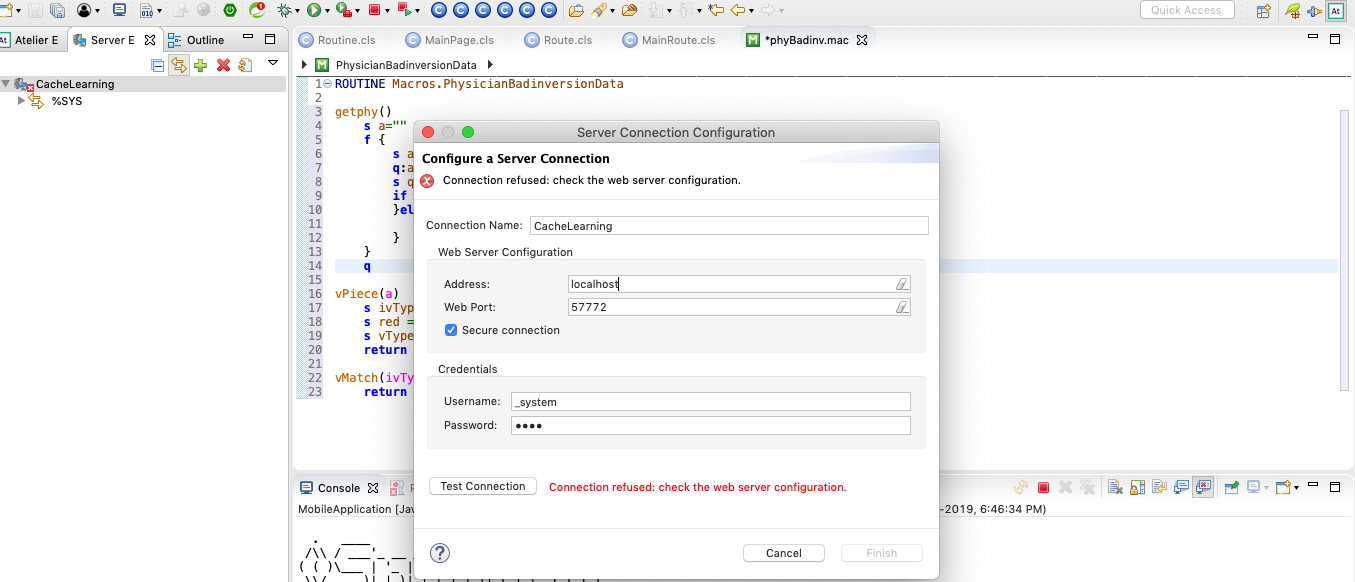
In ios machine, I tried to connect atelier server connection . But I got connection refused: check the web server configuration error. Please anyone guide me how I solve this issue.
Someone use gitflow for control of code version? How are doing with production when have many projects?
When I try to open a DTL in the tabbed editor I always get this error:
You are using Internet Explorer 7. This version is obsolete and is not compatible with diagram editors. Please update Internet Explorer to a recent version.
My actual Internet Explorer is version 11.
I'm running Eclipse Photon.
Atelier IDE 1.3.141 com.intersystems.atelier.feature.group InterSystems Corporation
The same error occurred with Atelier 1.2 on Eclipse Oxygen. I've never been able to get this to work.
Atelier has reached a threshold of feature completeness. Atelier 1.3 which is currently in flight will mainly focus on supporting the latest release of Eclipse Photon. After release, Atelier and Studio will continue to receive critical software corrections.
On a system I have been working there are some custom special variables like
do $example.DoSomething()Some code requires a
set x=$example.SomePropertycall e.g.
My problem is that atelier doensn't seem to be able to properly recognize this code.
If i have to use a call like this it breaks the entire code completion / code checking of the file.
Does somebody know a way to index these variables in atelier or manually add them so I can work with syntax checking and code completion?
With kind regards
Martin Weber
When I tried to make change in DTL view then only i see following error whereas in XML mode no issue in compilation.
Any resolution and solution ? it looks like some missing xml parser configuration or Pulg ins ?
ensEPC.DataTransforms.dtEcgCEpc081518.dtl was saved locally but could not be saved remotely.
ERROR <Ens>ErrInvalidDTL: Invalid DTL
ERROR #5001: attribute 'sourceclass' is not declared for element 'transform'
ERROR #5001: attribute 'sourcedoctype' is not declared for element 'transform'
ERROR #5001: attribute 'targetclass' is not declared for element 'transform'
All,
I've been following the " Build your First application with Cache " Learning path and followed to steps for installing the Atelier eclipse plugin.
It appears that the repository for the plugin is missing the "content.xml" file.
Parent Path: https://atelier.jfrog.io/atelier/updates/stable/1.3/
File Path (404 not found): https://atelier.jfrog.io/atelier/updates/stable/1.3/content.xml
.png)
I've followed the guide for modifying the cacerts within the Java 8 jdk here: LINK
Hello everyone,
I'm trying to migrate the IDE for programming in COS, we normally use the Studio, but we want to use a more modern IDE. Our team has knowledge with Visual Studio plataform, but we couldn't configurate the compiler and terminal, I installed the extension InterSystems ObjectScript and tried to configurate to connect with my local machine, unfortunately the connection don't sucessed.
Someone has material for how i can connect and compile? Some material i saw show how to use the compiler, but not how can i do the configuration.
Best regards,
Flávio.
Hello Gentlemen,
My Business process connector receive a Oru_01 hl7 message with an ED segment inside (Base64 pdf). How is it possible to extract it and create a pdf file within?
Here is the sample of function I have. I know it doesn't work but if you could help me, it would be perfect. Here is my function, the goal would be it create the file where I want and return me the link of the file.
Hi
Has anyone managed to get a dark theme (Like Darcula or Obsidian) working on the Atelier plugin. The Eclipse themes apply to everything in the IDE except the editor window, so it kind of defeats the purpose. I've tried searching for one but so far no luck. I know you can set each colour individually in the settings but I'd like a single config I can load if possible.
Thanks
Hi,
I am having a problem in REST service when de-serializing JSON using a nested Property.
I am new to Intersystems and my first time creating REST Service. I setup Atelier dev environment. The worst IDE I have ever worked in. I was able to attach to a process in the debug perspective and step through the code, but one cannot see contents of variables nor print anything to the console, so it is useless as a debugging tool. When looking at a variable all it displays is its type of the variable and if I try to "watch" I get:
Is it just me or is the sync mechanism way too slow and too trigger happy to be used for large projects? It keeps "Caching for server connection" which takes a good five minutes!
Has it been tested with a large number of classes and CPSs? I have about 2000 of each.
The Atelier 1.3 stable release update site (https://atelier.artifactoryonline.com/atelier/updates/stable/1.3/) has been updated to 1.3.139 just in time for the holidays!
Most notably, take advantage of enhancements to compiling with InterSystems IRIS. You can find more information about the additions in the release notes here.
Hi,
This is a quick tutorial how to install and use TFS in Atelier. It is based on my self experience and some tricks that I 've noted.
If you are used to using visual studio maybe you feel that is a bit slow and heavy, but you have the same TFS panel as you have in Visual Studio, so don't need any special "training" to use it
It's important don't store the file .buildpath because it has the server definition that you are working in a team, each one have the personal configuration, so the name of the server could be different.
To prevent it, create a file called .tfignore with this content