#System Administration

0 Followers · 540 Posts

System administration refers to the management of one or more hardware and software systems.

Documentation on InterSystems system administration.

Question Gerry Connolly · Oct 31, 2017

Is it possible to make the cache terminal available over a mirrored vip address for a healthshare mirrored environment? So that connecting to a terminal for a mirrored environment will always connect to the Live Node?

I'm looking to write a Powershell script to run against the system and need to connect to the Live Node in a mirrored setup. Is this possible or am I going to have to log onto each node to establish which is Live.  Or does this even matter?

4
0 539
Question Manikandasubramani S · Nov 3, 2017

Hi guys,

   I am trying to run a command line code using $zf(-1) in cache terminal. it is returning access denied error.

I have tried to run the code in cmd itself it is also throwing Access denied error. But if opened cmd as administrator and run the same code it is working perfectly. I am using windows system. 

Hence i need to know how can i run the cmd line code as administrator using our terminal or studio. Please help me out.

Thanks,

Mani

4
0 2277
Question Laura Cavanaugh · Oct 12, 2017

I'm trying to write an installer manifest that can create a namespace, resources (%DB_namespace) and a role (with the resource, above), based on the namespace.  So you could pass in "ABC", or "XYZ", and it would create the %DB_ABC resource and the ABC role with %DB_ABC:RW permissions; or it will create the %DB_XYZ resource and the XYZ role with %DB_XYZ:RW permissions, accordingly.

I have a variable set up for the name of the namespace (in my code it's called PMGNAMESPACE), and I create a variable for the resource name, called PMGDbResource ( this == %DB_ABC)

2
0 414
Question Mack Altman · Sep 26, 2017

Recently, we scheduled two tasks (1008 and 1009) within Task Manager. Task ID 1008 is set to run after Purge Tasks (%SYS-ID:3), and Task 1009 is set to run at 7:00:00 each day.

In attempt to provide as much detail as possible, each of the tasks are as follows:

  • Task 1008WHILE (($p($h,",",2) < $ZTH("10:00 PM")) && ($P($g(^Task.1008(+$h,$j)),"^",1) = +$h)) { J ^ROUTINE, ^ROUTINE2 D SUB^ROUTINE3 H 5 }
  • Task 1009WHILE (($p($h,",",2) < $ZTH("10:00 PM")) && ($P($g(^Task.1009(+$h,$j)),"^",1) = +$h)) { d ^ROUTINE4, ^ROUTINE5 J SUB^ROUTINE6 }
4
0 903
Question Kevin McGinn · Sep 26, 2017

I have a Powershell script to backup up a Cache database. The script runs through and backs up the database  with the normal 4 iterations. The script successfully produces the backup file and an associated log file. However, after completion of the backup there is what appears to be a permission error. I have not been able to find any information that would help me determine if this message impacts the integrity of the back up. From the end of the output of the backup:

2
0 676
Question Mack Altman · Sep 6, 2017

Currently, we are utilizing batch jobs at the OS level to kick off routines that watch for files. We are trying to convert these processes to be performed by the Task Manager.

The routines have while loops and perform while loops so long as the time parameters are being met.

What's the best way to ensure Task Manager kicks them off after the completion of the shutdown/backup/start process is performed, which we do nightly? I want to ensure that it starts it regardless of the time that we've set.

13
0 1037
Article Semion Makarov · Sep 10, 2017 2m read

System Monitor is a flexible and highly configurable tool supplied with Caché (Ensemble, HealthShare), which collects the essential metrics of the operating system and Caché itself. System Monitor also notifies administrators about issues with Caché and the operating system, when one or several parameters reach the admin-defined thresholds.

2
2 1493
Question Hans Rietveld · Aug 29, 2017
Caché Version String: Cache for UNIX (Red Hat Enterprise Linux for x86-64) 2016.2.1


We have a mirrored Ensemble system (110,  backup and 210, primary). At one time (14:00) there is a disruption in the production. The messages are not being processed. 

Looking at the pButtons (every 10 seconds) I see the following abnormal at the WDphase

and the backup

The different values of WDphase are:

0: Idle (WD is not running)

5: WD is updating the Write Image Journal (WIJ) file.

7: WD is committing WIJ and Journal.

8: Databases are being updated.

3
0 880
Question Evgeny Shvarov · Sep 4, 2017

Hi, folks!

What could be the best backup/restore strategy for a small (less than 100MB) but very valuable database which is placed on AWS/DO virtual host?

1. Use AWS/DO backup/restore features?

2. External backup (as the most recommended)?

3. InterSystems backup?

4. Globals export to a zipped file?

5. cache.dat copy?

Looking for the most robust and easy to use/implement method of backup and restore in a way "setup and forget" (until it becomes needed :)

2
0 718
Question Amir Samary · Sep 21, 2016

Hi!

I am not system admin. But it used to be very simple to install CSP Gateway on an apache system on Linux with Apache installed. I used to run the CSP Gateway installation program and after it was done, all I had to do was fine tune some configurations on CSP Gateway portal on http://<ip>/csp/bin/Systems/Module.cxw and I was up and running.

5
0 1499
Article Murray Oldfield · Apr 8, 2016 17m read

This post will guide you through the process of sizing shared memory requirements for database applications running on InterSystems data platforms. It will cover key aspects such as global and routine buffers, gmheap, and locksize, providing you with a comprehensive understanding. Additionally, it will offer performance tips for configuring servers and virtualizing IRIS applications. Please note that when I refer to IRIS, I include all the data platforms (Ensemble, HealthShare, iKnow, Caché, and IRIS).


[A list of other posts in this series is here](https://community.intersystems.com/post/capacity-planning-and-performance-series-index)

When I first started working with Caché, most customer operating systems were 32-bit, and memory for an IRIS application was limited and expensive. Commonly deployed Intel servers had only a few cores, and the only way to scale up was to go with big iron servers or use ECP to scale out horizontally. Now, even basic production-grade servers have multiple processors, dozens of cores, and minimum memory is hundreds of GB or TB. For most database installations, ECP is forgotten, and we can now scale application transaction rates massively on a single server.

A key feature of IRIS is the way we use data in shared memory usually referred to as database cache or global buffers. The short story is that if you can right size and allocate 'more' memory to global buffers you will usually improve system performance - data in memory is much faster to access than data on disk. Back in the day, when 32-bit systems ruled, the answer to the question how much memory should I allocate to global buffers? It was a simple - as much as possible! There wasn't that much available anyway, so sums were done diligently to calculate OS requirements, the number of and size of OS and IRIS processes and real memory used by each to find the remainder to allocate as large a global buffer as possible.

The tide has turned

If you are running your application on a current-generation server, you can allocate huge amounts of memory to an IRIS instance, and a laissez-faire attitude often applies because memory is now "cheap" and plentiful. However, the tide has turned again, and pretty much all but the very largest systems I see deployed now are virtualized. So, while 'monster' VMs can have large memory footprints if needed, the focus still comes back to the right sizing systems. To make the most of server consolidation, capacity planning is required to make the best use of available host memory.

What uses memory?

Generally, there are four main consumers of memory on an IRIS database server:

  • Operating System, including filesystem cache.
  • If installed, other non-IRIS applications.
  • IRIS processes.
  • IRIS shared memory (includes global and routine buffers and GMHEAP).

At a high level, the amount of physical memory required is simply added up by adding up the requirements of each of the items on the list. All of the above use real memory, but they can also use virtual memory. A key part of capacity planning is to size a system so that there is enough physical memory so that paging does not occur or is minimized, or at least minimize or eliminate hard page faults where memory has to be brought back from disk.

In this post I will focus on sizing IRIS shared memory and some general rules for optimising memory performance. The operating system and kernel requirements vary by operating system but will be several GB in most cases. File system cache varies and is will be whatever is available after the other items on the list take their allocation.

IRIS is mostly processes - if you look at the operating system statistics while your application is running you will see cache processes (e.g. iris or iris.exe). So a simple way to observe what your application memory requirements are is to look at the operating system metrics. For example with vmstat or ps on Linux or Windows process explorer and total the amount of real memory in use, extrapolating for growth and peak requirements. Be aware that some metrics report virtual memory which includes shared memory, so be careful to gather real memory requirements.

Sizing Global buffers - A simplified way

One of the capacity planning goals for a high transaction database is to size global buffers so that as much of the application database working set is in memory as possible. This will minimise read IOPS and generally improve the application's performance. We also need to strike a balance so that other memory users, such as the operating system and IRIS process, are not paged out and there is enough memory for the filesystem cache.

I showed an example of what can happen if reads from disk are excessive in Part 2 of this series. In that case, high reads were caused by a bad report or query, but the same effect can be seen if global buffers are too small, forcing the application to be constantly reading data blocks from disk. As a sidebar, it's also worth noting that the landscape for storage is always changing - storage is getting faster and faster with advances in SSDs and NVMe, but data in memory close to the running processes is still best.

Of course, every application is different, so it's important to say, "Your mileage may vary" but there are some general rules which will get you started on the road to capacity planning shared memory for your application. After that you can tune for your specific requirements.

Where to start?

Unfortunately, there is no magic answer. However, as I discussed in previous posts, a good practice is to size the system CPU capacity so that for a required peak transaction rate, the CPU will be approximately 80% utilized at peak processing times, leaving 20% headroom for short-term growth or unexpected spikes in activity.

For example, when I am sizing TrakCare systems I know CPU requirements for a known transaction rate from benchmarking and reviewing customer site metrics, and I can use a broad rule of thumb for Intel processor-based servers:

Rule of thumb: Physical memory is sized at n GB per CPU core for servers running IRIS.

  • For example, for TrakCare database servers, a starting point of n is 8 GB. But this can vary, and servers may be right-sized after the application has been running for a while -- you must monitor your systems continuously and do a formal performance review, for example, every six or 12 months.

Rule of thumb: Allocate n% of memory to IRIS global buffers.

  • For small to medium TrakCare systems, n% is 60%, leaving 40% of memory for the operating system, filesystem cache, and IRIS processes. You may vary this, say to 50%, if you need a lot of filesystem cache or have a lot of processes. Or make it a higher percentage as you use very large memory configurations on large systems.
  • This rule of thumb assumes only one IRIS instance on the server.

For example, if the application needs 10 CPU cores, the VM would have 80 GB of memory, 48 GB for global buffers, and 32 GB for everything else.

Memory sizing rules apply to physical or virtualized systems, so the same 1 vCPU: 8 GB memory ratio applies to TrakCare VMs.

Tuning global buffers

There are a few items to observe to see how effective your sizing is. You can observe free memory outside IRIS with operating system tools. Set up as per your best calculations, then observe memory usage over time, and if there is always free memory, the system can be reconfigured to increase global buffers or to right-size a VM.

Another key indicator of good global buffer sizing is having read IOPS as low as possible, which means IRIS cache efficiency will be high. You can observe the impact of different global buffer sizes on PhyRds and RdRatio with mgstat; an example of looking at these metrics is in Part 2 of this series. Unless you have your entire database in memory, there will always be some reads from disk; the aim is simply to keep reads as low as possible.

Remember your hardware food groups and get the balance right. More memory for global buffers will lower read IOPS but possibly increase CPU utilization because your system can now do more work in a shorter time. Lowering IOPS is pretty much always a good thing, and your users will be happier with faster response times.

See the section below for applying your requirements to physical memory configuration.

For virtual servers, plan not to ever oversubscribe your production VM memory. This is especially true for IRIS shared memory; more on this below.

Is your application's sweet spot 8GB of physical memory per CPU core? I can't say, but see if a similar method works for your application, whether 4GB or 10GB per core. If you have found another method for sizing global buffers, please leave a comment below.

Monitoring Global Buffer usage

The IRIS utility ^GLOBUFF displays statistics about what your global buffers are doing at any point in time. For example to display the top 25 by percentage:

do display^GLOBUFF(25)

For example, output could look like this:

Total buffers: 2560000    Buffers in use: 2559981  PPG buffers: 1121 (0.044%)

Item  Global                             Database          Percentage (Count)
1     MyGlobal                           BUILD-MYDB1        29.283 (749651)
2     MyGlobal2                          BUILD-MYDB2        23.925 (612478)
3     CacheTemp.xxData                   CACHETEMP          19.974 (511335)
4     RTx                                BUILD-MYDB2        10.364 (265309)
5     TMP.CachedObjectD                  CACHETEMP          2.268 (58073)
6     TMP                                CACHETEMP          2.152 (55102)
7     RFRED                              BUILD-RB           2.087 (53428)
8     PANOTFRED                          BUILD-MYDB2        1.993 (51024)
9     PAPi                               BUILD-MYDB2        1.770 (45310)
10    HIT                                BUILD-MYDB2        1.396 (35727)
11    AHOMER                             BUILD-MYDB1        1.287 (32946)
12    IN                                 BUILD-DATA         0.803 (20550)
13    HIS                                BUILD-DATA         0.732 (18729)
14    FIRST                              BUILD-MYDB1        0.561 (14362)
15    GAMEi                              BUILD-DATA         0.264 (6748)
16    OF                                 BUILD-DATA         0.161 (4111)
17    HISLast                            BUILD-FROGS        0.102 (2616)
18    %Season                            CACHE              0.101 (2588)
19    WooHoo                             BUILD-DATA         0.101 (2573)
20    BLAHi                              BUILD-GECKOS       0.091 (2329)
21    CTPCP                              BUILD-DATA         0.059 (1505)
22    BLAHi                              BUILD-DATA         0.049 (1259)
23    Unknown                            CACHETEMP          0.048 (1222)
24    COD                                BUILD-DATA         0.047 (1192)
25    TMP.CachedObjectI                  CACHETEMP          0.032 (808)

This could be useful in several ways, for example, to see how much of your working set is kept in memory. If you find this utility is useful please make a comment below to enlighten other community users on why it helped you.

Sizing Routine Buffers

Routines your application is running, including compiled classes, are stored in routine buffers. The goal of sizing shared memory for routine buffers is for all your routine code to be loaded and stay resident in routine buffers. Like global buffers, it is expensive and inefficient to read routines off disk. The maximum size of routine buffers is 1023 MB. As a rule you want more routine buffers than you need as there is always a big performance gain to have routines cached.

Routine buffers are made up of different sizes. By default, IRIS determines the number of buffers for each size; at install time, the defaults for 2016.1 are 4, 16 and 64 KB. It is possible to change the allocation of memory for different sizes; however, to start your capacity planning, it is recommended to stay with IRIS defaults unless you have a special reason for changing. For more information, see routines in the IRIS documentation “config” appendix of the IRIS Parameter File Reference and Memory and Startup Settings in the “Configuring IRIS” chapter of the IRIS System Administration Guide.

As your application runs, routines are loaded off disk and stored in the smallest buffer the routine will fit. For example, if a routine is 3 KB, it will ideally be stored in a 4 KB buffer. If no 4 KB buffers are available, a larger one will be used. A routine larger than 32 KB will use as many 64 KB routine buffers as needed.

Checking Routine Buffer Use

mgstat metric RouLas

One way to understand if the routine buffer is large enough is the mgstat metric RouLas (routine loads and saves). A RouLas is a fetch from or save to disk. A high number of routine loads/saves may show up as a performance problem; in that case, you can improve performance by increasing the number of routine buffers.

cstat

If you have increased routine buffers to the maximum of 1023 MB and still find high RouLas a more detailed examination is available so you can see what routines are in buffers and how much is used with cstat command.

ccontrol stat cache -R1  

This will produce a listing of routine metrics including a list of routine buffers and all the routines in cache. For example a partial listing of a default IRIS install is:

Number of rtn buf: 4 KB-> 9600, 16 KB-> 7200, 64 KB-> 2400, 
gmaxrouvec (cache rtns/proc): 4 KB-> 276, 16 KB-> 276, 64 KB-> 276, 
gmaxinitalrouvec: 4 KB-> 276, 16 KB-> 276, 64 KB-> 276, 

Dumping Routine Buffer Pool Currently Inuse
 hash   buf  size sys sfn inuse old type   rcrc     rtime   rver rctentry rouname
   22: 8937  4096   0   1     1   0  D  6adcb49e  56e34d34    53 dcc5d477  %CSP.UI.Portal.ECP.0 
   36: 9374  4096   0   1     1   0  M  5c384cae  56e34d88    13 908224b5  %SYSTEM.WorkMgr.1 
   37: 9375  4096   0   1     1   0  D  a4d44485  56e34d88    22 91404e82  %SYSTEM.WorkMgr.0 
   44: 9455  4096   0   0     1   0  D  9976745d  56e34ca0    57 9699a880  SYS.Monitor.Health.x
 2691:16802 16384   0   0     7   0  P  da8d596f  56e34c80    27 383da785  START
   etc
   etc 	

"rtns/proc" on the 2nd line above is saying that 276 routines can be cached at each buffer size as default.

Using this information another approach to sizing routine buffers is to run your application and list the running routines with cstat -R1. You could then calculate the routine sizes in use, for example put this list in excel, sort by size and see exactly what routines are in use. If your are not using all buffers of each size then you have enough routine buffers, or if you are using all of each size then you need to increase routine buffers or can be more direct about configuring the number of each bucket size.

Lock table size

The locksiz configuration parameter is the size (in bytes) of memory allocated for managing locks for concurrency control to prevent different processes from changing a specific element of data at the same time. Internally, the in-memory lock table contains the current locks, along with information about the processes that hold those locks.

Since memory used to allocate locks is taken from GMHEAP, you cannot use more memory for locks than exists in GMHEAP. If you increase the size of locksiz, increase the size of GMHEAP to match as per the formula in the GMHEAP section below. Information about application use of the lock table can be monitored using the system management portal (SMP), or more directly with the API:

set x=##class(SYS.Lock).GetLockSpaceInfo().

This API returns three values: "Available Space, Usable Space, Used Space". Check Usable space and Used Space to roughly calculate suitable values (some lock space is reserved for lock structure). Further information is available in IRIS documentation.

Note: If you edit the locksiz setting, changes take place immediately.

GMHEAP

The GMHEAP (the Generic Memory Heap) configuration parameter is defined as: Size (in kilobytes) of the generic memory heap for IRIS. This is the allocation from which the Lock table, the NLS tables, and the PID table are also allocated.

Note: Changing GMHEAP requires a IRIS restart.

To assist you in sizing for your application information about GMHEAP usage can be checked using the API:

%SYSTEM.Config.SharedMemoryHeap

This API also provides the ability to get available generic memory heap and recommends GMHEAP parameters for configuration. For example, the DisplayUsage method displays all memory used by each of the system components and the amount of available heap memory. Further information is available in the IRIS documentation.

write $system.Config.SharedMemoryHeap.DisplayUsage()

The RecommendedSize method can give you an idea of GMHEAP usage and recommendations at any point in time. However, you will need to run this multiple times to build up a baseline and recommendations for your system.

write $system.Config.SharedMemoryHeap.RecommendedSize()

Rule of thumb: Once again your application mileage will vary, but somewhere to start your sizing could be one of the following:

(Minimum 128MB) or (64 MB * number of cores) or (2x locksiz) or whichever is larger.

Remember GMHEAP must be sized to include the lock table. 

Large/Huge pages

The short story is that huge pages on Linux have a positive effect on increasing system performance. However, the benefits will only be known if you test your application with and without huge pages. The benefits of huge pages for IRIS database servers are more than just performance -- which may only be ~10% improvement at best. There are other reasons to use huge pages; When IRIS uses huge pages for shared memory, you guarantee that the memory is available for shared memory and not fragmented.

Note: By default, when huge/large pages are configured, InterSystems IRIS attempts to utilize them on startup. If there is not enough space, InterSystems IRIS reverts to standard pages. However, you can use the memlock parameter to control this behavior and fail at startup if huge/large page allocation fails.

As a sidebar for TrakCare, we do not automatically specify huge pages for non-production servers/VMs with small memory footprints ( for example less than 8GB) or utility servers (for example print servers) running IRIS because allocating memory for huge pages may end up orphaning memory, or sometimes a bad calculation that undersizes huge pages means IRIS starts not using huge pages which is even worse. As per our docs, remember that when using huge pages to configure and start IRIS without huge pages, look at the total shared memory at startup and then use that to calculate huge pages. Configuring Huge and Large Pages

Danger! Windows Large Pages and Shared Memory

IRIS uses shared memory on all platforms and versions, and it's a great performance booster, including on Windows, where it is always used. However, there are particular issues unique to Windows that you need to be aware of.

When IRIS starts, it allocates a single, large chunk of shared memory to be used for database cache (global buffers), routine cache (routine buffers), the shared memory heap, journal buffers, and other control structures. On IRIS startup, shared memory can be allocated using small or large pages. On Windows 2008 R2 and later, IRIS uses large pages by default; however, if a system has been running for a long time, due to fragmentation, contiguous memory may not be able to be allocated at IRIS startup, and IRIS can instead start using small pages.

Unexpectedly starting IRIS with small pages can cause it to start with less shared memory than defined in the configuration, or it may take a long time to start or fail to start. I have seen this happen on sites with a failover cluster where the backup server has not been used as a database server for a long time.

Tip: One mitigation strategy is periodically rebooting the offline Windows cluster server. Another is to use Linux.

Physical Memory

The best configuration for the processor dictates physical memory. A bad memory configuration can significantly impact performance.

Intel Memory configuration best practice

This information applies to Intel processors only. Please confirm with vendors what rules apply to other processors.

Factors that determine optimal DIMM performance include:

  • DIMM type
  • DIMM rank
  • Clock speed
  • Position to the processor (closest/furthest)
  • Number of memory channels
  • Desired redundancy features.

For example, on Nehalem and Westmere servers (Xeon 5500 and 5600) there are three memory channels per processor and memory should be installed in sets of three per processor. For current processors (for example, E5-2600), there are four memory channels per processor, so memory should be installed in sets of four per processor.

When there are unbalanced memory configurations — where memory is not installed in sets of three/four or memory DIMMS are different sizes, unbalanced memory can impose a 23% memory performance penalty.

Remember that one of the features of IRIS is in-memory data processing, so getting the best performance from memory is important. It is also worth noting that for maximum bandwidth servers should be configured for the fastest memory speed. For Xeon processors maximum memory performance is only supported at up to 2 DIMMs per channel, so the maximum memory configurations for common servers with 2 CPUs is dictated by factors including CPU frequency and DIMM size (8GB, 16GB, etc).

Rules of thumb:

  • Use a balanced platform configuration: populate the same number of DIMMs for each channel and each socket
  • Use identical DIMM types throughout the platform: same size, speed, and number of ranks.
  • For physical servers, round up the total physical memory in a host server to the natural break points—64GB, 128GB, and so on—based on these Intel processor best practices.

VMware Virtualisation considerations

I will follow up in future with another post with more guidelines for when IRIS is virtualized. However the following key rule should be considered for memory allocation:

Rule: Set VMware memory reservation on production systems.

As we have seen above when IRIS starts, it allocates a single, large chunk of shared memory to be used for global and routine buffers, GMHEAP, journal buffers, and other control structures.

You want to avoid any swapping for shared memory so set your production database VMs memory reservation to at least the size of IRIS shared memory plus memory for IRIS processes and operating system and kernel services. If in doubt reserve the full production database VMs memory.

As a rule if you mix production and non-production servers on the same systems do not set memory reservations on non-production systems. Let non-production servers fight out whatever memory is left ;). VMware often calls VMs with more than 8 CPUs 'monster VMs'. High transaction IRIS database servers are often monster VMs. There are other considerations for setting memory reservations on monster VMs, for example if a monster VM is to be migrated for maintenance or due to a High Availability triggered restart then the target host server must have sufficient free memory. There are stratagies to plan for this I will talk about them in a future post along with other memory considerations such as planning to make best use of NUMA.

Summary

This is a start to capacity planning memory, a messy area - certainly not as clear cut as sizing CPU. If you have any questions or observations please leave a comment.

As this entry is posted I am on my way to Global Summit 2016. If you are attending this year I will be talking about performance topics with two presentations, or I am happy to catch up with you in person in the developers area.

3
9 11083
Article Murray Oldfield · Nov 25, 2016 23m read

Hyper-Converged Infrastructure (HCI) solutions have been gaining traction for the last few years with the number of deployments now increasing rapidly. IT decision makers are considering HCI when scoping new deployments or hardware refreshes especially for applications already virtualised on VMware. Reasons for choosing HCI include; dealing with a single vendor, validated interoperability between all hardware and software components, high performance especially IO, simple scalability by addition of hosts, simplified deployment and simplified management.

I have written this post with an introduction for a reader who is new to HCI by looking at common features of HCI solutions. I then review configuration choices and recommendations for capacity planning and performance when deploying applications built on InterSystems data platform with specific examples for database applications. HCI solutions rely on flash storage for performance so I also include a section on characteristics and use cases of selected flash storage options.

Capacity planning and performance recommendations in this post are specific to VMWare vSAN. However vSAN is not alone in the growing HCI market, there are other HCI vendors, notably Nutanix which also has an increasing number of deployments. There is a lot of commonality between features no matter which HCI vendor you choose so I expect the recommendations in this post are broadly relevant. But the best advice in all cases is to discuss the recommendations from this post with HCI vendors taking into account your application specific requirements.


[A list of other posts in the InterSystems Data Platforms and performance series is here.](https://community.intersystems.com/post/capacity-planning-and-performance-series-index)
# What is HCI?

Strictly speaking converged solutions have been around for a long time, however in this post I am talking about current HCI solutions for example from Wikipedia: "Hyperconvergence moves away from multiple discrete systems that are packaged together and evolve into software-defined intelligent environments that all run in commodity, off-the-shelf x86 rack servers...."

So is HCI a single thing?

No. When talking to vendors you must remember HCI has many permutations; Converged and Hyper-converged are more a type of architecture not a specific blueprint or standard. Due to the commodity nature of HCI hardware the market has multiple vendors differentiating themselves at the software layer and/or other innovative ways of combining compute, network, storage and management.

Without going down too much of a rat hole here, as an example solutions labeled HCI can have storage inside the servers in a cluster or have more traditional configuration with a cluster of servers and separate SAN storage -- possibly from different vendors -- that has also been tested and validated for interoperability and managed from a single control plane. For capacity and performance planning you must consider solutions where storage is in an array connected over a SAN fabric (e.g. Fibre Channel or Ethernet) have a different performance profile and requirements to the case where the storage pool is software defined and located inside each of a cluster of server nodes with storage processing on the servers.

So what is HCI again?

For this post I am focusing on HCI and specifically VMware vSAN where storage is physically inside the host servers. In these solutions the HCI software layer enables the internal storage in each of multiple nodes in a cluster performing processing to act like one shared storage system. So another driver of HCI is even though there is a cost for HCI software there could also be significant savings using HCI when compared to solutions using enterprise storage arrays.

For this post I am talking about solutions where HCI combines compute, memory, storage, network and management software into a cluster of virtualised x86 servers.

Common HCI characteristics

As mentioned above VMWare vSAN and Nutanix are examples of HCI solutions. Both have similar high level approaches to HCI and are good examples of the format:

  • VMware vSAN requires VMware vSphere and is available on multiple vendors hardware. There are many hardware choices available but these are strictly dependent on VMware's vSAN Hardware Compatibility List (HCL). Solutions can be purchased prepackaged and preconfigured for example EMC VxRail or you can purchase components on the HCL and build-your-own.
  • Nutanix can also be purchased and deployed as an all-in-one solution including hardware in preconfigured blocks with up to four nodes in a 2U appliance. Nutanix solution is also available as a build-your-own software solution validated on other vendors hardware.

There are some variations in implementation, but generally speaking HCI have common features that will inform your planning for performance and capacity:

  • Virtual Machines (VMs) run on hypervisors such as VMware ESXi but also others including Hyper-V or Nutanix Acropolis Hypervisor (AHV). Nutanix can also be deployed using ESXi.
  • Host servers are often combined into blocks of compute, storage and network. For example a 2U Appliance with four nodes.
  • Multiple host servers are combined into a cluster for management and availability.
  • Storage is tiered, either all-flash or a hybrid with a flash cache tier plus spinning disks as a capacity tier.
  • Storage is presented as a pool which is software defined including data placement and policies for capacity, performance and availability.
  • Capacity and IO performance are scaled by adding hosts to the cluster.
  • Data is written to storage on multiple cluster nodes synchronously so the cluster can tolerate host or component failures without data loss.
  • VM availability and load balancing is provided by the hypervisor for example vMotion, VMware HA, and DRS.

As I noted above there are also other HCI solutions with twists on this list such as support for external storage arrays, storage only nodes... the list is a long as the list of vendors.

HCI adoption is gathering pace and competition between the vendors is driving innovation and performance improvements. It is also worth noting that HCI is a basic building block for cloud deployment.


# Are InterSystems' products supported on HCI?

It is InterSystems policy and procedure to verify and release InterSystems’ products against processor types and operating systems including when operating systems are virtualised. Please note InterSystems Advisory: Software Defined Data Centers (SDDC) and Hyper-Converged Infrastructure (HCI).

For example: Caché 2016.1 running on Red Hat 7.2 operating system on vSAN on x86 hosts is supported.

Note: If you do not write your own applications you must also check your application vendors support policy.


# vSAN Capacity Planning

This section highlights considerations and recommendations for deployment of VMware vSAN for database applications on InterSystems data platforms -- Caché, Ensemble and HealthShare. However you can also use these recommendations as a general list of configuration questions for reviewing with any HCI vendor.


VM vCPU and memory

As a starting point use the same capacity planning rules for your database VMs' vCPU and memory as you already use for deploying your applications on VMware ESXi with the same processors.

As a refresher for general CPU and memory sizing for Caché a list of other posts in this series is here: Capacity planning and performance series index.

One of the features of HCI systems is very low storage IO latency and high IOPS capability. You may remember from the 2nd post in this series the hardware food groups graphic showing CPU, memory, storage and network. I pointed out that these components are all related to each other and changes to one component can affect another, sometimes with unexpected consequences. For example I have seen a case of fixing a particularly bad IO bottleneck in a storage array caused CPU usage to jump to 100% resulting in even worse user experience as the system was suddenly free to do more work but did not have the CPU resources to service increased user activity and throughput. This effect is something to bear in mind when you are planning your new systems if your sizing model is based on performance metrics from less performant hardware. Even though you will be upgrading to newer servers with newer processors your database VM activity must be monitored closely in case you need to right-size due to lower latency IO on the new platform.

Also note, as detailed later you will also have to account for software defined storage IO processing when sizing physical host CPU and memory resources.


Storage capacity planning

To understand storage capacity planning and put database recommendations in context you must first understand some basic differences between vSAN and traditional ESXi storage. I will cover these first then break down all the best practice recommendations for Caché databases.

vSAN storage model

At the heart of vSAN and HCI in general is software defined storage (SDS). The way data is stored and managed is very different to using a cluster of ESXi servers and a shared storage array. One of the advantages of HCI is there are no LUNs, instead pool(s) of storage that are allocated to VMs as needed with policies describing capabilities for availability, capacity, and performance per-VMDK.

For example; imagine a traditional storage array consisting of shelves of physical disks configured together as various sized disk groups or disk pools with different numbers and/or types of disk depending on performance and availability requirements. Disk groups are then presented as a number of logical disks (storage array volumes or LUNs) which are in turn presented to ESXi hosts as datastores and are formatted as VMFS volumes. VMs are represented as files in the datastores. Database best practice for availability and performance recommends at minimum separate disk groups and LUNs for database (random access), journals (sequential), and any others (such as backups or non-production systems, etc).

vSAN is different; storage from the vSAN is allocated using storage policy-based management (SPBM). Policies can be created using combinations of capabilities, including the following (but there are more);

  • Failures To Tolerate (FTT) which dictates the number of redundant copies of data.
  • Erasure coding (RAID-5 or RAID-6) for space savings.
  • Disk stripes for performance.
  • Thick or thin disk provisioning (thin by default on vSAN).
  • Others...

VMDKs (individual VM disks) are created from the vSAN storage pool by selecting appropriate policies. So instead of creating disk groups and LUNs on the array with a set attributes, you define the capabilities of storage as policies in vSAN using SPBM; for example "Database" would be different to "Journal", or whatever others you need. You set the capacity and select the appropriate policy when you create disks for your VM.

Another key concept is a VM is no longer a set of files on a VMDK datastore but is stored as a set of storage objects. For example your database VM will be made up of multiple objects and components including the VMDKs, swap, snapshots, etc. vSAN SDS manages all the mechanics of object placement to meet the requirements of the policies you selected.


Storage tiers and IO performance planning

To ensure high performance there are two tiers of storage;

  • Cache tier - Must be high endurance flash.
  • Capacity tier - Flash or for hybrid uses spinning disks.

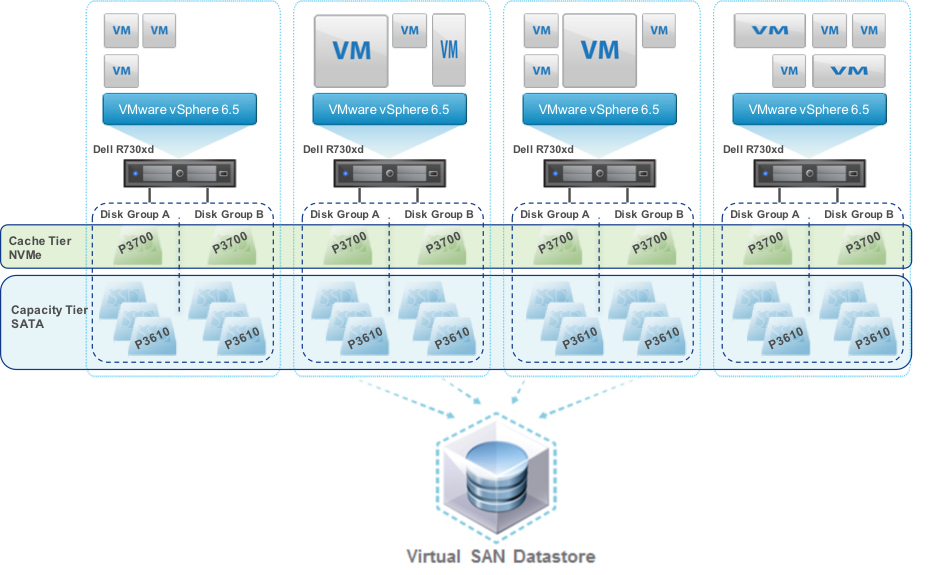
As shown in the graphic below storage is divided into tiers and disk groups. In vSAN 6.5 each disk group includes a single cache device and up to seven spinning disks or flash devices. There can be up to five disk groups so possibly up to 35 devices per host. The figure below shows an all-flash vSAN cluster with four hosts, each host has two disk groups each with one NVMe cache disk and three SATA capacity disks.


vSAN all-flash storage example

Figure 1. vSAN all-flash storage showing tiers and disk groups


When considering how to populate tiers and the type of flash for cache and capacity tiers you must consider the IO path; for the lowest latency and maximum performance writes go to the cache tier then software coalesces and de-stages the writes to the capacity tier. Cache use depends on deployment model, for example in vSAN hybrid configurations 30% of the cache tier is write cache, in the case of all-flash 100% of cache tier is write cache -- reads are from low latency flash capacity tier.

There will be a performance boost using all-flash. With larger capacity and durable flash drives available today the time has come where you should be considering whether you need spinning disks. The business case for flash over spinning disk has been made over recent years and includes much lower cost/IOPS, performance (lower latency), higher reliability (no moving parts to fail, less disks to fail for required IOPS), lower power and heat profile, smaller footprint, and so on. You will also benefit from additional HCI features, for example vSAN will only allow deduplication and compression on all-flash configurations.

  • Recommendation: For best performance and lower TCO consider all-flash.

For best performance the cache tier should have the lowest latency, especially for vSAN as there is only a single cache device per disk group.

  • Recommendation: If possible choose NVMe SSDs for the cache tier although SAS is still OK.
  • Recommendation: Choose high endurance flash devices in the cache tier to handle high I/O.

For SSDs at the capacity tier there is negligible performance difference between SAS and SATA SSDs. You do not need to incur the cost of NVMe SSD at the capacity tier for database applications. However in all cases ensure you are using enterprise class SATA SSDs with features such as power failure protection.

  • Recommendation: Choose high capacity SATA SSDs for capacity tier.
  • Recommendation: Choose enterprise SSDs with power failure protection.

Depending on your timetable new technologies such as such as 3D Xpoint with higher IOPS, lower latency, higher capacity and higher durability may be available. There is a breakdown of flash storage at the end of this post.

  • Recommendation: Watch for new technologies to include such as 3D Xpoint for cache AND capacity tier.

As I mentioned above you can have up to five disk groups per host and a disk group is made up of one flash device and up to seven devices at the capacity tier. You could have a single disk group with one flash device and as much capacity as you need, or multiple disk groups per host. There are advantages to having multiple disk groups per host:

  • Performance: Having multiple flash devices at the tiers will increase the IOPS available per host.
  • Failure domain: Failure of a cache disk impacts the entire disk group, although availability is maintained as vSAN rebuilds automatically.

You will have to balance availability, performance and capacity, but in general having multiple disk groups per host is a good balance.

  • Recommendation: Review storage requirements, consider multiple disk groups per host.

What performance should I expect?

A key requirement for good application user experience is low storage latency; the usual recommendation is that database read IO latency should be below 10ms. Refer to the table from Part 6 of this series here for details.

For Caché database workloads tested using the default vSAN storage policy and Caché RANREAD utility I have observed sustained 100% random read IO over 30K IOPS with less than 1ms latency for all-flash vSAN using Intel S3610 SATA SSDs at the capacity tier. Considering that a basic rule of thumb for Caché databases is to size instances to use memory for as much database IO as possible all-flash latency and IOPS capability should provide ample headroom for most applications. Remember memory access times are still orders of magnitude lower than even NVMe flash storage.

As always remember your mileage will vary; storage policies, number of disk groups and number and type of disks etc will influence performance so you must validate on your own systems!


Capacity and performance planning

You can calculate the raw TB capacity of a vSAN storage pool roughly as the total size of disks in the capacity tier. In our example configuration in figure 1 there are a total of 24 x INTEL S3610 1.6TB SSDs:

Raw capacity of cluster: 24 x 1.6TB = 38.4 TB

However available capacity is much different and where calculations get messy and is dependent on configuration choices; which policies are used (such as FTT which dictates how many copies of data) and also whether deduplication and compression have been enabled.

I will step through selected policies and discuss their implications for capacity and performance and recommendations for a database workload.

All ESXi deployments I see are made up of multiple VMs; for example, TrakCare a unified healthcare information system built on InterSystems’ health informatics platform, HealthShare is at its heart at least one large (monster) database server VM which is absolutely fits the description "tier-1 business critical application". However a deployment also includes combinations of other single purpose VMs such as production web servers, print servers, etc. As well as test, training and other non-production VMs. Usually all deployed in a single ESXi cluster. While I focus on database VM requirements remember that SPBM can be tailored per VMDK for all your VMs.

Deduplication and Compression

For vSAN deduplication and compression is a cluster-wide on/off setting. Deduplication and compression can only be enabled when you are using an all-flash configuration. Both features are enabled together.

At first glance deduplication and compression seems to be a good idea - you want to save space, especially if you are using (more expensive) flash devices at the capacity tier. While there are space savings with deduplication and compression my recommendation is that you do not enable this feature for clusters with large production databases or where data is constantly being overwritten.

Deduplication and compression does add some processing overhead on the host, maybe in the range of single digit %CPU utilization, but this is not the primary reason not recommending for databases.

In summary vSAN attempts to deduplicate data as it is written to the capacity tier within the scope of a single disk group using 4K blocks. So in our example at figure 1 data objects to be deduplicated would have to exists in the capacity tier of the same disk group. I am not convinced we will see much savings on Caché database files which are basically very large files filled with 8K database blocks with unique pointers, contents, etc. Secondly vSAN will only attempt to compress duplicated blocks, and will only consider blocks compressed if compression reaches 50% or more. If the deduplicated block does not compress to 2K it is written uncompressed. While there may be some duplication of operating system or other files the real benefit of deduplication and compression would be for clusters deployed for VDI.

Another caveat is the impact of a (albeit rare) failure of one device in a disk group on the whole group when deduplication and compression is on. The whole disk group is marked "unhealthy" which has a cluster wide impact: because the group is marked unhealthy all the data on a disk group will be evacuated off that group to other places, then the device must be replaced and vSAN will resynchronise the objects to rebalance.

  • Recommendation: For database deployments do not enable compression and deduplication.

Sidebar: InterSystems database mirroring.

For mission critical tier-1 Caché database application instances requiring the highest availability I recommend InterSystems synchronous database mirroring, even when virtualised. Virtualised solutions have HA built in; for example VMWare HA, however additional advantages of also using mirroring include:

  • Separate copies of up-to-date data.
  • Failover in seconds (faster than restarting a VM then operating System then recovering Caché).
  • Failover in case of application/Caché failure (not detected by VMware).

I am guessing you have spotted the flaw in enabling deduplication when you have mirrored databases on the same cluster? You will be attempting to deduplicate your mirror data. Generally not sensible and also a processing overhead.

Another consideration when deciding whether to mirror databases on HCI is the total storage capacity required. vSAN will be making multiple copies of data for availability, this data storage will be doubled again by mirroring. You will need to weigh the small incremental increase in uptime over what VMware HA provides against the additional cost of storage.

For maximum uptime you can create two clusters so that each node of the database mirror is in a completely independent failure domain. However take note of the total servers and storage capacity to provide this level of uptime.


Encryption

Another consideration is where you choose to encrypt data at rest. You have several choices in the IO stack including;

  • Using Caché database encryption (encrypts database only).
  • At Storage (e.g. hardware disk encryption at SSD).

Encryption will have a very small impact on performance, but can have a big impact on capacity if you choose to enable deduplication or compression in HCI. If you do choose deduplication and/or compression you would not want to be using Caché database encryption because it would negate any gains as encrypted data is random by design and does not compress well. Consider the protection point or risk they are trying to protect from, for example theft of file vs. theft of device.

  • Recommendation: Encrypt at the lowest layer as possible in the IO stack for a minimal level of encryption. However the more risk you want to protect move higher up the stack.

Failures To Tolerate (FTT)

FTT sets a requirement on the storage object to tolerate at least n number of concurrent host, network, or disk failures in the cluster and still ensure the availability of the object. The default is 1 (RAID-1); the VM’s storage objects (e.g. VMDK) are mirrored across ESXi hosts.

So vSAN configuration must contain at least n + 1 replicas (copies of the data) which also means there are 2n + 1 hosts in the cluster.

For example to comply with a number of failures to tolerate = 1 policy, you need three hosts at a minimum at all times -- even if one host fails. So to account for maintenance or other times when a host is taken off-line you need four hosts.

  • Recommendation: A vSAN cluster must have a minimum four hosts for availability.

Note there is also exceptions; a Remote Office Branch Office (ROBO) configuration that is designed for two hosts and a remote witness VM.


Erasure Coding

The default storage method on vSAN is RAID-1 -- data replication or mirroring. Erasure coding is RAID-5 or RAID-6 with storage objects/components distributed across storage nodes in the cluster. The main benefit of erasure coding is better space efficiency for the same level of data protection.

Using the calculation for FTT in the previous section as an example; for a VM to tolerate two failures using a RAID-1 there must be three copies of storage objects meaning a VMDK will consume 300% of the base VMDK size. RAID-6 also allows a VM to tolerate two failures and only consumes 150% the size of the VMDK.

The choice here is between performance and capacity. While the space saving is welcome you should consider your database IO patterns before enabling erasure coding. Space efficiency benefits come at the price of the amplification of I/O operations which is higher again during times of component failure so for best database performance use RAID-1.

  • Recommendation: For production databases do not enable erasure coding. Enable for non-production.

Erasure coding also impacts the number of hosts required in your cluster. For for example for RAID-5 you need a minimum of four nodes in the cluster, for RAID-6, you need a minimum of six nodes.

  • Recommendation: Consider the cost of additional hosts before planning to configure erasure coding.

Striping

Striping offers opportunity for performance improvements but will likely only help with hybrid configurations.

  • Recommendation: For production databases do not enable striping.

Object Space Reservation (thin or thick provisioning)

The name for this setting comes from vSAN using objects to store components of your VMs (VMDKs etc). By default all VMs provisioned to a VSAN datastore have object space reservation of 0% (thin provisioned) which leads to space savings and also enables vSAN more freedom for placement of data. However for your production databases best practice is to use 100% reservation(thick provisioned) where space is allocated at creation. For vSAN this will be Lazy Zeroed – where 0’s are written as each block is first written to. There are a few reasons for choosing 100% reservation for production databases; there will be less delay when database expansions occur, and you are guaranteeing that storage will be available when you need it.

  • Recommendation: For production database disks use 100% reservation.
  • Recommendation: For non-production instances leave storage thin provisioned.

When should I turn on features?

You can generally enable availability and space saving features after using the systems for some time, that is; when there are active VMs and users on the system. However there will be performance and capacity impact. Additional replicas of data in addition to the original are needed so additional space is required while data is synchronised. My experience is that enabling these type of features on clusters with large databases can take a very long time and expose the possibility of reduced availability.

  • Recommendation: Spend time up front to understand and configure storage features and functionality such as deduplication and compression before go-live and definitely before large databases are loaded.

There are other considerations such as leaving free space for disk balancing, failure etc. The point is you will have to take into account the recommendations in this post with vendor specific choices to understand your raw disk requirements.

  • Recommendation: There are many features and permutations. Work out your total GB capacity requirements as a starting point, review recommendations in this post [and with your application vendor] then talk to your HCI vendor.

Storage processing overhead

You must consider the overhead of storage processing on the hosts. Storage processing otherwise handled by the processors on an enterprise storage array is now being computed on each host in the cluster.

The amount of overhead per host will be dependent on workload and what storage features are enabled. My observations with basic testing I have done with Caché on vSAN shows that processing requirements are not excessive, especially when you consider the number of cores available on current servers. VMware recommends planning for 5-10% host CPU usage

The above can be a starting point for sizing but remember your mileage will vary and you will need to confirm.

  • Recommendation: Plan for worst case of 10% CPU utilisation and then monitor your real workload.

Network

Review vendor requirements -- assume minimum 10GbE NICs -- multiple NICs for storage traffic, management (e.g. vMotion), etc. I can tell you from painful experience that an enterprise class network switch is required for optimal operation of the cluster -- after all - all writes are sent synchronously over the network for availability.

  • Recommendation: Minimum 10GbE switched network bandwidth for storage traffic. Multiple NICs per host as per best practice.

Flash Storage Overview

Flash storage is a requirement of HCI so it is good to review where flash storage is today and where its going in the near future.

The short story is whether you use HCI or not if you are not deploying your applications using storage with flash today it is likely that your next storage purchase will include flash.

Storage today and tomorrow

Let us review the capabilities of commonly deployed storage solutions and be sure we are clear with the terminology.

Spinning disk

  • Old faithful. 7.2, 10K or 15K HDD spinning disks with SAS or SATA interface. Low IOPS per disk. Can be high capacity but that means the IOPS per GB are decreasing. For performance typically data is striped across multiple disks to achieve 'just enough' IOPS with high capacity.

SSD disk - SATA and SAS

  • Today flash is usually deployed as SAS or SATA interface SSDs using NAND flash. There is also some DRAM in the SSD as a write buffer. Enterprise SSDs include power loss protection - in event of power failure contents of DRAM are flushed to NAND.

SSD disk - NVMe

  • Similar to SSD disk but uses NVMe protocol (not SAS or SATA) with NAND flash. NVMe media attach via PCI Express (PCIe) bus allowing the system to talk directly without the overhead of host bus adapters and storage fabrics resulting in much lower latency.

Storage Array

  • Enterprise Arrays provide protection and the ability to scale. It is more common today that storage is either a hybrid array or all-flash. Hybrid arrays have a cache tier of NAND flash plus one or more capacity tiers using 7.2, 10K or 15K spinning disks. NVMe arrays are also becoming available.

Block-Mode NVDIMM

  • These devices are shipping today and are used when extremely low latencies are required. NVDIMMs sit in a DDR memory socket and provide latencies around 30ns. Today they ship in 8GB modules so are not likely to be used for legacy database applications, but new scale-out applications may take advantage of this performance.

3D XPoint

This is a future technology - not available in November 2016.

  • Developed by Micron and Intel. Also known as Optane (Intel) and QuantX (Micron).
  • Will not be available until at least 2017 but compared to NAND promises higher capacity, >10x more IOPS, >10x lower latency with extremely high Endurance and consistent performance.
  • First availability will use NVMe protocol.

SSD device Endurance

SSD device endurance is an important consideration when choosing drives for cache and capacity tiers. The short story is that flash storage has a finite life. Flash cells in an SSD can only be deleted and rewritten a certain number of times (no restrictions apply to reads). Firmware in the device manages spreading writes around the drive to maximise the life of the SSD. Enterprise SSDs also typically have more real flash capacity than visible to achieve longer life (over-provisioned), for example an 800GB drive may have more than 1TB of flash.

The metric to look for and discuss with your storage vendor is full Drive Writes Per Day (DWPD) guaranteed for a certain number of years. For example; An 800GB SSD at 1 DWPD for 5 years can have 800GB per day written for 5 years. So the higher the DWPD (and years) the higher the endurance. Another metric simply switches the calculation to show SSD devices specified in Terabytes Written (TBW); The same example has TBW of 1,460 TB (800GB * 365 days * 5 years). Either way you get an idea of the life of the SSD based on your expected IO.


Summary

This post covers the most important features to consider when deploying HCI and specifically VMWare vSAN version 6.5. There are vSAN features I have not not covered, if I have not mentioned a feature assume you should use the defaults. However if you have any questions or observations I am happy to discuss via the comments section.

I expect to return to HCI in future posts, this certainly is an architecture that is on the upswing so I expect to see more InterSystems customers deploying on HCI.


7
1 3753
Question Alexi Demetriou · Jul 13, 2017

Hello, I am writing to request assistance on an issue I appear to be having when accessing Ensemble. I have it running on a Windows virtual machine, on a Mac laptop, and am trying to access it through the emergency ID account. When starting Ensemble through the command line window using ccontrol start ENSEMBLE /Em... I get an error and Ensemble does not start. Below is the error message I am getting when checking the logs:

2
0 1003
Question Natasa Klenovsek Arh · Jan 12, 2017

Hy.

I set up cache in container, which is working fine. But when accessing managment portal the default user was alway Unknown user and no username or password were required. So i disabled the Unknow user in the Security section, but now i keep getting an error access denid. 

9
0 3619
Question Amir Samary · Jun 28, 2017

Hi everyone!

We have many severs (DEV, QA and LIVE) besides many other slave servers (about 133) that are running Caché instances. Before writing this utility myself, I would like to know if anyone has done it before. We need to change the SuperUser password and do other credential setups like this on all of these servers and we don't want to do it one by one.

4
0 775
Question Alexey Maslov · May 11, 2017

Since most of our customers moved to Caché 2015.1, some admins became abused with CPUPct warnings (sometimes alerts) in console log without other signs of lacking CPU power.
Documentation states that:

          CPUPct               job_type              CPU usage (percent) by all processes of the listed job type in aggregate       

What does it really mean?
E.g., if total system CPU usage is 25%, and all running processes are of the same type (e.g, CSPSRV), would CPUPct be equal to 100%? If so, why this case should be a reason for alert? 

4
0 723