Part I - Transform custom healthcare messages to HL7
EHR (Electronic Health Record) systems are designed in a proprietary format/structure and are not based on such market models as FHIR or HL7. Whereas some of those systems can interoperate data in a proprietary format for FHIR and further market models, others cannot. InterSystems has two platforms that can interoperate proprietary formats for market standards: InterSystems HealthShare Connect and InterSystems IRIS for Health. The transformation functionality (DTL - Data Transformation Language) of these platforms can receive data in any format, structure, or communication channel (CSV, JSON, XML, and others via FTP, File, HTTP, etc.) and transform it into market formats directly (FHIR, CDA, HL7 and so on).
This article is divided into two parts. The first one is dedicated to talking about HL7. In part II, on the other hand, we will show you how to transform proprietary/custom data into HL7 using IRIS for Health. The sample data we used for our experiment was taken from the SYNTHEA bulk data generation project (https://synthea.mitre.org/downloads). So, in our example, we will convert 1000 patients from a CSV file to HL7 v2, using the Interoperability features of IRIS for Health.
About HL7 Organization
The Health Level Seven International®, or HL7, is a member-driven non-profit organization dedicated to creating and maintaining standards that bridge the gap between various healthcare technologies. Founded in 1987, it is an ANSI-accredited standards-developing organization that provides a comprehensive framework and related standards for exchanging, integrating, sharing, and retrieving electronic health information that supports clinical practice as well as management, delivery, and evaluation of health services. One of the most popular standards developed by this organization is the HL7 standard in version 2.
About HL7 standard, version 2
HL7’s Version 2.x (V2) messaging standard is the workhorse of electronic data exchange in the clinical domain and is arguably the most widely implemented standard for healthcare in the world. This messaging standard allows the exchange of clinical data between systems. It is designed to support a central patient care system as well as a more distributed environment where data resides in departmental systems (see more on https://www.hl7.org/implement/standards/product_brief.cfm?product_id=18… the newest version 2 is 2.9, the most used one is 2.3. So, let's focus on getting more understanding about that version. The HL7 v2 standard specifies data exchange (messages) for each possible business process (ADT events - Admit, Discharge, and Transfer) that may occur in EMR solutions. Take a look at the table below:
The events type list
Code Event Description
A01 Admit/visit notification
A02 Transfer a patient
A03 Discharge/end visit
A04 Register a patient
A05 Pre-admit a patient
A06 Change an outpatient to an inpatient
A07 Change an inpatient to an outpatient
A08 Update patient information
A09 Patient departing - tracking
A10 Patient arriving - tracking
A11 Cancel admit/visit notification
A12 Cancel transfer
A13 Cancel discharge/end visit
A14 Pending admit
A15 Pending transfer
A16 Pending discharge
A17 Swap patients
A18 Merge patient information
A19 Patient query
A20 Bed status update
A21 Patient goes on a leave of absence
A22 Patient returns from a leave of absence
A23 Delete a patient record
A24 Link patient information
A25 Cancel pending discharge
A26 Cancel pending transfer
A27 Cancel pending admit
A28 Add person’s information
A29 Delete person’s information
A30 Merge person’s information
A31 Update person’s information
A32 Cancel patient arriving - tracking
A33 Cancel patient departing - tracking
A34 Merge patient information - patient ID only
A35 Merge patient information - account number only
A36 Merge patient information - patient ID and account number
A37 Unlink patient information
A38 Cancel pre-admit
A39 Merge person - patient ID
A40 Merge patient - patient identifier list
A41 Merge account - patient account number
A42 Merge visit - visit number
A43 Move patient information - patient identifier list
A44 Move account information - patient account number
A45 Move visit information - visit number
A46 Change patient ID
A47 Change patient identifier list
A48 Change alternate patient ID
A49 Change patient account number
A50 Change visit number
A51 Change alternate visit ID
A52 Cancel leave of absence for a patient
A53 Cancel patient returns from a leave of absence
A54 Change attending doctor
A55 Cancel change attending doctor
A60 Update allergy information
A61 Change consulting doctor
A62 Cancel change consulting doctor
The HL7 specification details each ADT event on segments.The most used event is the A01 which is intended to be used for “Admitted” patients only. This event is sent as a result of a patient undergoing the admission process that assigns the patient to a bed. It signals the beginning of a patient’s stay in a healthcare facility. Usually, this information is entered into the primary Patient Administration system and broadcasted to the nursing units and ancillary systems. It includes short stay and John Doe admissions. For instance, we can use an A01 event to notify: the pharmacy system that a patient has been admitted and may be prescribed drugs legitimately; the nursing system that the patient has been received and needs a care plan prepared; the finance system of the start of the billing period; the dietary system that a new patient has been installed and requires dietary services; the laboratory, pathology, and radiology systems that a patient has been admitted and is entitled to receive these services; the clinical repository that admission has taken place for the EMR (electronic medical record).
Details for sending an A01 event
|
|
|
|
|
|
|
|
|
|
|
|
|
|
|
|
|
|
|
|
|
|
|
|
|
|
|
|
|
|
|
|
|
|
|
|
|
|
|
|
|
|
|
|
|
|
|
|
|
|
|
|
|
|
|
|
|
|
|
|
|
|
|
|
|
|
|
|
|
|
|
|
|
|
|
|
|
|
|
|
|
|
|
|
|
|
|
|
|
|
|
|
|
|
|
|
In most HL7 messages, the pipe character |, also called Vertical Bar, is the pipe separator field, so in the case of our message, we will use the ^ as a space. When you come across multiple pipes together (like these ones ||||||||||), it means that the fields in these sequences are optional or not included. Also, remember that segments are separated by a CR – Carriage Return.
The MSH segment sample
MSH|^~\&|EPICADT|DH|LABADT|DH|201301011226||ADT^A01|HL7MSG00001|P|2.3|

The EVN segment sample
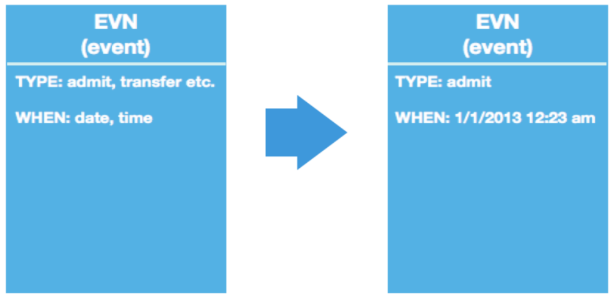
EVN|A01|201301011223||
The PID segment sample
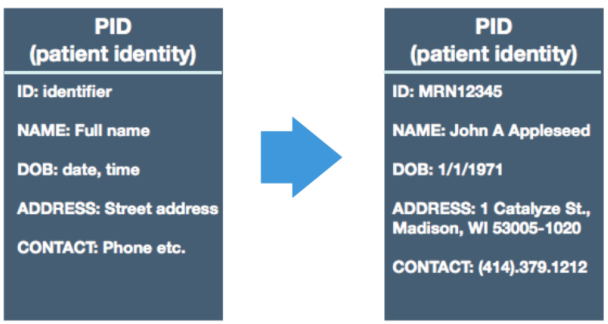
PID|||MRN12345^5^M11||APPLESEED^JOHN^A^III||19710101|M||C|1^CATALYZE
STREET^^MADISON^WI^53005-1020|GL| (414)379-1212|(414)271-
3434||S||MRN12345001^2^M10|123456789|987654^NC|
The NK1 segment
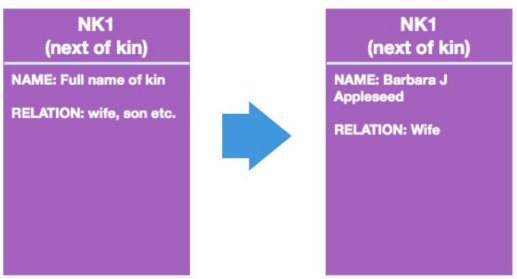
NK1|1|APPLESEED^BARBARA^J|WIFE||||||NK^NEXT OF KIN
The PV1 segment
PV1|1|I|2000^2012^01||||004777^GOOD^SIDNEY^J.|||SUR||||ADM|A0|
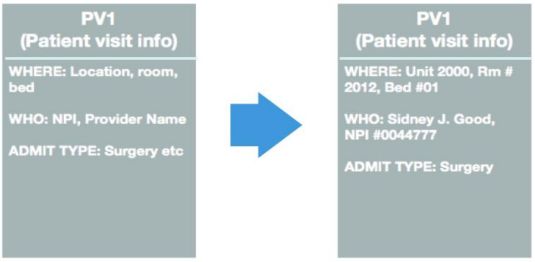
The complete sample
MSH|^~\&|EPICADT|DH|LABADT|DH|201301011226||ADT^A01|HL7MSG00001|P|2.3|
EVN|A01|201301011223||
PID|||MRN12345^5^M11||APPLESEED^JOHN^A^III||19710101|M||C|1 CATALYZE
STREET^^MADISON^WI^53005-1020|GL|(414)379-1212|(414)271-
3434||S||MRN12345001^2^M10|123456789|987654^NC|
NK1|1|APPLESEED^BARBARA^J|WIFE||||||NK^NEXT OF KIN
PV1|1|I|2000^2012^01||||004777^GOOD^SIDNEY^J.|||SUR||||ADM|A0|
- For more samples, visit the following website: https://confluence.hl7.org/display/OO/v2+Sample+Messages
- For more details about the ADTs, proceed to the next link: https://interopera.esy.es/wp-content/uploads/2017/04/HL7-PRIME-Mensagen… and https://hl7-definition.caristix.com/v2/HL7v2.3.1/TriggerEvents/ADT_A01.
Bonus: use IRIS to learn more about HL7 messages
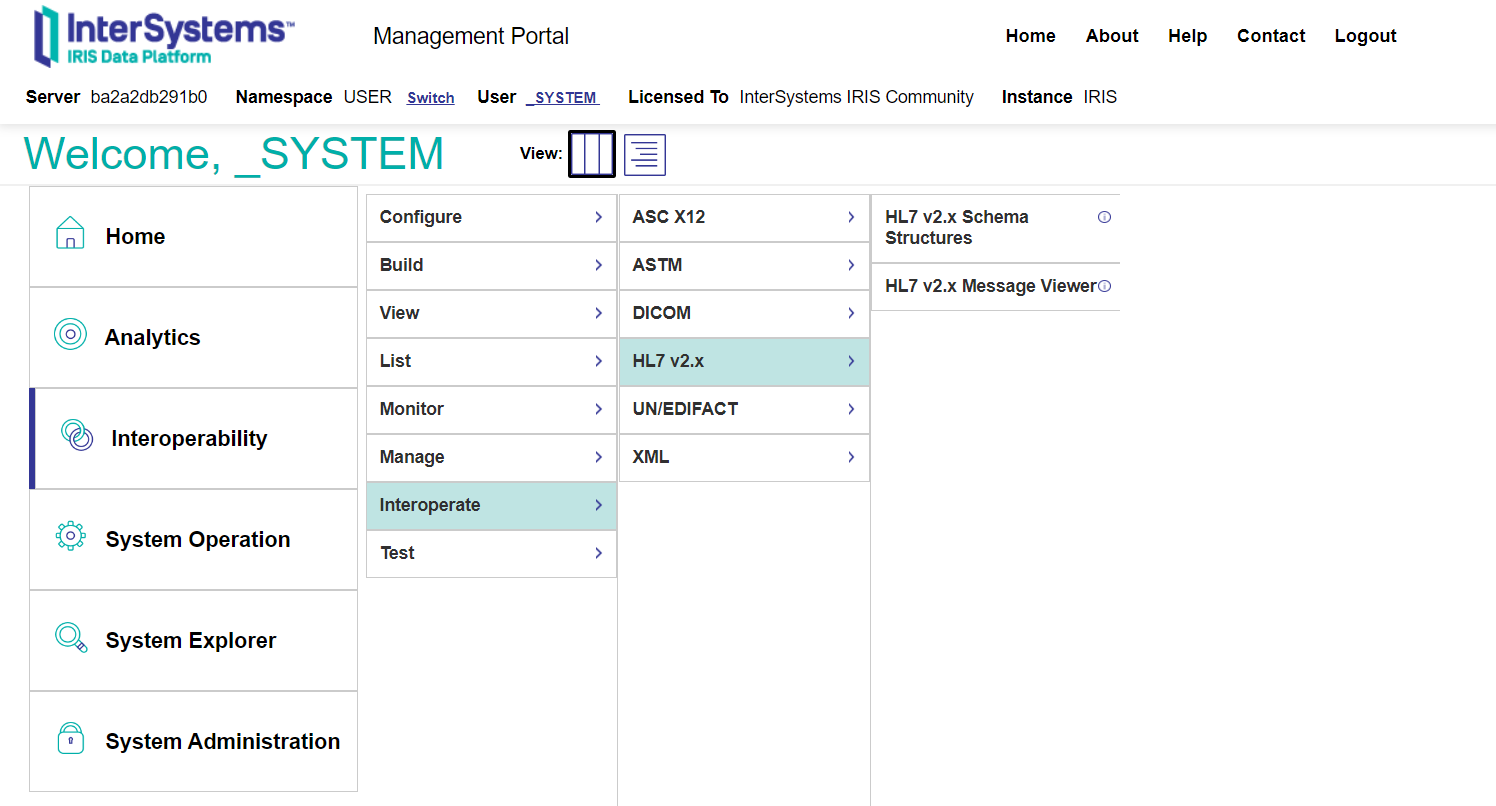
To know more about HL7 messages, segments, and fields, go to any IRIS for Health or HealthConnect instance and select Interoperability > Interoperate > HL7 v2.x. Then click HL7 v2.x Schema Structures:
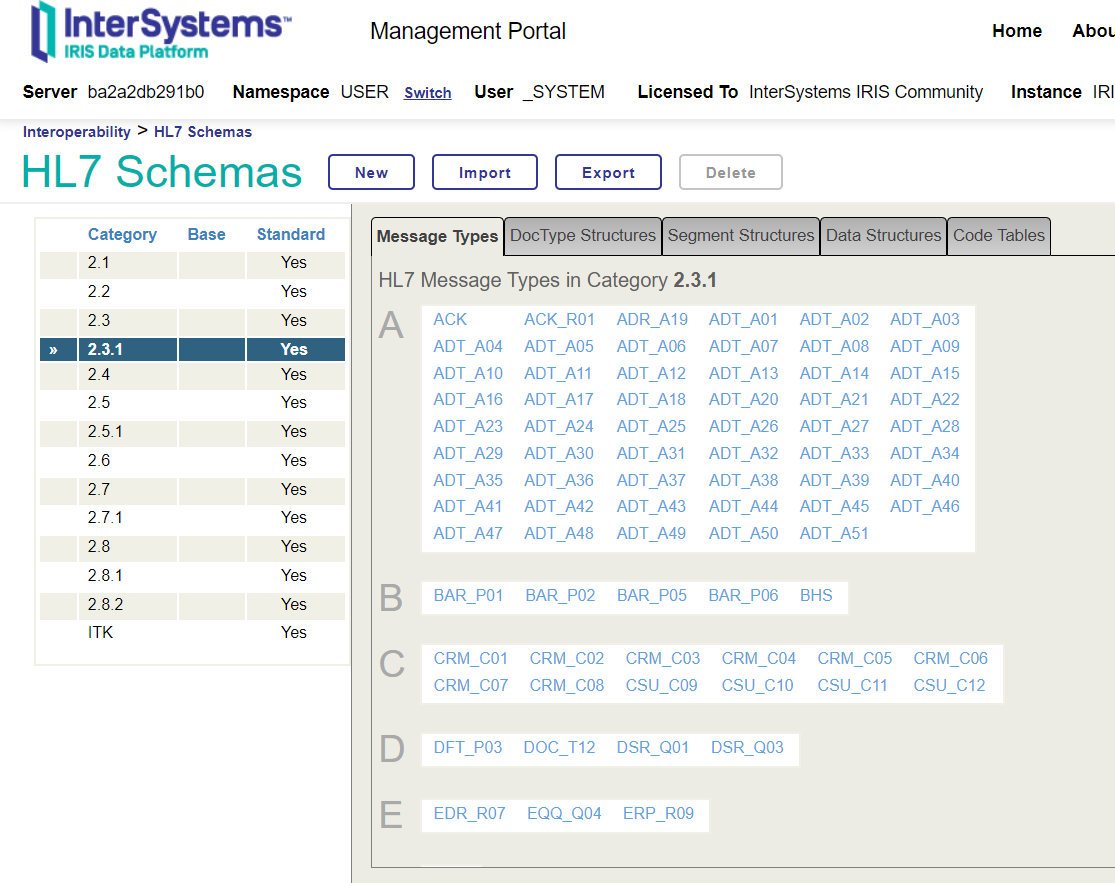
On HL7 Schemas click 2.3.1:
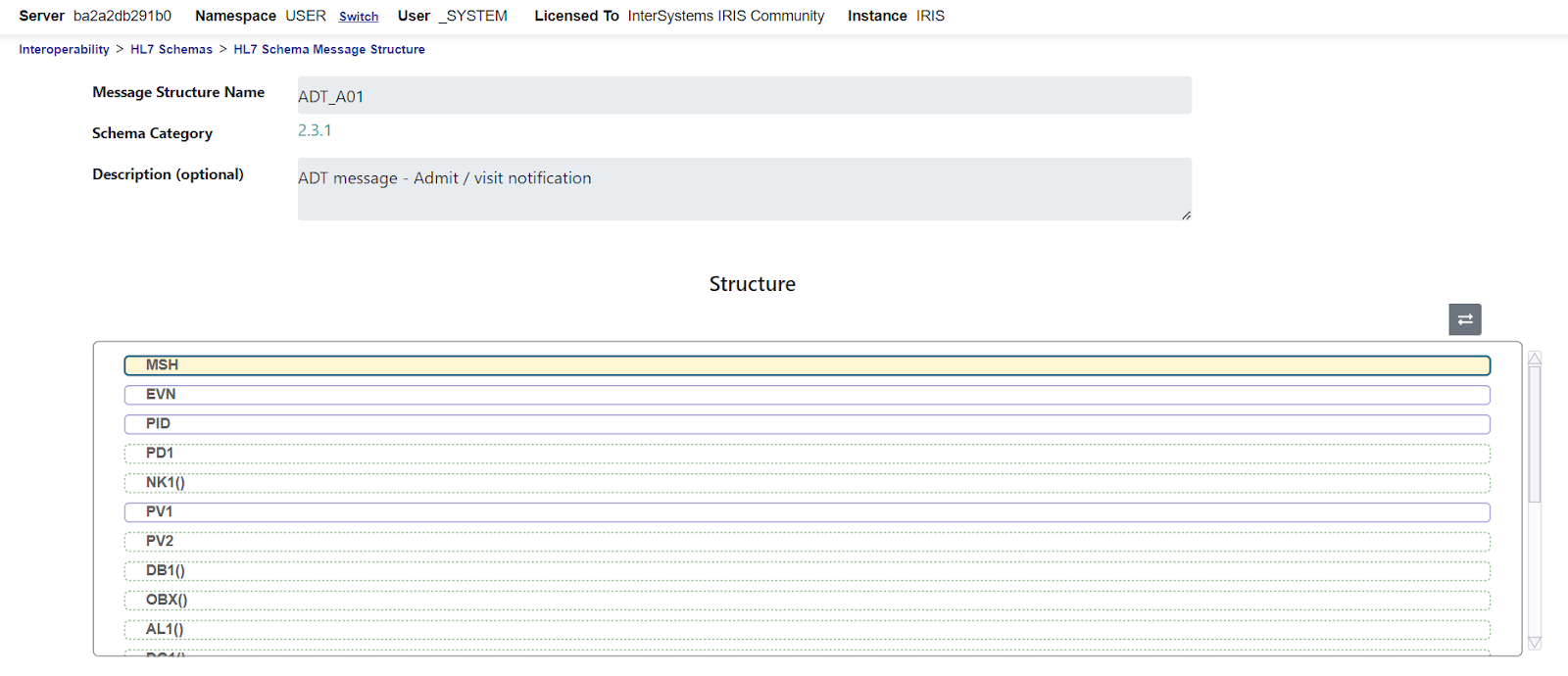
You can navigate on message types and study everything you find there. Click ADT_A01 to see its segments:
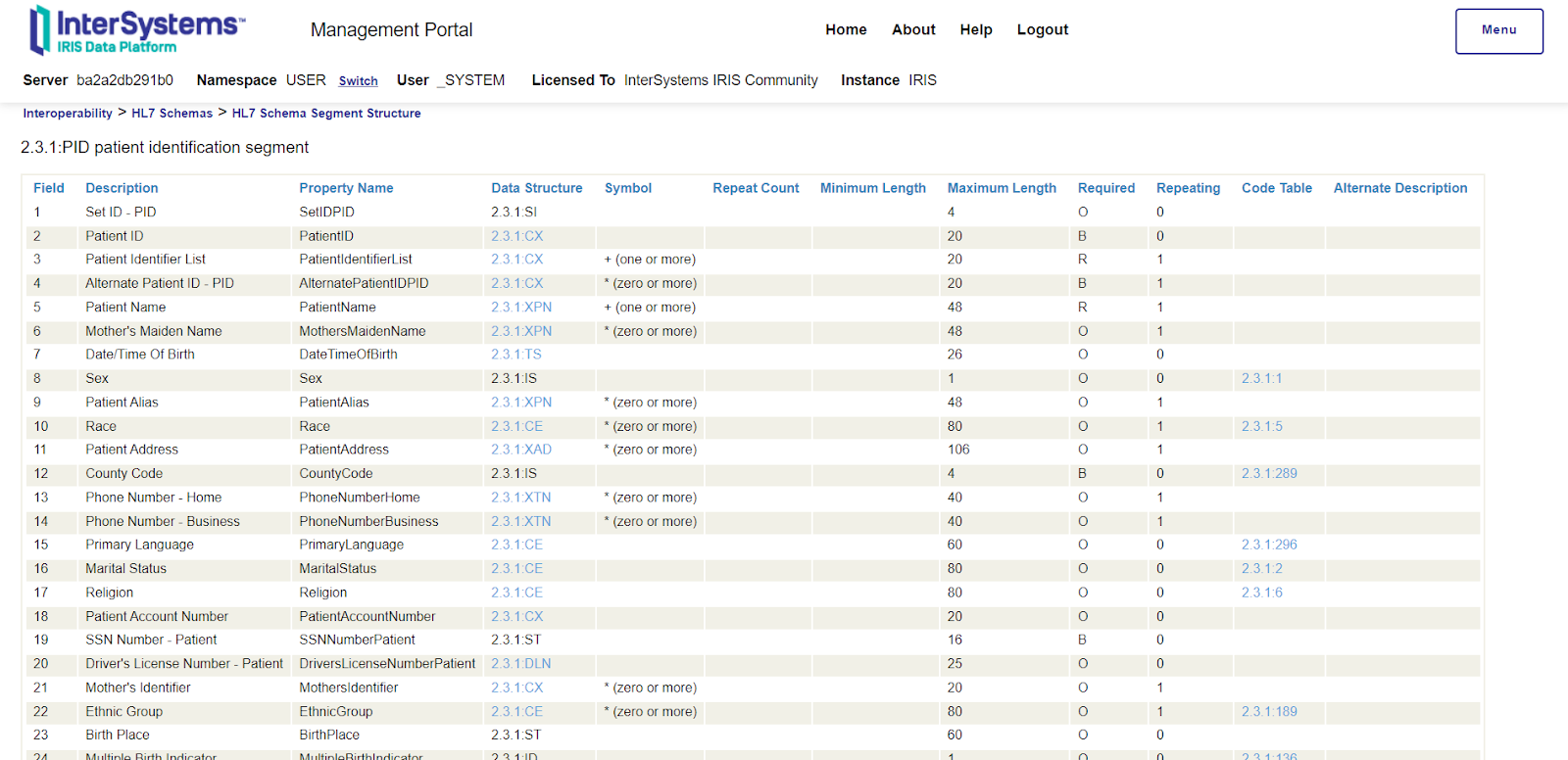
Double-click the PID segment and skim through the field’s documentation:
In part II, we will create an IRIS for Health instance and build a sample. Thanks for reading.